transmission AUDI A4 2020 Owner's Manual
[x] Cancel search | Manufacturer: AUDI, Model Year: 2020, Model line: A4, Model: AUDI A4 2020Pages: 296, PDF Size: 80.45 MB
Page 264 of 296

Emergency assistance
the special considerations when towing, especial-
ly when using a towing cable.
Always make sure the traction force does not ex-
ceed the permitted level and there are no shock
loading conditions. There is always the risk of the
coupling becoming overloaded when driving off-
road.
For the most safety and security, drive with a tow
bar. You should use a towing cable only if a tow
bar is not available. Use a towing cable made of
synthetic elastic cable similar elastic material.
Z\ WARNING
— Towing highly increases the risk of an acci-
dent, for example from colliding with the
towing vehicle.
—To reduce the risk of an accident, do not al-
low anyone to remain inside the vehicle
when it is being transported by a tow truck
or a special transporter.
@) Note
— If normal towing is not possible, for exam-
ple if the transmission is faulty or if the
towing distance is greater than 30 miles
(50 km), then transport the vehicle on a
special carrier.
— If the vehicle is towed by a tow truck at the
axle that is not permitted, this can cause se-
vere damage to the transmission.
— The vehicle must not be tow started for
technical reasons.
@ Tips
— If the power supply is interrupted, then it
will not be possible to move the selector
lever out of the "P" position. The parking
lock must be released using the emergency
release before towing the vehicle
=> page 97.
— Follow the local legal regulations for tow-
ing.
Read and follow the important information under
=> page 261.
262
Preparations
> Only secure the towing cable or tow bar at the
designated towing loop > page 262.
> Make sure the towing cable is not twisted. Oth-
erwise it could disconnect from the towing loop
while towing.
> Switch the emergency flashers on in both
vehicles > page 50. However, do not do this if it
prohibited by law.
Towing vehicle (front)
> Only start to drive when the towing cable is
taut.
> Press the brake pedal very carefully.
> Avoid sudden braking or driving maneuvers.
Vehicle being towed (rear)
> Make sure the ignition is switched on so that
the steering wheel is not locked and so that you
can use the turn signals, the horn, and the
windshield wipers if needed > A\.
> Switching it off before the vehicle has stopped
may impair the function of the brake booster
and power steering. You would then need to
use more force to steer and brake the vehicle.
> Release the parking brake > page 102.
> Select the “N” selector lever position.
» Make sure the towing cable is always taut.
ZA WARNING
Never tow a vehicle using a tow bar or towing
cable if the vehicle does not have electrical
power.
Rear towing loop
Fig. 184 Rear bumper: installing the towing loop
Page 268 of 296
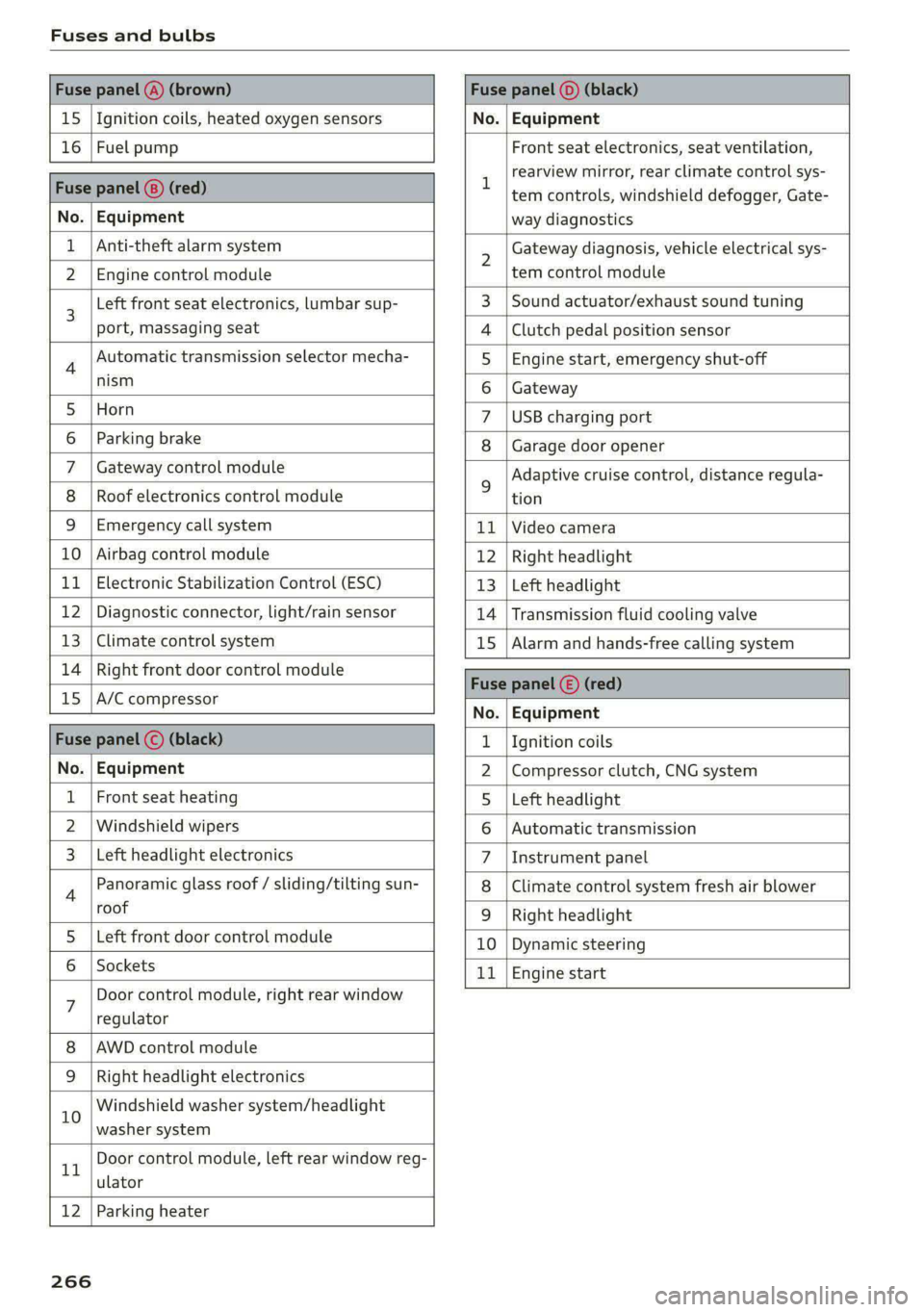
Fuses and bulbs
Fuse panel @) (brown) Fuse panel (0) (black)
15 |Ignition coils, heated oxygen sensors No. | Equipment
16 | Fuel pump Front seat electronics, seat ventilation,
= rearview mirror, rear climate control sys-
Fuse panel @) (red) | era controls, windshield defogger, Gate-
No. | Equipment way diagnostics
Anti-theft alarm system 2 Gateway diagnosis, vehicle electrical sys-
2 |Engine control module tem control module
3 [Left front seat electronics, lumbar sup- 3 | Sound actuator/exhaust sound tuning
port, massaging seat 4 |Clutch pedal position sensor
4 Automatic transmission selector mecha- 5 | Engine start, emergency shut-off
Sct 6 | Gateway
5 [Horn 7 |USB charging port
6 | Parking brake 8 | Garage door opener
7 | Gateway control module 5 Adaptive cruise control, distance regula-
8 | Roof electronics control module tion
9 |Emergency call system 11 |Video camera
10 | Airbag control module 12 | Right headlight
11
| Electronic Stabilization Control (ESC) 13 | Left headlight
12 | Diagnostic connector, light/rain sensor 14 | Transmission fluid cooling valve
13 | Climate control system 15 | Alarm and hands-free calling system
14 | Right front door control module Fuse panel © (red)
15 |A/C compressor ae
No. | Equipment
Fuse panel (©) (black) 1. |Ignition coils
No. | Equipment 2 |Compressor clutch, CNG system
Front seat heating 5 |Left headlight
2 |Windshield wipers 6 |Automatic transmission
Left headlight electronics 7 |Instrument panel
4 Panoramic glass roof / sliding/tilting sun- 8 | Climate control system fresh air blower
roof 9 | Right headlight
5 |Left front door control module 10 | Dynamic steering
6 | Sockets 11 | Engine start
7 Door control module, right rear window
regulator
AWD control module
Right headlight electronics
10 Windshield washer system/headlight
washer system
rT Door control module, left rear window reg-
ulator
12 | Parking heater
266
Page 269 of 296

8W1012721BB
Fuses and bulbs
Fuse assignment - Left side of the luggage
compartment
Fuse assignment - Driver's side of the
(ole 4o}ig
Fig. 189 Driver side cockpit: fuse panel with plastic bracket
Fuse panel
No. | Equipment
1 |Vehicle opening/start (NFC)
2 | Telephone, mobile device charger
4 |Head-up display
5 |Audi music interface, USB charging port
6 Front climate control panel, instrument
Fig. 190 Left side of the luggage compartment: fuse panel
n panel
with plastic clip
7 |Steering column lock
Infotainment system display Fuse panel @) (black)
9 |Instrument cluster No. | Equipment
Windshield defroster
Windshield defroster
10 | Infotainment unit
11 | Light switch, switch module
12 | Steering column electronics Suspension control
Particulate matter sensor for climate con-
trol system
13 Automatic transmission
Rear window defogger
14 | Infotainment system Rear seat heating
Left tail lights
10 | Airbag control module
WOl/OINID|M|)WInN 16 | Steering wheel heating
Luggage compartment lid central locking,
11 | fuel filler door, luggage compartment cov-
er
12 | Luggage compartment lid control module
Fuse panel (®) (red)
No. | Equipment
6 | Battery power interrupt
267
Page 272 of 296

Data privacy
These data can help provide a better understand-
ing of the circumstances in which crashes and in-
juries occur. NOTE: EDR data are recorded by your
vehicle only if a non-trivial crash situation occurs;
no data are recorded by the EDR under normal
driving conditions and no personal data (e.g.
name, gender, age, and crash location) are re-
corded. However, other parties, such as law en-
forcement, could combine the EDR data with the
type of personally identifying data routinely ac-
quired during a crash investigation.
To read data recorded by an EDR, special equip-
ment is required, and access to the vehicle or the
EDR is needed. In addition to the vehicle manu-
facturer, other parties, such as law enforcement,
that have the special equipment, can read the in-
formation if they have access to the vehicle or the
EDR.
Data usage
Audi can read out the information stored in the
data memories or similar data, or give this infor-
mation to third parties, especially in the follow-
ing situations:
— If the vehicle owner or lessee agrees
—If there is an official request from the police
— Ifa court or authorities request it
If legally permitted, Audi can also use the data
for analysis of vehicle operation and safety per-
formance or provide this data to third parties for
research purposes.
Transmitted information
Data collection
Applies to: vehicles with data collection
Depending on the country, AUDI AG may collect
data for the following purposes, for example: of-
fer and product optimization, public safety, pro-
vision of Audi connect remote vehicle services,
and adaptation to customer expectations. For ex-
ample, various technical function data, environ-
mental data, driving data, and usage data will be
collected for a specific purpose and forwarded to
AUDI AG. The data will be sent from the vehicle
at the time the data was collected.
270
Applies to: MMI: You can find additional informa-
tion about data collection in the MMI. Select on
the home screen: SETTINGS > General > Legal
notes > About Audi connect.
If you would like to deny data transmission to
AUDI AG, contact an authorized Audi dealer or
authorized Audi Service Facility for more infor-
mation. You also have the option to deactivate
data transmission within the privacy settings.
Privacy settings
Applies to: vehicles with Audi connect
> Applies to MMI: Select on the home screen:
SETTINGS > Privacy settings.
When using Audi connect services or during data
collection, data will be transmitted from the ve-
hicle.
> To display additional information about the pri-
vacy settings and the associated symbols in the
status bar, press @ in the MMI.
Requirement: the ignition must be switched on.
Setting the maximum privacy settings
When the Activate privacy mode function is
switched on, the data connection is deactivated
or sending of data is restricted, but all safety-re-
lated, legal, or contractually required Audi con-
nect services remain activated. The majority of
the Audi connect services are deactivated.
When the function is switched off, the data con-
nection will be available in order to use Audi con-
nect services.
Adjusting individual privacy settings
In the MMI, you can adjust individually which da-
ta should be transmitted from the vehicle. If you
switch on a data category, the data will be trans-
mitted.
@) Note
You are responsible for all precautions taken
for data protection, anti-virus protection, and
protection against loss of data on mobile de-
vices that are used to access the Internet
through the Wi-Fi hotspot.
Page 273 of 296

8W1012721BB
Data privacy
@) Tips
— The following interfaces are not affected by
changes to the privacy settings: Bluetooth,
Bluetooth Low Energy (BLE), Wi-Fi, Audi
smartphone interface (ASI), Near Field
Communication (NFC), charging communi-
cation (high-voltage system), Electronic Toll
Collect (ETC), On-Board Diagnostic System
(OBD) if equipped.
— If the maximum privacy settings are switch-
ed on, your vehicle may not receive security
updates and certificates for establishing an
encrypted connection, depending on vehicle
equipment. In order to receive security up-
dates and certificates, switch the maximum
privacy settings off for at least ten minutes
every six months. Make sure that your vehi-
cle is connected to the Internet. A symbol in
the MMI status bar indicates if the required
data connection is available > page 20.
— If the transmission of data is limited, it will
have the following effects on the exchange
of data for Audi connect services and emer-
gency calls, if equipped:
— The emergency call function will remain
available without restrictions and will con-
tinue to transmit data.
— If an online roadside assistance call is ini-
tiated, no data will be transmitted, but a
call will be made.
—If the Geofencing Alert, Speed Alert,
and/or Valet Alert services have been acti-
vated by the key user, then they will re-
main available without restrictions and
continue to transmit data.
— Stored destinations (favorites, last desti-
nations) are only stored in the vehicle. If
you allow transmission of data again,
these destinations will be synchronized via
the myAudi account. To prevent synchroni-
zation of destinations, delete the destina-
tions before you allow data to be trans-
mitted again.
Applies to: vehicles with Audi connect Infotainment
AUDI AG collects, uses, stores and shares your
personal information, such as contact data, vehi-
cle data, usage data, driving data and precise ge-
olocation, in order to provide you with the prod-
ucts and services you have purchased or request-
ed, and for a number of other purposes, for ex-
ample, to track quality issues, to performance
and safety, to meet our internal compliance or le-
gal requirements and to market to customers
and potential customers. For a more complete
list of the data we collect, how we use it and with
whom we share it, please visit your Audi nation-
al/sales region website at www.audi.com.
The collection, use and sharing may vary depend-
ing on your model and model year, your subscrip-
tion status, or the service offering. For example,
collection, use and sharing may vary between
Audi connect services, if you have designated a
key user, or if you are driving a model equipped
with persistent data logging. Please review the
complete Privacy Statement to understand our
data handling practices with respect to a particu-
lar service.
You can find additional information about our da-
ta privacy practices in your MMI.
> Applies to: MMI: On the home screen, select:
SETTINGS > General > Legal notes > About
Audi connect.
Information about our privacy practices in con-
junction with the mobile Audi connect applica-
tion can be found in the Application’s Privacy
Statement.
For additional information about the privacy
practices relating to Audi connect, myAudi, or
other websites, applications or online services as
well as your obligations with respect to using
these services, and for additional information re-
garding Audi connect terms and conditions,
please visit your Audi national/sales region web-
site at www.audi.com.
271
Page 279 of 296

8W1012721BB
Technical data
Technical data
Identification data
Vehicle data label
XXX X= HKNK WOK XX
(Hae wrccnce XX XNKKKNKK
Frm XXX XX
2
3 }—— MOTORS / GET. 8
eco au cone XXX
LACKNR / INNENAUSS.
PANT NO, INTEROR XXXX [XXX XXX / XX
M. - AUSST. / OPTIONS
EOA 7D5 4UB 6XM 5SG
2EH
JOZ 1LB 1AS
3FC SMU 7X1
FOA 9G3 0G7 OYH OJF
TL6 3KA 8EH U1A X9B QZ7
1XW 8Q3 9Q8 8Z4 D2D
716 CV7 7KO 4X3 2K2
3L4 4KC 3Y0 413
1SA 7GB Q1A
RAZ-0668
XX XXXXXXX XX. X.X XX
XXX KW XXX
XXX XXX
SRW
1BA
SH
5D2
4GQ
ee
Fig. 192 Vehicle identification label
The vehicle identification label > fig. 192 is locat-
ed in the luggage compartment under the cargo
floor cover.
The vehicle identification label information can
also be found in the Warranty & Maintenance
booklet.
Vehicle data
The sticker contains the following vehicle data:
@® Vehicle Identification Number (VIN)
@ Vehicle type/engine output/transmission
® Engine and transmission codes
@) Paint and interior codes
© Optional equipment numbers
Vehicle identification number (VIN)
The VIN is located in the following areas:
— Applies to: MMI: Select on the home screen:
VEHICLE > Settings & Service > Vehicle infor-
mation.
— On the vehicle identification label
— At the front behind the windshield*
— Inthe motor compartment on the right side
Notes about technical data
The values may vary based on special equipment
as well as market-specific equipment and meas-
uring methods.
Please note that the specifications listed in the
vehicle documentation always take precedence.
G) Tips
Any technical data that is missing was not
available at the time of printing.
Length (in (mm)) | Width (in (mm)) | Width across the | Height at curb
mirrors (in (mm)) | weight (in (mm))
A4 allroad 187.5 (4,762) 72.7 (1,847) 79.6 (2,022) 58.8 (1,493)
A4 sedan 187.5 (4,762) 72.7 (1,847) 79.6 (2,022) 1,428 (56,2)
S4 sedan 187.5 (4,762) 72.7 (1,847) 79.6 (2,022) 1,428 (56,2)
277
Page 281 of 296
8W1012721BB
Index
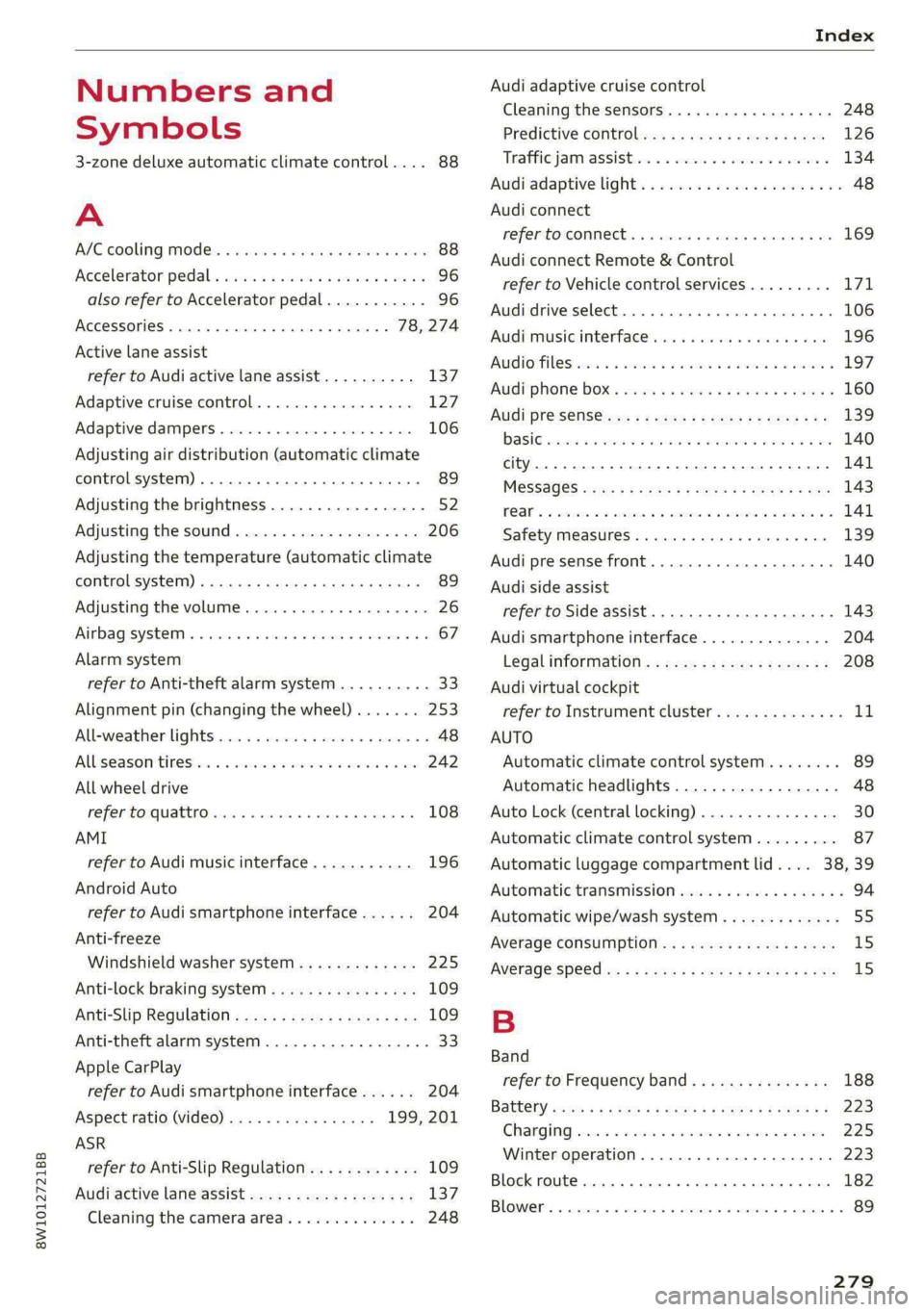
Numbers and
Symbols
3-zone deluxe automatic climate control.... 88
A
ALC cooling MOde ss « « vesiev «sass w © wernin eon 88
Accelerator pedals sais se cai sv aac oe ews 96
also refer to Accelerator pedal........... 96
AGCOSSONIES «vce. «0 cesses « wesese ao nreree © 5 78,274
Active lane assist
refer to Audi active lane assist.......... 137
Adaptive cruise control................. 127
Adaptive dampers............-.0000005 106
Adjusting air distribution (automatic climate
control system) ......... 0.0.00. e eee ee 89
Adjusting the brightness................. 52
Adjusting the sound..............-...0- 206
Adjusting the temperature (automatic climate
control system) ...... 0.0 e cee eee eee 89
Adjusting the volume..............000005 26
Aitbagsystemn « «: swersve « sxaneus + cuneons wx anecome o 67
Alarm system
refer to Anti-theft alarm system.......... 33
Alignment pin (changing the wheel)....... 253
Alleweatherlightscses ws ances © sonasie » i axssane a 48
All Season tireSiens ss emans e e emie eo enews oo 242
All wheel drive
refer to quattro... . 2... eee eee ee eae 108
AMI
refer to Audi music interface........... 196
Android Auto
refer to Audi smartphone interface...... 204
Anti-freeze
Windshield washer system............. 225
Anti-lock braking system............00-5 109
Anti-Slip Regulation.................05. 109
Anti-theft alarm system..............000 33
Apple CarPlay
refer to Audi smartphone interface...... 204
Aspect ratio (video) ................ 199, 201
ASR
refer to Anti-Slip Regulation............ 109
Audi active lane assist..............0005 137
Cleaning the camera area.............. 248
Audi adaptive cruise control
Cleaning the sensors..............
Predictive control.............05.
Traffic jam assist.............00-.
Audi adaptive light.................
Audi connect
refer to connect...........eee eee
Audi connect Remote & Control
refer to Vehicle control services.....
Audi drive select...............0005
Audi music interface............00.
AudiosFileSviccs «x eon 2 wwe « o emcee 9 8 5
Safety measures..............005
Audi pre sense front..............0-
Audi side assist
refer to Side assist................
Audi smartphone interface..........
Legalinformation................
Audi virtual cockpit
refer to Instrument cluster.........
AUTO
Automatic climate control system...
Automatic headlights.............
Auto Lock (central locking) ..........
Automatic climate control system... .
Automatic luggage compartment lid....
Automatic transmission............
Automatic wipe/wash system........
Average consumption..............
AVETAGE SPEEd ss 5s aean sy ows Bee
B
Band
279