partition AUDI A4 2020 Owners Manual
[x] Cancel search | Manufacturer: AUDI, Model Year: 2020, Model line: A4, Model: AUDI A4 2020Pages: 296, PDF Size: 80.45 MB
Page 82 of 296

Stowing and using
— Applies to: vehicles with luggage compart-
ment cover: The luggage compartment cov-
er must always be securely fastened when in
use to reduce the risk of an accident.
— Loose objects can be thrown around the ve-
hicle interior during sudden driving or brak-
ing maneuvers, which increases the risk of
an accident. Always stow objects securely in
the luggage compartment and secure them
at the tie-downs. Use straps suitable for
heavy objects.
— If pieces of luggage or objects are secured
to the tie-downs with unsuitable or dam-
aged straps, this can increase the risk of in-
jury during braking maneuvers or accidents.
— When transporting heavy objects, the vehi-
cle characteristics will change due to the
shift in the center of gravity, which increases
the risk of an accident. You may need to
adapt your driving style and speed to the
current conditions.
— The cargo net is only strong enough to se-
cure light objects. Heavy objects are not ade-
quately secured. Attempting to secure heavy
objects increases the risk of injury.
— Never exceed the permitted axle and load
and vehicle weight > page 278.
— Never secure a child safety seat to the tie-
downs.
— Never leave your vehicle unattended, espe-
cially if the luggage compartment lid is
open. Children could enter the luggage com-
partment and close the luggage compart-
ment lid from the inside. This creates the
risk of fatal injury, since the children would
be locked in and may not be able to escape
by themselves.
— Do not allow children to play in or on the ve-
hicle. Close and lock the luggage compart-
ment lid as well as all other doors when you
leave
the vehicle.
— Never transport passengers in the luggage
compartment. Every passenger must be cor-
rectly secured with the safety belts in the
vehicle > page 64.
— Be careful when releasing the backrest and
folding
it forward. To reduce the risk of be-
ing pinched, pay attention and check when
folding backrests forward.
— The backrest must be securely latched so
objects cannot slide forward out of the lug-
gage compartment during sudden braking.
— The backrest must be latched securely to en-
sure that the safety belt is protecting the
center seating position.
— Always pull forward on the backrest to make
sure it is check if it is correctly locked in
place.
80
() Note
—To reduce the risk of damage, move the rear
head restraints down before folding the rear
backrests forward > page 63.
— When folding the backrest forward, make
sure the outer safety belts are in the belt
guide recess so that they do not get pinched
in the backrest lock and damaged. Other ob-
jects should be removed from the rear
bench seat to protect the backrest from
damage.
— To reduce the risk of damaging the front
seats, make sure there is enough space be-
tween the front seat and the rear seat
equipment when folding the center backrest
forward.
— If you move the front seat back when the
rear seat backrest is folded forward, you
could damage the head restraints on the
rear seat.
— Make sure that the heating grid strips for
the rear window defogger are not damaged
by abrasive objects.
— Applies to: vehicles with manual luggage
compartment cover: Let the luggage com-
partment cover roll up slowly to reduce the
risk of damage.
— Applies to: vehicles with partition net: Let
the partition net roll up slowly to reduce the
risk of damage.
(i) Tips
— The tire pressure must be adapted to the
load > page 237.
— You can purchase straps at specialty stores.
Page 85 of 296
8W1012721BB
Stowing and using
Partition net (upright backrest position)
Applies to: vehicles with partition net
B8W-0121
‘ 2
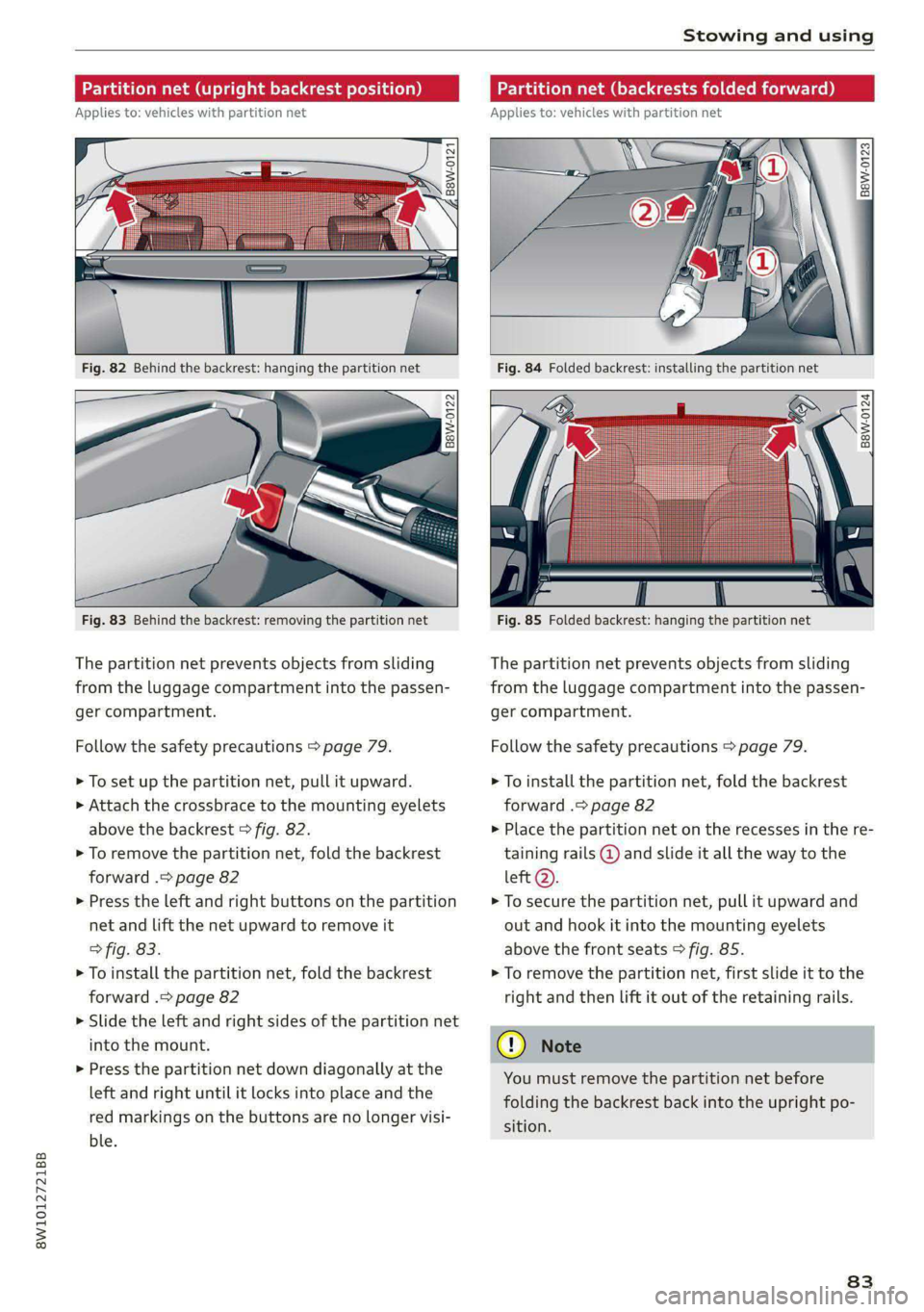
Fig. 82 Behind the backrest: hanging the partition net
B8W-0122
Fig. 83 Behind the backrest: removing the partition net
The partition net prevents objects from sliding
from the luggage compartment into the passen-
ger compartment.
Follow the safety precautions > page 79.
> To set up the partition net, pull it upward.
> Attach the crossbrace to the mounting eyelets
above the backrest > fig. 82.
> To remove the partition net, fold the backrest
forward .> page 82
> Press the left and right buttons on the partition
net and lift the net upward to remove it
> fig. 83.
> To install the partition net, fold the backrest
forward .> page 82
> Slide the left and right sides of the partition net
into the mount.
> Press the partition net down diagonally at the
left and right until it locks into place and the
red markings on the buttons are no longer visi-
ble.
Partition net (backrests folded forward)
Applies to: vehicles with partition net
B8W-0123
Fig. 84 Folded backrest: installing the partition net
. %
B8W-0124
Fig. 85 Folded backrest: hanging the partition net
The partition net prevents objects from sliding
from the luggage compartment into the passen-
ger compartment.
Follow the safety precautions > page 79.
> To install the partition net, fold the backrest
forward .> page 82
> Place the partition net on the recesses in the re-
taining rails @ and slide it all the way to the
left Q).
> To secure the partition net, pull it upward and
out and hook it into the mounting eyelets
above the front seats > fig. 85.
> To remove the partition net, first slide it to the
right and then lift it out of the retaining rails.
You must remove the partition net before
folding the backrest back into the upright po-
sition.
83
Page 204 of 296
Media
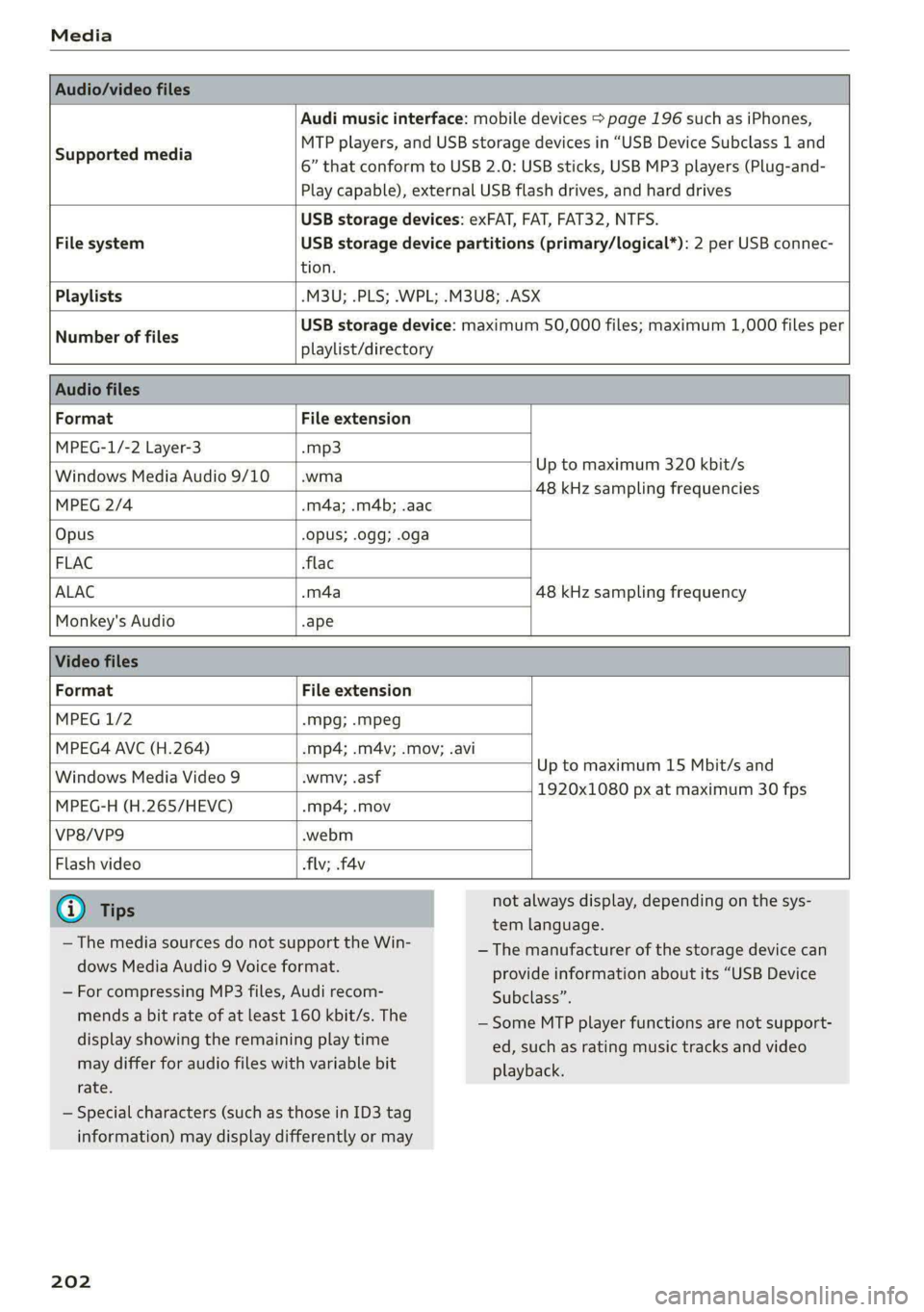
Audio/video files
Supported media
Audi music interface: mobile devices > page 196 such as iPhones,
MTP players, and USB storage devices in “USB Device Subclass 1 and
6” that conform to USB 2.0: USB sticks, USB MP3 players (Plug-and-
Play capable), external USB flash drives, and hard drives
USB storage devices: exFAT, FAT, FAT32, NTFS.
File system USB storage device partitions (primary/logical*): 2 per USB connec-
tion.
Playlists -M3U; .PLS; .WPL; .M3U8; .ASX
Number of files
USB storage device: maximum 50,000 files; maximum 1,000 files per
playlist/directory
Audio files
Format File extension
MPEG-1/-2 Layer-3 -mp3
Windows Media Audio 9/10 |.wma Up to maximum 320 kbit/s
48 kHz sampling frequencies
MPEG 2/4 .m4a; .m4b; .aac
Opus Opus; .0gg; .oga
FLAC flac
ALAC .m4a 48 kHz sampling frequency
Monkey's Audio -ape
Video files
Format File extension
MPEG 1/2 -Mpg; .mpeg
MPEG4 AVC (H.264) -mp4; .m4v; .mov; .avi
Up to maximum 15 Mbit/s and
1920x1080 px at maximum 30 fps
Windows Media Video 9 .wmv; .asf
MPEG-H (H.265/HEVC) -mp4; .mov
VP8/VP9 .webm
Flash video flv; fav
iG) Tips
— The media sources do not support the Win-
dows Media Audio 9 Voice format.
— For compressing MP3 files, Audi recom-
mends a bit rate of at least 160 kbit/s. The
display showing the remaining play time
may differ for audio files with variable bit
rate.
— Special characters (such as those in ID3 tag
information) may display differently or may
202
not always display, depending on the sys-
tem language.
— The manufacturer of the storage device can
provide information about its “USB Device
Subclass”.
— Some MTP player functions are not support-
ed, such as rating music tracks and video
playback.
Page 289 of 296
8W1012721BB
Index
Parking lock
Manually releasing..............00 000s 97
also refer to: Gears « car. se ees ye ess eee 94
Partition Wetaas + s same 3 c eee ¢ & eee so eee 83
Pass-through... ..... ccc eee e ee eee eee 84
Passing prevention..............000000e 129
Paths. 0... eee eee eee eee 17
Pause (media files)................0000. 197
Pedal Sic: os anoene « somine © seen © wanes xe purer a 96
Perchlorate « sis os wns a 2 wie 2 a ween 3 oe 272
Peripheral cameras............---000-5 149
Phone
Connecting a second mobile device...... 159
Disconnecting a mobile device.......... 159
SOttiiGSivax = « wes sv seme : ees s Re ee 165
Phonebook
POfer WO DirettONys: eas + ¢ ean sg waa se 163
PIN
A-digit MyAUGIPIN « ces 2 vce e 6 em so oe 27
Protection........ 0... ce eee eee eee eee 28
Playback (media) ..............2--000-4 197
Podcast
refer to Online radio.............. 191,,192
Polishing... 6.0.0... e cece cece eee eee 249
Pollen filter
refer to Pollutant filter................. 87
Pollutant filter... 0.0... 0.0.0... e eee eee 87
Power SOUrCES ... 6... eee eee eee 78, 196
Power windows............00 000s eee 42
Malfunction. .............. eee eee eee 42
Power windows malfunction.............. 42
Predictive control..............00 eee eae 126
Predictive messageS.............00e0 eee 125
pre sense
refer to Audi presense................ 139
Presentation mode..............---005- 187
Presets
Radio... 2.2.2.2... eee eee 190
Presets list
refer to PresetS....... cece eee eee eee 190
Pressure
Tire pressure monitoring system........ 245
Tir€S eee 237
Protectitngss « «cmc 5 a omare wa svonsd oo nienen ao 249
Pyrotechnic elements............-....- 272
Q
quattro... 2... eee 108
Selective wheel torque control.......... 109
R
Radios < s ase : eee © + eeue © ¢ eeme 2 eee oe 188
RagiOTOXb rsa «acces + maven @ = awn « 2 wae 191
Station list... 2.0.0.0... eee ee 188
Radio communications equipment........ 274
Radioequipmentt eave
Radio Standards Specification (RSS) ....... 275
Rain/light sensor
Automatic headlights.................. 48
Intermittent mode (windshield wipers).... 55
Range (fuel level) ...............0e eee 15
Reading LIGHtS ian. «a sere » manennce + utesene wine 51
Rear center armrest
refer to Cup holders...........2..00000- 78
Rear cross-traffic assist............20005 152
Rear fog lights. ...... 0... cece eee eee ee 48
Rear lid
refer to Luggage compartment lid........ 37
Rearview camera... ..... eee eee eee ee 149
Rear window defogger............-.00005 90
Rear wiper blades
Changing.......... 0... eee eee eee 57
GlEANING!s « s swans & = eee & eeR «EMER oon 57
Recirculation mode.............--.000es 89
Recuperation.......... 000 cece eee eee 15
Refueling. ......... 00.00 eee eee eee eee 211
Remote control
Garage door Opener’: seas ss sees st ees ees 45
Remote control key 34
Convenience opening and closing......... 42
Key replacement.........-.. eee eee eee 34
LED 2... 36
Replacing the battery.................. 36
Unlocking and locking... . sco. 6 ceve es coe 35
also refer to Vehicle key..............-. 34
Removing the caps (wheel bolts) ......... 256
REPAIItS smssiss oo senege @ © tmmame oo semnne © o oeUEES oo 272
REpeatis oo csseiss ss ssn 6 wsmnna s wanes 6 197,199
Replacement key... 0.0... 00sec ceee econ 34
Replacement parts's 5 « sais ¢ wows se ews ae 274
Replacing BULBS wes = = ssa ys sews x © ewe ¢ 268