break AUDI A4 2021 Owner´s Manual
[x] Cancel search | Manufacturer: AUDI, Model Year: 2021, Model line: A4, Model: AUDI A4 2021Pages: 304, PDF Size: 107.89 MB
Page 178 of 304
Audi connect
Information about the services and the corre-
sponding app was accurate at the time this man-
ual was printed. The scope of services depends
on the country and equipment. There may be
changes over the service life of the vehicle.
ZA WARNING
— Always follow the information found in > AA
in General information on page 173.
— Driver messages, text messages, and illumi-
nated warning and indicator lights in the ve-
hicle always take priority over information
from the Audi connect services. The infor-
mation displayed by the Audi connect serv-
ices should not cause you to take safety
risks. This can result in the vehicle breaking
down in traffic and to serious injuries or ac-
cidents.
G) Tips
— Accessing specific data or controlling func-
tions remotely depends on the charge level
of the vehicle battery. Therefore, these
functions only have limited availability after
switching off the ignition.
— An eSIM card establishes the Internet con-
nection for Audi connect vehicle control
services. The costs for this are included in
the price of Audi connect vehicle control
services. The cell phone network, for exam-
ple, must be available to use these services.
Applies to: vehicles with Audi connect vehicle control
Create a myAudi account by registering in the
myAudi app or at my.audi.com, depending on
your country.
>» Set the key user > page 30.
> Install the myAudi app on your mobile device
and log in with your access information.
@ Tips
Some services require you to enter a 4-digit
PIN that you set up during registration.
176
Settings
Applies to: vehicles with Wi-Fi hotspot
Requirement: the ignition must be switched on.
> Applies to: MMI: Select on the home screen:
SETTINGS > Connection settings > Wi-Fi
Depending on the country and the vehicle equip-
ment, the following functions may be available:
Wi-Fi
When the function is switched on, the MMI's Wi-
Fi hotspot is active and Wi-Fi devices can be con-
nected to the hotspot.
Wi-Fi hotspot settings
The Wi-Fi connection between the MMI and your
Wi-Fi device is encrypted. You can change the fol-
lowing information if needed.
— Access point (SSID): name of the Wi-Fi hot-
spot.
— Password: an initial password was set at the
factory in the MMI. Audi recommends changing
the initial password. Only use secure passwords
that conform to the general guidelines for se-
cure passwords. For more information, refer to
reputable and current sources on password se-
curity.
Allow data connection through Wi-Fi
When the function is switched on, mobile devices
can use the Internet connection through the Wi-
Fi hotspot. A data plan is needed to do this.
ZA\ WARNING
Always follow the information found in > A\
in General information on page 173.
@) Note
Always follow the information found in >@ in
General information on page 173.
Page 180 of 304
Emergency call
Emergency call
Overview
Applies to: vehicles with emergency call function
An emergency call is a combination of data trans-
mission and a phone call. The data transmission
from your vehicle forwards important informa-
tion, such as the vehicle and position data, to the
emergency call center.
Depending on the country and the vehicle equip-
ment, the following functions may be available:
With the emergency call, you can call for help in
dangerous situations as quickly as possible. Use
this function when emergency help is needed
=> page 178.
— Audi connect emergency call (TPS emergency
call). This eCall system uses emergency call
centers operated by third party providers.
With online roadside assistance, you can request
assistance if there is a breakdown or a minor acci-
dent > page 179.
A WARNING
In areas with poor GPS reception or outside
the coverage range of the respective cell
phone service provider, some functions and/or
services may not be available, it may not be
possible to send or receive data, or functional-
ity may be limited.
iG) Tips
To see which data can be transmitted, visit
your Audi country or sales region website at
www.audi.com.
Emergency call
Applies to: vehicles with emergency call function
The services are provided through a SIM card in-
stalled in the vehicle. Services are provided as-
suming that the cell phone network required for
the installed SIM card is functioning and availa-
ble for use. The services made availably by Audi
are only available within the mobile phone net-
178
work coverage area for the mobile phone service
provider selected by Audi.
@ Tips
— The emergency call function cannot be deac-
tivated in the Infotainment system settings.
— The availability of the TPS emergency call is
limited to certain times.
—The costs for call and data connections for
TPS emergency calls is included in the price
of the services.
Functions
Applies to: vehicles with emergency call function
A TPS emergency call can be made manually or
automatically > page 178.
Making an emergency call
Applies to: vehicles with emergency call function
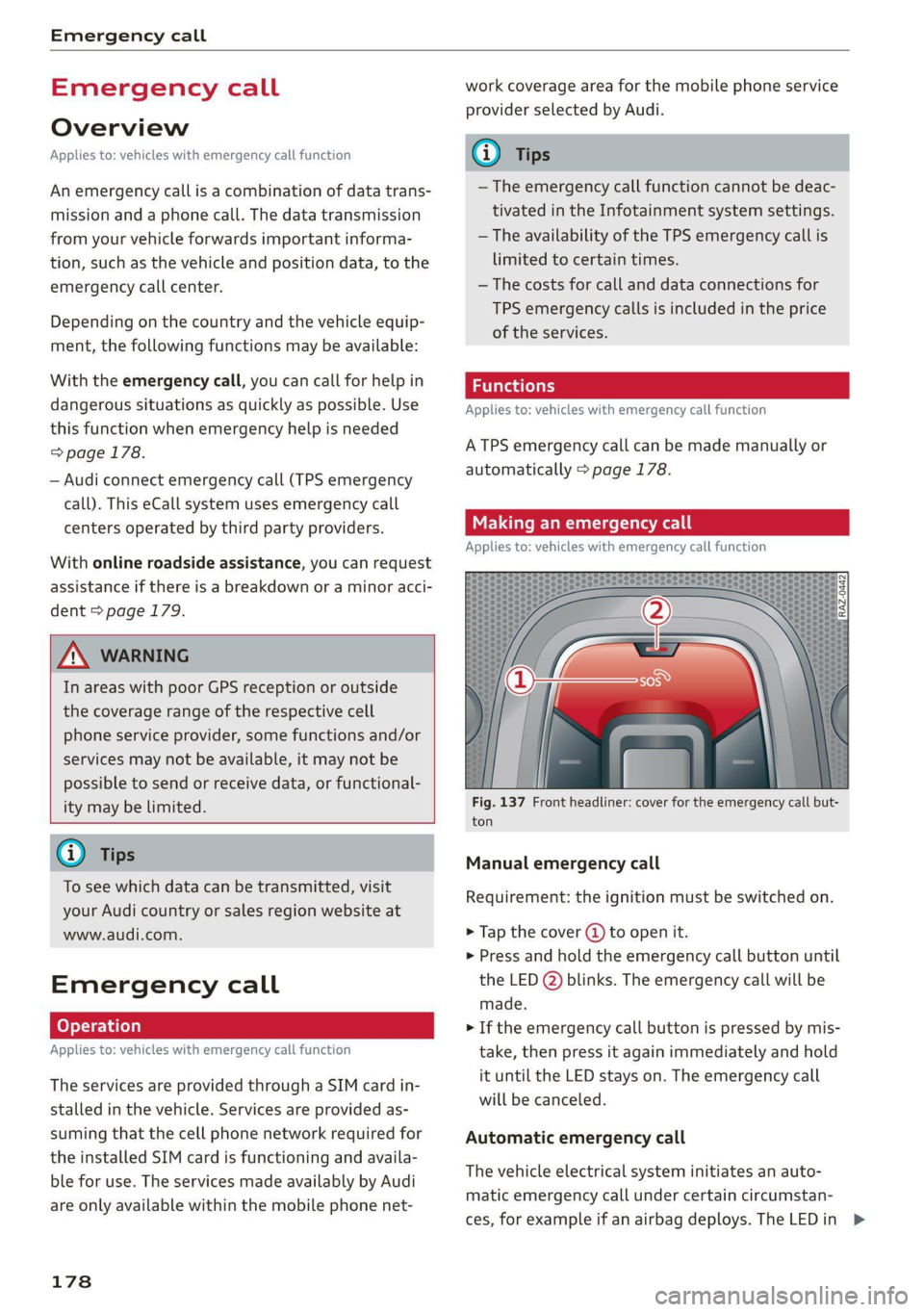
Fig. 137 Front headliner: cover for the emergency call but-
ton
Manual emergency call
Requirement: the ignition must be switched on.
> Tap the cover (J) to open it.
> Press and hold the emergency call button until
the LED @) blinks. The emergency call will be
made.
> If the emergency call button is pressed by mis-
take, then press it again immediately and hold
it until the LED stays on. The emergency call
will be canceled.
Automatic emergency call
The vehicle electrical system initiates an auto-
matic emergency call under certain circumstan-
ces, for example if an airbag deploys. The LEDin >
Page 227 of 304
8W1012721BC
Checking and Filling
Checking the engine oil level and the road conditions. The dilution of oil
from condensation or fuel residue as well as
the age of the oil also play a role. Because
The engine oil level can be checked in the MMI.
Observe the safety precautions > page 221, Gen- engine wear increases with mileage, oil con-
eral information. sumption will increase again over time until
it may be necessary to replace worn compo-
> Park the vehicle on a level surface.
> Shut the engine off when it is warm.
> Switch only the ignition back on.
> Wait approximately two minutes.
> Applies to MMI: Select on the home screen: VE-
HICLE > Settings & Service > Oil level.
> Read the oil level in the display. Add engine oil
if the bar in the oil level indicator is just below
“min” > page 225.
nents.
— Because all these variables play a role, it is
not possible to define an oil consumption
standard. Therefore, the oil level must be
checked regularly.
— If you believe that your engine has in-
creased its oil consumption, contact an au-
thorized Audi dealer or authorized Audi
Service Facility to determine the cause.
Please note that an exact oil consumption
© Note measurement must be done with the neces-
If the engine oil level is too low or too high, sary care and accuracy and may take time.
there is a risk of engine damage. An authorized Audi dealer or authorized
Audi Service Facility is trained in accurately
@ Tips measuring the oil consumption.
The oil level indicator in the display is only an — You can find information on engine oil and
informational display. If the oil level is too engine oil capacities for the USA at www.
low, a minimum oil warning appears in the in- audiusa.com/help/maintenance, or for Can-
strument cluster. Add oil and close the hood. ada at www.audi.ca/ca/web/en/
The current oil level will be displayed on the customer-area/care-and-maintenance/
MMI the next time the ignition is switched on. audi-service-schedules.html, or call
800-822-2834.
@ Tips
The engine oil consumption may be up to Adding engine oil
0.5 quart/600 miles (0.5 liter/1,000 km), de-
pending on driving style and operating condi-
tions. Consumption may be higher during the
first 3,000 miles (5,000 km). The engine oil
level must be checked regularly. It is best to
check each time you refuel your vehicle and
before long drives.
B8K-2120
— Because of the lubrication and cooling of
the engine, combustion engines consume
oil. The oil consumption varies depending
on the engine and may change during the
service life of the engine. Engines generally
consume more oil at the beginning during Observe the safety precautions > page 221, Gen-
the break-in period. Then oil consumption eral information.
stabilizes after the break-in period.
— Under normal conditions, oil consumption
depends on the quality and viscosity of the
oil, the engine RPM, the climate conditions,
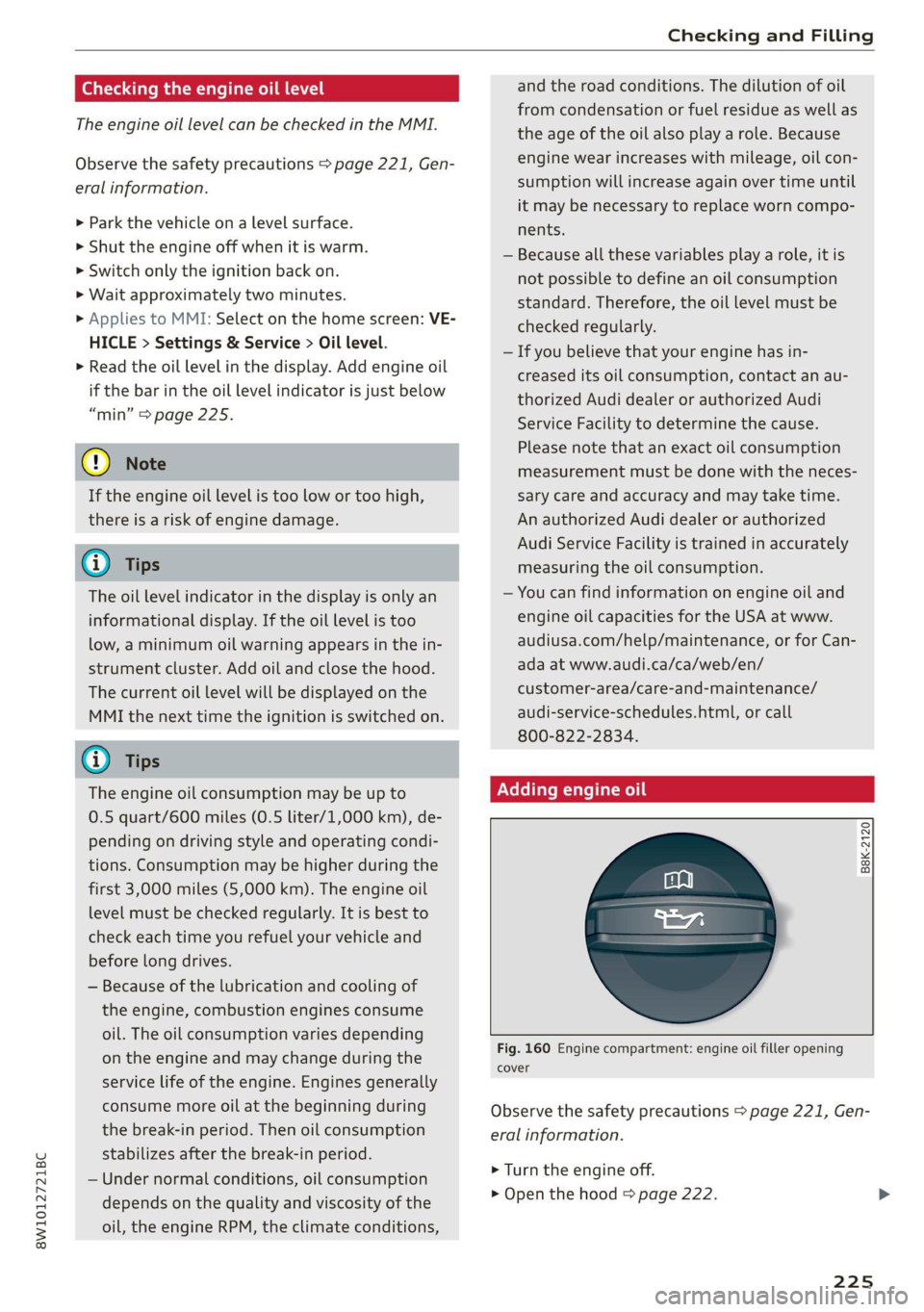
Fig. 160 Engine compartment: engine oil filler opening
cover
> Turn the engine off.
> Open the hood & page 222.
225
Page 240 of 304
Wheels
Glossary of tire and loading
terminology
Accessory weight
means the combined weight (in
excess of those standard items
which may be replaced) of auto-
matic transmission, power steer-
ing, power brakes, power win-
dows, power seats, radio, and
heater, to the extent that these
items are available as factory-in-
stalled equipment (whether in-
stalled or not).
Aspect ratio
means the ratio of the height to
the width of the tire in percent.
Numbers of 55 or lower indicate a
low sidewall for improved steer-
ing response and better overall
handling on dry pavement.
Bead
means the part of the tire that is
made of steel wires, wrapped or
reinforced by ply cords and that is
shaped to fit the rim.
Bead separation
means a breakdown of the bond
between components in the bead.
238
Cord
means the strands forming the
plies in the tire.
Cold tire inflation pressure
means the tire pressure recom-
mended by the vehicle manufac-
turer for a tire of a designated
size that has not been driven for
more than a couple of miles (kilo-
meters) at low speeds in the three
hour period before the tire pres-
sure is measured or adjusted.
Curb weight
means the weight of a motor ve-
hicle with standard equipment in-
cluding the maximum capacity of
fuel, oil, and coolant, air condi-
tioning and additional weight of
optional equipment.
Extra load tire
means a tire designed to operate
at higher loads and at higher in-
flation pressures than the corre-
sponding standard tire. Extra load
tires may be identified as “XL”,
“xl”, “EXTRA LOAD”, or “RF” on
the sidewall.
Page 263 of 304

8W1012721BC
Emergency assistance
Emergency assistance
General information
> Park the vehicle as far as possible from moving
traffic in the event of a breakdown. In the event
of a flat tire, park the vehicle ona level surface.
If you are ona steep hill, be especially careful.
> Set the parking brake.
> Switch the emergency flashers on.
> Have the passengers exit the vehicle. They
should move to a safe place, for example be-
hind a guard rail.
Z\ WARNING
Follow the steps given above. This is for your
protection and the for the safety of others on
the road.
Equipment
Vehicle tool kit, tire mobility kit, and
vehicle jack
Applies to: vehicles with the vehicle tool kit, tire mobility kit,
and vehicle jack
Fig. 169 Luggage compartment: cargo floor cover
The vehicle tool kit, vehicle jack, tire mobility kit
and compressor are stored in the luggage com-
partment under the cargo floor cover.
> Applies to: sedan: To open the front compart-
ment, lift the cargo floor cover by the strap (@).
> Applies to: allroad: To open the front compart-
ment, pull the cargo floor cover by the plastic
handle @) slightly toward the rear. Lift the car-
go floor cover over the front compartment.
> To open the rear compartment, lift the cargo
floor cover by the plastic handle @).
> Applies to: sedan: Engage the plastic handle @)
in the luggage compartment seal.
> To remove the cargo floor cover completely,
pull it toward the rear at the plastic handle @).
> Applies to: vehicles with spare tire: Turn the
handle counter-clockwise and remove the spare
tire.
> Applies to: sedan: Unhook the cargo floor cover
again
before closing the luggage compartment
lid.
Depending on vehicle equipment, the vehicle tool
kit, tire mobility kit, and compressor may be lo-
cated under another cover that is secured with a
handwheel.
Applies to: vehicles with vehicle jack in the stor-
age bag: The bag with the vehicle jack is secured
to the tie-downs in the luggage compartment
and must be secured to the tie-downs again after
using it.
ZX WARNING
Applies to: vehicles with vehicle jack in the storage bag
A vehicle jack that is unsecured, incorrectly se-
cured, or not secured in the luggage compart-
ment may slide out of place when braking,
turning,
or in an accident, which increases the
risk of injuries to vehicle passengers. To re-
duce the risk of an accident, never transport
the vehicle jack without securing it.
G) Tips
—Insome vehicles, the rear compartment
may not open.
— The vehicle jack in your vehicle is mainte-
nance-free.
Tire mobility kit
Applies to: vehicles with tire mobility kit
> Read and follow the important safety precau-
tions > page 261.
> Set the parking brake.
> Select the “P” position.
> Check if a repair with the tire mobility kit is pos-
sible > page 262.
261
Page 291 of 304
8W1012721BC
Index
Battery
Charging (12 Volt vehicle battery)....... 232
Vehicle battery (12 Volt)............... 230
Winter operation (12 Volt vehicle battery) . 231
BLOCK POU cei: «x were: oo ceamewe oo semen 2 o seems 187
BLOWN: sess: ¢ = seene « x wanes g 2 meee 5 2 ee 4 ee 92
Bluetooth
Audio playen snus « 2 sassws ae suesens ov srw 9 2 3 201
Connecting adevice..............0000- 214
Connecting a mobile phone............ 162
Deleting a device
Device overvieW............00-.0 eee
Disconnecting a device................ 214
Displaying profiles..................0. 215
Selecting adevice.............0..000. 214
Specifying a favorite.................. 215
Boost... 6... eee eee eee 15
Boost pressure indicator................. 15
Brake fluid
Checking the brake fluid level........... 229
BrakeS.. 0... eee eee 104
Brak@fluid(: = = sams = « eam = woven se pee as 229
Emergency braking function............ 106
0) 107
New brake pads............. 00s e eee 104
Braids « savay » © aaiwa & Raeoe ¢ & SanDR ES Se ES 216
Break-in security feature............00005 36
Breaking in
New brake pads..............----000- 104
NeWetiresis « wcuin as maces a meme a 2 emma ee 242
Browser
refer to Media center...............00. 204
Businessiaddressis i s, svessns sc scan a a veamiws a aa 187
c
California Proposition 65 Warning........ 222
Battery specific...............00-0 00 231
GALLUISE sacsse + ogsiese 0 9 axons 0 4 exexeus 4 2 anneew a 166
Cameras
Coverage areaS............-.0. 000000. 118
LOGAUIONS a: « ¢ apes ¢ nates 3 paee 5 x PEER GE 119
Capacities
Puelitankss sss so somes a sess @ o aves ¥ 0 ond 287
Washer fluid reservoir................. 287
Garwashh x 5 sews « onsmeus © scagens os ayers «6 @ some 255
Gatalytic converter « sis 2 weve eo wee ee cree 220
Cell phone
refer to Telephone............00 eee eee 162
Cell phone compartment
refer to Audi phone box............... 164
Central locking...... cece eee cree eee 33
AULOILOGK « coos 2 5 seme 5 5 ete so wows Go eG 33
Convenience key sie © « socsais 2 6 srvoem + 6 voese 38
Convenience opening and closing......... 46
Luggage compartment lid............... 4l
Mechanically unlocking and locking....... 36
MessageS ......--. 0c cece eects 35
Remote control key........:0ee eee ee eee 38
SEUNG’: © wave: s 2 wecems ve arene @ aetna ¥ ewee 34
Vehicle key... 0... cece eee ee eee ee 38
Central locking switch..............0000. 35
Ceramic Drakesinis © «cassie © x seve ¥ @ suena # ane 104
Certification): « . cee: ss wean ov enw os eee « 284
Charging
refer to Power sourceS..........-.000005 82
Charging the battery
Mobile devices..................00005 202
USB': « meme 2 ¢ anus © naueu & x REINS & ¥ ORE & 165
Witelessis «secs x x woos 2 v cervaue a x stone 2 9 oon 165
Child safety lock
Climate control system controls in the rear. 44
POWEr WINDOWS! si: = © xsnas 4 § Seen & & Maram 4 es 44
Rear dOOrsis + o omc sc sami oo me oases 44
Child safety seats..............---.00005 76
Securing to the top tether anchor........ 80
Securing with a safety belt.............. 79
Securing: with LATCH s « sw « & nome « ¢ sans « 78
ClEATIAG saves 5 x nore 5 2 wows ot eee xe eee 255
Cleaning Alcantara.............-.00000. 258
Cleaning artificial leather............... 258
Cleaning carbon components........ 257, 258
Cleaning controls..................005. 258
Cleaning decorative parts andtrim........ 257
Cleaning exhaust tail pipes.............. 257
Cleaning plastic parts...........00 eee 257
Cleaning textiles = cass ¢ & exes ¢ cae se ees 258
Climate control system ............00000- 90
also refer to Automatic climate control sys-
GNA. 2 execs © 2 ceeueve = ueueat © + steams © meme = © 90
Climate control system controls in the rear
Child safety lock........... 0. cece eee 44
289
Page 293 of 304

8W1012721BC
Drive select
refer to Audi drive select.............0. 110
Drive system... 1.2... cee ee eee 101
AUdi drive Select sais s & news < ¢ says & 3 ve 110
Drive system (message) ........... eee eee 103
Driving down hills............ 00.000 eee 107
DFIVIMGJPFOGFAMM:. « wnaceos % 0 spesine 6 & axonese on mune 137
Driving through water...............0.. 108
Driving CIM: « cescues & a ssanees vw ones vv orn a 8 a 16
Driving tips
Driving through water...............-- 108
Efficient driving...............-00000- 102
Offroad GriWitG cows sc caws se pean es ewan 108
Uphill and downhill................00. 107
Driving:up Wills: « ssc s 2 wave 6 o sree wv sew 107
Dust filter
refer to Pollutant filter................. 90
DYMAMMIGIStEORIAG, cxsieos ov secre © « soneers © ¥ soaser Lill
E
EFimailss os i: cwcsan oa ncewios ow sesnin @ ononans wa wretnon 4 T/1,
Settings............. 0.00. e eee eee ee 171
EDL
refer to Electronic Differential Lock...... 113
EDR
refer to Event Data Recorder (EDR)...... 277
Efficiency ASSISE: s wes » x ows & a ews 8 6 ow 128
Predictive :comtro lin: « cxvim x 0 sensawe oo swowane 133
Electrical system ........ 2... cee eee eee 230
Electromechanical parking brake......... 106
Electronic Differential Lock.............. 113
Electronic immobilizer................5-. 38
Electronic Stabilization Control........... 113
Embedded SIM card............--.00005 174
Emergency assistance...............00. 261
Emergency braking function............. 106
Emergency call... «ccc. 2 mwa ve ewe 169,178
Emergency flashers..............--0000- 53
Emergency modéw
Emergency operation
DOONS eves ov comme a a same ao omnes vv om x
Fuel filler door
Luggage compartment lid............... 43
Panoramic glass roof................005 47
Sliding/tilting sunroof...............00. 46
Emissions control system..............- 220
EnergyCOnsSUMErSi. & & sive a 2 wasn ao mare oes 16
Energy management...............0005 102
Engine
Breakingiin « sss c= cee = 2 aves ov ere a ee 101
Coolant..... 0.0... cece eee eee ee eee 227
EMe@ngenty StOpis « = ewes 5 2 sees ¢ 2 wees Fs me 95
JUMp'StARtING & vesi% « 6 war % 6 senens & ewes 268
Start/Stop system ......... 0. eee ee eee 102
Starting/Stopping:: « « seme os ews 5 wen s « 95
Engine compartment
Opening and closing the hood.......... 222
OVERVIEW cscssiic xo ciueins xo anette 6H atetaaie © ooetts 223
Safety precautions..................0. 221
Engine oil
AGQING = ex ¢ = seem « = ress « ¢ ee § pe 224
GhANGING sis «sess ss rena « waver 2» omen © 226
Checking oil level.............00-.000- 224
CONSUMPtIONs « 2 was s 2 ene x eee 5 oe 224
Indicator light « sss + «owes sw ssweenn ow vase 224
Replacement interval................. 233
Temperature display............0.e00e 15
Engine sound
Audi driveselect’s osx. < + sx » x come © ee 110
Engine Start/Stop mode
refer to Start/Stop system............. 102
Engine startsystem sce 3 5 seu o 9 was o 9 som 96
Engine stop
refer to Start/Stop system............. 102
Entry/exit. IQhtingie: + scsi as essen & © wonvme a v6 53
Entryiassistanee:: 2 coca 2s acim os eee 2 o were 65
also refer to Exit assistance............. 65
Environment
Unleaded gasoline.................00. 217
ESC
refer to Electronic Stabilization Control... 113
ESC Offroad... 2.1... eee eee ee 114
ESC Sport........... 000.000.0000 0000- 114
eSIM
refer to Embedded SIM card............ 174
Event Data Recorder (EDR).............. 277
Exit assistance .... 0.2... 0.00... e eee eee 65
Exit warning ...... 0.66... e ee ee eee eee 148
Exteriomantenna «cise oo srerw wane © aecete 165
Exterior Lighting’: = = sce «= seus © x cere = 4 seus 51
291