infotainment AUDI A4 2021 Owner´s Manual
[x] Cancel search | Manufacturer: AUDI, Model Year: 2021, Model line: A4, Model: AUDI A4 2021Pages: 304, PDF Size: 107.89 MB
Page 199 of 304

8W1012721BC
Radio
Opening radio text
> Applies to: MMI: Select on the home screen:
RADIO > select a frequency band (such as FM)
> select a station > More > Radio text.
Depending on vehicle equipment, the following
functions
may be available:
Displaying previous radio text entries
> Swipe downward with one finger. The last radio
text entries are displayed if they are available.
Scrolling through radio text entries
> Swipe upward or downward with one finger.
Showing Radio Text Plus information
If a radio text entry is displayed with a color, a
phone number or a navigation destination for the
station is available as radio text plus information.
You have the following options:
Selecting the destination
> Select: a navigation destination marked in col-
or > Set as destination.
Call
> Select: d phone number marked in color > Call.
@ Tips
A call to a phone number stored in the radio
text will start immediately.
Online radio
General information
Applies to: vehicles with Audi connect Infotainment and on-
line radio
You can listen to various radio stations or pod-
casts on the Internet using online radio.
Requirement: the MMI must be connected to the
Internet. A data plan must be available
=> page 177.
Accessing online radio through the MMI
> Applies to: MMI: Select on the home screen:
RADIO > Source > Online.
The following functions are available:
Previous selection
The station/podcast list for the last station or
podcast that was playing will be displayed.
Top stations
The favorite online radio stations are displayed.
Filter list
> Select: 2 > (a category) > a station/podcast.
The following categories are available:
— Countries
— Genres
— Languages
— Editor's picks
— Themes
— Nearby
@) Note
Read the information about Audi connect, and
be sure to note the connectivity costs section
=@ in General information on page 173.
@) Tips
— Depending on the Internet connection and
network traffic, the connection may be lost
when online radio is playing.
— Online radio reception may not be possible
if Internet service is throttled.
— Online media usage depends on the service
availability of the third party provider.
—The range and screen display of online me-
dia services from third party providers in the
vehicle can vary.
— Please note that it may not be possible to
play some online radio stations in certain
countries.
— Audi only provides access to online radio
and does not assume any responsibility for
the content of these services.
197
Page 200 of 304

Radio
Applies to: vehicles with Audi connect Infotainment and on-
line radio
Opening podcasts using the MMI
» Applies to: MMI: Select on the home screen:
RADIO > Source > Online > Podcasts.
The following functions are available:
Listening to a podcast
> Select: a podcast > a podcast episode.
Search
> Press 2.
The following functions are available in the pod-
cast playback view:
Displaying podcast episodes
> Press List.
Starting/stopping podcast playback
> Press /II.
Previous/next podcast
> PressKi/ DI.
Changing the playback position
> You can adjust the playback position using the
knob.
Displaying the online radio menu
> Press Ba.
Switching to radio
> Press Source. The sources in the Radio menu
are displayed.
Podcast favorites
You can store podcasts in the podcast favorites.
Requirement: the playback view for a podcast
must be displayed.
> Press YY @ © page 194, fig. 149.
Requirement: a list with podcasts must be dis-
played.
> Press and hold an entry in the list until the Op-
tions menu appears.
> Press Save podcast.
198
Listening to podcast favorites
Requirement: the podcast favorites list must be
displayed. At least one podcast favorite must be
stored.
> Select: a podcast > a podcast episode.
Browsing through podcast favorites
Requirement: the podcast favorites list must be
displayed. At least one podcast favorite must be
stored.
> Press < or >.
Displaying all podcast favorites
Requirement: the podcast favorites list must be
displayed. At least one podcast favorite must be
stored.
> Press All.
Editing podcast favorites
> Deleting podcast favorites: press Y in the
playback view, or
> In the podcast favorites list, select: All > Z >
one or more podcasts, or Select All > Delete >
(Done).
Requirement: the podcast favorites list must be
displayed.
> Moving podcast favorites: Select: All > Z.
> Touch the $ symbol and move the entry to the
desired position.
> Press Done.
Options and settings
Requirement: the playback view @) > page 194,
fig. 149 must be displayed.
> Press More (9), or
Requirement: a list with radio stations or pod-
casts* must be displayed > page 193, fig. 147.
> Press and hold an entry in the list until the Op-
tions menu appears.
Page 207 of 304

8W1012721BC
Media
Podcasts
You can control your podcasts through the MMI.
> Select: a podcast > a podcast episode.
Genres
All available genres are displayed.
>» Select: a genre > an artist > an album > a song.
Videos
All available video files are displayed.
> Press on a video.
Tracks
All available tracks are displayed.
> Press on a track.
Albums
All available albums are displayed.
> Select: an album > a track.
@ Note
Applies to: vehicles with Audi connect Infotainment
— Cloud services and the iTunes radio category
always require an Internet connection.
tele mitardatela ry
— Read the information about Audi connect,
and be sure to note the connectivity costs
section >@ in General information on
page 173.
G@) Tips
— Only the categories supported by the medi-
um are available.
— For safety reasons, the video image is only
displayed when the vehicle is stationary. On-
ly the sound from the video plays while driv-
ing.
—When synchronizing a portable device with
Cloud services, playlists may display incor-
rectly in the MMI. Use the media center in
the device.
— Applies to: iPod touch/iPhone: Note the in-
formation about the Audi music interface
and the supported devices > page 202.
[RAX-0037,
Baa aeCit)
Ca
The Rock Band
The big B
eee)
ns
eae)
nc
@
Fig. 152 Center display: left side: playback view; right side: playlist
Operating
> Applies to: MMI: To open the playback view (),
select on the home screen: MEDIA > Source > a
source > a category (for example, Artists > Al-
bum) > a track.
> To open the playlist @, select List in the play-
back view @..
205
Page 235 of 304
8W1012721BC
Checking and Filling
— A highly explosive mixture of gases can form
when charging batteries. Only charge the
battery in well-ventilated areas.
— A drained battery can freeze at tempera-
tures around 32 °F (0 °C). Do not charge or
use a frozen or thawed battery. If ice forms,
the battery housing can crack and battery
electrolyte can leak out, which increases the
risk of an explosion and chemical burns.
Contact an authorized Audi dealer or author-
ized Audi Service Facility for more informa-
tion.
— Do not connect or disconnect the charging
cable while charging because this increases
the risk of an explosion.
@) Tips
Read all of the manufacturer's instructions
for the charger before charging the battery.
Windshield washer
system
B8W-0125
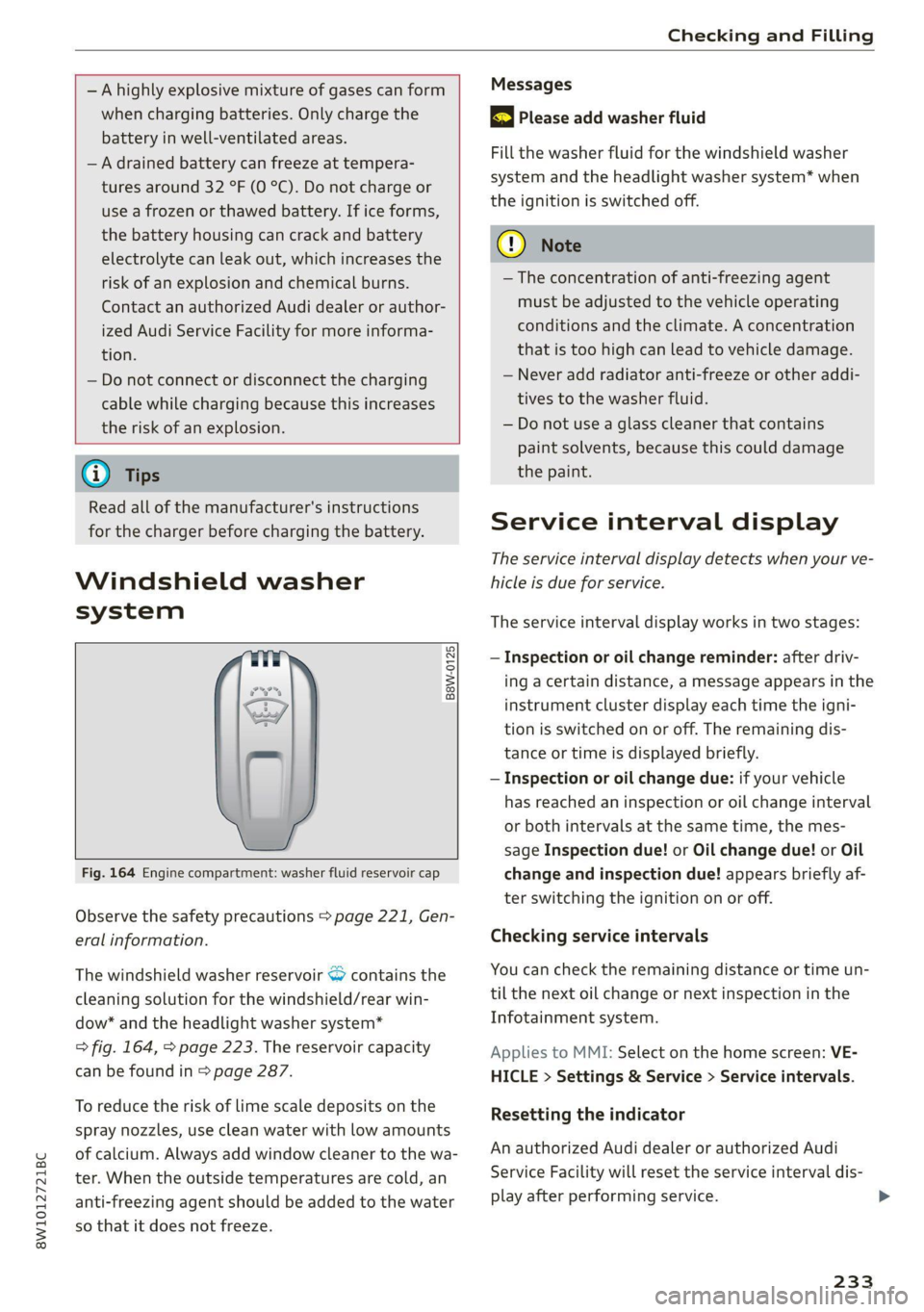
Fig. 164 Engine compartment: washer fluid reservoir cap
Observe the safety precautions > page 221, Gen-
eral information.
The windshield washer reservoir © contains the
cleaning solution for the windshield/rear win-
dow* and the headlight washer system*
> fig. 164, > page 223. The reservoir capacity
can be found in > page 287.
To reduce the risk of lime scale deposits on the
spray nozzles, use clean water with low amounts
of calcium. Always add window cleaner to the wa-
ter. When the outside temperatures are cold, an
anti-freezing agent should be added to the water
so that it does not freeze.
Messages
3 Please add washer fluid
Fill the washer fluid for the windshield washer
system and the headlight washer system* when
the ignition is switched off.
@) Note
— The concentration of anti-freezing agent
must be adjusted to the vehicle operating
conditions and the climate. A concentration
that is too high can lead to vehicle damage.
— Never add radiator anti-freeze or other addi-
tives to the washer fluid.
— Do not use a glass cleaner that contains
paint solvents, because this could damage
the paint.
Service interval display
The service interval display detects when your ve-
hicle is due for service.
The service interval display works in two stages:
— Inspection or oil change reminder: after driv-
ing acertain distance, a message appears in the
instrument cluster display each time the igni-
tion is switched on or off. The remaining dis-
tance or time is displayed briefly.
— Inspection or oil change due: if your vehicle
has reached an inspection or oil change interval
or both intervals at the same time, the mes-
sage Inspection due! or Oil change due! or Oil
change and inspection due! appears briefly af-
ter switching the ignition on or off.
Checking service intervals
You can check the remaining distance or time un-
til the next oil change or next inspection in the
Infotainment system.
Applies to MMI: Select on the home screen: VE-
HICLE > Settings & Service > Service intervals.
Resetting the indicator
An authorized Audi dealer or authorized Audi
Service Facility will reset the service interval dis-
play after performing service.
233
>
Page 277 of 304
8W1012721BC
Fuses and bulbs
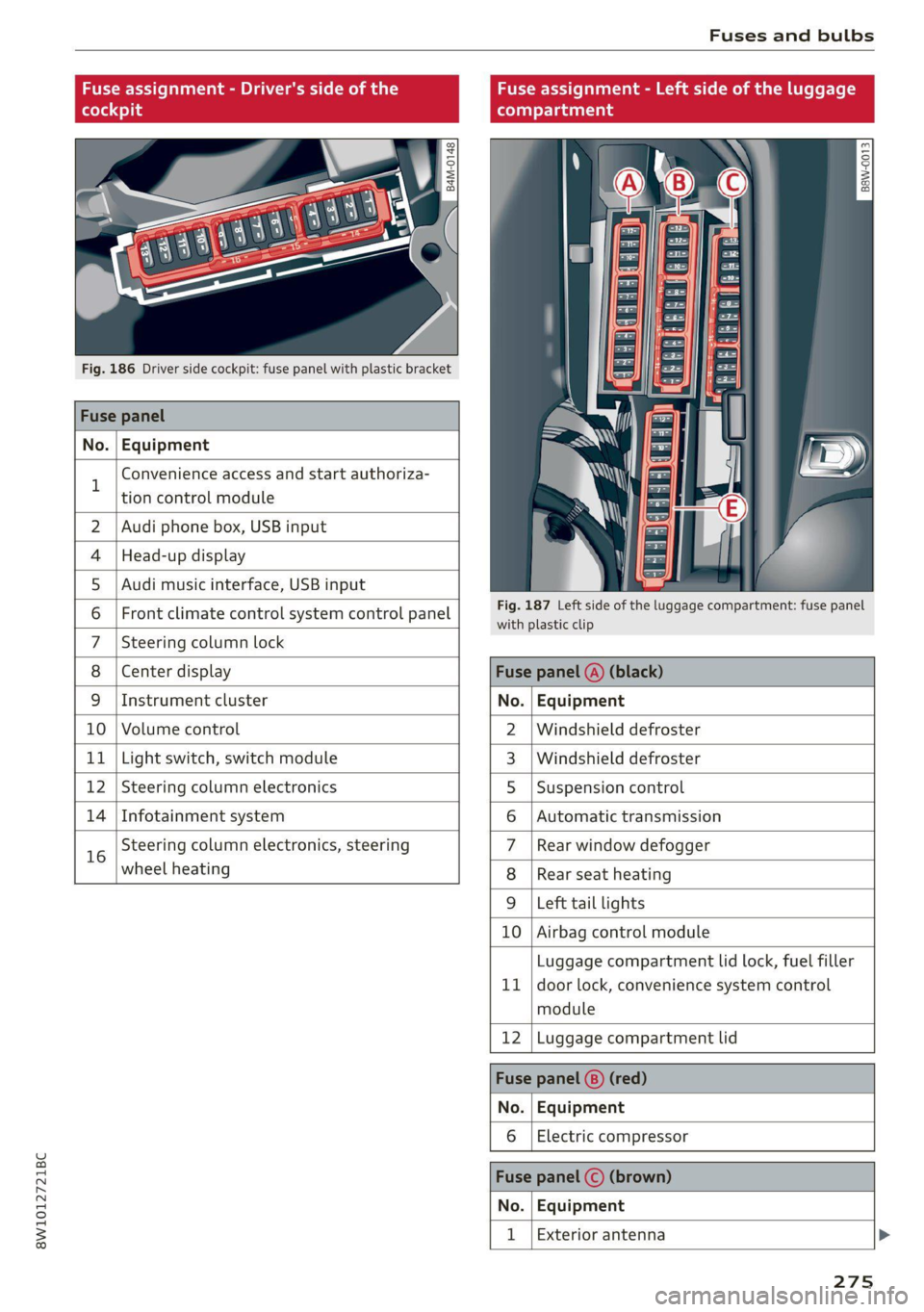
Fuse assignment - Driver's side of the
(ole 4o)ig
Fig. 186 Driver side cockpit: fuse panel with plastic bracket
Fuse panel
No. Equipment
B
Convenience access and start authoriza-
tion control module
Fuse assignment - Left side of the luggage
compartment
GU -
|_8aw-0013]
2 | Audi phone box, USB input
4 |Head-up display
5 |Audi music interface, USB input
6 | Front climate control system control panel eet ofihe uagage compartment: fuse panel
7 |Steering column lock
8 |Center display Fuse panel @) (black)
9 |Instrument cluster No. | Equipment
10 | Volume control 2 |Windshield defroster
11 | Light switch, switch module 3 |Windshield defroster
12 | Steering column electronics 5 |Suspension control
14 | Infotainment system 6 |Automatic transmission
16 Steering column electronics, steering 7 |Rear window defogger
wheel heating 8 |Rear seat heating
9 |Left tail lights
10 Airbag control module
ig
Luggage compartment lid lock, fuel filler
door lock, convenience system control
module
12 Luggage compartment lid
Fuse panel @) (red)
No. Equipment
Electric compressor
Fuse panel (©) (brown)
No. Equipment
Exterior antenna
275
Page 281 of 304
8W1012721BC
Data privacy
You can also deactivate individual services for
your vehicle at my.audi.com if you are logged into
the vehicle as the key user > page 30. These de-
activated services will not be available in the ve-
hicle. For additional information, visit my.audi.
com.)
@) Note
You are responsible for all precautions taken
for data protection, anti-virus protection, and
protection against loss of data on mobile de-
vices that are used to access the Internet
through the Wi-Fi hotspot.
@ Tips
— The following interfaces are not affected by
changes to the privacy settings: Bluetooth,
Bluetooth Low Energy (BLE), Wi-Fi, Audi
smartphone interface (ASI), Near Field
Communication (NFC), charging communi-
cation (high-voltage system), Electronic Toll
Collect (ETC), On-Board Diagnostic System
(OBD) if equipped.
— If the maximum privacy settings are switch-
ed on, your vehicle may not receive security
updates and certificates for establishing an
encrypted connection, depending on vehicle
equipment. In order to receive security up-
dates and certificates, switch the maximum
privacy settings off for at least ten minutes
every six months. Make sure that your vehi-
cle is connected to the Internet. A symbol in
the MMI status bar indicates if the required
data connection is available > page 22.
— If the transmission of data is limited, it will
have the following effects on the exchange
of data for Audi connect services and emer-
gency calls, if equipped:
— The emergency call function will remain
available without restrictions and will con-
tinue to transmit data.
— If an online roadside assistance call is ini-
tiated, no data will be transmitted, but a
call will be made.
— If the Geofencing Alert, Speed Alert,
and/or Valet Alert services have been acti-
D In certain countries
vated by the key user, then they will re-
main available without restrictions and
continue to transmit data.
— Stored destinations (favorites, last desti-
nations) are only stored in the vehicle. If
you allow transmission of data again,
these destinations will be synchronized via
the myAudi account. To prevent synchroni-
zation of destinations, delete the destina-
tions before you allow data to be trans-
mitted again.
Applies to: vehicles with Audi connect Infotainment
Audi collects, uses, stores and shares your per-
sonal information, such as contact data, vehicle
data, usage data, driving data and precise geolo-
cation, in order to provide you with the products
and services you have purchased or requested,
and for a number of other purposes, for example,
to track quality issues, to performance and safe-
ty, to meet our internal compliance or legal re-
quirements and to market to customers and po-
tential customers. For a more complete list of
the data we collect, how we use it and with
whom we share it, please visit your Audi nation-
al/sales region website at www.audi.com.
The collection, use and sharing may vary depend-
ing on your model and model year, your subscrip-
tion status, or the service offering. For example,
collection, use and sharing may vary between
Audi connect services, if you have designated a
key user, or if you are driving a model equipped
with persistent data logging. Please review the
complete Privacy Statement to understand our
data handling practices with respect to a particu-
lar service.
You can find additional information about our da-
ta privacy practices in your MMI.
> Applies to: MMI: On the home screen, select:
SETTINGS > General > Legal notes > About
Audi connect.
Information about our privacy practices in con-
junction with the mobile Audi connect
279
Page 292 of 304
Index
Closing
Automatic luggage compartment lid...... 41
Convenience closing...........00.++00% 46
HOOP «a asaces
Luggage compartment lid............... 41
Luggage compartment lid with foot motion . 42
Panoramic glass'roOf ici «+ eaves ew wrens oo a 47
Sliding/tilting sunroof................-. 46
Sufishadé (OOF): « + eww = x sates ¢ oem ze se 47
Wind OwS:. « sess «save oo ance 2 0 weuew sw vee 45
Cockpit diMMING:: « & excuse cers so eens ees 55
Cockpit (GVEMIEW)'s + saws 2 2 eam ae wows 2c ce 6
Collapsible spare tire.................0- 267
Collapsible tire
refer to Collapsible spare tire........... 267
Color cOd@
Compartments...........0.0 eee eee eee 83
Compass inthe mirror............-0 0-0 ee 61
Compliance ..... 0.0... cee eee eee eee 284
Conference call......... eee eee eee eee 168
Configuration wizard « « sce 26 wicca a wena o 19
CONNEC son 2 & ieee 2 wares o were oo sR we oe L73
Data plans... 0... eee eee eee ee 177
Data Privacy..............2..0..0200. 279
Eme@ngericy'Calll ws a » aaa a & ons 2 9 rey 178
Infotainment............... 2.0 e ee eee 173
Infotainment services............00005 174
Online roadside assistance............. 179
Vehicle control services................ 175
Connected devices
Device overvieW.......... 00 eee eee eee 214
Connections
referto Media................--- 201, 203
Consumer information.................- 281
Consumption
Re@dUCING secs << sees = = wows sp eee sp ee 102
Consumption (fuel) .................000. 16
Contacts
IMPOFUNG ces s news 3 x woRG 5 5 aeEE Tae 170
Updating inthe MMI.................. 170
also refer to Directory...............-. 167
Convenience key...............00 000s eee 33
Convenience closing...........-...+6.: 46
also refer to Vehicle key..............-. 37
Convenience opening and closing
Windows or panoramic glass roof........ 46
290
Coolant temperature display.............. 14
Cooling system
Adding
coolant..............2--0000- 228
Checking the coolant level............. 228
GOOlANE
« sess oo soem oo memes © a ieenen @ DesemN 227
Cornering
lighticcs : gees s see es Senge 2 wes 51
Cruise control system..............00-5 127
CUB ROIGETS secs 5 eas « Basen Gs Hates ee BEG 82
Current consumption..............000005 16
D
Data module
Serial number (IMED) «swiss eae as rene 170
Data Plans = sees ss sees sine sarees bees 177
Data Privacy... .... cece cee ee eee eee 279
Date... eee eee 16
SEUting:< = = seme ¢ = see Fe ewes Fe ee Ee we 212
Daytime running lights.................. 51
Declaration of compliance............... 284
DEF (instrument cluster)..............005 12
Demo mode
refer to Presentation mode............. 191
Destination onthe map...............0. 184
Details... 6.0... ieee eee eee eee 184
Determining correct load limit........... 249
Digital GOMpass)s: sevsia + 0 woicssue se anesene 6 coven ws 61
DIMENSIONS ie. © & sss 2 w mens © w seen we AMR 286
Dimming the exterior mirrors............. 56
Dimming the rearview mirror............. 56
DIRECtO RY asus 5 2 wees 5s eee 5 3 ee Ey ERE 167
BUSIMESSICATG iam a wasn a 6 anesens « @ asanim www 168
Settings.......... 20.0.0 e eee eee eee 170
Display
Cleaning ....... 6... cece eee eee eee 258
Displaying tooltips..................00. 19
Disposal. ... 2.0.0... cee eee eee eee ee 281
DIStANGE cecriie is « coemmes ox mevece x somnwse ow omevere & 16
Distance’ Warning « sesisies + s acs w o enone & eeewens 140
Doors
Child safety lock............. 00... eee 44
DOOr COMEACESWITCH): « s waas s 6 eae s jaan a 3 54
Mechanically unlocking and locking....... 36
Driver information system................ L3
Drives
Feferto Med ideas se exw ae eevee 6 owe 201, 203