airbag AUDI A4 2021 Owner´s Manual
[x] Cancel search | Manufacturer: AUDI, Model Year: 2021, Model line: A4, Model: AUDI A4 2021Pages: 304, PDF Size: 107.89 MB
Page 85 of 304
8W1012721BC
Storage and convenience
@) Note
Beverage containers in the cup holders should
always
have a lid. Otherwise, the liquid inside
could spill and cause damage to vehicle
equipment.
Storage and
compartments
Storage area behind the rear head
restraints
Applies to: vehicles with storage area behind the rear head re-
straints
The storage area can be used to carry light pieces
of clothing.
Z\ WARNING
The storage compartment must not be used
to transport heavy objects, hard objects, or
animals. Such objects endanger vehicle occu-
pants and increase the risk of injury during
sudden driving or braking maneuvers or in an
accident.
@) Note
Make sure that the heating grid strips for the
rear window defogger are not damaged by
abrasive objects.
@ Tips
To ensure the ventilation functions correctly,
the ventilation slots between the rear window
and the storage area must not be covered.
Additional storage options
Depending on vehicle equipment, there are a va-
riety of storage areas, compartments, and retain-
ers, such as the glove compartment, for safely
storing and securing objects.
Z\ WARNING
—To reduce the risk of injury, make sure all
storage compartments are always closed
while driving.
— Loose objects can be thrown around the ve-
hicle interior during sudden driving or brak-
ing maneuvers, which increases the risk of
an accident. Store objects securely while
driving.
— Only use the storage compartments in the
door trim panels to store small objects that
will not stick out of the compartment and
impair the function of the side airbags.
— Due to strength reasons, only secure objects
up to 11 lbs (5 kg) with the straps* in the
luggage compartment. Heavier objects are
not adequately secured. There is risk of per-
sonal injury.
— Only lightweight clothing should be hung
from the garment hooks in the vehicle. Do
not use clothes hangers to hang clothing.
The pockets of the clothing must not con-
tain any heavy, breakable, or sharp-edged
objects. This could impair the effectiveness
of the side curtain airbags.
— Make sure your view toward the rear is not
blocked, for example by hanging clothing or
objects in the vehicle.
Luggage compartment
General information
All pieces of luggage or objects must be securely
fastened in the luggage compartment. Note the
following to maintain good vehicle handling:
> Distribute the load evenly in the luggage com-
partment.
> Stow heavy luggage as far forward in the lug-
gage compartment as possible.
> Use non-elastic cords attached to the tie-downs
to secure objects.
Z\ WARNING
— Applies to: vehicles with luggage compart-
ment cover: The luggage compartment cov-
er is not a surface for storing objects. Ob-
jects placed on the cover increase the risk of
injury to all vehicle occupants during sudden
driving or braking maneuvers or in the event
of an accident. >
83
Page 106 of 304
Driving
This message appears when specific conditions
are not met during a Stop phase. The Start/Stop
system will not be able to restart the engine. The
engine must be started with the
START ENGINE STOP] button.
Vehicle starting system: malfunction! Please
contact Service
There is a malfunction in the Start/Stop system.
Drive the vehicle to an authorized Audi dealer or
authorized Service Facility as soon as possible to
have the malfunction corrected.
Brakes
General information
You can apply the vehicle's brakes using the brake
pedal.
Operating noise
Noises may occur when braking depending on the
speed, braking force, and outside conditions such
as temperature and humidity.
Braking effect
The response time from the brakes depends on
the weather and environmental conditions. To
ensure the optimal braking effect, the brake sys-
tem is cleaned at regular intervals. This is done
by applying the brake pads to the brake rotors for
a short period of time when driving at high
speeds when the windshield wipers are switched
on.
If the brake system becomes damp, for example
after driving in heavy rain, the braking effect may
be delayed. Other factors that could temporarily
increase the response time of the brakes include:
— Wet conditions
— Low temperatures, ice, and snow
— Roads covered in salt
— Dirty brake pads
Corrosion
Corrosion may form on the brake rotors if there is
no heavy braking, if the vehicle is not driven for
long periods of time, or if the vehicle is not driv-
en
frequently or for long distances. In this case,
104
braking heavily several times while driving at
high speeds can clean the brake rotors > A\.
Brake pads
New brake pads do not achieve their full braking
effect during the first 250 miles (400 km). They
must be “broken in” first. However, you can com-
pensate for the slightly reduced braking force by
pressing firmly on the brake pedal. Avoid heavy
braking during the break-in period.
Brake pad wear depends largely on the way the
vehicle is driven and on operating conditions.
Brake pad wear increases when driving frequently
in the city or short distances or when using a very
sporty driving style.
Ceramic brakes
Applies to: vehicles with ceramic brakes
Ceramic brakes provide excellent deceleration
rates.
The break-in period for new ceramic brakes may
be significantly longer than for standard brake
rotors. Due to the properties of the material,
they may cause noises at lower speeds. Ceramic
brakes also absorb more moisture in wet condi-
tions. Therefore, there will temporarily be less
braking force than when the brakes are dry. You
can compensate for this by pressing the brake
pedal harder.
Automatic post-collision braking system
The automatic post-collision braking system can
help to reduce the risk of sliding and of addition-
al collisions after an accident. If the airbag con-
trol module detects a collision, the vehicle is
braked by the ESC.
The vehicle does not brake automatically if one of
the following occurs:
— The driver presses the accelerator pedal, or
— The braking force generated by the pressed
brake pedal is greater than the braking force
that would be initiated by the system
— The ESC, the brake system, or the vehicle elec-
trical system is not functioning
Page 145 of 304

8W1012721BC
Driver assistance
steering correction cannot be set, the steering
correction will function in the Late setting.
— Vibration warning - You can select if you would
also like to be warned using a vibration in the
steering wheel.
@) Tips
Certain settings are automatically stored and
assigned to the remote control key being
used.
Applies to: vehicles with Audi active lane assist
iff or is displayed when there is a malfunc-
tion, the active lane assist functions may be un-
available or limited.
A message that indicates the cause and possible
solution may appear with some displays. The
weather conditions may be too poor or the cam-
era may be covered. Clean the area in front of the
camera > page 119 and try to turn on the sys-
tems again later.
If the malfunction remains, drive to an author-
ized Audi dealer or authorized Audi Service Facili-
ty immediately to have the malfunction correct-
ed.
Audi pre sense
Introduction
Applies to: vehicles with Audi pre sense
Within the limits of the system, the Audi pre
sense functions can initiate measures in certain
driving situations to protect the vehicle occu-
pants and other road users. Depending on the ve-
hicle equipment, various Audi pre sense systems
may
be installed:
— Audi pre sense basic can react during emergen-
cy and dangerous braking maneuvers and un-
stable driving situations (such as oversteering
or understeering).
— Audi pre sense city and Audi pre sense front
can detect an impending frontal impact and re-
act with warnings, braking interventions, and
preemptive safety measures for the vehicle oc-
cupants.
— Audi pre sense rear monitors the rear traffic
behind your vehicle and can react to an impend-
ing rear impact.
— The swerve assist can help you to steer the ve-
hicle around an obstacle during an evasive ma-
neuver that is detected as critical.
— The turn assist can detect vehicles in the oppo-
site lane as critical during a turning maneuver
and react with braking maneuvers.
Audi pre sense safety measures
Applies to: vehicles with Audi pre sense
Depending on the vehicle speed and the vehicle
equipment, the following functions may be initi-
ated in certain situations:
— Visual and audio warnings
— Reversible tensioning of safety belts
— Closing the windows and panoramic glass roof
— Adjusting the seats
— Other preemptive safety measures by individual
systems
ZA\ WARNING
Observe the safety precautions and note the
limits of the assist systems, sensors, and
cameras > page 117.
G) Tips
— Depending on the risk situation that is de-
tected and the selected Audi drive select*
mode, not all preemptive safety measures
may be initiated under certain circumstan-
ces. Certain functions can be adjusted or
skipped if necessary.
— Audi pre sense may also be limited or un-
available under certain circumstances, for
example if:
— There are passengers with unfastened
safety belts
— After turning on the ignition, as long as
the FJ or indicator light is on.
— When driving in reverse.
— The front passenger's airbag is switched
off
— There is an airbag control module mal-
function
143
Page 180 of 304
Emergency call
Emergency call
Overview
Applies to: vehicles with emergency call function
An emergency call is a combination of data trans-
mission and a phone call. The data transmission
from your vehicle forwards important informa-
tion, such as the vehicle and position data, to the
emergency call center.
Depending on the country and the vehicle equip-
ment, the following functions may be available:
With the emergency call, you can call for help in
dangerous situations as quickly as possible. Use
this function when emergency help is needed
=> page 178.
— Audi connect emergency call (TPS emergency
call). This eCall system uses emergency call
centers operated by third party providers.
With online roadside assistance, you can request
assistance if there is a breakdown or a minor acci-
dent > page 179.
A WARNING
In areas with poor GPS reception or outside
the coverage range of the respective cell
phone service provider, some functions and/or
services may not be available, it may not be
possible to send or receive data, or functional-
ity may be limited.
iG) Tips
To see which data can be transmitted, visit
your Audi country or sales region website at
www.audi.com.
Emergency call
Applies to: vehicles with emergency call function
The services are provided through a SIM card in-
stalled in the vehicle. Services are provided as-
suming that the cell phone network required for
the installed SIM card is functioning and availa-
ble for use. The services made availably by Audi
are only available within the mobile phone net-
178
work coverage area for the mobile phone service
provider selected by Audi.
@ Tips
— The emergency call function cannot be deac-
tivated in the Infotainment system settings.
— The availability of the TPS emergency call is
limited to certain times.
—The costs for call and data connections for
TPS emergency calls is included in the price
of the services.
Functions
Applies to: vehicles with emergency call function
A TPS emergency call can be made manually or
automatically > page 178.
Making an emergency call
Applies to: vehicles with emergency call function
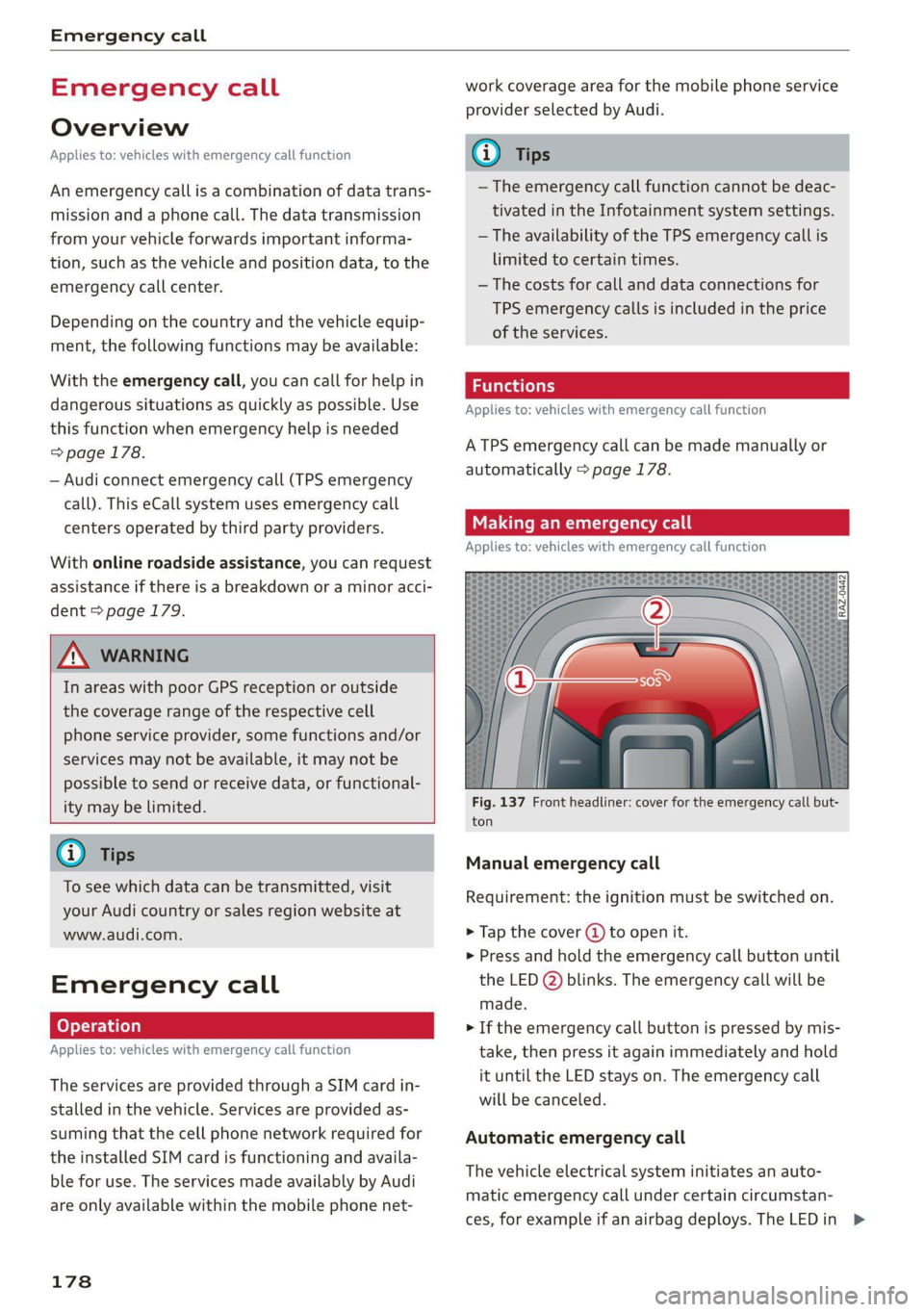
Fig. 137 Front headliner: cover for the emergency call but-
ton
Manual emergency call
Requirement: the ignition must be switched on.
> Tap the cover (J) to open it.
> Press and hold the emergency call button until
the LED @) blinks. The emergency call will be
made.
> If the emergency call button is pressed by mis-
take, then press it again immediately and hold
it until the LED stays on. The emergency call
will be canceled.
Automatic emergency call
The vehicle electrical system initiates an auto-
matic emergency call under certain circumstan-
ces, for example if an airbag deploys. The LEDin >
Page 276 of 304
Fuses and bulbs
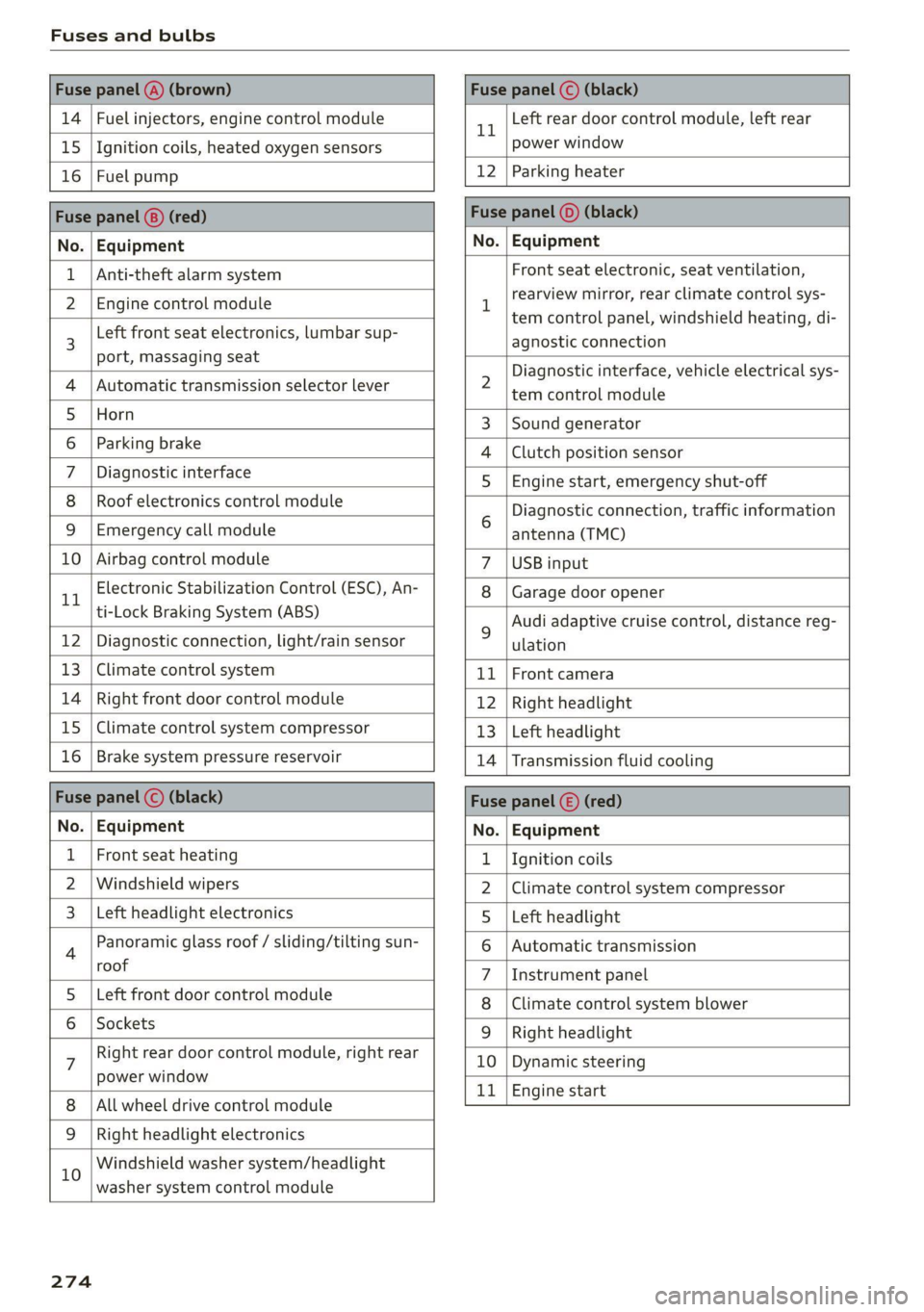
Fuse panel @) (brown) Fuse panel (© (black)
14 | Fuel injectors, engine control module 11 Left rear door control module, left rear
15 |Ignition coils, heated oxygen sensors power window
16 | Fuel pump 12 | Parking heater
Fuse panel (®) (red) Fuse panel (0) (black)
No. | Equipment No. | Equipment
Anti-theft alarm system
Front seat electronic, seat ventilation,
rearview mirror, rear climate control sys-
tem control panel, windshield heating, di-
agnostic connection
2 Diagnostic interface, vehicle electrical sys-
tem control module
3 |Sound generator
4 |Clutch position sensor
5S |Engine start, emergency shut-off
6 Diagnostic connection, traffic information
antenna (TMC)
7 |USB input
8 |Garage door opener
9 Audi adaptive cruise control, distance reg-
ulation
11 | Front camera
12 | Right headlight
13 | Left headlight
14 | Transmission fluid cooling
Fuse panel (©) (red)
No. | Equipment
1 {Ignition coils
2 |Climate control system compressor
S |Left headlight
6 |Automatic transmission
7 |Instrument panel
8 | Climate control system blower
9 |Right headlight
10 | Dynamic steering
11 | Engine start
2 | Engine control module
3 Left front seat electronics, lumbar sup-
port, massaging seat
4 | Automatic transmission selector lever
5 |Horn
6 |Parking brake
7 | Diagnostic interface
8 | Roof electronics control module
9 |Emergency call module
10 | Airbag control module
11 Electronic Stabilization Control (ESC), An-
ti-Lock Braking System (ABS)
12 | Diagnostic connection, light/rain sensor
13 | Climate control system
14 | Right front door control module
15 | Climate control system compressor
16 | Brake system pressure reservoir
Fuse panel (©) (black)
No. | Equipment
Front seat heating
2 |Windshield wipers
Left headlight electronics
4 Panoramic glass roof / sliding/tilting sun-
roof
5 |Left front door control module
6 | Sockets
7 Right rear door control module, right rear
power window
All wheel drive control module
9 | Right headlight electronics
10 Windshield washer system/headlight
washer system control module
274
Page 277 of 304
8W1012721BC
Fuses and bulbs
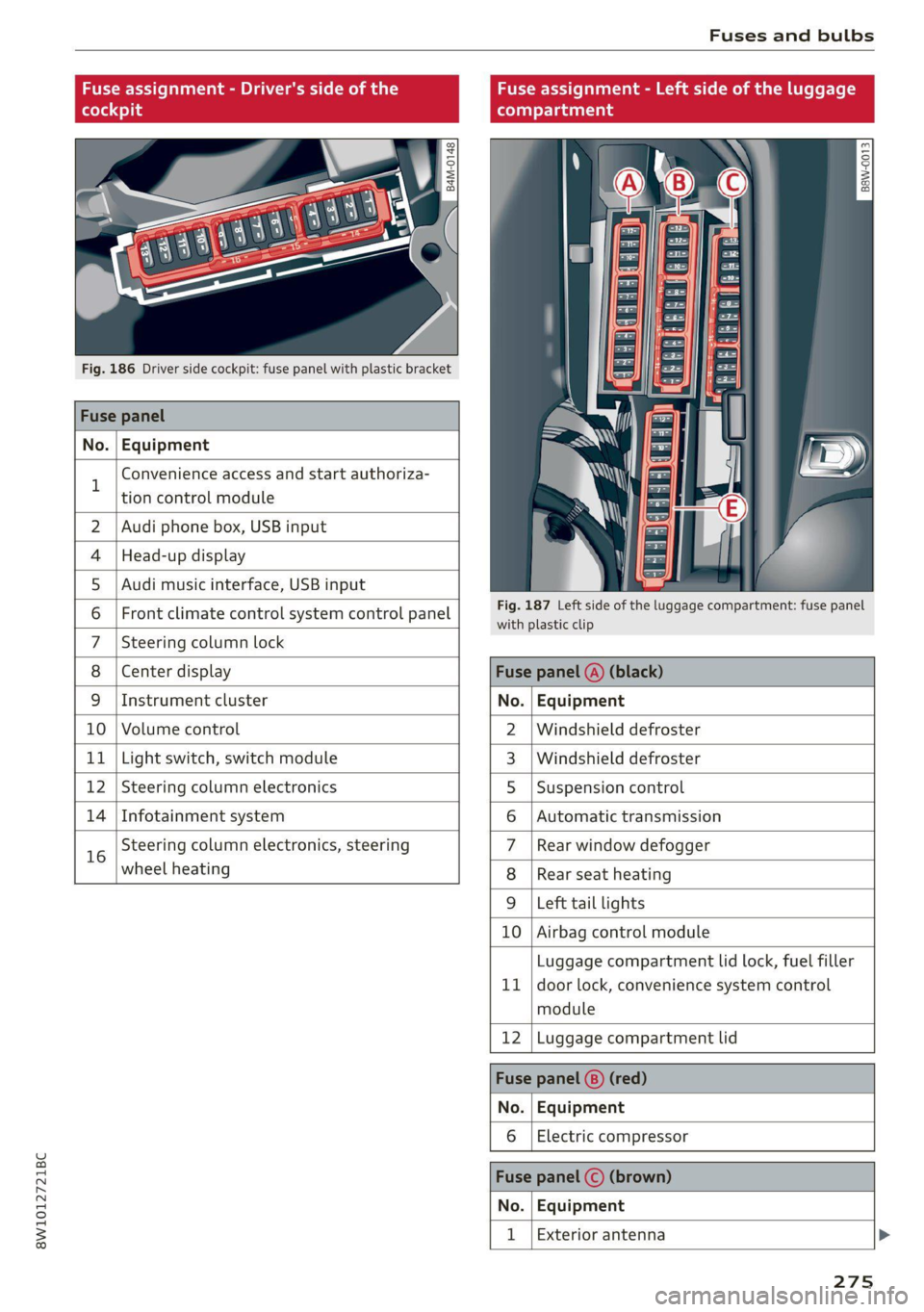
Fuse assignment - Driver's side of the
(ole 4o)ig
Fig. 186 Driver side cockpit: fuse panel with plastic bracket
Fuse panel
No. Equipment
B
Convenience access and start authoriza-
tion control module
Fuse assignment - Left side of the luggage
compartment
GU -
|_8aw-0013]
2 | Audi phone box, USB input
4 |Head-up display
5 |Audi music interface, USB input
6 | Front climate control system control panel eet ofihe uagage compartment: fuse panel
7 |Steering column lock
8 |Center display Fuse panel @) (black)
9 |Instrument cluster No. | Equipment
10 | Volume control 2 |Windshield defroster
11 | Light switch, switch module 3 |Windshield defroster
12 | Steering column electronics 5 |Suspension control
14 | Infotainment system 6 |Automatic transmission
16 Steering column electronics, steering 7 |Rear window defogger
wheel heating 8 |Rear seat heating
9 |Left tail lights
10 Airbag control module
ig
Luggage compartment lid lock, fuel filler
door lock, convenience system control
module
12 Luggage compartment lid
Fuse panel @) (red)
No. Equipment
Electric compressor
Fuse panel (©) (brown)
No. Equipment
Exterior antenna
275
Page 278 of 304
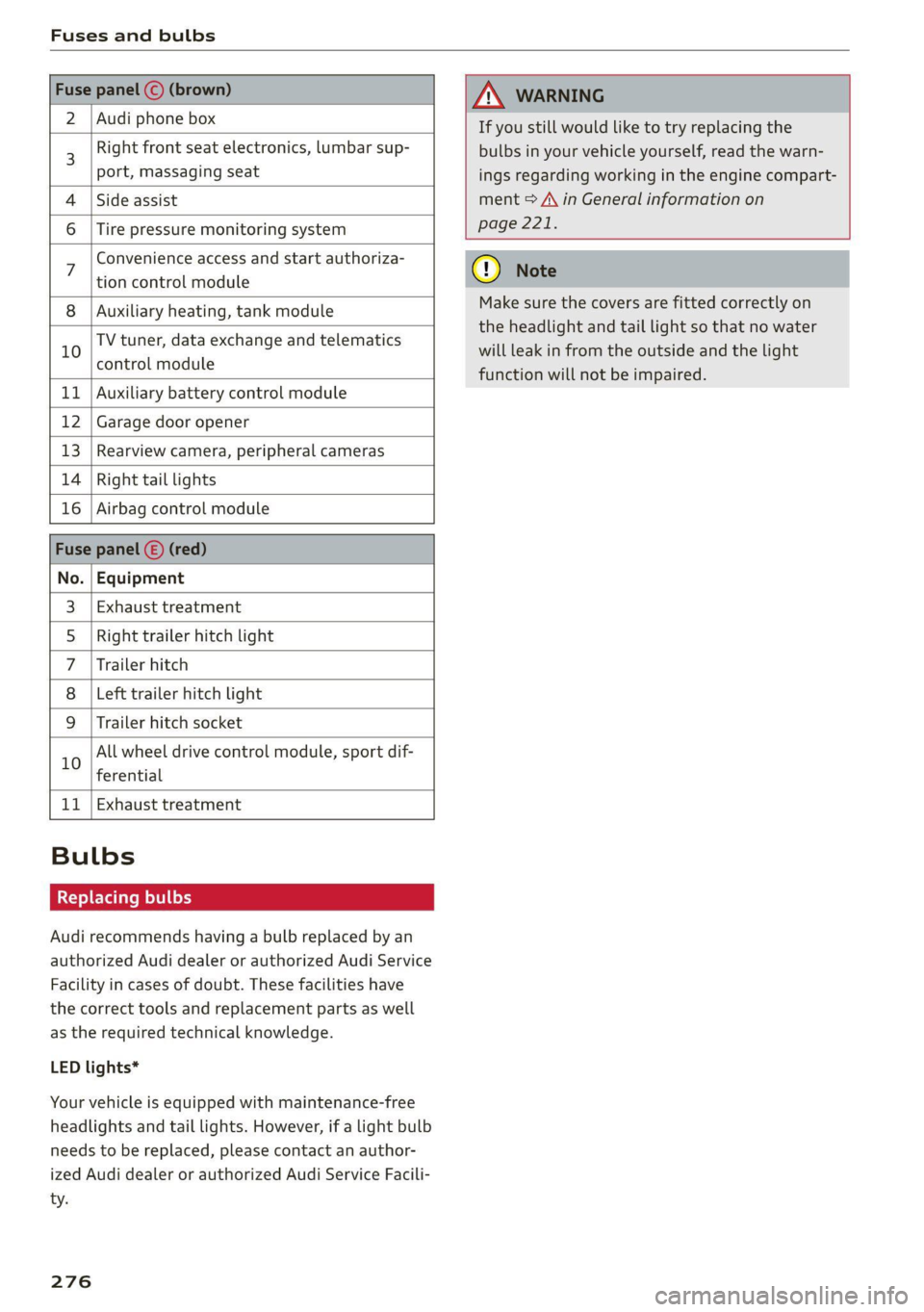
Fuses and bulbs
2 | Audi phone box
Right front seat electronics, lumbar sup-
port, massaging seat
4 |Side assist
6 |Tire pressure monitoring system
Convenience access and start authoriza-
tion control module
8 | Auxiliary heating, tank module
TV tuner, data exchange and telematics
10 control module
11 | Auxiliary battery control module
12 | Garage door opener
13 | Rearview camera, peripheral cameras
14 | Right tail lights
16 | Airbag control module
No. | Equipment
Exhaust treatment
Right trailer hitch light
Trailer hitch
Left trailer hitch light
Trailer hitch socket
WO)
O};N]/
Mm|
Ww
All wheel drive control module, sport dif-
10
ferential
11 | Exhaust treatment
Bulbs
Replacing bulbs
Audi recommends having a bulb replaced by an
authorized Audi dealer or authorized Audi Service
Facility in cases of doubt. These facilities have
the correct tools and replacement parts as well
as the required technical knowledge.
LED lights*
Your vehicle is equipped with maintenance-free
headlights and tail lights. However, if a light bulb
needs to be replaced, please contact an author-
ized Audi dealer or authorized Audi Service Facili-
ty.
276
If you still would like to try replacing the
bulbs in your vehicle yourself, read the warn-
ings regarding working in the engine compart-
ment > A\ in General information on
page 221.
Make sure the covers are fitted correctly on
the headlight and tail light so that no water
will leak in from the outside and the light
function will not be impaired.
Page 279 of 304

8W1012721BC
Data privacy
Data privacy
Privacy
notice
You can find information about responsibility for
data protection in the MMI.
Applies to: MMI: Select on the home screen: SET-
TINGS > General > Legal notes > About Audi
connect.
Image recording
Surrounding area monitoring
Applies to: vehicles with surrounding area monitoring
Some vehicle functions require the vehicle’s path
to be detected and evaluated. This is done by
cameras installed permanently on the vehicle
that detect objects in the vehicle's surroundings
(such as obstacles or guard rails). The live images
from the cameras are transmitted to the applica-
ble control module.
The camera images are transmitted to the appli-
cable control module and stored for processing.
The control module analyzes the current camera
image using image evaluation software. This im-
age evaluation software detects anonymized
technical measurements, such as distances to ob-
jects. The control module evaluates these techni-
cal measurements and makes it possible for the
assist systems to control the vehicle, if necessary.
Data memories
~ 3. o
g| =z x a.
Fig. 188 Driver's side footwell: connection port for the On
Board Diagnostic System (OBD)
Your vehicle is equipped with electronic control
modules for various vehicle systems such as the
airbags. These vehicle control modules store data
while driving normally that is required by an au-
thorized Audi dealer or authorized Audi Service
Facility for diagnosis and repair purposes. Only
certain types of data are recorded for a very short
period of time if a control module has detected a
system event. No noises, conversations, or im-
ages will be recorded in the vehicle.
The data may include information such as the ve-
hicle speed, the direction of travel, and informa-
tion about the brake system, or also the behavior
of the restraint system in the event of an acci-
dent. The stored data can be exported and down-
loaded with special devices, which must be con-
nected directly to the vehicle.
On Board Diagnostic System (OBD)
There is a diagnostic connector socket in the driv-
er's side footwell to read out the various control
modules and the event data recorder. Data re-
garding the function and condition of the elec-
tronic control modules is stored in the event
memory. Only have an authorized Audi dealer or
authorized Audi Service Facility read out and de-
lete the event memory.
ZX WARNING
— Incorrect use of the connection port for the
On Board Diagnostic System can cause mal-
functions, which can then result in accidents
and serious injuries.
— Only allow an authorized Audi dealer or au-
thorized Audi Service Facility to read out the
engine data.
ash data recorder
Event Data Recorder
This vehicle is equipped with an Event Data Re-
corder (EDR). The main purpose of an EDR is to
record, in certain crash or near crash-like situa-
tions,
such as an airbag deployment or hitting a
road obstacle, data that will assist in understand-
ing how a vehicle's system performed. The EDR is
designed to record data related to vehicle dynam-
ics and safety systems for a short period of time,
typically 30 seconds or less. The EDR in this vehi-
cle is designed to record such data as:
277
Page 284 of 304
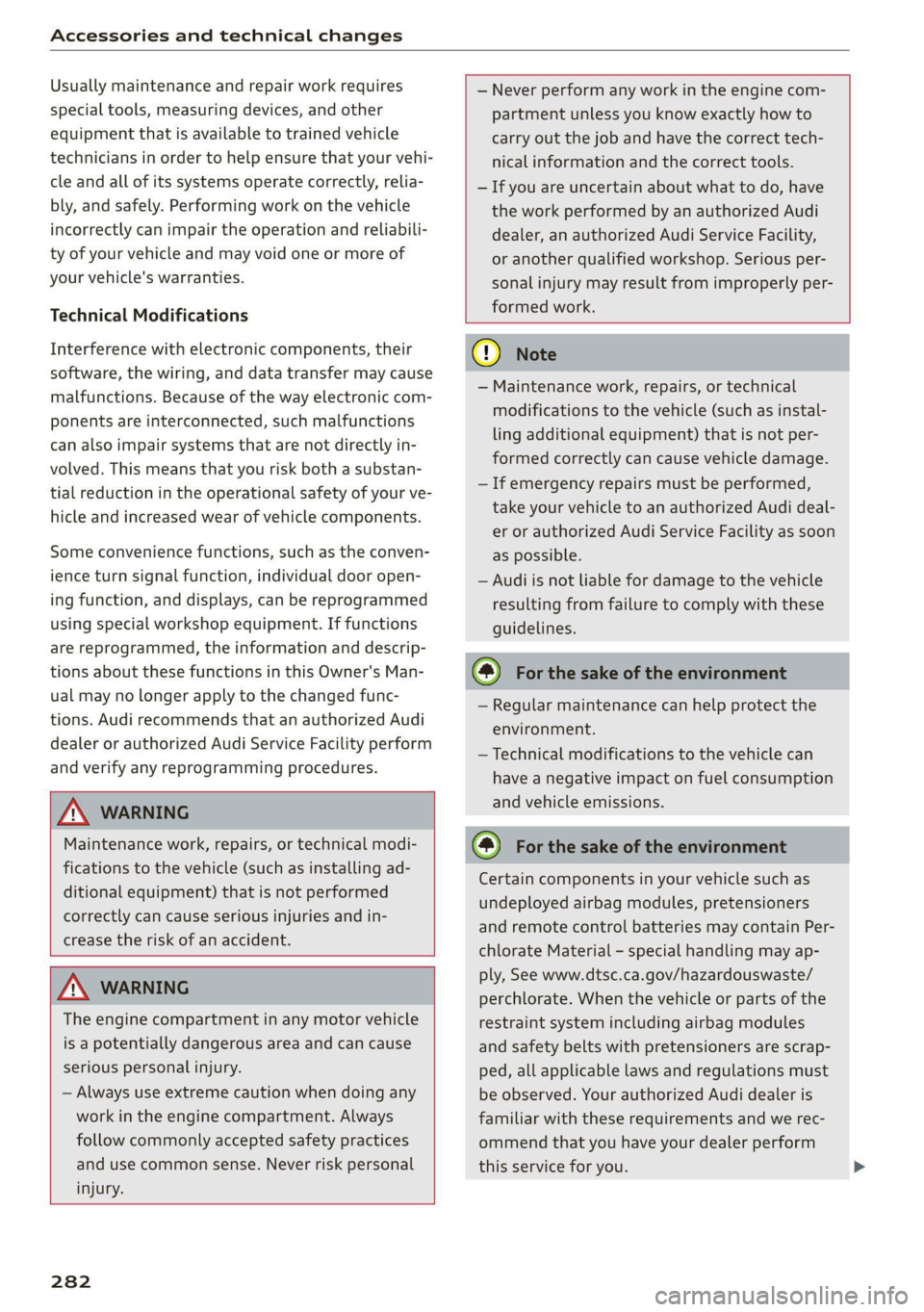
Accessories and technical changes
Usually maintenance and repair work requires
special tools, measuring devices, and other
equipment that is available to trained vehicle
technicians in order to help ensure that your vehi-
cle and all of its systems operate correctly, relia-
bly, and safely. Performing work on the vehicle
incorrectly can impair the operation and reliabili-
ty of your vehicle and may void one or more of
your vehicle's warranties.
Technical Modifications
Interference with electronic components, their
software, the wiring, and data transfer may cause
malfunctions. Because of the way electronic com-
ponents are interconnected, such malfunctions
can also impair systems that are not directly in-
volved. This means that you risk both a substan-
tial reduction in the operational safety of your ve-
hicle and increased wear of vehicle components.
Some convenience functions, such as the conven-
ience turn signal function, individual door open-
ing function, and displays, can be reprogrammed
using special workshop equipment. If functions
are reprogrammed, the information and descrip-
tions about these functions in this Owner's Man-
ual may no longer apply to the changed func-
tions. Audi recommends that an authorized Audi
dealer or authorized Audi Service Facility perform
and verify any reprogramming procedures.
— Never perform any work in the engine com-
partment unless you know exactly how to
carry out the job and have the correct tech-
nical information and the correct tools.
— If you are uncertain about what to do, have
the work performed by an authorized Audi
dealer, an authorized Audi Service Facility,
or another qualified workshop. Serious per-
sonal injury may result from improperly per-
formed work.
ZA\ WARNING
Maintenance work, repairs, or technical modi-
fications to the vehicle (such as installing ad-
ditional equipment) that is not performed
correctly can cause serious injuries and in-
crease the risk of an accident.
Z\ WARNING
The engine compartment in any motor vehicle
is a potentially dangerous area and can cause
serious personal injury.
— Always use extreme caution when doing any
work in the engine compartment. Always
follow commonly accepted safety practices
and use common sense. Never risk personal
injury.
282
@) Note
— Maintenance work, repairs, or technical
modifications to the vehicle (such as instal-
ling additional equipment) that is not per-
formed correctly can cause vehicle damage.
— If emergency repairs must be performed,
take your vehicle to an authorized Audi deal-
er or authorized Audi Service Facility as soon
as possible.
— Audi is not liable for damage to the vehicle
resulting from failure to comply with these
guidelines.
@) For the sake of the environment
— Regular maintenance can help protect the
environment.
— Technical modifications to the vehicle can
have a negative impact on fuel consumption
and vehicle emissions.
@) For the sake of the environment
Certain components in your vehicle such as
undeployed airbag modules, pretensioners
and remote control batteries may contain Per-
chlorate Material - special handling may ap-
ply, See www.dtsc.ca.gov/hazardouswaste/
perchlorate. When the vehicle or parts of the
restraint system including airbag modules
and safety belts with pretensioners are scrap-
ped, all applicable laws and regulations must
be observed. Your authorized Audi dealer is
familiar with these requirements and we rec-
ommend that you have your dealer perform
this service for you.
Page 290 of 304

Index
Numbers and
Symbols
3-zone deluxe automatic climate control.... 91
A
A/G.cooling MOde:. 6 « vice a 6 assis av arene «ow 91
A/C system refrigerant oil............00. 287
Accelerator pedals ¢ wes 2 naan ox news s crew 99
also refer to Accelerator pedal........... 99
AGCOSSOMIES « sresis as isso 4 o ansnine ao atowen 8 He 283
Active lane assist
refer to Audi active lane assist.......... 141
Adaptive cruise control................. 130
Adaptive dampers...............0.-005 111
Adjusting air distribution (automatic climate
control system) ................0 eee eee 92
Adjusting the brightness................. 55
Adjusting the sound..............-..00- 212
Adjusting the temperature (automatic climate
control system) ......... 0.0.00 cee eee eee 92
Adjusting the volume.............0 eee ee 29
Adjusting the volume (announcements).... 212
Adjusting the welcome sound............ 212
Airbag’system . « sss 5 sees se een se cee ee 71
Alarm system
refer to Anti-theft alarm system.......... 36
Alignment pin (changing the wheel)....... 261
All-weather lights...............-.000005 51
AS@ASON tifeSmman: + » swe se meee s Hee Be 250
All wheel drive
refer toquatto sews s ween ss ween as wens 112
Amazon Alexa integration
Media:playback:. jo sscee oo cise a enero oo 202
Operating...............0..0..0.0000. 27
AMI
refer to Audi music interface........... 202
Android Auto
refer to Audi smartphone interface...... 210
Anti-lock braking system............0005 113
Anti-Slip Regulation.................05. 113
Anti-theft alarm system...........-...04. 36
Apple CarPlay
refer to Audi smartphone interface...... 210
288
ASR
refer to Anti-Slip Regulation............
Audi active lane assist...............005
Cleaning the camera area..............
Audi adaptive cruise control
Cleaning the sensors...............005
Predictive control..............000005
Traffic jam assistwax < » sees ss eeee ss eens
Audi adaptive light..............--..00-.
Audi connect
TEfEFLO CONNEC: « = ewan ss news ss Hea Fs
AUdidrive SeleCt ws s y oem s i ween ya eee 4
Audi music interface..............0000-
Audio files........ 0.00.00 cece eee eee
Safety measures... ...... eee eee e wees
Audi side assist
refer to Side assist............-..000-5
Audi smartphone interface..............
Legal information...................5
Audi virtual cockpit
refer to Instrument cluster..............
AUTO
Automatic climate control system........
Automatic headlights ..................
Auto Lock (central locking) ...............
Automatic climate control system.........
Automatic luggage compartment lid....
Automatic transmission............-...05
Automatic wipe/wash system.............
Average consumption...................
Average speed... 0... ee eee eee eee
B
Bag hooks........ 2.52.
Band
refer to Frequency band...............