transmission AUDI A4 2021 Owner´s Manual
[x] Cancel search | Manufacturer: AUDI, Model Year: 2021, Model line: A4, Model: AUDI A4 2021Pages: 304, PDF Size: 107.89 MB
Page 276 of 304
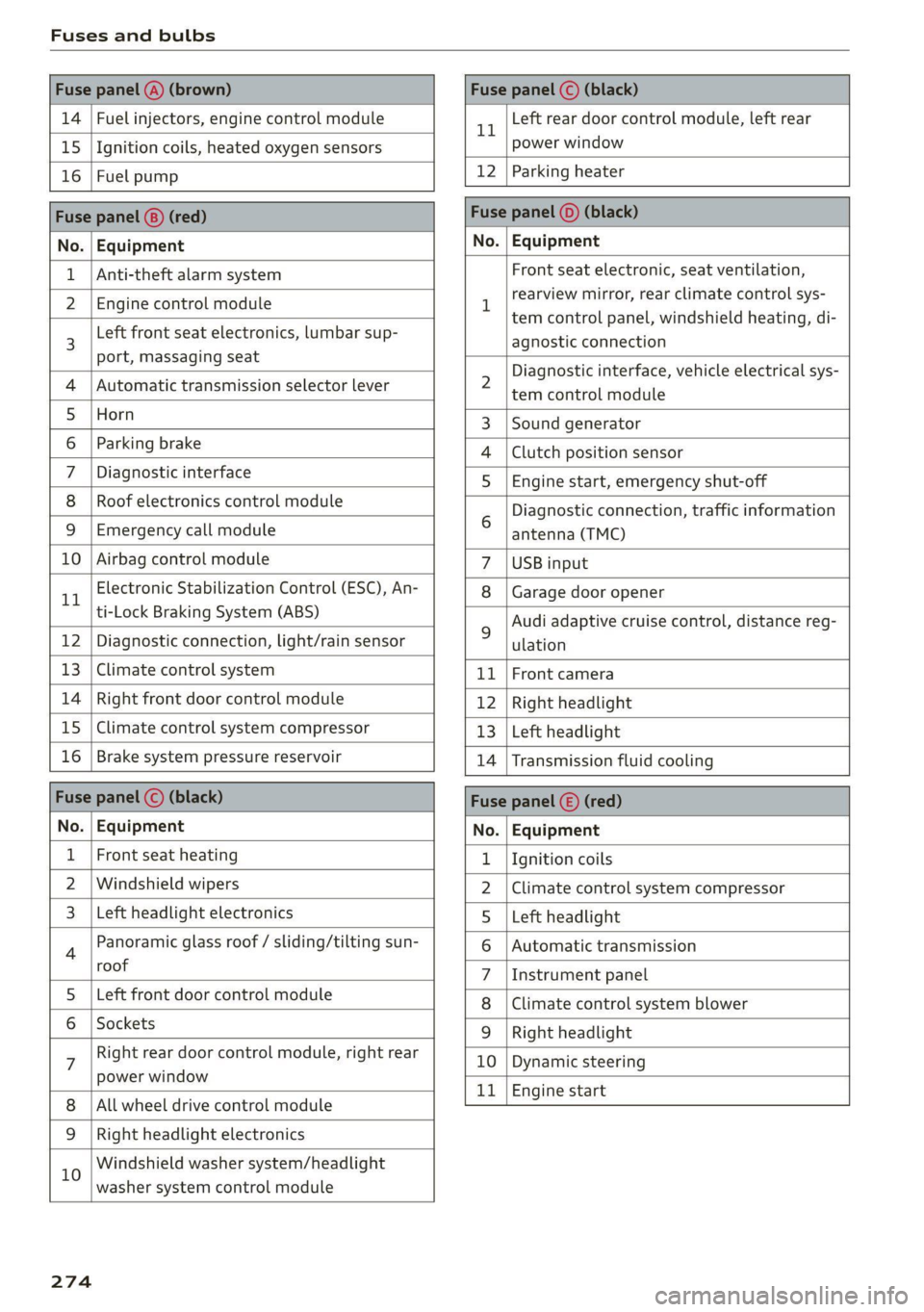
Fuses and bulbs
Fuse panel @) (brown) Fuse panel (© (black)
14 | Fuel injectors, engine control module 11 Left rear door control module, left rear
15 |Ignition coils, heated oxygen sensors power window
16 | Fuel pump 12 | Parking heater
Fuse panel (®) (red) Fuse panel (0) (black)
No. | Equipment No. | Equipment
Anti-theft alarm system
Front seat electronic, seat ventilation,
rearview mirror, rear climate control sys-
tem control panel, windshield heating, di-
agnostic connection
2 Diagnostic interface, vehicle electrical sys-
tem control module
3 |Sound generator
4 |Clutch position sensor
5S |Engine start, emergency shut-off
6 Diagnostic connection, traffic information
antenna (TMC)
7 |USB input
8 |Garage door opener
9 Audi adaptive cruise control, distance reg-
ulation
11 | Front camera
12 | Right headlight
13 | Left headlight
14 | Transmission fluid cooling
Fuse panel (©) (red)
No. | Equipment
1 {Ignition coils
2 |Climate control system compressor
S |Left headlight
6 |Automatic transmission
7 |Instrument panel
8 | Climate control system blower
9 |Right headlight
10 | Dynamic steering
11 | Engine start
2 | Engine control module
3 Left front seat electronics, lumbar sup-
port, massaging seat
4 | Automatic transmission selector lever
5 |Horn
6 |Parking brake
7 | Diagnostic interface
8 | Roof electronics control module
9 |Emergency call module
10 | Airbag control module
11 Electronic Stabilization Control (ESC), An-
ti-Lock Braking System (ABS)
12 | Diagnostic connection, light/rain sensor
13 | Climate control system
14 | Right front door control module
15 | Climate control system compressor
16 | Brake system pressure reservoir
Fuse panel (©) (black)
No. | Equipment
Front seat heating
2 |Windshield wipers
Left headlight electronics
4 Panoramic glass roof / sliding/tilting sun-
roof
5 |Left front door control module
6 | Sockets
7 Right rear door control module, right rear
power window
All wheel drive control module
9 | Right headlight electronics
10 Windshield washer system/headlight
washer system control module
274
Page 277 of 304
8W1012721BC
Fuses and bulbs
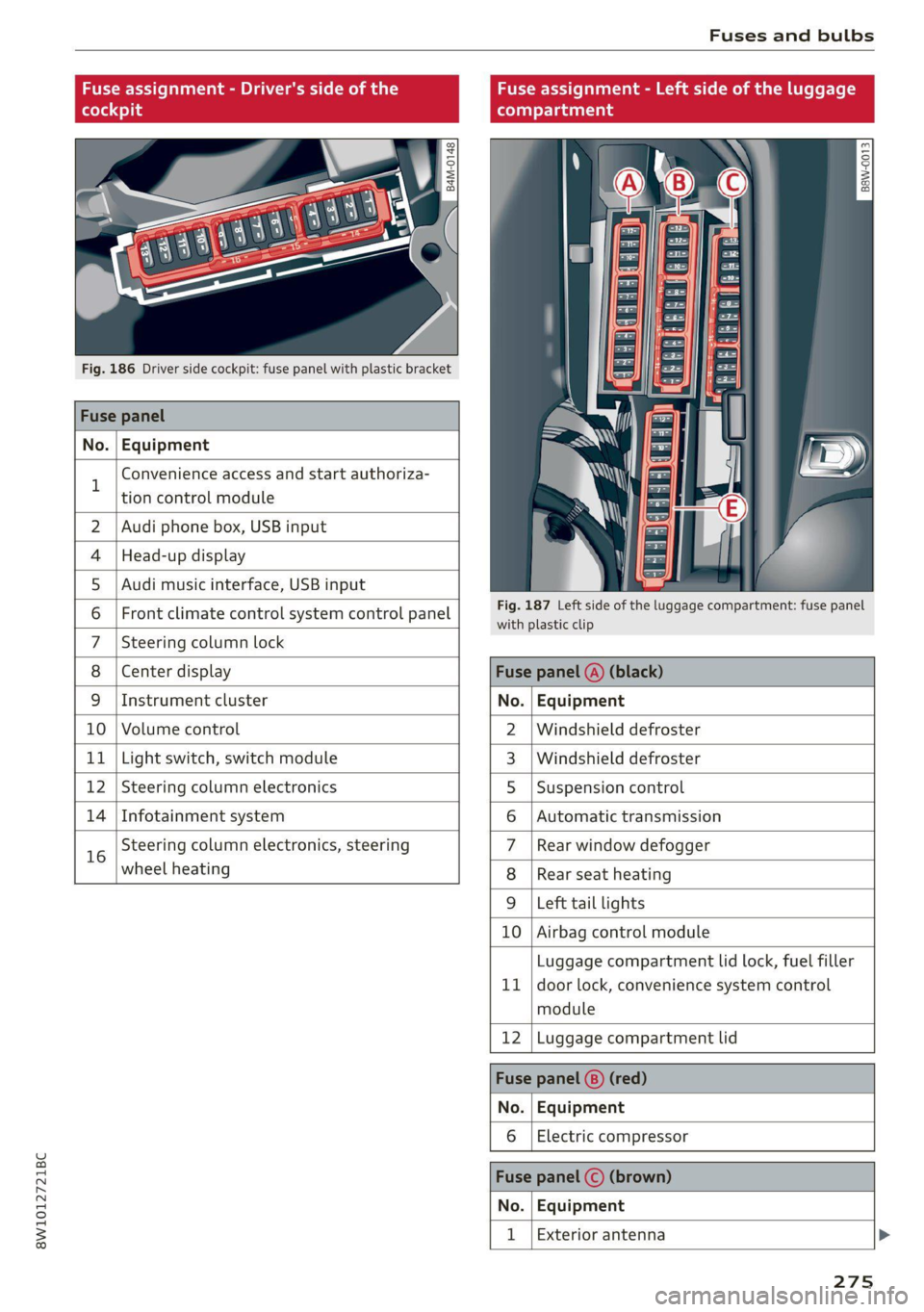
Fuse assignment - Driver's side of the
(ole 4o)ig
Fig. 186 Driver side cockpit: fuse panel with plastic bracket
Fuse panel
No. Equipment
B
Convenience access and start authoriza-
tion control module
Fuse assignment - Left side of the luggage
compartment
GU -
|_8aw-0013]
2 | Audi phone box, USB input
4 |Head-up display
5 |Audi music interface, USB input
6 | Front climate control system control panel eet ofihe uagage compartment: fuse panel
7 |Steering column lock
8 |Center display Fuse panel @) (black)
9 |Instrument cluster No. | Equipment
10 | Volume control 2 |Windshield defroster
11 | Light switch, switch module 3 |Windshield defroster
12 | Steering column electronics 5 |Suspension control
14 | Infotainment system 6 |Automatic transmission
16 Steering column electronics, steering 7 |Rear window defogger
wheel heating 8 |Rear seat heating
9 |Left tail lights
10 Airbag control module
ig
Luggage compartment lid lock, fuel filler
door lock, convenience system control
module
12 Luggage compartment lid
Fuse panel @) (red)
No. Equipment
Electric compressor
Fuse panel (©) (brown)
No. Equipment
Exterior antenna
275
Page 280 of 304

Data privacy
— How various systems in your vehicle were oper-
ating;
— Whether or not the driver and passenger safety
belts were buckled/fastened;
— How far (if at all) the driver was depressing the
accelerator and/or brake pedal; and,
— How fast the vehicle was traveling.
These data can help provide a better understand-
ing of the circumstances in which crashes and in-
juries occur. NOTE: EDR data are recorded by your
vehicle only if a non-trivial crash situation occurs;
no data are recorded by the EDR under normal
driving conditions and no personal data (e.g.
name, gender, age, and crash location) are re-
corded. However, other parties, such as law en-
forcement, could combine the EDR data with the
type of personally identifying data routinely ac-
quired during a crash investigation.
To read data recorded by an EDR, special equip-
ment is required, and access to the vehicle or the
EDR is needed. In addition to the vehicle manu-
facturer, other parties, such as law enforcement,
that have the special equipment, can read the in-
formation if they have access to the vehicle or the
EDR.
Data usage
Audi can read out the information stored in the
data memories or similar data, or give this infor-
mation to third parties, especially in the follow-
ing situations:
— If the vehicle owner or lessee agrees
— If there is an official request from the police
— Ifa court or authorities request it
If legally permitted, Audi can also use the data
for analysis of vehicle operation and safety per-
formance or provide this data to third parties for
research purposes.
Transmitted information
Data collection
Applies to: vehicles with data collection
Depending on the country, Audi may collect data
for the following purposes, for example: offer
and product optimization, public safety, provision
278
of Audi connect remote vehicle services, and
adaptation to customer expectations. For exam-
ple, various technical function data, environmen-
tal data, driving data, and usage data will be col-
lected for a specific purpose and forwarded to
Audi. The data will be sent from the vehicle at
the time the data was collected.
Applies to: MMI: You can find additional informa-
tion about data collection in the MMI. Select on
the home screen: SETTINGS > General > Legal
notes > About Audi connect.
If you would like to deny data transmission to
Audi, contact an authorized Audi dealer or au-
thorized Audi Service Facility for more informa-
tion. You also have the option to deactivate data
transmission within the privacy settings.
aE La ata ae)
Applies to: vehicles with Audi connect
> Applies to MMI: Select on the home screen:
SETTINGS > Privacy settings.
When using Audi connect services or during data
collection, data will be transmitted from the ve-
hicle.
> To display additional information about the pri-
vacy settings and the associated symbols in the
status bar, press @ in the MMI.
Requirement: the ignition must be switched on.
Setting the maximum privacy settings
When the Activate privacy mode function is
switched on, the data connection is deactivated
or sending of data is restricted, but all safety-re-
lated, legal, or contractually required Audi con-
nect services remain activated. The majority of
the Audi connect services are deactivated.
When the function is switched off, the data con-
nection will be available in order to use Audi con-
nect
services.
Adjusting individual privacy settings
In the MMI, you can adjust individually which da-
ta should be transmitted from the vehicle. If you
switch on a data category, the data will be trans-
mitted.
Page 281 of 304
8W1012721BC
Data privacy
You can also deactivate individual services for
your vehicle at my.audi.com if you are logged into
the vehicle as the key user > page 30. These de-
activated services will not be available in the ve-
hicle. For additional information, visit my.audi.
com.)
@) Note
You are responsible for all precautions taken
for data protection, anti-virus protection, and
protection against loss of data on mobile de-
vices that are used to access the Internet
through the Wi-Fi hotspot.
@ Tips
— The following interfaces are not affected by
changes to the privacy settings: Bluetooth,
Bluetooth Low Energy (BLE), Wi-Fi, Audi
smartphone interface (ASI), Near Field
Communication (NFC), charging communi-
cation (high-voltage system), Electronic Toll
Collect (ETC), On-Board Diagnostic System
(OBD) if equipped.
— If the maximum privacy settings are switch-
ed on, your vehicle may not receive security
updates and certificates for establishing an
encrypted connection, depending on vehicle
equipment. In order to receive security up-
dates and certificates, switch the maximum
privacy settings off for at least ten minutes
every six months. Make sure that your vehi-
cle is connected to the Internet. A symbol in
the MMI status bar indicates if the required
data connection is available > page 22.
— If the transmission of data is limited, it will
have the following effects on the exchange
of data for Audi connect services and emer-
gency calls, if equipped:
— The emergency call function will remain
available without restrictions and will con-
tinue to transmit data.
— If an online roadside assistance call is ini-
tiated, no data will be transmitted, but a
call will be made.
— If the Geofencing Alert, Speed Alert,
and/or Valet Alert services have been acti-
D In certain countries
vated by the key user, then they will re-
main available without restrictions and
continue to transmit data.
— Stored destinations (favorites, last desti-
nations) are only stored in the vehicle. If
you allow transmission of data again,
these destinations will be synchronized via
the myAudi account. To prevent synchroni-
zation of destinations, delete the destina-
tions before you allow data to be trans-
mitted again.
Applies to: vehicles with Audi connect Infotainment
Audi collects, uses, stores and shares your per-
sonal information, such as contact data, vehicle
data, usage data, driving data and precise geolo-
cation, in order to provide you with the products
and services you have purchased or requested,
and for a number of other purposes, for example,
to track quality issues, to performance and safe-
ty, to meet our internal compliance or legal re-
quirements and to market to customers and po-
tential customers. For a more complete list of
the data we collect, how we use it and with
whom we share it, please visit your Audi nation-
al/sales region website at www.audi.com.
The collection, use and sharing may vary depend-
ing on your model and model year, your subscrip-
tion status, or the service offering. For example,
collection, use and sharing may vary between
Audi connect services, if you have designated a
key user, or if you are driving a model equipped
with persistent data logging. Please review the
complete Privacy Statement to understand our
data handling practices with respect to a particu-
lar service.
You can find additional information about our da-
ta privacy practices in your MMI.
> Applies to: MMI: On the home screen, select:
SETTINGS > General > Legal notes > About
Audi connect.
Information about our privacy practices in con-
junction with the mobile Audi connect
279
Page 288 of 304
![AUDI A4 2021 Owner´s Manual Technical data
Technical data
Identification data
Vehicle data label
—S>SSESESES>S>S>E>E>>—s FA
WOOK X-XOK KKK)
(Hae osccn XX x XXKKKNKK
Fim = YXX XXX
27] XX XXXXXXX XX. X.X XX
XXX](/img/6/40260/w960_40260-287.png "AUDI A4 2021 Owner´s Manual Technical data
Technical data
Identification data
Vehicle data label
—S>SSESESES>S>S>E>E>>—s FA
WOOK X-XOK KKK)
(Hae osccn XX x XXKKKNKK
Fim = YXX XXX
27] XX XXXXXXX XX. X.X XX
XXX")
Technical data
Technical data
Identification data
Vehicle data label
—S>SSESESES>S>S>E>E>>—s FA
WOOK X-XOK KKK)
(Hae osccn XX x XXKKKNKK
Fim = YXX XXX
27] XX XXXXXXX XX. X.X XX
XXX KW x
(3)—-Wwoee / GER. 1B
ENG. CODE / TRANS. CODE
XX
XXXX XXX XXX
@ i XK XKNK XK XX
EOA 7D5 4UB
2EH JOZ 1LB
3FC
FOA
TL6 3KA
1xXw 8Q3
716 CV7 7KO
34 AKC
1SA 7GB
6XM 5SG 1AS
SMU 7X1
0G7 OYH OJF
U1A X9B QZ7
9Q8
824 D2D
4X3 2K2
3Y0 413
QIA
SRW
1BA
9G3
8EH 6)
5D2
4GQ
et
Fig. 189 Vehicle identification label
The vehicle identification label > fig. 189 is locat-
ed in the luggage compartment under the cargo
floor cover.
The vehicle identification label information can
also be found in the Warranty & Maintenance
booklet.
Vehicle data
The sticker contains the following vehicle data:
@ Vehicle Identification Number (VIN)
@ Vehicle type, engine output, transmission
® Engine and transmission codes
@ Paint and interior codes
© Optional equipment numbers
Vehicle identification number (VIN)
The VIN is located in the following areas:
— Applies to MMI: Select on the home screen: VE-
HICLE > Settings & Service > Vehicle informa-
tion.
— On the vehicle identification label
— At the front behind the windshield*
— Inthe motor compartment on the right side
Notes about technical data
The values may vary based on special equipment
as well as market-specific equipment and meas-
uring methods.
Please note that the specifications listed in the
vehicle documentation always take precedence.
@ Tips
Any technical data that is missing was not
available at the time of printing.
Length (in (mm))
Width (in (mm)) Width across the
mirrors (in (mm))
Height at curb
weight (in (mm))
A4 allroad 187.5 (4,762) 72.7 (1,847) 79.6 (2,022) 58.8 (1,493)
A4 Sedan 187.5 (4,762) 72.7 (1,847) 79.6 (2,022) 56.2 (1,428)
S4 Sedan 187.5 (4,762) 72.7 (1,847) 79.6 (2,022) 56.2 (1,428)
286
Page 290 of 304

Index
Numbers and
Symbols
3-zone deluxe automatic climate control.... 91
A
A/G.cooling MOde:. 6 « vice a 6 assis av arene «ow 91
A/C system refrigerant oil............00. 287
Accelerator pedals ¢ wes 2 naan ox news s crew 99
also refer to Accelerator pedal........... 99
AGCOSSOMIES « sresis as isso 4 o ansnine ao atowen 8 He 283
Active lane assist
refer to Audi active lane assist.......... 141
Adaptive cruise control................. 130
Adaptive dampers...............0.-005 111
Adjusting air distribution (automatic climate
control system) ................0 eee eee 92
Adjusting the brightness................. 55
Adjusting the sound..............-..00- 212
Adjusting the temperature (automatic climate
control system) ......... 0.0.00 cee eee eee 92
Adjusting the volume.............0 eee ee 29
Adjusting the volume (announcements).... 212
Adjusting the welcome sound............ 212
Airbag’system . « sss 5 sees se een se cee ee 71
Alarm system
refer to Anti-theft alarm system.......... 36
Alignment pin (changing the wheel)....... 261
All-weather lights...............-.000005 51
AS@ASON tifeSmman: + » swe se meee s Hee Be 250
All wheel drive
refer toquatto sews s ween ss ween as wens 112
Amazon Alexa integration
Media:playback:. jo sscee oo cise a enero oo 202
Operating...............0..0..0.0000. 27
AMI
refer to Audi music interface........... 202
Android Auto
refer to Audi smartphone interface...... 210
Anti-lock braking system............0005 113
Anti-Slip Regulation.................05. 113
Anti-theft alarm system...........-...04. 36
Apple CarPlay
refer to Audi smartphone interface...... 210
288
ASR
refer to Anti-Slip Regulation............
Audi active lane assist...............005
Cleaning the camera area..............
Audi adaptive cruise control
Cleaning the sensors...............005
Predictive control..............000005
Traffic jam assistwax < » sees ss eeee ss eens
Audi adaptive light..............--..00-.
Audi connect
TEfEFLO CONNEC: « = ewan ss news ss Hea Fs
AUdidrive SeleCt ws s y oem s i ween ya eee 4
Audi music interface..............0000-
Audio files........ 0.00.00 cece eee eee
Safety measures... ...... eee eee e wees
Audi side assist
refer to Side assist............-..000-5
Audi smartphone interface..............
Legal information...................5
Audi virtual cockpit
refer to Instrument cluster..............
AUTO
Automatic climate control system........
Automatic headlights ..................
Auto Lock (central locking) ...............
Automatic climate control system.........
Automatic luggage compartment lid....
Automatic transmission............-...05
Automatic wipe/wash system.............
Average consumption...................
Average speed... 0... ee eee eee eee
B
Bag hooks........ 2.52.
Band
refer to Frequency band...............
Page 299 of 304
8W1012721BC
Removing the caps (wheel bolts)......... 264
ROP alts sass 2 2 mais o eaten w & wee we ONC oe 281
Replacement key........ cece eee eeee eens 37
Replacement parts’ « exw « « ques yo eawes x oe 283
Replacing bulbs a. = ssws st eee ee ewes ees 276
Reporting Safety Defects................ 283
Reverse gear
WEfEF LO GESTS savas sy euaw co wees co wee a 97
Reversible cargo floor..............0000e 88
RIMS 2... eee ee 250
Cleaning = « sss + © seovs 3 & sees to ews ee oe 257
ROUING’s = wanes « ween os woe eo Ree ee BeeE Ye 96
Rolling ability
Electromechanical parking brake........ 106
Transmission idley. . 5 sso + saene oo siecaun oa an 98
Roof
refer to Panoramic glass roof............ 47
Roof load. ...........2.. 020222 e eee eee 287
ROO FAG cece sxcuens ao manor a w amante « oxewemnce «ate 88
also refer to Roof rack..........-...0-4. 88
Route guidance
StOPPING swe = ones ¢ ¥ Hee se carey o 2 SOS 185
also refer to Navigation............... 181
Running direction (tires)..............-. 266
S
Safety beltSies x » saws x 2 uae ¢ ¢ mew 2» REwH 6 2 68
Cleaning.......... 0. ec eee eee eee 258
LOCKING... 6.6.6 c cece eee eee 79
Securing child safety seats.............. 79
Satellite Map seve ss wees 2 o ees 7 e owe es 188
Saving fuel
Energy CONSUMEeMSisscs so sxe v waar a 9 were 16
Recuperation........ 00. c eee eee eee ee 16
Screen
refer to Touch display...............-.. 17
Screwdriver ........ 0.00. cece eee eee 261
Search function
refer to Free text search............... 206
Seat heating............. ee eee eee eee 92
Seats
ACJUStING as: « 2 ems « 2 weaw § § see FE wR Fe 64
Cleaning « « cia se even eo one oo ae oo os 258
Folding the rearseats............... 85, 86
Head feStraints): « sass ¢ « maven ss sane ¢ ¢ ners 67
Memory function « ses + 2 vei se eens see 71
Resetting the position.................. 65
Storing a seat profile...............000. 71
Seat ventilation....................000. 92
Securing the vehicle...............0.-00. 96
Selecting a source (media).............. 203
Selector lever. « o svvne 2 x wos 2 x ames w a anes & 97
Selector lever position
WEPFEPTOLGCATS « sere ao ammraye «a sma omens © 97
Sensors
Coverage areaS... eee eee eee 118
LOGatiOnS =< < sacs ¢ + seem & s wows ey eee 2 119
Service interval display................. 233
SET REAR (button).............00000000e 92
Setting measurement units.............. 212
SettingS ..... 0... eee eee eee eee eee 212
Announcements and tones............. 212
BlUGtOOthis « 2 sss + wese s + wow x 5 Hern gee 213
Daterand time < s ecine « 2 ovens w 5 xneee 3 3 212
Language
Measurement units.................-. 212
Media... .. eee eee eee eee 207
Navigation...........0..0..0.002 eee 191
RadiGiecy: x » swe sv mee 4 e cow & yee £ ee 199
SOUMG rsx « & ssexine 6 1 aveveus wo ecicens o eneN Bo 212
SysteM . 2... ee eee 212
TiMe/ZONCcas « x mewe 7 2 aoe ¢ Hom ae BERR 212
WiItFi OtSPOt eneves oo coevene oe cress wo creer vo 176
Setting the language................... 212
Setting the time's « « saws ve ees ve cee vo 212
Shift paddles-sies < y esas ¢ weeew y ween ss ewe 99
SHGprs « s seams © o EtOH 7c REGS FOE ROR EE ese = 175
Shuffle... 2... eee eee eee 205
Side assist... 0.6... eee eee eee ee 147
Cleaning the sensors...............-.. 256
SIMiGard's sasan 3 4 case ¢ s BGG Te Rew FB eR 174
Sliding/tilting sunroof...............005- 46
Emergency closing...........--+eeeeeee 46
SUMSH AGES swims wa ssanave ox somcene @ x aeauawe ww sean 46
also refer to Panoramic glass roof........ 47
Smart Favorites
pefer to Presets ex « « ewan se een ce eee ee 196
Smartphone
refer to Telephone...........-seeee0e: 162
STOW CHAINS): « 2 qs a 2 ews a @ eee a x ReE x 251
Socket
refer to Power sourceS..........--.20-05 82
297