warning lights AUDI A4 2021 Owner´s Manual
[x] Cancel search | Manufacturer: AUDI, Model Year: 2021, Model line: A4, Model: AUDI A4 2021Pages: 304, PDF Size: 107.89 MB
Page 129 of 304
8W1012721BC
Driver assistance
Driver assistance
Cruise control system
Applies to: vehicles with cruise control system
The cruise control system assists the driver in
maintaining a constant speed above approxi-
mately 15 mph (20 km/h). The system maintains
the desired speed by braking and accelerating.
ZA WARNING
— Always pay attention to the traffic around
your vehicle when the cruise control system
is in operation. As the driver, you are always
responsible for controlling your vehicle
speed and the distance between your vehicle
and
other vehicles.
— For safety reasons, cruise control should not
be used in the city, in stop-and-go traffic, on
winding roads, and when road conditions are
poor (such as ice, fog, gravel, heavy rain,
and conditions that could lead to hydroplan-
ing), because this increases the risk of an ac-
cident.
— Switch the cruise control off temporarily
when driving in turning lanes, highway exits,
or in construction zones.
—To reduce the risk of an accident, you should
only resume the stored speed if it is suitable
for the current traffic conditions.
() Note
Before driving downhill a long distance ona
steep hill, decrease your speed and select a
lower gear. This makes use of the engine brak-
ing effect and reduces the load placed on the
brakes.
@ Tips
The brake lights turn on when the brakes are
applied automatically.
Switching the system on
Applies to: vehicles with cruise control system
BFV-0220
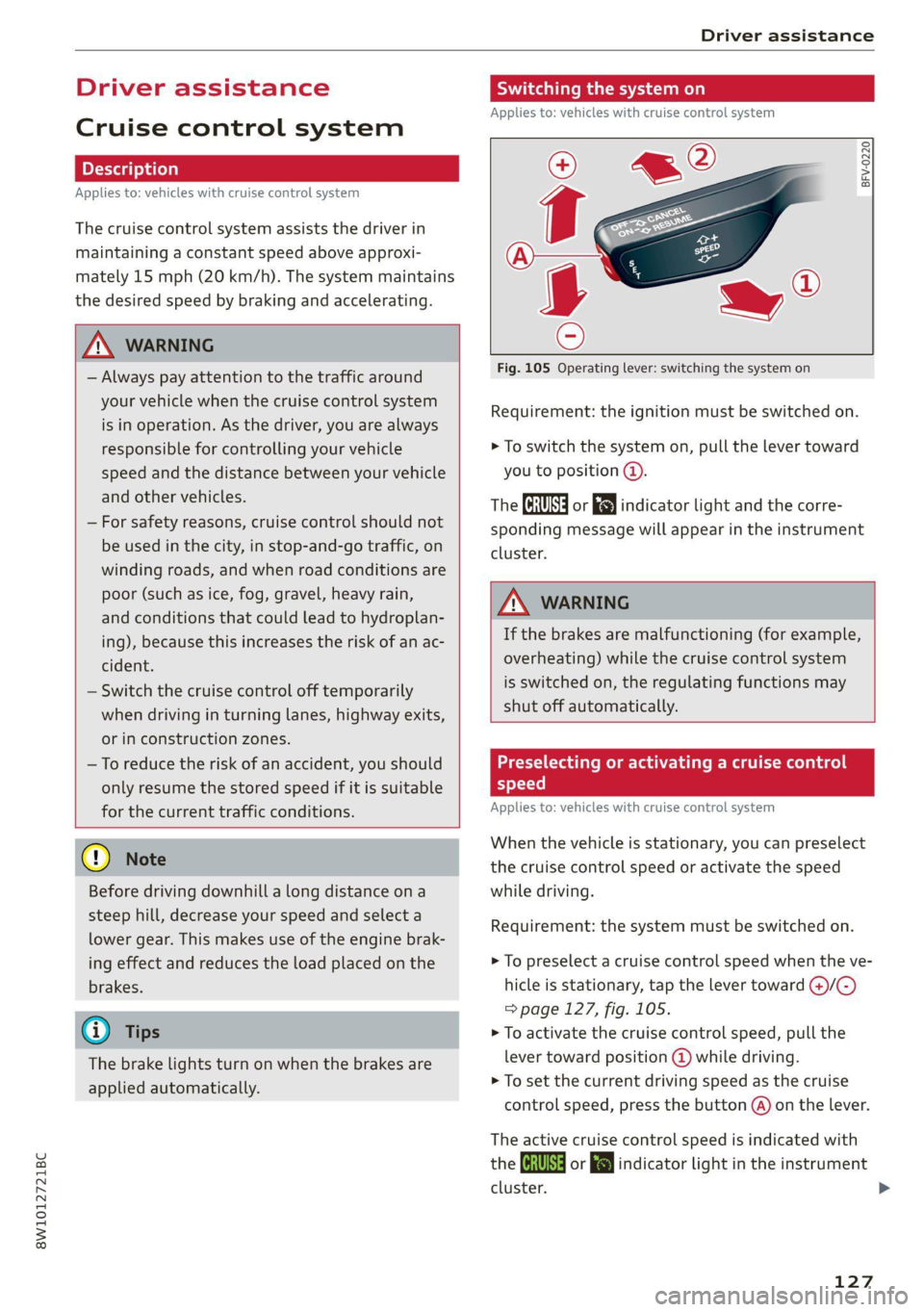
Fig. 105 Operating lever: switching the system on
Requirement: the ignition must be switched on.
> To switch the system on, pull the lever toward
you to position ©.
The Gia or i$) indicator light and the corre-
sponding message will appear in the instrument
cluster.
ZA\ WARNING
If the brakes are malfunctioning (for example,
overheating) while the cruise control system
is switched on, the regulating functions may
shut off automatically.
estate Rem lad lite: Rag ena)
speed
Applies to: vehicles with cruise control system
When the vehicle is stationary, you can preselect
the cruise control speed or activate the speed
while driving.
Requirement: the system must be switched on.
> To preselect a cruise control speed when the ve-
hicle is stationary, tap the lever toward @)/G)
=> page 127, fig. 105.
> To activate the cruise control speed, pull the
lever
toward position @ while driving.
> To set the current driving speed as the cruise
control speed, press the button @) on the lever.
The active cruise control speed is indicated with
the Gg or kl indicator light in the instrument
cluster. >
127
Page 133 of 304
8W1012721BC
Driver assistance
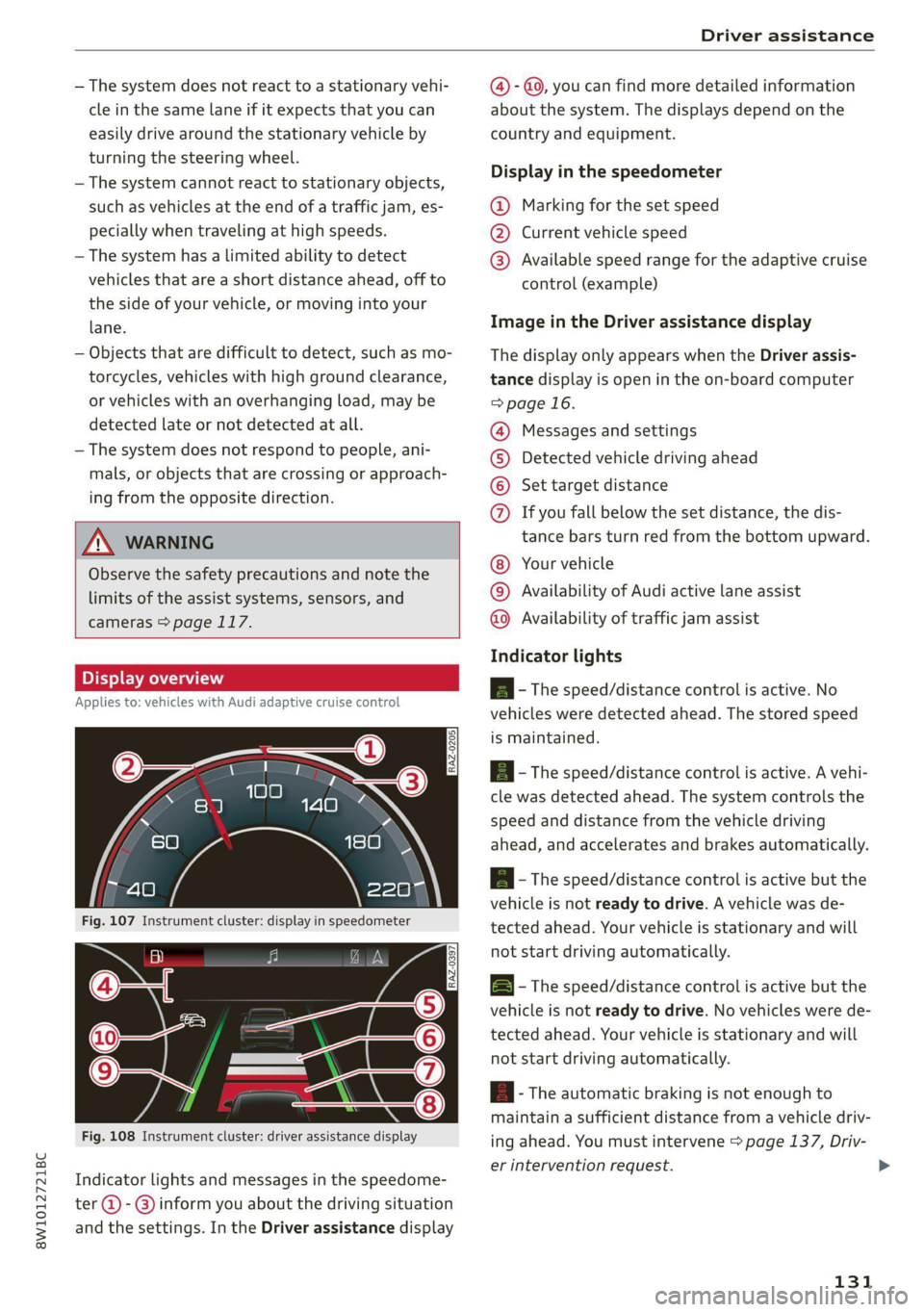
— The system does not react to a stationary vehi- @ - @, you can find more detailed information
cle in the same lane if it expects that you can about the system. The displays depend on the
easily drive around the stationary vehicle by country and equipment.
turning the steering wheel.
— The system cannot react to stationary objects, Display th thespeedsmeter
such as vehicles at the end of a traffic jam, es- @ Marking for the set speed
pecially when traveling at high speeds. @ Current vehicle speed
— The system has a limited ability to detect © Available speed range for the adaptive cruise
vehicles that are a short distance ahead, off to control (example)
the side of your vehicle, or moving into your
iane: Image in the Driver assistance display
— Objects that are difficult to detect, such as mo- The display only appears when the Driver assis-
torcycles, vehicles with high ground clearance, tance display is open in the on-board computer
or vehicles with an overhanging load, may be > page 16.
detected late or not detected at all.
— The system does not respond to people, ani-
mals, or objects that are crossing or approach-
ing from the opposite direction.
Messages and settings
Detected vehicle driving ahead
Set target distance
If you fall below the set distance, the dis-
tance bars turn red from the bottom upward.
ZA WARNING
Observe the safety precautions and note the
limits of the assist systems, sensors, and
cameras > page 117. Your
vehicle
Availability of Audi active lane assist
©O©©OQ®
COG®
Availability of traffic jam assist
Indicator lights
BI alo A - The speed/distance control is active. No
Applies to: vehicles with Audi adaptive cruise control
vehicles were detected ahead. The stored speed
is maintained.
RAZ-0205. a - The speed/distance control is active. A vehi-
cle was detected ahead. The system controls the
speed and distance from the vehicle driving
ahead, and accelerates and brakes automatically.
A - The speed/distance control is active but the
vehicle is not ready to drive. A vehicle was de-
tected ahead. Your vehicle is stationary and will
not start driving automatically. BI 3 9) nN | fac B - The speed/distance control is active but the
vehicle is not ready to drive. No vehicles were de-
tected ahead. Your vehicle is stationary and will
not start driving automatically.
aA - The automatic braking is not enough to
maintain a sufficient distance from a vehicle driv-
Fig. 108 Instrument cluster: driver assistance display ing ahead. You must intervene > page 137, Driv-
er intervention request. >
Indicator lights and messages in the speedome-
ter @ -@ inform you about the driving situation
and the settings. In the Driver assistance display
131
Page 136 of 304
Driver assistance
Messages
If and a message with Predictive control is
displayed when there is a malfunction, the effi-
ciency assist functions are unavailable or limited.
A message that indicates the cause and possible
solution may appear with some displays. The
weather conditions may be too poor or a sensor
may be covered. Clean the area in front of the
sensors > page 119 and try to turn on the sys-
tems again later.
If the malfunction remains, drive to an author-
ized Audi dealer or authorized Audi Service Facili-
ty immediately to have the malfunction correct-
ed.
ZA WARNING
— Observe the safety precautions and note the
limits of the assist systems, sensors, and
cameras > page 117.
— Pay attention to traffic and the area around
your vehicle when predictive control is
switched on. The driver is always responsible
for assessing the traffic situation.
— The system does not consider “right of way”
rules and does not respond to traffic lights,
so lack of driver attention in these situations
can increase the risk of an accident.
— The speed when driving through curves may
be different from what you as a driver would
do or may not be suitable for the weather
and road conditions. If necessary, apply the
brakes and reduce the selected speed to be
maintained in the Adjustment to curves
along route setting to reduce the risk of an
accident.
@ Tips
— Predictive control can exceed or drop below
the maximum permitted speed. The driver
is responsible for adhering to the permitted
speed limit.
— The traffic signs on the road always take pri-
ority over the display. The driver is always
responsible for adhering to the regulations
D_ In certain countries
134
applicable in the country where the vehicle
is being operated.
— Ifa speed limit is detected, the marking @
= page 131 of the set speed limit will be ad-
justed even if Audi adaptive cruise control is
not actively regulating.
— Control by the system depends on which
adaptive cruise control driving program is
set or on the selected Audi drive select*
mode.
— After switching on the ignition and first
driving onto a freeway or similar road with-
out a speed limit, the system will regulate
the speed to 80 mph (130 km/h). Then
the system adjusts to the last speed set by
the driver.
— There is no adaptation to speed limits when
driving through highway interchanges and
when driving on or off the expressway.
— The system can fail to provide control or the
control may be faulty if the values from the
camera-based traffic sign recognition* are
incorrect or the navigation system map data
is outdated.
— When route guidance is switched on, the
system adapts to the route provided by the
navigation system. Driving without route
guidance or leaving a route can result in
faulty control.
Setting the distance
Applies to: vehicles with Audi adaptive cruise control
B4M-0234
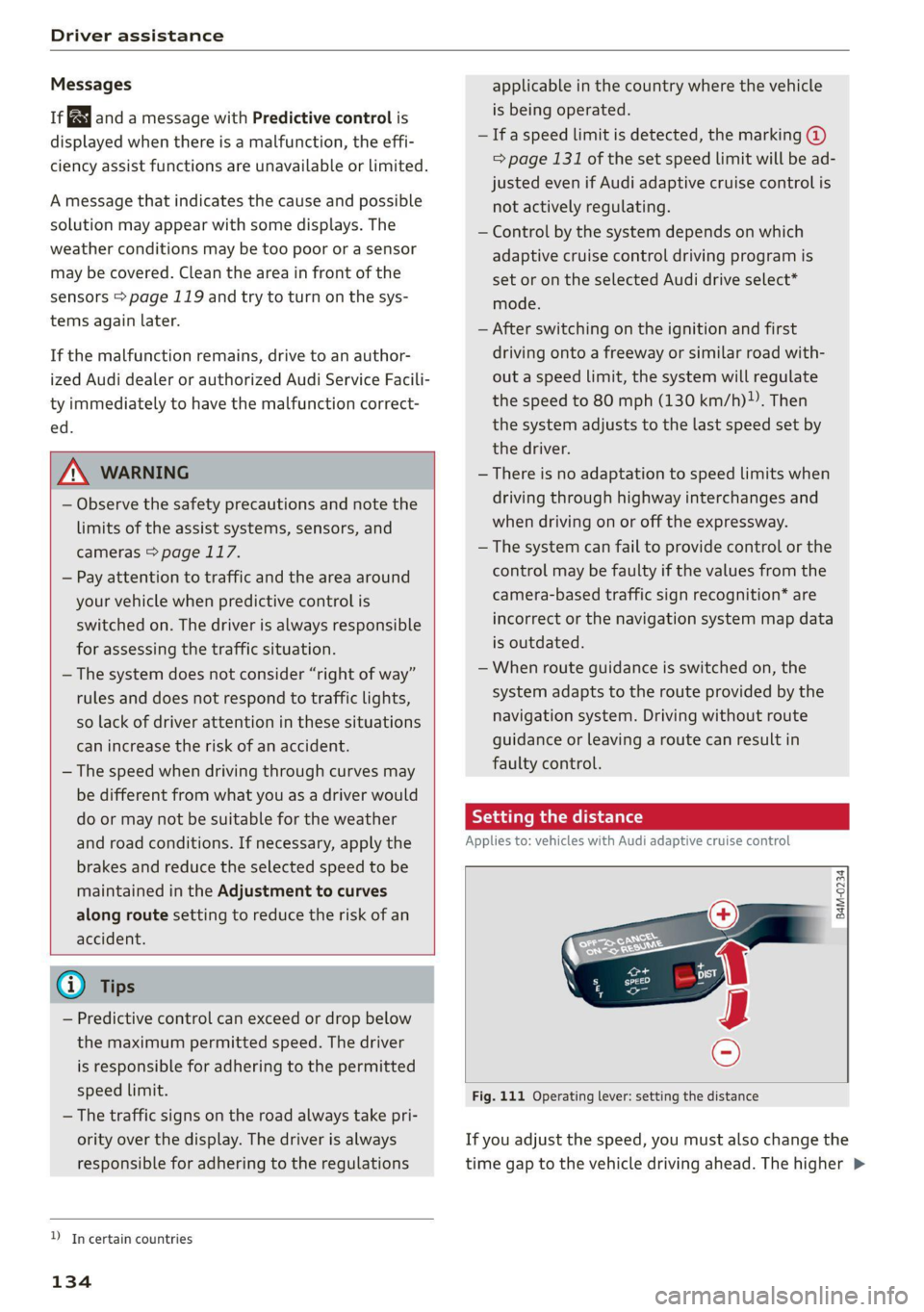
Fig. 111 Operating lever: setting the distance
If you adjust the speed, you must also change the
time gap to the vehicle driving ahead. The higher >
Page 137 of 304

8W1012721BC
Driver assistance
the speed, the greater the distance that is need-
ed.
> Tap the rocker switch to display the distance
that is currently set.
> To increase or decrease the distance in incre-
ments, tap the switch again toward @) or ().
The newly-set distance will be shown briefly, for
example with the [eg indicator light. In the Driv-
er assistance display, a graphic display is shown
instead of the indicator lights > page 131,
fig. 108. The display matches the functions of
the indicator lights.
When approaching a vehicle driving ahead, the
adaptive cruise control system brakes to match
that vehicle's speed and then adjusts to the set
distance. If the vehicle driving ahead accelerates,
then the adaptive cruise control will accelerate
up to the speed that you have set.
The following distances can be set:
Sym-
bol
Meaning
The time between is approximately 2.4
seconds. This setting corresponds toa
distance of approximately 219 feet
(100 m) when traveling at 62 mph
(67 m/h).
The time between is approximately 3.6
seconds. This setting corresponds toa
distance of approximately 328 feet
(100 m) when traveling at 62 mph
(100 m/h).
D
1D
Z\ WARNING
Observe the safety precautions and note the
limits of the assist systems, sensors, and
cameras > page 117.
Meaning
The time between is approximately 1
second. This setting corresponds toa
distance of approximately 92 feet
(100 m) when traveling at 62 mph
(28 m/h).
The time between is approximately 1.3
seconds. This setting corresponds toa
distance of approximately 118 feet
(100 m) when traveling at 62 mph
(36 m/h).
nD
The time between is approximately 1.8
seconds. This setting meets the general
recommendation of “half the speed
shown on the speedometer”. This cor-
responds to a distance of approximate-
ly 164 feet (SO m) when traveling at
62 mph (100 km/h).
(i) Tips
— When setting the distance, the driver is re-
sponsible for adhering to any applicable le-
gal regulations.
— Depending on the selected driving program
and distance, driving behavior when acceler-
ating may vary from moderate to sporty
= page 137, Adjusting adaptive cruise con-
trol.
— The distances provided are specified values.
Depending on the driving situation and how
the vehicle ahead is driving, the actual dis-
tance may be more or less than these target
distances.
Overriding control
Applies to: vehicles with Audi adaptive cruise control
[RAZ-0096
Fig. 112 Operating lever: decreasing the distance
135
Page 143 of 304

8W1012721BC
Driver assistance
Audi active lane assist/
lane departure warning
General information
Applies to: vehicles with Audi active lane assist
The Audi active lane assist/lane departure warn-
ing (called only Audi active lane assist in the vehi-
cle displays and in the information that follows in
this Owner's Manual) can detect lane marker
lines within the limits of the system. If you are
approaching a detected lane marker and it ap-
pears likely that you will leave the lane, the sys-
tem can warn you with corrective steering anda
steering wheel vibration, if necessary.
Applies to: vehicles with Audi active lane assist
Fig. 118 Instrument cluster: driver assistance display
The system functions in the speed range of ap-
proximately 40 mph - 155 mph (65 km/h -
250 km/h).
Applies to: vehicles with Audi adaptive cruise control and traf-
fic jam assist
If the conditions are met, traffic jam assist
switches on at speeds under approximately
40 mph (65 km/h) > page 138.
Z\ WARNING
Observe the safety precautions and note the
limits of the assist systems, sensors, and
cameras > page 117.
Display and warning
The availability, readiness to provide warnings,
and the warnings are indicated with indicator
lights. Audi active lane assist is ready to provide
warnings if an object is detected on at least one
side of the lane where your vehicle is traveling.
Driver assistance Indicator lights Meaning
display Audi virtual | Instrument
cockpit cluster (analog)
@ White 71% 7% Audi active lane assist is activated, but is not
lines ready to provide warnings.
@ Green ex 7\ Audi active lane assist is activated and ready to
line(s) provide warnings.
@ Red 7X 7 \ Blinking Audi active lane assist will warn you with correc-
line tive steering before exiting the lane. If the system
must intervene for a long period of time, a mes-
sage will request the driver to drive in the center
of the lane. The steering wheel will also vibrate
lightly when exiting the lane.
If the system is switched on but is not ready to
provide warnings, one of the following systems
limits or situations could be the cause:
— The necessary lane marker lines have not been
detected (for example, in a construction zone
or because the lines are obstructed by snow,
dirt, water, or lighting)
— The speed is below the activation speed
— The lane is too narrow or too wide
— The curve is too narrow
— The driver's hands are not on the steering
wheel
— Visibility is obstructed by a rise or dip.
141
Page 178 of 304
Audi connect
Information about the services and the corre-
sponding app was accurate at the time this man-
ual was printed. The scope of services depends
on the country and equipment. There may be
changes over the service life of the vehicle.
ZA WARNING
— Always follow the information found in > AA
in General information on page 173.
— Driver messages, text messages, and illumi-
nated warning and indicator lights in the ve-
hicle always take priority over information
from the Audi connect services. The infor-
mation displayed by the Audi connect serv-
ices should not cause you to take safety
risks. This can result in the vehicle breaking
down in traffic and to serious injuries or ac-
cidents.
G) Tips
— Accessing specific data or controlling func-
tions remotely depends on the charge level
of the vehicle battery. Therefore, these
functions only have limited availability after
switching off the ignition.
— An eSIM card establishes the Internet con-
nection for Audi connect vehicle control
services. The costs for this are included in
the price of Audi connect vehicle control
services. The cell phone network, for exam-
ple, must be available to use these services.
Applies to: vehicles with Audi connect vehicle control
Create a myAudi account by registering in the
myAudi app or at my.audi.com, depending on
your country.
>» Set the key user > page 30.
> Install the myAudi app on your mobile device
and log in with your access information.
@ Tips
Some services require you to enter a 4-digit
PIN that you set up during registration.
176
Settings
Applies to: vehicles with Wi-Fi hotspot
Requirement: the ignition must be switched on.
> Applies to: MMI: Select on the home screen:
SETTINGS > Connection settings > Wi-Fi
Depending on the country and the vehicle equip-
ment, the following functions may be available:
Wi-Fi
When the function is switched on, the MMI's Wi-
Fi hotspot is active and Wi-Fi devices can be con-
nected to the hotspot.
Wi-Fi hotspot settings
The Wi-Fi connection between the MMI and your
Wi-Fi device is encrypted. You can change the fol-
lowing information if needed.
— Access point (SSID): name of the Wi-Fi hot-
spot.
— Password: an initial password was set at the
factory in the MMI. Audi recommends changing
the initial password. Only use secure passwords
that conform to the general guidelines for se-
cure passwords. For more information, refer to
reputable and current sources on password se-
curity.
Allow data connection through Wi-Fi
When the function is switched on, mobile devices
can use the Internet connection through the Wi-
Fi hotspot. A data plan is needed to do this.
ZA\ WARNING
Always follow the information found in > A\
in General information on page 173.
@) Note
Always follow the information found in >@ in
General information on page 173.
Page 255 of 304
8W1012721BC
Wheels
Your vehicle has also been equipped with a TPMS
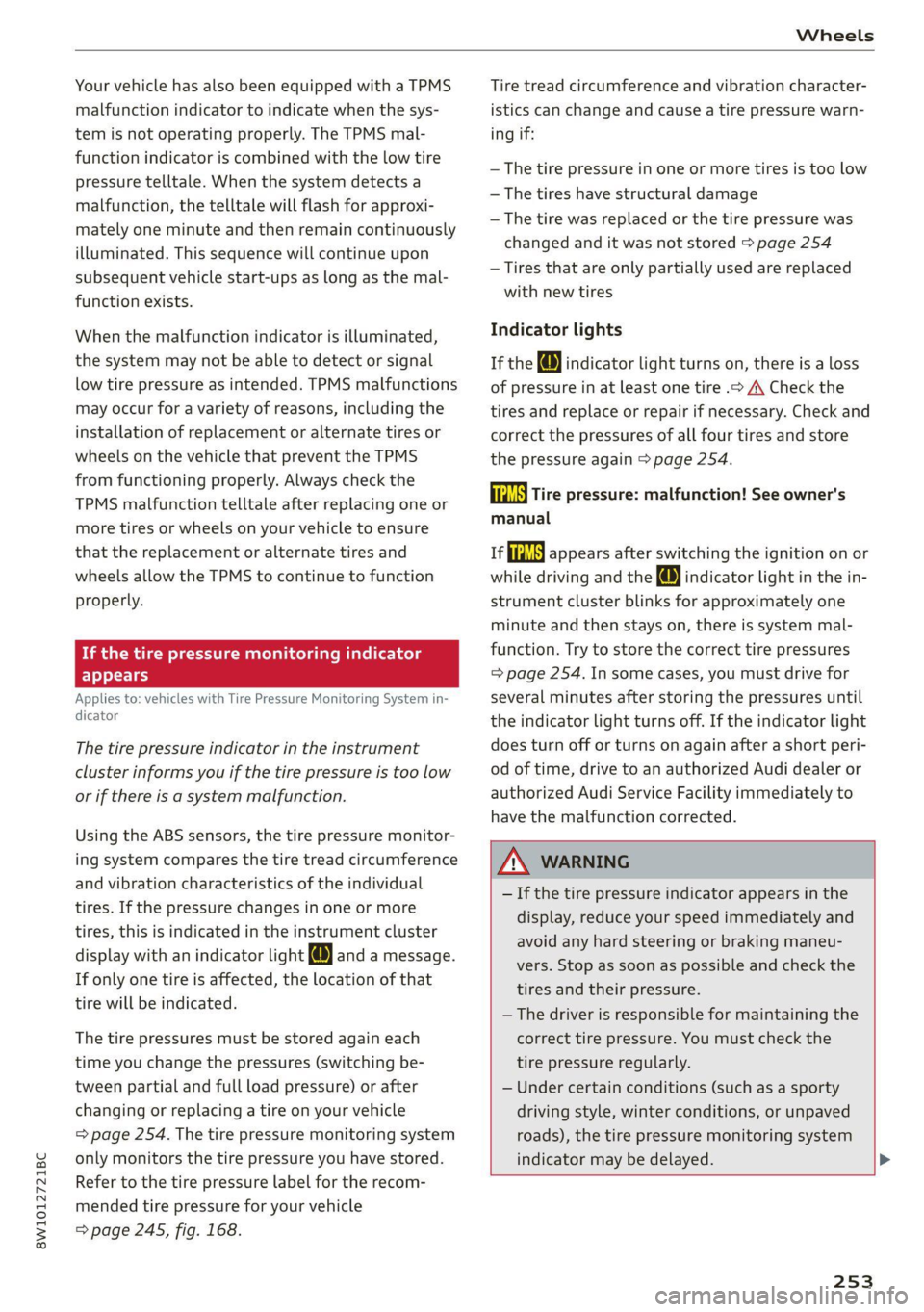
malfunction indicator to indicate when the sys-
tem is not operating properly. The TPMS mal-
function indicator is combined with the low tire
pressure telltale. When the system detects a
malfunction, the telltale will flash for approxi-
mately one minute and then remain continuously
illuminated. This sequence will continue upon
subsequent vehicle start-ups as long as the mal-
function exists.
When the malfunction indicator is illuminated,
the system may not be able to detect or signal
low tire pressure as intended. TPMS malfunctions
may occur for a variety of reasons, including the
installation of replacement or alternate tires or
wheels on the vehicle that prevent the TPMS
from functioning properly. Always check the
TPMS malfunction telltale after replacing one or
more tires or wheels on your vehicle to ensure
that the replacement or alternate tires and
wheels allow the TPMS to continue to function
properly.
If the tire pressure monitoring indicator
appears
Applies to: vehicles with Tire Pressure Monitoring System in-
dicator
The tire pressure indicator in the instrument
cluster informs you if the tire pressure is too low
or if there is a system malfunction.
Using the ABS sensors, the tire pressure monitor-
ing system compares the tire tread circumference
and vibration characteristics of the individual
tires. If the pressure changes in one or more
tires, this is indicated in the instrument cluster
display with an indicator light @ and a message.
If only one tire is affected, the location of that
tire will be indicated.
The tire pressures must be stored again each
time you change the pressures (switching be-
tween partial and full load pressure) or after
changing or replacing a tire on your vehicle
=> page 254. The tire pressure monitoring system
only monitors the tire pressure you have stored.
Refer to the tire pressure label for the recom-
mended tire pressure for your vehicle
= page 245, fig. 168.
Tire tread circumference and vibration character-
istics can change and cause a tire pressure warn-
ing if:
— The tire pressure in one or more tires is too low
— The tires have structural damage
— The tire was replaced or the tire pressure was
changed and it was not stored > page 254
— Tires that are only partially used are replaced
with new tires
Indicator lights
If the @ indicator light turns on, there is a loss
of pressure in at least one tire .> A\ Check the
tires and replace or repair if necessary. Check and
correct the pressures of all four tires and store
the pressure again > page 254.
ia Tire pressure: malfunction! See owner's
manual
fi appears after switching the ignition on or
while driving and the @ indicator light in the in-
strument cluster blinks for approximately one
minute and then stays on, there is system mal-
function. Try to store the correct tire pressures
=> page 254. In some cases, you must drive for
several minutes after storing the pressures until
the indicator light turns off. If the indicator light
does turn off or turns on again after a short peri-
od of time, drive to an authorized Audi dealer or
authorized Audi Service Facility immediately to
have the malfunction corrected.
ZA WARNING
— If the tire pressure indicator appears in the
display, reduce your speed immediately and
avoid any hard steering or braking maneu-
vers. Stop as soon as possible and check the
tires and their pressure.
— The driver is responsible for maintaining the
correct tire pressure. You must check the
tire pressure regularly.
— Under certain conditions (such as a sporty
driving style, winter conditions, or unpaved
roads), the tire pressure monitoring system
indicator may be delayed.
253
Page 260 of 304

Care and cleaning
Water-based deposits
such as coffee, tea,
blood, etc.
Component Situation Solution
Displays/instru- | Deposits Soft cloth with LCD cleaner; dust in the lower area of the
ment cluster instrument cluster can be removed using a soft brush.
Controls Deposits Soft brush, then a soft cloth with a mild soap solution®
Safety belts Deposits Mild soap solution ®, allow to dry before letting them re-
tract
Textiles, Deposits adhering to | Vacuum cleaner
artificial leather, |the surface
Alcantara Absorbent cloth and mild soap solution®
Oil-based deposits
such as oil, make-up,
etc:
Apply a mild soap solution ®), blot away the dissolved oil or
dye, treat afterward with water, if necessary
Certain types of de-
posits such as ink,
nail polish, latex
paint, shoe polish,
etc.
Special stain remover, blot with absorbent material, treat
afterward with mild soap solution, if necessary®
Natural leather Fresh stains Cotton cloth with a mild soap solution®
Water-based deposits
such as coffee, tea,
blood, etc.
Fresh stains: absorbent cloth
dried stains: stain remover suitable for leather
Oil-based deposits
such as oil, make-up,
etc.
Fresh stains: absorbent cloth and stain remover suitable
for leather
dried stains: oil cleaning spray
Certain types of de-
posits such as ink,
nail polish, latex
paint, shoe polish,
etc.
Spot remover suitable for leather
nents
Care Regularly apply conditioning cream that protects from
light and penetrates into the material. Use special colored
conditioning cream, if necessary.
Carbon compo- Deposits Clean the same way as plastic components
@) Mild soap solution: maximum two tablespoons of neutral soap in 1 quart (1 liter) of water
Z\ WARNING
The windshield must not be treated with wa-
ter-repelling windshield coating agents. Un-
der
unfavorable conditions, such as wetness,
darkness, and when the sun is low, these coat-
ings can cause increased glare, which increas-
es the risk of an accident. They can also cause
wiper blade chatter.
() Note
— Headlights and tail lights
258
Page 271 of 304
8W1012721BC
Emergency assistance
Connecting the positive cable (red) to the
positive terminal
> Open the cover on the positive terminal
> fig. 179.
1. Attach one end of the positive cable (red) to
the jump-start pin @ © fig. 180 on your vehi-
cle.
2. Attach the other end of the positive cable
(red) to the positive terminal @ on the pow-
er source.
Connecting the negative cable (black) to the
negative terminal
3. Attach one end of the negative cable (black)
to the negative terminal @) on the power
source.
4. Attach the other end of the negative cable
(black) to the jump-start pin @) on the vehi-
cle.
Starting the engine
>» Start the engine in the vehicle giving the charge
and let it run at idle.
> Now start the engine in your vehicle, which has
the
drained battery.
> If the engine does not start, stop the starting
procedure after 10 seconds and then repeat it
after approximately 30 seconds.
> Turn on the rear window defogger in your vehi-
cle in order to reduce any voltage peaks that
may occur when disconnecting the jump start
cables. The headlights must be switched off.
> With the engines running, remove the cables in
reverse order of the way they were installed.
> Close the cover on the positive terminal.
ZA WARNING
— Never connect the jump start cable directly
to your vehicle battery. Only use the connec-
tions in the engine compartment.
— Do not touch the non-insulated parts of the
terminal clamps. The cable must also not
come into contact with vehicle components
that conduct electricity when it is connected
to the positive vehicle battery terminal. This
can cause a short circuit.
— The plugs on the battery cells must not be
opened.
— Keep ignition sources (such as open flames,
burning cigarettes, etc.) away from the vehi-
cle batteries to reduce the risk of an explo-
sion.
— Route the jump start cables so they cannot
get caught in the moving parts in the other
vehicle's engine compartment.
() Note
Please note that the connecting process previ-
ously described for the jump start cables is in-
tended for when your vehicle is being jump
started.
G) Tips
Make sure that the connected jump start ca-
bles have sufficient contact with metal.
Towing
General information
You should only perform the steps that follow if
you have the necessary tools and technical ex-
pertise.
Towing requires a certain amount of practice.
Audi recommends contacting a towing company
to have the vehicle transported.
You should only have your vehicle towed by an-
other vehicle when disabled in exceptional cir-
cumstances. Inexperienced drivers should not
tow.
Notes on towing
When the engine is stopped, the transmission
will not be sufficiently lubricated if traveling at
high speeds and long distances:
— The maximum permitted towing speed is 30
mph (50 km/h).
— The maximum permitted towing distance is 30
miles (50 km).
Additional information on towing with a tow
truck
The vehicle may only be towed with the front axle
raised. Do not wrap any chains or cables around
the brake lines.
269
>
Page 292 of 304
Index
Closing
Automatic luggage compartment lid...... 41
Convenience closing...........00.++00% 46
HOOP «a asaces
Luggage compartment lid............... 41
Luggage compartment lid with foot motion . 42
Panoramic glass'roOf ici «+ eaves ew wrens oo a 47
Sliding/tilting sunroof................-. 46
Sufishadé (OOF): « + eww = x sates ¢ oem ze se 47
Wind OwS:. « sess «save oo ance 2 0 weuew sw vee 45
Cockpit diMMING:: « & excuse cers so eens ees 55
Cockpit (GVEMIEW)'s + saws 2 2 eam ae wows 2c ce 6
Collapsible spare tire.................0- 267
Collapsible tire
refer to Collapsible spare tire........... 267
Color cOd@
Compartments...........0.0 eee eee eee 83
Compass inthe mirror............-0 0-0 ee 61
Compliance ..... 0.0... cee eee eee eee 284
Conference call......... eee eee eee eee 168
Configuration wizard « « sce 26 wicca a wena o 19
CONNEC son 2 & ieee 2 wares o were oo sR we oe L73
Data plans... 0... eee eee eee ee 177
Data Privacy..............2..0..0200. 279
Eme@ngericy'Calll ws a » aaa a & ons 2 9 rey 178
Infotainment............... 2.0 e ee eee 173
Infotainment services............00005 174
Online roadside assistance............. 179
Vehicle control services................ 175
Connected devices
Device overvieW.......... 00 eee eee eee 214
Connections
referto Media................--- 201, 203
Consumer information.................- 281
Consumption
Re@dUCING secs << sees = = wows sp eee sp ee 102
Consumption (fuel) .................000. 16
Contacts
IMPOFUNG ces s news 3 x woRG 5 5 aeEE Tae 170
Updating inthe MMI.................. 170
also refer to Directory...............-. 167
Convenience key...............00 000s eee 33
Convenience closing...........-...+6.: 46
also refer to Vehicle key..............-. 37
Convenience opening and closing
Windows or panoramic glass roof........ 46
290
Coolant temperature display.............. 14
Cooling system
Adding
coolant..............2--0000- 228
Checking the coolant level............. 228
GOOlANE
« sess oo soem oo memes © a ieenen @ DesemN 227
Cornering
lighticcs : gees s see es Senge 2 wes 51
Cruise control system..............00-5 127
CUB ROIGETS secs 5 eas « Basen Gs Hates ee BEG 82
Current consumption..............000005 16
D
Data module
Serial number (IMED) «swiss eae as rene 170
Data Plans = sees ss sees sine sarees bees 177
Data Privacy... .... cece cee ee eee eee 279
Date... eee eee 16
SEUting:< = = seme ¢ = see Fe ewes Fe ee Ee we 212
Daytime running lights.................. 51
Declaration of compliance............... 284
DEF (instrument cluster)..............005 12
Demo mode
refer to Presentation mode............. 191
Destination onthe map...............0. 184
Details... 6.0... ieee eee eee eee 184
Determining correct load limit........... 249
Digital GOMpass)s: sevsia + 0 woicssue se anesene 6 coven ws 61
DIMENSIONS ie. © & sss 2 w mens © w seen we AMR 286
Dimming the exterior mirrors............. 56
Dimming the rearview mirror............. 56
DIRECtO RY asus 5 2 wees 5s eee 5 3 ee Ey ERE 167
BUSIMESSICATG iam a wasn a 6 anesens « @ asanim www 168
Settings.......... 20.0.0 e eee eee eee 170
Display
Cleaning ....... 6... cece eee eee eee 258
Displaying tooltips..................00. 19
Disposal. ... 2.0.0... cee eee eee eee ee 281
DIStANGE cecriie is « coemmes ox mevece x somnwse ow omevere & 16
Distance’ Warning « sesisies + s acs w o enone & eeewens 140
Doors
Child safety lock............. 00... eee 44
DOOr COMEACESWITCH): « s waas s 6 eae s jaan a 3 54
Mechanically unlocking and locking....... 36
Driver information system................ L3
Drives
Feferto Med ideas se exw ae eevee 6 owe 201, 203