lock AUDI A4 2021 Owner´s Manual
[x] Cancel search | Manufacturer: AUDI, Model Year: 2021, Model line: A4, Model: AUDI A4 2021Pages: 304, PDF Size: 107.89 MB
Page 253 of 304

8W1012721BC
Wheels
@) Tips
You can also use all season tires instead of
winter tires. Please note that in some coun-
tries where winter tires are required, only win-
ter tires with the 44 symbol may be permit-
ted.
Snow chains improve both driving and braking in
winter road conditions.
> Only install snow chains on the front wheels.
> Check and correct the seating of the snow
chains after driving a few feet, if necessary. Fol-
low the instructions from the manufacturer.
> Note the maximum speed of 30 mph
(50 km/h). Observe the local regulations.
Use of snow chains is only permitted with certain
rim/tire combinations due to technical reasons.
Check with an authorized Audi dealer or author-
ized Audi Service Facility to see if you may use
snow chains.
Use fine-mesh snow chains. They must not add
more than 0.53 in (13.5 mm) in height, including
the chain lock.
You must remove the snow chains on roads with-
out snow. Otherwise, you could impair driving
ability and damage the tires.
ZA WARNING
Using incorrect snow chains or installing snow
chains incorrectly can result in loss of vehicle
control, which increases the risk of an acci-
dent.
@) Note
Snow chains can damage the rims and wheel
covers* if the chains come into direct contact
with them. Remove the wheel covers* first.
Use coated snow chains.
@ Tips
When using snow chains, it may be advisable
to limit the ESC > page 114.
Low-profile tires
Applies to: vehicles with low-profile tires
Compared to other tire/rim combinations, low-
profile tires offer a wider tread surface anda
larger rim diameter with shorter tire sidewalls.
This results in an agile driving style. However, it
may reduce the level of comfort and increase
road noise when driving on roads in poor condi-
tion.
Low-profile tires can become damaged more
quickly than standard tires when driving over
large bumps, potholes, manhole covers, and
curbs. Therefore, it is particularly important to
maintain the correct tire pressure > page 245.
To reduce the risk of damage to the tires and
rims, drive very carefully on poor roads.
Check your wheels regularly every 2,000 mi
(3,000 km) for damage. For example, check for
bulges/cracks on the tires or deformations/cracks
on the rims.
After a heavy impact or damage, have the tires
and rims inspected or replaced immediately by
an authorized Audi dealer or authorized Audi
Service Facility.
Low-profile tires can wear out faster than stand-
ard tires.
Uniform tire quality grading
— Tread wear
— Traction AAABC
— Temperature ABC
Quality grades can be found where applicable on
the tire side wall between tread shoulder and
maximum section width > page 236, fig. 165.
For example: Tread wear 200, Traction AA, Tem-
perature A.
All passenger car tires must conform to Federal
Safety Requirements in addition to these grades.
Tread wear
The tread wear grade is a comparative rating
based on the wear rate of the tire when tested
251
>
Page 259 of 304
8W1012721BC
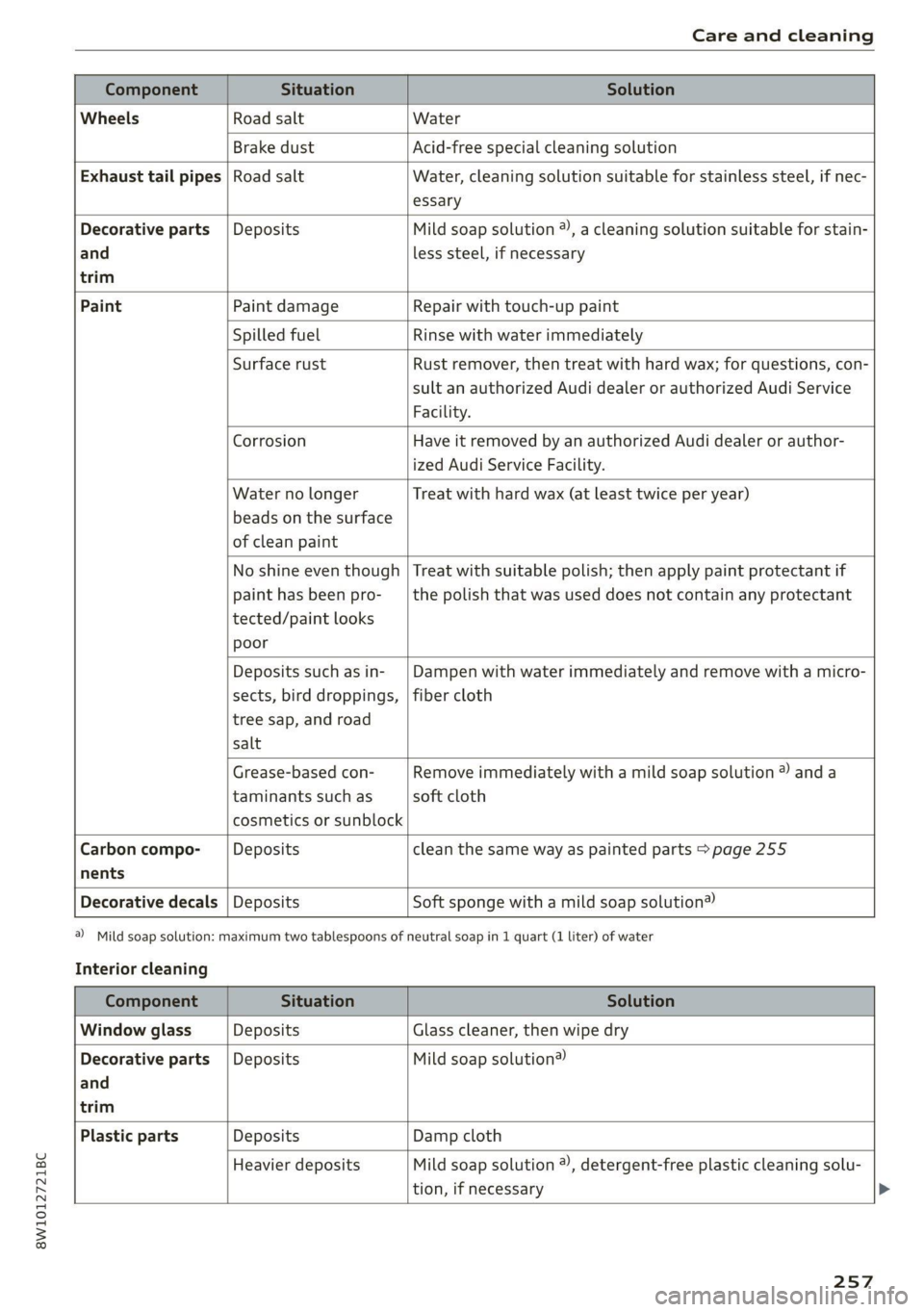
Care and cleaning
Component Situation Solution
Wheels Road salt Water
Brake dust Acid-free special cleaning solution
Exhaust tail pipes | Road salt Water, cleaning solution suitable for stainless steel, if nec-
essary
Decorative parts | Deposits Mild soap solution @), a cleaning solution suitable for stain-
and
trim
less steel, if necessary
Paint Paint damage Repair with touch-up paint
Spilled fuel Rinse with water immediately
Surface rust Rust remover, then treat with hard wax; for questions, con-
sult an authorized Audi dealer or authorized Audi Service
Facility.
Corrosion Have it removed by an authorized Audi dealer or author-
ized Audi Service Facility.
Water no longer
beads on the surface
of clean paint
Treat with hard wax (at least twice per year)
No shine even though
paint has been pro-
tected/paint looks
poor
Treat with suitable polish; then apply paint protectant if
the polish that was used does not contain any protectant
Deposits such as in-
sects, bird droppings,
tree sap, and road
salt
Dampen with water immediately and remove with a micro-
fiber cloth
Grease-based con-
taminants such as
cosmetics or sunblock
Remove immediately with a mild soap solution ® anda
soft cloth
Carbon compo- Deposits clean the same way as painted parts > page 255
nents
Decorative decals | Deposits Soft sponge with a mild soap solution®
@) Mild soap solution: maximum two tablespoons of
Interior cleaning
neutral soap in 1 quart (1 liter) of water
Component Situation Solution
Window glass Deposits Glass cleaner, then wipe dry
Decorative parts | Deposits Mild soap solution®
and
trim
Plastic parts Deposits Damp cloth
Heavier deposits Mild soap solution ®), detergent-free plastic cleaning solu-
tion, if necessary
257
Page 263 of 304

8W1012721BC
Emergency assistance
Emergency assistance
General information
> Park the vehicle as far as possible from moving
traffic in the event of a breakdown. In the event
of a flat tire, park the vehicle ona level surface.
If you are ona steep hill, be especially careful.
> Set the parking brake.
> Switch the emergency flashers on.
> Have the passengers exit the vehicle. They
should move to a safe place, for example be-
hind a guard rail.
Z\ WARNING
Follow the steps given above. This is for your
protection and the for the safety of others on
the road.
Equipment
Vehicle tool kit, tire mobility kit, and
vehicle jack
Applies to: vehicles with the vehicle tool kit, tire mobility kit,
and vehicle jack
Fig. 169 Luggage compartment: cargo floor cover
The vehicle tool kit, vehicle jack, tire mobility kit
and compressor are stored in the luggage com-
partment under the cargo floor cover.
> Applies to: sedan: To open the front compart-
ment, lift the cargo floor cover by the strap (@).
> Applies to: allroad: To open the front compart-
ment, pull the cargo floor cover by the plastic
handle @) slightly toward the rear. Lift the car-
go floor cover over the front compartment.
> To open the rear compartment, lift the cargo
floor cover by the plastic handle @).
> Applies to: sedan: Engage the plastic handle @)
in the luggage compartment seal.
> To remove the cargo floor cover completely,
pull it toward the rear at the plastic handle @).
> Applies to: vehicles with spare tire: Turn the
handle counter-clockwise and remove the spare
tire.
> Applies to: sedan: Unhook the cargo floor cover
again
before closing the luggage compartment
lid.
Depending on vehicle equipment, the vehicle tool
kit, tire mobility kit, and compressor may be lo-
cated under another cover that is secured with a
handwheel.
Applies to: vehicles with vehicle jack in the stor-
age bag: The bag with the vehicle jack is secured
to the tie-downs in the luggage compartment
and must be secured to the tie-downs again after
using it.
ZX WARNING
Applies to: vehicles with vehicle jack in the storage bag
A vehicle jack that is unsecured, incorrectly se-
cured, or not secured in the luggage compart-
ment may slide out of place when braking,
turning,
or in an accident, which increases the
risk of injuries to vehicle passengers. To re-
duce the risk of an accident, never transport
the vehicle jack without securing it.
G) Tips
—Insome vehicles, the rear compartment
may not open.
— The vehicle jack in your vehicle is mainte-
nance-free.
Tire mobility kit
Applies to: vehicles with tire mobility kit
> Read and follow the important safety precau-
tions > page 261.
> Set the parking brake.
> Select the “P” position.
> Check if a repair with the tire mobility kit is pos-
sible > page 262.
261
Page 266 of 304
Emergency assistance
> Set the parking brake.
> Select the “P” position.
>» When towing a trailer: disconnect the trailer
from your vehicle.
> Lay out the vehicle tool kit > page 261 and the
spare tire > page 266.
>» Switch the ignition off.
> Turn the wheel bolt approximately one turn to
the left. To achieve the required torque, hold
the end of the wheel wrench*. If the wheel bolt
will not loosen, press carefully on the wheel
wrench* with your foot. Hold onto the vehicle
securely while doing this and make sure your
footing is stable.
ZA\ WARNING
The vehicle must also be secured to prevent it
from rolling when using the vehicle jack*. Use
suitable objects to block the front and back of
the wheel that is diagonal from the wheel
with the flat tire.
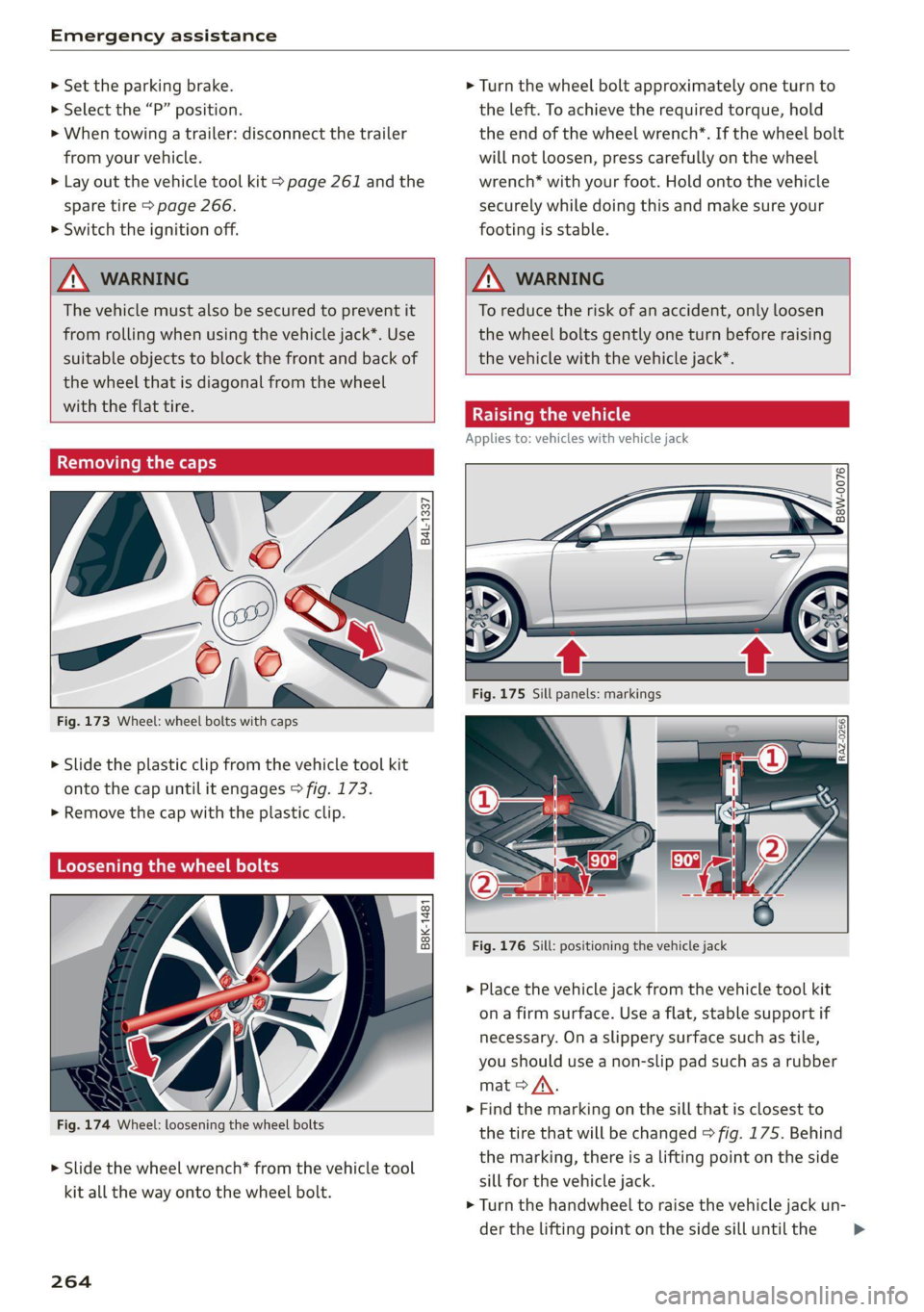
Removing the caps
@
=
(G)
me
as
Fig. 173 Wheel: wheel bolts with caps
?
> Slide the plastic clip from the vehicle tool kit
onto the cap until it engages > fig. 173.
> Remove the cap with the plastic clip.
Loosening the wheel bolts
©
i=
x © a
Fig. 174 Wheel: loosening the wheel bolts
> Slide the wheel wrench* from the vehicle tool
kit all the way onto the wheel bolt.
264
ZA WARNING
To reduce the risk of an accident, only loosen
the wheel bolts gently one turn before raising
the vehicle with the vehicle jack*.
Raising the vehicle
Applies to: vehicles with vehicle jack
© & Ss
g
= % oo
Fig. 176 Sill: positioning the vehicle jack
> Place the vehicle jack from the vehicle tool kit
ona firm surface. Use a flat, stable support if
necessary. Ona slippery surface such as tile,
you should use a non-slip pad such as a rubber
mat > A\.
> Find the marking on the sill that is closest to
the tire that will be changed > fig. 175. Behind
the marking, there is a lifting point on the side
sill for the vehicle jack.
> Turn the handwheel to raise the vehicle jack un-
der the lifting point on the side sill until the
Page 269 of 304
8W1012721BC
Emergency assistance
— Normal summer or winter tires must not be
mounted on the compact spare wheel rim.
() Note
Secure the spare tire in the spare tire well us-
ing
the handwheel in order to reduce the risk
of damage to other components.
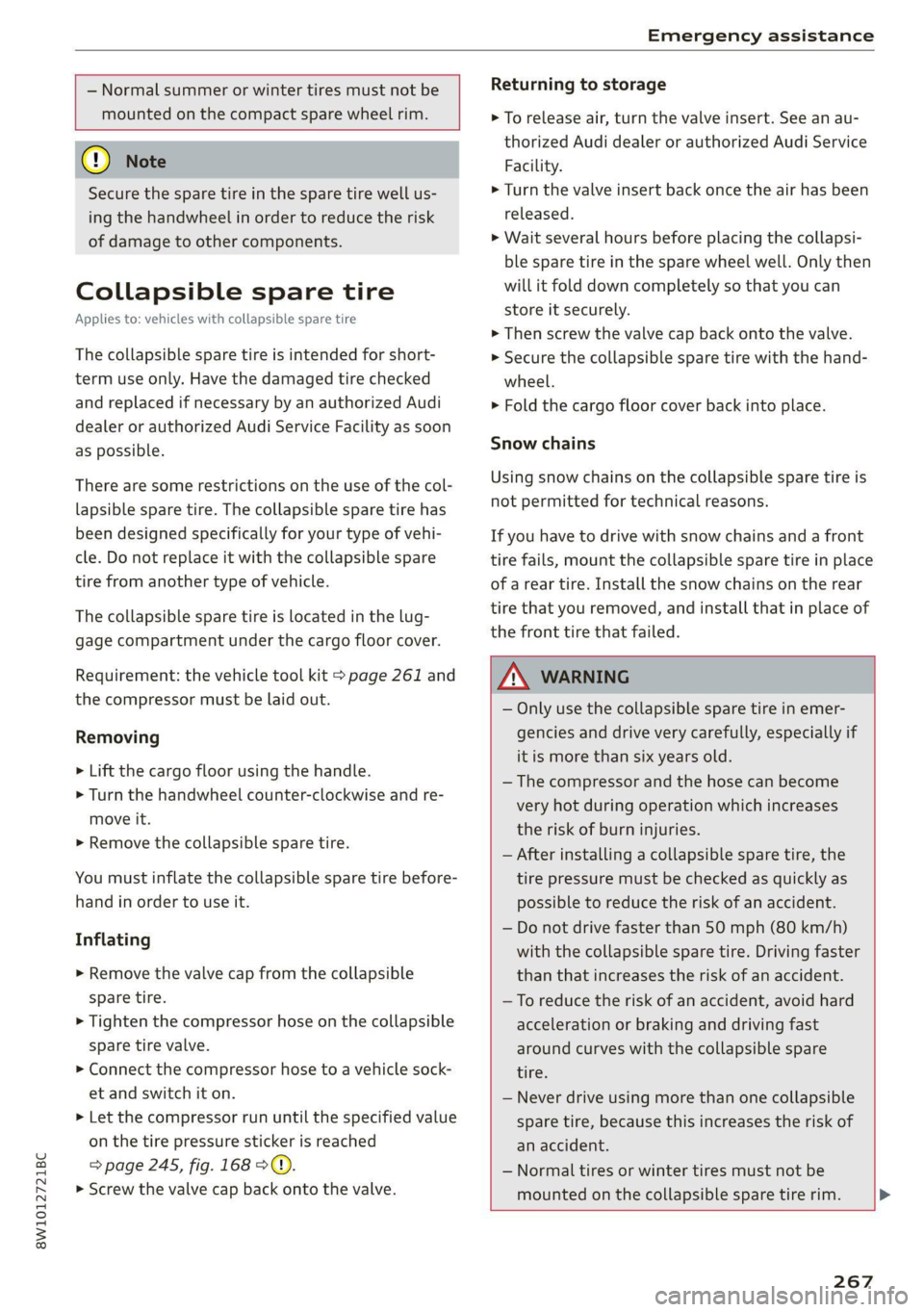
Collapsible spare tire
Applies to: vehicles with collapsible spare tire
The collapsible spare tire is intended for short-
term use only. Have the damaged tire checked
and replaced if necessary by an authorized Audi
dealer or authorized Audi Service Facility as soon
as possible.
There are some restrictions on the use of the col-
lapsible spare tire. The collapsible spare tire has
been designed specifically for your type of vehi-
cle. Do not replace it with the collapsible spare
tire from another type of vehicle.
The collapsible spare tire is located in the lug-
gage compartment under the cargo floor cover.
Requirement: the vehicle tool kit > page 261 and
the compressor must be laid out.
Removing
> Lift the cargo floor using the handle.
> Turn the handwheel counter-clockwise and re-
move it.
> Remove the collapsible spare tire.
You must inflate the collapsible spare tire before-
hand in order to use it.
Inflating
> Remove the valve cap from the collapsible
spare tire.
> Tighten the compressor hose on the collapsible
spare tire valve.
> Connect the compressor hose to a vehicle sock-
et and switch it on.
> Let the compressor run until the specified value
on the tire pressure sticker is reached
> page 245, fig. 168 > ©.
> Screw the valve cap back onto the valve.
Returning to storage
> To release air, turn the valve insert. See an au-
thorized Audi dealer or authorized Audi Service
Facility.
> Turn the valve insert back once the air has been
released.
>» Wait several hours before placing the collapsi-
ble spare tire in the spare wheel well. Only then
will it fold down completely so that you can
store it securely.
> Then screw the valve cap back onto the valve.
> Secure the collapsible spare tire with the hand-
wheel.
>» Fold the cargo floor cover back into place.
Snow chains
Using snow chains on the collapsible spare tire is
not permitted for technical reasons.
If you have to drive with snow chains and a front
tire fails, mount the collapsible spare tire in place
of a rear tire. Install the snow chains on the rear
tire that you removed, and install that in place of
the front tire that failed.
Z\ WARNING
— Only use the collapsible spare tire in emer-
gencies and drive very carefully, especially if
it is more than six years old.
— The compressor and the hose can become
very hot during operation which increases
the risk of burn injuries.
— After installing a collapsible spare tire, the
tire pressure must be checked as quickly as
possible to reduce the risk of an accident.
— Do not drive faster than 50 mph (80 km/h)
with the collapsible spare tire. Driving faster
than that increases the risk of an accident.
— To reduce the risk of an accident, avoid hard
acceleration or braking and driving fast
around curves with the collapsible spare
tire.
— Never drive using more than one collapsible
spare tire, because this increases the risk of
an accident.
— Normal tires or winter tires must not be
mounted on the collapsible spare tire rim.
267
Page 272 of 304
Emergency assistance
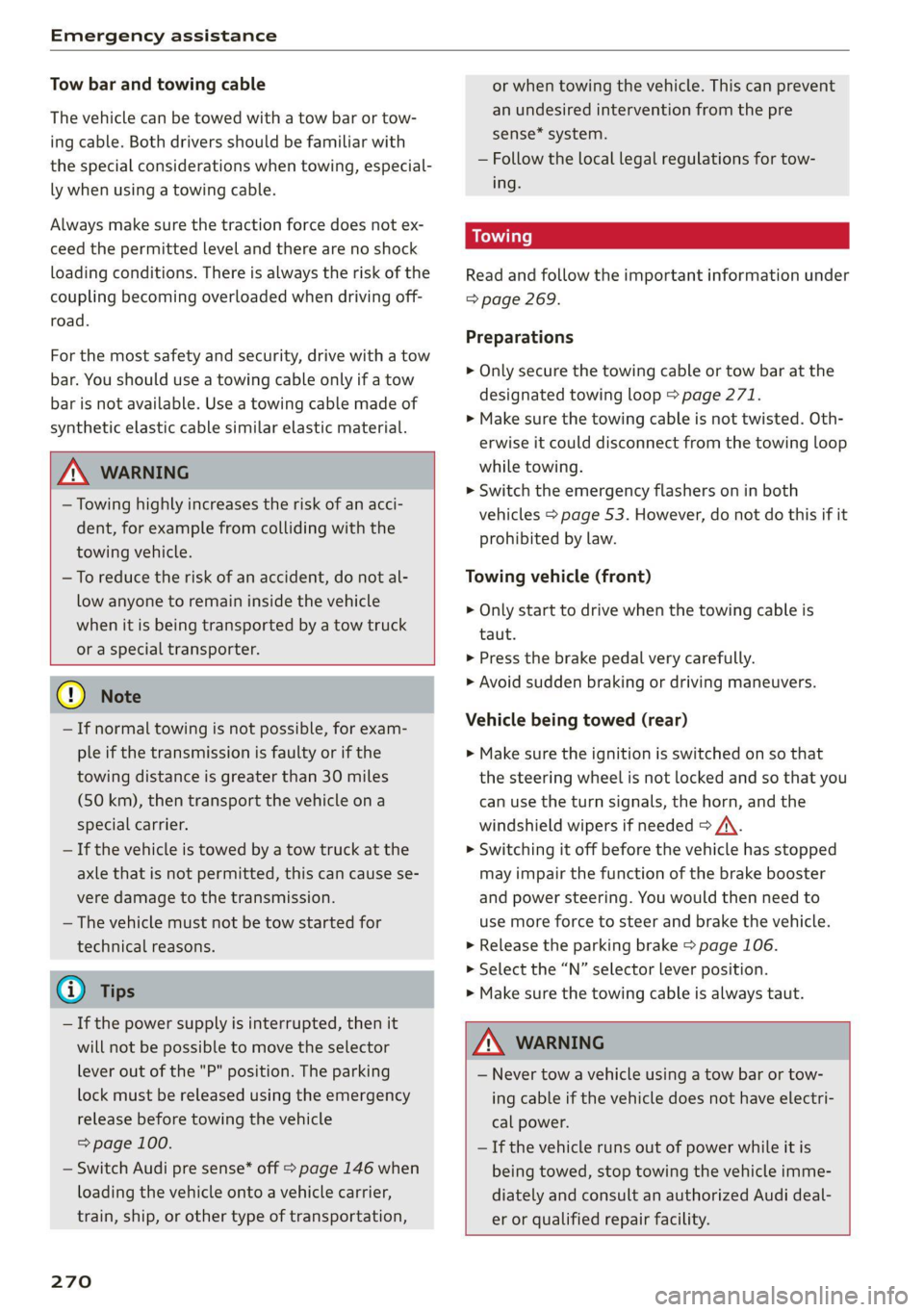
Tow bar and towing cable
The vehicle can be towed with a tow bar or tow-
ing cable. Both drivers should be familiar with
the special considerations when towing, especial-
ly when using a towing cable.
Always make sure the traction force does not ex-
ceed the permitted level and there are no shock
loading conditions. There is always the risk of the
coupling becoming overloaded when driving off-
road.
For the most safety and security, drive with a tow
bar. You should use a towing cable only if a tow
bar is not available. Use a towing cable made of
synthetic elastic cable similar elastic material.
ZA\ WARNING
— Towing highly increases the risk of an acci-
dent, for example from colliding with the
towing vehicle.
— To reduce the risk of an accident, do not al-
low anyone to remain inside the vehicle
when it is being transported by a tow truck
or a special transporter.
@) Note
— If normal towing is not possible, for exam-
ple if the transmission is faulty or if the
towing distance is greater than 30 miles
(50 km), then transport the vehicle on a
special carrier.
— If the vehicle is towed by a tow truck at the
axle that is not permitted, this can cause se-
vere damage to the transmission.
— The vehicle must not be tow started for
technical reasons.
G) Tips
— If the power supply is interrupted, then it
will not be possible to move the selector
lever out of the "P" position. The parking
lock must be released using the emergency
release before towing the vehicle
=> page 100.
— Switch Audi pre sense* off > page 146 when
loading the vehicle onto a vehicle carrier,
train, ship,
or other type of transportation,
270
or when towing the vehicle. This can prevent
an undesired intervention from the pre
sense* system.
— Follow the local legal regulations for tow-
ing.
Read and follow the important information under
=> page 269.
Preparations
> Only secure the towing cable or tow bar at the
designated towing loop > page 271.
> Make sure the towing cable is not twisted. Oth-
erwise it could disconnect from the towing loop
while towing.
> Switch the emergency flashers on in both
vehicles > page 53. However, do not do this if it
prohibited by law.
Towing vehicle (front)
> Only start to drive when the towing cable is
taut.
> Press the brake pedal very carefully.
> Avoid sudden braking or driving maneuvers.
Vehicle being towed (rear)
» Make sure the ignition is switched on so that
the steering wheel is not locked and so that you
can use the turn signals, the horn, and the
windshield wipers if needed > A\.
> Switching it off before the vehicle has stopped
may impair the function of the brake booster
and power steering. You would then need to
use more force to steer and brake the vehicle.
> Release the parking brake > page 106.
> Select the “N” selector lever position.
> Make sure the towing cable is always taut.
ZA\ WARNING
— Never tow a vehicle using a tow bar or tow-
ing cable if the vehicle does not have electri-
cal power.
— If the vehicle runs out of power while it is
being towed, stop towing the vehicle imme-
diately and consult an authorized Audi deal-
er or qualified repair facility.
Page 276 of 304
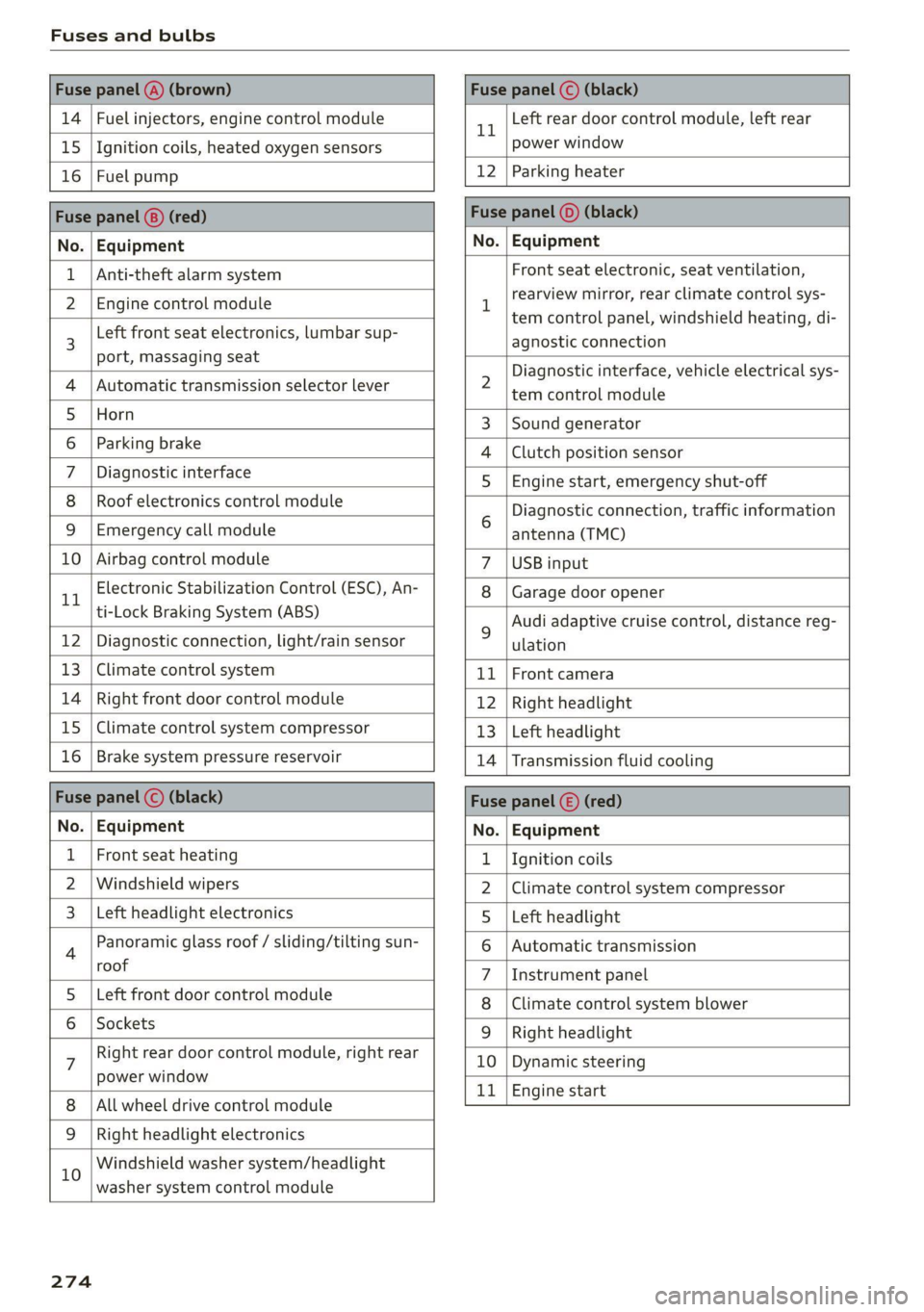
Fuses and bulbs
Fuse panel @) (brown) Fuse panel (© (black)
14 | Fuel injectors, engine control module 11 Left rear door control module, left rear
15 |Ignition coils, heated oxygen sensors power window
16 | Fuel pump 12 | Parking heater
Fuse panel (®) (red) Fuse panel (0) (black)
No. | Equipment No. | Equipment
Anti-theft alarm system
Front seat electronic, seat ventilation,
rearview mirror, rear climate control sys-
tem control panel, windshield heating, di-
agnostic connection
2 Diagnostic interface, vehicle electrical sys-
tem control module
3 |Sound generator
4 |Clutch position sensor
5S |Engine start, emergency shut-off
6 Diagnostic connection, traffic information
antenna (TMC)
7 |USB input
8 |Garage door opener
9 Audi adaptive cruise control, distance reg-
ulation
11 | Front camera
12 | Right headlight
13 | Left headlight
14 | Transmission fluid cooling
Fuse panel (©) (red)
No. | Equipment
1 {Ignition coils
2 |Climate control system compressor
S |Left headlight
6 |Automatic transmission
7 |Instrument panel
8 | Climate control system blower
9 |Right headlight
10 | Dynamic steering
11 | Engine start
2 | Engine control module
3 Left front seat electronics, lumbar sup-
port, massaging seat
4 | Automatic transmission selector lever
5 |Horn
6 |Parking brake
7 | Diagnostic interface
8 | Roof electronics control module
9 |Emergency call module
10 | Airbag control module
11 Electronic Stabilization Control (ESC), An-
ti-Lock Braking System (ABS)
12 | Diagnostic connection, light/rain sensor
13 | Climate control system
14 | Right front door control module
15 | Climate control system compressor
16 | Brake system pressure reservoir
Fuse panel (©) (black)
No. | Equipment
Front seat heating
2 |Windshield wipers
Left headlight electronics
4 Panoramic glass roof / sliding/tilting sun-
roof
5 |Left front door control module
6 | Sockets
7 Right rear door control module, right rear
power window
All wheel drive control module
9 | Right headlight electronics
10 Windshield washer system/headlight
washer system control module
274
Page 277 of 304
8W1012721BC
Fuses and bulbs
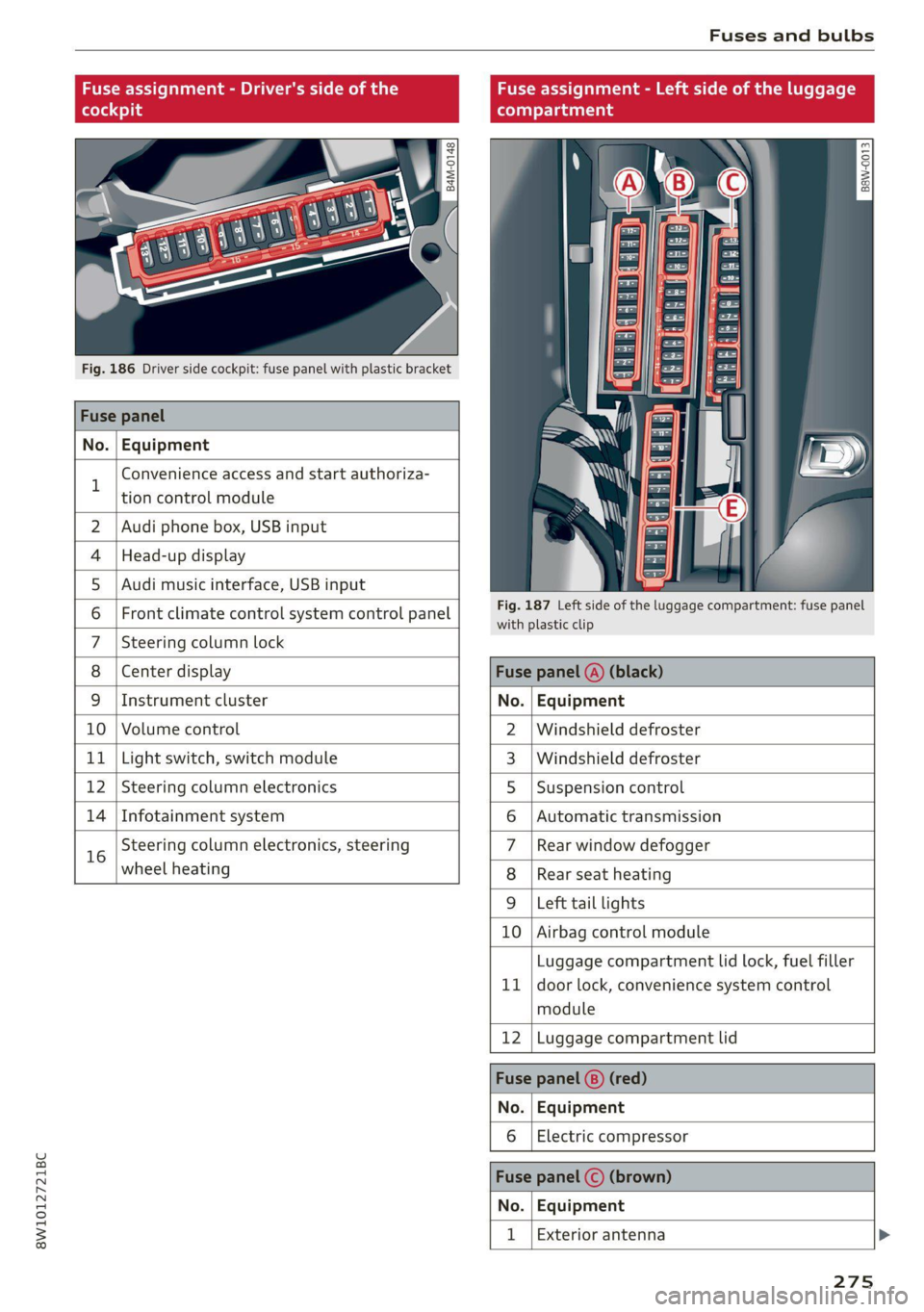
Fuse assignment - Driver's side of the
(ole 4o)ig
Fig. 186 Driver side cockpit: fuse panel with plastic bracket
Fuse panel
No. Equipment
B
Convenience access and start authoriza-
tion control module
Fuse assignment - Left side of the luggage
compartment
GU -
|_8aw-0013]
2 | Audi phone box, USB input
4 |Head-up display
5 |Audi music interface, USB input
6 | Front climate control system control panel eet ofihe uagage compartment: fuse panel
7 |Steering column lock
8 |Center display Fuse panel @) (black)
9 |Instrument cluster No. | Equipment
10 | Volume control 2 |Windshield defroster
11 | Light switch, switch module 3 |Windshield defroster
12 | Steering column electronics 5 |Suspension control
14 | Infotainment system 6 |Automatic transmission
16 Steering column electronics, steering 7 |Rear window defogger
wheel heating 8 |Rear seat heating
9 |Left tail lights
10 Airbag control module
ig
Luggage compartment lid lock, fuel filler
door lock, convenience system control
module
12 Luggage compartment lid
Fuse panel @) (red)
No. Equipment
Electric compressor
Fuse panel (©) (brown)
No. Equipment
Exterior antenna
275
Page 290 of 304

Index
Numbers and
Symbols
3-zone deluxe automatic climate control.... 91
A
A/G.cooling MOde:. 6 « vice a 6 assis av arene «ow 91
A/C system refrigerant oil............00. 287
Accelerator pedals ¢ wes 2 naan ox news s crew 99
also refer to Accelerator pedal........... 99
AGCOSSOMIES « sresis as isso 4 o ansnine ao atowen 8 He 283
Active lane assist
refer to Audi active lane assist.......... 141
Adaptive cruise control................. 130
Adaptive dampers...............0.-005 111
Adjusting air distribution (automatic climate
control system) ................0 eee eee 92
Adjusting the brightness................. 55
Adjusting the sound..............-..00- 212
Adjusting the temperature (automatic climate
control system) ......... 0.0.00 cee eee eee 92
Adjusting the volume.............0 eee ee 29
Adjusting the volume (announcements).... 212
Adjusting the welcome sound............ 212
Airbag’system . « sss 5 sees se een se cee ee 71
Alarm system
refer to Anti-theft alarm system.......... 36
Alignment pin (changing the wheel)....... 261
All-weather lights...............-.000005 51
AS@ASON tifeSmman: + » swe se meee s Hee Be 250
All wheel drive
refer toquatto sews s ween ss ween as wens 112
Amazon Alexa integration
Media:playback:. jo sscee oo cise a enero oo 202
Operating...............0..0..0.0000. 27
AMI
refer to Audi music interface........... 202
Android Auto
refer to Audi smartphone interface...... 210
Anti-lock braking system............0005 113
Anti-Slip Regulation.................05. 113
Anti-theft alarm system...........-...04. 36
Apple CarPlay
refer to Audi smartphone interface...... 210
288
ASR
refer to Anti-Slip Regulation............
Audi active lane assist...............005
Cleaning the camera area..............
Audi adaptive cruise control
Cleaning the sensors...............005
Predictive control..............000005
Traffic jam assistwax < » sees ss eeee ss eens
Audi adaptive light..............--..00-.
Audi connect
TEfEFLO CONNEC: « = ewan ss news ss Hea Fs
AUdidrive SeleCt ws s y oem s i ween ya eee 4
Audi music interface..............0000-
Audio files........ 0.00.00 cece eee eee
Safety measures... ...... eee eee e wees
Audi side assist
refer to Side assist............-..000-5
Audi smartphone interface..............
Legal information...................5
Audi virtual cockpit
refer to Instrument cluster..............
AUTO
Automatic climate control system........
Automatic headlights ..................
Auto Lock (central locking) ...............
Automatic climate control system.........
Automatic luggage compartment lid....
Automatic transmission............-...05
Automatic wipe/wash system.............
Average consumption...................
Average speed... 0... ee eee eee eee
B
Bag hooks........ 2.52.
Band
refer to Frequency band...............
Page 291 of 304
8W1012721BC
Index
Battery
Charging (12 Volt vehicle battery)....... 232
Vehicle battery (12 Volt)............... 230
Winter operation (12 Volt vehicle battery) . 231
BLOCK POU cei: «x were: oo ceamewe oo semen 2 o seems 187
BLOWN: sess: ¢ = seene « x wanes g 2 meee 5 2 ee 4 ee 92
Bluetooth
Audio playen snus « 2 sassws ae suesens ov srw 9 2 3 201
Connecting adevice..............0000- 214
Connecting a mobile phone............ 162
Deleting a device
Device overvieW............00-.0 eee
Disconnecting a device................ 214
Displaying profiles..................0. 215
Selecting adevice.............0..000. 214
Specifying a favorite.................. 215
Boost... 6... eee eee eee 15
Boost pressure indicator................. 15
Brake fluid
Checking the brake fluid level........... 229
BrakeS.. 0... eee eee 104
Brak@fluid(: = = sams = « eam = woven se pee as 229
Emergency braking function............ 106
0) 107
New brake pads............. 00s e eee 104
Braids « savay » © aaiwa & Raeoe ¢ & SanDR ES Se ES 216
Break-in security feature............00005 36
Breaking in
New brake pads..............----000- 104
NeWetiresis « wcuin as maces a meme a 2 emma ee 242
Browser
refer to Media center...............00. 204
Businessiaddressis i s, svessns sc scan a a veamiws a aa 187
c
California Proposition 65 Warning........ 222
Battery specific...............00-0 00 231
GALLUISE sacsse + ogsiese 0 9 axons 0 4 exexeus 4 2 anneew a 166
Cameras
Coverage areaS............-.0. 000000. 118
LOGAUIONS a: « ¢ apes ¢ nates 3 paee 5 x PEER GE 119
Capacities
Puelitankss sss so somes a sess @ o aves ¥ 0 ond 287
Washer fluid reservoir................. 287
Garwashh x 5 sews « onsmeus © scagens os ayers «6 @ some 255
Gatalytic converter « sis 2 weve eo wee ee cree 220
Cell phone
refer to Telephone............00 eee eee 162
Cell phone compartment
refer to Audi phone box............... 164
Central locking...... cece eee cree eee 33
AULOILOGK « coos 2 5 seme 5 5 ete so wows Go eG 33
Convenience key sie © « socsais 2 6 srvoem + 6 voese 38
Convenience opening and closing......... 46
Luggage compartment lid............... 4l
Mechanically unlocking and locking....... 36
MessageS ......--. 0c cece eects 35
Remote control key........:0ee eee ee eee 38
SEUNG’: © wave: s 2 wecems ve arene @ aetna ¥ ewee 34
Vehicle key... 0... cece eee ee eee ee 38
Central locking switch..............0000. 35
Ceramic Drakesinis © «cassie © x seve ¥ @ suena # ane 104
Certification): « . cee: ss wean ov enw os eee « 284
Charging
refer to Power sourceS..........-.000005 82
Charging the battery
Mobile devices..................00005 202
USB': « meme 2 ¢ anus © naueu & x REINS & ¥ ORE & 165
Witelessis «secs x x woos 2 v cervaue a x stone 2 9 oon 165
Child safety lock
Climate control system controls in the rear. 44
POWEr WINDOWS! si: = © xsnas 4 § Seen & & Maram 4 es 44
Rear dOOrsis + o omc sc sami oo me oases 44
Child safety seats..............---.00005 76
Securing to the top tether anchor........ 80
Securing with a safety belt.............. 79
Securing: with LATCH s « sw « & nome « ¢ sans « 78
ClEATIAG saves 5 x nore 5 2 wows ot eee xe eee 255
Cleaning Alcantara.............-.00000. 258
Cleaning artificial leather............... 258
Cleaning carbon components........ 257, 258
Cleaning controls..................005. 258
Cleaning decorative parts andtrim........ 257
Cleaning exhaust tail pipes.............. 257
Cleaning plastic parts...........00 eee 257
Cleaning textiles = cass ¢ & exes ¢ cae se ees 258
Climate control system ............00000- 90
also refer to Automatic climate control sys-
GNA. 2 execs © 2 ceeueve = ueueat © + steams © meme = © 90
Climate control system controls in the rear
Child safety lock........... 0. cece eee 44
289