Glove AUDI A4 2021 Owner´s Manual
[x] Cancel search | Manufacturer: AUDI, Model Year: 2021, Model line: A4, Model: AUDI A4 2021Pages: 304, PDF Size: 107.89 MB
Page 3 of 304
8W1012721BC
Foreword
Thank you for choosing an Audi - we value your trust in us.
Your new Audi will allow you to experience the best in groundbreaking technology and premium quality
equipment that a vehicle has to offer. Audi recommends that you read your Owner's Manual thoroughly
so that you quickly become acquainted with your Audi and make use of all of its features.
In addition to explaining how the different features work, there are many useful tips and information
concerning your safety, how to care for your vehicle, and how to maintain your vehicle's value. Audi also
gives you useful tips and information on how to drive your vehicle more efficiently and in an environ-
mentally-friendly manner.
Audi hopes you enjoy driving your vehicle and wishes you safe and pleasant motoring.
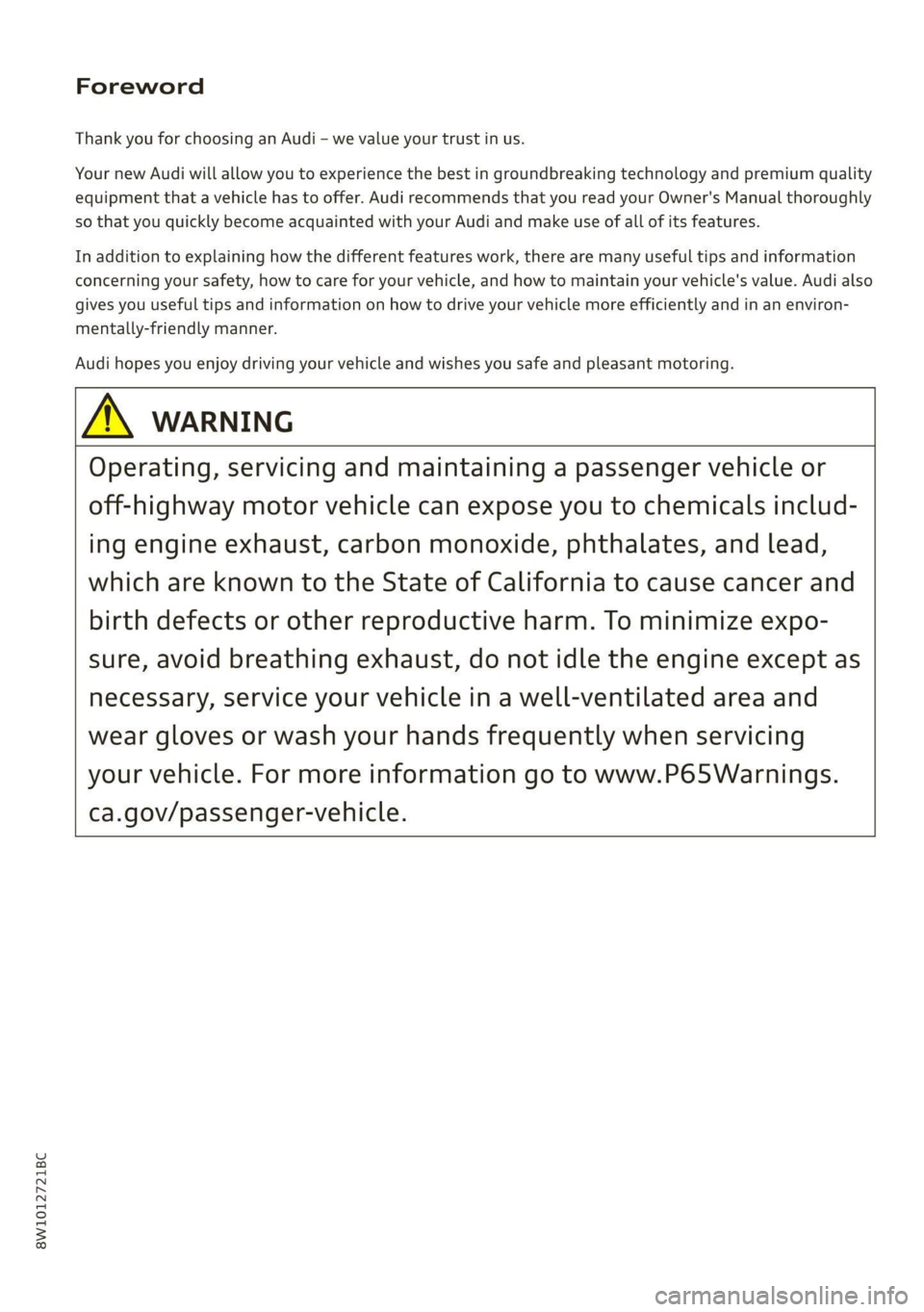
ZA\ warNiNc
Operating, servicing and maintaining a passenger vehicle or
off-highway motor vehicle can expose you to chemicals includ-
ing engine exhaust, carbon monoxide, phthalates, and lead,
which are known to the State of California to cause cancer and
birth defects or other reproductive harm. To minimize expo-
sure, avoid breathing exhaust, do not idle the engine except as
necessary, service your vehicle in a well-ventilated area and
wear gloves or wash your hands frequently when servicing
your vehicle. For more information go to www.P65Warnings.
ca.gov/passenger-vehicle.
Page 8 of 304
Quick access
Quick access
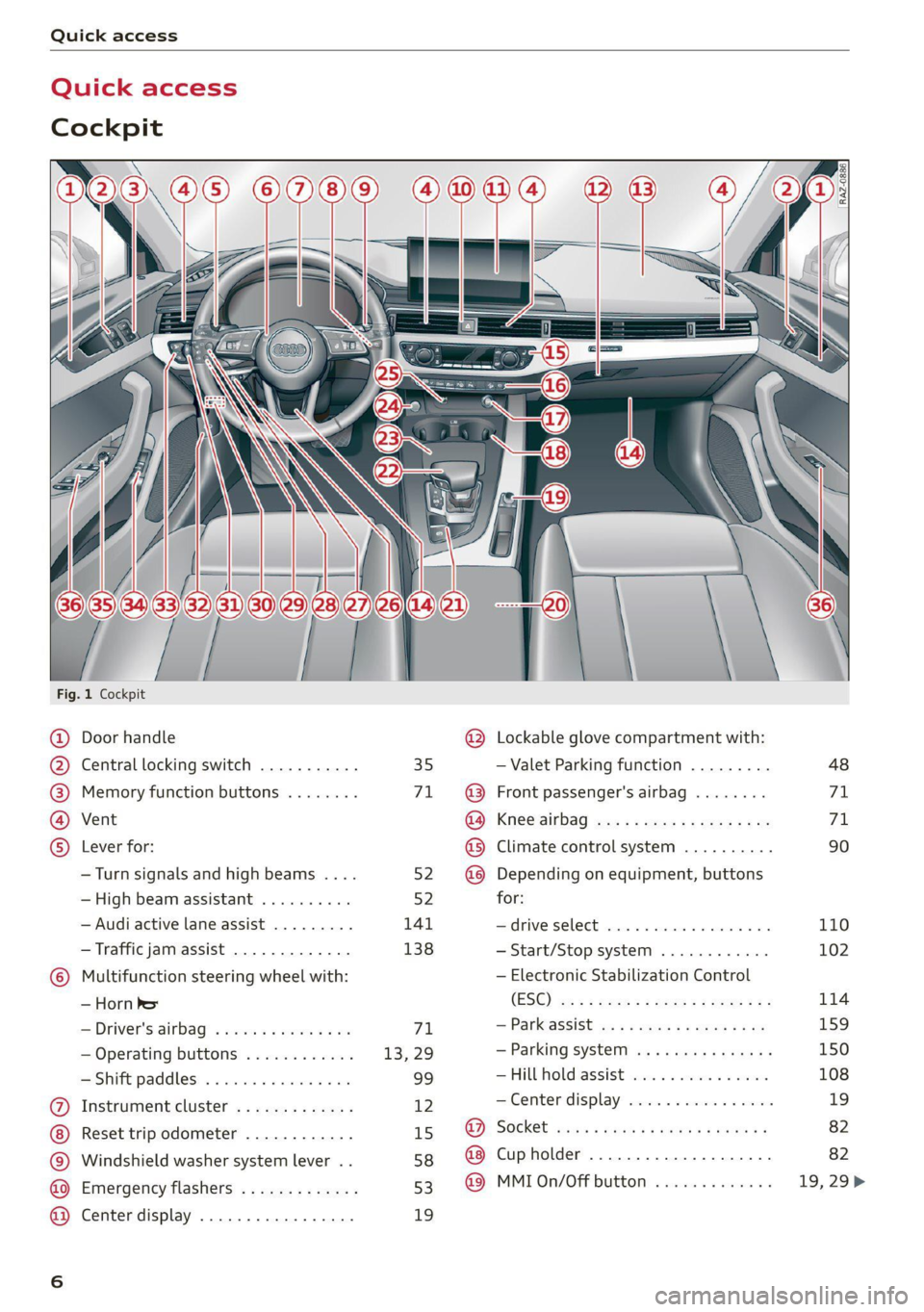
Cockpit
[RAZ-0886.
Fig. 1 Cockpit
@ Door handle @ Lockable glove compartment with:
@ Central locking switch ........... 35 — Valet Parking function ......... 48
@ Memory function buttons ........ 71. ~@ Front passenger's airbag ........ 71
@ Vent GO; KSC Sia auc 2 x wee so ews 2 ae 71
© Lever for: @® Climate control system .......... 90
—Turn signals and high beams .... 52. @@ Depending on equipment, buttons
— High beam assistant .......... 52 for:
— Audi active lane assist ......... 141 drive SELCCE cassis «6 sossan © 4 esr © 6s 110
— Traffic jam assist ............. 138 —Start/Stop system ............ 102
© Multifunction steering wheel with: — Electronic Stabilization Control
_iHorn' bet (ES@) we < = ween «seme se ee zea 114
—Driver's airbag .............0- 71 — Panassist ws 5 2 aque « s quae x # me 159
— Operating buttons ............ 13, 29 — Parking system ..........-..+. 150
—Shift paddles ................ 99 — FUL Fold aSSi8t cies 2 4 onus oo ees 108
@ Instrument cluster ............. 12 — Center display .............0 0s 19
Reset trip odometer ............ 15 @ Socket .......seeseeeee eens 82
© Windshield washer system lever .. 58 @ Cupholder ........ 0.0 seer eee 82
@ Emergency flashers ............ 53 @© MMI0n/Off button ............. 19,29>
@ Center display ................. 19
Page 39 of 304

8W1012721BC
Opening and closing
Break-in security feature
The alarm will sound if there is a break-in at the
doors, hood, and/or luggage compartment lid.
Interior/towing protection monitor
The alarm will be triggered if there are move-
ments detected in the vehicle interior (for exam-
ple, by animals) or if there is a change in the vehi-
cle angle (for example, when the vehicle is being
towed).
You can prevent the alarm from being triggered
by deactivating the interior/towing protection
monitor.
Deactivating the interior/towing protection
monitor
There are the following options for deactivating
the interior/towing protection monitor:
> Press the & button on the vehicle key a second
time within two seconds. Or
> Applies to: vehicles with convenience key:
Touch the sensor on the door handle a second
time within two seconds. Or
> Turn the mechanical key in the door lock to the
close position a second time within two sec-
onds.
> Applies to: vehicles with MMI: Select on the
home screen: VEHICLE > Settings & Service >
Interior monitoring.
If you lock the vehicle, then the interior/towing
protection monitor will stay off until the next
time the vehicle is unlocked.
Z\ WARNING
No one, especially children, should stay in the
vehicle when it is locked from the outside, be-
cause the windows can no longer be opened
from the inside. Locked doors make it more
difficult for emergency workers to enter the
vehicle, which puts lives at risk.
@ Tips
The interior/towing protection monitoring on-
ly functions correctly when the windows and
the roof* are closed.
RAZ-0720,
Fig. 26 Your vehicle key set
@ Vehicle key
You can unlock and lock your vehicle with the ve-
hicle key.
@ Mechanical key and release buttons for
the mechanical key
A mechanical key is integrated in the vehicle key.
To remove it, press the release button and re-
move the mechanical key.
Using the mechanical key, you can:
— Applies to: vehicles with lockable glove com-
partment: locking/unlocking the glove com-
partment.
— Manually unlock and lock the doors > page 36.
— Applies to: sedan with locking backrests: Lock-
ing and unlocking the backrest > page 85.
— Unlock the luggage compartment lid using the
emergency release > page 43.
@ Key fob with vehicle code
Applies to: vehicles with Audi connect vehicle control
Open the key tag and scratch to reveal the vehicle
code. You can unlock the Audi connect vehicle
control services* for your vehicle with this vehicle
code. For additional information, see
=> page 175. If a key fob is lost, contact an au-
thorized Audi dealer or authorized Audi Service
Facility.
37
Page 50 of 304
Opening and closing
@) Note
Always close the roof when you leave the vehi-
cle and when there is precipitation to reduce
the risk of damage to the interior equipment,
particularly the electronic equipment.
G) Tips
— After switching off the ignition, the roof and
sunshades can still be operated for several
minutes as long as neither of the front
doors have been opened.
— It is not possible to open the roof when
temperatures are too low.
Valet parking
Applies to: vehicles with valet parking function
The valet parking function can protect the lug-
gage compartment from unauthorized access.
The [VALET] button for valet parking is in the
glove compartment.
You can switch the valet parking function on, for
example when someone else is parking your vehi-
cle ). The vehicle can be driven, locked, and un-
locked using the vehicle key, but access to the
luggage compartment is blocked.
> Remove the mechanical key > page 37.
> Press the [VALET] button in the glove compart-
ment. The LED in the button turns on if the
function is switched on.
> Lock the glove compartment with the mechani-
cal key.
» Applies to: vehicles with lockable pass-through
and lockable rear seat backrests: To secure the
luggage compartment from the vehicle interior,
lock the pass-through and the rear seat backr-
ests using the mechanical key > page 86,
=> page 85.
> Give your vehicle key to the service personnel
who are parking your vehicle and keep the me-
chanical key.
D_ This function is not available in all countries.
2) The possible number of hand-held transmitters depends
on the equipment.
48
The following buttons are deactivated when the
valet parking function is switched on:
— <3 Button in the driver's door
— As Button on the vehicle key
— Handle in the luggage compartment lid
If the valet parking function is switched on, a
message will appear every time the ignition is
switched on.
@) Tips
Please note that the luggage compartment
can still be accessed from the vehicle interior
in vehicles with fixed rear seat backrests or
ones that cannot be locked, even when the
valet parking function is switched on.
Garage door opener
Applies to: vehicles with garage door opener
With the garage door opener, you can activate
systems such as the garage doors, security sys-
tems or house lights from inside your vehicle.
These functions are operated in the MMI. Multi-
ple receivers can be programmed, which can con-
trol the functions of up to eight2) hand-held
transmitters.
ZA\ WARNING
— When operating or programming the garage
door opener, make sure that no people or
objects are in the area immediately sur-
rounding the equipment. People can be in-
jured or property can be damaged if struck
when closing.
— Do not allow yourself to be distracted from
traffic by the viewing and operating the dis-
plays.
(i) Tips
— If you sell your vehicle, reset all settings to
the factory default settings > page 213.
>
Page 85 of 304
8W1012721BC
Storage and convenience
@) Note
Beverage containers in the cup holders should
always
have a lid. Otherwise, the liquid inside
could spill and cause damage to vehicle
equipment.
Storage and
compartments
Storage area behind the rear head
restraints
Applies to: vehicles with storage area behind the rear head re-
straints
The storage area can be used to carry light pieces
of clothing.
Z\ WARNING
The storage compartment must not be used
to transport heavy objects, hard objects, or
animals. Such objects endanger vehicle occu-
pants and increase the risk of injury during
sudden driving or braking maneuvers or in an
accident.
@) Note
Make sure that the heating grid strips for the
rear window defogger are not damaged by
abrasive objects.
@ Tips
To ensure the ventilation functions correctly,
the ventilation slots between the rear window
and the storage area must not be covered.
Additional storage options
Depending on vehicle equipment, there are a va-
riety of storage areas, compartments, and retain-
ers, such as the glove compartment, for safely
storing and securing objects.
Z\ WARNING
—To reduce the risk of injury, make sure all
storage compartments are always closed
while driving.
— Loose objects can be thrown around the ve-
hicle interior during sudden driving or brak-
ing maneuvers, which increases the risk of
an accident. Store objects securely while
driving.
— Only use the storage compartments in the
door trim panels to store small objects that
will not stick out of the compartment and
impair the function of the side airbags.
— Due to strength reasons, only secure objects
up to 11 lbs (5 kg) with the straps* in the
luggage compartment. Heavier objects are
not adequately secured. There is risk of per-
sonal injury.
— Only lightweight clothing should be hung
from the garment hooks in the vehicle. Do
not use clothes hangers to hang clothing.
The pockets of the clothing must not con-
tain any heavy, breakable, or sharp-edged
objects. This could impair the effectiveness
of the side curtain airbags.
— Make sure your view toward the rear is not
blocked, for example by hanging clothing or
objects in the vehicle.
Luggage compartment
General information
All pieces of luggage or objects must be securely
fastened in the luggage compartment. Note the
following to maintain good vehicle handling:
> Distribute the load evenly in the luggage com-
partment.
> Stow heavy luggage as far forward in the lug-
gage compartment as possible.
> Use non-elastic cords attached to the tie-downs
to secure objects.
Z\ WARNING
— Applies to: vehicles with luggage compart-
ment cover: The luggage compartment cov-
er is not a surface for storing objects. Ob-
jects placed on the cover increase the risk of
injury to all vehicle occupants during sudden
driving or braking maneuvers or in the event
of an accident. >
83
Page 119 of 304
8W1012721BC
Assist systems
Assist systems
General information
Sra eel delay
ZA\ WARNING
— As the driver, you are always completely re-
sponsible for all driving tasks. The assist
systems cannot replace the driver's atten-
tion. Give your full attention to driving the
vehicle, and be ready to intervene in the
traffic situation at all times.
— Activate the assist systems only if the sur-
rounding conditions permit it. Always adapt
your driving style to the current visual,
weather, road, and traffic conditions.
— Loose objects can be thrown around the ve-
hicle interior during sudden driving or brak-
ing maneuvers, which increases the risk of
an accident. Store objects securely while
driving.
— For the assist systems to be able to react
correctly, the function of the sensors and
cameras must not be restricted. Note the in-
formation on sensors and cameras
=>page 118.
@ Tips
— Pay attention to applicable local regulations
relating to driving tasks, leaving space for
emergency vehicles, vehicle distance, speed,
parking location, wheel placement, etc. The
driver is always responsible for following
the laws that are applicable in the location
where the vehicle is being operated.
— You can cancel a steering or braking inter-
vention by the system, by braking or accel-
erating noticeably, steering, or deactivating
the respective assist system.
— Always check the assist systems settings be-
fore driving. The settings could have been
changed, for example by other drivers.
System limitations
ZA\ WARNING
—The use of an assist system cannot over-
come the natural laws of physics. A collision
cannot be prevented in certain circumstan-
ces.
— Warnings, messages, or indicator lights may
not be displayed or initiated on time or cor-
rectly, for example, if vehicles are approach-
ing very fast.
— Corrective interventions by the assist sys-
tems, such as steering or braking interven-
tions, may not be sufficient or they may not
occur. Always be ready to intervene.
@) Tips
— Due to the system limitations when detect-
ing the surrounding area, the systems may
warn or intervene unexpectedly or too late
in certain situations. The assist systems may
also interpret a driving maneuver incorrectly
and then warn the driver unexpectedly.
— The systems may not function as expected
in unusual driving situations, such as driving
offroad, on unpaved roads, on loose ground,
on inclines, or on grooves in the road.
— The systems may not function correctly in
unclear traffic situations, such as turning
lanes, exit ramps, construction zones, rises
or dips that obstruct visibility, intersections,
toll stations, or city traffic.
— The detection of the surrounding area can
be limited, for example by vehicles driving
ahead or by rain, snow, heavy spray, or light
shining into the camera.
— The steering wheel touch recognition may
be limited when you wear gloves. Steering
intervention requests from the steering as-
sist systems may occur more frequently.
— If accessories have been mounted on the
steering wheel, the steering assist systems
may
be limited. The frequency of steering
intervention requests from the steering as-
sist systems may vary as well.
117
Page 233 of 304
8W1012721BC
Checking and Filling
that the vehicle can still be started, the electrical
equipment will be limited or switched off. Some
convenience functions, such as interior lighting
or power seat adjustment, may not be available
under certain circumstances. The convenience
functions will be available again when you start
the
engine.
Even when electrical equipment is switched off,
the equipment can still drain the battery if the
vehicle is not driven for Long periods of time.
Deep draining results in a chemical reaction that
destroys the inside of the battery. The battery
must be charged every month to prevent this
= page 232. Contact an authorized Audi dealer or
authorized Audi Service Facility for more infor-
mation.
Winter operation
Cold weather places an especially high load on
the 12 Volt vehicle battery. Have the battery
checked by an authorized Audi dealer or author-
ized Audi Service Facility before cold weather be-
gins.
so that it will not be destroyed by “freezing”
=> page 232, Charging the 12 Volt vehicle
battery.
— There are electrical components under the
cargo floor behind a trim panel that warm
up during operation. To reduce the risk of
the components overheating, do not store
objects such as blankets under the cargo
floor. If the components overheat, they will
switch off temporarily. This will be indicated
by a message that will be displayed in the
instrument cluster until the temperature re-
turns to normal.
12 Volt vehicle battery
Explanation of warnings:
Always wear eye protection.
forbidden.
ZA WARNING
— All work on the battery or electrical system
in your vehicle can result in injuries, chemi-
cal burns, accidents, or burns. Because of
this, all work must be performed only by an
authorized Audi dealer or authorized Audi
Service Facility.
— Never connect a charging cable or jump
start cable directly to the 12 Volt vehicle
battery. Only use the connections in the en-
gine compartment > page 232.
ZA WARNING
California Proposition 65 Warning:
— Battery posts, terminals and related acces-
sories contain lead and lead compounds,
chemicals known to the State of California
to cause cancer and reproductive harms.
Wash hands after handling.
@) Note
— If the vehicle will be parked for long periods
of time, protect the battery against the cold
A highly explosive mixture of gases can
form when charging batteries.
Always keep children away from battery
acid and the battery.
Battery acid is highly corrosive. Always
wear protective gloves and eye protection.
® Fire, sparks, open flame, and smoking are
@/ | Always follow the instructions in the oper-
(QO | ating manual.
@) For the sake of the environment
“© % Lead-acid batteries must be disposed of
using methods that will not harm the environ-
ment. Do not dispose of them in household
trash. They contain harmful substances, such
as sulfuric acid and lead, and also recyclable
raw materials. Contact an authorized Audi
dealer or authorized Audi Service Facility for
more information.
231
Page 294 of 304
Index
ExteriOmmirrorssecs os asco w 6 aeons vo ween 9 we 55
Folding settings............. eee eee eee 34
External voice operation................. 27
F
Factory default settings
Multi Media Interface................. 213
Fast route............ 0.0.0.0. . cee eee 182
Favorites... 0.2.0.0... cee eee eee eee 21
BIW@tOOth): < seca ss ceca s i yews se ees 2s 215
NaViGatiOnices ss sescsus so aves + ware eo nena 183
Telephone ..........0 00 cece eee eee 167
Federal Communications Commission (FCC) . 284
File formats (media drives).............. 207
Filling
Tank capacities.......... eee eee eee 287
For the sake of the environment
Disposing of engine oil................ 226
FOGUING's « « supe ¢ ¢ cause 5s same 7 2 eee a eae 218
LOAKS ice ie x erences = 6 caenene a 6 aueuioe we axons 6 eae 222
Forward gear
refer to Gears... . eee eee eee 97
Free text search
Media... .... eee ee eee eee 206
RadiO sys = ¢ seove + © sees ¢ crews ge pew Es 195
also refer to Intelligent search.......... 182
Freeze protection
Coolant... ... 2... eee eee eee 227
Windshield washer system............. 233
Frequency band..........-....--.000-5 193
also refer to Frequency band........... 193
Front center armrest..............02 0005 66
Front passenger’s seat adjustment
REAR « ieiam co nasi 3 onan + wR Ts HeEEE Be RO 65
Front wiper blades
Changing.......... 00. c eee ee eee eee 59
Cleaning... .. cece eee 59
Fuel... 2. eee eee eee 217
AGGItIVES: = ess = ven e = sees os owen ee xe 218
CUFrFeENE CONSUMPTION ¢ & sesso 6 3 ese ao eee 16
Fueldisplay....... 2... cece eee eee eee 12
GaSOliNGs « sees ss ween oe eee ce een es es 217
Reducing fuel consumption............ 102
Tank capacity...........0 ee eee eee eee 287
292
Fueling
Fuel filler door. ....... 0... cece eee eee 218
Fuel filler door emergency release....... 220
Functions on demand...............4.. 175
Functions that require a license.......... 75S
also refer to Functions on demand....... 175
Fuses
ASSIQNMENKS « & senses o 8 mnmors & & mamens @ & inerer 273
Replacing......... 0. cece eee eee eee 272
G
Garage door opener...........0..000 eee 48
Garment hooks ...... 2... 0c e eee eee eee 83
GaSOUME sscwee a 2 evarnes a a omawwes vx amos ow vase 2 217
Additives... 0.0.0... eee e cece eee eee 218
GasOliNe MIXtURE cnn « : seam ct same & 2 Hew 217
GAWR
refer to Gross Axle Weight Rating (GAWR) . 287
GOSTSics + nayss = = pees = yeu se eeUR GE ROUSE 97
Glossary of tire and loading terminology... 238
Glove compartment.............--000-05 83
Valet parking: « < ews + ¢ sees se news oe ees 48
Gross Axle Weight Rating (GAWR)........ 287
Gross Vehicle Weight Rating (GVWR)...... 287
GVWR
refer to Gross Vehicle Weight
Rating (GVWR) .............0000.0005 287
H
Handstreess «sss x i souness 6 0 annwine «a auaware x 163
Hands Free: Profiles «3 inisa ao inesow a vow & 163
Head-up display
Adjusting. ........... 0c cee eee eee eee 25
Adjusting the brightness................ 55
Operatings « : vem « x ewe 5 ¢ eee g 7 eee oe 25
Headlight range control................0. §1
H@AdLIQtS: ¢ = xcs ¢ < eees x = Resa cB eS ea 51
Gleanings « 2 svc so wes 2 wea ee res ees 256
Headlight range control................ 51
Washer system.........--00 eee eee eee 58
Washer system (filling washer fluid) .... . 233
Head restraints < seus « s ems s + sates =v egops se 67
Heated rear window...........0 eee eee 93
Heated steering wheel..............000.. 93
Heating...........0.. 00.0. cee 90