Pre sense AUDI A4 2021 Owner´s Manual
[x] Cancel search | Manufacturer: AUDI, Model Year: 2021, Model line: A4, Model: AUDI A4 2021Pages: 304, PDF Size: 107.89 MB
Page 5 of 304
8W1012721BC
Table of contents
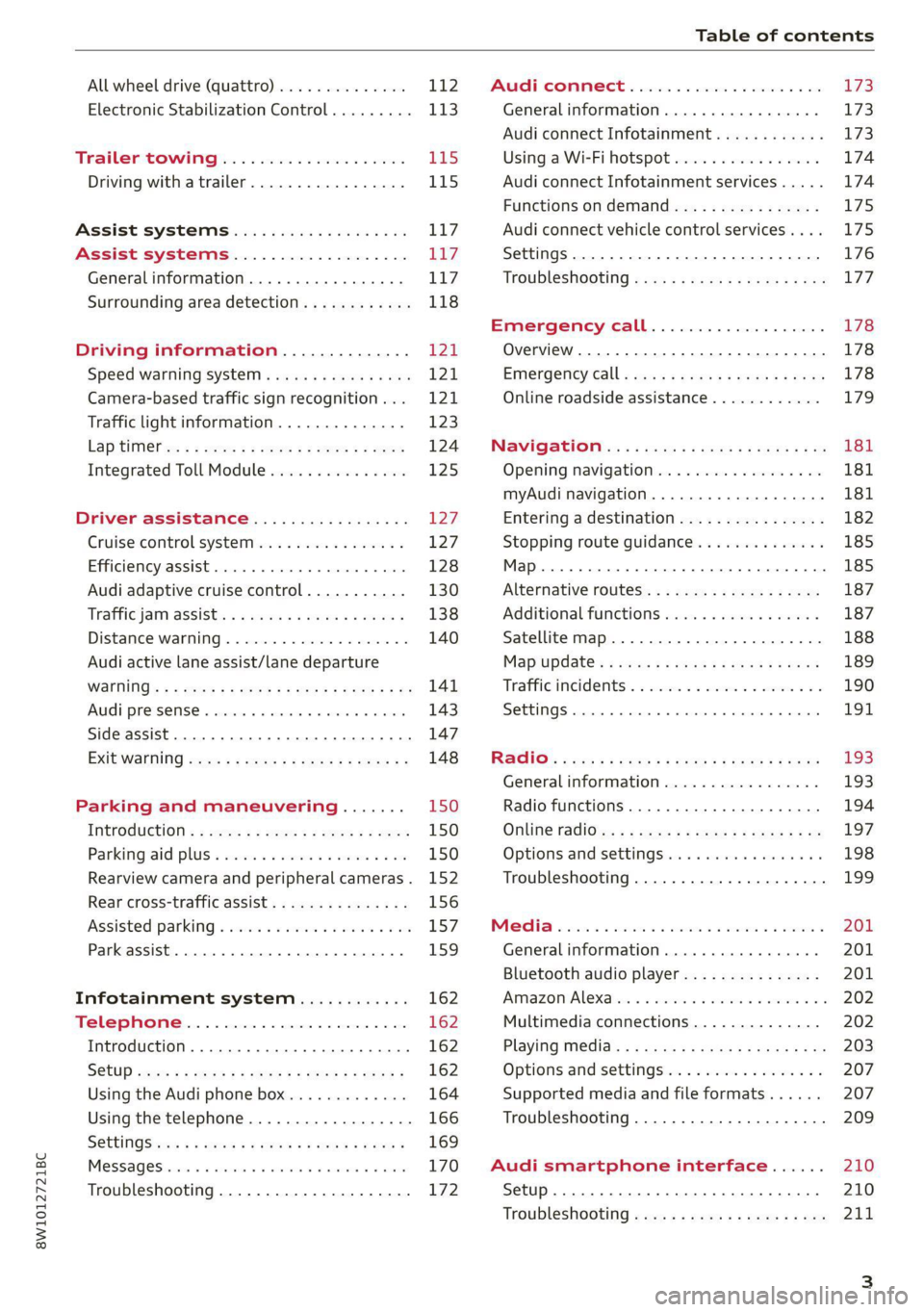
All wheel drive (quattro).............. 112
Electronic Stabilization Control......... 113
Trailer towing.................... 115
Driving with atrailer................. 115
Assist systems................... 117
Assist systems................... 117
General information. . 117
Surrounding area detection............ 118
Driving information.............. L241
Speed warning systeM.........-.00 00 121
Camera-based traffic sign recognition... 121
Traffic light information.............. 123
Lap tel ws = = sees 5 5 ses 2 2 eee ge ee 124
Integrated Toll Module............... 125
Driver assistance................. 127
Cruise control system............20-- 127
Efficiency assist....... 0.00... 128
Audi adaptive cruise control........... 130
Traffiejaim assists: « ¢ sas s o aerey & 2 sores x 138
Distance warning ...... 2.00... .00000. 140
Audi active lane assist/lane departure
WARNING: = = wey = o eee 2 o wees 2 Rae & 2 BS 141
Audi pre sense... ...... cee eee eee 143
Side assist... 0.0.6... cece eee eee 147
EXit Warnitig ces s = ewes 5 & eee § o eee es 148
Parking and maneuvering....... 150
TNtROGUetiON « = sew ce sees 5 2 eee : x ewer 150
Parkirigiaid plus o seswies «5 acinwse ow enanave a & ox 150
Rearview camera and peripheral cameras. 152
Rear cross-traffic assist.............0. 156
Assisted
parking............ 0 eee eee 157
Park assist... 0.0... ccc eee ee 159
Infotainment system............ 162
Telephone..................-0-005 162
Introduction................ 0000-0 162
S@tUP -cusy 9 sous & ¥ Sew Yo eR Es ewe 162
Using the Audi phone box............. 164
Using the telephone.................. 166
SOtUiNGS sisis < & eawig + eels # eee s BwR 169
MOSSAQESicies «i sanswis 6 v sete + 0 oxime 4 9 aie 170
Troubleshooting............--.000005 172
PRCT COMMBCE 's. cosves 5 6 sivas 6 6 snes 8 oo LS
General information................- 173
Audi connect Infotainment............ 173
Using a Wi-Fi hotspot................ 174
Audi connect Infotainment services..... 174
Functions on demand................ 175
Audi connect vehicle control services.... 175
Settings............. 0.0.00 002 eee 176
TRGUBIESHOOLING sass ¢ scm s 3 Hae 5 tee 177
Emergency call................... 178
Overview... 12.0... eee eee eee 178
Emergenicy'call « css s sees 6 s gems © + eeu 178
Online roadside assistance............ 179
NaViGGationtc: « « meus « & seu sc poms + «oe 181
Opening navigation............0..005 181
myAudi navigation...............000. 181
Entering a destination................ 182
Stopping route guidance.............. 185
Map... .. see cece eee eee 185
Alternative routes.............2-.00. 187
Additional functions................. 187
Satellite map.......... 2.0... ee eee 188
Mapupdaté-: « 2cas ss ees 9 ¢ eews vs pee 189
Traffic incidents’. = vce se eeu ve exon ewe 190
SETEIIGS sseneie oo smeneie © oxemenene © sitadame @ © etnznis 191
RAGUIG:: « cas 2 = seus « s pomp o 6 com 2 ¢ ce 193
General information................. 193
Radio functions................00005 194
Online radio's: ss sees ss eees ye epee se ee 197
Options and settings.............0005 198
Troubleshooting..............--000-5 199
PRE wei. as aoscen oo sauweme 3 & coset 3 v wens 201
Generalinformation................. 201
Bluetooth audio player............... 201
Amazon Alexa... 0.000 s eee bee eee ees 202
Multimedia connections.............. 202
Playing media. ........ 2. cece eee eee 203
Options and settings................. 207
Supported media and file formats...... 207
Troubleshooting..............--.0005 209
Audi smartphone interface...... 210
Setup... 2... eee eee eee 210
Troubleshooting.............---.00-5 211
Page 10 of 304
Quick access
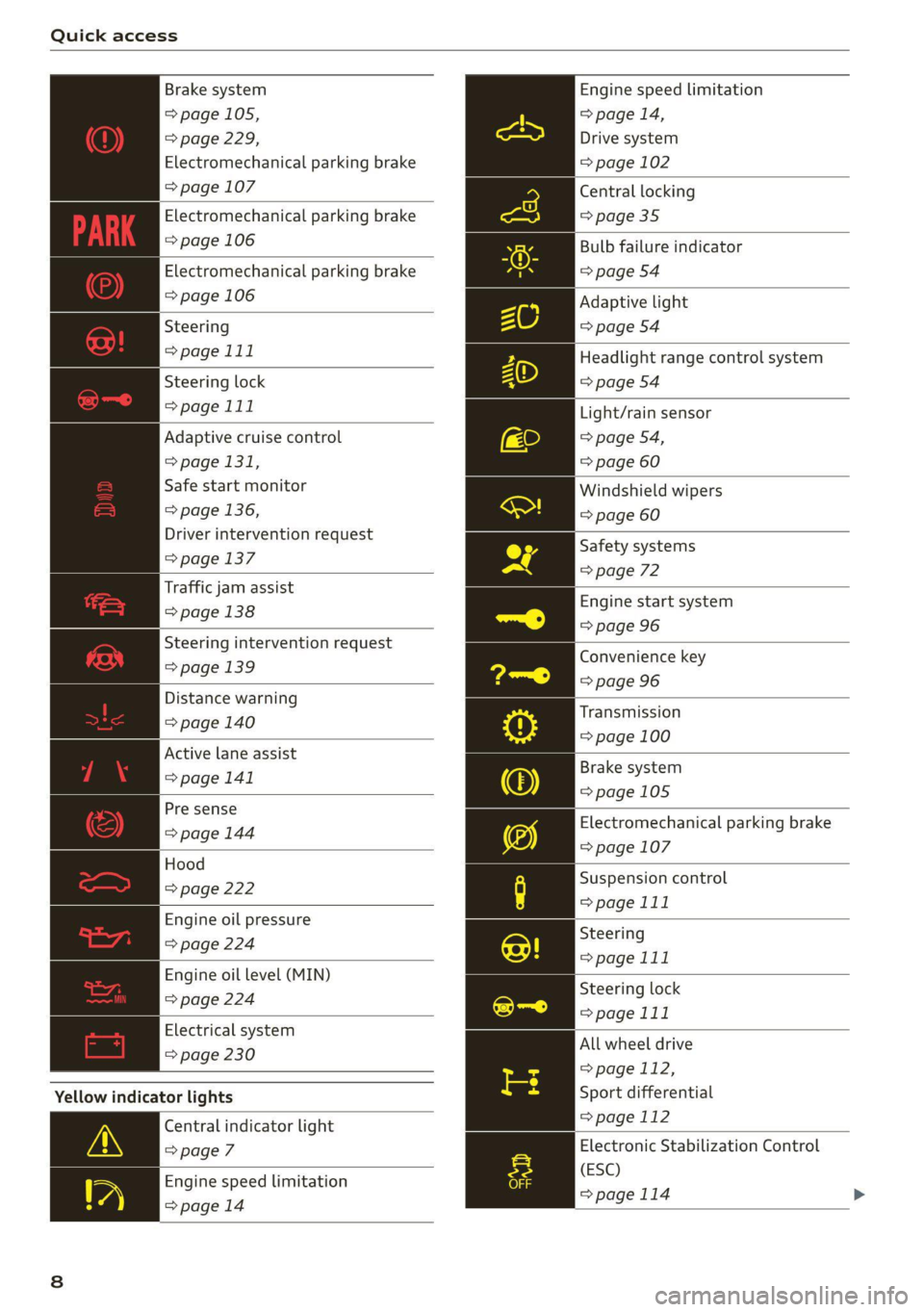
Brake system
=> page 105,
=> page 229,
Electromechanical parking brake
=> page 107
Electromechanical parking brake
=> page 106
Electromechanical parking brake
=> page 106
Steering
>page 111
Steering lock
>page 111
Adaptive cruise control
=> page 131,
Safe start monitor
> page 136,
Driver intervention request
=> page 137
Traffic jam assist
=> page 138
Steering intervention request
=>page 139
Distance warning
=> page 140
Active lane assist
=> page 141
Pre sense
> page 144
Hood
=> page 222
Engine oil pressure
=> page 224
Engine oil level (MIN)
=> page 224
Electrical system
= page 230
Yellow indicator lights
Central indicator light
=> page 7
Engine speed limitation
=>page 14
Engine speed limitation
> page 14,
Drive system
= page 102
Central locking
=> page 35
Bulb failure indicator
=> page 54
Adaptive light
=> page 54
Headlight range control system
> page 54
Light/rain sensor
=> page 54,
=> page 60
Windshield wipers
=> page 60
Safety systems
=> page 72
Engine start system
=> page 96
Convenience key
=> page 96
Transmission
=> page 100
Brake system
=>page 105
Electromechanical parking brake
=> page 107
Suspension control
> page 111
Steering
=> page 111
Steering lock
>page 111
All wheel drive
> page 112,
Sport differential
> page 112
Electronic Stabilization Control
(ESC)
=>page 114
Page 11 of 304
8W1012721BC
Quick access
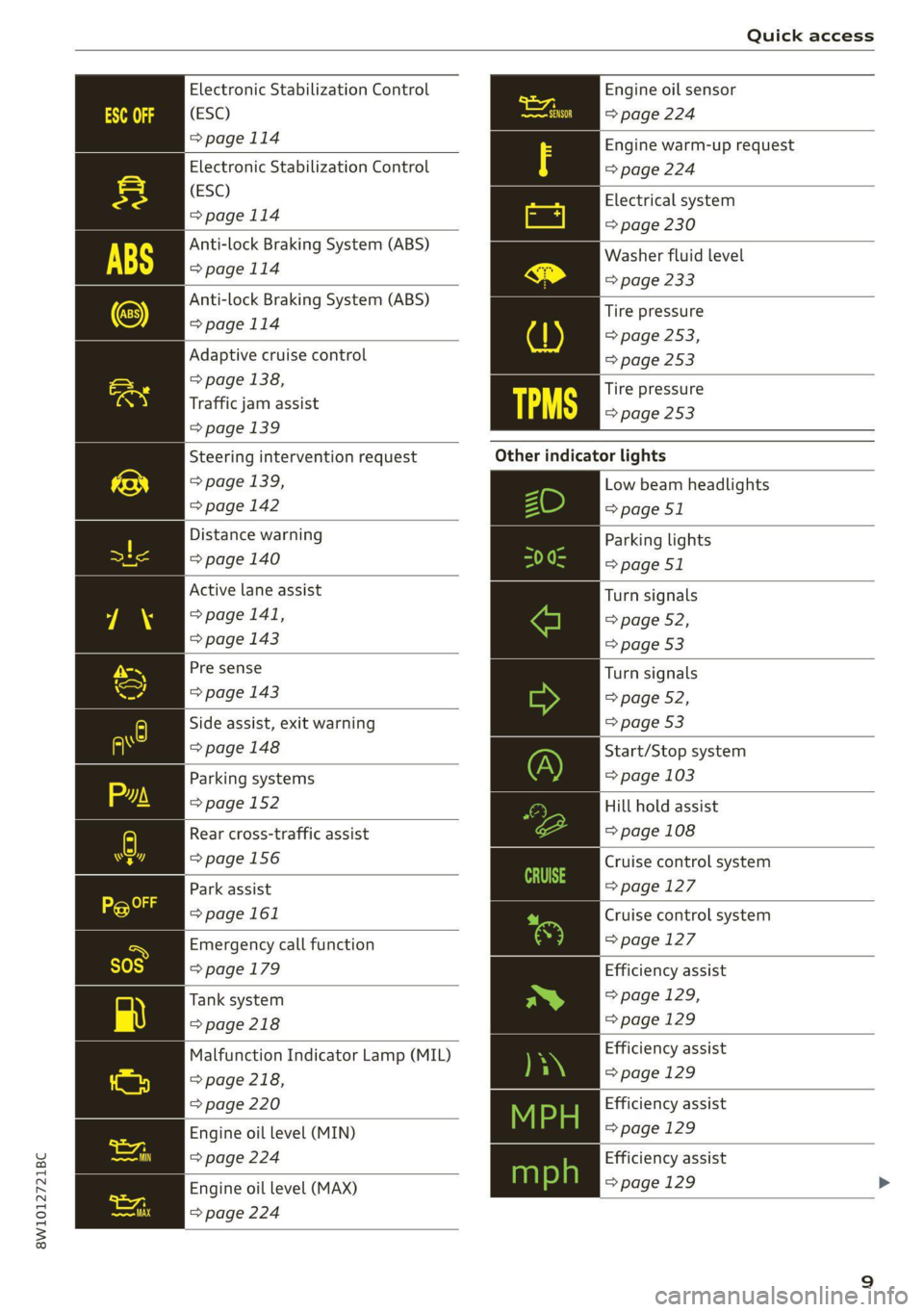
Electronic Stabilization Control
(ESC)
> page 114
Electronic Stabilization Control
(ESC)
=>page 114
Anti-lock Braking System (ABS)
>page 114
Anti-lock Braking System (ABS)
=>page 114
Adaptive cruise control
> page 138,
Traffic jam assist
=> page 139
Engine oil sensor
=> page 224
Engine warm-up request
=> page 224
Electrical system
=> page 230
Washer fluid level
=> page 233
Tire pressure
=> page 253,
=> page 253
Tire pressure
=> page 253
Steering intervention request
> page 139,
=>page 142
Distance warning
=> page 140
Active lane assist
> page 141,
=> page 143
Pre sense
=> page 143
Side assist, exit warning
=> page 148
Parking systems
=>page 152
Rear cross-traffic assist
=> page 156
Park assist
=>page 161
Emergency call function
> page 179
Tank system
=> page 218
Malfunction Indicator Lamp (MIL)
> page 218,
=> page 220
Engine oil level (MIN)
=> page 224
Engine oil level (MAX)
=> page 224
Other indicator lights
Low beam headlights
=>page 51
Parking lights
=> page 51
Turn signals
=> page 52,
=>page 53
Turn signals
=> page 52,
=> page 53
Start/Stop system
=> page 103
Hill hold assist
=> page 108
Cruise control system
=> page 127
Cruise control system
=>page 127
Efficiency assist
=> page 129,
=>page 129
Efficiency assist
> page 129
Efficiency assist
=> page 129
Efficiency assist
=> page 129 >
Page 13 of 304

8W1012721BC
Quick access
Active lane assist
=> page 141,
=> page 143
Pre sense
> page 143
®) Pre sense
=> page 144
Side assist, exit warning
Fs => page 148
Parking systems
=> page 152
Rear cross-traffic assist
Q hee => page 156
Park assist
=> page 161
Park assist
=> page 161
11
Page 116 of 304

Driving dynamic
these control systems are installed and this
can affect driving stability and increase the
risk of a collision.
Gi) Tips
The ABS and ASR only function correctly when
all four wheels have a similar wear condition.
Different tire sizes can lead to a reduction in
engine power.
The So button (or 2, depending on the model)
for controlling the ESC is located in the center
console, in front of the selector lever. The ESC is
automatically switched on when the ignition is
switched on.
Limiting ESC
In some situations, it may make sense to limit
the stabilizing function of the ESC so that the
wheels can spin, for example to rock a vehicle to
free it when it is stuck or to drive with snow
chains. The ESC can also be limited to provide
more sporty driving characteristics with fewer
stabilizing corrective actions.
—To limit the ESC, press the oF button briefly.
The B indicator light will turn on.
— To completely reactivate the ESC stabilization
function, press the button again. The indicator
light turns off.
When ESC is limited, allroad models switch to
Offroad mode. All other model versions switch to
Sport mode. Sport mode is particularly suited for
driving on an even road surface. Offroad mode is
designed for uneven terrain or loose ground.
Switching off ESC
For a more active control of the vehicle where the
stabilizing functions of the ESC cannot intervene,
the ESC can be switched off.
—To switch off the ESC, press and hold the Sor
button for more than three seconds. The B
and Ea indicator lights turn on.
— To completely reactivate the ESC stabilization
function, press the button again. The indicator
lights turn off.
114
ZA\ WARNING
— When the ESC is switched off or limited,
there will be no vehicle stabilization or it will
be limited. The driving wheels could spin
and the vehicle could swerve, especially on
slick or slippery road surfaces, which in-
creases the risk of an accident.
— Because of the increased risk of an accident,
only drive with the ESC switched off or limit-
ed when it is necessary. Reactivate the ESC
as soon as possible.
(i) Tips
— If you select the Audi drive select* Offroad
mode, hill descent assist will switch on.
— If the ESC is limited, switched off, or mal-
functioning, systems with an automatic
braking intervention function may not be
fully available.
— If malfunctions occur in other systems or
certain driver assist systems are active, the
ESC must be switched on by the system. The
ESC
may switch on automatically and can-
not be operated with the button.
BB /ABS} / B © Stabilization control (ESC/
ABS): malfunction! See owner's manual
There is a malfunction in the ABS or EDL. This al-
so causes the ESC to malfunction. The brakes still
function with their normal power, but ABS is not
active.
Drive to an authorized Audi dealer or authorized
Audi Service Facility immediately to have the
malfunction corrected.
Other indicator lights
it a blinks while driving, the ESC is actively reg-
ulating. Operating noises may occur. If the indi-
cator light stays on, the ESC has been switched
off due to system needs. The indicator light turns
off when the system is fully functional.
Page 145 of 304

8W1012721BC
Driver assistance
steering correction cannot be set, the steering
correction will function in the Late setting.
— Vibration warning - You can select if you would
also like to be warned using a vibration in the
steering wheel.
@) Tips
Certain settings are automatically stored and
assigned to the remote control key being
used.
Applies to: vehicles with Audi active lane assist
iff or is displayed when there is a malfunc-
tion, the active lane assist functions may be un-
available or limited.
A message that indicates the cause and possible
solution may appear with some displays. The
weather conditions may be too poor or the cam-
era may be covered. Clean the area in front of the
camera > page 119 and try to turn on the sys-
tems again later.
If the malfunction remains, drive to an author-
ized Audi dealer or authorized Audi Service Facili-
ty immediately to have the malfunction correct-
ed.
Audi pre sense
Introduction
Applies to: vehicles with Audi pre sense
Within the limits of the system, the Audi pre
sense functions can initiate measures in certain
driving situations to protect the vehicle occu-
pants and other road users. Depending on the ve-
hicle equipment, various Audi pre sense systems
may
be installed:
— Audi pre sense basic can react during emergen-
cy and dangerous braking maneuvers and un-
stable driving situations (such as oversteering
or understeering).
— Audi pre sense city and Audi pre sense front
can detect an impending frontal impact and re-
act with warnings, braking interventions, and
preemptive safety measures for the vehicle oc-
cupants.
— Audi pre sense rear monitors the rear traffic
behind your vehicle and can react to an impend-
ing rear impact.
— The swerve assist can help you to steer the ve-
hicle around an obstacle during an evasive ma-
neuver that is detected as critical.
— The turn assist can detect vehicles in the oppo-
site lane as critical during a turning maneuver
and react with braking maneuvers.
Audi pre sense safety measures
Applies to: vehicles with Audi pre sense
Depending on the vehicle speed and the vehicle
equipment, the following functions may be initi-
ated in certain situations:
— Visual and audio warnings
— Reversible tensioning of safety belts
— Closing the windows and panoramic glass roof
— Adjusting the seats
— Other preemptive safety measures by individual
systems
ZA\ WARNING
Observe the safety precautions and note the
limits of the assist systems, sensors, and
cameras > page 117.
G) Tips
— Depending on the risk situation that is de-
tected and the selected Audi drive select*
mode, not all preemptive safety measures
may be initiated under certain circumstan-
ces. Certain functions can be adjusted or
skipped if necessary.
— Audi pre sense may also be limited or un-
available under certain circumstances, for
example if:
— There are passengers with unfastened
safety belts
— After turning on the ignition, as long as
the FJ or indicator light is on.
— When driving in reverse.
— The front passenger's airbag is switched
off
— There is an airbag control module mal-
function
143
Page 146 of 304

Driver assistance
— System functions may not be available if
the ESC is limited or switched off, or if
there is a malfunction.
NU ee elie
Applies to: vehicles with Audi pre sense basic
Audi pre sense basic is automatically active at
speeds of approximately 20 mph (30 km/h) and
higher. Audi pre sense basic can trigger preemp-
tive safety measures during emergency braking
and dangerous braking maneuvers as well as in
unstable driving situations, such as oversteering
or understeering > page 143, Audi pre sense
safety measures.
The message Audi pre sense Bo / (@) will warn
you about the danger.
Z\ WARNING
Observe the safety precautions and note the
limits of the assist systems, sensors, and
cameras > page 117.
ON Tee ee La)
Applies to: vehicles with Audi pre sense city
Within the limits of the system, Audi pre sense
city can warn about an impending front end colli-
sion and brake the vehicle strongly, if necessary.
The system uses the camera behind the wind-
shield and is available at speeds above approxi-
mately 6 mph (10 km/h).
Driving situations
The situations to which the system reacts de-
pends on the vehicle speed.
Automatic braking interventions are available at
vehicle speeds up to approximately 50 mph
(85 km/h).
Up to speeds of approximately 50 mph
(85 km/h), the system may react to the following
situations:
— Pedestrians are moving inside your lane
144
Up to speeds of approximately 155 mph
(250 km/h), the system may react to the follow-
ing situations:
—Avehicle driving ahead clearly applies the
brakes
— When approaching a vehicle ahead that is clear-
ly traveling more slowly
— When approaching a stationary vehicle
Prewarning
To warn about detected dangers, Audi pre
sense 1) / {@) will appear in the instrument clus-
ter and an audio signal will sound.
A brief application of the brakes
If a collision is imminent, there may be an acute
warning using a brief application of the brakes.
You
will also be warned about the danger by an
indicator in the instrument cluster display. You
may only be able to avoid a collision by swerving
or braking strongly.
Automatic braking force increase
If there is an impending collision and you are not
applying the brakes enough, the braking force
may be increased, depending on the situation.
Automatic braking
If you do not react to the acute warning, the sys-
tem may apply the brakes with strong braking
force within the limits of the system in order to
reduce the speed of impact in the event of a colli-
sion.
If the brakes are applied until the vehicle is sta-
tionary, © / Please take over! will appear in
the instrument cluster and you must take over
control of the vehicle.
ZA\ WARNING
— Observe the safety precautions and note the
limits of the assist systems, sensors, and
cameras > page 117.
— Audi pre sense cannot overcome natural
physical laws. It is a system designed to as-
sist and it cannot prevent a collision in every
circumstance. The driver must always inter-
vene. The driver is always responsible for
braking at the correct time. Do not let the >
Page 147 of 304

8W1012721BC
Driver assistance
increased safety provided tempt you into
taking risks. This could increase your risk of
a collision.
— Audi pre sense city does not react to certain
objects, such as animals, crossing or oncom-
ing vehicles, bars, railings, or railcars.
— Audi pre sense may be limited or unavailable
in curves or when it is dark.
— Loose objects can be thrown around the ve-
hicle interior during sudden driving or brak-
ing maneuvers, which increases the risk of
an accident. Store objects securely while
driving.
G) Tips
Certain system functions may not be available
if the ESC is limited or switched off
=> page 114, if there is a malfunction, or if the
hill hold assist* is switched on > page 108.
ON eee Reels
Applies to: vehicles with Audi pre sense front
Audi pre sense front provides the same scope of
functions as Audi pre sense city, with a few ex-
ceptions > page 144. The system has an exten-
sive field of view due to additional sensors that
are installed. Because of this, vehicles that are
braking or traveling significantly more slowly can
be detected earlier and more clearly, depending
on the limits of the system.
The following features apply to Audi pre sense
front:
— Automatic braking interventions are available
at vehicle speeds up to approximately 155 mph
(250 km/h)
—The system does not detect pedestrians
ZA WARNING
— Observe the safety precautions > A\ in Audi
pre sense city on page 144.
— Observe the safety precautions and note the
limits of the assist systems, sensors, and
cameras > page 117.
— Audi pre sense front does not react to cer-
tain objects, such as pedestrians, animals,
crossing or oncoming vehicles, bars, railings,
or railcars.
ONT eee
Applies to: vehicles with Audi pre sense rear
Within the limits of the system, Audi pre sense
rear uses data from radar sensors at the rear cor-
ners of the vehicle and calculates the probability
of a rear-end collision with the vehicle behind
you.
Audi pre sense preemptive safety measures can
be initiated if the risk of a collision with the vehi-
cle behind you is detected.
ZA WARNING
— Observe the safety precautions and note the
limits of the assist systems, sensors, and
cameras > page 117.
— Audi pre sense rear does not react to pedes-
trians, animals, crossing objects, and ob-
jects not detected as vehicles.
G) Tips
Audi pre sense rear functions may also switch
off if there is a malfunction in the side assist
system.
Rati
Applies to: vehicles with swerve assist
The swerve assist can help you to steer the vehi-
cle around an obstacle detected in a critical area.
If you avoid an obstacle after the acute warning,
then the swerve assist assists you by applying
slight steering adjustment to correct your steer-
ing wheel angle as long as you are actively steer-
ing. Swerve assist is available at speeds between
approximately 20 mph (30 km/h) and 90 mph
(150 km/h).
ZA\ WARNING
— Observe the safety precautions and note the
limits of the assist systems, sensors, and
cameras > page 117. >
145
Page 148 of 304

Driver assistance
— Swerve assist does not react to pedestrians,
animals, crossing objects, and objects not
detected as vehicles.
Gi) Tips
— System functions may not be available if the
ESC is limited or switched off, or if there is a
malfunction.
— An indicator in the instrument cluster will
inform you when there is an intervention.
Turn assist
Applies to: vehicles with turn assist
When turning left), turn assist can help to re-
duce the risk of a collision with an oncoming ve-
hicle by using braking action to keep your vehicle
in its lane. The function is only available when
the turn signal is turned on and at speeds up to
approximately 6 mph (10 km/h).
ZA WARNING
— Observe the safety precautions and note the
limits of the assist systems, sensors, and
cameras > page 117.
— The turn assist does not react to pedes-
trians, animals, crossing objects, and ob-
jects not detected as vehicles.
@) Tips
— System functions may not be available if the
ESC is limited or switched off, or if there is a
malfunction.
— An indicator in the instrument cluster will
inform you when there is an intervention.
PNM lm e es)
Applies to: vehicles with Audi pre sense
You can switch Audi pre sense and the associated
systems on or off, or adjust them individually.
The adjustment options depend on the vehicle
equipment.
2) When making a right turn in countries with left-hand drive
vehicles.
2) Incertain countries
146
> Applies to MMI: Select on the home screen: VE-
HICLE > Driver assistance > Audi pre sense.
Setting the prewarning
You can adjust the warning time for the prewarn-
ing”) individually (Early/Medium/Late) or switch
the prewarning off.
Set the warning time for the early warning to
Early at first. If you feel that the prewarnings ap-
pear too early, then set the warning time to Me-
dium. The Late warning time should only be set
in special circumstances.
(i) Tips
— If Audi pre sense is switched off, it switches
on again automatically once the ignition is
switched on again).
— Switch Audi pre sense off when you are not
using public streets, when loading the vehi-
cle onto a vehicle carrier, train, ship, or oth-
er type of transportation, or when towing
the vehicle. This can help to prevent an un-
desired intervention from the Audi pre
sense system.
— Certain settings are automatically stored
and assigned to the remote control key be-
ing used.
Applies to: vehicles with Audi pre sense
re) or is displayed when there is a malfunc-
tion, the Audi pre sense functions may be un-
available or may be limited.
A message that indicates the cause and possible
solution
may appear with some displays. The
weather conditions may be too poor or a sensor
may be covered. Bring the vehicle to a full stop,
switch the ignition off, and clean the area in front
of the sensors > page 119.
If the message still appears after switching the
ignition on again, have an authorized repair facili-
ty correct the malfunction as soon as possible.
Page 272 of 304
Emergency assistance
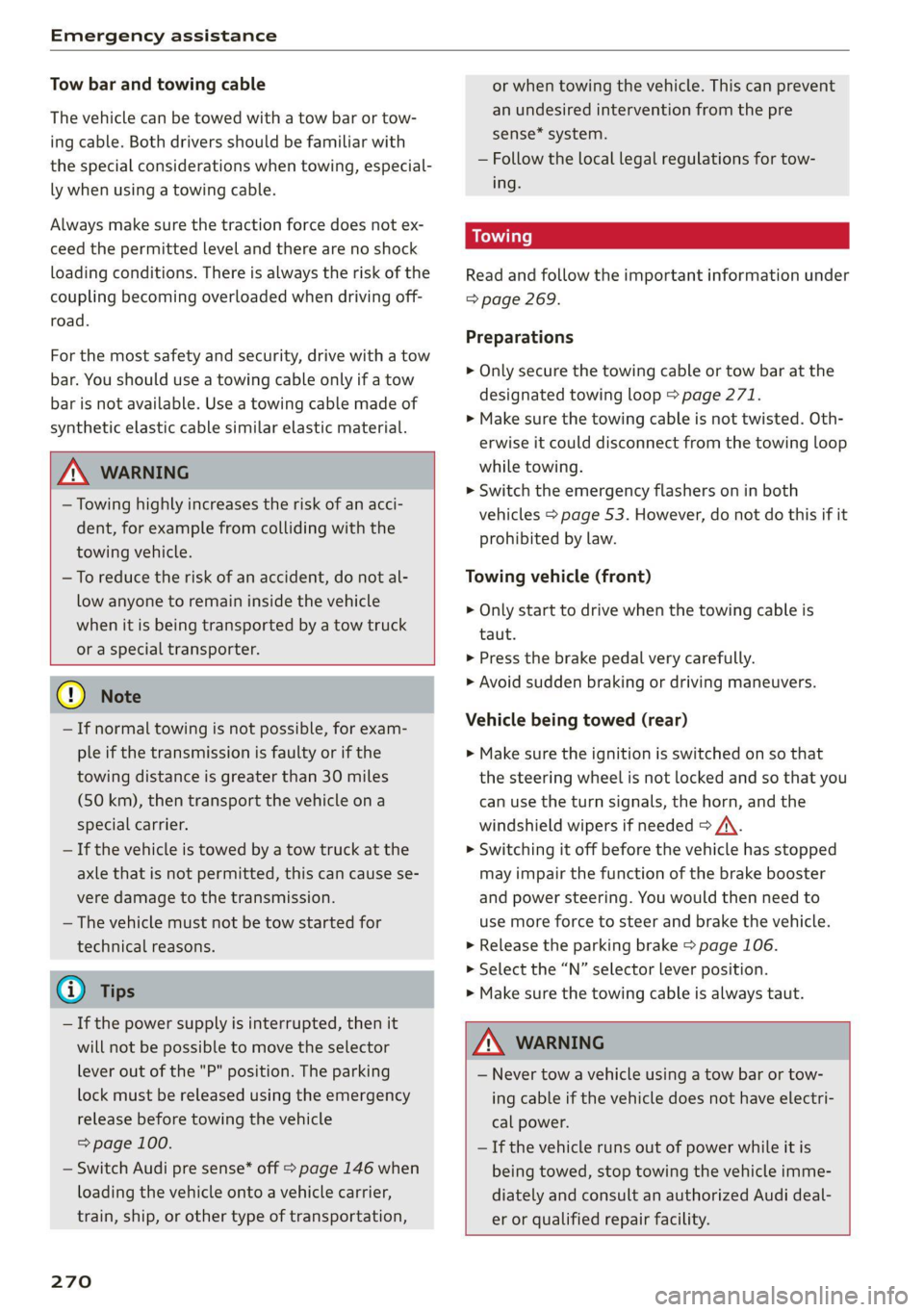
Tow bar and towing cable
The vehicle can be towed with a tow bar or tow-
ing cable. Both drivers should be familiar with
the special considerations when towing, especial-
ly when using a towing cable.
Always make sure the traction force does not ex-
ceed the permitted level and there are no shock
loading conditions. There is always the risk of the
coupling becoming overloaded when driving off-
road.
For the most safety and security, drive with a tow
bar. You should use a towing cable only if a tow
bar is not available. Use a towing cable made of
synthetic elastic cable similar elastic material.
ZA\ WARNING
— Towing highly increases the risk of an acci-
dent, for example from colliding with the
towing vehicle.
— To reduce the risk of an accident, do not al-
low anyone to remain inside the vehicle
when it is being transported by a tow truck
or a special transporter.
@) Note
— If normal towing is not possible, for exam-
ple if the transmission is faulty or if the
towing distance is greater than 30 miles
(50 km), then transport the vehicle on a
special carrier.
— If the vehicle is towed by a tow truck at the
axle that is not permitted, this can cause se-
vere damage to the transmission.
— The vehicle must not be tow started for
technical reasons.
G) Tips
— If the power supply is interrupted, then it
will not be possible to move the selector
lever out of the "P" position. The parking
lock must be released using the emergency
release before towing the vehicle
=> page 100.
— Switch Audi pre sense* off > page 146 when
loading the vehicle onto a vehicle carrier,
train, ship,
or other type of transportation,
270
or when towing the vehicle. This can prevent
an undesired intervention from the pre
sense* system.
— Follow the local legal regulations for tow-
ing.
Read and follow the important information under
=> page 269.
Preparations
> Only secure the towing cable or tow bar at the
designated towing loop > page 271.
> Make sure the towing cable is not twisted. Oth-
erwise it could disconnect from the towing loop
while towing.
> Switch the emergency flashers on in both
vehicles > page 53. However, do not do this if it
prohibited by law.
Towing vehicle (front)
> Only start to drive when the towing cable is
taut.
> Press the brake pedal very carefully.
> Avoid sudden braking or driving maneuvers.
Vehicle being towed (rear)
» Make sure the ignition is switched on so that
the steering wheel is not locked and so that you
can use the turn signals, the horn, and the
windshield wipers if needed > A\.
> Switching it off before the vehicle has stopped
may impair the function of the brake booster
and power steering. You would then need to
use more force to steer and brake the vehicle.
> Release the parking brake > page 106.
> Select the “N” selector lever position.
> Make sure the towing cable is always taut.
ZA\ WARNING
— Never tow a vehicle using a tow bar or tow-
ing cable if the vehicle does not have electri-
cal power.
— If the vehicle runs out of power while it is
being towed, stop towing the vehicle imme-
diately and consult an authorized Audi deal-
er or qualified repair facility.