ignition AUDI A4 AVANT 2008 User Guide
[x] Cancel search | Manufacturer: AUDI, Model Year: 2008, Model line: A4 AVANT, Model: AUDI A4 AVANT 2008Pages: 368, PDF Size: 46.19 MB
Page 28 of 368

Driver information display
& WARNING
• Never rely exclusively on the outside temperature display to
determine if a road surface is icy or not. Keep in mind that road
surfaces, especially bridges and overpasses, could be ice covered
and slippery even at an outside temperature above 41 °F
1+5 °Cl.
• Always remember, even if the "snowflake" symbol lice
warning) does not appear in the display, black ice could be on the
road .
• Always reduce your speed and drive with special care in cold
weather conditions when the chance of encountering icy road
surfaces increases.
[ i ] Tips
When using the navigation system feature "Destination", the
outside temperature is also displayed.•
Miles (kilometers) to empty
The miles (kilometers) to empty indication is a valuable
aid to schedule the refueling stops on a trip.
Fig . 13 Center display:
miles (kilometers) to
empty
Th is feature shows you the estimated range in miles (kilometers)
:::::, fig. 13 until the tank runs dry. This feature calculates how far you
could drive with the amount of fuel left in your fuel tank while
driving under the current driving conditions. The remaining
distance is recalculated every
6 miles (10 km).
While calculating the miles (kilometers) to empty, the system also
calculates your fuel consumption over the last
18 miles (30 km).
Remember:
-the more economica lly you drive, the further you can
go.•
Warning : engine hood, door or rear lid open
Fig . 14 Display: door ,
rear lid, and engine
hood open
With the ignition switched on, the open-door-or-lid warning illumi
nates when at least
one door, or the engine hood or the trunk lid is
not closed . The symbol also shows you which door(s) or lid is not
closed. The illustration shows that both the driver's and the right
rear door are not closed
:::::, fig. 14.
If the engine hood or trunk lid are not closed, the display will flash.
As soon as all the doors and lids are properly closed, the warning
goes out.
~
Page 29 of 368

You can switch off the open-door-or-lid warning display by briefly pressing the On Board computer control
but tons => page 39. The
open door or trunk warn ing will, however, illuminate again as soon
as there is a change in the position of the doors, engine hood or
trunk lid. •
On-Board Diagnostic system (OBD)
Malfunction Indicator Lamp (MIL) (USA
models) / (Canada models)
The Malfunction Indicator Lamp (MIU in the instrument cluster
=> page 19, fig. 9 is part of the On -Board Diagnostic (OBD II) system.
The warning/indicator light il luminates when the ignition is
switched on and goes out after the engine starts and the idle has
stabi lized . This indicates that the MIL is working prope rly.
If the light do es not go out after the engine is started, or illuminates
while you are driving, a malfunction may exist in the engine system.
If the light starts flashing, the catalytic converter could be damaged .
Continue driving
w ith redu ced pow er (avoiding sustained high
speeds and/or rapid accelerations) and have the condition
corrected. Contact your authorized Audi dealer.
If the light illuminates, the e lectronic speed limiter may also be
malfunctioning . For more
information=> page 28, "Electronic speed
limiter".
An impr operly c lo se d fuel filler cap may al so cau se th e MIL l amp to
illumi nate
=> page 269. •
Controls and equip
ment
Dri ver inf orma tio n di spl ay
On -Board Diagnostics
F ig. 15 Locatio n of
Da ta Li nk Co nnecto r
( DL Cl
On-Board Diagnostics monitors the components of your emission
control system . Each control led component in your engine system
has been assigned a code. In case of a malfunction, the component
wil l be identified and the fault stored as a code in the control
modu le memory.
The M IL lamp may a lso illuminate if there is a leak in the on-board
fuel vapor recovery system. If the light illuminates after a refuelling,
pull off the road and stop the vehicle, then check that the fuel fi ller
cap is proper ly closed
=> page 269.
In order to make an accurate diagnosis, the stored data can only be
displayed using special diagnos tic equipment (generic scan tool for
OBD).
In order to connect the special diagnostic equipment, push the plug
into the Data Link Connector (DLC). The DLC is located to the right of
the engine hood release
lever => fig. 15 .
Your author ized Audi dealer or a qua lified service station can inter
pre t the code and perform the necessary repair. •
irechnical data
Page 30 of 368

Driver inf orma tion di spl ay
Electronic speed limiter
Your vehicle may be factory equipped with tires that are rated for a
maximum speed of 130 mph (210 km/h}. This is less than the
maximum speed of your vehicle. To reduce the risk of sudden tire
failure and loss of control if the vehicle is operated at excessive speeds, your vehicle also has an electronic speed limiter . The elec
tronic speed limiter prevents your vehic le from going faster than the
tire speed rating. For more
information~ page 305, "New tires and
r eplacing tires and wheels" .
If the vehicle approaches the tire speed rating, the engine control
unit wi ll turn off the fuel injectors. You will notice an immediate loss
of engine power and a drop in road speed.
If the engine control unit receives faulty vehicle road speed signals,
t he Malfunc tion Indicator Light (MIU will illuminate. If this occurs,
contact the nearest authorized Audi dea ler for ass istance.
&_ WARNING
Al wa ys o bserve th e pos te d speed l imit s and adjust your sp eed t o
s uit preva ilin g road, traffic and weath er cond ition s. Ne ver drive
yo ur vehicle f aster than the ma xim um spe ed rating of the ti re s
install ed .•
Auto-Check Control
Introduction
Fi g. 16 Au to-Check
C o nt rol: a ll syste ms
c h eck ed OK
Whenever the ignition is turned on, Auto -Check Control checks the
proper functioning of important vehicle components and systems.
Auto -Check Contro l keeps up its continuous monitoring of vehic le
systems even as you are driving.
If Auto Check senses an irregular condition or a malfunction
requiring urgent repair, it generates a specific symbol or short
message in the instrument cluster center display . You will also hear
an audible warning tone . The disp lays a re color coded in either red
or yellow depending on their level of priority.
A red symbol means
D anger , a yellow symbol indicates Warning .
Along with some particular red symbols, a message will appear in
the display to alert the driver to certain conditions. •
Page 31 of 368

Driver information messages
Along with some particular warning/indicator lights and instrument cluster symbols, additional messages will
appear in the display .
A driver information message will appear in the display when, for
example :
a light bulb has burnt
out => page 35,
or if you drive off with the parking brake s till engaged (pulled up).
or before you move the selector lever in gear (automatic transmis
sion).
Driver information messages can be switched o n by the driver when
a priority 1 symbol appears and flashes =>
page 28.
Sw it c hing on th e dri ver inf orm ati on me ssage
For example, if there is a malfunction in the engine oil pressure, the
~ symbo l will appear in the display . If you press the CHECK button ,
the following message will appear:
Sw itch off en gin e, check oil l evel
The message goes out after approximately 5 seconds. Press the
CHECK button to display the message again.
[ i ] Tip s
The following two messages, Handb ra ke i s a pplie d and Wh en
s tati onary ap ply foot br ake while selecting g ear ,
cannot be
switched on again . T hese messages will remain in the display until
you release the parking brake or unti l you move the selector lever
into a gear .•
Controls and equip
ment
Dri ver inf orma tio n di spl ay
Parking brake warning
To release the parking brake, first press the release button in the
lever and lift the lever s lightly. Then lower it all the way down.
If you should drive off with the parking brake still engaged, a
warning tone will sound to remind you to release the pa rking brake.
Also, the following message will appear in the display :
Handbrake is a pplied
The parking brake warning is activated when you drive longer than
3 seconds and faster than 3 mph (5 km/h) .•
Ap plies to vehi cles: w it h ma nua l trans mission
Function test : manual transmission
Fig. 17 Dis pl ay:
man ual trans missio n
fu ncti on test
perfo rmed
The Auto -Check Control will automatically perform a test each time
you switch on the ignition.
If the functions monitored by the Auto-Check Control are working
properly, the
O K => fig. 17 will light up for a few seconds. .,_
irechnical data
Page 32 of 368

Driver information display
If one or more faults exist, the driver information disappears
approximately 15 seconds after the engine has been started and the
appropriate fault symbol appears in the display.
If neither the OK message nor a malfunction message appears in
the display, have the Auto-Check Contro l inspec ted by your autho
rized Audi dealer. •
Function test: automatic transmission
Fig. 18 Dis play: func
tion test automatic
transmission, ignition
ju st turned on
The Auto-Check Contro l will automatically perform a test each time
you switch on the ignition . When the selector lever in
P or N , the
following message appears in the display:
When stationary apply footbrake while selecting gear.
When you a select a different gear (for example : R, D, etc.), the
message will disappear and the Auto-Check function is displayed. If
there are no ma lfunctions, the OK message illuminates for a few
seconds => fig. 18.
If there is a malfunction, then the malfunction message wil l appear
about 15 seconds after the you start the vehicle. At the same time
you will hear a warning tone . If
neither the OK message nor a malfunction message appear in the
display, have the Auto -Check Control inspected by your authorized
Audi dea ler .•
Red symbols
A red symbol means DANGER.
-Pull of the road and stop the vehicle.
Turn off the engine.
Fig. 19 Display: engine
coolant level warning
( p rio rity 1 )
-Check the malfunctioning system. Contact your autho
rized Audi dealer or a qualified workshop for assistance.
The red symbols mean:
Page 38 of 368
Driver inf orma tion di spl ay
The speed warning system warns the driver if he exceeds a previ
ously stored maximum speed . A warning tone wi ll sound as soon as
the vehic le speed exceeds the set speed by about 6 miles per hour
(10 km/h) . At the same time, a warning symbol appears in the
display~ fig. 21 .
The speed warning system has
t wo wa rning thre sholds that func
tion independent ly of each other and that have somewhat different
purposes:
Sp eed w arnin g 1 -
You can use speed warning 1 to set the maximum speed while you
are driving . This setting will remain in effect until you turn off the
ignition, assuming that you have not changed or reset the setting.
The speed warning symbol (USA models)/ (: (Canada models) in
the warning 1 disp lay appears when you exceed the maximum
speed. It goes out when the speed falls be low the stored maximum
speed .
The speed warning symbol will also go out if the speed
exceeds the
stored maximum speed by more than about 25 mph (40 km/h) for at
least 10 seconds. The stored maximum speed is de leted.
Setting speed warning 1
~ page 36 .
S pee d w arni ng 2
Storing warning 2 is recommended if you always want to be
reminded of a certain speed, for example when you are traveling in
a country that has a genera l maximum speed limit, or if you do not
want to exceed a specified speed for winter tires.
The speed warning 2 symbol, (USA models)/ (Canada models) appears in the disp lay when you exceed the stored speed limit .
Unlike warning 1, it wil l not go out until the vehicle speed drops
below the stored speed limit .
Setting speed warning 2
~ page 37.
[ i ] Tip s
Even though your vehicle is equipped with a speed warning system,
you shou ld still watch the speedometer to make sure you are not
driving faster than the speed l imit. •
Speed warning 1: setting a speed limit
Warning thresh old 1 is set by the CHECK button .
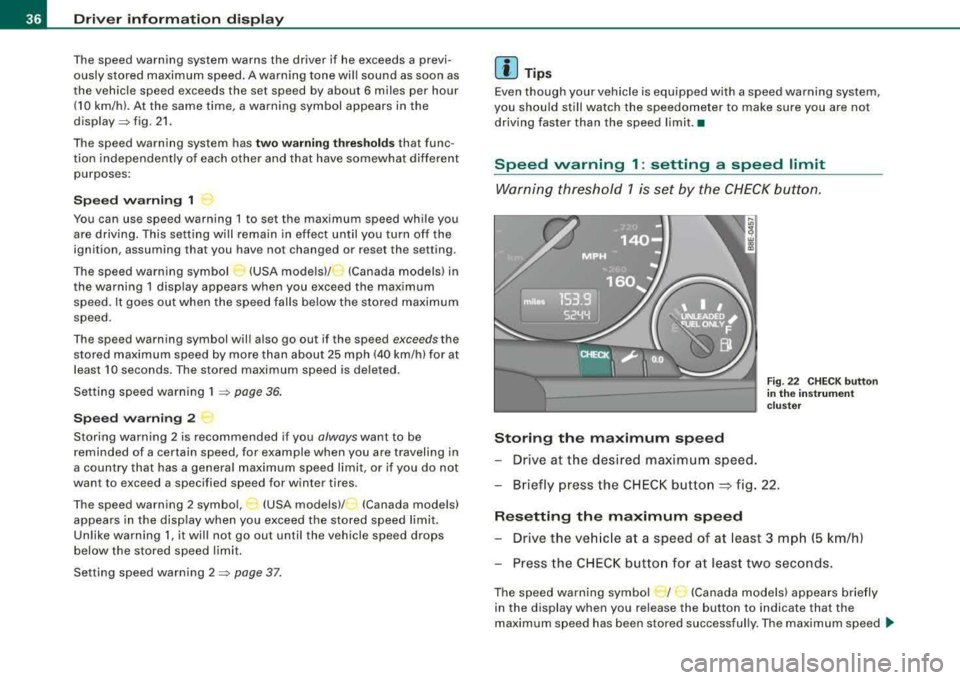
Storing the maximum s pee d
- Drive at the desired maximu m speed.
Fig. 22 C HECK button
i n t he in strum ent
c lust er
Briefly press the CHECK button ~ fig. 22 .
Resetting th e ma ximum sp eed
Drive the ve hicle at a speed of at least 3 mph (5 km/h)
Press the CH EC K butto n for at least two seconds .
The speed warning symbo l r I· (Canada models) appears briefly
in the display when you re lease the button to indicate that the
maximum speed has been stored success ful ly . The maximum speed
~
Page 39 of 368
will remain stored in the system until it is changed by briefly
pressing the button again or until it is reset by holding down the
button for at least two seconds. •
Speed warning 2: setting a speed limit
Switches in the wiper arm are used to operate warning
threshold 2.
Controls and equip
ment
Fig . 23 CHECK button
in the instrument
cluster
Fig. 24 Wiper arm:
function selector
switches
Driver information display
Saving a maximum speed
-Turn off the ignition.
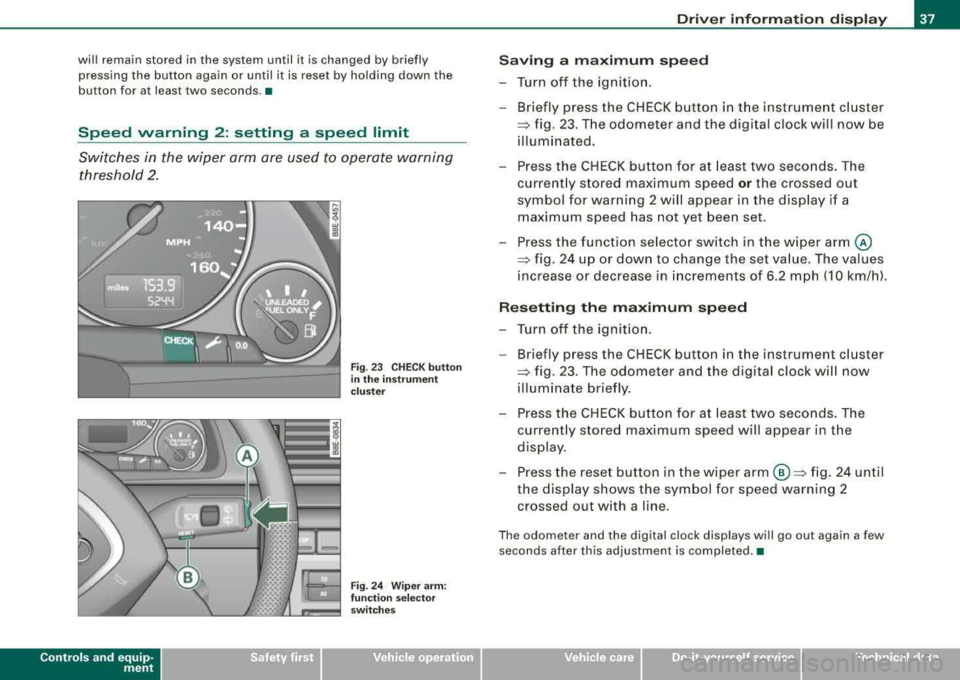
-Briefly press the CHECK button in the instrument cluster
=> fig. 23 . The odometer and the digital clock will now be
illuminated.
-Press the CHECK button for at least two seconds. The
currently stored maximum speed
or the crossed out
symbol for warning 2 will appear in the display if a maximum speed has not yet been set.
Press the function selector switch in the wiper
arm @
=> fig. 24 up or down to change the set value. The values
increase or decrease in increments of 6.2 mph (10 km/h).
Resetting the maximum speed
-Turn off the ignition.
- Briefly press the CHECK button in the instrument cluster
=> fig. 23. The odometer and the digital clock will now
illuminate briefly.
-Press the CHECK button for at least two seconds. The
currently stored maximum speed will appear in the
display.
-Press the reset button in the wiper arm ©=> fig. 24 until
the display shows the symbol for speed warning 2 crossed out with a line.
The odometer and the digital clock displays will go out again a few
seconds after this adjustment is completed. •
irechnical data
Page 40 of 368
Driver inf orma tion di spl ay
Trip computer
A pplie s to v ehicl es: w ith trip com pu te r
Introduction
The trip computer gives you information on current and
average fuel consumption rates, average speed, cruising
distance and driving time.
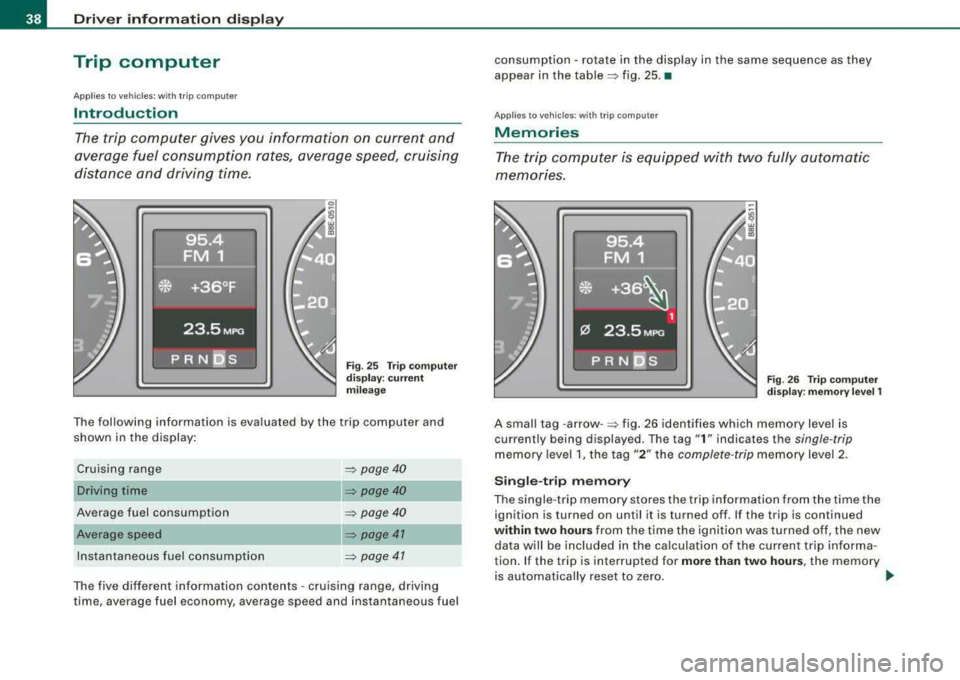
Fi g. 25 Trip computer
di sp lay: c urre nt
mi leag e
The fol lowi ng information is eva luated by the trip compu ter and
shown in th e display :
Cruis ing range
Driving time
Average fuel consumption
Average speed
Ins tantaneous fuel consumption
=:> page 40
=:> page 40
=> page 40
=:> page 41
=:> page 47
The five different information contents -cruis ing range, driving
ti me, ave rage fuel economy , average speed and ins tan taneous fuel consumpt
ion
-rota te in the display in the same sequen ce as they
appear in the
table =:> fig. 25. •
Applies t o ve hic les: with t rip co mpute r
Memories
The trip c omputer is equipped with tw o fully automatic
memones.
F ig . 2 6 Tr ip co mput er
d isp lay : m emor y le vel 1
A smal l tag -arrow -=:> fig . 26 identifies which memory leve l is
current ly being displayed . The tag
"1 " indicates the single-tr ip
memory leve l 1, the tag "2 " the complete -trip memory leve l 2.
S ingle -t rip m emor y
The singl e-trip memory stores the trip information from the time th e
ignition is turned on until it is turned off . If the tr ip is con tinued
within two hour s from the time the ignition was turned off, the new
data w ill be included in the ca lculation o f the current trip in forma
tion . If the trip is interrupted for
more than two hours , the memory
is automatically reset to zero . _..
Page 42 of 368
Driver inf ormation di spl ay
You can reset the following values to zero using th e reset button:
• driving time
• average mileage
• average speed
The trip computer will not operate unless the ignition is on. When
you turn on the ignition, the function that was in use the last time
you turned the ignition off, wil l appear in the display . Briefly press
the function selector switch
@ or the reset button ® to set the
driving time
alarm=> page 40.
[ i ] Tips
All stored values w ill be lost if the veh ic le battery is disconnected. •
Applies to vehicles: with trip computer
Cruising range
The cruising range display helps you plan your trips.
The estimated cruising range in miles (kilometers) appears in the
d isplay . Th is te lls you how far you r vehicle wi ll be able to trave l with
the amount of fuel left in the tank and with the same driving style .
The disp lay counts down in 6 mile- (10 km-) s teps.
The cruising range is ca lculated based on the fuel consumption for
the last 18 miles (30 km). If you drive conservatively, the cruising
range wi ll increase .•
App lies to vehicles: with trip computer
Driving time
The driving time display reminds you when it is time to
take a break.
The length of time that you have been driving since you last rese t
the memory appears in this display. If you want to keep track of your driving
time from a given point in time, reset the memory at this
point in time by press ing the reset
butto n=> page 39, fig. 28 @ .
Sin gle -trip m emor y
If you stop driv ing for more than 2 hours , the driv ing t ime value will
be reset automatically .
Complete-trip memory
The driving time va lue remains in memory when the ignition is off.
When you resume driving, t he additio nal driving ti me is added on to
the previous value.
D riv in g time alarm
After you have been driving for two hours, the display wil l automat
ica lly switch to the driving t ime d isplay
2 :00 . The driving t ime
display wil l also flash. This driving time alarm reminds the driver to
take a break fro m driv ing.
To turn off the driving time alarm, briefly press the function selector
switch or the rese t button
~ page 39, fig . 28.
If you continue your trip or take a break o f
less than ten minutes, a
new a larm wi ll be disp layed at driving times of
4 :00 , 6 :00 etc.
However, the driving time alarm counter wi ll be reset if you take a
break of more than ten minutes. •
Applies to vehicles: with tr ip computer
Average fuel consumption
The average mileage indica tion allows you to anticipate
your refueling stops well ahead in time.
Th e average fuel economy i n MPG (1/100 km) s ince you last cleared
the memory appears in this display. You can use this disp lay to
adjust your driving technique to achieve a desired mi leage. I f you
want to determine the fuel economy for a new time period, reset the
memo ry using the reset
button => page 39, fig. 28 . After you have
reset the display, a zero will appear for the first 100 feet (30 metres) . .,_
Page 43 of 368
Single -t rip memory
If you interrupt your trip for more than two hours , the average fuel
consumption value will be reset automatically .
Complete-trip memory
The value for average fue l economy will be stored when the ignition
is off. Once you resume driving. the new mileage figures will be
included into the calculation of the average .•
Applies to vehicles: with trip computer
Average speed
The average speed display helps you plan your progress .
The average speed in mph (km/h) since the last time the display was
reset appears in the display. If you want to determine your average
speed over a new time period, reset the memory using the reset
button
~ page 39, fig . 28 .
Single-trip memory
If you interrupt your trip for more than two hours the average speed
value will be reset automatically.
Complete-trip memory
The average speed value remains in the memory when the ignition
is off . The new data will be entered in to the calculation when you
resume driving.•
Appl ies to vehicles: with trip computer
Instantaneous fuel consumption
The instantaneous fuel consumption display helps you
save fuel.
The instantaneous fuel consumption in miles per gallon (1/100 km)
is shown in this display. You can use this disp lay to adjust your
driving technique to achieve a desired mileage.
Controls and equip
ment
Driver information display
Fuel consumption is recalculated in intervals of 33 yards (30
metres). When the vehic le is standing still, the most recent fue l
consumption is displayed .•
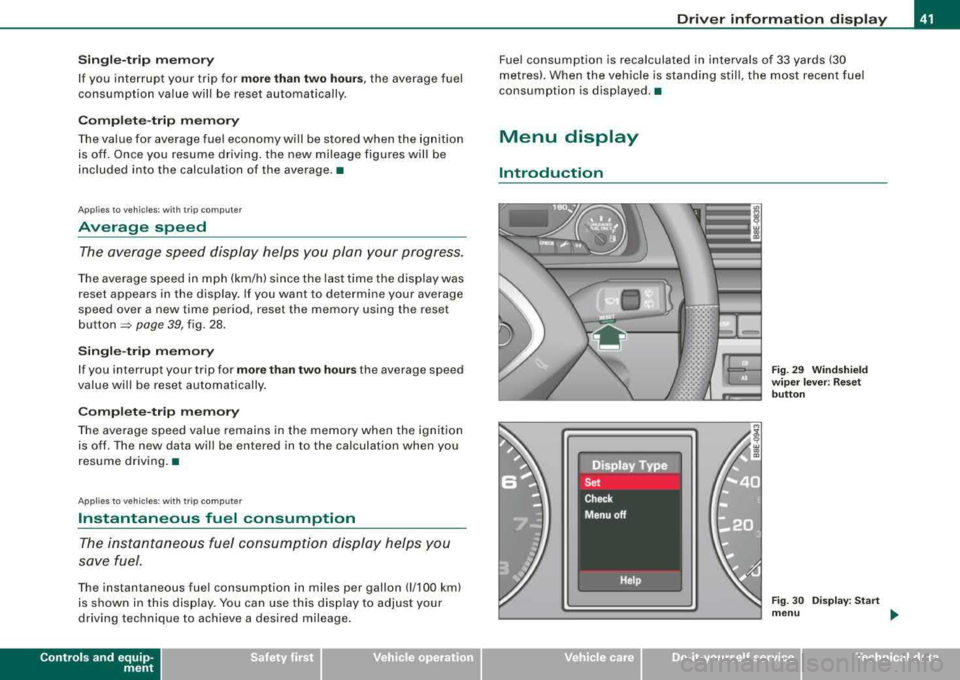
Menu display
Introduction
Fig. 29 Windshield
w iper lever : Reset
button
Fig . 30 Display: Start
menu ...
irechnical data