reset AUDI A4 CABRIOLET 2009 User Guide
[x] Cancel search | Manufacturer: AUDI, Model Year: 2009, Model line: A4 CABRIOLET, Model: AUDI A4 CABRIOLET 2009Pages: 340, PDF Size: 77.32 MB
Page 43 of 340
![AUDI A4 CABRIOLET 2009 User Guide Using the rocker switch, you can select the menus in the display or
change settings. A cursor appears on the left in front of the selected
values .
By pressing the [Reset] b](/img/6/57553/w960_57553-42.png "AUDI A4 CABRIOLET 2009 User Guide Using the rocker switch, you can select the menus in the display or
change settings. A cursor appears on the left in front of the selected
values .
By pressing the [Reset] b")
Using the rocker switch, you can select the menus in the display or
change settings. A cursor appears on the left in front of the selected
values .
By pressing the [Reset] button, you activate the selection you made
or confir m the values you set.
Sel ecte d funct ions are identified with
a check mark or are carried out directly.
Meanings of the symbo ls in the display:
Selection bar Selected function
> Cursor
Check mark
D
Box
-
Meaning
Current Selection
Selected o r Function
active
Not selected
Triangle pointing up Previous page
Triangle pointing down
Next page
-
Tire pressure monitoring system
App lies to vehicles: with tire pressu re mon itoring system
General notes C.. ~
Each tire, including the spare (if provided), should be checked
month ly when cold and inflated to the inflat ion pressure recom
mended by the vehicle manufacturer on the vehicle placard or tire
inf lation pressure label. ( If your vehicle has tires of a different size
than the size indicated on the vehicle placard or tire inflation pres
sure label, you should determine the proper tire inflation pressure
for those tires.)
As an added safety feature, your vehicle has been equipped with a
tire pressure monitoring system (TPMS) that illuminates a low tire
Controls and equip
ment
•
Driv er inf ormati on di spl ay
pressure telltale when one or more of your tires is significant ly
under -inflated. Accord ingly, when the low tire pressure tel ltale illu
minates, you shou ld stop and check your tires as soon as possible,
and inflate them to the proper pressure . Driving on a significan tly
under-inflated tire causes the tire to overheat and can lead to tire
failure . Under-inflation also reduces fuel efficiency and tire tread
life, and may affect the vehic le's handling and stopping ability .
Please note that the TPMS is not a substitute for proper tire mainte
nance, and it is the driver's responsibility to maintain correct t ire
pressure, even if under -inflation has not reached the leve l to trigger
il lumination of the TPMS low tire pressure te lltale .
Your veh ic le has a lso been equipped w ith a TPMS malfunction indi
cator to indicate when the system is not operating properly . The
TPMS malfunction indicator is combined with the low tire p ressure
telltale . When the system detects a malfunction, the telltale wil l
flash for approx imately one minute and then remain cont inuously
il luminated . This sequence will continue upon subsequent vehicle
start -ups as long as the malfu nction exists.
When the ma lfunction indicator is illuminated , the system may not
be able to detect or signal low tire pressure as intended. TPMS
malfunctions may occur for a variety of reasons , including the
insta llation of replacement or alternate tires or wheels on the
vehicle that prevent the TPMS from functioning prope rly . A lways
check the TPMS malfunction telltale after replacing one or more
tires or whee ls on your vehicle to ensure that the replacement or
alternate tires and wheels allow the TPMS to continue to function
p roper ly .•
App lies to ve hic les : with tire pressu re mon ito ring system
Introduction
The tire pressure m onitoring system monit ors air pressure
in all four road wheels while t he vehicle is moving.
As soon as the tire pressure monitoring system senses a significant
loss of air pressure in one or seve ra l tires, text messages and yellow
~
Page 46 of 340
Driver information display
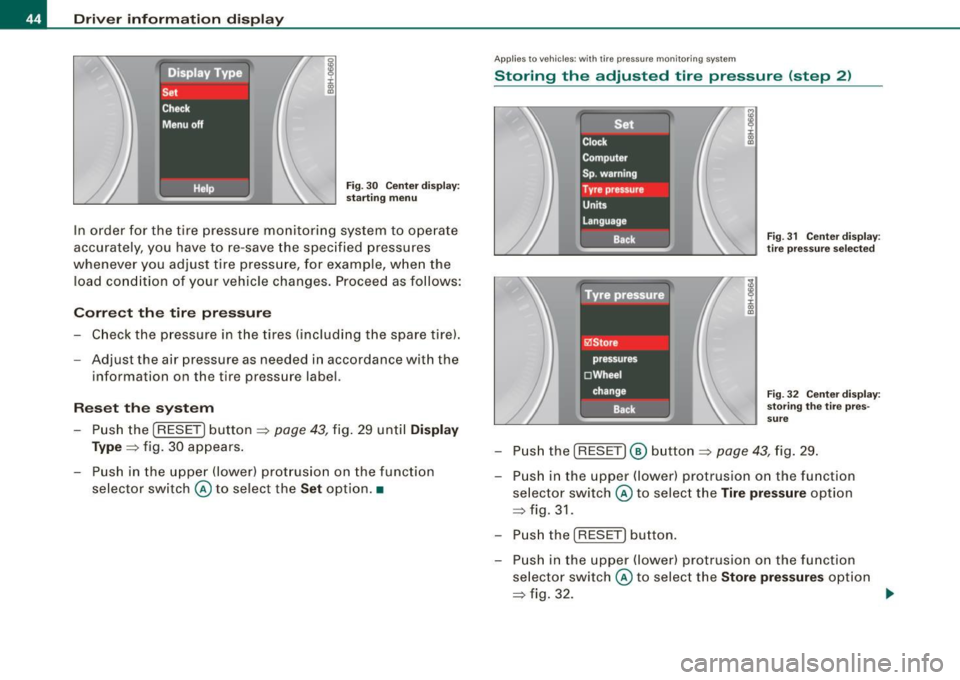
Fig. 30 Center display :
starting menu
In order fo r the t ire pressure monitoring system to operate
accurately , you have to
re-save the specified pressures
whenever you adjust t ire pressure, for example , when t he
l oad conditio n of you r vehicle changes . Proceed as follows :
Correct the tire pressure
Check the pressure in the t ires (i ncluding the spare tire).
Adjust the air pressure as needed in accordance w ith the
i nformation on the tire pressure label.
Reset the system
- Push the (RESET ] button=> page 43, fig. 29 until Display
Type =>
fig. 30 appears.
- Push in the upper (lower) protrusion on the function
selector switch @to select the
Set option. •
Applies to veh ic les : w it h tir e pressu re mon ito ring sys tem
Storing the adjusted tire pressure (step 2)
Fig. 31 Center display :
tire pressure selected
Fig. 32 Center display:
storing the tire pres
sure
- Push the (RESET] @ button=> page 43, fig. 29.
Push in the uppe r (lower) protrusion on the functio n
selector switch @ to select the
Tire pressure option
=> fig. 31.
- Push the
( RESE T] button .
- Push in the upper (lower) protrusion on the function selector switch @ to select the
Store pressures option
=> fig. 32. _.,
Page 54 of 340

Opening and clos ing
PANIC Button
- Push the red button@to activate the panic function. The
horn sounds and the turn signals flash.
- Push the button® again to deactivate the panic f unc
tion.
& WARNING
R ead a nd fo llo w all W ARNING S => & in "Ge nera l desc ription " on
page 50.
[ i ] Tips
• In order to make sure the locking function is working, you should
always keep your eye on the vehicle to make sure it is properly
locked.
• Do not use the remote control if you are inside the car, otherwise
you may unintentionally lock the vehic le, and then you would set off
the anti-theft alarm when you try to start the engine or open a door.
In case this happens anyhow, push the unlock button@.
• Use the panic function only if you are in an emergency
situation .•
R ese tting the remote control
The remote c ontr ol must be reset if the vehicle does not
unlock .
0
Fig . 4 1 Ign itio n l ock
p os it ions
- If the ve hicle is locked, o pen the driver's door with the
mechanical key i n your remote con tro l.
- Press the unlock button
III on the remote control.
- Insert the key into the ign ition lock
CD => fig. 4 1 and turn
it to position
0 to turn the ignition on .
Turn the key back to position
CD to t urn the ig nition off
agai n.
- Pu ll the key out of t he ig nition loc k.
- Press e it her the lock-1'.D or the unlock
III button to
com plete the reset sequence .
0 Note
Do not turn the key to position 0 for resetting as this will start the
engine and may put the car in motion .•
Page 71 of 340

forward goes much easier when done by two people. However, if no
assistance is available, you may find it easier to position yourself on
the rear seatbench and lift the power top up by grabbing it at the
center. •
Where is the manual release key stored?
The special key for manually opening the power top
storage bay is located in a compartment behind the fuse
cover.
Fig. 64 Left end-face of
dash panel
Fig. 65 Left end-face of
dash panel: location of
manual release key
-Remove the fuse cover using the ignition key or a screw
driver=:> fig. 64.
- Take the manual key out of its compartment=:> fig. 65. •
Controls and eq uip
ment
Power top
How does the manual release key work?
The manual release key has two distinct configurations
for insertion and actuation.
g
9 :c: ., a,
j ., m
Fig . 66 Release key:
configured for inser
tion
Fig. 67 Release key:
configured for actua
tion
Turn the red handle counter-clockwise as far as poss ible
to configure the release key for insertion =:> fig. 66.
The release key is inserted and engaged in the power top locking
mechanism with the key handle raised. Once inserted and engaged
the key is reset for actuation to lock and unlock the mechanism. •
~ehicle care Technical data
Page 103 of 340
__________________________________________________ S_ e_ a_t _s _ a_n _ d_ s_ t _ o_ r_a ...;:g ::.. e _ ___,_
[ i J Tip s
The storage area in the center armrest may be equipped with a te le
phone base plate to house a phone crad le . Ask your authorized Audi
dealer if you have questions .•
Rear seats
General information
Safe transportation of passengers on the rear seats
requires proper safety precautions.
All passengers on the rea r seats must be seated in comp liance with
the safety guidelines explained in=>
page 159 and=> page 168 . The
correct seat ing pos ition is critical for the sa fety of front
and rear
seat passengers alike =>
page 150.
& WARNING
• Occ upants in the front and rear seats must a lways be properly
restrained .
• Do not let anyone r ide in the vehi cle w ithout the head re str aints
provided . Head re str aint s help to reduce injurie s.
• Loo se item s in side the p assenger compartm ent , c an fly
forward in a crash or sudden m aneuve r an d injure occupants.
Alw ays store articl es in the luggag e comp artment and use the
fa stening eye s, especi ally wh en the r ear seat back s have been
fold ed d ow n.
• Read and h eed all WARNIN GS::::>
page 150, "Proper seating
p ositi ons f or p assengers in re ar seats ". •
Contro ls and eq uip
ment
Rear head restraints
The rear head restraints a re set at the optimum height at the factory.
This height setting cannot be changed . This preset height protects
both short and tall persons effective ly. •
Seat memory
App lies to vehicles: with seat memory
Driver 's seat memory
The seat adjustment settings for four drivers can be
stored using the memory buttons in the driver's door.
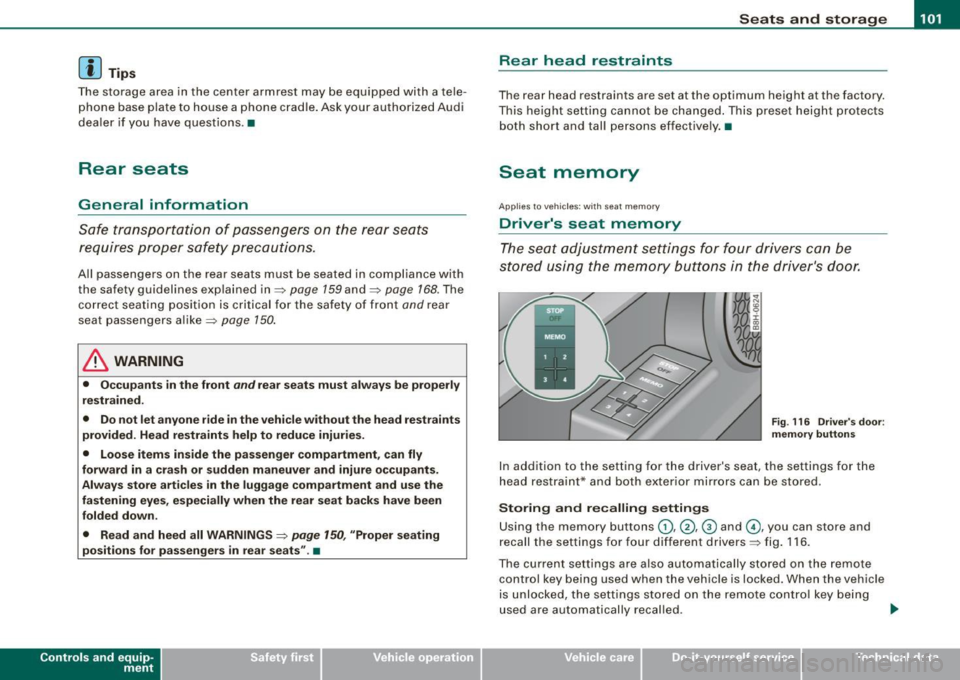
F ig . 116 Driver's doo r:
m emory button s
In addition to the setting for the driver's seat, the settings for the
head restraint* and both exter ior mirrors can be stored .
Storing and recalling setting s
Using the memory buttons G), @ , @ and G), you can store and
recall the settings for four different drivers=> fig . 116 .
The current settings are also automatically stored on the remote
control key being used when the vehicle is locked. When the vehicle
is unlocked, the settings stored on the remote contro l key being
used are automatically recal led . .,..
~ehicle care irechnical data
Page 112 of 340
• .___w __ a _r _m _ a _n_d_ c_ o _ ld __________________________________________________ _
Warm and cold
Climate controls
Description
The air conditioner is fully automatic and is designed to
maintain a comfortable and uniform climate inside the
vehicle.
We recommend the following settings:
- Select and set a temperature between 64 °F (+22 °C) and
86 °F (+29 °C).
- Press the !AUTO
I button.
With this setting, you attain maximum comfort in the least amount
of time. Change this setting, as desired, to meet your personal
needs.
The climate controls are a combination of heating, ventilation and cooling systems, which automatically reduce humidity and cool the
air inside your vehicle.
The air temperature, air flow and air distribution are automatically regulated to achieve and maintain the desired passenger compart
ment temperature as quickly as possible.
The system automatically compensates for changes in the outside
temperature and for the intensity of the sunlight entering the
vehicle. We recommend you use the
Automatic mode=> page 112
for year -round comfort.
Please note the following:
Turn on the air conditioner to reduce humidity in the vehicle. This
also prevent the windows from fogging up. When the outside temperature is high and the air is very
humid,
condensation from the evaporator may drip under the vehicle. This
is normal and does not indicate a leak.
I f the outside temperature is low, the fan normally only switches to
a higher speed once the engine coolant has warmed up sufficiently.
The air conditioner temporarily switches off when you drive off from a standstill using full throttle to save engine power.
The compressor also switches off if the coolant temperature is too
high so that the engine can be adequately cooled under extreme
loads.
Air pollutants filter
The air pollutants filter (a combined particle filter and activated charcoal filter) reduces or eliminates outside air pollution (dust, or
pollen) from entering the vehicle.
The air pollutants filter must be changed at the intervals specified in your Warranty
& Maintenance booklet, so that the air conditioner
can properly work.
If you drive your vehicle in an area with high air pollution, the filter
may need to be changed more frequently than specified in your
Audi Warranty
& Maintenance booklet. If in doubt, ask your autho
rized Audi Service Advisor for advice.
Key coded settings
The air conditioner settings selected are automatically stored and
assigned to the key being used. When the vehicle is started, the air
conditioner automatically selects the settings assigned to that key.
These settings will differ depending if the roof is opened or closed.
This way every driver will maintain his/her own personal settings
and does not have to reset them manually.
~
Page 114 of 340
![AUDI A4 CABRIOLET 2009 User Guide -W
arm and cold --------------------
Button (s )
!AU TO)
88
(left and right)
§)
!ECON]
!OFF)
88
!in the center)
Fun cti on
Automatic operation
Temperature controls for
drivers](/img/6/57553/w960_57553-113.png "AUDI A4 CABRIOLET 2009 User Guide -W
arm and cold --------------------
Button (s )
!AU TO)
88
(left and right)
§)
!ECON]
!OFF)
88
!in the center)
Fun cti on
Automatic operation
Temperature controls for
drivers")
-W
arm and cold --------------------
Button (s )
!AU TO)
88
(left and right)
§)
!ECON]
!OFF)
88
!in the center)
Fun cti on
Automatic operation
Temperature controls for
driver's side and passenger side
Air recirculation
Switches off air conditioning
Switches off air conditioning (rather than using
@a)
Switches o ff the air reci rculation (rather than
using
I O FF])
Adjusts fan speed
Air directed to the windows
A ir directed to the footwells
Air from dashboard outlets
Windshie ld defroster/defogger
Rear window defroste r/defogger
The buttons
I -O J, IEJJ, and j-0,,J can be selected individually or in
combination .•
Automatic mode [AU TO]
The automatic mode is the standard setting for all
seas ons.
Swit ching on AUTO
- Set the temperature between 64 °F (+ 18 °C) and 86 °F
(+29 °C) . -
Press [AUTO
I=> page 111, fig. 130.
AUTO on ly works when you set the inside temperature between
64 °F (18 °C) and 86 ° F (29 °Cl. If you select a temperature be low
64 °F (18 °C),
LO will appear in the display. If you se lect a tempera
ture above 86 °F (29 °C),
H I wi ll appear in the display.
The system automatically compensates for changes in outside
temperature and for the intens ity of the sunlight.
[ i ] T ips
By keeping the !AUTO l button on the driver's side pressed for
severa l seconds, the temperature of the passenger side can be set
t o the tempera ture of the driver's side or vice versa . The new
temperature setting will be shown in the disp lay .•
Setting the temperature
Sep arate temperatures can be selected for the driver's
and front passenger side.
- Press the(:) button or t he G button under each display
=> page 111, fig. 130 until the desired temperature is
reached.
The selected temperature setting appears in the display above the
buttons .
By pressing both
! AUTO l buttons for severa l seconds, the tempera
ture on the passenger side can be set to the temperature of the
driver's side or v ice versa . The new temperature setting will be
shown in the display. The old temperature setting can be restored
by resett ing the display as required .•
Page 126 of 340
• .___O_ n_ t_ h _e _ ro_ a_d __________________________________________________ _
Storing a sp eed
You must set and then store a vehicle speed using the
cruise control.
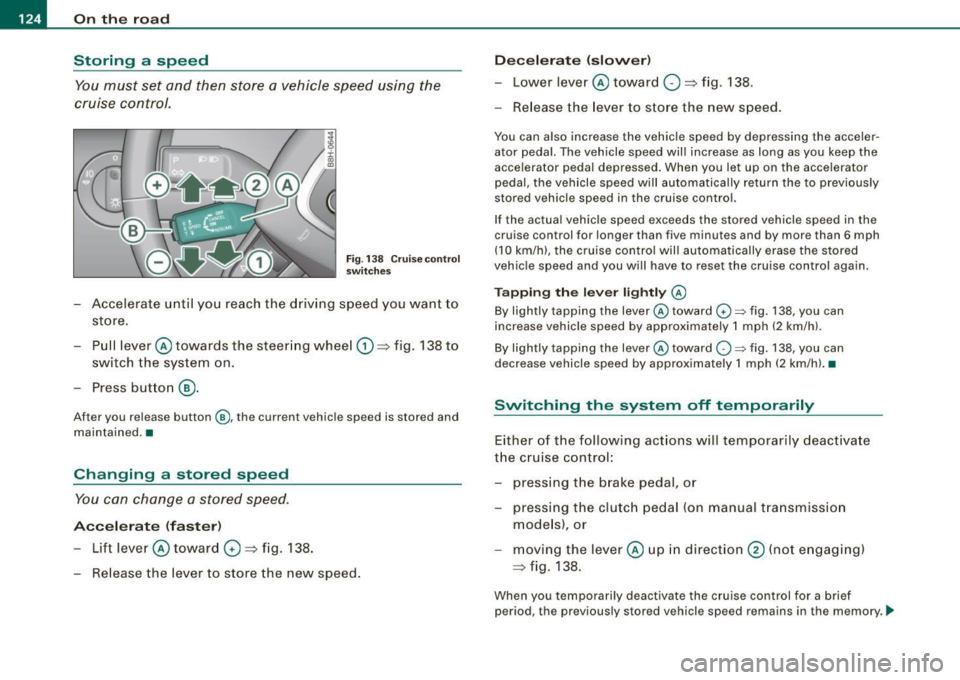
Fig . 138 Cruise control
switches
- Accelerate until you reach the driving speed you want to
store.
Pull lever @ towards the steering wheel
G) => fig. 138 to
switch the system on.
Press button
® ·
After you release button@, the current vehicle speed is stored and
maintained. •
Changing a stored speed
You can change a stored speed.
Accelerate (faster)
-Lift lever @ toward 0 => fig. 138.
Release the lever to store the new speed.
Decelerate (slower)
-Lower lever@ toward O => fig. 138.
- Release the lever to store the new speed.
You can also increase the vehicle speed by depressing the acceler
ator pedal. The vehicle speed will increase as long as you keep the
accelerator pedal depressed. When you let up on the accelerator
pedal, the vehicle speed will automatically return the to previously
stored vehicle speed in the cruise control.
If the actual vehicle speed exceeds the stored vehicle speed in the
cruise control for longer than five minutes and by more than 6 mph
(10 km/h), the cruise control will automatically erase the stored
vehicle speed and you will have to reset the cruise control again.
Tapping the lever lightly @
By lightly tapping the lever@toward G) ~ fig. 138, you can
increase vehicle speed by approximately 1 mph (2 km/h).
By lightly tapping the lever @toward
O ~ fig. 138, you can
decrease vehicle speed by approximately 1 mph (2 km/hl. •
Switching the system off t emporarily
Either of the following actions will temporarily deactivate
the cruise control:
- pressing the brake pedal, or
- pressing the clutch pedal (on manual transmission
models), or
moving the lever@ up in direction
@ (not engaging)
=>fig .138.
When you temporarily deactivate the cruise control for a brief
period, the previously stored vehicle speed remains in the memory. -.,
Page 127 of 340
On the road -
----------------
To resume the previously stored vehicle speed, re lease the brake (or
clutch) pedal, or you pull lever © toward the steering whee l
G).
If no veh ic le speed was stored when you switched off the system
temporarily, you must reset a new vehicle speed : Acce lerate to the
des ired speed and press button @ (SET) =>
page 124, fig. 138.
& WARNING
Do not use the cruise control if the stored vehi cle speed i s faster
than exi sting traffic condition s permit . •
Switching off the cruise control system
While driving
- Move lever © into pos ition @ until it engages
=> page 124, fi g. 138 .
When the vehicle is at a standstill
- Sw itch off the ignit ion. •
Controls and equip
ment
Page 138 of 340
• .___T_ r_a _n_ s_ m_ is_ s_io _ n ______________________________________________________ _
Applies to vehicles: with mult it ron ic® Contin uously Variable Transm iss io n (CVT )
Dynamic shift program (DSP)
The multitronic® transmission is electronically
controlled .
The transmission selects the appropriate gear ratio (upshifts and
downshiftsl automatically based on preset driving programs .
The transmission will select one of the
economy programs when
you drive at a steady speed or a gradually changing speeds without heavy acceleration. This gives best fuel efficiency, with early
upshifting and delayed downshifting .
The transmission will automatically select th e
sporty shift programs
when you drive at higher speeds, or with heavy acceleration and
fr equ ently changing speeds. Upshifts are d elay ed to make full use
of engine power. Downshifting takes place at higher engine speeds
than in the economy programs .
The selection of the most suitable shift program is a continuous,
automatic process . The driver can also make the transmission
switch to a sporty program by
quickly pressing down the gas pedal.
This causes the transmission to shift down into a lower gear ratio
a n d makes quick acceleration possible (to pass another vehicle) You
do not need to press the gas pedal into the kickdown range. After
the transmission has upshifted, the original prog ram is selected
according to your driving style .
An additional shift program allows the automatic transmission to select the prop er gear for uphill and downhill gradients .
This prevents the transmission from shifting up and down unneces
sarily on hills. The transmission
will shift down to a lower gear ratio
when the driver presses the brake pedal on a downhill gradient . This
makes use of the braking effect of the engine without the need to
shift down manually.
If you are driving in hills and mountains, the transmission will
continuously adjust the g ear ratio to the road grade . If you press the brake pedal when driving downhill, the transmission will downshift
automatically. This increases the braking effect
of the engine.
If the cruise control is on when you are trave.ling downhill, the trans
mission will automatically select a lower gear ratio in order to main
tain the set vehicle speed. This will cause the engine speed to
increase. •
Applies to vehic les: with mult it ro ni c® Continu ous ly Varia ble Trans mission (CVT )
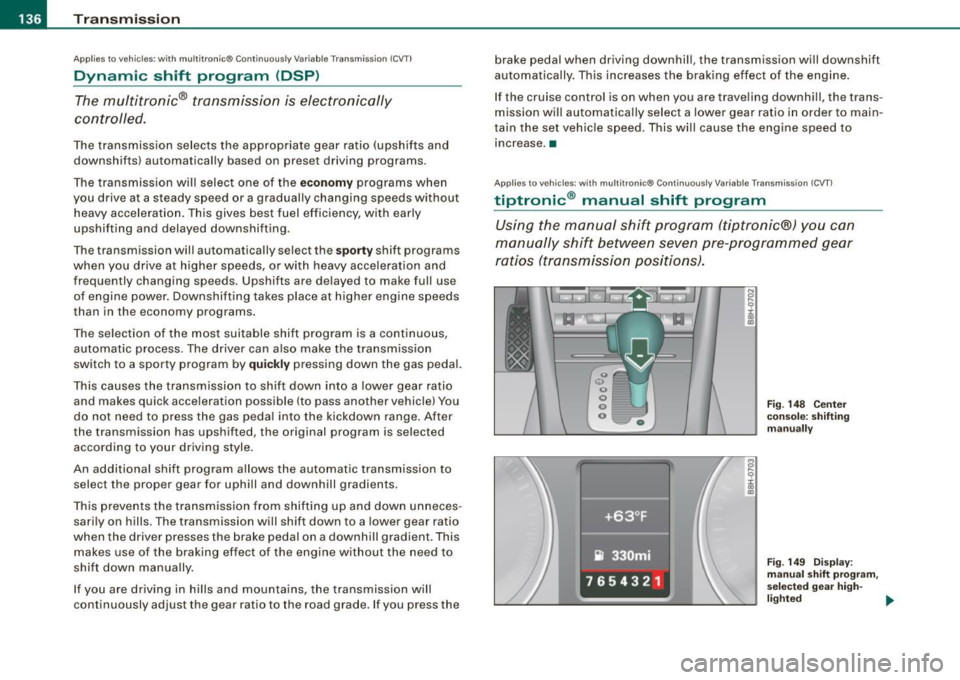
tiptronic ® manual shift program
Using the manual shift program (tiptronic®) you can
manually shift between seven pre -programmed gear
ratios (transmission positions).
I
Fig . 148 Center
console: shifting
manually
Fig. 149 Display:
manual shift program ,
selected gear high-
lighted ._