ECO mode AUDI A4 SEDAN 2013 User Guide
[x] Cancel search | Manufacturer: AUDI, Model Year: 2013, Model line: A4 SEDAN, Model: AUDI A4 SEDAN 2013Pages: 294, PDF Size: 73.71 MB
Page 54 of 294
52 Clear vis ion
- To help prevent damage to wiper blades,
do not use gasoline, kerosene, paint
th inner, or other solvents on or near the
wiper blades.
- To he lp prevent damage to the wiper
arms or other components, do not at
tempt to move the wipers by hand.
@ Tips
- Commercial hot waxes applied by auto
matic car washes affect the how easily
the glass surface can be cleaned .
- You can also use the service position, for
example, if you want to protect the
windshield from icing by using a cover .
Digital compass
Switching the compass on and off
Applies to vehicles: with dig ital compass
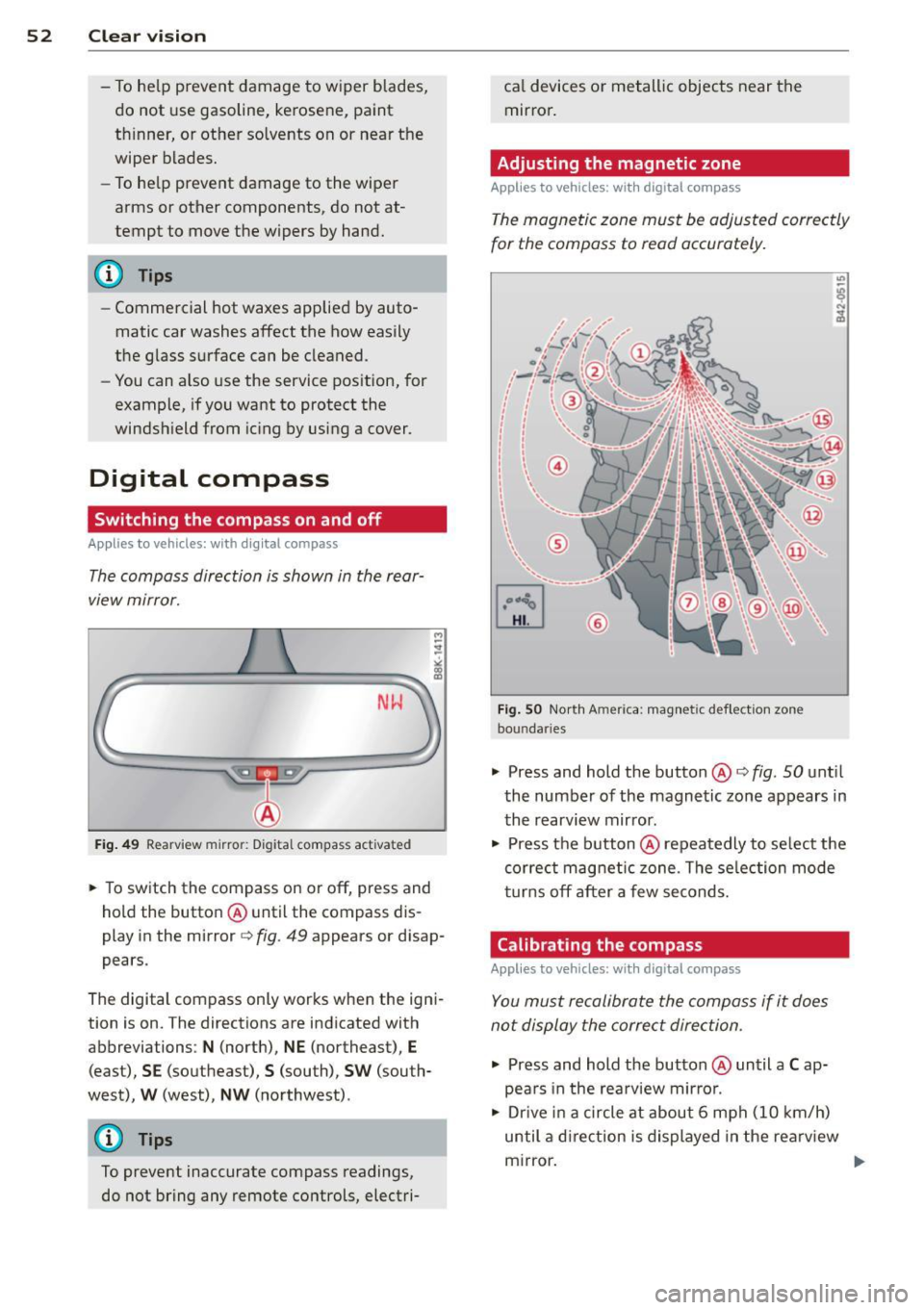
The compass direction is shown in the rear-
. . view mtrror.
NW
Fig. 49 R earv iew mir ro r: Digi tal compa ss activate d
.. To sw itch the compass on or off, press and
hold the button @ until the compass dis
pl ay in the mirror¢
fig. 49 appears o r disap
pea rs.
The digital compass only works when the igni
tion is on. The directions are indicated with
abbreviations :
N (north), NE (northeast), E
(east), SE (southe ast), S (sou th), SW (sou th
west),
W (west), NW (northwest) .
(D Tips
To prevent inaccurate compass readings,
do not bring any remote controls, electri- ca
l devices or metallic objects near the
mirror .
Adjusting the magnetic zone
Applies to vehicles: with digital compass
The magnetic zone must be adjusted correctly
for the compass to read accurately.
F ig . SO Nor th A meri ca: magn etic d ef le ctio n zo ne
bo un dari es
"'
.,. Press and hold the button@¢ fig. 50 until
the number of the magnetic zone appears in
the rearview mirror .
.. Press the button@ repeatedly to se lect the
correct magnetic zone . The se lec tion mode
turns
off after a few seconds.
Calibrating the compass
Applies to vehicles: with digital compass
You must recalibrate the compass if it does
not display the correct direction .
.. Press and hold the button @ until a Cap
pears in the rea rview mirro r.
.. Drive in a circle at about 6 mph (10 km/h)
until a direction is displayed in the rearv iew
mirror.
Page 71 of 294
Warm and cold 69
Operation
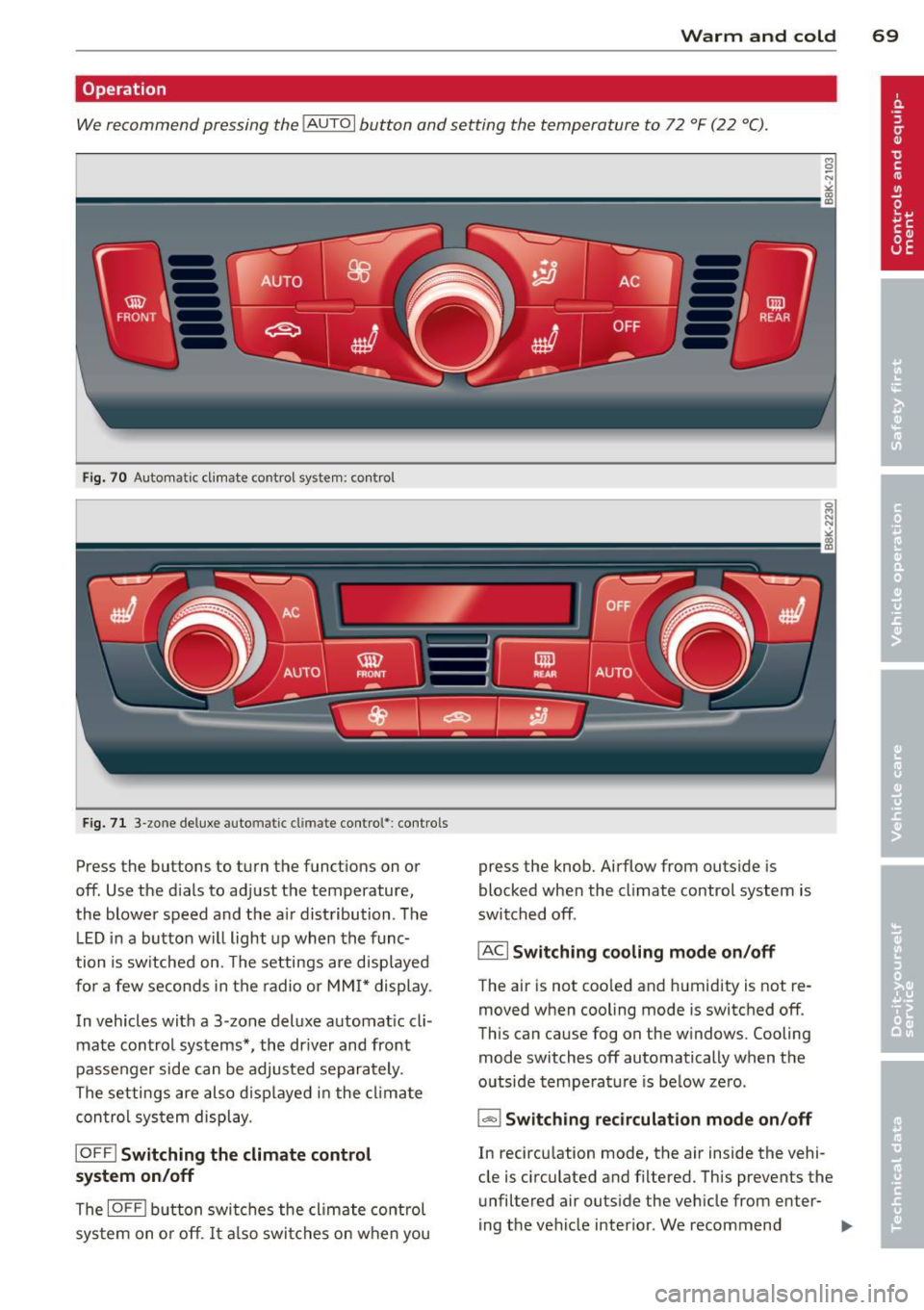
We recommend pressing the IAUTO I button and setting the temperature to 72 °F (22 °C).
Fig. 70 Automatic cl imate control system: control
Fig. 71 3-zone deluxe automatic cl imate control': controls
Press the buttons to turn the functions on or
off. Use the d ials to adjust the temperature,
the blower speed and the a ir distribution. The
LE D in a button will light up when the func
tion is switched on. The settings are displayed
for a few seconds in the radio or MMI* display.
In vehicles with a 3-zone deluxe automat ic cl i
mate control systems *, the dr iver and front
passenger side can be adjusted separately.
The settings are also d isplayed in the climate
con trol system display.
IOFFI Switching the climate control
system on/off
The IOF FI button switches the climate control
sys tem on or off.
It also switches on when you press the knob. Airflow from
outside is
blocked when the climate control system is
switched off.
IACI Switching cooling mode on/off
The air is not coo led and humidity is not re
moved when cooling mode is switched off.
This can cause fog on the w indows. Cooling
mode switches off automatically when the
outside temperature is be low zero.
1- 1 Switching recirculation mode on/off
In recircu lation mode, the air inside the vehi
cle is circulated and filtered. This prevents the
unfiltered air outside the vehicle from enter
ing the vehicle interior. We recommend
Page 72 of 294
70 Warm and cold
switching recirculation mode on when driving
through a tunnel or when sitting in traffic
c:::> &. .
The IAU TO I button or I@ FRON T I butt on
switches recircu lation mode off .
IAUTO I Switching automatic mode on
Automatic mode mainta ins a constant tem
perature inside the vehicle. Air temperature,
airflow and air distribution are controlled au
tomatically.
Adjusting the temperature
Temperatures between 60 °F (+16 °C) and
84 °F ( +28 °C) can be set . Outside of this
range,
LO or HI will appea r in the climate con
trol system disp lay. At both of these settings,
the climate control system runs continuously
at maximum cooling or heating power . There
is no temperature regu lation.
~ Adjusting the airflow
You can adjust the airflow manually to su it
your needs . To have the airflow regulated au
tomatically , press the
!AUTO ! button.
~ Adjusting the air distribution
You can manually select the vents where the
a ir will flow . To have the air d istribution regu
lated automatically, press the
IAUTOI button .
~ Adjusting seat heating*
Pressing the button switches the seat heating
on at the highest sett ing (level 3) . The LEDs
indicate the temperature leve l. To reduce the
temperature, press the button again . To
switch the seat heating off , press the button
repeatedly until the LED turns off .
After 10 minutes , the seat heating automati
cally switches from level 3 to leve l 2.
I@ FR ON T I Switch the defroster on/off
The windshield and s ide windows are defrost
ed or cleared of condensation as quickly as
possible . The max imum amount of air flows
mainly from the vents below the windshield.
Recirculation mode switches off . Th e tempera
ture is controlled automatically. T
he
!AUTO I button switches the defroster off.
l !iiil R EAR I Switching rear window heater
on/off
T he rea r window heater only operates when
the engine is running. It switches off auto
matically after a few m inutes, depending on
the outside temperature .
T o prevent the rea r window heater from
switching off automatically, press and hold
the
l oo REAR I button for more than 2 seconds .
This remains stored until the ignition is
switched off.
Air vents
You can open and close the center and rear air
vents using the thumbwhee ls. The levers ad
just the direction of the airflow from the
vents.
In vehicles with a 3-zone deluxe automatic cli
mate control system*, you can adjust the air
temperature in the rear by turning the thumb
wheel toward the red side to make it warmer
or toward the b lue s ide to make it cooler.
A WARNING
-- Do not use the recirculation for extended
periods of time . The windows could fog
up since no fresh air can enter the vehi
cle . If the windows fog up, press the air
recir culation butto n aga in imm ediately
to switch off the air recirculation func
tion or se lect defrost.
- I ndivid uals w ith reduced sensitivity to
pa in or temperature could develop burns
when using the seat heating function . To
red uce the risk of injury, these individu
als shou ld not use seat heating.
(D Note
To avoid damage to the heating elements
in the seats, do not kneel on the seats or
place heavy loads on a small area of the
seat.
Page 80 of 294
78 On the road
Emerg ency b rake function
An emergency brake ensures t hat the vehicle
can be slowed down even if the
normal brakes
fail c::>
page 79, Emergency broking.
Indicat or light s
-If the par king b rake is closed w ith the igni
t ion
s witc hed on the . (USA models) /
• (Canada mode ls) indica tor lights come
on in the instrum ent cluster and the switch .
-If the parking brake is closed w ith the igni
tion
s witc hed off the . (USA models) /
• (Canada mode ls) indicator lights come
on in the instrument clust er and th e switch
for about 20 seconds .
A WARNING
If a gear or a drive range (automat ic trans
m ission) is engaged with the vehicle sta
tionary and the engine runn ing, you must
in no instance accelerate o r release the
cl utch carelessly. Otherwise the vehicle
w ill sta rt to move immediately- r isk of an
accident .
@ Note
If the . symbol in the display or the
.. (USA models) . (Canada models)
ind icator light in the instr ume nt cl uster
flashes, there is a ma lf u nction in the brake
system. By pressing the
ISETI button, you
can bring up a driver message which ex
plains the malfunction in more detail. If
the driver message
Pa rking brake! ap
pears, there is an operating malfunction in
the park ing brake which you should have
repaired immediately by an authorized
Aud i deale r or other qualified workshop
c::>
page 15.
(D Tips
- You can apply the parking brake at any time - even w ith the ignition switched
off . Th e ignit ion must be t urned on in o r
der to release the par king brake. - Occasional noises when the parking
bra ke is applied and released are normal
and are not a cause for concern.
- When the vehicle is parked , the parking
brake goes through a self-test cycle at
regu lar interva ls. Any associated noises
are normal.
Parking
Parking
"' Press the br ake ped al to s top the veh icle .
"' Pull the button @ c::>
page 77, fig. 77 to set
the parking brake.
"' Automatic transmission: Move the selector
lever to P.
.,. Turn t he engine off c::>
,& .
.,. Man ual transmission: Shift into 1st gear.
In addition on inclines and gr ades
.,. Turn the steering wheel so that your vehicle
w ill roll aga inst the curb in case it shou ld
start to move.
A WARNING
- When you leave yo ur vehicle -even if on
ly briefly -always remove the igni tion
key. This app lies particularly when chi l
dren remain in the vehicle. Otherwise the
children could start the eng ine, release
the park ing brake or operate electrical
equ ipme nt (e .g . power windows). There
is the risk of an acc ident .
- When the veh icle is locked, no one -par
ticularly not children should rema in in
the vehicle . Locked doors make it mo re
d ifficult for emergency worke rs to get in
to the vehicle -putting lives at r isk .
Starting from rest
The starting assist function ensures that the
parking brake is released automatically upon starting.
Stopping and applying parking brake
"' Pull the switch @c::> page 77, fig . 77 to ap-
ply the parking brake . .,.
Page 82 of 294
80 On the road
vehicle speed exceeds the set speed by about
3 mph (3 km/h). At the same time, a warning
symbol appears in the d isp lay . The symbol's
appeara nce m ight be d ifferent in some mod
els.
The speed warning system has one or two*
warn ing thresholds that f unct ion independ
ently of each other and that have somewhat
d ifferent purposes:
Speed warn ing 1
You can use speed warning 1 to set the maxi
m um speed w hile you are driv ing. T his setting
will remain in effect until you turn off the igni
tion, assuming that you have not changed or
reset the setting.
The . (USA
models) ;a (Canada models)
speed warning symbol in the warning 1 dis
p lay appears whe n you exceed the maximum
speed. It goes out when the speed fa lls below
the stored max imum speed .
The speed warning symbo l w ill also go out if
the speed exceeds the stored max imum speed
by more than about 25 mph (40 km/h) for at
least 10 seconds. The stored maximum speed
is deleted .
Sett ing speed warning 1
c::> page 80.
Speed warning 2*
Sto ring warning 2 is recommended if you al
ways want to be reminded of a certain speed,
for example when yo u are traveling in a coun
try that has a general maximum speed limit,
or if you do not want to exceed a specified
speed for winter tires.
The . (USA mode ls)/ . (Canada models)
speed warning 2 symbo l appears in the dis
play when you exceed the stored speed lim it.
Unlike warning 1, it will not go out until the
vehicle speed drops below the stored speed
lim it.
Sett ing speed warning 2
c::> page 80.
(D Tips
Even tho ugh your vehicle is equipped with
a speed warning system, you should st ill watch the speedome
ter to ma ke s ure you
are not dr iving faster than the speed limit .
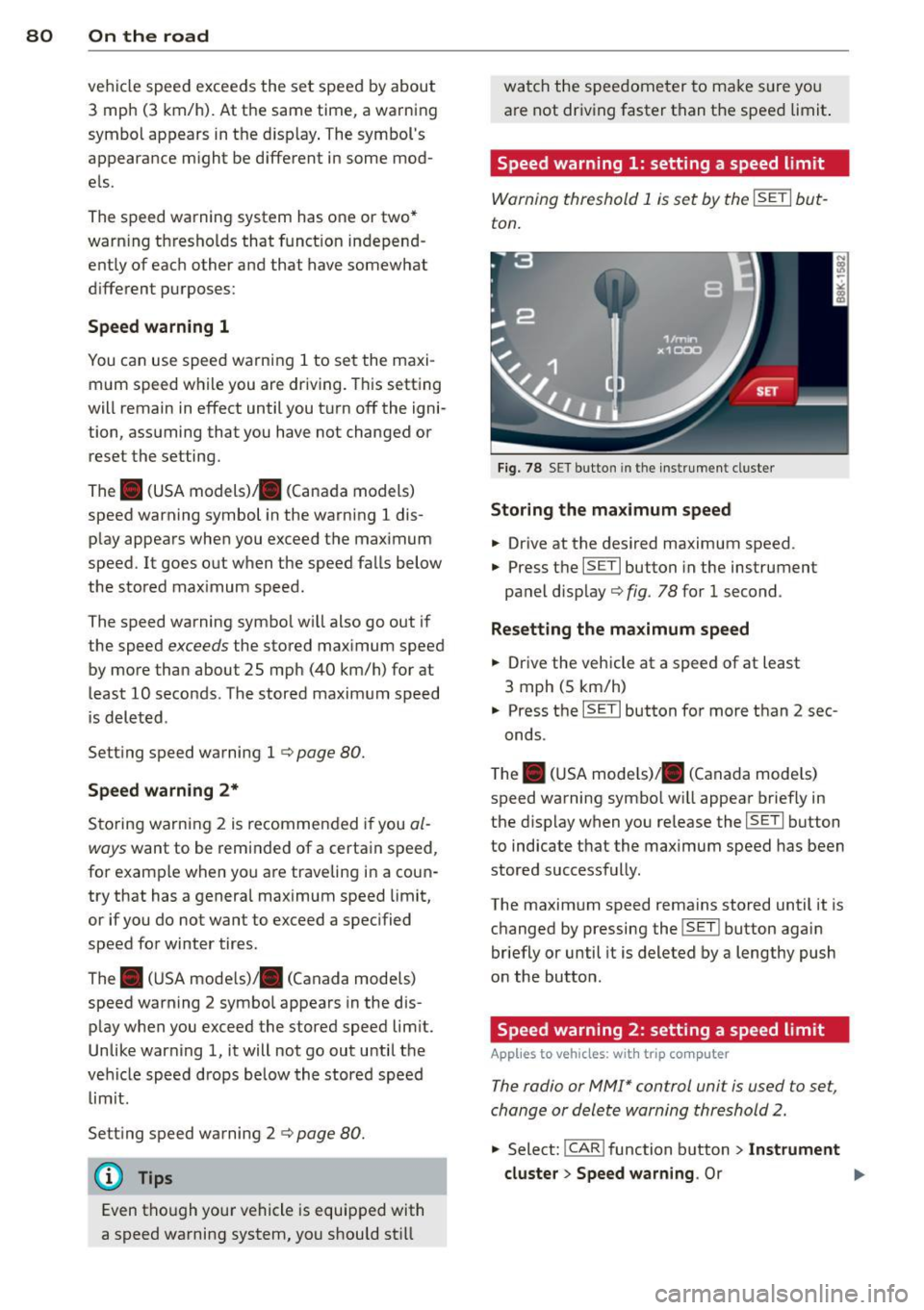
Speed warning 1: setting a speed limit
Warning threshold 1 is set by the ISETI but
ton.
F ig . 78 SET bu tton in the instr ume nt cluste r
Storing the max imum speed
.. Drive at the desired maximum speed .
.,. Press t he
ISE TI button in the instrument
panel disp lay c::>fig .
78 for 1 second .
Resetting the maximum speed
.. Drive the vehicle at a speed of at least
3 mph (5 km/h)
.. Press the
ISET I button for more than 2 sec-
onds.
T he . (USA mode ls)/ . (Canada mode ls)
speed warning symbo l w ill appear briefly in
the display when you release the
I SE TI button
to indicate that the maximum speed has been
stored successfully.
The maximum speed remains stored until it is changed by pressing the
I SET ! button again
briefly or until it is deleted by a lengthy push
on the button.
Speed warning 2: setting a speed limit
App lies to vehicles: wi th trip co mp uter
The radio or MMI* control unit is used to set,
change or delete warning threshold 2.
.. Select:
!CAR ! function b utton > In st rument
cluster > Speed warning .
Or
Page 88 of 294
86 Transmission
mo de. The instr ument cluster display shows
the selected driving mode .
I n the
normal m ode D, the transmission auto
mat ica lly selec ts the best gea r ratio .
It de
pends o n engine load, vehicle speed and the
dynamic control program ( DRP) .
Selec t the
sport mode S fo r spo rty drivi ng.
The vehicle makes full use of the engine's
power . S hifting is more not iceable when accel
erating.
When the ve hicle is stationary o r at speeds
be low 3 mph (S km/h), you must always apply
the foot brake before and while moving the lever to D/S out of N.
I n ce rtain circumstances i t may be advanta
geous to tempo rarily swi tch to the manual
shift p rogram to manually se lect gear ratios
to match specific driving conditions
c::> page88.
.&_ WARNING
Read and follow a ll WARNINGS c:> & in
Driving the automatic transmission on
page 84 .
(D Note
-
Coasting downhi ll with the transmission in
N and the e ngine not r unning w ill result in
damage to the automatic transmiss ion
and possibly the catalytic converte r.
(D Tips
On veh icles with Audi drive se lect *, you can
ad just the sporty shift characteristics in
the
Dynamic dr iving mode.Swill appear in
the instrumen t cluster display instead of
D .
Automatic Shift Lock {ASL)
Applies to vehicles: with multitronic or tiptro nic
The Automatic Shift Lock safeguards you
against accidentally shifting into a forward or the reverse gear and causing the vehicle to
move unintentionally.
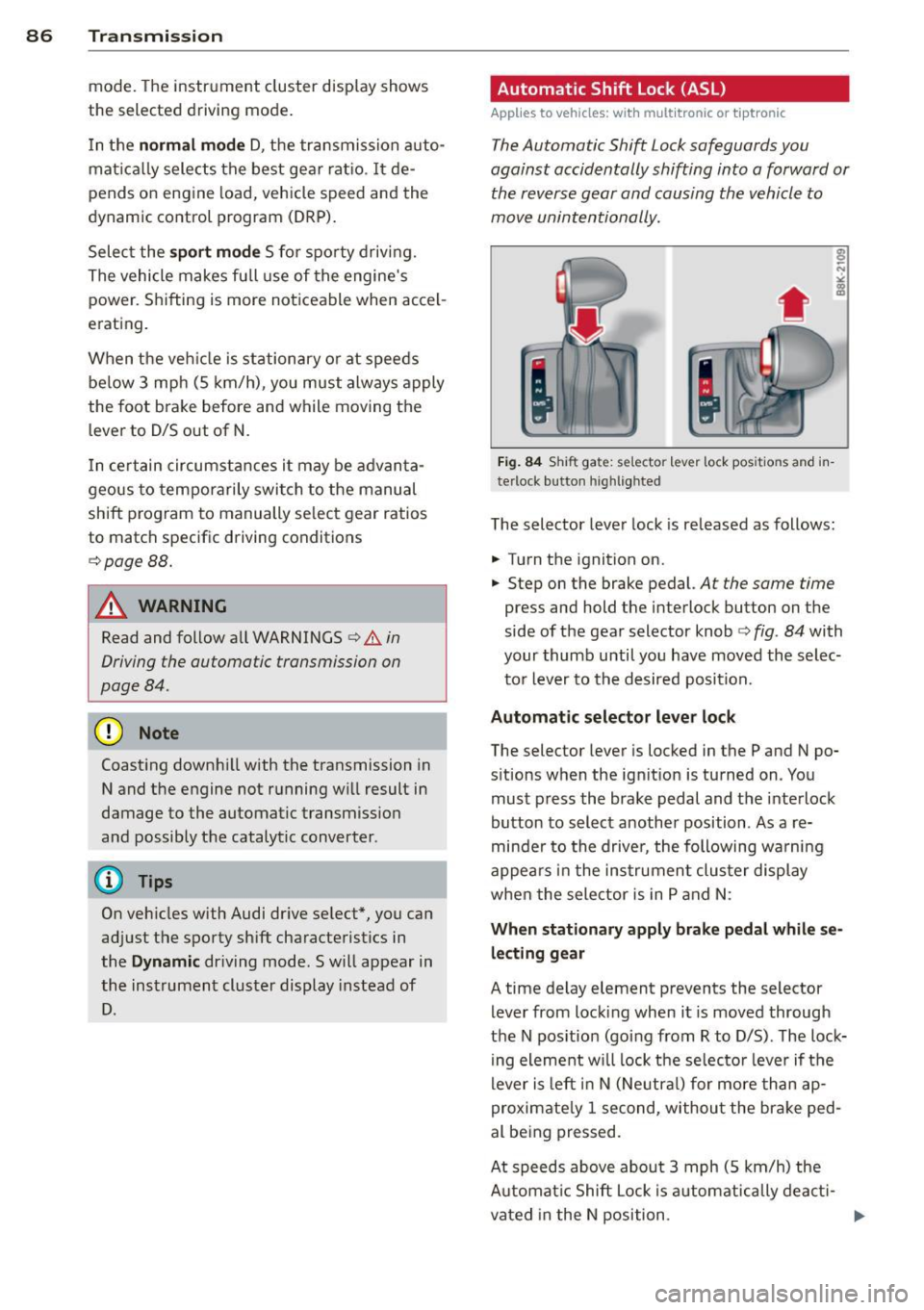
Fig. 84 Shi ft ga te: se lec tor le ve r lock pos itio ns a nd in
te rlock b utton highl ig hte d
The selector lever lock is re leased as follows:
.. Turn the ignition on .
.. Step on the brake pedal.
At the same time
press and hold the in terlock button on the
side of the gear selector knob
c:> fig . 84 with
your thumb until you have moved the selec
t o r lever to the desired position.
Automatic selector leve r lock
The selector lever is locked in the P and N po
s itions when the ign it io n is tu rned on. You
mus t press the brake pedal and the inte rlock
button to select another position . As a re
minde r to the drive r, the following wa rnin g
appe ars in the in strumen t clus ter di splay
when the selector is in P and N:
When stationary apply brak e pedal while se
lecting gear
A time delay element p revents the selector
lever from locking when it is moved through
the N pos ition (going from R to D/S) . T he lock
ing element w ill lock the selec to r lever if t he
lever is le ft in N (Ne utra l) for more th an ap
proximate ly 1 second, withou t the bra ke ped
al be ing pressed .
At speeds above abou t 3 mph (S km/h) the
A utomat ic Shift Lock i s automatica lly deac ti-
vated in the N position .
IJJ>-
Page 94 of 294
92 Transmi ssion
• Wait a moment until the transm ission
shifts . You wi ll notice a slight movement
when the gear engages.
• Re lease the brake pedal and press the accel
erator pedal
c::> .&, .
Stopping t empora ril y
• Press the brake peda l to prevent the vehicle
from moving, for example at traffic lights .
• Do not press the accelerator pedal when do -
ing this.
P a rk ing
If the selector lever is not in the P position
when you open the driver's door, the vehicle
could ro ll. The message
T ran smi ssio n: Car
m ay roll! Shift to p ark!
appears.
• Press and ho ld the brake pedal
c::> .&, .
• Activate the parking brake .
• Hold t he interlock button down, place the
selector lever in the
P position and release
the interlock button.
Stopping on an inclin e
• Always press the b rake peda l to hold the ve
hicle in p lace and prevent it from "rolling
back" c::>
.&,. Do not try to prevent the ve hicle
from "ro lling back" when a gear is engaged
by increasing the engine speed
c::> (D.
Starting on an incline
• Activate the parking brake .
• With the driving gear se lected, press the ac
celerator pedal carefully. The parking brake
will release automat ically if your seat be lt is
fastened.
Dr ivin g on an incline: Under certain circum
stances, such as driving in the mountains, it may be useful to sw itch temporarily to the
manual shift program in order to adjust the
gears to the driving conditions by hand
c::> & .
On slopes, activate the parking brake first and
then move the selector lever to the P posit ion.
This prevents the lock ing mechanism from be
ing loaded too heav ily and w ill make it easier
to move the selector leve r out of P .
A WARNING
-Never leave your vehicle with the engine
running while in gear. If you must leave
your veh icle when the engine is running,
activate the pa rking brake and move the
selecto r lever to P .
- Powe r is still transmitted to the w heels
when the engine is runn ing at idle. To
p revent the vehicle from "c reeping", you
m ust keep your foot on the brake when
the engine is running and the selector
lever is in D/S or R or "t iptronic" mode is
selected.
- Do not press the accelerator pedal when changing the se lector lever position
while the veh icle is stationary and the
engine is running.
- Never sh ift into R or
P while driving .
- Before driving down a steep s lope, re-
duce your speed and shift into a lower
gear with "tiptronic".
- Do not ride the brakes o r press the bra ke
pedal too often or too long. Constant
brak ing ca uses the brakes to overheat
and substantially reduces braking per
formance, increases braking d istance or
causes complete failure of the brake sys
tem.
- To preve nt the vehicle from ro lling back
when stopp ing on inclines, always hold it
in place with the b rake pedal or parking
b rake.
- Never hold the vehicle on an incline with
a slipping clutc h. T he clutch opens auto
mat ica lly when it becomes too hot from
the overload. An indica tor l amp
mJ ill u
minates and a driver message appears
c::>
page 95 when the clutc h is overload
ed .
(D Note
-When s topping on an incl ine, do no t try
to hold t he vehicle in place by pressing
the acce lerator pedal while a driving gear
is se lected. This can cause the S t ron ic
transm ission to overheat and can dam
age it. Activate t he parking brake or
Page 96 of 294
94 Transmi ssion
When acce lerating, the transmiss ion will au
tomatically shift into the next gear before the
engine reaches its maximum RPM.
I f you apply a ligh t throttle when accelerat
ing, tiptronic will automatically shift from 1st
to 2nd gear to save fuel. If you app ly a heavy
thrott le, the transmission will stay in 1st gear
unti l near maximum RPM is reached, or unt il
the dr iver shifts into 2nd gear.
If you take your foot off the accelerator peda l
when dr iving down a steep incline, tiptronic
will downshift from the selected gear into the next lower gear until it reaches 1st gear,
based on road speed and eng ine RPM . Auto
mat ic downshifti ng is interrupted as soon as
you apply the th rottle aga in .
(D} Tips
- When you sh ift into the next lower gear,
the transmiss ion will downshift only
when there is no possibility of over-rev
v ing the engine.
- When the kick-down comes on, the
transmission will sh ift down to a lower
gear, depending on vehicle and engine
speeds.
- Tiptronic is inope rat ive when the t rans
mission is in the fail-sa fe mode.
Kick-down
A pp lies to vehicles: with S tro nic tr ansmiss ion
Kick-down enables maximum acceleration.
When you press the acce lerator pedal down
beyond the resistance po int, the automatic
transmission downshifts into a lower gear, de
pending on vehicle speed and engine RP M.
It
shifts up into the next h igher ge ar once the
max imum specified engine RPM is reached.
& WARNING
Please note that the wheels could spin on
slick or slippery roads when kick-down is
active.
Launch Control Program
App lies to vehicles : wit h S tronic tra nsmi ssio n
The Launch Control Program provides the
best acceleration possible when starting from
a stop .
Requirement: The engine must be at operat
ing temperature and the steering wheel must
not be t urned .
.. Press the
I~ OF F! button c::;, page 186 while
the engine is running. The
fl ind icator light
illuminates in the instrument cluster and
Traction control (ASR ): Off . Warning! Re
stricted stability
appea rs in the driver infor
mat io n system display .
.. Move the se lector lever to the D/S posit ion
or select the
d ynamic dr iv ing mode in Audi
drive select*
c::;, page 112 .
.. Press the brake peda l strongly with your left
foot and ho ld it down for at least one sec
ond.
.. At the same time, press the accelerator
pedal down complete ly w ith your r ight foot
until t he e ngine reaches and mainta ins a
h igh RP M.
.. Remove yo ur foot from the brake pedal
w ith in S seconds
c::;, A, .
& WARNING
-Always adapt your driving to the traffic
f low .
- On ly use the Launch Cont ro l Program
when road and traffic conditions a llow it
and other drivers w ill not be endangered
or annoyed by your driving and the vehi
cle's acceleration.
- Please note that the d riving wheels can
spin and the vehicle can break away
when ASR is switched off , especially
when the road is slippery .
- Once you have accelerated, you shou ld
sw itch the ASR back on by pressing the
lfl O FF ! button . .__ _____________ _J ...
Page 113 of 294
Audi drive select Driving settings
Introduction
App lies to vehicles: w it h drive se lect
Audi drive select provides the possibility to ex
perience different types of veh icle sett ings in
one vehicle. For instance, using the three
Comfort, Auto and Dynamic modes, the driv
er can switch from a sporty to a comfortab le
driving mode with the press of a button.
Addit ionally, in vehicles with MM I*, the vehi
cle setup for
Individual* mode can be cus
tomized by you. This makes it possib le to
combine settings such as a sporty engine tun
ing with comfortable steering.
A WARNING
Improper use of the Audi drive select can
cause collisions, other acc idents and seri
ous personal injury.
Description
Ap plies to vehicles: w it h drive se lect
The vehicle setup in each mode depends on
the vehicle's features. However, the engine,
automatic t ransmission* and steering are al
ways involved.
.
Engine and automatic transmission*
Depending on the mode, the engine and the
automatic transmission respond quicker or in
a more ba lanced manner to acce lerator pedal
movements. In the sporty dynamic mode, the
automatic transmission shifts at higher R PMs.
Steering
The steering adapts in terms of steering effort
and steering ratios . Indirect steer ing that
moves easily, like the stee ring in comfort
mode, is best su ited to long dr ives on a high
way. In contrast, dynamic mode prov ides
sporty, di rect steering .
The follow ing applies to vehicles with dynam ic
steer ing*: the stee ring ratio changes based on
ve hicl e speed in order to maintain optimum
Audi drive select 111
steering effort for the driver at all times. This
sets the steering to be less sensitive at higher
speeds in order to provide improved vehicle
control. At reduced speeds, however, steer ing
is more direct in order to keep the steering ef
fort as minimal as possible when the driver is
maneuveri ng the vehicle . At low and average
speeds, dynamic steering addit iona lly pro
vides more responsive steering pe rformance.
Adaptive dampers*
The adaptive dampers* use sensors to record
i nformation regarding steering movements,
braking and acceleration operations by the
drive r, road surface, driving speed, and load.
T his makes it possible to adapt damp ing to
the driving situation virtually i n rea l time.
Audi drive select also makes it possible to sat
isfy the desire for sporty s uspension (Dynam
ic) and comfortable suspension (Comfort)
without giv ing up balanced tuning (Auto).
Sport differential*
As a component of the all whee l dr ive system
(quattro ®)
q page 189, the sport differential*
distributes the driving power to the rear axle
depending on the situation . The distribution
of power var ies depending on the mode se
lected. The goal is a high level of agility and
ability to accelerate on curves . The ve hicle is
very respons ive to steering .
Adaptive cruise control*
The behavior when accelerating can be adjust
ed from comfortab le to sporty, depending on
the drive select mode. Adaptive cru ise control
also responds to the driving behavior of the
vehicle ahead in a more conservative or sporty
manner .
Engine sound*
The sound of the eng ine is adapted to the se
lected mode and ranges from subtle to sporty.
0) Tips
-In some models, the maximum vehicle
speed can only be reached in the
Auto
and Dynamic modes.
Page 118 of 294
116 Park assist
Vehicles with the parking system are equipped
with a rear view camera in addition to the
acoustic parking system.
You can choose between two modes to assist
you with park ing. For example, you can use
"parking mode 1" when parking in a parking
space or garage
c:> fig . 114. When you want to
park parallel to the edge of the street, select
"park ing mode 2"
c:>fig . 115.
The rear acoustic park assist system is inte
grated in the rear of the vehicle and the rear
view camera is integrated in the rear lid
c:>page 117.
A WARNING
- The rear view camera has blind spots, in
wh ich objects cannot be detected . Be es
pecially careful to check for small chil
dren and animals before backing up.
Small children and animals will not al
ways be detected by the sensors.
General Information
Applies to vehicles: with parking system (rear, with rear
view camera)
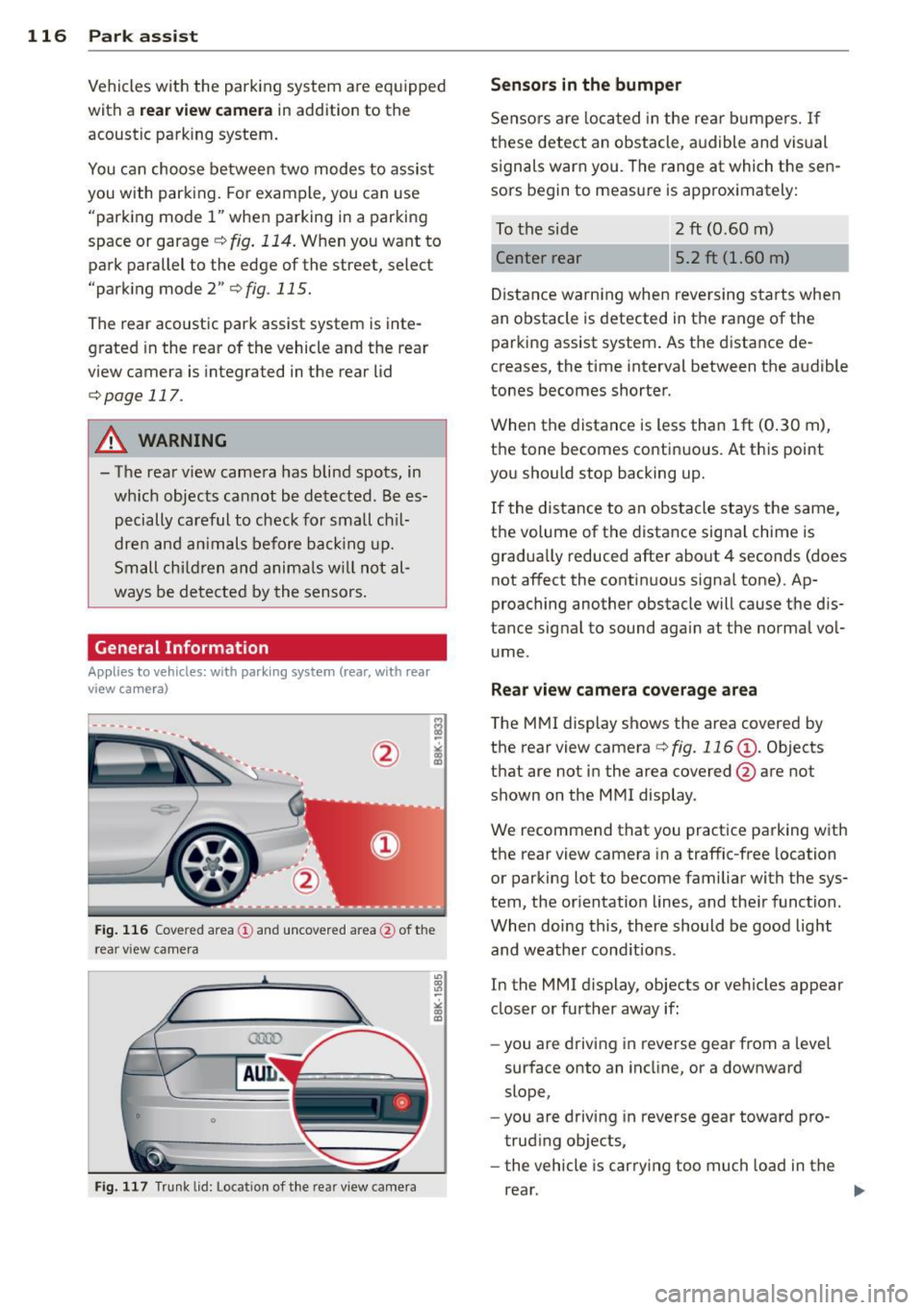
Fig. 116 Cove red area (!) and uncovered area @ of the
rea r view ca mera
• 0
Fig . 117 Trun k lid : Location of the rear view camera
"'
"' "'
~
Sensors are loca ted in the rear bumpers. If
these detect an obstacle, audible and visual
s ignals warn you. The range at which the sen
sors begin to measure is approx imately:
To the side 2
ft (0.60 m)
Center rear 5.2 ft (1.60 m)
Distance warning when reversing starts when
an obstacle is detected in the range of the
parking assist system. As the distance de
creases, the time interval between the audible
tones becomes shorter.
When the distance is less than 1ft (0.30 m),
t h e tone becomes continuous. At thi s point
you should stop backing up.
If the distance to an obstacle stays the same,
the volume of the distance signal chime is
gradually reduced after about 4 seconds (does
not affect the contin uous signa l tone) . Ap
proaching another obstacle will cause the d is
tance signal to sound agai n at the normal vol
ume.
Rear view camera coverage area
T he MMI display shows the area covered by
the rear view camera
c:> fig. 116 (D . Objects
that are not in the area covered @are not
shown on the MMI display .
We recommend that you practice parking with
the rear view camera in a traffic-free location
or parking lot to become familiar with the sys
tem, the orientation lines, and the ir function.
When doing this, there should be good light
and weathe r cond itions.
In the MMI display, objects or vehicles appear
closer or further away if:
- you are driving in reverse gear from a leve l
surface onto an incline, or a downward
slope,
- you are driving in reverse gear toward pro
trud ing ob jects,
- the vehicle is car ry ing too much load in the
rear.