automatic transmission AUDI A4 SEDAN 2013 User Guide
[x] Cancel search | Manufacturer: AUDI, Model Year: 2013, Model line: A4 SEDAN, Model: AUDI A4 SEDAN 2013Pages: 294, PDF Size: 73.71 MB
Page 87 of 294
necessary to keep the vehicle from
rolling.
- If the selector lever is unintentionally
moved into N while you are driving, take
your foot
off the accelerator pedal and
wait for the engine to return to idle
speed before selecting a driving position .
- Never shift into R or P when the vehicle is
in motion .
- Never get out of the driver's seat when
the engine is running.
- If you must get out of the vehicle, move
the selector lever securely into the P po
sit ion and apply the parking brake firmly.
- If the engine must remain running, never
have any driving position engaged when
checking under the hood . Make sure the
selector lever has securely engaged and
is locked in P with the parking brake
firmly set ¢
page 208, Engine compart
ment.
Otherwise, any increase in engine
speed may set the vehicle in motion,
even with the parking brake applied.
(D Tips
For safety reasons, the parking brake is re
leased automatically only when the driv
er 's safety belt is engaged in the buckle.
Selector lever positions
Applies to vehicles: with multit ronic or tiptronic
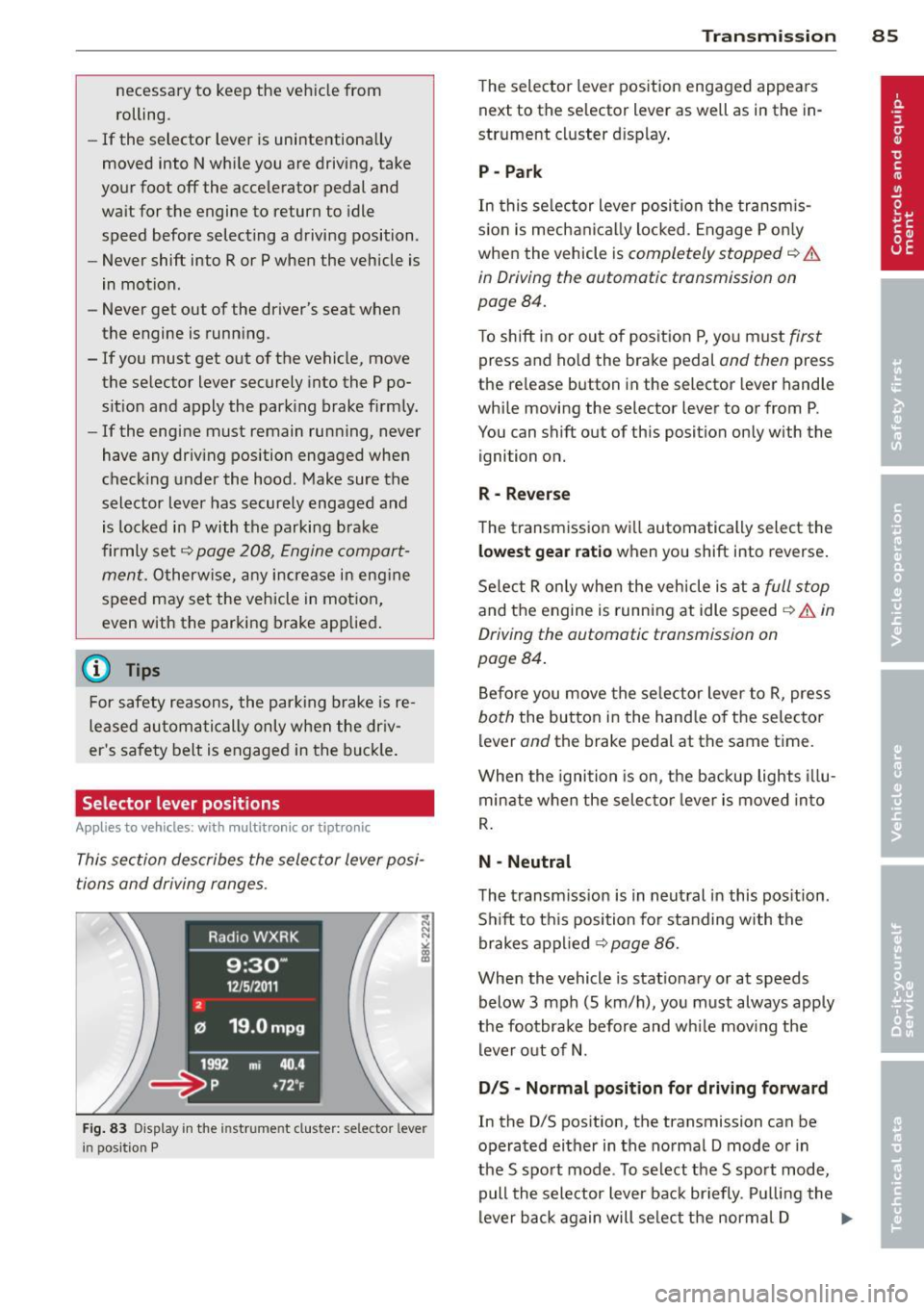
This section describes the selector lever posi
tions and driving ranges .
2
Radio WXRK
9:30-
12/5/2 011
121 19 .0mpg
1992 mi 40 .4
~= ~p +7 2~
Fig. 83 Display in the in str um ent cluste r: selecto r leve r
i n positi on P
Transmission 85
The selector lever position engaged appears
next to the selector lever as well as in the in
strument cluster display .
P -Park
In this selector lever position the transmis
s ion is mechanically locked. Engage P only
when the vehicle is
completely stopped ¢ &
in Driving the automatic transmission on
page 84.
T o shift in or out of position P, you must first
press and hold the brake pedal and then press
the re lease button in the selector lever handle
while moving the selecto r lever to or from P.
You can shift out of this position only with the
ignition on.
R- Reverse
The transmission will automatically select the
lowest gear ratio when you shift into reverse.
Select R only when the vehicle is at a
full stop
and the engine is running at idle speed ¢ & in
Driving the automatic transmission on
page 84.
Before you move the selector lever to R, press
both the button in the handle of the selector
lever
and the brake pedal at the same time .
When the ignition is on, the backup lights illu
minate when the selector lever is moved into
R.
N -Neutral
The transmission is in neutral in this position.
Shift to th is position for standing with the
brakes applied ¢
page 86.
When the vehicle is stationary or at speeds
below 3 mph (S km/h), you must always apply
the footbrake before and while mov ing the
lever out of N.
D /S -Normal position for driving forward
In the D/S pos ition, the transmission can be
operated either in the normal D mode or in
the S sport mode . To select the S sport mode,
pull the selector lever back briefly . Pulling the
lever back again will se lect the normal D ...,
Page 88 of 294
86 Transmission
mo de. The instr ument cluster display shows
the selected driving mode .
I n the
normal m ode D, the transmission auto
mat ica lly selec ts the best gea r ratio .
It de
pends o n engine load, vehicle speed and the
dynamic control program ( DRP) .
Selec t the
sport mode S fo r spo rty drivi ng.
The vehicle makes full use of the engine's
power . S hifting is more not iceable when accel
erating.
When the ve hicle is stationary o r at speeds
be low 3 mph (S km/h), you must always apply
the foot brake before and while moving the lever to D/S out of N.
I n ce rtain circumstances i t may be advanta
geous to tempo rarily swi tch to the manual
shift p rogram to manually se lect gear ratios
to match specific driving conditions
c::> page88.
.&_ WARNING
Read and follow a ll WARNINGS c:> & in
Driving the automatic transmission on
page 84 .
(D Note
-
Coasting downhi ll with the transmission in
N and the e ngine not r unning w ill result in
damage to the automatic transmiss ion
and possibly the catalytic converte r.
(D Tips
On veh icles with Audi drive se lect *, you can
ad just the sporty shift characteristics in
the
Dynamic dr iving mode.Swill appear in
the instrumen t cluster display instead of
D .
Automatic Shift Lock {ASL)
Applies to vehicles: with multitronic or tiptro nic
The Automatic Shift Lock safeguards you
against accidentally shifting into a forward or the reverse gear and causing the vehicle to
move unintentionally.
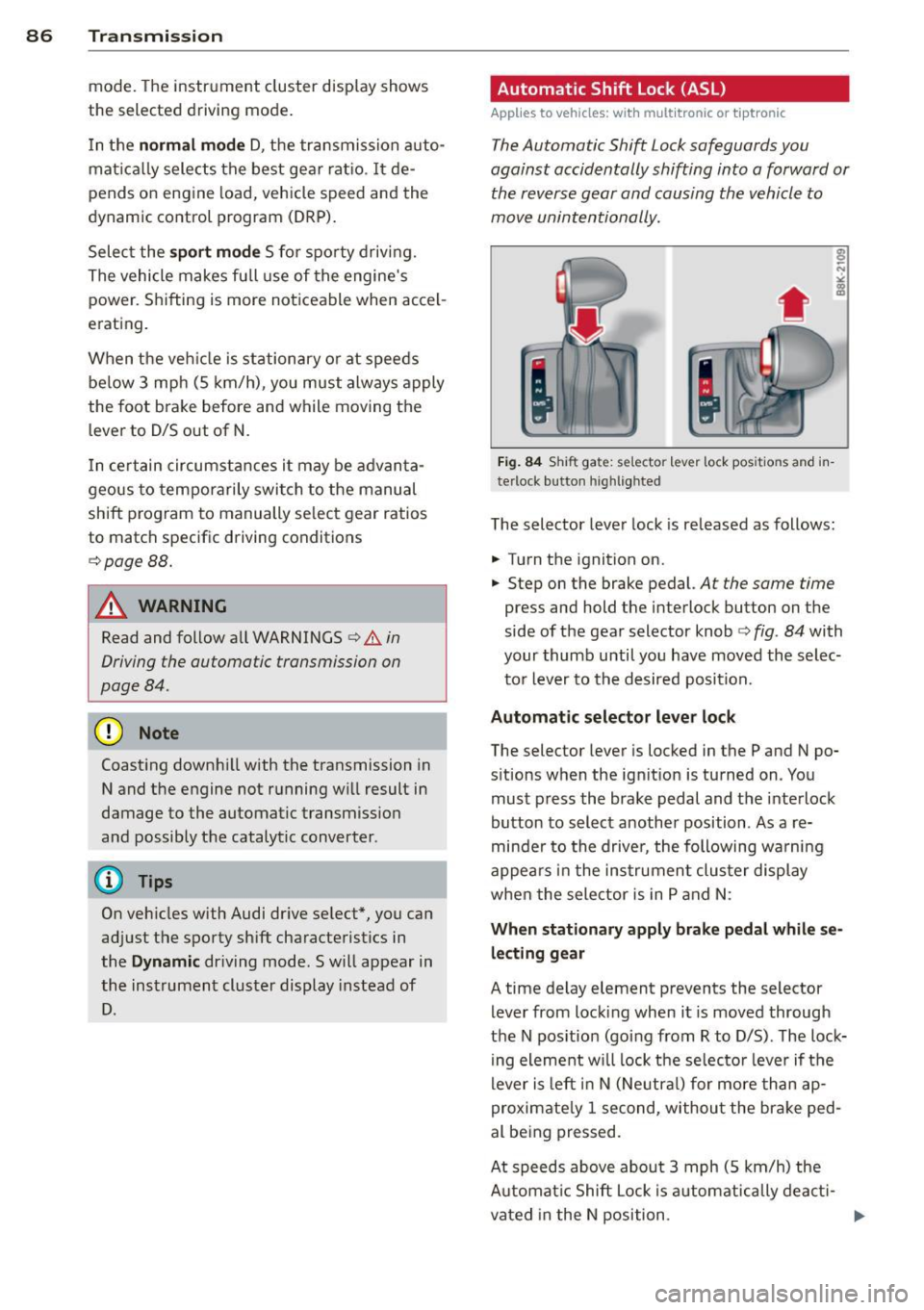
Fig. 84 Shi ft ga te: se lec tor le ve r lock pos itio ns a nd in
te rlock b utton highl ig hte d
The selector lever lock is re leased as follows:
.. Turn the ignition on .
.. Step on the brake pedal.
At the same time
press and hold the in terlock button on the
side of the gear selector knob
c:> fig . 84 with
your thumb until you have moved the selec
t o r lever to the desired position.
Automatic selector leve r lock
The selector lever is locked in the P and N po
s itions when the ign it io n is tu rned on. You
mus t press the brake pedal and the inte rlock
button to select another position . As a re
minde r to the drive r, the following wa rnin g
appe ars in the in strumen t clus ter di splay
when the selector is in P and N:
When stationary apply brak e pedal while se
lecting gear
A time delay element p revents the selector
lever from locking when it is moved through
the N pos ition (going from R to D/S) . T he lock
ing element w ill lock the selec to r lever if t he
lever is le ft in N (Ne utra l) for more th an ap
proximate ly 1 second, withou t the bra ke ped
al be ing pressed .
At speeds above abou t 3 mph (S km/h) the
A utomat ic Shift Lock i s automatica lly deac ti-
vated in the N position .
IJJ>-
Page 89 of 294
Interlo ck button
The lock b utton on the selector leve r prevents
the lever from being accidentally shifted into
certain positions. Pressing this button deacti
vates the se lector lever lock. Depending on
the direction of the shift, the se lector lever
locks at different positions. The positions are
hi ghlighted in the illustration
c:> fig. 84.
Ignition k ey sa fe ty int erlock
The key cannot be removed from the ignition
un less the se lector lever is in the P park posi
tion . When the ign ition key is removed, the
selector lever will be locked in the P pos ition.
Kick-down
App lies to vehicles: with multitronic or tiptro nic
The kick-down features allows maximum ve
hicle acceleration.
Appli es to v eh icl es with a multit ronic ®
t ran sm ission
When you depress the acce lerator pedal be
yond the resistance point, the transmission downshifts into a lower gear ratio depending
on the vehicle speed and engine speed . As
long as the accelerator pedal is depressed, the
engine speed is automat ica lly regulated for
max imum ac celeration.
Applie s to veh icles with a tiptronic
transmission
When you depress the accelerator pedal be
yond the resistance po int, the automat ic
transmission downshifts into a lower gear, de
pending on vehicle speed and engine speed .
The upshift into the next higher gear takes
p lace once the maxim um specified engine
speed is reached.
_&. WARNING
Please note that the drive whee ls can spin
if kick-down is used on a smooth slippery
road -there is a risk of skidding.
Tran sm iss ion 87
Dynamic shift program (DSP)
App lies to vehicles: wit h m ultitro nic or t iptronic
The automatic transmission is electronically
controlled .
The transm iss ion is self adapting and will
a u
tomati call y select the best sh ift program suit
ed to the driving conditions and driv ing style.
The transmission wi ll select one of the
eco no
m y
programs when you drive at a steady
speed or a gradually changing speed w ithout
heavy acceleration . This achieves optimum
fuel eff iciency, with early upshifting and de
l ayed downshift ing .
The transm iss ion w ill automatically select the
sporty sh ift programs w hen you drive at high
er speeds, or with heavy acceleration and fre quently changing speeds. Upsh ifts are delayed
to make full use of e ngine power. Downshift
ing takes place at highe r engine speeds than
in the economy programs .
T he selection of the most suitable sh ift pro
gram is a continuous, automatic process . The
drive r can a lso make the transm iss ion sw itch
to a sporty program by
quickl y pressing down
the gas pedal.
T h is causes the t ransm ission to shift down to
a lowe r gear to ach ieve rapid acce le rat ion, e.g.
f or quickly passing another vehicle . You do not
need to press the gas pedal into the kick-down
range . After the transmission has upshifted,
the or iginal program is selected according to
your driving style .
Vehicles with mult itronic t ransmission: when
driving on hills and mountains, the gear ratio
continuously adapts to the grade . The trans
mission downshifts automatically when driv
ing downh ill if the brake pedal is pressed . As a
result, the engine braking effect inc reases.
Vehicles with tiptron ic transm issions: when
driv ing on hills and mountains, the gear se lec
tion adapts to the grade. This prevents con
stant upshift ing and downsh ifting when driv
i ng uphill.
Page 90 of 294
88 Transmission
Manual shift program
Applies to vehicles: with multitronic or tiptron ic
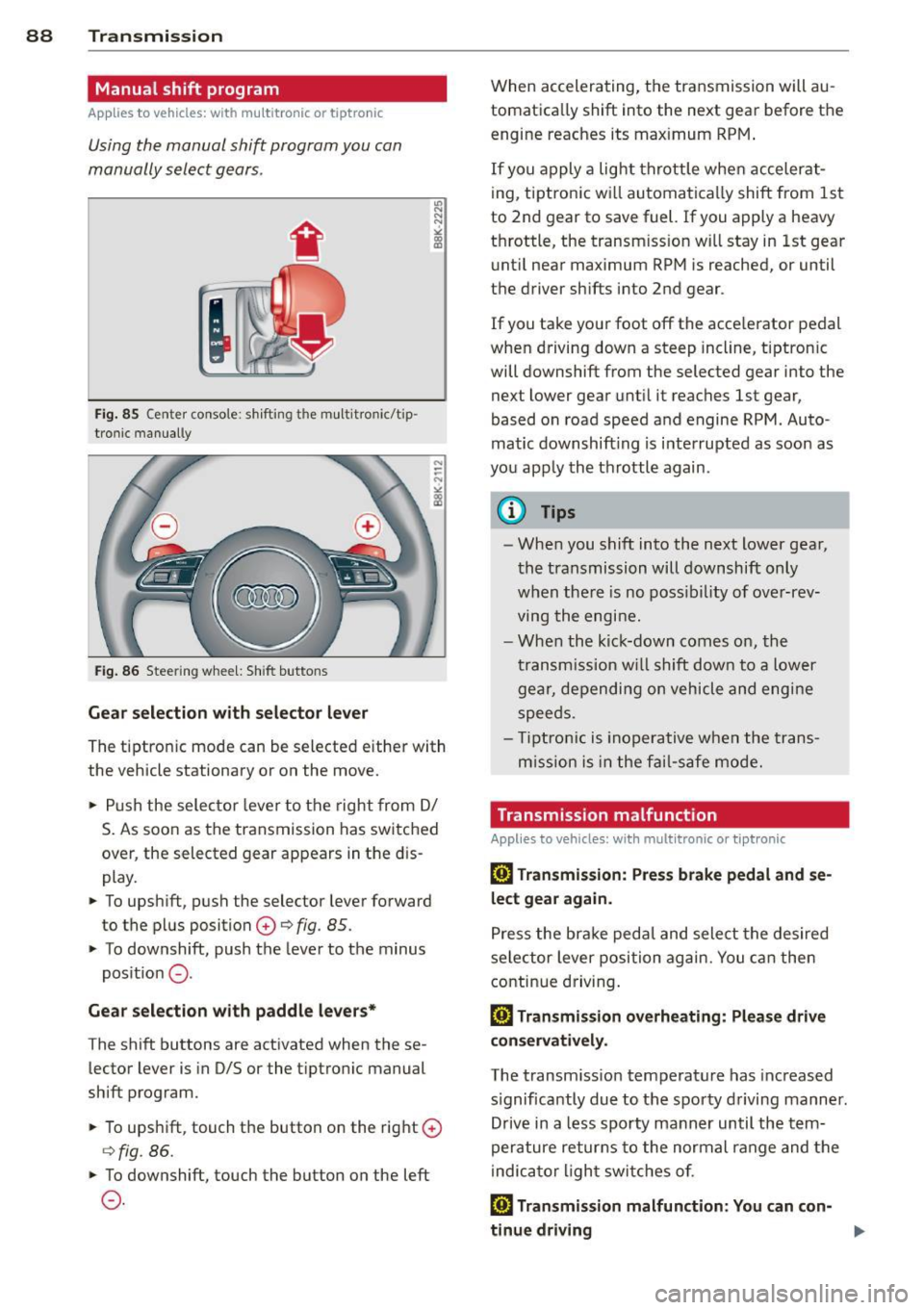
Using the manual shift program you can
manually select gears .
Fig. 85 Center console : shift ing t he multitro nic/t ip ·
tronic manual ly
Fig . 86 Steering wheel: Shift buttons
Gear selection with selector lever
"' N
N
~
" a> CD
The tiptronic mode can be selected either with
the vehicle stationary or on the move .
.,. Push the selector lever to the right from
DI
S. As soon as the transmission has switched
over , the selected gear appears in the dis
play.
.,. To upshift, push the selector lever forward
to the plus position
0 ¢ fig. 85 .
.,. To downshift, push the lever to the minus
position
0 -
Gear selection with paddle levers*
The shift buttons are activated when these
lector lever is in D/S or the tiptronic manual
shift program.
.,. To upshift, touch the button on the right
0
¢fig . 86.
.,. To downshift, touch the button on the left
0-
When accelerating, the transmission will au
tomatically shift into the next gear before the
engine reaches its maximum RPM .
If you apply a light throttle when accelerat
ing, tiptronic will automatically shift from 1st
to 2nd gear to save fuel. If you apply a heavy
throttle, the transm iss ion will stay in 1st gear
until near maximum RPM is reached, or until
the driver shifts into 2nd gear .
If you take your foot off the accelerator pedal
when driving down a steep incline, tiptronic
will downshift from the selected gear into the
next lower gear until it reaches 1st gear,
based on road speed and engine RPM . Auto ·
matic downshifting is interrupted as soon as
you apply the throttle again .
(D Tips
-When you shift into the next lower gear,
the transmission will downshift only
when there is no possibility of over-rev
ving the engine.
- When the kick-down comes on, the
transmission will shift down to a lower
gear, depending on vehicle and engine
speeds .
- Tiptronic is inoperative when the trans
m ission is in the fail-saf e mode.
Transmission malfunction
Applies to vehicles: with mult itronic or tiptronic
[O] Transmission: Press brake pedal and se
lect gear again .
Press the brake pedal and select the desired
selector lever position again. You can then
continue driving.
[O] Transmission overheating: Please drive
conservatively.
The transmission temperature has increased
s ignificantly due to the sporty driving manner.
Drive in a less sporty manner until the tern·
perature returns to the normal range and the
indicator light switches of.
[O] Transmission malfunction: You can con-
tinue driving ..,.
Page 91 of 294
There is a system malfunction in the transmis
sion. You may continue driving. Drive to your
authorized Audi dealer or qualified repair fa
cility soon to have the malfunction corrected.
[O] Transmission malfunction: Limited driv·
ing functionality
There is a system malfunction in the transmis
sion . The transmission is switching to emer
gency mode. This mode only shifts into cer
tain gears or will no longer shift at all. The en
gine may stall. Drive to your authorized Audi
dealer or qualified repair facility immediately
to have the malfunction corrected .
[O] Transmission malfunction: Stop vehicle
and shift to park.
Do not continue driving. Select the P selector
lever position and see your authorized Audi
dealer or qualified repair facility for assis
tance.
([) Note
If the transmission switches to emergency
mode, you should take the vehicle to an
authorized Audi dealership as soon as pos
sible to have the condition corrected.
Emergency release of the selector lever
Applies to vehicles: with multitronic or tiptro nic
If the vehicle's power supply foils, the selec
tor lever can be released in an emergency.
Fig . 87 Removing ashtray insert
Transmission 89
Fig . 88 Emerge ncy release fo r se lecto r lever
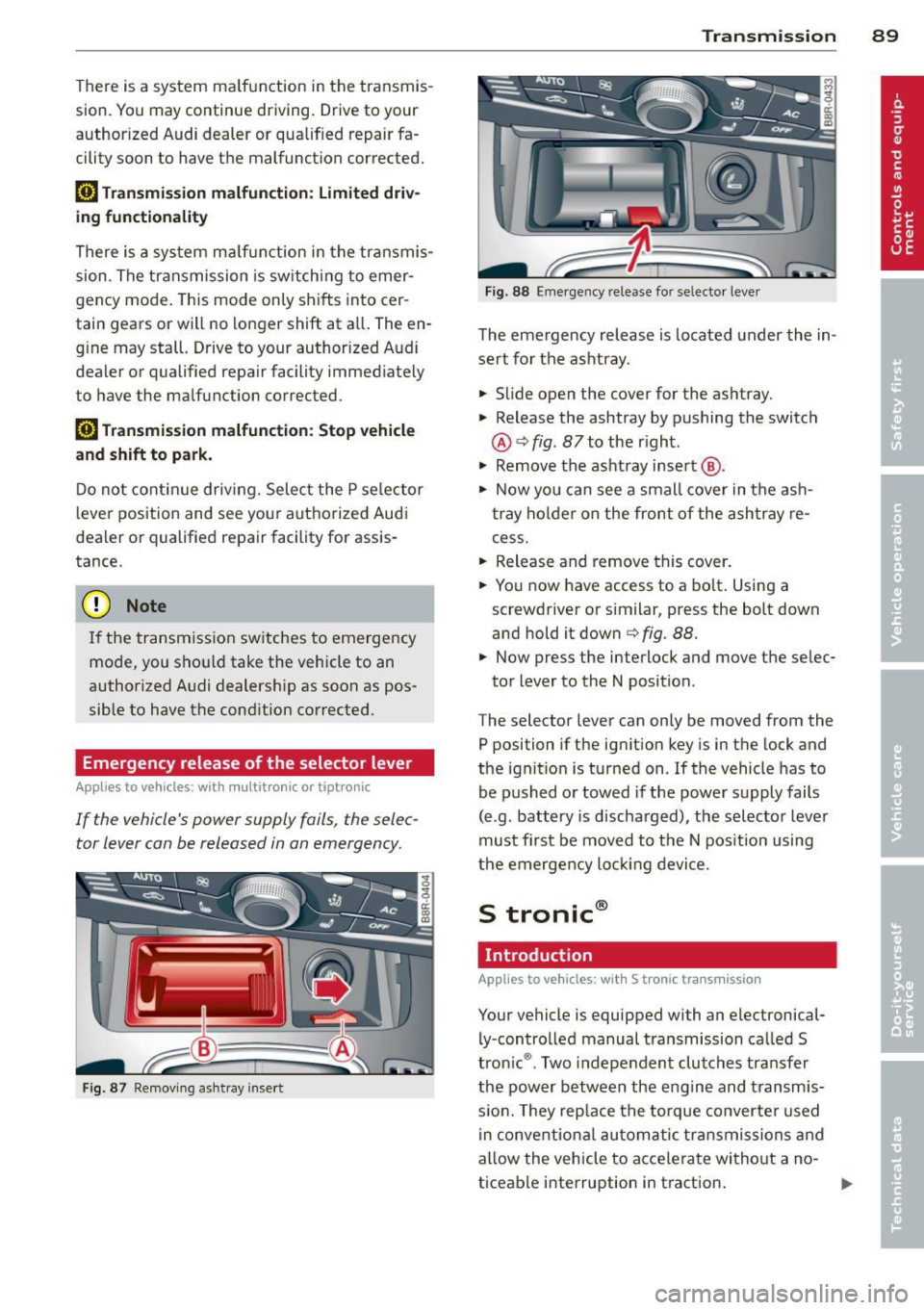
The emergency release is located under the in
sert for the ashtray.
.,. Slide open the cover for the ashtray.
.,. Release the ashtray by pushing the switch
@ ¢
fig. 87 to the right .
.,. Remove the ashtray insert @ .
.,. Now you can see a small cover in the ash
tray holder on the front of the ashtray re
cess .
.,. Release and remove this cover.
.,. You now have access to a bolt. Using a
screwdriver or similar, press the bolt down
and hold it down ¢
fig. 88.
.,. Now press the interlock and move the selec-
tor lever to the N position .
The selector lever can only be moved from the
P position if the ignition key is in the lock and
the ignition is turned on . If the vehicle has to
be pushed or towed if the power supply fails
(e .g . battery is discharged), the selector lever
must first be moved to the N position using
the emergency locking device.
S tronic®
Introduction
Applies to vehicles : with S tronic transmission
Your vehicle is equipped with an electronical
ly -controlled manual transmission called S
tronic ®. Two independent clutches transfer
the power between the engine and transmis
s ion. They rep lace the torque converter used
in conventional automatic transmissions and
allow the vehicle to accelerate without a no
ticeable interruption in traction.
Page 93 of 294
-If you accidentally select N while driving,
take your foot off the accelerator pedal immediately and wait for the engine to
slow down to idle before selecting D/S.
- If there is a power failure, the selector
lever will not move out of the P position.
The emergency release can be used if
this happens¢page
95.
Selector lever lock
App lies to vehicles: with S tro nic transmiss ion
The selector lever lock prevents you from se
lecting a gear accidentally, causing the vehi
cle to roll .
I
Fig. 90 Selecto r leve r lock
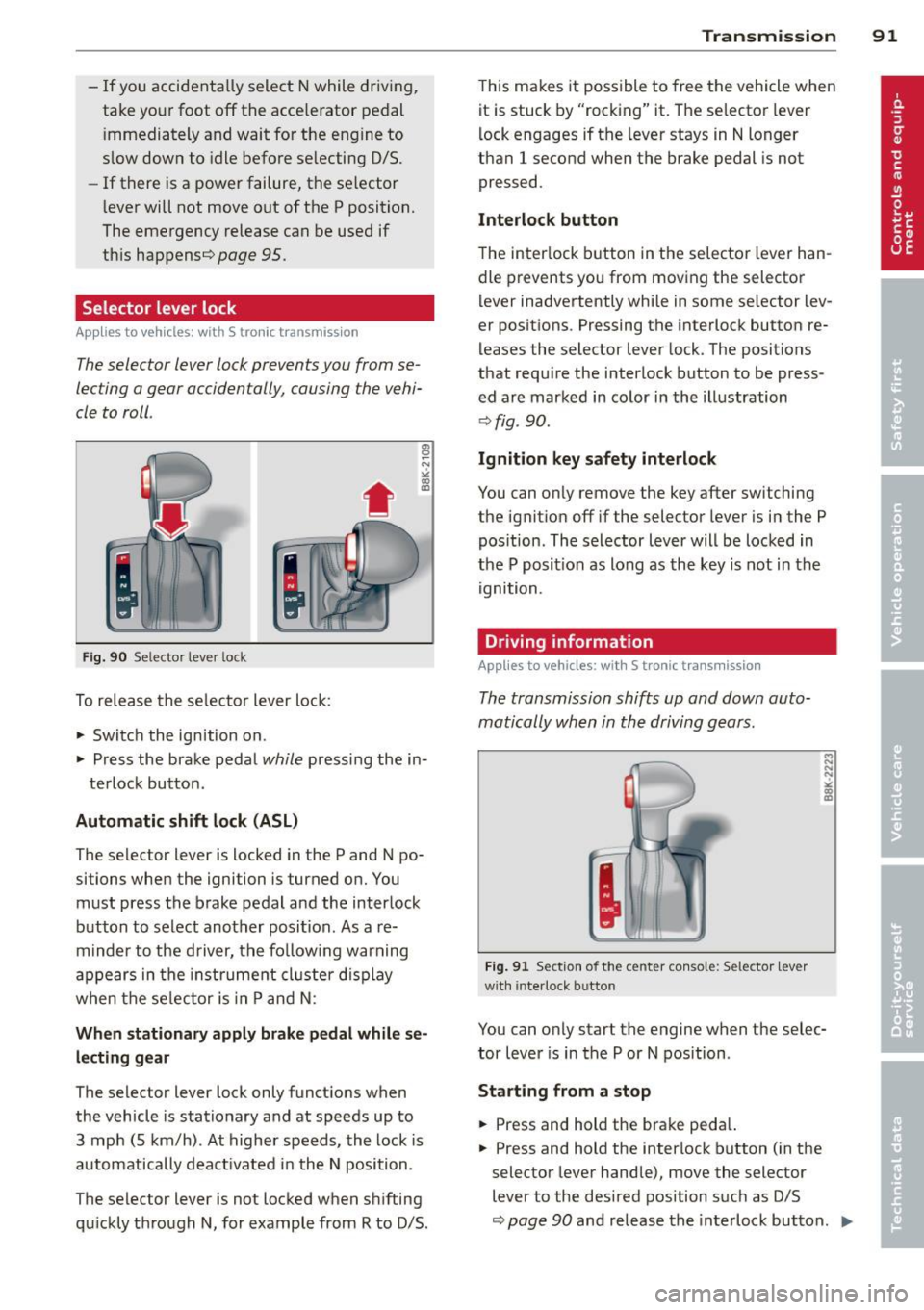
To release the selector lever lock:
.,.. Switch the ignition on .
.,.. Press the brake pedal
while pressing the in-
terlock button .
Automatic shift lock (ASL)
The selector lever is locked in the P and N po
sitions when the ignition is turned on. You must press the brake pedal and the interlock
button to select another position . As a re
minder to the driver, the following warning
appears in the instrument cluster display
when the selector is in P and N :
When stationary apply brake pedal while se
lecting gear
The selector lever lock only functions when
the vehicle is stationary and at speeds up to 3 mph (5 km/h) . At higher speeds, the lock is
automatically deactivated in the N position .
The selector lever is not locked when shifting
qu ickly through N, for example from R to 0/5.
Transmission 91
This makes it possible to free the vehicle when
it is stuck by "rocking" it. The selector lever
lock engages if the lever stays in N longer
than 1 second when the brake pedal is not
pressed.
Interlock button
The interlock button in the selector lever han
dle prevents you from moving the selector
lever inadvertently while in some selector lev
er positions . Pressing the interlock button re
leases the selector lever lock. The positions
that require the interlock button to be press
ed are marked in color in the illustration
¢fig . 90.
Ignition key safety interlock
You can only remove the key after switching
the ignition off if the selector lever is in the P
position . The selector lever will be locked in
the P posit ion as long as the key is not in the
ignition.
Driving information
App lies to vehicl es: wi th S tronic tra nsmi ssio n
The transmission shifts up and down auto
matically when in the driving gears .
Fig. 91 Section of the center console: Selector lever
w ith in terlock button
.., N
N
N
"' .. ID
You can only start the engine when the selec
tor lever is in the P or N position .
Starting from a stop
.,.. Press and hold the brake pedal.
.,.. Press and hold the interlock button (in the
selector lever handle), move the selector
lever to the desired position such as D/S
~ page 90 and release the interlock button. IIJ,,
Page 96 of 294
94 Transmi ssion
When acce lerating, the transmiss ion will au
tomatically shift into the next gear before the
engine reaches its maximum RPM.
I f you apply a ligh t throttle when accelerat
ing, tiptronic will automatically shift from 1st
to 2nd gear to save fuel. If you app ly a heavy
thrott le, the transmission will stay in 1st gear
unti l near maximum RPM is reached, or unt il
the dr iver shifts into 2nd gear.
If you take your foot off the accelerator peda l
when dr iving down a steep incline, tiptronic
will downshift from the selected gear into the next lower gear until it reaches 1st gear,
based on road speed and eng ine RPM . Auto
mat ic downshifti ng is interrupted as soon as
you apply the th rottle aga in .
(D} Tips
- When you sh ift into the next lower gear,
the transmiss ion will downshift only
when there is no possibility of over-rev
v ing the engine.
- When the kick-down comes on, the
transmission will sh ift down to a lower
gear, depending on vehicle and engine
speeds.
- Tiptronic is inope rat ive when the t rans
mission is in the fail-sa fe mode.
Kick-down
A pp lies to vehicles: with S tro nic tr ansmiss ion
Kick-down enables maximum acceleration.
When you press the acce lerator pedal down
beyond the resistance po int, the automatic
transmission downshifts into a lower gear, de
pending on vehicle speed and engine RP M.
It
shifts up into the next h igher ge ar once the
max imum specified engine RPM is reached.
& WARNING
Please note that the wheels could spin on
slick or slippery roads when kick-down is
active.
Launch Control Program
App lies to vehicles : wit h S tronic tra nsmi ssio n
The Launch Control Program provides the
best acceleration possible when starting from
a stop .
Requirement: The engine must be at operat
ing temperature and the steering wheel must
not be t urned .
.. Press the
I~ OF F! button c::;, page 186 while
the engine is running. The
fl ind icator light
illuminates in the instrument cluster and
Traction control (ASR ): Off . Warning! Re
stricted stability
appea rs in the driver infor
mat io n system display .
.. Move the se lector lever to the D/S posit ion
or select the
d ynamic dr iv ing mode in Audi
drive select*
c::;, page 112 .
.. Press the brake peda l strongly with your left
foot and ho ld it down for at least one sec
ond.
.. At the same time, press the accelerator
pedal down complete ly w ith your r ight foot
until t he e ngine reaches and mainta ins a
h igh RP M.
.. Remove yo ur foot from the brake pedal
w ith in S seconds
c::;, A, .
& WARNING
-Always adapt your driving to the traffic
f low .
- On ly use the Launch Cont ro l Program
when road and traffic conditions a llow it
and other drivers w ill not be endangered
or annoyed by your driving and the vehi
cle's acceleration.
- Please note that the d riving wheels can
spin and the vehicle can break away
when ASR is switched off , especially
when the road is slippery .
- Once you have accelerated, you shou ld
sw itch the ASR back on by pressing the
lfl O FF ! button . .__ _____________ _J ...
Page 107 of 294
Audi adaptive cruise control and braking guard 105
-If you switch the ASR/ESC off or the off
road mode on (allroad), Audi braking
guard switches off automatically
<=> page 186.
-Switch Audi braking guard off when you
are loading the vehicle onto a vehicle car
rier, train, ship or other type of transpor
tation. This can prevent undesired warn ings from the braking guard system .
Messages
Applies to vehicles: with Audi adaptive cruise co ntrol
Braking guard: Off
This driver message appears if the system is
turned off via the radio/MM I*. Otherwise, if
the system is turned off, the information ap
pears every time shortly after the start of the
trip.
Braking guard: Activated
This driver message appears if sharp brake
pressure was applied due to an acute warning.
•••
Three white dots appear if a setting cannot be
selected with the operating lever. For exam
ple, this happens if you want to raise/lower
the speed even though there was no previous
ly saved speed .
ACC: Deactivation
The driver message appears in vehicles with
manual transmission . If the clutch pedal was
pressed down for too long, the adaptive cruise
control turns off. A chime sounds as a remind
er.
ACC: Sensor blocked
This message appears if the sensor view is ob
structed, for example by leaves, snow, heavy
spray or dirt. Clean the sensor
<=>page 97,
fig. 96.
ACC: not available
The driver message appears if there is a mal
function. The adaptive cruise control turns off.
A chime sounds as a reminder. Have the sys- tern checked by an authorized Audi dealer or
authorized Audi Service
Facility.
ACC: unavailable
The driver message appears if, for example,
the brake temperature is too high . The adap
tive cruise control is temporarily unavailable.
A chime sounds as a reminder.
Engine speed!
This driver message appears in vehicles with
manual transmission if the driver had not up
shifted or downshifted in time while using
adaptive cruise control braking or accelerat ing, causing the vehicle to exceed or not reach
the permitted limit speed. The adaptive cruise
control turns off. A chime sounds as a remind
er .
Shift lever position!
Vehicles with an automatic transmission: the
driver message appears if the selector lever is
shifted to the N position . The adaptive cruise
control is not available while in this position .
Vehicles with manual transmission: the driver message appears for vehicles with manual
transmission if there is no forward gear en
gaged, meaning if the reverse gear or the 1st
gear is engaged or if the selector lever is in
the neutral position. The adaptive cruise con
trol is not available while in this position.
Stabilization control (ESC)
This message appears if the electronic stabili
zation control (ESC) is taking action to stabi
lize the vehicle. The adaptive cruise control
turns off . A chime sounds as a reminder.
Speed too low
This message appears if the current speed is
too low
to set or to maintain the desired
speed .
The speed being saved must be at least
20 mph (30 km/h). The cruise control is
turned off for speeds lower than 12 mph
(20 km/h). The adaptive cruise control re
mains turned on for speeds above 95 mph
(150 km/h) (override).
It will stabilize again at.,..
Page 113 of 294
Audi drive select Driving settings
Introduction
App lies to vehicles: w it h drive se lect
Audi drive select provides the possibility to ex
perience different types of veh icle sett ings in
one vehicle. For instance, using the three
Comfort, Auto and Dynamic modes, the driv
er can switch from a sporty to a comfortab le
driving mode with the press of a button.
Addit ionally, in vehicles with MM I*, the vehi
cle setup for
Individual* mode can be cus
tomized by you. This makes it possib le to
combine settings such as a sporty engine tun
ing with comfortable steering.
A WARNING
Improper use of the Audi drive select can
cause collisions, other acc idents and seri
ous personal injury.
Description
Ap plies to vehicles: w it h drive se lect
The vehicle setup in each mode depends on
the vehicle's features. However, the engine,
automatic t ransmission* and steering are al
ways involved.
.
Engine and automatic transmission*
Depending on the mode, the engine and the
automatic transmission respond quicker or in
a more ba lanced manner to acce lerator pedal
movements. In the sporty dynamic mode, the
automatic transmission shifts at higher R PMs.
Steering
The steering adapts in terms of steering effort
and steering ratios . Indirect steer ing that
moves easily, like the stee ring in comfort
mode, is best su ited to long dr ives on a high
way. In contrast, dynamic mode prov ides
sporty, di rect steering .
The follow ing applies to vehicles with dynam ic
steer ing*: the stee ring ratio changes based on
ve hicl e speed in order to maintain optimum
Audi drive select 111
steering effort for the driver at all times. This
sets the steering to be less sensitive at higher
speeds in order to provide improved vehicle
control. At reduced speeds, however, steer ing
is more direct in order to keep the steering ef
fort as minimal as possible when the driver is
maneuveri ng the vehicle . At low and average
speeds, dynamic steering addit iona lly pro
vides more responsive steering pe rformance.
Adaptive dampers*
The adaptive dampers* use sensors to record
i nformation regarding steering movements,
braking and acceleration operations by the
drive r, road surface, driving speed, and load.
T his makes it possible to adapt damp ing to
the driving situation virtually i n rea l time.
Audi drive select also makes it possible to sat
isfy the desire for sporty s uspension (Dynam
ic) and comfortable suspension (Comfort)
without giv ing up balanced tuning (Auto).
Sport differential*
As a component of the all whee l dr ive system
(quattro ®)
q page 189, the sport differential*
distributes the driving power to the rear axle
depending on the situation . The distribution
of power var ies depending on the mode se
lected. The goal is a high level of agility and
ability to accelerate on curves . The ve hicle is
very respons ive to steering .
Adaptive cruise control*
The behavior when accelerating can be adjust
ed from comfortab le to sporty, depending on
the drive select mode. Adaptive cru ise control
also responds to the driving behavior of the
vehicle ahead in a more conservative or sporty
manner .
Engine sound*
The sound of the eng ine is adapted to the se
lected mode and ranges from subtle to sporty.
0) Tips
-In some models, the maximum vehicle
speed can only be reached in the
Auto
and Dynamic modes.
Page 114 of 294
112 Audi drive select
-For vehicles with an automatic transmis
sio n*, se lecting the
Dynamic mode re
su lts in sporty shifting characteristics .
The S gear position engages automati
cally.
- In vehicles that have dynamic steering*,
operating noise is heard when starting or
stopping the eng ine . This does not ind i
cate a problem .
Selecting the driving mode
Applies to vehicles: w ith drive se lect
You can choose between Comfort, Auto, Dy
namic
and Individual * modes.
Fig. 112 Center console: Control for Au di dri ve select
Fig. 113 MMI•: Aud i drive select
Adjusting the Individual mode
Applies to vehicles: with MMI a nd drive se lect
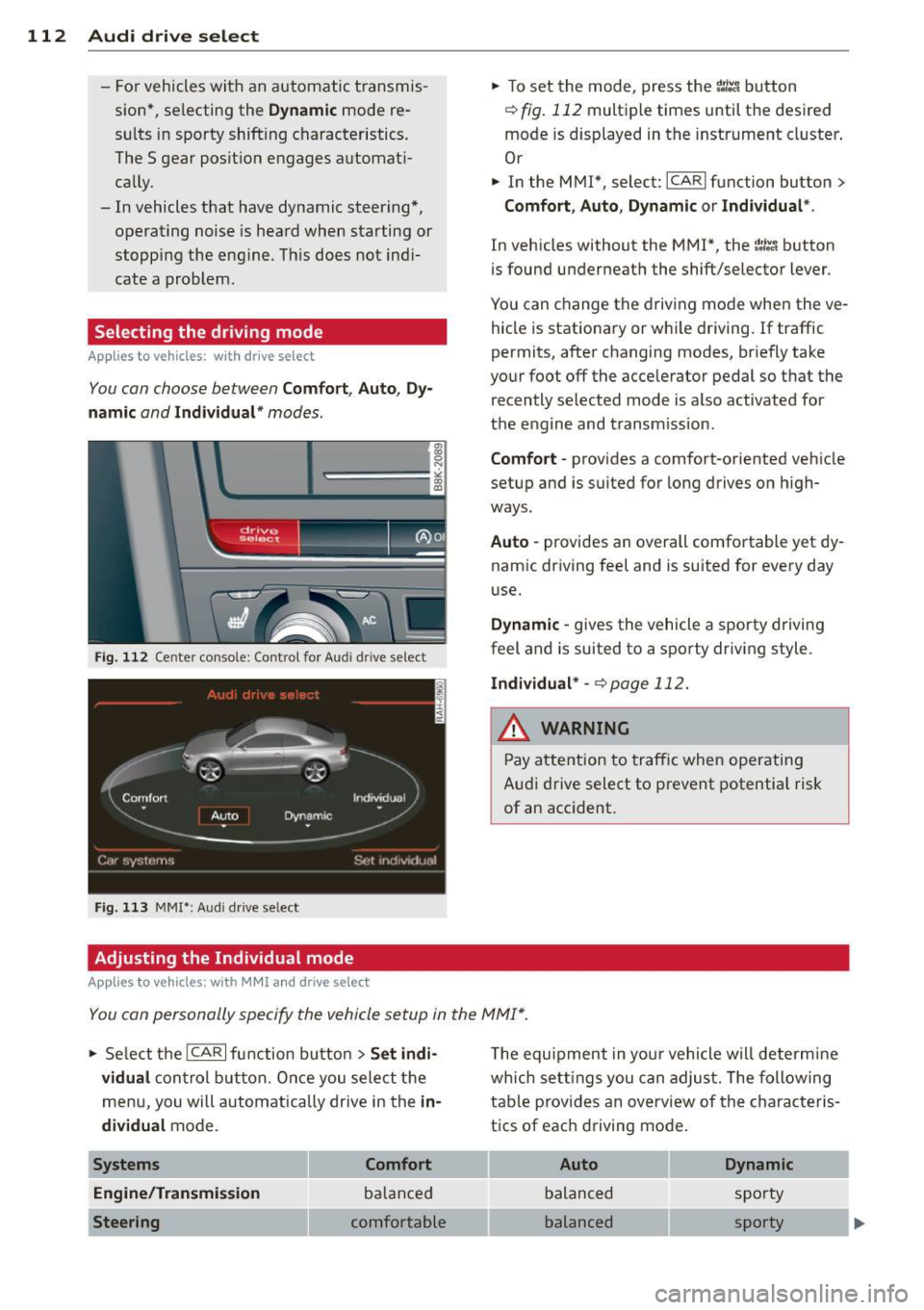
.,. To set the mode, press the f:l:-.i button
~ fig. 112 multiple times until the desired
mode is displayed in the instrument cluster .
Or
.,. In the MMI*, select: ICARlfunction button>
Comfort, Auto, Dynamic or Individual *.
In vehicles without the MMI*, the~:/;,~ button
is found underneath the shift/selector lever.
You can change the driving mode when the ve
hicle is stationary or wh ile driving . If traffic
permits, after changing modes, br iefly take
your foot off the accelerator pedal so that the recently selected mode is also activated for
the engine and transm ission .
Comfort -provides a comfort-oriented vehicle
setup and is suited for long drives on h igh
ways .
Auto -provides an overall comfortable yet dy
namic driving feel and is suited for every day
use.
Dynamic -gives the vehicle a sporty driving
feel and is suited to a sporty driving style.
Individual * -¢page 112.
& WARNING
Pay atte ntion to traffic when operating
Audi drive select to prevent potential risk
of an accident.
You can personally specify the vehicle setup in the MMI* .
.,. Select the ICAR I f unc tion button > Set indi
vidual
control button. Once you select the
menu, you will automatically drive in the
in·
dividual
mode.
Systems Comfort
Engine/Transmission
balanced
Steering comfortable T
he equipment in your vehicle will determine
wh ich sett ings you can adjust. The following
table provides an overview of the characteris
tics of each driving mode .
Auto Dynamic
balanced sporty
balanced sporty