steering AUDI A4 SEDAN 2013 User Guide
[x] Cancel search | Manufacturer: AUDI, Model Year: 2013, Model line: A4 SEDAN, Model: AUDI A4 SEDAN 2013Pages: 294, PDF Size: 73.71 MB
Page 76 of 294
7 4 On the road
Starting the vehicle with the emergency
key
Applies to vehicles: with ig ni tion lock
You can use the emergency key as an ignition
key in on emergency.
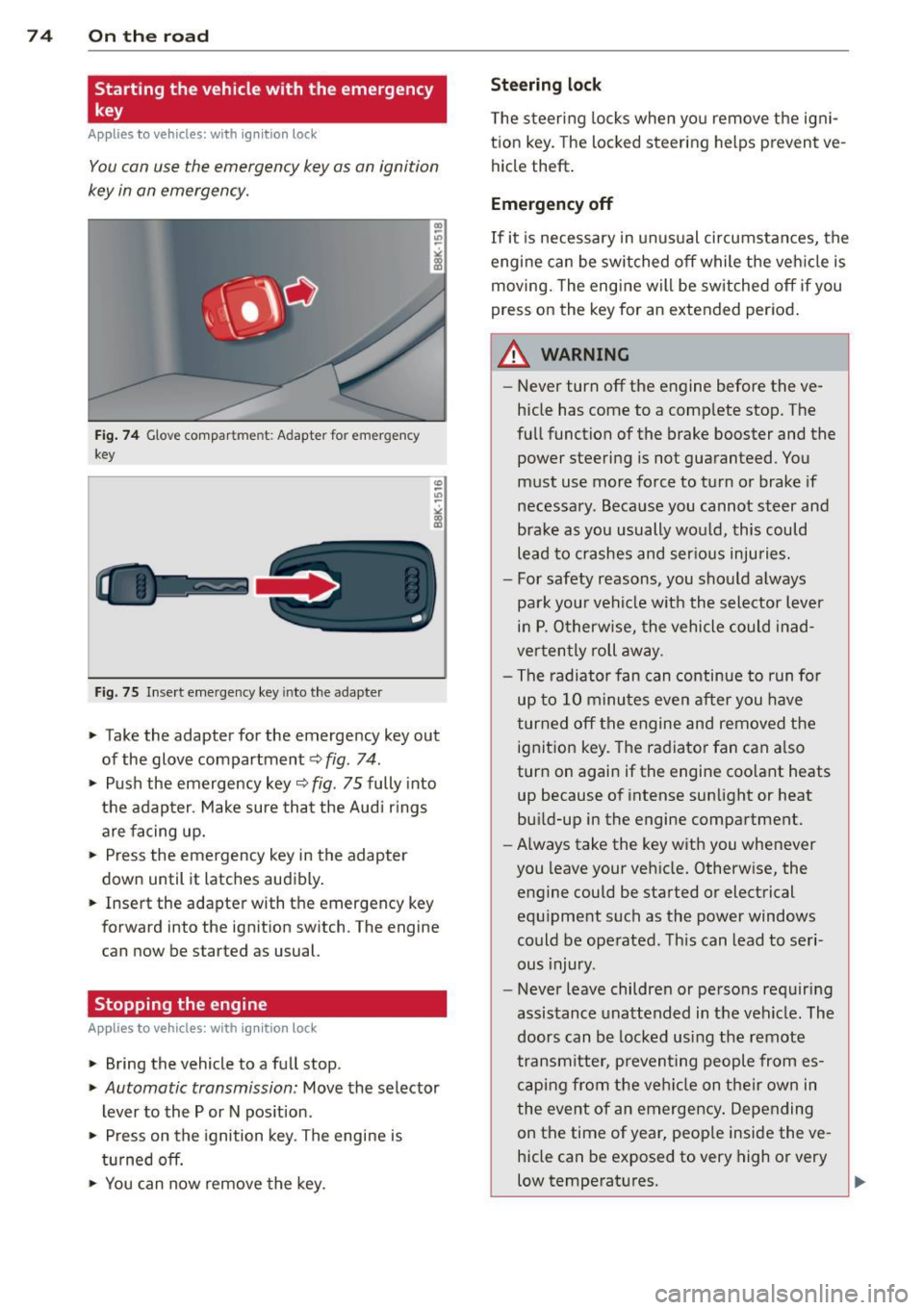
Fi g. 74 G love compar tme nt: Adapter for emergency
key
Fig. 75 Inse rt emergency key into the adapter
.. Take the adapter for the emergency key out
of the glove compartment
c!> fig . 74 .
.. Push the emergency key c::> fig . 75 fully into
the adap ter . Make sure tha t the Aud i rings
are facing up.
.. Press the emergency key in the adapter
down until it latches audibly .
.. Insert the adapter with the emergency key
forward into the ignition switch. The engine
can now be started as usual.
Stopping the engine
App lies to vehicles: with ig n ition lock
.. Bring the vehicle to a full stop.
.. Automatic transmission: Move the selector
lever to the P or N pos ition .
.. Press on the ignition key. The engine is
t u rned off.
.. You can now remove the key.
Steering lock
T he steering locks when yo u remove the igni
t ion key. The locked steering helps prevent
ve
hicle theft .
Emergency off
If it is necessary in un usual circumstances, the
engine can be switched off while the veh icle is
moving. The engine will be switched off if you
press on the key for an extended period .
A WARNING ~
-Never turn off the engine before the ve
hicle has come to a comp lete stop. The
fu ll function of the brake booster and the
power steering is not guaranteed. You
must use more force to turn or brake if
necessary. Because you cannot steer and
brake as you usually wou ld, this could
lead to crashes and ser ious injuries.
- For safety reasons, you should a lways
park your vehicle w ith the selector lever
in P. O therwise, the vehicle could in ad
ver ten tly roll away.
- The radiator fan can continue to run fo r
up to 10 minu tes
even after you have
turned off the engine and removed the ignit ion key. The radiator fan can a lso
turn on agai n if the engine coo lant heats
up because of intense sunlight or heat
bu ild-up in the engine compartment.
- Always take the key with you whenever
you leave your vehicle. Otherw ise, the
engine could be started or electrical
equ ipment such as the power windows
could be operated. This can lead to seri
ous injury.
- Never leave children or persons requiring
assistance unattended in t he vehicle . The
doors can be locked using the remote
transm itter, preven ting people from es
caping from the ve hicle on their own in
the event of an emergency . Depending
on the time of year, peop le inside the
ve
hicle can be exposed to very high or very
low temperatures .
Page 78 of 294
76 On the road
in the hy dra ulic valve adjusters. This is
norma l and not a cause for concern.
- If you leave the vehicle with the ignit ion
switched on, the ignition will switch
off
after a certain period of time . Please
note that e lectrica l equipment such as
exter ior lights w ill switch
off as well
when that happens.
Switching engine off
Applies to vehicles: with conven ience key
" Bring your vehicle to a complete stop.
" Automat ic transm iss ion: Move the se lector
lever to the P or N pos it ion.
" Press the
!START ENGINE STOPI button
~ page 75, fig . 76.
St eering lock
The steering locks when you t urn the engine
off us ing the I STAR T ENGINE STOP I button
and open the dr iver's door. The locked stee r
i ng helps p reven t vehicle theft.
Emergency off
If necessary, the eng ine ca n be sw itched off
with the selector leve r in the R o r D/S pos i
tions. To do so, step on the brake pedal and
p ress and hold the
I START ENGINE STOP I but
ton vehicle speed must be less th an 6 mph
(10 km/h).
_& WARNING
- Never t urn off the eng ine before the ve
hicle has come to a complete stop . The
full f unction o f the brake booster and the
power steering is not guaranteed. You
must use more force to turn or brake if
necessary. Because you cannot steer and
brake as you usua lly would, this could
lead to crashes and se rious injur ies.
- For safety reasons, you s hould always
par k your vehicle with the se lector lever
in P. Ot herwi se, the ve hicle co uld i nad
vertent ly roll away.
- T he ra diator fan ca n continue to ru n for
up to 10 mi nutes even after yo u have
tu rne d off the eng ine and remove d the ignit
ion key. T he radiator fan can a lso
tur n on again if the engine coo lant heats
up because of intense sunlight or heat
bu ild-up in the engine compartment.
- Always take the key w ith you whenever
you leave your ve hicle. Otherw ise, the
eng ine could be sta rted or elect rical
equ ipme nt such as the power windows
could be ope rated. This can lead to seri
o us injury.
(D Note
If the engine has bee n under heavy load
fo r an extended pe riod, heat bu ilds up in
the engine compartment after the engine
i s sw itched off -there i s a r is k of damag ing
the e ngine. A llow the eng ine to run at i dle
for about two minutes before switching it
off.
Driver messages
Ignition i s on
This message appears and a warning tone
sounds if you open the d river's door when the
ignition is sw itched on.
No key id entified
This message appears when t he
I S TART ENGI NE STOPI button is pressed if
there is no master key ins ide the veh icle or if
the system does not recognize it . Fo r exam
ple, the master k ey cannot be recognized if it
is covered by an object (e.g. al uminum b rief
case) which
screens the radio s ignal. Elec tron
ic dev ices such as cell phones can also inter
fere with the radio s ignal.
Press brak e pedal to start engine
This message appears if you do not press the
brake pedal to start the eng ine in a veh icle
with an automat ic transm iss ion.
Press clutch pedal to sta rt engine
T his message ap pears if you do not press the
clutch pedal to start the engine in a vehicle
with a manual transmission. .,.
Page 80 of 294
78 On the road
Emerg ency b rake function
An emergency brake ensures t hat the vehicle
can be slowed down even if the
normal brakes
fail c::>
page 79, Emergency broking.
Indicat or light s
-If the par king b rake is closed w ith the igni
t ion
s witc hed on the . (USA models) /
• (Canada mode ls) indica tor lights come
on in the instrum ent cluster and the switch .
-If the parking brake is closed w ith the igni
tion
s witc hed off the . (USA models) /
• (Canada mode ls) indicator lights come
on in the instrument clust er and th e switch
for about 20 seconds .
A WARNING
If a gear or a drive range (automat ic trans
m ission) is engaged with the vehicle sta
tionary and the engine runn ing, you must
in no instance accelerate o r release the
cl utch carelessly. Otherwise the vehicle
w ill sta rt to move immediately- r isk of an
accident .
@ Note
If the . symbol in the display or the
.. (USA models) . (Canada models)
ind icator light in the instr ume nt cl uster
flashes, there is a ma lf u nction in the brake
system. By pressing the
ISETI button, you
can bring up a driver message which ex
plains the malfunction in more detail. If
the driver message
Pa rking brake! ap
pears, there is an operating malfunction in
the park ing brake which you should have
repaired immediately by an authorized
Aud i deale r or other qualified workshop
c::>
page 15.
(D Tips
- You can apply the parking brake at any time - even w ith the ignition switched
off . Th e ignit ion must be t urned on in o r
der to release the par king brake. - Occasional noises when the parking
bra ke is applied and released are normal
and are not a cause for concern.
- When the vehicle is parked , the parking
brake goes through a self-test cycle at
regu lar interva ls. Any associated noises
are normal.
Parking
Parking
"' Press the br ake ped al to s top the veh icle .
"' Pull the button @ c::>
page 77, fig. 77 to set
the parking brake.
"' Automatic transmission: Move the selector
lever to P.
.,. Turn t he engine off c::>
,& .
.,. Man ual transmission: Shift into 1st gear.
In addition on inclines and gr ades
.,. Turn the steering wheel so that your vehicle
w ill roll aga inst the curb in case it shou ld
start to move.
A WARNING
- When you leave yo ur vehicle -even if on
ly briefly -always remove the igni tion
key. This app lies particularly when chi l
dren remain in the vehicle. Otherwise the
children could start the eng ine, release
the park ing brake or operate electrical
equ ipme nt (e .g . power windows). There
is the risk of an acc ident .
- When the veh icle is locked, no one -par
ticularly not children should rema in in
the vehicle . Locked doors make it mo re
d ifficult for emergency worke rs to get in
to the vehicle -putting lives at r isk .
Starting from rest
The starting assist function ensures that the
parking brake is released automatically upon starting.
Stopping and applying parking brake
"' Pull the switch @c::> page 77, fig . 77 to ap-
ply the parking brake . .,.
Page 90 of 294
88 Transmission
Manual shift program
Applies to vehicles: with multitronic or tiptron ic
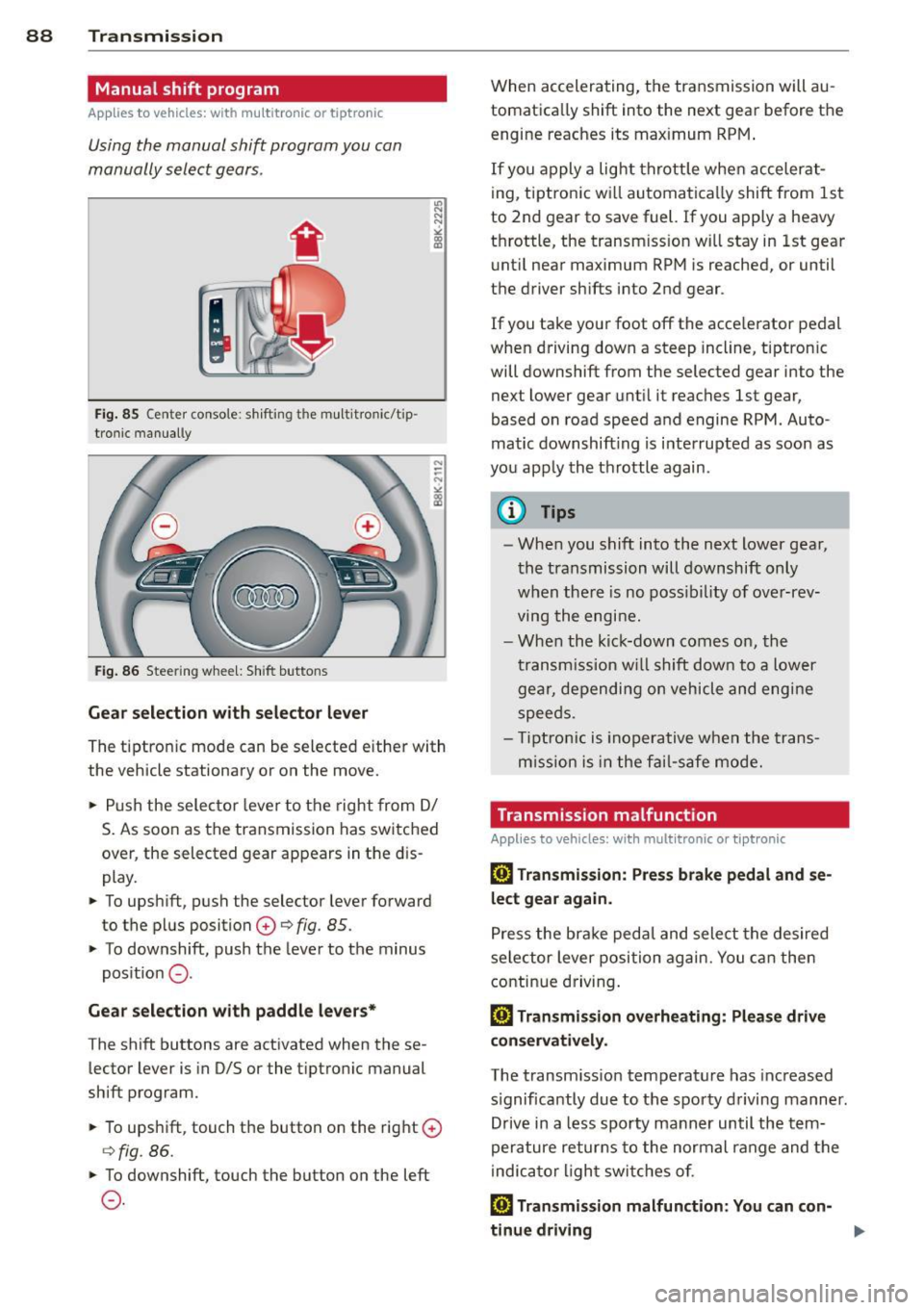
Using the manual shift program you can
manually select gears .
Fig. 85 Center console : shift ing t he multitro nic/t ip ·
tronic manual ly
Fig . 86 Steering wheel: Shift buttons
Gear selection with selector lever
"' N
N
~
" a> CD
The tiptronic mode can be selected either with
the vehicle stationary or on the move .
.,. Push the selector lever to the right from
DI
S. As soon as the transmission has switched
over , the selected gear appears in the dis
play.
.,. To upshift, push the selector lever forward
to the plus position
0 ¢ fig. 85 .
.,. To downshift, push the lever to the minus
position
0 -
Gear selection with paddle levers*
The shift buttons are activated when these
lector lever is in D/S or the tiptronic manual
shift program.
.,. To upshift, touch the button on the right
0
¢fig . 86.
.,. To downshift, touch the button on the left
0-
When accelerating, the transmission will au
tomatically shift into the next gear before the
engine reaches its maximum RPM .
If you apply a light throttle when accelerat
ing, tiptronic will automatically shift from 1st
to 2nd gear to save fuel. If you apply a heavy
throttle, the transm iss ion will stay in 1st gear
until near maximum RPM is reached, or until
the driver shifts into 2nd gear .
If you take your foot off the accelerator pedal
when driving down a steep incline, tiptronic
will downshift from the selected gear into the
next lower gear until it reaches 1st gear,
based on road speed and engine RPM . Auto ·
matic downshifting is interrupted as soon as
you apply the throttle again .
(D Tips
-When you shift into the next lower gear,
the transmission will downshift only
when there is no possibility of over-rev
ving the engine.
- When the kick-down comes on, the
transmission will shift down to a lower
gear, depending on vehicle and engine
speeds .
- Tiptronic is inoperative when the trans
m ission is in the fail-saf e mode.
Transmission malfunction
Applies to vehicles: with mult itronic or tiptronic
[O] Transmission: Press brake pedal and se
lect gear again .
Press the brake pedal and select the desired
selector lever position again. You can then
continue driving.
[O] Transmission overheating: Please drive
conservatively.
The transmission temperature has increased
s ignificantly due to the sporty driving manner.
Drive in a less sporty manner until the tern·
perature returns to the normal range and the
indicator light switches of.
[O] Transmission malfunction: You can con-
tinue driving ..,.
Page 95 of 294
press the brake pedal to prevent the ve
hicle from rolling .
- Allow ing the ve hicl e to roll when the en
gine is stopped and the selector lever is i n N will dama ge the S tronic transm is
s ion because it is not lubricated under
those c ircumstances.
@ Tips
For safety reasons, the park ing brake is re
leased automatically only when the dr iv-
er's safety belt is engaged in the buck le.
Hill descent control
Applies to vehicles: with S tro nic transmiss ion and hill de
scent co ntrol
T he hill descen t control sys tem assists the
driver when driving down declines .
Hill desce nt co ntrol is activated when these
l ec to r lever is in D/S and you press the bra ke
p edal. The S tro nic tr ansm ission au tom atically
shifts down into a gear sui table for the de
cline. Hi ll descent control tr ies to maintain
the speed achieved at the time of braking,
wit hin physical and techn ica l limitations . If
may still be necessary to adjust the speed
with the brakes.
H ill descent control switches off once the de
cline levels out or you press t he accelerator
pedal.
On ve hicles with the cruise co ntrol system *
c::> page 81, hill descent control is also act ivat
ed when the speed is set.
A WARNING
-
Hi ll descent control cannot overcome
physical l imitations, so it may not be able
t o m aintain a cons tant speed under all
c o nditions. Alway s be r eady to app ly th e
br ak es.
Transm ission 93
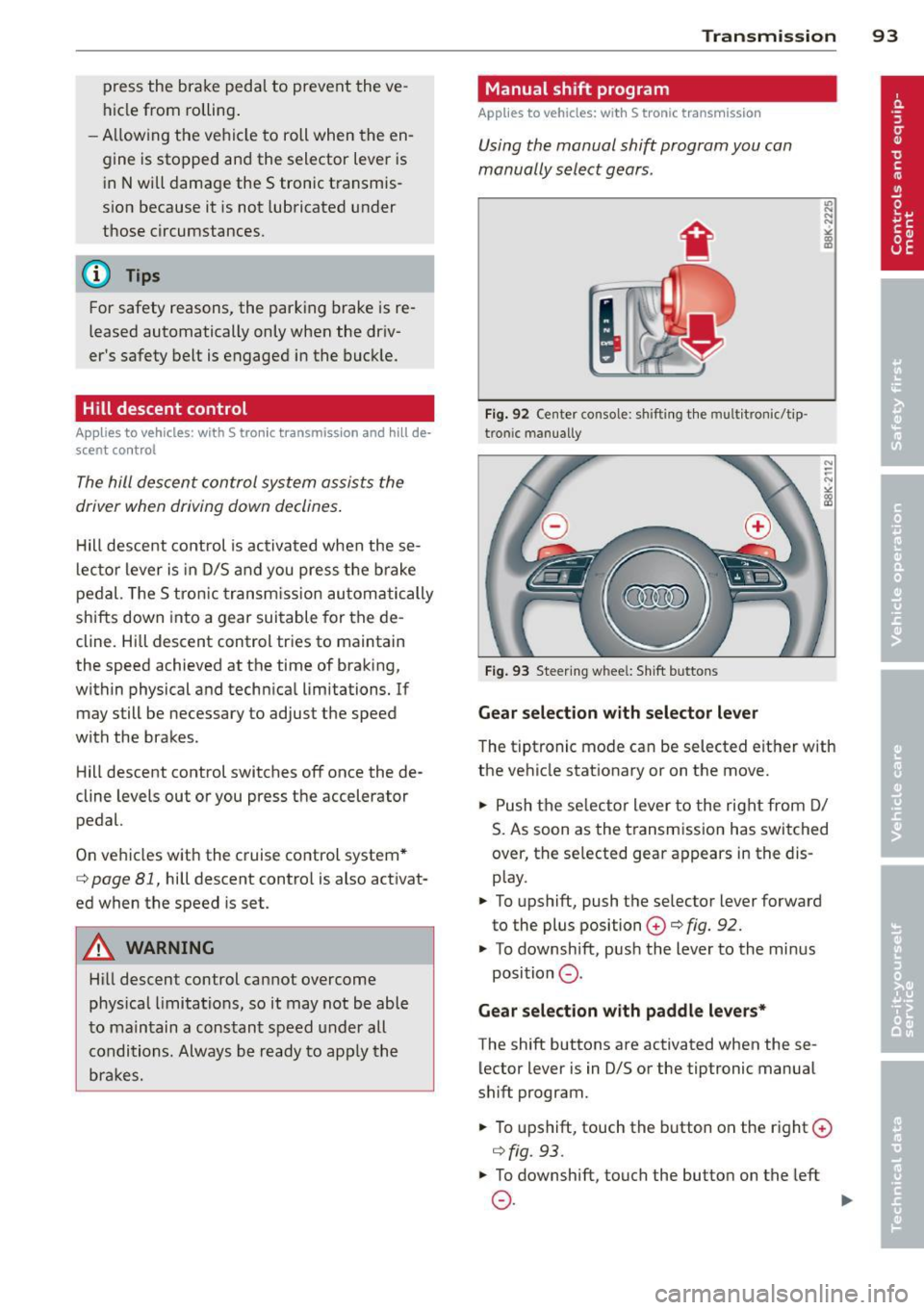
Manual shift program
Applies to vehicles: wit h S tronic transm ission
Using the manual shift program you can
manually select gears .
Fig. 92 Center console : sh ift in g t he m ult itron ic/t ip ·
tro nic m an u ally
Fig. 93 Steering w hee l: S hift b utto ns
Gear selection with selector lever
"' ... .... "!
"' co a,
The tipt ronic mode can be selected eit her with
the ve hicle stat ionary or on the move.
.,. Push the se lec tor lever to the rig ht from D/
S. As soon as the t ransmission has switched
over, the se lected gear ap pears in the dis
p lay .
.,. To upshift, push the se lector lever forward
to the plus position
0 c::> fig. 92.
.,. To downshift, pus h the lever to the mi nus
position
0 .
Gear selection with paddle levers*
The shift buttons are activated when these
lector lever is in D/S or the tiptronic manual
shift program .
.,. To upshift, touch the button o n the right ©
c::> fig. 93 .
.,. To downshift , touch the butto n on the left
0 . ~
Page 96 of 294
94 Transmi ssion
When acce lerating, the transmiss ion will au
tomatically shift into the next gear before the
engine reaches its maximum RPM.
I f you apply a ligh t throttle when accelerat
ing, tiptronic will automatically shift from 1st
to 2nd gear to save fuel. If you app ly a heavy
thrott le, the transmission will stay in 1st gear
unti l near maximum RPM is reached, or unt il
the dr iver shifts into 2nd gear.
If you take your foot off the accelerator peda l
when dr iving down a steep incline, tiptronic
will downshift from the selected gear into the next lower gear until it reaches 1st gear,
based on road speed and eng ine RPM . Auto
mat ic downshifti ng is interrupted as soon as
you apply the th rottle aga in .
(D} Tips
- When you sh ift into the next lower gear,
the transmiss ion will downshift only
when there is no possibility of over-rev
v ing the engine.
- When the kick-down comes on, the
transmission will sh ift down to a lower
gear, depending on vehicle and engine
speeds.
- Tiptronic is inope rat ive when the t rans
mission is in the fail-sa fe mode.
Kick-down
A pp lies to vehicles: with S tro nic tr ansmiss ion
Kick-down enables maximum acceleration.
When you press the acce lerator pedal down
beyond the resistance po int, the automatic
transmission downshifts into a lower gear, de
pending on vehicle speed and engine RP M.
It
shifts up into the next h igher ge ar once the
max imum specified engine RPM is reached.
& WARNING
Please note that the wheels could spin on
slick or slippery roads when kick-down is
active.
Launch Control Program
App lies to vehicles : wit h S tronic tra nsmi ssio n
The Launch Control Program provides the
best acceleration possible when starting from
a stop .
Requirement: The engine must be at operat
ing temperature and the steering wheel must
not be t urned .
.. Press the
I~ OF F! button c::;, page 186 while
the engine is running. The
fl ind icator light
illuminates in the instrument cluster and
Traction control (ASR ): Off . Warning! Re
stricted stability
appea rs in the driver infor
mat io n system display .
.. Move the se lector lever to the D/S posit ion
or select the
d ynamic dr iv ing mode in Audi
drive select*
c::;, page 112 .
.. Press the brake peda l strongly with your left
foot and ho ld it down for at least one sec
ond.
.. At the same time, press the accelerator
pedal down complete ly w ith your r ight foot
until t he e ngine reaches and mainta ins a
h igh RP M.
.. Remove yo ur foot from the brake pedal
w ith in S seconds
c::;, A, .
& WARNING
-Always adapt your driving to the traffic
f low .
- On ly use the Launch Cont ro l Program
when road and traffic conditions a llow it
and other drivers w ill not be endangered
or annoyed by your driving and the vehi
cle's acceleration.
- Please note that the d riving wheels can
spin and the vehicle can break away
when ASR is switched off , especially
when the road is slippery .
- Once you have accelerated, you shou ld
sw itch the ASR back on by pressing the
lfl O FF ! button . .__ _____________ _J ...
Page 113 of 294
Audi drive select Driving settings
Introduction
App lies to vehicles: w it h drive se lect
Audi drive select provides the possibility to ex
perience different types of veh icle sett ings in
one vehicle. For instance, using the three
Comfort, Auto and Dynamic modes, the driv
er can switch from a sporty to a comfortab le
driving mode with the press of a button.
Addit ionally, in vehicles with MM I*, the vehi
cle setup for
Individual* mode can be cus
tomized by you. This makes it possib le to
combine settings such as a sporty engine tun
ing with comfortable steering.
A WARNING
Improper use of the Audi drive select can
cause collisions, other acc idents and seri
ous personal injury.
Description
Ap plies to vehicles: w it h drive se lect
The vehicle setup in each mode depends on
the vehicle's features. However, the engine,
automatic t ransmission* and steering are al
ways involved.
.
Engine and automatic transmission*
Depending on the mode, the engine and the
automatic transmission respond quicker or in
a more ba lanced manner to acce lerator pedal
movements. In the sporty dynamic mode, the
automatic transmission shifts at higher R PMs.
Steering
The steering adapts in terms of steering effort
and steering ratios . Indirect steer ing that
moves easily, like the stee ring in comfort
mode, is best su ited to long dr ives on a high
way. In contrast, dynamic mode prov ides
sporty, di rect steering .
The follow ing applies to vehicles with dynam ic
steer ing*: the stee ring ratio changes based on
ve hicl e speed in order to maintain optimum
Audi drive select 111
steering effort for the driver at all times. This
sets the steering to be less sensitive at higher
speeds in order to provide improved vehicle
control. At reduced speeds, however, steer ing
is more direct in order to keep the steering ef
fort as minimal as possible when the driver is
maneuveri ng the vehicle . At low and average
speeds, dynamic steering addit iona lly pro
vides more responsive steering pe rformance.
Adaptive dampers*
The adaptive dampers* use sensors to record
i nformation regarding steering movements,
braking and acceleration operations by the
drive r, road surface, driving speed, and load.
T his makes it possible to adapt damp ing to
the driving situation virtually i n rea l time.
Audi drive select also makes it possible to sat
isfy the desire for sporty s uspension (Dynam
ic) and comfortable suspension (Comfort)
without giv ing up balanced tuning (Auto).
Sport differential*
As a component of the all whee l dr ive system
(quattro ®)
q page 189, the sport differential*
distributes the driving power to the rear axle
depending on the situation . The distribution
of power var ies depending on the mode se
lected. The goal is a high level of agility and
ability to accelerate on curves . The ve hicle is
very respons ive to steering .
Adaptive cruise control*
The behavior when accelerating can be adjust
ed from comfortab le to sporty, depending on
the drive select mode. Adaptive cru ise control
also responds to the driving behavior of the
vehicle ahead in a more conservative or sporty
manner .
Engine sound*
The sound of the eng ine is adapted to the se
lected mode and ranges from subtle to sporty.
0) Tips
-In some models, the maximum vehicle
speed can only be reached in the
Auto
and Dynamic modes.
Page 114 of 294
112 Audi drive select
-For vehicles with an automatic transmis
sio n*, se lecting the
Dynamic mode re
su lts in sporty shifting characteristics .
The S gear position engages automati
cally.
- In vehicles that have dynamic steering*,
operating noise is heard when starting or
stopping the eng ine . This does not ind i
cate a problem .
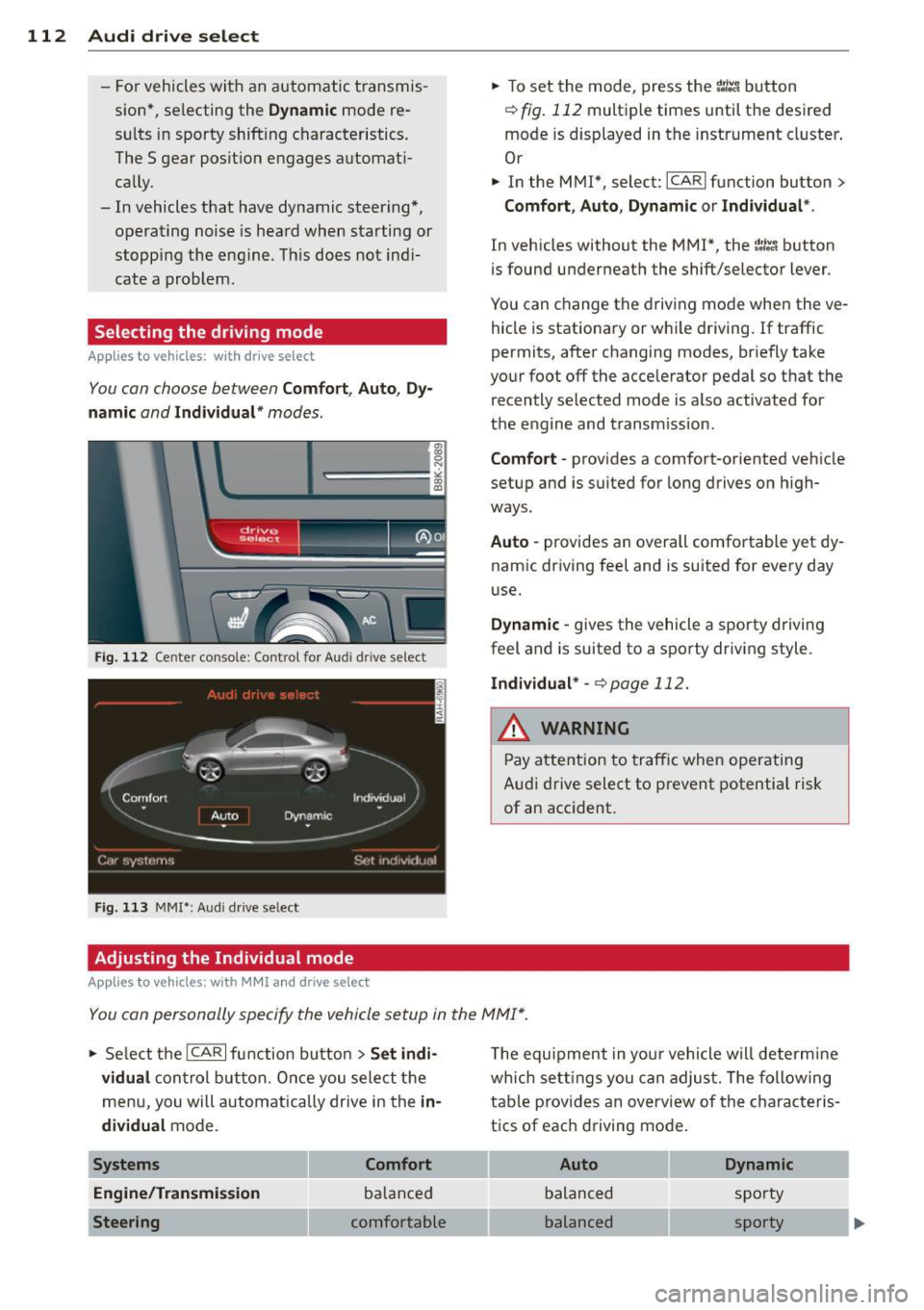
Selecting the driving mode
Applies to vehicles: w ith drive se lect
You can choose between Comfort, Auto, Dy
namic
and Individual * modes.
Fig. 112 Center console: Control for Au di dri ve select
Fig. 113 MMI•: Aud i drive select
Adjusting the Individual mode
Applies to vehicles: with MMI a nd drive se lect
.,. To set the mode, press the f:l:-.i button
~ fig. 112 multiple times until the desired
mode is displayed in the instrument cluster .
Or
.,. In the MMI*, select: ICARlfunction button>
Comfort, Auto, Dynamic or Individual *.
In vehicles without the MMI*, the~:/;,~ button
is found underneath the shift/selector lever.
You can change the driving mode when the ve
hicle is stationary or wh ile driving . If traffic
permits, after changing modes, br iefly take
your foot off the accelerator pedal so that the recently selected mode is also activated for
the engine and transm ission .
Comfort -provides a comfort-oriented vehicle
setup and is suited for long drives on h igh
ways .
Auto -provides an overall comfortable yet dy
namic driving feel and is suited for every day
use.
Dynamic -gives the vehicle a sporty driving
feel and is suited to a sporty driving style.
Individual * -¢page 112.
& WARNING
Pay atte ntion to traffic when operating
Audi drive select to prevent potential risk
of an accident.
You can personally specify the vehicle setup in the MMI* .
.,. Select the ICAR I f unc tion button > Set indi
vidual
control button. Once you select the
menu, you will automatically drive in the
in·
dividual
mode.
Systems Comfort
Engine/Transmission
balanced
Steering comfortable T
he equipment in your vehicle will determine
wh ich sett ings you can adjust. The following
table provides an overview of the characteris
tics of each driving mode .
Auto Dynamic
balanced sporty
balanced sporty
Page 115 of 294
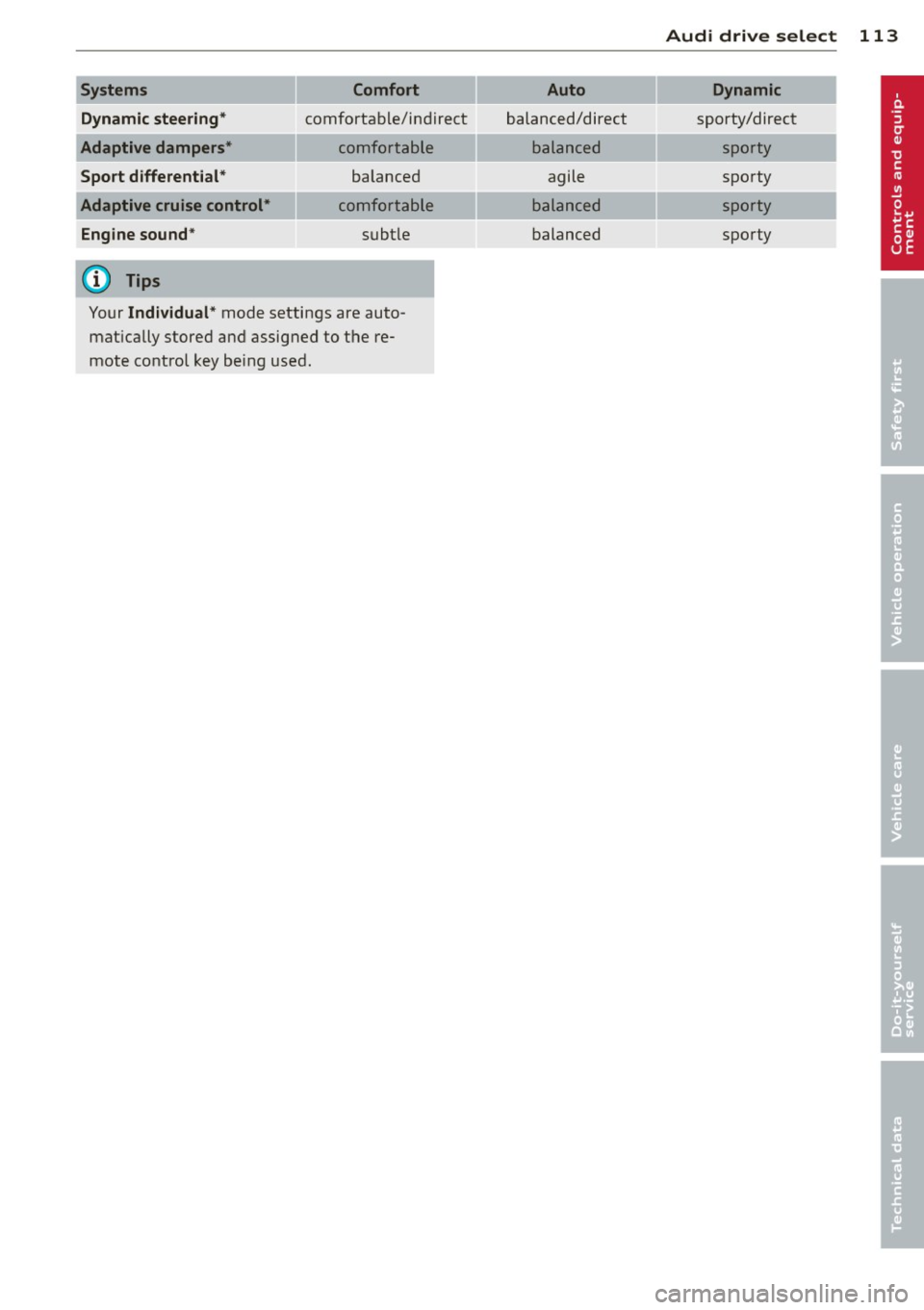
Systems Comfort
Dynamic steering*
comfortable/ind ire ct
Adaptive dampers* comfortable
Sport differential* balanced
Adaptive cruise control* comfortable
Engine sound * subtle
(D) Tips
Your Individual* mode settings are auto
matically stored and assigned to the re
mote control key being used.
Audi drive select 113
Auto Dynamic
balanced/direct sporty/direct
balanced sporty
agile sporty
balanced sporty
balanced sporty
Page 120 of 294
118 Park ass is t
@ Tips
- The rear view camera picture is avai lable
as soon as the MMI D isplay or the MMI is
switched on, or the start-up phase is
completed.
- Keep the sensors in the rear bumper and the rear view camera lens clean and free
of snow and ice, so that the parking sys
tem can work properly . Please follow the
additional notes on
~ pag e 120.
Reverse Park ing
App lies to vehicles: with parking system (rear, wit h rear
view came ra)
Parking mod e 1 can be used when parking in
a garage or parking space.
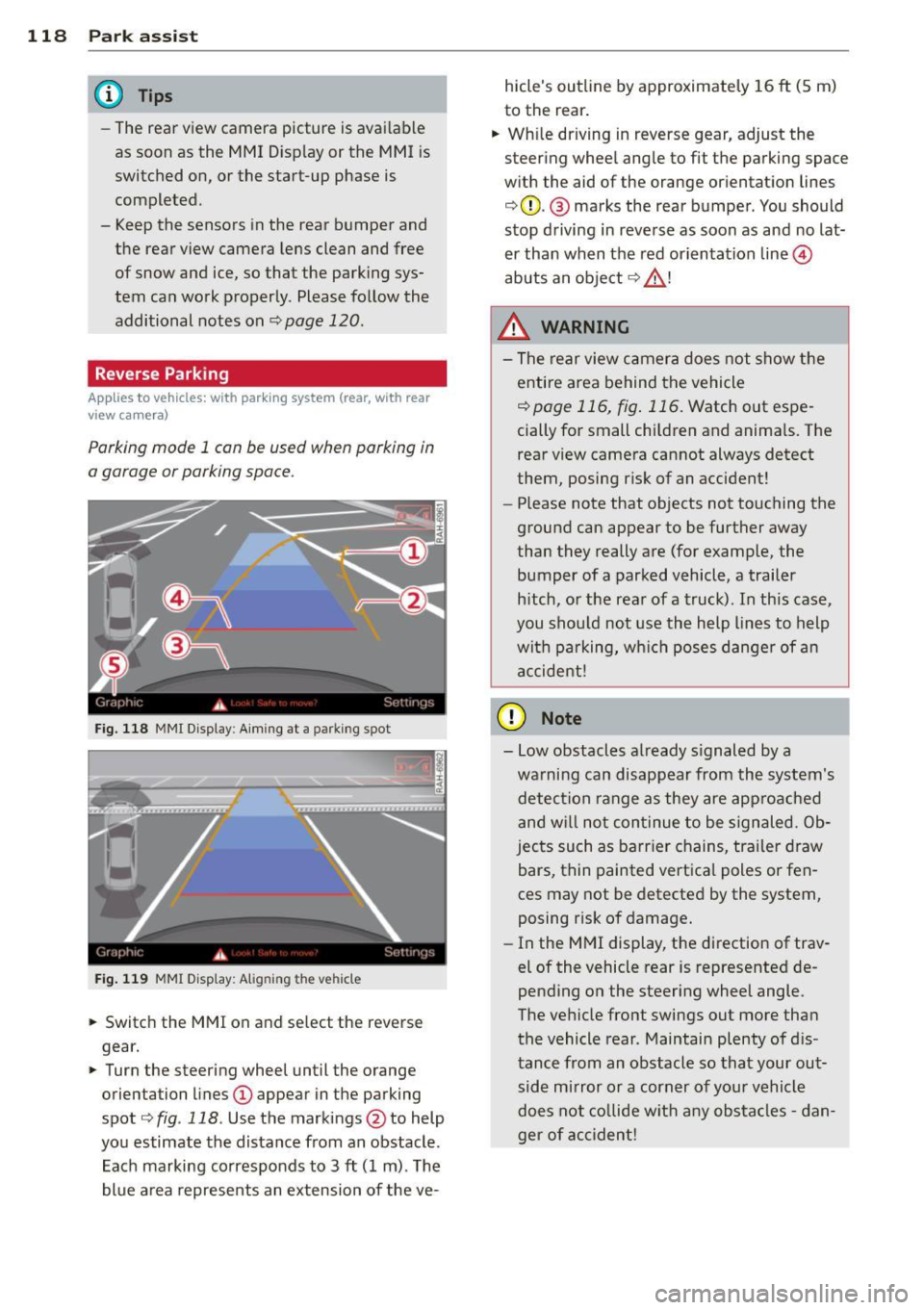
F ig. 1 18 MMI Di splay : Aim ing at a p arkin g spot
F ig . 119 MMI Disp lay: Ali gning th e vehi cle
"' Switch the MMI on and se lect the reverse
gear.
"' Turn the steering wheel until the orange
orienta tion lines
(D appear in the parking
spot ¢
fig. 118 . Use the mark ings @to help
yo u estimate the distance from an obstacle .
Each marking corresponds to 3
ft (1 m) . T he
blue a rea represents an extension of the ve- hicle's outline by approximate
ly 16
ft (5 m)
to the rear .
"' Wh ile driving in reverse gear, adjust the
steering whee l angle to fit the parking space
w ith the aid of the orange or ientation lines
¢ 0 . @ marks the rear bumper . You should
stop d riving in reve rse as soon as and no lat
er than when the red orientation line©
abuts a n obje ct ¢ _&. !
_& WARNING
- The rear view c amera does not show t he
e ntire area behind t he vehicle
¢ page 116, fig . 11 6. Watch out espe
cially for small children and anima ls. The
rear view camera cannot always detect
them, posing risk of an accident!
- Please note that objects not touching the
ground can appear to be further away
than they really a re (for example, the
bumper of a parked vehicle , a trailer
h itch, o r the rea r of a truck). In this case,
you shou ld not use the h elp lines to help
wit h pa rking, wh ich poses danger of a n
a ccident!
(D Note
- Low obstacles a lready s ignaled by a
wa rning can disappear from th e system's
detec tion range as they are approa ched
and w ill not con tinue to be signaled. Ob
jec ts such as barr ier chains, tr ailer draw
bars, thin painted vertica l poles or fen
ces may not be detecte d by the system,
posing risk of damage.
- In the MMI display, t he direction of trav
el of the vehicle rear is represented de
pending on the steering wheel angle.
The ve hicle fro nt swings out more tha n
the vehicle rear . Maintain plenty of d is
tance from an obstacle so that your out side mirror o r a corner of you r vehicle
d oes not co llide w it h any obs ta cl es -d an
ger of accident!