boot AUDI A5 2008 8T / 1.G User Guide
[x] Cancel search | Manufacturer: AUDI, Model Year: 2008, Model line: A5, Model: AUDI A5 2008 8T / 1.GPages: 313, PDF Size: 12.13 MB
Page 49 of 313
Doors and windows47
Controls
Safety
Driving tips
General maintenance
Self-help
Technical data
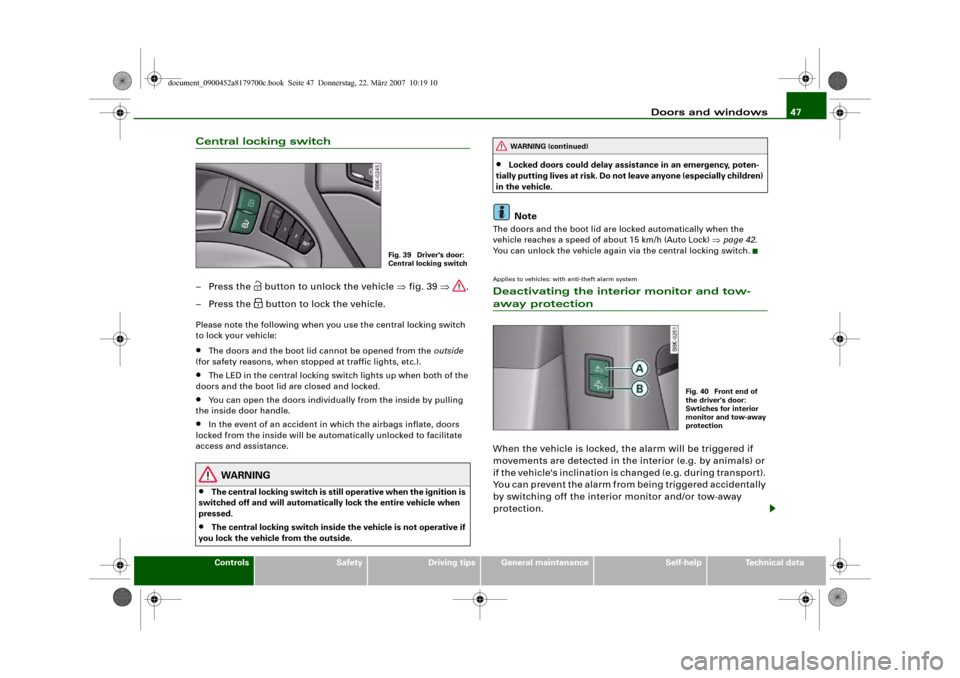
Central locking switch– Press the
button to unlock the vehicle ⇒fig. 39 ⇒.
– Press the button to lock the vehicle.
Please note the following when you use the central locking switch
to lock your vehicle:•
The doors and the boot lid cannot be opened from the outside
(for safety reasons, when stopped at traffic lights, etc.).
•
The LED in the central locking switch lights up when both of the
doors and the boot lid are closed and locked.
•
You can open the doors individually from the inside by pulling
the inside door handle.
•
In the event of an accident in which the airbags inflate, doors
locked from the inside will be automatically unlocked to facilitate
access and assistance.
WARNING
•
The central locking switch is still operative when the ignition is
switched off and will automatically lock the entire vehicle when
pressed.
•
The central locking switch inside the vehicle is not operative if
you lock the vehicle from the outside.
•
Locked doors could delay assistance in an emergency, poten-
tially putting lives at risk. Do not leave anyone (especially children)
in the vehicle.Note
The doors and the boot lid are locked automatically when the
vehicle reaches a speed of about 15 km/h (Auto Lock) ⇒page 42.
You can unlock the vehicle again via the central locking switch.Applies to vehicles: with anti-theft alarm systemDeactivating the interior monitor and tow-away protectionWhen the vehicle is locked, the alarm will be triggered if
movements are detected in the interior (e.g. by animals) or
if the vehicle's inclination is changed (e.g. during transport).
You can prevent the alarm from being triggered accidentally
by switching off the interior monitor and/or tow-away
protection.
Fig. 39 Driver's door:
Central locking switch
WARNING (continued)
Fig. 40 Front end of
the driver's door:
Swtiches for interior
monitor and tow-away
protection
document_0900452a8179700c.book Seite 47 Donnerstag, 22. März 2007 10:19 10
Page 50 of 313
Doors and windows 48
Deactivating interior monitor
– Press switch ⇒fig. 40. The diode in the switch will
light up.
Deactivating tow-away protection
– Press switch . The diode in the switch will light up.The interior monitor and tow-away protection will be switched on
again automatically the next time the vehicle is locked.
WARNING
Do not leave anyone (especially children) in the car if it is locked
from the outside and the deadlock mechanism is activated: the
doors and windows cannot then be opened from the inside.
Locked doors could delay assistance in an emergency, potentially
putting lives at risk.Locking the passenger's door manually if the central locking fails to work
If the central locking system should fail to work at any
time, the passenger's door will have to be locked sepa-
rately.
A mechanical locking device (only visible when the door is
open) is provided on the front passenger's door.
– Take the emergency key out of the remote control key
⇒page 41.
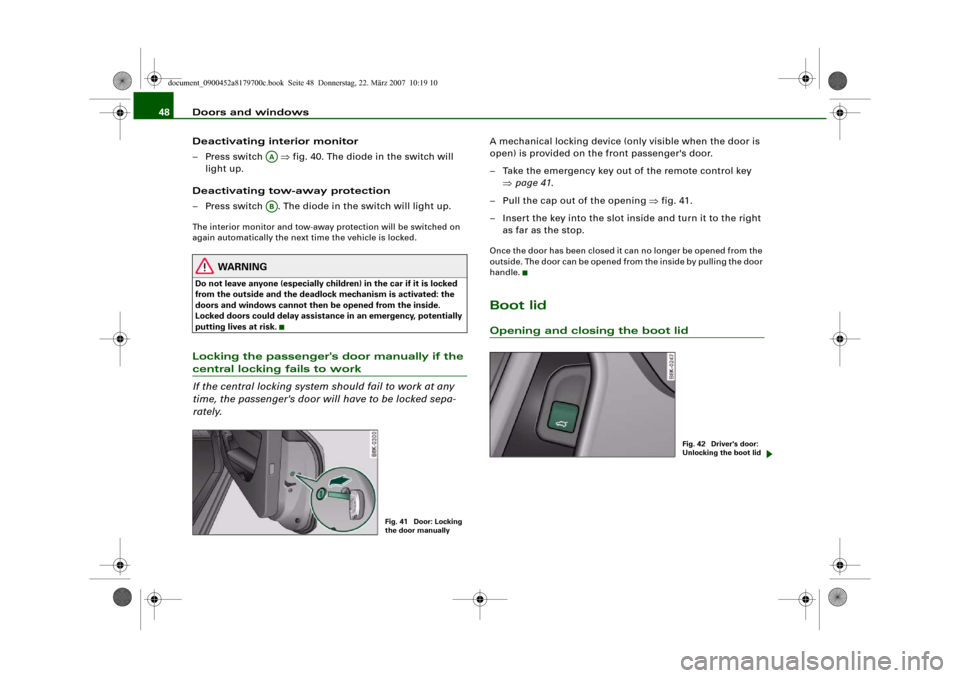
– Pull the cap out of the opening ⇒fig. 41.
– Insert the key into the slot inside and turn it to the right
as far as the stop.Once the door has been closed it can no longer be opened from the
outside. The door can be opened from the inside by pulling the door
handle.Boot lidOpening and closing the boot lid
AAAB
Fig. 41 Door: Locking
the door manually
Fig. 42 Driver's door:
Unlocking the boot lid
document_0900452a8179700c.book Seite 48 Donnerstag, 22. März 2007 10:19 10
Page 51 of 313
Doors and windows49
Controls
Safety
Driving tips
General maintenance
Self-help
Technical data
Opening boot lid
– Press the
button on the remote control key for at least
one second, or
– Pull the unlock switch
on the driver's door ⇒page 48,
fig. 42. This will unlock the boot lid, which will then open
slightly. Or:
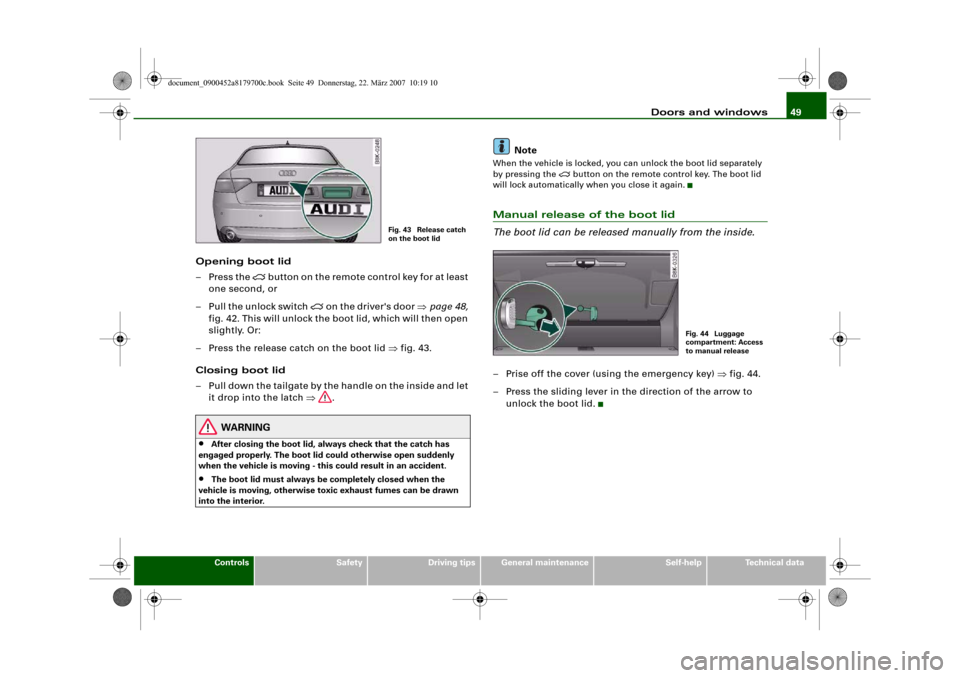
– Press the release catch on the boot lid ⇒fig. 43.
Closing boot lid
– Pull down the tailgate by the handle on the inside and let
it drop into the latch ⇒.
WARNING
•
After closing the boot lid, always check that the catch has
engaged properly. The boot lid could otherwise open suddenly
when the vehicle is moving - this could result in an accident.
•
The boot lid must always be completely closed when the
vehicle is moving, otherwise toxic exhaust fumes can be drawn
into the interior.
Note
When the vehicle is locked, you can unlock the boot lid separately
by pressing the
button on the remote control key. The boot lid
will lock automatically when you close it again.
Manual release of the boot lid
The boot lid can be released manually from the inside.– Prise off the cover (using the emergency key) ⇒fig. 44.
– Press the sliding lever in the direction of the arrow to
unlock the boot lid.
Fig. 43 Release catch
on the boot lid
Fig. 44 Luggage
compartment: Access
to manual release
document_0900452a8179700c.book Seite 49 Donnerstag, 22. März 2007 10:19 10
Page 82 of 313
Seats and storage 80
– To open the storage compartment, pull the handle
⇒page 79, fig. 86.DVD player for navigation system*
The DVD player for the navigation system is located in this storage
compartment ⇒fig. 87 in the luggage compartment. For more
information, please refer to the Infotainment/MMI Operating
Manual.
Applies to vehicles: with folding backrestsExtending the luggage compartment from the boot
The backrests can be folded forwards to increase the
storage space.Releasing and folding down backrest
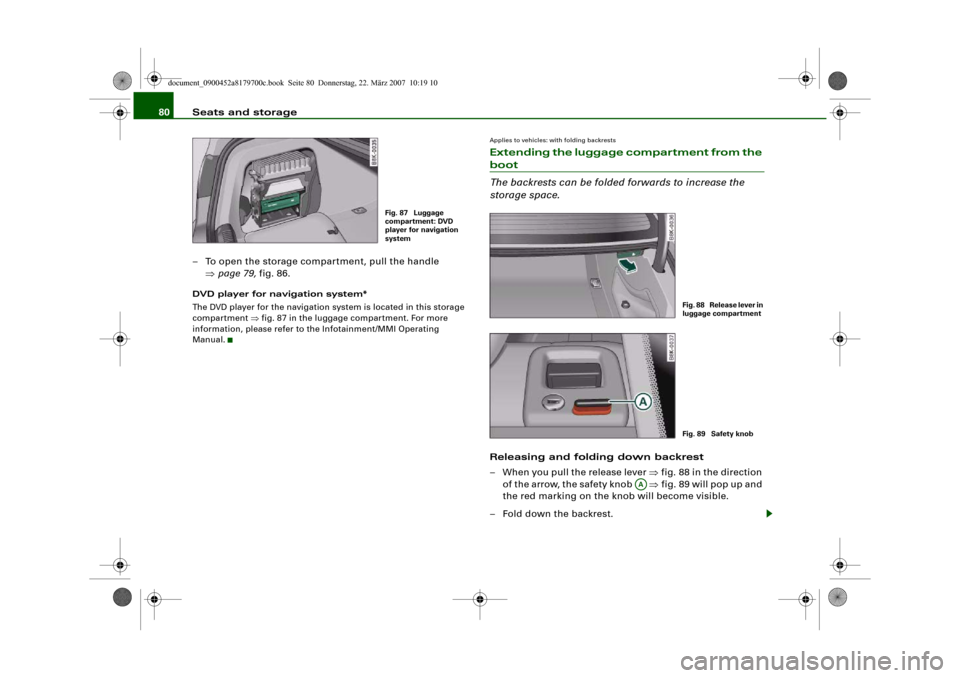
– When you pull the release lever ⇒fig. 88 in the direction
of the arrow, the safety knob ⇒fig. 89 will pop up and
the red marking on the knob will become visible.
– Fold down the backrest.
Fig. 87 Luggage
compartment: DVD
player for navigation
system
Fig. 88 Release lever in
luggage compartmentFig. 89 Safety knob
AA
document_0900452a8179700c.book Seite 80 Donnerstag, 22. März 2007 10:19 10
Page 83 of 313
Seats and storage81
Controls
Safety
Driving tips
General maintenance
Self-help
Technical data
Returning backrest to an upright position
– Push the backrest up again until it engages securely
⇒. The red marking on the safety knob ⇒page 80,
fig. 89 should no longer be visible when the backrest is
properly secured.When the backrest is properly engaged in its upright position, it can
be locked and unlocked with the key. This prevents unauthorised
access to the luggage compartment from inside the vehicle.
The luggage compartment can only be extended from the boot
when the backrest has not been locked with the key.
WARNING
The rear backrest must always be securely latched so that objects
stored in the luggage compartment will not fly forward during
sudden braking.
Caution
When returning the backrest to an upright position, make sure that
the seat belts for the rear seats are in their guides so that they
cannot be caught up and damaged in the catches for the backrest.
It is also important to remove any other objects from the rear seats
to avoid damaging the backrest when folding it forwards.
Applies to vehicles: with folding backrestsExtending the luggage compartment from inside the vehicle
The backrests can be folded forwards to increase the
storage space.Folding down backrest
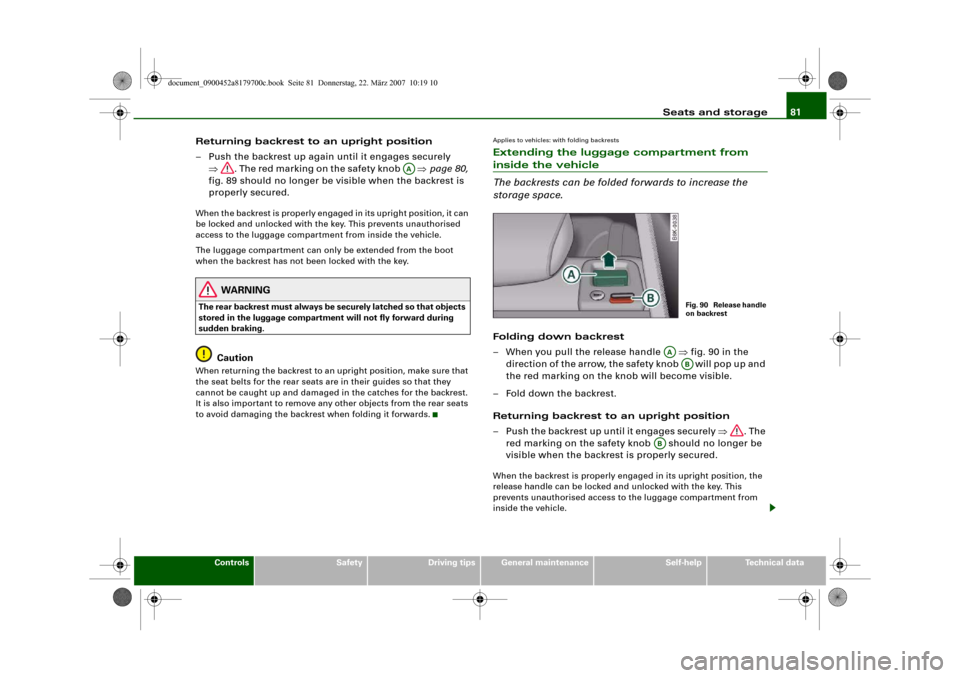
– When you pull the release handle ⇒fig. 90 in the
direction of the arrow, the safety knob will pop up and
the red marking on the knob will become visible.
– Fold down the backrest.
Returning backrest to an upright position
– Push the backrest up until it engages securely ⇒. The
red marking on the safety knob should no longer be
visible when the backrest is properly secured.When the backrest is properly engaged in its upright position, the
release handle can be locked and unlocked with the key. This
prevents unauthorised access to the luggage compartment from
inside the vehicle.
AA
Fig. 90 Release handle
on backrest
AA
AB
AB
document_0900452a8179700c.book Seite 81 Donnerstag, 22. März 2007 10:19 10
Page 85 of 313
Seats and storage83
Controls
Safety
Driving tips
General maintenance
Self-help
Technical data
Applies to vehicles: with load-through hatchLoad-through hatch
You can use the load-through hatch and bag to transport
objects safely inside the vehicle.Opening the load-through hatch
– In the passenger compartment, pull down the centre rear
armrest.
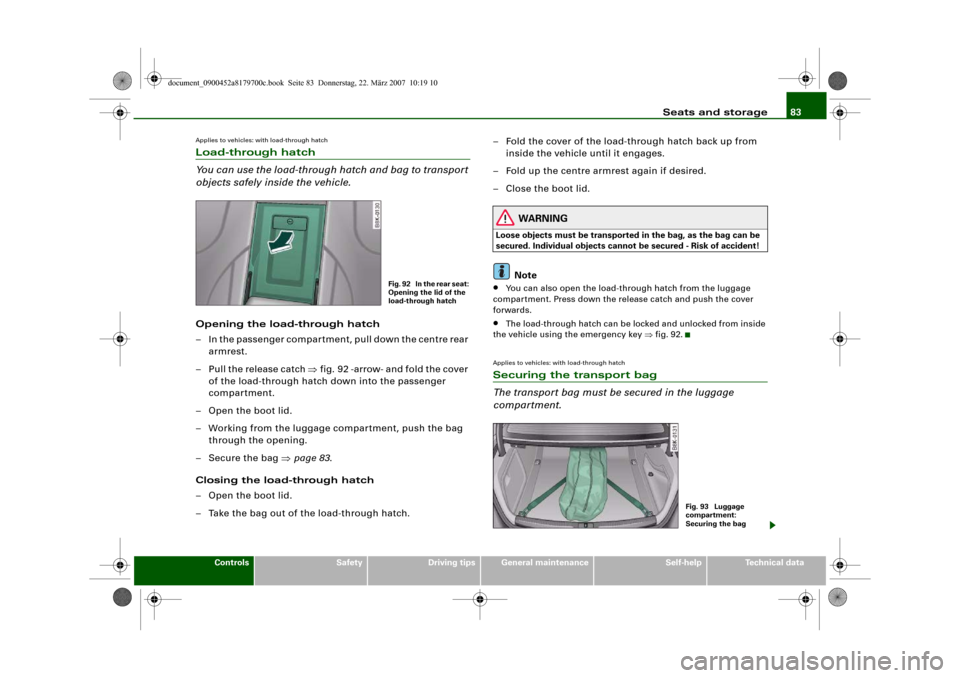
– Pull the release catch ⇒fig. 92 -arrow- and fold the cover
of the load-through hatch down into the passenger
compartment.
– Open the boot lid.
– Working from the luggage compartment, push the bag
through the opening.
– Secure the bag ⇒page 83.
Closing the load-through hatch
– Open the boot lid.
– Take the bag out of the load-through hatch.– Fold the cover of the load-through hatch back up from
inside the vehicle until it engages.
– Fold up the centre armrest again if desired.
– Close the boot lid.
WARNING
Loose objects must be transported in the bag, as the bag can be
secured. Individual objects cannot be secured - Risk of accident!
Note
•
You can also open the load-through hatch from the luggage
compartment. Press down the release catch and push the cover
forwards.
•
The load-through hatch can be locked and unlocked from inside
the vehicle using the emergency key ⇒fig. 92.
Applies to vehicles: with load-through hatchSecuring the transport bag
The transport bag must be secured in the luggage
compartment.
Fig. 92 In the rear seat:
Opening the lid of the
load-through hatch
Fig. 93 Luggage
compartment:
Securing the bag
document_0900452a8179700c.book Seite 83 Donnerstag, 22. März 2007 10:19 10
Page 139 of 313
Audi parking system137
Controls
Safety
Driving tips
General maintenance
Self-help
Technical data
Audi parking systemParking aid systemsApplies to vehicles: with parking systemGeneral notes
Depending on the optional equipment fitted, there are
various parking aid systems to assist you when parking or
manoeuvring in tight spaces.parking system*:
The parking system comprises the rear acoustic parking aid
⇒page 137.
The rear acoustic parking system uses ultrasonic sensors to
measure the distance between the vehicle and an obstacle which
has been detected. There are four sensors which are located in the
rear bumper (two in the centre, two at the sides).
parking system plus*:
The parking system plus* comprises the rear and front acoustic
parking aid ⇒page 138 in conjunction with a graphic display.
The parking system plus* uses ultrasonic sensors to measure the
distance between the vehicle and an obstacle which has been
detected. There are a total of 8 sensors located in the front and rear
bumpers (2 in the centre and 2 on the side of each bumper).
parking system advanced*:
The parking system advanced* comprises the rear and front
acoustic parking aid in conjunction with the graphic display as well
as a reversing camera (Rear View) ⇒page 140.
The reversing camera is located in the boot lid ⇒page 140, fig. 154
and assists the driver when parking or manoeuvring in tight spaces.
The reversing camera provides an image which is shown in the MMI display. It represents the mirror image of a section of the area
behind the vehicle ⇒page 144, fig. 159.
Note
There is a slight delay in the picture display.parking systemApplies to vehicles: with parking systemRear parking aid
The parking aid gives an acoustic warning if it detects any
obstacles behind the vehicle.– Engage reverse gear. You will hear a short beep to
confirm that the rear parking aid has been activated. The
rear parking aid remains active for as long as the reverse
gear is engaged.The measuring range of the sensors in the rear bumper starts at
approximately:
Reversing
When the vehicle is reversing, the system starts to beep when it
registers an obstacle within its detection range (see above). The
warnings will beep increasingly rapidly as the vehicle approaches
the obstacle.Rear
Side
0.60 m
Centre
1.60 m
document_0900452a8179700c.book Seite 137 Donnerstag, 22. März 2007 10:19 10
Page 145 of 313
Audi parking system143
Controls
Safety
Driving tips
General maintenance
Self-help
Technical data
•
To ensure that the acoustic parking aid works properly, the
sensors and the lens of the reversing camera must be kept clean
and free of snow and ice. Please observe the additional notes from
⇒page 152 onwards.
•
Please refer to the notes on towing ⇒page 147.
Applies to vehicles: with parking system advancedReversing camera (Rear View)
The reversing camera image in the MMI display shows the
area behind the vehicle.
Parking mode
There are two different parking modes available when you park your
vehicle with the help of the reversing camera. These are referred to
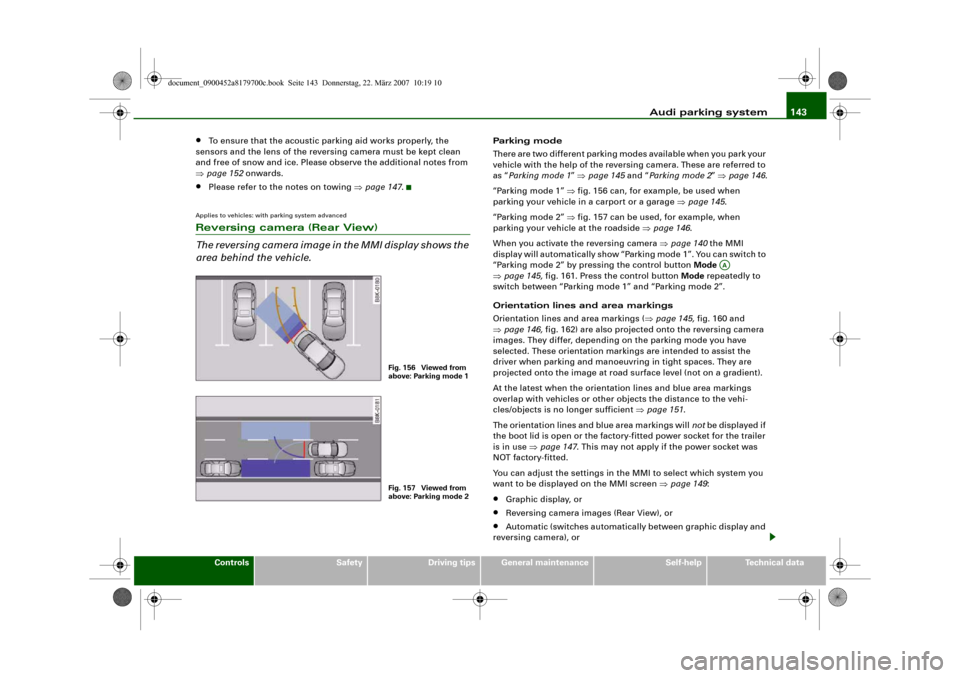
as “Parking mode 1” ⇒page 145 and “Parking mode 2” ⇒page 146.
“Parking mode 1” ⇒fig. 156 can, for example, be used when
parking your vehicle in a carport or a garage ⇒page 145.
“Parking mode 2” ⇒fig. 157 can be used, for example, when
parking your vehicle at the roadside ⇒page 146.
When you activate the reversing camera ⇒page 140 the MMI
display will automatically show “Parking mode 1”. You can switch to
“Parking mode 2” by pressing the control button Mode
⇒page 145, fig. 161. Press the control button Mode repeatedly to
switch between “Parking mode 1” and “Parking mode 2”.
Orientation lines and area markings
Orientation lines and area markings (⇒page 145, fig. 160 and
⇒page 146, fig. 162) are also projected onto the reversing camera
images. They differ, depending on the parking mode you have
selected. These orientation markings are intended to assist the
driver when parking and manoeuvring in tight spaces. They are
projected onto the image at road surface level (not on a gradient).
At the latest when the orientation lines and blue area markings
overlap with vehicles or other objects the distance to the vehi-
cles/objects is no longer sufficient ⇒page 151.
The orientation lines and blue area markings will not be displayed if
the boot lid is open or the factory-fitted power socket for the trailer
is in use ⇒page 147. This may not apply if the power socket was
NOT factory-fitted.
You can adjust the settings in the MMI to select which system you
want to be displayed on the MMI screen ⇒page 149:•
Graphic display, or
•
Reversing camera images (Rear View), or
•
Automatic (switches automatically between graphic display and
reversing camera), or
Fig. 156 Viewed from
above: Parking mode 1Fig. 157 Viewed from
above: Parking mode 2
AA
document_0900452a8179700c.book Seite 143 Donnerstag, 22. März 2007 10:19 10
Page 146 of 313
Audi parking system 144•
Off (no display).
The reversing camera can be switched on and off in the MMI
⇒page 149. The acoustic proximity warning will, however, remain
activated.
WARNING
•
The reversing camera has blind spots in which obstacles are
not registered. It is particularly important to ensure that there are
no small children or animals near the vehicle, as the reversing
camera may not always be able to detect them (accident risk).
•
The parking aid cannot replace the full concentration of the
driver. The driver is always responsible for safety during parking
and other manoeuvres. Always keep a close watch on the area
around the vehicle.
•
Please note that low obstacles detected by the system may no
longer be registered by the sensors as the car moves closer, so the
system will not give any further warning. Certain kinds of obsta-
cles (such as wire fences, chains, thin painted posts or trailer draw
bars, etc.) may not always be detected by the system (accident
risk).Note
•
There is a slight delay in the picture display.
•
To ensure that the reversing camera works properly, the lens of
the camera ⇒page 140, fig. 154 must be kept clean and free of
snow and ice. Please observe the additional notes on ⇒page 152.
•
If the boot lid is open the angle covered by the camera will
change. For this reason, the image of the reversing camera will then
be shown without orientation lines and blue area markings.
•
Please refer to the notes on towing ⇒page 147.
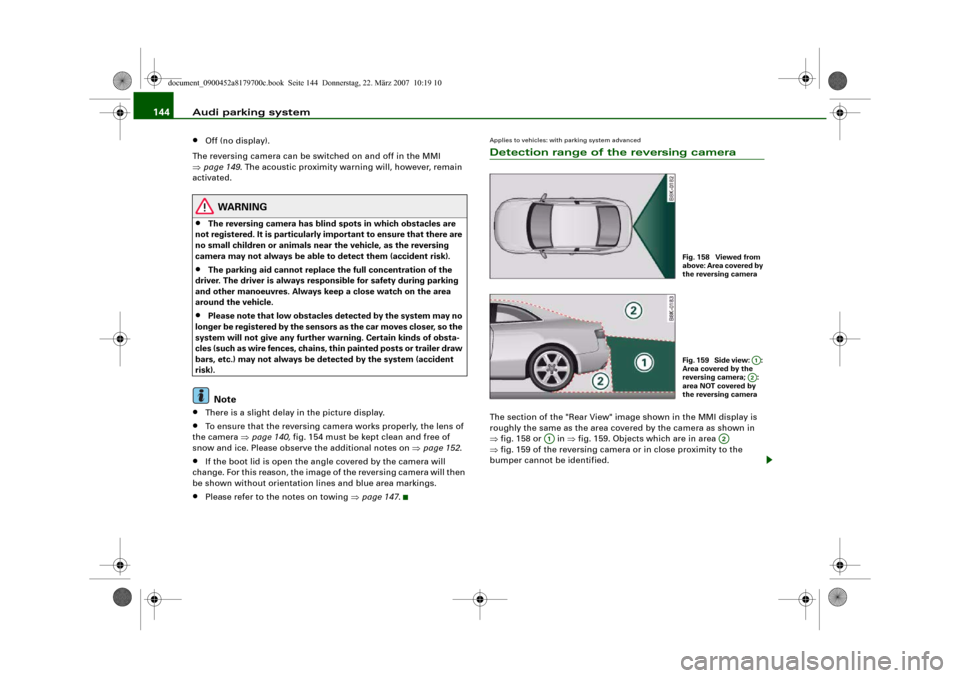
Applies to vehicles: with parking system advancedDetection range of the reversing cameraThe section of the "Rear View" image shown in the MMI display is
roughly the same as the area covered by the camera as shown in
⇒fig. 158 or in ⇒fig. 159. Objects which are in area
⇒fig. 159 of the reversing camera or in close proximity to the
bumper cannot be identified.
Fig. 158 Viewed from
above: Area covered by
the reversing cameraFig. 159 Side view: :
Area covered by the
reversing camera; :
area NOT covered by
the reversing camera
A1A2
A1
A2
document_0900452a8179700c.book Seite 144 Donnerstag, 22. März 2007 10:19 10
Page 155 of 313
Audi parking system153
Controls
Safety
Driving tips
General maintenance
Self-help
Technical data
•
Do not allow the camera images in the MMI display to distract
you from watching the traffic.
•
When parking or manoeuvring do not rely solely on the MMI
display. Some objects (e.g. narrow posts or bars) may - due to the
resolution of the display screen - not be displayed in a satisfactory
manner or may not be displayed at all.
•
Only use the reversing camera to assist you if it is supplying
you with a good and clear picture. The quality of the picture could
be impaired by adverse light, dirt on the lens or a defect (accident
risk).
•
If the MMI display is switched on and the picture is obscured or
the area behind the vehicle is not visible (e.g. due to a dirty or
defective lens) you must not use the reversing camera to assist
you when manoeuvring (accident risk).
•
The reversing camera produces two-dimensional images.
Please remember that ridges in the ground, parts protruding on
other vehicles or fixed objects jutting out are all more difficult to
detect on the MMI display screen due to a lack of spatial depth. In
some cases it may not be possible to detect them at all.
•
For safety reasons, you should not use the system if the posi-
tion and installation angle of the camera have been changed, e.g.
in a rear-end collision. Have it checked by a qualified workshop.
•
Only use the reversing camera when the boot lid is completely
closed. Please make sure that there are no objects mounted to the
rear end of the vehicle which could block the view of the reversing
camera.Caution
•
Never remove snow and ice from the lens of the reversing
camera using warm or hot water - danger of cracks appearing on the
lens.
•
Never use abrasive cleaning agents on the lens.WARNING (continued)
document_0900452a8179700c.book Seite 153 Donnerstag, 22. März 2007 10:19 10