brakes AUDI A5 2015 Owner´s Manual
[x] Cancel search | Manufacturer: AUDI, Model Year: 2015, Model line: A5, Model: AUDI A5 2015Pages: 264, PDF Size: 66.83 MB
Page 94 of 264
Audi adaptive cruise control and braking guard
You can set any speed between 20 mph and 95
mph (30 and 150 km/h).
I ndicator lamps and messages i n the instrument
cluster display inform you about the current sys
tem status and settings .
Switching Audi adaptive cruise control on
11-Pull the lever toward you into posit ion (D
¢ fig. 97. ACC standby appears in the instru
ment cluster display.
Setting the speed and activating regulation
.,.. To set the current speed, press the !SET ! button
¢ page 11, fig. 4. The set speed is shown in the
tachometer @ and is also shown b rief ly in the
display @¢
fig. 98.
Switching Audi adaptive cruise control off
.,.. Push the lever away from you into position @
until it clicks into place. The message
ACC off
appears.
@ Indicator lights
Ill-Adaptive cruise contro l is switched on. No
veh icles are detected up ahead . The stored speed
is mainta ined .
•- A moving vehicle is detected up ahead. The
adaptive cruise control system regu lates the
speed and distance to the moving vehicle ahead
and accelerates/brakes automatically .
•- When automatic braking is not able to keep
enough distance to a previously detected moving
veh icle up ahead, you must take control and
brake ¢
page 94, Request for driver interven
tion .
© Display
If adaptive cruise control is not shown in the d is
play, you can call it up with the
!RESET! button
¢page 23.
Based on the symbo ls in the display, you can de
termine if the system is mainta ining a distance to
the vehicle ahead and what that distance is.
No vehicle -No vehicle ahead was detected .
White vehicle -A vehicle ahead was detected.
92
Red vehicle -Prompt for the driver to take action
¢page 94.
Both arrows on the scale © indicate the d istance
to the vehicle ahead. No arrow appears when the
vehicle is on an open road and there is no object
ahead. If an object is detected ahead, the arrow
moves on the scale .
The green zone on the scale shows the stored dis
tance . For info rmation on changing the stored
distance, refer to¢
page 93. If the distance se
l ected is too close or may soon become too close,
the arrows move into the red zone on the scale .
A WARNING
Improper use of the adaptive cruise contro l
can cause collisions, other acc idents and seri
ous persona l injuries.
- Pressing the
!SET ! button when driving at
speeds below 20 mph (30 km/h), will auto
matically accelerate the vehicle to 20 mph
(30 km/h), which is the minimum speed
that can be set.
@ Tips
-If you switch the ign it ion or the adaptive
cruise control off, the set speed is erased
from the system memory.
- The electronic stabilizat ion control (ESC)
and the anti-slip-regulation (ASR) are auto
matically turned on when the adaptive
cruise control is turned on. Both systems
cannot be turned off if the adaptive cruise
control is turned on .
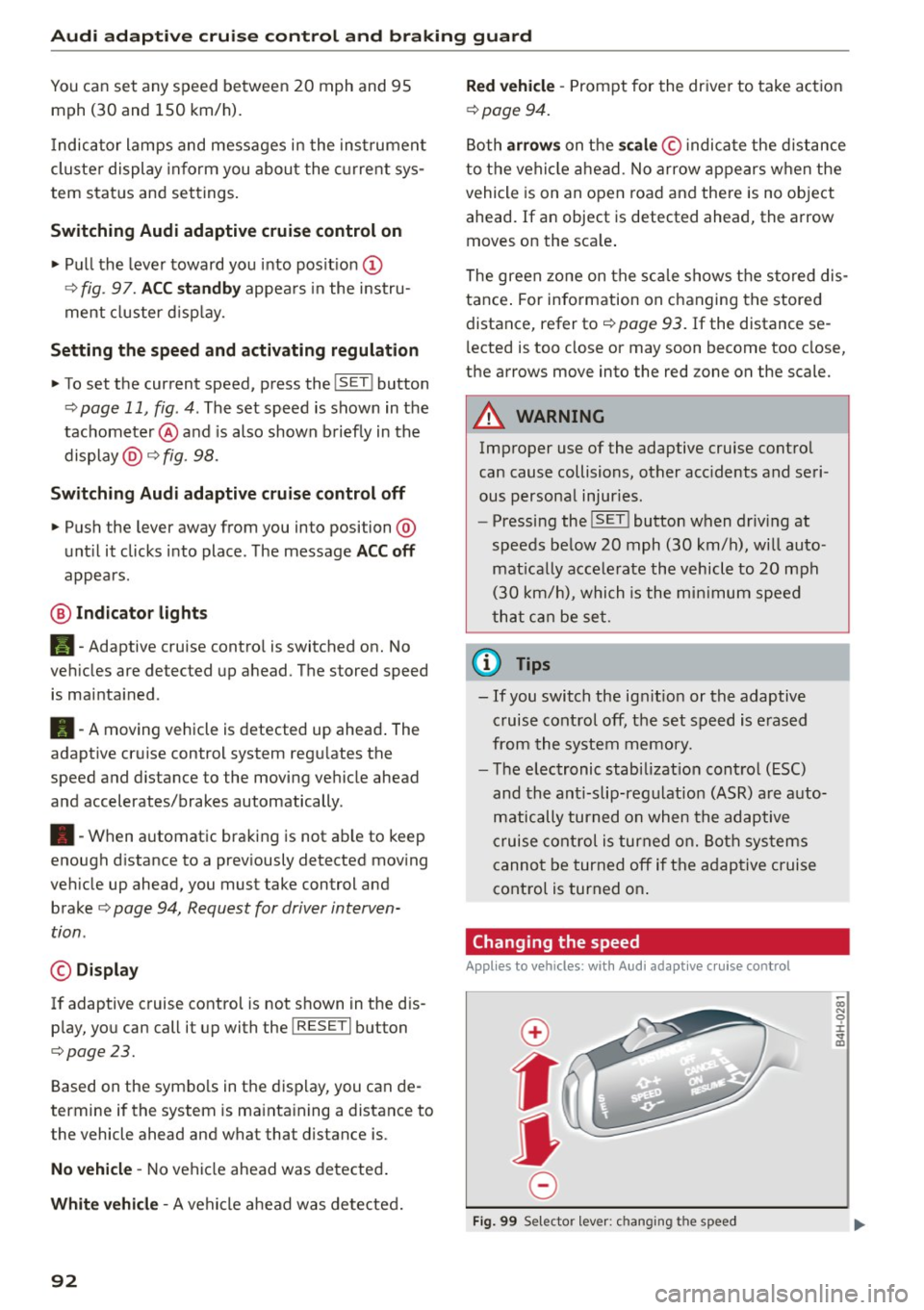
Changing the speed
Applies to veh icles: with Aud i adapt ive cru ise control
0
f
•
0
Fig. 99 Selector lever: ch ang ing th e speed
Page 95 of 264
M N
0 loo
rl I.O
"' N
"' rl
Audi adaptive cruise control and braking guard
.. To increase or reduce the speed in increments,
tap the lever up or down .
.. To increase or reduce the speed quickly,
hold
the lever up or down until the red LED ® reach
es the desired speed¢
page 91 , fig . 98.
Following any changes, the new stored speed will
be disp layed briefly in the display@¢ page 91,
fig . 98 .
Interrupting cruise control
Applies to vehicles: with Audi adaptive cruise control
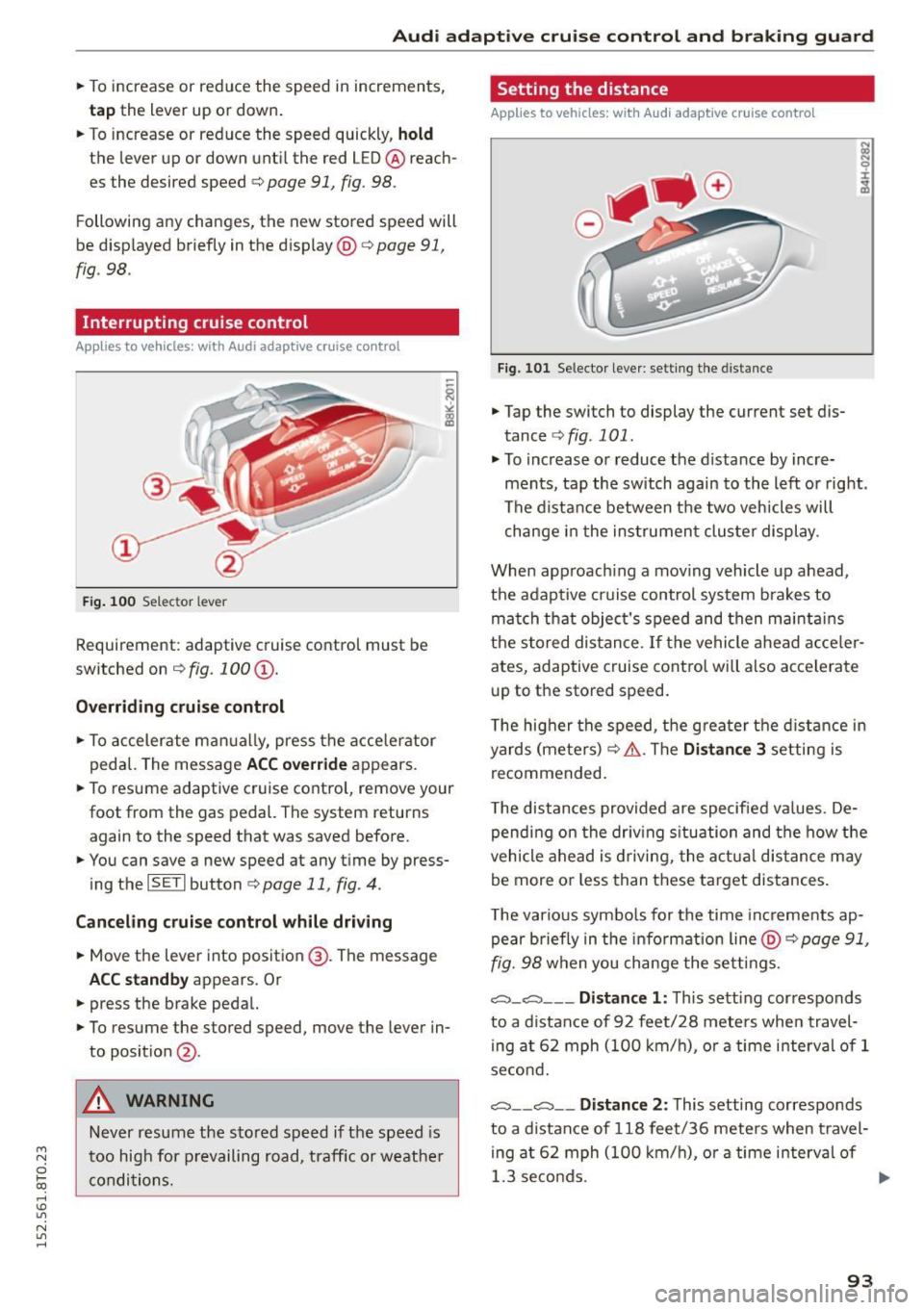
Fig. 100 Selector lever
Requirement : adaptive cruise control must be
switched on
¢ fig. 100 @.
Overriding cruise control
.. To accelerate manually, press the accelerator
pedal. The message
ACC override appears.
.. To resume adaptive cruise control, remove your
foot from the gas pedal. The system returns
again to the speed that was saved before.
.. You can save a new speed at any time by press
ing the
I SET I button ¢ page 11 , fig . 4.
Canceling cruise control while driving
.. Move the lever into position @. The message
ACC standby appears. Or
.. press the brake pedal.
.. To resume the stored speed, move the lever in
to posit ion
@ .
A WARNING
Never resume the stored speed if the speed is
too high for p revailing road, traffic or weather
conditions.
Setting the distance
Applies to vehicles: with Audi adaptive cruise control
Fig. 101 Selector lever: sett ing the distance
.. Tap the switch to display the current set dis
tance
¢ fig . 101 .
.. To increase or reduce the distance by incre
ments, tap the switch again to the left or right.
The distance between the two veh icles will
change in the instrumen t cluster display .
When approach ing a mov ing vehicle up ahead,
the adaptive cruise control system brakes to
match that object's speed and then maintains
the stor ed distance .
If the vehicle ahead acceler
ates, adaptive cruise control will also accelerate
up to the stored speed.
T he hig her the speed, the greater the distance in
yards (meters) ¢&. .The
Distance 3 setting is
recommended .
T he distances provided are specified values . De
pending on the driving s ituation and the how the
vehicle ahead is driving, the actual distance may
be more or less than these target distances .
T he various symbols for the time increments ap
pear briefly in the information line @¢
page 91,
fig. 98
when you change the settings.
,::::::,_,::::::, ___ Distance 1: This setting corresponds
to a distance of 92 feet/28 meters when travel
ing at 62 mph (100 km/h), or a time interval of 1
second.
,::::::, __ ,:::::, __ Distance 2: This setting corresponds
to a distance of 118 feet/36 meters when travel
in g at 62 mph (100 km/h), or a time interval of
1.3 se conds. ..,.
93
Page 97 of 264
Audi adaptive cruise control and braking guard
Audi braking guard
Description
Applies to vehicles: with Audi adaptive cruise co ntrol
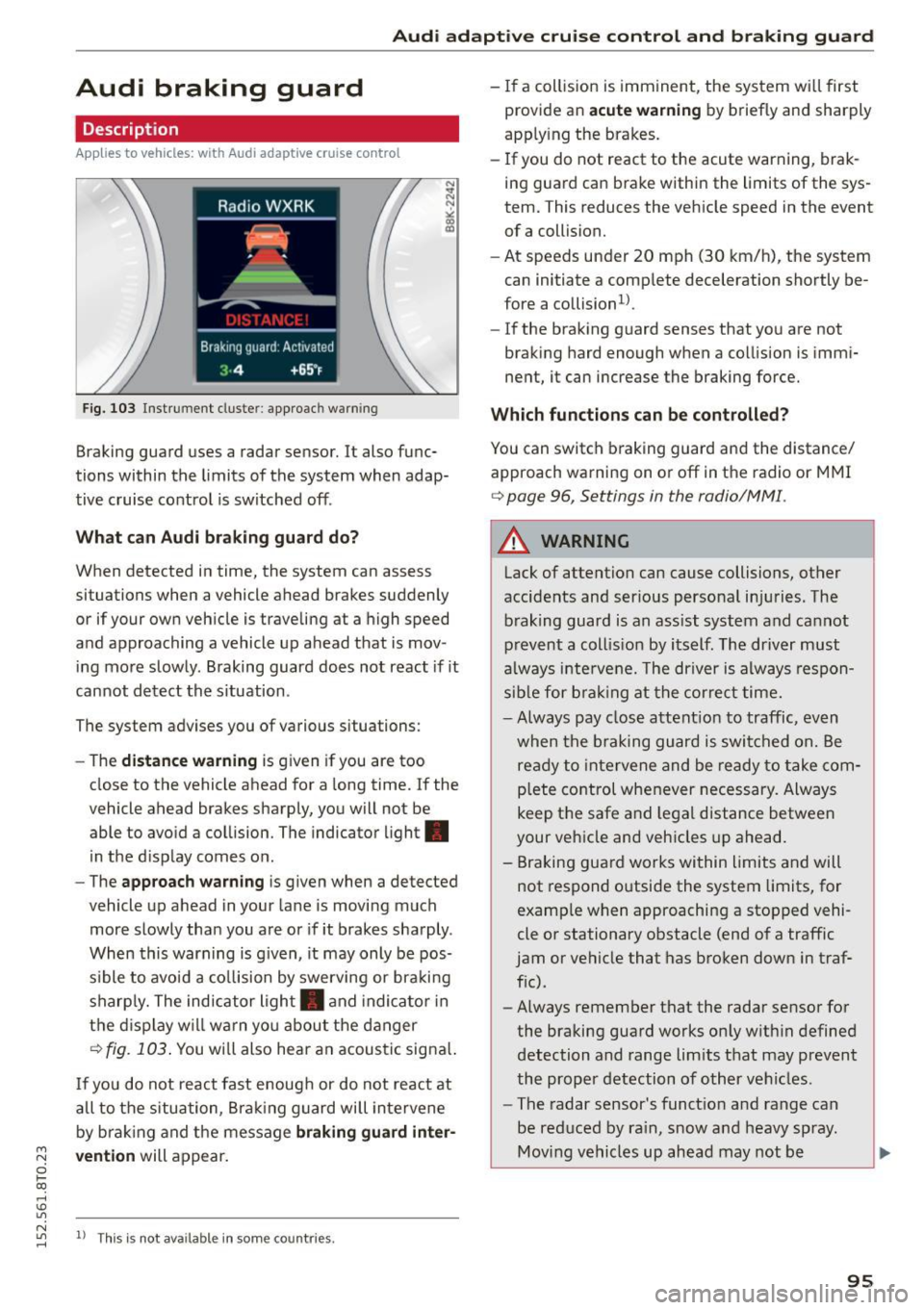
F ig. 103 Instrument cluste r: app roac h warn ing
Braking guard uses a radar sensor. It also func
tions within the limits of the system when adap
tive cruise control is switched off .
What can Audi braking guard do?
When detected in time, the system can assess
situations when a vehicle ahead brakes suddenly
or if your own vehicle is traveling at a high speed
and approaching a vehicle up ahead that is mov
ing more slowly . Braking guard does not react if it
cannot detect the s ituation .
The system advises you of various situations:
- The
distance warning is given if you are too
close to the vehicle ahead for a long time. If the
vehicle ahead brakes sharply, you will not be
able to avoid a collision. The indicator light.
in the d isplay comes on .
- The
approach warning is given when a detected
vehicle up ahead in your lane is moving much
more slowly than you are or if it brakes sharply .
When this warning is g iven, it may only be pos
s ible to avoid a co llision by swerving or braki ng
sharply. The indicator light . and indicator in
the display will warn yo u about the danger
c> fig. 103. You wi ll also hear an acoust ic signa l.
If you do not react fast enough or do not react at
all to the situation, Braking guard will intervene
by braking and the message
braking guard inter-
~ vention will appear.
0 l-oo
rl I.O
"' N "' 11
This is not available in som e count ries. rl
- If a collision is imminent, the system wi ll first
provide an
acute warning by briefly and sharply
app ly ing the brakes.
- If you do not react to the acute warning, brak
ing guard can brake within the limits of the sys
tem. This reduces the vehicle speed in the event
of a collision.
- At speeds under 20 mph (30 km/h), the system
can initiate a complete deceleration shortly be
fore a collisionl).
- If the braking guard senses that you are not
braking hard enough when a collision is immi
nent, it can increase the braking force.
Which functions can be controlled?
You can switch braking guard and the distance/
approach warning on or off in the radio or MMI
c> page 96, Settings in the radio/MM! .
A WARNING
-
Lack of attention can cause collisions, other
accidents and serious personal injuries. The b raking guard is an ass ist system and cannot
prevent a collis ion by itself. The driver must
always intervene. The driver is always respon
sib le for b ra kin g at the correct time.
- Always pay close attent ion to traffic, even
when the braking guard is switched on. Be
ready to intervene and be ready to take com
p lete control whenever necessary. Always
keep t he safe a nd legal distance between
your vehicle and vehicles up ahead.
- Braking guard works within limits and will
not respond outside the system limits, for
examp le when approaching a stopped vehi
cle or stationary obstacle (end of a traffic
jam or vehicle that has broken down in traf
f ic).
- Always remember that the radar sensor for
the braking guard works on ly w ithin defined
detection and range limits that may prevent
the proper detection of other vehicles.
- The radar sensor's funct ion and range can
be reduced by ra in, snow and heavy spray.
Moving vehicles up ahead may not be
,.
95
Page 174 of 264

Smart Technology
The following situations are exceptions where it
may be usefu l to switch on sport mode to allow
the wheels to spin : -
Rocking the vehicle to free it when it is stuck
- Driv ing in deep snow or on loose ground
- Dr iv ing with snow chains
Sport mode on ESC/ASR off Sport mode off or
ESC /ASRon
Behavior
The ESC and ASR stabiliza- The stabilization funct ion is The full stabilization func-
tion fu nct ions are limited not
available¢ ,&.. ESC and
tion of the ESC and ASR is
¢ ,&. .
ASR are switched
off. available again.
Operation Press the I!> OF F! button Press and hold the I!> OF FI Press the I!> OF F! button
briefly . button longer than 3 sec-again.
onds .
Indicator II turns on. JI and lf'lii•li~ turn on. II turns off or II and
lights lf'lii•l~~ turn off.
Driver mes- Stabilization control (ESC): Stabilization control (ESC): Stabilization control
sages Sport. Warning! Re stricted off. Warning! Restricted (ESC):
On
stability stability
It is only possible to turn off the ASR up to 30
mph (SO km/h) for veh icles wi th front whee l
drive . At about
45 mph (70 km/h) it automatica l
ly turns on again. It is possible to turn
off the
ASR at any speed for vehicles with all whee l
drive.
A WARNING
-
You should only sw itch sport mode on or
switch ESC/ASR
off if your driving ab ilities and
road condit io ns perm it .
- The stabilization function is limited when
sport mode is switched on. The dr iv ing
wheels could spin and the veh icle cou ld
swerve, especially on slick or slippery road
surfaces.
- There is no vehicle stabilization when ESC/
ASR are switched
off.
(D Tips
ESC/ASR cannot be switched off or sport
mode cannot be switched on when cruise con
trol or adaptive cru ise control* is sw itched on .
172
Braking
What affects broking efficiency?
New brake pads
During the first 250 miles (400 km), new brake
pads do not possess their full braking effect, they
have to be "broken in" first¢,&. . You can com
pensate for this slightly reduced braking power
by pushing harder on the brake pedal. Avoid
heavy braking loads during the break-in period.
Operating conditions and driving habits
The brakes on today's automobiles are still sub
ject to wear, depending largely on operating con
ditions and driving habits~,&. . On vehicles that
are either driven most ly in stop-and -go city traf
fic or are driven hard, the brake pads should be
checked by your authorized Audi dealer more of
ten than specified in the
Warranty & Mainte
nance booklet .
Failure to have your brake pads
i nspected can result in reduced brake perform
ance .
On steep slopes, you should use the braking ef
fect of the engine . This way, you prevent unnec
essary wear on the brake system. If you must use
your brakes, do not hold the brakes down contin
uously. Pump the brakes at intervals.
Page 175 of 264
Operating noise
Noises may occur when braking depending on the
speed, braking force and outside conditions such
as temperature and humidity.
Effect of water and road salt
In certain situat ions, for example after driving
through water, in heavy ra in, after overn ight con
densat ion or after washing your car, the braking
effect can be reduced by moisture or ice on the
brake rotors and brake pads. The brakes must be
dried first with a few carefu l brake applications.
At higher speeds and with the w indshie ld w ipers
turned on, the brake pads press against the brake
rotors for a short amount of time. This occurs at
regular intervals without the driver noticing and
provides for better brake response time under
wet conditions.
The effectiveness of the brakes can be reduced
when the vehicle is driven on a salt-covered road
and the brakes are not used. Likewise, you clean
off accumulated salt coating from brake discs
and pads with a few cautious applications of the
brake ¢.& .
Corrosion
There may be a tendency for dirt to build up on
the brake pads and corros ion to form on the discs
if the car is not driven regularly or only for short
tr ips with little use of the brakes.
If the brakes are not used frequently, or if corro
sion has formed on the discs, it is advisab le to
clean off the pads and discs by braking firmly a
few t imes from a moderately high speed¢.&.
Faults in the brake system
If you should notice a sudden increase in brake
pedal trave l, then one of the two brake circuits
may have failed
c:> .& .
Low brake fluid level
Malfunctions can occur in the brake system if the
brake fluid level is too low. The brake fluid leve l is
~ monitored e lectronically.
i? co ,...., \!) ..,.,
N ..,., ,....,
Smart Technology
Brake booster
T he brake booster increases the pressure that you
generate w ith the brake pedal.
It works on ly
when the engine is running
.c:> .&
Brake lining wear status
Brake lining wear may be checked by visual in
spect ion of the condition of the brake pads
through the openings in the wheel. If necessary,
the wheel may be removed for this inspection
c:> page 226, Replacing wheels.
_8 WARNING "'---
-New brake pads don't have the best stop
pin g power and must be "broken-in" during
the initial 250 miles (400 kilometers). You
can compensate for this by press ing the
brake pedal more firmly. This also applies
later when new pads are installed.
-
- You shou ld perform braking maneuvers for
the purpose of cleaning the brake system
only if road conditions permit. Other road
users must not be put at r isk -you may
cause an acciden t!
- Before descending a steep grade, reduce
speed and shift transmission into a lower
gear or lower driving range. Do not ride the
brakes or hold the pedal down too long or
too often . This could cause the brakes to get
hot and diminish braking efficiency.
- Do not "ride the brakes" by resting your foot
on the pedal when you do not intend to
brake. This may cause the brakes to over
heat, premature wear and increased stop
p in g distance.
- Under certain cl imatic and operat ing condi
tions such as passing through water, dr iv ing
in heavy rain or after washing the vehicle,
the effectiveness of the brakes can be re
duced. In winter, ice can accumulate on the
b rak e pads, linings, discs and drums. Care
fully apply brakes for a test. Brakes will dry
and ice coatings will be cleaned off after a
few careful brake applications.
- Driving for an extended period of time on
salt -covered roads wi thout using your
brakes can a lso affect braking efficiency .
173
Page 176 of 264
Smart Technolog y
Clean off accumulated salt coating from
brake discs and pads w ith a few carefu l
brake applications .
- If you damage the front spoiler, or if you in
stall a d ifferent spoiler, be sure the air flow
to the front brakes is not obstructed. Other
wise the brake system could overheat reduc
ing the effectiveness of the entire brake sys
tem.
- Failure of one brake c ircuit will impair the
braking capab ility result ing in an increased
stopp ing distance. Avoid driving the veh icle
and have it towed to the nearest autho rized
Audi dealer or qualified workshop.
- Never let the vehicle ro ll to a stop with the
engine shut off .
- If the brake booster is not work ing, the
brake pedal must be pressed considerably
harder to make up for the lack of booste r as
sistance .
Electro-mechanical
power assist, dynamic
steering
The electro-mechanical power assist helps the
driver when steering.
Power steering adapts electronically based on
the vehicle speed .
Indicator lights and me ssages
• Stee ring defe cti ve! D o not dr ive vehicle!
If this indicator light tu rns on and stays on and
this message appears, the power steering may
have fai led .
Do
not contin ue driving. See yo ur authorized
Aud i dealer o r a qua lified repair facility for assis
tance.
l ;r- ij Dynami c steering : S ys te m fault! You can
c on tinu e dr iving
If the indicator light turns on and the message
appears, the steer ing may be more difficult to
move or mo re sensitive than us ual. The steer ing
wheel may also be at an ang le when dr iv ing
straight.
174
Drive slowly to your authorized Audi dea ler or
qualified workshop to have the ma lf u nction cor
rected.
' -r, ij Dynamic ste ering: i nitializing
If this driver message appears and the indicator
li ght is flashing on the i nstrume nt pane l, dynam
i c steer ing* is being rein it ia lized . After sta rting
the engine, the steer ing whee l w ill move sligh tly.
Re-initialization might be necessary if the steer
ing whee l was moved hard to th e left and right
whi le the vehicle was not moving . The display
goe s out as soon as initiali zation is comp lete.
A WARNING
,-
H ave the dynamic steering* system malfunc-
tion repaired as soon as possible by an author
ized Audi dealer or qualified workshop - r isk
of accid ent!
@ Tips
- If the . or 'T fl indicator light only stays on
for a short time, you may cont inue driving.
- The dynamic steering* stab ility system s are
not availab le in the event of a system mal
function .
- For add itional information on dynamic
steering*, refer to<=> page 102 .
Driving with your quattro
Applies to vehicles : wit h all -w hee l drive
With all-wheel drive , all four wheels are driven .
General information
With a ll-wheel drive, power is distrib uted to a ll
fo ur wheels . This happens automatica lly depend
i ng on your driving style and the road conditions
at the t ime . See also <=> page 1 70 .
A center d ifferential distributes the driving power
variab ly to the front and rear ax le. It works to
gether w ith select ive whee l torque control , which
activates when drivi ng throug h curves
¢ page 171 . W ith the sport diffe rential*, power
distribution to the rear wheels is var iable and can
be ad justed with d rive select ¢ page 102 .
1111-
Page 179 of 264
Driving and the
environment
Breaking in
New engine
The engine needs to be run-in during the first
1,000 miles (1,500 km).
For the first 600 miles (1,000 kilometers ):
"' Do not use full throttle .
"' Do not drive at engine speeds that are more
than
2/3 of the max imum permitted RPM .
From 600 to 1,000 miles (1,000 to 1,500
kilometers):
"' Speeds can gradually be increased to the maxi
mum perm issible road or engine speed.
During and after break-in period
"'Do not rev the engine up to high speeds when it
is cold. This applies whether the transmission is
in N (Neutral) or in gear .
After the break-in period
"'Do not exceed maximum engine speed under
any circumstances.
"'U pshift into the next higher gear
before reach
ing the red area at the end of the tachometer
scale
c=> page 10.
During the first few hours of driving, the engine's
internal friction is higher than later when all the
moving parts have been broken in. How well this
break-in process is done depends to a considera
ble extent on the way the vehicle is driven during
the first 1,000 miles (1,500 kilometers).
(D Note
Extremely high engine speeds are automati
cally reduced. However, these rpm limits are
p rog rammed for an engine wel l run- in, not a
new engine.
@) For the sake of the environment
Do not dr ive with unnecessarily high eng ine
speeds -upshifting early saves fuel, reduces
noise and protects the environment.
Driving and the environment
New tires
If your vehicle is running on new tires, drive very
carefully for the fi rst 350 m iles (500 kilometers)
after fitting .
New tires tend to be slippery and must also
be "broken-in". Be sure to remember this dur
ing the first
350 miles (500 kilometers).
Brake gently. Avoid following closely behind
other vehicles or other situations that might
require sudden, hard brak ing .
Avoid damaging the
vehicle
When you are d riving on poor roads, or over
curbs, steep ramps, etc., ma ke certain that low
lying parts such as spoilers and exhaust system
parts do not bottom out and get damaged.
T his is espec ially true for veh icles with low-s lung
chassis (sports chassis)* and fully loaded
vehicles.
Driving through water on
roads
Note the following to avoid vehicle damage when
driving through water, for example on f looded
roads:
- The water must not be any higher than the bot
tom of the vehicle body.
- Do not drive faster than walking speed.
A WARNING
= -
After driving through water, mud, slush, etc.,
the brakes may be s low to take effect because
of wet brake rotors and pads. Dry the brakes
first by braking carefully to restore the full braking effect.
(D Note
Vehicle components such as the engine,
transmission, suspension or electrical system
can be severely damaged by driving through
water . ""
177
Page 181 of 264
M N
i? co ,...., \!) 1.1'1
N 1.1'1 ,....,
on necessary precautions e.g. corrosion preven
tion, maintenance and storage. Pay attention to
addit ional information concern ing the battery.
Refer to
c> page 200.
Economical and environ
mentally-friendly driving
General
Your personal style of driving will determine the
economy of your vehicle, as well as exhaust and
noise levels.
Fu el economy, environmental impact , and wear
on your engine, brakes and tires largely depend
on three factors:
- your persona l dr iving style
- operating conditions
- technical limitations
If you anticipate what you need to do next and
drive economically, you can easily cut your fuel
consumption by 10-15 percen t. This sec tion will
give you some tips on how you can help the envi
ronment and your pocketbook .
(!) Tips
The consumpt ion estimates as published by
ENVIRONMENTAL PROTECTION AGENCY (EPA)
and Transport Canada may not correspond to
your actual consumption on the road, which
w ill vary depending upon vehicle load and
speed, road and weather conditions, trip
length, etc.
Drive smoothly and keep a lookout ahead
Vehicles use the most fuel when they are acceler
ating.
" Avoid unnecessary accelerating and braking.
Vehicles use the most fuel when they are acceler
ating . If you anticipate what is going to happen
next, you will need to brake less and, thus, accel
e rate less. Let the vehicle coast whenever possi
ble - for example when yo u see that the next traf
fic light is red .
Driving and the environment
Avoid full throttle
Driving at moderate speeds saves fuel and im
proves your mileage .
"Try and keep well below your car's maximum
speed.
Acce lerat ing gently reduces fue l consumption,
engine wear, and does not disturb the environ
ment .
Fuel consumption, exhaust emissions and engine
noise increase disproportionately at high speeds.
If you drive at approximate ly three quarters of
top speed, fuel consump tion will be reduced by
one half. Never drive faster than the posted
speed l imit and weather cond itions permit .
Reducing unnecessary idling
Even when your car is jus t idling it burns up fuel.
" Shut the eng ine off when you are not driving
the vehicle.
" Do not warm up the vehicle by lett ing the en-
gine run at idle.
It makes sense to shut off the engine in traffic
jams, when wa iting for tra ins to pass a t railroad
crossings, or at traffic lights that have long waits
on red . Turning the engine
off for just 30-40 sec
onds saves more fue l than is burned starting the
. . engine again.
It takes a long t ime for the engine to warm up
fully when it is running at idle. However, wear
and noxious emissions are especially high when
the engine is warming up. So you should drive
away as soon as you sta rt the engine and avoid
running at high rpms wh ile the engine is st ill
warming up.
(D Note
Do not leave engine idling unatt ended afte r
starting .
If warning lights should come on to
indicate improper operation, they would go
un heeded . Extended idling also produces
heat, which could result in overheating or oth
er damage to the vehicle or other property.
179
Page 183 of 264

M N
i? co ,...., \!) ..,.,
N ..,., ,....,
Trailer mode Driving with a trailer
General information
Your Audi was designed primarily for passenger
transportation.
If you plan to tow a tra iler, p lease remember that
the additiona l load will affect durability, econo
my and performance .
T railer towing not on ly places more stress on the
vehicle, it also calls for more concentrat ion from
the driver .
F or this reason, a lways fo llow the operating and
d riving instructions provided and use common
sense.
Technical requirements
Traile r hitch
Use a weight-carrying hitch conforming to the
gross trailer weight. The hitch must be suitable
for your vehicle and trailer and must be mounted
securely on the veh icle 's chassis at a technically
sound
location . Use on ly a tra iler hitc h with a re
movable ba ll mou nt. Always chec k w ith the t ra il
e r hitch m anu fac tur er to make sure that you a re
using the co rrec t hitch.
Do not use a bumper hitch .
The hitch must be installed in such a way that it
does not in terfere with the impact-absorbi ng
bumper system. No mod ificat ions should b e
mad e to the vehicle exhaust and brake systems .
Fr om time to t ime, c hec k t hat a ll h itch mou nti ng
bo lts remain sec urely fastened .
When you are no t tow ing a trailer,
remove the
trai ler hitch ball mount . Th is prevents the hitc h
fr om caus ing damage should you r vehicle be
s truck from behind¢,&. .
Trailer brakes
If yo ur tra iler is equipped w it h a braking system,
check to be s ure that it conforms to all regu la
tions.
Trailer mode
T he trailer hyd raulic brake system must not be di
rect ly connected to the ve hicle's hydraulic b rake
system ¢.&. .
Safety chains
Alw ays use s afety ch ains be tween your ve hicle
and t he tra ile r.
Trailer lights
Tra ile r li ghts must meet all regulations. Be sure
to check w it h your author ized Audi deal er for cor
r e ct w iring, sw itches, and relays.
Mirrors
If you are unable to see the traffic behind you us
i ng the regular o uts ide mirrors, then you
must in
sta ll extended mirrors .
It is importa nt that you
always have clea r vision to the rea r.
_&. WARNING
- I f a trai ler has elec trical brake s please note
th at these b ra kes are not acti va ted by the
factory -fitted contro l unit -ris k of acci dent!
- After removing the t railer hi tch, do n ot store
it in your vehicle . In case o f su dden braking,
the hi tch could fly forward and injure you or
your passe ngers.
Operating instructions
Maximum traile r weight
A trai ler for you r vehicle is limited to a typical
class 1 or class 2 trailer.
Trailer load distribution
B e sure the load in the t ra iler i s held secure ly in
pla ce to prevent it from sh ifting forw ard , back
war d or sideways .
Never allow a passenger to ride in a trailer¢.&.
in Driving in struc tion s on page 182.
Engine cooling system
Towing a trailer makes the engine work harder . It
is important that the cooling system's pe rform
ance is up to the additional load . Ma ke s ure that
t h e coo ling system has enoug h fluid.
IIJJ,
181
Page 184 of 264
Trailer mode
Tire pressure
When tow ing a trailer, inflate the tires of your ve
hicle to the cold tire pressure listed under " Full
load" on the label located on the driver's side B
pillar (visible when the door is open). Inflate
trailer tires to trailer and tire manufacturers'
specifications.
Lights
The headlight settings should be checked with
the trailer attached before driving off . Check to
make sure both vehicle and trailer lights are
working properly.
Safety chains
Be su re trailer safety chains are properly connect
ed from the trailer to the hitch on the vehicle.
Leave enough slack in the chains to permit turn
ing corners. When you install safety chains, make
sure they will not drag on the road when you are
driving.
The chains shou ld cross under the trai ler tongue
to prevent it from dropping in case of separation
from the hitch.
Driving instructions
Driving with a trailer always requires extra care
and consideration.
To obtain the best possible handling of vehicle
and trai ler, please note the following:
.. Do not tow a loaded trailer when your car itself
is not loaded .
.. Be especia lly careful when passing other
vehicles.
.. Observe speed limits.
.. Do not drive at the maximum permissible
speed .
.. Always apply brakes early.
.. Monitor the temperature gauge.
Weight distribution
Towing a loaded trai ler with an empty car results
in a highly unstable distribution of weight. If this
cannot be avoided, drive at very low speeds only
to avoid the risk of losing steering control.
182
A "balanced" rig is easier to operate and contro l.
This means that the tow vehicle shou ld be loaded
to the extent possible and permissib le, wh ile
keep ing the trailer as light as possible under the
c ir cumstances. Whenever poss ible, transfer
some cargo to the luggage compartment of the
tow veh icle while observing tongue load require
ments and vehicle load ing considerat ions .
Speed
The higher the speed, the more difficult it be
comes for the driver to control the rig. Do not
drive at the maximum permissible speed. Reduce
your speed even more if load, weather or w ind
cond it ions are unfavorab le - particularly when
go ing downh ill.
Reduce veh icle speed
immediately if the trailer
shows the slightest sign of swaying.
Do not try
to stop the swaying by accelerating.
Observe speed limits. In some areas, speeds for
vehicles towing tra ilers are lower than for regular
vehicles.
Always apply brakes early. When dr iving down
hill, shift into a lower gear to use the engine
braking effect to slow the vehicle. Use of the
brakes alone can cause them to overheat and fail.
Coolant temperature
The coolant temperature gauge¢ page 10 must
be observed carefully. If the needle moves close
to the upper end of the scale, reduce speed im
med iately and/or turn off the air conditioner .
If the coolant temperature warning light . in
the instrument cluster starts flashing, pull off
the road, stop and let the engine
idle for about
two m inutes to prevent heat build-up .
&_ WARNING
Anyone not properly restrained in a moving
vehicle is at a much greater risk in an acci
dent. Never let anyone ride in your car who is
not properly wearing the restraints provided
by Audi.
-