engine AUDI A5 2015 Owner´s Manual
[x] Cancel search | Manufacturer: AUDI, Model Year: 2015, Model line: A5, Model: AUDI A5 2015Pages: 264, PDF Size: 66.83 MB
Page 22 of 264
Instruments and indicator lights
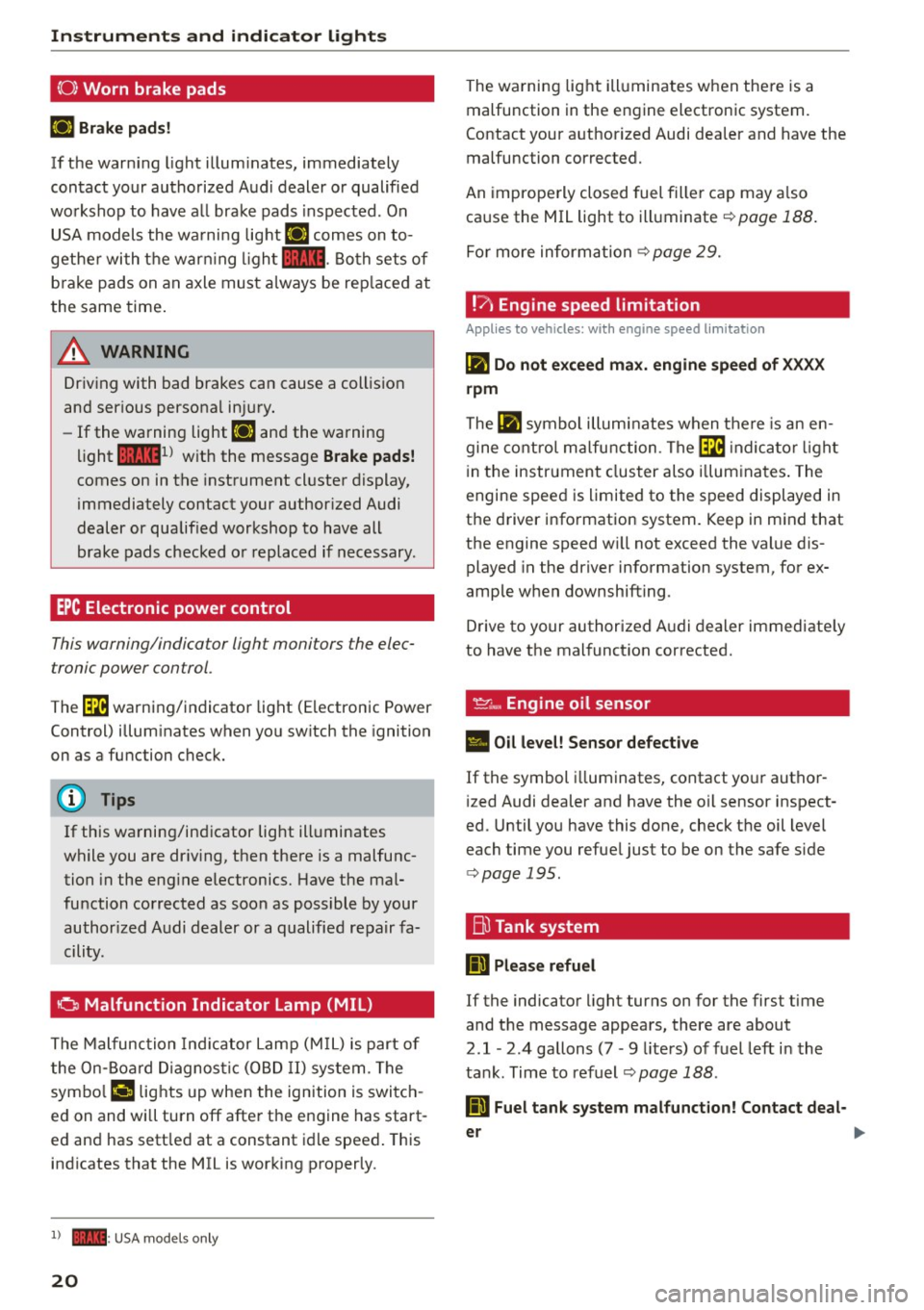
(0) Worn brake pads
El Brak e pads!
If th e warn ing lig ht illum ina tes, imme diately
c o ntact your authorized Aud i dealer or qualified
workshop to have a ll brake pads i nspected. On
USA models the wa rni ng light
El comes on to
gethe r with the war ning l igh t
1111 . Both sets of
b ra ke pads on an axle must a lways be rep laced at
the same time .
A WARNING
Driv ing with bad brakes can cause a collis ion
and ser ious personal in jury.
- If the warning light El and the warning
light
11111 ) w ith the message Brake pads!
comes on in the instrument cl uster display,
immediately contact your author ized Audi
dealer or qualified workshop to have all
brake pads checked o r replaced if necessary .
EPC Electronic power control
This warning/indicator ligh t monitors the elec
tronic power control .
The~ warning/indicator light (Electronic Power
Control) illum inates when yo u sw itch the ignition
on as a function check.
(D Tips
If this wa rning/ind icator light ill uminates
while you are dr iv ing, then the re is a malfunc
tion in the eng ine electronics. Have the mal
function corrected as soon as possible by your
author ized A udi dealer or a qualified re pair fa
cility.
0 Malfunction Indicator Lamp (MIL)
T he Malfunc tion Ind ica tor Lamp (M IL) is part o f
the On-Board Diagnos tic (O BD II ) system . The
symbo l
('4 lights up when the ignition is switch
e d on and wi ll turn off afte r the engine has start
e d an d has sett le d at a constant i dle speed . This
indicates that the MIL is working p roperly.
l) - : USA mo dels o nly
20
The wa rning lig ht ill uminates when the re is a
malfunction in the engine electronic system.
Contact your a uthorized Audi dea ler and have the
malfunction corrected.
An imprope rly closed fuel fille r cap may a lso
ca use the MIL light to illuminate ¢
page 188 .
For more inform ation ¢ page 29.
!?) Engine speed limitation
Applies to vehicles: wi th engine speed limitation
(II Do not exceed max. engine speed of XXXX
rpm
The (II symbo l illu min ates when t here is an en
gine co ntro l m alfu nction . The ~ indica tor light
in the instrument clus ter also i llum ina tes . T he
engine spee d is limited to the speed displayed in
t h e d river i nfo rmation system. Keep in m ind that
the engine speed w ill not exceed the value dis
played in the driver information system, for ex
amp le w hen downshifting .
D rive to your authorized A udi dealer immediate ly
to have t he mal funct ion corrected.
~~. Engine oil sensor
• Oil level! Sensor defective
If the symbol illuminates, contact yo ur autho r
i zed Audi dealer and have the oil sensor inspect
ed . Until you have this done, check t he oil level
each time you refue l just to be on the safe s ide
¢ page 195.
Bu Tank system
ID Please refuel
If the indicator light turns on for the first time
and the message appea rs, there are about
2
.1 -2 .4 gallons (7 -9 liters) of fuel left in the
ta nk . Time to refuel
¢page 188.
ID Fuel tank system malfunction! Contact deal -
er
~
Page 25 of 264
M N
0 loo
rl I.O
"' N
"' rl
Driver information
system
Introduction
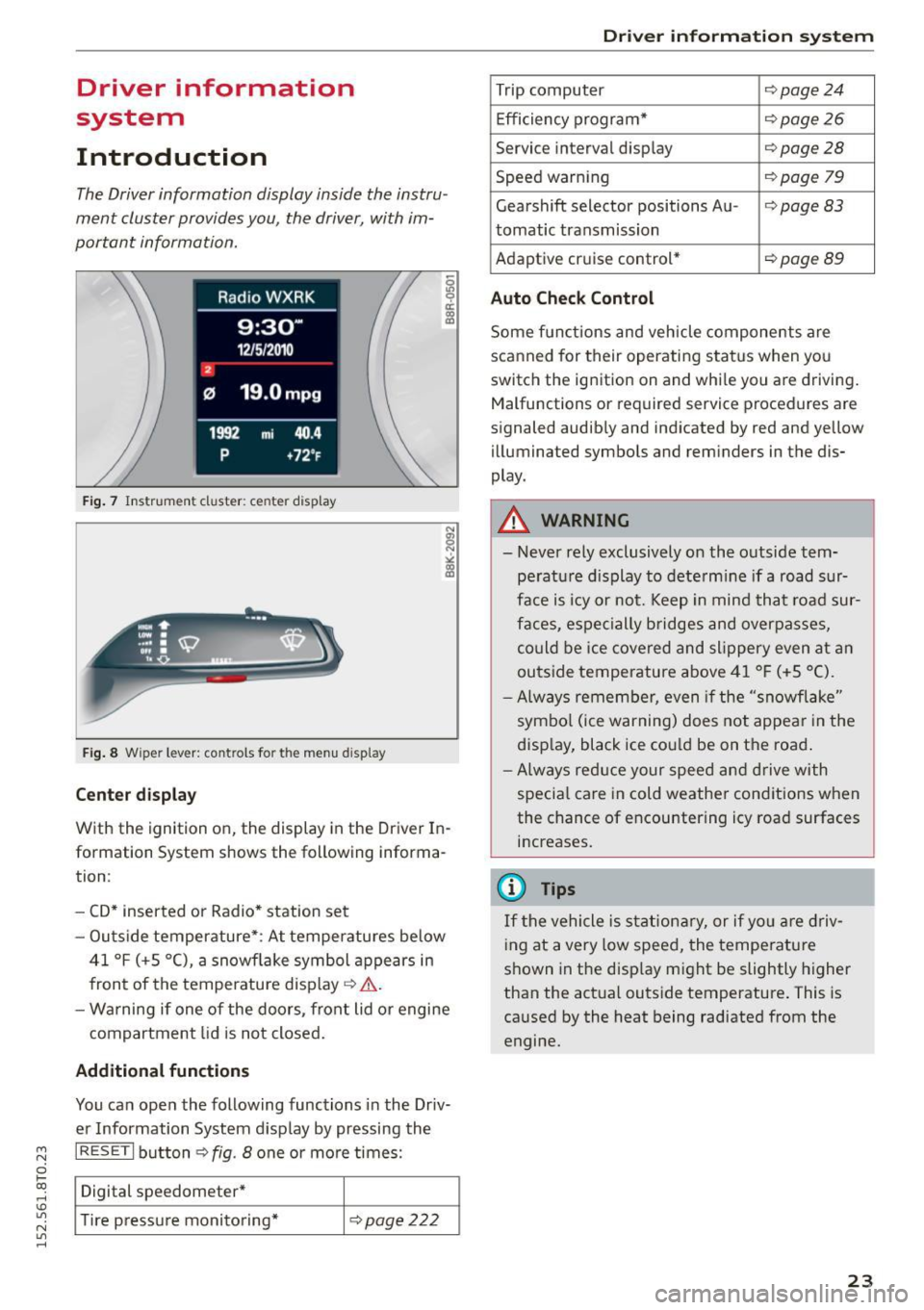
The Driver information display inside the instru
ment cluster provides you, the driver, with im
portant information.
Fig. 7 Instrument cluster: ce nter display
Fig . 8 Wipe r lever: controls fo r the men u display
Cent er dis play
With the ignition on, the display in the Driver In
formation System shows the following informa
tion :
- CD* inserted or Radio * station set
- Outs ide temperature* : At temperatures below
41 °f (+S
0
(), a snowf lake symbol appears in
front of the temperature display¢&. .
- Wa rning if one of the doors, front lid o r engine
compartment lid is not closed.
Additional function s
You can open the following functions in the Driv
er Information System display by pressing the
I RESET I button ¢ fig. 8 one or more times:
Digital speedometer*
T ire pressure monitoring*
¢page222
Dr iver inform atio n sy stem
Trip computer Q page24
Efficiency program* ¢page26
Service interval display Qpage28
Speed warning ¢page 79
Gearshift selector positions Au -i=>page83
tomatic transmission
Adaptive cr uise control*
¢ page89
Auto Chec k Control
Some functions and vehicle components are
scanned for their operating status when yo u
switch the ignition on and whi le you are driving.
Malfunctions or required service procedures are
signaled audibly and indicated by red and yellow
illuminated symbols and reminders in the dis
play.
A WARNING
--- Never rely exclusively on the outside tem pe ratu re d isplay to dete rm ine if a road sur
face is icy or not. Keep in mind that road sur
faces, espe cially bridges and overpasses,
could be ice covered and slippery even at an
outside temperature above 41 °f (+S °C).
- Always remember, even if the "snowflake"
symbo l (ice warning) does not appear in the
display, black ice cou ld be on the road .
-Always red uce your speed and d rive with
specia l care in cold weather conditions when
the chance of encountering icy road surfaces
increases.
(j) Tips
If the vehicle is stationary, or if yo u are driv
ing at a very low speed, the temperature
shown in the disp lay might be slightly higher
than the actual outside temperature . This is
caused by the heat being radiated from the
engine.
23
Page 31 of 264
M N
0 loo
rl I.O
"' N
"' rl
the possibility to reset the oi l change schedu le af
ter having performed an oil change according to
Audi specif ications. Select
ICARI function button
> Service interval display > Reset oil change in
terval
or I CAR ! function button > Car systems*
control button > Servicing & checks > Reset oil
change interval.
(D Note
- Only reset the oil change d isp lay when you
have completed an oil change .
- If you d isconnect the battery terminals, no
calculations can be made for the service in
terval display during this t ime and no serv
i ce reminder will appear . Remember that
obse rv in g the proper serv ice intervals is vi
tally impor tant to extending the life of your
vehicle, particularly the engine, and main
taining its value. Even if the mi leage driven
i s low, the maximum period of one year
from one service to the next must not be ex
ceeded.
(D Tips
The information in the Service Reminder re
mains stored even when the veh icle battery is
disconnected.
On Board Diagnostic
System (OBD)
Malfunction Indicator Lamp (MIL)
The Malfunction Indicator Lamp (MIL) ¢-4 in the
instrument cluster is part of the On-Board Diag
nostic (OBD II) system.
The warning/indicator light illuminates when the
ignition is switched on and goes out after the en
gine starts and the idle has stabilized. This indi
cates that the MIL is working properly.
If the light does not go out after the engine is
started, or illuminates while you are driving, a malfunct ion may exist in the engine system. If
the light illuminates, the catalytic converter
could be damaged.
Continue driving
with reduced power (avoiding
sustained high speeds and/or rapid accelerations)
Dri ver information system
and have the condition corrected. Contact your
authorized Audi dea ler.
If t he light illuminates, the electronic speed lim
ite r may also be ma lf u nctioning. For more infor
mation
¢ page 30, Electronic speed limiter .
An improperly closed fuel filler cap may also
cause the MIL light to illuminate ¢
page 188.
On-Board Diagnostics
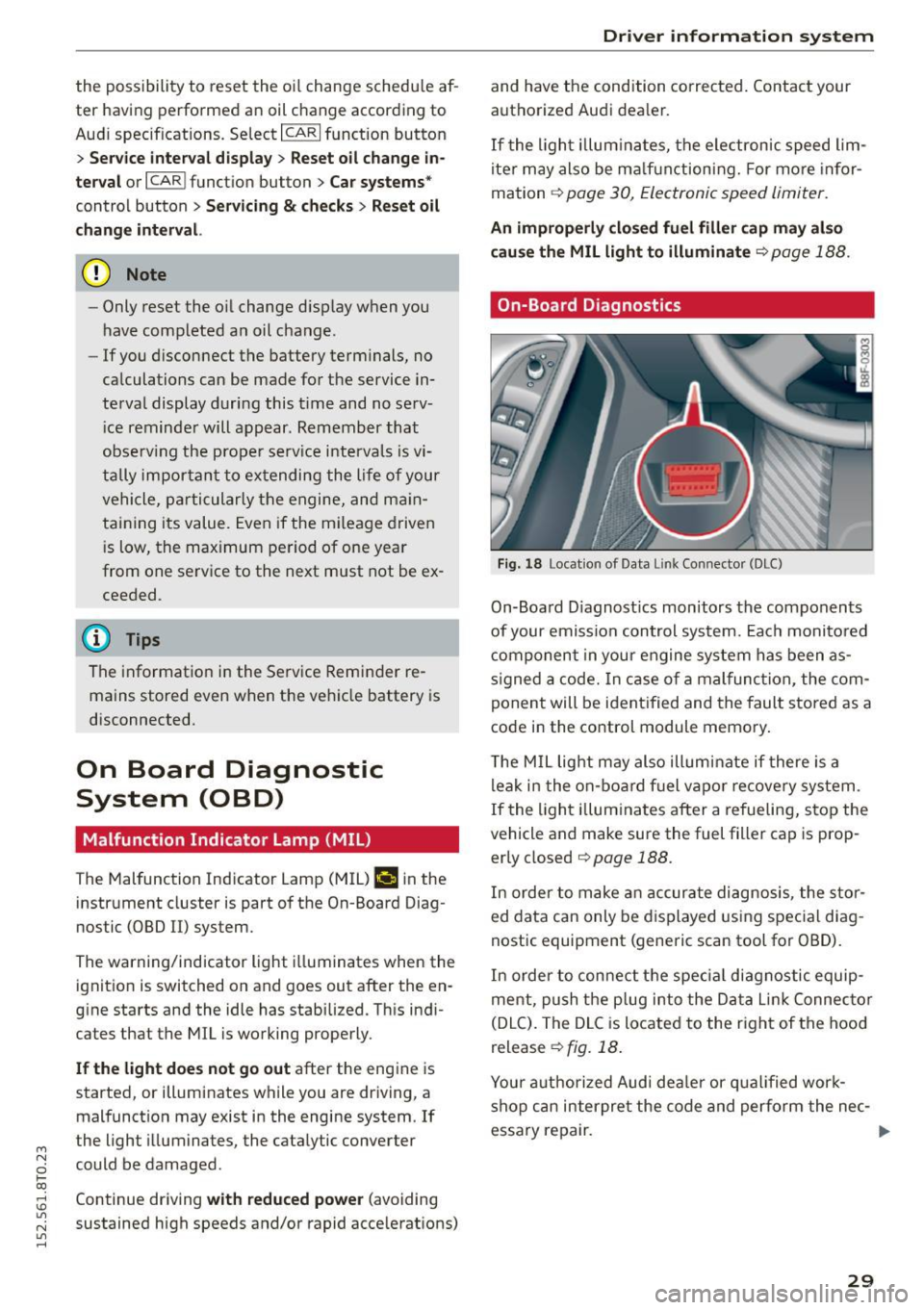
Fig. 18 Locat ion of Data Link Connector (DLC)
On-Board D iagnost ics monitors the components
of your emission control system. Each monito red
component in your engine system has been as
signed a code. In case of a malfunction, the com
ponent will be ident ified and the fault stored as a
code in the control module memory.
T he MIL light may also illum inate if there is a
leak in the on-board fuel vapo r recovery system .
If the light illuminates after a refueling, stop the
vehicle and make sure the fuel filler cap is prop
erly closed
¢ page 188.
In order to make an accurate diagnosis, the stor
ed data can only be displayed using special diag
nostic equipment (generic scan tool for OBD).
In order to connect the spec ial diagnostic equip
ment, push the plug into the Data Lin k Connec tor
(DLC). The DLC is located to the right of the hood
release
¢ fig. 18.
Your authorized Audi deale r or qualified work
shop can interpre t the code and perform the nec-
essary repair. .,,.
29
Page 32 of 264
Driver inform ation system
A WARNING
Do not use the diagnostic connector for per
sonal use. Incorrect usage can cause malfunc
tions, wh ich can increase the risk of a colli
sion!
Electronic speed limiter
Your veh icle may be facto ry equipped with t ires
that a re rated fo r a maximum speed of 130 mph
(210 km/h). This is may be less than the maxi
m um speed o f your vehicle . To red uce the risk of
sudden tire fa ilure and loss of contro l if the vehi
cle is operated at excessive speeds, your vehicle
has an electronic speed limite r. The electronic
speed limiter prevents your vehicle from going
faster than the t ire speed rating . Fo r more infor
ma tion ~ page
205 .
If the engine control unit rece ives fa ulty vehicle
roadspeed signals, the Malfunction Ind icator
Light (MIL)
II w ill illuminate . If this occurs, co n
tact the nearest authorized Aud i dealer for assis
tance .
A WARNING
Always observe the posted s peed limits and
adjust you r speed to s uit prevail ing road, traf
fic and weathe r cond itions. Never drive your
vehicle faster than the maximum speed rating
of the tires installed .
30
.
Page 34 of 264
Opening and closing
-If the power locking system should fail, you
can still open the fuel tank flap in an emer
gency ~
page 190.
-You are well advised not to keep valuables
inside an unattended vehicle, visible or not.
Even a properly locked vehicle cannot pro
vide the security of a safe.
- If the LED in the upper edge of the driver's
door panel comes on for about 30 seconds
after the vehicle is locked, there is a mal
function in the power locking or the anti
theft warning system. Have the malfunction
corrected by an authorized Audi dealership
or qualified repair facility.
Key set
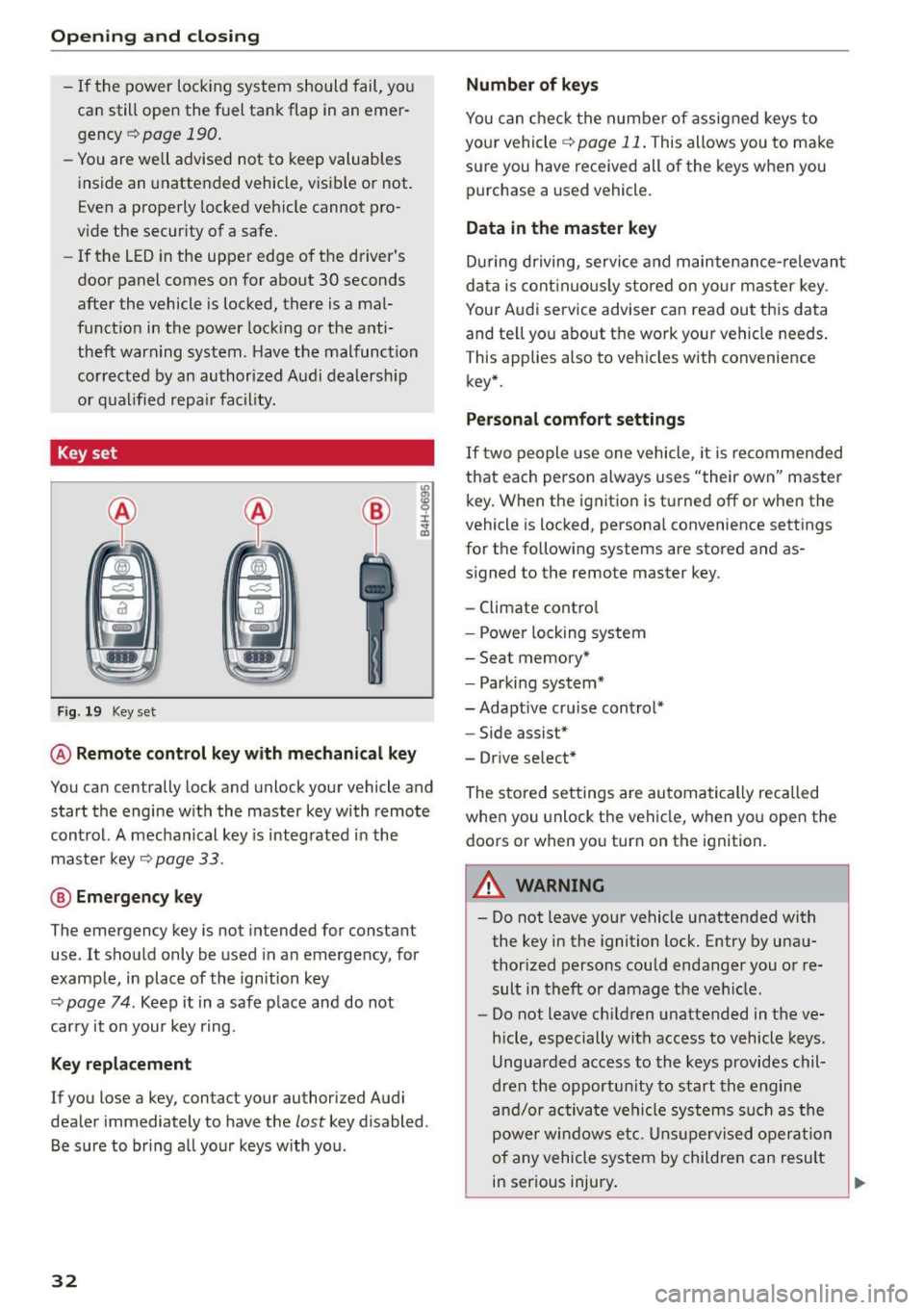
Fig . 19 Key set
m 0 ±
~
@ Remote control key with mechanical key
You can centrally lock and unlock your vehicle and
start the engine with the master key with remote
control. A mechanical key is integrated in the
master key
~ page 33.
@ Emergency key
The emergency key is not intended for constant
use . It should only be used in an emergency, for
example, in place of the ignition key
~ page 7 4 . Keep it in a safe place and do not
carry it on your key ring.
Key replacement
If you lose a key, contact your authorized Audi
dealer immediately to have the
lost key disabled.
Be sure to bring all your keys with you .
32
Number of keys
You can check the number of assigned keys to
your vehicle
¢ page 11. This allows you to make
sure you have received all of the keys when you purchase a used vehicle.
Data in the master key
During driving, service and maintenance-relevant
data is continuously stored on your master key .
Your Audi service adviser can read out this data
and tell you about the work your vehicle needs.
This applies also to vehicles with convenience
key*.
Personal comfort settings
If two people use one vehicle, it is recommended
that each person always uses "their own" master key. When the ignition is turned off or when the
vehicle is locked, personal convenience settings
for the following systems are stored and as
signed to the remote master key.
- Climate control
- Power locking system
- Seat memory*
- Parking system*
- Adaptive cruise control* - Side assist*
- Drive select*
The stored settings are automatically recalled
when you unlock the vehicle, when you open the
doors or when you turn on the ignition.
A WARNING
-Do not leave your vehicle unattended with
the key in the ignition lock. Entry by unau
thorized persons could endanger you or re
sult in theft or damage the vehicle.
- Do not leave children unattended in the ve
hicle, especially with access to vehicle keys.
Unguarded access to the keys provides chil
dren the opportunity to start the engine
and/or activate vehicle systems such as the
power windows etc. Unsupervised operation
of any vehicle system by children can result
in serious injury.
.
Page 36 of 264
Opening and closing
Emergency unlocking of the ignition key
In the event of malfunctions in the electrical sys
tem, it may happen that you cannot remove the
ignition key.
.,. Remove the mechanical key <=>page 33.
.,. Lock the vehicle using the mechanical key
<=>page 36.
.,. Have the e lectrica l system inspected by an au
thorized Aud i dea lership.
Locking and unlocking the vehicle with the
remote control
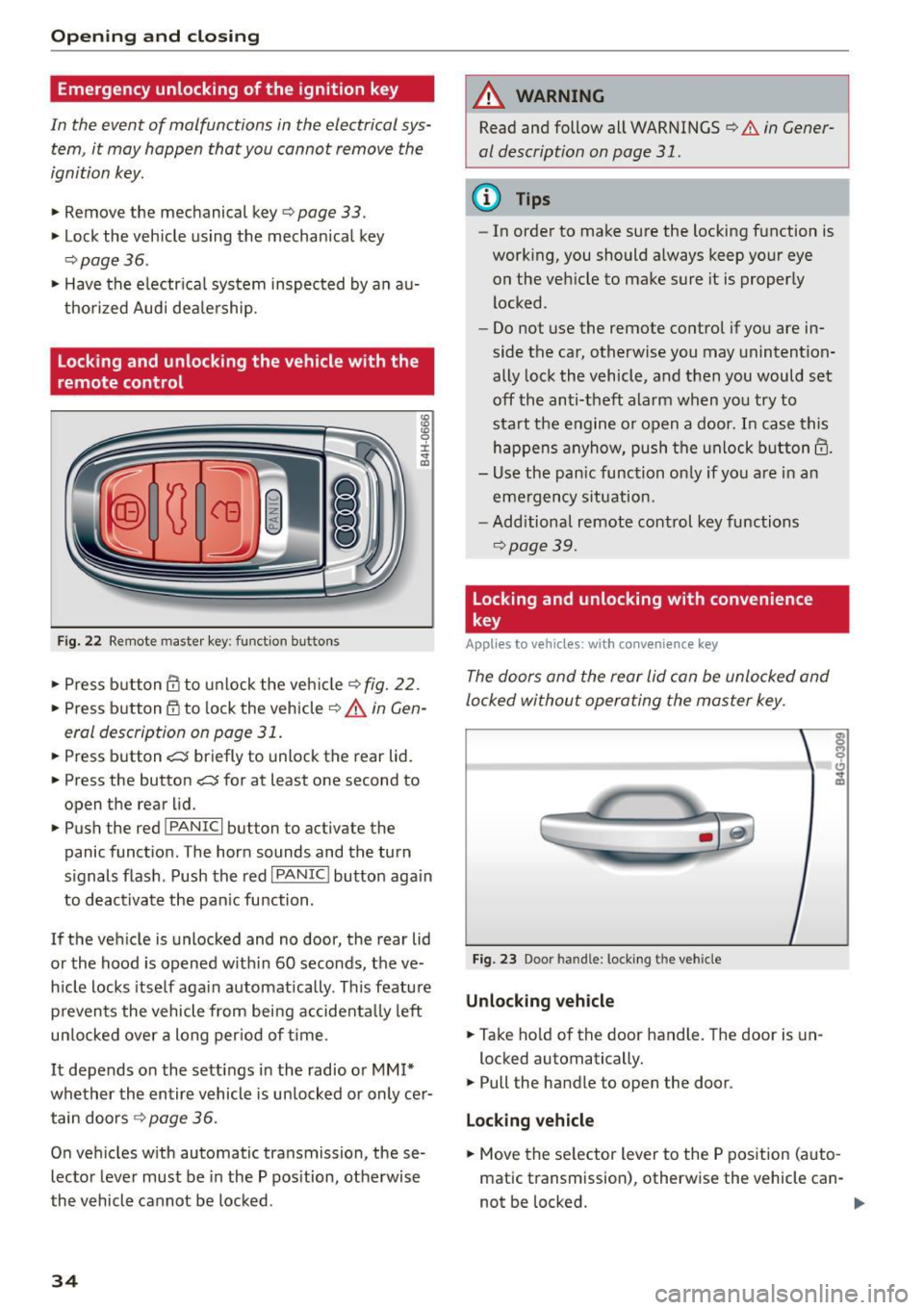
Fig. 22 Remote master key: funct ion bu tto ns
:8
"' 0 ±
"' OJ
.,. Press b utton ill to unlock the vehicle<=> fig. 22.
... Press button m to lock the vehicle ¢ A in Gen
eral description on page 31 .
.,. Press button c::5 briefly to unlock the rear lid .
.,. Press the button
c::5 for at least one second to
open the rear lid .
.,. Push the red
!PANIC I button to activate the
panic function. The horn sounds and the turn
s ignals flash . Push the red
I PANIC! button aga in
to deactivate the pan ic function .
If the vehicle is unlocked and no door, the rear lid
or the hood is opened w ith in 60 seconds, the ve
hicle locks itself again automatically . This feature
prevents the vehicle from being accidenta lly left
un locked over a long per iod of time .
It depends on the settings in the radio or
MM!*
whether the entire vehicle is unlocked or only cer
tain doors <=>
page 36.
On vehicles with automatic transmission, these
lector lever must be in the P pos ition, otherwise
the vehicle cannot be locked .
34
A WARNING
Read and follow all WARNINGS
<=> .&. in Gener
al description on page 31.
(D Tips
- In order to make sure the locking function is
work ing, you should always keep your eye
on the vehicle to make sure it is properly
locked .
- Do not use the remote control if you are in
side the car, otherwise you may unintention
ally lock the vehicle, and then you would set
off the anti-theft alarm when you try to
start the engine or open a door. In case this
happens anyhow, push the unlock button@.
- Use the pan ic function on ly if you are in an
emergency situation.
- Additional remote control key functions
¢page 39.
Locking and unlocking with convenience
key
Applies to vehicles: wit h co nvenience key
The doors and the rear lid can be unlocked and
locked without operating the master key .
Fig. 23 Door handle: lock ing the vehicle
Unlocking vehicle
.,. Ta ke hold of the door handle. The door is un-
locked automatically.
.,. Pull the handle to open the door .
Locking vehicle
.,. Move the se lector lever to the P position (auto
matic transmission), otherwise the vehicle can-
not be locked. .,..
Page 39 of 264
M N
0 loo
rl I.O
"' N
"' rl
Once the front passenger's door has been closed,
you cannot open it again from the outside. The
doo r can be opened from the inside by pulling
t he door hand le.
A WARNING
Read and follow all WARNINGS q .&. in Gener
al description on page 31 .
@ Tips
After the ignition is switched on, the power
locking system sw itch and the unlocking but
ton for the rear lid
.c::5 in the door are ena
bled .
Electronic immobilizer
The immobili zer prevents your vehicle from being
s tarted by unauthorized persons .
Inside the key there is a computer chip. This chip
automatically activates/deact ivates the electron
ic immobili zer.
Applie s to vehicl es with ign ition lock :
The electronic immobilizer deactivates automati
cally when you insert the remote control key into
the ignition lock . It activates again automatically
when you remove the remote control key from
t he ignition lock .
Applies to v eh icl es with conven ienc e key :
If t he remote control key is located inside the ve
hicle and you press the
! S TAR T ENGINE ST OPI
button, the electronic immobilizer deactivates
au tomatically . If you switch the igni tion off and
remove the remote control key from the ve hicle,
the electronic immobilizer activates again auto
mat ica lly.
A WARNING
Always take the key with you when you leave
the vehicle. The key ca n disa rm the electron ic
eng ine immob ilizer and permit an unau thor
ized pe rson to start the eng ine and enable op
eration of the vehicle systems such as power
w indow or power sunroof leading to serious
personal in jury.
Open ing and clo sing
(D Tips
- The vehicle cannot be started if an una u
thorized key is used . The vehicle may not
start if another radio device s uch as a key
for another ve hicle or a transponder is locat
ed on the key ring.
- For Declaration of Comp liance to United
States FCC and Industry Canada regulations
¢ page 247.
Luggage compartment
Lid
Opening/closing rear lid
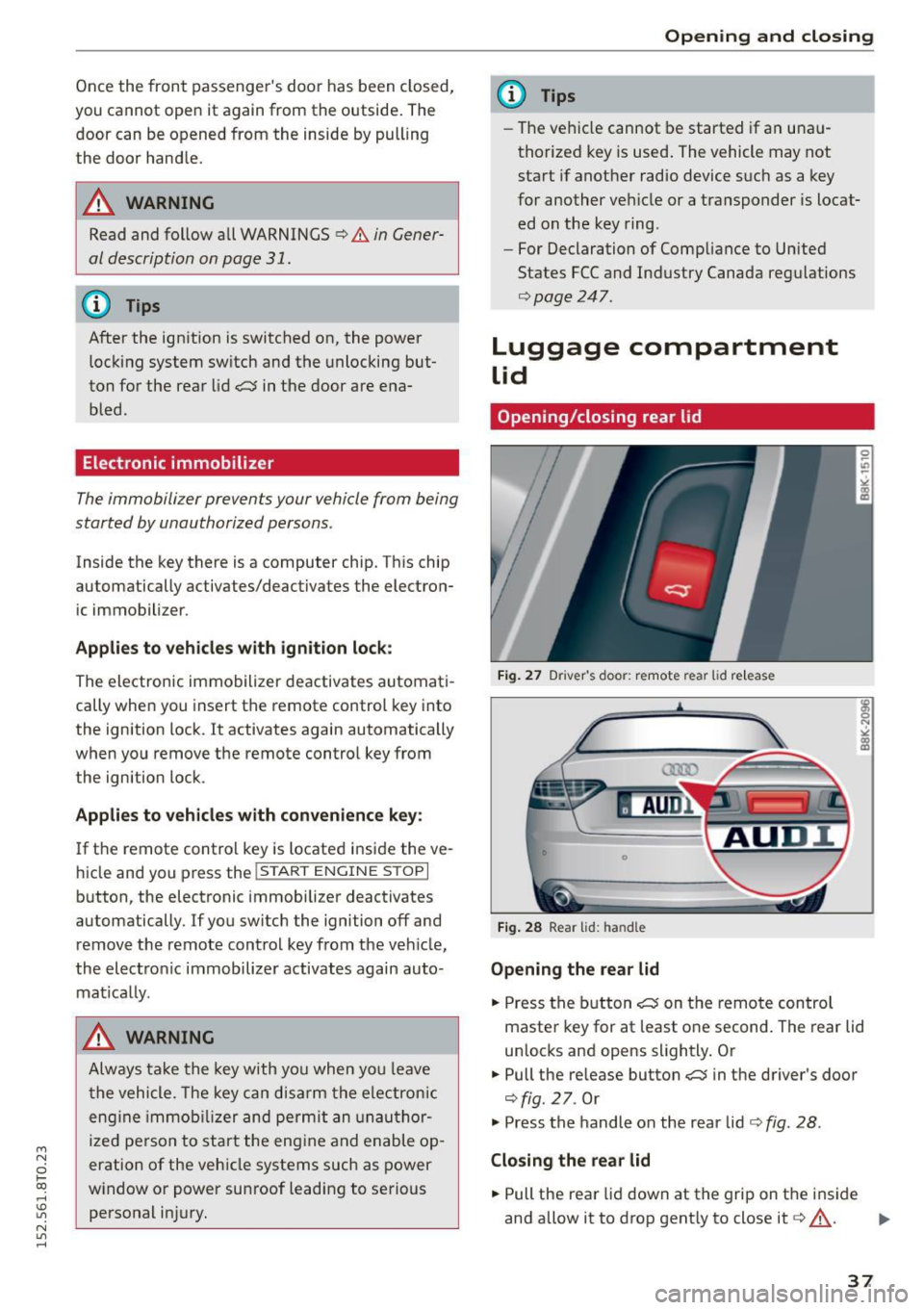
Fig. 2 7 Drive r's doo r: remot e rear lid re le a se
Fig . 2 8 Rea r lid : han d le
Opening the rear lid
.. Press the b utton .c::5 on t he remote control
maste r key for at least o ne second. The rear lid
unlocks and opens slightly. Or
.,. Pull the release button
.c::5 in the driver's door
¢fig. 27. Or
.,. Press the handle on the rear lid¢
fig. 28 .
Closing the rear lid
.. Pull the rea r lid down at the grip on t he i nside
and allow it to drop gent ly to close it¢,&. .
II>-
37
Page 41 of 264
M N
i? co ,...., \!) 1.1'1
N 1.1'1 ,....,
• Pull the switch briefly to the se con d s top to au
tomatica lly close the window.
A WARNING
-When you leave your veh icle -even if only
br iefly -always remove the ignition key. This
applies part icularly when children remain in
the vehicle. Otherwise the children could start the engine o r operate electr ical equip
ment (e.g. power w indows). The power win
dows are functional until the d river's door o r
passenger's door has been opened.
- Pay close attention when closing the w in
dows to prevent pinch ing of hands or limbs.
- When loc king the veh icle from outs ide, the
vehicle must be unoccupied since t he win
dows can no longer be opened in an emer
gency.
@ Tips
- When you open the doors, the windows au
tomatically lower about 10 mm.
- After the ignition has been switched off, the
windows can st ill be opened or closed for
abo ut 10 m inutes. The window regulato rs
are not switched until the driver's or pas
senger's door is opened .
Convenience opening/closing
The windows and the panoramic tilting sunroof
can be opened and closed with the mechanical
key or the emergency key.
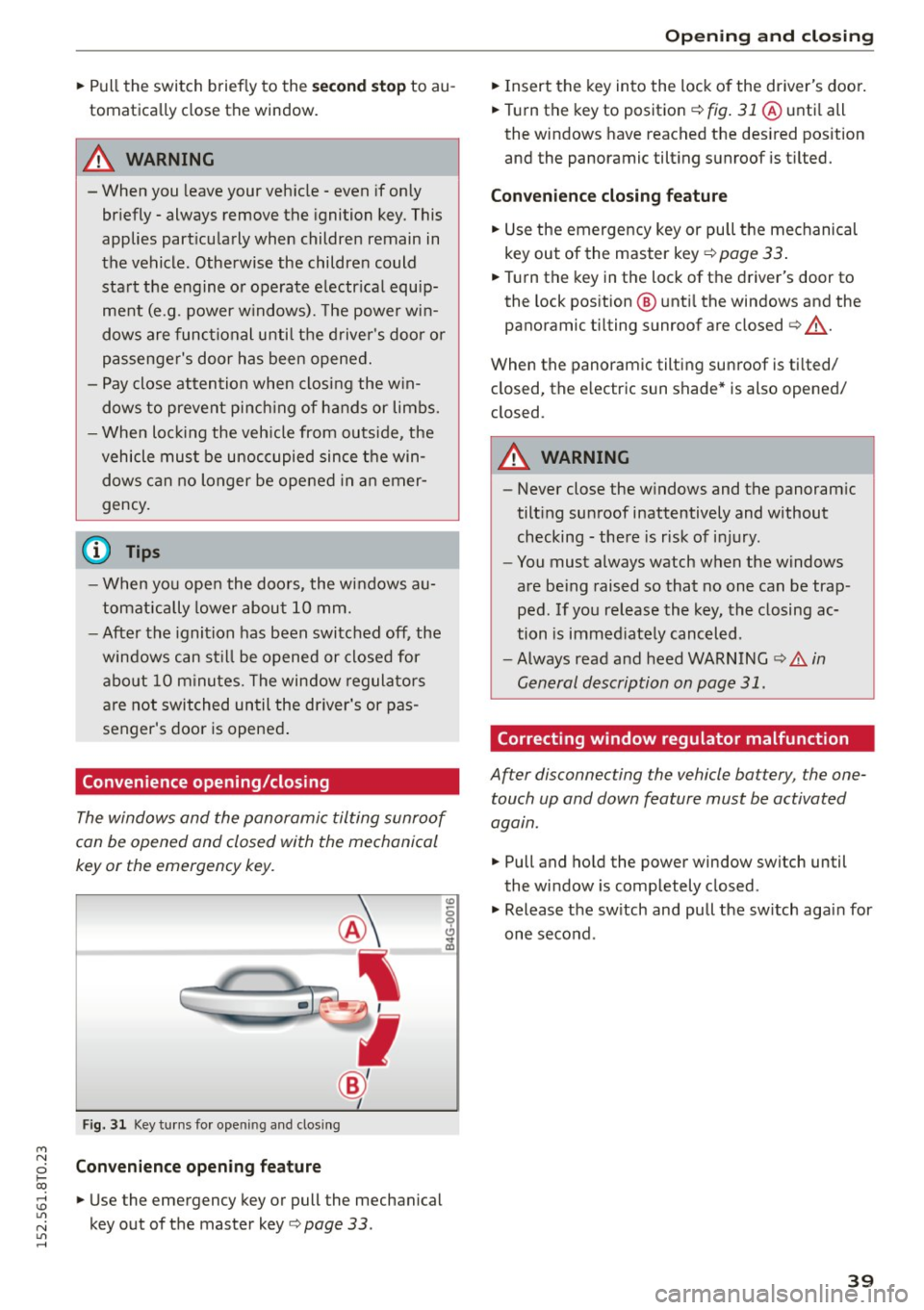
Fig. 3 1 Key tu rns fo r opening a nd clos ing
Con venience open ing fea ture
• Use the emergency key or pull the mechanical
key out of the master key
Q page 33 .
-
Opening and cl osing
• Insert the key into the lock of the driver's doo r.
• Turn the key to position
Q fig. 31 @ unti l all
the windows have reached the des ired pos ition
and the panoramic tilting sunroof is tilted.
Convenienc e clo sing featur e
• Use the emergency key or pull the mechanical
key out of the master key
Q page 33 .
• Turn the key in the lock of the d river's door to
the lock position @ unti l the windows and the
panoramic tilting sunroof are closed
Q ,A.
When the panoramic tilting sunroof is tilted/
closed, the electric sun shade* is also opened/
closed.
A WARNING
-- Never close the w indows and the panoram ic
tilt ing sunroof inattentively and without
checking - there is risk of injury.
- You must always watch when the windows
are be ing raised so that no one can be trap
ped. If you release the key, the closing ac
tion is immed iate ly canceled.
- Always read and heed WARNING
Q .&. in
General description on page 31.
Correcting window regulator malfunction
After disconnecting the vehicle battery , the one
touch up and down feature must be activated
again.
• Pull and hold the power window switch until
the window is completely closed.
• Release the sw itch and pull the sw itch again for
one second .
39
Page 70 of 264
Warm and cold
Warm and cold Climate control system
Description
The climate control system warms, cools and
adds humidity to the air in the vehicle interior. It
is the most effective when the windows and sun
roof are closed. If there is a build-up of heat in
side the vehicle , ventilation can help to speed up
the cooling process.
In all heating mode functions except
defrost, the
blower only switches to a higher speed once the
engine coolant has reached a certain tempera
ture.
Condensation from the cooling system can drip
and form a puddle of water under the vehicle.
This is normal and does not mean there is a leak.
Pollutant filter
The pollutant filter removes pollutants such as
dust and pollen from the air.
The air pollutants filter must be changed at the
intervals specified in your Warranty & Mainte
nance booklet, so that the air conditioner can
properly work.
If you drive your vehicle in an area with high air pollution , the filter may need to be changed
more frequently than specified in your Audi War
ranty
& Maintenance booklet. If in doubt, ask
your authorized Audi Service Advisor for advice.
Key coded settings
The climate control settings are automatically
stored and assigned to the remote control key
that is in use .
.8, WARNING
Reduced visibility is dangerous and can cause
accidents.
- For safe driving it is very important that all
windows be free of ice, snow and condensa
tion.
68
- Completely familiarize yourself with the
proper use and function of the heating and
ventilation system and especially how to de
fog and defrost the windows .
- Never use the windshield wiper/washer sys
tem in freezing weather until you have
warmed the windshield first, using the heat
ing and ventilation system . The washer solu
tion may freeze on the windshield and re
duce visibility .
(D Note
-If you suspect that the air conditioner has
been damaged, switch the system off to
avoid further damage and have it inspected
by a qualified dealership.
- Repairs to the Audi air conditioner require
special technical knowledge and special
tools. Contact an authorized Audi dealer for
assistance.
@ For the sake of the environment
By reducing the amount of fuel you use, you
also reduce the amount of pollutants emitted
into the air.
(D Tips
-Keep the air intake slots (in front of the
windshield) free from ice, snow and debris
in order to maintain the proper function of
the climate control system.
- The energy management system may switch
the seat heating* or rear window defroster
off temporarily. These systems are available
again as soon as the energy balance has
been restored.
- Air escapes through vents under the rear
window. When placing items of clothing on
the luggage compartment cover, ensure
that the openings are not covered.
Page 72 of 264
Warm and cold
l= I Swit ching recir culation m ode on /off
In recirculation mode, the air ins ide the vehicle is
circu lated and filtered . This prevents the unfil
tered air outside the vehicle from entering the
ve hicle interior . We recommend switching recir
culation mode on when driving through a tunne l
or when sitting in traffic
c:> ,&. .
The IAU TOI button or lllll> F RONT I button switches
recirculation mode off .
IAUTOI Switching automatic mode on
Automatic mode ma inta ins a constant tempera
ture inside the vehicle. A ir temperature, airflow
and ai r distribution are controlled automatica lly .
Adjusting th e tempe ratur e
Temperatures between 60 °F (+16 °C) and 84 °F
( + 28 °C) can be set. Outside of this range,
LO or
HI will appear in the cl imate control system dis
p lay. At both of these settings, the climate con
trol system r uns continuously at maximum cool
i n g or heating power. There is no temperat ure
regulation.
~ Ad justing the airflow
You can adjust the a irf low manually to su it yo ur
needs . To have the airf low regulated automatica l
ly, press the
IAUTO I button .
~ Adjusting the air distribution
You can manually se lect the vents where the air
will flow. To have the air distr ibution reg ulated
automatically , press the
!AUTO ! button.
QJ Adjusting seat h eating *
Pressing the button sw itches the seat heating on
at the h ighest setting (level 3) . The LEDs indicate
the tempe ratu re leve l. To reduce the tempe ra
ture, press the button again . To switch the seat
heating off, press the button repeatedly unt il the
L ED turns off .
Afte r 10 minutes, the seat heat ing automat ica lly
sw itches from level 3 to leve l 2.
~ Adjust ing seat ventilation*
Pressing the button switches the seat ventilation
on at the highest setting (level 3) . The LEDs indi-
70
cate the ventilation level. To reduce the ventila
tion level, press the button again. To switch the
seat ventilation off , press the button repeatedly
u nt il the LED turns off .
I@ FRONT I Switch the defro ste r on /off
The w indshield and side windows are defrosted
or cleared of condensation as q uickly as possib le.
The maximum amount of air f lows mainly from
the vents below the windshield. Recirculation
mode switches off. The temperature should be
set to 72 °F (22 °C) or h igher. The temperature is
controlled automat ically.
The
! AUTO ! button switches the defroster off.
lliil REAR I Switch ing rear window he ater on /
off
The rear window heater on ly operates when the
engine is runn ing . It switches off automatically
after a few minutes, depending on the outside
temperature.
To prevent the rear window heater from switch ing off automatically, press and hold the
I Cliil REARI
button for more than 2 seconds. This remains
stored until the ignit ion is switched off.
Air vents
You can open and close the center and rear air
vents using the th umbwhee ls . The levers adjust
the d irection of the airflow from the vents.
In vehicles with a 3-zone deluxe automa tic cli
mate control system*, you can adjust the air tem
perature in the rear by turning the thumbwhee l
toward the red side to make it warmer or toward
the blue side to make it cooler.
A WARNING
- Do not use the recircu lation for extended
periods of time. The windows could fog up
since no fresh air can enter the vehicle. If
the wi ndows fog up, press the air rec ircula
tion button again immed iate ly to sw itch off
the air recirc ulation func tion or selec t de
frost.
- I ndivid ua ls w ith red uced sensitivity to pain
or tempera ture could develop burns when
using the seat heating f unction . To reduce
-