sport mode AUDI A5 2015 Owner´s Manual
[x] Cancel search | Manufacturer: AUDI, Model Year: 2015, Model line: A5, Model: AUDI A5 2015Pages: 264, PDF Size: 66.83 MB
Page 16 of 264
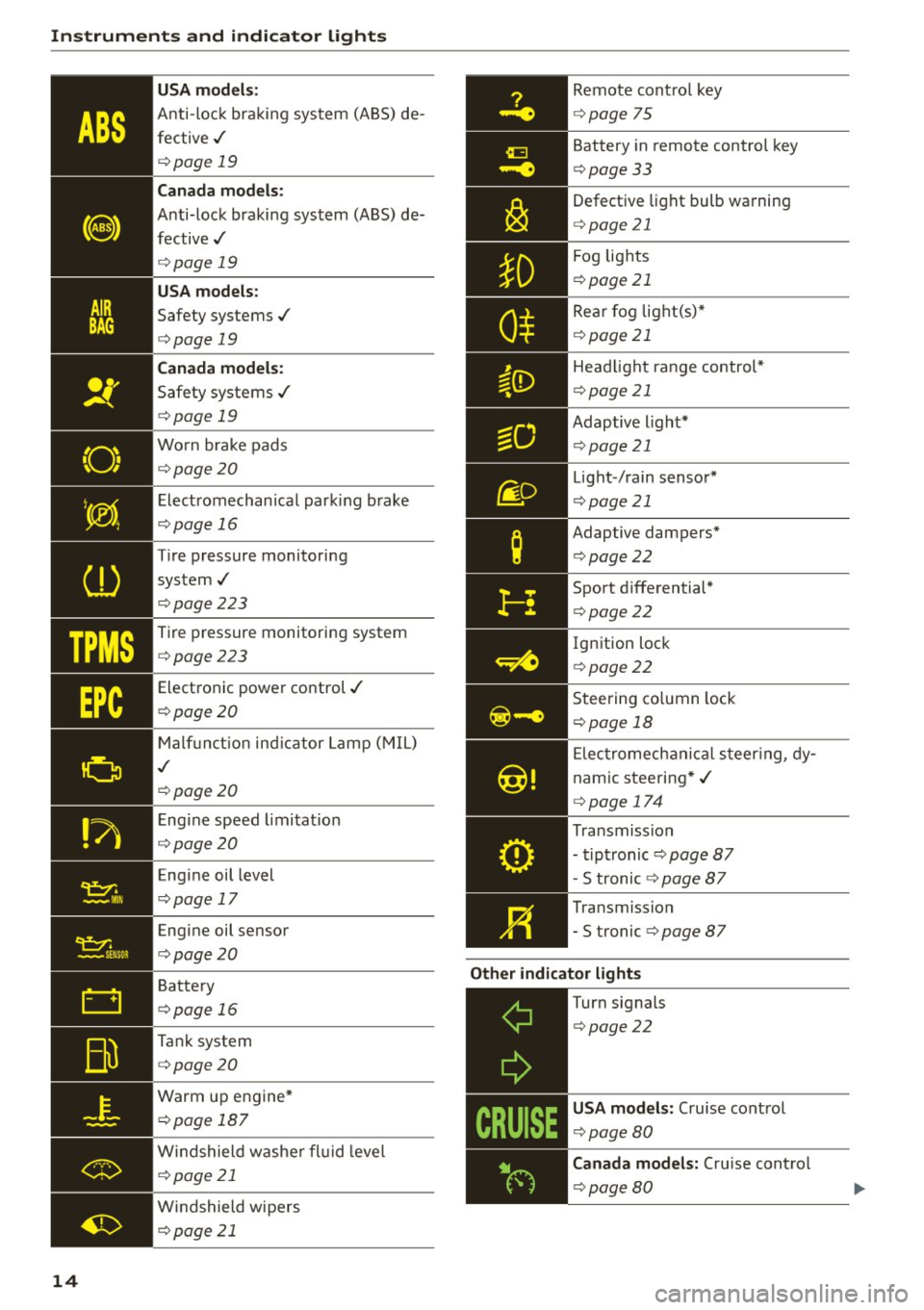
Instruments and indicator lights
TPMS
-~--
14
USA m odel s:
Anti-loc k braking system (ABS) de
fective,/
¢ page 19
Canada mod els :
Anti-lock braking system (ABS) de
fective,/
¢ page 19
USA models :
Safety systems./
¢page 19
Canada model s:
Safety systems ./
¢page 19
Worn brake pads
¢ page20
Elect romechanical parking b rake
¢page 16
Tire pressure monitoring
system,/
¢ page 223
Tire pressure monitoring system
¢page223
Electronic power control./
¢page20
Malf unct ion ind icator Lamp (MIL)
,I
c::>page 20
Engine speed limitat ion
c::> page20
Engine oil level
c::> page 17
Engine oil sensor
c::>page20
Battery
c::>page 16
Tank system
c::>page20
Warm up engine*
¢page 187
Windshield washe r flu id leve l
¢page 21
Windshield wipers
¢page 21
Remote cont ro l key
¢ page 75
Battery in remote control key
¢page 33
Defect ive light bulb wa rning
<=> page 21
Fog lights
¢page 21
Rear fog lig ht(s)*
c> page 21
Headlight range control*
c>page 21
Adaptive light*
c>page 21
Light-/rain sensor*
c>page 21
Adaptive dampers*
c>page22
Sport d ifferential *
<=>page22
Ig nition lock
c>page22
Steering co lumn lock
¢ page 18
Elec tromechanical s teer ing, dy
nam ic stee ring* ,/
c>page 174
Transmission
- tiptronic
c> page 87
-S tronic c::> page 87
Transmission
-5 tronic
<=> page 87
Other indicator light s
~--==------------Turn signals
<=>page22
USA mod els: Cruise cont rol
c> page80
Canada mod els : Cru ise contro l
c>page 80
Page 84 of 264
Automatic transmission
Automatic transmission
Manual transmission
Gearshift lever
Applies to vehicles: with manual transmission
The clutch pedal must be depressed all the way
before you can start the engine .
The manual transmission in your Audi is equipped
with an
interlock-feature.
• Depress the clutch pedal all the way.
• Start the engine with the gearshift lever in Neu
tral and the clutch pedal depressed.
(D Note
Always depress the clutch pedal fully when
changing gears . Do not hold the vehicle on a
hill with the clutch pedal partially depressed.
This may cause premature clutch wear or damage.
@ Tips
- Resting your hand on the gearshift lever
knob while driving will cause premature
wear in the transmission.
- The back-up lights go on when you sh ift into
Reverse with the ignit ion on.
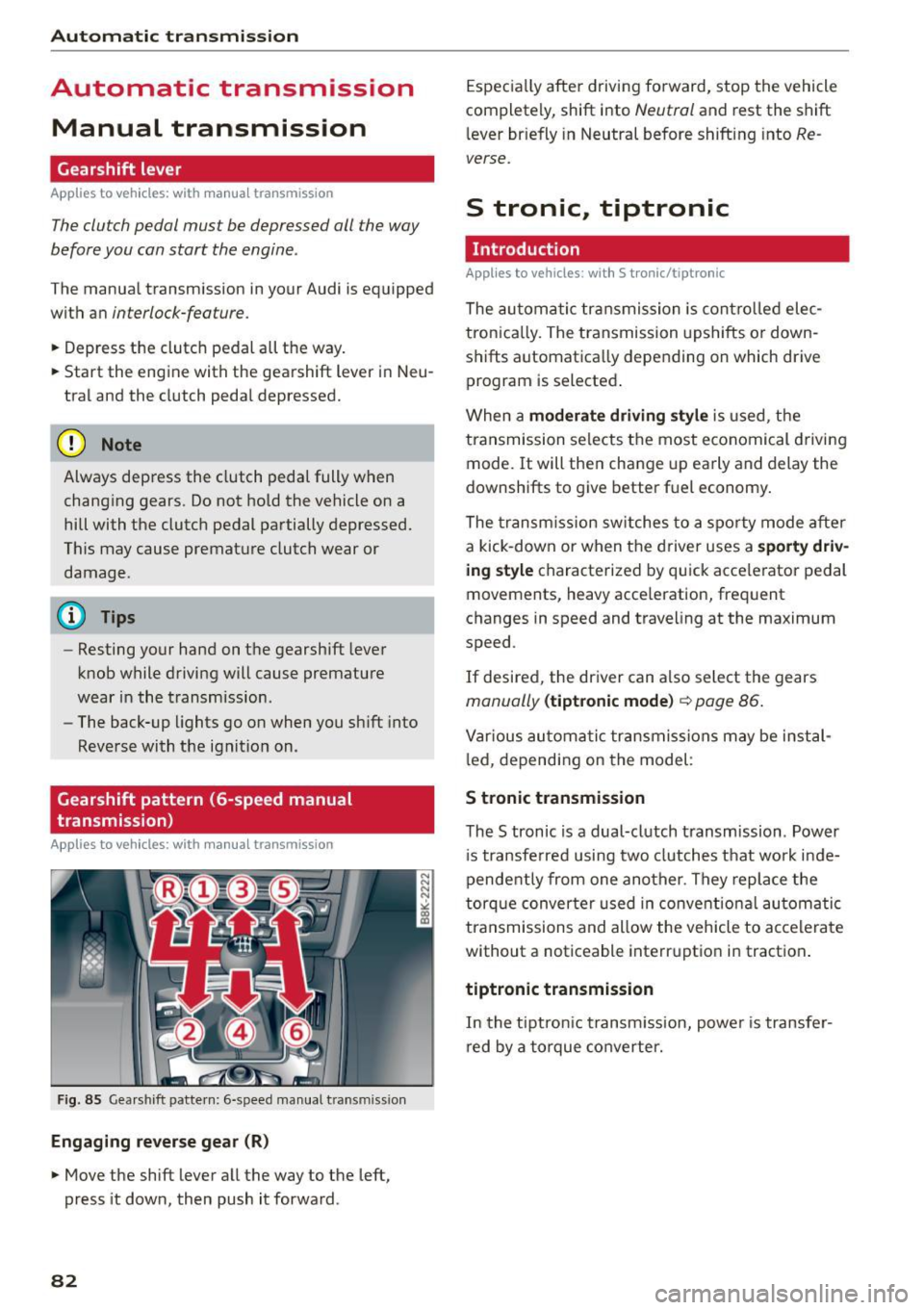
Gearshift pattern (6-speed manual
transmission)
Applies to vehicles: with manual transmission
Fig. 85 Gearshift pattern: 6-speed manual transmiss ion
Engaging reverse gear (R)
• Move the shift lever all the way to the left,
press it down, then push it forward .
82
Especially after driving forward, stop the vehicle
completely, shift into
Neutral and rest the shift
lever briefly in Neutral before shifting into
Re
verse.
S tronic, tiptronic
Introduction
Applies to vehicles: with S tronic/tiptronic
The automatic transmission is controlled elec
tron ically. The transmission upshifts or down
shifts automatica lly depending on which drive
program is selected .
When a
moderate driving style is used, the
transmission selects the most economical driving
mode. It will then change up early and delay the
downshifts to give better fuel economy.
The transmission switches to a sporty mode after
a kick-down or when the driver uses a
sporty driv
ing style
characterized by quick acce lerator pedal
movements, heavy acce leration, frequent
changes in speed and traveling at the maximum
speed .
If desired, the driver can a lso select the gears
manually (tiptronic mode) c::> page 86.
Various automatic transmissions may be instal
l ed, depending on the model :
S tronic transmission
The S tronic is a dual-clutch transmission . Power
i s transferred using two clutches that work inde
pendently from one another . They replace the
torque converter used in conventio nal automatic
transmissions and allow the vehicle to accelerate
without a noticeable interruption in traction .
tiptronic transmission
In the tiptronic t ransm ission, power is transfer
red by a torque converter.
Page 85 of 264
M N
0 loo
rl I.O
"' N
"' rl
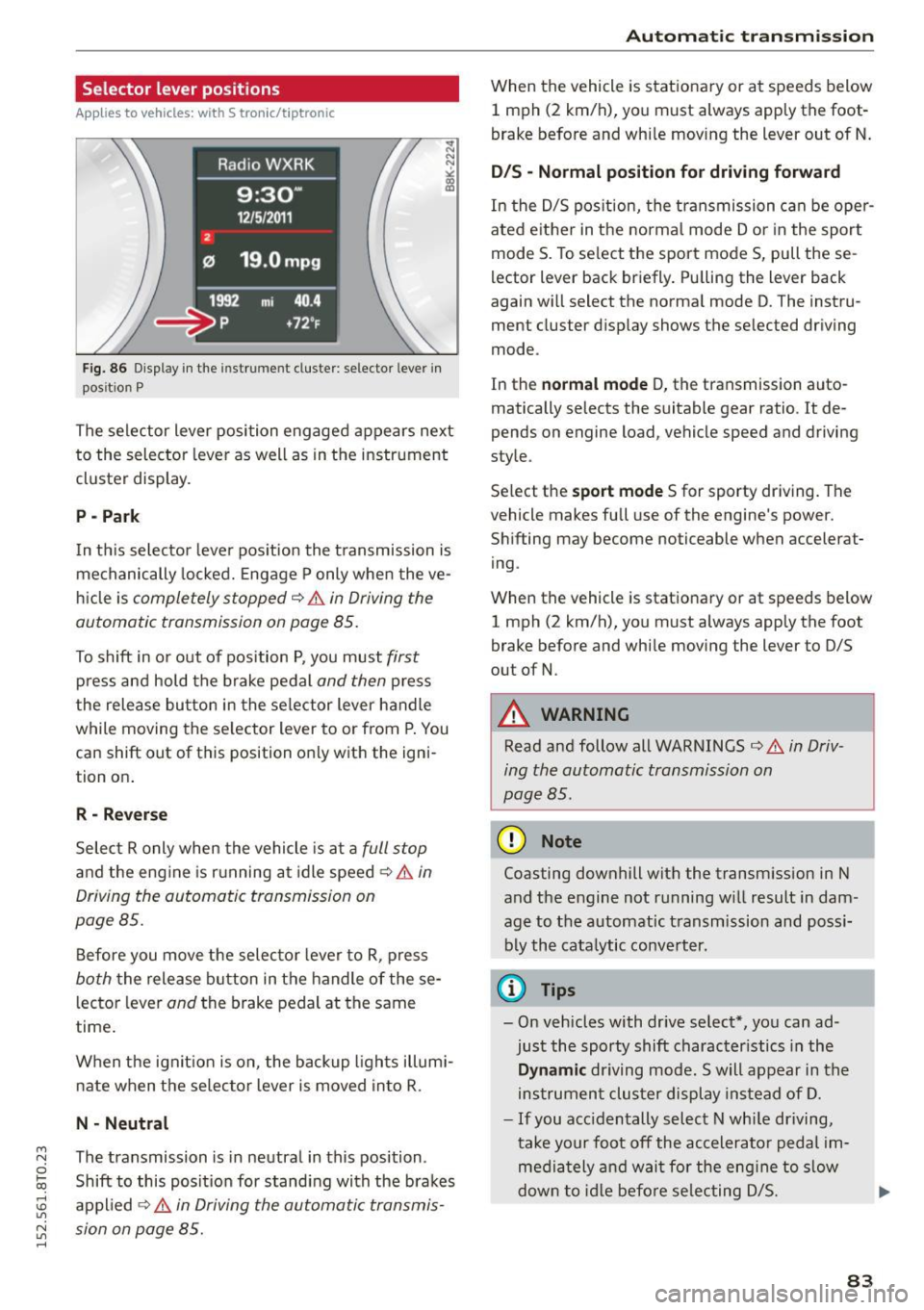
Selector lever positions
Applies to vehicles: with S tronic/tiptronic
Fig. 86 Display in the instr um en t cluster : selecto r lever in
pos it ion P
The selector lever position engaged appears next
to the selector lever as well as in the instrument
cluster display.
P -Park
In th is selector lever pos ition the t ransmission is
mechanically locked. Engage P only when the ve
hicl e is
completely stopped q &. in Driving the
automatic transmission on page 85.
To shift in or out of position P, you must first
press and hold the brake pedal and then press
the release button in the selector lever handle
while moving the selector lever to or from P. You
can shift out of this position only with the igni
tion on .
R - Reverse
Select R only when the vehicle is at a full stop
and the engine is running at idle speed q &. in
Driving the automatic transmission on
page 85.
Before you move the selector lever to R, press
both the release button in the handle of the se
l ector lever
and the brake pedal at the same
time .
When the ignit ion is on, the backup lights illumi
nate when the se lector lever is moved in to R .
N · Neutral
The transmission is in neutral in this position .
Shift to this posit ion for standing with the brakes
applied ~
A in Driving the automatic transmis
sion on page 85.
Automatic transmission
When the vehicle is stationary or at speeds below
1 mph (2 km/h), yo u must always apply the foot
brake before and while moving the lever out of N.
D/S · Normal position for driving forward
In the D/S position, the transmission can be oper
ated e ither in the normal mode Dor in the sport
mode S. To se lect the sport mode S, pull these
l ector lever back briefly. Pu lling the lever back
again will select the norma l mode D. The instru
ment cluster display shows the selected driving
mode.
In the
normal mode D, the transmission auto
matically selects the suitable gear ratio.
It de
pends on engine load, vehicle speed and driving
style.
Se lect the
sport mode S for sporty driving. The
vehicle makes full use of the engine's power.
Shifting may become noticeable when accelerat
ing .
When the vehicle is stationary or at speeds below
1 mph (2 km/h), you must always app ly the foot
brake before and while moving the lever to D/S
out of N.
_& WARNING
--
Read and follow all WARNINGS ca> A in Driv
ing the automatic transmission on
page 85.
(D Note
Coasting downhill with the transm ission in N
and the engine not running w ill result in dam
age to the automatic transmission and possi
bly the cata lytic converter.
¢j) Tips
-On vehicles with dr ive select*, you can ad
just the sporty shift character istics in the
Dynamic driving mode. Swill appear in the
instrument cluster display instead of D.
- If you acc identally select N whi le driving,
take your foot off the accelerator pedal im
mediately and wait for the engine to slow
down to idle before selecting D/S.
83
Page 89 of 264
M N
i? co ,...., \!) 1.1'1
N 1.1'1 ,....,
will return to automatic mode. To keep shifting
using the shift paddles, move the s elector lever
to the right out of the 0/5 position.
The t ransmission automatically shifts up o r down
before critica l engine speed is reached.
The transmission only allows manua l shift ing
when the engine speed is within the permitted range .
@ Tips
-When you sh ift into the next lower gear, the
transmission will downshift only when there i s no poss ibility of over -revving the engine.
- When the kick-down comes on, the trans
mission will sh ift down to a lower gear, de
pending on vehicle and engine speeds .
- Tiptronic is inoperat ive when the transmis
s ion is in the fa il-safe mode .
Kick-down
Appl ies to vehicles: with S tro nic/t iptronic
Kick-down enables maximum acceleration.
When you depress the accelerato r pedal beyond
the resistance po int, the automatic transm iss ion
downshifts into a lower gear, depend ing o n ve hi
cle speed and engine speed. The upsh ift into the
nex t higher gear ta kes place once the maximum
specified engine speed is reached .
A WARNING
Please note that the drive wheels can spin if
kick-down is used on a smooth slippery road -
there is a risk of sk idding.
Launch Control Program
App lies to vehicles: with S tro nic
Th e Launch Control Program provides the best
acceleration possible when starting from a stop .
Requirement: The engine must be at operating
temperature and the steering wheel must not be
turn ed .
.,. Press the
1.$ O FF I button ¢ page 171 while the
engine is running. The
II i ndicator light ill umi
nates i n the instrument cluster and
Stabiliza-
Aut omatic transm issio n
tion control (ESC): Sport. W arning! Re stri cted
s tability
appears in the driver information sys
tem display .
.,. Move the sele ctor leve r to the 0/5 position to
select spo rt mode (5) or se lect the
d y namic
driving mode in drive se lect* ¢ page 103 .
.,. Press the brake pedal strongly with your left
foot and ho ld it down fo r at least 1 second.
.,. At the same time, press the accelerator pedal
down comp lete ly with yo ur right foot u nti l th e
eng ine reaches and mainta ins a high R PM .
.,. Remove your foot from the brake pedal within 5
seconds ¢
,A.
A WARNING
-Always adapt your dr iving to the traff ic flow.
- Onl y use the Launch Cont ro l Program when
road and traffic cond itions allow it and oth
er drivers will not be endangered or annoyed by your driving and the vehicle's acce lera
tion .
- Please note that the driving wheels can spin
and the vehicle can break away when sport
mode is switched on, especially when the
road is s lippery .
- Once you have accelerated, you shou ld
sw itch sport mode off by pressing the
l.f3 OFF I button .
(D Tips
-The tra nsmission temperature may increase
signif icant ly after us ing the Launch Contro l
Program. If that happens , the program may
not be availab le for a few minutes.
It wi ll be
available again afte r a cool-down per iod.
- When acc elerating using the Launch Control
program, a ll vehicle parts are subject to
heavy loads. Thi s can resu lt in in creased
wear.
Transmission malfunction
App lies to vehicles : wi th S tronic/tip tro nic
[cjJ Tran smi ssion: Pre ss brake pedal and select
gear again . ..,.
87
Page 90 of 264
Automatic transmission
Press the brake pedal a nd se lect the desi red se
lector le ver positio n again. You can then continue
driving .
rm Transmi ssion overheating : Please drive con·
s ervatively .
The transmission temperature has increased sig
n ifi cant ly due to the s porty dr iv ing m anne r. D rive
i n a less sporty manner u ntil t he tempera ture re
tur ns to the normal range and the indica to r li ght
switches of .
rm Transmission malfunction: You can continue
driving
There is a system ma lfunction in the tra nsmis
sion . You may continue driving. Drive to your au
thor ized A udi de aler or qu alified repair f acility
soon to have the ma lfunct io n corrected.
[O] Transmission malfunction: Limited driv ing
functionality
There is a system ma lf u nction in the tra nsmis
sion . The transmission is sw itch ing to emergency
mo de . T his mode only shifts into certa in gears o r
w ill no longer s hift a t all. The engi ne may stall.
D rive t o your author ized Aud i de aler o r q ualified
re pai r facili ty immedia tely to have the m alfu n c
tion correcte d.
l'§J l:t Transmission malfunction : No reverse
You c an continue driving
S tron ic tr ansm ission : There is a sys tem ma lf u nc
tion in the transmiss io n. The transm iss ion is
sw itching to emergency mode . Thi s mode on ly
shi fts i nto ce rtain ge ars or w ill no longer shi ft at
a ll . T he engine may s tal l. You canno t engage the
reve rse gear . Dr ive to your authorized Audi dea ler
or qualified repair faci lity immediately to have
the ma lfunction corrected .
rm Transmission malfunction: Stop vehicle and
s hift to park.
D o not cont inue d riving. Select the P se le ctor lev
er position and see yo ur auth orize d Aud i de aler
or qualified rep air f acili ty for assist ance.
(D Note
If the trans mission s witc hes to e mergen cy
m od e, y ou s hould ta ke the vehicle to an au-
88
thorized Audi dea lership as soon as possible
to have the condition correcte d.
Selector lever emergency release
Applies to vehicles: with S tronic/tiptro nic
If the vehicle's power supply fails, the sele ctor
lever can be released in an emergency .
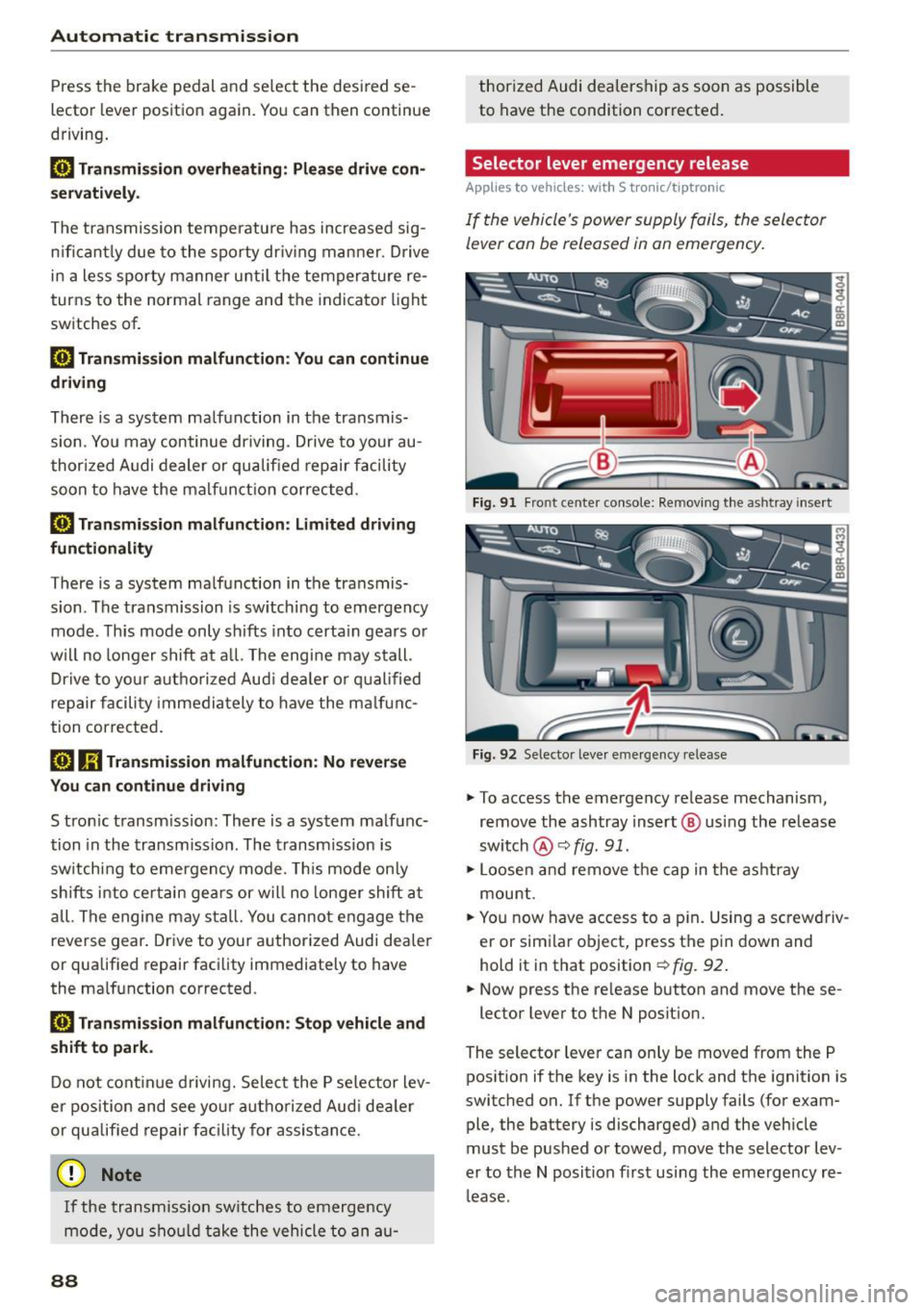
Fig. 91 Fro nt ce nte r co nsole : Rem oving t he as htray i nse rt
Fig. 92 Selec to r leve r em erge ncy re lease
.,. To access the emergency re lease mechanism,
remove the ashtray insert @ using the release
sw itch
@ ¢fig. 91.
.,. Loosen a nd remove t he cap in t he as htray
mou nt.
.,. Yo u now have access to a p in. Using a sc rewdriv
er or sim ila r o bject, press t he pi n down and
hold it in that position
¢ fig. 92 .
.,. Now press the re lease button and move these -
lector lever to t he N posit ion.
The selector leve r ca n only be moved from the P
pos ition if the key is in the lock and the ignition is
switc hed on . If the power supply fails (for exam
ple, the battery is discharged) and the veh icle
must be pus hed or towed, move the selector lev
er to th e N position fi rst usi ng the emerg ency re
l ease .
Page 104 of 264
Audi drive select
Audi drive select
Driving settings
Introduction
Applies to veh icles: w ith Audi drive select
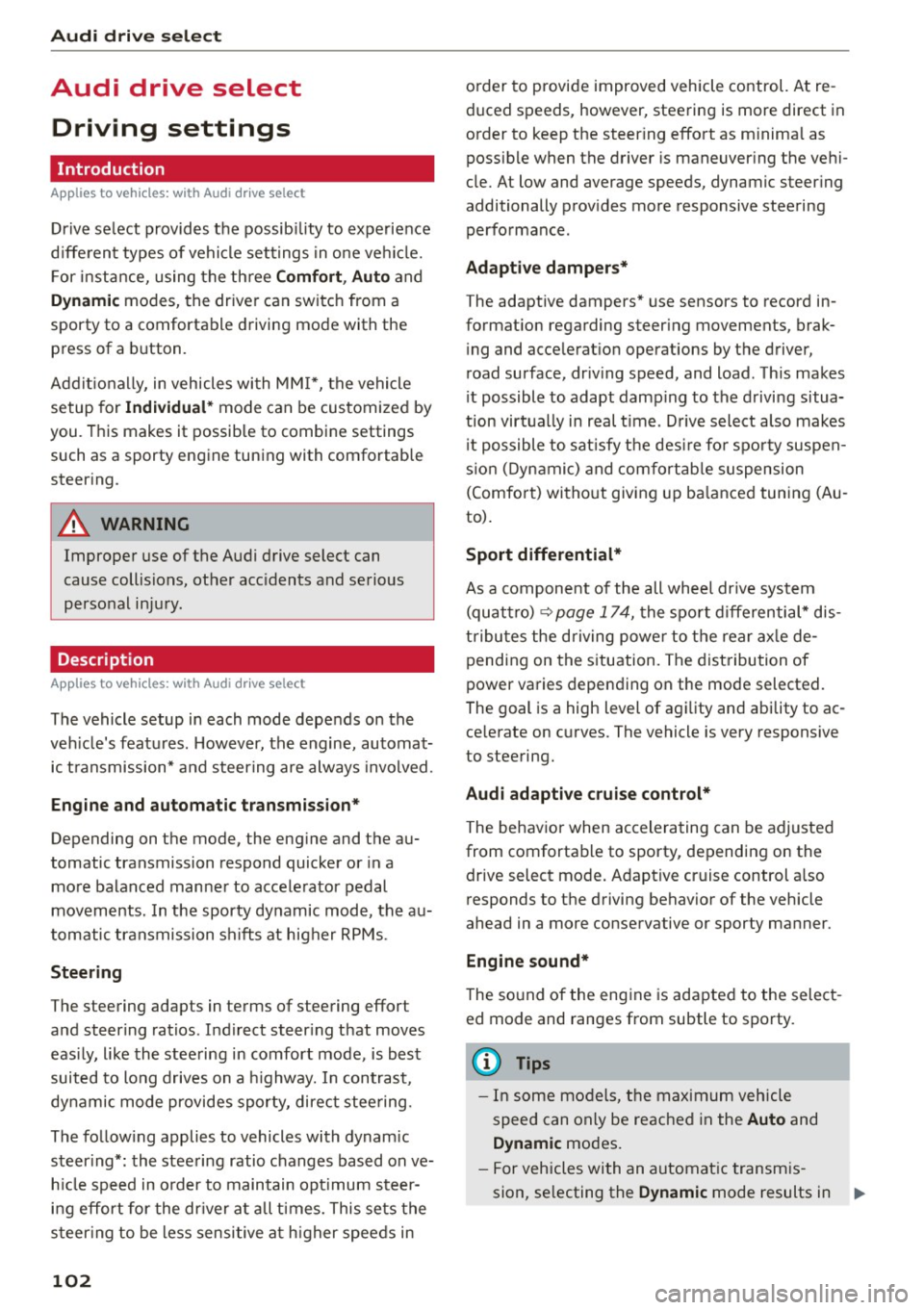
Drive select provides the possibility to experience
d ifferent types of vehicle settings in one vehicle.
F or instance, using the three
Comfort, Auto and
Dynamic modes, the driver can switch from a
sporty to a comfortable driving mode with the press of a button.
Addit ionally, in vehicles with MM I*, the vehicle
setup for
Individual* mode can be customized by
you. This makes it possible to combine settings
such as a sporty engine tuning with comfortable
steering .
A WARNING
Improper use of the Audi drive select can
cause collisions, other acc idents and serious
personal injury.
Description
Applies to veh icles: w ith Audi dr ive select
-
The vehicle setup in each mode depends on the
veh icle's features . However, the engine, automat
ic transmission* and steering are always involved.
Engine and automatic transmission*
Depending on the mode, the engine and the au
tomatic transmission respond quicker or in a
more balanced manner to accelerator pedal
movements. In the sporty dynamic mode, the au
tomatic transmission shifts at higher RPMs.
Steering
The steering adapts in terms of steering effort
and steering ratios. Indirect steer ing that moves
easily, like the steering in comfort mode, is best
suited to long drives on a highway. In contrast,
dynamic mode provides sporty, direct stee ring.
The follow ing applies to vehicles with dynam ic
steer ing*: the steering ratio changes based on ve
h icle speed in order to maintain optimum steer
ing effort for the dr iver at all times. This sets the
s teer ing to be less sensitive at higher speeds in
102
order to provide improved vehicle control. At re
duced speeds, however, steering is more direct in
order to keep the steer ing effort as m inima l as
possib le when the driver is maneuver ing the vehi
cle. At low and average speeds, dynam ic steering
additionally provides more responsive steering
performance.
Adaptive dampers*
The adaptive dampers* use sensors to record in
formation regarding steering movements, brak ing and acceleration operations by the driver,
road surface, driving speed, and load. This makes
i t possible to adapt damp ing to the driving situa
tion virtually in real t ime . Drive select also makes
i t possible to sat isfy the desire fo r sporty suspen
s ion (Dynamic) and comfortable suspension
(Comfo rt) without giving up ba lanced tuning (Au
to).
Sport differential*
As a compone nt of the all whee l dr ive system
(quattro)
<> page 174, t he sport differential* dis
tributes the driving power to the rear axle de
pending on the situation. The distribution of
power varies depending on the mode selected.
The goal is a high level of agility and ability to ac
ce lerate on curves. The vehicle is very responsive
to steering.
Audi adaptive cruise control*
The behavior when accelerating can be adjusted
from comfortable to sporty, depending on the drive select mode. Adaptive cruise control a lso
responds to the driving behavior of the vehicle
ahead in a more conservative or sporty manner.
Engine sound*
The sound of the engine is adapted to the select
ed mode and ranges from subtle to sporty.
(D Tips
- In some models, the maximum vehicle
speed can only be reached in the
Auto and
Dynamic modes.
- For vehicles with an automatic transmis-
sion, se lecting the
Dynamic mode results in 1111-
Page 105 of 264
M N
0 loo
rl I.O
"' N
"' rl
sporty sh ifting charac ter istics . The 5 gear
position engages automatically.
- In vehicles that have dynamic steering*, op
erating noise is hea rd when starting or sto p
p ing the engine . This does not indicate a
problem.
Selecting the driving mode
Applies to vehicles: with Audi drive select
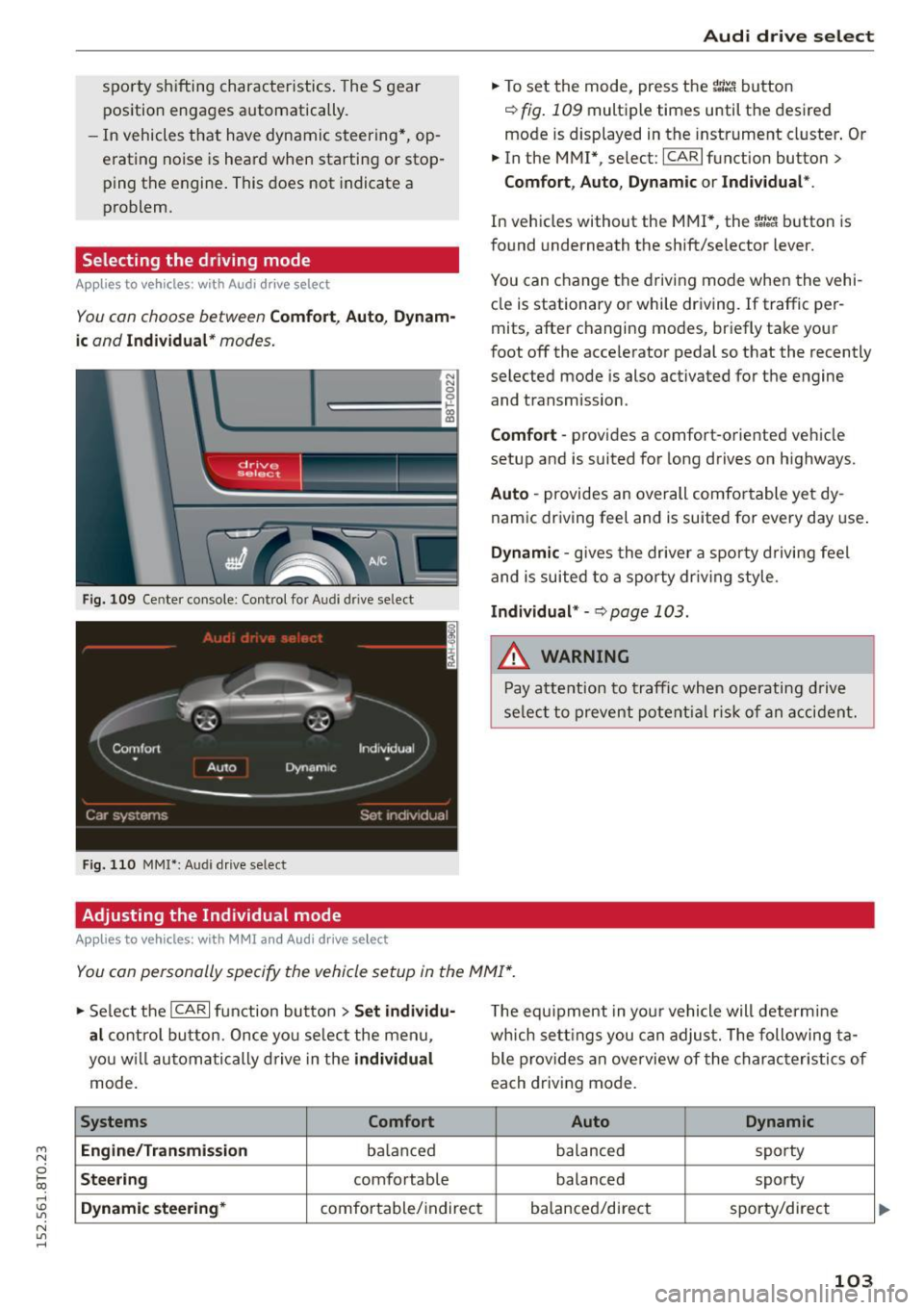
You con choose between Comfort , Auto , Dynam·
ic
and Individual * modes.
N N 0
~=== =:::: ~ ~
drive I se lect _ ~ -~-
F ig . 109 Ce nter co nso le : Con trol fo r A udi dri ve se lect
F ig. 110 MMI*: Audi drive se lect
Adjusting the Individual mode
Applies to vehicles: with MMI an d Aud i d rive select
Aud i drive select
.,. To set the mode, press the r.:i:.~ button
~ fig . 109 multip le times until the des ired
mode is displayed in the instrument cl uster . Or
.,. In the M MI*, se lect : ICARlfunction button>
Comfort , Auto , Dyn amic or Individual *.
In veh icles without the MMI*, the r:l:e'i button is
fo und underneath the shift/selector lever.
You can change the driving mode when the vehi
cle is stationary or while dr iving.
If traffic per
mits, after c hanging modes, briefly take your
foot off the acce lerator pedal so that the recently
selected mode is also activated for t he engine
and transmission .
Comfort -provides a comfort-o riented veh icle
setup and is suited for long drives on highways.
Auto -provides an overall comfo rtable ye t dy
nam ic dr iving feel and is suited for every day use .
Dynamic -gives the driver a spor ty driving feel
and is suited to a sporty dr iv ing style.
Individual * -~ page 103 .
.&, WARNING
-Pay atte ntion to tra ffic when op era ti ng d rive
se lect to preven t pote ntial r is k of an a cci dent.
You con personally specify the vehicle setup in the MMI* .
.,. Se lect the ICAR I function bu tton > Set individu·
al
c o ntro l bu tton. Once yo u se lec t the me nu,
yo u will a utoma tical ly dr ive in the
individual
mode.
Systems Comfort
Engine/Transmi ssion
balan ced
Steering comfo rtable
Dynamic steering* comfor table/ indirect T
he equipment in you r vehicle will determine
wh ich se tt in gs y ou can adjust. The following ta
ble p rov ides an overview of the charac teristics of
each driving mode.
Auto Dynamic
balanced sporty
balanced sporty
ba lanced/direct sporty/direct
103
Page 106 of 264
Audi drive select
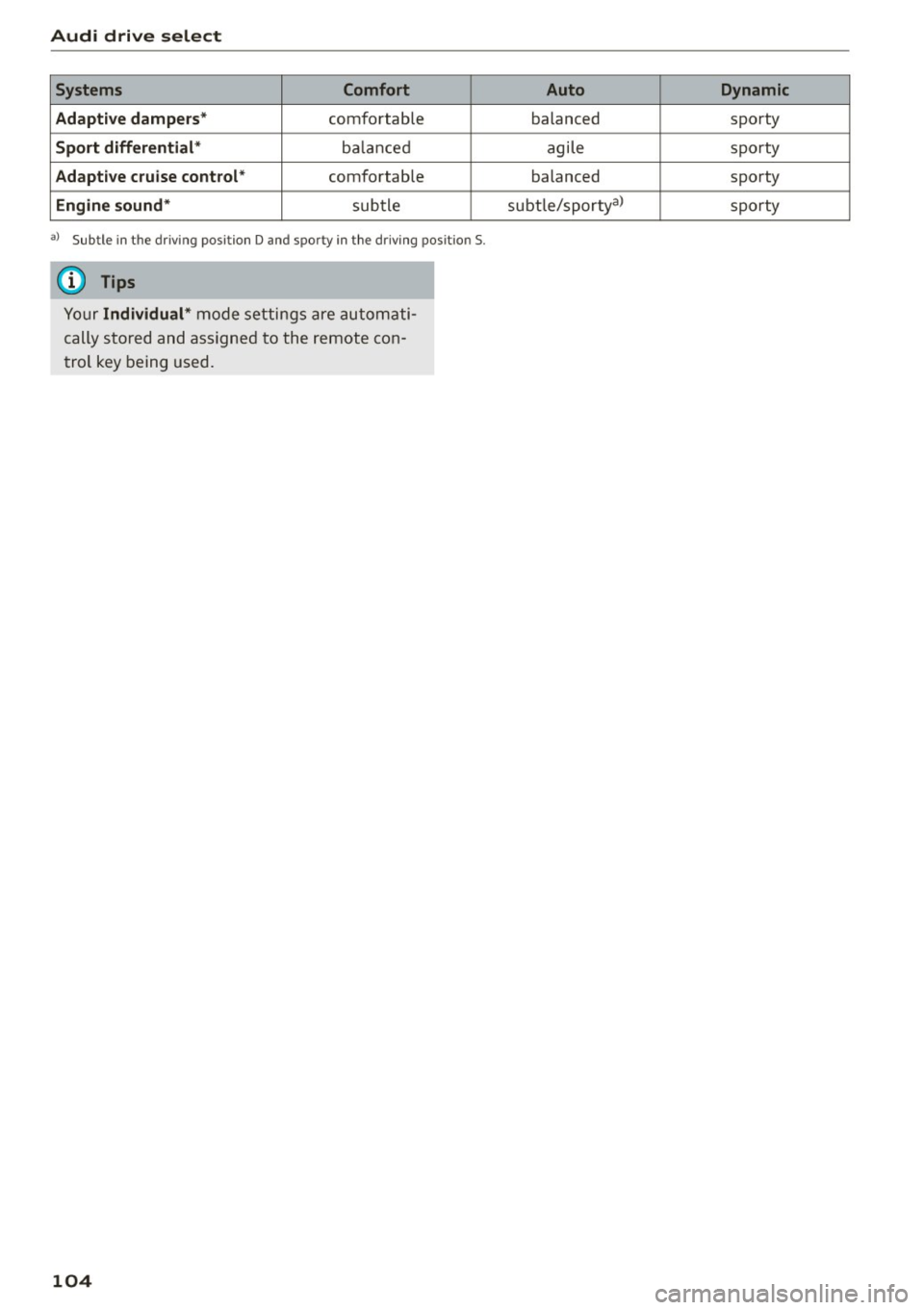
Systems Comfort
Adaptive dampers *
comfortable
Sport differential* balanc ed
Adaptive cruise control* comfortable
Engine sound* subtle
al Sub tle in t he d riving posit ion D and sp or ty in the driv ing pos it io n 5.
(D Tips
Your Individual* mode settings are automati
cally stored and assigned to the remote con
trol key being used.
104
Auto Dynamic
balanced sporty
agile sporty
balanced sporty
subt le/sporty
3> sporty
Page 156 of 264
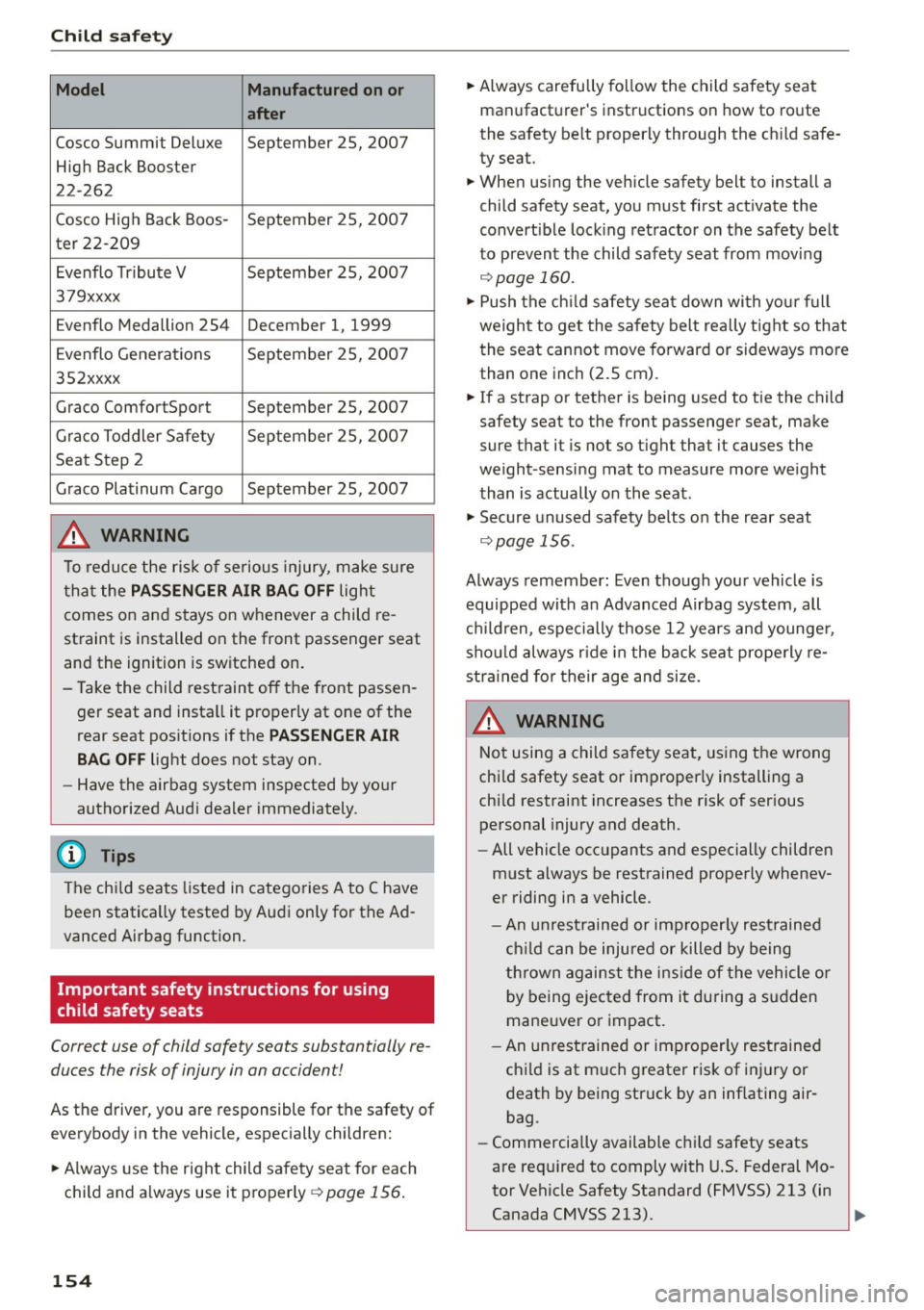
Child safety
Model Manufactured on or
after
Cosco Summit Deluxe September 25, 2007
High Back Booster
22-262
Cosco High Back Boos -September 25, 200 7
ter 22-209
Evenflo Tr ibute V September 25, 2007
379xxxx
Evenflo Medallion 254 December 1, 1999
E venflo Generations September 25, 2007
352xxxx
Grace ComfortSport September 25, 2007
Grace To ddler Sa fe ty Sep
tember 25, 200 7
Seat Step 2
G race Platinum Cargo September 25, 2007
.&_ WARNING
To reduce the ris k of serious injury, make sure
t ha t the
PASSENGER AIR BAG OFF light
comes on and stays on whenever a child re
st raint is installed on the front passenger seat
and the ignition is switched on.
- Take the child rest raint off the front passen
ger seat and insta ll it properly at one of the
rear seat pos itions if the
PASSENGER AIR
BAG OFF
light does not stay on.
- Have the airbag system inspected by yo ur
autho rized Audi dealer immediately.
(D Tips
The ch ild sea ts listed in catego ries A to C have
been statica lly tested by Audi only for the Ad
vanced Airbag function.
Important safety instructions for using
child safety seats
Correct use of child safety seats substantially re
duces the risk of injury in on occident!
As the driver, you are responsible for the safety of
everybody in the vehicle, espec ially children:
... Always use the right child sa fety seat for each
c h ild and a lways use it properly
¢ page 156.
154 ...
Always carefully fo llow the child safety seat
manufact urer's instructions on how to ro ute
the sa fety belt proper ly through the c hild safe
ty seat.
... When using the vehicle safety belt to install a
child safety seat, you must first act ivate the
convert ible lock ing ret ractor on the safety belt
to prevent the child safety seat from moving
¢ page 160.
... Push the ch ild safety sea t down wi th yo ur fu ll
weigh t to get the safety belt really tight so that
the seat cannot move forward or sideways more
than one inch (2.5 cm).
... If a strap or tether is be ing used to tie the child
safety seat to the front passenger seat, make
sure that it is not so tight that it causes the
weight-sensi ng mat to measure more we ight
than is actually o n the seat .
... Secu re unused safety belts on the r ear seat
¢ page 156.
Always remember : Even tho ugh you r vehicle is
equipped with an Advanced Airbag system, all
c hi ld ren, espe cially those 12 years and younge r,
shou ld always r ide in the back seat prope rly re
stra ine d f or t heir age an d size.
.&_ WARNING
-
N ot using a child safe ty seat, using t he wrong
chi ld safety seat or improper ly installing a
chi ld restraint increases the risk of ser ious
personal injury and death.
- All vehicle occ upants and especially children
m ust always be restrained properly whenev
er riding in a vehicle.
- An un rest rained or imp rope rly res trained
chi ld ca n be inju red or killed by being
t h rown ag ains t the i nsid e of the vehicle or
b y being ejected from it du ring a s udden
mane uver o r impact.
- An unrestrained or im properly res trained
ch ild is at much greater risk of i nju ry or
death by being struck by an inflating air
bag.
- Commercially available ch ild safety seats
are req uired to comply with U.S. Federal Mo
tor Vehicle Safety Standard (FMVSS) 213 (in
Canada CMVSS 213). .,_
Page 174 of 264

Smart Technology
The following situations are exceptions where it
may be usefu l to switch on sport mode to allow
the wheels to spin : -
Rocking the vehicle to free it when it is stuck
- Driv ing in deep snow or on loose ground
- Dr iv ing with snow chains
Sport mode on ESC/ASR off Sport mode off or
ESC /ASRon
Behavior
The ESC and ASR stabiliza- The stabilization funct ion is The full stabilization func-
tion fu nct ions are limited not
available¢ ,&.. ESC and
tion of the ESC and ASR is
¢ ,&. .
ASR are switched
off. available again.
Operation Press the I!> OF F! button Press and hold the I!> OF FI Press the I!> OF F! button
briefly . button longer than 3 sec-again.
onds .
Indicator II turns on. JI and lf'lii•li~ turn on. II turns off or II and
lights lf'lii•l~~ turn off.
Driver mes- Stabilization control (ESC): Stabilization control (ESC): Stabilization control
sages Sport. Warning! Re stricted off. Warning! Restricted (ESC):
On
stability stability
It is only possible to turn off the ASR up to 30
mph (SO km/h) for veh icles wi th front whee l
drive . At about
45 mph (70 km/h) it automatica l
ly turns on again. It is possible to turn
off the
ASR at any speed for vehicles with all whee l
drive.
A WARNING
-
You should only sw itch sport mode on or
switch ESC/ASR
off if your driving ab ilities and
road condit io ns perm it .
- The stabilization function is limited when
sport mode is switched on. The dr iv ing
wheels could spin and the veh icle cou ld
swerve, especially on slick or slippery road
surfaces.
- There is no vehicle stabilization when ESC/
ASR are switched
off.
(D Tips
ESC/ASR cannot be switched off or sport
mode cannot be switched on when cruise con
trol or adaptive cru ise control* is sw itched on .
172
Braking
What affects broking efficiency?
New brake pads
During the first 250 miles (400 km), new brake
pads do not possess their full braking effect, they
have to be "broken in" first¢,&. . You can com
pensate for this slightly reduced braking power
by pushing harder on the brake pedal. Avoid
heavy braking loads during the break-in period.
Operating conditions and driving habits
The brakes on today's automobiles are still sub
ject to wear, depending largely on operating con
ditions and driving habits~,&. . On vehicles that
are either driven most ly in stop-and -go city traf
fic or are driven hard, the brake pads should be
checked by your authorized Audi dealer more of
ten than specified in the
Warranty & Mainte
nance booklet .
Failure to have your brake pads
i nspected can result in reduced brake perform
ance .
On steep slopes, you should use the braking ef
fect of the engine . This way, you prevent unnec
essary wear on the brake system. If you must use
your brakes, do not hold the brakes down contin
uously. Pump the brakes at intervals.