door lock AUDI A5 2021 User Guide
[x] Cancel search | Manufacturer: AUDI, Model Year: 2021, Model line: A5, Model: AUDI A5 2021Pages: 318, PDF Size: 85.96 MB
Page 44 of 318

Opening and closing
— Applies to: vehicles with fixed rear backr-
ests: The luggage compartment lid can be
unlocked from the inside in an emergency.
Opening and closing the luggage
compartment lid
Fig. 30 Driver's door: opening the luggage compartment
lid
Opening the luggage compartment lid
» Applies to: vehicles without convenience key:
Unlock the vehicle or the luggage compartment
lid using the @/ Zs button on the vehicle key
and press the handle in the luggage compart-
ment lid. Or
> Applies to: vehicles with convenience key: Press
the handle in the luggage compartment lid.
The vehicle key cannot be more than approxi-
mately 4 feet (1.5 m) away from the luggage
compartment. Or
> When the ignition is switched off, press and
hold the 4s button on the vehicle key twice. Or
> Engage the "P" selector lever position and pull
the <3 button* in the driver's door.
Closing the luggage compartment lid
> Applies to vehicles without automatic luggage
compartment lid: Use the inside grip to pull the
luggage compartment lid down and allow it to
drop gently to close it. Or
» Applies to vehicles with automatic luggage
compartment lid: Note > page 42.
ZA WARNING
Observe the safety precautions > page 41.
42
omatic luggage compar nt lid
Applies to: vehicles with automatic luggage compartment lid
Fig. 31 Luggage compartment lid: @ closing button*, @)
lock button* (vehicles with convenience key*)
The luggage compartment lid can be opened and
closed automatically > A\ in General informa-
tion on page 41.
Opening the luggage compartment lid
> When the ignition is switched off, press and
hold the 4s button on the vehicle key twice. Or
» Engage the "P" selector lever position and pull
the << button* in the driver's door. Or
> Applies to: vehicles with convenience key: Press
the handle in the luggage compartment lid.
The vehicle key cannot be more than approxi-
mately 4 feet (1.5 m) away from the luggage
compartment.
Closing the luggage compartment lid
> Press the < button in the luggage compart-
ment lid. Or
> Press the handle in the luggage compartment
lid. Or
> Press the luggage compartment lid downward
slightly. Or
> When the ignition is switched on, pull the <
switch in the driver's door > page 42, fig. 30
until the luggage compartment lid is closed. Or
» Applies to: vehicles with convenience key: Press
and hold the 4s button on the vehicle key while
the ignition is switched off until the luggage
compartment lid closes. Make sure there is
enough distance (maximum of approximately 9
feet (3 m)) between you and the luggage com-
partment lid. Or
> Applies to vehicles with convenience key: When
the ignition is switched off, press the < / fi* >
Page 46 of 318

Opening and closing
between the rear of the vehicle and your ga-
rage door. In some situations, the function
may be limited or temporarily unavailable.
This may happen if:
— You are standing too close to the bumper or
too far away from it
— The luggage compartment lid was closed or
opened immediately beforehand
— You park close to a hedge and the branches
move back and forth under the vehicle for a
long period of time
— You clean your vehicle, for example with a
pressure washer or in a car wash
— There is heavy rain
—The bumper is very dirty, for example after
driving on salt-covered roads
— There is interference to the vehicle key's ra-
dio signal, such as from mobile devices or
remote controls
Mechanically unlocking luggage
compartment lid
Fig. 33 Inner luggage compartment lid: access to the
emergency release. (2) Coupe, @) Sportback
44
B8W-0267
Applies to: vehicles with power top
Fig. 34 Luggage compartment lid: mechanical key in lock
cylinder
» Fold the backrest on the rear bench seat for-
ward > page 94.
> Remove the mechanical key > page 38.
> Using the mechanical key, pry the cover off the
luggage compartment lid trim panel.
> To unlock the luggage compartment lid, press
the lever in the direction of the arrow using a
suitable object (such as a screwdriver) or using
the mechanical key if necessary.
> Fold the backrest backward until it locks into
place.
Applies to: vehicles with power top
>» Remove the integrated mechanical key
=> page 38.
> Insert the mechanical key in the luggage com-
partment lid lock cylinder.
> Turn the key counterclockwise. The luggage
compartment lid opens.
Observe the safety precautions > page 41.
If you have folded the backrests into the up-
right
position, always check if the lock is cor-
rectly engaged by pulling forward on the
backrest.
Page 47 of 318

8W7012721BB
Opening and closing
Child safety lock
Applies to: vehicles with child safety locks
The child safety lock prevents the rear doors
from being opened from the inside and the rear
power windows from being operated.
RAZ-0826
B8W-0085
Applies to: vehicles with manual child safety locks
Fig. 36 Rear door: manual child safety lock
Vehicles with button
Applies to: vehicles with power child safety locks
> To activate and deactivate the child safety lock
(door handle and power window switch) for the
a rear door, press the left or right @ button in
the driver's door @) that corresponds to that
rear door > fig. 35. The indicator light in the
button turns on/blinks.
> Make sure the child safety lock is working by
checking the function on the rear power win-
dow switch and door handle.
Vehicles with 4 button
Applies to: vehicles with manual child safety lock
> To activate or deactivate the child safety lock
for the power window switch in the rear doors,
press the 4 button in the driver's door @)
> fig. 35. The indicator light in the button turns
on/blinks.
> To activate or deactivate the manual child safe-
ty lock for the rear door handle, open the re-
spective rear door and turn the key switch with
the mechanical key in the direction of the arrow
or opposite the direction of the arrow > fig. 36.
This will disable the function of the rear door
handle.
> Make sure the child safety lock is working by
checking the function on the rear power win-
dow switch and door handle.
Applies to: vehicles with power child safety locks:
It is not possible to operate the rear climate con-
trol system* when the child safety lock is activat-
ed. The SET REAR function allows you to adjust
all settings in the rear using the climate control
system controls in the cockpit.
Message in the instrument cluster display
@/ Child safety lock: malfunction! Please
contact Service
There is a malfunction in the child safety lock.
Press the @/ G4 button again.
If the message stays on, drive immediately to an
authorized Audi dealer or authorized Audi Service
Facility to have the malfunction repaired.
Z\ WARNING
— Observe the safety precautions > page 34.
—A malfunction in the child safety lock could
allow
the rear doors to be opened from the
inside, which increases the risk of an acci-
dent.
Power windows
Opening and closing the windows
re q 2.
2 2
r} a
Fig. 37 Driver's door: power window switch*
4s
Page 48 of 318

Opening and closing
Power window switches:
Left front door
Right front door
Left rear door*
Right rear door*
OOOO Central switch* for opening or closing all side
windows at the same time
Opening and closing the windows
The driver can control all power windows. All
power window switches are equipped with a two-
stage function:
> To open or close the window completely, press
the switch down or pull the switch up briefly to
the second level. The operation will stop if the
switch is pressed or pulled again.
> To select a position in between opened and
closed, press or pull the switch to the first level
until the desired window position is reached.
Correcting a malfunction in the one-touch
up/down function
You can reactivate the one-touch up/down func-
tion if it malfunctions.
> Pull the power window switch up until the win-
dow is completely raised.
> Release the switch and pull it up again for at
least one second.
until the driver's door or front passenger's
door has been opened.
— The power windows are equipped with pinch
protection. The automatic window may stop
closing and will open all the way again even
if no obstacle is detected. Pull the power
window switch up until the window is com-
pletely raised.
Convenience opening and closing
Applies to: vehicles with convenience key
For power top* convenience opening/closing, re-
fer to the information in > page 52.
Convenience opening and closing the
windows and roof*
You can set in the MMI if all windows or the roof*
should open or close all at once > page 35, Set-
ting the central locking system.
> Press and hold the & or & button on the vehicle
key until all windows and the roof* have
reached the desired position > /A\.
> Touch the sensor* on the door handle until all
of the windows and the roof* are closed. Do not
place your hand in the door handle when doing
this.
When all of the windows and the roof* are
closed, the turn signals will flash once.
ZA WARNING
— Observe the safety precautions > page 34.
— Never close the windows carelessly or in an
uncontrolled manner, because this increases
the risk of injury.
G) Tips
— The windows will automatically open slight-
ly when you open the doors.
— If the window in the driver's or front pas-
senger's door is completely open, it will
raise slightly when the door is opened. The
window will lower again when you close the
door.
— You can still open and close the windows for
several minutes after turning the ignition
off. The power windows do not switch off
46
ZA WARNING
— Never close the windows or the roof* care-
lessly or in an uncontrolled manner, because
this increases the risk of injury.
— For security reasons, the windows and the
roof* can only be opened and closed with
the vehicle key at a maximum distance of
approximately 6.5 feet (2 m) away from the
vehicle. Always pay attention when using
the f& button to close the windows and the
roof* so that no one is pinched. The closing
process will stop immediately when the f&
button is released.
Page 50 of 318

Opening and closing
You can switch the valet parking function on, for
example when someone else is parking your vehi-
cle ). The vehicle can be driven, locked, and un-
locked using the vehicle key, but access to the
luggage compartment is blocked.
> Remove the mechanical key > page 38.
> Press the [VALET] button in the glove compart-
ment. The LED in the button turns on if the
function is switched on.
> Lock the glove compartment with the mechani-
cal key.
>» Applies to: vehicles with lockable pass-through
and lockable rear seat backrests: To secure the
luggage compartment from the vehicle interior,
lock the pass-through and the rear seat backr-
ests using the mechanical key > page 95,
=> page 94.
> Give your vehicle key to the service personnel
who are parking your vehicle and keep the me-
chanical key.
The following buttons are deactivated when the
valet parking function is switched on:
— <3 Button in the driver's door
— &s Button on the vehicle key
— Handle in the luggage compartment lid
If the valet parking function is switched on, a
message will appear every time the ignition is
switched on.
@ Tips
Please note that the luggage compartment
can still be accessed from the vehicle interior
in vehicles with fixed rear seat backrests or
ones that cannot be locked, even when the
valet parking function is switched on.
Garage door opener
Applies to: vehicles with garage door opener
With the garage door opener, you can activate
systems such as the garage doors, security sys-
D_ This function is not available in all countries.
2) The possible number of hand-held transmitters depends
on the equipment.
48
tems or house lights from inside your vehicle.
These functions are operated in the MMI. Multi-
ple receivers can be programmed, which can con-
trol the functions of up to eight2) hand-held
transmitters.
ZA WARNING
— When operating or programming the garage
door opener, make sure that no people or
objects are in the area immediately sur-
rounding the equipment. People can be in-
jured or property can be damaged if struck
when closing.
— Do not allow yourself to be distracted from
traffic by the viewing and operating the dis-
plays.
Gi) Tips
— Ifyou sell your vehicle, reset all settings to
the factory default settings > page 222.
— The system complies with United States FCC
regulations and ISED regulations
=> page 297.
(i) Tips
Before you program your system to the ga-
rage door opener, first check the compatibili-
ty:
— Ask an authorized Audi dealer or authorized
Audi Service Facility or check at www.
homelink.com. You can also find more infor-
mation about HomeLink there.
— You can display information about Home-
Link (compatibility level/status/country
code/HomeLink generation) in the MMI:
— Select on the home screen: VEHICLE > Set-
tings & Service > Garage door opener > @.
Applies to: vehicles with garage door opener
Requirements: the remote control transmitter
must be programmed > page 49, the vehicle >
Page 54 of 318
Power top
factors and that it does not interfere with
other drivers.
— Visibility to the rear is limited when operat-
ing the power top. Avoid operating the top
while driving in reverse.
— Never drive with the power top unlocked.
The wind from driving could cause the pow-
er top to open. This can result in injuries and
damage to the vehicle.
— Make sure no one will be injured by the pow-
er top supports or other moving compo-
nents when opening and closing the top.
— The headroom in the rear is reduced when
opening and closing the power top. Make
sure the rear passengers keep enough dis-
tance from the power top to reduce the risk
of injury.
@) Note
To prevent damage to the power top:
— do not store any objects in the power top
storage compartment.
— make sure there is enough space above the
vehicle when opening or closing the power
top.
@) Tips
— To avoid draining the vehicle battery unnec-
essarily, do not open and close the power
top repeatedly when the engine is switched
off.
— The power top can also be operated manual-
ly temporarily if there is a malfunction
=> page 55, Power top emergency opera-
tion. Have the problem corrected as soon as
possible by an authorized Audi dealer or au-
thorized Audi Service Facility.
— If the vehicle is parked with the power top
open, the vehicle interior is not protected
from
damaging weather or unauthorized ac-
cess. Lock any items you leave behind in the
luggage compartment. Close the power top
before leaving the vehicle.
— The side windows automatically lower
slightly when opening or closing the power
top.
52
Power top convenience opening and closing
Applies to: vehicles with power top
“Ss
paw-0149
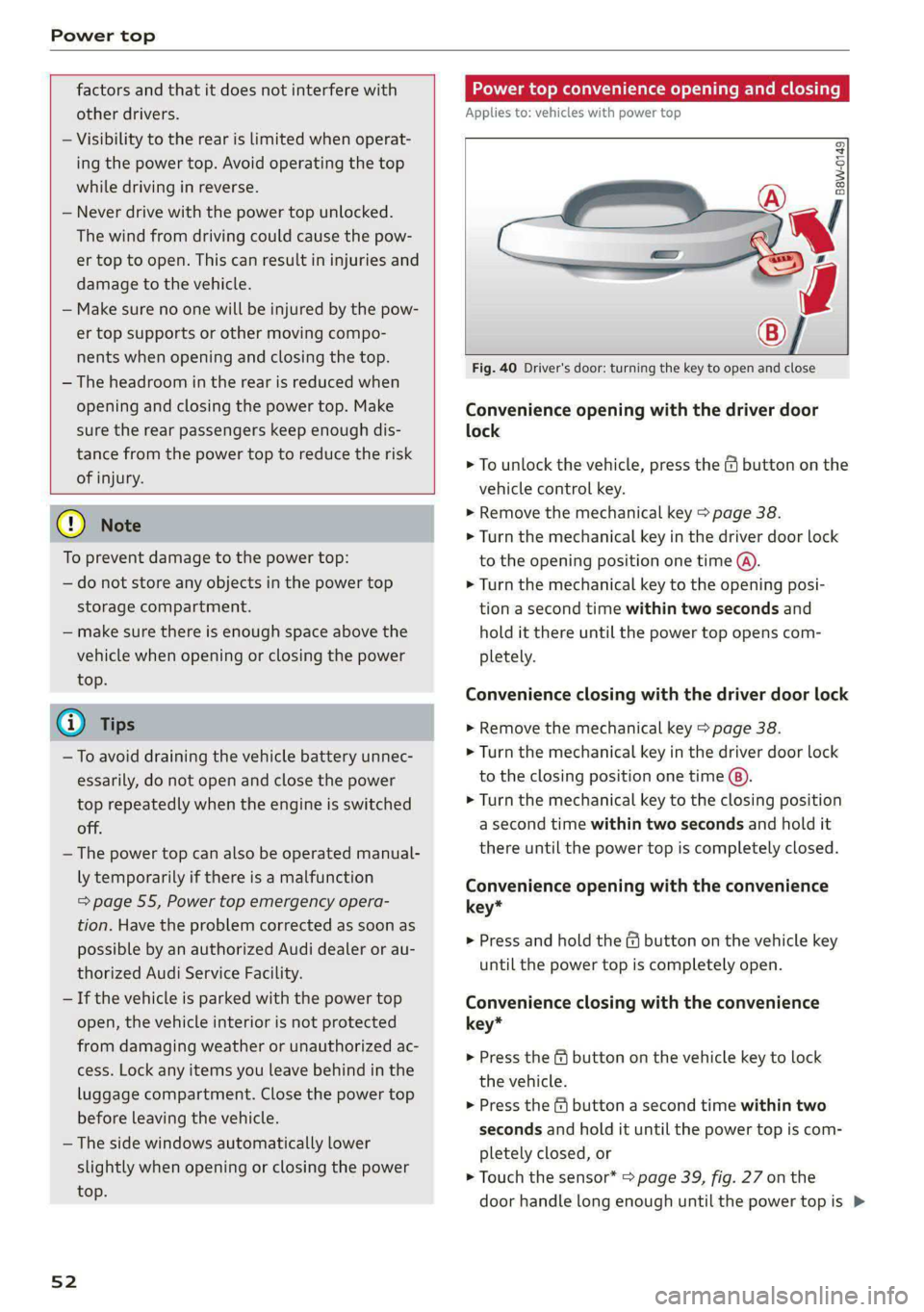
Fig. 40 Driver's door: turning the key to open and close
Convenience opening with the driver door
lock
> To unlock the vehicle, press the & button on the
vehicle control key.
> Remove the mechanical key > page 38.
> Turn the mechanical key in the driver door lock
to the opening position one time @).
> Turn the mechanical key to the opening posi-
tion a second time within two seconds and
hold it there until the power top opens com-
pletely.
Convenience closing with the driver door lock
> Remove the mechanical key > page 38.
> Turn the mechanical key in the driver door lock
to the closing position one time ®).
> Turn the mechanical key to the closing position
a second time within two seconds and hold it
there until the power top is completely closed.
Convenience opening with the convenience
key*
> Press and hold the & button on the vehicle key
until the power top is completely open.
Convenience closing with the convenience
key*
> Press the f& button on the vehicle key to lock
the vehicle.
> Press the f button a second time within two
seconds and hold it until the power top is com-
pletely closed, or
> Touch the sensor* > page 39, fig. 27 on the
door handle long enough until the power top is >
Page 55 of 318
8W7012721BB
Power top
completely closed. Do not place your hand in
the door handle when doing this.
The opening or closing process will stop immedi-
ately if you release the key or stop touching the
button or sensor*. Opening and closing with the
convenience key* is possible from up to 13 feet
(4 m) away.
ZX WARNING
Read and follow the important safety precau-
tions > A\ in Opening and closing the power
top on page 51.
Power top storage compartment
Applies to: vehicles with power top
B8W-0251
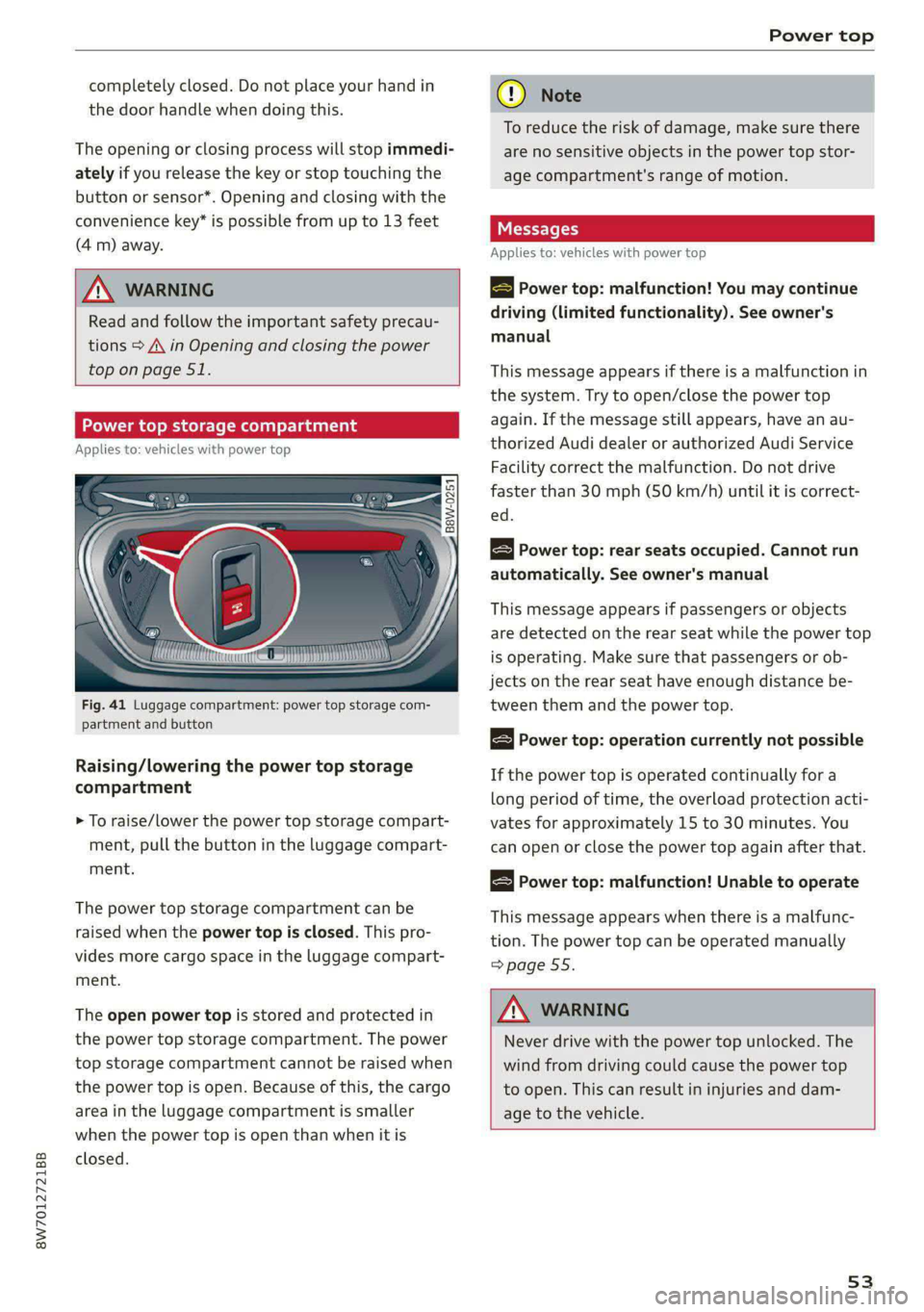
Fig. 41 Luggage compartment: power top storage com-
partment and button
Raising/lowering the power top storage
compartment
> To raise/lower the power top storage compart-
ment, pull the button in the luggage compart-
ment.
The power top storage compartment can be
raised when the power top is closed. This pro-
vides more cargo space in the luggage compart-
ment.
The open power top is stored and protected in
the power top storage compartment. The power
top storage compartment cannot be raised when
the power top is open. Because of this, the cargo
area in the luggage compartment is smaller
when the power top is open than when it is
closed.
® Note
To reduce the risk of damage, make sure there
are no sensitive objects in the power top stor-
age compartment's range of motion.
Messages
Applies to: vehicles with power top
B Power top: malfunction! You may continue
driving (limited functionality). See owner's
manual
This message appears if there is a malfunction in
the system. Try to open/close the power top
again. If the message still appears, have an au-
thorized Audi dealer or authorized Audi Service
Facility correct the malfunction. Do not drive
faster than 30 mph (50 km/h) until it is correct-
ed.
Power top: rear seats occupied. Cannot run
automatically. See owner's manual
This message appears if passengers or objects
are detected on the rear seat while the power top
is operating. Make sure that passengers or ob-
jects on the rear seat have enough distance be-
tween them and the power top.
Power top: operation currently not possible
If the power top is operated continually for a
long period of time, the overload protection acti-
vates for approximately 15 to 30 minutes. You
can open or close the power top again after that.
Power top: malfunction! Unable to operate
This message appears when there is a malfunc-
tion. The power top can be operated manually
=> page 55.
Z\ WARNING
Never drive with the power top unlocked. The
wind from driving could cause the power top
to open. This can result in injuries and dam-
age to the vehicle.
53
Page 58 of 318
Power top
compartment lid
Applies to: vehicles with power top
B8W-0260
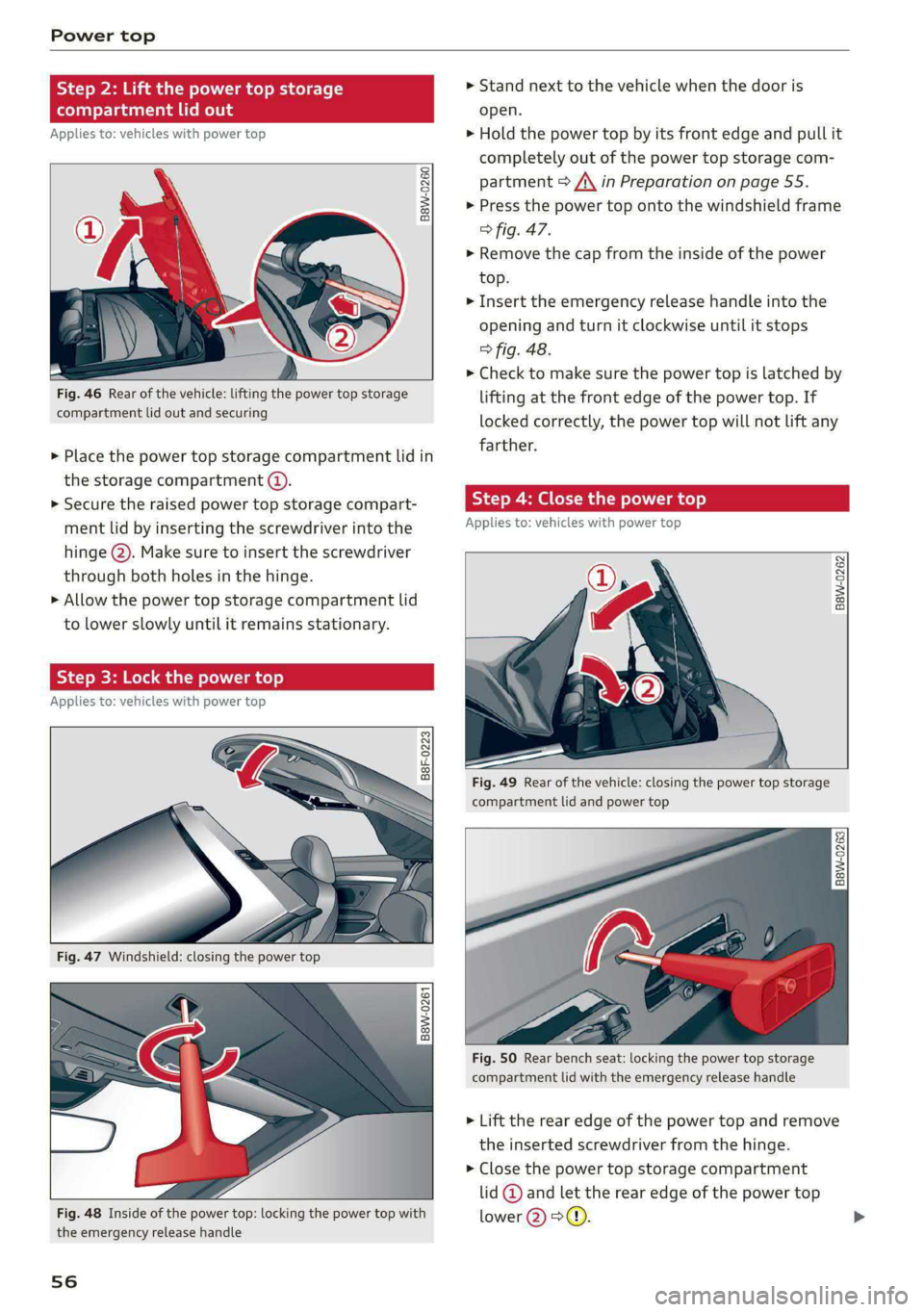
Fig. 46 Rear of the vehicle: lifting the power top storage
compartment lid out and securing
> Place the power top storage compartment lid in
the storage compartment ().
> Secure the raised power top storage compart-
ment lid by inserting the screwdriver into the
hinge @). Make sure to insert the screwdriver
through both holes in the hinge.
> Allow the power top storage compartment lid
to lower slowly until it remains stationary.
Step 3: Lock the power top
Applies to: vehicles with power top
B8F-0223
oS q
g|
a a
Fig. 48 Inside of the power top: locking the power top with
the emergency release handle
56
> Stand next to the vehicle when the door is
open.
> Hold the power top by its front edge and pull it
completely out of the power top storage com-
partment > A\ in Preparation on page 55.
> Press the power top onto the windshield frame
> fig. 47.
> Remove the cap from the inside of the power
top.
> Insert the emergency release handle into the
opening and turn it clockwise until it stops
> fig. 48.
> Check to make sure the power top is latched by
lifting at the front edge of the power top. If
locked correctly, the power top will not lift any
farther.
Step 4: Close the power to
Applies to: vehicles with power top
B8W-0262
Fig. 49 Rear of the vehicle: closing the power top storage
compartment lid and power top
B8W-0263
Fig. 50 Rear bench seat: locking the power top storage
compartment lid with the emergency release handle
> Lift the rear edge of the power top and remove
the inserted screwdriver from the hinge.
> Close the power top storage compartment
lid @ and let the rear edge of the power top
lower @>@.
Page 63 of 318

8W7012721BB
Lights and Vision
@) Tips
— The headlight contains a class 2 laser. The
technical design converts the laser beam so
that there is no danger when it is used for
its intended purpose.
— The laser beam emission from the head-
lamp has been classified in accordance with
IEC 60825-1:2007.
— The possible emission is below the thresh-
old for laser class 2.
— Maximum laser beam output: 5W (continu-
ous emission), wavelength range A= 400 nm
-700 nm.
—The headlamp light functions are rated in
accordance with IEC 62471-5:2015.
— The beam emitted from the headlamp was
classified as risk group 2.
Adjusting the exterior lighting
You can adjust the exterior lighting separately.
The settings depend on the vehicle equipment.
> Applies to: MMI: Select on the home screen:
VEHICLE > Light & Visibility > Exterior light-
ing.
Automatic headlights
You can adjust the following settings in the Auto-
matic
headlights menu:
Activation time - You can adjust if the headlights
switch on Early, Medium, or Late based on the
sensitivity of the light sensor.
High beam assistant - You can switch the high
beam assistant on and off.
Laser lights - You can switch the laser lights on
and off.
Entry/exit lighting
The Entry/exit lighting illuminates the area
around the vehicle when the vehicle is unlocked
or when the driver’s door is opened while the ig-
nition is off. The entry/exit lighting works when it
is dark and the light switch is in the AUTO posi-
tion. The front and rear daytime running lights*
switch on automatically each time the vehicle is
unlocked regardless of how bright it is outside
the vehicle.
Daytime running lights
USA models: The daytime running lights can be
switched on and off.
Canada models: This function cannot be switched
off. They activate automatically each time the ig-
nition is switched on.
Emergency flashers
so
al i2 EY S|
| |
Fig. 54 Center console: emergency flashers
The emergency flashers help to make other driv-
ers aware of your vehicle in dangerous situations.
> Press the A @ button to switch the emergency
flashers on or off.
When the emergency flashers are turned on, the
a and By indicator lights will flash at the same
time.
You can indicate a lane change or a turn when the
emergency flashers are switched on by using the
turn signal lever. The emergency flashers stop
temporarily.
The emergency flashers also work when the igni-
tion is turned off.
@) Tips
You should switch the emergency flashers on
ite
— you are the last car in a traffic jam so that
all other vehicles approaching from behind
can see your vehicle
— your vehicle has broken down or you are
having an emergency
61
Page 64 of 318

Lights and Vision
— your vehicle is being towed or if you are tow-
ing another vehicle
WEE Tel
If the Ea indicator light turns on, a bulb has
failed. The displayed message indicates the cause
and possible solutions. If one of the messages re-
mains on, drive immediately to an authorized
Audi dealer or authorized Audi Service Facility to
have the malfunction repaired.
By Audi adaptive light: malfunction! See own-
er's manual
Adaptive light* is not working. The headlights
still function. Drive immediately to an authorized
Audi dealer or authorized Audi Service Facility to
have the malfunction repaired.
By Headlight range control: malfunction! See
owner's manual
There is a malfunction in the headlight range
control system, which may cause glare for other
drivers. Drive to an authorized Audi dealer or au-
thorized Audi Service Facility immediately to have
the malfunction corrected.
High beam assistant: malfunction! See own-
er's manual
You can still switch the high beams on or off
manually. Drive immediately to an authorized
Audi dealer or authorized Audi Service Facility to
have the malfunction repaired.
High beam assistant: currently unavailable.
Camera view limited due to environmental con-
ditions
This message appears if the camera's visual field
is blocked. The system will switch itself off. Try
switching the systems on later.
a Automatic headlights: malfunction! See
owner's manual
The light/rain sensor is malfunctioning. In the
AUTO light switch position, the low beams re-
main switched on at all times for safety reasons.
Drive immediately to an authorized Audi dealer
or authorized Audi Service Facility to have the
malfunction repaired.
62
Interior lighting
Front interior lighting
Fig. 55 Headliner: front interior lighting
Interior lighting buttons
axs* - Interior lighting on/off
4 - Door contact switch on/off. The interior light-
ing is controlled automatically.
Touch-sensitive reading lights
> To turn a reading light on or off, touch the sur-
face @ briefly.
> To activate the manual dimming function,
touch the surface @ when the light is switched
off and keep touching it until the desired
brightness is reached.
Rear interior lighting
3 2
NI
Fig. 56 Headliner: rear reading lights
Reading lights
> To switch the reading lamp on or off, press the
~¥ button @.
> To activate the manual dimming function*,
touch the surface while the light is switched off
“~¥@ and keep touching it until the desired
brightness is reached.