light AUDI A5 2021 User Guide
[x] Cancel search | Manufacturer: AUDI, Model Year: 2021, Model line: A5, Model: AUDI A5 2021Pages: 318, PDF Size: 85.96 MB
Page 18 of 318
Instrument cluster
cause for concern as long as the B or 3 indica-
tor lights do not turn on.
Boost indicator
Applies to: vehicles with boost indicator
Depending on vehicle equipment, the current en-
gine load (meaning the current boost pressure)
may be indicated by a bar in the instrument clus-
ter.
> Applies to: vehicles with Audi virtual cockpit:
Open the vehicle functions tab and switch to
the enhanced view > page 13.
> Applies to: vehicles with analog instrument
cluster: Open the lap timer > page 133.
Shift light indicator
Applies to: RS models
The shift light indicator informs the driver when
the RPM limit is reached.
» Applies to: vehicles with Audi virtual cockpit:
Set the RS Performance or RS Runway layout if
necessary > page 13.
» Applies to: vehicles with analog instrument
cluster: Open the lap timer > page 133.
The shift light indicator is displayed with green,
yellow and red ranges in the upper areas of the
tachometer. The shift light indicator will blink red
when approaching the engine speed limit. Shift
to the next highest gear at the right time.
Sport displays
Applies to: RS models
Various sport displays, such as a G meter or tire
pressure indicator, may be available depending
on vehicle equipment.
Opening sport displays in the instrument
cluster
Applies to: vehicles with Audi virtual cockpit
> Select in the instrument cluster: Vehicle func-
tions tab > EE] button > Sport displays.
> Turn the left thumbwheel on the multifunction
steering wheel until the desired sport display
appears in the instrument cluster.
16
Opening sport displays in the MMI
> Applies to MMI: Select on the home screen: VE-
HICLE > RS monitor.
> Browse to the desired display if necessary.
G meter
Applies to: vehicles with Audi virtual cockpit
The G meter displays the longitudinal and lateral
acceleration. The current values are displayed in
the instrument cluster while driving. The maxi-
mum values that are reached are stored and dis-
played when the vehicle is stationary. Only the
maximum values that are reached are displayed
in the MMI.
> To reset the stored values, press and hold the
left thumbwheel on the multifunction steering
wheel for one second.
Tire pressure
The tire pressure monitoring system displays the
current tire pressures and temperatures. Also see
=> page 263, Tire pressure monitoring system.
Engine data
Applies to: vehicles with Audi virtual cockpit
The engine data in the instrument cluster shows
which percentage of the maximum output or
maximum torque is currently being used.
Temperature
The temperature display in the MMI shows the
temperature of various fluids and vehicle compo-
nents, such as the engine oil or sport differential.
Vehicle functions
(OTe TWN]
The trip computer is displayed in the first tab of
the driver information system. Additional vehicle
functions can be accessed depending on the vehi-
cle equipment.
> Press the =] button on the multifunction steer-
ing wheel.
— On-board computer > page 17
— Sport displays > page 16
— Lap times > page 133
Page 19 of 318

8W7012721BB
Instrument cluster
— Lap statistics > page 133
— Acceleration measurement > page 134
— Reduced display > page 14
On-board computer
Resetting values to zero
Requirement: the Consumption, Short-term
memory, or Long-term memory display must be
selected.
> To reset the values in the respective memory to
zero, press and hold the left thumbwheel on
the multifunction steering wheel for one sec-
ond.
Depending on the vehicle equipment, you can call
up the following displays in the on-board com-
puter one at a time by turning the left thumb-
wheel on the multifunction steering wheel:
—Time and date > page 221
— Level
— Digital speedometer
— Average consumption > page 17
— Range
— Short-term memory overview
— Long-term memory overview
— Energy consumers > page 17
— Driver assistance
— Traffic sign recognition and traffic light infor-
mation
Short-term memory and long-term memory
The short-term memory collects driving informa-
tion from the time the ignition is switched on un-
til it is switched off. If you continue driving within
two hours after switching the ignition off, the
new values will be included when calculating the
current trip information.
Unlike the short-term memory, the long-term
memory is not erased automatically. You can se-
lect the time period for evaluating trip informa-
tion yourself.
Average consumption
The current consumption can be shown using a
bar graph. The average consumption stored in
the short-term memory is also displayed. If the
bar is green, your vehicle is saving fuel (for exam-
ple, using recuperation).
Energy consumers
The Energy consumers view lists other equip-
ment that is currently affecting fuel consump-
tion. The display shows up to three equipment
items. The equipment using the most power is
listed first. If more than three items using power
are switched on, the equipment that is currently
using the most power is displayed. A gauge also
shows the current total consumption of all other
equipment.
G) Tips
The date, time of day, and time and date for-
mat can be set > page 221.
17
Page 27 of 318
![AUDI A5 2021 User Guide 8W7012721BB
Touch display
> To delete all characters at a specific location,
press and hold <]@) and drag up to the desired
location ), When released, the highlighted
characters are deleted.](/img/6/57567/w960_57567-26.png "AUDI A5 2021 User Guide 8W7012721BB
Touch display
> To delete all characters at a specific location,
press and hold <]@) and drag up to the desired
location ), When released, the highlighted
characters are deleted.")
8W7012721BB
Touch display
> To delete all characters at a specific location,
press and hold <]@) and drag up to the desired
location ), When released, the highlighted
characters are deleted.
Accepting suggested words or selecting
entries from the results list
> To accept a suggested word (2) or select an en-
try from the results list @), press on it.
> To display more content in the results list, drag
your finger upward or downward on the screen.
> To enlarge the results list, press the @) button
or pull it inward.
Setting the input language or keyboard
layout
>» Select on the home screen: SETTINGS > Lan-
guage & keyboard > Keyboard.
> To define additional input languages, press the
© button.
> To change the keyboard layout for an input lan-
guage, press >. For example, you can select be-
tween QWERTZ and QWERTY.
2) Depending on the country or equipment
25
Page 28 of 318
Head-up display
Head-up display
Description
Applies to: vehicles with head-up display
RAZ-0847
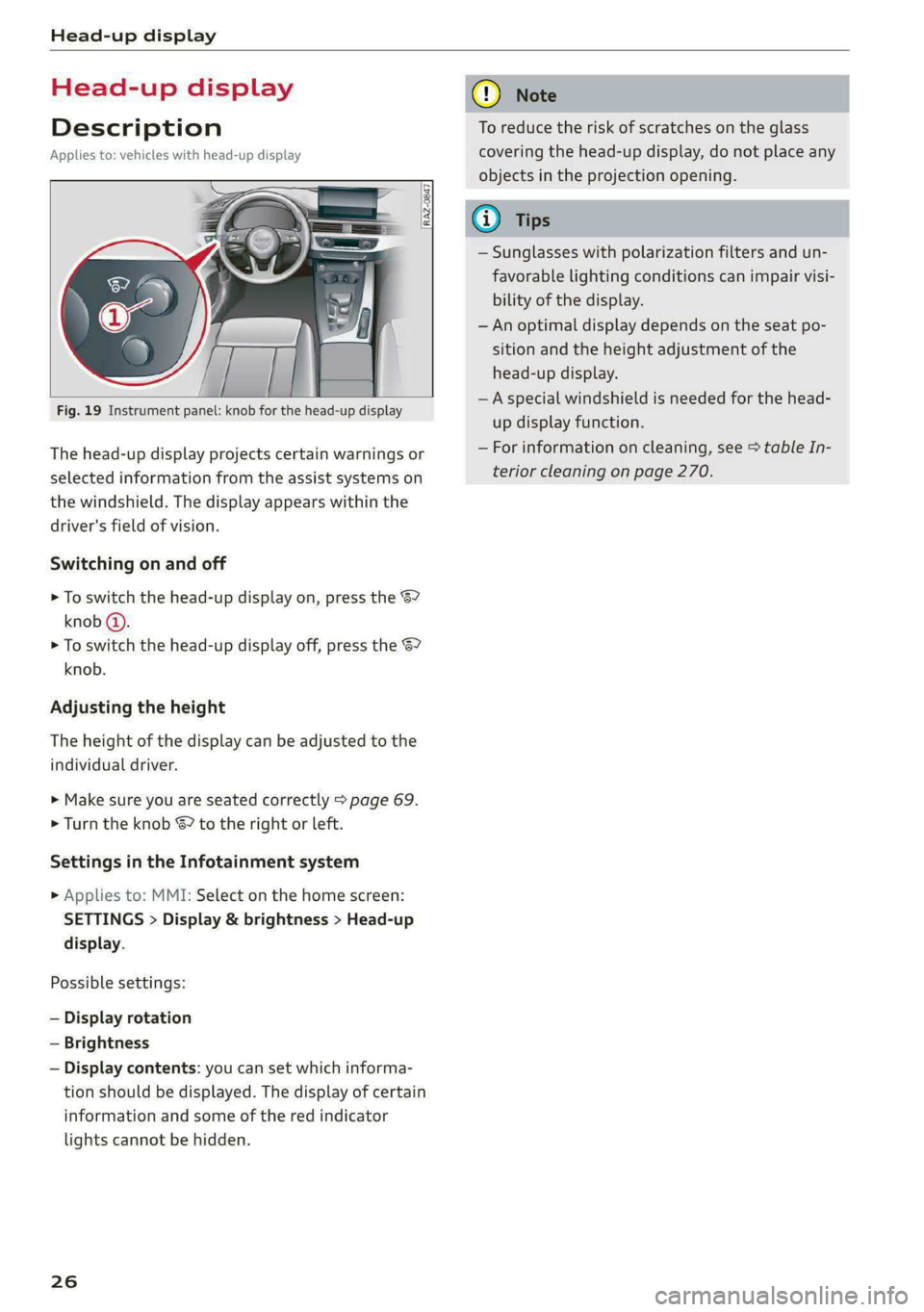
The head-up display projects certain warnings or
selected information from the assist systems on
the windshield. The display appears within the
driver's field of vision.
Switching on and off
> To switch the head-up display on, press the 67
knob @).
> To switch the head-up display off, press the S7
knob.
Adjusting the height
The height of the display can be adjusted to the
individual driver.
> Make sure you are seated correctly > page 69.
> Turn the knob &? to the right or left.
Settings in the Infotainment system
> Applies to: MMI: Select on the home screen:
SETTINGS > Display & brightness > Head-up
display.
Possible settings:
— Display rotation
— Brightness
— Display contents: you can set which informa-
tion should be displayed. The display of certain
information and some of the red indicator
lights cannot be hidden.
26
@) Note
To reduce the risk of scratches on the glass
covering the head-up display, do not place any
objects in the projection opening.
@ Tips
— Sunglasses with polarization filters and un-
favorable lighting conditions can impair visi-
bility of the display.
— An optimal display depends on the seat po-
sition and the height adjustment of the
head-up display.
— A special windshield is needed for the head-
up display function.
— For information on cleaning, see > table In-
terior cleaning on page 270.
Page 29 of 318
8W7012721BB
Voice recognition system
Voice recognition system
General information
Applies to: vehicles with voice recognition system
You can operate many functions in the vehicle
easily using voice commands.
Using the voice recognition system optimally
> Speak clearly and distinctly at a normal volume.
Speak louder when driving faster.
» Emphasize the words in the commands evenly
and do not leave long pauses.
> Close the doors, the windows, and the sunroof*
to reduce background noise. Make sure that
passengers are not speaking when you are giv-
ing a voice command.
> Do not direct the vents toward the hands-free
microphone, which is in the roof headliner near
the front interior lights.
> Only the driver should speak to the system, be-
cause the handsfree microphone is aimed to-
ward this seating position.
ZA\ WARNING
— Direct your full attention to driving. As the
driver, you have complete responsibility for
safety in traffic. Only use the functions in
such a way that you always maintain com-
plete control over your vehicle in all traffic
situations.
— Do not use the voice recognition system in
emergencies because your voice may change
in stressful situations. The system may take
longer to dial the number or may not be
able to dial it at all. Dial the emergency
number manually.
G) Tips
There are no voice guidance* prompts when a
dialog is active.
Description
eye aU mame ees eR
Applies to: vehicles with voice recognition system
Se
Drive me to
Where is a a
Connect
Pre)
Play
Eg
Maes
coy
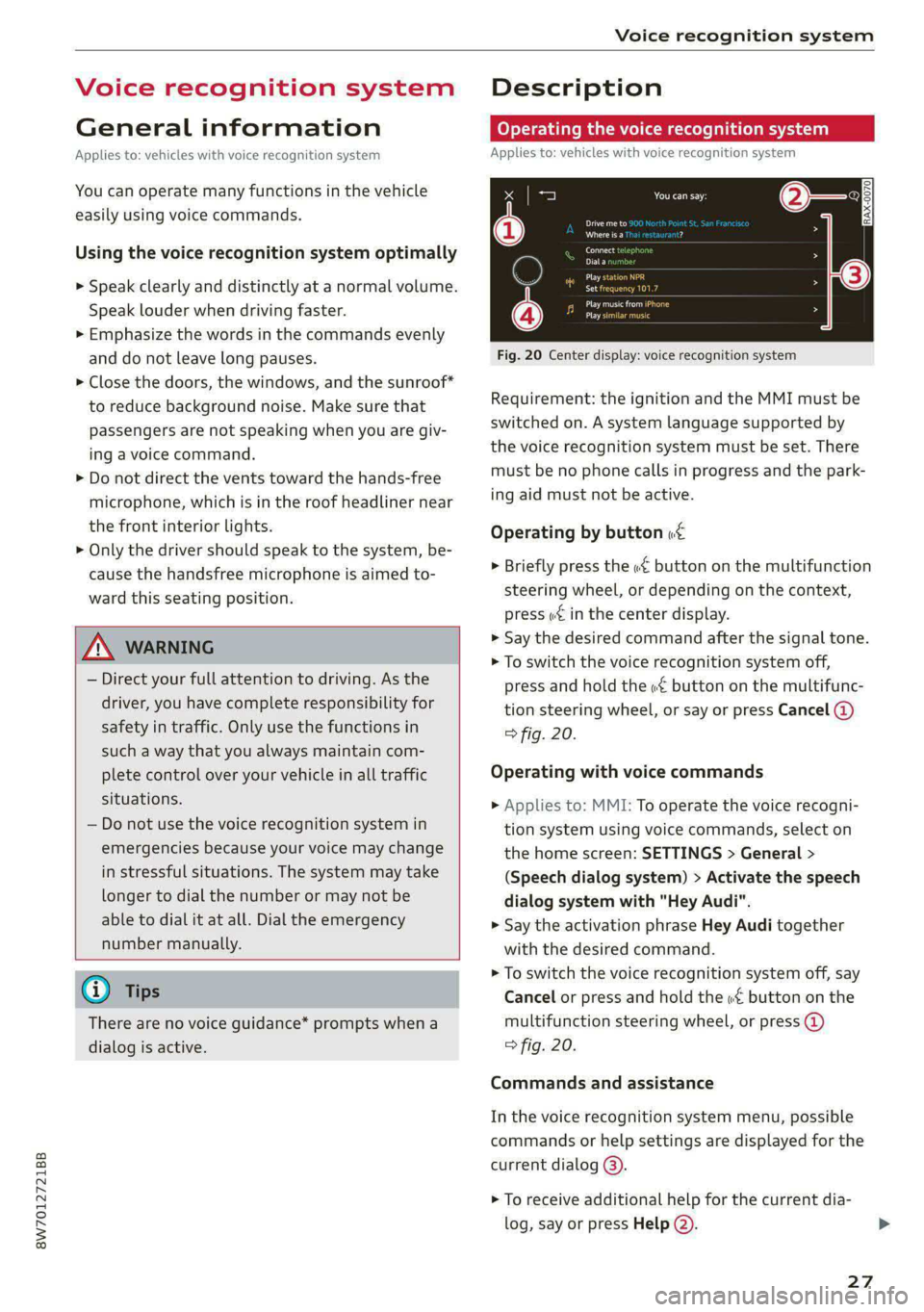
Fig. 20 Center display: voice recognition system
Requirement: the ignition and the MMI must be
switched on. A system language supported by
the voice recognition system must be set. There
must be no phone calls in progress and the park-
ing aid must not be active.
Operating by button «£
> Briefly press the «€ button on the multifunction
steering wheel, or depending on the context,
press we in the center display.
> Say the desired command after the signal tone.
> To switch the voice recognition system off,
press and hold the «€ button on the multifunc-
tion steering wheel, or say or press Cancel (@)
> fig. 20.
Operating with voice commands
> Applies to: MMI: To operate the voice recogni-
tion system using voice commands, select on
the home screen: SETTINGS > General >
(Speech dialog system) > Activate the speech
dialog system with "Hey Audi".
> Say the activation phrase Hey Audi together
with the desired command.
> To switch the voice recognition system off, say
Cancel or press and hold the «£ button on the
multifunction steering wheel, or press @)
> fig. 20.
Commands and assistance
In the voice recognition system menu, possible
commands or help settings are displayed for the
current dialog @).
> To receive additional help for the current dia-
log, say or press Help (2).
27
Page 38 of 318
Opening and closing
Tone when locking!)
You can select if an audio signal sounds when
locking the vehicle.
Open with convenience key
Applies to: vehicles with convenience key
You can deactivate the feature for unlocking us-
ing
the sensor > page 39.
(etna mele den) in]
8 3
o
2 we a
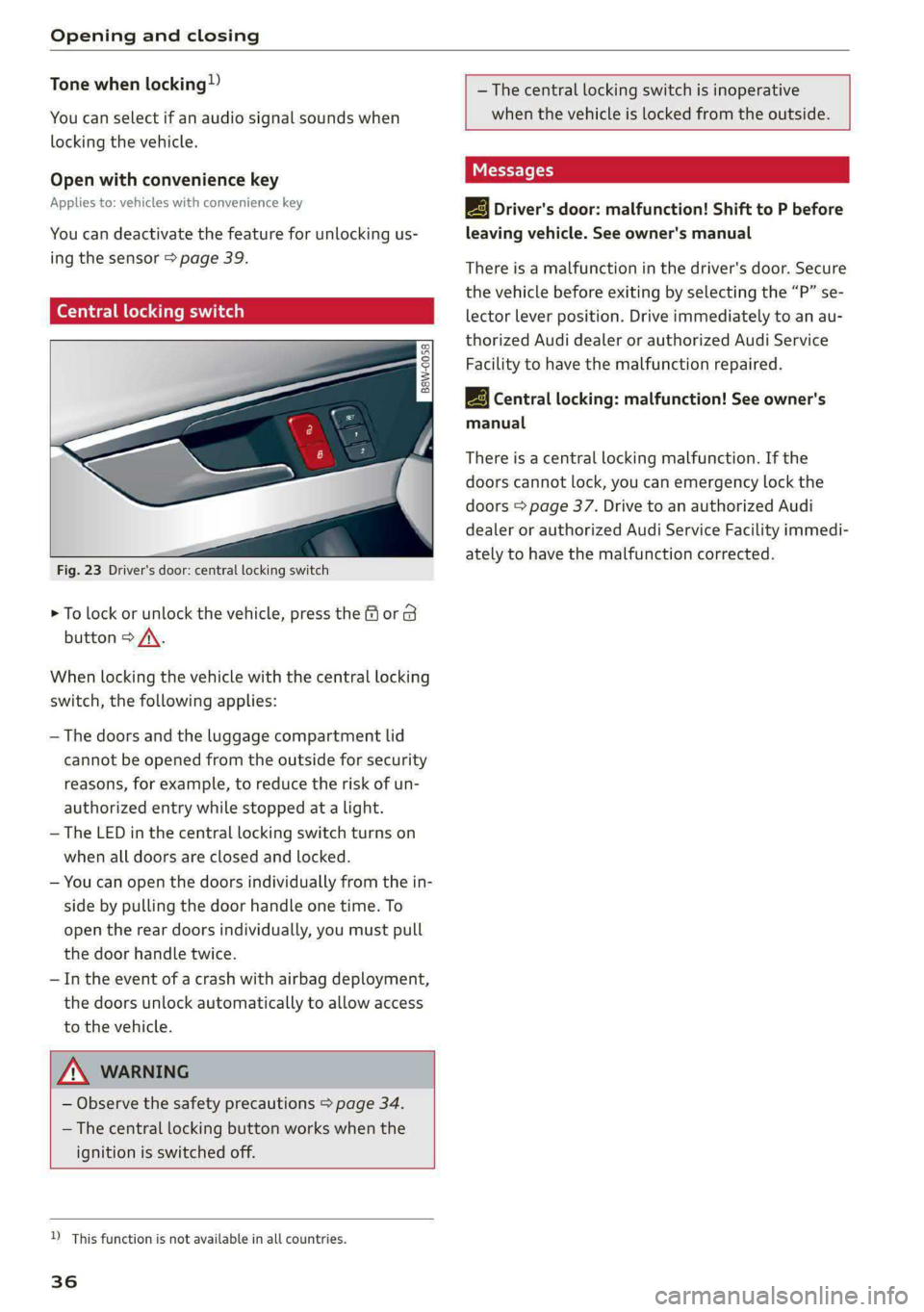
Fig. 23 Driver's door: central locking switch
> To lock or unlock the vehicle, press the or B
button > A\.
When locking the vehicle with the central locking
switch,
the following applies:
— The doors and the luggage compartment lid
cannot be opened from the outside for security
reasons, for example, to reduce the risk of un-
authorized entry while stopped at a light.
— The LED in the central locking switch turns on
when all doors are closed and locked.
— You can open the doors individually from the in-
side by pulling the door handle one time. To
open the rear doors individually, you must pull
the door handle twice.
— In the event of a crash with airbag deployment,
the doors unlock automatically to allow access
to the vehicle.
ZX WARNING
— Observe the safety precautions > page 34.
— The central locking button works when the
ignition is switched off.
D_ This function is not available in all countries.
36
— The central locking switch is inoperative
when the vehicle is locked from the outside.
2 Driver's door: malfunction! Shift to P before
leaving vehicle. See owner's manual
There is a malfunction in the driver's door. Secure
the vehicle before exiting by selecting the “P” se-
lector lever position. Drive immediately to an au-
thorized Audi dealer or authorized Audi Service
Facility to have the malfunction repaired.
2B Central locking: malfunction! See owner's
manual
There is a central locking malfunction. If the
doors cannot lock, you can emergency lock the
doors > page 37. Drive to an authorized Audi
dealer or authorized Audi Service Facility immedi-
ately to have the malfunction corrected.
Page 41 of 318

8W7012721BB
Opening and closing
@ PANIC button
In an emergency, you can press the PANIC button
to trigger the alarm for the anti-theft alarm sys-
tem. The vehicle horn and emergency flashers
will turn on if you trigger the alarm.
—To trigger the alarm, press the [PANIC] but-
ton @)° fig. 26.
—To turn the alarm off, press the [PANIC] button
again.
Lost key/replacing a key
If a vehicle key is lost, contact an authorized Audi
dealer or authorized Audi Service Facility. Have
this vehicle key deactivated. It is important to
bring all keys with you.
If a key is lost, you should report it to your insur-
ance company.
Electronic immobilizer
The immobilizer prevents unauthorized use of
the vehicle.
In some cases, it may not be possible to start the
vehicle if there is a vehicle key from a different
vehicle manufacturer on the key chain.
Data in the vehicle key
When driving, service and maintenance-relevant
data is continuously stored in your vehicle key. An
authorized Audi dealer or authorized Audi Service
Facility can read out this data and tell you about
the work your vehicle needs.
Z\ WARNING
Observe the safety precautions > page 34.
@) Note
Protect the key against high temperatures
and direct sunlight.
() For the sake of the environment
XE Do not dispose of vehicle keys in household
trash. They contain materials that can be re-
cycled. Contact an authorized Audi dealer or
authorized Audi Service Facility for more in-
formation.
@) Tips
— The vehicle key function can be temporarily
disrupted by interference from transmitters
near the vehicle working in the same fre-
quency range (such as a mobile device or ra-
dio equipment). Always check if your vehicle
is locked.
— Applies to MMI: You can view the number of
keys programmed to the vehicle by selecting
on the home screen: VEHICLE > Settings &
Service > Vehicle information.
— The system complies with United States FCC
regulations and ISED regulations
=> page 297.
Unlocking and locking the vehicle
B8W-0148
Fig. 27 Door handle: sensor for locking
Depending on the vehicle equipment, you may
have various options for unlocking and locking
your vehicle. The settings in the MMI specify
which doors will unlock > page 35.
Unlocking or locking using the vehicle key
buttons
> To unlock the vehicle, press the @ button
=> page 38, fig. 26.
> To lock the vehicle, press the ff button once.
Unlocking or locking using the sensors
Applies
to: vehicles with convenience key
> To unlock a door or the luggage compartment
lid, grasp the door handle or luggage compart-
ment lid handle.
> To lock the vehicle, close the door and touch
the sensor on the door handle once > fig. 27.
Do not grasp the door handle while locking the
vehicle, or else the vehicle will not lock. The
39
>
Page 44 of 318

Opening and closing
— Applies to: vehicles with fixed rear backr-
ests: The luggage compartment lid can be
unlocked from the inside in an emergency.
Opening and closing the luggage
compartment lid
Fig. 30 Driver's door: opening the luggage compartment
lid
Opening the luggage compartment lid
» Applies to: vehicles without convenience key:
Unlock the vehicle or the luggage compartment
lid using the @/ Zs button on the vehicle key
and press the handle in the luggage compart-
ment lid. Or
> Applies to: vehicles with convenience key: Press
the handle in the luggage compartment lid.
The vehicle key cannot be more than approxi-
mately 4 feet (1.5 m) away from the luggage
compartment. Or
> When the ignition is switched off, press and
hold the 4s button on the vehicle key twice. Or
> Engage the "P" selector lever position and pull
the <3 button* in the driver's door.
Closing the luggage compartment lid
> Applies to vehicles without automatic luggage
compartment lid: Use the inside grip to pull the
luggage compartment lid down and allow it to
drop gently to close it. Or
» Applies to vehicles with automatic luggage
compartment lid: Note > page 42.
ZA WARNING
Observe the safety precautions > page 41.
42
omatic luggage compar nt lid
Applies to: vehicles with automatic luggage compartment lid
Fig. 31 Luggage compartment lid: @ closing button*, @)
lock button* (vehicles with convenience key*)
The luggage compartment lid can be opened and
closed automatically > A\ in General informa-
tion on page 41.
Opening the luggage compartment lid
> When the ignition is switched off, press and
hold the 4s button on the vehicle key twice. Or
» Engage the "P" selector lever position and pull
the << button* in the driver's door. Or
> Applies to: vehicles with convenience key: Press
the handle in the luggage compartment lid.
The vehicle key cannot be more than approxi-
mately 4 feet (1.5 m) away from the luggage
compartment.
Closing the luggage compartment lid
> Press the < button in the luggage compart-
ment lid. Or
> Press the handle in the luggage compartment
lid. Or
> Press the luggage compartment lid downward
slightly. Or
> When the ignition is switched on, pull the <
switch in the driver's door > page 42, fig. 30
until the luggage compartment lid is closed. Or
» Applies to: vehicles with convenience key: Press
and hold the 4s button on the vehicle key while
the ignition is switched off until the luggage
compartment lid closes. Make sure there is
enough distance (maximum of approximately 9
feet (3 m)) between you and the luggage com-
partment lid. Or
> Applies to vehicles with convenience key: When
the ignition is switched off, press the < / fi* >
Page 47 of 318

8W7012721BB
Opening and closing
Child safety lock
Applies to: vehicles with child safety locks
The child safety lock prevents the rear doors
from being opened from the inside and the rear
power windows from being operated.
RAZ-0826
B8W-0085
Applies to: vehicles with manual child safety locks
Fig. 36 Rear door: manual child safety lock
Vehicles with button
Applies to: vehicles with power child safety locks
> To activate and deactivate the child safety lock
(door handle and power window switch) for the
a rear door, press the left or right @ button in
the driver's door @) that corresponds to that
rear door > fig. 35. The indicator light in the
button turns on/blinks.
> Make sure the child safety lock is working by
checking the function on the rear power win-
dow switch and door handle.
Vehicles with 4 button
Applies to: vehicles with manual child safety lock
> To activate or deactivate the child safety lock
for the power window switch in the rear doors,
press the 4 button in the driver's door @)
> fig. 35. The indicator light in the button turns
on/blinks.
> To activate or deactivate the manual child safe-
ty lock for the rear door handle, open the re-
spective rear door and turn the key switch with
the mechanical key in the direction of the arrow
or opposite the direction of the arrow > fig. 36.
This will disable the function of the rear door
handle.
> Make sure the child safety lock is working by
checking the function on the rear power win-
dow switch and door handle.
Applies to: vehicles with power child safety locks:
It is not possible to operate the rear climate con-
trol system* when the child safety lock is activat-
ed. The SET REAR function allows you to adjust
all settings in the rear using the climate control
system controls in the cockpit.
Message in the instrument cluster display
@/ Child safety lock: malfunction! Please
contact Service
There is a malfunction in the child safety lock.
Press the @/ G4 button again.
If the message stays on, drive immediately to an
authorized Audi dealer or authorized Audi Service
Facility to have the malfunction repaired.
Z\ WARNING
— Observe the safety precautions > page 34.
—A malfunction in the child safety lock could
allow
the rear doors to be opened from the
inside, which increases the risk of an acci-
dent.
Power windows
Opening and closing the windows
re q 2.
2 2
r} a
Fig. 37 Driver's door: power window switch*
4s
Page 48 of 318

Opening and closing
Power window switches:
Left front door
Right front door
Left rear door*
Right rear door*
OOOO Central switch* for opening or closing all side
windows at the same time
Opening and closing the windows
The driver can control all power windows. All
power window switches are equipped with a two-
stage function:
> To open or close the window completely, press
the switch down or pull the switch up briefly to
the second level. The operation will stop if the
switch is pressed or pulled again.
> To select a position in between opened and
closed, press or pull the switch to the first level
until the desired window position is reached.
Correcting a malfunction in the one-touch
up/down function
You can reactivate the one-touch up/down func-
tion if it malfunctions.
> Pull the power window switch up until the win-
dow is completely raised.
> Release the switch and pull it up again for at
least one second.
until the driver's door or front passenger's
door has been opened.
— The power windows are equipped with pinch
protection. The automatic window may stop
closing and will open all the way again even
if no obstacle is detected. Pull the power
window switch up until the window is com-
pletely raised.
Convenience opening and closing
Applies to: vehicles with convenience key
For power top* convenience opening/closing, re-
fer to the information in > page 52.
Convenience opening and closing the
windows and roof*
You can set in the MMI if all windows or the roof*
should open or close all at once > page 35, Set-
ting the central locking system.
> Press and hold the & or & button on the vehicle
key until all windows and the roof* have
reached the desired position > /A\.
> Touch the sensor* on the door handle until all
of the windows and the roof* are closed. Do not
place your hand in the door handle when doing
this.
When all of the windows and the roof* are
closed, the turn signals will flash once.
ZA WARNING
— Observe the safety precautions > page 34.
— Never close the windows carelessly or in an
uncontrolled manner, because this increases
the risk of injury.
G) Tips
— The windows will automatically open slight-
ly when you open the doors.
— If the window in the driver's or front pas-
senger's door is completely open, it will
raise slightly when the door is opened. The
window will lower again when you close the
door.
— You can still open and close the windows for
several minutes after turning the ignition
off. The power windows do not switch off
46
ZA WARNING
— Never close the windows or the roof* care-
lessly or in an uncontrolled manner, because
this increases the risk of injury.
— For security reasons, the windows and the
roof* can only be opened and closed with
the vehicle key at a maximum distance of
approximately 6.5 feet (2 m) away from the
vehicle. Always pay attention when using
the f& button to close the windows and the
roof* so that no one is pinched. The closing
process will stop immediately when the f&
button is released.