sport mode AUDI A5 2021 User Guide
[x] Cancel search | Manufacturer: AUDI, Model Year: 2021, Model line: A5, Model: AUDI A5 2021Pages: 318, PDF Size: 85.96 MB
Page 124 of 318

Driving dynamic
Power steering
The ESC can also support vehicle stability
through steering.
ZA WARNING
— The ESC and its integrated systems cannot
overcome the limits imposed by natural
physical laws. This is especially important on
slippery or wet roads. If the systems begin
acting to stabilize your vehicle, you should
immediately alter your speed to match the
road and traffic conditions. Do not let the in-
creased safety provided tempt you into tak-
ing risks. This could increase your risk of a
collision.
— Please note the risk of a collision increases
when driving fast, especially through curves
and on slippery or wet roads, and when driv-
ing too close to objects ahead. There is still
a risk of accidents because the ESC and its
integrated systems cannot always prevent
collisions.
— Accelerate carefully when driving on
smooth, slippery surfaces such as ice and
snow. The drive wheels can spin even when
these control systems are installed and this
can affect driving stability and increase the
risk of a collision.
@) Tips
The ABS and ASR only function correctly when
all four wheels have a similar wear condition.
Different tire sizes can lead to a reduction in
engine power.
The So button (or 2, depending on the model)
for controlling the ESC is located in the center
console, in front of the selector lever. The ESC is
automatically switched on when the ignition is
switched on.
Limiting ESC
In some situations, it may make sense to limit
the stabilizing function of the ESC so that the
wheels can spin, for example to rock a vehicle to
free it when it is stuck or to drive with snow
122
chains. The ESC can also be limited to provide
more sporty driving characteristics with fewer
stabilizing corrective actions.
—To limit the ESC, press the S20 button briefly.
The B indicator light will turn on.
— To completely reactivate the ESC stabilization
function, press the button again. The indicator
light turns off.
Switching off ESC
For a more active control of the vehicle where the
stabilizing functions of the ESC cannot intervene,
the ESC can be switched off.
—To switch off the ESC, press and hold the or
button for more than three seconds. The B
and Ea indicator lights turn on.
— To completely reactivate the ESC stabilization
function, press the button again. The indicator
lights turn off.
ZA\ WARNING
— When the ESC is switched off or limited,
there will be no vehicle stabilization or it will
be limited. The driving wheels could spin
and the vehicle could swerve, especially on
slick or slippery road surfaces, which in-
creases the risk of an accident.
— Because of the increased risk of an accident,
only drive with the ESC switched off or Limit-
ed when it is necessary. Reactivate the ESC
as soon as possible.
@) Tips
— If the ESC is limited, switched off, or mal-
functioning, systems with an automatic
braking intervention function may not be
fully available.
— If malfunctions occur in other systems or
certain driver assist systems are active, the
ESC must be switched on by the system. The
ESC
may switch on automatically and can-
not be operated with the button.
B fs / B © Stabilization control (ESC/
ABS): malfunction! See owner's manual
Page 146 of 318
Driver assistance
the speed, the greater the distance that is need-
ed.
> Tap the rocker switch to display the distance
that is currently set.
> To increase or decrease the distance in incre-
ments, tap the switch again toward @) or ©).
The newly-set distance will be shown briefly, for
example with the [eg indicator light. In the Driv-
er assistance display, a graphic display is shown
instead of the indicator lights > page 140,
fig. 115. The display matches the functions of
the indicator lights.
When approaching a vehicle driving ahead, the
adaptive cruise control system brakes to match
that vehicle's speed and then adjusts to the set
distance. If the vehicle driving ahead accelerates,
then the adaptive cruise control will accelerate
up to the speed that you have set.
The following distances can be set:
Sym- |Meaning
bol
The time between is approximately 2.4
Z seconds. This setting corresponds toa
= distance of approximately 219 feet
lame (100 m) when traveling at 62 mph
(67 m/h).
The time between is approximately 3.6
seconds. This setting corresponds toa
Ea distance of approximately 328 feet
ieee (100 m) when traveling at 62 mph (100
km/h).
Z\ WARNING
Observe the safety precautions and note the
limits of the assist systems, sensors, and
cameras > page 126.
Meaning Sym-
bol
The time between is approximately 1
second. This setting corresponds to a
distance of approximately 92 feet
(100 m) when traveling at 62 mph
(28 m/h).
seconds. This setting corresponds to a
distance of approximately 118 feet
(100 m) when traveling at 62 mph
(36 m/h).
seconds. This setting meets the general
recommendation of “half the speed
shown on the speedometer”. This cor-
responds to a distance of approximate-
ly 164 feet (SO m) when traveling at
62 mph (100 km/h).
144
The time between is approximately 1.3
The time between is approximately 1.8
G) Tips
— When setting the distance, the driver is re-
sponsible for adhering to any applicable le-
gal regulations.
— Depending on the selected driving program
and distance, driving behavior when acceler-
ating may vary from moderate to sporty
= page 146, Adjusting adaptive cruise con-
trol.
— The distances provided are specified values.
Depending on the driving situation and how
the vehicle ahead is driving, the actual dis-
tance may be more or less than these target
distances.
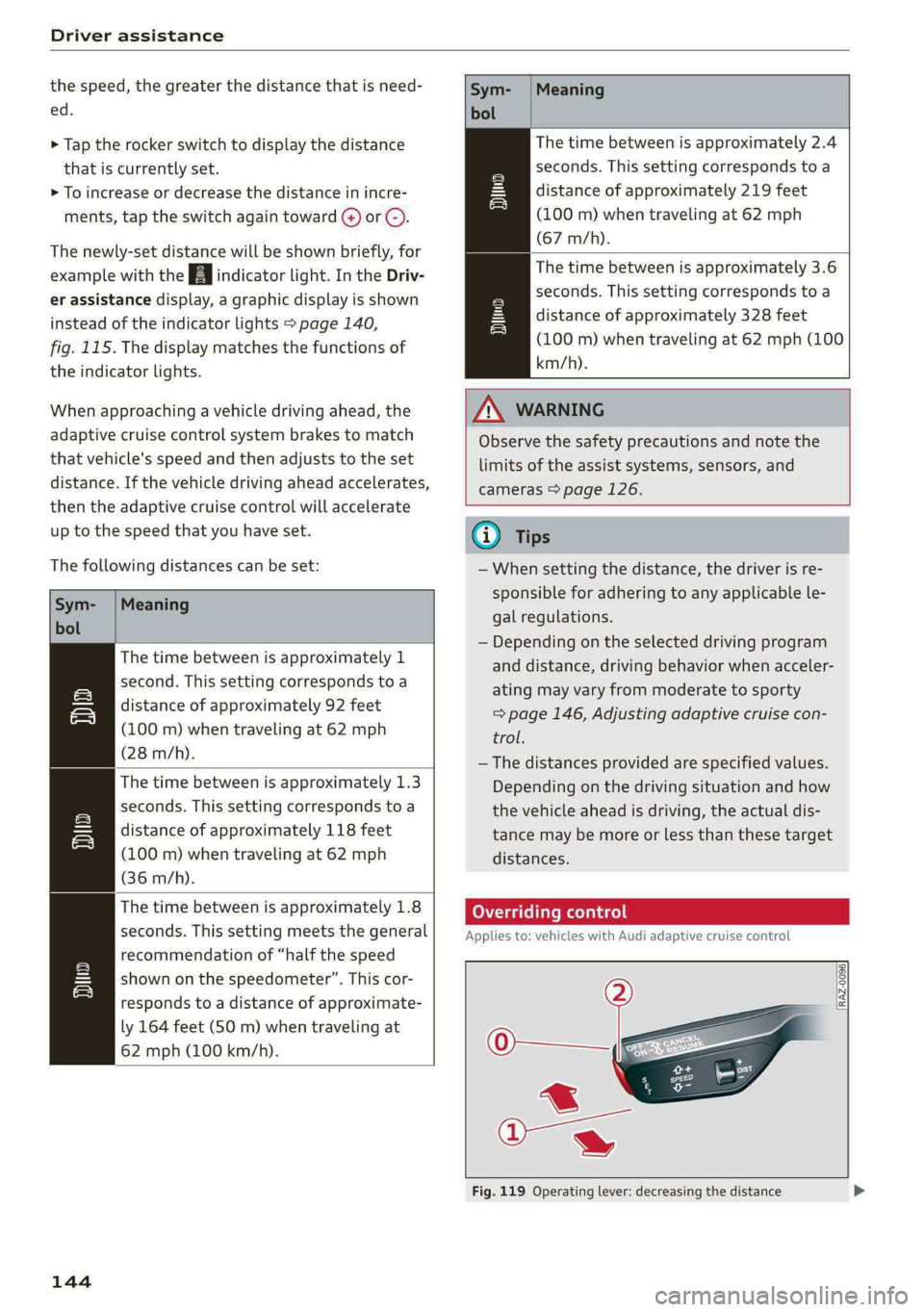
CON Tea sate Reena)!
Applies to: vehicles with Audi adaptive cruise control
[RAZ-0096|
Fig. 119 Operating lever: decreasing the distance
Page 148 of 318
Driver assistance
This may also occur in some situations when
there is no apparent obstacle.
> Press the brake pedal to slow your vehicle
down.
ZA WARNING
— Observe the safety precautions and note the
limits of the assist systems, sensors, and
cameras > page 126.
— If the message B& ready to drive!) appears,
your vehicle will start driving even if there is
an obstacle between your vehicle and the ve-
hicle ahead. To reduce the risk of an acci-
dent, always make sure there are no obsta-
cles between your vehicle and the vehicle
driving ahead.
@) Tips
For safety reasons, the adaptive cruise control
will only be active if
— The driver's safety belt is fastened
— All doors and the hood are closed
— Your vehicle is not stopped for a long period
of time
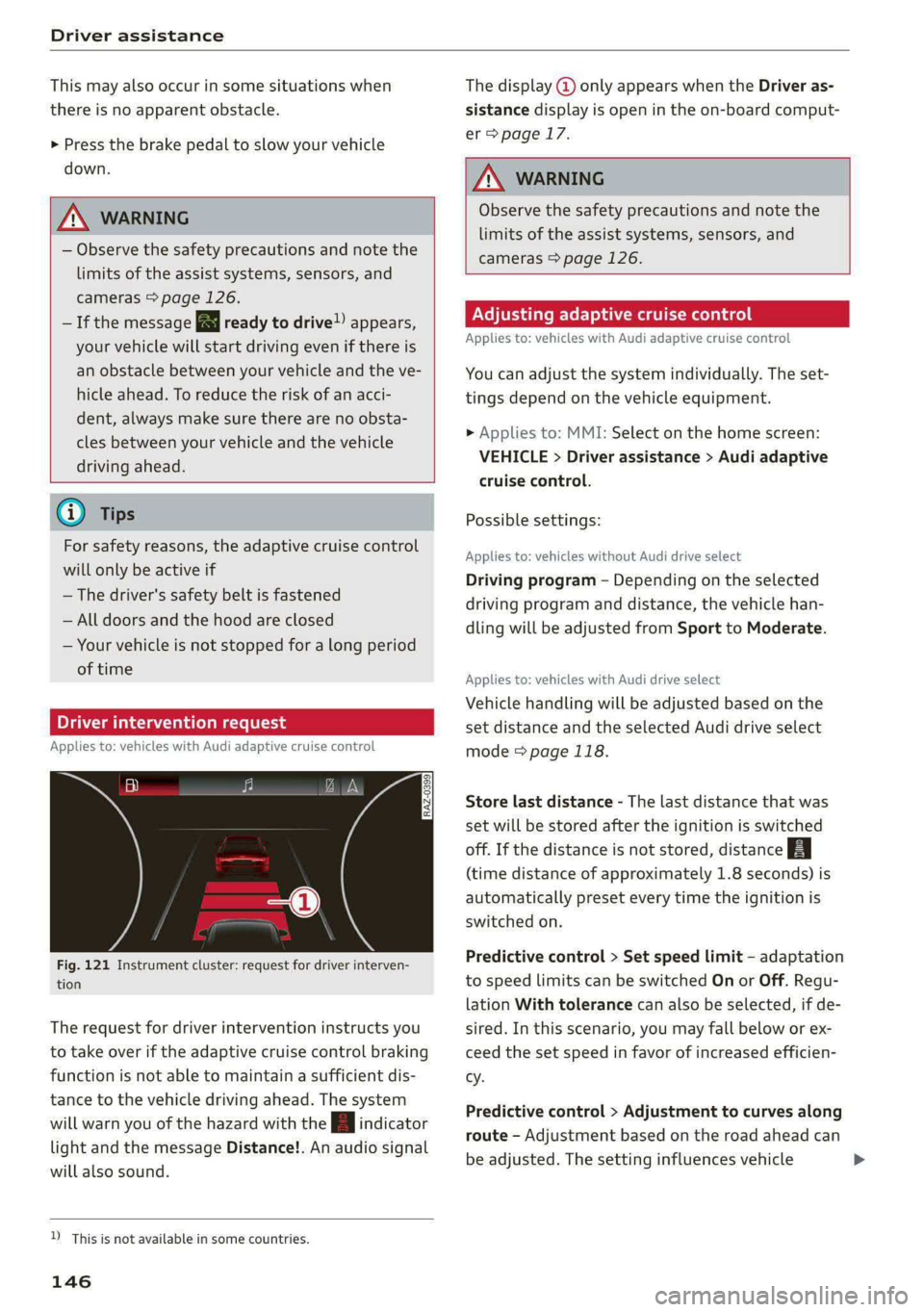
Driver intervention request
Applies to: vehicles with Audi adaptive cruise control
al 3
S| ny
x cc
Fig. 121 Instrument cluster: request for driver interven-
tion
The request for driver intervention instructs you
to take over if the adaptive cruise control braking
function is not able to maintain a sufficient dis-
tance to the vehicle driving ahead. The system
will warn you of the hazard with the indicator
light and the message Distance!. An audio signal
will also sound.
D_ This is not available in some countries.
146
The display @ only appears when the Driver as-
sistance display is open in the on-board comput-
er > page 17.
Z\ WARNING
Observe the safety precautions and note the
limits of the assist systems, sensors, and
cameras > page 126.
Adjusting adaptive cruise control
Applies to: vehicles with Audi adaptive cruise control
You can adjust the system individually. The set-
tings depend on the vehicle equipment.
> Applies to: MMI: Select on the home screen:
VEHICLE > Driver assistance > Audi adaptive
cruise control.
Possible settings:
Applies to: vehicles without Audi drive select
Driving program - Depending on the selected
driving program and distance, the vehicle han-
dling will be adjusted from Sport to Moderate.
Applies to: vehicles with Audi drive select
Vehicle handling will be adjusted based on the
set distance and the selected Audi drive select
mode > page 118.
Store last distance - The last distance that was
set will be stored after the ignition is switched
off. If the distance is not stored, distance
(time distance of approximately 1.8 seconds) is
automatically preset every time the ignition is
switched on.
Predictive control > Set speed limit - adaptation
to speed limits can be switched On or Off. Regu-
lation With tolerance can also be selected, if de-
sired.
In this scenario, you may fall below or ex-
ceed the set speed in favor of increased efficien-
cy.
Predictive control > Adjustment to curves along
route - Adjustment based on the road ahead can
be adjusted. The setting influences vehicle >
Page 259 of 318
8W7012721BB
Wheels
Model/ Tire designation Tire pressure
Engine Normal load Maximum load
(up to 2/3* people)?
Front Rear Front Rear
PSI | kPA | PSI | kPA | PSI | kPA | PSI | kPA
A5 Sportback: |225/50 R17 94Y 32 | 220 | 29 | 200) 35 | 240) 35 | 240
2.0L 245/40 R18 93Y 32 | 220 | 29 | 200 | 35 | 240) 35 | 240
4-cylinder 255/35R1996Y | 32 | 220 | 32 | 220 | 38 | 260| 41 | 280
245/40 R18 97H 35 | 240 | 35 | 240 | 38 | 260) 41 | 280
265/30 R20 94Y 33. | 230 | 33 | 230) 38 | 260) 38 | 260
S5 Sportback: | 245/40 R18 97H 35 | 240 | 32 | 220] 39 | 270) 39 | 270
3.0L 245/40 R18 97Y 36 | 250 | 33 | 230] 41 | 280) 41 | 280
Greylinder 255/35R1996Y | 38 | 260 | 35 | 240 | 42 | 290| 42 | 290
265/30 R20 94Y 41 | 280 | 38 | 260 | 45 | 310 | 45 | 310
RS 5 Sportback: | 265/35 R19 98Y 36/ | 250/ | 32/ | 220/ | 39/ | 270/| 39/ | 270/
2.9L 39) | 270») | 36) | 250) | 425) | 290)| 425) | 290)
6-cylinder 275/30 R20 97Y 38/ | 260/ | 32/ | 220/ | 41/ | 280/| 41/ | 280/
415) | 280) | 365) | 250) ) 44>) | 3005) | 44») | 3005)
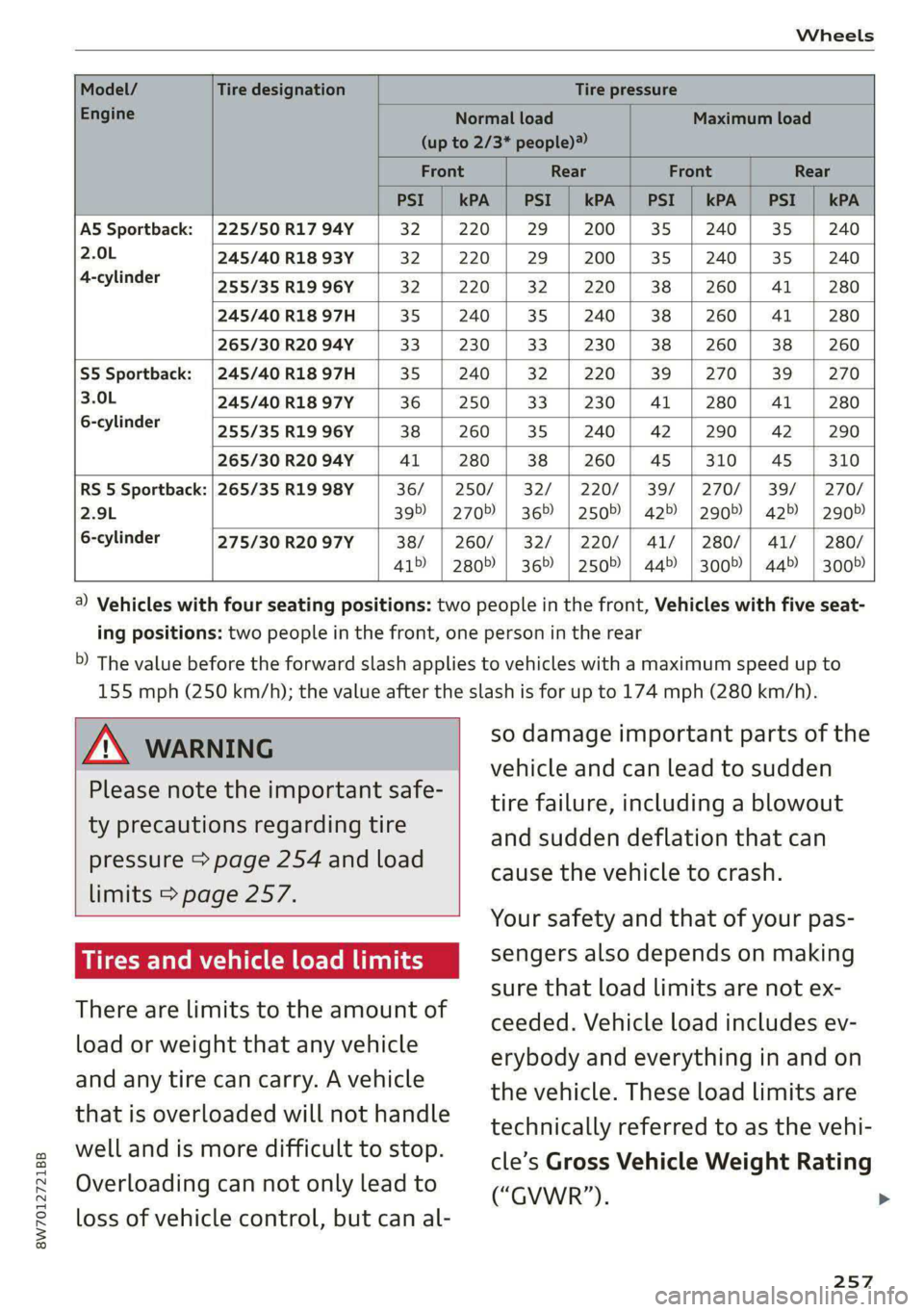
4) Vehicles with four seating positions: two people in the front, Vehicles with five seat-
ing positions: two people in the front, one person in the rear
5) The value before the forward slash applies to vehicles with a maximum speed up to
155 mph (250 km/h); the value after the slash is for up to 174 mph (280 km/h).
Z\ WARNING
Please note the important safe-
ty precautions regarding tire
pressure > page 254 and load
limits > page 257.
Tires and vehicle load limits
There are limits to the amount of
load or weight that any vehicle
and any tire can carry. A vehicle
that is overloaded will not handle
well and is more difficult to stop.
Overloading can not only lead to
loss of vehicle control, but can al-
so damage important parts of the
vehicle and can lead to sudden
tire failure, including a blowout
and sudden deflation that can
cause the vehicle to crash.
Your safety and that of your pas-
sengers also depends on making
sure that load limits are not ex-
ceeded. Vehicle load includes ev-
erybody and everything in and on
the vehicle. These load limits are
technically referred to as the vehi-
cle’s Gross Vehicle Weight Rating
(“GVWR”).
257
>
Page 285 of 318

8W7012721BB
Emergency assistance
(50 km), then transport the vehicle on a
special carrier.
— If the vehicle is towed by a tow truck at the
axle that is not permitted, this can cause se-
vere damage to the transmission.
— The vehicle must not be tow started for
technical reasons.
@® Tips
— If the power supply is interrupted, then it
will not be possible to move the selector
lever out of the "P" position. The parking
lock must be released using the emergency
release before towing the vehicle
=> page 108.
— Switch Audi pre sense* off > page 155 when
loading the vehicle onto a vehicle carrier,
train, ship, or other type of transportation,
or when towing the vehicle. This can prevent
an undesired intervention from the pre
sense* system.
— Follow the local legal regulations for tow-
ing.
Read and follow the important information under
=> page 282.
Preparations
> Only secure the towing cable or tow bar at the
designated towing loop > page 283.
> Make sure the towing cable is not twisted. Oth-
erwise it could disconnect from the towing loop
while towing.
> Switch the emergency flashers on in both
vehicles > page 61. However, do not do this if it
prohibited by law.
Towing vehicle (front)
> Only start to drive when the towing cable is
taut.
> Press the brake pedal very carefully.
» Avoid sudden braking or driving maneuvers.
Vehicle being towed (rear)
> Make sure the ignition is switched on so that
the steering wheel is not locked and so that you
can use the turn signals, the horn, and the
windshield wipers if needed > A\.
> Switching it off before the vehicle has stopped
may
impair the function of the brake booster
and power steering. You would then need to
use more force to steer and brake the vehicle.
> Release the parking brake > page 114.
> Select the “N” selector lever position.
> Make sure the towing cable is always taut.
JN WARNING
— Never tow a vehicle using a tow bar or tow-
ing cable if the vehicle does not have electri-
cal power.
— If the vehicle runs out of power while it is
being towed, stop towing the vehicle imme-
diately and consult an authorized Audi deal-
er or qualified repair facility.
Rear towing loop
Applies to: RS models
Fig. 190 Rear bumper: installing the towing loop
The threaded opening for the towing loop is lo-
cated on the right rear of the bumper.
> Remove the towing loop from the vehicle tool
kit > page 274.
283
>
Page 306 of 318

Index
Drive select
refer to Audi drive select.............0. 118
Drive system... ... 00.20. cee eee eee eee 110
Audi driveselect . cc.0i ices d ceca cain 118
Drive system (message) ........00. eee eee 112
Driving down hills............0. 00.0 eee 116
DrivING PFOGKAME. « « eserce «© sone 6 0 sons aw ane 146
Driving through water.................. 116
DrIVING ELIMI 5 & cescinne 6 5 cose vo een & enawens a 17
Driving tips
Driving through water...............0- 116
Efficient driving................00000- 110
Uphilland downhill................... 116
DFIVING:-trACK es: « 2 sews & 2 seme xc owe oe 116
Driving Up:hills. < 2 sees + » yews 5» ewes c 2 eee 116
Dust filter
refer to Pollutant filter................. 98
DY MAMIE StEEKING = wwe = 2 qewe a 2 anes = noR 119
E
E-itidilss < same « 2 sau: ¢ 5 sepa 2 s neem 2 5 pee 180
SOCHINGSiccsain » sew © © wravens a & soomem w V soveTS 6 180
EDL
refer to Electronic Differential Lock...... 121
EDR
refer to Event Data Recorder (EDR)...... 290
Efficiency assist.............0 02. eee ee 137
PREGietiVe CONTTOlacs ¢ = wax + xeme 2 2 pene 142
Electrical system. ...........0.0020000. 239
Electromechanical parking brake......... 114
Electronic Differential Lock.............. 121
Electronic immobilizer................00. 39
Electronic Stabilization Control........... 121,
Embedded SIM Card « seswiie ss sien os wiven oo 8 183
Emergency assistance ............00000e 274
Emergency braking function............. 115
Emergency call.........cceeeeveee 178, 187
Emergency flashers...............000005 61
Emergency mode............020 eee eee 109
Emergency operation
DOOGIS s seas 3 ¢ Sone 2b ROMA ca aK o ANeRE se 37
Fuel tillerdoor ic = swiss a 2 saves wo wien «2 axe 229
Luggage compartment lid............... 44
Panoramic glass roof...............2-0. 47
Emissions control system..............- 229
304
EMErGy’CONSUMENS Hs 6 ceive e sieves ww neeewe wo x
Energy management... 006. eeee ee eens
Engine
Breakingin.............. cece eee eee
Emergency StOpies : « sews ss weea s eae gs
JUMPISTAREIING » « canseis ws wssins 6 # oeenss a a une
Start/Stop system...........--0000005
Starting/Stopping ws ss caw se ewes yams
Engine compartment
Opening and closing the hood..........
Overview ......- 2. eee cee eee eee
Safety precautions............-0.ee0ee
Engine data
refer to Sport displays..................
Engine oil
AGING «scence ox cesses > 5 eons owes av ara
Changing.......... eee eee eee eee
Checking oillevel.............---000--
CONSUMPTION ess « & sivees 2 o onerees & o ewer @ 8 ov
Indicator light..............02..0000-
Replacement interval.................
Temperature display.................-.
Engine sound
Audi drive select............ 0.00000
Engine Start/Stop mode
refer to Start/Stop system.............
Engine startsSySte ny wcusooe » scaseas o « seas oo one
Engine stop
refer to Start/Stop system.............
Entry/exit lighting. ............0 0...
Entry ASSISTANGE!S. 4 « scusnze » » sxnzece » o asnseue ow anes
also refer to Exit assistance.............
GlSO refer to Seats ¢ seen % 3 aes sv awn % Ears
Environment
Unleaded gasoline..................0.
ESG
refer to Electronic Stabilization Control...
ESCSpOlbnnsos 5 2 omners x x emmes oo nveoeee ao manne ©
eSIM
refer to Embedded SIM card............
Event Data Recorder (EDR)..............
Exitassistamee « scccene a 0 sxesese = v vreuain 3 o anes © 5
EXHE WAP Gicnes 2 a caees vw cscs «Heaven «© enone
Exterionantenna s wise <2 wees 2 6 mec ss oes
Exterior lighting + « ¢ see: +» sees y sae ees
Page 311 of 318

8W7012721BB
Index
Parking lock
Manually releasing.............000005 108
also refer to Gears... 00... cece cece e eee 105
PaSs*throuGl scx = = casas ¢ s eatem 3 ¢ Hae ¢ coe 95
Pedals... 0... cc eee e cece eee eee eens 107
Perchlorate. ... 0.2.0... eee eee eee ee eee 294
Performance/torque display
refer to Sport displays.................. 16
Peripheral cameras............---0000 0s 161
Phone
Connecting a second mobile device...... 172
Disconnecting a mobile device.......... 173
Settings........... 00.02 eee eee eee 178
Phonebook
refer to Directory....... 0.0.00 cece eae 176
PIN
4-digit myAudi PIN..............-..0005 31
Protection esc os was < v owiie + ¥ wou 2 ¥ ecoxmn 32
Playbacki(media) si cscs 2s sos so secu s 2 acs 212
Podcast
refer to Online radio.............. 206, 207
Polishing ices o csenwes xo onesies vv vein ¥ w anewwn oe 269
Pollen filter
refer to Pollutant filter.............0005 98
Pollutamtfilter’. cxscsns + somes 2 0 onesies + 6 ncooee © 98
Power SOUPCES's + wx a 8 inne oo creme @ 8 91,211
POWEPtOP sien oo cen 3 2 enna oo ee vo ee 51
Cleaning. .... 2... cece eee eee eee 269
POWePWINGOWS « scsvine i o ssvirs & arene & wanes ee a 45
Malfunction
Power windows malfunction.............. 45
Predictivercomtrols.. wise ss aves 0 aceon 0 0 some 142
Predictive messageS..........00eeeeeeee 138
pre sense
refer to Audi presense................ 152
Presentation modes. . « some « «smc = awamene = 201
Presets
Radio... eee eee eee ee 205
Presets list
Feferto Presets’. « «ccc. i aes de nas ses 205
Pressure
Tire pressure monitoring system.... 262, 263
AROS = vonsnas we wince 2 3 Hones 8 x cements oH ee 254
Profile:picture « seca < s samo 2 wane 6% oem @ a oes 31
Protecting’: =o cos vo ee oo een oo een oo 269
Pyrotechnic elements............--..-- 294
Q
quattro... 2... eee eee 120
Selective wheel torque control.......... 121
R
Radio’: < » seme s sams : Rome « ¢ ome & seme ee 202
RagiOteXtecsas «sina x wana 6 2 imeem «2 emwew 205
Station list........ 0... 202
Radio communications equipment........ 296
Radioequipment wai. <2 cee ee cee eee es 296
Radio Standards Specification (RSS)....... 297
Rain/light sensor
Automatic headlights .................- 58
Intermittent mode (windshield wipers).... 65
Random
réfer to Shutfle:: < s sess = 2 mee %s seen ee xe 214
Range (fuel level) ................000000- 17
Reading lights.............. 0.0.00 eae 62
Rear cross-traffic assist.............00.. 165
Rear lid
refer to Luggage compartment lid........ 42
Rear seatS......... cee eee 94,95
Rear shelf
refer to Storage area behind the rear head
RESEPAINES sisi > rome os weve a 6 ase 6 ZNO & 92
Rearview camerals «wea ss evens ¢ wom a yo 161
Rear window defogger............--+0. 101
Recirculation mode..............+..05- 100
Recuperation.......... 000 cece eee eee ee 17
Refrigerant oil... 2.2.2.2... eee eee 300
Refueling. ........ 0... cee eee eee eee 227
Remote access authorization (key user)..... 32
Remote control
Garage door opener...........-0e ee eee 48
Remote control key..............-.00005 38
Convenience opening and closing......... 46
Key replacement..............--0000-- 38
1 40
PANIC function..............00 00 ee eee 38
Replacing the battery.................. 40
Unlocking and locking................-- 39
also refer to Vehicle key............00.. 38
Removing the caps (wheel bolts)......... 277
Repairs. ... 0.0.0.0... eee 294
Replacement key.........-..0--00000005 38