Traffic sign AUDI A5 2021 Owners Manual
[x] Cancel search | Manufacturer: AUDI, Model Year: 2021, Model line: A5, Model: AUDI A5 2021Pages: 318, PDF Size: 85.96 MB
Page 5 of 318
8W7012721BB
Table of contents
Brivirigy cy mieirles. cies i 6 scious 6 6 esses 6 118
Audi drive select............00 eee eee 118
SUSPENSION: + yews a x mem a e Bees se CeRRE L19
StOOKIING cms a v ves 8 ceawem ¥ sen ¥ erzaees LIS.
All wheel drive (quattro) .............. 120
Electronic Stabilization Control......... 121
Trailer towing.................0-. 124
Driving with atrailer................. 124
Assist systems................... 126
Assist systems................00. 126
General information................. 126
Surrounding area detection............ 127
Driving information.............. 130
Speed warning system..............-. 130
Camera-based traffic sign recognition... 130
Traffic light information.............. 132
Lap etime ris « & esuass « 6 mesns « o uve & & meee 133
Acceleration measurement............ 134
Integrated Toll Module............... 135
Driver assistance................. 136
Cruise control system................ 136
Efficiency assist .«
Audi adaptive cruise control........... 139
Traffic jam assist............00.-000- 147
Distance Warning « « sais + s ewe 2 o eee & s 149
Audi active lane assist/lane departure
warning............ 20. ce eee eee 150
AUGi PrESGNSe « esis sx cows < e cams & eaew 152
Sidevassist vccssv: «x ceavous ov aseuase ao cerns © 8 ane 156
Exit warning ...............-e eee eee 157
Parking and maneuvering....... 59:
Introduction. ............ 2. eee eee ee 159
Parkitig:aid plUS = ssa < 2 esos ¢ ¥ Sana 4 x 159
Rearview camera and peripheral cameras. 161
Rear cross-traffic assist............... 165
Assisted parking.........-...0--- eee 166
ParkeaSsiSt’s cass a = sane s x pany s & eens 3 5 168
Infotainment system............ 171
Telephone.............. cece eee U7.
TMEROGUCTION « & cess wo wcinase we a oraeni ow awenaie 171
Setup... 2.2... cee eee eee eee 171
Using the Audi phone box............. 173
Using the telephone.................. 175
SettingS 00... . cece cee eee eee eee 178
MOSSAGES cours « s eauu § 2 eueeS Fo EGE FE BS 179
Troubleshooting sic ss wes oe ween es owe 181
Audi CONNECE : «6: = i e665 st ees so 182
General information................. 182
Audi connect Infotainment............ 182
Using a Wi-Fi hotspot 183
Audi connect Infotainment services..... 183
Functions on demand................ 184
Audi connect vehicle control services.... 184
SOttingS sews + 9 cae ¥ eee ¥ perms we pee 185
Troubleshooting..............--.0005 186
Emergency call................... 187
OVERVIEW. secs. 6 x sxcvers 6 emutes @ a eavaens vw ame
Emergency call
Online roadside assistance............ 188
Navigation.....................05. 190
Opening navigation.................. 190
myAudi navigation................00. 190
Entering adestination..............0- 191
Stopping route guidance.............. 194
Mapes & 5 saves © 2 saws yo sme @ & Hew 2 2 Be 194
Alternative routes................04. 196
Additional functions...............0-- 196
Satellite Map’s + 6 gare = cama a e weep os oe 197
Mapreipdates » cmos + x sre: «2 anes aw onnens 198
Traffic incidents.............. 000 eee 199
SOtuiNGS
wows ¢ « eeen ¢ nae 2 Bees doe 200
Radio....... cece eee 202
Generalinformation................. 202
Radio functions sss < eins 2 + wen 3 6 eacern 203
Online radio... .... eee eee eee 206
Options and settings................. 207
Troubleshooting wisi « s wen» 6 eae o + wae 208
Media................. 0c cece eee 210
General information................. 210
Bluetooth audio player............... 210
Amazon Alexa ..........0.00 eee eee 211
Multimedia connections.............. 211
Playing medias... crocs s 0 samen 4 o snmeie «0 one 212
Options and settings................- 216
Page 8 of 318
Quick access
Quick access
Cockpit
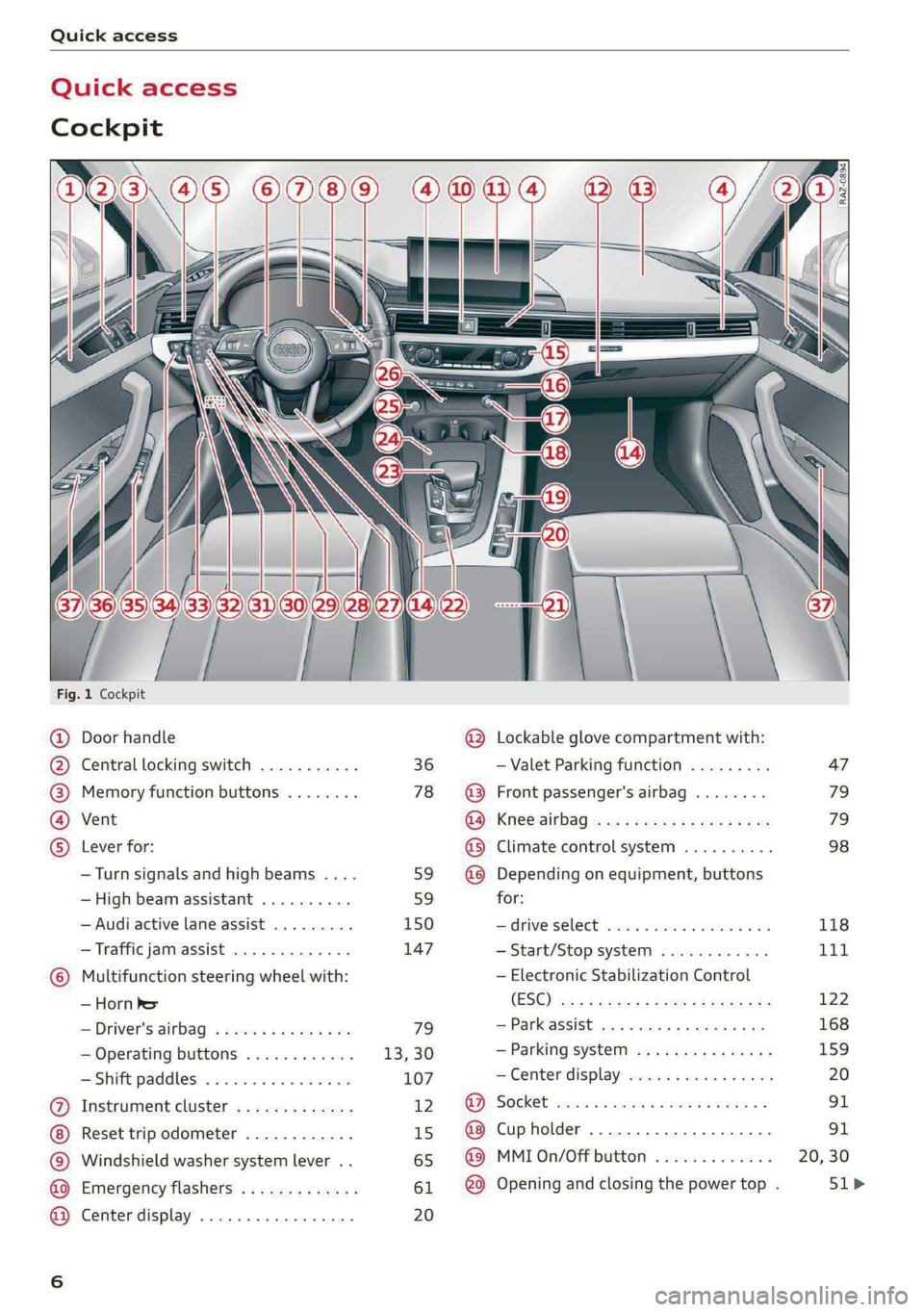
Fig. 1 Cockpit
@ @ @ @ ©
©
OO©eCS9
Door handle
Central locking switch
Memory function buttons
Vent
Lever for:
—Turn signals and high beams ....
— High beam assistant ..........
— Audi active lane assist .........
— Traffic jam assist .............
Multifunction steering wheel with:
— Horn he
— Driver's airbag
— Operating buttons
—Shift paddles ................
Instrument cluster .............
Reset trip odometer ............
Windshield washer system lever ..
Emergency flashers .............
Center display .................
36
78
59 59
150 147
79
13,30
107
12 15
65
61 20
®
OOO®
©OO®
Lockable glove compartment with:
— Valet Parking function
Front passenger's airbag
Knee airbag
Climate control system ..........
Depending on equipment, buttons
for:
drive SELCCE cassis «6 sossan © 4 esr © 6s
— Start/Stop system
— Electronic Stabilization Control
(ESC)
— Parkassist os 5 & enies so acs x ¢ ee
— Parking system
—Center display ................
Cup holder ...............0000.
MMI On/Off button
Opening and closing the power top .
[RAZ-0894)
47
79
79
98
118
Tit
122
168
159
Page 11 of 318

8W7012721BB
Quick access
Electronic Stabilization Control
(ESC)
=> page 122
Electronic Stabilization Control
(ESC)
=> page 122
Electronic Stabilization Control
(ESC)
=> page 122
Anti-lock Braking System (ABS)
=>page 122
Anti-lock Braking System (ABS)
=> page 122
Adaptive cruise control
> page 147,
Traffic jam assist
=> page 148
Steering intervention request
=> page 148,
=>page 151
Distance warning
=> page 149
Active lane assist
=> page 150,
=> page 152
Pre sense
> page 152
Side assist, exit warning
>page 157
Parking systems
=>page 161
Rear cross-traffic assist
>page 165
Park assist
=>page 170
Emergency call function
> page 188
Tank system
=> page 227
Malfunction Indicator Lamp (MIL)
=> page 227,
> page 229
Engine oil level (MIN)
=> page 233
Engine oil level (MAX)
=> page 233
Engine oil sensor
=> page 233
Engine warm-up request
=> page 233
Electrical system
> page 239
Washer fluid level
=> page 242
Tire pressure
=> page 262,
=> page 263,
=> page 265,
=> page 265,
=> page 266
Tire pressure
=> page 263,
=> page 266
Other indicator lights
Low beam headlights
=> page 58
Parking lights
=>page 58
Turn signals
=> page 59,
=> page 61
Turn signals
=>page 59,
=> page 61
Start/Stop system
=> page 111
Cruise control system
=> page 136
Cruise control system
=> page 136
Efficiency assist
=> page 138,
> page 138
Efficiency assist
=> page 138
Page 12 of 318

Quick access
Efficiency assist
=> page 138
Efficiency assist
=> page 138
Efficiency assist
=> page 138
Efficiency assist
=> page 138
Efficiency assist
> page 138
Adaptive cruise control
=> page 140
Adaptive cruise control
=> page 140
Adaptive cruise control
=> page 140
Adaptive cruise control
=> page 140
Adaptive cruise control
=> page 145
Traffic jam assist
=> page 147
Traffic jam assist
=> page 147
Active lane assist
=> page 150
High beam headlights
=> page 59,
=>page 59
High beam assistant
=> page 59,
=> page 60
Laser lights
=> page 60
Child safety lock
=>page 45
Child safety lock
=> page 45
Child safety lock
=>page 45
10
Power top
=> page 53
High beam assistant
=> page 59,
=> page 60,
=> page 62
Convenience key
=> page 104
Transmission
=> page 109
Start/Stop system
> page 112
Electromechanical parking brake
>page 115
Electromechanical parking brake
=>page 115
Hold assist
=>page 115
Steering
=>page 119
Speed warning system
=> page 130
Speed warning system
= page 130
Camera-based traffic sign recog-
nition
> page 131
Cruise control system
=> page 136,
=> page 137,
=> page 137
CRUISE
Cruise control system
=> page 136,
=> page 137,
=> page 137
Efficiency assist
=> page 138,
Predictive control
> page 143,
Adaptive cruise control
=> page 147,
Traffic jam assist
=>page 148
Adaptive cruise control
=> page 143
Page 19 of 318

8W7012721BB
Instrument cluster
— Lap statistics > page 133
— Acceleration measurement > page 134
— Reduced display > page 14
On-board computer
Resetting values to zero
Requirement: the Consumption, Short-term
memory, or Long-term memory display must be
selected.
> To reset the values in the respective memory to
zero, press and hold the left thumbwheel on
the multifunction steering wheel for one sec-
ond.
Depending on the vehicle equipment, you can call
up the following displays in the on-board com-
puter one at a time by turning the left thumb-
wheel on the multifunction steering wheel:
—Time and date > page 221
— Level
— Digital speedometer
— Average consumption > page 17
— Range
— Short-term memory overview
— Long-term memory overview
— Energy consumers > page 17
— Driver assistance
— Traffic sign recognition and traffic light infor-
mation
Short-term memory and long-term memory
The short-term memory collects driving informa-
tion from the time the ignition is switched on un-
til it is switched off. If you continue driving within
two hours after switching the ignition off, the
new values will be included when calculating the
current trip information.
Unlike the short-term memory, the long-term
memory is not erased automatically. You can se-
lect the time period for evaluating trip informa-
tion yourself.
Average consumption
The current consumption can be shown using a
bar graph. The average consumption stored in
the short-term memory is also displayed. If the
bar is green, your vehicle is saving fuel (for exam-
ple, using recuperation).
Energy consumers
The Energy consumers view lists other equip-
ment that is currently affecting fuel consump-
tion. The display shows up to three equipment
items. The equipment using the most power is
listed first. If more than three items using power
are switched on, the equipment that is currently
using the most power is displayed. A gauge also
shows the current total consumption of all other
equipment.
G) Tips
The date, time of day, and time and date for-
mat can be set > page 221.
17
Page 29 of 318
8W7012721BB
Voice recognition system
Voice recognition system
General information
Applies to: vehicles with voice recognition system
You can operate many functions in the vehicle
easily using voice commands.
Using the voice recognition system optimally
> Speak clearly and distinctly at a normal volume.
Speak louder when driving faster.
» Emphasize the words in the commands evenly
and do not leave long pauses.
> Close the doors, the windows, and the sunroof*
to reduce background noise. Make sure that
passengers are not speaking when you are giv-
ing a voice command.
> Do not direct the vents toward the hands-free
microphone, which is in the roof headliner near
the front interior lights.
> Only the driver should speak to the system, be-
cause the handsfree microphone is aimed to-
ward this seating position.
ZA\ WARNING
— Direct your full attention to driving. As the
driver, you have complete responsibility for
safety in traffic. Only use the functions in
such a way that you always maintain com-
plete control over your vehicle in all traffic
situations.
— Do not use the voice recognition system in
emergencies because your voice may change
in stressful situations. The system may take
longer to dial the number or may not be
able to dial it at all. Dial the emergency
number manually.
G) Tips
There are no voice guidance* prompts when a
dialog is active.
Description
eye aU mame ees eR
Applies to: vehicles with voice recognition system
Se
Drive me to
Where is a a
Connect
Pre)
Play
Eg
Maes
coy
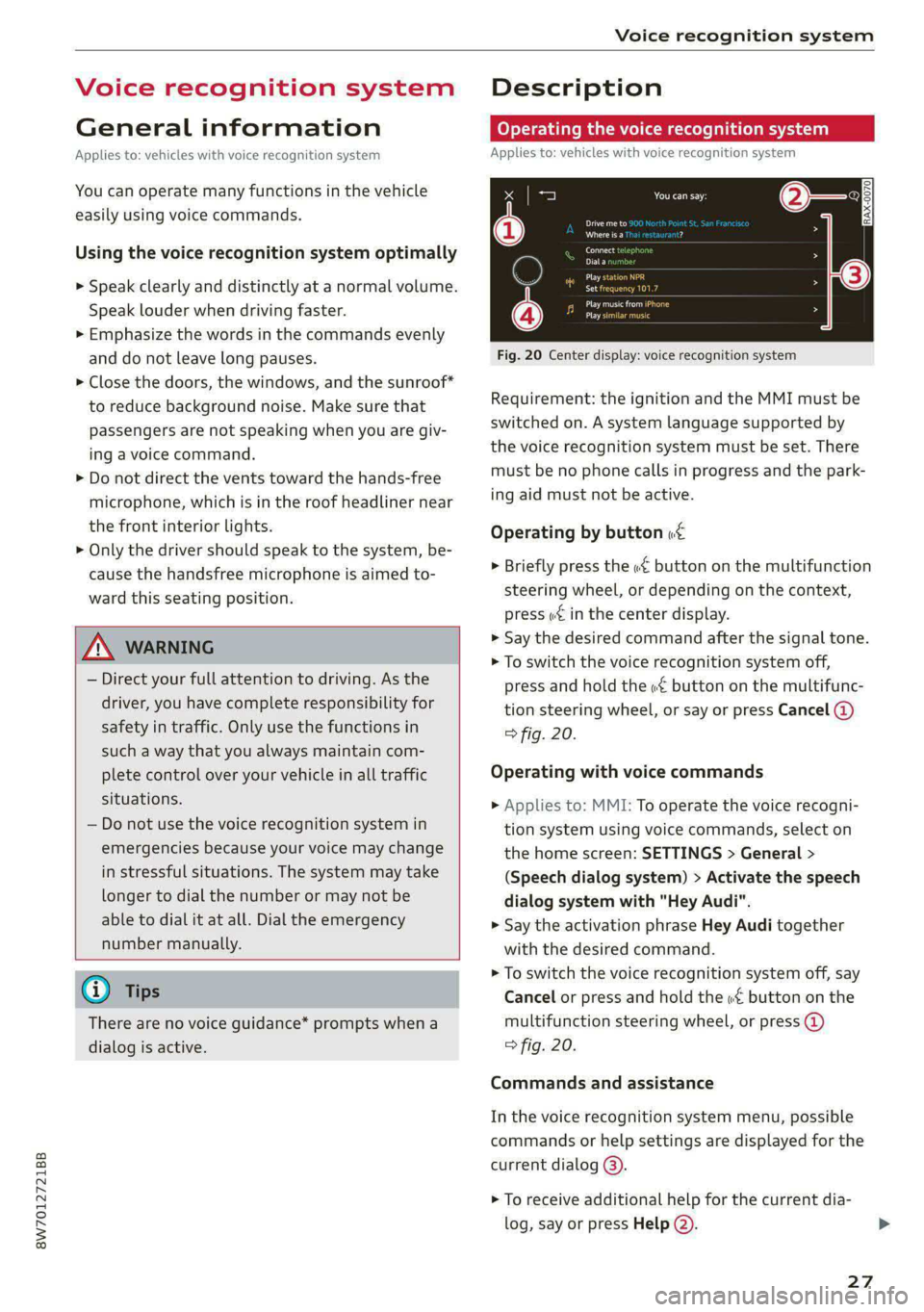
Fig. 20 Center display: voice recognition system
Requirement: the ignition and the MMI must be
switched on. A system language supported by
the voice recognition system must be set. There
must be no phone calls in progress and the park-
ing aid must not be active.
Operating by button «£
> Briefly press the «€ button on the multifunction
steering wheel, or depending on the context,
press we in the center display.
> Say the desired command after the signal tone.
> To switch the voice recognition system off,
press and hold the «€ button on the multifunc-
tion steering wheel, or say or press Cancel (@)
> fig. 20.
Operating with voice commands
> Applies to: MMI: To operate the voice recogni-
tion system using voice commands, select on
the home screen: SETTINGS > General >
(Speech dialog system) > Activate the speech
dialog system with "Hey Audi".
> Say the activation phrase Hey Audi together
with the desired command.
> To switch the voice recognition system off, say
Cancel or press and hold the «£ button on the
multifunction steering wheel, or press @)
> fig. 20.
Commands and assistance
In the voice recognition system menu, possible
commands or help settings are displayed for the
current dialog @).
> To receive additional help for the current dia-
log, say or press Help (2).
27
Page 60 of 318

Lights and Vision
Lights and Vision
Exterior lighting
Switching the lights on and off
Fig. 51 Instrument panel: light switch with button
@ Light switch &
Turn the light switch @ to the corresponding po-
sition when the ignition is switched on. The 2
symbol and the selected position will turn on (ex-
cept position 0).
O - The daytime running lights* will automatical-
ly turn on. In vehicles for some markets, you can
switch the automatic daytime running lights on
and off in the MMI.
AUTO - The headlights will automatically adapt to
the surrounding brightness.
300: — Parking lights
2D - Low beam headlights
When the low beam headlights or parking lights
are switched on, the corresponding BB or 200 in-
dicator light will turn on depending on vehicle
equipment.
@ All-weather lights Zo
Requirement: the light switch must be in the AU-
TO or ZO position.
The headlights automatically adjust so that there
will be less glare, for example when the road sur-
face is wet.
Automatic headlight range control
Your vehicle is equipped with automatic head-
light range control. It reduces glare for oncoming
58
traffic if the vehicle load changes. The headlight
range adjusts automatically.
Audi adaptive light
Applies to: vehicles with Audi adaptive light
Audi adaptive light provides better visibility when
driving in the dark. The lights are adapted to the
road conditions based on speed, such as when
driving on expressways, rural roads, at intersec-
tions, and around curves. The adaptive lights only
function when the light switch is in the AUTO po-
sition and the all-weather lights are switched off.
ZA WARNING
— Observe the safety precautions and note the
limits of the assist systems, sensors, and
cameras > page 126.
— Automatic headlights are only intended to
assist the driver. The driver is still responsi-
ble for controlling the headlights and may
need to switch them on and off manually
depending on light and visibility conditions.
For example, fog cannot be detected by the
light sensors. So always switch on the low
beams ZO under these weather conditions
and when driving in the dark.
(i) Tips
— If the vehicle battery has been discharging
for a while, the parking light may switch off
automatically. Avoid using the parking
lights for several hours.
— When using lighting equipment, the driver
is responsible for adhering to any local ap-
plicable regulations while driving and when
parking the vehicle.
— Only the front headlights turn on when the
daytime running lights are switched on*. In
vehicles in certain markets, the tail lights
will also turn on.
—Incool or damp weather, the inside of the
headlights, turn signals, and tail lights can
fog
over due to the temperature difference
between the inside and outside. They will
clear shortly after switching them on. This
does not affect the service life of the light-
ing.
Page 61 of 318

8W7012721BB
Lights and Vision
Turn signal and high beam lever
BFV-0012
Fig. 52 Lever: switching on the turn signal and high beams
The lever operates the turn signals, the high
beams and the headlight flasher.
Turn signals 15>
The turn signal will activate when you move the
lever into a turn signal position while the ignition
is switched on. The respective Kl or By indicator
light will flash.
@ Right turn signal
@® Left turn signal
The turn signal blinks three times if you tap the
lever (convenience turn signal).
If an indicator light blinks twice as fast as usual,
a turn signal bulb has failed. Carefully drive to an
authorized Audi dealer or authorized Audi Service
Facility immediately to have the malfunction cor-
rected.
High beams =O and headlight flasher
> Move the Lever to the corresponding position:
@) High beams on (vehicles with high beam assis-
tant*) > page 59
@ High beams off or headlight flasher
The
=o) indicator light in the instrument cluster
will turn on.
Z\ WARNING
High beams can cause glare for other drivers,
which increases the risk of an accident. For
this reason, only use the high beams or the
headlight flasher when they will not create
glare for other drivers.
thames
Applies to: vehicles with high beam assistant
The high beam assistant automatically turns the
high beams on or off depending on the surround-
ing conditions.
A camera on the rearview mirror mount can de-
tect light sources from other road users. The high
beams switch on or off automatically depending
on the position of vehicles driving ahead and on-
coming vehicles, the vehicle speed as well as oth-
er environmental factors and traffic conditions.
Activating high beam assistant
Requirement: the light switch must be in the AU-
TO position and the high beam assistant must be
switched on in the MMI > page 61.
> To activate the high beam assistant, tap the
lever forward @) > page 59, fig. 52. The fa&4 in-
dicator light will appear in the instrument clus-
ter display and the high beams will be switched
on or off automatically. The Ea indicator light
will turn on if the high beams are switched on.
Activating and deactivating the high beam
head lights manually
If the high beams did not switch on or off as ex-
pected, you may switch them on or off manually
instead:
> To activate the high beams manually, tap the
lever
forward @) > page 59, fig. 52. The & in-
dicator light will turn on.
> To deactivate the high beams manually, pull
the lever back @) > page 59, fig. 52. The high
beam assistant is deactivated.
Operating the headlight flasher
> To operate the headlight flashers, pull the lever
back @) > page 59, fig. 52. If the high beam
headlights are not switched on, the high beam
assistant will remain activated.
Z\ WARNING
— Observe the safety precautions and note the
limits of the assist systems, sensors, and
cameras > page 126.
59
Page 63 of 318

8W7012721BB
Lights and Vision
@) Tips
— The headlight contains a class 2 laser. The
technical design converts the laser beam so
that there is no danger when it is used for
its intended purpose.
— The laser beam emission from the head-
lamp has been classified in accordance with
IEC 60825-1:2007.
— The possible emission is below the thresh-
old for laser class 2.
— Maximum laser beam output: 5W (continu-
ous emission), wavelength range A= 400 nm
-700 nm.
—The headlamp light functions are rated in
accordance with IEC 62471-5:2015.
— The beam emitted from the headlamp was
classified as risk group 2.
Adjusting the exterior lighting
You can adjust the exterior lighting separately.
The settings depend on the vehicle equipment.
> Applies to: MMI: Select on the home screen:
VEHICLE > Light & Visibility > Exterior light-
ing.
Automatic headlights
You can adjust the following settings in the Auto-
matic
headlights menu:
Activation time - You can adjust if the headlights
switch on Early, Medium, or Late based on the
sensitivity of the light sensor.
High beam assistant - You can switch the high
beam assistant on and off.
Laser lights - You can switch the laser lights on
and off.
Entry/exit lighting
The Entry/exit lighting illuminates the area
around the vehicle when the vehicle is unlocked
or when the driver’s door is opened while the ig-
nition is off. The entry/exit lighting works when it
is dark and the light switch is in the AUTO posi-
tion. The front and rear daytime running lights*
switch on automatically each time the vehicle is
unlocked regardless of how bright it is outside
the vehicle.
Daytime running lights
USA models: The daytime running lights can be
switched on and off.
Canada models: This function cannot be switched
off. They activate automatically each time the ig-
nition is switched on.
Emergency flashers
so
al i2 EY S|
| |
Fig. 54 Center console: emergency flashers
The emergency flashers help to make other driv-
ers aware of your vehicle in dangerous situations.
> Press the A @ button to switch the emergency
flashers on or off.
When the emergency flashers are turned on, the
a and By indicator lights will flash at the same
time.
You can indicate a lane change or a turn when the
emergency flashers are switched on by using the
turn signal lever. The emergency flashers stop
temporarily.
The emergency flashers also work when the igni-
tion is turned off.
@) Tips
You should switch the emergency flashers on
ite
— you are the last car in a traffic jam so that
all other vehicles approaching from behind
can see your vehicle
— your vehicle has broken down or you are
having an emergency
61
Page 112 of 318

Driving
There is a system malfunction in the selector lev-
er. You can continue driving with restricted func-
tion. The selector lever is not working. Gears can
only be selected by tapping both shift paddles at
the same time when the vehicle is stationary. The
“P” gear is automatically engaged when you turn
off the engine. Drive to an authorized Audi dealer
or authorized Audi Service Facility immediately to
have the malfunction corrected.
i Selector lever: malfunction! You can contin-
ue driving. Please contact Service
There is a system malfunction in the selector lev-
er. Drive immediately to an authorized Audi deal-
er or authorized Audi Service Facility to have the
malfunction repaired.
fs} P button: malfunction! Auto P when engine
off. Please contact Service
There is a malfunction in the "P" button on the
selector lever. The “P” gear is automatically en-
gaged when you turn off the engine. Drive to an
authorized Audi dealer or authorized Audi Service
Facility immediately to have the malfunction cor-
rected.
Move selector lever to automatic position
There is a malfunction in the tiptronic mode. End
tiptronic mode by pushing the selector lever to
the left into the "D/S" position.
Drive system
A new vehicle must be broken in within the first
1,000 miles (1,500 km) so that all moving parts
work smoothly together, which helps to increase
the service life of the engine and other drive com-
ponents.
Do not drive higher than two-thirds of the maxi-
mum permitted engine RPM during the first 600
miles (1,000 km) and do not use full accelera-
tion. The engine can be increased RPM gradually
during the next 300 miles (500 km).
110
aire (alee Madey neat iN ede (Tue A
driving
Your driving style greatly influences the amount
of fuel and energy consumed, the environmental
impact, and the wear on the engine, brakes, and
tires. Note the following information for efficient
and environmentally-conscious driving:
— Turn off electrical equipment that is not need-
ed, for example seat heating*.
— Anticipate upcoming traffic situations while
driving to avoid unnecessary acceleration and
braking.
— Avoid driving at high speeds.
— Avoid adding extra weight to the vehicle if pos-
sible, for example by not leaving roof racks or
bike racks installed when they are not needed.
— Make sure the tire pressure is correct.
— Have maintenance performed regularly on the
vehicle.
— Do not let the engine run while the vehicle
parked.
— Do not drive with winter tires during the summ-
er.
— Use the Start/Stop system.
— Utilize the engine braking effect.
— Avoid driving short distances when possible.
(i) Tips
The amount of noise produced by the vehicle
can increase significantly when driving with a
sporty style. Show respect to others around
you and the environment with the way you op-
erate your vehicle, especially at night.
Sees
Your vehicle is equipped with an intelligent ener-
gy management system for distributing electrici-
ty. This significantly improves the starting ability
and increases the vehicle battery life.
@ Tips
—If you drive short distances frequently, the
vehicle battery may not charge enough
while driving. As a result, convenience func-
tions for electrical equipment may be tem-
porarily unavailable.