garage door opener AUDI A5 2021 Owners Manual
[x] Cancel search | Manufacturer: AUDI, Model Year: 2021, Model line: A5, Model: AUDI A5 2021Pages: 318, PDF Size: 85.96 MB
Page 4 of 318
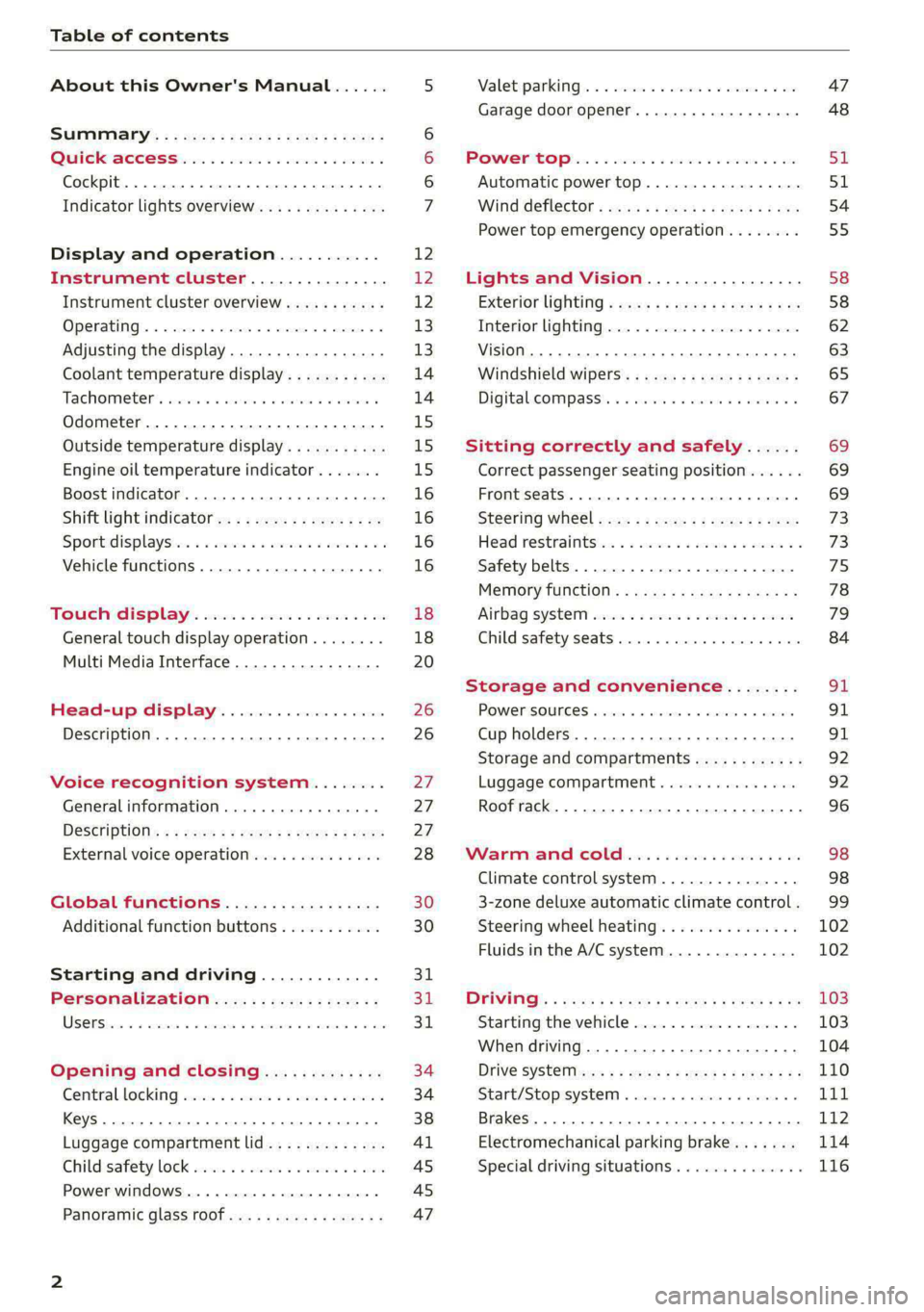
Table of contents
About this Owner's Manual......
SUMIMAry: < = exe : eens: Seen cs sens
QutckeaeCe ssh: «i esis se ois a eaves @
Cockpit. ...... 0... eee eee eee eee
Indicator lights overview...........4..
Display and operation...........
Instrument cluster...............
Instrument cluster overview...........
Operating. ecccuse w+ were oo wens oo ayes 9 ¥
Adjusting the display.................
Coolant temperature display...........
Tachometer’ series i ewe so snes ¥ & ome
Odometer.............. cee eee eee ee
Outside temperature display...........
Engine oil temperature indicator.......
Boost indicator...............0--000.
Shift light indicator..................
Sportidisplaystens « scwne x » eum os vomew «02
Vehicle functions ..............00000.
TOUCH AISPLAY ' sevece: 3 seisas 6 sessen 6 6 ws
General touch display operation........
Multi Media Interface................
Head-up display..................
Description............0.. ee cee eee
Voice recognition system........
General information..............00.
DESGriptiOns « = seen ¢ = seme xs eee st eee
External voice operation..............
Global functions.................
Additional function buttons...........
Starting and driving.............
Personalization..................
Opening and closing.............
Central locking) sani x x swasien © x sponae 2 aaaonor
Keys... eee
Luggage compartment lid.............
Childisafety lock seis 2 « sere ¥ © were 3 ¢ overs
Power windows............000eeeeee
Panorartiic glass roof 0... ieee s ieee es
12 12 12
13
13
14 14
15
15
15
16
16
16
16 18
18
20 26 26 27 27 27
28
30
30
311.
Bi
3,
34
34
38
Al 45 45
47
Valetiparking = s ssse «x cscs ov crue a ¥ oe 47
Garage door opener..........--.00 eee 48
POWOEPRtOP lies. 5 6 sisi. ae sic ao oie & wae 51
Automatic power top................. 51
Wind deflect6r « cccs ss pees sv eeea sv ees 54
Power top emergency operation........ 55
Lights and Vision................. 58
Exteriorlighting « css < «sees < ¢ caew soars 58
Interior lightinGpenis « « sen 0 mew © 2 amore 62
VISION. 2... eee ee eee eee 63
Windshield wipers..................- 65
Digital. compass’. « . ceria ss caw s cei es 67
Sitting correctly and safely...... 69
Correct passenger seating position...... 69
Front seats ....... 0c eee 69
Steering Wheel sows » s wou sg wane x x see 73
Head restraintsti:. «ose a a nase ao oan ae 73
Safety belts. .............0...00000. 75
Memory function..............ee sees 78
‘Airbag SYSteM eviscie co soaae es werae oo eee 79
Child
safety seats... ...... 00... eee eee 84
Storage and convenience........ 91
POWEPISQUIGES vases + arouse « 6 eomaime « + eects 91
Cup holders............. eee eee eee 91
Storage and compartments............ 92
Luggage compartment............... 92
Roof rack... 2.0.2... 2c eee eee eee 96
Warmandicoled ioc. es isco & 6 anes 9 5 ae 98
Climate control system............... 98
3-zone deluxe automatic climate control. 99
Steering wheel heating............... 102
Fluids in the A/C system.............. 102
DYPIVITVE: « eens ¢ & cars ¢ & seme 4 2 HasEE Ee 103
Starting the vehicle.................. 103
When driving.............00eeee eens 104
Drive SYStE Misses ¢ = sawe + « mee se eee sb 110
Start/Stopisystei « sso so aceon 4 @ suena a 111
Brakes... . 2.2.2.0... 2c eee ee eee eee 112
Electromechanical parking brake....... 114
Special driving situations.............. 116
Page 26 of 318
Touch display
Possible functions
Description
Press: switches the center display
on or off (this can also be done us-
ing
the button in the center con-
sole)
Press and hold: switches the
screen clearing mode on or off
(can also be done using the but-
ton in the center console)
Opens the garage door opener
function
Possible quick settings
Symbol Description
Apply sound settings
Manage connected devices
Manage users
= Set displayed content in the noti-
fication center
OWES Set date and time YP
a catillt ia
RAZ-0955,
ce
Prac
cH
Prac
Los Angeles,
Dandy
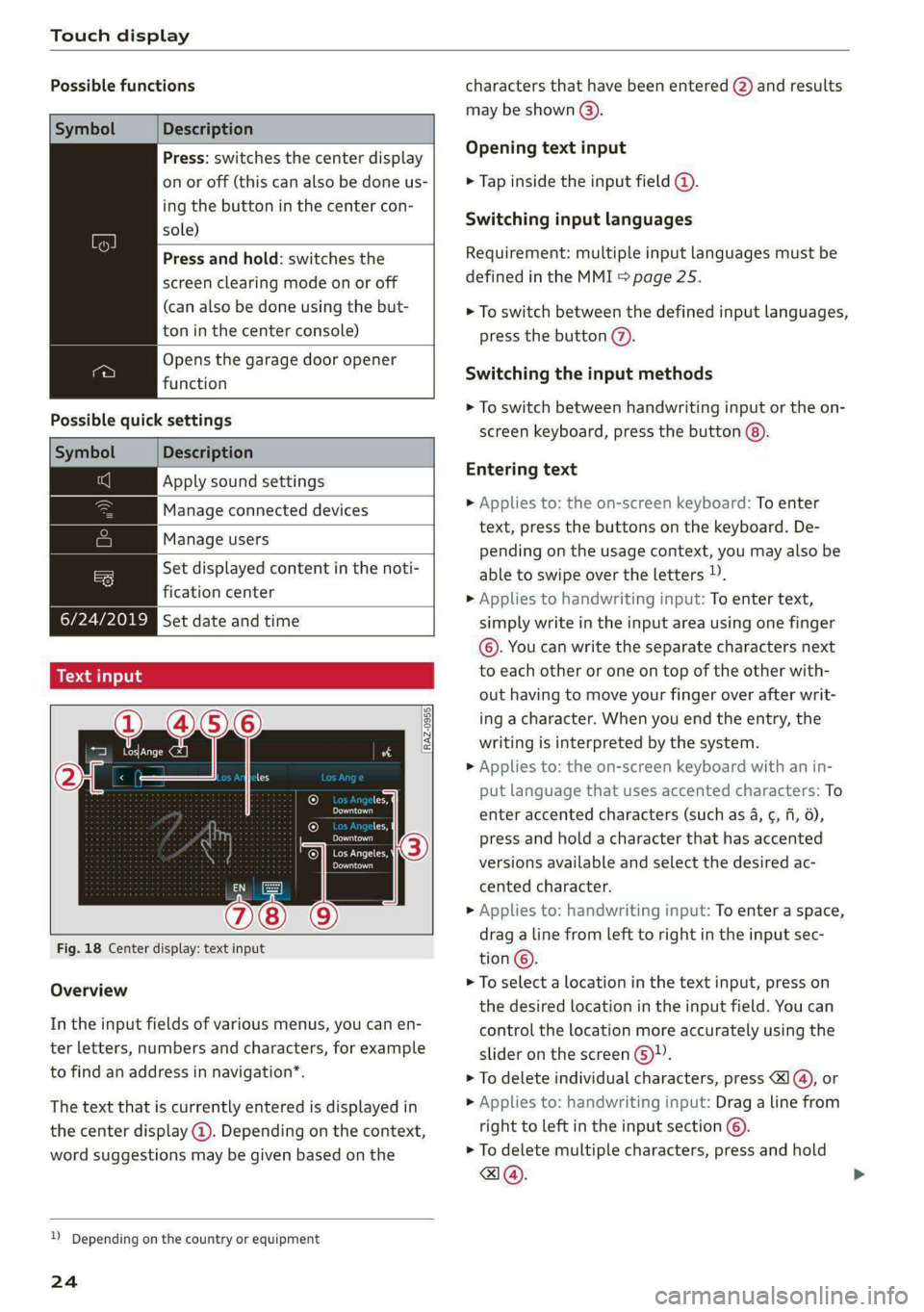
Fig. 18 Center display: text input
Overview
In the input fields of various menus, you can en-
ter letters, numbers and characters, for example
to find an address in navigation”.
The text that is currently entered is displayed in
the center display @). Depending on the context,
word suggestions may be given based on the
2) Depending on the country or equipment
24
characters that have been entered @) and results
may be shown @).
Opening text input
> Tap inside the input field @.
Switching input languages
Requirement: multiple input languages must be
defined in the MMI > page 25.
> To switch between the defined input languages,
press the button (2).
Switching the input methods
> To switch between handwriting input or the on-
screen keyboard, press the button @).
Entering text
> Applies to: the on-screen keyboard: To enter
text, press the buttons on the keyboard. De-
pending on the usage context, you may also be
able to swipe over the letters )).
> Applies to handwriting input: To enter text,
simply write in the input area using one finger
©. You can write the separate characters next
to each other or one on top of the other with-
out having to move your finger over after writ-
ing a character. When you end the entry, the
writing is interpreted by the system.
> Applies to: the on-screen keyboard with an in-
put language that uses accented characters: To
enter accented characters (such as 4, ¢, fi, 6),
press and hold a character that has accented
versions available and select the desired ac-
cented character.
> Applies to: handwriting input: To enter a space,
drag a line from left to right in the input sec-
tion©.
> To select a location in the text input, press on
the desired location in the input field. You can
control the location more accurately using the
slider on the screen 6)”.
> To delete individual characters, press
> Applies to: handwriting input: Drag a line from
right to left in the input section ©.
> To delete multiple characters, press and hold
a@.
Page 50 of 318

Opening and closing
You can switch the valet parking function on, for
example when someone else is parking your vehi-
cle ). The vehicle can be driven, locked, and un-
locked using the vehicle key, but access to the
luggage compartment is blocked.
> Remove the mechanical key > page 38.
> Press the [VALET] button in the glove compart-
ment. The LED in the button turns on if the
function is switched on.
> Lock the glove compartment with the mechani-
cal key.
>» Applies to: vehicles with lockable pass-through
and lockable rear seat backrests: To secure the
luggage compartment from the vehicle interior,
lock the pass-through and the rear seat backr-
ests using the mechanical key > page 95,
=> page 94.
> Give your vehicle key to the service personnel
who are parking your vehicle and keep the me-
chanical key.
The following buttons are deactivated when the
valet parking function is switched on:
— <3 Button in the driver's door
— &s Button on the vehicle key
— Handle in the luggage compartment lid
If the valet parking function is switched on, a
message will appear every time the ignition is
switched on.
@ Tips
Please note that the luggage compartment
can still be accessed from the vehicle interior
in vehicles with fixed rear seat backrests or
ones that cannot be locked, even when the
valet parking function is switched on.
Garage door opener
Applies to: vehicles with garage door opener
With the garage door opener, you can activate
systems such as the garage doors, security sys-
D_ This function is not available in all countries.
2) The possible number of hand-held transmitters depends
on the equipment.
48
tems or house lights from inside your vehicle.
These functions are operated in the MMI. Multi-
ple receivers can be programmed, which can con-
trol the functions of up to eight2) hand-held
transmitters.
ZA WARNING
— When operating or programming the garage
door opener, make sure that no people or
objects are in the area immediately sur-
rounding the equipment. People can be in-
jured or property can be damaged if struck
when closing.
— Do not allow yourself to be distracted from
traffic by the viewing and operating the dis-
plays.
Gi) Tips
— Ifyou sell your vehicle, reset all settings to
the factory default settings > page 222.
— The system complies with United States FCC
regulations and ISED regulations
=> page 297.
(i) Tips
Before you program your system to the ga-
rage door opener, first check the compatibili-
ty:
— Ask an authorized Audi dealer or authorized
Audi Service Facility or check at www.
homelink.com. You can also find more infor-
mation about HomeLink there.
— You can display information about Home-
Link (compatibility level/status/country
code/HomeLink generation) in the MMI:
— Select on the home screen: VEHICLE > Set-
tings & Service > Garage door opener > @.
Applies to: vehicles with garage door opener
Requirements: the remote control transmitter
must be programmed > page 49, the vehicle >
Page 51 of 318

8W7012721BB
Opening and closing
must be within range of the system, and the igni-
tion must be switched on.
There are multiple options to open or close the
system (such as the garage door).
> If you have only programmed one remote con-
trol transmitter, press the rs button on the
display. Or
> If you have programmed multiple remote con-
trol transmitters, press the 2 button on the
display and then press the respective system
button. Or
> Applies to: vehicles with programmable steer-
ing wheel button: If you have configured the
programmable steering wheel button, press
the *K button > page 30 and then press the re-
spective button for the system. Or
> Applies to: vehicles with location pairing: If you
have programmed Location pairing, press the
button for this in the display (notification cen-
ter > page 23). As you approach the system,
the button is displayed on the MMI.
If transmission was successful, the message:
Send to: XXX will appear.
Applies to: vehicles with garage door opener
You can program both fixed code and rolling code
systems in the MMI using the procedure that is
described.
Requirement: the ignition must be switched on.
Programming the system
Applies to: MMI
Requirement: the hand transmitter must be
present and the vehicle must be within range of
the system (such as the garage door) that you
would like to program.
> If you are programming the garage door opener
for the first time, press the - button on the
display. Follow the instructions in the MMI. Or
> If you would like to program other systems, se-
lect on the home screen: VEHICLE > Settings &
Service > Garage door opener. Select the de-
2) Only applies to rolling code systems
sired button: @). Follow the instructions in the
MMI.
> If you would like to reprogram systems that are
already programmed, select on the home
screen: VEHICLE > Settings & Service > Garage
door opener. Press the Z button and select 7
for the system to be reprogrammed. Select:
Program. Follow the instructions in the MMI.
With some systems, the garage door opener will
be immediately available after programming.
With other systems, the garage door opener
must also be synchronized.
Synchronizing!)
Requirement: the hand transmitter must already
be programmed and the vehicle must be within
range of the system (such as the garage door).
If the system synchronization is performed di-
rectly after the programming procedure, follow
the instructions on the MMI.
If you would like to sync at a later time:
> Applies to: MMI: Select on the home screen:
VEHICLE > Settings & Service > Garage door
opener.
> Press the button for the system that you would
like to synchronize.
> Follow the instructions in the MMI.
Renaming programmed systems
You can rename the programmed systems indi-
vidually (names may have a maximum of 10 char-
acters).
>» Applies to: MMI: Select on the home screen:
VEHICLE > Settings & Service > Garage door
opener.
> Press the Z button.
> Press the 7 button for the system that you
would like to rename.
> Select: Rename. If necessary, delete the preset
name, such as Garage door opener 1.
> Follow the instructions in the MMI.
49
Page 52 of 318
Opening and closing
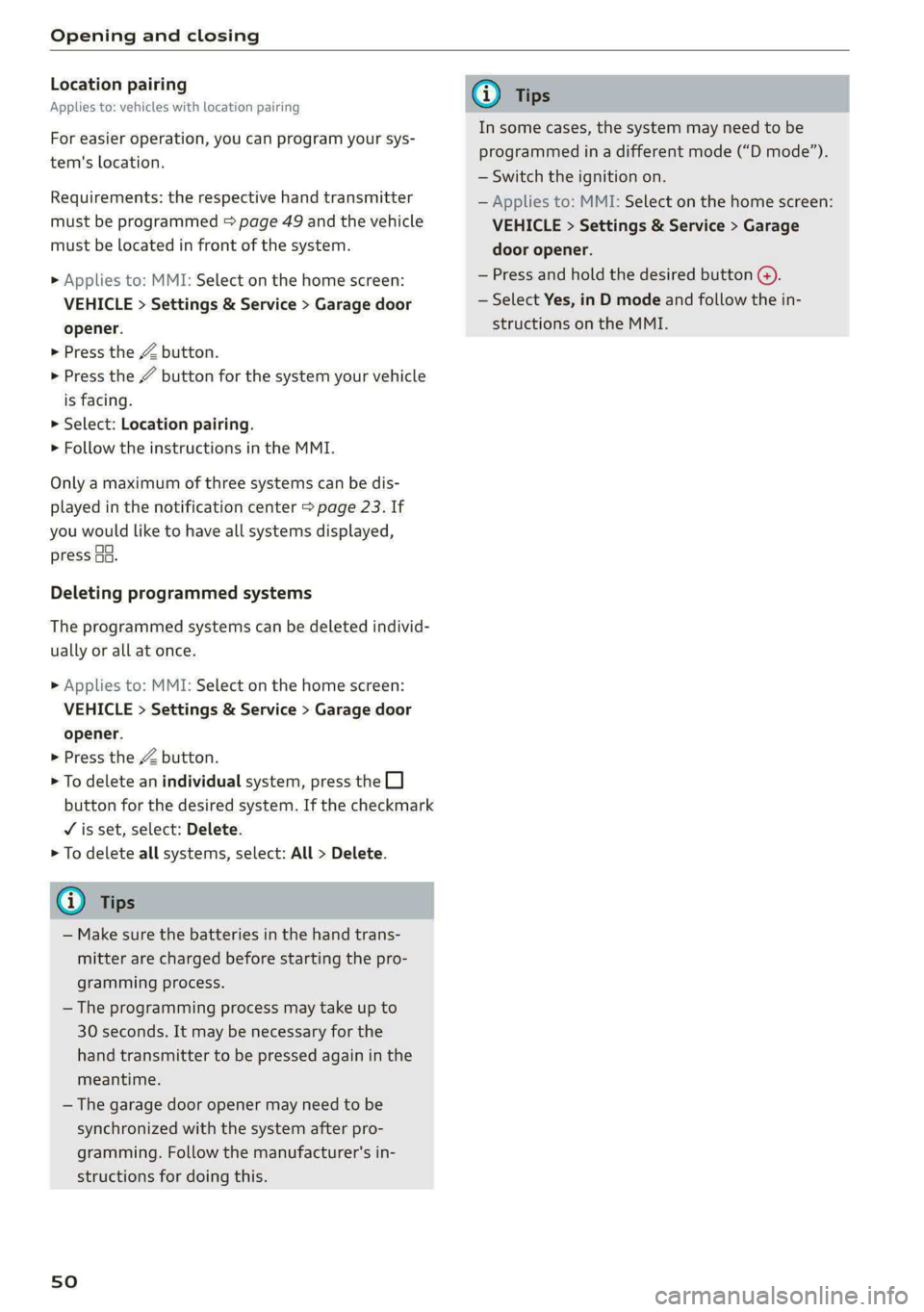
Location pairing
Applies to: vehicles with location pairing
For easier operation, you can program your sys-
tem's location.
Requirements: the respective hand transmitter
must be programmed > page 49 and the vehicle
must be located in front of the system.
» Applies to: MMI: Select on the home screen:
VEHICLE > Settings & Service > Garage door
opener.
> Press the Z button.
> Press the 7 button for the system your vehicle
is facing.
> Select: Location pairing.
> Follow the instructions in the MMI.
Only a maximum of three systems can be dis-
played in the notification center > page 23. If
you would like to have all systems displayed,
press aa.
Deleting programmed systems
The programmed systems can be deleted individ-
ually or all at once.
» Applies to: MMI: Select on the home screen:
VEHICLE > Settings & Service > Garage door
opener.
> Press the Z button.
> To delete an individual system, press the L]
button for the desired system. If the checkmark
¥ is set, select: Delete.
> To delete all systems, select: All > Delete.
@ Tips
— Make sure the batteries in the hand trans-
mitter are charged before starting the pro-
gramming process.
— The programming process may take up to
30 seconds. It may be necessary for the
hand transmitter to be pressed again in the
meantime.
— The garage door opener may need to be
synchronized with the system after pro-
gramming. Follow the manufacturer's in-
structions for doing this.
sO
G) Tips
In some cases, the system may need to be
programmed in a different mode (“D mode”).
— Switch the ignition on.
— Applies to: MMI: Select on the home screen:
VEHICLE > Settings & Service > Garage
door opener.
— Press and hold the desired button @).
— Select Yes, in D mode and follow the in-
structions on the MMI.
Page 289 of 318

8W7012721BB
Fuses and bulbs
Fuse panel (4) (brown) Fuse panel © (black)
14 | Fuel injectors, engine control module 1 Left rear door control module, left rear
15 |Ignition coils, heated oxygen sensors power window
16 | Fuel pump 12 | Parking heater
Fuse panel @) (red) Fuse panel (0) (black)
No. | Equipment No. | Equipment
Anti-theft alarm system Front seat electronics, seat ventilation,
2. [Engine control module rearview mirror, rear climate ‘control sys-
1 |tem control panel, neck heating, front pas-
3 Left front seat electronics, lumbar sup- senger's airbag warning light, diagnostic
port, massaging seat connection
4_|Automatic transmission selector lever Diagnostic interface, vehicle electrical sys-
5 |Horn 2 tem control module
6 |Parking brake 3 /Sound generator
7 | Diagnostic interface 4 |Clutch position sensor
8 | Roof electronics control module 5 |Engine start, emergency shut-off
9 | Emergency call module 6 Diagnostic connection, traffic information
10 | Airbag control module antenna (TMC)
1 Electronic Stabilization Control (ESC), An- 7 |USB input
ti-Lock Braking System (ABS) 8 | Garage door opener
12 | Diagnostic connection, light/rain sensor 7 Audi adaptive cruise control, distance reg-
13 | Climate control system ulation
14 | Right front door control module 11 | Front camera
15 | Climate control system compressor 12 | Right headlight
16 Brake system pressure reservoir, left neck 13 | Left headlight
heating 14 |Transmission fluid cooling
Fuse panel © (black) Fuse panel © (red)
No. | Equipment No. | Equipment
1 |Front seat heating 1 | Ignition coils
2 |Windshield wipers 2 |Climate control system compressor
3 | Left headlight electronics 5 | Left headlight
4 | Panoramic glass roof 6 |Automatic transmission
5 |Left front door control module 7 | Instrument panel
6 | Sockets 8 | Climate control system blower
7 Right rear door control module, right rear 9 |Right headlight
power window 10 | Dynamic steering
All wheel drive control module 11 | Engine start
9 | Right headlight electronics
10 Windshield washer system/headlight
washer system control module
287
Page 291 of 318

8W7012721BB
Fuses and bulbs
Fuse panel © (brown)
2 | Audi phone box, safety belt microphone
Right front seat electronics, lumbar sup-
3 port, massaging seat
4 |Side assist
6 Interior monitoring, anti-theft alarm sys-
tem, tire pressure monitoring system
7 Convenience access and start authoriza-
tion control module
8 | Auxiliary heating, tank module
9 | Power top control module
Your vehicle is equipped with maintenance-free
headlights and tail lights. However, if a light bulb
needs to be replaced, please contact an author-
ized Audi dealer or authorized Audi Service Facili-
ty.
ZX WARNING
If you still would like to try replacing the
bulbs in your vehicle yourself, read the warn-
ings regarding working in the engine compart-
ment > A\ in General information on
page 230.
TV tuner, data exchange and telematics
a control module
11 | Auxiliary battery control module
12 | Garage door opener
13 | Rearview camera, peripheral cameras
14 | Right tail lights
16 | Airbag control module
Fuse panel (£) (red)
No. | Equipment
Right neck heating
Exhaust treatment
Power top control module
Right trailer hitch light
Trailer hitch
Left trailer hitch light
Trailer hitch socket
WOlLOIN
MW)
R]
W]e
All wheel drive control module, sport dif-
10
ferential
11 | Exhaust treatment
Bulbs
Replacing bulbs
Audi recommends having a bulb replaced by an
authorized Audi dealer or authorized Audi Service
Facility in cases of doubt. These facilities have
the correct tools and replacement parts as well
as the required technical knowledge.
LED lights*
@) Note
Make sure the covers are fitted correctly on
the headlight and tail light so that no water
will leak in from the outside and the light
function will not be impaired.
289
Page 307 of 318

8W7012721BB
Index
Exterior MinrorSeecs «= cess oe cure +o coarene © o ove 63
Folding settings........... 0. cece eee ee 35
External voice operation................. 28
F
Factory default settings
Multi Media Interface...............4. 222
Fast route............ 0.00.00. . 0022 191
Favorites... 0... 0... eee eee eee ee 22
BIWetOOth ¢ « sses so eees co eG Hee ee Be 224
Navigation’s. © « cscs. 6 2 sma o 0 omens o 0 woman 192
Telephone ........... 0. e eee eee eee 176
Federal Communications Commission (FCC) . 297
File formats (media drives) .............. 216
Filling
Tank capacities... 0.2.0... eee eee eee 300
For the sake of the environment
Disposing of engine oil................ 235
FUGLING(s = aes s « seme & ¢ seus = 7 ERS & oe 227
LO AKS base ox estzane ew esecire o somneun ss & wrenene we ¥ rane 231
Forward gear
refer to Gears... ... eee eee eee 105
Free text search
Media... ..... 0. eee eee eee 215
RadiO:ss ss ssc « = nes 5 2 ceree Sees ee 204
also refer to Intelligent search.......... 191,
Freeze protection
Coolant... ...... cee eee eee eee 236
Windshield washer system............. 242
Frequency band...............--0000-- 202
also refer to Frequency band........... 202
Fronit‘centerarmrest © esis s caes ae eee sve 72
Front passenger’s seat adjustment
ROAM cesses 6 & sonra 5 & anion & & seRON ow SMO we Be 71
Front wiper blades
Changing............. see eee eee eee 66
Cleaning... .. cece eects 66
Fuel... cece eee eee 226
AddItIVGS « ces z = seus ¢ s een 2 eee se os 227
CUPFENt: CONSUMPTION « esses 6 cee we eee oe 17
Fueldisplay....... 0.0... cece eee eee ee 12
Gasoline : wess + y ees ss ca6s to ews Fe ees 226
Reducing fuel consumption............ 110
Tank
capacity. ........... 0. cee eee eee 300
Fueling
Fuel filler door..... 0.0... cece eee eee ee 227
Fuel filler door emergency release....... 229
Functions on demand.................. 184
Functions that require a license.......... 184
also refer to Functions on demand....... 184
Fuses
ASSIQMIMIOM GE & asvies & weenie © ¥ sursers WF senses v 286
Replacing......... 0c cece cece eee 285
G
Garage door opener............-.000 eee 48
Garment hooks ...... 2... 0c eee eee 92
GasOlime visio: x ceawnwe vo ancane ow ceewe mw aw Oo 226
Additives... 0.0.0... cece cece 227
GaSOline MIXING veux ss meme 2» see so ee 226
GAWR
refer to Gross Axle Weight Rating (GAWR) . 300
GOATS: x = ues © gate « ¢ aes « Rates F RaNEE & 105
Glossary of tire and loading terminology... 247
Glove compartment.............-.000005 92
Valet parking’: s ¢ aes + eons ss wows es eeu 47
G meter
refer to Sport displays.................. 16
Gross Axle Weight Rating (GAWR)........ 300
Gross Vehicle Weight Rating (GVWR)...... 300
GVWR
refer to Gross Vehicle Weight
Rating (GVWR)... 1... . cee eee eee ee 300
H
Handsfree..................000000 00 172
HamdsiPree:Profiles. so sacs + 0 weowee 0 0 ctunene «2 172
Head-up display
Adjusting ..... 6.6.06. eee ee 26
Adjusting the brightness................ 63
Operating’: « s ses « sews + cine oo corer o ¥ ave 26
Headlight range control.................. 58
Headlights’, » segs x + sees se pees se ees ee 58
Cleanings « x visas x 6 aomene eo aevuee wo anarene w oe 268
Headlight range control................ 58
Washersystem:: « « gems « x nama x paemes 2 per 65
Washer system (filling washer fluid) ..... 242
Head restraints « icin s cian s wae a 2 cexsen wv 74
Heated rear Window ¢ sacs iw a eames eee 101
305
Page 308 of 318

Index
Heated steering wheel................-. 102
Oat bases. 4s sxesaas @ 2 ieee 5 ees so ese oe a 98
HFP
refer to Hands Free Profile............. 171
High beams
High beam assistant................... 59
Highway lights...... 2.6.0... e eee ee 58
Hill descemticomtrol. « secve + « canise «a mmo © & 116
Hill Holdsassist « cco es sense w eranene ve mee 2 105
Home
refer to Home address.............04. 196
Hommesaddnessi, = sieves + nmawos «+ wines x 2 eens 196
HomeLink
refer to Garage door opener............. 48
Home screen... ... ee eee eee ee eee 19
FHORM « « sonst 6 o arate © oi come © a ane © senor 6
Hotspot
refer to Wi-Fi...........0 0.0 c eee eee 185
I
Idle
refer to Gears..... 2... eee eee eee 105
Ignition
Switching Onvand Off : s owes + + news «cares 103
Imbalance (wheels) ..........-...2--055 253
Immobilizer
refer to Electronic immobilizer........... 38
Indicator lights = sews = « segs o 7 wows « ReURS a ae 7
Inspection intervals : woes s x wows sp eee oo 242
Instrument cluster.............0--.00005 12
Adjusting the layout.................0. 13
Cleaning........ 0... eee eee eee 270
Engine code... ... ec cece eee eee eee 224
Failt@’ss s secs s een 2 s waren & ¥ wees 5 Few 12
Onzboardcomputen acesese ao vances 0 emesis #0 vrs LL?
Operating............... 0.020. e eee 13
Service interval display................ 242
Software information..............005 224
Switching tabs..........0..0......200. 13
Switching the view..........00.e eee e ee 13
Vehicle functions « eaien x 2 sees oo enesene xo orev 16
Version information................-. 224
Instruments
Adjusting illumination.................. 63
Integrated Toll Module................. 135
306
Intelligent search
Navigation ........ 0... e eee e eee eee 191
Interior lighting...............-.000- 62, 63
InterioriMonitorings. . + ween « 6 women << ence a © 37
Intermittent mode (windshield wipers) ..... 65
International travel..................-. 186
Internet
refer toconnect..............0e eee eee 182
Internet radio
refer to Online radio.............. 206, 207
iPhone
refer to Audi music interface........... 211
J
Jump starting ....... 6c eee e eee eee eee 280
K
Key... eee 34, 38
Convenience opening and closing......... 46
Key:replacementiic. + vcs ee eeu es mee ee 38
Mechanical key... .. 0... cece eee eee eee 38
PANIG Button » ses < = ses ¢ = seen ¢ = sees ge 39
Replacing the battery.................. 40
Unlocking and locking............-...-- 39
VEHICLE COdG « secs s ¢ sews = 2 ees ye ee 5 38
Key user... ee eee 32
Kick-down.. 0.2... cee eee eee eee 107
L
Lane assist
refer to Audi active lane assist.......... 150
Lane departure warning
refer to Audi active lane assist.......... 150
Lap tMer's = = sans ¢ = sews x © Hawes ¢ o awe ee 133
Evaluating’: « 2 cccvaic < ences o sevens eo ences © ¥ 134
Starting........... 6.0. c cece eee eee 133
Laser lighting....................00 008s 60
LATCH (securing child safety seats)......... 87
Launch: Controle 2 2 ccesee v seseron 2 vsciens 3 = a0 107
Leather care and cleaning............... 271
Legal information
License subscriptions...............0. 224
Software information...............0- 224
Software licenses...........--000 ee eee 224
Version information................5. 224
Page 311 of 318

8W7012721BB
Index
Parking lock
Manually releasing.............000005 108
also refer to Gears... 00... cece cece e eee 105
PaSs*throuGl scx = = casas ¢ s eatem 3 ¢ Hae ¢ coe 95
Pedals... 0... cc eee e cece eee eee eens 107
Perchlorate. ... 0.2.0... eee eee eee ee eee 294
Performance/torque display
refer to Sport displays.................. 16
Peripheral cameras............---0000 0s 161
Phone
Connecting a second mobile device...... 172
Disconnecting a mobile device.......... 173
Settings........... 00.02 eee eee eee 178
Phonebook
refer to Directory....... 0.0.00 cece eae 176
PIN
4-digit myAudi PIN..............-..0005 31
Protection esc os was < v owiie + ¥ wou 2 ¥ ecoxmn 32
Playbacki(media) si cscs 2s sos so secu s 2 acs 212
Podcast
refer to Online radio.............. 206, 207
Polishing ices o csenwes xo onesies vv vein ¥ w anewwn oe 269
Pollen filter
refer to Pollutant filter.............0005 98
Pollutamtfilter’. cxscsns + somes 2 0 onesies + 6 ncooee © 98
Power SOUPCES's + wx a 8 inne oo creme @ 8 91,211
POWEPtOP sien oo cen 3 2 enna oo ee vo ee 51
Cleaning. .... 2... cece eee eee eee 269
POWePWINGOWS « scsvine i o ssvirs & arene & wanes ee a 45
Malfunction
Power windows malfunction.............. 45
Predictivercomtrols.. wise ss aves 0 aceon 0 0 some 142
Predictive messageS..........00eeeeeeee 138
pre sense
refer to Audi presense................ 152
Presentation modes. . « some « «smc = awamene = 201
Presets
Radio... eee eee eee ee 205
Presets list
Feferto Presets’. « «ccc. i aes de nas ses 205
Pressure
Tire pressure monitoring system.... 262, 263
AROS = vonsnas we wince 2 3 Hones 8 x cements oH ee 254
Profile:picture « seca < s samo 2 wane 6% oem @ a oes 31
Protecting’: =o cos vo ee oo een oo een oo 269
Pyrotechnic elements............--..-- 294
Q
quattro... 2... eee eee 120
Selective wheel torque control.......... 121
R
Radio’: < » seme s sams : Rome « ¢ ome & seme ee 202
RagiOteXtecsas «sina x wana 6 2 imeem «2 emwew 205
Station list........ 0... 202
Radio communications equipment........ 296
Radioequipment wai. <2 cee ee cee eee es 296
Radio Standards Specification (RSS)....... 297
Rain/light sensor
Automatic headlights .................- 58
Intermittent mode (windshield wipers).... 65
Random
réfer to Shutfle:: < s sess = 2 mee %s seen ee xe 214
Range (fuel level) ................000000- 17
Reading lights.............. 0.0.00 eae 62
Rear cross-traffic assist.............00.. 165
Rear lid
refer to Luggage compartment lid........ 42
Rear seatS......... cee eee 94,95
Rear shelf
refer to Storage area behind the rear head
RESEPAINES sisi > rome os weve a 6 ase 6 ZNO & 92
Rearview camerals «wea ss evens ¢ wom a yo 161
Rear window defogger............--+0. 101
Recirculation mode..............+..05- 100
Recuperation.......... 000 cece eee eee ee 17
Refrigerant oil... 2.2.2.2... eee eee 300
Refueling. ........ 0... cee eee eee eee 227
Remote access authorization (key user)..... 32
Remote control
Garage door opener...........-0e ee eee 48
Remote control key..............-.00005 38
Convenience opening and closing......... 46
Key replacement..............--0000-- 38
1 40
PANIC function..............00 00 ee eee 38
Replacing the battery.................. 40
Unlocking and locking................-- 39
also refer to Vehicle key............00.. 38
Removing the caps (wheel bolts)......... 277
Repairs. ... 0.0.0.0... eee 294
Replacement key.........-..0--00000005 38