warning AUDI A5 CABRIOLET 2011 Owners Manual
[x] Cancel search | Manufacturer: AUDI, Model Year: 2011, Model line: A5 CABRIOLET, Model: AUDI A5 CABRIOLET 2011Pages: 364, PDF Size: 86.48 MB
Page 139 of 364
_________________________________________________ A_ u_d _ i_ s_id _ e_ a_s _s_ i_s _t __ ffl'II
Deactivating
- Pre ss th e b utton again . Th e ind icator light on the button
goes o ut.
The system works at speeds faster than 19 mph (30 km/h) .
& WARNING
• Improper reliance on the side assist system can cause collisions
and seriou s per sonal injury:
- Never rely only on side assist when changing lanes.
- Alway s check rear view mirrors to make sure that it is safe to
change lanes.
• Side assist cannot detect all vehicles under all condition s
danger of accident!
• Side a ssist cannot detect vehicle s
in time to alert you when
they approach from behind at very high speed , or fall drop bac;k
very quickly .
• The radar sensor's
vision can be reduced o r entirely blocked by
rain, snow, and heavy spray . Thi s can result in side a ssist not
adequately detecting vehicles o r, in some cases , not detecting
them at all. Always keep an eye on the direction you are traveling
and the relevant area around the vehicle.
• Plea se note that side assi st indi cates there are approaching
veh icles, or vehicles in your blind spot, only after your vehicle has
reached a driving speed of at lea st 19 mph (30 km/h).
• Side assist signal does not work around tight corners (turning
radius le ss than 328 feet or 100 m).
• Side assist is no replacement for the driver's full attention. The
driver alone is respon sible for lane changes and similar driving
maneuvers. Always keep an eye on the direction you are traveling
and the relevant area around the vehicle .
Controls and equip
ment Safety first
0 Note
• T
o ens ure t hat you do not adve rsely affec t side assist, do not blo ck
the area on the rear bumper where the radar sensors are located with
foreign obje cts (s uch as stickers or bicy cle ra cks).
• Make s ure that the s ignal light on the outside mirror is not
blo cked by st ickers or o ther ite ms.
W Tips
• Side assist a utoma tically deact iva tes if it de tects that the rada r
sensors are blocked =>
page 143. The indicator light on the button
goe s out.
• Th e area on the bumpe r w here the ra dar sensors are located must
c o nsistent ly remain free of snow, i ce, a nd heavy soiling so tha t side
assist can funct ion p roper ly. Follow the add itiona l notes on
=>
page 1 4 3.
• Additiona l tint ing on the front si de windows can make it ha rder to
see and co rrec tly un ders t and t he sig nal ligh t on the outs ide m irro r.
• F or Declaration of Compliance to United States FC C and Industry
Cana da regulat ions=>
pag e 346. •
Applies to veh icl es: w ith s ide ass ist
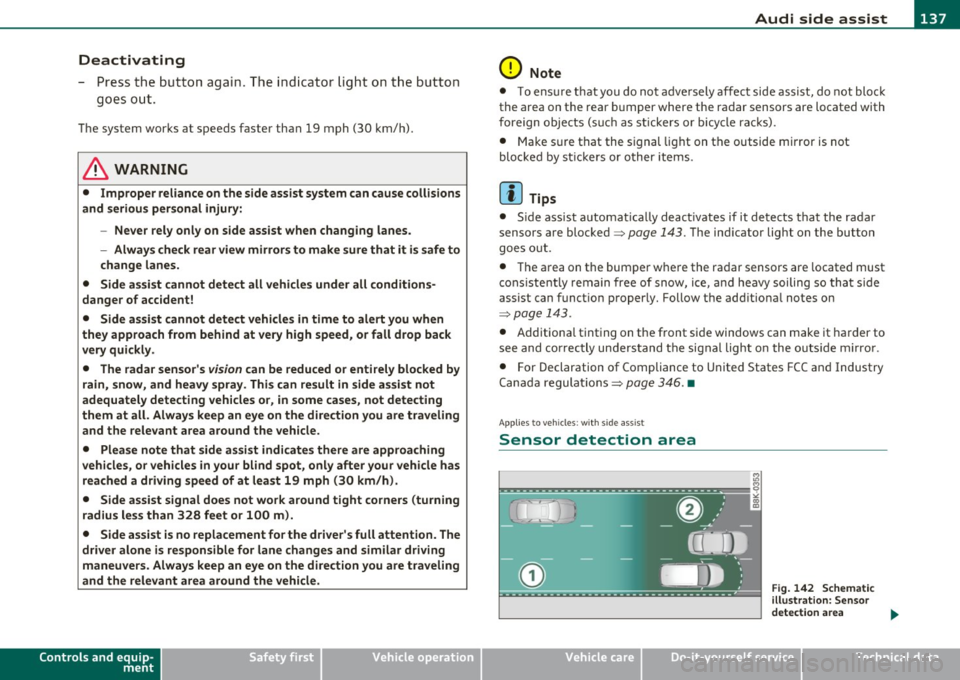
Sensor detection area
Vehicle care
Fig . 142 Schem atic
ill ustration: Se nsor
detectio n area
~
Technical data
Page 144 of 364
111'..__A_ u_ d_ i_ s_ i_ d_ e _ a_ s_s _i_s _t _________________________________________________ _
(I) Tips
• Side assist is not act ive when the basic br ightness is adj usted. The
signal light comes on briefly to he lp you make the adjustment .
• Your settings are automatically stored and assigned to the remote
cont rol key being used .•
A ppli es to vehic les : w ith si de assist
General information
Side assist has limits and cannot detect vehicles under all road and
weathe r conditions . Please remember system limitat ions and never
re ly on t he system, espec ially w hen:
• driving t hrough curves =>
page 142,
• lanes a re of differe nt widths => page 142. •
Ap plies to veh icles : w it h side ass ist
When driving through curves
Side assist cannot detect vehicles in curves with a turning radius of
less than 3 28 feet (1 00 m).
When driving through a cu rve, it is possible that side assist may
reg iste r a vehi cle two l anes over, and the sign al on the o utside m irro r
wi ll li ght up .•
A pp lies to vehicles : wi th si de assist
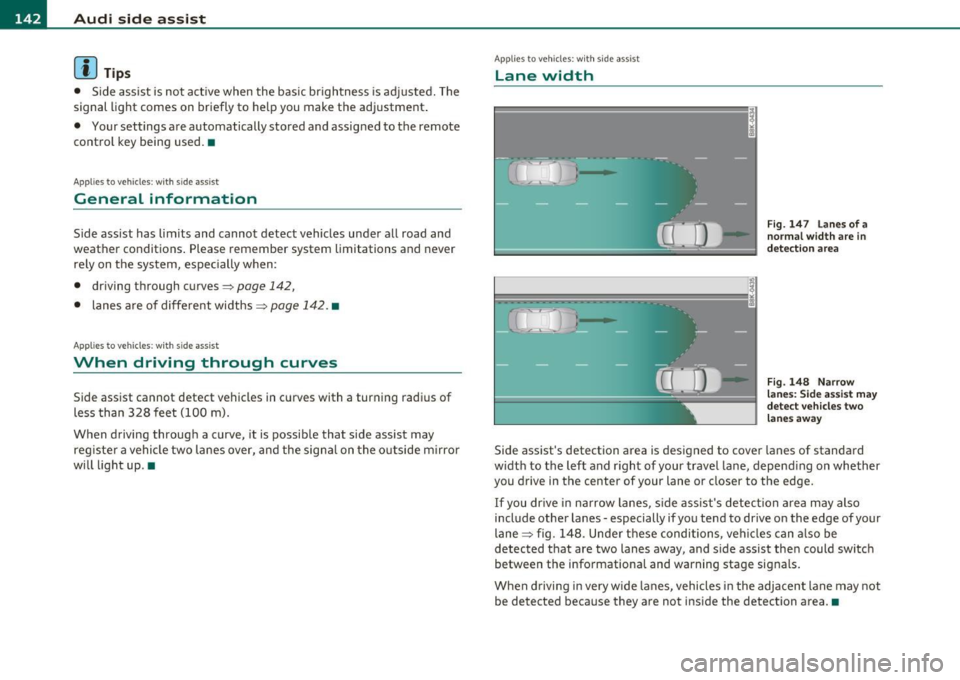
Lane width
Fig. 147 L an es of a
norma l width are in
det ection ar ea
Fig . 148 N arrow
l a n es : Si de assis t may
dete ct ve h icl es tw o
lane s away
Side assist 's detection area is designed to cover lanes of standard
w idt h to the left and r ight of your travel lane, depend ing on whether
you drive in the center of your lane or closer to the edge.
If you dr ive in narrow lanes, s ide ass is t's detec tion area may also
include other la nes -especially if you tend to drive on the edge of your
lane => fig. 148. Unde r th ese condi tions, ve hicl es can a lso be
detected t hat are two lanes away, and s ide assist the n could switc h
between the info rmationa l and warning stage signals.
When drivi ng i n very w ide la n es, vehicles in the adjacent lane may not
be detected because they are not inside the detection a rea .•
Page 145 of 364
_________________________________________________ A_ u_d _ i_ s_id _ e_ a_s _s_ i_s _t __ _
Notes
Applies to veh icles: w ith s ide ass ist
Messages in instrument cluster display
If side assist turns off automatically, the indicator lig ht on the butto n
w ill go out and yo u w ill see a message in the instrument cl uster
display:
Audi side assist not available: sensors blocked
Th e side ass ist senso rs a re b uilt in to the rear bum per o n the left and
r ight (not v is ible on the outside)=>
page 136, fig. 139. To e nsure
that you do not adve rsely affect the way side assist f unctions, foreign
objec ts (such as stic ke rs or b icycle racks) should not be attached to
the a rea on the rear bumper where t he sensors are located. If side
as sis t fu nctions a re adverse ly affe cted , you will see thi s me ssa ge in
the instrume nt cl uster disp lay. Remove anything that may b e
bl ockin g the sensor s.
If no ve hicle is detected for a lo nger p eriod of t ime w hile driving, side
assist w ill also switch off automatically .
Audi side assist currently not available
If the re is a te mp orary p rob lem (such as the vehicle 's batt ery ch arg e
bei ng low) , side assist ca nnot be act ivated temporar ily.
Audi side assist : system fault
Have the system checked by an auth orized Audi dealer or qualified
wo rkshop .•
Applies to veh icles: w ith s ide ass is t
Safety tips
T he side assist detect io n may be limited when driving a ro u nd na rrow
s tr ee t co rner s, on hilly stree ts, and und er poor we ather cond itio n s.
Controls and equip
ment Safety first
It
is possible that the rada r senso rs may a lso detect o ther objects,
such a s high or stag gere d guar drails.
S ide assis t does not measure actua l lane w idth. The system assum es
a fi xed la ne w idt h. Detection in the left and right lanes is based on
t hi s a ssumed lane w id th. Wh en driving o n narrow ro ads or w he n
dr iv ing to the left or rig ht of the center of a travel lane, it is poss ible
t h at vehicles will be de tected tha t a re
no t in th e lan e nex t to th e l an e
you are using.
& WARNING
• Improper reliance on the side assist system can cause collisions
and serious personal injury:
-Never rely only on side assist when changing lanes .
- Always check rear view mirrors to make sure that it is safe to
change lanes.
• Side assist cannot detect all vehicles under all conditions
danger of accident!
• Side assist cannot detect vehicles in time to alert you when
they approach from behind at very high speed , or fall drop back
very quickly .
• The radar sensor's
vision can be reduced or entirely blocked by
rain, snow, and heavy spray. This can result in side assist not
adequately detecting vehicles or, in some cases , not detecting
them at all. Always keep an eye on the direction you are traveling and the relevant area around the vehicle .
• Please note that side ass ist indicates there are approaching
vehicles, or vehicles in your blind spot, only after your vehicle has reached a driving speed of at least 19 mph (30 km/h).
• Side assist signal does not work around tight corners (turning
radius less than 328 feet, or 100 m ).
• Side assist is no replacement for the driver's full attention . The
driver alone is responsible for lane changes and similar driving
maneuvers. Always keep an eye on the direction you are traveling
and the relevant area around the vehicle. .,,
Vehicle care Technical data
Page 147 of 364
________________________________________________ A_u_ d_i_ d_ r_iv _ e_ s_ e _ le_ c_t __ _
Audi drive select
Driving settings
Applies to veh icles : with Aud i driv e select
Introduction
Audi dr ive select makes it possible to exper ience d ifferent types of
vehicle set tings in one vehi cle. For ins tance, using the three
COMFORT, AUTO and DYNAMIC modes, the driver can switch from a
sporty to a com fortab le dr iv ing mode with the p ress of a bu tton .
Add itionally, in ve hicles with MMI*, the veh icle se tup for I NDI
VIDUAL * mode can be customized by you. This makes it poss ib le to
combi ne sett ings such as a sporty engi ne tuning w it h light stee ring.
& WARNING
• Improper use of the Audi drive select can cause collisions,
other accident s and serious personal injury.
• Never drive at speeds that are too high for traffic , road and
weather conditions. •
Applies to veh icles: wit h Aud i dri ve select
Description
Depending on the mode, the engine and automatic transmission
respond more quickly or in a more balanced ma nner to a ccelera tor
peda l movements.
The
Ser votron ic (power steering assistance)=> page 246 can also be
adapted to d riving situat ions.
Dynamic steering changes the steering rat io as a function of the
driv ing speed in order to op tim ize t he d river's required steer ing
effort . This sets the steer ing to be less sensitive at highe r sp eeds in
Controls and equip
ment Safety first
orde
r to provid e greate r contro l over the ve hicle. At r educ ed spe eds,
howeve r, steering is mo re direct in order to keep the stee ring effort
as minimal as possible whe n the drive r is maneuve ring the vehi cle. At
low and average speeds, dynamic steering add itiona lly p rovides more
responsive steer ing perfo rm ance. The driver can set the basi c
steering rat io characteristics.
Th e
adaptive damper s use sensors to recor d informat ion regar ding
stee rin g movements, b raking and accele ration ope ra tions by the
dr iver, road sur face , d riving speed, and load. This makes it possib le to
adapt damp ing to t he d riving situat ion virt ua lly in rea l time . Audi
dr ive select a lso makes it poss ible to satisfy the desire for sporty
s us pension (DY NAM IC) and comfort able suspension ( COMFOR T)
without giving up balanced tun ing (AUTO).
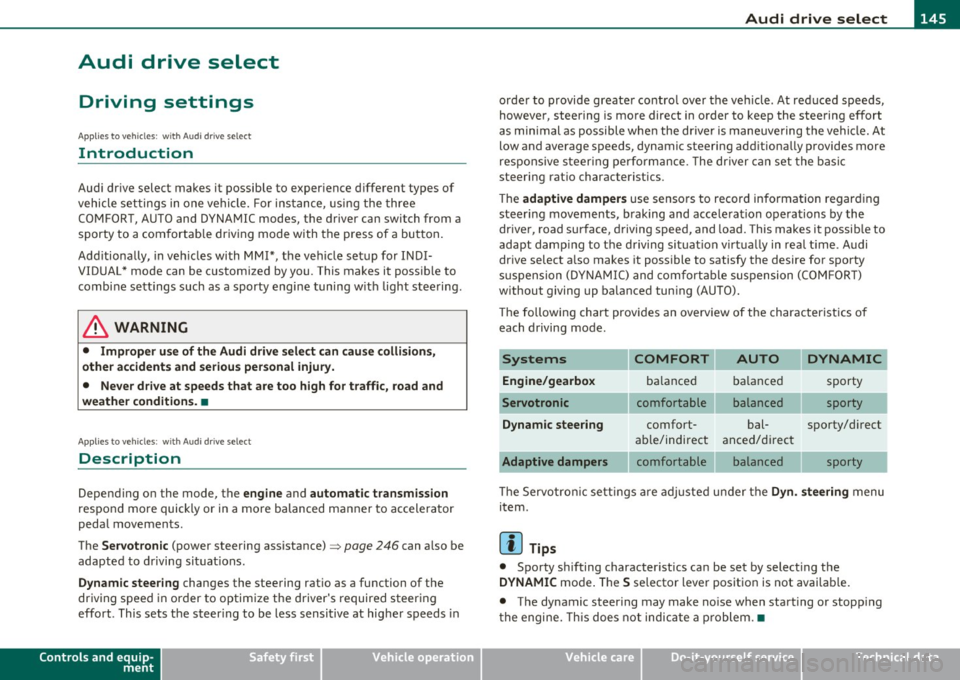
Th e followi ng chart prov ides an overv iew of t he char acteristics of
each driving mode .
Systems COMFORT AUTO DYNAMIC
Engine/gearbox bala nce d b ala nce d sporty
comfortable balanced sporty
Dynamic steering comfort- bal- sporty/d irect
ab le/indirect
anced/direc t
comfortable balanced sporty
Th e Servo tro nic sett in gs are a djusted und er the
Dyn. steering menu
item .
[I] Tips
• Spo rty sh ifting character istics can be se t by select ing the
DYNAMIC mo de. The S se lector lever posit io n is not avai lab le.
• The dynamic steer ing may make no ise when start ing or stopp ing
t he e ngine. This does no t indic ate a p roblem. •
Vehicle care Technical data
Page 148 of 364
llffl..__A_ u_d_ i _d _r_ i_v _e _ s_e _ l_ e _ c_ t _______________________________________________ _
Applie s to veh icl es : w ith A udi d riv e se lect
Selecting the driving mode
You can choose between COMFORT, AUTO, DYNAMIC and
INDIVIDUAL* modes.
en • 2 ,;
~- =========::::: LP
Fig. 149 Shift gate:
Control for Audi drive
select
Fig . 1S0 Ce nter
console: Control for
Audi drive select
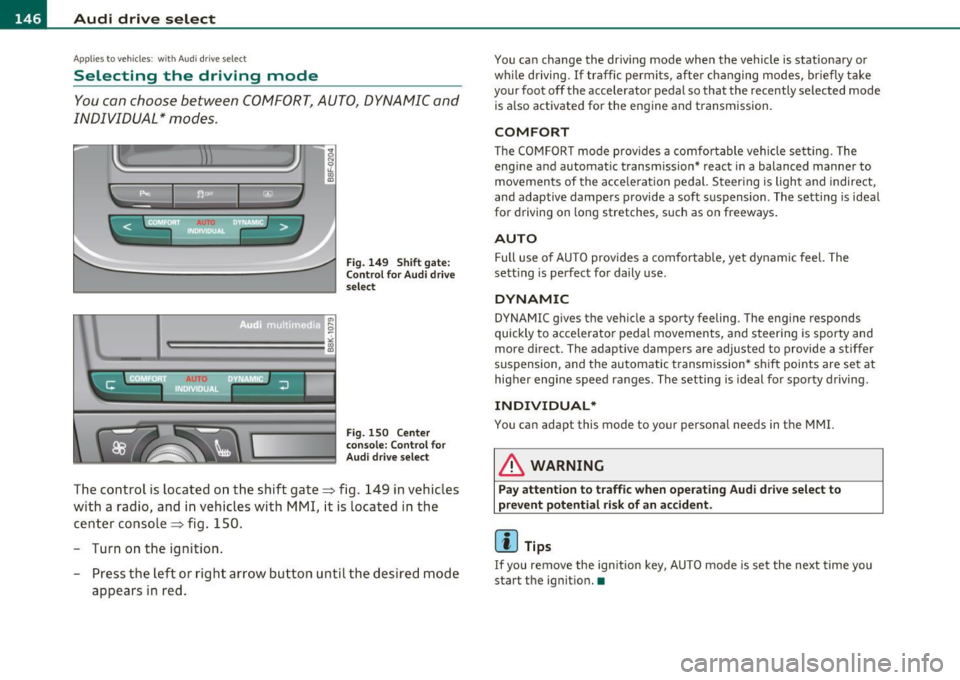
The control is located on the shift gate~ fig. 149 in vehicles
with a radio, and in vehicles with MMI, it is located in the
center console~ fig. 150.
- Turn on the ignition .
- Press the left or right arrow button u ntil the desired mode
appears in red.
You can change the driving mode when the vehicle is stationary or
whil e driving. If traffic permits, after changing modes, briefly take
your foot off the accelerator pedal so that the recently selected mode
is also activated for the eng ine and transmission .
COMFORT
The COMFORT mode provides a comfo rtable vehicle se tting. The
engine and automatic t ransm ission* react in a balanced manner to
movements of the acce leration pedal. Steering is light and indirect,
and adaptive dampe rs provide a soft s uspension . The setting is ideal
for driving on long stretches, such as on freeways .
AUTO
Full use of AUTO provides a comfortable, yet dynamic feel. The
sett ing is perfect for daily use .
DYNAMIC
DYNAMIC gives the vehicle a sporty feeling. The eng ine responds
quickly to accelerator pedal movements, and steering is sporty and
more direct. The adaptive dampers are adjusted to provide a stiffer
suspension, and the automatic transmission* shift points are set at
higher engine speed ranges. The setting is ideal for sporty driving.
INDIVIDUAL*
You can adapt this mode to your personal needs in the MMI.
& WARNING
Pay attention to traffic when operating Audi drive select to
prevent potential risk of an accident .
(I] Tips
If you remove the ignition key, AUTO mode is set the next time you
start the ignition. •
Page 151 of 364

____________________________________________________ T_r_a _ n_ s_m_ i_ s _s_ i_ o _ n __ _
The selector lever must be in Nor P . If one o f the dr iv in g positions is
e n gag ed a saf ety s witch will preven t the engin e from b eing sta rt e d.
S ee also=>
page 106.
Be fore you move t he se lecto r lever from t he P position, yo u m ust
a lw ay s a ppl y the b rake pedal before and while depr ess ing the bu tton
in t he handle of the selector lever.
_& WARNING
• Unintended vehicle movement can cause serious injury.
- When the selector lever is
in a driving position, the vehicle
may creep, even at idle speed. Therefore do not release the
parking brake
or foot brake until you are ready to move,
because power is transmitted to the wheels as soon as a driving
position is engaged.
- Do not accelerate while selecting a driving position . At this
time the engine must be at idle speed so that undue stress is
not placed on the clutches in the transmission.
- Remember : · even when stopped briefly with the automatic
transmission
in " D", "S" or "R", engine power is being trans
mitted to the wheels. Your vehicle could "creep " forward or
backward. When stopped, keep the brake pedal fully
depressed and use the parking brake if necessary to keep the
vehicle from rolling .
• If the selector lever is unintentionally moved into N while you
are driving, take your foot off the accelerator pedal and wait for
the engine to return to idle speed before selecting a driving posi
tion.
• Never shift into "R" or "P " when the vehicle is in motion .
• Never get out of the d river's seat when the engine is running.
• If you must get out of the vehicle , move the selector lever
securely into the P position and apply the parking brake firmly .
• If the engine must remain running, never have any driving
position engaged when checking under the hood. Make sure the
selector lever has securely engaged and is locked in "P " with the
Controls and equip
ment Safety first
& WARNING (
cont inued)
parking brake firmly set=> page 272, "Engine compartment ".
Otherwise, any increase in engine speed may set the vehicle in
motion, even with the parking brake applied. •
App lies to vehicles : w it h auto mat ic t ransmiss ion
Selector lever positions
T his s ection d escrib es the s ele ct or l eve r posi tions and
drivin g ran ges.
Fig. 152 Di splay in
the instrum ent cluster:
selector lever In posi
tio n P
Th e sele ctor lever posi tion engaged appe ars ne xt to the se le ct or lever
as well as in the instr umen t cluster display .
P -Park
In this selector lev er position the transmiss ion is mecha nica lly
l oc ked. Engage
P only when the vehi cle is comple tely sto pp ed=> &
in " Driving t he automatic transmiss io n" on page 148.
T o sh ift in o r o ut of position P , yo u must first press an d hold the brake
peda l
and th en press t he r elease b utton in t he se lec to r l eve r hand le
wh ile moving the selector lever to or from
P. Yo u can s hif t out of thi s
posit ion on ly with t he ignit ion on . .,,
Vehicle care Technical data
Page 152 of 364
ffl..__T_ r_a _n_ s_ m_ is_ s_io _ n ___________________________________________________ _
R -Reverse
Th e transmission will automatically select the lowest gear ratio when
you shift into reverse.
Select
R only when the vehicle is at a full stop and the engine is
running at idle speed=>
& in "Driving the automatic transmission"
on
page 148 .
Before you move the selector lever to R, press both the button in the
handle of the selector lever
and the brake pedal at the same time.
When the ignition is on, the backup lights illum inate when the
selector lever is moved into
R.
N -Neutral
The transmission is in neutral in this position . Shift to this position
for standing with the brakes applied~
page 150.
When the vehicle is stationary or at speeds below 3 mph (5 km/h),
you must always apply the footbrake before and while moving the
lever out of
N.
D -Normal position for driving forward
Position Dis for normal city and highway driving. It ranges from zero
to top speed and all gears shift automatically, depending on engine
load, driving speed and automatically selected shift programs.
When the vehicle is stationary or at speeds below 3 mph (5 km/h),
you must always apply the foot brake before and while moving the
lever to
D out of N .
In certa in circumstances it may be advantageous to temporarily
switch to the manual shift program to manually select gear ratios to
match specific driving conditions~
page 152.
S -Sport position*
Select this position for sportier performance. In this position, the
transmission will not upshift as soon, allowing the vehicle to use the
increased power available at higher engine speeds to achieve livelier
acceleration . When the vehicle
is stationary or at speeds below 3 mph (5 km/h),
you must always apply the foot brake before and while moving the
lever to
S out of N.
& WARNING
Read and follow all WARNINGS=> & in "Driving the automatic
transmission" on
page 148 .
0 Note
Coasting downhill with the transmission in N and the engine not
running will result in damage to the automatic t ransmiss ion and
possibly the catalytic converter. •
Applies to vehicles: with automat ic transmissio n
Automatic Shift Lock (ASL)
The Automatic Shift Lock safeguards you against acci
dentally shifting into a forward or the reverse gear and
causing the vehicle to move unintentionally.
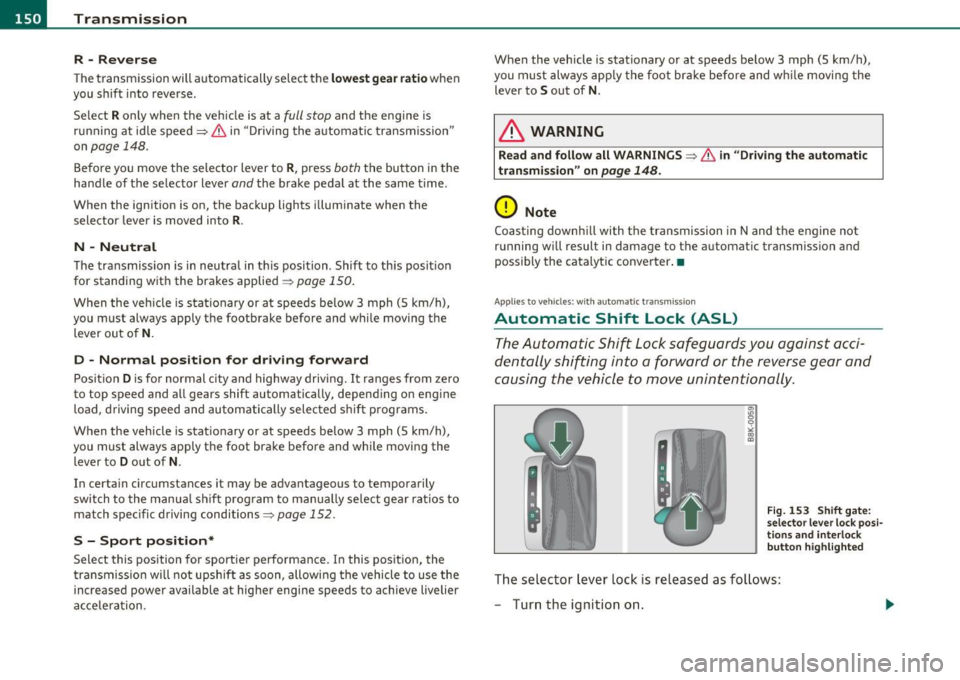
Fig. 153 Shift gate:
selector lever lock posi
tions and interlock
button highlighted
Th e selector lever lock is released as follows:
- Turn the ignition on.
Page 153 of 364
Transmission -
----------------
- Step on the brake peda l. At the same time press and hold
the interlock button on the s ide of the gear selector knob
=:> fi g. 153 wi th your thumb until you have moved the
selector lever to the des ired position .
Automatic selector lever lock
The se lector lever is locked in the P and N positions w hen the ignition
is turned on . To move the leve r from these pos it ions the driver must
dep ress the brake peda l. As a reminder to the d river, the following
warning appears in the instrument cluster display when the se lector
is in
P and N:
When stationary apply footbrake while selecting gear
A time delay e lement prevents t he selector leve r from lock ing when
it is moved throug h the
N posit ion (going from R to D ). The lock ing
element will lock the se lector lever if the lever is left in N (Neutra l) for
more tha n app rox imately 1 second, w ithout t he b rake pedal be ing
pressed.
A t speeds above about 3 mp h (5 km/h) the A utomat ic Shi ft Lock is
automatically deactivated in t he
N position .
Interlock button
The lock button on the selector lever prevents the lever from being
a cciden tally shifted in to cert ain posi tions . Pressing this b utton deac
tivates the selector lever lock. Depend ing on the direction of the
shift, the se lector leve r locks a t different positions. The pos itions are
highlighted in the illustrat io n =>
page 150, fig. 153 .
Igni tion key safety interlock
The key cannot be removed from the ignition unless the selector lever
is in the
P pa rk position. When the igni tion key is removed, the
selector lever will be locked in the
P position. •
Controls and equip
ment Safety first
Applies
to vehicles : with au toma tic transmiss ion
Kick-down
The kick -down feature allows the vehicle to generate
maximum acceleration .
When you press the accelerator peda l beyond the resis tance po int
that is reached at full throttle, the transmission will select a lower
gear rat io b ased on vehicle speed and e ngine RPM . The engine R PM
will be controlled to produce maximum vehicle acceleration as long
as you con tinue to press the acceler ator pedal beyond t his resistance
point .
& WARNING
Be careful when using the kick-down featu re on slippery roads.
Rapid a cceleration may cau se the vehicle to skid .•
App lies to veh icles: with automatic trans mission
Dynamic shift program (DSP)
The automati c transmi ssion is electronically controlled .
The transmiss ion is self adapting and will automatically select the
bes t sh ift p rogram su ited to the dr iv ing cond it io ns and dr iving style .
Th e transmission will select one of the
economy programs when you
drive at a steady speed or a gradually c hanging speed without heavy
acce le ration . This ac hieves optimum fuel efficiency, with early
upshifting and delayed downshifting.
Th e transm iss ion will au tomatically se lect the
s porty shift p rograms
when you dr ive at higher speeds, or w ith heavy acceleration and
frequently chang ing speeds . Upshifts a re de layed to make full use of
engine power . Downs hifting takes place at higher engine speeds than
in the economy programs . _.,
Vehicle care Technical data
Page 158 of 364

IIIIL_..:T..:r..: a::. n :..:.: S:.: •..: •..: • .:.:is :::.::: s~io ::.: n..:.._ ____________________________________________________ _
in. WARNING
• Unintended vehicle movement can cause serious injury.
- When the selector le ve r is in a driving position, the vehicle
may creep, even at idle speed . Therefore do not re lea se the
parking brake o r foot brake until you are ready to move ,
becau se pow er is transmitted to the wheels as soon a s a driving
position is engaged .
- Do not accelerate while selecting a driving position. At this
time the engine must be at idle speed so that undue stre ss is
not plac ed on the clutche s in the transmi ssion.
- Remember : - even when stopped b riefly with the automatic
tran smis sion in "D ", "S " or "R ", engine power is being trans
mitted to the wheels . Your vehicle could "creep " forward or
ba ckward. When stopped, keep the brake pedal fully
depressed and use the pa rking brake if necessary to keep the
vehicle from rolling .
-If the selector lever is unintentionally moved into N while
you are driving, take your foot off the ac celerator pedal and
wait fo r the engine to return to idle speed before selecting a
driving position.
- Never shift into "R" or "P" when the vehicle is in motion.
- Never get out of the driver 's seat when the engine i s running .
- If you must get out of the vehicle , move the selector lever
securely into the P pos ition and apply the parking brake firmly .
- If the engine must remain running , never h ave any driving
position engaged when check ing under the hood. Make sure
the selector lever ha s securely engaged and is lo cked in "P "
with the parking brake firmly set=> page
272, "Engine
compartment". Otherwise , any inc rease in engine speed may
set the veh icle in motion, even with the parking brake
applied. •
App lies to veh icles: with mult itron ic ® Cont in uous ly Var ia bl e Transm ission (CVT)
Selector Lever positions
This section descri bes the selector lever positions and
driving r ang es .
Fig . 160 Di spl ay in
the in strume nt clu ster :
selecto r leve r in po si
t io n D
Th e sele cto r lever posi tion engaged appears next to the se lec tor lever
as well as in the i nstr ument clus ter disp lay .
P - Park
In this selecto r lever position t he t ransmission is mechan ically
lo ck ed.
Engage P only wh en the vehicle is completely stopped=>
& in
" Dr iving the mult itronic ®" on page 155
T o shift into or out of position P, yo u mus t first press and hold the
brake pedal and then press the release b utton in the selector lever
h andl e wh ile mov ing the sele cto r leve r to P.
R - Reverse
Th e tran smi ssion will a utoma tica lly selec t the lowest gear ratio when
you sh ift into reve rse.
Select R only when t he veh icle is at a full stop and the eng ine is
running a t id le speed =>
& in "Driving the mult it ronic ®" on
page 155. _,.,
Page 159 of 364
____________________________________________________ T_r_a _ n_ s_m_ i_ s _s_ i_ o _ n __ ffllll
Before you move the selector lever to R, press both, the button in the
hand le of the se lec tor lever
and the brake peda l at the same t ime.
When the ignition is on, the backup lights illuminate when the
selector lever is moved into
R.
N -Neutral
Shift to this position for standing with brakes applied=> page 157.
When the vehicle is stat ionary o r at speeds below 3 mph (5 km/h),
you must always apply the footbrake before and while moving the
lever ou t of
N .
Do not use N for coasting downh ill.
D -Normal dri ving po sition for f orward
Depending on the load on the engine, veh icle speed and the dynamic
cont rol program, the t ransm ission wi ll se lect the
o ptimal gear ratio.
In certa in circumstances it may be advantageous to temporarily
switch to the manua l shift program to manually select gear ratios to
match specific driving conditions=>
page 159.
When the vehicle is stat ionary or at speeds below 3 mph (5 km/h),
you must always apply the footbrake before and wh ile moving the
lever to
D out of N .
S -Sport po sition
Select this position for sportier performance. In this position, the
transm ission will not upsh ift as soon, allowing the veh icle to use the
increased power available at higher engine speeds to achieve livelier
accelera tion.
When the vehicle is stat io nary or at speeds below 3 mph (5 km/h),
you must always app ly the foot brake before and while moving the
lever to
S out of N.
& WARNING
Read an d follo w all W ARNINGS => & in " Drivin g the mul ti
tronic ®" on
pag e 155.
Controls and equip
ment Safety first
0 Note
Coast
ing downh ill with the transmission in N and the engine not
operating will resu lt in damage to the automatic transmission and
poss ibly the cata lytic conve rter. •
App lies to veh icles: w ith mult itronic ® Continuously Va riab le T ransmiss ion (CVT)
Automatic Shift Lock (ASL)
The Automatic Shift Lock safeguards you against acci
dentally shifting into a forward or the reverse gear and
causing the vehicle to move unintentionally.
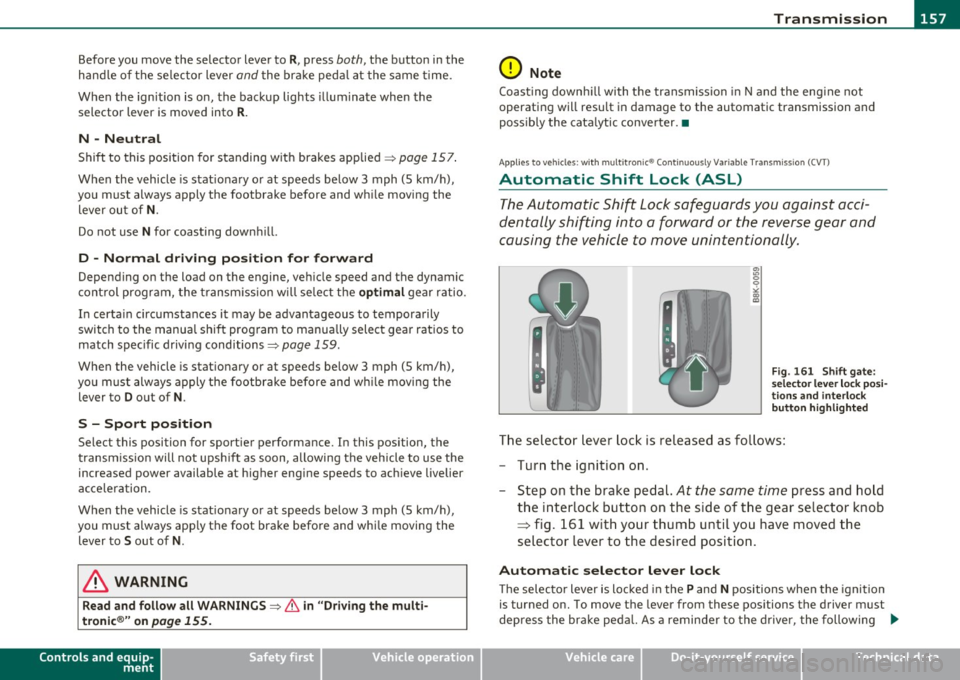
"' "' 0 9
"' ::l
F ig. 16 1 Shi ft ga te:
s e lec tor lev er l ock pos i
t ions and i nterlo ck
b utton h ighlig hted
The selector lever lock is released as fo llows :
- Turn the ignit ion on.
- Step on the brake pedal.
At the some time press and hold
the interlock button on the side of the gear se lector knob
=> fig. 161 w ith your thumb until you have moved the
selector lever to the desired position .
Automatic selector le ver l ock
Th e selecto r lever is locked in th e P and N positions when the ignition
is turned on. To move the lever from these pos itions the driver must
depress the brake peda l. As a reminder to the drive r, the following .,_
Vehicle care Technical data