remote control AUDI A5 CABRIOLET 2011 User Guide
[x] Cancel search | Manufacturer: AUDI, Model Year: 2011, Model line: A5 CABRIOLET, Model: AUDI A5 CABRIOLET 2011Pages: 364, PDF Size: 86.48 MB
Page 111 of 364
___________________________________________________ O_ n_ t_h _e_ r_o _a_ d __ _
position, otherwise the vehicle is not secured aga inst rolling away.
Y ou also ca n not lock t he vehi cle using th e locking button on the door
hand le or us ing the remote key .
Convenience key defe ctive ! Use ignition lock
T hi s message appears if t he veh icle has to be sta rted not w ith the
! STAR T EN GINE STO PJ bu tton bu t with the ig nition key.
& WARNING
• Never allow the engine to run in confined spaces -danger of
asphyxiation.
• Never turn off the engine until the vehicle has come to a
complete stop.
• The brake booster and servotronic only work when the engine
is running . With the ignition turned off , you have to apply more
force when steering or braking. Since you cannot steer and stop normally, this can lead to accidents and serious injuries.
0 Note
• Avoid high engine rpm, full throttle and heavy engine loa ds until
t he e ngi ne h as r eache d op erat ing temperat ure -oth erwi se you ri sk
eng ine damage.
• Th e en gine ca nnot be sta rted by p us hi ng or tow ing t he veh icle.
• If the eng ine has bee n un der h eavy load for a n ex tended per iod,
heat b uilds up i n the engin e compartmen t after the engine is
switched off- there is a risk o f damag ing the engine. Allow the engine
t o r un at idle for abou t 2 min utes before sw itc hing it off.
[I) Tips
If y ou open t he dr iver 's door wi th th e ig nit io n sw itche d on, a bu zzer
so unds and the message
Ignition is on appears in the instrument
clu ster displa y. Swi tch t he ig nition o ff.•
Controls and equip
ment Safety first
App
lies to vehicles : w ith con venience key
Sw itching engine off with the
[ START ENGINE S TOP] button
- Bring yo ur ve hic le to a co mplete sto p.
- Aut omat ic tra nsmissi on*: Mo ve the select or l eve r to the P
o r N posit ion.
- Press the !ST ART EN GI NE STO P] but to n => page 108,
fig . 110 .
Emergency OFF function
If necessary, the eng ine ca n be switched off with the se lecto r lever in
t he R, Dor S* po sitio ns. To d o so, step o n the b rake pedal and pr ess
and ho ld the
! ST ART ENGINE STOPJ button (vehicle speed must be
les s than 6 mph / 10 km /h.
& WARNING
• Never turn off the engine until the vehicle has come to a
complete stop.
• The brake booster and servotronic only work when the engine
is running . With the ignition turned off , you have to apply more
force when steering or braking. Since you cannot steer and stop normally , this can lead to accidents and serious injuries .
• For safety reasons, you should always park your vehicle with
the selector lever in P . Otherwise, the vehicle could inadvertently
roll away .
• After the engine has been switched off , the radiator fan can
continue to run for up to 10 minutes -even with the ignition
switched off. It can also switch on again after some time if the
coolant temperature rises as the result of a heat buildup or if the
engine is hot and the engine compartment is additionally heated
by the sun's rays.
~
Vehicle care Technical data
Page 129 of 364
____________________________________________ A_ d_ a.._p _t_ i_ v _e_ c_r_u _ i_ s _e_ c_o_ n_ t_r _o _l __ ffl'II
[I) Tips
• If the adaptive cruise control initiates brak ing, the hydraulic brake
system is under pressure. Therefore, the brake pedal distance is
shorter and the peda l "feels" harder.
• Adaptive cruise control is switched off after pressing the foot
brake. The speed saved up this poi nt can be resumed.
• To resume the saved speed, release the brake pedal and press the
control lever:::::,
page 120, "Turning adaptive cruise control off
temporari ly".
• If you use the accelerator to go faster than the speed of the object
ahead of you, the
driver intervention prompt will not be accompa
nied by a warn ing s ignal.
• If the speed you prev iously set is exceeded, the indicator light in
the speedometer will switch off .•
A pplie s to vehicles: w ith adapt iv e cru is e control
MMI settings
Individual settings for adaptive cruise control can be
selected in the fV/fVII*.
Settings for the driving program can be adjusted individually
to the particular user and saved in the MMI*.
- Select:
[CAR] function button > Adaptive Cruise Control >
Driving program.
Setting the driving program
In the driving program menu you can adjust the characterist ics of
adaptive cruise contro l to what you want using
dynamic , standard or
comfort.
Controls and equip
ment Safety first
Saving settings
Your individual settings are automatica
lly saved and assigned to the
remote control key being used (remote key storage) . If the key is
given to another person, the saved settings remain as they are. •
System limitations
Applies to vehicles : with adapt ive cruise cont rol
General information
Some driving situations which affect the function of the
radar sensor are described below.
When driving, the adaptive cru ise contro l is governed by physical and
system-specified limits. Also, under certain circumstances, the ACC
system may react unexpectedly or late from the driver's point of view.
Therefore, always be attentive and intervene, if necessary:
• when driving around curves :::::,
page 128
• when vehicles in front are not in line with your vehicle:::::, page 128
• when other vehicles are changing lanes:::::, page 128
• when other vehicles are difficult to detect :::::, page 129.
& WARNING
The radar sensor's vision can be reduced by rain, snow and heavy
spray. This can result in vehicles driving ahead being inadequately
detected or, in some circumstances , not detected at all. If neces
sary, take action yourself!•
Vehicle care Technical data
Page 137 of 364
Audi lane assist -_______________________________ lff'II
Applie s to vehicles: w ith lane assist
Setting the warning time and steering
wheel vibration
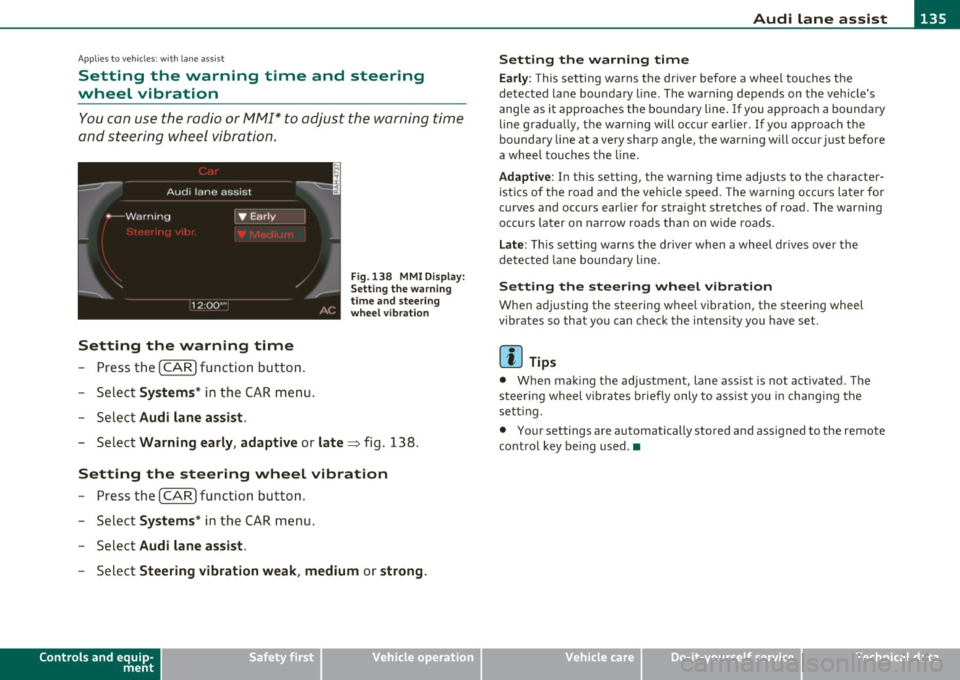
You c an use the radio or MM I* to adjust the warning time
and steerin g wheel vibration.
Setting the warning time
- Press the [ CA R] function button .
- Selec t
Systems * in the CAR men u.
- Selec t
Audi lane assist .
Fig. 13 8 MMI D isplay:
S ettin g the w arning
time an d stee ring
w he el vibr ation
- Select Warning early , adaptive or late => fig. 138.
Setting the steering wheel vibration
-Press th e [ CAR] function bu tt o n.
- Select
Systems * in the CAR men u.
- Select
Audi lane assist .
-Selec t Steering vibration weak , medium or strong .
Controls and equip
ment Safety first
Setting the warning time
Earl
y: This setting wa rns the driver before a wheel touches the
detected la ne bounda ry l ine. The warn ing depends on the vehicle's
angle as it approaches the bo undary line . If you app roach a bounda ry
line gradua lly, t he war ning will occ ur earlier. If you app roach the
boundary line at a very sharp angle, the warning will occur just before
a whee l touches the line.
Adapti ve : In this setting, the warning time adjusts to the character
ist ics o f th e road and the veh icle speed . The wa rning occurs later for
c u rves and occurs ear lier for straight stretches of road. The warn ing
occurs later on narrow roads t han on w ide roads .
Late: This setti ng warns the d river when a whee l dr ives over the
detected lane boundary line.
Setting the steer ing wheel vibration
When ad justing the steering wheel vib ration, the steer ing wheel
vibrates so that yo u can c hec k t he intens ity you have set.
(I) Tips
• Whe n mak ing t he ad justment, lane ass ist is not act ivated. The
steering wheel v ibrates briefly only to assist you in chang ing the
se tt ing.
• Your settings are automatically stored and assigned to the remote
cont rol key being used. •
Vehicle care Technical data
Page 149 of 364
________________________________________________ A_u_ d_i_ d_ r_iv _ e_ s_ e _ le_ c_t __ l!'II
Applies to vehicles : w ith MMI and Audi drive select
Setting the INDIVIDUAL mode
You can personally specify the vehicle setup in the /11/\11.
-Select : [CAR]> Audi drive select individual.
You need to select this control to drive in the recently set INDIVIDUAL
mode ~
page 146.
[ i ] Tips
Your IN DIV IDUA L mode se tt ings a re automa tically sto red and
assigned to the remote control key being used. •
Controls and equip
ment Safety first
Vehicle care Technical data
Page 165 of 364

______________________________________________________ P_a _ r_ k_ a_ s_s _i _ s _t __ _
Please note that low objects already signaled by a warning can disap
pear from the system's detection range and will not continue to be
signaled.
If the distance to an obstacle remains the same, the vo lume of the
distance warning is gradually reduced after about 4 seconds.
Approaching another obstacle will result in the distance warning
sounding at the normal volume again.
Malfunctions in the system
If a warning tone is aud ible for about five seconds when you turn on
the ignition , there is a malfunction in the system. Have the problem
corrected by your authorized Audi dealer.
Keep the sensors in the rear bumper clean and free from ice so that
the acoustic park assist system can function properly.
& WARNING
• Sensors have dead spaces in which objects cannot be detected.
Be especially alert for small children and animals, since they are
not always detected by the sensors.
• The Acoustic Parking System is not a substitute for the driver's
own caution and alertness. Ultimate respon sibility always
remains with the driver during parking and similar maneuvers.
Always watch where you are driving.
• You should always adjust the volume and frequency of the
chimes so that you can easily hear the acoustic distance warning
even if the radio is playing, the air-conditioner blower is on High
or there is a high level of outside noise .
- Check the settings whenever anyone else has driven the
vehicle before you.
0 Note
• Remember that low obstacles for which a warning has already
been issued may "dive" below the system 's sensing zone if the veh icle
is be ing backed up closer . In this case, the warning sound shutting off
Controls and equip
ment Safety first
does not ind
icate that you have cleared the obstacle . Instead, impact
is immin ent.
• Objects such as trai ler hitches, chains, narrow posts or fences
covered by a thin layer of paint may not always be detec ted by the
system . They can still damage your vehicle w ithout warning .
lI] Tips
Keep the sensors in the rear bumper clean and free of snow and ice so
that the aco ustic parking assist system can function properly.•
Applies to ve hicle s: wit h pa rkin g system (re ar)
Adjusting the chimes
The volume and the pitch (frequency) of the chimes can
be adjusted in the radio or in the /11/111*.
Rear volume adjustment
-Select: [CAR]> Parking system .
- Select Rear volume if you want to change the volume of
the rear signal generator.
Rear frequency adjustment
- Select: [CAR]> Parking system.
- Select Rear frequency when you want to change the
frequency of the rear audible signal generator.
When adjusting the volume and frequency, the new sett ing will
sound for approx. 2 seconds from each audib le signal generator. The
vol ume and frequency settings are automatically stored and assigned
to the master key with remote control. .,_
Vehicle care Technical data
Page 172 of 364
![AUDI A5 CABRIOLET 2011 User Guide lffl!I.__ __ P_a _ r_ k_ a_ s_ s_is _ t ____________________________________________________ _
(I] Tips
• The warn ing tones can a lso be adjusted d irectly by the v isua l
display or](/img/6/57571/w960_57571-171.png "AUDI A5 CABRIOLET 2011 User Guide lffl!I.__ __ P_a _ r_ k_ a_ s_ s_is _ t ____________________________________________________ _
(I] Tips
• The warn ing tones can a lso be adjusted d irectly by the v isua l
display or")
lffl!I.__ __ P_a _ r_ k_ a_ s_ s_is _ t ____________________________________________________ _
(I] Tips
• The warn ing tones can a lso be adjusted d irectly by the v isua l
display or the picture from the rearview camera . Simp ly press the
S ettings cont rol button .
• Changed settings are activated when parking system is switched
on again .
• T he settings are automatically stored and assigned to the remote
control key .•
Ap plies to vehicles: w ith pa rking System (rear) a nd rea r-view ca mera
Acoustic parking system error message
If a warning tone is audible for abo ut five seconds when you tur n on
the ignition, the re is a ma lfunction in the system. Have the problem
corrected by your authorized Audi dea ler.
Keep the se nsors i n the rea r bumper clean and free from ice so t hat
the acoustic park assist system can function properly. •
Page 173 of 364
HomeLink® -
----------------
Homelink®
Universal remote control
Applies to veh icles: w ith Hom eli nk ® universal remote control
General information
The Homelink ® feature can learn up to three radio
frequency codes for most current transmitters used for
operating garage doors, estate gates, home or outdoor
lighting systems, and other devices.
You must first program the Homelink ® transm itter before you can
use the system=>
page 172, "Programming the Home link® trans
mitter".
I n order to program the Homelink ® transmitter for devices utilizing
rolling code, a second person on a ladder who can safe ly reach the
garage door opener motor is recommended. It is also necessary to
locate the "learn" button on your garage door opener motor. Refer to
the operating instructions for the opener, as the location and color of
this button may vary by manufacturer.
You can still use the original remote control for the device at any
time.
& WARNING
• Never use the Homelink'"' transmitter with any garage door
opener that does have not the safety stop and reverse feature as
required by federal safety standards. This includes any garage
door opener model manufactured before Aprill, 1982.
• A garage door opener which cannot detect an object, signaling
the door to stop and reverse does not meet current federal safety
standards. Using a garage door opener without these features
increases risk of serious injury or death.
Controls and equip
ment Safety first
& WARNING
(continued)
• For safety reasons never release the parking brake or start the
engine while anyone is standing in front of the vehicle.
• A garage door or an estate gate may sometimes be set in
motion when the Homelink ® remote control is being
programmed. If the device is repeatedly activated, this can over
strain motor and damage its electrical components -an over
heated motor is a fire hazard!
• To avoid possible injuries or property damage, please always
make absolutely certain that no persons or objects are located in
the range of motion of any equipment being operated.
rn Tips
• If you would like more information on Homelink ®, where to
purchase the Homelink ® compatible products, or would like to
purchase the Homelink ® Home Lighting Package, please call toll
free: 1-800-355-3515.
• For Declaration of Compliance to United States FCC and Industry
Canada regulations=>
page 346 . •
Vehicle care Technical data
Page 174 of 364
Ill HomeLink® ..__ ______________ _
Applies to veh icles : w ith Homelin k® un iversa l remote control
Programming the Homel ink ® transmitter
The transmitter is programmed in two phases . For rolling
code transmitters, a third phase is also necessary .
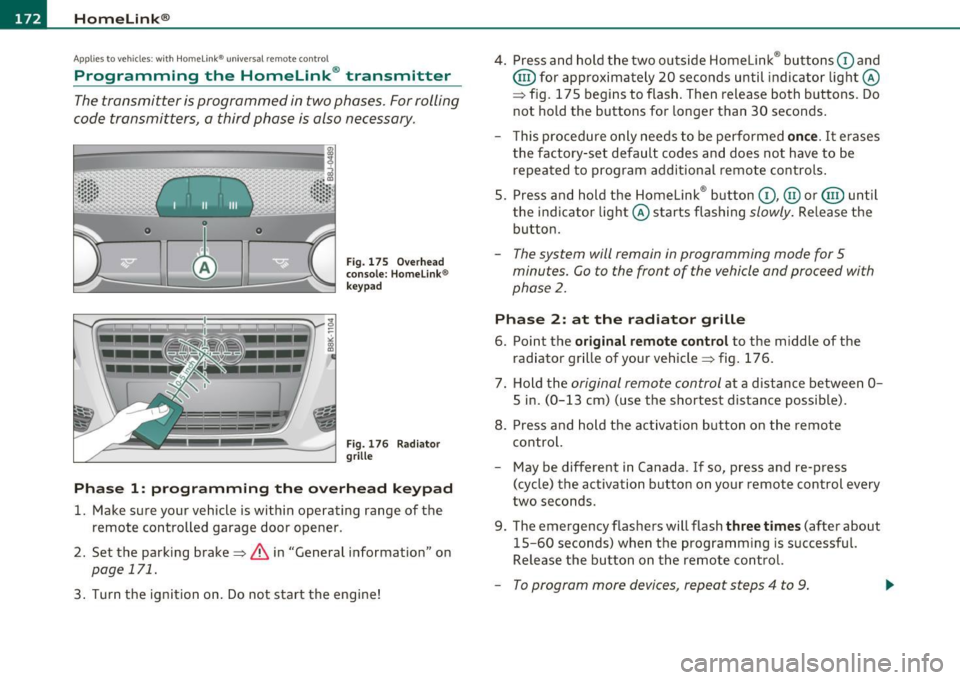
0
ct
Fig. 175 Ove rh ead
console: Homelink ®
keypad
F ig. 176 Rad iator
grille
Phas e 1: prog ramming th e ove rhead k eypad
1. Make sure your vehicle is within operating range of the
remote controlled garage door opener .
2. Set the parking brake=>&, in "General information " on
page 171.
3. Turn the ignition on . Do not start the engine! 4
. Press and hold the two outside Homelink ® buttons
G) and
@ for approximately 20 seconds until indicator light@
=> fig. 175 begins to flash . Then release both buttons . Do
not hold the buttons for longer than 30 seconds .
- This procedure only needs to be performed
once. It erases
the factory-set default codes and does not have to be repeated to program additional remote controls .
S. Press and hold the Homelink ® button
G) , @ or@ until
the indicator light@ starts flashing
slowly . Release the
button .
-The system will remain in programming mode for 5
minutes. Co to the front of the vehicle and proceed with
phase
2 .
Phase 2: at the radiator grille
6. Po int the original remote control to the middle of the
radiator grille of your vehicle=> fig. 176.
7 . Hold the
original remote control at a distance between O
S in. (0 -13 cm) (use the shortest distance possible).
8 . Press and hold the activation button on the remote
control.
- May be different in Canada . If so, press and re-press
(cycle) the act ivation button on your remote control every
two seconds.
9. The emergency flashers will flash
three t imes (after about
15-60 seconds) when the programm ing is successful.
Release the button on the remote control.
- To program more devices , repeat steps 4 to 9.
Page 175 of 364

HomeLink® -_______________ __.
10. Press and hold the trained Homelink ® button and
observe the indicator light©~
page 172, fig. 175 .
- If the indicator light is solid/continuous, programming is
complete and your device should activate when you press
and release the trained Homelink ® button.
- If the indicator light blinks rapidly for 2 seconds and is
then a solid/continuous light, proceed with phase 3 to program a rolling code device .
Phase 3: rollin g code progr amm ing
- A second person on a ladder who can safely reach the
garage door opener motor is recommended.
11. Locate the "learn" button on the garage door opener
motor (refer to the operating instructions for the opener,
as the location of this button may vary by manufacturer) .
12. Press and release the learn button on the garage door opener motor.
- Note: once the button is pressed, there are 30 sec ond s in
which to initiate the next step.
13. On the Homelink ® keypad inside the vehicle, firmly press
and hold the Homelink ® button previously programmed
in phases 1 and 2 for two seconds and release. Repeat this
sequence
twice .
-Some vehicles may require the press/hold/release
sequence up to three times to complete the training
process.
-HomeLink ® should now activate your rolling code
equipped device.
Con tro ls a nd e quip
m en t Vehicle
OP-eration
If the 5 minute time limit is exceeded, the em erge ncy fla shers w ill
fla sh on e t ime
to indicate that the process has been terminated. In
this case, repeat steps 4 through 9 .
If the emergency flashers do not flash
three times (after about 15-
60 seconds), programming was not successful. In this case, repeat
steps 4 through 9.
Remote control un its for garage door openers in Canada are set to
stop transmitt ing radio frequency signals after two seconds. This
time may not be sufficient for the Home link ® system to learn the
rad io frequency signal. Perform all other steps as described above .•
Applies to veh icles: with Homelin k® universal re mote cont rol
Operating the Homelink ® transmitter
The HomeLink ® transmitter works in the some manner as
the original hand held remote control that come with the
system.
Fig. 177 Overhead
conso le: Homeli nk®
k ey pad
- Press the appropriate programmed button G),@ or @
to activate the desired remote control function
~ & in
"General information" on
page 171. •
Vehicle care Do-it-yourselt service iTechnical data
Page 176 of 364
1111....__H_ o_ m __ e_L _ i_n _k_ ®_ • _________________________________________________ _
Applies to veh icles : w ith Home link® un iversa l remote cont rol
Reprogramming a single button
A Homelink ® button can be reprogrammed individually
without affecting the other button allocations .
Programming the overhead keypad
Press the appropriate Homelink ® button until the indi
cator light begins flashing slowly.
At the radiator grille
1. Point the original remote control to the middle of the
radiator grille of your vehicle~
page 172, fig. 176.
2.
Hold the original remote control at a distance between O
S
in . (0-13 cm) (use the shortest distance possible) .
3. Press and hold the activation button on the remote
control.
4. The emergency flashers will flash
three times (after about
15-60 seconds) when the programming is successful.
Now release the button on the remote control.
- If the device utilizes a rolling code, please follow phase 3
of ~
page 172, "Programming the Homelink ® trans
mitter" for rolling code programming.
This procedure will cause the existing programming on the
Homelink® button to be erased! •
Applies to vehicles: with Home link® un iversa l remote cont rol
Erasing the programming of the
Homelink ® transmitter
When you erase the programming, the programming on
all three of the transmitter channels with be lost!
- Perform steps 1 to 4 as described on~ page 172, "Phase
1: programming the overhead keypad".
When completed, the Homelink® system will be in the programming
mode and is then ready to learn the codes for remote controlled
devices.
[I) Tips
• Programmed buttons cannot be eras ed individually.
• For security reasons you are advised to erase the programming of
the HomeLink ® system before you sell your vehicle. •