tow AUDI A5 CABRIOLET 2011 User Guide
[x] Cancel search | Manufacturer: AUDI, Model Year: 2011, Model line: A5 CABRIOLET, Model: AUDI A5 CABRIOLET 2011Pages: 364, PDF Size: 86.48 MB
Page 116 of 364
IIIIL-_O.::...:. n.:....: t:.:.h.:.. e::....: r...: o:.. a .::..: d,;__ ________________________________________________ _
& WARNING (continued)
• Please note that unconsciously "resting" your foot on the
accelerator pedal causes cruise control not to brake. This is due to
the control system being overridden by the driver's acceleration.
• If a brake system malfunction such as overheating occurs when
the cruise control system is switched on, the braking function in
the system may be switched off. The other cruise control functions remain active as long as the indicator light
CRUISE (US model) / (;f
(Canadian model) is on.
(I) Tips
The brake lights illuminate as soon as the brakes apply
automatically. •
Applies to vehicles : w ith cr uise contro l
Changing speed
-Press the lever in the direction of the
0 => page 113,
fig . 112 or in the direction of the Oto increase or
decrease your speed.
- Let go of the lever to save that speed.
Change speed in increments of 1 mph (1 km/h) by lightly press ing the
lever . If you keep the lever pressed down, you will alter your speed in
5 mph (10 km/h) incremen ts.
You can also press the accelerator pedal down to increase your speed,
e .g . if you want to pass someone. The speed you saved earlier will
resume as soon as you let off of the accelerator pedal.
If, howeve r, you exceed your saved speed by 5 mph (10 km/h) for
longer than 5 minutes, the cruise control will be turned off tempo
rarily. The green symbol in the display turns white, the saved speed is
retai ned .•
A pp lies to veh ic les : wi th cru ise contro l
Pre-selecting speed
You can pre-select your desired speed while the vehicle is
not moving.
- Turn on the ignition.
- Pull lever into position 1
=> page 113, fig. 112.
- Press the lever in the
0 or O direction to increase or
decrease your speed.
- Let go of the lever to save that speed.
This function makes it possible, for example, to save the speed you
want before driving on the highway. Once on the highway, activate
the cruise control by pulling the lever toward
(D . •
App lies to veh icles : w ith c ruise contro l
Switching off
Temporary deactivation
-Step on the brake pedal, or
Press the lever into position @ (not clicked into place)
=> page 113, fig. 112, or
- Drive for longer than S minutes at more than S mph
(10 km/h) above the stored speed.
Switching off completely
-Press lever into position @ (clicked into place), or
- Switch the ignition off.
Page 119 of 364
____________________________________________ A_ d_ a.._p _t_ i_ v _e_ c_r_u _ i_ s _e_ c_o_ n_ t_r _o _l __ ffl'II
& WARNING (co ntinued )
• Always turn off adaptive crui se control when entering turn
lanes, highway ex it lanes and con struction zones or similar situa
tions because the vehicle will automatically accele rate to the
stored speed .
• Never rest your foot on the accelerator pedal, especially when
the adaptive cruise control is being u sed because doing so will
override the braking function and prevent the brakes from being
applied by the system when it detect s a situation when the brake s
must be applied.
• Alway s remember that the adaptive cruise control has limits -
it does not react when you drive towards an obstacle or something
else on or near the road that is not moving, such as vehicles
stopped in a traffic jam , a stalled or disabled vehicle .
• Always remember that the adaptive cruise control cannot
detect a veh icle th at i s driving towards you in your traffic lane and
that it cannot detect narrow vehicles such as motorcycles and bicy
cles .
[ i] Tips
• For safety reasons, the stored speed is deleted when the ignition
is turned off.
• The Electronic Stabilization Program (ESP) and the Ant i-Slip Regu
la tio n (A SR) c anno t be de activated when the adaptive cruise cont rol
is sw itched on .
If the ESP and the Anti -S lip Regulation (ASR) has been
de activ at ed an d yo u the n switch on the ad apt ive cruise cont rol, the
ESP fu nction w ill also be activated automatically.
• Dam age cau sed by accide nts (e.g. if the vehicle is dam age d whe n
park ing) can affect the rada r sensor settings. This can cause t he
sys tem to malfunc tion or switch off comple tely.
• The radar sensor cover is heated. In w inter conditions, you should
st ill ch eck befor e dr iv in g to make s ure i t is free of ice and s now. If
necessary, clean the area nea r the rada r sensor carefully=>
page 116,
fig. 114 .
Controls and equip
ment Safety first
•
To ensure that the radar sensor is not blocked , fore ign objects
(e .g. st ickers, add -on par ts) m ust no t cover the are a ne ar th e radar
sensor=>
page 116, fig . 114 . The area near t he radar sensor must not
be painted, either .
• For Declaration of Compliance to United States FCC and Industry
C an ada regula tions =>
page 34 6. •
App lies to ve hicle s: with adap tiv e crui se contro l
How does adaptive cruise control work?
Vehicles traveling ahead are de tec ted w ith the aid of a
ra dar sens or.
I;= =;. =============== --~
~
l8
Fig. 115 Radar sen sor
mea sureme nt r an ge
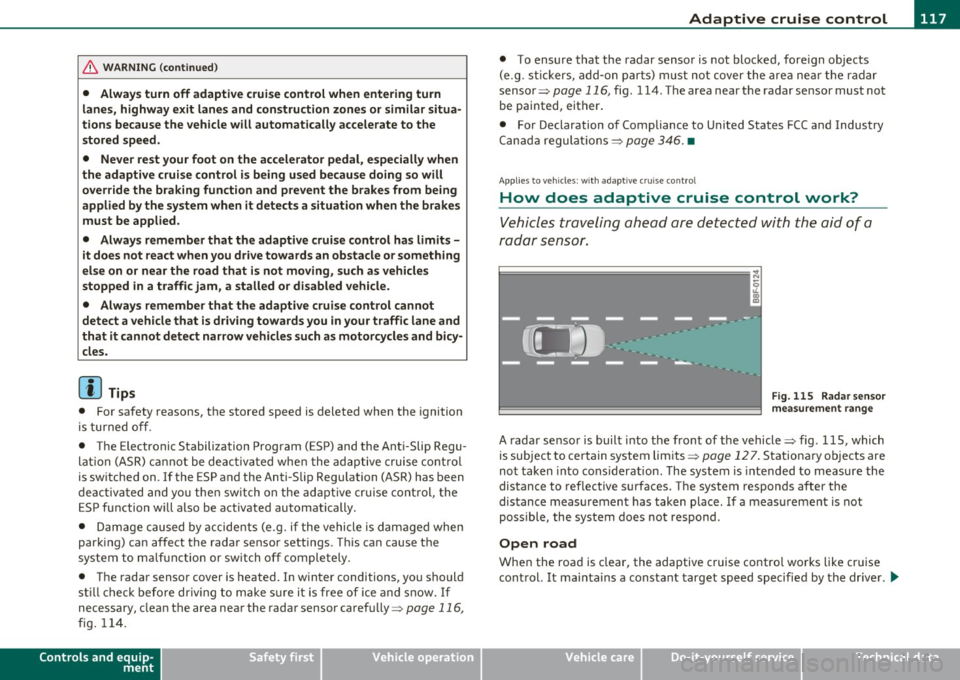
A radar sensor is buil t into the front of the vehicle=> fig. 115, which
is subject to ce rtain system limits =>
page 12 7 . Stationary o bjects are
not taken into cons iderat ion. The system is intended to measure the
distance to reflective s urfaces. The system responds after the
dis tance measuremen t has taken place. If a meas urement is not
poss ible, the system does not respond.
Open road
When the road is clear, the adaptive c ruise contro l works like cr uise
cont rol. It ma inta ins a constant target speed specified by the drive r.
~
Vehicle care Technical data
Page 127 of 364
____________________________________________ A_ d_ a.:.p _t_ i_ v _e_ c_r_u _ i_ s _e_ c_o_ n_ t_r _o _l __ _
Appli es to ve hicl es: wi th a daptive cruise cont rol
System status indicator
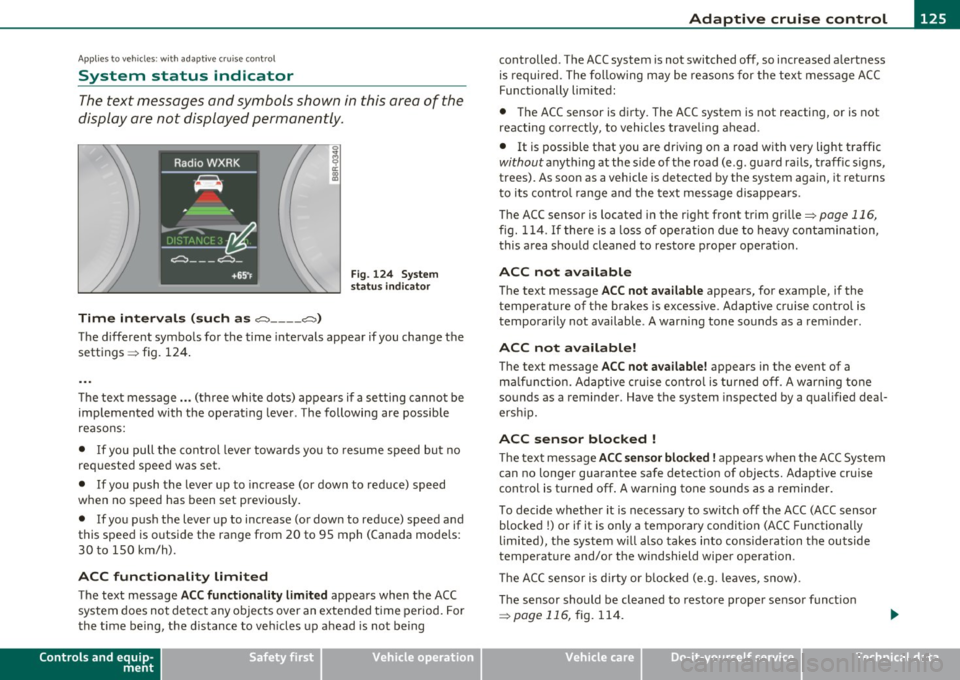
The text messages and symbols shown in this area of the
display are not displayed permanently .
Time intervals (such as e::::, ____ e::::,)
Fig. 124 System
status indicator
The different symbols for the time intervals appear if you change the
sett ings => fig. 124 .
Th e text message ... (three white dots) appears if a setting cannot be
implemented with the operating lever. The following are possible
reasons:
• If you pull the control lever towa rds you to resume speed but no
requested speed was set .
• If you push the lever up to increase (or down to reduce) speed
when no speed has been set previously.
• If you push the lever up to increase (or down to reduce) speed and
this speed is outside the range from 20 to 95 mph (Canada mode ls:
30 to 150 km/h) .
ACC functionality Limited
The text message ACC functionality limited appears when the ACC
system does not detect any objects over an extended time period. For
the time being, the d istance to veh icles up ahead is not being
Controls and equip
ment Safety first
controlled
. The ACC system is not switched off, so increased alertness
is required. The following may be reasons for the text message ACC
Functionally limited:
• The ACC sensor is dirty. The ACC system is not reacting, or is not
reacting correctly, to vehicles traveling ahead.
• It is possible that you are driving on a road with very light traffic
without anything at the s ide of the road (e .g . guard rails, traff ic s igns,
trees). As soon as a vehicle is detected by the system again, it returns
t o its contro l range and the text message disappears.
The ACC sensor is located in the r ig ht front trim grille
=> page 116,
fig. 114 . If there is a loss of operation due to heavy contamination,
this area should cleaned to restore proper operat ion .
ACC not available
The text message ACC not available appears, for examp le, if the
t empe rature of the brakes is excessive. Adaptive cruise control is
temporarily not available. A warning tone sounds as a rem inder .
ACC not available!
The text message ACC not available! appears in the event of a
ma lf unct ion. Adaptive cruise control is turned off. A warn ing tone
sounds as a reminder . Have the system inspected by a qualified deal
ersh ip.
ACC sensor blocked !
The text message ACC sensor blocked ! appears when the ACC System
can no longer guarantee safe detection of objects. Adaptive cruise
control is turned off. A warning tone sounds as a reminder.
To decide whether it is necessary to switch off the ACC (ACC sensor
blocked
!) or if it is only a temporary condition (ACC Functionally
limited), the system w ill also takes into consideration the outside
temperature and/or the windshield wiper operation .
Th e ACC sensor is d irty or blocked (e.g. leaves, snow).
Th e sensor should be cleaned to restore prope r sensor funct ion
=> pagell6,fig.114.
Vehicle care Technical data
Page 132 of 364
IIII.___A_ d_ a,.:.p _ t_ i _v _ e_ c_ r _u _ is_ e_ c_o _n_ t_r _o _l _____________________________________________ _
The Audi braking guard is active from a speed of approx. 20 mph
(30 km/h) and works within the system limits=>
page 12 7 even when
the adaptive cruise control is deactivated.
A radar sensor is built into the front of the vehicle=>
page 116,
fig. 114. The system is intended to measure the distance to reflective
surfaces. If a measurement is not possible, the system does not
respond.
When the measurement has taken place, the system can assess a
hazardous situation, when a vehicle ahead suddenly brakes or when
your own vehicle is dr iving at high speed towards a much slower
vehicle ahead. As soon as the system assumes that a possible colli
sion w ith the vehicle ahead can only be avoided by immediate all-out
braking or by an avoiding maneuver, a warning appears .
Th e system has a pre-set response time to be able to warn in good
time. This system response time is automatically reduced if you accel
erate actively, for example to join a highway. Braking, transverse
acceleration and the steering angle can lead to a reduced system
response time. The warning is deactivated if you begin to overtake
with full accelerat ion.
The system draws your attention to two different hazardous situa
tions:
Distance
Th e distance wa rning is issued in the event of inadequate distance to
the vehicle ahead a period of more than S seconds. If the distance is
less than 30 feet (9 meters) at SO mph (80 km/h), for example, an
optical display is faded in on the instrument cluster=>
page 129,
fig. 133.
If the vehicle ahead brakes sharply, a collision cannot be avoided,
even in the case of an immediate response. In this case, increase the
distance to the vehicle ahead.
Speed
If there is a much slower vehicle ahead in your lane, or if the vehicle
ahead brakes sha rply, the Audi braking guard calculates the point from which a collision can only be avoided by all-out braking or by an
avoiding maneuver. If a warning does sound, a possible collision with
the vehicle in front can be avoided through an evasive maneuver or by
braking.
Th e warn ing is given in two stages:
• Pre-warning: An optical display appears in the instrument cluster
and a warning tone sounds.
• Acute warning: If you do not respond to the pre-warning, the
second stage, the acute warning, is issued. A brake jolt reminds you
to concentrate on the road again.
Under heavy breaking, brake assist =>
page 245 also helps you obtain
maximum braking effic ien cy.
& WARNING
Always pay attention to traffic, even when the Audi braking guard
is switched on. You are always resp onsible for
your speed and the
distance between your vehicle and other vehicles.
• Always keep the legally stipulated safety distance between
your vehicle and the vehicle ahead -danger of accident!
• The Audi braking guard does not respond outside the system
limits, for example if you approach a stationary obstacle (end of a
traffic jam or breakdown vehicle).
• Please observe that the Audi braking guard is subject to restric
tions in narrow bends due to the field of vision of the radar sensor.
This may possibly lead to obstacles not being detected.
• The radar sensor's
vision can be reduced by rain, snow and
heavy spray . This can result in vehicles driving ahead being inade
quately detected or, in some circumstances, not detected at all.
Always watch where you are driving.
• Reflecting objects such as e.g. crash barriers or the entrance to
a tunnel may impair the function of the radar sensor.•
Page 156 of 364
ffl..__T_ r_a _n_ s_ m_ is_ s_io _ n ___________________________________________________ _
Applies to veh icles : with automat ic tr ansm ission
Emergency release of the selector lever
If the vehicle's power supply fails, the selector lever can
be released in an emergency.
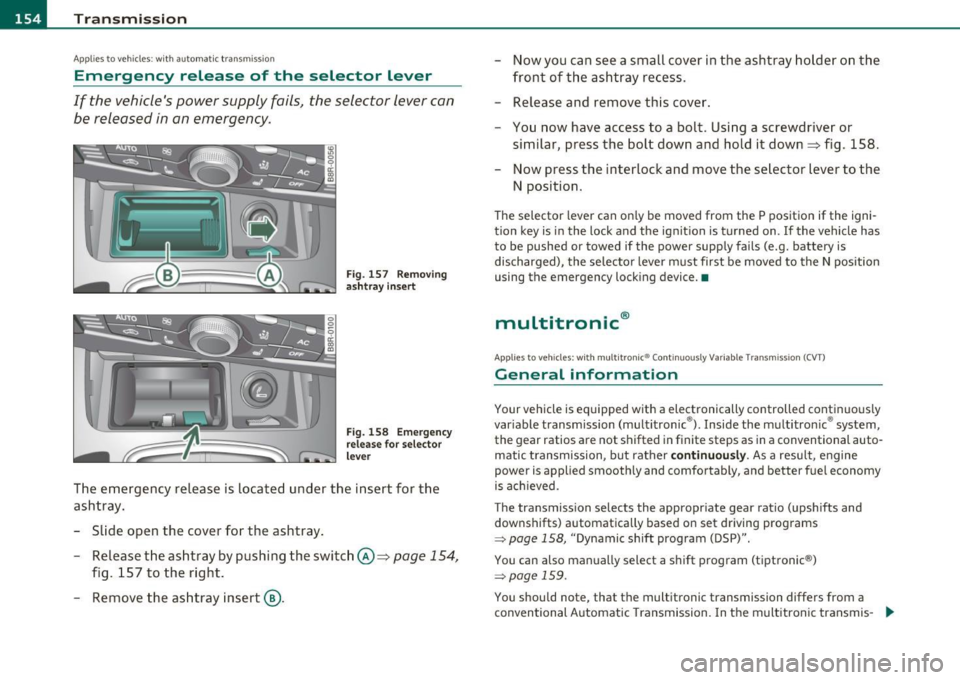
Fig . 157 Removing
ashtr ay in sert
Fig. 158 Emerge ncy
release for selector
lever
The emergency release is located under the insert for the
ashtray.
- Slide open the cover for the ashtray .
- Release the ashtray by pushing the switch @=>
page 154,
fig. 157 to the right.
- Remove the ashtray insert@. -
Now you can see a small cover in the ashtray holder on the
front of the ashtray recess.
- Release and remove this cover.
- You now have access to a bolt. Using a screwdriver or
similar, press the bolt down and hold it down=> fig . 158.
Now press the interlock and move the selector lever to the
N position.
Th e selector lever can on ly be moved from the P position if the igni
tion key is in the lock and the ignit ion is turned on . If the vehicle has
to be pushed or towed if the power supply fails (e.g. battery is
discharged), the selector lever must first be moved to the N position
using the emergency locking device. •
multitronic®
Applies to veh icle s: with mu lt it ron ic® Con tinuously Variable Transmission (CVT)
General information
Your vehicle is equipped with a electronically controlled continuous ly
var iable transmission (multitronic ®). Inside the multitronic ® system,
the gear ratios are not shifted in finite steps as in a conventional auto
matic t ransmission, but rather
continuously. As a result, engine
power is applied smoothly and comfortably, and better fuel economy
is ach ieved .
The transmission selects the appropriate gear ratio (upshifts and
downshifts) automatically based on set driving programs
~ page 158, "Dynamic shift program (DSP)".
You can also manually select a shift program (tiptronic ®)
~ page 159 .
You shou ld note, that the multitronic transmission differs from a
conventional Automatic Transmission . In the multitronic transmis-
9J,,
Page 163 of 364
____________________________________________________ T _r_a _n_ s_m _ i_s _s_ i_ o _ n_---J_
Applies to vehicles : with mult itron ic® Continuous ly Variab le Transm ission (CVT)
Emergency release for selector lever
If the vehicle 's power supply fails, the selector lever can
be released in an emergency.
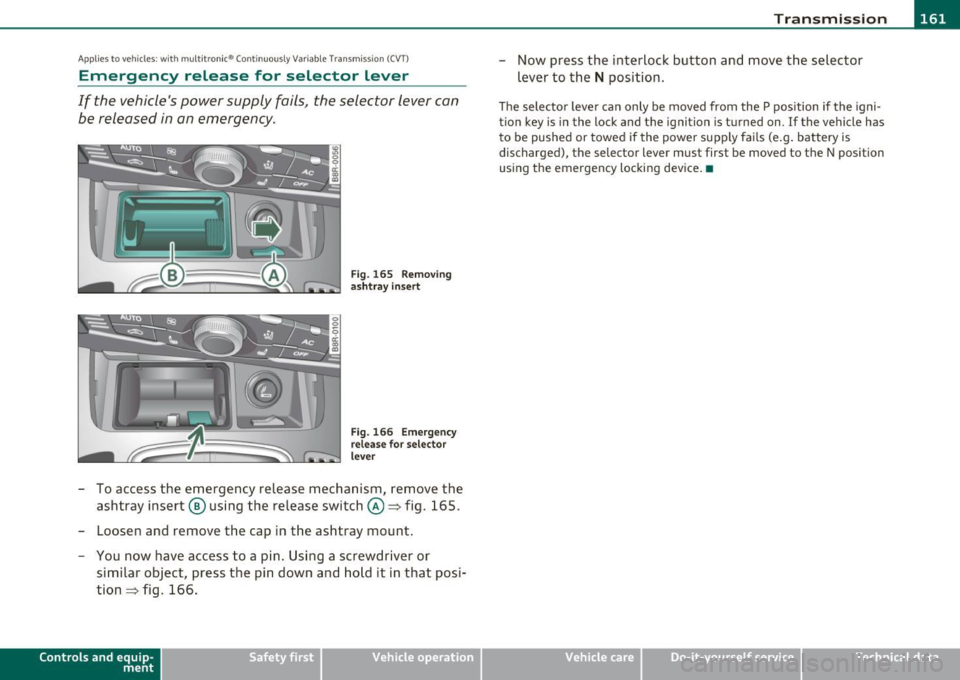
Fig . 165 Removing
ashtray insert
Fig. 166 Emergency
release for selector
lever
- To access the emergency release mechanism, remove the
ashtray insert @ using the release switch@~ fig. 165.
- Loosen and remove the cap in the ashtray mount.
- You now have access to a pin. Using a screwdriver or
similar object, press the pin down and hold it in that posi
tion~ fig. 166.
Contro ls a nd e quip
m en t Vehicle
OP-eration
-Now press the interlock button and move the selector
lever to the
N position.
The selector lever can only be moved from the P position if the igni
tion key is in the lock and the ignition is turned on. If the vehicle has
to be pushed or towed if the power supply fails (e.g. battery is
discharged) , the selector lever must first be moved to the N position
using the emergency locking device. •
Vehicle care Do-it-yourselt service iTechnical data
Page 167 of 364

______________________________________________________ P_a _ r_ k_ a_ s _ s_is _ t _ __.fflll
A ppli es to veh icl es: wi th park ing s yst em (r ear ) and re ar-view camera
General Information
®
Sensors in the bumper
Fig . 169 Covered area
(!) and uncovered area
@ of the rear-view
camera
Fig. 170 Trunk lid:
location of the rear
view camera
Sensors are located in the front and rear bumpers. If these detect an
obstacle, audible and visual signals warn you. The range at which the
sensors begin to measure is approximately:
To the side
Center rear
2 ft (0.60 m)
5.2 ft (1.60 m)
The closer you get to the obstacle, the shorter the interval between
the audible signals. A continuous tone sounds when the obstacle is
Con tro ls a nd e quip ·
m en t Vehicle
OP-eration
less than approximately 1 foot (0.30 meters) away . Do not continue
driving farther.
If the distance to an obstacle stays the same, the volume of the
distance signal chime is gradually reduced after about
4 seconds
(does not affect the continuous signal tone). Approaching another
obstacle will cause the distance signal to sound again at the normal
volume.
Rearview camera coverage area
The MMI display shows the area covered by the rearview
camera ::> fig.
169 (D. Objects that are not in the area covered@ are
not shown on the MMI display.
We recommend that you practice parking with the rear-view camera
in a traffic-free location or parking lot to become familiar with the
system, the orientation lines, and their function. When doing this,
there should be good light and weather conditions.
In the MMI display, objects or vehicles appear closer or further away
if:
• you are driving in reverse gear from a level surface onto an incline,
or a downward slope,
• you are driving in reverse gear toward protruding objects ,
• the vehicle is carrying too much load in the rear.
The accuracy of the orientation lines and blue surfaces diminishes if:
• the rear-view camera does not provide a reliable image, for
example, in poor visibility conditions or if the lens is dirty,
• the image on the screen is not visible due to sun glare and reflec
tion.
Caring for the rear-view camera lens
The rear-view camera is located above the rear license plate bracket.
For the parking assist to operate, the lens=> fig . 170 must be kept
clean:
• Dampen the lens with a household alcohol-based glass cleaner,
and clean the lens with a dry cloth=>
0. .,
Vehicle care Do-it-yourselt service iTechnical data
Page 180 of 364
• ....__D_ r_iv _i_ n_, g=-- S_ a _ f_e _,Ly _ ______________________________________________ _
Proper occupant seating positions
Proper seating position for the driver
The proper driver seating position is important for safe,
relaxed driving.
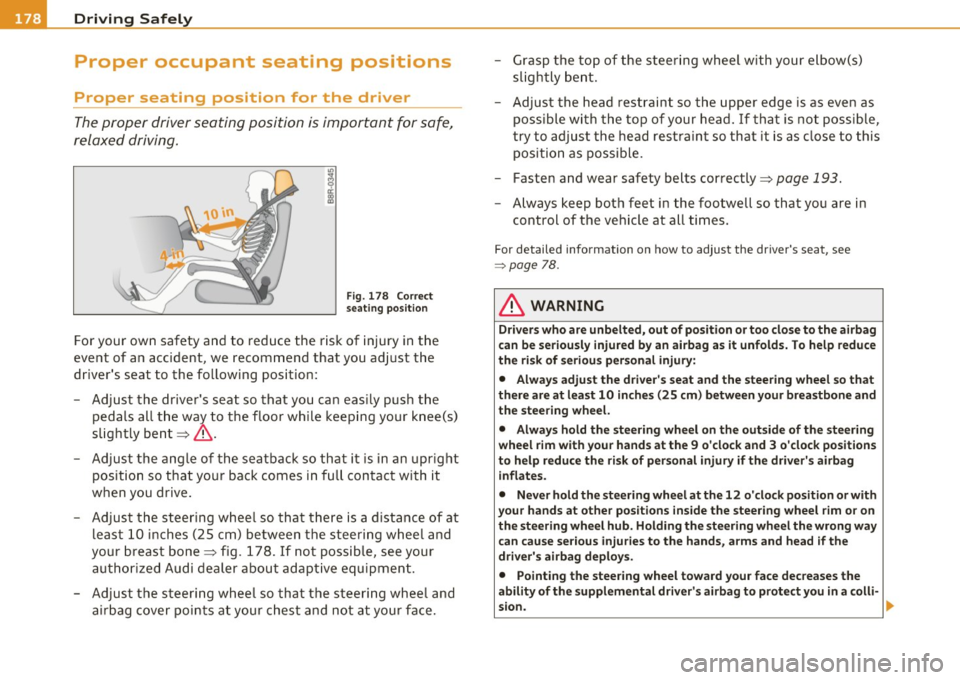
Fig. 178 Correct
seating position
For your own safety and to reduce the risk of injury in the
event of an accident, we recommend that you adjust the
driver's seat to the following position:
- Adjust the driver's seat so that you can easily push the
pedals all the way to the floor while keeping your knee(s)
slightly bent~& .
- Adjust the angle of the seatback so that it is in an upright
pos ition so that your back comes in full contact with it
when you drive.
- Adjust the steering wheel so that there is a distance of at least 10 inches (25 cm) between the steering wheel and
your breast bone~ fig . 178. If not possible, see your
authorized Audi dealer about adaptive equipment.
- Adjust the steering wheel so that the steering wheel and airbag cover points at your chest and not at your face. -
Grasp the top of the steering wheel with your elbow(s)
slightly bent.
- Adjust the head restraint so the upper edge is as even as
possible with the top of your head. If that is not possible,
try to adjust the head restraint so that it is as close to this
position as possible.
- Fasten and wear safety belts correctly~
page 193.
-Always keep both feet in the footwell so that you are in
control of the vehicle at all t imes.
F o r deta iled informat ion on how to adjust the d river 's seat, see
=:> page 78.
& WARNING
Drivers who are unbelted, out of position or too close to the airbag
can be seriously injured by an airbag as it unfolds. To help reduce
the risk of serious personal injury:
• Always adjust the driver's seat and the steering wheel so that
there are at least 10 inches (25 cm) between your breastbone and
the steering wheel.
• Always hold the steering wheel on the outside of the steering
wheel rim with your hands at the 9 o'clock and 3 o'clock positions
to help reduce the risk of personal injury if the driver's airbag
inflates.
• Never hold the steering wheel at the 12 o'clock position or with
your hands at other positions inside the steering wheel rim or on
the steering wheel hub. Holding the steering wheel the wrong way
can cause serious injuries to the hands, arms and head if the
driver's airbag deploys.
• Pointing the steering wheel toward your face decreases the
ability of the supplemental driver's airbag to protect you in a colli-
sion.
~
Page 185 of 364
________________________________________________ D_ r_ i_ v _i_n ""'g "-- S_a_ f_ e_ l _,,y'-- __
Use only floor mats that leave the pedal area unobstructed and that
are firmly secured so that they cannot slip out of position . You can
obtain suitable floor mats from your authorized Audi dealer.
Floor mat fasteners are installed in your Audi.
Floor mats used in your vehicle must be attached to these fasteners.
Properly securing the floor mats will prevent them from sliding into
positions that could interfere with the pedals or impair safe opera
tion of your vehicle in other ways .
& WARNING
Pedals that cannot move freely can result in a loss of vehicle
control and increase the risk of serious personal injury.
• Always make sure that floor mats are properly secured.
• Never place or install floor mats or other floor coverings in the
vehicle that cannot be properly secured in place to prevent them
from slipping and interfering with the pedals or the ability to
control the vehicle.
• Never place or install floor mats or other floor coverings on top
of already installed floor mats. Additional floor mats and other
coverings will reduce the size of the pedal area and interfere with
the pedals.
• Always properly reinstall and secure floor mats that have been
taken out for cleaning.
• Always make sure that objects cannot fall into the driver foot
well while the vehicle is moving. Objects can become trapped under the brake pedal and accelerator pedal causing a loss of
vehicle control. •
Controls and equip ment Safety first Vehicle operation
Stowing luggage
Loading the luggage compartment
All
luggage and other objects must be properly stowed
and secured in the luggage compartment.
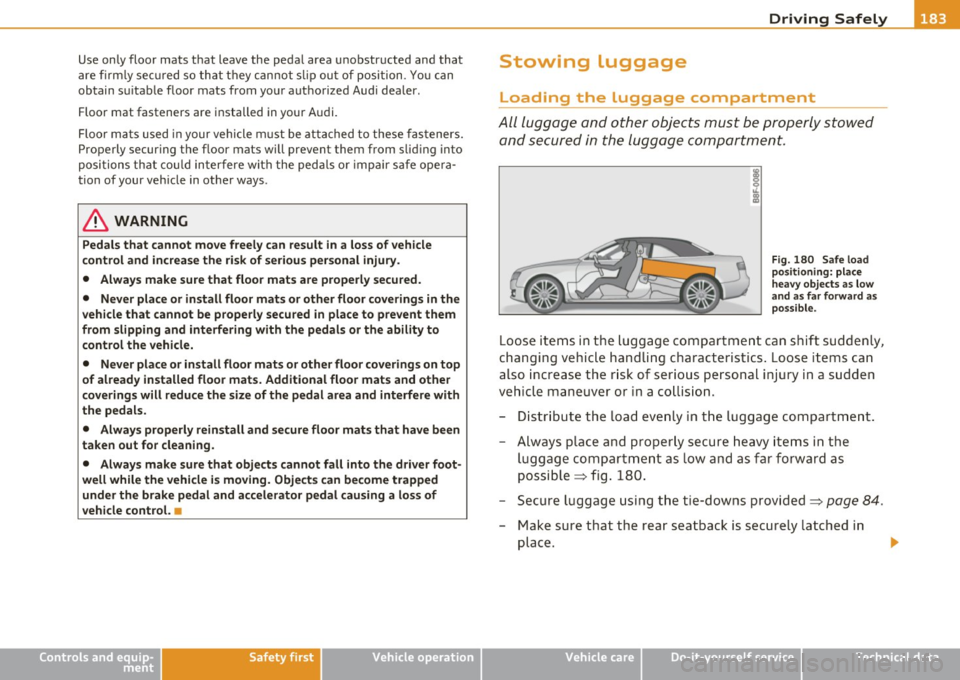
Fig . 180 Safe load
positioning: place
heavy objects as low
and as far forward as
possible.
Loose items in the luggage compartment can shift suddenly,
changing vehicle handling characteristics. Loose items can
also increase the risk of serious personal injury in a sudden
vehicle maneuver or in a collision.
- Distribute the load evenly in the luggage compartment.
- Always place and properly secure heavy items in the
luggage compartment as low and as far forward as
possible => fig. 180.
- Secure luggage using the tie-downs provided=>
page 84.
-Make sure that the rear seatback is securely latched in
place .
Vehicle care Do-it-yourself service Technical data
Page 188 of 364
-Driving Safely
NHTSA
1200 New Jersey Avenue, SE
Washington, D.C. 20590
You can also obtain other information about motor vehicle safety from:
http:/ /www.safercar.gov
Applicable to Canada
Canadian customers who wish to report a
safety-related defect to Transport Canada,
Defect Investigations and Recalls, may tele
phone the toll free hotline:
Tel.: 1-800-333-0371 or
Tel.: 1-613-998 -8616 if you are in the Ottawa
area
TTY for hearing impaired: 1-888-675-6863
email comments/questions to: roadsafetyweb [email protected]
or contact Transport Canada by mail at:
Road Safety and Motor Vehicle Regulation
Directorate
Transport Canada
Tower C, Place de Ville, 330 Sparks Street
Ottawa, Ontario KlA ONS For additional road safety information, please
visit the Road Safety website at:
http:/ /www.tc.gc.ca/roadsafety/index.htm •
Active rollover protection system
Function
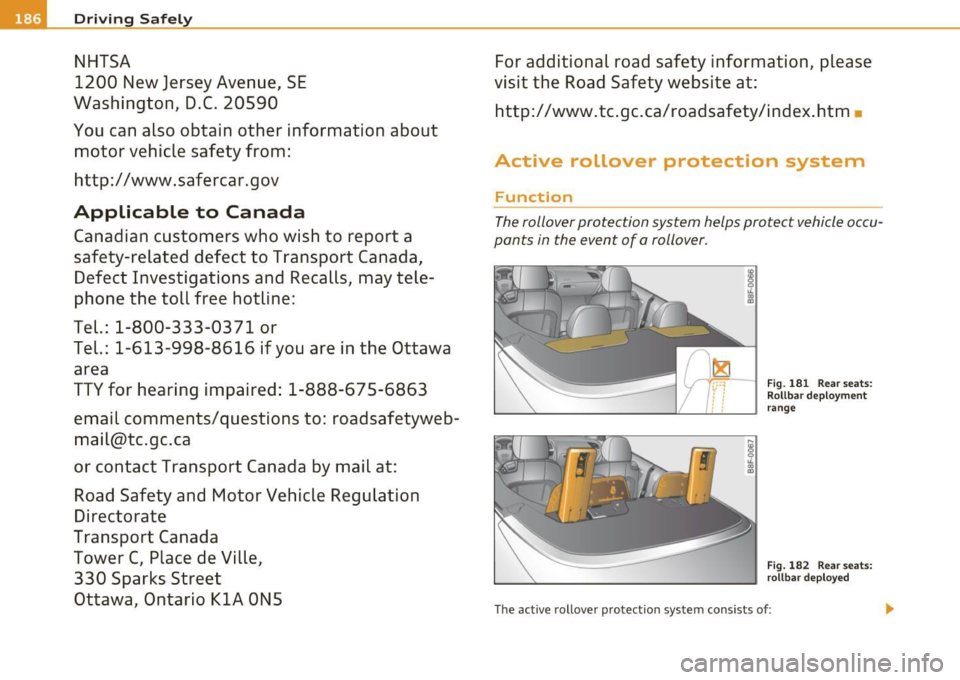
The rollover protection system helps protect vehicle occu
pants in the event of a rollover.
Fig. 181 Rear seats:
Rollbar deployment
i____:.__ ______ &.:....._----'--'-....:...._---' range
i____;.__ _________ ___., Fig. 182 Rear seats:
rollbar deployed
The active rollover protection system consists of : ...