turn signal AUDI A5 CABRIOLET 2011 Owner's Manual
[x] Cancel search | Manufacturer: AUDI, Model Year: 2011, Model line: A5 CABRIOLET, Model: AUDI A5 CABRIOLET 2011Pages: 364, PDF Size: 86.48 MB
Page 144 of 364
111'..__A_ u_ d_ i_ s_ i_ d_ e _ a_ s_s _i_s _t _________________________________________________ _
(I) Tips
• Side assist is not act ive when the basic br ightness is adj usted. The
signal light comes on briefly to he lp you make the adjustment .
• Your settings are automatically stored and assigned to the remote
cont rol key being used .•
A ppli es to vehic les : w ith si de assist
General information
Side assist has limits and cannot detect vehicles under all road and
weathe r conditions . Please remember system limitat ions and never
re ly on t he system, espec ially w hen:
• driving t hrough curves =>
page 142,
• lanes a re of differe nt widths => page 142. •
Ap plies to veh icles : w it h side ass ist
When driving through curves
Side assist cannot detect vehicles in curves with a turning radius of
less than 3 28 feet (1 00 m).
When driving through a cu rve, it is possible that side assist may
reg iste r a vehi cle two l anes over, and the sign al on the o utside m irro r
wi ll li ght up .•
A pp lies to vehicles : wi th si de assist
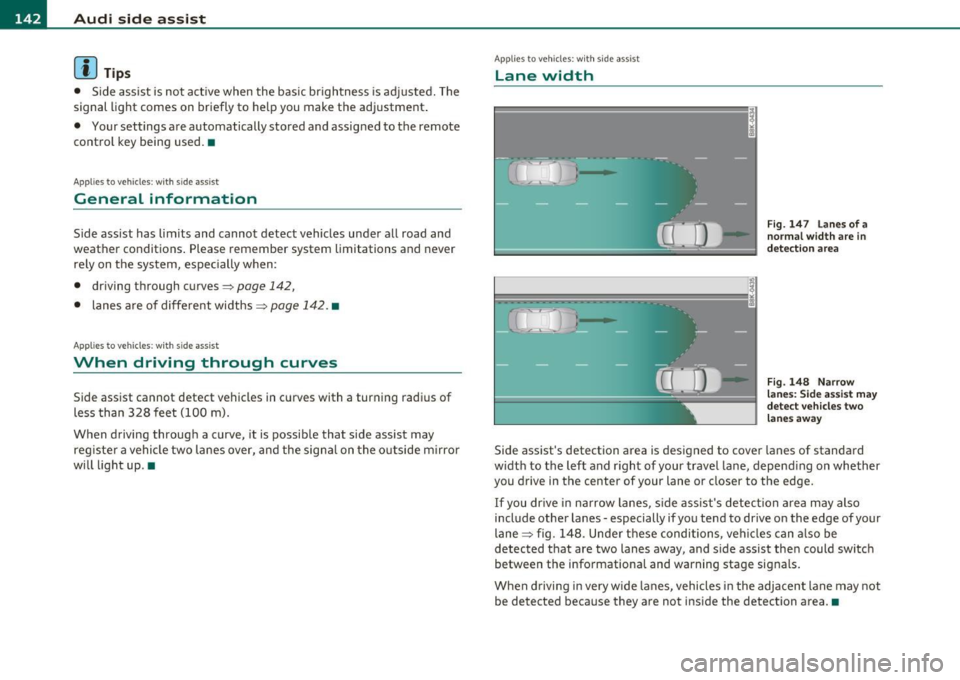
Lane width
Fig. 147 L an es of a
norma l width are in
det ection ar ea
Fig . 148 N arrow
l a n es : Si de assis t may
dete ct ve h icl es tw o
lane s away
Side assist 's detection area is designed to cover lanes of standard
w idt h to the left and r ight of your travel lane, depend ing on whether
you drive in the center of your lane or closer to the edge.
If you dr ive in narrow lanes, s ide ass is t's detec tion area may also
include other la nes -especially if you tend to drive on the edge of your
lane => fig. 148. Unde r th ese condi tions, ve hicl es can a lso be
detected t hat are two lanes away, and s ide assist the n could switc h
between the info rmationa l and warning stage signals.
When drivi ng i n very w ide la n es, vehicles in the adjacent lane may not
be detected because they are not inside the detection a rea .•
Page 145 of 364
_________________________________________________ A_ u_d _ i_ s_id _ e_ a_s _s_ i_s _t __ _
Notes
Applies to veh icles: w ith s ide ass ist
Messages in instrument cluster display
If side assist turns off automatically, the indicator lig ht on the butto n
w ill go out and yo u w ill see a message in the instrument cl uster
display:
Audi side assist not available: sensors blocked
Th e side ass ist senso rs a re b uilt in to the rear bum per o n the left and
r ight (not v is ible on the outside)=>
page 136, fig. 139. To e nsure
that you do not adve rsely affect the way side assist f unctions, foreign
objec ts (such as stic ke rs or b icycle racks) should not be attached to
the a rea on the rear bumper where t he sensors are located. If side
as sis t fu nctions a re adverse ly affe cted , you will see thi s me ssa ge in
the instrume nt cl uster disp lay. Remove anything that may b e
bl ockin g the sensor s.
If no ve hicle is detected for a lo nger p eriod of t ime w hile driving, side
assist w ill also switch off automatically .
Audi side assist currently not available
If the re is a te mp orary p rob lem (such as the vehicle 's batt ery ch arg e
bei ng low) , side assist ca nnot be act ivated temporar ily.
Audi side assist : system fault
Have the system checked by an auth orized Audi dealer or qualified
wo rkshop .•
Applies to veh icles: w ith s ide ass is t
Safety tips
T he side assist detect io n may be limited when driving a ro u nd na rrow
s tr ee t co rner s, on hilly stree ts, and und er poor we ather cond itio n s.
Controls and equip
ment Safety first
It
is possible that the rada r senso rs may a lso detect o ther objects,
such a s high or stag gere d guar drails.
S ide assis t does not measure actua l lane w idth. The system assum es
a fi xed la ne w idt h. Detection in the left and right lanes is based on
t hi s a ssumed lane w id th. Wh en driving o n narrow ro ads or w he n
dr iv ing to the left or rig ht of the center of a travel lane, it is poss ible
t h at vehicles will be de tected tha t a re
no t in th e lan e nex t to th e l an e
you are using.
& WARNING
• Improper reliance on the side assist system can cause collisions
and serious personal injury:
-Never rely only on side assist when changing lanes .
- Always check rear view mirrors to make sure that it is safe to
change lanes.
• Side assist cannot detect all vehicles under all conditions
danger of accident!
• Side assist cannot detect vehicles in time to alert you when
they approach from behind at very high speed , or fall drop back
very quickly .
• The radar sensor's
vision can be reduced or entirely blocked by
rain, snow, and heavy spray. This can result in side assist not
adequately detecting vehicles or, in some cases , not detecting
them at all. Always keep an eye on the direction you are traveling and the relevant area around the vehicle .
• Please note that side ass ist indicates there are approaching
vehicles, or vehicles in your blind spot, only after your vehicle has reached a driving speed of at least 19 mph (30 km/h).
• Side assist signal does not work around tight corners (turning
radius less than 328 feet, or 100 m ).
• Side assist is no replacement for the driver's full attention . The
driver alone is responsible for lane changes and similar driving
maneuvers. Always keep an eye on the direction you are traveling
and the relevant area around the vehicle. .,,
Vehicle care Technical data
Page 165 of 364

______________________________________________________ P_a _ r_ k_ a_ s_s _i _ s _t __ _
Please note that low objects already signaled by a warning can disap
pear from the system's detection range and will not continue to be
signaled.
If the distance to an obstacle remains the same, the vo lume of the
distance warning is gradually reduced after about 4 seconds.
Approaching another obstacle will result in the distance warning
sounding at the normal volume again.
Malfunctions in the system
If a warning tone is aud ible for about five seconds when you turn on
the ignition , there is a malfunction in the system. Have the problem
corrected by your authorized Audi dealer.
Keep the sensors in the rear bumper clean and free from ice so that
the acoustic park assist system can function properly.
& WARNING
• Sensors have dead spaces in which objects cannot be detected.
Be especially alert for small children and animals, since they are
not always detected by the sensors.
• The Acoustic Parking System is not a substitute for the driver's
own caution and alertness. Ultimate respon sibility always
remains with the driver during parking and similar maneuvers.
Always watch where you are driving.
• You should always adjust the volume and frequency of the
chimes so that you can easily hear the acoustic distance warning
even if the radio is playing, the air-conditioner blower is on High
or there is a high level of outside noise .
- Check the settings whenever anyone else has driven the
vehicle before you.
0 Note
• Remember that low obstacles for which a warning has already
been issued may "dive" below the system 's sensing zone if the veh icle
is be ing backed up closer . In this case, the warning sound shutting off
Controls and equip
ment Safety first
does not ind
icate that you have cleared the obstacle . Instead, impact
is immin ent.
• Objects such as trai ler hitches, chains, narrow posts or fences
covered by a thin layer of paint may not always be detec ted by the
system . They can still damage your vehicle w ithout warning .
lI] Tips
Keep the sensors in the rear bumper clean and free of snow and ice so
that the aco ustic parking assist system can function properly.•
Applies to ve hicle s: wit h pa rkin g system (re ar)
Adjusting the chimes
The volume and the pitch (frequency) of the chimes can
be adjusted in the radio or in the /11/111*.
Rear volume adjustment
-Select: [CAR]> Parking system .
- Select Rear volume if you want to change the volume of
the rear signal generator.
Rear frequency adjustment
- Select: [CAR]> Parking system.
- Select Rear frequency when you want to change the
frequency of the rear audible signal generator.
When adjusting the volume and frequency, the new sett ing will
sound for approx. 2 seconds from each audib le signal generator. The
vol ume and frequency settings are automatically stored and assigned
to the master key with remote control. .,_
Vehicle care Technical data
Page 169 of 364

___________________________________________________ P_ a_ r_k _ a _ s_s _ i_s _t _ __.fflll
If the warning message appears in the display but not the rear-view
camera picture, read and confi rm the warn ing message . The aco ustic
distance signal is always act ive.
If you press a function button on the MMI control console, the rear
view camera picture disappears. The rear-view camera picture reap
pears the next time you park .
Further information on the wa rning message and the MMI contro l
console can be found in the MMI instruct io n booklet.
(I] Tips
• The rear-view camera picture is ava ilable as soon as the MMI
Display or the MMI is .switched on, or the start-up phase is completed.
• Keep the sensors in the rear bumper and the rear-view camera lens
clean and free of snow and ice, so that the parking system can work
properly . Please follow the additional notes on=>
page 170. •
App lies to veh icles : w ith parking system (r ear) and rear-view camera
Reverse Parking
Parking mode 1 can be used when parking in a garage or
parking space.
Con tro ls a nd e quip
m en t
Fig. 17 1 MMI D ispla y:
Aim ing at a par king
sp ot
Vehicle OP-eration
Fig.172 MMI D ispl ay:
A lig ning the vehicl e
-Switch th e MMI on and select the reverse gea r.
- Turn the steering wheel until the orange orientation lines
(D appear in the parking spot=> fig. 171. Use the mark
ings @to help you es timate the distance from an
obstacle. Each marking co rres ponds to 3 ft (1 m). The
blue area repr esen ts an ext ension of the vehicle 's outline
by approximately 16 ft (S m) to the rear .
- While driving in reverse gear, adjust the steering wheel
angle to fit the parking space wi th the aid of the orange
orienta tion lines=>
0. ® marks th e re ar bumper . You
should sto p driving in reverse as soon as and no later than
when the red orientation line © abuts an object=> &!
& WARNING
• The re ar- vie w came ra doe s not sh ow th e entire are a behind the
veh icl e=>
pag e 165, fig. 169. Watch out espe ciall y for small chil
dr en and anim als. Th e rear-view cam era cannot alwa ys dete ct
th em, posing ri sk of an a ccident!
• Plea se note that objec ts not tou ching th e ground can appear to
be furthe r awa y than the y reall y are ( for e xample , th e bump er of
a p arked vehi cle, a trailer hitch , or the rear of a truck ). In thi s ca se, .,_
Vehicle care Do-it-yourselt service iTechnical data
Page 170 of 364
ffl Park assist .._ _____________________________________ _
& WARNING (continued)
you should not use the help lines to help with parking, which
poses danger of an accident!
0 Note
• Low obstacles already signaled by a warning can disappear from
the system's detection range as they are approached and will not
continue to be signaled. Objects such as barrier chains, trailer draw
bars, thin painted vertical poles or fences may not be detected by the
system, posing risk of damage.
• In the MMI display, the direction of travel of the vehicle rear is
represented depending on the steering wheel angle. The vehicle front
swings out more than the vehicle rear . Maintain plenty of distance
from an obstacle so that your outside mirror or a corner of your
vehicle does not collide with any obstacles -danger of accident! •
Applies to vehicles: w ith park ing system (rea r) and rear-view camera
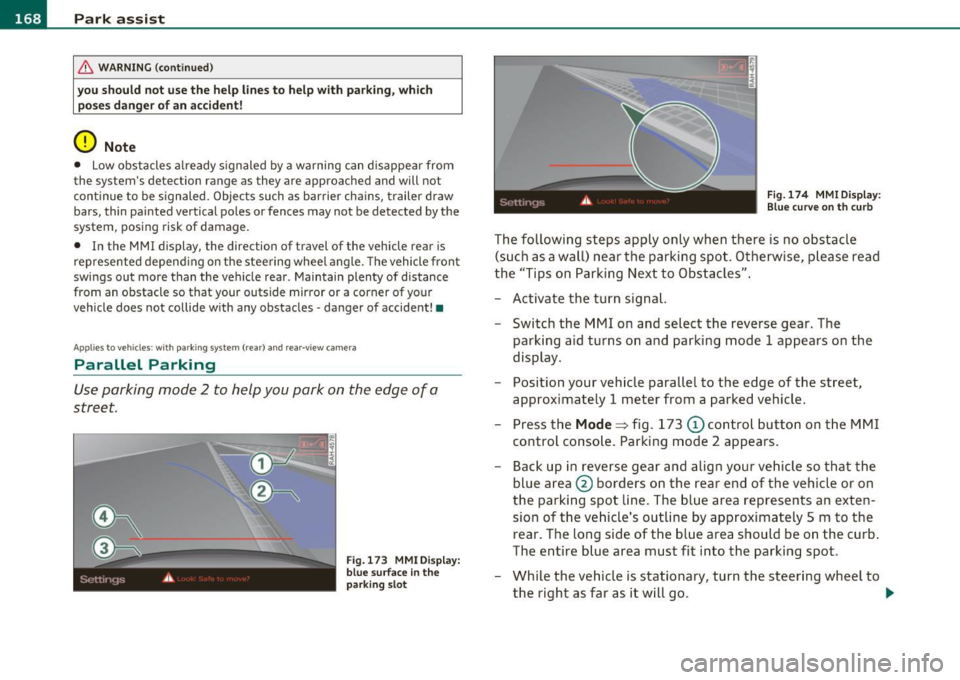
Parallel Parking
Use parking mode 2 to help you park on the edge of a
street.
Fig.173 MMI Display:
blue surface In the
parking slot Fig.174 MMIDisplay:
Blue
curve on th curb
The following steps apply only when there is no obstacle
(such as a wall) near the parking spot. Otherwise, please read
the "Tips on Parking Next to Obstacles".
- Activate the turn signal.
- Switch the MMI on and select the reverse gear. The
parking aid turns on and parking mode 1 appears on the
display.
- Position your vehicle parallel to the edge of the street,
approximately 1 meter from a parked vehicle.
- Press the
Mode => fig. 173 © control button on the MMI
control console. Parking mode 2 appears.
- Back up in reverse gear and align your vehicle so that the
blue area
0 borders on the rear end of the vehicle or on
the parking spot line. The blue area represents an exten
sion of the vehicle's outline by approximately 5 m to the rear. The long side of the blue area should be on the curb.
The entire blue area must fit into the parking spot.
- While the vehicle is stationary, turn the steering wheel to
the right as far as it will go.
~
Page 171 of 364
_________________________________________________ P_ a_ r_k _a_ s_s _is _ t __ _
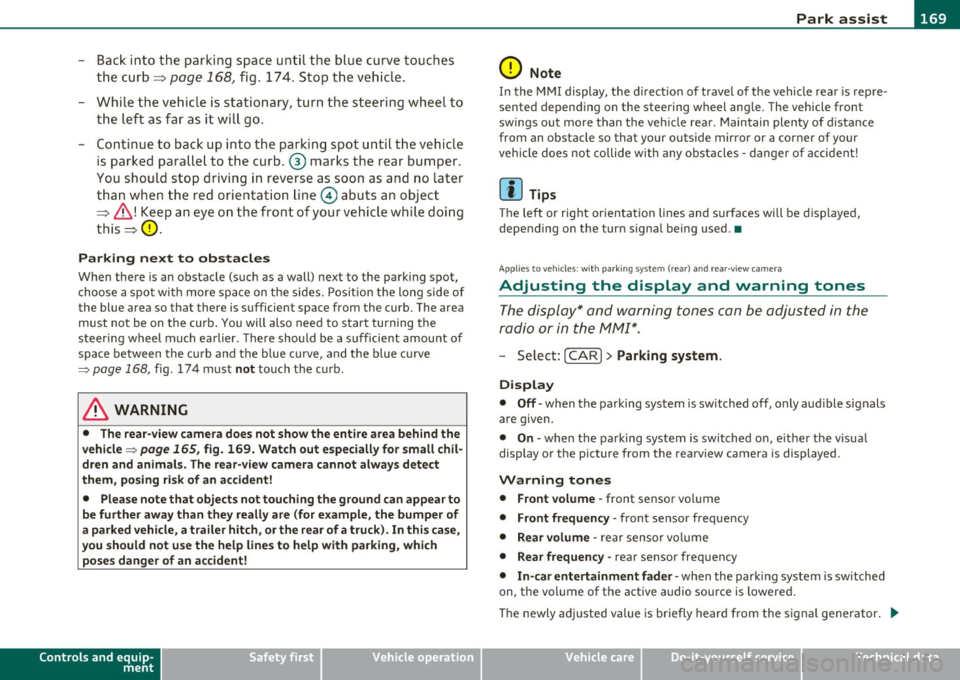
- Bac k into the parking space un til the bl ue curve touches
the curb =:>
page 168, fig. 17 4. Stop the vehicle .
- While th e ve hicle is statio nary, turn the steering wheel to
the left as far as i t wil l go .
- Continue to back up into the parking spot until the vehicle
is parked paralle l to the curb. @ mar ks the rear bumper .
You should stop driving in reverse as soon as and no late r
than when the red orie ntatio n line
0 abuts an object
:::::, & ! Keep an eye on the f ront of you r ve hi cle while doi ng
this =:>
0.
Parking next to obstacles
When there is an obstacle (such as a wall) next to the park ing spot,
choose a spo t w ith more space on the s ides. Pos ition the long side of
the blue area so that there is sufficient space from the curb. The area
must not be on the curb . You will also need to star t turning the
steeri ng wheel much earlier. There sho uld be a suff icie nt amount of
space between the cu rb and t he b lue c urve, and the blue c urve
=> page 168, fig . 1 74 must not touch the curb .
& WARNING
• The rea r-view camera does not show the entire a rea behind the
vehicle =>
page 165, fig. 169. Watch out e speciall y for small chil·
dren and animals . The rear-view camer a cannot always dete ct
them , posing ri sk of an accident!
• Please note th at objects not touching the ground can appear to
be further away than they really are (for example, the bumper of
a park ed vehicle, a trailer hit ch, or the r ear of a truck). In this ca se,
you should not u se the help line s to help with pa rking , which
po se s danger of an accident!
Controls and equip
ment Safety first
0 Note
I n the MMI display, the d irect io n of travel of t he vehicle rear is rep re
sented depending on the steering wheel ang le. The vehicle front
sw ings ou t mo re than t he veh icle rea r. M ain tain plenty of d ista nce
from an obstacle so that your outside mirror or a corner of your
vehicle does not collide w ith any obstacles -dange r of a ccident!
[ i ] Tips
Th e left or r ight or ien tat ion lines and s urf aces will be d isp laye d,
depending on the turn signal being used .•
A pp lies to veh icles : w ith par king system (rea r) and rea r-vi ew camera
Adjusting the display and warning tones
The display* and warning tones can be adjusted in the
radio or in the /11/111* .
- Select: [C A R]> Parking sy stem.
Display
• Off -when the parking system is switched off, only aud ible signals
are given.
• On -when the pa rking system is switched on, e ithe r the v isua l
display or the picture from the rearv iew camera is displayed .
Warning tones
• Front volume -front sensor vo lume
• Front frequ ency -front sensor frequency
• Rear volume -rear sensor vol ume
• Rear frequency -rear sensor freq uency
• In-car entertainm ent f ader · when the parking system is switched
on, the volume of the active a udio source is lowered .
Th e newly ad justed v alue is briefly hear d from the s ignal ge nerator.
~
Vehicle care Technical data
Page 225 of 364
__________________________________________ ___:C~ h~il ~d ~ S~a ~f ~e ~t ¥_Y __ _
and for the different models of the same kind of child restraint
offered by child restraint manufacturers.
The weight ranges for the individual types, makes and models of ch ild
restraints that the NHTSA has specified in the Safety Standard
together with the weight ranges of typical infants and typical 1 year
old child have been stored in the control unit of the Advanced Airbag
System. When a child restraint is being used on the front passenger
seat with a typical 1 year-old chi ld, the Advanced Airbag System
compares the weight meas ured by the weight sensing mat with the
information stored in the electronic control unit .
The electronic contro l unit a lso registers the tension on the front
passenger safety belt. The tension on the safety belt for the front
passenger seat will be different for an adult who is properly using the
safety belt as compared to the tension on the belt when it is used to
attach a child restraint to the seat . The sensor below the latch for the
safety belt for the front seat passenger measures the tension on the
belt. The input from this sensor is then used with the weight to
"decide", whether there is a child restraint with a typical 1 year-old
child on the front passenger seat and whether or not the airbag must
be turned off .•
Child restraints and Advanced Airbags
Regardless of the child restraint that you use, ma ke sure that it has
been certified to meet United States Federal Motor Vehicle Safety
Standards and has been ce rtified by its manufacturer for use with an
airbag . Always be sure that the child restraint is properly installed at
one of the rear seating positions. If in exceptional circumstances you
must use it on the front passenger seat, carefully read all of the infor
mation on ch ild safety and Advanced Airbags and heed all of the
app licab le WARNINGS. Make certain that the child restra int is
correctly recognized by the weight-sensing mat inside the front
passenger seat, that the front passenger airbag is turned off and that
the airbag status is always correctly signaled by the
PASSENGER AIR
BAG OFF
light.
Controls and equip ment Safety first Vehicle operation
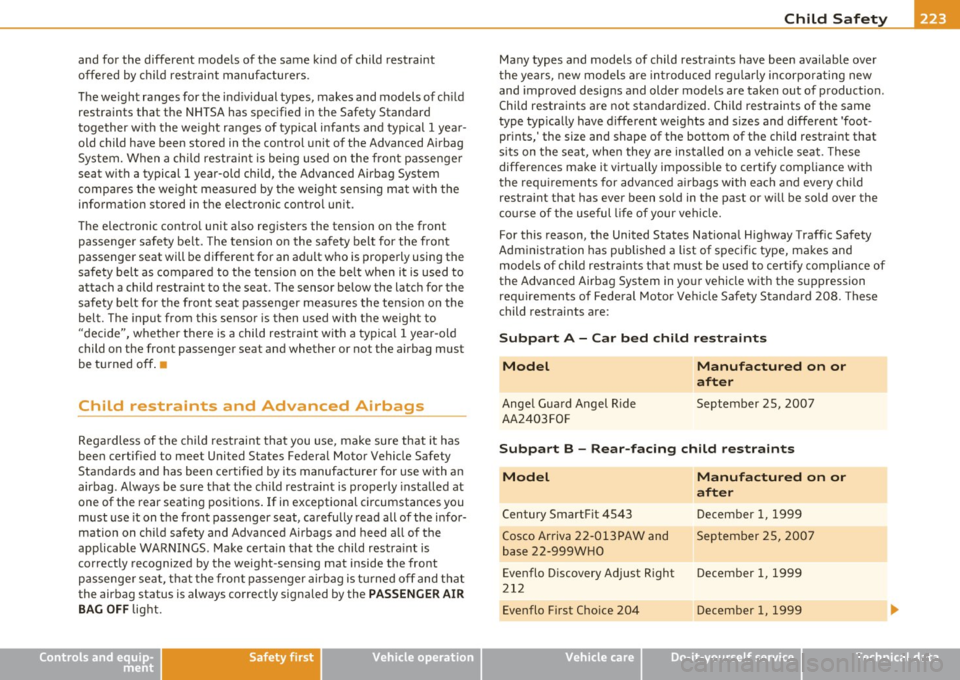
Many types and models of child restra
ints have been available over
t he years, new models are introduced reg ularly incorpo rating new
and improved designs and older models are taken out of product ion.
Chi ld restraints are not standardized. Child restraints of the same
type typ ically have d ifferent weights and sizes and differe nt 'foot
prints,' the size and shape of the bottom of the child restraint that
sits on the seat, when they are installed on a vehicle seat . These
differences make it virtually impossib le to certify compliance with
t he requirements for advanced airbags with each and every chil d
restra int that has ever been sold in the past or will be sold over the
course of the useful life of your vehicle.
For this reason, the United States Nationa l Highway Traffic Safety
Administration has published a list of specific type, makes and
mode ls of child restra ints that must be used to cert ify compliance of
the Advanced Airbag System in yo ur vehicle with the suppression
requirements of Federal Motor Veh icle Safety Standard 208. These
child restraints are:
Subpart A - Car bed child restraints
Model
Angel Gua rd Angel Ride
AA2403 FOF
Manufactured on or
after
September 25, 2007
Subpart B -Rear-facing child restraints
Model
Century SmartF it 4543
Cosco Ar riva 22-013PAW and
base 22-999 WHO
Evenflo D iscovery Ad just Right
21 2
Evenflo First Cho ice 204
Manufactured on or
after
December 1, 1999
September 25, 20 07
December 1, 1999
December 1, 1999
Vehicle care Do-it-yourself service Technical data
Page 356 of 364
-Alphabetical inde x _ ___,_ ______ .::..:....=.:..:..__ __________________________ _
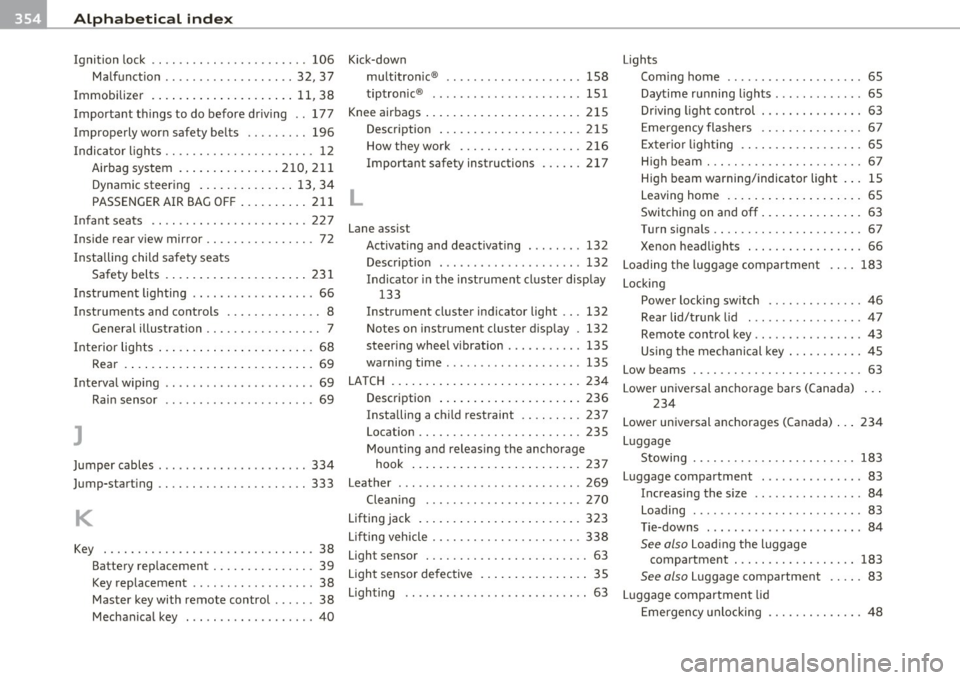
Ignition lock .. .. .. .. .. .. ... ........ 106
Malfunction .............. ... .. 32, 37
Immobilizer ... ................. . 11, 38
Important things to do before driving .. 177
Improperly worn safety belts ....... .. 196
Indicator lights ............. ...... ... 12
Airbag system ...... ..... .... 210,211
Dynamic steering .............. 13, 34
PASSENGER AIR BAG OFF .......... 211
Infant seats .... .... ...... ......... 227
Inside rear view mirror ................ 72
Insta lling child safety seats
Safety belts .................. ... 231
Instrument lighting .. .. .......... .... 66
Instruments and controls .............. 8 General illustration ............. .. .. 7
Interior lights ... .. .. .. ... ..... ...... 68
Rear .... .. .. .................... 69
Interval wip ing .. ............ ........ 69
Rain sensor ..... ....... ..... .. .. . 69
J
Jumper cables ...................... 334
Jump-starting .... .. .... .. .. .. .. .. .. 333
K
Key . ..................... .. .... .. . 38
Battery replacement ............... 39
Key replacement .... .. .. .. .. .. .. .. 38
Master key with remote control ...... 38
Mechanical key ..... ... ........... 40 Kick-down
multitronic ® ................ ... . 1S8
t.
t . ® rp ronic ................ ... .. . 151
Knee airbags ................ .. .... . 215
Description . .. ................. . 215
How they work ......... .. .. .. .. . 216
Important safety instructions ...... 217
L
Lane assist
Activating and deactivating ........ 132
Description . .................. .. 132
Indicator in the instrument cluster display
133
Instrument cluster indicator light ... 132
Notes on instrumen t cluster display . 132
steering wheel vibration . .......... 135
warning time .. ... ... ... .. .. .. ... 135
LATCH ............ .... ..... .. .... . 234
Description ... ................. . 236
Installing a child restraint .. .. .... . 237
Location ....... ...... .... .. ..... 235
Mounting and releasing the anchorage hook .............. .... ....... 237
Leather . .. .. .. .. ..... ...... .. ... .. 269
Cleaning . .......... ... .. ... ... . 270
Lifting jack ......... .... .... ....... 323
Lifting vehicle .... ........... .. .. .. . 338
Light sensor ............ .... .. ...... 63
Light senso r defective ............. ... 35
Lighting .. .. .. .... ....... .... .... .. 63 Lights
Com ing home .......... .... ...... 65
Daytime running lights ............. 65
Dr iving light control . .......... ... . 63
Emergency flashers .. .. .. .. .. .. .. . 67
Exterior lighting .. .. .... ......... . 65
H igh beam ... .. .. .. .............. 67
High beam warning/indicator light ... 15
Leaving home ........ ... .. .... ... 65
Switching on and off .............. . 63
Turn signals .. .. .... ............. . 67
Xenon headlights . .. ............. . 66
Loading the luggage compartment 183
Locking Power locking switch . . . . . . . . . . . . . . 46
Rear lid/trunk lid ................. 4 7
Remote control key . . . . . . . . . . . . . . . . 43
Us ing the mechanical key . .......... 45
Low beams . . . . . . . . . . . . . . . . . . . . . . . . . 63
Lower unive rsal ancho rage bars (Canada) ...
234
Lower universal anchorages (Canada) . .. 234
Luggage Stowing ............ .. .. .. .... .. 183
Luggage compartment ............... 83
Increasing the s ize .. .......... .... 84
Loading ........... .. . ... ... .. ... 83
Tie-downs . . . . . . . . . . . . . . . . . . . . . . . 84
See also Loading the luggage
compartment . .. .. ......... .... 183
See also Luggage compartment .... . 83
Luggage compartment lid
Emergency unlocking ....... .. .. .. . 48