instrument cluster AUDI A5 CABRIOLET 2011 Owner's Guide
[x] Cancel search | Manufacturer: AUDI, Model Year: 2011, Model line: A5 CABRIOLET, Model: AUDI A5 CABRIOLET 2011Pages: 364, PDF Size: 86.48 MB
Page 128 of 364
BI..__A_ d_a_ p,__ t_iv _ e_ c_r _ u _i _ s _e _ c_o _n _ t_ r_ o_ l ___________________________________________ _
Parking brake!
The text message Parking brake! appears if emergency braking was
manually initiated with the Electromechanical Parking Brake (EPB).
The adapt ive cruise control is turned off. This is accompanied by a
warning tone.
Stabilisation program
The text message Stabilisation program appears if the Elect ronic
Stabilization Program (ESP) has intervened. In this case the adaptive
cruise control is automat ica lly turned off. This is accompanied by a
warning tone.
Speed
The set speed in mph (Canada km/h) always appears when saving or
changing the speed in adaptive cruise control~
page 119, "How is
the speed stored?" and~
page 119, "Changing stored speed".
Speed too low
The text message Speed too low appears if the current speed is too
low
to set or to hold the requested speed.
When setting a desired speed, it must be at least 20 mph (30 km/h).
At speeds below 12 mph (20 km/h), the cruise control is turned off .
In speeds over 95 mph (150 km/h), the system remains active and
resumes the speed of 95 mph (150 km/h) if the driver removes the
foot from the accelerator .
Selector lever position!
The text message Selector lever position! appears when the selector
lever is moved to position
N. In this position , adaptive cruise control
is not available .•
A pplie s to veh icles : wit h adap tive cru ise contro l
Driver intervent ion prompt
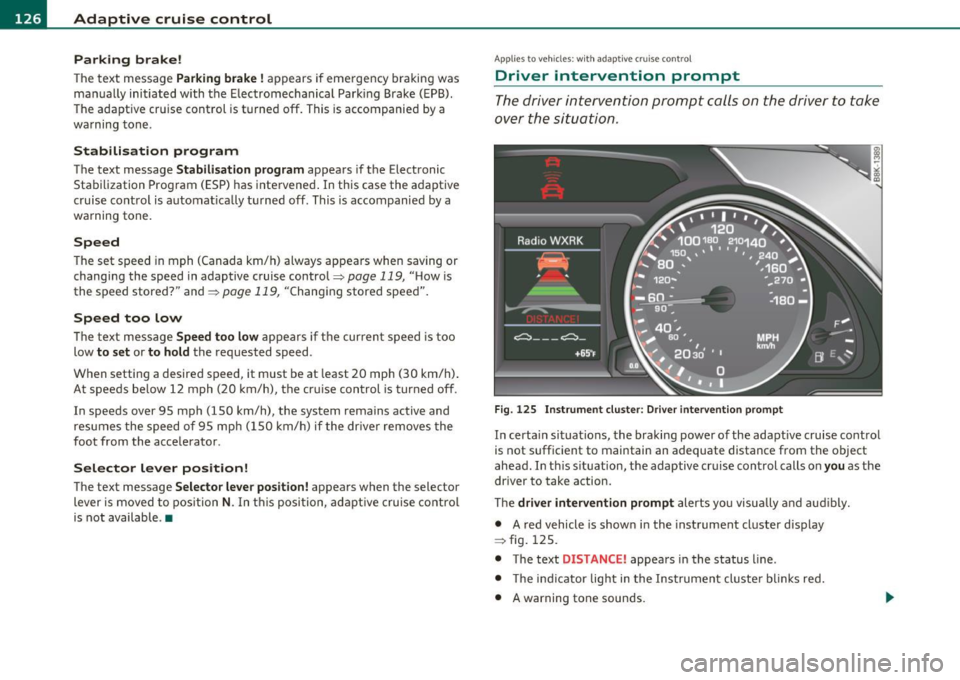
The driver intervention prompt calls on the driver to take
over the situation .
Fig. 125 Instrument cluster: Driver intervention prompt
In certain situations, the braking power of the adaptive cruise control
is not sufficient to maintain an adequate distance from the object
ahead . In th is s ituation, the adaptive cruise control calls on you as the
driver to take action.
The
driver intervention prompt alerts you visua lly and audibly.
• A red vehicle is show n in the instrument cluster display
=> fig . 125.
• The text
DISTANCE! appears in the status line .
• T he indicator light in the Instrument cluste r blinks red.
• A warning tone sounds.
Page 132 of 364
IIII.___A_ d_ a,.:.p _ t_ i _v _ e_ c_ r _u _ is_ e_ c_o _n_ t_r _o _l _____________________________________________ _
The Audi braking guard is active from a speed of approx. 20 mph
(30 km/h) and works within the system limits=>
page 12 7 even when
the adaptive cruise control is deactivated.
A radar sensor is built into the front of the vehicle=>
page 116,
fig. 114. The system is intended to measure the distance to reflective
surfaces. If a measurement is not possible, the system does not
respond.
When the measurement has taken place, the system can assess a
hazardous situation, when a vehicle ahead suddenly brakes or when
your own vehicle is dr iving at high speed towards a much slower
vehicle ahead. As soon as the system assumes that a possible colli
sion w ith the vehicle ahead can only be avoided by immediate all-out
braking or by an avoiding maneuver, a warning appears .
Th e system has a pre-set response time to be able to warn in good
time. This system response time is automatically reduced if you accel
erate actively, for example to join a highway. Braking, transverse
acceleration and the steering angle can lead to a reduced system
response time. The warning is deactivated if you begin to overtake
with full accelerat ion.
The system draws your attention to two different hazardous situa
tions:
Distance
Th e distance wa rning is issued in the event of inadequate distance to
the vehicle ahead a period of more than S seconds. If the distance is
less than 30 feet (9 meters) at SO mph (80 km/h), for example, an
optical display is faded in on the instrument cluster=>
page 129,
fig. 133.
If the vehicle ahead brakes sharply, a collision cannot be avoided,
even in the case of an immediate response. In this case, increase the
distance to the vehicle ahead.
Speed
If there is a much slower vehicle ahead in your lane, or if the vehicle
ahead brakes sha rply, the Audi braking guard calculates the point from which a collision can only be avoided by all-out braking or by an
avoiding maneuver. If a warning does sound, a possible collision with
the vehicle in front can be avoided through an evasive maneuver or by
braking.
Th e warn ing is given in two stages:
• Pre-warning: An optical display appears in the instrument cluster
and a warning tone sounds.
• Acute warning: If you do not respond to the pre-warning, the
second stage, the acute warning, is issued. A brake jolt reminds you
to concentrate on the road again.
Under heavy breaking, brake assist =>
page 245 also helps you obtain
maximum braking effic ien cy.
& WARNING
Always pay attention to traffic, even when the Audi braking guard
is switched on. You are always resp onsible for
your speed and the
distance between your vehicle and other vehicles.
• Always keep the legally stipulated safety distance between
your vehicle and the vehicle ahead -danger of accident!
• The Audi braking guard does not respond outside the system
limits, for example if you approach a stationary obstacle (end of a
traffic jam or breakdown vehicle).
• Please observe that the Audi braking guard is subject to restric
tions in narrow bends due to the field of vision of the radar sensor.
This may possibly lead to obstacles not being detected.
• The radar sensor's
vision can be reduced by rain, snow and
heavy spray . This can result in vehicles driving ahead being inade
quately detected or, in some circumstances, not detected at all.
Always watch where you are driving.
• Reflecting objects such as e.g. crash barriers or the entrance to
a tunnel may impair the function of the radar sensor.•
Page 133 of 364
Adaptive cruise control -____________ __._ __ _
App lies to ve hicl es: wi th a daptive cruise co ntro l
Settings in the MMI
The settings of the Audi braking guard are performed in
the MMI* .
Settings regarding the system and the early warning can be
adjusted to the respective user and saved in the MM!*.
Switching the syst em on and off
- Press the [CAR]function button .
- Select
Audi brak ing guard . The Audi b raking gua rd menu
appears.
- Select
System on to switch the system on or off to switch
the system off .
Switching the early warning on and off
- Press the [ CAR] function button .
- Select
Audi braking guard . The Audi braking guard menu
appea rs .
- Select
Early warning on to switch the acoustic and optical
warning on or
off to switch the system off .
(I) Tips
When handing over the keys to another person , the p revious settings
are adopted if the Audi braking guard is activated~
page 43. •
Controls and equip
ment Safety first
A
pp lies to ve hicles : w ith ada ptiv e cr uise cont ro l
Driver's information in the instrument
cluster display
braking guard ac tiv at ed
This driver's information appears when a brake jolt has been carried
out due to an acute war ning .
brak ing guard off
T his dr iver's info rmation appears when the system has been deacti
vated via the MMI. Furthermore the information appears each t ime
shortly after the beginning of the jou rney when the system is
switched off.
T his driver's information also appears when the system is not avai l
able due to a malfunct ion or if you switch the ESP/ ASR off
~ page 240. In this state the system no longer warns of a pending
collision .•
Vehicle care Technical data
Page 134 of 364
IIIIL_!_A~u~d~i~l!:!a~n~e '...:a~s~s:!:is~t ~--------------------------------------------
Aud i Lane assist
Lane assist
Applies to veh icles : w ith lane assist
Description
Lane assist helps you keep your vehicle in your lane.
Lane assist uses a camera to detect lane boundary lines. If the system
detects that your vehicle is about to leave a lane boundary line, the
steering wheel
vibrates to alert the driver. If lane assist detects
boundary lines on both sides o f the veh icle's lane, the system enters
act ive standby mode, which is indicated by t he gree n indicator light
/ : on the instrument cluster .
If the system is in active standby mode and the turn signal is acti
vated before driving over the boundary line , the warning does not
occur sinc e th e system allows for in tention al lane changes.
The system is designed for driving on freeways and expanded high
ways and th us works only at speeds of 40 mph (65 km/h) or more.
& WARNING
• Lane assist will not keep your vehicle in your lane. The system
only warns the driver when the vehicle is leaving the lane. The
driver is always responsible for keeping the vehicle in the lane.
• The camera is not able to detect all lane boundary lines and in
some cases might also detect lane structures or objects as
boundary lines. This can lead to incorrect warnings or warnings
that fail to go off at all.
• The camera's visibility can be impaired by vehicles ahead of
you, for instance, or by rain, snow, heavy spray or light shining
into the camera lens. This can cause lane assist to fail to detect
boundary lines. •
Applies to veh icles: wit h lane assist
Activating and deactivating
•
Fig. 134 Turn signal
lever: Lane assist
button
Fig. 135 Windshield:
Lane assist camera
viewing window
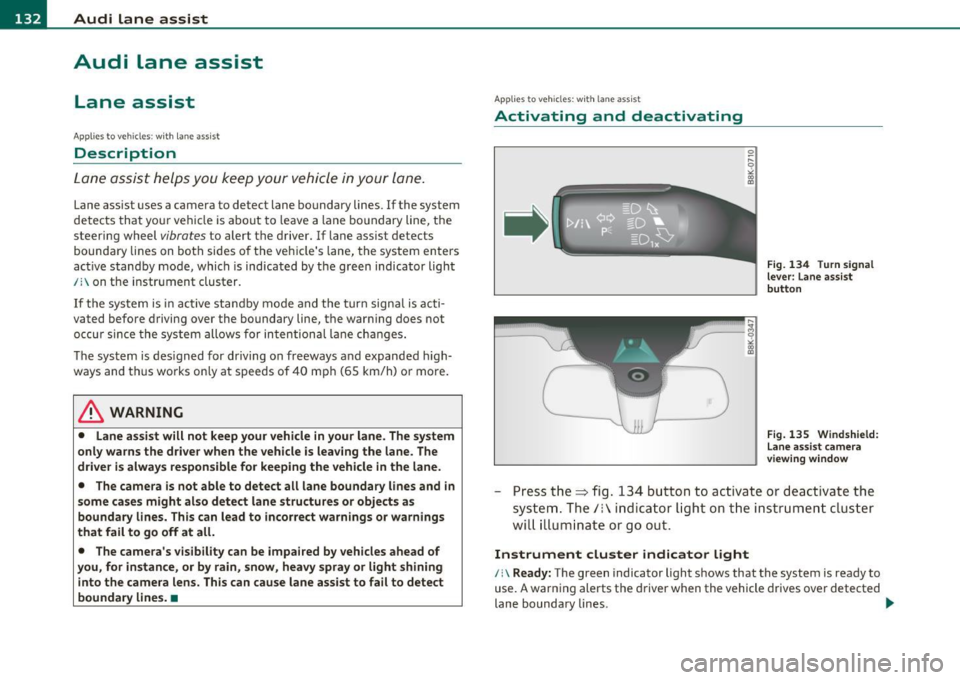
-Press the=> fig . 134 button to act ivate or deactivate the
system. The/: ind icator light o n the instrument cluster
will illumi nate or go out.
Instrument cluster indicator light
/:\Ready: The green indicator light shows that the system is ready to
use. A warning alerts the driver when the vehicle drives over detected
lane boundary lines . -.,
Page 135 of 364
Audi lane assist ml
----------------
Not ready: The yellow indicator light shows that the system is
turned on but unable to send a warning. This can be due to the
following:
• Th ere are no boundary lines, or there is only one boundary line
present.
• The boundary lines are not detected (e .g . due to snow, dirt, wet
conditions or light shining into the camera lens).
• More than two boundary lines (such as at construction sites) are
located in the vehicle's lane.
• Th e vehicle's speed is below the speed needed to activate it, which
is about 40 mph (65 km/h) .
• Th e lane is narrowe r than about 8
ft. (2.5 m), or wider than about
16 ft. (5 m).
• The curve is too sharp.
Notes on the instrument cluster display
When the lane assist turns off automatically, the instrument cluster
indicator goes out and one of the fo llowing messages appears on the
display:
Audi lane assist not available: currently no sensor vision
This message appears when the camera can no longer function
because it cannot detect the boundary lines. This may be due to the
following:
• Th e exte rior side of the camera viewing window=>
page 132,
fig. 135 is covered with dirt or ice. Clean this part of the windsh ield.
• Th e came ra viewing window is fogged up on the inside. In this
case, wait until the fog disappears before turning lane assist on
again.
• Th e system was unable to detect boundary lines over an extended
period of time due to road conditions (such as snow-cove red lanes).
Do not turn lane assist on aga in until the lines can be more easily
detected.
Audi lane assist currently not available
Controls and equip
ment Safety first
A temporary malfunction
is preventing lane assist from operating .
Tr y turning on lane assist again at a lat er time.
Audi lane assist: system fault
The system shou ld be checked by an authorized Audi dealer or other
qualified wo rkshop.
[ i ] Tips
• Make sure that the camera viewing window =>
page 132, fig. 135
is not covered by stickers or similar objects.
• Always keep the camera viewing w indow clean. This can us ually be
done by operating the windshie ld wipers. •
Applies to ve hicles : with lane assist and trip comp ute r
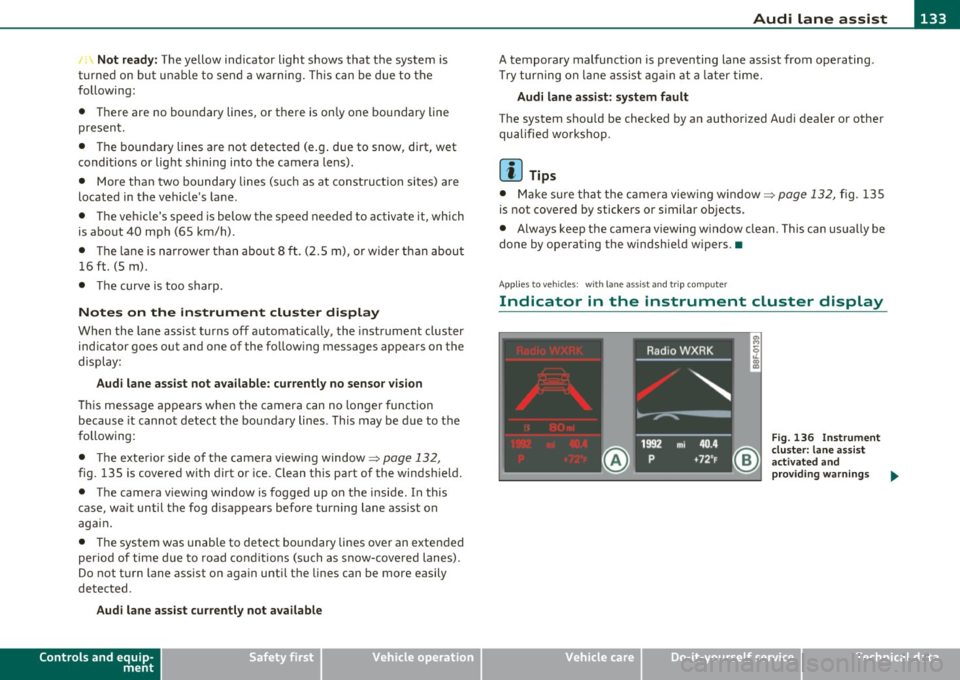
Indicator in the instrument cluster display
Vehicle care
Fig. 136 I nstrument
cluster: lane assist
ac tiva ted and
provid in g warning s ...
Technical data
Page 136 of 364
1111....__A_ u_ d_i_ l_ a_ n_ e_ a_s_ s_ is_t _________________________________________________ _
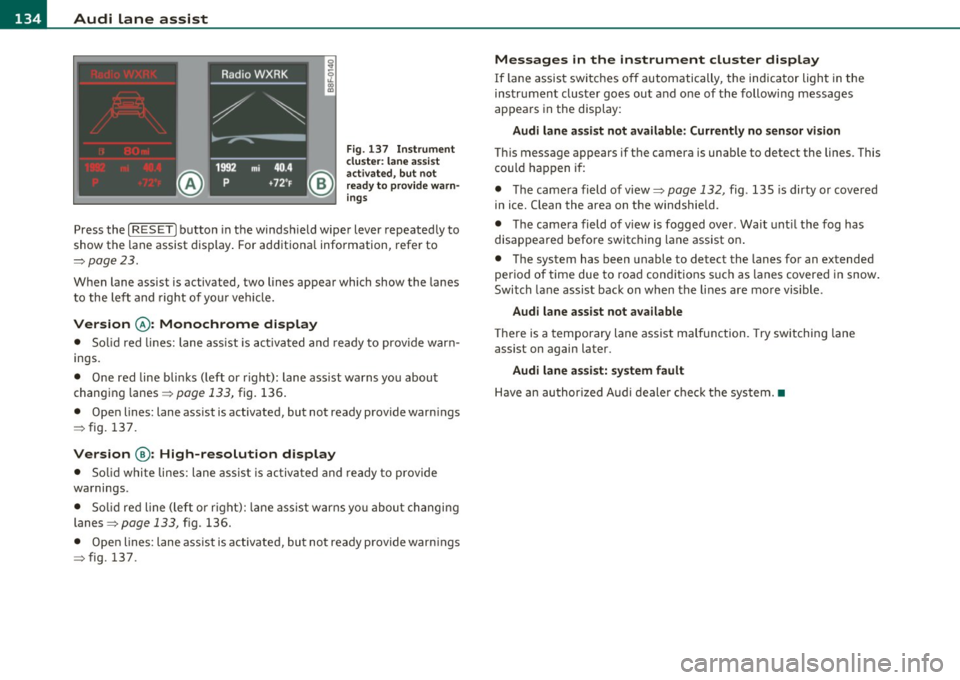
Fig. 137 Ins trume nt
clu ster : lane assis t
ac tiv ated , bu t n ot
ready to provid e warn
ing s
Press the [ RESET] button in the winds hield wipe r lever repeated ly to
show the lane assist display . For ad ditiona l information, refer to
:::>pag e 23.
When lane assist is activated, two lines appear which show the lanes
t o the le ft and right of yo ur vehi cle.
Version @ : Monochrome display
• Solid red lines: lane ass ist is activa ted and ready to prov ide war n
ings.
• One red line bli nks (left or r ight) : lane ass ist warns you abou t
changin g lanes =>
page 133, fig. 136 .
• Open lines: lane assist is activated, but not ready provide warn ings
=> fig. 137 .
Version @: High-resolution display
• Solid whi te lines: lane ass is t i s activa ted and ready to p rovide
wa rnings.
• Solid red line (left o r rig ht): lane ass ist w arns you about changi ng
lanes=>
page 133, fig. 136.
• Ope n lines: lane assist is activated, but no t ready p rovide warn ings
=> fig. 137.
Messages in the instrument cluster display
If lane assis t sw itches o ff automatically, the indicator light in the
ins tru men t cluste r goes ou t and one of the following messages
appears in the disp lay:
Audi lane as sist not available: Currently no sensor vi sion
T hi s message appears if t he camera is unab le to detect the lines. This
c o uld h appen i f:
• Th e came ra field of view=>
page 132, fig. 135 is dirty or covered
in ice. Clean the area on the windshie ld.
• Th e came ra field of vi ew is fogged over . Wait unt il the fog has
disappea red befo re switching lane assist on .
• The system has been unable to detect the lanes for an extended
period of time due to road cond it ions s uch as lanes covere d in snow .
Switch la ne assist back on when the li nes are mo re vis ible.
Audi lane assist not available
Th ere is a temporary lane assist malfunction. Try switching lane
assist on again later.
Audi lane assist: system fault
H ave an au thor ized A udi deale r check the syste m.•
Page 145 of 364
_________________________________________________ A_ u_d _ i_ s_id _ e_ a_s _s_ i_s _t __ _
Notes
Applies to veh icles: w ith s ide ass ist
Messages in instrument cluster display
If side assist turns off automatically, the indicator lig ht on the butto n
w ill go out and yo u w ill see a message in the instrument cl uster
display:
Audi side assist not available: sensors blocked
Th e side ass ist senso rs a re b uilt in to the rear bum per o n the left and
r ight (not v is ible on the outside)=>
page 136, fig. 139. To e nsure
that you do not adve rsely affect the way side assist f unctions, foreign
objec ts (such as stic ke rs or b icycle racks) should not be attached to
the a rea on the rear bumper where t he sensors are located. If side
as sis t fu nctions a re adverse ly affe cted , you will see thi s me ssa ge in
the instrume nt cl uster disp lay. Remove anything that may b e
bl ockin g the sensor s.
If no ve hicle is detected for a lo nger p eriod of t ime w hile driving, side
assist w ill also switch off automatically .
Audi side assist currently not available
If the re is a te mp orary p rob lem (such as the vehicle 's batt ery ch arg e
bei ng low) , side assist ca nnot be act ivated temporar ily.
Audi side assist : system fault
Have the system checked by an auth orized Audi dealer or qualified
wo rkshop .•
Applies to veh icles: w ith s ide ass is t
Safety tips
T he side assist detect io n may be limited when driving a ro u nd na rrow
s tr ee t co rner s, on hilly stree ts, and und er poor we ather cond itio n s.
Controls and equip
ment Safety first
It
is possible that the rada r senso rs may a lso detect o ther objects,
such a s high or stag gere d guar drails.
S ide assis t does not measure actua l lane w idth. The system assum es
a fi xed la ne w idt h. Detection in the left and right lanes is based on
t hi s a ssumed lane w id th. Wh en driving o n narrow ro ads or w he n
dr iv ing to the left or rig ht of the center of a travel lane, it is poss ible
t h at vehicles will be de tected tha t a re
no t in th e lan e nex t to th e l an e
you are using.
& WARNING
• Improper reliance on the side assist system can cause collisions
and serious personal injury:
-Never rely only on side assist when changing lanes .
- Always check rear view mirrors to make sure that it is safe to
change lanes.
• Side assist cannot detect all vehicles under all conditions
danger of accident!
• Side assist cannot detect vehicles in time to alert you when
they approach from behind at very high speed , or fall drop back
very quickly .
• The radar sensor's
vision can be reduced or entirely blocked by
rain, snow, and heavy spray. This can result in side assist not
adequately detecting vehicles or, in some cases , not detecting
them at all. Always keep an eye on the direction you are traveling and the relevant area around the vehicle .
• Please note that side ass ist indicates there are approaching
vehicles, or vehicles in your blind spot, only after your vehicle has reached a driving speed of at least 19 mph (30 km/h).
• Side assist signal does not work around tight corners (turning
radius less than 328 feet, or 100 m ).
• Side assist is no replacement for the driver's full attention . The
driver alone is responsible for lane changes and similar driving
maneuvers. Always keep an eye on the direction you are traveling
and the relevant area around the vehicle. .,,
Vehicle care Technical data
Page 153 of 364
Transmission -
----------------
- Step on the brake peda l. At the same time press and hold
the interlock button on the s ide of the gear selector knob
=:> fi g. 153 wi th your thumb until you have moved the
selector lever to the des ired position .
Automatic selector lever lock
The se lector lever is locked in the P and N positions w hen the ignition
is turned on . To move the leve r from these pos it ions the driver must
dep ress the brake peda l. As a reminder to the d river, the following
warning appears in the instrument cluster display when the se lector
is in
P and N:
When stationary apply footbrake while selecting gear
A time delay e lement prevents t he selector leve r from lock ing when
it is moved throug h the
N posit ion (going from R to D ). The lock ing
element will lock the se lector lever if the lever is left in N (Neutra l) for
more tha n app rox imately 1 second, w ithout t he b rake pedal be ing
pressed.
A t speeds above about 3 mp h (5 km/h) the A utomat ic Shi ft Lock is
automatically deactivated in t he
N position .
Interlock button
The lock button on the selector lever prevents the lever from being
a cciden tally shifted in to cert ain posi tions . Pressing this b utton deac
tivates the selector lever lock. Depend ing on the direction of the
shift, the se lector leve r locks a t different positions. The pos itions are
highlighted in the illustrat io n =>
page 150, fig. 153 .
Igni tion key safety interlock
The key cannot be removed from the ignition unless the selector lever
is in the
P pa rk position. When the igni tion key is removed, the
selector lever will be locked in the
P position. •
Controls and equip
ment Safety first
Applies
to vehicles : with au toma tic transmiss ion
Kick-down
The kick -down feature allows the vehicle to generate
maximum acceleration .
When you press the accelerator peda l beyond the resis tance po int
that is reached at full throttle, the transmission will select a lower
gear rat io b ased on vehicle speed and e ngine RPM . The engine R PM
will be controlled to produce maximum vehicle acceleration as long
as you con tinue to press the acceler ator pedal beyond t his resistance
point .
& WARNING
Be careful when using the kick-down featu re on slippery roads.
Rapid a cceleration may cau se the vehicle to skid .•
App lies to veh icles: with automatic trans mission
Dynamic shift program (DSP)
The automati c transmi ssion is electronically controlled .
The transmiss ion is self adapting and will automatically select the
bes t sh ift p rogram su ited to the dr iv ing cond it io ns and dr iving style .
Th e transmission will select one of the
economy programs when you
drive at a steady speed or a gradually c hanging speed without heavy
acce le ration . This ac hieves optimum fuel efficiency, with early
upshifting and delayed downshifting.
Th e transm iss ion will au tomatically se lect the
s porty shift p rograms
when you dr ive at higher speeds, or w ith heavy acceleration and
frequently chang ing speeds . Upshifts a re de layed to make full use of
engine power . Downs hifting takes place at higher engine speeds than
in the economy programs . _.,
Vehicle care Technical data
Page 160 of 364
1111 ...... __ T _r_ a_ n _ s_ m __ is_ s_io _ n _____________________________________________________ _
warning appears in the instrument cluster display when the selector
is in
P and N:
When stationary apply footbrake while selecting gear
A time delay element prevents the selector lever from locking when
it is moved through the
N position (going from R to D). The locking
element will lock the selector lever if the lever is left in N (Neutral) for
more than approximately 1 second, without the brake pedal be ing
pressed .
At speeds above about 3 mph (5 km/h) the Automatic Shift Lock is
automatically deactivated in the
N position.
Interlock button
The lock button on the selector lever prevents the lever from being
accidentally shifted into certain positions. Pressing this button deac
tivates the selector lever lock. Depending on the direction of the
shift, the selector lever locks at different positions. The positions are
high light ed in the illustrat ion~
page 157 , fig. 161.
Ignition key safety interlock
The key can not be removed from the ignition unless the selector lever
is in the
P park position. When the ignition key is removed, the
selector lever w ill be locked in the
P pos it ion .•
Ap plies to v ehicles : w ith mult itronic ® Contin uously Var iable Transm issio n (C VT)
Kick-down
The kick-down feature allows the vehicle to generate
maximum acceleration.
When you press the accelerator pedal beyond the resistance point
that is reached at full throttle, the transmission will select a lower
gear ratio based on vehicle speed and engine RPM . The engine RPM
w ill be co ntro lled to produce maximum vehicle acceleration as long
as you continue to press the accelerato r pedal beyond th is resistance
point .
& WARNING
Be careful when using the kick-down feature on slippery roads.
Rapid acceleration may cause the vehicle to skid. •
Applies to veh icl es: w it h mul tit ro nic® Con tin uous ly Va ria bl e Tran smis s io n ( CVT)
Dynamic shift program (DSP)
The multitronic ® transmission is electronically
controlled .
The transmission selects the appropriate gear ratio (upshifts and
downshifts) automatically based on preset d riving programs.
The transmission will select one of the
economy programs when you
drive at a steady speed or a gradua lly changing speeds without heavy
acceleration . Th is gives best fuel eff iciency, with early upshifting and
delayed downshifting.
Th e transmission will automatically select the
sporty shift programs
when you dr ive at higher speeds, or w ith heavy acceleration and
frequently changing speeds. Upshifts are delayed to make full use of
eng ine power . Downshifting takes place at higher engine speeds than
in the economy programs.
Th e selection of the most suitab le shift program is a continuous,
automatic process. The driver can a lso make the transmission switc h
to a sporty program by
quickly pressing down the gas pedal.
This causes the transmiss ion to sh ift down into a lower gear ratio and
makes quick acceleration possible (to pass another vehicle) You do
not need to press the gas pedal into the kickdown range. After the
transmission has upshifted, the original program is selected
according to your driving style.
An additional shift prog ram allows the automatic t ransmission to
select the proper gear for uph ill and downh ill grad ients.
This prevents the transmiss ion from shifting up and down unneces
sari ly on hills. The transmission will shift down to a lower gear ratio _,,,
Page 191 of 364
_____________________________________________ S_a _f _e _t _y _b_ e_lt _ s __ _
Safety belts
General notes
Always wear safety belts!
Wearing safety belts correctly saves lives!
This chapter explains why safety belts are necessary, how
they work and how to adjust and wear them correctly.
- Read all the information that follows and heed all of the
instructions and WARNINGS.
& WARNING
Not wearing safety belts or wearing them improperly increases
the risk of serious personal injury and death.
• Safety belts are the single most effective means available to
reduce the risk of serious injury and death in automobile acci
dents. For your protection and that of your passengers, always
correctly wear safety belts when the vehicle is moving.
• Pregnant women, injured, or physically impaired persons must
also use safety belts. Like all vehicle occupants, they are more
likely to be seriously injured if they do not wear safety belts. The
best way to protect a fetus is to protect the mother -throughout
the entire pregnancy. •
Number of seats
Your Audi has a total of four seating positions: two in the front and
two in the rear . Each seating position has a safety belt .
Controls and equip
ment Safety first Vehicle operation
& WARNING
Not wearing
safety belts or wearing them improperly increases
the risk of serious personal injury and death.
• Never strap more than one person, including small children,
into any belt. It is especially dangerous to place a safety belt over
a child sitting on your lap.
• Never let more people ride
in the vehicle than there are safety
belts available.
• Be sure everyone riding in the vehicle is properly restrained
with a separate safety belt or child restraint. •
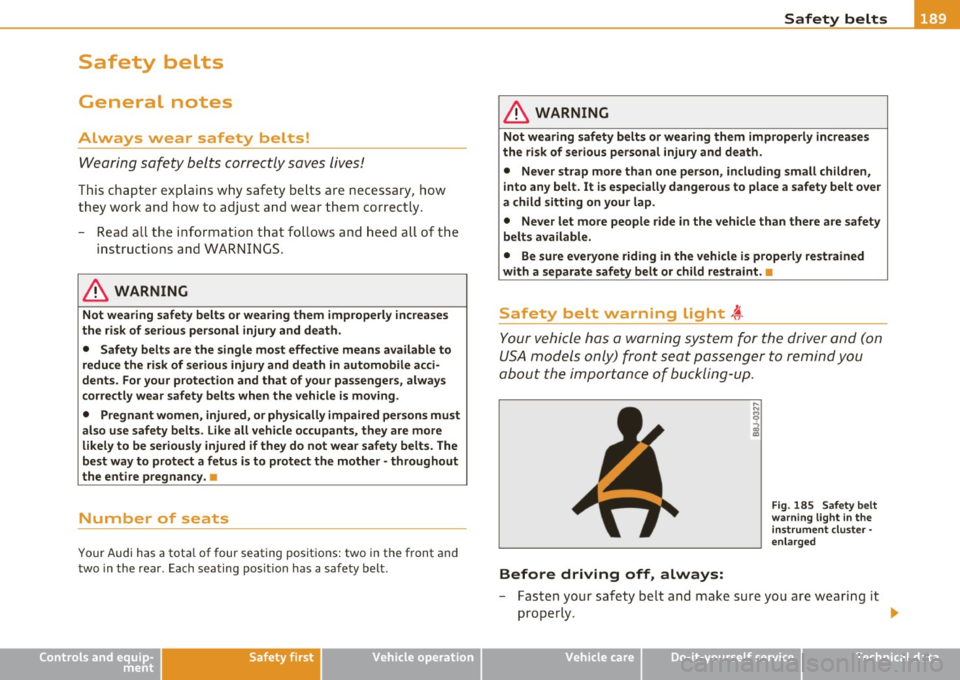
Safety belt warning light t
Your vehicle has a warning system for the driver and (on
USA models only) front seat passenger to remind you
about the importance of buckling-up.
Before driving off, always:
Fig. 185 Safety belt
warning light in the
instrument cluster -
enlarged
- Fasten your safety belt and make sure you are wearing it
properly .
IJ,,
Vehicle care Do-it-yourself service Technical data