cruise control AUDI A5 CABRIOLET 2013 User Guide
[x] Cancel search | Manufacturer: AUDI, Model Year: 2013, Model line: A5 CABRIOLET, Model: AUDI A5 CABRIOLET 2013Pages: 290, PDF Size: 72.35 MB
Page 99 of 290
Audi adaptive cruise control and braking guard 97
the tachometer @and is also shown briefly
in the display @<:::>
fig. 108.
Switching Audi adaptive cruise control off
~ Push the lever away from you into position
@ until it clicks into place. The message
ACC off appears.
@ Indicator lights
II-Adaptive cruise control is switched on. No
vehicles are detected up ahead. The stored
speed is ma intained.
I-A moving vehicle is detected up ahead .
The adaptive cruise control system regulates
the speed and distance to the moving vehicle
ahead and acce lerates/brakes automatica lly.
I -When automatic braking is not able to
keep enough distance to a previously detected
mov ing vehicle up ahead, you must take con
trol and brake
c:> page 99, Request for driver
intervention.
© Display
If adaptive cruise control is not shown in the
d isplay, you can call it up with the
I RES ET I
button c:> page 24.
Based on the symbols in the d isplay, you can
determine if the system is maintaining a dis
tance to the vehicle ahead and what that dis
tance is.
No vehicle -No vehicle ahead was detected.
White vehicle -A vehicle ahead was detected .
Red vehicle -Prompt for the driver to take ac
tion
c:> page 99.
Both arrows on the scale © indicate the dis
tance to the vehicle ahead . No ar row appears
when the vehicle is on an open road and there
is no object ahead . If an object is detected
ahead, the arrow moves on the scale.
The green zone on the scale shows the stored
distance. For information on changing the
stored distance, refer to
c:> page 98. If the
distance selected is too close or may soon be
come too close, the arrows move into the red
zone on the scale.
A WARNING
Improper use of the adaptive cruise con
trol can cause collisions, other accidents
and serious personal injuries.
- Pressing the
!SET ! button when driv ing at
speeds below 20 mph (30 km/h), w ill au
tomatically accelerate the vehicle to
20 mph (30 km/h), which is the mini
mum speed that can be set.
@ Tips
-If you switch the ignit ion or the adaptive
cruise control off, the set speed is erased
from the system memory.
- The electronic stab ilizat ion control
(ESC)
and the anti-slip-regulat ion (ASR) are au
tom atica lly turned on when the adaptive
cruise control is turned on. Both systems
cannot be turned off if the adaptive
cruise control is turned on .
Changing the speed
Applies to vehicles: with Aud i adapt ive c ruise control
0
f
jJ
0
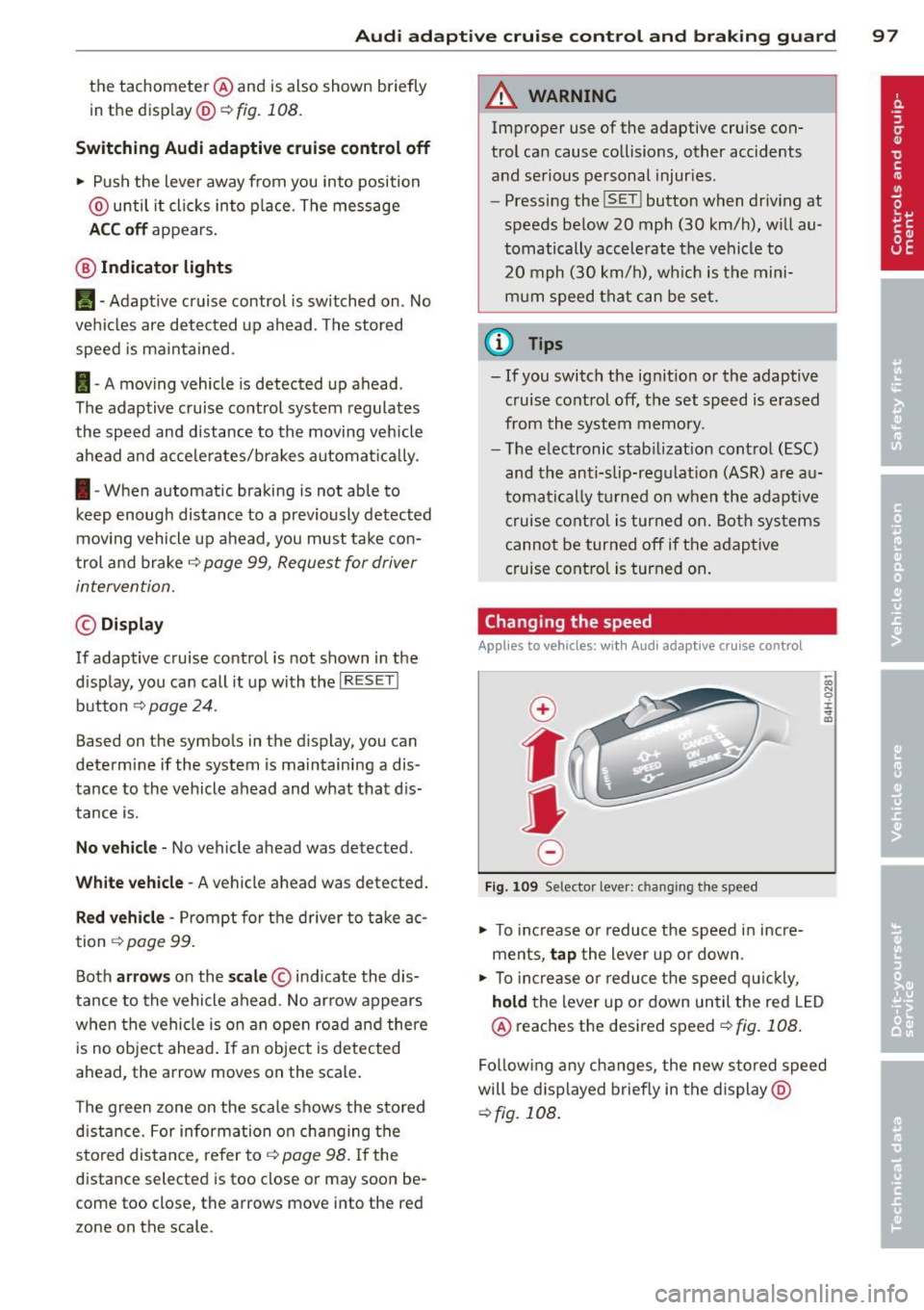
Fig. 109 Selector lever: ch anging the speed
~ To increase o r reduce the speed in incre
ments,
tap the lever up or down.
-0:, N 0 ± ... a)
~ To incr ease o r reduce the speed quickly,
hold the lever up or down until the red LED
@ reaches the desired speed
c:>fig . 108 .
Following any changes, the new stored speed
will be displayed briefly in the display @
c:>fig. 108 .
Page 100 of 290
98 Audi adapti ve cruise control and bra king gu ard
Interrupting cruise control
App lies to vehicles: with Audi adaptive cruise control
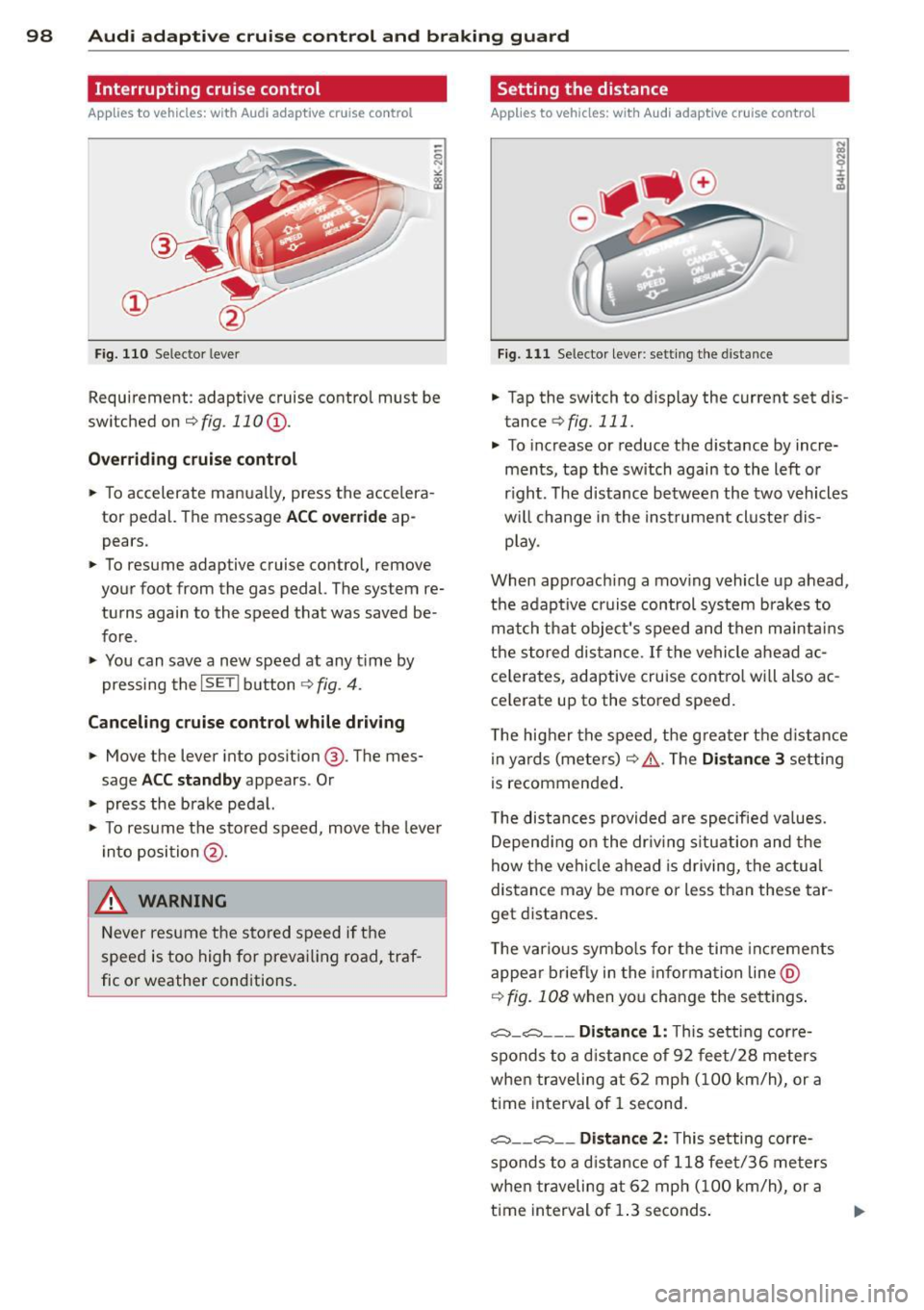
Fig. 110 Selector lever
Requirement: adaptive cruise contro l must be
switched on
¢fig.110 (i).
Ove rrid ing crui se contr ol
.. To accelerate manually, press the accelera
tor pedal. The message
ACC o ver ride ap
pears .
.. To resume adaptive cruise control, remove
your foot from the gas pedal. The system re
turns again to the speed that was saved be
fore .
.. You can save a new speed at any t ime by
pressing the
I SETI button ¢ fig. 4 .
Canceling crui se control while dri ving
.. Move the lever into posit ion @. The mes
sage
ACC sta ndb y appears . Or
.. press the brake pedal.
.. To resume the stored speed, move the leve r
into position @.
&_ WARNING
Never resume the stored speed if the
speed is too high for prevailing road, traf
fic or weather cond itions.
Setting the distance
Applies to vehicles: wit h Audi adapt ive cr uise contro l
Fig. 111 Selector lever : sett ing t he d istance
.. Tap the switch to display the current set dis
tance
¢ fig. 111 .
.. To increase or reduce the distance by incre
ments, tap the switch again to the left or
r ight. The distance between the two vehicles
w ill change in the instrument cluster dis
p lay .
When approach ing a mov ing vehicle up ahead,
the adaptive cruise control system brakes to
match that object's speed and then ma inta ins
the stored dis tance. If the vehicle ahead ac
ce le rates, adaptive cruise contro l will also ac
ce lerate up to the stored speed.
T he higher the speed, the greater t he d istance
in yards (mete rs)
c:::> /1. . The Di stan ce 3 setting
is recommended .
T he distances provided are specified va lues .
Depend ing on the dr iv ing s ituation and the
how the veh icle ahead is driving, the actual
distance may be more or less than these tar
get d istances.
T he various symbo ls for the time inc reme nts
appear briefly in the information line @
¢ fig. 108 when you change the se ttings .
,:;:::::,_c:::::, ___ Distance 1 : This setting corre-
sponds to a d istance of 92 feet/28 meters
when traveling at 62 mph (100 km/h), or a
t ime interval of 1 second.
,:;:::::, __ ,:;:::::, __ Distanc e 2: This setting corre
sponds to a d istance of 118 feet/36 meters
when traveling at 62 mph (100 km/h), or a
t ime interval of 1.3 seconds .
Page 101 of 290
Audi adaptive cruise control and braking guard 99
~--- ~-Di stance 3: This setting corre
sponds to a distance of 164 feet/SO meters
when traveling at 62 mph (100 km/h), or a
time interva l of 1.8 seconds .
~---- ~ Distance 4: This setting corre
sponds to a distance of 210 feet/64 meters
when traveling at 62 mph (100 km/h), or a
time interva l of 2.3 seconds .
A WARNING
Following other vehicles too closely in
creases the risk of collisions and serious
personal injury.
- Setting short distances to the traffic
ahead reduces the time and distance
available to br ing your vehicle to a safe
stop and ma kes it
even more necessary
to pay close attention to traffic.
- Always obey applicable traffic laws, use
good judgment, and select a safe follow
ing distance for the traffic, road and
weather conditions .
¢j) Tips
- Distance 3
is set automatically each time
you switch the ignition on.
- Your standa rd settings are automatically
stored and assigned to the remote con
trol key being used.
Setting the driving program
Applies to vehicles: with Audi adaptive cruise control
Depending on the se lected driv ing program
and distance, driving behavior when accelerat
ing will
vary from dynamic to comfortab le .
Setting the driving program for vehicles
without Audi drive select*
~ In the rad io/MM I*, select: I CAR ! function
button
> Adaptive cruise control > Driving
prog .
> comfort, standard or dynamic. Or
~ Select : ICARI function button > Car sys
tems *
control button > Driver assist > Adap
tive cruise control
> Driving program * >
Comfort, Standard or Dynamic. Setting the driving mode for
vehicles with
Audi drive select*
Refer to ¢ page 108.
(D Tips
Your settings are automatica lly stored and
assigned to the remote control key being
used.
Request for driver intervention
Applies to vehicles : with Audi adaptive cruise contro l
Fig. 112 Instrument d uste r: request for drive r inte r
ve ntion
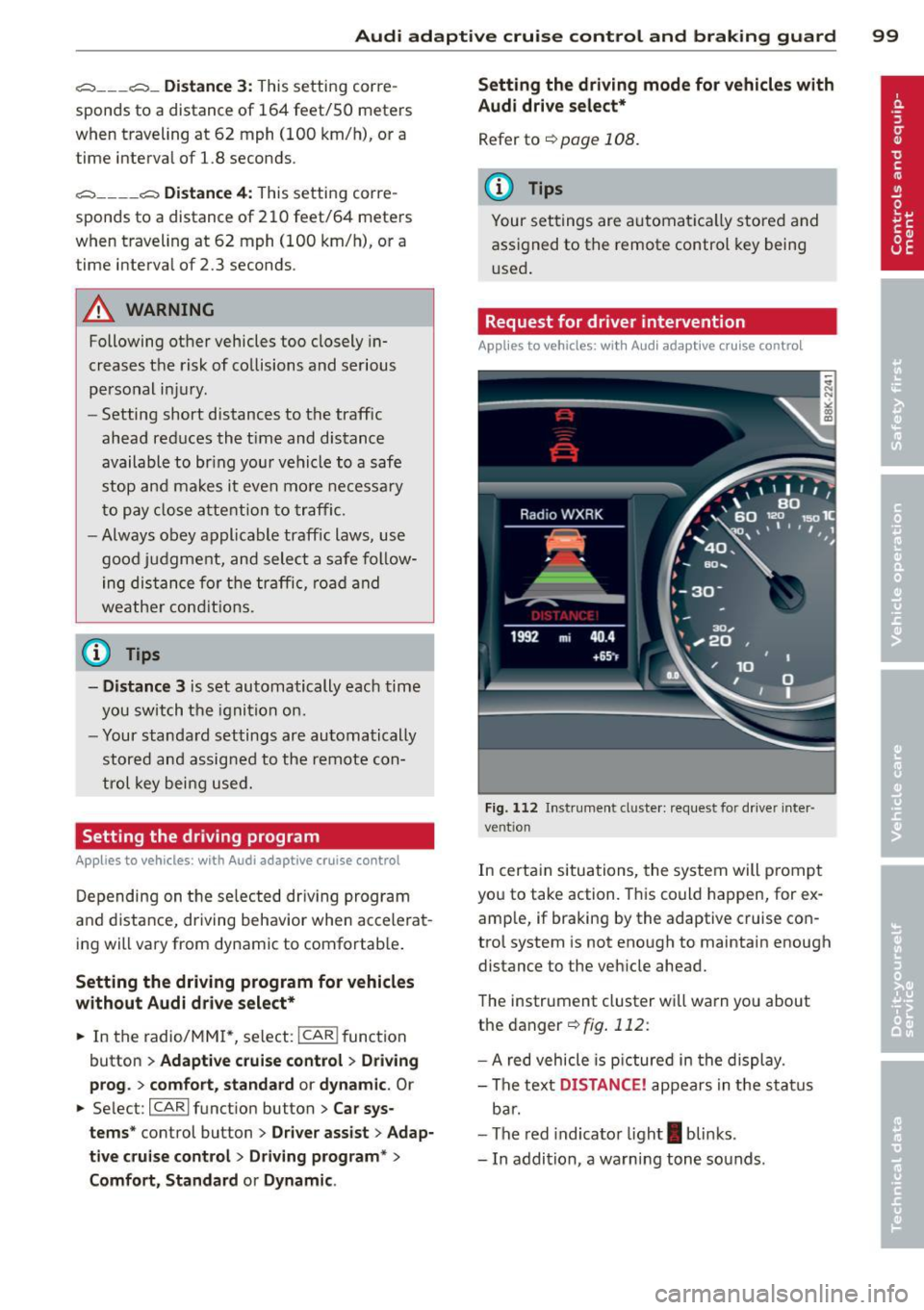
In certain situations, the system will p rompt
you to take action. This could happen, for ex
amp le, if braking by the adaptive cruise con
trol system is not enough to maintain enough
distance to the vehicle ahead.
The instrument cluster will warn you about
the danger ¢
fig. 112:
-A red vehicle is pictured in the display.
- The text
DISTANCE! appears in the status
bar.
- The red indicator light
I blinks .
- In addition, a warning tone sounds .
Page 102 of 290
100 Audi adaptive cruise control and braking guard
Audi braking guard
Descript ion
Applies to vehicles: with Audi adaptive cruise control
Fig. 113 Instrument cluste r: approach warn ing
Braking guard uses a radar sensor. It also
functions within the limits of the system
when adaptive cruise control is switched off .
What can Audi braking guard do?
When detected in time, the system can assess
situations when a vehicle ahead brakes sud
denly or if your own vehicle is traveling at a
high speed and approaching a vehicle up
ahead that is moving more slowly . Braking
guard does not react if it cannot detect the
situation.
The system advises you of various situations :
- The
distance warning is given if you are too
close to the vehicle ahead for a long time. If
the vehicle ahead brakes sharply, you will
not be able to avoid a collision. The indicator
light
I in the display comes on .
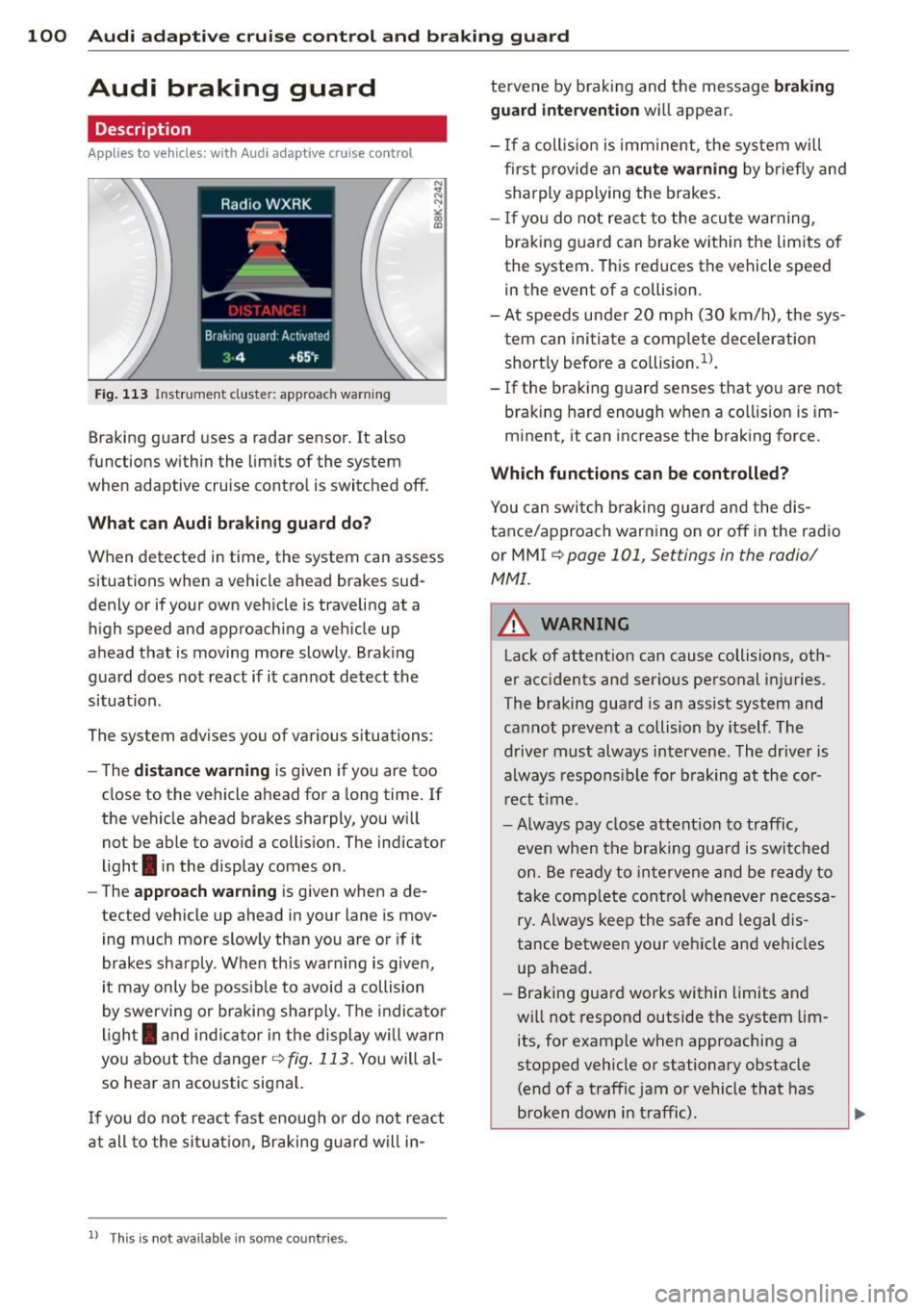
- The
approach warning is given when a de
tected vehicle up ahead in your lane is mov ing much more slowly than you are or if it
brakes sharply . When th is warning is given,
it may only be possib le to avoid a collision
by swerving or braking sharply . The indicator
l ight
I and indicato r in the display will warn
you about the danger
¢ fig. 113 . You will al
so hear an acoustic signal.
I f you do not react fast enoug h or do not react
at all to the situat ion , Braking guard will in-
ll This is not available in some co un tri es .
tervene by braking and the message braking
guard intervention
wi ll appear.
- If a coll is ion is imminent, the system wi ll
fi rst provide an
acute warning by briefly and
sharply applying the brakes.
- If you do not react to the acute warning,
braking guard can brake within the lim its of
the system. This reduces the vehicle speed
in the event of a collision .
- At speeds under 20 mph (30 km/h), the sys
tem can initiate a comp lete deceleration
short ly before a co llision .
1
).
- If the braking guard senses that you are not
brak ing hard enough when a co llision is im
minent, it can increase the braking force.
Which functions can be controlled?
You can switch braking guard and the dis
tance/approach warning on or off in the radio
or MMI
¢ page 101, Settings in the radio/
MMI.
A WARNING
-Lack of attention can cause collisions, oth
er accidents and serious personal injuries.
The braking guard is an assist system and
cannot prevent a collision by itself. The
driver must always intervene. The dr iver is
always responsible for braking at the cor
rect time .
- Always pay close attent ion to traffic,
even when the braking guard is switched
on. Be ready to intervene and be ready to
take complete control whenever necessa
ry. Always keep the safe and legal dis
tance between your vehicle and vehicles
up ahead.
- Braking guard works within limits and
will not respond outside the system lim
its, for examp le when approaching a
stopped vehicle or stationary obstacle (end of a traffic jam or vehicle that has
broken down in t raffic).
Page 103 of 290
Audi adaptive cru ise control and brakin g guar d 101
-Always remember that the radar sensor
for the braking guard works only within
defined detection and range limits that
may prevent the proper detection of oth
er vehicles.
- The radar sensor's function and range
can be reduced by rain, snow and heavy
spray. Moving vehicles up ahead may not be promptly detected or may not be de
tected at al l.
- Reflective surfaces includ ing crash barr i
ers or tunnel ent ran ces may impair the
function of the radar sensor.
- You can cance l the braking that is initiat
ed by the system by braking yourself, by
accelerating noticeab ly or by swerving.
- Bra king guard error messages
<> page 101.
-Keep in mind that braking guard can
brake unexpectedly . Always secure any
ca rgo or objects that you are transport
i ng to reduce the risk of d amage or in
ju ry.
Settings in the radio/MM!
Applies to vehicles: with Audi adaptive cruise co ntrol
~ Se lect: I CARI f unction button > Car sys
tems*
control button > Driver assist > Audi
braking guard .
Or
~ Select: ICARlf unct ion button> Audi brak -
ing guard .
System -
Switch Audi braking g uard On and
Off . When you switch the ignition on, the
message
Aud i braking guard off appears if
the system is sw itched off .
Early warning -The distance and app roac h
warn ings in the display can be switched
On /
Off .
(D Tips
-Your settings are automatically stored
and ass igned to the remote control key
being used at the t imes the settings are
made. -
If you switch the ASR/ESC off, braking
guard switches off automatically
<> page 181.
- Switch braking guard off when you a re
loading the vehicle onto a vehicle carrier,
train, ship or other type of transporta
t ion. This can prevent undesired warn
ings from the braking gua rd system.
Messages
App lies to vehicles : wit h Aud i adapt ive c ruise contro l
Braking guard : Off
This driver message appears if the system is
turned off via the radio/MMI *. Otherwise, if
the system is turned off, the informat ion ap
pears every t ime shortly after the start of the
trip.
B raking guard : Activated
T h is dr iver message appears if sharp b rake
pressure was applied due to an acu te warning.
•••
Three white dots appear if a sett ing cannot be
selected w ith the operating lever. For exam
ple, this happens if you want to raise/lower
the speed even though there was no previous
ly saved speed.
ACC: Sensor blocked
This message appears if the sensor v iew is ob
structed, for examp le by leaves, snow, heavy
spray or d i rt . Clean the sensor<>
fig. 103.
ACC: not available
T he driver mess age appears if there is a mal
f un ction. The adapt ive cr uise con tro l tu rns off.
A chime sounds as a reminder . Have the sys
tem checked by an authorized Audi dea ler or
authorized Aud i Service Fac ility.
ACC : unavailable
The dr iver message appears if, for example,
t h e b ra ke tempe rat ure is too hig h. T he adap
t ive cr uise cont ro l is temporar ily u nava ilable.
A ch ime sounds as a remin der .
Shift lever position!
Page 104 of 290
102 Audi adaptive cruise control and bra king guard
The driver message appears i f the se lector lev
er is shifted to the N position. The adaptive
cr uise control is not available wh ile in this po
sition .
Stabilization control (ESC)
This message appears if the e lectronic stabili
z ation control (ES C) is taking action to stabi
lize the vehicle . Th e adaptive cru ise con trol
turns off . A chime sounds as a reminder .
Speed too low
This message appears if the current speed is
too low
to set or to maintain the desired
speed .
The speed being saved must be at least
20 mph (30 km/h) . The cruise control is
turned off for speeds lower than 12 mph
(20 km/h) . The adapt ive cruise control re
mains turned on fo r speeds above 95 mph
(1S0 km/h) (overr ide) .
It will stabi lize again at
95 mph (150 km/h) when the driver takes his
foot off of the gas pedal.
Parking brake!
The driver message appears when the park ing
brake is activated . Adaptive cru ise cont rol is
turned off . A chime sounds as a reminder.
Page 111 of 290
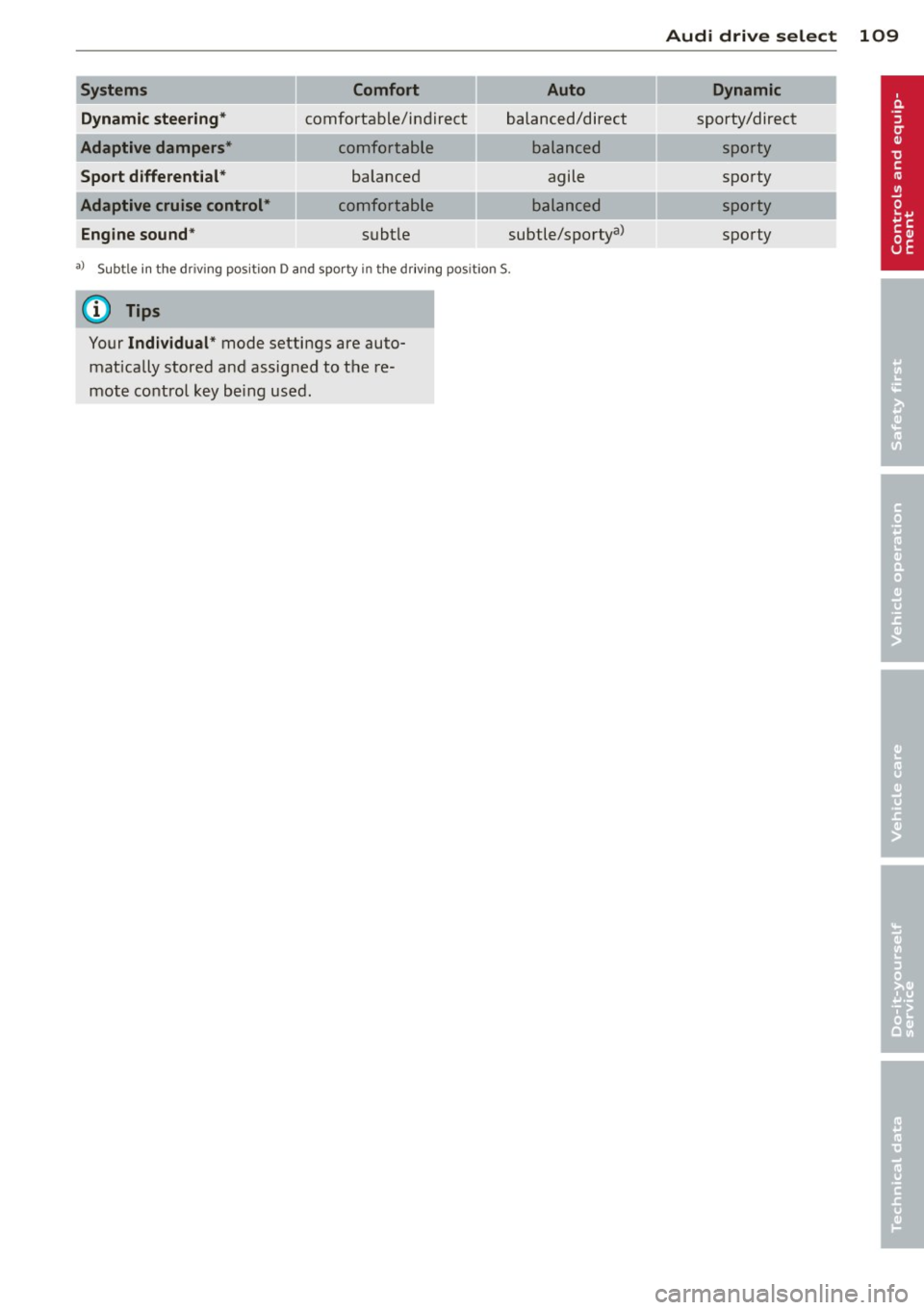
Systems Comfort Auto
Dynamic steering*
comfortable/ind ire ct balanced/direct
Adaptive dampers* comfortable balanced
Sport differenti al* balanced agile
Adaptive cruise control*
comfortable balanced
Engine sound *
subtle subtle/sportya>
a)
Sub tle in t he driving pos it io n D an d sp orty in t he dr iv ing p osition S.
(D Tips
Your Individual * mode settings are auto
mat ically stored and assigned to the re
mote control key being used.
Audi drive select 109
Dynamic
sporty/direct
sporty
spo rty
sporty
spo rty
Page 182 of 290
180 Intelligent technology
ESC includes and/or works together with the
anti-lock brake system (ABS), brake assist sys
tem, anti-slip regulation (ASR) , e lectronic dif
ferential lock (EDL), dynamic steering" and
e lectronic interaxle differentia l lock* /selective
wheel torque control* . ESC is switched on all
the t ime. I n certa in s ituations whe n you need
l ess t raction, you can switch off ASR by p ress
i ng the bu tto n
[ru ¢ fig. 167 or ¢ fig. 168. Be
sure to sw itch ASR on ag ain when you no lon
ger need less trac tion.
Anti -lock braking system (ABS)
ABS prevents t he wheels from locking up
when braking. The veh icle can still be st eered
even d uring ha rd b rak ing . Apply steady p res
sure to the br ake pedal. Do no t pu mp the ped
a l. A puls ing in t he bra ke peda l ind icates that
the system is he lping yo u to b rake the vehicle .
Brake assist system
The brake assist system can decrease bra king
d ista nce. It increases braking powe r w hen the
d river p resses the brake pedal quickl y in eme r
gency situa tions . You mus t press and ho ld the
brake peda l until the situation is over. In
ve hicles with adaptive cruise contro l", the
brake assist system is more sensit ive if the
d ista nce detected to t he vehicle a head is too
smal l.
Anti-slip regulation (ASR)
ASR reduces engi ne power when the drive
wheels begin to spin and adapts the fo rce to
the road condit ions. This makes it easier to
start, accelerate and drive up hills.
Electronic diffe rential lock (EDL )
The EDL brakes wheels that are spinning and
tra nsfers t he d rive powe r to the other d rive
wheel or whee ls if the vehicle is equipped with
all-wheel drive*. This function is available up
to about 60 mph (100 km/h).
In extreme cases, EDL a utomatica lly switches
off to help keep the bra ke on the braked whee l
from overheating. EDL will switch on aga in au
tomatically when conditions have returned to
normal.
Dynamic steering*
On vehicles wi th dynam ic s teering *, ESC he lps
sta bilize the steer ing in crit ica l sit uat ions.
Electronic interaxle differential lock*/
selective wheel torque control*
T he ele ctroni c in te raxle di fferentia l lock ( fron t
whee l drive) o r th e se lective whee l torque
control (all -whee l drive) operates when driv
ing t hro ugh cu rves. The front wheel on the in
s ide of the c urve or both whee ls on the inside
of the curve are braked selectively as needed .
Th is mi nimizes sliding in the front wheels and
allows for more precise d rivi ng through
cu rves . The a ppl icable syste m may not acti
vate when dr iv ing in wet o r snowy cond itions.
_&. WARNING
- E SC, A BS, ASR, ED L d ynam ic steering *
a nd the elect roni c in ter ax le d ifferenti al
loc k* /se lective whee l torque control *
cannot ove rcome the laws of physics .
This is especia lly important on slippery
or wet r oads. If the systems beg in acting
to stabilize your veh icle, yo u should im
mediately change you r speed to match
the road and t raff ic conditions. Do not
let the increased safety prov ided by
t hese systems temp t you to ta ke r is ks.
Doing so will increase the risk of a lo ss of
veh icle cont ro l, col lision an d ser io us per
sonal injur ies.
- Always adapt your speed to ro ad, traff ic
an d wea ther conditions . The risk of los
ing contro l of t he vehicle increases when
driving too fast, es pec ially through
curves and on slippery or wet roads, and
when dr iv ing too close to vehicles up
a head. ESC, ABS, the brake ass ist sys
t e m, ASR, EDL dynam ic s teer ing* and the
elec tronic inte raxle differe ntia l lock*/se
lective whee l to rque contr ol* cannot p re
vent co lli sion s.
- Always accelerate wi th special care on
eve n smooth s urfaces su ch as those that
'
ar e we t or covered w ith i ce and snow.
T he drive whee ls can spin even w ith
-
these assistance systems that can not ~
Page 183 of 290
always help to reduce the risk of loss of
vehicle control.
(D T ips
- ABS and ASR on ly work correctly when
a ll four wheels are eq uipped with identi
ca l tires . Different tire s izes can lead to a
reduction in eng ine power.
- You may hear noises when the systems
described are working.
- If the indicator light
DJ or r.1:1::1 (U SA
models) ;tiJ (Canada mode ls) appears,
there may be a malfunction
c:> page 19,
c:> page 19.
Switching on/off
ESC turns on automaticolly when you start
the engine.
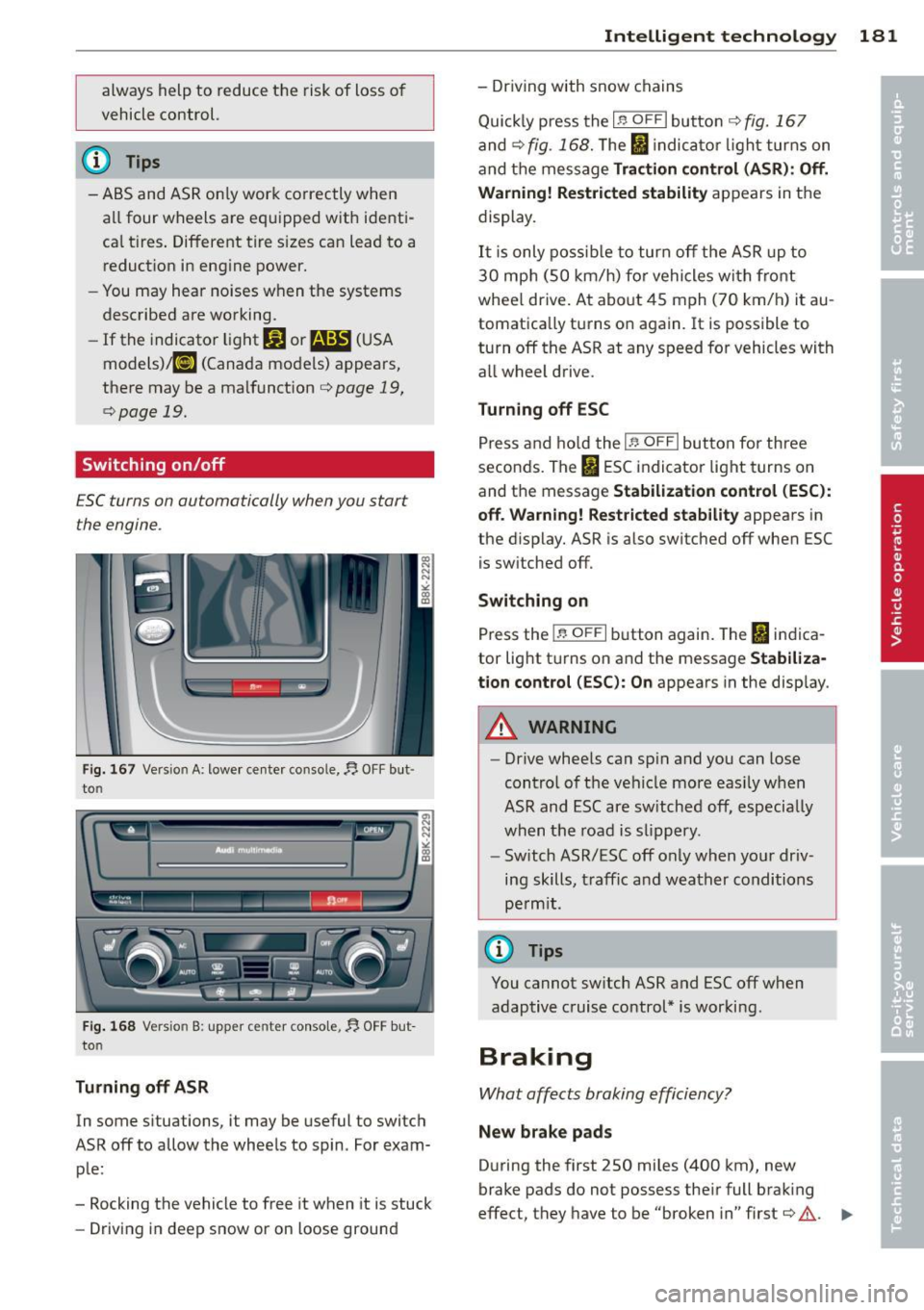
Fi g. 16 7 Version A: lowe r ce nter console,~ OFF but
to n
:.!;::.:-, I I ---- 1- n~I -
l.
~
- o~ -· \)1) 1./ .., l~c~~ ·-WJO -J •-MJTO -~, -
-----....... -... ~ ~ -~
Fi g. 16 8 Versio n 8: upper ce nter conso le,~ OFF but
to n
Tu rning off ASR
In some situations, it may be useful to switch
ASR off to allow the wheels to spin. For exam ple:
- Rocking the vehicle to free it when it is stuck
- Driving in deep snow or on loose ground
Intelligen t technolog y 181
- Driving with snow chains
Quick ly press the
lf3 O FF ! button c:> fig. 167
and c:> fig. 168. The I indica to r li ght turns on
and the message
Trac tion control (ASR ): Off.
Warning! Restri cted stabilit y
appears in the
display.
It i s only poss ib le to turn off the ASR up to
30 mp h (SO km/h) fo r vehicles with front
whee l drive. At about 45 mph (70 km/h) it au
tomatica lly turns on again. It is possible to
turn off the ASR at any speed for vehicles with
all wheel drive.
Turning off ESC
Press and hold the It, O FF I button fo r th ree
seconds. The
fl ESC indicator light t urns on
and the message
Stabil ization cont rol (ES C):
off. Wa rnin g! Restricte d stability
appears in
the d isplay. A5R is also switched off when ESC
is sw itched off.
Switching on
Press the I~ OF FI button again. The fl indica
tor lig ht t urns on and the message
Stabiliza
tion cont rol (ES C): O n
appears in the disp lay.
_.& WARNING
- Drive whee ls can sp in and you can lose
contro l of t he vehicle more eas ily w hen
ASR and ESC are sw itched off, especially
when the road is slipp ery .
- Sw itch A5R/ESC off only when your driv
ing skills, t raffic and weather conditions
pe rm it .
(D Tips
You cannot sw itch ASR and ESC off when
adaptive cruise control* is worki ng.
Braking
What affects braking efficiency?
Ne w brake p ads
During the first 250 miles (400 km), new
-
brake pads do not possess the ir full brak ing
effect, they have to be "broken in" first
c:> .&.. .,.
Page 200 of 290
198 Cleaning and protection
Chamois are not suitable for drying the top .
Neve r use gasoline, spot remover, benzene,
pa int thinner o r so lvents to remove spots. We
recommend that you only use cleaners espe
cially formu lated for use on convertible tops,
and that you follow the produce use directions
caref ully. Authorized Audi deals can provide
deta iled information.
A WARNING
Always read and heed all WARNINGS and
the information on
¢ page 194.
@ Note
Never use a high-pressure power washer to
clean the power top.
Wind deflector
App lies to vehicles: with wind def lector
Clear the wind deflector with water or, if it is
heav ily soiled, a chemically neutral cleaning
solut ion .
A WARNING
Always read and heed a ll WARNINGS and
the information on¢
page 194.
Sensors and camera lenses
-Remove snow with a hand brush and remove
ice with a de-icing spray that does not con
tain solvents .
- Clean the sensors (adapt ive cruise control*,
parking system*) with a cleaning solution
that does not conta in solvents and a soft
cloth .
@ Note
- If you wash you r vehicle with a pressu re
washer,
- make sure there is enough distance to
sensors in the rear bumper .
- do not clean the camera lenses and the
area around them with the pressure
washer . - Never use warm or hot wate
r to remove
snow or ice from the camera lens . This
cou ld cause the lens to crack.
- Never clean the camera lens with abra
sive products.
Waxing and Polishing
W axin g
A good wax coating protects the vehicle paint
to a large extent against the environmental
factors listed under¢
page 194, Washing and
even against slight scratches.
You can use a liquid car wax to protect your
paint as soon as one week after your vehicle
has been delivered.
Even if you regularly use a
w axin g process in
automatic car washes, we recommend that
you manually apply a coat of wax to give the
paint extra protection, part icularly if water no
longer beads on the clean paint .
Protect plastic body parts with car wax in the
same way as the vehicle
body.
During warm weather dead insects tend to
collect on the front bumper and on the for
ward area of the hood . They are much easier
to remove from pa int that is waxed
often.
Polishing
Polish yo ur vehicle only if the paint has lost its
shine and the gloss cannot be brought back
with wax .
If the polish used does not conta in preserva
tive compounds, the paint must be waxed af
terwards.
A WARNING
A lways read and heed all WARNINGS and
other information ¢
page 194.
(D Note
Do not use car wax on
- matte o r anodized meta l trim
- rubber or rubber-like t rim .