door lock AUDI A5 CABRIOLET 2013 User Guide
[x] Cancel search | Manufacturer: AUDI, Model Year: 2013, Model line: A5 CABRIOLET, Model: AUDI A5 CABRIOLET 2013Pages: 290, PDF Size: 72.35 MB
Page 42 of 290
40 Opening and clo sing
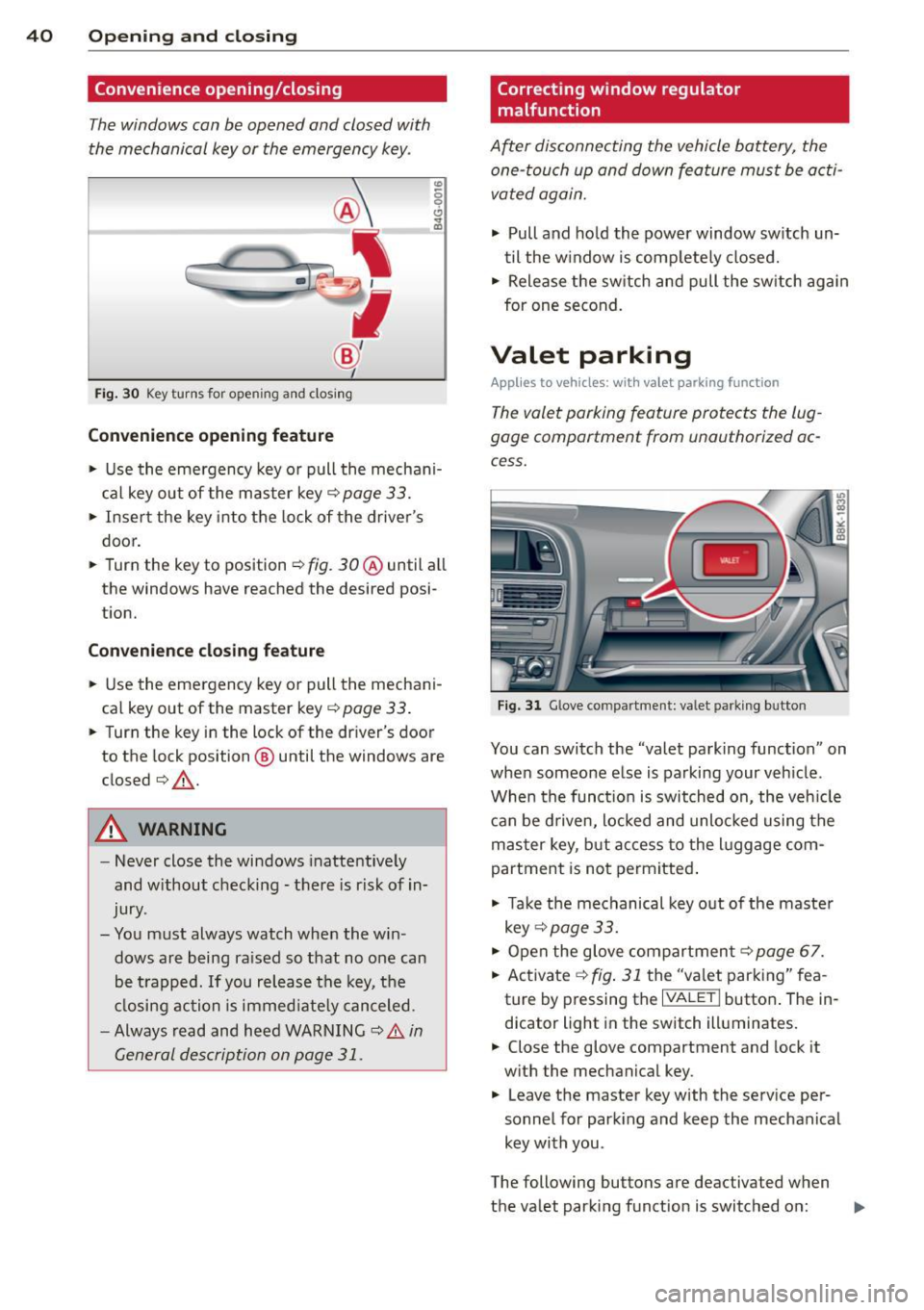
Convenience opening/closing
The windows can be opened and closed with
the mechanical key or the emergency key.
@
' ~-~
® '
Fig . 30 Key turns for open ing a nd clos ing
Conv eni ence open ing fe ature
"' 0 0 0
" m
• Use the emergency key or pull the mechani
cal key out of the master key¢
page 33.
• Insert the key into the lock of the drive r's
door.
• Turn the key to position ¢
fig. 30@ until a ll
the windows have reached the desired posi
t ion.
Con venience clo sing f eature
• Use the eme rgency key or pull the mechani
cal key out of the master key¢
page 33 .
• Turn the key in the lock of the driver's door
to the lock position @ until the windows are
closed¢ &.
A WARNING
-Never close the windows inattentive ly
and w ithout checking -there is risk of in
jury.
- You must always watch when the win dows are being ra ised so that no one can
be t rapped. If you release the key, the
closing action is immed iate ly canceled.
- Always read and heed WARNING ¢
A in
General description on page
31 .
Correcting window regulator
malfunction
After disconnecting the vehicle battery, the
one-touch up and down feature must be activated again.
• Pull and ho ld the power window sw itch un
til the w indow is completely closed.
• Release the sw itch and pull the sw itch again
for one second.
Valet parking
Applies to vehicles: with va let parking function
The valet parking feature protects the lug
gage compartment from unauthorized ac
cess.
Fi g. 31 Glove compartment: valet parking button
You can switch the "valet parking function" on
when someone else is parking your veh icle .
When the funct io n is switched on, the veh icle
can be d riven, Locked and unlocked using the
master key, but access to the l uggage com
partment is not permitted .
• Take the mechanical key out of the maste r
key ¢
page 33.
• Open the glove compartment¢ page 67.
• Activate ¢
fig. 31 the "valet parking" fea
ture by pressing the
I VALET I butto n. The in
dicator light in the switch illuminates.
• Close the glove compartment and lock it
with the mechanical key .
• Leave the master key with the service per
sonnel for park ing and keep the mechanical
key with you .
The following buttons are deactivated when
the valet parking function is switched on: ..,_
Page 46 of 290
44 Power top
Reduce the vehicle speed below 50 km/h and
use the switch to open or close the powe r top
comp lete ly.
.&_ WARNING
Never drive when the powe r top is not
locked co rrectly. The w ind from dr iv ing
co uld cause t he power top to open. Th is
can r esult in injuries a nd damage to th e
veh icle .
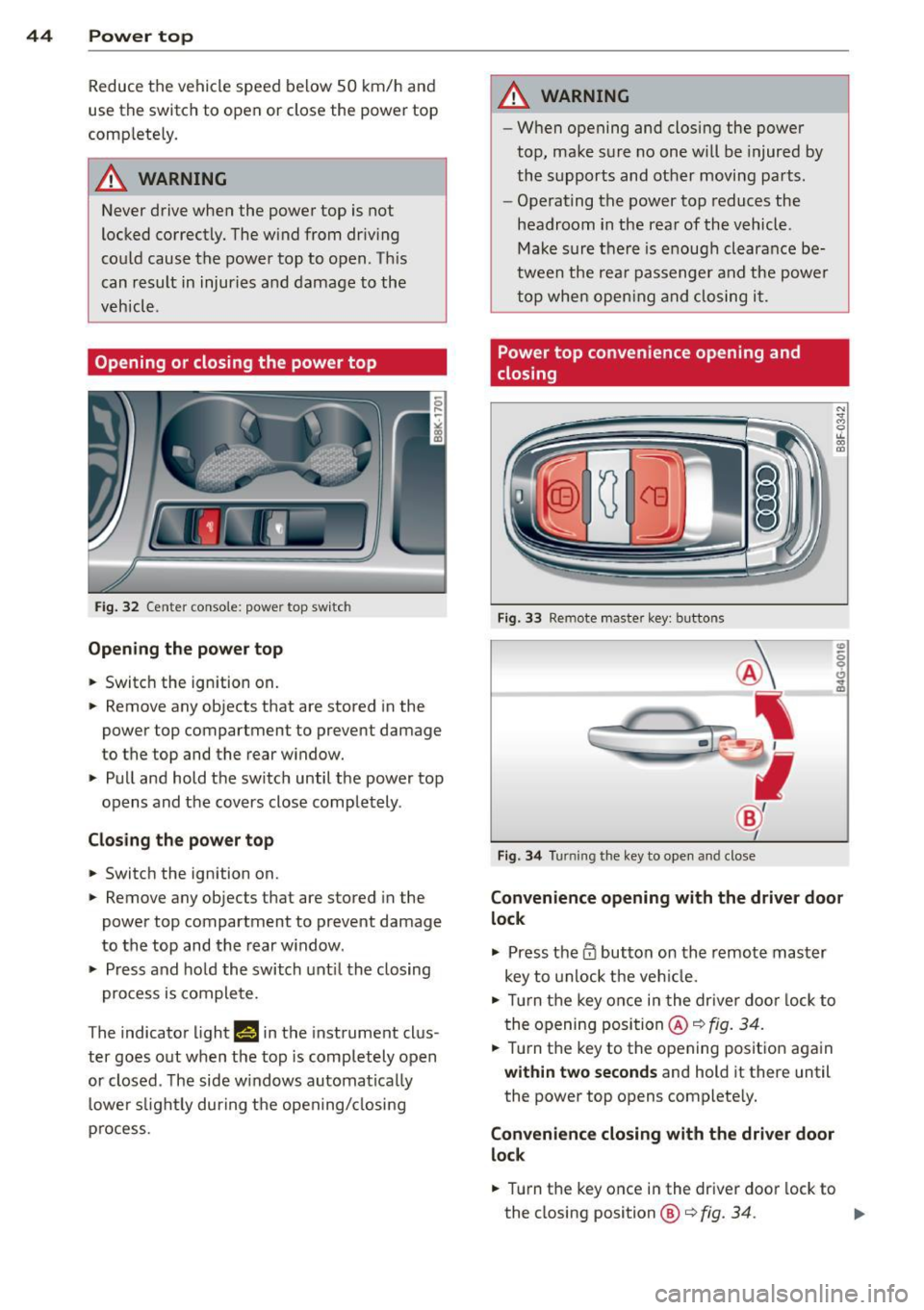
Opening or closing the power top
Fig. 32 Ce nte r conso le : powe r top sw itc h
Opening the power top
.. Switc h the ign ition on .
-
.. Remove any objects that are stored in the
power top compartment to preve nt damage
to the top and t he rear w indow .
.. Pull and hold t he swi tc h until t he power top
opens and the cov ers close compl ete ly .
Closing the power top
.. Switch the ignition on .
.. Remove any objects that are stored in the
power top compartment to prevent damage
to the top and the rear w indow .
.. Press and ho ld the swi tch unt il t he closing
pro cess is co m plete.
T he indicato r light
1#§ 111 the instrument clus
ter goes o ut w hen the top is compl etely open
or closed . T he side w indows automa tica lly
l owe r slig htl y during t he open ing/ closing
p rocess.
.&_ WARNING
-- Wh en opening and closing the powe r
top, ma ke s ure no on e w ill be injur ed by
the supp orts and ot her movi ng pa rts .
- Ope rat ing the power top reduces the
headroom in the rea r of the vehicl e.
M ake sur e th ere i s enoug h clear an ce be
twee n the rea r passenger an d the power
t o p whe n openin g an d clos ing i t.
Power top convenience opening and
closing
Fi g. 33 Remote maste r key : butto ns
Fig . 34 Turnin g the key to ope n an d close
Convenience opening with the driver door
lock
.,. Press them butto n on th e r emo te ma ster
key to unlock t he ve hicle.
.. Tu rn the key on ce i n t he drive r do or l ock to
t he openi ng posi tion @~
fig. 34 .
.. Tur n the key to t he opening posit io n aga in
within two seconds and hold it there until
the power top opens complete ly.
Convenience closing with the driver door
lock
.. Turn the key once in the driver door lock to
the closing position@¢
fig. 34. ..,.
Page 55 of 290
@ Tips
-The light sensor * for headl ight control is
l ocated in the rear view m irror mount.
You should therefore not apply any st ick
ers to the windsh ield in this area in order
to prevent malfunctions or failures .
- Some exterior lighting functions can be
ad justed
¢ page 53.
-When yo u remove you r key from the igni
tion w hile the vehicle's lights are turned
on, a buzzer sounds as long as the driv
er's door is open .
- In cool or damp weather, t he ins ide of
the headlights, turn signa ls and tail
li ghts can fog ove r due to the tem pera
ture diffe ren ce betwe en the inside and
outside. They will clear shor tly after
swi tching t hem on. This d oes not aff ect
the service life of the ligh ting.
- In the even t of a ligh t sensor malfunc
tion, the drive r is no tifie d in the inst ru
ment cluster disp lay ~
page 2 2.
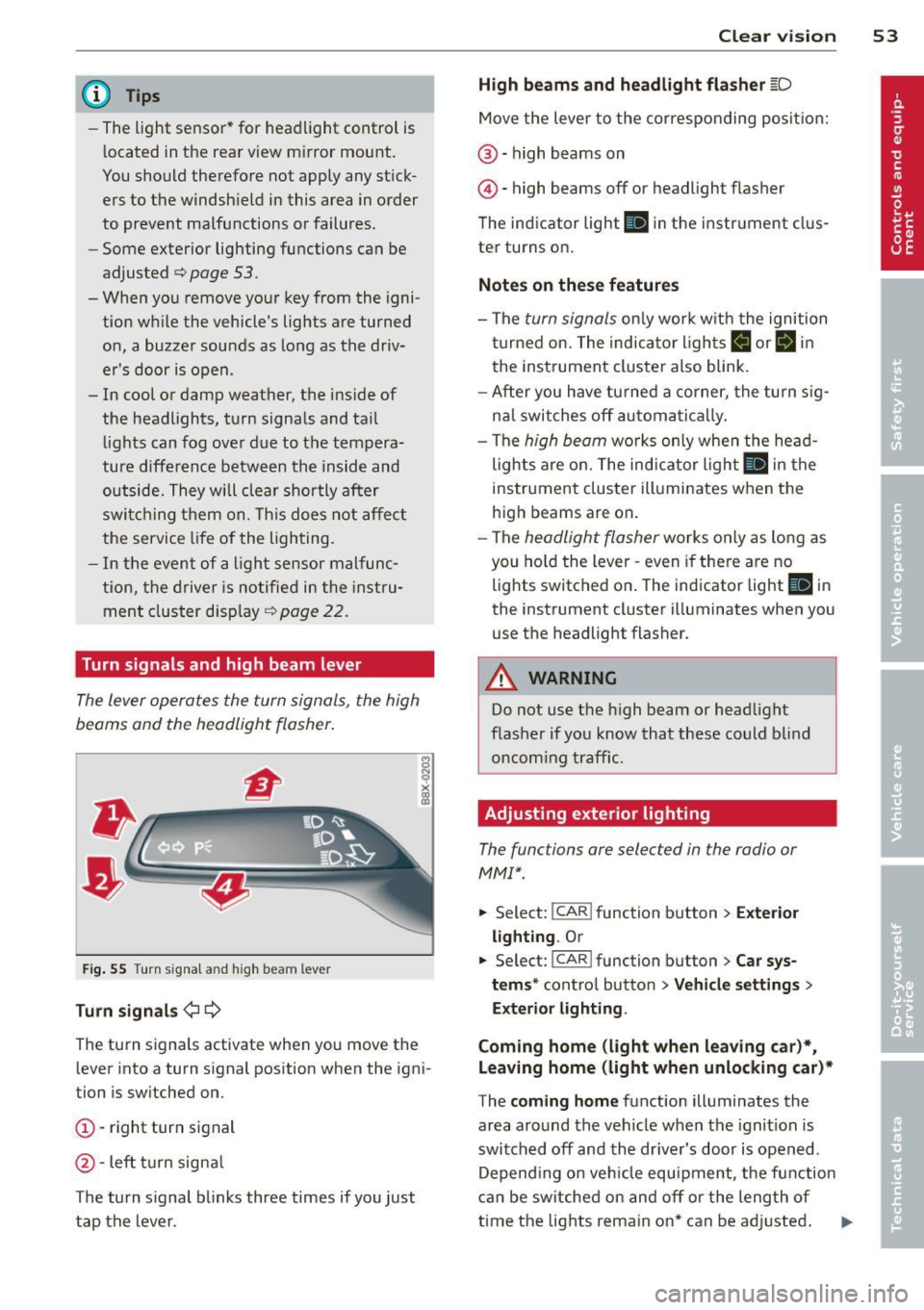
Turn signals and high beam lever
The lever operates the turn signal s, the high
b eams and th e headlight flash er.
F ig. 55 Turn sig na l an d high beam leve r
Turn signals ¢i ¢
Th e turn s ignals activate when you move the
l ever into a turn s ignal position when the ign i
tion i s sw itched on.
(D -right turn signal
@ -Left turn signa l
T he turn s ignal b links three times if you just
tap the lever .
Clear vision 5 3
High beams and headlight flasher @:D
Move the lever to the corresponding posit io n:
@ -high beams on
@-high beams off or headlight flasher
T he ind icator light
II in the instr ument clus
ter turns on .
Notes on these features
-The turn signals on ly wor k w it h t he ignition
t urned on. The indica tor l igh ts
11 or II in
the instrument cluste r also blink .
- Aft er you have tu rned a corner, the turn s ig
na l swi tches off au tom atically .
- The
high beam wo rks only when the head
lights a re on. The indicator Ligh t. in the
i nstrumen t clus ter illuminates when the
high beams are on .
- The
headligh t flasher works on ly as long as
you ho ld the lev er -even if the re are no
lights switched o n. The ind icator light
Ill i n
the inst rument cluster illuminates when you
use the headlight flasher .
&_ WARNING
Do not use the high beam or head light
flasher if you kn ow that these could b lind
oncom ing traffic.
Adjusting exterior lighting
The functions are selec ted in the radio or
MM!* .
.. Select : I CAR! function b utton > Exter io r
light ing . Or
.. Select: I CAR I func tion button > Car sys
tems *
control button > Vehicle settings >
Exterior Lighting .
Coming home (light when leaving car )*,
Leaving home (light when unlocking car)*
T he coming home function illumi nates the
area around the vehicle when the ignition is
switched off and the dr iver's door is open ed.
Depend ing o n ve hicl e equ ipment, t he function
can be switched on and off or the length of
time the lig hts remain on* can be ad justed . .._
Page 57 of 290
Interior lights
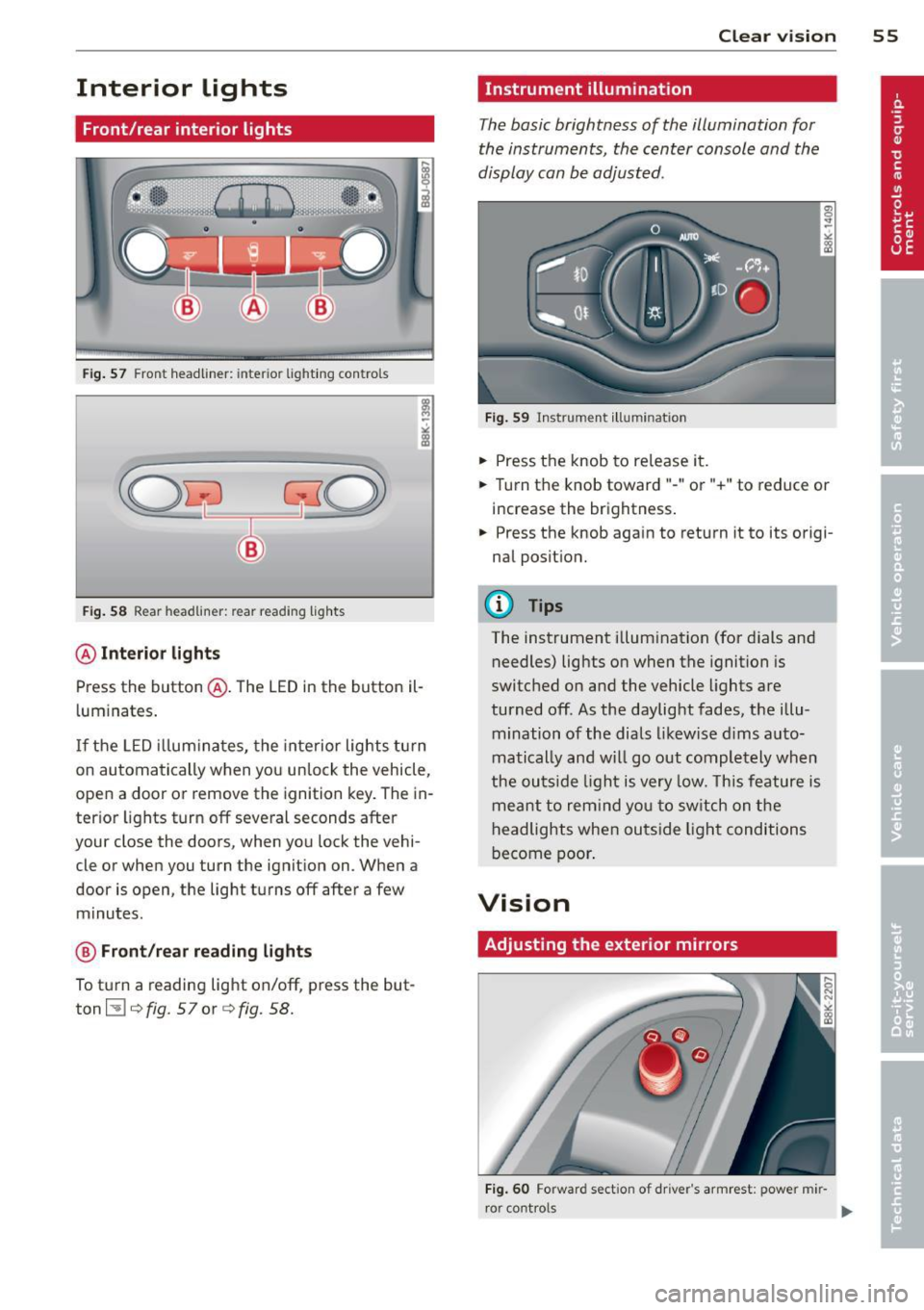
Front/rear interior lights
Fig. 57 Front headliner: inter ior lighti ng controls
Fig. 58 Rear headlin er: rear reading lights
@ Interior lights
Press the button @. The LED in the button il
l uminates .
If the LED illuminates, the interior lights turn
on automatically when you unlock the vehicle,
open a door or remove the ignition key. The in
terior lights turn off several seconds after
your close the doors, when you lock the vehi
cle or when you turn the ignition on. When a
door is open, the light turns off after a few
minutes.
@ Front/rear reading lights
To turn a reading light on/off, press the but
ton ~¢
fig. 57or ¢fig. 58.
Clear vision 55
Instrument illumination
The basic brightness of the illumination for
the instruments, the center console and the
display can be adjusted.
Fig. 59 Instrument illumination
.,. Press the knob to release it .
.. Turn the knob toward"-" or"+" to reduce or
increase the brightness .
.,. Press the knob aga in to return it to its origi
nal position.
(D Tips
The instrument illumination (for dials and
needles) lights on when the ignition is
switched on and the vehicle lights are
turned off. As the daylight fades, the illu
mination of the dials likewise dims auto
matically and will go out completely when
the outside light is very low. This feature is
meant to remind you to switch on the
headlights when outside light conditions
become poor.
Vision
Adjusting the exterior mirrors
Fig. 60 Forward sect ion of dr iver 's armrest: power mir
r or cont rols
Page 67 of 290
profiles for the driver . The memory function is
operated through the master key and the memory buttons in the driver's door.
The driver's seating profi le is stored and as
signed to the master key each time the vehicle
is locked. The seating profile is recalled auto
mat ically when the veh icle is unlocked. If two
people use one vehicle , it is recommended
that each person always uses "their own"
master key .
Up to 2 seat profiles can be stored in the
memory buttons in the driver's door. Once
they are stored, these seat profiles can be se lected at any time.
In addition to the driver 's seat settings, you
can also store and access the exterior mirror
adjustment settings* using the remote con
trol key or memory button .
Remote control key
Applies to vehicles: with seat memory
To assign the driver 's seat settings to the re
mote control key when locking the vehicle, the
function must be activated in the radio or
MMI*
~ Select: I CAR I function button > Seat adjust
ment
> Driver's seat > Remote control key >
on.Or
~ Select: I CAR I f u nct ion button > Car sys
tems*
control button > Vehicle settings>
Seats > Driver 's seat > Remote control key
> On.
(D Tips
If you do not want another driver's set
tings to be assigned to the remote key,
switch off the memory function using the
rad io or
MMI* or the ! ON/OFF I button
¢page 65.
Seats and storage 65
Memory buttons
Applies to vehicles: wit h seat memory
Fig. 73 Driver's door: memo ry funct ion buttons
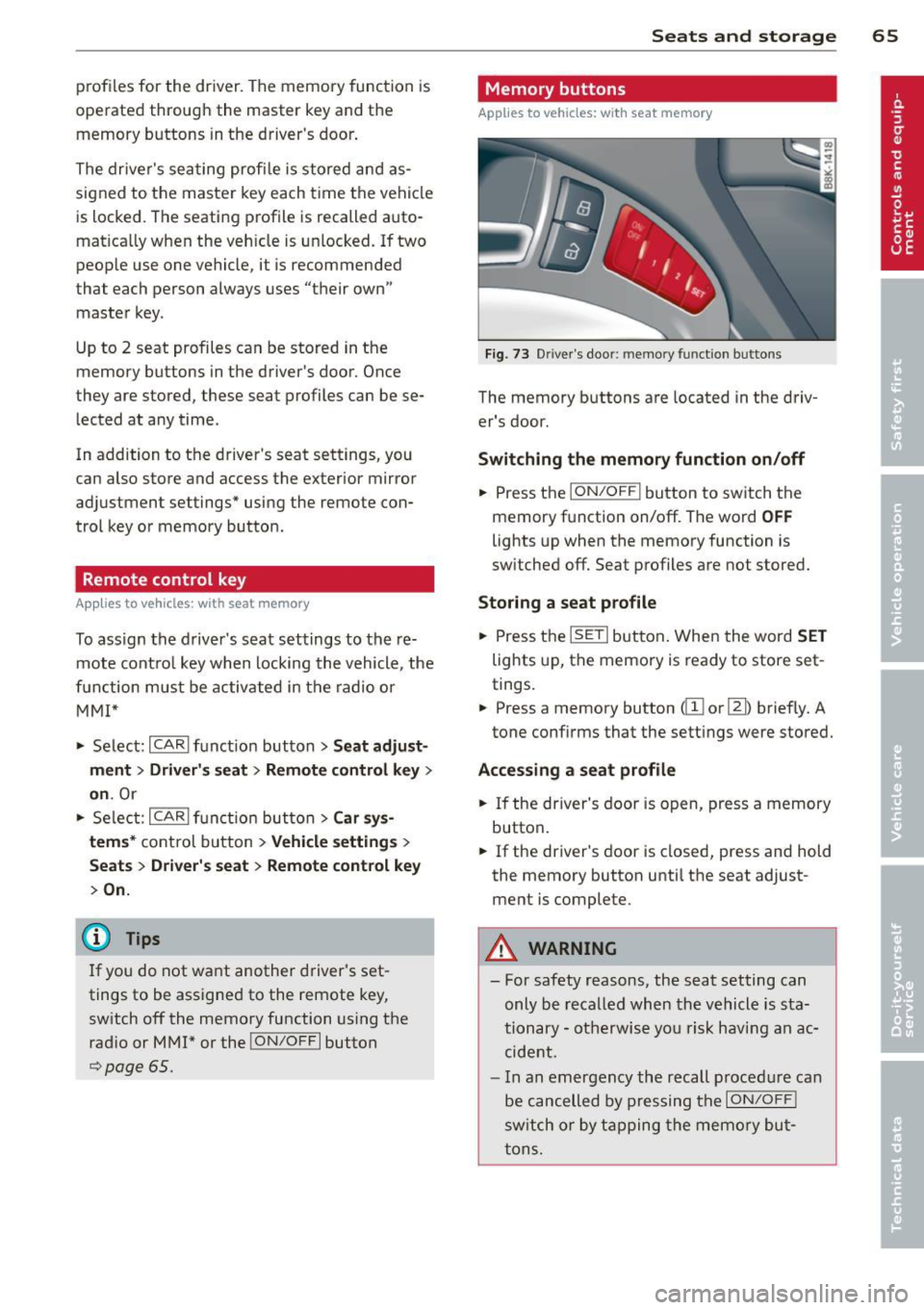
The memory buttons are located in the driv
er's door.
Switching the memory function on/off
~ Press the ION/OF F! button to switch the
memory function on/off. The word
OFF
lights up when the memory function is
sw itched off. Seat profiles are not stored.
Storing a seat profile
~ Press the ISETI button. When the word SET
lights up, the memory is ready to store set
tings.
~ Press a memory button dII or [Ii) briefly. A
tone conf irms that the settings were stored.
Accessing a seat profile
~ If the driver's door is open, press a memory
button .
~ If the driver's door is closed, press and hold
the memory button until the seat adjust
ment is complete.
A WARNING
- For safety reasons, the seat setting can only be recalled when the vehicle is sta
tionary -otherwise you risk having an ac
cident.
- I n an emergency the recall procedure can
be cancelled by pressing the
I ON/OFF !
switch or by tapping the memory but
tons.
Page 78 of 290
76 On the road
• Press the key¢ fig. 88 -the engine will
start.
Switching the ignition on /off
If you wou ld like to switch the ignition o n
witho ut starting the eng ine, follow these
steps:
• Insert the key into the ignition lock.
• Press the key b riefly
without p ress ing the
brake pedal.
• To switch the ignition off, press the key
again .
When starting the engine, major e lectr ica l
l oads are swit ched off temporarily.
You can only remove the key w ith the ignition
switched off.
If the engine should not start immediately,
the starting process is automatically stopped
after a short time. Repeat starting procedure.
A WARNING
- N ever allow the engine to ru n in confined
spaces - dange r of asphyxiation.
- Never remove the ign ition key from the
ignition look whi le the vehicle is mov ing.
Ot herw ise, the stee ring lo ck coul d sud
denly engage and you would not be ab le
to steer the vehicle .
- Always ta ke t he key wi th yo u wheneve r
yo u leave your vehicle. Otherwise, the
engine could be started or e lectrica l
equipment such as the power windows
cou ld be operated. This can lead to seri
ous injury.
- Never leave children or persons requiring
assistance unattended in the vehicle. The
doors can be locked using the remote
transmitter, preventing people from es
caping from the vehicle on their own in
the event of an eme rgency . Depend ing
on the time of year, people inside the ve hicle c an be exposed to very h igh or ve ry
low temperatures.
(D Note
Avoid high engine rpm, fu ll throttle and
heavy engine loads unti l the engine has
reached operating tempe rat ure - other
wise you risk eng ine damage.
@ For the sake of the environment
Do not let the engine run w hile pa rked to
warm up. Begin dr iving immediately. Th is
reduces u nnecessary emissions.
(D Tips
- If the key cannot be removed from the
ign ition lock, you have to pull the me
chanical key out of the master key in or
der to be able to lock the vehicle
¢page 34 .
-After starting a cold engine, there may
be a brief pe riod of increased noise be
cause the oil pressure must fi rst bu ild up
in the hydraulic valve ad juste rs. This is
normal and not a cause for concer n.
- If you leave the ve hicle w ith the ignition
sw itched on, the ig nit io n w ill sw itch off
afte r a cer tain per iod of t ime. Please
no te that electri cal eq uipment such as
exterior ligh ts will sw itch off as well
w hen that happens .
Page 79 of 290
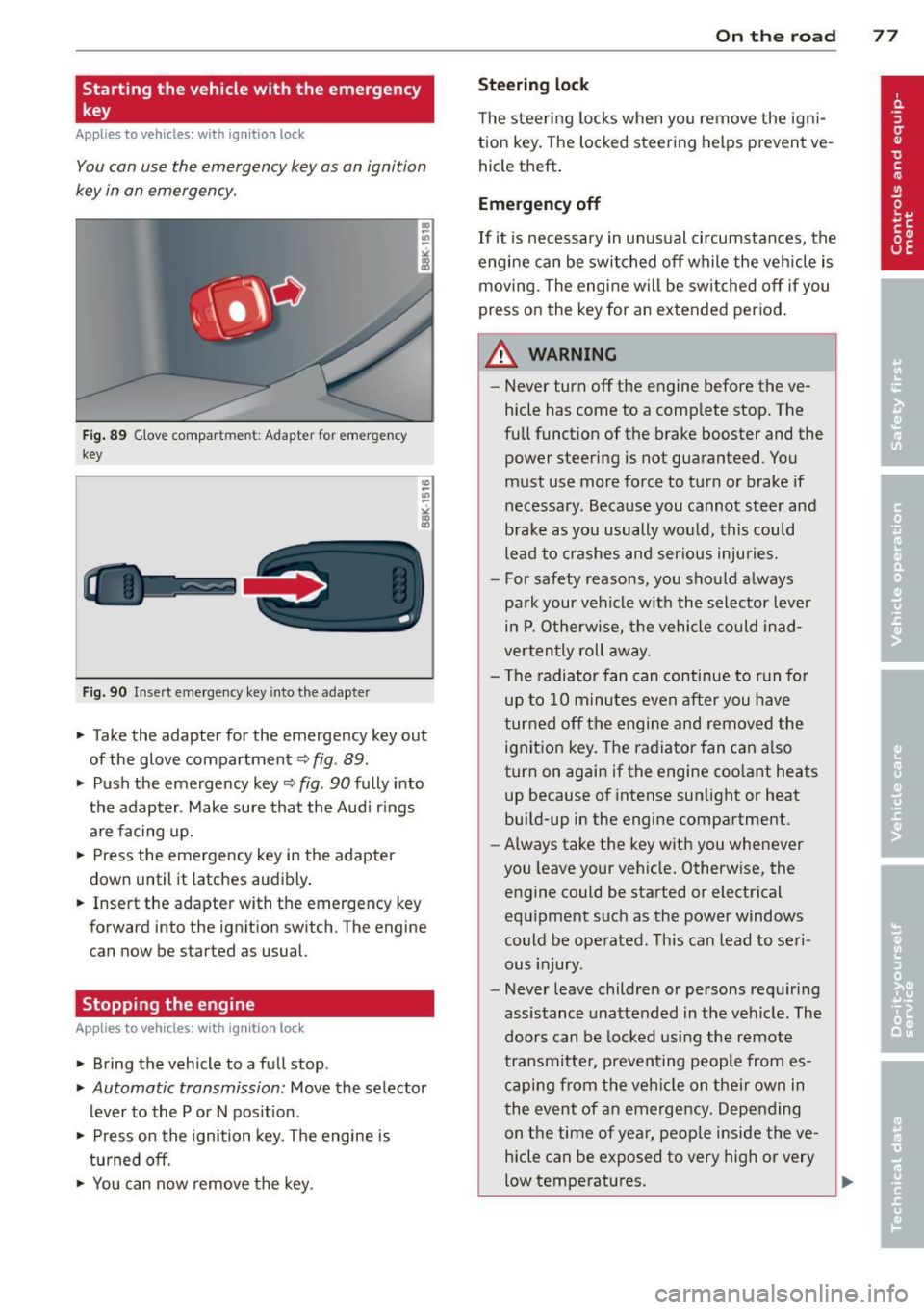
Starting the vehicle with the emergency
key
Applies to vehicles: with ignitio n lock
You can use the emergency key as an ignition
key in an emergency.
Fig . 89 G lo ve compar tment: A dapt er fo r em ergen cy
key
Fig. 90 In ser t emergen cy key in to the adapter
.,.. Take the adapter for the emergency key out
of the glove compartment
c:> fig . 89 .
.,.. Push the emergency key~ fig . 90 fully into
the adap ter . Make sure that the Audi r ings
are facing up.
.,.. Press the emergency key in the adapter
down un til it latches audibly .
.,.. Insert the adapter with the emergency k ey
forwa rd into the ignition swit ch . T he eng ine
can now be sta rted a s usual.
Stopping the engine
App lies to vehicles: with ig ni tion loc k
.,.. Bring the vehicle to a full stop .
.,.. Automatic transmission : Move the selector
lever to the P or N pos ition .
.,.. Press on the ignition key. The engine is
tu rned off.
.,.. You can now remove the key.
On th e road 77
Ste ering lock
The steering locks when yo u remove the ig ni
tion key . The lo cked steering helps prevent ve
hicle theft .
Emergency off
If it is necessary in unus ual circumstances, the
engine can be switched off while the veh icle is
moving. The engine will be switched off if you
press on the key for an extended period .
A WARNING
-Never turn off the engine before the ve
hicle has come to a comp lete stop. The
full funct ion of the brake booster and the
power steering is not guaranteed . You
must use more force to turn or brake if
necessary . Because you cannot steer and
brake as you usually wo uld, this could
lead to crashes and ser ious injuries.
- For safety reasons , you should always
pa rk your vehicle w ith the selector lever
in P . Otherwise, the vehicle could inad
verten tly roll away .
- The radiator fan can continue to run fo r
up to 10 minutes even after you have
turned off the engine and removed the ignition key. The radiator fan can a lso
turn on again if the engine coo lant heats
up because of intense sunlight or heat
build-up in the engine compartment.
- Always take the key with you whenever
you leave your vehicle. Otherw ise, the
engine could be started or electrical
equ ipment such as the power windows
could be operated . This can lead to seri
ous injury.
- Never leave children or persons requiring
assistance unattended in the vehicle. The
doors can be locked using the remote
transmitter, preven ting people from es
caping from the veh icle on their own in
the event of an emergency. Depending
on the time of year, peop le inside the ve
hicle can be exposed to very high or very
low temperatures .
Page 80 of 290
78 On the road
(D Note
If the engine has been under heavy load
for an extended period, heat builds up in
the engine compartment after the engine
is switched off -there is a risk of damaging
the engine. Allow the engine to run at idle
for about two minutes before switching it
off.
Convenience key
Starting the engine
Appl ies to vehicles: w it h co nve nience key
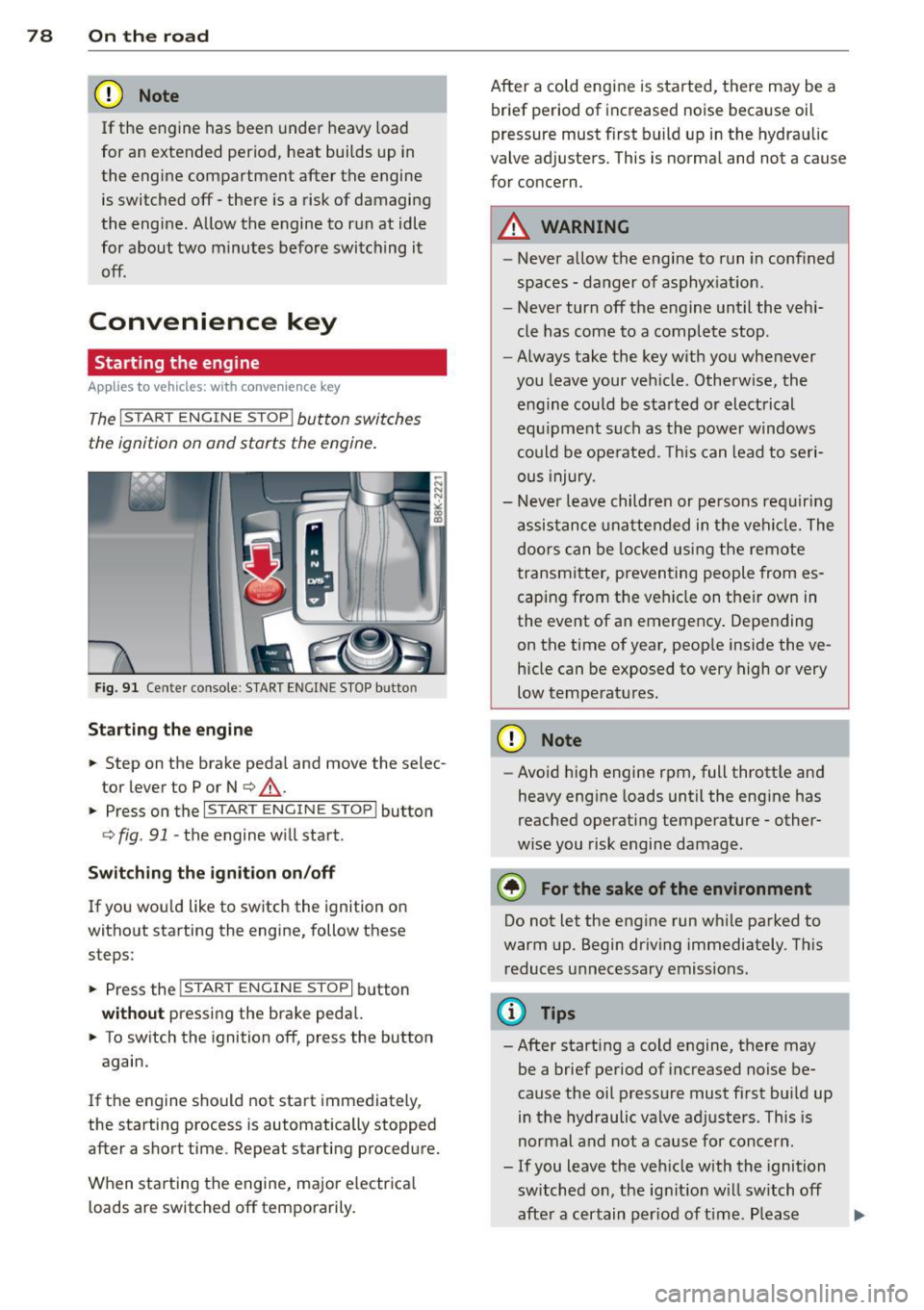
The I STAR T ENGINE S TOP! button switches
the ignition on and starts the engine .
Fig. 91 Cente r conso le: S TART ENGINE S TOP butto n
Starting the engine
.. Step on the brake peda l and move the selec
tor lever to P or N
q &, .
.. Press on the ,..., 1s==T=--= A-=R ==T:-=:E~N ~G-;-,IN ;-;--;:::: E--;: S:-::;T =-::O :;-;: P:;-,I butto n
q fig. 91 -the engine w ill start .
Switch ing the ignition on /off
If yo u wou ld like to switch the ignition on
without starting the engine, follow these
steps:
.. Press the
!S TAR T ENGINE STOP! button
without pressing the brake peda l.
.. To switch the ignition off, press the button
again.
If the engine should not start immediately,
the starting process is automatically stopped after a short time . Repeat starting procedure.
When starting the engine, major e lectr ica l
loads are switched off temporarily. After a cold engine is started, there may be a
brief period of increased noise beca use oil
pressure must first bu ild up in the hydrau lic
valve adjusters. This is normal and not a cause
for concern .
A WARNING
=
-Never allow the engine to run in confined
spaces -danger of asphyx iat ion.
- Never turn off the e ngine until the vehi
cle has come to a complete stop.
- Always take the key with you whenever
you leave your veh icle . Otherw ise, the
engine could be started or electrical
equ ipment such as th e power windows
could be ope rated. Th is can lead to seri
ous injury.
- Never leave children or persons req uiring
a ssis tance u nattended in t he vehi cle. The
doors can be locked usi ng the remote
transmitter, preventing people from es
caping from the veh icle on the ir own in
the event of an emergency . Depending
on the time of year, peop le inside the ve
hicle can be exposed to very high or very
low temperatures.
(D Note
- Avoid high engine rpm, full thrott le and
heavy eng ine loads unt il the eng ine has
reached operating temperature -other
w ise you risk engine damage.
® For the sake of the env ironment
Do not let the engine run wh ile parked to
warm up. Begin dr iving immediately. This
reduces unnecessary emissions .
¢j) Tips
- After starting a co ld engine, there may
be a brief period of increased noise be
cause the oil pressure must fi rst bu ild up
in the hydraulic valve ad justers. This is
normal and not a cause for concern .
- If you leave the veh icle with the ignition
switched on, the ignit ion w ill switch off
afte r a certain per iod of t ime . Please
1JJ1,
Page 81 of 290

note that electrica l equipment such as
exterior lights wi ll switch off as well
when that happens.
Switching engine off
App lies to vehicles: with conve nien ce key
.,. Bring your vehicle to a complete stop.
.,. Move the selector lever to the P or N posi
t ion.
... Press the
!START E NGIN E STOPI button
~fig. 91.
St eering lock
The steering locks when you turn the engine
off us ing the
I STAR T ENGINE STOP I button
and open the dr iver's door . The locked steer
ing he lps prevent vehicle theft.
E mergenc y off
If necessary, the eng ine can be sw itched off
with the selector lever in the R or D/S pos i
tions. To do so, step on the brake peda l and
press and hold the
I STAR T ENGINE STOP I but
ton vehicle speed must be less than 6 mph
(10 km/h).
.&, WARNING
-Never t urn off the eng ine be fore the ve
hicle has come to a complete stop . The
f ull function of the brake booster and the
power steering is not guaranteed . You
must use more force to turn or brake if
necessary. Because you cannot steer and
brake as you usua lly would, this could
lead to c rashes and serious injur ies.
- For safety reasons, you should always
park your vehicle with the se lector lever
in P . Otherwise, the veh icle could i nad
vertent ly roll away .
- The rad iator fan can continue to run for
up to 10 minutes eve n after you have
tu rned off the eng ine and removed the
ignition key. The radiator fan can also
turn on again i f the engine coolant hea ts
up because of intense sunlight or hea t
build -up in the engine compartment.
On th e ro ad 79
-Always take the key w ith you whenever
you leave your ve hicle. Otherw ise, the
e ngine could be started or electrical
equipment such as the power windows
could be operated. This can lead to seri
ous injury.
(D Note
If the engine has been under heavy load
for an extended period, heat bu ilds up in
the eng ine compartment after the eng ine
i s sw itched off - there is a r is k of damag ing
the e ngine. A llow the eng ine to run at id le
for abo ut two minutes before switching it
off.
Driver messages
I g nition i s on
This message appears and a warning tone
sounds if you open the d river's door when the
ignition is sw itched on .
No key ident ified
This message appears when the
I S TART ENGINE STOP I button is pressed if
there is no master key ins ide the ve hicle or if
the system does not recognize it . For exam
ple, the master key cannot be recognized if it
i s covered by an object (e .g . aluminum brief
case) which
screens the radio s ignal. Electron
ic dev ices such as cell p ho nes can also inte r
f ere with the radio s ignal.
Pr ess brake p edal to start engine
This message appears if you do not press the
brake pedal to start the eng ine .
Shift to N or P to start engine
T h is message appears w hen a ttempt ing to
star t the eng ine if the selecto r lever for the
automatic transmiss ion is not in the P or N
pos ition . The engine can only be started with
the se lector in these positions.
Is the ke y in the vehicle ?
Page 82 of 290
80 On the road
This message appears if the master key is re
moved from the vehicle with the engine run
n ing.
If the master key is no longer in the ve
hicle, you cannot switch on the ignition after
stopping the engine and you also cannot start
the eng ine again . Moreover, you can not lock
the veh icle from the outside w ith the key.
Shift to P otherwise vehicle can roll away.
Doors do not lock if lever is not in
P.
This message appears for safety reasons
a long w ith a warning signa l. It appears if the
selector lever for the automat ic transm iss ion
is not in the P position when switch ing off the
ignition . Move the selector lever to the P pos i
tion, othe rwise the ve hicle is not secured
against rolling away . You also cannot lock the
vehi cle using the locking bu tton* on the door
han dle or using the remote key.
Convenience key defective! Use ignition lock
This message appears if the eng ine must be
started or stopped using the ignition key and
not the
I STAR T ENGIN E ST OP ! button .
Electromechanical
parking brake
Operation
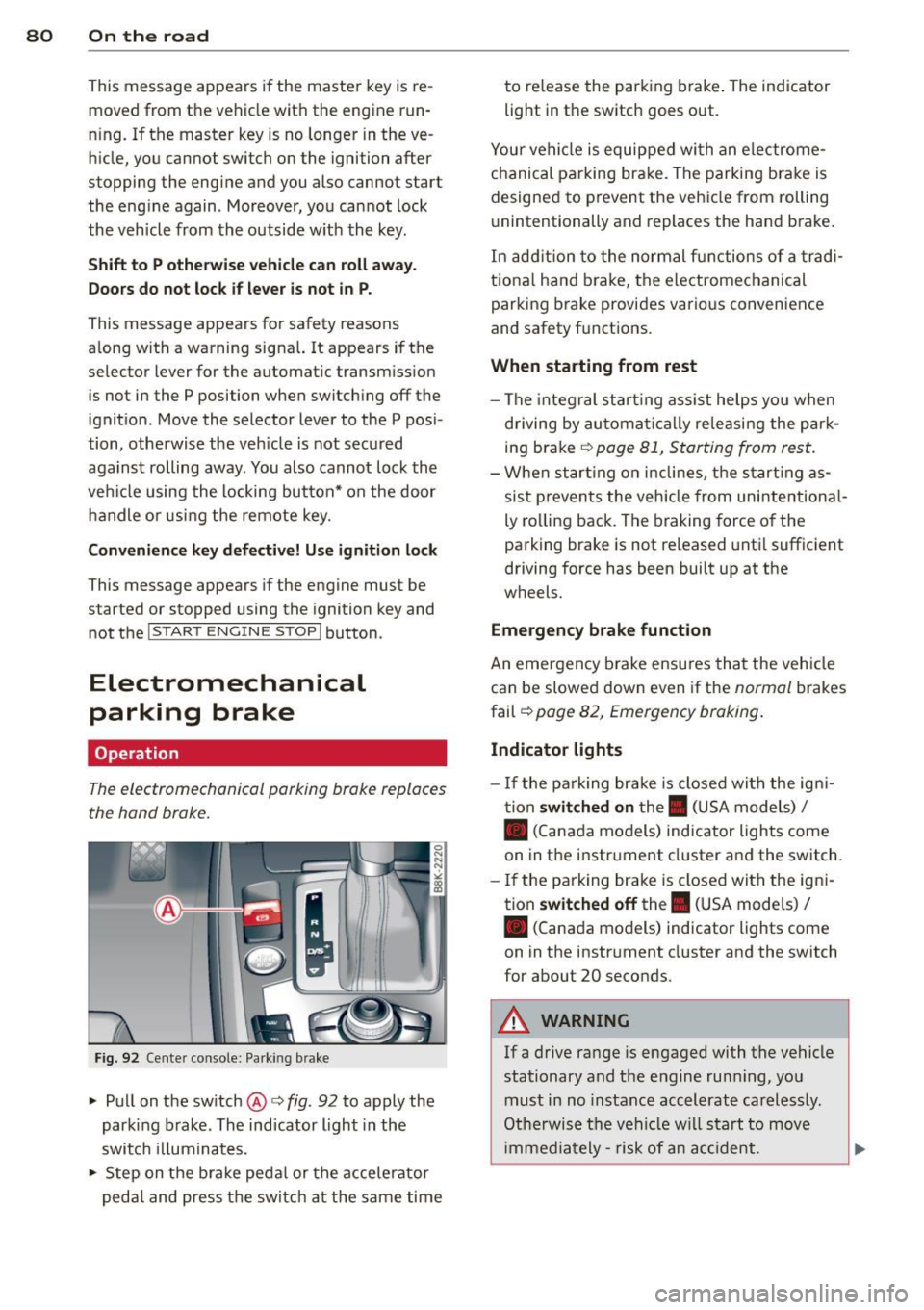
The electromechanicol parking brake replaces
the hand brake.
F ig. 92 Cente r console: Parking brake
.., Pull on the switch @c:> fig. 92 to apply the
parking brake. The indicator light in the
switch illum inates .
.., Step on the brake peda l or the accele rator
pedal and press the switch at the same time to re
lease the par king brake . The indicator
light in the switch goes out.
Your vehicle is equipped wi th an electrome
chanical parking brake . The parking brake is
designed to prevent the vehicle from rolling
u nintentionally and replaces the hand brake.
In addition to the normal fun ctions of a tradi
tiona l hand b rake, the electromechanical
parking brake provides various convenience
and safety f unctions .
When starting from rest
-The integral start ing assist helps you when
driving by automatica lly re leasing the par k
ing brake
c:> page 81, Starting from rest.
-When starting on inclines, the starting as
sist prevents the vehicle from unintentiona l
ly ro lling back. The braking force of the
parking brake is not released until sufficient
driving force has been built up at the
wheels.
Emergency brake function
An eme rgency b rake ensures that the vehicle
can be slowed down even if the
normal brakes
fail c:>
page 82, Emergency braking .
Indicator lights
- If the parking brake is closed with the igni
tion
switched on the. (USA models) I
• (Canada models) ind icator lights come
on in the instr ument cluster and the switch .
- If the parking brake is closed with the igni
tion
switched off the . (USA models) I
• (Canada models) indicator lights come
on in the instrument cluster and the switch
for about 20 seconds .
A WARNING
-
If a drive range is engaged with the vehicle
stationary and the engine runn ing , you
must in no instance accelerate carelessly.
Otherwise the vehicle will start to move
i mmed iately- risk of an acc ident.