ignition AUDI A5 CABRIOLET 2013 Owner's Manual
[x] Cancel search | Manufacturer: AUDI, Model Year: 2013, Model line: A5 CABRIOLET, Model: AUDI A5 CABRIOLET 2013Pages: 290, PDF Size: 72.35 MB
Page 36 of 290
34 Openin g and clo sing
@ For the sake of the environment
Dispose of dead batteries proper ly so as
not to pollute the environment.
@ Tips
The replacement battery must be the
same specification as the original.
Emergency unlocking of the ignition key
In the event of malfunctions in the electrical
system, it may happen that you cannot re move the ignition key .
,. Remove the me chanical key c> page 33.
,. Lock the vehicle using the mechanical key
i=>page 36.
,. Have the electrical system inspected by an
authorized Audi dealership.
Locking and unlocking the vehicle with
the remote control
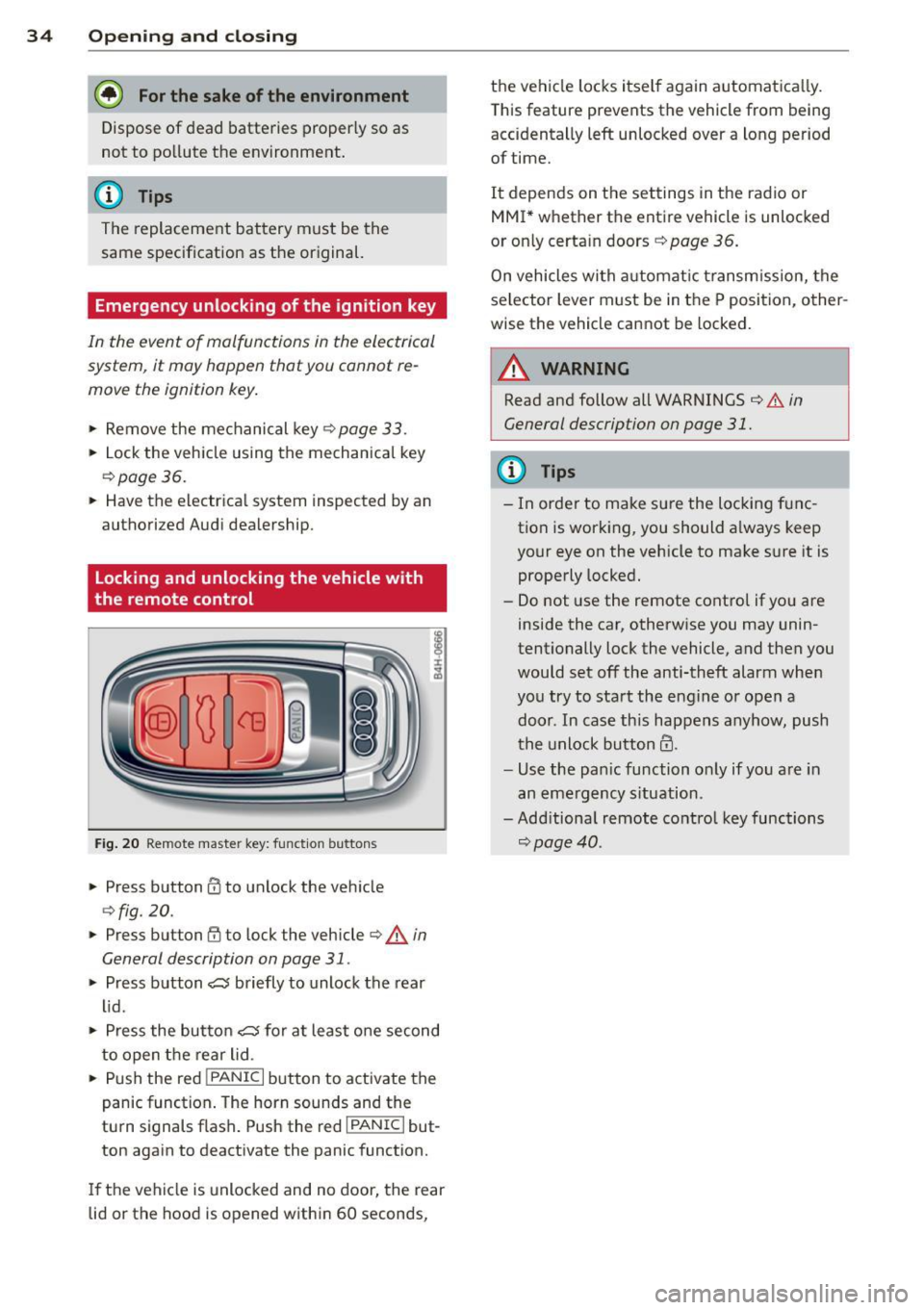
Fig . 20 Remote master key: funct ion buttons
,. Press button 0 to unlock the vehicle
c>fig. 20.
,. Press button ff) to l ock the vehicle c> A in
General description on page 31.
,. Press b utton cs briefly to unlock the rear
lid.
,. Press the but to n
cs for a t least one second
to open t he rear lid.
,. Push the red
I PANIC I button to activate the
panic function . The horn sounds and the
tu rn signals flash . Push the red
I PANIC I but
ton again to deactivate the panic function.
If the vehicle is unlocked and no door, the rear
lid or the hood is opened within 60 seconds, the vehicle locks itself again automatica
lly.
T his feature prevents the vehicle from being
accidentally left unlocked over a long period
of time.
It depends on t he settings in the radio or
MMI * whether the entire vehicle is unlocked
or on ly certain doors¢
page 36.
On vehicles wi th a utomatic transm ission, the
selector lever must be in the P position, other
wise the vehicle cannot be locked.
.&_ WARNING
--
Read and follow all WARNINGS ¢ & in
General description on page 31.
(D Tips
- In order to make sure the locking f unc
tion is work ing, you should a lways keep
your eye on the vehicle to make s ure it is
properly locked .
- Do not use the remote cont rol if yo u are
inside the car, otherw ise you may unin
tentionally lock the vehicle, and then you
would set off the anti-theft alarm whe n
you try to sta rt the engine or open a
door. In case this happens anyhow, push
the unlock button@.
- Use the pa nic function o nly if you a re in
an eme rgency s ituation.
-Add itiona l remote co ntrol key functions
¢ page 40.
Page 38 of 290
36 Opening and clo sing
- You cannot open the doors or the rear lid
from the
outside (increased security, for ex
amp le when you are stopped at a red light).
- The diodes in the power locking switch illu
minate when all the doors are closed and
locked .
- You can unlock and open the doors from the
inside by pulling on the door hand le .
- If you have a crash and the airbag is activat
ed, the doors automatically un lock .
.&_ WARNING
- The power locking switch works with the
ignition off and automatically locks the
entire vehicle when it is actuated .
- On a vehicle locked from the outs ide the
power locking system switch is inopera
t ive .
- locked doors make it more difficult for
emergency workers to get into the vehi
cle, which puts lives at risk . Do not leave
anyone beh ind in the veh icle, especially
children.
(D Tips
Your vehicle is locked automatically at a speed of
9 mph (15 km/h) (Auto lock)
~ page 31. You can unlock the veh icle
again using the opening f unction in th e
power locking sys tem switch
@I.
Setting power locking
In the radio/MM!*, you can set which doors
the central locking system will unlock.
• Select : I CARI function button > C e ntral lock
ing .
Or
• Se lect:
~IC_A_R~I funct ion button > Car s ys·
tem s*
control button > Vehicl e settings >
(Central lo cking )* .
Sing le door un locking /Unlock do ors* -
you
can specify which doors un lock when you open
the veh icle .
- Se lecting
off /All and pressing the I@ b utton
on the remote cont ro l key unlocks the entire
vehicle . -
Selecting
on/Dri ver and pressing the~ but
ton on the remote control key once un locks
only the driver 's door. In vehicles w ith a con
ven ience key*, only the door whose handle
you pull will unlock. If you press the
@J but
ton tw ice, the entire vehicle will un lock .
If
you p ress the I@ b utton, t he ent ire ve hicle
w ill always lock.
Luggage comp. lock /Lock e xterior trunk han
dle -
If you select On, you can no longer ope n
t h e luggage compartment usi ng the rea r lid
hand le ~
fig . 25 . In this case, the rear lid can
be opened with the
l=I button on the master
k ey~
fig . 20.
Ton e when locking -if you select On, a tone
will sound when yo u lock the vehicle .
Auto Lock/Lock when dri ving -if you select
On, the entire vehicle w ill lock automatica lly
when the speed reaches
9 mph ( 1 5 km/h) .
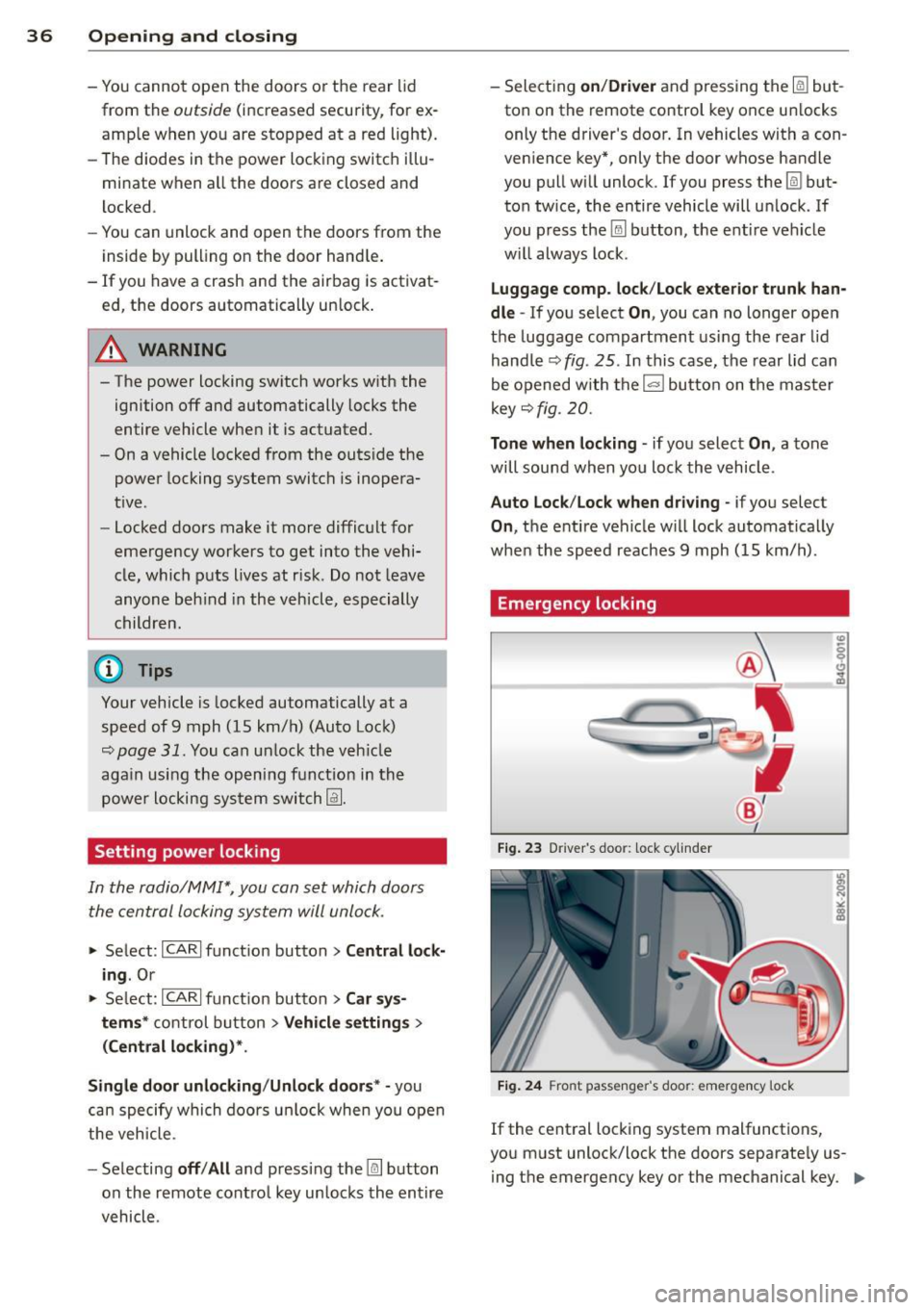
Emergency locking
Fig. 23 D river 's doo r: lock cy linder
Fig. 24 Fro nt passenger 's doo r: emergency lock
If the central locking system malfunctions,
you must unlock/lock the doors separate ly us
i ng the emergency key or the mechanical key. .,.
Page 39 of 290
Unlocking/ loc king th e dri ver' s door with
th e m ech anical k ey
• Remove the mechanical key¢ page 33.
• To unlock the driver's door, turn the key to
the open position@¢
fig. 23.
• To lock the driver's door, move the selector
lever to the P position (automatic transmis
s ion) and turn the key
o nc e to the close posi
tion
@ ¢&. in General description on
page 31.
Locking the front pa ssenger' s door with
th e mechanical ke y
The emergency lock is located on the rear side
of the front passenger's door.
It is on ly visible
when the door is open.
• Remove the mechanical key¢
page 33.
• Pull the cover cap out of the opening
¢fig. 24.
• Insert the key i n the inside slot and turn it
all the way to the right.
Once the front passenger's door has been
closed, you cannot open it again from the out
side. The door can be opened from the inside
by pulling the doo r handle.
A WARNING
Read and follow a ll WARNINGS¢ ,1. in
General description on page 31.
@ T ips
After the ign ition is swi tched on, the pow
er locking system switch is enab led.
Electronic immobilizer
The immobilizer prevents your vehicle from
being started by unauthorized persons.
-
I nside the key there is a computer chip. This
ch ip automatically activates/deactivates the
e lectronic immob ilizer.
Appli es to v eh icl es with ign ition lock :
The electronic immobilizer deactivates auto
mat ica lly when you insert the remote control
key into the ignition lock.
It activates again
Op enin g an d clos ing 3 7
automatica lly when you remove the remote
control key from the ignition lock.
Applies to veh icles with convenien ce ke y:
If the remote control key is located inside the
vehicle and you press the
I START ENGINE STOPI button, the electro nic
immobilizer deactivates a utomatically. If you
switch the ignition
off and remove the remote
control key from the vehicle, the electronic immobilizer activates again automatically.
A WARNING
-
Always take the key with you when you
leave the vehicle. The key can disarm the
electronic engine immobilizer and permit
an unauthorized person to start the engine
and enable operation of the vehicle sys
tems such as power w indow or power sun
roof leading to serious personal injury.
© Tips
- T he veh icle cannot be started if an unau
tho rized key is used. The vehicle may not
start if another radio device s uch as a key
for another ve hicle or a transponder is
located on the key ring .
- For Declaration of Comp liance to United
States FCC and Ind ustry Canada reg ula
tions ¢
page 2 72.
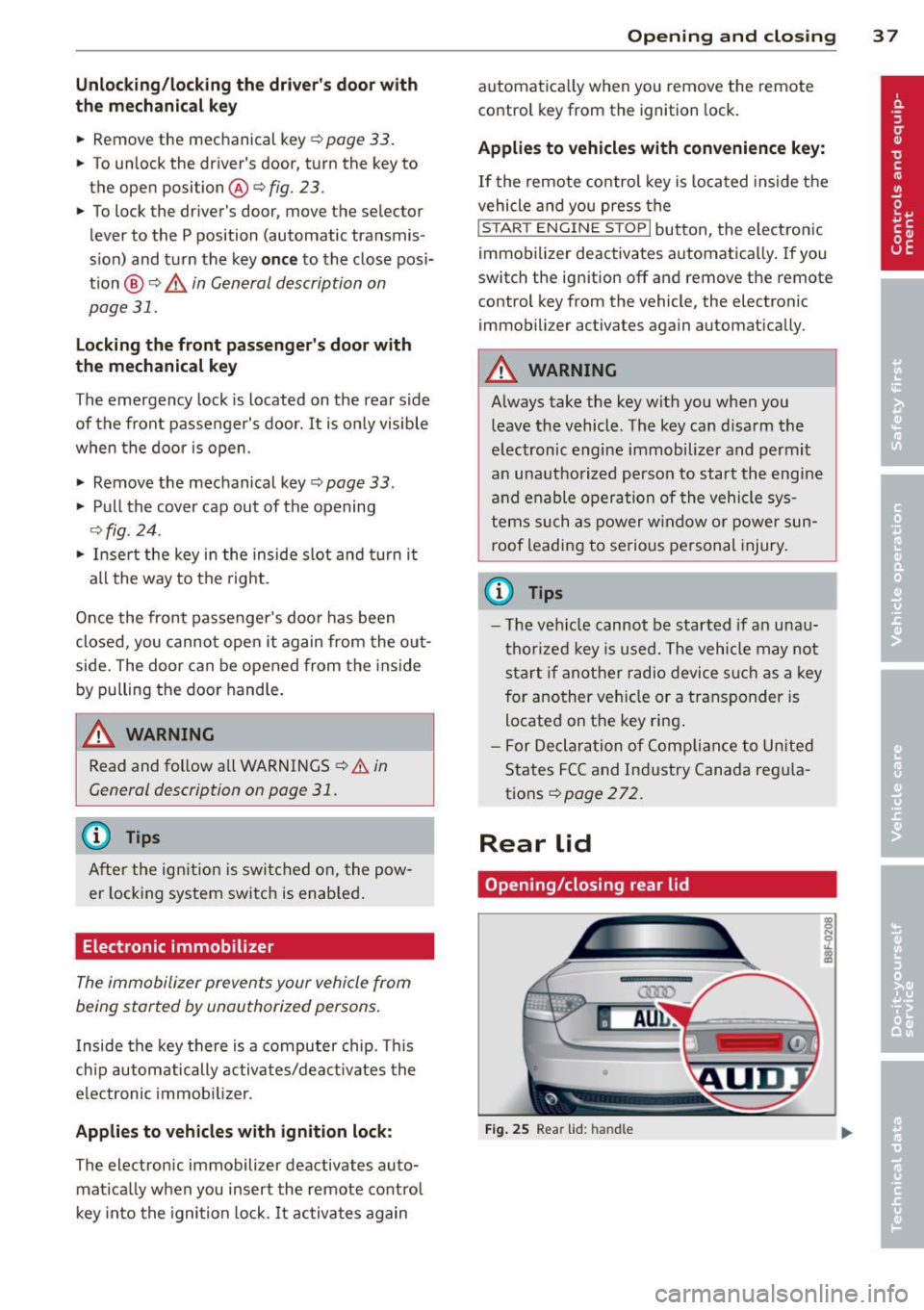
Rear lid
Opening /closing rear lid
F ig . 25 Rear lid: handle
Page 41 of 290
@ Tips
The emergency release lever should never
be used as a handle for closing the lug-
gage compartment lid.
Power windows
Controls
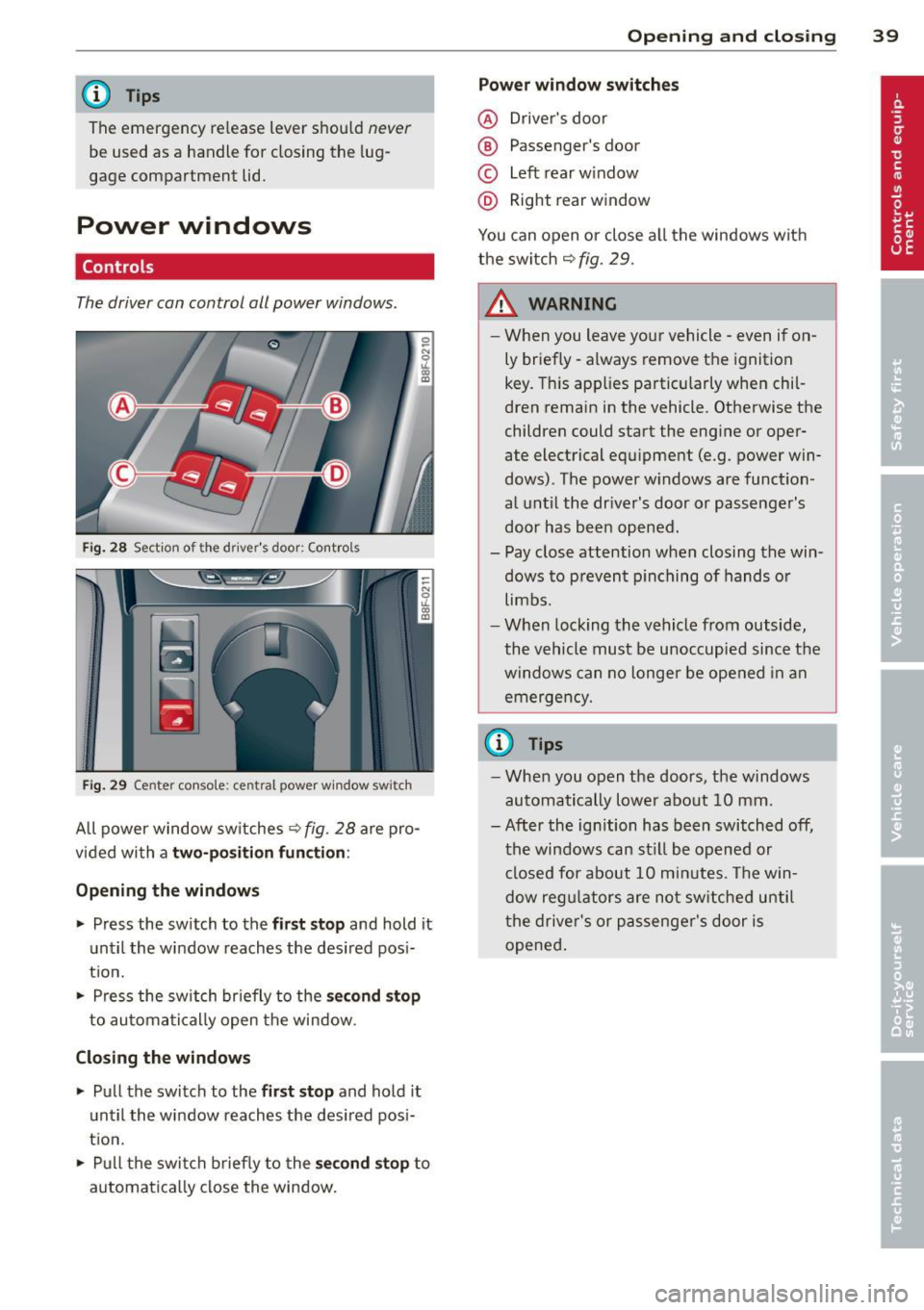
The driver can control all power windows .
Fig. 28 Sectio n of the dr ive r's d oor: Control s
l
I I
I
Fig. 29 Cente r con sole: cen tral power window sw it c h
All power window switches Q fig. 28 are pro
v id ed with a
two-position function:
Opening the windows
.,. Press the switch to the first stop and hold it
until the window reaches the desired pos i
t ion .
.. Press the switch briefly to the
se co nd stop
to automatically open the window.
Closing the windows
.,. Pull the switch to the first stop and hold it
until the window reaches the desired pos i
tion .
.,. Pull the switch brief ly to the
second stop to
automatical ly close the window.
Opening and closing 39
Power window switches
@ Driver's door
® Passenger's door
© Left rear window
@ Right rear window
You can open or close a ll the windows with
the switch
Q fig. 29.
_&. WARNING ..-
- When you leave your vehicle - even if on-
ly briefly -always remove the ignition
key. This applies particularly when chil
dren remain in the vehicle. Otherwise the
children could start the engine or oper
ate electrical equ ipment (e.g . power win
dows). The power w indows are function
al until the driver's door or passenger's
door has been opened.
- Pay close attention when closing the win dows to prevent pinching of hands or
limbs.
- When locking the vehicle from outside,
the vehicle must be unoccupied since the
windows can no longer be opened in an
emergency.
{D Tips
- When you open the doors, the windows
automatically lower about
1 0 mm .
- After the ignition has been switched off, the windows can st ill be opened or
closed for about
10 minutes. The win
dow regu lators are not switched until
the driver's or passenger's door is
opened .
Page 43 of 290
-1<=>1 button on the master key
- Handle in the rear lid
When the valet parking feature is act ivated,
the message
Val et par king activat ed appears
i n the ins trument cluster display when you
switch the ignition on. Opening and clo
sin g 41
Page 46 of 290
44 Power top
Reduce the vehicle speed below 50 km/h and
use the switch to open or close the powe r top
comp lete ly.
.&_ WARNING
Never drive when the powe r top is not
locked co rrectly. The w ind from dr iv ing
co uld cause t he power top to open. Th is
can r esult in injuries a nd damage to th e
veh icle .
Opening or closing the power top
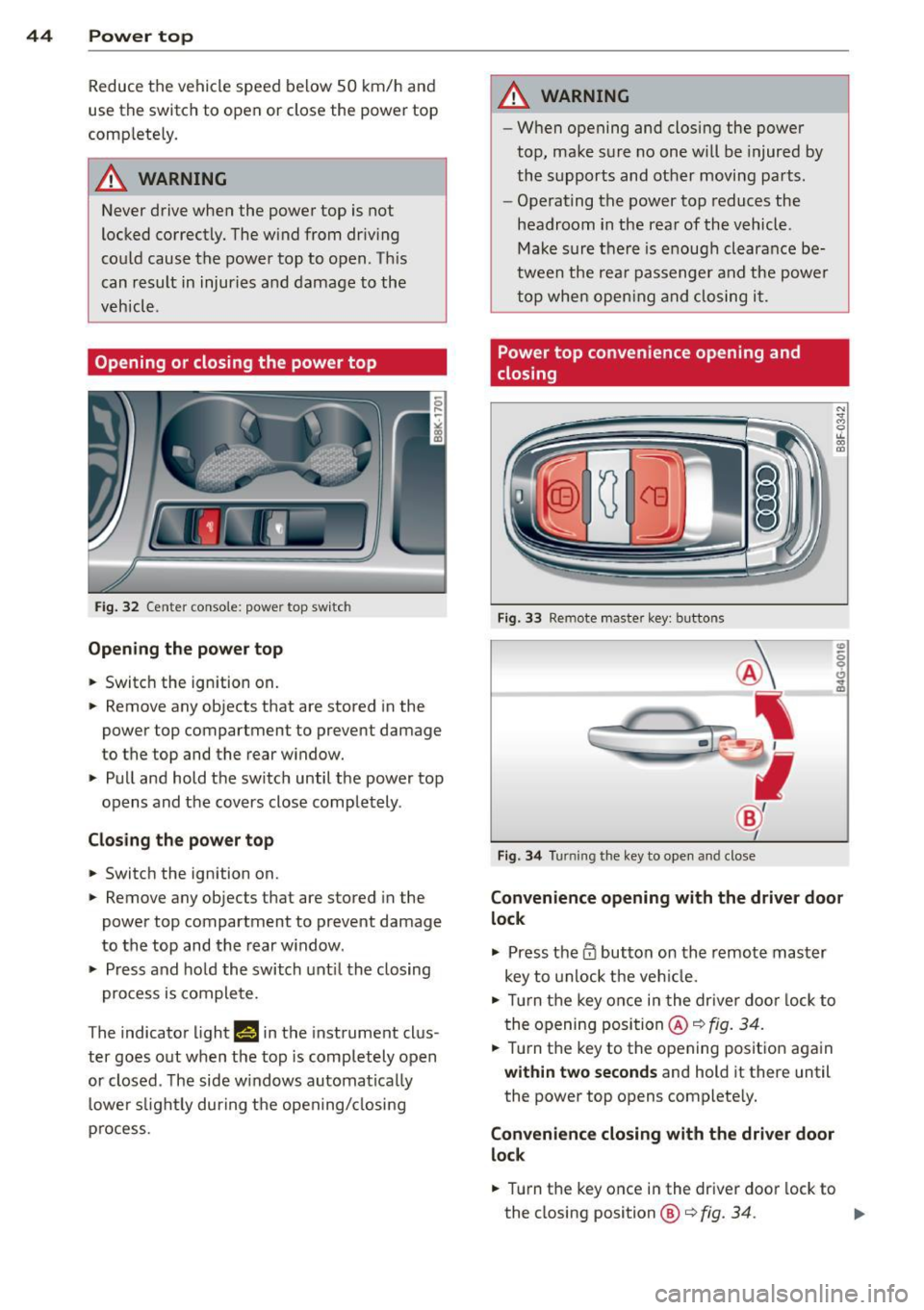
Fig. 32 Ce nte r conso le : powe r top sw itc h
Opening the power top
.. Switc h the ign ition on .
-
.. Remove any objects that are stored in the
power top compartment to preve nt damage
to the top and t he rear w indow .
.. Pull and hold t he swi tc h until t he power top
opens and the cov ers close compl ete ly .
Closing the power top
.. Switch the ignition on .
.. Remove any objects that are stored in the
power top compartment to prevent damage
to the top and the rear w indow .
.. Press and ho ld the swi tch unt il t he closing
pro cess is co m plete.
T he indicato r light
1#§ 111 the instrument clus
ter goes o ut w hen the top is compl etely open
or closed . T he side w indows automa tica lly
l owe r slig htl y during t he open ing/ closing
p rocess.
.&_ WARNING
-- Wh en opening and closing the powe r
top, ma ke s ure no on e w ill be injur ed by
the supp orts and ot her movi ng pa rts .
- Ope rat ing the power top reduces the
headroom in the rea r of the vehicl e.
M ake sur e th ere i s enoug h clear an ce be
twee n the rea r passenger an d the power
t o p whe n openin g an d clos ing i t.
Power top convenience opening and
closing
Fi g. 33 Remote maste r key : butto ns
Fig . 34 Turnin g the key to ope n an d close
Convenience opening with the driver door
lock
.,. Press them butto n on th e r emo te ma ster
key to unlock t he ve hicle.
.. Tu rn the key on ce i n t he drive r do or l ock to
t he openi ng posi tion @~
fig. 34 .
.. Tur n the key to t he opening posit io n aga in
within two seconds and hold it there until
the power top opens complete ly.
Convenience closing with the driver door
lock
.. Turn the key once in the driver door lock to
the closing position@¢
fig. 34. ..,.
Page 55 of 290
@ Tips
-The light sensor * for headl ight control is
l ocated in the rear view m irror mount.
You should therefore not apply any st ick
ers to the windsh ield in this area in order
to prevent malfunctions or failures .
- Some exterior lighting functions can be
ad justed
¢ page 53.
-When yo u remove you r key from the igni
tion w hile the vehicle's lights are turned
on, a buzzer sounds as long as the driv
er's door is open .
- In cool or damp weather, t he ins ide of
the headlights, turn signa ls and tail
li ghts can fog ove r due to the tem pera
ture diffe ren ce betwe en the inside and
outside. They will clear shor tly after
swi tching t hem on. This d oes not aff ect
the service life of the ligh ting.
- In the even t of a ligh t sensor malfunc
tion, the drive r is no tifie d in the inst ru
ment cluster disp lay ~
page 2 2.
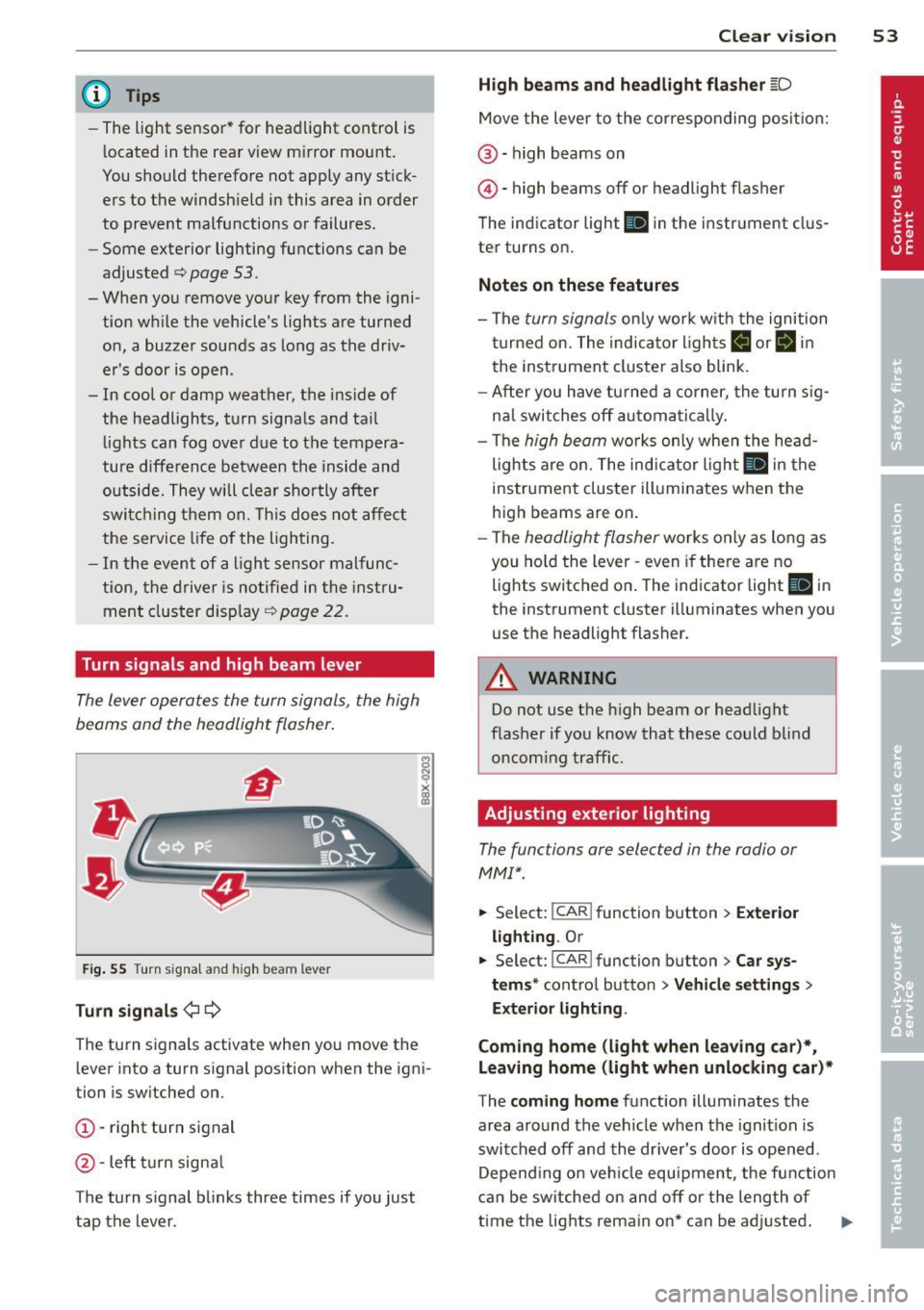
Turn signals and high beam lever
The lever operates the turn signal s, the high
b eams and th e headlight flash er.
F ig. 55 Turn sig na l an d high beam leve r
Turn signals ¢i ¢
Th e turn s ignals activate when you move the
l ever into a turn s ignal position when the ign i
tion i s sw itched on.
(D -right turn signal
@ -Left turn signa l
T he turn s ignal b links three times if you just
tap the lever .
Clear vision 5 3
High beams and headlight flasher @:D
Move the lever to the corresponding posit io n:
@ -high beams on
@-high beams off or headlight flasher
T he ind icator light
II in the instr ument clus
ter turns on .
Notes on these features
-The turn signals on ly wor k w it h t he ignition
t urned on. The indica tor l igh ts
11 or II in
the instrument cluste r also blink .
- Aft er you have tu rned a corner, the turn s ig
na l swi tches off au tom atically .
- The
high beam wo rks only when the head
lights a re on. The indicator Ligh t. in the
i nstrumen t clus ter illuminates when the
high beams are on .
- The
headligh t flasher works on ly as long as
you ho ld the lev er -even if the re are no
lights switched o n. The ind icator light
Ill i n
the inst rument cluster illuminates when you
use the headlight flasher .
&_ WARNING
Do not use the high beam or head light
flasher if you kn ow that these could b lind
oncom ing traffic.
Adjusting exterior lighting
The functions are selec ted in the radio or
MM!* .
.. Select : I CAR! function b utton > Exter io r
light ing . Or
.. Select: I CAR I func tion button > Car sys
tems *
control button > Vehicle settings >
Exterior Lighting .
Coming home (light when leaving car )*,
Leaving home (light when unlocking car)*
T he coming home function illumi nates the
area around the vehicle when the ignition is
switched off and the dr iver's door is open ed.
Depend ing o n ve hicl e equ ipment, t he function
can be switched on and off or the length of
time the lig hts remain on* can be ad justed . .._
Page 56 of 290
54 Clear vis ion
The lea ving home function i lluminates the
area around the vehicle when unlocking it.
This funct ion can be switched on and
off.
The co ming h ome and le av ing h ome func
tions on ly operate when it is dark and the
light switch is in the AUTO position
r=:> fig. 54.
Auto headlight s*
When the light switch is in the AUTO
r=:> page 52 position, the sw itch-on po int of the
lights can be changed in the automatic dr iv ing
light function.
Daytime running lights
US A mo del s: You can switch the dayt ime run
ni ng lights
on and off .
Ca nada mod els :
The function cannot be
turned
off . It is activated automat ically each
time the ignition is switched on.
Tra vel mode*
The headlight beam is asymmetrical. This pro
vides stronger illum ination on the side of the
road on wh ich you are driving . If you are driv
ing in a country that drives on the opposite
side of the road from your own country, t his
will cause glare for oncoming dr ivers. To pre
vent glare:
- Trave l mode must be selected in vehicles
with Xenon head lights *.
- In vehicles with halogen headlights, ce rtain
areas of the head light lenses must be cov
ered w ith waterproof adhesive covers that
prevent light from passing through . Fo r
more information, please see your author
ized Audi dea ler or authorized repair facility .
@ Tips
When travel mode is a ctiv ated, a displ ay in
the dr iver information system indi cates
this each time you switch t he ignition on.
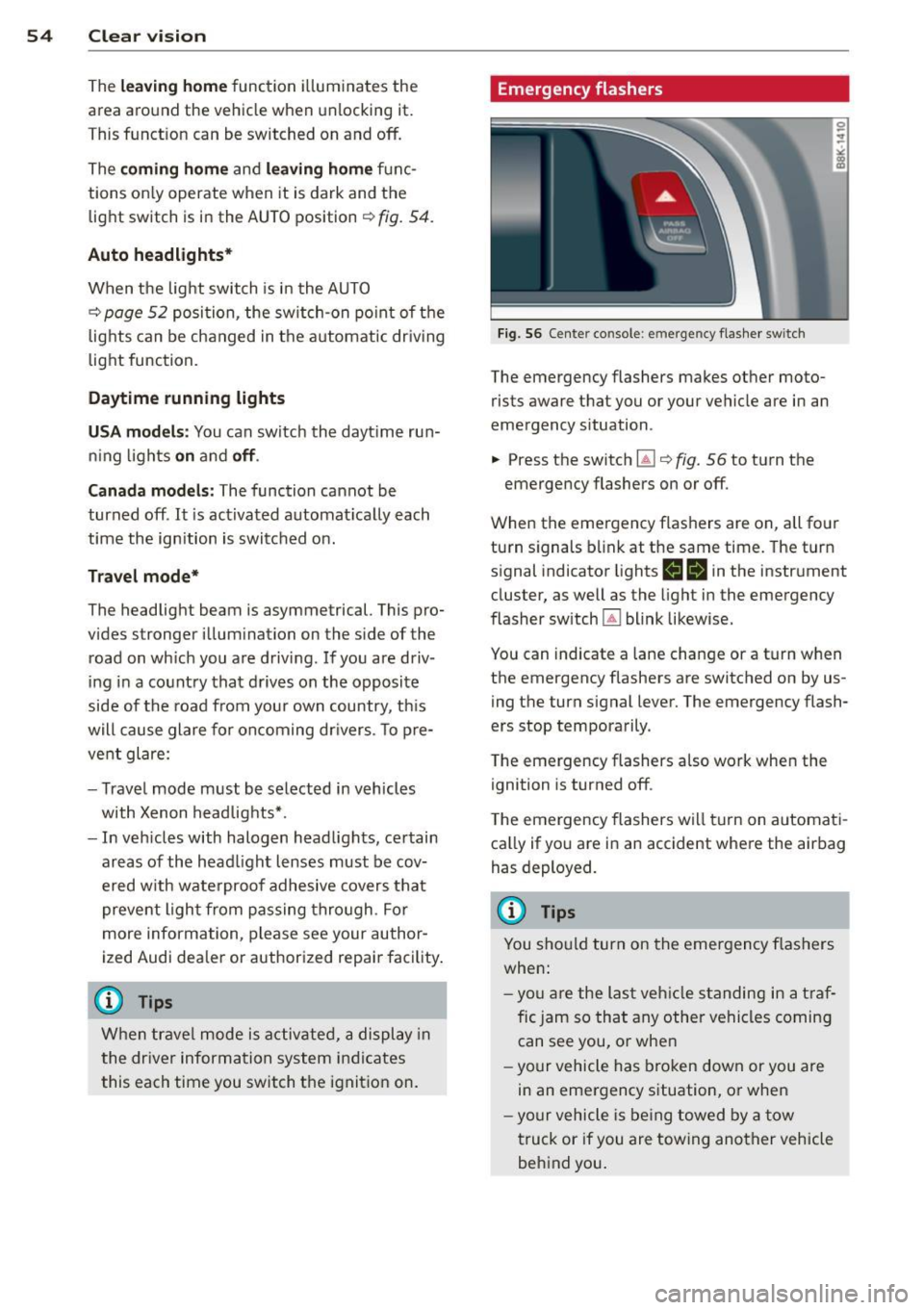
Emergency flashers
F ig. 56 Center console: em erge ncy flashe r switch
The emergency flashers makes other moto
rists aware that you or your vehicle are in an
emergency situation.
... Press the switch ~¢
fig. 56 to turn the
emergency flashers on or
off.
When the emergency flashers are on, all four
turn signals b link at the same time. The turn
s ignal indicator lights
H II in the instrument
cluster, as well as the light in the emergency
flasher switch ~ blink likewise.
You can indicate a lane change or a tu rn when
the emergency flashers are switched on by us
ing th e turn signal lever. The emergency flash
ers stop temporarily .
T he emergency flashers also work when the
ignition is turned
off .
The emergency flashers wi ll tu rn on automat i
ca lly if yo u are in an accident where the air bag
has deployed.
(D Tips
You sho uld turn on the emergency flashers
when:
- yo u are the last veh icle standing in a t ra f
fic jam so that any other vehicles coming can see you, or whe n
- yo ur vehicle has bro ken down or you are
in an emergency situation, or when
- yo ur vehicle is be ing towed by a tow
truck or if you are towing ano ther vehicle
behind you .
Page 57 of 290
Interior lights
Front/rear interior lights
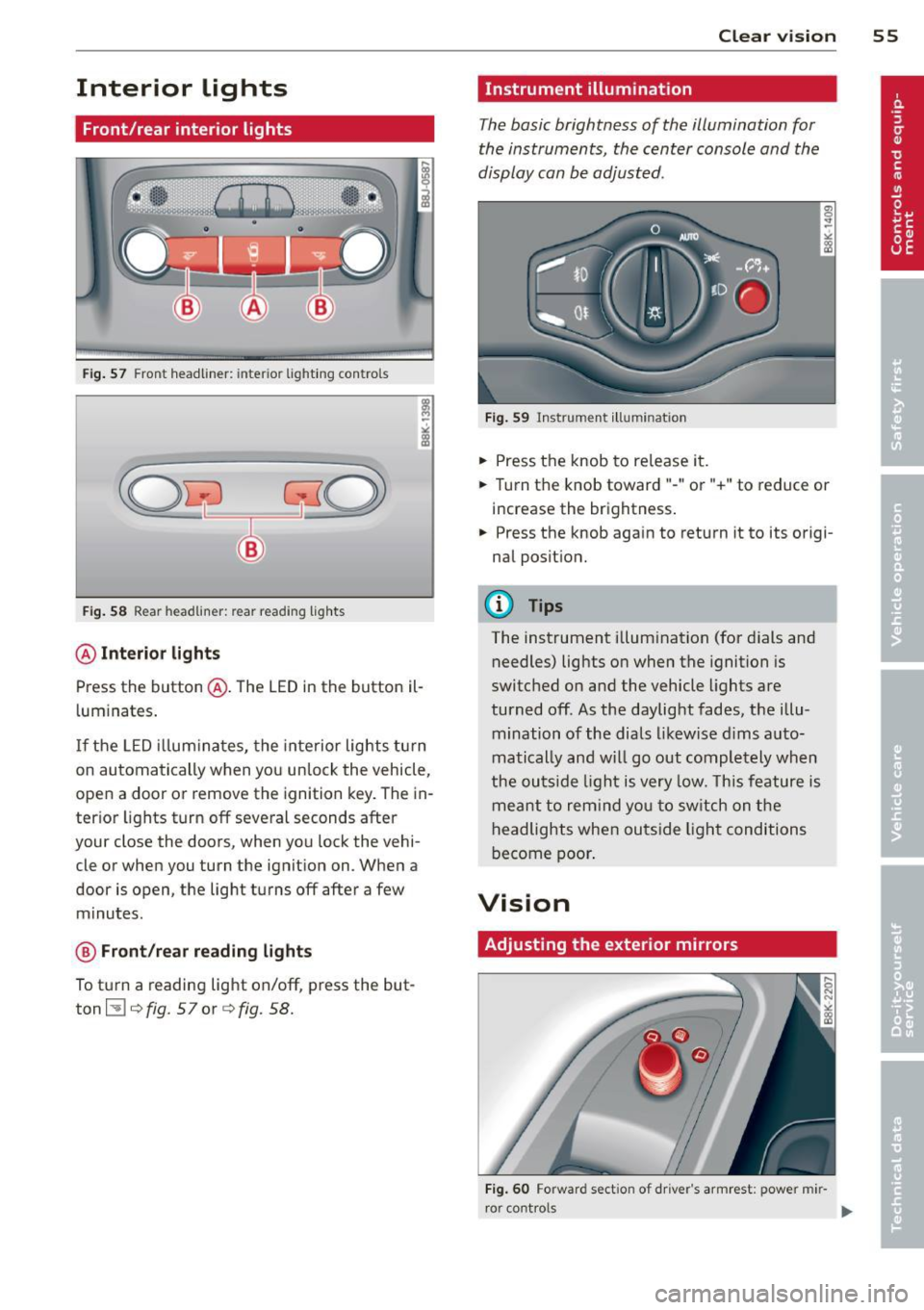
Fig. 57 Front headliner: inter ior lighti ng controls
Fig. 58 Rear headlin er: rear reading lights
@ Interior lights
Press the button @. The LED in the button il
l uminates .
If the LED illuminates, the interior lights turn
on automatically when you unlock the vehicle,
open a door or remove the ignition key. The in
terior lights turn off several seconds after
your close the doors, when you lock the vehi
cle or when you turn the ignition on. When a
door is open, the light turns off after a few
minutes.
@ Front/rear reading lights
To turn a reading light on/off, press the but
ton ~¢
fig. 57or ¢fig. 58.
Clear vision 55
Instrument illumination
The basic brightness of the illumination for
the instruments, the center console and the
display can be adjusted.
Fig. 59 Instrument illumination
.,. Press the knob to release it .
.. Turn the knob toward"-" or"+" to reduce or
increase the brightness .
.,. Press the knob aga in to return it to its origi
nal position.
(D Tips
The instrument illumination (for dials and
needles) lights on when the ignition is
switched on and the vehicle lights are
turned off. As the daylight fades, the illu
mination of the dials likewise dims auto
matically and will go out completely when
the outside light is very low. This feature is
meant to remind you to switch on the
headlights when outside light conditions
become poor.
Vision
Adjusting the exterior mirrors
Fig. 60 Forward sect ion of dr iver 's armrest: power mir
r or cont rols
Page 58 of 290
56 Clear vis ion
Turn the knob to the desired position :
Q/P -In t his position , you can adjust the
driver's and front passenger's exter ior mirrors
by turn ing the knob in the des ired direction.
(jjjl -The mirrors are heated depending on the
outside temperatu re.
P assenger exterio r m irro r tilt func tion*
( onl y with memor y for ext erior mirrow s)
To help you see the curb when backing into a pa rking space, the surface of the m irror t ilts
slightly . The knob m ust be in the
P posit ion
for this to happen .
You can adjust the ti lted mirror surface by
turning the knob in the desired direction .
When you move out of reverse and into anoth
e r gear, the new mirror posi tion is stored and
assigned to the key you are using.
The mirror goes back into its origina l posit io n
once yo u drive forward f aster than 9 mph
(15 km/h) or switch the ignition off .
_& WARNING
Curved mirror s urfaces (convex or spheri
cal *) increase your field of view . Remem
ber that vehicles or other objects will ap
pear smaller and farther away than when
seen in a flat m irror. If you use this mirror
to estimate distances of following veh icles
when changing lanes, you could estimate incorrectly and cause an accident .
{CT) Note
- If you wash the vehicle in an automatic
ca r wash, you must fold the exterior m ir
r o rs in to reduce the r isk of damage to
the mirrors .
(i) Tips
- The exterior mirror settings are stored
with the memory funct ion* c::>
page 64.
-If there should be a ma lfunct ion in the
electrical system, you can st ill adjust the
exter ior mirrors by press ing the edge of
the m irror. Dimming the mirrors
F
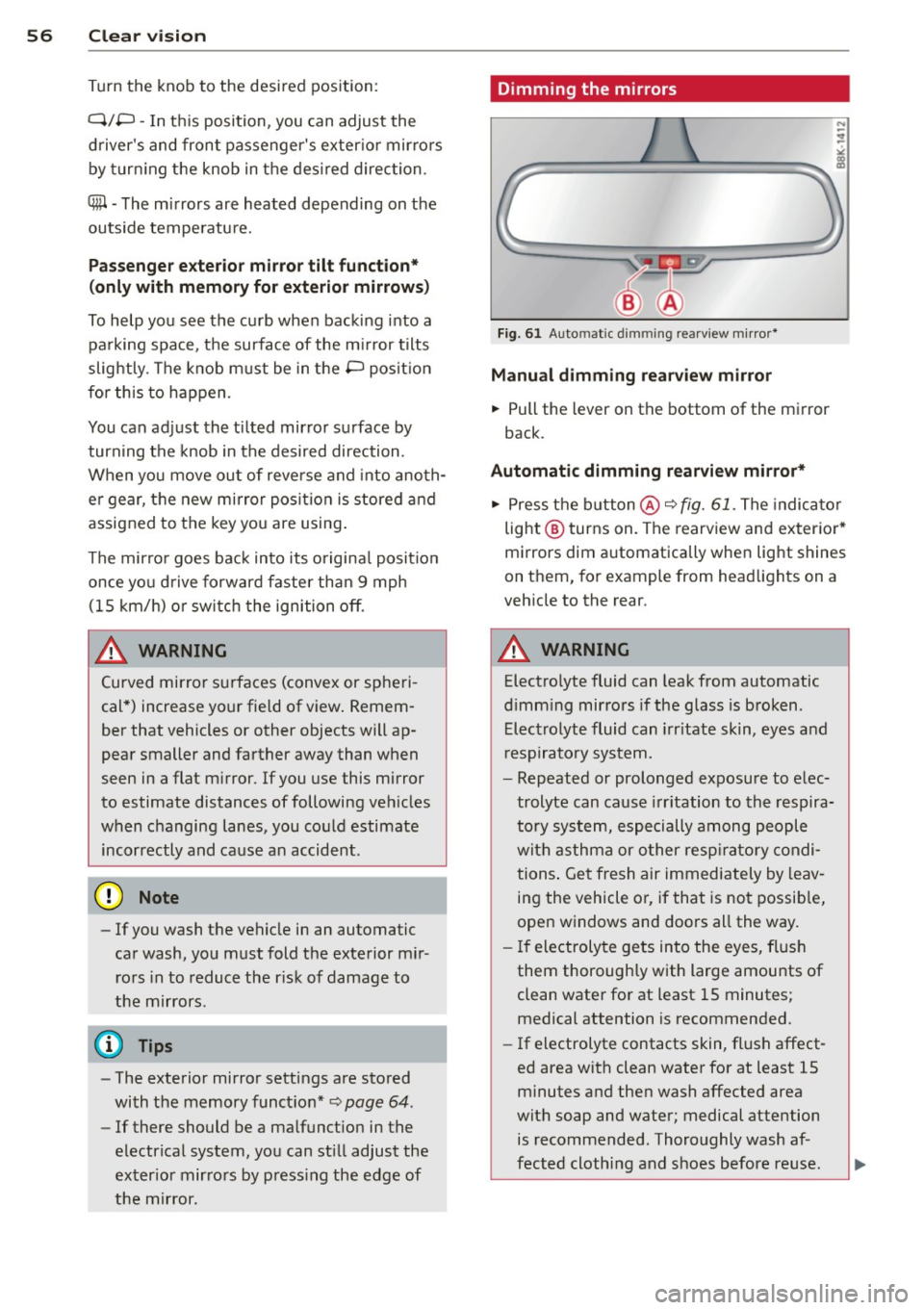
ig. 61 Auto ma tic dimming rearview m irro r*
Manu al di mm ing re a rvi ew mirro r
• Pull the lever on th e bottom of the mirror
back .
Automat ic dimming rearvi ew mirror *
....
• Press the button @c::> fig. 61. The indicator
light @turns on . The rearview and exterior*
mirrors dim automatically when light shines
on them, for example from headlights on a
veh icle to the rear.
_& WARNING ..__
Electrolyte fluid can leak from automatic
d imm ing mirrors if the glass is broken .
Electrolyte fluid can irr itate skin, eyes and
r espiratory system.
- Repeated or prolonged exposure to e lec
trolyte can cause irritation to the respira
tory system, especially among people
with asthma or o ther resp ira to ry condi
tions . Get fresh air immediately by leav
ing the vehicle or, if that is no t possib le,
open windows and doors all the way.
- If electroly te gets into the eyes, flush
them thoroughly with large amounts of
clean water for at least 15 minutes; medical attention is recommended.
- If electrolyte contacts skin, fl ush affect
ed area with clean water for at least 15
minutes and then wash affected area
with soap and water; medical attention
is recommended. Thoroughly wash af
fected cloth ing and shoes before reuse.