radio AUDI A5 CABRIOLET 2013 Owner's Manual
[x] Cancel search | Manufacturer: AUDI, Model Year: 2013, Model line: A5 CABRIOLET, Model: AUDI A5 CABRIOLET 2013Pages: 290, PDF Size: 72.35 MB
Page 113 of 290
_& WARNING
-Sensors have dead spaces in which ob
jects cannot be detected. Be especially
alert for small children and animals,
since they are not always detected by the
sensors.
- The acoustic park ing system is not a sub
st itute for the driver 's own caution and
alertness. Ultimate responsibi lity always
remains with the driver during parking
and simi lar maneuvers . Always watch
where you are driving.
- You should always adjust the volume and
frequency of the warning tones so that
yo u can easily hear the acoustic distance
warning even if the radio is p laying, the
air-cond itioner blower is on High or there
is a high level of outside noise .
- Check the settings whenever anyone
else has driven the vehicle before you.
(D Note
-Remember that low obstacles for which
a warn ing has already been issued may
"dive" below the system's sensing zone if
the vehicle is being backed up closer. In
this case, the warning sound shutting off
does
not in dicate that you have cleared
the obstacle . Instead, impact is immi
nent.
- Objects such as trailer hitches, chains,
narrow posts or fences covered by a th in
l ayer of paint may not always be detect
ed by the system. They can still damage
your vehicle without warning .
@ Tips
Keep the sensors in the rear bumper clean
and free of snow and ice so that the acous
tic parking assist system can function
properly.
Park assist 111
Adjusting the warning tones
Applies to vehicles: with parking system (rear)
The warning tones can be adjusted in the
MM!*.
.. Select: I CAR ! function button > Parking sys
tem .
Or
.. Select:
I CAR I function button > Car sys
tems *
control button > Driver assist > Park
ing aid .
- Rear volume -
rear sensor volume
-Rear frequency -rear sensor frequency
-Music volume while parking -when the
parking system is switched on, the volume
of the active audio source is lowered.
The newly ad justed value is briefly heard from
the signal generator. The settings are auto
matically stored and assigned to the master
key with remote control.
Parking system (rear,
with rear view camera)
Introduction
Applies to vehicles: with parking system (rear, with rear
v iew camera}
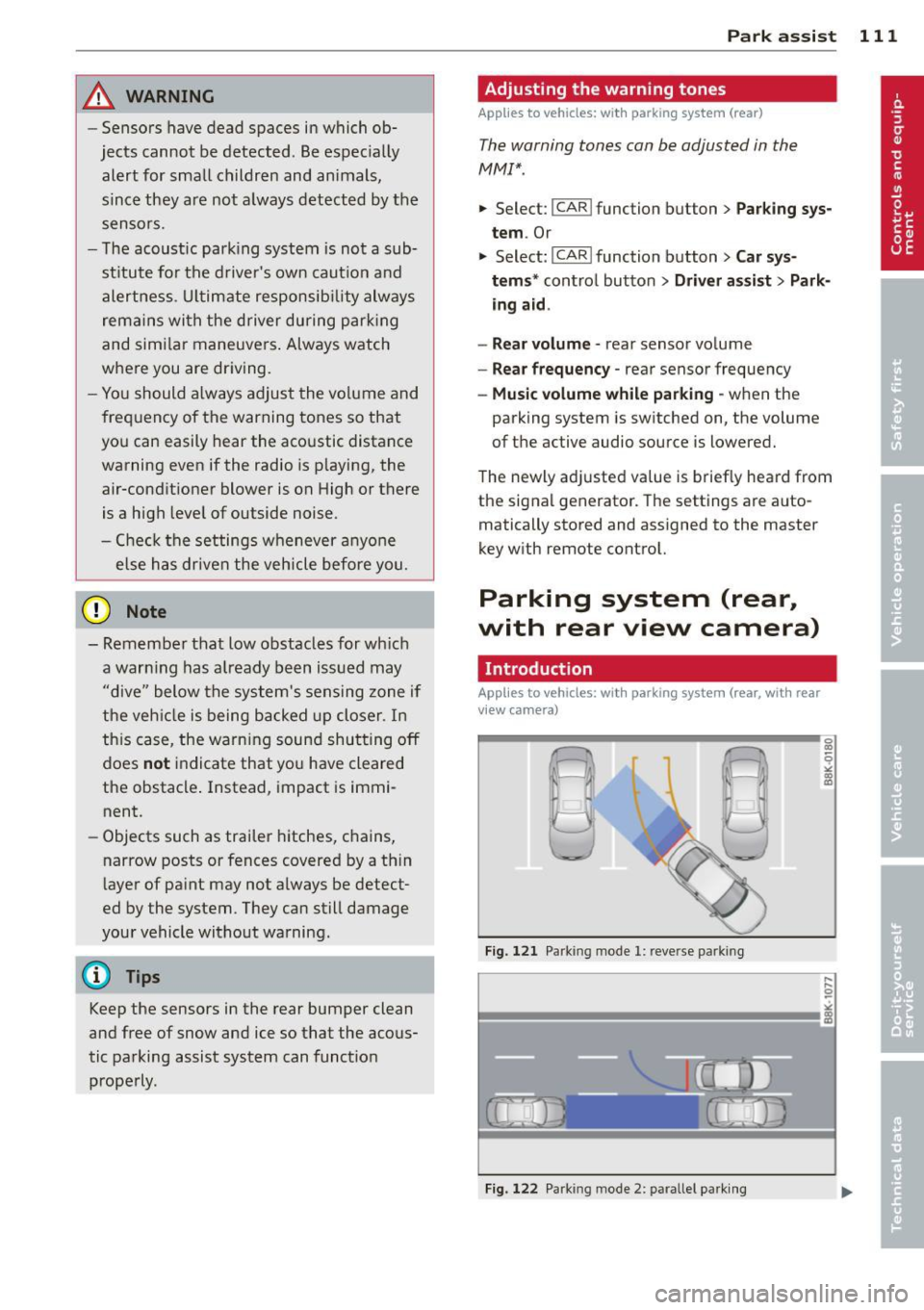
Fig. 121 Parking mode 1: reve rse park ing
Fig. 122 Park ing mode 2: parallel parking
Page 118 of 290
116 Park assist
In the MMI display, the direction of travel
of the vehicle rear is represented depending on the steering wheel angle. The vehi
cle front swings out more than the vehicle
rear. Maintain plenty of distance from an
obstacle so that your outside mirror or a
corner of your vehicle does not collide with
any obstacles -danger of accident!
@ Tips
The left or right orientation lines and sur
faces will be displayed, depending on the turn signal being used.
Adjusting the display and warning tones
Applies to vehicles: with parking system (rear, with rear
view camera)
The display and warning tones are adjusted in
the radio or MM!*.
"' Select: I CARI function button > Parking sys·
tern.
Or
"' Select: ~I C~A~RI function button > Car sys
tems*
control button > Driver assist > Park·
ing aid.
Display
- Off -when the parking system is switched
off, only audible signals are given.
- On -when the parking system is switched
on, the picture from the rear view camera is
displayed.
Warning tones
- Rear volume -
rear sensor volume
-Rear frequency -rear sensor frequency
-Music volume while parking -when the
parking system is switched on, the volume
of the active audio source is lowered.
The newly adjusted value is briefly heard from
the signal generator. The settings are auto
matically stored and assigned to the remote
control key.
A WARNING
- Always make sure that the volume and
frequency of the warning tones is adjust
ed so that you can easily hear the acous
tic distance signal even if the radio is
playing, the air-conditioner blower is on
High or there is a high level of outside
noise.
- Check the settings whenever someone
else has driven the vehicle before you.
@ Tips
- The warning tones can also be adjusted
directly from the rear view camera im
age. Simply press the Settings* control
button.
- Changed settings are activated when
parking assist is switched on again.
Error messages
Applies to vehicles: with parking system (rear, with rear
view camera)
-
If a warning tone is audible for about five sec
onds when you turn on the ignition, there is a
malfunction in the system. Have the problem
corrected by your authorized Audi dealer.
Keep the sensors in the rear bumper clean and
free from ice so that the acoustic park assist system can function properly.
Page 120 of 290
118 Homelink®
• To open the garage door, press the p ro
grammed button . The LED @will light up or
flash.
• To close the garage door, press the button
again.
@ Tips
To open the garage door, press the button, but do not press it for longer ten seconds
or the Homelink module w ill switch to
programming mode.
Programming the transmitter (version
A)
Appl ies to vehicles : wit h Home li nk
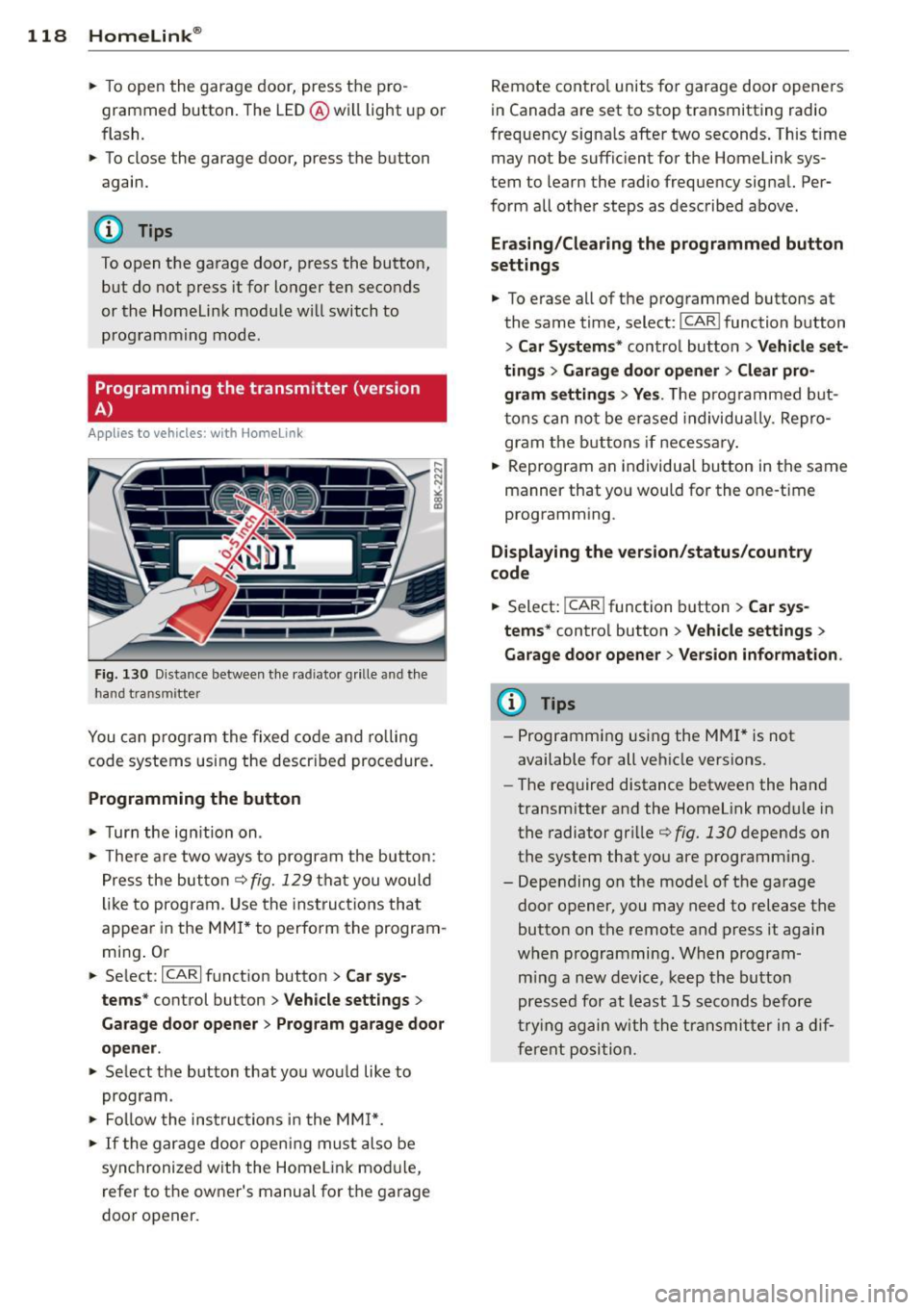
Fig . 130 D istance between t he rad iator grille and th e
hand transmitter
You can p rogram the fixed co de and ro lling
code systems using the descr ibed procedure.
Programming the button
• Turn the ig nition on .
• The re a re two ways to program the button:
P res s the but ton¢
fig. 129 tha t you would
li ke to progr am. Use the instruct io ns that
appear in the M MI* to perform the program
mi ng . Or
• Se lect:
~I C-A-R~I function button > Car sys
tems *
control button > Vehicle settings >
Garage door opener > Program garage door
opener .
• Select the button that yo u would like to
program.
• Fol low the ins truc tions in the MMI*.
• If the gar age door openi ng mus t also be
syn chronized wit h the Homel ink mod ule,
refer to the owner's manual for t he ga rage
door opener. R
emote cont ro l units fo r garage door opene rs
in Canada are set to stop transmitting radio
f requency signa ls after two seconds . This t ime
may not be suffic ient for the Homelink sys
tem to learn the radio frequency signal. Per
form all other steps as described above.
Erasing /Clearing the programmed button
settings
• To e rase all of t he programmed buttons at
the same t ime, select:
I CAR I function button
> Car Systems" contro l button > Vehicle set
ting s
> Garage doo r open er > Clear pro
gram setting s> Yes.
The prog rammed b ut
t ons can no t be erased individua lly. Re pro
gram the butt ons if necessa ry .
• Reprogram an individua l bu tton in the same
manner that you wou ld for the one-time
programm ing .
Displaying the version /status/country
code
• Select: I CAR ! function b utton > Car sy s
tems *
contro l button > Vehicle settings >
Garage door opener > Version information .
(D Tips
-Programming using the M MI* is not
available for all ve hicle vers ions.
- The required distance betwee n the hand
transm itter and the Homelink module in
the radiator gr ille¢
fig. 130 depends on
the system that you are prog ramm ing .
- Depending on the mode l of the garage
door opener, you may need to release the
butto n on t he remote and press it again
w hen programming. When program
m ing a new device, keep the button
presse d for at least 15 s econds befo re
tr ying again w ith the tra ns mit ter in a dif
ferent posi tion.
Page 121 of 290
Programming the transmitter (version
B)
Applies to vehicles: with Horne link
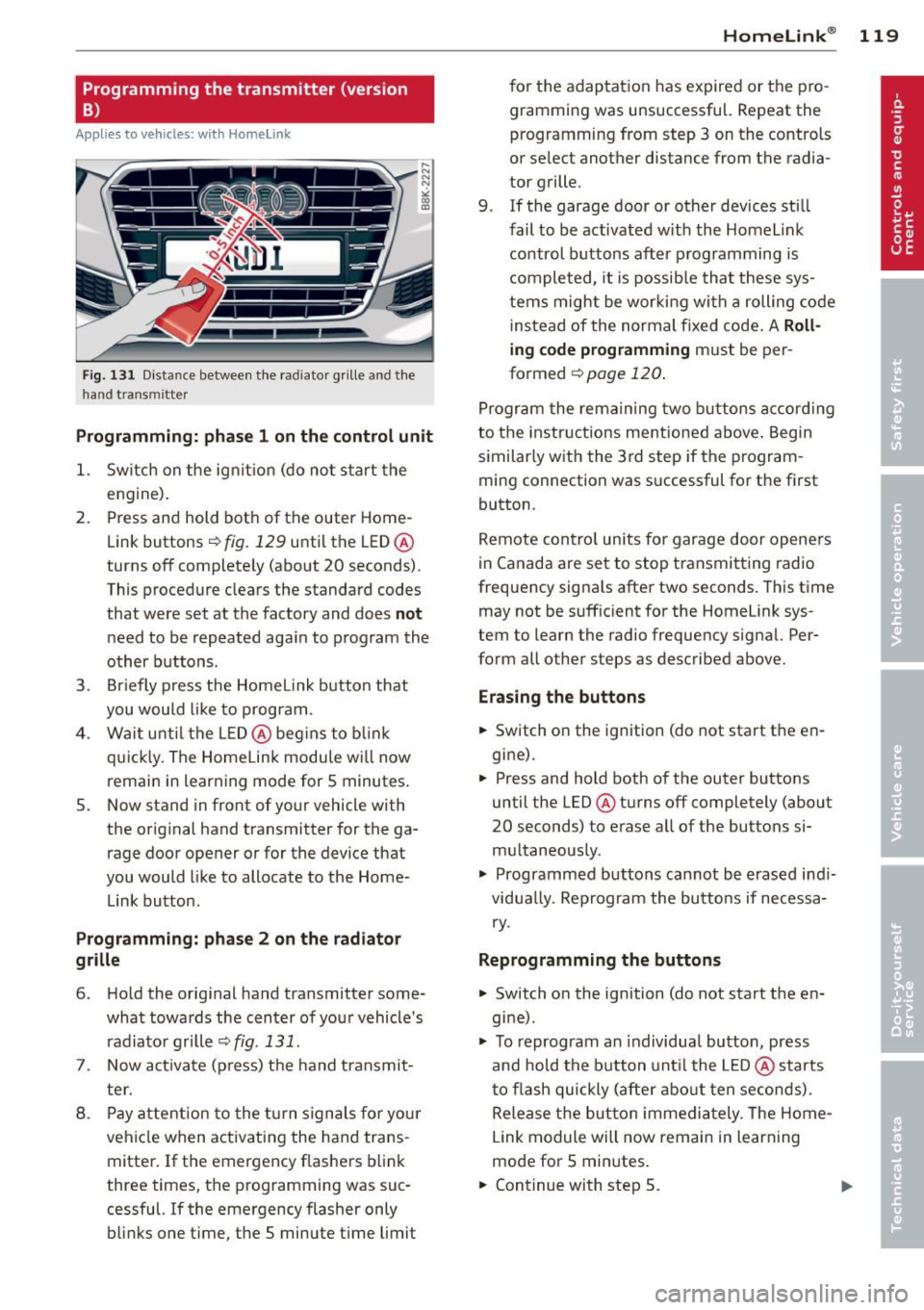
Fig. 131 D istance between t he rad ia tor grill e and t he
hand transmitte r
Programming: phase 1 on the control unit
1. Sw itch on the ig nit io n (d o n ot start the
e ngine ).
2. P ress and hold bot h of the outer Home
Link buttons
r=> fig. 129 until the LED @
turns off complete ly (about
20 seconds).
This procedure clea rs the standard c odes
that were set at the factory and does
not
n eed to be repeated aga in to program the
other b uttons.
3. Briefly press the Homelink button that
you would like to prog ram .
4 . Wai t until the LED@ beg ins to blink
q ui ckly. The Home Lin k modu le wi ll now
remai n in learning mode for
5 minutes .
5. Now stand in front of your vehicle with
the original hand transmitter for the ga rage door opener o r for the device that
you would like to allocate to the Home
Link button.
Programming: pha se 2 on the radiator
grille
6 . Hold the o rig inal hand transmitter some
what towa rds the center o f you r vehicle 's
radiato r gr ille r=>
fig. 131.
7. Now activate (p ress) t he hand transmit
ter.
8 . Pay a ttention to the t urn sign als for yo ur
vehicle when activating the ha nd trans
mitter . If t he emergency flashers b link
three times, the programming was suc
cessful. If the emergency flasher only
bli nks one time, the 5 minute t ime limit
Homelink ® 119
for the adaptat ion has expired or the pro
gram ming was unsuccessful. Repeat the
programming from step 3 on the controls
o r se lect another distance from the radia
tor grille.
9. If the garage door or other devices sti ll
fail to be activated w it h the Homelink
control buttons after p rogramming is
comple ted, it is possib le tha t these sys
tems might be wor king with a roll ing code
ins tead of the normal fixed code .
A Roll
ing code programming must be per
formed
r=> page 120 .
Program the rema ining tw o b uttons a ccord ing
to the instructions mentioned above . Beg in
similar ly w ith the 3rd step if the program
m ing connection was successful for t he first
button .
Remote con trol units fo r garage door opene rs
in Canada are set to stop transmitting radio
frequency signa ls after two seconds . This time
may not be suffic ient for the Homelink sys
tem to learn the radio frequency signa l. Per
form all other steps as described above.
Erasing the buttons
.,. Switch o n the ignition (do not start the en
gi ne).
.,. Press and hold both of the outer buttons
until the LED @tu rns off completely (about
20 seconds) to erase all of the buttons si
m ultaneously .
.,. Programmed buttons cannot be erased ind i
vidua lly. Reprogram the buttons if necessa
ry .
Reprogramming the buttons
.,. Switch on the ignition (do not start the en
gine) .
.,. To reprogram an individua l butto n, press
and hold the button unt il the L ED@ starts
to f lash quickly (after abo ut ten seconds) .
Release t he bu tton imme dia tely. The Home
L ink module will now remain in learning
mo de for 5 minutes.
.,. Continue with step 5.
Page 156 of 290
154 Airbag system
There are some important things you have to
know to make sure that the effectiveness of
the system will not be impaired and that dis
carded components do not cause injury or pol
lute the environment.
A WARNING
Improper care, servicing and repair proce
dures can increase the risk of personal in
jury and death by preventing an airbag
from deploying when needed or deploying an airbag unexpectedly:
- Never cover, obstruct, or change the
steering wheel horn pad or airbag cover
or the instrument panel or modify them
in any way.
- Never attach any objects such as cu
pholders or telephone mountings to the
surfaces covering the airbag units.
- For cleaning the horn pad or instrument
panel, use only a soft, dry cloth or one
moistened with plain water. Solvents or
cleaners could damage the airbag cover
or change the stiffness or strength of the
material so that the airbag cannot de
ploy and protect properly.
- Never repair, adjust, or change any parts
of the airbag system .
- All work on the steering wheel, instru
ment panel, front seats or electrical sys
tem (including the installation of audio
equipment, cellular telephones and CB
radios, etc .) must be performed by a
qualified technician who has the training
and special equipment necessary.
- For any work on the airbag system, we
strongly recommend that you see your
authorized Audi dealer or qualified work shop.
- Never modify the front bumper or parts
of the vehicle body.
- Always make sure that the side airbag
can inflate without interference:
- Never install seat covers or replace
ment upholstery over the front seat
backs that have not been specifically
approved by Audi . -
Never use additional seat cushions that
cover the areas where the side airbags
inflate.
- Damage to the original seat covers or
to the seam in the area of the side air
bag module must always be repaired
immediately by an authorized Audi
dealer .
- The airbag system can be activated only
once. After an airbag has inflated, it
must be replaced by an authorized Audi
dealer or qualified technician who has
the technical information, training and
special equipment necessary.
- The airbag system can be deployed only
once . After an airbag has been deployed,
it must be replaced with new replace
ment parts designed and approved espe
cially for your Audi model version. Re
placement of complete airbag systems
or airbag components must be per
formed by qualified workshops only.
Make sure that any airbag service action
is entered in your Audi Warranty
& Main
tenance booklet under
AIRBAG REPLACE
MENT RECORD .
-In accidents when an airbag is deployed,
the vehicle battery separates the alterna
tor and the starter from the vehicle elec
trical system for safety reasons with a pyrotechnic circuit interrupter.
- Work on the pyrotechnic circuit inter
rupter must only be performed by a
qualified dealer -risk of an accident!
- If the vehicle or the circuit interrupter
is scrapped, all applicable safety pre
cautions must be followed.
@ For the sake of the environment
Undeployed airbag modules and preten
sioners might be classified as Perchlorate Material -special handling may apply, see
www.dtsc.ca.gov/hazardouswaste/per
chlorate. When the vehicle or parts of the restraint system including airbag modules
safety belts with pretensioners are scrap
ped, all applicable laws and regulations
must be observed. Your authorized Audi
1J1-
Page 187 of 290
Energy management
Starting ability is optimized
Energy management controls the distribution
of electrical energy and thus optimizes the
availability of electrical energy for starting the engine .
If a vehicle with a conventional energy system
is not driven for a long period of time , the bat
tery is discharged by idling current consumers
(e.g. immobilizer). In ce rtain c ircumstances it
can result in there being insuff icient ene rgy
avai lab le to start the engine .
Intell igent energy management in your vehi
cle hand les the d istribution of electrical ener
gy. Starting ab il ity is markedly improved and
the life of the battery is extended.
Basically, energy management consists of
batt ery di agno sis, idlin g current man ag e
m ent
and dyn ami c en ergy m anage ment .
Batter y diagnosis
Battery diagnosis continuously determines
the state of the battery . Sensors determ ine
battery vo ltage, battery current and battery
temperature. This dete rm ines the current
state of charge and the powe r of the battery.
Idling curr ent man agement
Idling current management reduces ene rgy
consumption while the vehicle is stand ing .
W ith the ignition switched off, it cont ro ls the
energy supply to the va rious electr ical compo
nents . Data from battery diagnosis is consid
ered.
Depending on the battery's state of charge,
i nd ividua l consumers are gradual ly t urned off
to prevent excess ive d ischarge of the bat tery
and thus maintain starting capability .
Dynamic en ergy management
While the vehicle is being driven, dynamic en
e rgy management dist ributes the energy gen
e rated according to the needs of the individu
a l components.
It reg ulates cons umption, so
that more electrical energy is not being used
Int ellig ent technolog y 185
than is being generated and ensures an opti
mal state of charge for the battery.
(0 Tips
- But even energy management canno t
negate the limits of physics . Consider
that the power and life of a battery are
limited .
- If starting ability is threatened, the indi
cator light (•) appears~
page 17.
What you should know
The highest priority is given to maintaining
starting capability.
T he bat tery is severe ly taxed in short-distance
driving, in city traffic and during the cold time
of year. Ab undant electrical energy is re
quired, but on ly a little is generated .
It is also
critica l if the engine is not running and electri
ca l components are turned on . In this in
stance energy is be ing consumed but none is
being generated .
It is in precisely these situations that you will
notice energy management active ly regulat
ing the d istribution of energy.
V ehicle stand s for an ex tend ed peri od
If you do not drive your vehicle over a period
of severa l days or weeks, e lectrica l compo
nents are gradually cut back or switched off.
This reduces energy consumption and ma in
ta ins start ing capability over a longer period .
Some of the convenience functions may not
operate, such as the interior l ights or the
power seat adjustme nt. The convenience
funct ions w ill be available again when you
swi tch on the ignition and sta rt the eng ine .
With the eng in e turn ed off
If you listen to the radio, for example, w ith
the engine tu rned off or use other MMI func
tions, the battery is be ing d ischarged.
If starting capability is jeopardized due to en
ergy consumption, the following warning ap- pears in the MM I display: ..,.
•
•
Page 219 of 290

Checking the engine oil level
Fig . 176 MMI Disp lay: Oil l eve l ind icator
Re ad oil le vel
.,. Park you r vehicle so that it is horizontally
level.
.,. Shut the engine off when it is at operating
temperature.
.,. Switch only the ignit ion back on.
.,. Wait approx . two minutes .
.,. Select : Funct ion button
ICAR I > Oil l evel. Or
.,. Se lect: Function button
ICA RI > Car sys-
tem s*
cont rol button > Servicin g & ch e ck s >
Oil l evel.
.,. Read the oil leve l in the MMI * Display
r:!> fig . 176 . Add engine oi l if the bar o f the
oi l level indicator is near "min"
c> page 217
Depending on the way the veh icle is driven
and the operating conditions, oil consumption
can be up to a 1/2 qua rt per 600 miles (0 .5
li
ter per 1,000 km) . Consumption may be high
er within the first 3,000 mi les (5,000 km).
@ Tips
The oil level indicator in the MMI* Disp lay
is only an information display.
If the oi l
level is too low, a min imum oil warning ap
pears in the instrument cluster. Add oil
r:!> page 217 . If the hood has been opened,
the current oil level is shown in the instru
ment cluster the next time the ign ition is
sw itched on. Checkin
g and fillin g 217
~ Adding engine oil
Fig. 177 Eng in e compa rtm en t: Cove r on the oil filler
n eck
.,. Before yo u check anything in the engine
compa rtment,
alwa ys read and h eed all
WARNING S
c> .&. in Working in the engine
compartment on page 212 .
.,. Unscrew the cap
'e:;r. to the engin e oil filling
hole ¢fig . 177, r:!>fig. 175 .
.,. Carefully top off with the appropr iate oil in
0 .5 liter doses .
.,. Check the oil level aga in after two minutes
c> page 217 .
.,. Top off the o il aga in, if necessary.
.,. Scr ew the cap back on the filling hole .
&_ WARNING
-Wh ile topping off, the o il m ust not come
in contact with hot engine parts -fire
hazard!
- The oi l filler cap mus t be properly se
cured to prevent oil from being sprayed
on the hot engine and exhaust system
when the engine is running - fire hazard!
- If you r skin has come in contact with the
engine o il, you must subsequently
cleanse it thoroughly.
(D Note
- Check the oil leve l using the radio or
M MI* . If the message
Plea se reduce oil
level
appears, contact yo ur authorized
Audi dea ler or other qualified workshop
to have excess oil extracted if necessary.
- Audi does not recommend the u se of o il
addit iv es. They m ay damage the engine
and adversely aff ect your New Vehi cle
W arranty .
Page 230 of 290
228 Tire s and wheel s
-Never mount used tires on yo ur vehicle if
you are not sure of their "previous histo
ry." Old used tires may have been dam
aged even though the damage cannot be
seen that can lead to sudden t ire failure
and loss of vehicle control.
- If you notice unusual vibration or if the
vehicle pulls to one side when driving, al
ways stop as soon as it is safe to do so
and check the wheels and tires for dam
age.
(D Note
Please note that summer and winter tires
are designed for the cond itions that are
Glossary of tire and loading terminology
Accessory weight
means t he comb ined we ight (in excess of
those sta ndard items which may be rep laced)
of au toma tic tra nsmission, power steer ing,
power brakes, power windows, power seats,
radio, and heater, to the extent that th ese
items are availab le as factory -installed equip
ment (whether installed or not) .
Aspect ratio
means t he ratio of the he ight to the w idth of
the tire in percent . Numbers of 55 or lower in
dicate a low sidewall for improved steering re
sponse and better overall handling on dry pavement .
Bead
means the part of the ti re that is made of
steel wires, wrapped or reinforced by ply cords
and that is shaped to fit the rim.
Bead separation
means a b reakdown of the bond between
components in the bead.
Cord
means the strands forming the plies in the
tire . typ
ica l in those seasons . Audi recommends
using winter tires during the winter
months . Low temperatures signif icant ly
decrease the e lasticity of summer tires,
which affects tract ion and brak ing ability.
If summer tires are used in very co ld tem
peratures, cracks ca n form on the tread
bars, res ulting in permanent tire damage
that can cause loud driving no ise and un
balan ced t ires. Audi is not responsible for
th is type of damage .
Cold tire inflation pressure
means the tire p ressu re recommended by t he
vehicle manufacturer fo r a tire of a des igna ted
s iz e that has not bee n driven for more than a
coup le of miles (k ilometers) at low speeds in
t h e three hour period before the tire pressure
is measured or adjusted.
Curb weight
mea ns the we ight of a motor ve hicl e w ith
standard equipment including the max imum
capacity of fuel, oil, and coolant, air condi
tioning and additional weight of optiona l
equipment.
Extra load tire
me ans a t ire design to operate at higher loads
and at h igher inflation pressures than the cor
responding standard tire . Extra load tires may
be identified as "XL", "x l" , "EXTRA LOAD", or
"RF" on the sidewall.
Gross A xle Weight Rating ("GAWR ")
means the lo ad -c a rry ing c apac ity of a s ingle
axle system , measured a t the tire-ground in
terfaces.
Gross Vehicle Weight Rating ("GVWR ")
mea ns the maximum total loaded we ight of
t h e ve hicl e. .,.
Page 248 of 290
246 Tires and wheels
wheels on your vehicle to ensure that the re
p lacement or a lternate tires and wheels allow
the TPMS to continue to function properly.
Tire pressure indicator appears
Applies to vehicles: with tire pressure monitoring system
The tire pressure indicator in the instrument
cluster informs you if the tire pressure is too
low or if there is a system malfunction.
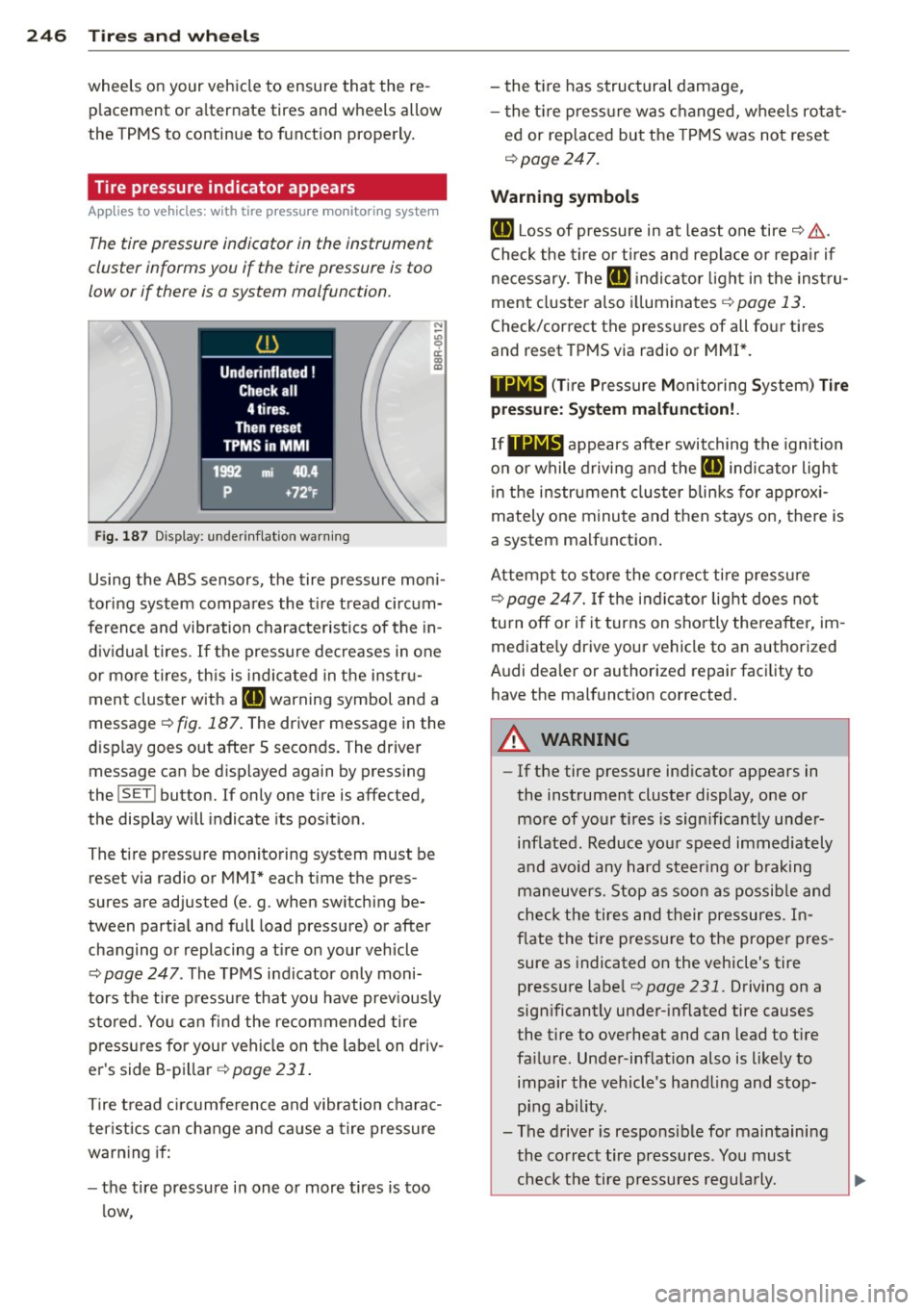
Fig. 187 Display: underinflation warning
N :;:; 9 a:
l:l
Using the ABS sensors, the tire pressure moni
tor ing system compares the tire tread circum
ference and vibration characteristics of the in
dividual tires.
If the pressure decreases in one
or mo re tires, this is indicated in the instru
ment cluster with a
[I] warning symbol and a
message
r:!> fig. 187 . The driver message in the
display goes out after S seconds. The driver
message can be displayed again by pressing
the
! SET ! button. If only one tire is affected,
the display will indicate its position.
The tire press ure monitoring system must be
reset via radio or MMI* each time the pres
sures are adjusted (e. g . when switching be
tween partial and full load pressure) or after
changing or replacing a tire on your veh icle
r:!> page 247 . The TPMS indicator only moni
tors the tire pressure that you have prev iously
stored . You can find the recommended tire
pressures for your vehicle on the label on driv
er's side 8-pillar
¢page 231.
Tire tread circumference and vibration charac
ter istics can change and cause a tire pressure
warning if:
- the tire pressure in one or more tires is too
low, - the
tire has structural damage,
- the tire pressure was changed, wheels rotat-
ed or replaced but the TPMS was not reset
c;, page 247.
Warning symbols
[I] Loss of pressure in at least one tire c;, .&,..
Check the tire or tires and replace or repa ir if
necessary. The
[I] indicator light in the instru
ment cluster also illuminates
¢page 13.
Check/correct the pressures of all four tires
and reset TPMS via radio or MMI*.
11Nl~1 (Tir e Pressure Mon itor ing System) Tire
pressure: System malfunction!.
IfllilB appears after switching the ignition
on or while driving and the
[I] indicator light
in the instrument cluster blinks for approx i
mately one minute and then stays on, there is
a system malfunction .
Attempt to store the correct tire pressu re
c;, page 247. If the indicator light does not
turn off or if it turns on shortly thereafter, im
mediate ly driv e your vehicle to an author ized
Audi dealer or authorized repair facility to
have the malfunct ion corrected.
A WARNING
-
- If the tire pressure ind icator appears in
the instrument cluster display, one or
more of your t ires is sign ificantly under
inflated . Reduce yo ur speed immediately
and avoid any hard steering or braking
maneuvers. Stop as soon as possible and
check the tires and their pressures. In
f la te the tire pressure to the prope r pres
sure as indicated on the vehicle's tire
pressure label
r:!> page 231. Driving on a
significantly under-inflated tire causes
the t ire to overheat and can lead to tire
fa ilure . Under -inflation also is likely to
impair the vehicle's handling and stop ping ability.
- The driver is responsible for maintaining
the co rrect tire pressures. You must
check the tire pressures regularly.
Page 249 of 290
-Under certain conditions (such as a spor
ty driving style, winter conditions or un
paved roads), the pressure monitor indi
cator may be delayed.
- Ask your authorized Audi dealer if run
flat tires may be used on your vehicle.
Your vehicle registration becomes invalid
if you use these tires when not permit
ted. Damage to your vehicle or accidents could also result.
(D Tips
- The tire pressure monitoring system
stops working when there is an ESC/ABS
malfunction.
- Using snow chains may result in a system
malfunction .
- The tire pressure monitoring system on
your Audi was developed using tires with the "AO" or "RO" identification on the
tire sidewall ~
page 238. We recom
mend using these tires.
Reset tire pressure monitoring system
Applies to vehicles: with tire pressure monito ring system
If the tire pressure is adjusted, wheels are ro
tated or changed, the
TPMS must be reset via
radio or
MMI*.
~ Before resetting the TPMS, the current pres
sures of all four tires must correspond to
the specified values. Adjust the tire pressure and reset the pressure in the tire pressure
monitoring system according to the load
you are carrying
~ page 231.
~ Turn on the ignition.
~ Select: the ICARI function button> Tire
pressure monitoring
> Store now . Or
~ Select: the ICARI function button > Car sys
tems*
control button > Servicing & checks >
Tire pressure monitoring > Store tire pres
sures.
(D Tips
Do not store the ti re pressure if there a re
snow chains on the tire.
Tires and wheels 24 7
•
•