ECU AUDI A5 CABRIOLET 2014 User Guide
[x] Cancel search | Manufacturer: AUDI, Model Year: 2014, Model line: A5 CABRIOLET, Model: AUDI A5 CABRIOLET 2014Pages: 286, PDF Size: 70.4 MB
Page 90 of 286

88 Transmission
order to adjust the gears to the driving condi
tions by hand
¢page 89.
On slopes, activate the parking brake first and
then move the selector lever to the P position.
This prevents too much stress from being placed on the locking mechanism.
Vehicles with multitronic transmission : Your
vehicle is equipped with
hill hold assist allow
ing you to start while on an incline. The sys
tem is activated when the brake pedal is pressed down and held
for a few seconds. The
br ake pre ssure will hold for
a moment after
the brake pedal loosens to preven t the vehicle
from rolling backwards while starting up.
A WARNING
- The vehicle can also roll when the engine
is stopped .
- Unintended vehicle movement can cause serious injury .
- Never leave your vehicle with the engine
running while in gear . If you must leave
your vehicle when the engine is running,
activate the parking brake and move the
selector lever to P.
- Power is still transmitted to the wheels
when the engine is running at idle. To
prevent the vehicle from "creeping", you
must keep your foot on the brake when
the engine is running and the selector
lever is in D/S or R or "tiptronic" mode is
selected.
- Do not press the accelerator pedal when
changing the selector lever position
while the vehicle is stationary and the
engine is running.
- Never shift into R or P while driving.
- Before driving down a steep slope, re-
duce your speed and shift into a lower
gear with "tiptronic".
- Do not ride the brakes or press the brake
pedal too often or too long when driving
down a hill . Constant braking causes the
brakes to overheat and substantially re
duces braking performance, increases
braking distance or causes complete fail
ure of the brake system. -
To prevent the vehicle from rolling back
when stopping on inclines, always hold it
in place with the brake pedal or parking
brake .
- Never hold the vehicle on an incline with
a slipping clutch. The clutch opens auto
matically when it becomes too hot from
the overload . An indicator lamp
mJ illu
minates and a driver message appears
¢ page 91 when the clutch is overload
ed.
- If the engine must remain running, never
have any driving position engaged when
checking under the hood. Make sure the
selector lever has securely engaged and
is locked in P with the parking brake set
¢ page 206. Otherwise, any increase in
engine speed may set the vehicle in mo
tion, even with the parking brake ap
plied .
(D Note
-S tronic- and tiptronic transmission :
When stopping on an incline, do not try
to hold the vehicle in place by pressing the accelerator pedal while a driving gear
is selected . This can cause the transmis
sion to overheat and can damage it. Acti
vate the parking brake or press the brake pedal to prevent the vehicle from rolling .
- S tronic- and tiptronic transmission : Al
lowing the vehicle to roll when the en
gine is stopped and the selector lever is
in N will damage the transmission be
cause it is not lubricated under those cir
cumstances.
(D Tips
For safety reasons, the parking brake is re
leased automatically only when the driv
er's safety belt is engaged in the buckle.
Page 102 of 286

100 Audi adaptive cruise control and bra king guard
- Always remember t hat t he radar sens or
fo r the braking guard wo rks only within
defined detection and range limits that
may preve nt the proper detection of oth
er v eh icles.
- The radar senso r's fu nction and range
can be reduced by rain, s now a nd heavy
spray. Mo ving v ehicl es u p ahead may not
b e promptly det ecte d or may not be de
te cte d at al l.
- Reflective surfaces in cl udi ng c ras h barri
ers or tu nnel ent ran ces may impair the
f unc tion of the r ad ar sen sor.
(D Tips
- You can cance l th e braking tha t is initiat
ed by the system by braking yours elf, by
a cce lerati ng noticeab ly o r by swerving.
- Brak ing guard er ror m essages
¢pag e 100.
- Keep in mi nd that braking gua rd can
brake u nexpect edly . Always secure any
ca rgo or objects that you are tr ansport
i ng to reduce the risk of d amage or in
ju ry.
Settings in the radio/MM!
Appl ies to vehicles: with Audi adaptive cruise control
• Se lect : ICAR !f u nct ion button> Car sy stem s*
control button > Driver assist > Audi brak·
ing guard .
Or
• Se lect : I CAR ! funct io n button >
Audi braking
guard .
System -
Switch Aud i bra king guard On and
Off . When you switc h the ignition on, the
message
Aud i braking guard off appea rs if
the system is sw itched off.
Early warning -The d istance and approach
warn ings in the display can be switched
On /
Off .
(D Tips
-Your settings are automatica lly sto red
and ass igned to the remote control key
being used at the t imes t he settings are
made.
- If you res tric t or sw itch o ff the E SC, the
bra kin g gua rd also switches itse lf off
r=) page 181.
-Switch braking guar d off when you a re
loading the vehicle onto a ve hicle car rier,
train, ship o r other type of t ransporta
tion. This can prevent undesired warn ings from the braking gua rd system .
Messages
Applies to vehicles: wit h Aud i adapt ive c ruise contro l
Braking guard : Off
T his dr iver message a ppears if t he system is
tu rned off via the radio/M M!* . Otherw ise, if
the system is turned off, the in formation ap
pears every t ime sho rtly after the start of the
trip .
T he driver message a lso appea rs if the system
is not avai lable d ue to a malfunct ion or if the
ESC is not switched on¢
page 181. If this is
t h e case , the system w ill not prov ide warnings
about a poss ible collision.
Braking guard : Activated
T his dr iver mess age a ppears if shar p brake
p ressure was applie d due to a n acute warning.
•••
Three white dots appea r if a sett ing cannot be
selected w ith the operating lev er. For exam
ple, this happens if you want to raise/lower
t h e speed even thoug h there was no prev ious
l y saved speed.
ACC: Sensor blocked
Th is message appears if the senso r view is ob
structed, for examp le by leaves, snow, heavy
spray or d irt. Clean the sensor¢
page 93,
fig. 103.
ACC: not available
The driver message appears if there is a mal
funct ion . The adaptive cru ise cont ro l turns off .
A chime sounds as a reminder . Have the sys
tem chec ked by an authori zed Aud i dea le r or
authorized Aud i Service Fac ility.
ACC: unavailable ll-
Page 119 of 286

Homelink
Universal remote
control
Description
Applies to vehicles: with Home link
The HomeLink universal remote control can
be programmed with the remote control for
devices that are already present.
With Home Link, you can control devices such
as the garage door, security systems, house
lights , etc. comfortably from the inside of you
vehicle.
Homelink makes it possible for you to rep lace
three different remote controls from dev ices
in your home with one universal remote. Th is
feature works for most garage door and exte
rior door motor signals. Programming the in
dividual remote control for your remote con
trol takes place near the center of the radiator
grille. There is a control module attached at
this location .
A one-time programming of the sensor must be performed before you are able to use sys
tems with Homelink. If the system does not activate after performing the one-time pro
gramming, check whether the system uses a rolling code¢
page 120 for vehicles without
the
MMI*.
& WARNING
-
- Never use the Homelink transmitter
with any garage door opener that does
have not the safety stop and reverse fea
ture as requ ired by federa l safety stand
ards. Th is includes any garage door open
er mode l manufactured before April 1,
1982.
-A garage door opener which cannot de
tect an object, signaling the door to stop
and reverse does not meet current feder
al safety standards . Using a garage door
opener without these features increases
risk of serious injury or death.
Homelink 11 7
-For safety reasons never re lease the
parking brake or start the engine while
anyone is standing in front of the vehicle .
- A garage door or an estate gate may
sometimes be set in motion when the
Homelink remote control is being pro
grammed. If the device is repeatedly ac
tivated, th is can overstrain motor and
damage its electrical components - an
overheated mo to r i s a fire haza rd!
- To avoid possib le injuries or property
damage, please always make abso lutely
certa in that no persons or objects are lo
cated in the range of motion of any
equipment being operated.
(0 Tips
- If you would like more information on
Homelink, where to purchase the Home
Link compat ible products, or would like
to purchase the Home Link Home Light
ing Package, please call toll-free :
1-800-355-3515.
-For Declaration of Compliance to United
States FCC and Industry Canada regula
tions ¢
page 267.
-For security reasons, we recommend that
you clear the programmed b uttons be
fore selling the vehicle.
Operation
App lies to vehicles : with Homeli nk
Fig. 129 H ead li ner: controls
Req uirement: The buttons must be program-
med
c!) page 118 or ¢ page 119. ..,_
Page 123 of 286
Driving Safely
General notes
Safe driving habits
Please remember -safety first!
This chapter contains important information,
tips, instructions and warnings that you need
to read and observe for your own safety, the
safety of your passengers and others . We have
summarized here what you need to know
about safety belts, airbags, child restraints as
well as child safety. Your safety is for us
priori
ty number 1.
Always observe the information
and warnings in this section - for your own
safety as well as that of your passengers.
The information in this section applies to all
model versions of your vehicle . Some of the
features described in this sections may be
standard equipment on some models, or may
be optional equipment on others. If you are
not sure, ask your authorized Audi dealer.
A WARNING
- Always make sure that you follow the in
structions and heed the WARNINGS in
this Manual. It is in your interest and in
the interest of your passengers.
- Always keep the complete Owner's Liter
ature in your Audi when you lend or sell
your vehicle so that this important infor
mation will always be available to the
driver and passengers.
- Always keep the Owner's literature handy
so that you can find it easily if you have
questions.
Safety equipment
The safety features are part of the occupant
restraint system and work together to help
reduce the risk of injury in a wide variety of
accident situations .
Your safety and the safety of your passengers
should not be left to chance. Advances in
technology have made a variety of features
available to help reduce the risk of injury in an
Driving Safely 121
accident. The following is a list of just a few of
the safety features in your Audi :
- sophisticated safety belts for driver and all
passenger seating positions,
- belt force limiters for the front seats,
- belt pretensioners for the seats,
- head restraints for each seating position,
- front airbags,
- side airbags in the front seats,
- special LATCH anchorages for child re-
straints,
- adjustable steering column.
These individual safety features, can work to
gether as a system to help protect you and
your passengers in a wide range of accidents.
These features cannot work as a system if
they are not always correctly adjusted and cor
rectly used.
Safety is everybody's responsibility!
Important things to do before driving
Safety is everybody's job! Vehide and occv
pant safety always depends on the informed
and careful driver.
For your safety and the safety of your passen
gers,
before driving always:
"'Make sure that all lights and signals are op
erating correctly .
"'Make sure that the tire pressure is correct.
"'Make sure that all windows are clean and af
ford good visibility to the outside.
"'Secure all luggage and other items carefully
c::>page 65.
"'Make sure that nothing can interfere with
the pedals.
"'Adjust front seat, head restraint and mirrors
correctly for your height .
"' Instruct passengers to adjust the head re
straints according to their height .
"'Make sure to use the right child restraint
correctly to protect children
c::, page 161,
Child Safety.
"'Sit properly in your seat and make sure that
your passengers do the same
c::, page 60,
Seats and storage.
ll>
•
•
Page 126 of 286
124 Driving Safely
-Passengers must always sit in an upright
position and never lean against or place
any part of their body too close to the
area where the airbags are located.
- Passengers who are unbelted, out of po
sition or too close to the airbag can be
seriously injured by an airbag as it un
folds with great force in the blink of an
eye.
- Always make sure that there are at least
10 inches (25 cm) between the front
passenger's breastbone and the instru
ment panel.
- Each passenger must always sit on a seat
of their own and properly fasten and
wear the safety belt belonging to that
seat.
- Before driving, always adjust the front
passenger seat and head restraint prop
erly.
- Always keep your feet on the floor in
front of the seat. Never rest them on the
seat, instrument panel, out of the win
dow, etc. The airbag system and safety
belt will not be able to protect you prop
erly and can even increase the risk of in
jury in a crash.
- Never drive with the backrest reclined or
tilted far back! The farther the backrests
are tilted back, the greater the risk of in
jury due to incorrect positioning of the
safety belt and improper seating posi
tion.
- Children must always ride in child safety
seats
c::> page 161 . Special precautions
apply when installing a child safety seat
on the front passenger seat<=:>
page 140.
Proper seating positions for passengers
in rear seats
Rear seat passengers must sit upright with
both feet on the floor consistent with their
physical size and be properly restrained
whenever the vehicle is in use.
To reduce the risk of injury caused by an incor
rect seating position in the event of a sudden
braking maneuver or an accident, your pas -sengers on the
rear bench seat must always
observe the following:
" Make sure that the seatback is securely
latched in the upright position <=:>
page 67.
"Keep both feet flat in the footwell in front of
the rear seat.
" Fasten and wear safety belts properly
<=:>
page 135 .
"Make sure that children are always properly
restrained in a child restraint that is appro
priate for their size and age ¢
page 161.
,&. WARNING
Passengers who are improperly seated on
the rear seat can be seriously injured in a
crash.
- Each passenger must always sit on a seat
of their own and properly fasten and
wear the safety belt belonging to that
seat .
- Safety belts only offer maximum protec
tion when the seatback is securely latch
ed in the upright position and the safety
belts are properly positioned on the body. By not sitting upright, a rear seat
passenger increases the risk of personal
injury from improperly positioned safety
belts!
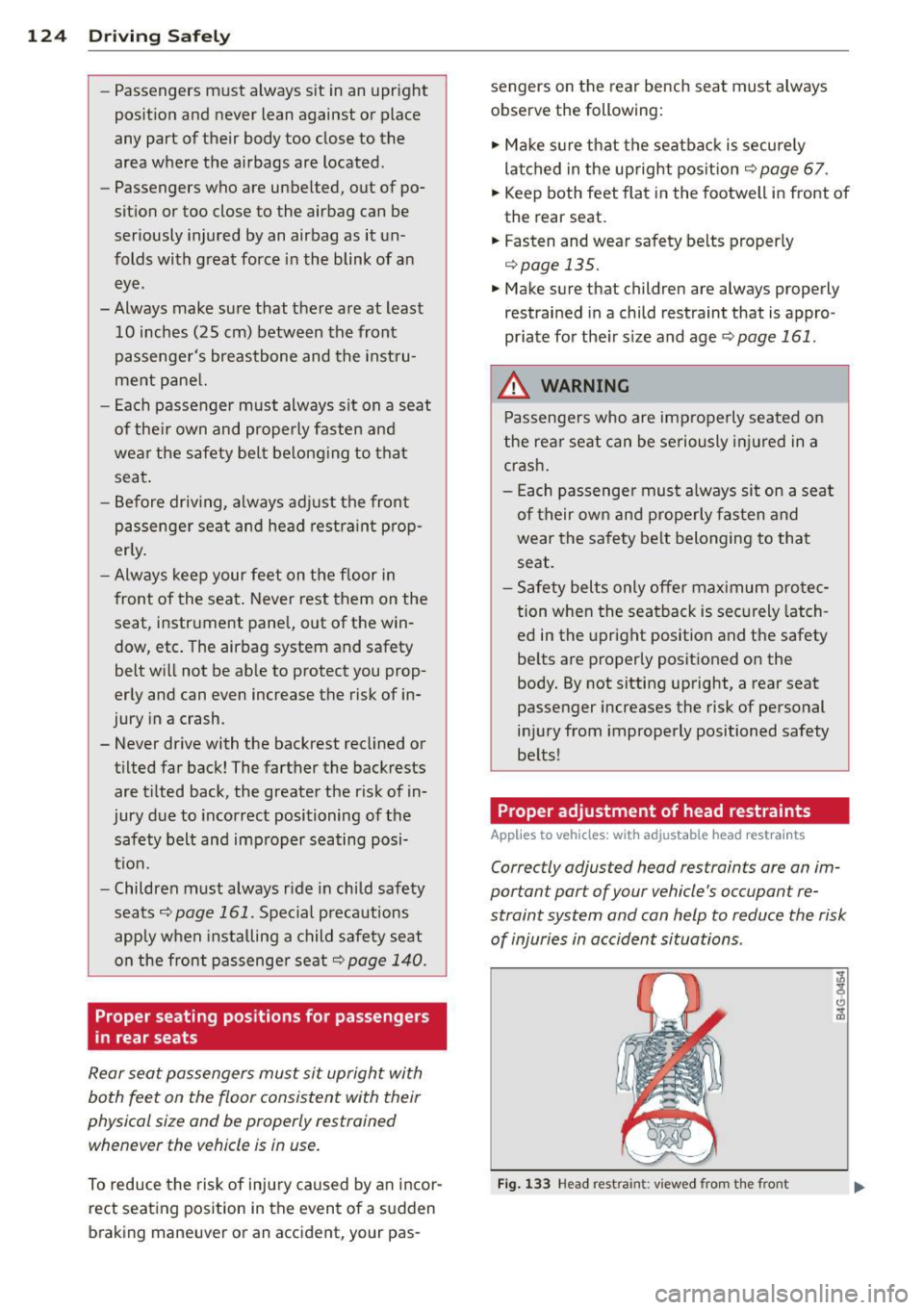
Proper adjustment of head restraints
-
App lies to vehicles: with adjustable head restraints
Correctly adjusted head restrain ts are an im
portant part of your vehicle 's occupant re
straint system and can help to reduce the risk
of injuries in accident situations .
Fig. 133 Head restra int: v iewed from the front
Page 128 of 286
126 Driving Saf ely
Driver and passenger
side footwell
Important safety instructions
Appl ies to vehicles: with knee airbags
A WARNING
Always make sure that the knee a irbag can
inflate without interference . Objects be
tween yourself and the airbag can increase
the risk of injury in an acc ident by inte rfer
ing w ith the way the a irbag deploys or by
being p ushed into you as the airbag de
ploys .
- No persons (ch ildren) or animals should
ride in the footwell in front of the pas
senger seat. If the airbag deploys, this
can res ult in serious or fata l injuries .
- No objects of any k ind sho uld be carried
in the footwe ll area in front of the driv
er's or passenger's seat . Bulky objects
(shopping bags, for example) can ham
per or prevent proper deployment of the
airbag . Small objects can be thrown
through the vehicle if the airbag deploys
and injure you o r your passengers .
Pedal area
Pedals
The pedals must always be free to move and
must never be interfered with by a floor mat
or any other object.
M ake sure tha t all pedals move freely witho ut
i nte rfe rence and that nothing prevents them
from retu rning to the ir origina l posi tions.
Only use floo r mats that leave the peda l area
free and can be secured wit h floor mat fasten
e rs.
If a b rake circuit fails, increased b rake pedal
trave l is required to bring the vehicle to a full
stop.
A WARNING
Pedals that cannot move free ly can cause
l oss of veh icle control and increase the risk
of ser ious injury .
- Never p lace any objects in the drive r's
footwell . An object cou ld get into the
pedal area and inte rfe re with pedal func
tion . In case of sudde n brak ing o r an ac
cident, yo u wo uld not be a ble to brake or
acceler ate !
- Always ma ke s ure that no thing can fall
or move into the driver's footwel l.
Floor mats on the driver side
Always use floor mats that can be securely
attached to the floor mat fast eners and do
not interfere with the free movement of the
pedals.
.. Make s ure that the floor mats are prope rly
secured and canno t move and in terfere with
t he peda ls
£:=? &, .
Use on ly f loor mats that leave the pedal area
u nobst ructed and that are firmly secu red so
t h at t hey cannot slip o ut of position . You ca n
obta in suitab le floor mats from yo ur autho r
ized Audi dea ler .
Floor mat fastene rs are insta lled in your Audi.
Floor mats used in your vehicle must be at
tached to these fastene rs. Prope rly securing
the floor mats will prevent them from sliding
i nto posi tions that cou ld interfere with the
peda ls o r impa ir safe ope rat io n of yo ur vehicle
i n othe r ways.
A WARNING
Pedals that cannot move free ly can result
in a loss of vehicle control and inc rease the
risk of ser ious persona l injury .
- Always make sure that floor mats are properly secu red.
- Never p lace or ins tall floor mats o r othe r
floor coverings in the vehicle that cannot
be properly secured in p lace to prevent
them from slipping and interfer ing with
lill>
Page 129 of 286
the pedals or the ability to control the
vehicle.
- Never place or install floor mats or other
floor coverings on top of already insta l
led floor mats . Additional floor mats and
other coverings will reduce the size of
the pedal area and interfere with the
pedals.
- Always property reinstall and secure floor
mats that have been taken out for clean
ing .
- Always make sure that objects cannot fall into the driver footwell wh ile the ve
hicle is moving. Objects can become
t rapped under t he brake pedal and accel
erator peda l causing a loss of veh icle
control.
Stowing Luggage
Loading the luggage compartment
All luggage and other objects must be prop
erly stowed and secured in the luggage com
portment.
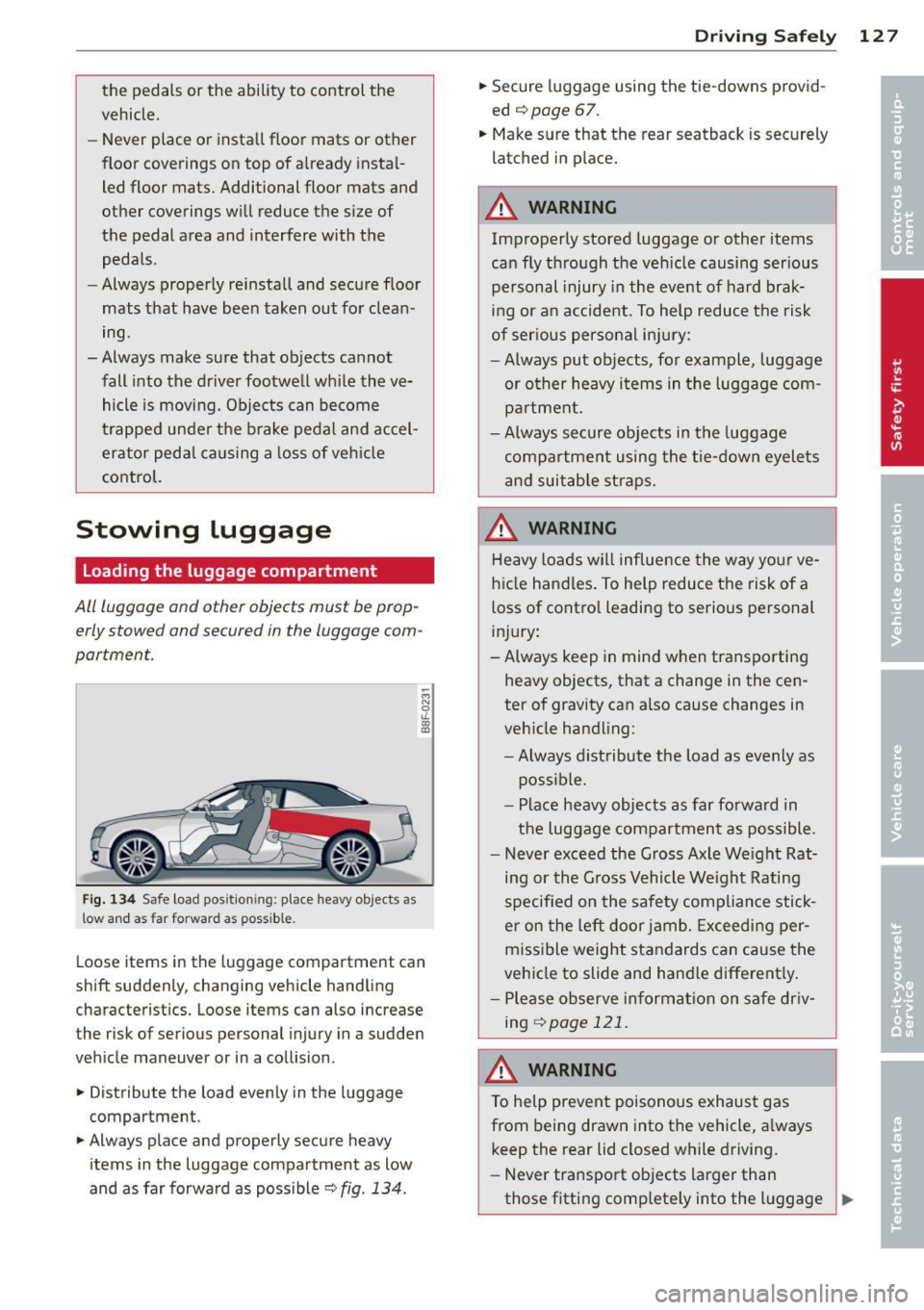
F ig. 134 Safe load pos ition ing: place heavy objects as
low a nd as fa r forwa rd as possible .
-M N 0 u.
ill
Loose items in the luggage compartment can
shift suddenly, changing vehicle handling
characterist ics. Loose items can also increase
the risk of serious personal injury in a sudden
veh icle maneuver or in a collision .
.. Distribute the load evenly in the luggage
compartment.
.. Always place and properly secure heavy
items in the luggage compartment as low
and as far forward as poss ible
c::> fig . 134 .
Drivin g Sa fely 12 7
.. Secure luggage using the tie-downs p rovid
ed
c::> page 67.
.. Make sure that the rear seatback is securely
latched in place.
A WARNING
Improperly stored luggage or other items
can fly through the ve hicle causing ser ious
pe rsonal injury in the event of hard brak
ing or an accident . To help reduce the risk
of ser ious persona l injury:
- Always put objects, for example, luggage
or other heavy i tems in the luggage com
pa rtment.
- Always secure objects in the luggage
compa rtment using the t ie-down eyelets
a nd suitab le st raps.
A WARNING
Heavy loads w ill influence the way yo ur ve
hicle handles. To help reduce the risk of a
loss of contro l leading to serious personal
i nj ury :
-Always keep in mind w hen transporting
heavy objects, that a change in the cen
ter of gravity can a lso cause changes in
veh icle handling:
- Always distribute t he load as evenly as
possible.
- Place heavy objects as far forward in
the luggage compartment as possible .
- Never exceed the Gross Axle We ight Rat
ing or the G ross Vehicle We ight Rating
specified o n the sa fety compliance stick
e r on the left door jamb. Exceeding per
miss ible weight standards can cause the
vehicle to slide and hand le different ly .
- P lease observe in format ion on sa fe dr iv
ing
<::> page 121.
A WARNING
To help prevent poisonous exhaus t gas
from being drawn into the vehicle, a lways
keep the rear lid closed while driving.
- Never transport objects larger than
those fitting comp lete ly into the l uggage _..
Page 130 of 286
128 Driving Safely
area because the rear lid cannot be fully
closed.
- If you absolutely must drive with the rear
lid open, observe the following notes to
reduce the risk of poisoning:
- Close all windows,
- Close the power top,
- Open all air outlets in the instrument
panel,
- Switch off the air recirculation,
- Set the fresh air fan to the highest
speed.
A WARNING
Always make sure that the doors, all win
dows, the power top and the rear lid are
securely closed and locked to reduce the
risk of injury when the vehicle is not being
used .
-After closing the rear lid, always make
sure that it is properly closed and locked .
- Never leave your vehicle unattended es
pecially with the rear lid left open. A
child could crawl into the vehicle through
the luggage compartment and close the
rear lid becoming trapped and unable to
get out. Being trapped in a vehicle can
lead to serious personal injury.
- Never let children play in or around the
vehicle.
- Never let passengers ride in the luggage
compartment. Vehicle occupants must
always be properly restrained in one of
the vehicle's seating positions.
(D Tips
- Air circulation helps to reduce window
fogging. Stale air escapes to the outside
through vents in the trim panel. Be sure
to keep these slots free and open.
- The tire pressure must correspond to the
load. The tire pressure is shown on the
tire pressure label. The tire pressure la
bel is located on the driver's side B-pillar.
The tire pressure label lists the recom
mended cold tire inflation pressures for
the vehicle at its maximum capacity
-
'
weight and the tires that were on your
vehicle at the time it was manufactured.
For recommended tire pressures for nor
mal load conditions, please see chapter
¢page 226.
Tie-downs
Applies to vehicles: with tie-downs
The luggage compartment is equipped with
four tie-downs to secure luggage and o ther
items.
Use the tie-downs to secure your cargo prop
erly
¢ page 12 7, Loading the luggage com
par tmen t.
In a collision, the laws of physics mean that
even smaller items that are loose in the vehi
cle will become heavy missiles that can cause
serious injury. Items in the vehicle possess en
ergy which vary with vehicle speed and the
weight of the item . Vehicle speed is the most
significant factor.
For example, in a frontal collision at a speed
of 30 mph (48 km/h), the forces acting on a 10-lb (4 .S kg) object are about 20 times the
normal weight of the item . This means that
the weight of the item would suddenly be about 200 lbs. (90 kg). You can imagine the
injuries that a 200 lbs. (90 kg) item flying
freely through the passenger compartment could cause in a collision like this.
A WARNING
Weak, damaged or improper straps used
to secure items to tie-downs can fail dur ing hard braking or in a collision and cause
serious personal injury.
- Always use suitable mounting straps and
properly secure items to the tie-downs in
the luggage compartment to help pre
vent items from shifting or flying for
ward as dangerous missiles.
- When the rear seat backrest is folded
down, always use suitable mounting
straps and properly secure items to the
tie-downs in the luggage compartment
to help prevent items from flying
Page 133 of 286
For safety reasons, rollover protection a lso de
p loys during front, side and rear collisions
above a certa in level of severity.
Retracting rollover protection
Fig . 137 Dep loyed rollbar with release loop.
Fig. 138 Deployed rollba r w ith power top frame facing
upward.
If the rollover protection has triggered but
the vehicle was not involved in an accident,
you can retract the rollover protection your
self in an emergency . Drive to your authorized
Aud i dealer or qualified repa ir facility immedi
ately to have the malfunction corrected.
With the p ower top open
• Pull the loop upward in the direction of the
arrow and hold it in p lace
c;, fig . 13 7.
• Slide the rollbar down .
• Re lease the loop just before the rollbar
reaches its end position by approximately 1-2 in. (3-5 cm).
• Press the rollbar down until it stops.
• Make sure the rollbar is secure before re-
leasing it.
• Close the cover@c::,
fig. 138 .
• Repeat the procedure on the other rollbar.
With th e power top clo sed
• Switch the ignition on.
Drivin g Sa fely 131
• Press the convertible switch to adjust the
convertible frame until it is vertical
r::!) fig. 138.
• Pull the loop upward in the direction of the
arrow and hold it in place
c::, fig. 137 .
• Slide the rollbar down .
• Release the loop just before the rollbar
reaches its end position (3-5 cm) .
• Press the rollbar down unt il it stops.
• Make s ure the rollbar is sec ure before re-
leasing it.
• Close the cover @
r::!) fig. 138.
• Repeat the procedure on the other ro llbar.
• You can now close the power top again.
A WARNING
-Make sure your head or other parts of
your body are not located in the area
above the rollbar when p ress ing the roll
bar down.
If the rollbar is not secu red
correctly, it cou ld deploy again as soon as
you release it and cause injur ies.
- Have the rollover protection system
checked by your author ized Audi dealer if
it is fa ulty. Otherwise, the system may
not deploy correctly in a col lision .
- Mod ifying the rollove r protection system
or ind ividual components is not perm it
ted.
- Wo rk on the ro llover p rotection system
should only be performed by yo ur au
thorized Audi dealer or qualified work
shop . Otherwise the system may not
function correctly in a co llision or it cou ld
dep loy unexpectedly.
- Have the system inspected at service in
tervals. This ensures the system w ill al
ways be ready for use. Have your author
ized Audi dealer check the rollover pro
tect ion system every two yea rs at the lat
est.
Page 137 of 286

Important safety instructions about
safety belts
Safety belts must always be correctly posi
tioned across the strongest bones of your
body.
~ Always wear safety belts as illustrated and
described in this chapter.
~ Make sure that your safety belts are always
ready for use and are not damaged.
A WARNING
Not wearing safety belts or wearing them
improperly increases the risk of serious
personal injury and death. Safety belts can
work only when used correctly.
- Always fasten your safety be lts correctly
before driving off and make sure all pas
sengers are correctly restrained.
- For maximum protection, safety belts must always be positioned properly on
the body .
- Never strap more than one person, in
cluding small children, into any belt.
- Never place a safety belt over a child sit ting on your lap.
- Always keep feet in the footwell in front
of the seat while the vehicle is being d riv
en .
- Never let any person ride with their feet
on the instrument panel or sticking out
the window or on the seat.
- Never remove a safety belt while the ve
hicle is moving. Doing so will increase
your risk of be ing injured or killed.
- Never wear belts twisted.
- Never wear belts over rigid or breakable
objects in or on your clothing, such as
eye glasses, pens, keys, etc., as these may cause injury.
- Never allow safety belts to become dam
aged by being caught in door or seat
hardware .
- Do not wear the shoulder part of the belt
under your arm or otherwise out of posi
tion . Safety belts
135
- Several layers of heavy clothing may in
terfere with correct positioning of belts and reduce the overall effectiveness of
the system .
- Always keep belt buckles free of anything
that may prevent the buckle from latch
ing securely .
- Never use comfort clips or devices that
create slack in the shoulder belt . Howev
er, special clips may be requ ired for the
proper use of some child restraint sys
tems .
- Torn or frayed safety belts can tear, and
damaged belt hardware can break in an
accident. Inspect belts regularly.
If web
bing , bindings, buckles, or retractors are
damaged, have belts replaced by an au
thorized Audi dealer.
- Safety belts that have been worn and
loaded in an accident must be replaced
with the correct replacement safety belt
by an authorized Audi dealer. Replace
ment may be necessary even if damage
cannot be clearly seen. Anchorages that
were loaded must also be inspected.
- Never remove, modify, disassemble, or
try to repair the safety belts you rs elf .
- Always keep the belts clean. Dirty belts
may not work properly and can impair
the function of the inertia reel¢
ta
ble Cleaning interior on page 197 .
Safety belts
Belt positioner
The driver and front passenger seats are
equipped with belt positioners.
Fig. 145 Drive r's se at: B elt pos itio ner