brake AUDI A5 CABRIOLET 2014 User Guide
[x] Cancel search | Manufacturer: AUDI, Model Year: 2014, Model line: A5 CABRIOLET, Model: AUDI A5 CABRIOLET 2014Pages: 286, PDF Size: 70.4 MB
Page 67 of 286
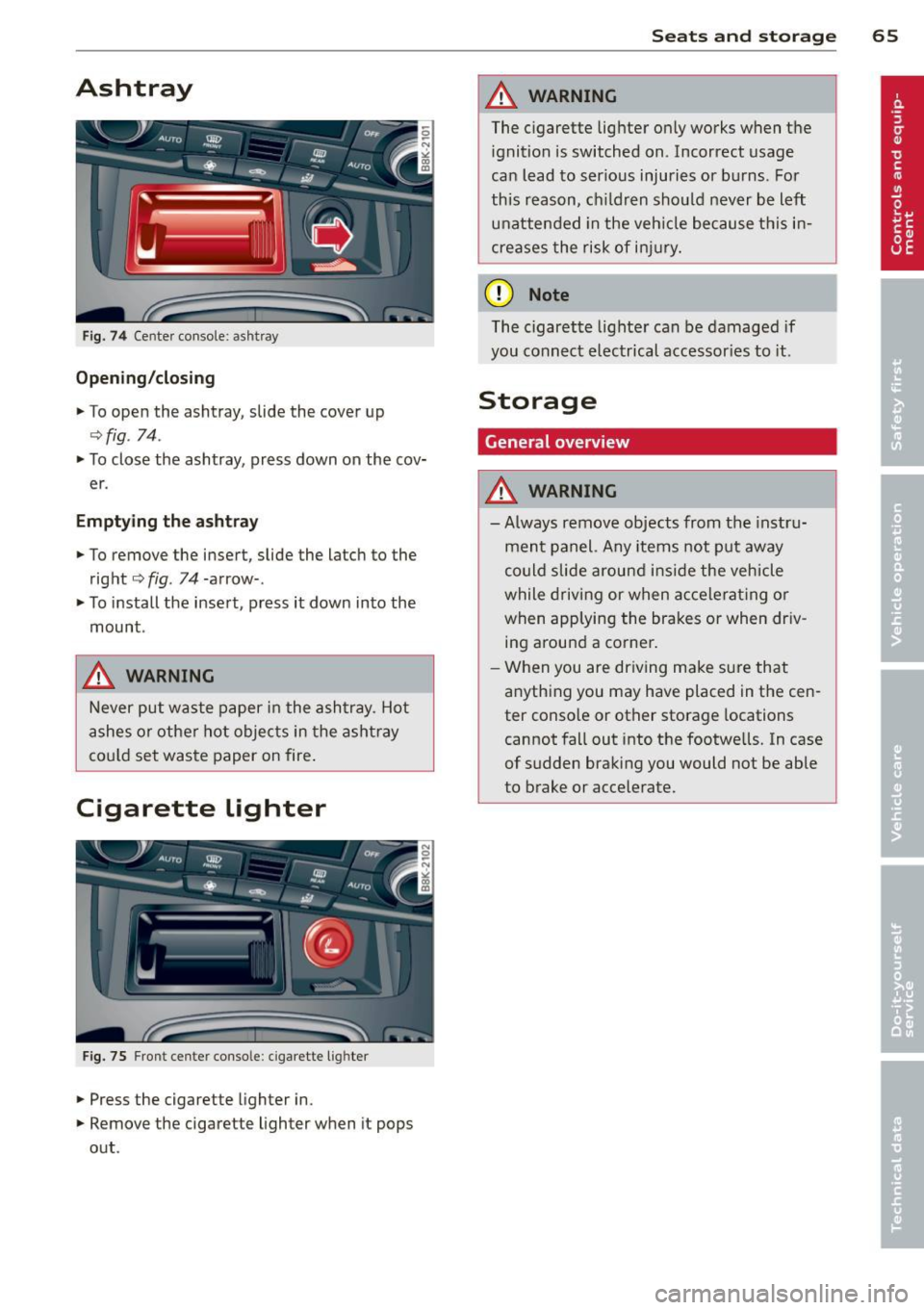
Ashtray
Fig. 74 Cente r console : ashtray
Opening /closing
.,. To open the ashtray, slide the cover up
<=>fig . 74.
.,. To close the ashtray, press down on the cov
er .
Emptying the ashtray
.,. To remove the insert, slide the latch to the
right
<=> fig. 74-arrow-.
.,. To install the insert, press it down into the
mount .
_& WARNING
Never put waste paper in the ashtray . Hot
ashes or othe r hot objects in the ashtray
could set waste paper on fire.
Cigarette Lighter
Fig. 75 Fron t center conso le : ciga rette l ighter
.,. Press the cigarette lighter in .
.,. Remove the cigarette lighter when it pops
out .
Seats and storage 65
_& WARNING
The cigarette lighter on ly works when the
ignition is switched on . Incorrect usage
can lead to ser ious injuries or burns. For
this reason, ch ildren should never be left
unattended in the veh icle because this in
creases the risk of injury.
(D Note
The cigarette lighter can be damaged if
you connect electrical accessor ies to it.
Storage
General overview
_& WARNING
--Always remove objects from the instru-
ment panel. Any items not put away
could slide around inside the vehicle
while driving or when accelerating or
when applying the brakes or when driv
ing around a corner.
- When you are driving make sure that
anything you may have placed in the cen
ter conso le or other storage locations
cannot fall out into the footwe lls. In case
of sudden braking you would not be able
to brake or accelerate.
-
Page 76 of 286

7 4 On the road
On the road
Steering
Manually adjustable steering wheel
The steering wheel position is fully adjustable
up and down and forward and bock .
Fig. 87 Lever under the steering column
F irst, adjust the driver's seat correctly .
• Pull the lever
r:> fig . 87 <=> &_ .
• Move the steer ing whee l to the desired posi
t ion.
• Push the lever against the steering column
until it locks.
There must be at least 10 inches (25 cm) be
tween you r chest and the center of the steer
i ng wheel. If you cannot sit more than 10 in
ches (25 cm) from the steering whee l, see if
adaptive equipment is available to help you
reach the pedals and increase the distance
from the steering wheel.
F or detai led information on how to adjust the
driver's seat, see
r:> page 61 .
A WARNING
Improper use of steeri ng wheel adjust
ment and improper seating position can
cause serious personal injury.
- Adjust the steering whee l co lumn on ly
when the veh icle is not moving to pre
vent loss of veh icle control.
- Adjust the driver's seat or steering wheel
so that there is a minimum of 10 inches
(25 cm) between your chest and the
steering wheel
c;, page 122, fig . 132. If
yo u cannot mainta in this min imum dis- tance, the airbag system cannot protect
you proper ly.
- If physical limitations prevent you from
sitting 10 inches (25 cm) or more from
the steering wheel, check with your au
thorized Audi dealer to see if adaptive
equ ipment is ava ilable .
- If the steer ing wheel is aligned with your
face, the supplementa l driver's a irbag
cannot provide as much protection in an
accident . Always make sure that the
steer ing wheel is aligned with your
chest.
- Always hold the steering wheel w ith your
hands at the 9 o'clock and 3 o'clock posi
tions to reduce the risk of persona l injury
if the driver's airbag dep loys .
- Never hold the stee ring wheel at the 12
o'clock position or with your hands inside
the steeri ng wheel rim or on the steering
wheel hub . Holding the steering wheel
the wrong way can cause se rious injuries
to the hands, arms and head if the driv
er's airbag deploys.
Ignition lock
Starting engine with the key
Applies to vehicles : w ith ign ition lock
The ignition is switched on and the engine
started with the ignition key .
Fig. 88 Igni tion k ey
Starting th e engine
• Insert the key into the ignition lock .
• Step on the brake pedal and move the selec-
tor lever to the P or N pos ition. ..,..
Page 77 of 286

~ Press the key ¢ fig. 88 -the en gine will
start.
Switching the ignition on /off
If you wou ld like to switch the ignition on
without starting the engine, follow these
steps :
~ Insert the key into the ignition lock .
~ Press the key b riefly wi thout p ress ing the
brake pedal.
~ T o switch the ignition off, press the key
again .
When starting the engine, major e lectr ica l
l oads are switched off temporarily .
You can only remove the key w ith the ignition
sw itched off.
If the engine should not start immediately,
the starting process is automatically stopped
after a short time . Repeat sta rting procedure .
A WARNING
-Never allow the engine to ru n in confined
spaces -dange r of asphyxiation .
- Never remove the ignition key from the
ignition look whi le the vehicle is movi ng.
Otherw ise, the stee ring lo ck cou ld sud
denly engage and you would not be ab le
to steer the vehicle .
- Always ta ke the key with you wheneve r
yo u leave yo ur vehicle . Otherwise, the
engine could be started or e lectrica l
equipment such as the power windows
cou ld be operated. This can lead to seri
ous injury.
- Never leave ch ildren or persons requiring
assistance unattended in the vehicle. The
doo rs can be locked using the remote
transmitter, preventing people from es
caping from the vehicle on their own in
the event of an eme rgency . Depend ing
on the t ime of year, people inside the ve
hicle c an be exposed to very h igh or ve ry
low temperatures.
On th e ro ad 75
@ Note
Avoid high engine rpm, fu ll throttle and
heavy engine loads until the engine has
reached operating temperat ure -other
wise you r isk eng ine damage.
@ For the sake of the environment
Do not let the eng ine run w hile pa rked to
warm up. Begin dr iv ing immediately . Th is
reduces unnecessary emissions.
(D Tips
- If the key cannot be removed from the
ignition lock, you have to pull the me
chanical key out of the master key in or
der to be able to lock the vehicle
¢ page 34 .
-After starting a cold e ngine, there may
be a brief period of increased no ise be
cause the oil p ress ure must fi rst bu ild up
in the hydraulic va lve ad justers. This is
normal and not a cause for concer n.
- If you leave the veh icle w ith the ignition
switched on, the ig nitio n w ill switch off
afte r a cer tain per iod of t ime . Please
note that ele ctrical eq uipment such as
exterior lights will switch off as well
w hen that happens .
Page 78 of 286
76 On the road
Starting the vehicle with the emergency
key
Applies to vehicles: with ig ni tion lock
You can use the emergency key as an ignition
key in on emergency.
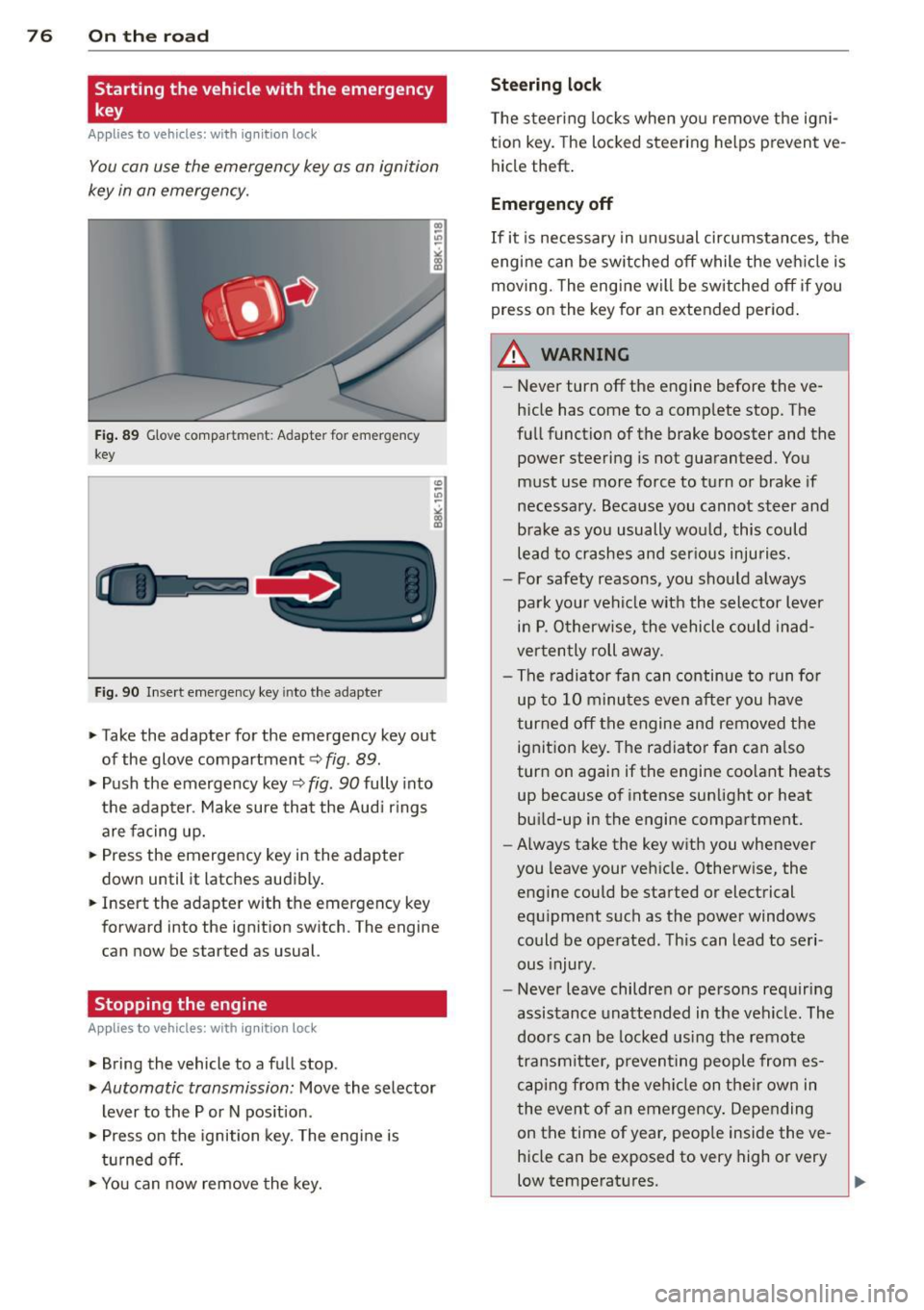
Fi g. 89 Glove compar tme nt: Adapter for emergency
key
Fig. 90 Inse rt emergency key into the adapter
.. Take the adapter for the emerge ncy key out
of the glove compartment
c!> fig . 89 .
.. Push the emergency key c::> fig. 90 fully into
the adap ter . Make sure tha t the Aud i rings
are facing up.
.. Press the emergency key in the adapter
down until it latches audibly .
.. Inse rt the adapte r with the emergency key
forward into the ignit ion switch. The engine
can now be started as usual.
Stopping the engine
App lies to vehicles: with ig n ition lock
.. Bring the vehicle to a full stop .
.. Automatic transmission: Move the selector
lever to the P or N pos ition .
.. Press on the ignition key. The engine is
t ur ned off.
.. You can now remove the key.
Steering lock
T he s teeri ng locks when yo u remove the igni
t ion key. The locked steering helps prevent
ve
hicle theft .
Emergency off
If it is necessary in unu sual circumstan ces, the
engine can be switched off while the veh icle is
moving. The eng ine will be switched off if you
press on the key for an extended period .
A WARNING ~
-Never turn off the engine before the ve
hicle has come to a comp lete stop. T he
fu ll function of the brake booster and the
power steering is not guaranteed. You
must use more force to turn or brake if
necessa ry. Beca use you cannot steer and
brake as you usually wou ld, this could
lead to crashes and ser io us injuries.
- For safety reasons, you sho uld a lways
park your vehi cle with the sele ctor lever
in P. O therwise, the vehicle could in ad
ver ten tly roll away.
- The radiator fan can continue to run fo r
up to 1 0 minu tes
even after you have
t urned off the engine and removed the
ignit ion key. The radiator fan can a lso
turn on agai n if the engine coo lant heats
up because o f intense sunlight or heat
bu ild-up in the engine compartment.
- Always take the key with you whenever
you leave your ve hicle. Otherw ise, the
engine could be sta rted or electrical
equ ipment such as the power windows
could be operated. This can lead to seri
ous injury.
- Never leave childre n or persons requiring
assistance unattended in t he vehicle . The
doors can be locked using the remote
trans mitte r, preven ting people from es
c a ping from t he ve hicle on the ir own in
the event of a n emergency . Depe nding
on the time of year, peop le inside the
ve
h icle can be exposed to very high or very
low temperatures .
Page 79 of 286
CD Note
If the engine has been under heavy load
for an extended period, heat builds up in
the engine compartment after the engine
is switched off- there is a risk of damaging
the engine . Allow the engine to run at idle
for about two minutes before switching it off.
Convenience key
Starting the engine
Applies to vehicles: with convenience key
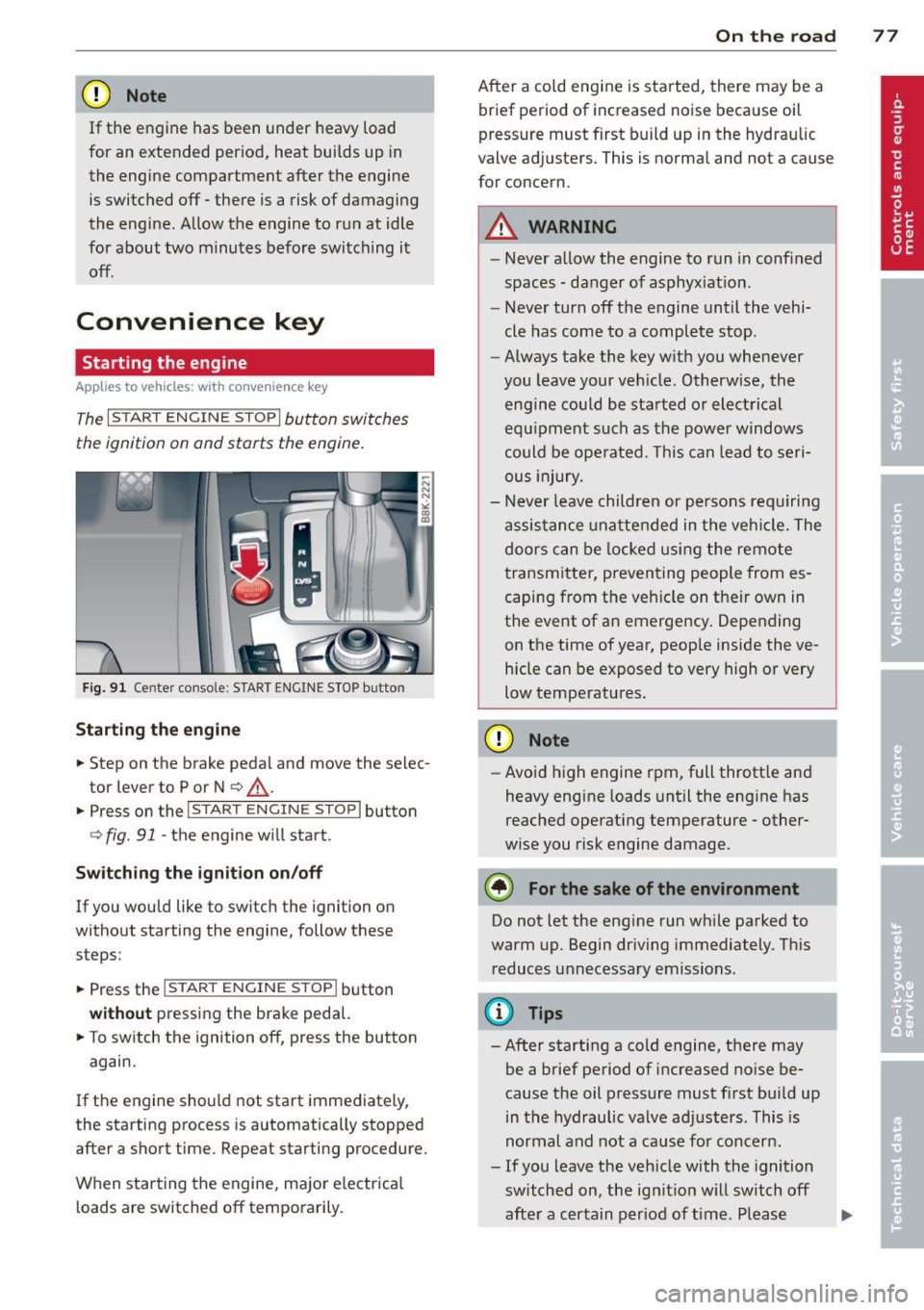
The I START ENGINE S TOPI button switches
the ignition on and starts the engine.
Fig. 91 Ce nter console : S TART ENGINE STOP button
Starting the engine
.. Step on the brake pedal and move the selec
tor lever to P or N
c::> ,&..
.. Press On the ,..,I s=T"" A--=R=T =-= E~N::;:.,=G-;-,I N:-:--;:::E--;:S:-:;T:--;:O:;--;:P::il button
c::>fig. 91 -the engine w ill start.
Switching the ignition on/off
If you would like to switch the ignition on
without starting the engine, follow these
steps:
.. Press the
!S TART ENGINE STOPI button
without pressing the brake pedal.
.. To switch the ignition off, press the button
again.
If the engine should not start immediately,
the starting process is automatically stopped
after a short time . Repeat starting procedure.
When starting the engine, major electrical
loads are switched off temporarily.
On the road 77
After a cold engine is started, there may be a
brief period of increased noise because oil
pressure must first build up in the hydraulic
valve adjusters. This is normal and not a cause
for concern .
A WARNING
-Never allow the engine to run in confined
spaces - danger of asphyxiation.
- Never turn off the engine until the vehi
cle has come to a complete stop.
- Always take the key with you whenever
you leave your vehicle. Otherwise, the
engine could be started or electrical
equipment such as the power windows
could be operated. This can lead to seri
ous injury.
- Never leave children or persons requ iring
assistance unattended in the vehicle. The
doors can be locked using the remote
transmitter, preventing people from es
caping from the veh icle on their own in
the event of an emergency . Depending
on the time of year, people inside the ve
hicle can be exposed to very high or very
low temperatures.
CD Note
- Avoid high engine rpm, full throttle and
heavy engine loads until the eng ine has
reached operating temperature - other
w ise you risk engine damage.
@ For the sake of the environment
Do not let the engine run while parked to
warm up. Begin driving immediately. This
reduces unnecessary emissions .
(!} Tips
-After starting a cold engine, there may
be a brief period of increased noise be
cause the oil pressure must first bu ild up
in the hydraulic valve adjusters. This is
normal and not a cause for concern .
- If you leave the veh icle with the ignition
switched on, the ign it ion w ill switch off
after a certain period of time . Please ..,.
Page 80 of 286

78 On the road
note that e lectrica l equipment such as
exterior lights wi ll switch off as well
when that happens .
Switching engine off
Applies to vehicles: with conven ience key
._ Bring your vehicle to a complete stop.
._ Move the selector lever to the P or N pos i
t ion .
._ Press the
I START ENGINE STOPI button
9 page 77, fig. 91.
Steering lock
The steering locks when you turn the engine
off us ing the
I STAR T ENGINE STOP I button
and open the dr iver's door. The locked steer
i ng helps prevent vehicle theft .
Emergency off
If necessary, the engine can be sw itched off
with the selector lever in the R or D/S pos i
tions. To do so, step on the brake pedal and
press and hold the
I START ENGINE STOP I but
ton vehicle speed must be less than 6 mph (10 km/h).
_& WARNING
- N ever turn off the eng ine before the ve
hicle has come to a comple te stop . The
f ull function o f the brake booster and the
powe r steering is not guara nteed . You
must use more force to turn or brake if
necessary. Because you cannot steer and
brake as you usually would, this could
lead to crashes and serious injur ies.
- For safety reasons, you should always
park your vehicle with the se lector lever
in P. Otherwise, the ve hicle could inad
vertent ly roll away.
-The rad iator fan can continue to ru n for
up to 10 m inutes even afte r yo u have
tu rned off the eng in e and removed the
ignition key. The radiator fa n can also
t u rn on again i f th e e ngine cool ant hea ts
up because of intense sunlight or hea t
build -up in the engine compartment. -
Always take the key with you whenever
you leave your veh icle. Otherw ise, the
engine could be started or electrical
equ ipment such as the power windows
could be ope rated. This can lead to seri
ous injury.
(D Note
If the engine has been under heavy load
for an extended period, heat bu ilds up in
the e ngine compartment after the eng ine
i s sw itched off - there is a r isk of damag ing
the engine. Allow the engine to run at id le
fo r about two minutes before switching it
off.
Driver messages
Ignition i s on
This message appears and a warning tone
sounds if you open the driver's door when the
ignition is sw itched on.
No key ident ified
This message appears when the
I S TART ENGINE STOPI button is pressed if
t h ere is no master key ins ide the ve hicle or if
the system does not recognize it. For exam
ple, the master key cannot be recognized if it
i s covered by an object (e.g . al uminum brief
case) which
screens the radio s ignal. Electron
i c dev ices such as cell phones can also i nte r
f ere with the radio s ignal.
Pres s bra ke p edal to start engine
This message appears if you do not press the
brake pedal to start the eng ine .
Shift to N or P to start engine
Th is mess age appears w hen at tempt ing to
sta rt the eng ine if the selecto r lever for the
automatic transmission is not in the P or N
pos ition . The engine can only be started with
the selecto r in these positions.
Is the key in the vehicle ?
Page 81 of 286

This message appears if the master key is re
moved from the vehicle with the engine run
n ing.
If the master key is no longer in the ve
hicle, you cannot switch on the ignition after
stopping the engine and you also cannot start
the engine again . Moreover, you cannot lock
the vehicle from the outside w ith the key.
Shift to P otherwise vehicle can roll away.
Doors do not lock if lever is not in P.
This message appears for safety reasons
along w ith a warning signa l. It appears if the
selector lever for the automat ic transm ission
is not in the P position when switch ing off the
ignition. Move the selector lever to the P posi
tion, otherw ise the veh icle is not secured
against rolling away . You also cannot lock the
veh icle using the locking button* on the door
handle or using the remote key.
Convenience key defective! Use ignition lock
This message appears if the engine must be
started or stopped using the ignition key and
not the
I STAR T ENGIN E STOP ! button .
Electromechanical
parking brake
Operation
The electromechanical parking brake replaces
the hand brake.
F ig. 92 Cen ter console: Pa rk ing brake
.. Pull on the switch @c> fig . 92 to apply the
parking brake. The indicator light in the
switch illum inates .
.. Step on the brake pedal or the acce le rator
pedal and press the switch at the same time
On the road 79
to release the parking brake. The indicator
light in the switch goes out .
Your vehicle is equipped wi th an electrome
chanical parking brake. The parking brake is
designed to prevent the vehicle from rolling
unintentionally and replaces the hand brake.
In addition to the normal functions of a tradi
tiona l hand brake, the electromec hanical
parking brake provides various convenience
and safety funct ions .
When starting from rest
-The integral start ing ass ist helps you when
driving by automatically releasi ng the park
ing brake
¢ page 80, Starting from rest.
-When starting on inclines, the starting as
sist prevents the vehicle from unintentiona l
ly rolling back. The braking force of the
parking brake is not re leased until sufficient
driving force has been bui lt up at the
wheels.
Emergency brake function
An emergency brake ensures that the veh icle
can be slowed down even if the
normal brakes
fail
c> page Bl, Emergency braking.
Indicator lights
- If the parking brake is closed with the ign i
t ion
switched on the . (USA models) /
• (Canada models) indicator lights come
on in the instrument cluster and the switch.
- If the parking brake is closed with the igni
tion
switched off the. (USA models) /
• (Canada models) indicator lights come
on in the instrument cluster and the switch
for about 20 seconds.
A WARNING
If a drive range is engaged with the vehicle
stationary and the engine runn ing, you
must in no instance accelerate carelessly .
Othe rwis e the vehicle w ill start to move
imm ediately- risk of an accident.
Page 82 of 286
80 On the road
(0 Note
If the . symbol i n the display or the.
(USA models) . (Canada models) indica
tor light in the instrument cluste r flashes
'
there is a malfunction in the brake system.
By pressing the
IS ET I button, you can br ing
up a driver message which explains the
malfunct ion in more detai l. If the driver
message
Parking brake! appears , the re is
an operating malfunct io n in t he par king
bra ke wh ich you sho uld have repa ired im
mediately by an authorized Audi dealer or
qualif ied workshop ¢
page 15.
(D Tips
-You can apply the pa rking br ake at any
time -even with the ignition switched
off. The ignition must be t urne d on and
the brake peda l must be pressed in order
to release the parking bra ke .
- Occas iona l noises when the parking
brake is applied and re leased are norma l
and are not a ca use for concern.
- When the vehicle is parked, the par king
brake goes through a se lf -test cycle at
regular intervals. Any assoc iated no ises
are norma l.
Parking
• Press the brake p eda l to stop the vehicle .
• Pull the switch @¢
page 79, fig. 92 to set
t h e parking br ake.
• Move the se lec tor lever to P .
• Turn the eng ine off
c:!> .,&_ .
• When on incl in es or declines, turn the steer
i ng whee l so that th e vehicle will roll into
the curb if it begins to move.
A WARNING
- Whe n you leave your veh icle -even if on
ly b rief ly -always remove the ig nition
key . This applies part icu larly when chil
dre n remain in t he ve hicl e. Otherwise the
c hildren co ul d st art the engine, re lease
the parking br ake or oper ate e lectri ca l eq
uipment (e.g. power windows). The re
is the risk of an acc ident.
- When the ve hicle is locked, no one -par
ticularly not children should rema in in
the vehicle . Locked doors make it more
difficult for emergency wo rkers to get i n
to the vehicle -putting lives at risk .
Starting from rest
The starting assist function ensures that the
parking brake is released au toma tically upon
starting .
Stopping and applying parking brake
• Pull the switch @¢ page 79, fig. 92 to ap-
p ly the parking bra ke .
Starting and automatically releasing the
parking brake
• W hen you sta rt to drive as us ual , the park
ing brake is a utomat ica lly released and yo ur
veh icle beg ins to move.
When stopping at a traffic signal or stopping in city traffic on vehicles with an a utomatic
transmission, the parking b rake can be ap
plied. The vehicle does not have to be held
with the foo tbrake . The parking brake elimi
nates the tendency to creep w ith a dr ive range
engaged. As soon as you d rive off as us ual ,
the pa rking bra ke is re leased automat ically
and t he vehicle s tarts to move.
Starting on slopes
When starting on inclines, the sta rting assist
prevents the vehicle from u ninten tionally roll
i ng back. The brak ing force of th e parki ng
brake is not re leased unti l su ffi cient d riving
f orce has been built up a t the w heels.
(D Tips
Fo r safety reasons, the pa rking brake is re
l eased a utom atically o nly when t he d riv
e r's s afety bel t is eng aged in the buckle.
Page 83 of 286

Starting off with a trailer
To prevent rolling back unintentionally on an
incline, do the following:
11-Keep the switch@¢ page 79, fig. 92 pulled
and depress the accelerator. The park ing
brake stays applied and prevents the vehicle
from roll ing backward.
11-You can release the switch @ once you are
su re that yo u are develop ing enough dr iv ing
f orce at the wheels by depress ing the accel
erator.
D epending on the weight of the r ig (vehicle
and tra ile r) and the severi ty of the in cli ne, you
may roll backwards as you start. Yo u can pre
vent rolling backwards by holding the parking brake switch @ pulled out and accelerating -
just as you would when starting on a hill with
a conventional hand brake.
Emergency braking
In the event that the conventional brake system fails or locks.
11-In an emergency, pull the switch @
¢
page 79, fig. 92 and contin ue to p ull it to
s low your vehicle down with the parking
brake.
11-As soon as you release the sw itch @ or ac-
ce lerate, the braking process stops .
If you pull the sw itch @ and ho ld it above a
speed of about 5 mph (8 km/h), the emergen
cy braking function is in itiated. The vehicle is
braked at all four wheels by activating the hy
draul ic brake system . T he b rake performance
i s simi lar to making an emergency stop ¢
.&,.
In order not to activate the emergency brak
i ng by m istake, an audible warning tone (buz
zer) sounds when the switch @ is pu lled. As
soon as the switch @ is released, o r th e accel
e rator pedal is dep ressed , emergency bra king
stops.
WARNING
Emergency braking should on ly be used in
an eme rgency, when the normal foot brake
On th e ro ad 81
has failed or the brake pedal is obstructed.
Using the parking brake to perform emer
gency brak ing will slow your vehicle down
as if you had made a full brake application .
The laws of physics cannot be suspended
even with ESC and its associated compo
nents (ABS, ASR, EDS). In corners and
when road o r wea the r cond itions are b ad,
a full brake application can ca use the vehi
cle to skid or the rear end to break away -
risking an accident .
Speed warning system
, Overview
The speed warning system helps you to keep
your driving speed below a set speed limit.
The speed warning system warns if the driver
exceeds a previous ly stored max imum speed.
A war ning tone w ill sound as soon as the vehi
cle speed exceeds the set speed by about
3 mph (3 km/h) . At the same t ime, a warn ing
symbol appears in the display. The symbo l's
appearan ce might be different in some mod
els.
The speed warn ing system has two warning
thresholds that funct ion i ndependent ly of
each othe r and that have somewhat different
purposes:
Speed w arning 1
You can use speed warning 1 to set the maxi mum speed while you are driving . This setting
will remain in effect until you turn off the ig ni
tion, assumi ng that you have not changed or
rese t the set ting.
The . (USA models) /. (Canada models)
speed warning symbo l in the warning 1 dis
play appears when you exceed the maximum
speed . It goes ou t when the speed falls be low
the stored maximum speed.
T he speed warn ing symbol w ill also go out if
the speed
exceeds t h e stored maximum speed
by more than about 25 mph (40 km/h) for at
least 10 seconds . The stored max imum speed
is de leted . ..,_
Page 85 of 286

Cruise control
Switching on
The cruise control system makes it possible to
drive at a constant speed starting at 20 mph
(30 km/h).
0
f
~
0
Fig . 94 Contro l lever with push-bu tton
Fig . 95 D isplay: Selected speed
.,. Pull the lever to position (!)~ fig. 94 to
swit ch the system on .
.,. Drive at the speed to be controlled.
.,. Press button @ to set that speed .
The stored speed and the green symbol
.,
;1; 9 a: .,
"'
II (US model)/ ... (Canadian mode l) are
shown in the display~
fig. 95. The display
may vary, depending on the type of display in
your vehicle.
The speed is kept constant by modifying en gine power or through an active brake inter
vention.
A WARNING
- Always pay attention to the traffic around you when the cruise control is in
operation . You are always responsib le for
your speed and the distance between
your vehicle and other vehicles.
On the road 83
-For reasons of safety, cruise control
should not be used in the city, in stop
and-go traffic, on twisting roads and
when road conditions are poor (such as ice, fog, gravel, heavy rain and hydro
plan ing) - risk of accident .
- Turn off the cruise control temporarily when enter ing turn lanes, highway exit
lanes or in construction zones.
- Please note that inadvertently ''resting"
your foot on the accelerator pedal causes
the cruise control not to brake. This is
because the cruise control is overridden
by the driver's acceleration.
- If a brake system malfunction such as
overheating occurs when the cruise con
trol system is switched on, the braking
function in the system may be switched off . The other cruise contro l functions re
main active as long as the indicator light
Ill (US models) !l'I (Canadian models)
is on.
(D Tips
The brake lights illuminate as soon as the
brakes app ly automatically .
Changing speed
.,. To increase/decrease the speed in incre
ments, tap the lever in the
0 10 direction
~ page 83, fig. 94 .
.,. To increase/decrease the speed quickly, hold
the lever in the
010 direction until the de
sired speed is displayed .
You can also press the accelerator pedal down
to increase your speed, e.g. if you want to pass someone. The speed you saved earlier
will resume as soon as you let off of the acce l
erator pedal.
If, however , you exceed yo ur saved speed by
6 mph (10 km/h) for longer than S minutes,
the cru ise control will be turned off tempora
rily. The green symbol in the display turns
white. The saved speed remains the same.