wheel AUDI A5 CABRIOLET 2014 User Guide
[x] Cancel search | Manufacturer: AUDI, Model Year: 2014, Model line: A5 CABRIOLET, Model: AUDI A5 CABRIOLET 2014Pages: 286, PDF Size: 70.4 MB
Page 92 of 286

90 Transmi ssion
when there is n o possibility of over-rev
ving the e ngine.
- When the kick-down comes on, the
transmission will sh ift down to a lower
gear, depending on vehicle and engine
speeds.
- Tiptronic is inoperative when the trans
mission is in the fail-sa fe mode.
Kick-down
Applies to vehicles: with multitronic/5 tronic/t iptronic
Kick-down enables maximum acceleration .
Applies to vehicles with a multitronic
transmission
When you depress the acce le ra to r pedal be
yond the resis tance point, the transmission
downshifts into a lower gear ratio depending
on the vehicle speed and engine speed. As l ong as the accelerator peda l is depressed, the
engine speed is automat ica lly regula ted for
maximum acceleration .
Applies to vehicle s with a S tronic- /
tiptronic transmis sion
When you depress the accelerator pedal be
yond the resistance po int , the automat ic
tra nsmission downshifts into a lower gear, de
pending on vehicle speed and engine speed .
The upshift in to the next higher gea r takes
p lace once the maxim um specified eng ine
speed is reache d.
_& WARNING
Please note that the d rive wheels can spin
if kick-down is used on a smooth slippery
road -there is a risk of skidding .
Launch Control Program
Applies to vehicles: with S tron ic
T he Launch Control Program provides the
best acceleration possible when starting from
a stop.
Requirement: The engine must be at operat
ing temperature and the stee ring wheel must
not be turned. ..
Press the
I~ O FF ! button c;, page 181 whi le
the engine is running. The
II i ndicator light
illuminates in the instrument cl uster and
Stab ilizat ion control (ESC): Sport. Warn
ing! Restricted stability
appears in the driv
er info rmation system display .
.. Move the selector lever to the D/S posi tion
t o select sport mode (S) o r se lect the
dy
namic dr iving mode in dr ive se lect*
c:> page 107.
.. Press the brake pe dal s trongly with yo ur left
foo t and hold it down fo r at leas t 1 second .
.. At the same time, press the acce lerator ped
al down completely with your right foot un
til the eng ine reaches and maintai ns a high
RPM.
.. Remove your foot from the brake pedal
w ith in S seco nds
c;, &, .
_& WARNING
-Always ad apt your dr iving to the traffic
f low.
- On ly use the Launch Cont ro l Program
when road and traff ic conditions allow it
a nd other d river s w il l no t be en dangered
or annoyed by your driving and the vehi
cle's acceleration.
- Ple ase no te th at th e driving wheels can
spin an d the vehicle can break away
when sport mode is switc hed on, espe
cially when the road is slippe ry .
- Once you have accelerate d, you sho uld
sw itch sport mode off by pressing the
I~ O FF ! button.
(D Tips
- The transmission temperature may in
crease significa ntly after using the
Launch Control P rogram . If that hap
pens, the prog ram may not be availab le
for a few minutes. It will be ava ilable
again after a cool-down period.
- When accelerating using the Launch Cont rol program, all vehicle parts are
subject to heavy loads . Th is can result in
increased wear.
Page 96 of 286

94 Audi adaptive cruise control and braking guard
confirmed by the video camera, an acute
collision warning.
- For safety reasons, do not use adaptive
cruise control when driving on roads with
many curves, when the road surface is in
poor condition and/or in bad weather
(such as ice, fog, gravel, heavy rain and
hydroplaning). Using the system under
these conditions could result in a colli
sion.
- Switch adaptive cruise control off tempo
rarily when driving in turning lanes, on
expressway exits or in construction
zones. This prevents the vehicle from ac
celerating to the set speed when in these
situations.
- The adaptive cruise control system will
not brake by itself if you put your foot on
the accelerator pedal. Doing so can over
ride the speed and distance regulation.
- When approaching stationary objects
such as stopped traffic, adaptive cruise
control will not respond and braking
guard will have limited function.
- The adaptive cruise control system and
braking guard do not react to people, an
imals, objects crossing the road or on
coming objects .
- The function of the radar sensor can be
affected by reflective objects such as
guard rails, the entrance to a tunnel,
heavy rain or ice.
- Never follow a vehicle so closely that you cannot stop your vehicle safely. The
adaptive cruise control cannot slow or
brake the vehicle safely when you follow
another vehicle too closely . Always re
member that the automatic braking
function cannot bring the vehicle to a sudden or emergency stop under these
conditions.
- To prevent unintended operation, always
switch ACC off when it is not being used.
{[) Note
The sensor can be displaced by impacts or
damage to the bumper, wheel housing and
underbody. That could affect the adaptive cruise control system and braking guard.
Have your authorized Audi dealer or au
thorized Audi Service Facility check their
function.
, In curves
Applies to vehicles: wit h Aud i adapt ive cr uise contro l
Fig. 104 Example: driv ing into a curve
When driving into a curve <=> fig. 104 and out
of a curve, the adaptive cruise control may re act to a vehicle in the next lane and apply the
brakes. You can override or prevent the brak
ing by pressing the accelerator pedal briefly.
Stationary objects
Applies to vehicles: with Aud i adaptive crui se contro l
Fig. 105 Example: object changing lanes a nd station
a ry object
The adaptive cruise control system only reacts
to objects that are moving or that the system
has already detected as moving. For example,
if a vehicle @, which has already been detect
ed by the adaptive cruise control, turns or
changes lanes and another stationary vehicle
@ is located in front of that vehicle, the sys
tem will not react to the stationary vehicle.
Page 105 of 286

General information
Applies to vehicles: with Audi side assist
®
©
Fig . 116 Dr iving situations
Fig. 117 Rear of t he ve hicle: positio n of t he se nsors
., ... N 0 IL
l:l
Side assist functions at speeds above approx i
mately 19 mph (30 km/h).
@ Vehicl es th at ar e approaching
In certain cases, a vehicle will be classified as
cr itical for a lane change even if it is still
somewhat far away. The fas ter a vehicle ap
p roaches, the sooner the display in the exteri
or m irror will t urn on.
@ Vehicles traveling with you
Vehicles traveling w ith you are indicated in the
exterior m irror if they are classified as cr itical
for a lane change. All vehicles detec ted by
side assist are indicated by the time they en
ter your "blind spot", at the latest.
Audi side assist 103
@ Veh icle s left behind
If you s low ly pass a vehi cle that s ide assist has
detected (the difference in speed between the
vehicle and you r vehicle is less than 9 mph
(15 km/h)), the display in the exterior mirror
turns on as soon as the vehicle enters your blind spot.
T he disp lay will not t urn on if you quickly pass
a vehicle that side assist has detected (the dif
ference in speed between the veh icle and your
vehicle is greater than 9 mph (15 km/h)).
Functional limitations
The radar senso rs are designed to detect the
left and right adjacent lanes when the road
lanes are the normal width. In certain situa
tions, the disp lay in the exterior mirror may
turn on even though there is no vehicle locat
ed in the area that is cr itical for a la ne change.
For example:
- if the lanes are narrow or if your are dr iving
on the edge of your lane.
If this is the case,
the system may have detected the vehicle in
another lane that is
not adjacent to your
current lane .
- if you a re driving through a curve. Side assist
may react to a vehicle that is one lane ove r
from the adjacent lane.
- if side assist reacts to other objects (such as
high or d isp laced guard rails) .
- In poor weather conditions. The side assist
functions are l imited .
Do not cover the radar sensors <=>
fig. 117 with
stickers, depos its, bicycle wheels or other ob
jects, because this will affect the funct ion. Do
not use s ide ass ist when towing a trailer. For
i nformation on cleaning, refer to<=>
page 195.
_&. WARNING
- Always pay attention to traffic and to t he
area a round your ve hicl e. S ide assist can
not repla ce a driver's attention. T he driv
er a lone is always responsible for lane
changes and similar driving mane uvers.
Page 106 of 286

104 Audi side assist
-Improper reliance on the side assist sys
tem can cause collisions and serious
personal injury:
- Never rely only on side assist when
changing lanes.
- Always check rear view mirrors to make
sure that it is safe to change lanes.
- Side assist cannot detect all vehicles un
der all conditions- danger of accident!
- Please note that side assist indicates
there are approaching vehicles, or
vehicles in your blind spot, only after
your vehicle has reached a driving speed
of at least 19 mph (30 km/h).
- In certain situations, the system may not
function or its function may be limited.
For example:
- if vehicles are approaching or being left
behind very quickly . The display may
not turn on in time.
- in poor weather conditions such as
heavy rain, snow or heavy mist .
- on very wide lanes, in tight curves or if
there is a rise in the road surface.
Vehicles in the adjacent lane may not
be detected because they are outside
of the sensor range.
(D Note
The sensors can be displaced by impacts or
damage to the bumper, wheel housing and
underbody. This can affect the system.
Have your authorized Audi dealer or au
thorized Audi Service Facility check their
function.
@ Tips
- If the window glass in the driver's door
or front passenger's door has been tint
ed, the display in the exterior mirror may
be misinterpreted.
- For Declaration of Compliance to United
States FCC and Industry Canada regula
tions¢
page 267.
Activating and deactivating
A pp lies to vehic les : wi th Audi s ide ass ist
Fig. 118 Driver's door: Side ass ist butto n
.. Press the button c> A in General informa
tion on page 103
to switch the system on/
off. The LED in the button turns on when
side assist is switched on .
Adjusting the display brightness
Applies to vehicles: wit h Audi side ass ist
The signal brightness con be set in the radio
or MM!*.
.. Select: I CAR I function button > Audi side as
sist.
.. Select: !CARI function button> Car systems*
control button > Driver assist> Audi side
assist .
The display brightness adjusts automatically
to the brightness of the surroundings, both in
the information and in the warning stage . In
very dark or very bright surroundings, the dis play is already set to the minimum or maxi
mum level by the automatic adjustment. In
such cases, you may notice no change when
adjusting the brightness, or the change may
only be noticeable once the surroundings
change.
Adjust the brightness to a level where the dis
play in the information stage will not disrupt
your view forward. If you change the bright
ness, the display in the exterior mirror will
briefly show the brightness level in the infor
mation stage. The brightness of the warning
stage is linked to the brightness in the infor
mation stage and is adjusted along with the
information stage adjustment.
Page 107 of 286

@ Tips
-Side assist is not active whi le you are
making the adjustment.
- Your settings are automatica lly stored
and assigned to the remote control key
being used.
Driver messages
Applies to vehicles: with Audi side assist
If s ide ass ist switches off by itself, the LED in
the button turns off and a message will ap
pear in the instrument cluster display:
Audi side assist unavailable: Sensors blocked
The radar sensors' vision is affected. Do not
cover the area in front of the sensors with bike
wheels, stickers, dirt or other objects. Clean
the area in front of the sensors, if necessary
¢ page 103, fig. 117.
Audi side assist: Currently unavailable
Side assist cannot be switched on temporarily
because there is a malfunc tion (for example,
the battery charge leve l may be too low) .
Audi side assist: System fault!
The system cannot guara ntee that it will de
tect veh icles correctly and it is switched off .
The sensors have been displaced or are faulty.
H ave the system checked by an authorized
Aud i dealer or authorized Aud i Service Facility
soon.
Audi side assist: Unavailable when towing
Side assist sw itches off automatically when a
factory- insta lled trailer h itch is connected to
the electrical connector on the trailer. There is
no guarantee the system will switch off when
usi ng a retrofitted t ra iler hitch. Do not use
side assist when towing a trailer .
Audi side assist 105
Page 115 of 286

Switching off
• Drive faster than 9 mph (15 km/h), or
• take the vehicle out of reverse gear. The
acoustic parking system is immediately de
activated, and the rear view camera picture is deactivated automatically after a period
of about 15 seconds, or
• switch off the ignition.
The delay in deactivating the camera provides
an uninterrupted view behind the vehicle es
pecially when maneuvering in tight parking
spaces and prevents the picture from turning
off the every time you sh ift out of reverse .
If the warning message appears in the display but not the rear view camera picture, read and
confirm the warning message . The acoustic
d istance signal is always active.
If you press a function button on the MMI
control console, the rear view camera picture
disappears . The rear view camera picture reap
pears the next time you park.
Further information on the warning message
and the MMI control console can be found in
the MMI instruction booklet.
A WARNING
- Only use the rearview camera to assist
you if it shows a good, clear picture. For
example, the image may be affected by
the sun shining into the lens, dirt on the
lens or if there is a defect.
- Use the rearview camera only with the
rear lid completely closed. Make sure any
objects you may have mounted on the
rear lid do not block the rearview cam
era.
(D Tips
- The rear v iew camera picture is available
as soon as the MMI Display or the MMI is
switched on, or the start-up phase is
completed.
- The sensors must be kept clean and free
of snow and ice for the park assist to op
erate.
Park assist 113
- You can change the vo lume and pitch of
the signals as we ll as the disp lay
~page 115.
-What appears in the display is time-de
layed.
Reverse Parking
App lies to vehicles: wit h parking system (rear, with rear
v iew camera}
Parking mode 1 can be used when parking in
a garage or parking space.
Fig. 125 MMI Display: Aim ing at a park ing spot
Fig. 1 26 MMI Disp lay : Al ign ing the veh icle
• Switch the MMI on and select the reverse
gea r.
• Turn the steering wheel until the orange ori
entation lines (!) appear in the parking spot
i=> fig. 125. Use the markings @to help you
estimate the distance from an obstacle.
Each marking corresponds to 3 ft (1 m). The
blue area represents an extens ion of the ve
hicle's outline by approximately 16 ft (5 m)
to the rear.
• Wh ile driving in reverse gear, adjust the
steer ing whee l angle to fit the parking space
with the aid of the orange orientation lines
i::>0 .@ marks the rear bumper. You should
stop driving in reve rse as soon as and no
Ill>-
Page 116 of 286

114 Park assist
later than when the red orientation line©
abuts an object
c:> _&!
A WARNING
- The rear view camera does not show the
entire area behind the vehicle
c:>page 111, fig. 123. Watch out espe
cially for small children and animals. The
rear view camera cannot always detect
them, posing risk of an accident!
- Please note that objects not touching the
ground can appear to be further away
than they really are (for example, the
bumper of a parked vehicle, a trailer
hitch, or the rear of a truck). In this case,
you should not use the help lines to help
with parking, which poses danger of an
accident!
(D Note
- Low obstacles already signaled by a
warning can disappear from the system's
detection range as they are approached
and will not continue to be signaled. Ob
je cts such as barrier chains, trailer draw
bars, thin painted vertical poles or fen
ces may not be detected by the system, posing risk of damage.
- In the MMI display, the direction of trav
el of the vehicle rear is represented de
pending on the steering wheel angle.
The vehicle front swings out more than
the vehicle rear. Maintain plenty of dis
tance from an obstacle so that your out
side mirror or a corner of your vehicle
does not collide with any obstacles -dan
ger of accident!
Parallel Parking
Applies to vehicles: wit h parking system (rear, with rear
v iew camera)
Use parking mode 2 to help you park on the
edge of a street.
Fig. 127 MMI Disp lay : b lue surface in t he parking spot
Fig. 128 MMI Display : Bl ue curve on the curb
Th e following steps apply only when there is
no obstacle (such as a wall) near the parking
spot. Otherwise, please read the "Tips on
Parking Next to Obstacles"
c:>page 115.
.,. Activate the turn signal.
.,. Posit ion your vehicle parallel to the edge of
the street, approx imately 3
ft (1 m) from a
parked vehicle.
.,. Switch the MMI on and select the reverse
gear. The parking aid turns on and parking
mode
1 appears on the display .
.,. Press the
Mode c:> fig . 12 7 (D control button
on the MMI control console. Parking mode 2
appears .
.,. Back up in reverse gear and align your vehi
cle so that the blue area @borders on the
rear end of the vehicle or on the parking
spot line. The blue area represents an exten
sion of the vehicle's outline by approximate-
ly 16
ft (Sm) to the rear . The long side of ..,.
Page 117 of 286

the blue area should be o n the curb. The en
tire b lue area must fit into the parking spot.
~ While the vehicle is stationary, t urn the
steering wheel to the right as far as it will go.
~ Back into the park ing spot . Stop the vehicle
as soon as the blue curve touches the curb
¢ fig . 128 .
~ While the vehicle is stationary, tu rn the
steering wheel to the left as far as it w ill go.
~ Continue to back up into the park ing spot
until the vehicle is parked paralle l to the
curb .@ marks the rear bumper . You should
stop dr iving in reverse as soon as and no lat
er than when the red orientation line@
abuts an object¢,& ! Keep an eye on the
front of your vehicle wh ile doing this ¢(D .
Par kin g ne xt to obst acles
When there is an obstacle (such as a wall)
next to the parking spot, choose a spot with
more space on the sides. Position the long
side of the blue area so that there is sufficient
space from the curb . The area must not be on
the curb . You w ill also need to start turning
the steeri ng whee l much ear lie r. T he re should
be a suffic ien t amo unt of space between the
curb and the b lue curve, and the blue c urve
¢
fig . 128 mus t not touch the curb .
&_ WARNING
-The rear view came ra does not show the
entire area behind the vehicle
¢ page 111, fig. 123. Watch out espe
c ially for small children and an imals. The
rear view camera cannot a lways detect
them, posing risk of an accident!
- Please note that objects not touch ing the
ground can appear to be further away
than they really are (for example, the bumper of a pa rked vehicle, a t railer
hi tc h, or the rear of a tru ck). In this case,
yo u should not use the help lines to he lp
with par king, which poses danger of an
accident!
P ark a ssis t 115
@ Note
In the MMI display, the direction of travel
of the vehicle rear is represented depend
i ng on the steering wheel angle. The vehi
cle front swings out more than the vehicle
rear. Maintain p lenty of d istance from an
obstacle so that your outs ide mirror or a
corner of you r vehicle does not coll ide with
any obstacles - dange r of accident!
(D Tips
The left o r right orie ntation lines and su r
faces will be displayed, depending on the
turn s ignal being used.
Adjusting the display and warning tones
App lies to vehicles: wi th parking sys tem (rear , wi th rear
v iew camera)
The display and warning tones are adjusted in
the radio or MM!*.
~ Select: !CAR ! function button > Par king sys
tem .
Or
--~ Select: !CAR ! function button> Car systems *
contro l butto n > Driver ass ist > Parking aid .
Di splay
- Off -when the parking system is switched
off, only a udible s ignals a re g iven .
-On -when the parking system is switched
on, the picture from the rear view camera is
disp layed.
Warning tones
- Rear volume -
rear sensor vo lume
- Rear frequency -rear senso r frequency
- Music volume while parking -when the
park ing system is sw itched on, the volume
of t he active audio sour ce is lowered.
The newly adjusted value is briefly heard from
the sig nal generato r. Th e settings are auto
matically stored and assigned to the remote
control key. ..,.
Page 124 of 286
122 Driving Safel y
• Fasten your safety be lt and wear it properly .
Also instruct your passengers to fasten their
safety belts proper ly ¢
pag e 132.
What impairs driving safety?
Safe driving is directly related to the condi
tion of the vehicle, the driver as well as the
driver 's ability to concentrate on the rood
without being distracted.
The driver is responsible for the safety of the
vehicle and all of its occupants. If your ability
to drive is impaired, safety risks for everybody
in the vehicle increase and you also become a
hazard to everyone else on the road ¢
.&,.
Therefore:
• Do not let yourself be distracted by passen
gers or by using a cellular telephone.
• NEVER drive when your dr iving ability is im
paired (by medicat ions, alcohol, drugs, etc.) .
• Observe all traffic laws, rules of the road
and speed limits and plain common sense.
• ALWAYS adjust your speed to road, traffic
and weather conditions.
• Take frequent breaks on long trips . Do not
drive for more than two hours at a stretch .
• Do NOT drive when you are tired , under
pressure or when you are stressed.
A WARNING , .
Impaired driving safety increases the risk
of serious personal injury and death when
ever a vehicle is being used.
Proper occupant
seating positions
Proper seating position for the driver
The proper driver seating position is impor
tant for safe, relaxed driving.
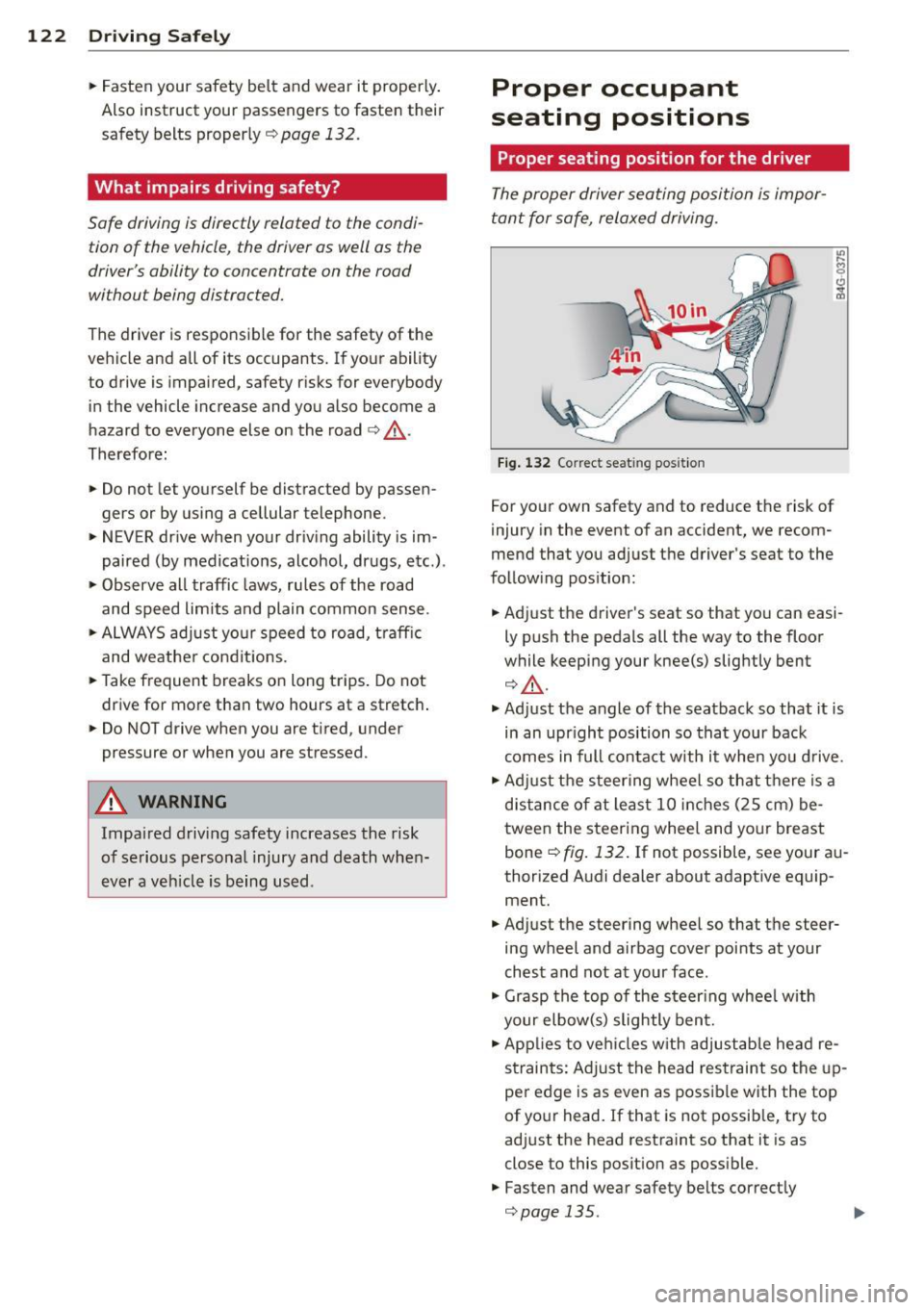
Fig. 132 Correc t seat ing posit ion
For your own safety and to reduce the risk of
injury in the event of an accident, we recom
mend that you adjust the driver's seat to the
following position:
• Adjust the driver's seat so that you can easi
ly push the pedals all the way to the floor
while keeping your knee(s) slightly bent
¢.&, .
• Adjust the angle of the seatback so that it is
in an upr ight position so that your back
comes in full contact with it when you drive.
• Adj ust the steering wheel so that there is a
distance of at least 10 inches (25 cm) be
tween the steering wheel and your breast
bone ¢
fig. 132. If not possible, see your au
thorized Audi dealer about adaptive equip ment.
• Adjust the steering wheel so that the steer
ing wheel and airbag cover points at your
chest and not at your face .
• Grasp the top of the steer ing wheel with
your elbow(s) slightly bent.
• Applies to veh icles w ith adjustable head re
straints: Adjust the head restraint so the up
per edge is as even as possible with the top
of your head.
If that is not possible, try to
adjust the head restraint so that it is as
close to this posit ion as possible.
• Fasten and wear safety belts correctly
¢page 135.
Page 125 of 286
~ Always keep both feet in the footwell so
that you are in control of the vehicle at all
times .
F or detai led information on how to adjust the
driver's seat, see
c:;, page 61.
A WARNING
Drivers who are unbelted, out of position
or too close to the airbag can be ser iously
injured by an airbag as it unfolds. To help
reduce the risk of serious personal injury :
- Always adjust the dr iver's seat and the
steering wheel so that there are at least
10 inches (25 cm) between your breast
bone and the steering wheel.
- Always hold the steering wheel o n the
outside of the steering wheel rim with
your hands at the 9 o'clock and 3 o'clock posit ions to he lp red uce the risk of pe r
sonal in jury if the drive r's airbag inflates.
- Never hold the steer ing whee l at the
1 2 o'clock posit ion or w it h your hands at
other pos it ions inside the steering wheel
rim or on the stee ring wheel h ub. Hold
ing the steering wheel the wrong way
can cause serious injuries to the hands,
arms and head i f the driver 's airbag de
ploys.
- Pointing the steering whee l toward your
face decreases the ab ility o f the supp le
menta l dr iver's airbag to protect you in a
co llision.
- Always s it in an upright position and nev
er lean against or place any part of your
body too close to the a rea where the air
bags are located.
- Before driv ing, a lways ad just the front
seats and head restra ints prope rly and
make s ure that all passengers are prop
er ly restrained.
- Never adjust the seats while the vehicle
is moving . Your seat may move unexpect
edly and you could lose control of the ve
hicle.
- Never drive with the backrest recl ined o r
t il ted far ba ck! T he farther the ba ck rests
are t ilted back, the greate r the ris k of in-
Dr iving S afel y 123
jury due to incorrect pos itioning of the
safety belt and improper seating posi
tion.
- Ch ildren must a lways ride in ch ild safety
seats
c:;, page 161. Special precaut ions
apply when installing a child safety seat
on the front passenger seat
c:;, page 140.
Proper seating position for the front
passenger
The proper front passenger seating position
is important for safe, relaxed driving.
For your own safety and to reduce the risk of
injury in the event of an accident, we recom
mend that you adjust the seat for the front
passenger to the following position:
~ Move the front passenger seat back as far as
possible . There must be a m inimum of
1 0 i nches (25 cm) between the breastbone
and the ins trument panel
c:;, &, .
~ Adjust t he a ngle of the seatbac k so that it is
in an upr igh t position and yo ur ba ck comes
in full contact wit h it whenever the vehicle is
moving.
~ Applies to vehicles with adjustab le head re
straints: Adjust the head restraint so the up
per edge is as even as possible wit h the top
of your head. If that is not possib le, try to
adjust the head restraint so that it is as
close to this pos it ion as poss ible.
~ Keep both feet flat on the floor in front of
t he fron t passenger seat .
~ Fasten and we ar safe ty be lts cor re ctly
c:;, page 135.
For detailed information on how to adj ust the
fron t passenger's seat, see
c:;, page 60.
A WARNING
-
Front seat passengers w ho are un belted,
out of posi tion or too close to the airbag
can be ser iously injured or killed by the air
bag as it unfolds. To help reduce the risk of
serious personal injury:
•
•