lock AUDI A5 CABRIOLET 2014 Owner's Manual
[x] Cancel search | Manufacturer: AUDI, Model Year: 2014, Model line: A5 CABRIOLET, Model: AUDI A5 CABRIOLET 2014Pages: 286, PDF Size: 70.4 MB
Page 44 of 286
42 Power top
Power top
Automatic power top
General information
The sophisticated design of the fabric power
top allows you to operate it easily and quickly.
You can open and close the power top while
driving as long as the vehicle is traveling be
low 30 mph. When open, the power top is
stored in a special compartment which is
equipped with a cover.
Under normal conditions, the power top is
wind- and waterproof . In rare cases, small
droplets of water may form under extreme
weather conditions such as torrential or pro longed rain. That is normal and no cause for
concern.
F ollow the maintenance instructions to main
tain the attractive appearance of the converti ble and to ensure that it does not leak
¢ page 195. Also observe the following:
- Only open and close the power top when it is
clean. Sharp-edged particles of dirt can
scratch the rear window when the power top is folded and can cause abrasion that result
in damage to the power top over time. You
should also remove ice and snow before
opening the power top.
- Never remove snow and ice with sharp
edged objects. You can remove ice from the
rear window w ith a standard ice scraper.
- You should only open the power top when it
is completely dry. Opening the power top
and stowing it in the compartment when it
is wet can cause marks on the top that de
tract from its appearance. Mi ldew can also
form if the power top is stowed for an ex
tended period of time when it is wet.
- Do not leave the power top open for several
weeks at a time. Always close it between uses to prevent discoloration and creases
from forming. This is especially important if
it was not completely dry when stowed.
- Opening or closing the power top in temper
atures below 32 °F (0 °C) is not recommend- ed because the flexibility of the fabric
de
creases is sub-zero temperatures .
A WARNING ,-
-When operating the power top, make
sure the function is not affected by wind
or other factors and that it does not in
terfere w ith other dr ivers.
- Never drive when the power top is not
locked correctly. The wind from driving
could cause the power top to open . This
can result in injuries and damage to the
veh icle.
- When opening and closing the power
top, make sure no one will be injured by
the supports and other moving parts.
- Operating the power top reduces the
headroom in the rear of the vehicle.
Make sure there is enough clearance be
tween the rear passenger and the power
top when opening and closing it.
-
- When operating the power top, visibility
to the rear is limited . Avo id operat ing the
top while driving in reverse.
(D Note
-Always make sure there is enough clear
ance above the vehicle so the power top
is not damaged when opening and clos
ing it.
- Do not store any objects in the power top
compartment to avoid damage when
opening the top.
@ Tips
- To prevent the battery from discharg ing,
do not open or close the power top re
peated ly when the engine is switched
off.
-A message in the instrument cluster dis
play will a lert you if a protection function
was activated or if there is a malfunction
¢page 43.
-The power top can also be operated
manually if there is a malfunction .,..
Page 45 of 286

¢ page 46, Power top emergency op
eration.
Have you authorized Audi dealer
correct the cause of the malfunction as
soon as possible.
- If parking the vehicle with the power top
open, remember that the vehicle interior
will not be protected from the weather
or from unauthorized entry. Closing the
power top before leaving the vehicle is
recommended . If you leave items in the
vehicle, lock them in the trunk.
=-· Power top operation
The indicator light monitors the power top .
The I!!! indicator light illuminates for approxi
mately 2 seconds when the ignition switches
on to check the function and then goes out
again . The indicator light also:
- illuminates when the power top opens or
closes.
- blinks if the power top switch is operated
but the conditions for opening or closing the
power top are not met . A warning message
also appears in the instrument cluster dis
play ¢
page 43, Error message in the in
strument cluster display.
-if the power top did not open or close com
pletely.
0) Tips
The indicator light stays on if the power
top was opened manually.
Error message in the instrument cluster
di splay
An error message appears if the power top
cannot open or close.
Several conditions must be met for the power
top to open or close automatically.
An error message in the instrument cluster
d isplay indicates if one of the conditions is not
met or there is a malfunction.
Power top 43
Power top: please close rear lid
The luggage compartment lid must be closed
when the power top is opening or closing. This
error message appears in the instrument clus
ter display if the luggage compartment lid is
not closed.
Storage bay not lowered. Please remove
obstruction
The power top storage bay must lower when
the power top is opening. This error message
appears in the instrument cluster display if
the storage bay is not lowered. If the storage
bay does not lower automatically because of
objects in the luggage compartment, remove
the objects that are in the way from the stor
age bay area . Otherwise, you can operate the
power top storage bay manually
c::> page 45.
Power top: cannot be used
This error message appears if the convertible
cannot open or close automatically because of safety reasons or if there is a malfunction. The
following causes are possible :
-Vehicle speed too high: Power top opera
tion is deactivated and an error message ap
pears if the vehicle speed is too high. Re
duce the vehicle speed and operate the
sw itch again to open or close the power top.
-Battery voltage too low: The power top can
not be operated if the battery voltage is too
low. This ensures there will be enough bat
tery voltage left to start the vehicle. The
power top can be operated again after the
engine is started.
- Rollover protection active: If the power top
is operated continuously for an extended pe
riod of ti me, rollover protection will activate
to prevent damage to the hydraulic unit .
This protective function prevents the power top from opening or close for approximately
15 to 30 minutes .
It will function again af
ter that
c::> ,& .
-Malfunction: Failure of system components
is one possible cause for malfunction. If this
happens, you can also operate the power
top by hand¢
page 46.
Page 46 of 286
44 Power top
Power top not se cure
This message appe ars with a warning tone if
the power top is not
c o mplet ely cl osed or
open and the vehicle speed is above SO km/h.
Reduce th e ve hicl e spe ed b elow SO km/h and
use the switch to open o r close the power top
completely .
A WARNING
Never drive when the power top is not
locked co rrectly . The w ind from dr iv ing
co uld cause the power top to open . T his
c an result in injuries and damage to the
veh icle .
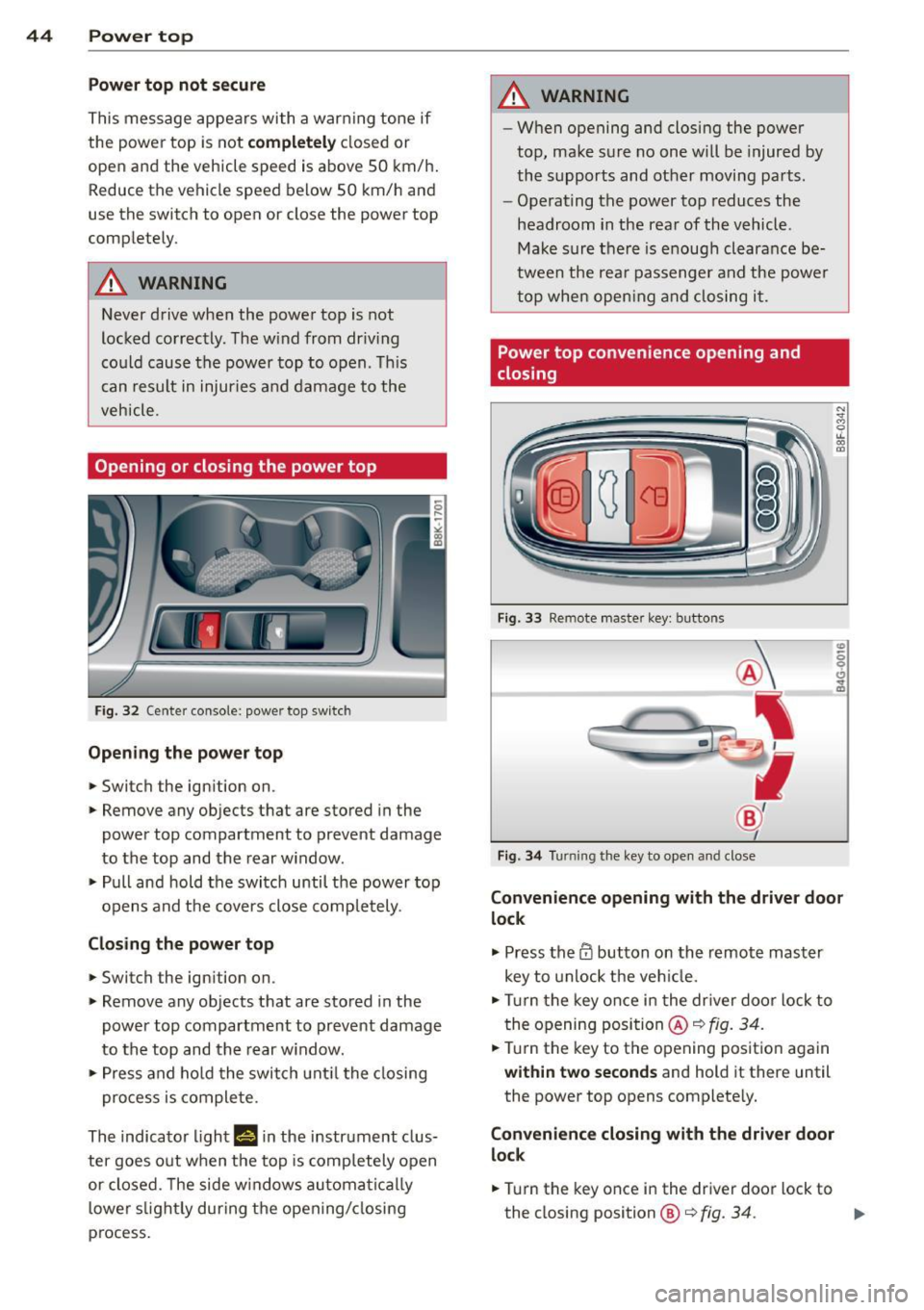
Opening or closing the power top
Fig. 32 Ce nte r conso le : powe r top swi tch
Opening the power top
... Switch the ign ition on.
,. Remove any objec ts that are stored in the
power top compartment to prevent damage
to the top and the rear w indow .
... Pull and hold the switch until the power top
opens and the covers close completely .
Closing the power top
... Switch the ign it ion on .
,. Remove any objects that are sto red in the
power top compartment to prevent damage
to the top and the rear w indow .
,. Press and ho ld the switch unt il the closing
pro cess is complete.
The indicator light
H i r, the instrument clus
ter goes o ut when the top is comp letely open
or closed . T he side w indows automa tica lly
l owe r slight ly during the opening/ closing
p rocess.
A WARNING
-- W hen opening and closing the power
top, make sure no one will be injured by
the supports and other moving pa rts .
- Operat ing the power top reduces the
headroom in the rear of the vehicle .
Ma ke sure there is enough clearance be
tween the rea r passenger and the power
top whe n open ing and closing it.
Power top convenience opening and
closing
F ig. 33 Re mote ma ste r key : bu ttons
®
' "1)
@
I
Fi g. 34 Turnin g the key to ope n and close
Convenience opening with the driver door
lock
.,. Press the CD button on the remote mas ter
key to unlock the veh icle .
... Turn the key once i n the dr iver door lock to
the opening position@~ fig.
34.
... Tur n the key to the opening pos itio n again
within two se conds and hold it there until
the power top opens complete ly.
Con venience closing with the driver door
l ock
... Turn the key once i n the driv er door lock to
the closing position@¢ fig.
34. ll>
Page 48 of 286
46 Power top
in the mounts on the vehicle's rear side trim .
F or safety reasons, inserting the wind deflec
tor from the side farthest from traffic.
Inserting and positioning the wind
d efl ector
.. Open the rear side w indow on the side far
thest from traffic.
.. Read the assembly instructions on the wind
deflector storage bag.
.. Remove the wind deflector from the storage
bag and fold it apart
once . The w ind deflec
tor is installed in the correct position when
the longest s ide is toward the front and the
wind deflector frame is at the top .
.. Insert both retain ing p ins in the mounts in
the trim above the rear seat on the driver
side
¢ fig. 37(!) .
.. Fo ld the hand le @ at the front and center of
the wind deflector upward and lift the de
flector slig htly in the center¢
fig. 38@.
.. Now gu ide the wind deflector into the
mounts in the side trim on the passenger
s ide @ and press lightly in the m iddle ®
unti l the hand le locks in place.
.. Set the wind def lector up completely.
Removing the wind deflecto r
.. Fold the w ind deflector frame back .
.. Fold the handle¢
fig. 37 @at the front and
center of the w ind deflector upward and lift
the defle ctor slightly in the center.
.. Remove the wind deflecto r from the mounts
in the side trim on the passenger side.
.. Pull the wind deflector out of the mounts on
the driver side and lift it out.
.. Fold it together.
.. Store the wind deflector in the storage bag.
A WARNING
- Do not use the wind deflector to secure
cargo .
- Be careful when instal ling so you do not
pinch your fingers .
- Pay attention to the traffic when instal
ling the wind deflector, if necessary .
(D Note
Do not lean aga inst the vehicle when in
stalling the wind deflector. Hard objects
and decorat ions on clothing such as be lt
buckles can scratch the paint. Your cloth
i ng could also become dirty .
(D Tips
- The wind deflector works best when all
of the windows are rolled up while driv
ing.
- Only store the wind deflector in the stor
age bag when it is dry.
Power top emergency
operation
General information
The power top can be closed by hand if there
is a malfunction .
.. Ac tivate the pa rking brake.
.. Open the windows
.. Remove the key from the ignition .
Only close the power top manually in an emer
gency . The best so lution is to have your au
thorized Audi dea ler correct the cause of the
malfunction .
Power top emergency operation consists o f
the following steps :
-Unl ocking the power t op compartm ent
c o ver :
The cove r on the power top compart
ment m ust be released by hand.
- Clo sin g the pow er top : The power top must
be lifted out of the tray and closed .
- Lo cking the power top : The power top
latches must be locked with the emergency
key.
A WARNING
- When positioning the power top, avoid
contact with the s upports or other mov
ing pa rts . Make s ure all of the windows
are lowered. Otherwise yo u could pinch
your hands. -
Page 49 of 286
-Never drive when the power top is not
locked correctly. The wind from driving
could cause the power top to open. This
can result in injuries and damage to the
vehicle .
(D Tips
Have a second person assist when closing
the power top. Positioning the power top
is easier when there is a second person to
help .
Step 1: Unlocking the power top
compartment cover
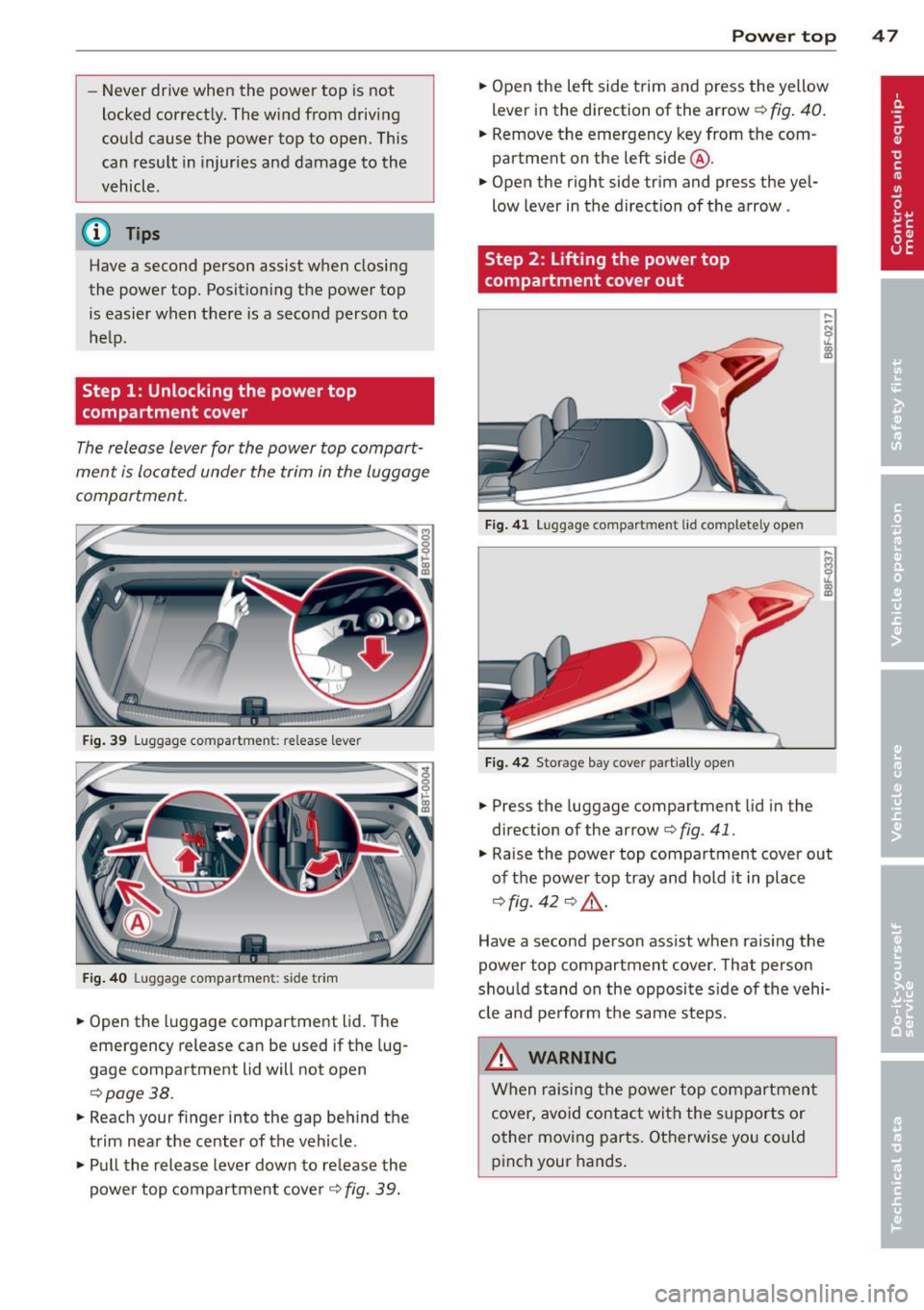
The release lever for the power top compart
ment is located under the trim in the luggage
compartment.
Fig. 39 Luggage compartmen t: re lease leve r
Fig. 40 Luggage compartmen t: side trim
.,. Open the luggage compartment lid. The
emergency release can be used if the lug
gage compartment lid will not open
<=:> page 38.
"" Reach your finger into the gap behind the
trim near the center of the vehicle .
"" Pull the release lever down to release the
power top compartment cover
c:> fig. 39.
Power top 47
.,. Open the left side trim and press the yellow
lever in the d irection of the arrow
c:> fig. 40.
.. Remove the emergency key from the com
partment on the left side @.
.,. Open the right side trim and press the yel
low lever in the direction of the arrow .
Step 2: Lifting the power top
compartment cover out
Fig. 41 Lug ga ge compart men t lid co m plete ly ope n
Fig. 42 Storage bay cover partiall y open
.,. Press the luggage compartment lid in the
direc tion of the arrow
c:> fig . 41 .
.,. Raise the power top compartment cover out
of the power top tray and hold it in place
c:> fig. 42 c:> ,&. .
Have a second person assist when raising the
power top compartment cover . That person
should stand on the opposite side of the vehi
cle and perform the same steps .
.&_ WARNING
When raising the power top compartment
cover, avoid contact with the supports or
other moving parts. Otherwise you could
pinch your hands.
Page 50 of 286

48 Power top
Step 3: Lifting the power top storage
bay cover out
Fig. 4 3 Luggage compartment lid closed
Fig. 44 Power top sto rage bay cover completely open
... Close the luggage compartment lid .
11--Open the power top storage bay cover com
pletely
c::> fig. 44 .
..&, WARNING
When ra is ing the power top storage bay
cover, avoid con tact w ith the s upports o r
other moving parts . Othe rwise you cou ld
pinch your hands.
Step 4: Closing the power top
F ig . 4 5 Removi ng the cover
Fig. 46 Emergency key for ope ning the latches
11--Remove the cap on the trim .
11--Insert the emergency key in the open ing
(hex socket) .
11--Turn the release key counterclockwise until
it stops to open the latch .
... Remove the emergency key.
Step S: Closing the power top
The power top must be positioned by hand.
Fig . 47 Power top partially open
Fig. 4 8 Winds hie ld: Power top
11--Raise the power top out of the tray c::> .&. in
Step 2: Lifting the power top compartment cover out on page 47 .
11--Pull the power top out completely .
., Press the power top onto the windshield
frame
c::> fig . 48 .
Page 51 of 286

.. Press the switch ~ ¢ page 44, fig. 32 to
close the convertible top. If this does not
work, proceed w ith
¢ page 49, Step 6: Re
tracting the power top comportment cover.
Have a second person assist when posit ioning
the power top . That person should stand on
the opposite side of the vehicle and perform
the same steps.
A WARNING
- When positioning the power top, avoid
contact with the supports or o ther mov
ing parts. Otherwise you could pinch
yo ur hands .
- When pressing the power top down onto
the windsh ie ld frame, make su re that
you do not pinch yourse lf or anyone else .
Step 6: Retract ing the power top
compartment cover
The power top comportment cover must be
retracted by hand.
F ig . 49 Power top raised
-
.. Raise the rear of the power top and hold it in
place
i::> fig. 49 © i::> A in Step 2: Lifting the
power top compor tment cover out on
page 47 .
.,. Slide the power top compartment forward
u nti l it reaches the end position @. Release
the power top.
A WARNING
Do not pinch yo urself o r othe rs when clos
ing the power top compartment.
Power top 49
Step 7 : Locking the power top
The locking system for the power top latches
ore located on the inside of the power top .
Fig . SO In side of the powe r top : hex key fo r eme rgency
oper atio n
.. Insert the emergency key in the open ing and
turn it clockwise unt il it stops to lock the
power top .
.,. Remove the emergency key .
.. Cover the opening w ith the cap.
(D Tips
Make sure the locking mechanisms are
l ocked secure ly.
Step 8 : Loosen ing the headliner
F ig. 51 Power top: area around the rig ht s ide o f th e
rear window
F ig. 52 Area a ro un d t he r igh t sid e of th e rear w indow :
,._ 0 ,._ ~
>< co a,
headliner part ia lly loose ned •
Page 54 of 286

52 Clear vis ion
@ Tips
- The light sensor* for headlight control is
located in the rear view m irror mount.
You should therefore not apply any st ick
ers to the windsh ield in this area in order
to prevent malfunctions or failures.
- Some exterior lighting functions can be
adjusted
¢page 52.
- When you remove your key from the igni
tion while the vehicle's lights are turned
on, a buzzer sounds as long as the driv
er's door is open .
- In cool or damp weather, the ins ide of
the headlights, turn signals and tail lights can fog over due to the tempera
ture difference between the inside and
outside. They will clea r shor tly after
switching them on. This does not affect
the service life of the lighting.
- In the even t of a light sensor malfunc
tion, the driver is no tified in the instru
ment cluster disp lay¢
page 22.
Turn signals and high beam lever
The lever operates the turn signals, the high
beams and the headlight flasher .
Fig. 55 Tu rn s ig na l and hig h beam lever
Turn sign als ¢i ¢
The turn signals activate when you move the
l ever into a turn s ignal pos ition when the ign i
tion is switched on.
(D -right turn signal
@-left tur n signa l
The turn s ignal blinks three times if you just
tap the lever .
High be ams and headlight flasher [D
Move the lever to the correspon ding posit io n:
@ -high beams on
@ -high beams off or headlight flasher
The indicator light
ii in the instrument cl us
te r turns on .
Notes on thes e features
-The turn signals on ly wor k w ith the ignition
t ur ned on. The indicator ligh ts
Ct or a in
the instrument cluster also blink.
- After you have turned a co rner, the turn s ig
na l switches off au toma tically .
- The
high beam works on ly w hen the head
lights a re on. The ind icator ligh t
II in the
instrument cluster illuminates when the
high beams are on .
- The
headlight flasher works o nly as long as
you ho ld the lever -even if there a re no
lights switched on . The indicator light
II in
the instrument cluster illuminates when you
use the headlight flasher.
A WARNING
--
Do not use the h igh beam or headlight
flasher if you know that these could blind
oncom ing traffic.
Adjusting exterior lighting
The functions ore selected in the radio or
MMI" .
.,. Select: !CARI function button> Exte rior
light ing .
Or
.,. Select: !CARI function button > Car systems *
control button > Vehicle s etting s> Exterior
lighting .
Coming home (light when leav ing car }*,
Leav ing home (light when unlocking car )*
The coming home function illuminates the
area around the vehicle when the ignition is
switched off and th e dr ive r's door is open ed.
Depend ing on veh icle equ ipment, the function
can be switched on and off or the length of
time the lig hts remain on* can be ad justed . ..,.
Page 55 of 286
The leavin g home function i lluminates the
area around the vehicle when unlock ing it.
T his function can be switched on and off.
The
c o ming h om e and lea ving home func
tions on ly operate when it is dark and the
light switch is in the AUTO posit ion
¢ page 51 , fig. 54 .
Auto headlight s*
When the light switch is in the A UTO
¢ page 51 position, the switch-on po int of the
lights can be changed in the automatic driving
light function.
Daytime running lights
USA m odel s:
You can switch the dayt ime run
ni ng lights
on and o ff .
Canada mod els:
The function cannot be
turned off .
It is activated a utomat ica lly each
time the ignition is switched on.
Travel mode*
T he headlight beam is asymmetrical. This pro
v ides stronger illum ination on the s ide of the
road on wh ich you are driving .
If you are driv
i ng in a country that d rives on the opposite
side of the road from your own country, th is
will cause glare for on coming drivers. To pre
vent glare:
- Trave l mode must be selected in vehicles
with Xenon headlights*.
- In veh icles with halogen headlights, ce rtain
areas of the head light lenses must be cov
ered with wate rproof adhesive covers that
prevent light from passing thro ugh. For
more informat ion, please see your author
i z ed Audi dea ler or author ized repa ir faci lity .
(D Tips
When trave l mode is activated, a display in
the driver information system indicates
this each time you switch the ignit io n on.
Clear vi sion 5 3
Emergency flashers
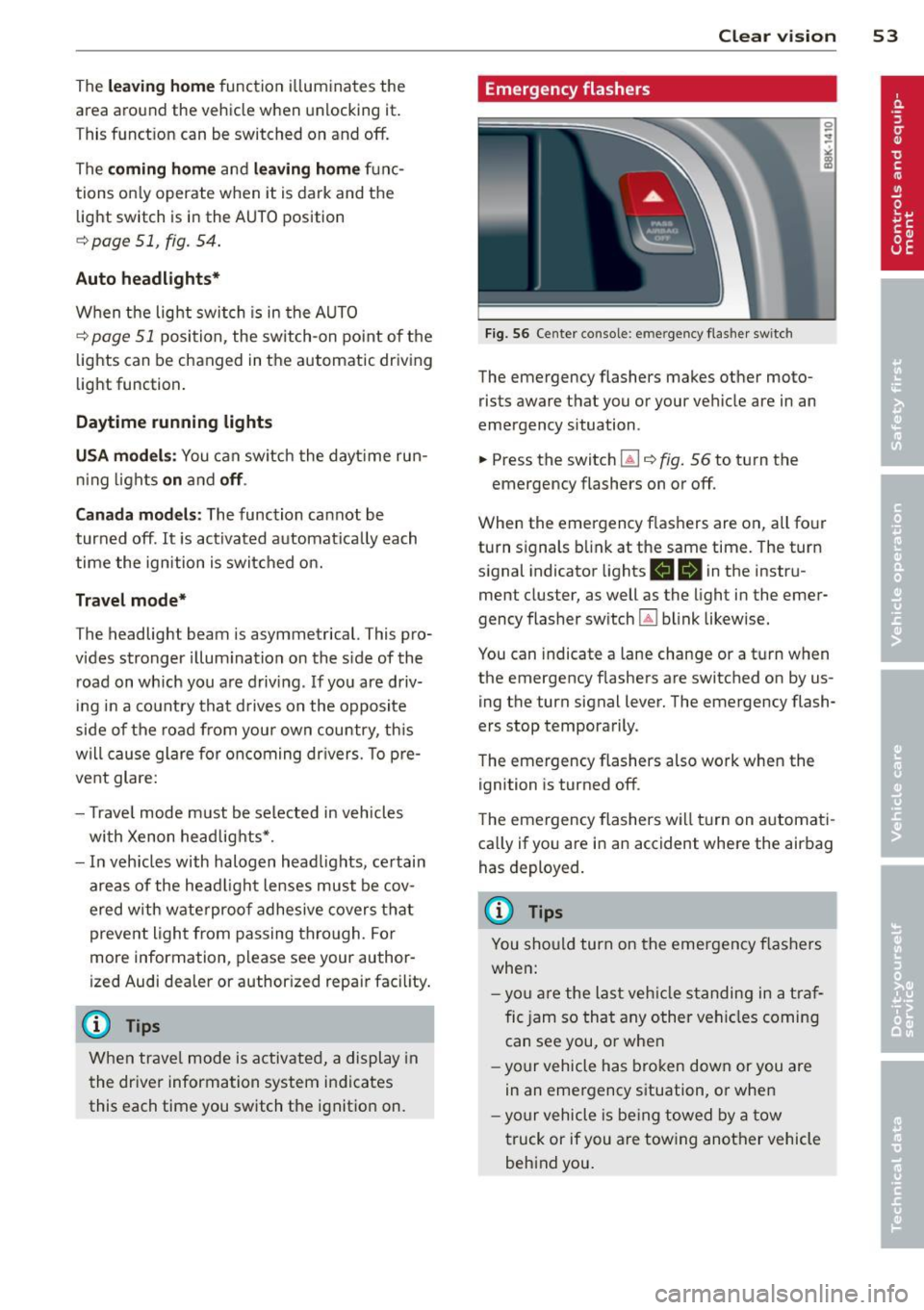
Fig. 56 Center co n sole : em erge ncy flasher sw itc h
The emergency flashers makes other moto
rists aware that you or your vehicle are in an
emergency situation .
.. Press the switch
Gil ¢ fig. 56 to turn the
emergency flashers on or off .
When the emergency f las hers are on, all four
turn s ignals b link at the same time. The turn
s ignal indicator lights .
1B in the instru
ment cluster, as well as the light in the emer
gency flasher switch ~ blink likewise.
You can indicate a lane change or a tu rn w hen
the emergency flashers are switched on by us
ing the turn signal lever. The emergency flash
ers stop temporarily .
T he emergency flashers also work when the
ign it ion is turned off .
T he emergency flashers w ill turn on a utomat i
ca lly if yo u are in an accident where the airbag
has deployed.
(D Tips
You sho uld turn on the emergency f lashers
when:
- yo u are the last veh icle standing in a t raf
fic jam so that any other vehi cles coming
can see you, or whe n
- your vehicle has bro ken down or you are
in an eme rgency s ituation, or when
- yo ur vehicle is be ing towed by a tow
truck or if you are tow ing another vehicle
beh ind you.
Page 56 of 286

54 Clear vision
Interior lights
Front/rear interior lights
Fig . 57 Fro nt headliner : interior lighting controls
Fig. 58 Rear headlin er: rear reading lights
@ Interior lights
Press the button ®· T he LED in the button il
luminates.
If the LED illum inates, the interior lights turn
on automatically when you un lock the vehicle,
open a door or remove the ignition key. The in
ter ior lights turn off several seconds after
your close the doors, when you lock the vehi
cle or when you turn the ignition on. When a
door is open, the light turns off after a few
minutes .
@ Front/rear reading lights
To turn a reading light on/off, press the but
ton~¢
fig. 57or ¢fig. 58.
Instrument illumination
The basic brightness of the illumination for
the instruments, the center console and the
display can be adjusted.
Fig. 59 Instrument illumination
.,. Press the knob to release it .
.,. Turn the knob toward"-" or"+" to reduce or
increase the brightness .
.,. Press the knob aga in to return it to its origi
nal position.
(!') Tips
The instrument illumination (for dials and
needles) lights on when the ignition is
switched on and the vehicle lights are
turned off. As the daylight fades, the illu
mination of the dia ls likewise dims auto
matically and will go out completely when
the outside light is very low. This feature is
meant to remind you to switch on the
headlights when outside light conditions
become poor.
Vision
Adjusting the exterior mirrors
Fig. 60 Forward section of driver's armrest: power mir
r or controls