change time AUDI A5 CABRIOLET 2014 Owners Manual
[x] Cancel search | Manufacturer: AUDI, Model Year: 2014, Model line: A5 CABRIOLET, Model: AUDI A5 CABRIOLET 2014Pages: 286, PDF Size: 70.4 MB
Page 14 of 286
12 Instruments and warning/indicator lights
pressure on the ISETI button, you delete the
warning threshold.
Digital clock with date display and
Odometer
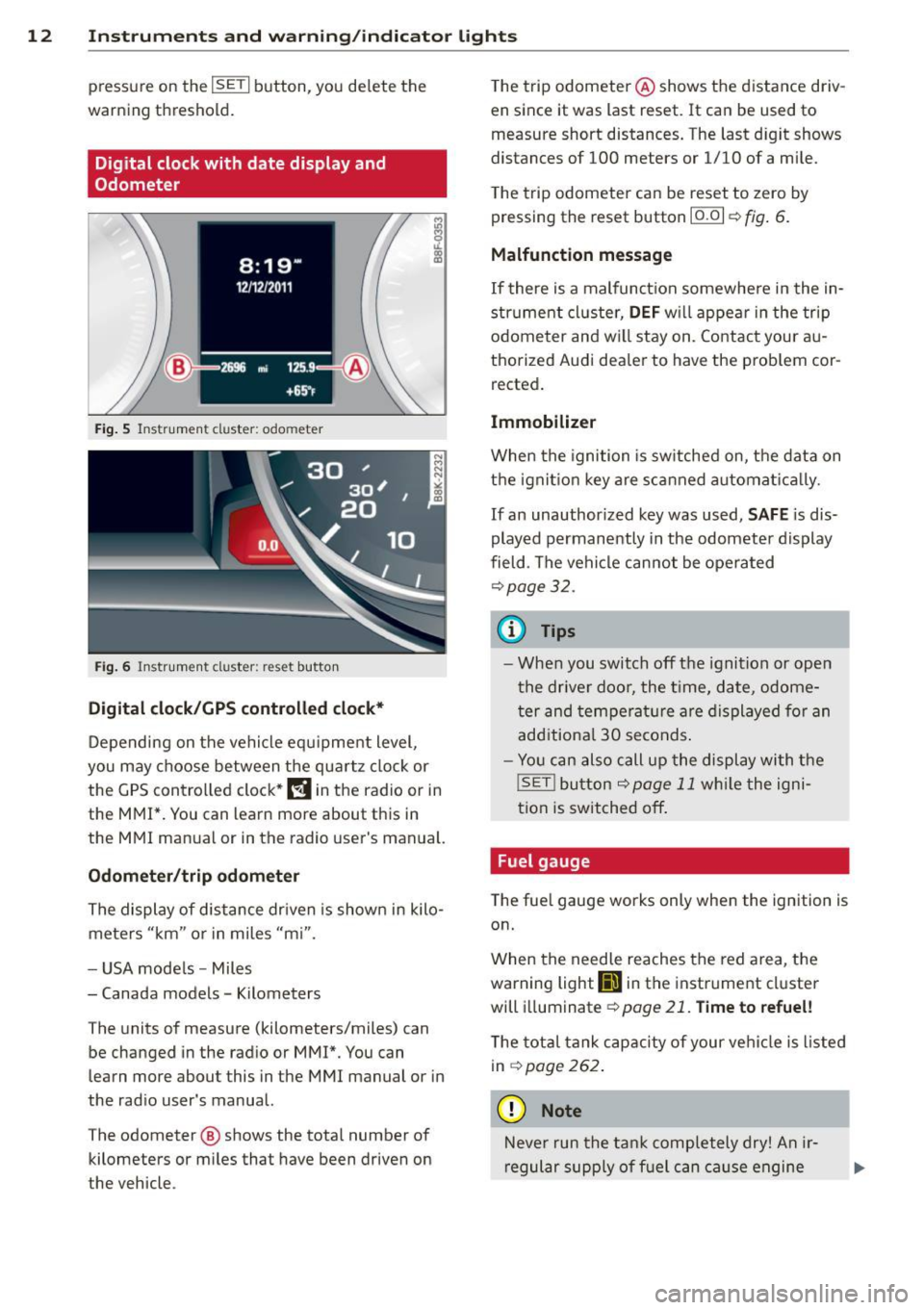
Fig. 5 Instrument cluster: odo meter
Fig. 6 In strume nt cl us ter : reset button
Digital clock/GPS controlled clock*
Depending on the vehicle equ ipment level,
you may choose between the quartz clock or
the GPS controlled clock*
l!!j in the radio or in
the MMI*. You can learn more about this in
the MMI manual or in the radio user's manual.
Odometer/trip odometer
The display of distance driven is shown in kilo
meters "km" or in miles "mi".
- USA mode ls - Miles
- Canada models -Kilometers
The units of measure (kilometers/miles) can
be changed in the radio or MMI*. You can
learn more about this in the MMI manual or in
the radio user's manual.
The odometer @ shows the total number of
kilometers or miles that have been driven on
the vehicle . T
he trip odometer @shows the distance driv
en since it was last reset. It can be used to
measure short distances. The last d igit shows
distances of 100 meters or 1/10 of a mile.
T he trip odometer can be reset to zero by
pressing the reset button
10.01 r::!;> fig . 6.
Malfunction message
If there is a malfunct ion somewhere in the in
strument cluster,
DEF will appear in the trip
odometer and w ill stay on. Contact your au
thorized Audi dea ler to have the problem cor
rected.
Immobilizer
When the ignition is switched on, the data on
the ignition key are scanned automat ica lly.
If an unauthor ized key was used, SAFE is dis
played permanently in the odometer display
field . The vehicle cannot be opera ted
r::!;>p age32 .
(D Tips
- When you switch off the ignition or open
the driver door, the time, date, odome
ter and temperature are displayed for an
additional
30 seconds .
- Yo u can also call up the display with the
!SET ! button r::!;> page 11 while the igni
tion is switched off .
Fuel gauge
The fuel gauge works only when the ignition is
on.
When the needle reaches the red area, the
warning light
111 in the instrument cluster
will illuminat e
¢page 21. Time to refuel!
The total tank capacity of your vehicle is listed
in
r::!;> page262 .
(D Note
Never run the tank completely dry! An ir
regular supply of fuel can cause engine
Page 27 of 286
Trip computer
Introduction
The trip computer gives you information on
current and average fuel mileage, average
speed, fuel range and driving time .
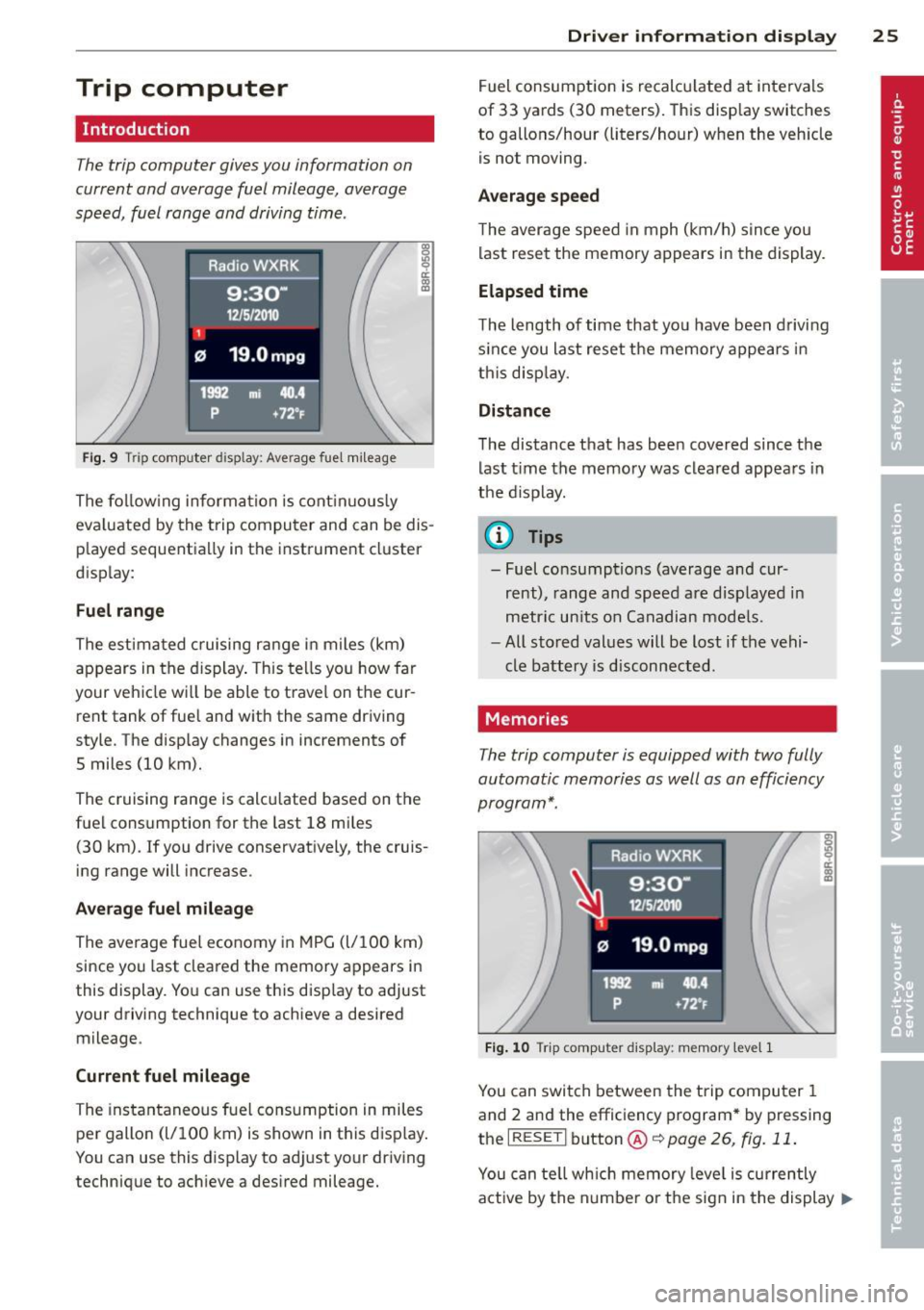
Fig. 9 Trip computer display: Average fuel mileag e
The fo llowing information is continuously
eva luated by the trip computer and can be dis
p layed sequentially in the instrument cluster
display:
Fuel range
The estimated cruising range in miles (km)
appears in the display. This tells you how far
your vehicle wi ll be able to travel on the cur
rent tank of fue l and with the same driving
style. The display changes in increments of
5 miles (10 km).
The cruising range is calcu lated based on the
fuel cons umption for the last 18 mi les
(30 km) . If you drive conservatively, the cruis
ing range will increase.
Average fuel mileage
The average fuel economy in MPG (l/100 km)
since you last cleared the memory appears in
this display. You can use this disp lay to adjust
your driving technique to achieve a desired
mileage .
Current fuel mileage
The instantaneous fuel consumption in miles
per gallon (l/100 km) is shown in this display .
You can use this display to adj ust yo ur driving
technique to ach ieve a desired mileage.
Driver information display 25
Fuel consumption is recalcu lated at intervals
of 33 yards (30 meters). This display switches
to gallons/hour (liters/hour) when the veh icle
is not moving.
Average speed
The average speed in mph (km/h) s ince you
last reset the memory appears in the display.
Elapsed time
The length of time that yo u have been driving
s ince you last reset the memory appears in
th is disp lay.
Distance
The distance that has been covered since the
last time the memory was cleared appears in
the d isplay .
(0 Tips
- Fuel consumptions (average and cur
rent), range and speed are displayed in
metric units on Canadian mode ls.
- All stored values will be lost if the vehi
cle battery is disconnected.
Memories
The trip computer is equipped with two fully
automatic memories as well as an efficiency
program* .
Fig . 10 Tri p computer display: memory leve l 1
You can switch between the trip computer 1
and 2 and the efficiency program* by pressing
the
I RESET I button @r:::> page 26, fig. 11 .
You can tell which memory leve l is currently
active by the number o r the sign in the display
II--
Page 30 of 286

28 Driver information d isplay
automatically and are only displayed in the ef
ficiency program. The fu el economy messages
turn off automat ically after a certain period of
time.
• To turn a fue l economy message off immedi
ately after it appears, press the
I RESET I but
ton ¢
page 26, fig. 11 @, or
• Press the function selection switch
c::> page 26, fig. 11 @ .
{D) Tips
-Once you have turned a fuel economy
message off, it will only appear again af
ter you turn the ignition on again .
- The fuel economy messages are not dis
played in every instance, but rather in in
tervals over a period of time .
Service interval display
The service interval display reminds you when
your next service is due.
Fig . 15 Dis play : S ervic e interva l di splay
The schedule for the next oil change or inspec
tion is calculated automatically and displayed
according ly . The display works in two stages :
Service reminder
30 days before the next service is due, a serv
ice reminder appears in the display when you
turn on the ignition
c::>fig. 15.
After about S seconds the display switches
back to normal. The d istance and time re
maining are updated each time the ignition is
turned on until the date due for service is reached .
Service due
When the due date for service is reached, the
message
Service due! appears in the instru
ment cluster immediate ly after yo u turn on
the ignition. Additionally, a warning tone
sounds. After about S seconds the display
switches back to normal.
Calling up the service schedules
If or when an oil change or inspection is due,
can be shown in the radio or MMI* d isp lay by
selecting the service interval display in the car
menu. Select !CAR ! function button >
Service
interval dis play
or! CAR ! function button> Car
systems*
control button > Servicing &
checks .
Resett ing the service interval display
Your authorized Audi dealer will reset the cor
responding service schedule after performing
the appropriate service on your vehicle. You
also have the possibility to reset the oil
change schedule after having performed an
o il change according to Aud i specif ications .
Select
I CAR ! funct ion button > Service interval
display> Reset oil change interval
or ICARI
function button > Car systems* control but
ton >
Servicing & checks > Reset oil change
interval.
(D Note
If you disconnect the battery terminals, no
ca lculations can be made for the service
interval display dur ing th is time and no
service reminder will appear. Remember
that observing the proper service intervals
i s vitally important to extending the life of
your vehicle, particularly the engine, and maintain ing its value. Even if the mileage
driven is low, the maximum period of one
year from one service to the next must not
be exceeded.
© Tips
-Do not reset the display between oil
changes, otherwise the disp lay w ill be in
correct.
...
Page 35 of 286
keys. Unguarded access to the keys pro
vides children the opportunity to start
the engine and/or activate veh icle sys
tems such as the power windows etc. Un supervised operation of any vehicle sys
tem by ch ildren can result in serious in
jury.
- Do not remove the key from the ignition
lock until the vehicle has come to a com
plete stop. Otherw ise the steering col
umn lock cou ld suddenly engage -caus
ing the risk of an accident.
(D Tips
- The operation of the remote contro l key
can be temporarily disrupted by interfer
ence from transmit ters in the vici nity of
the vehicle working in the same frequen
cy range (e .g . a ce ll phone, radio equip
ment).
- Fo r security reasons, replacement keys
are on ly available from authorized A udi
dealer.
- For Declaration of Compliance to United
States FCC and Industry Canada regula
tions¢
page 267.
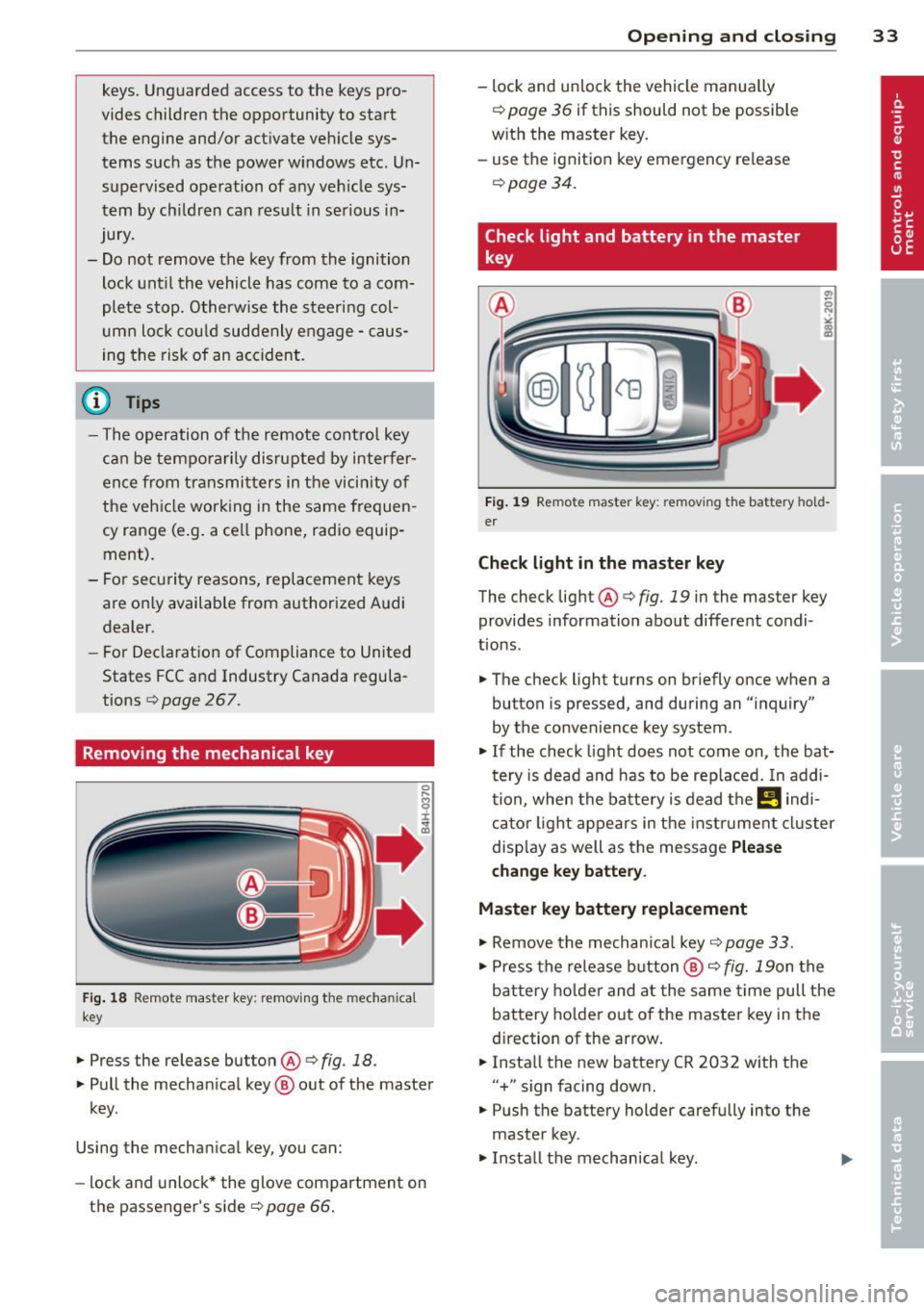
Removing the mechanical key
Fi g. 18 Remote master key: removing the mechanical
key
... Press the release button@¢ fig. 18.
... Pull the mechan ical key @ out of the master
key.
Using the mechanical key, you can:
- lock and unlock* the glove compartment on
the passenger's side
9 page 66 .
Op enin g an d clos ing 33
- lock and unlock the vehicle manually
¢ page 36 if this should not be possible
w ith the master key.
- use the ignition key emergency release
¢page 34.
Check light and battery in the master
key
F ig . 1 9 Remote master key: removing the battery hold
er
Check li ght in the mast er key
The check light@¢ fig. 19 in the master key
provides information about different condi
tions.
... The check light turns on br iefly once when a
button is pressed, and during an "inquiry"
by the convenience key system .
... If the check light does not come on, the bat
tery is dead and has to be rep laced. In addi
tion, when the batte ry is dead the
!I indi
ca tor light appears in the instrument cluster
disp lay as well as the message
Pl ease
change ke y battery .
Master key battery replacement
.,. Remove the mechan ica l key ¢page 33 .
... Press the release b utton @¢ fig. 19on the
bat tery ho lder and at the same time pull the
battery ho lder out of the master key in the
direction of the arrow .
... Insta ll the new battery CR 2032 with the
"+ " sign facing down.
... Push the battery holder carefully into the
master key.
.,. Install the mechanical key.
Page 55 of 286
The leavin g home function i lluminates the
area around the vehicle when unlock ing it.
T his function can be switched on and off.
The
c o ming h om e and lea ving home func
tions on ly operate when it is dark and the
light switch is in the AUTO posit ion
¢ page 51 , fig. 54 .
Auto headlight s*
When the light switch is in the A UTO
¢ page 51 position, the switch-on po int of the
lights can be changed in the automatic driving
light function.
Daytime running lights
USA m odel s:
You can switch the dayt ime run
ni ng lights
on and o ff .
Canada mod els:
The function cannot be
turned off .
It is activated a utomat ica lly each
time the ignition is switched on.
Travel mode*
T he headlight beam is asymmetrical. This pro
v ides stronger illum ination on the s ide of the
road on wh ich you are driving .
If you are driv
i ng in a country that d rives on the opposite
side of the road from your own country, th is
will cause glare for on coming drivers. To pre
vent glare:
- Trave l mode must be selected in vehicles
with Xenon headlights*.
- In veh icles with halogen headlights, ce rtain
areas of the head light lenses must be cov
ered with wate rproof adhesive covers that
prevent light from passing thro ugh. For
more informat ion, please see your author
i z ed Audi dea ler or author ized repa ir faci lity .
(D Tips
When trave l mode is activated, a display in
the driver information system indicates
this each time you switch the ignit io n on.
Clear vi sion 5 3
Emergency flashers
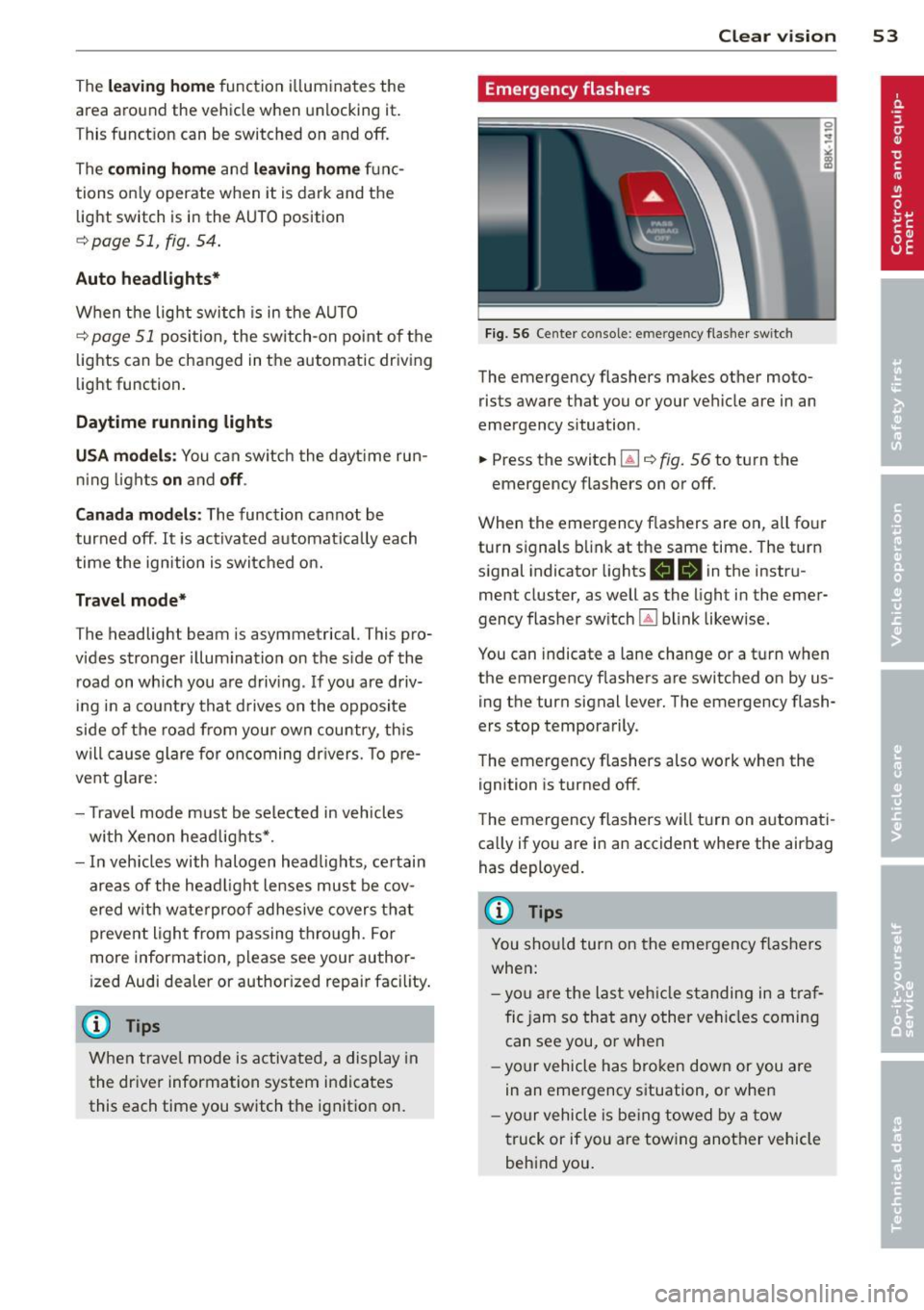
Fig. 56 Center co n sole : em erge ncy flasher sw itc h
The emergency flashers makes other moto
rists aware that you or your vehicle are in an
emergency situation .
.. Press the switch
Gil ¢ fig. 56 to turn the
emergency flashers on or off .
When the emergency f las hers are on, all four
turn s ignals b link at the same time. The turn
s ignal indicator lights .
1B in the instru
ment cluster, as well as the light in the emer
gency flasher switch ~ blink likewise.
You can indicate a lane change or a tu rn w hen
the emergency flashers are switched on by us
ing the turn signal lever. The emergency flash
ers stop temporarily .
T he emergency flashers also work when the
ign it ion is turned off .
T he emergency flashers w ill turn on a utomat i
ca lly if yo u are in an accident where the airbag
has deployed.
(D Tips
You sho uld turn on the emergency f lashers
when:
- yo u are the last veh icle standing in a t raf
fic jam so that any other vehi cles coming
can see you, or whe n
- your vehicle has bro ken down or you are
in an eme rgency s ituation, or when
- yo ur vehicle is be ing towed by a tow
truck or if you are tow ing another vehicle
beh ind you.
Page 87 of 286

Transmission multitronic, S tronic,
tiptronic
Introduction
Appl ies to vehicles: with multitronic/5 tronic/tiptronic
The automatic transmission is controlled elec
tronically. The transmission upshifts or down
shifts automatically depending on which drive
program is se lected.
When a
moderate driving style is used, the
transmission se lects the most economica l
driving mode.
It wi ll then change up early and
de lay the downshifts to give better fuel econ
omy.
The transmission switches to a sporty mode after a kick -down or when the driver uses a
sporty driving style characteri zed by quick ac
celerator pedal movements, heavy accelera
tion, frequent changes in speed and traveling
at the maximum speed.
If desired, the driver can also se lect the gears
manually (tiptronic mode) q page 85.
Various a utomatic transmissions may be in
stalled, depending on the mode l:
multitronic transmission
The multitronic transmission is a continuously
variab le transmission. Power is trans ferred us
ing a mu ltidisk clutch. In contrast to conven
tional automatic transmissions using shifting
operations, the transmission ratio in the con
t inuously variab le transm iss ion is changed
continuously. This opt imizes the comfort level
and conserves fuel.
S tronic transmission
The 5 tronic is a dual-clutch transmission.
Power is transferred using two clutches that
work independently from one another. They
replace the torque converter used in conven
tional automat ic transmissions and allow the
ve hicle to accelerate without a noticeable in
terruption in traction .
Transmission 85
tiptronic transmission
In the tiptronic transm ission , power is trans
f erred by a torque converter.
Selector lever positions
Applies to vehicles: wit h mult itronic/5 tronic/tiptronic
1- -...~~------------,,--~ -... N
N
N
"" :ll
Fig . 96 D isp lay in t he inst rum ent cluster: se lec to r lever
in pos it io n P
The selector lever position engaged appears
next to the se lector lever as well as in the in
strument cluster display.
P -Park
In this se lector lever position the transmis
sion is mechanica lly locked. Engage P on ly
when the vehicle is
completely stopped q .&.
in Driving the automatic transmission on
page 88.
To shift in or out of position P, you must first
press and hold the brake pedal and then press
the re lease button in the selector lever handle
while moving the selector lever to or from P.
You can shift out of th is position only with the
ignition on .
R • Reverse
Select R only when the vehicle is at a full stop
and the engine is running at idle speed q &. in
Driving the automatic transmission on
page 88.
Before you move the se lector lever to R, press
both the release button in the hand le of the
selector lever
and the brake pedal at the same
time .
When the ignition is on, th e backup lights illu
minate when the selector lever is moved into
R.
Page 97 of 286

Audi adaptive cruise control and braking guard 95
Audi adaptive cruise
control
Description
A pp lies to vehicles: with Audi adaptive cruise control
Fig. 106 Detect ion range
What can Audi adaptive cruise control do?
The adaptive cruise control works in conjunc
tion with a radar sensor installed in the front
of the vehicle ¢
page 93, fig . 103, which is
subject to designated sys tem limits
¢
page 95. Stationary objects are disregard
ed .
On open roads w ith no traffic, adaptive cruise
control wo rks like a regular cruise control sys
tem. The stored speed is maintained. When
approaching a moving vehicle detected up
ahead, the adaptive cruise control system au
tomatically slows down to match that vehi
cle's speed and then maintains the distance
that the driver previously stored. As soon as
the system does not detect a vehicle up
ahead, adaptive cruise control accelerates back up to the stored speed.
Which functions can be controlled?
When you switch adaptive cruise control on,
you can set the current speed as the "control speed" ¢
page 95, Switching on and off.
When driving, you can stop cruise control
¢
page 97 or change the speed¢ page 96
at any time .
You can a lso set the distance to the object
ahead and set the adaptive cruise control driv ing program
¢ page 97.
Switching on and off
Applies to vehicles: with Aud i adap tive crui se contro l
Fig. 107 Selecto r lever : switch ing on/off
Fig . 108 Instru men t cluster: Audi adaptive c ru ise con
trol
You can set any speed between 20 mph and
95 mph (30 and 150 km/h).
Ind icator lamps and messages in the instru
ment cluster disp lay inform you about the cur
rent system status and settings.
Switching Audi adaptive cruise control on
.. Pull the lever toward you into position (D
¢ fig. 107. ACC standby appears in the in
strument cluster display.
Setting the speed and activating regulation
.. To set the current speed, press the ISETI but-
ton ¢
page 11, fig. 4. The set speed is ll-
Page 99 of 286

Audi adaptive cruise control and braking guard 97
Interrupting cruise control
Applies to vehicles: with Audi adaptive cruise control
Fig. 110 Selector lever
Requirement: adaptive cruise control must be
switched on
¢fig. 110@.
Overriding cruise control
• To accelerate manually, press the accelera
tor pedal. The message
ACC override ap
pears.
• To resume adaptive cruise control, remove
your foot from the gas pedal. The system re
turns again to the speed that was saved be
fore.
• You can save a new speed at any time by
pressing the
I SETI button ¢ page 11, fig. 4.
Canceling cruise control while driving
• Move the lever into position @. The mes
sage
ACC standby appears. Or
• press the brake pedal.
• To resume the stored speed, move the lever
into position @.
A WARNING
Never resume the stored speed if the
speed is too high for prevailing road, traf
fic or weather conditions.
Setting the distance
App lies to vehicles: wit h Aud i adapt ive cr uise contro l
Fig.
111 Selector lever: setting the distance
• Tap the switch to display the current set dis
tance
¢ fig. 111.
• To increase or reduce the distance by incre
ments, tap the switch again to the left or
r ight. The distance between the two vehicles
w ill c hange in the instrument cluster dis
p lay .
When approach ing a moving vehicle up ahead,
the adapt ive cruise control system brakes to
match that object's speed and then mainta ins
the stored distance. If the vehicle ahead ac
ce lerates, adaptive cruise contro l will also ac
celerate up to the stored speed.
T he higher the speed, the greater the distance
in yards (meters) ¢& .The
Distance 3 setting
is recommended.
T he distances provided are specified va lues .
Depend ing on the driv ing s ituation and the
how the vehicle ahead is driving, the actual
distance may be more or less than these tar
get distances.
T he var ious symbols for the time increments
appear briefly in the informat ion line @
¢ page 95, fig. 108 when you change the set
tings.
c:::::,_c:::::, ___ Distance 1 : This setting corre-
sponds to a distance of 92 feet/28 meters
when traveling at 62 mph (100 km/h), or a
time interval of 1 second.
c:::::, __ c:::::, __ Distance 2 : This setting corre
sponds to a distance of 118 feet/36 meters
when traveling at 62 mph ( 100 km/h), or a
time interval of 1.3 seconds.
Page 105 of 286

General information
Applies to vehicles: with Audi side assist
®
©
Fig . 116 Dr iving situations
Fig. 117 Rear of t he ve hicle: positio n of t he se nsors
., ... N 0 IL
l:l
Side assist functions at speeds above approx i
mately 19 mph (30 km/h).
@ Vehicl es th at ar e approaching
In certain cases, a vehicle will be classified as
cr itical for a lane change even if it is still
somewhat far away. The fas ter a vehicle ap
p roaches, the sooner the display in the exteri
or m irror will t urn on.
@ Vehicles traveling with you
Vehicles traveling w ith you are indicated in the
exterior m irror if they are classified as cr itical
for a lane change. All vehicles detec ted by
side assist are indicated by the time they en
ter your "blind spot", at the latest.
Audi side assist 103
@ Veh icle s left behind
If you s low ly pass a vehi cle that s ide assist has
detected (the difference in speed between the
vehicle and you r vehicle is less than 9 mph
(15 km/h)), the display in the exterior mirror
turns on as soon as the vehicle enters your blind spot.
T he disp lay will not t urn on if you quickly pass
a vehicle that side assist has detected (the dif
ference in speed between the veh icle and your
vehicle is greater than 9 mph (15 km/h)).
Functional limitations
The radar senso rs are designed to detect the
left and right adjacent lanes when the road
lanes are the normal width. In certain situa
tions, the disp lay in the exterior mirror may
turn on even though there is no vehicle locat
ed in the area that is cr itical for a la ne change.
For example:
- if the lanes are narrow or if your are dr iving
on the edge of your lane.
If this is the case,
the system may have detected the vehicle in
another lane that is
not adjacent to your
current lane .
- if you a re driving through a curve. Side assist
may react to a vehicle that is one lane ove r
from the adjacent lane.
- if side assist reacts to other objects (such as
high or d isp laced guard rails) .
- In poor weather conditions. The side assist
functions are l imited .
Do not cover the radar sensors <=>
fig. 117 with
stickers, depos its, bicycle wheels or other ob
jects, because this will affect the funct ion. Do
not use s ide ass ist when towing a trailer. For
i nformation on cleaning, refer to<=>
page 195.
_&. WARNING
- Always pay attention to traffic and to t he
area a round your ve hicl e. S ide assist can
not repla ce a driver's attention. T he driv
er a lone is always responsible for lane
changes and similar driving mane uvers.
Page 106 of 286

104 Audi side assist
-Improper reliance on the side assist sys
tem can cause collisions and serious
personal injury:
- Never rely only on side assist when
changing lanes.
- Always check rear view mirrors to make
sure that it is safe to change lanes.
- Side assist cannot detect all vehicles un
der all conditions- danger of accident!
- Please note that side assist indicates
there are approaching vehicles, or
vehicles in your blind spot, only after
your vehicle has reached a driving speed
of at least 19 mph (30 km/h).
- In certain situations, the system may not
function or its function may be limited.
For example:
- if vehicles are approaching or being left
behind very quickly . The display may
not turn on in time.
- in poor weather conditions such as
heavy rain, snow or heavy mist .
- on very wide lanes, in tight curves or if
there is a rise in the road surface.
Vehicles in the adjacent lane may not
be detected because they are outside
of the sensor range.
(D Note
The sensors can be displaced by impacts or
damage to the bumper, wheel housing and
underbody. This can affect the system.
Have your authorized Audi dealer or au
thorized Audi Service Facility check their
function.
@ Tips
- If the window glass in the driver's door
or front passenger's door has been tint
ed, the display in the exterior mirror may
be misinterpreted.
- For Declaration of Compliance to United
States FCC and Industry Canada regula
tions¢
page 267.
Activating and deactivating
A pp lies to vehic les : wi th Audi s ide ass ist
Fig. 118 Driver's door: Side ass ist butto n
.. Press the button c> A in General informa
tion on page 103
to switch the system on/
off. The LED in the button turns on when
side assist is switched on .
Adjusting the display brightness
Applies to vehicles: wit h Audi side ass ist
The signal brightness con be set in the radio
or MM!*.
.. Select: I CAR I function button > Audi side as
sist.
.. Select: !CARI function button> Car systems*
control button > Driver assist> Audi side
assist .
The display brightness adjusts automatically
to the brightness of the surroundings, both in
the information and in the warning stage . In
very dark or very bright surroundings, the dis play is already set to the minimum or maxi
mum level by the automatic adjustment. In
such cases, you may notice no change when
adjusting the brightness, or the change may
only be noticeable once the surroundings
change.
Adjust the brightness to a level where the dis
play in the information stage will not disrupt
your view forward. If you change the bright
ness, the display in the exterior mirror will
briefly show the brightness level in the infor
mation stage. The brightness of the warning
stage is linked to the brightness in the infor
mation stage and is adjusted along with the
information stage adjustment.