cruise control AUDI A5 CABRIOLET 2014 Owners Manual
[x] Cancel search | Manufacturer: AUDI, Model Year: 2014, Model line: A5 CABRIOLET, Model: AUDI A5 CABRIOLET 2014Pages: 286, PDF Size: 70.4 MB
Page 4 of 286
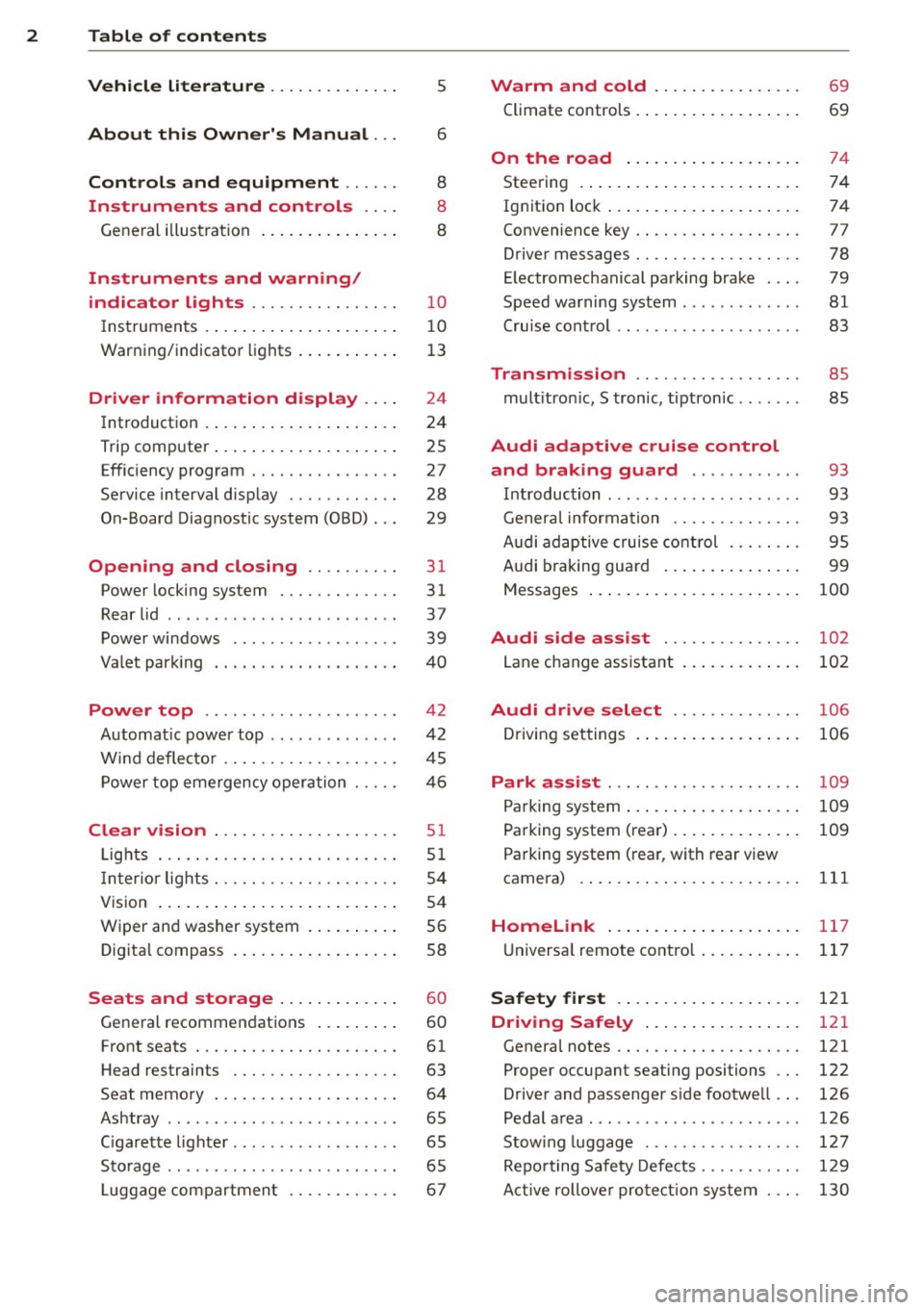
2 Table of contents Vehicle literature .. .. .. .. .. ... .
5
About this Owner's Manual . . . 6
Controls and equipment .. ... .
Ins truments and controls .. . .
General illus tration .... ... .. .. ... .
Instruments and warning /
indicator lights ........ .. .. .. . .
I ns truments . .. .. ..... ... .. .. ... .
War ning/ indi cator lights ... .. ... .. .
Driver information d isplay .. . .
I ntroduct ion . .. .. ..... ... .. .. ... .
Trip computer .. .. ..... ... .. .. ... .
Efficiency program ........ .. .. ... .
Service interval d isp lay .... .. .. .. . .
On-Board Diagnostic system (OBD) . . .
Opening and closing .... .. ... .
Power locking system ..... .. .. .. . .
Rear lid .. .. ... .... .... .. .. .. .. . .
P owe r windows ........... ... .. . .
Valet par king . ........ ... .. .. ... .
Power top .............. ... .. . .
Automatic powe r top ....... ..... . .
W ind deflecto r ........... .. .. ... .
P owe r top emergency oper ation
Clear vision .. .......... .. .. .. . .
Li ghts . .. .. ............. ....... .
I n ter ior lights . ......... .. .. .. .. . .
V 1s1on ..... ... .. ..... ... .. .. ... .
W iper an d washer system . ... .. ... .
Dig ita l compass ....... ... .. .. ... .
Seats and storage ... .. .. ... .. .
General recommen dat ions ... .. ... .
Front seats . ............. .. .. .. . .
H ead restraints .......... .. .. ... .
Seat memory . ........ ... .... .. . .
Ashtray .. .. ................ ... . .
C igarette lighte r .... .... .. .. .. .. . .
St orage .. .. ............. .. .. .. . .
L uggage compartmen t ...... .. ... . 8
8
8
10
1
0
1 3
24
24
25
27
28
29
31
31
37
39
40
4 2
42
45
46
51
5 1
54
54
5 6
58
60
60
61
63
64
65
65
65
67
Warm and cold ... .. ..... .... . .
Climate co ntrols . ... ... ..... ... .. .
On the road ... .. ... ..... ... .. .
Stee ring . ..... .. ... .. ..... .... . .
Ign it io n lock ..... .. .... .... ... .. .
Convenience key .. ... .......... .. .
Driver messages ................. .
E lectromechanical parking brake . .. .
Speed warning sys tem .. .. ... ... .. .
Cru ise cont ro l .. .. ............... .
Transm ission .. ..... ......... . .
mult it ron ic, S tronic, tiptron ic ...... .
Audi adaptive cruise control and braking guard .......... . .
I n troduc tion ... .. ... .. .. ... ..... .
Genera l informa tion ......... .. .. .
A udi adaptive cruise cont rol ..... .. .
A udi braking gua rd ..... .... ... .. .
Messages ..... .. .. ... ..... ... .. .
Audi side assist ............ .. .
L ane change ass istant
Audi drive select ........... .. .
D riving set tings .. ... .. ..... .... . .
Park assist ... .. ............... .
P arking sys tem ... .. ... ..... ... .. .
Pa rking system (rea r) . .. ..... ... .. .
Pa rking system (rear, with rear view
camera) .. .... .. .. ........... .. .
Homelink ..... ... .. ..... .... . .
U niversa l remote contro l ..... ... .. .
Safety fir st .... .. ... ..... ... .. .
Driving Safely .... .. ..... .... . .
Genera l notes .. .. ............. .. .
Proper occupant seating positions .. .
Driver and passenger s ide footwe ll .. .
Pedal a rea ..... .. .. ........ ... .. .
Stow ing luggage .... .. .. ... ..... .
Repo rting Safety Defe cts ...... .. .. .
Active rollove r pro te ction sy st em . .. . 69
69
74
74
74
77
78
79
81
83
85
85
93
93
93
95
99
100
102
102
106
10 6
109
109
109
111
117
117
121
121
121
122
126
126
1 2 7
129
130
Page 11 of 286

(!) Door handle
@
®
©
®
®
Power locking sw it ch
Memory buttons (dr iver's seat)
Button for side ass ist
A ir outlets
Control leve r for :
- Turn signal and high beam
0 Multifunction steering wheel
with:
- Horn
- Driver's airbag ...... ... .. .
- Audio/video , telephone and
navigation buttons
- Rocker switches for tiptron ic
operation .... .... ... .... .
@ ISETI button .... ....... .... .
® Instrument cluster ......... .
@ Reset button for trip odometer
@ Switches for:
- Windsh ield wiper/washer
- Trip computer ............ .
@ Ignition lock .. ....... ... .. .
@ Adjustable steer ing column
~ Control leve r fo r:
- Cruise contro l .. ... ... .... .
- adaptive cruise contro l ... .. .
@ Instrument lighting .. ... ... .
@ Release lever for the engine
hood .. .. .. ............. .. .
@ Data Link Conne ctor for On
Board Diagnos tic s (OBD II) . .. .
@ Light switch ........... .. .. .
@ Adjuster control for outside mir-
35
64
102
52
144
89 11
1 0
1 2
56
25
74
74
83
93
54
206
29
5 1
rors . . . . . . . . . . . . . . . . . . . . . . 54
@ Power window switches . . . . . . 39
@ Radio-Disp layll or MM I-Display
@ Depending on options:
- Radio system
- CD changer
l) The imag e in t he d ispl ay will app ea r e ither in mu lt ipl e
col ors or in a singl e co lor , de pen din g o n th e vehicl e
e q ui pment. Th e m ulti co lo r im age w ill be use d i n this
O w ner's M anual becau se bo th mu lt i co lo r and sin gle
col or vers io ns are almost iden tic al.
In strument s and control s 9
@) Emergency flasher ....... .. .
@ Glove compartment (lockable)
@ Front passenger's airbag .....
@ Depending on options, switches
for :
- drive select .............. .
- Electron ic Stabilization Con -
trol ....... ... ..... ..... .
@ Del uxe a utomatic climate con-
tro l .. .. .. .... .. . .. .. ..... .
@ Selector lever for automatic
transmission ......... ..... .
@ Ashtray with cigarette lighter
@ Depend ing on options:
- MMI cont ro l conso le or
- drive select ......... ..... .
- Electron ic Stabili zation Con-
trol button .............. .
@ Central power w indow switch
@ Powe r top switch ... ........ .
@ I START ENG IN E STOPI button
@ Electromechanical parking
brake . ... .... ... .. .. ..... .
(D Tips
53
66
144
106
179
69
87
65 ,65
106
17 9
44
77
79
- Some of the equipment o r fea tures
shown in the genera l ill ustration may be
standard equipment on your vehicle or
may be optional eq uipment depending
on your model. A lways ask your author
ized Aud i dea ler if you have a quest ion
about your vehicle.
- Operat ion of the Multi Med ia Interface
(MMI) is described in a separate manual.
Page 16 of 286
14 Instruments and warning/indicator lights
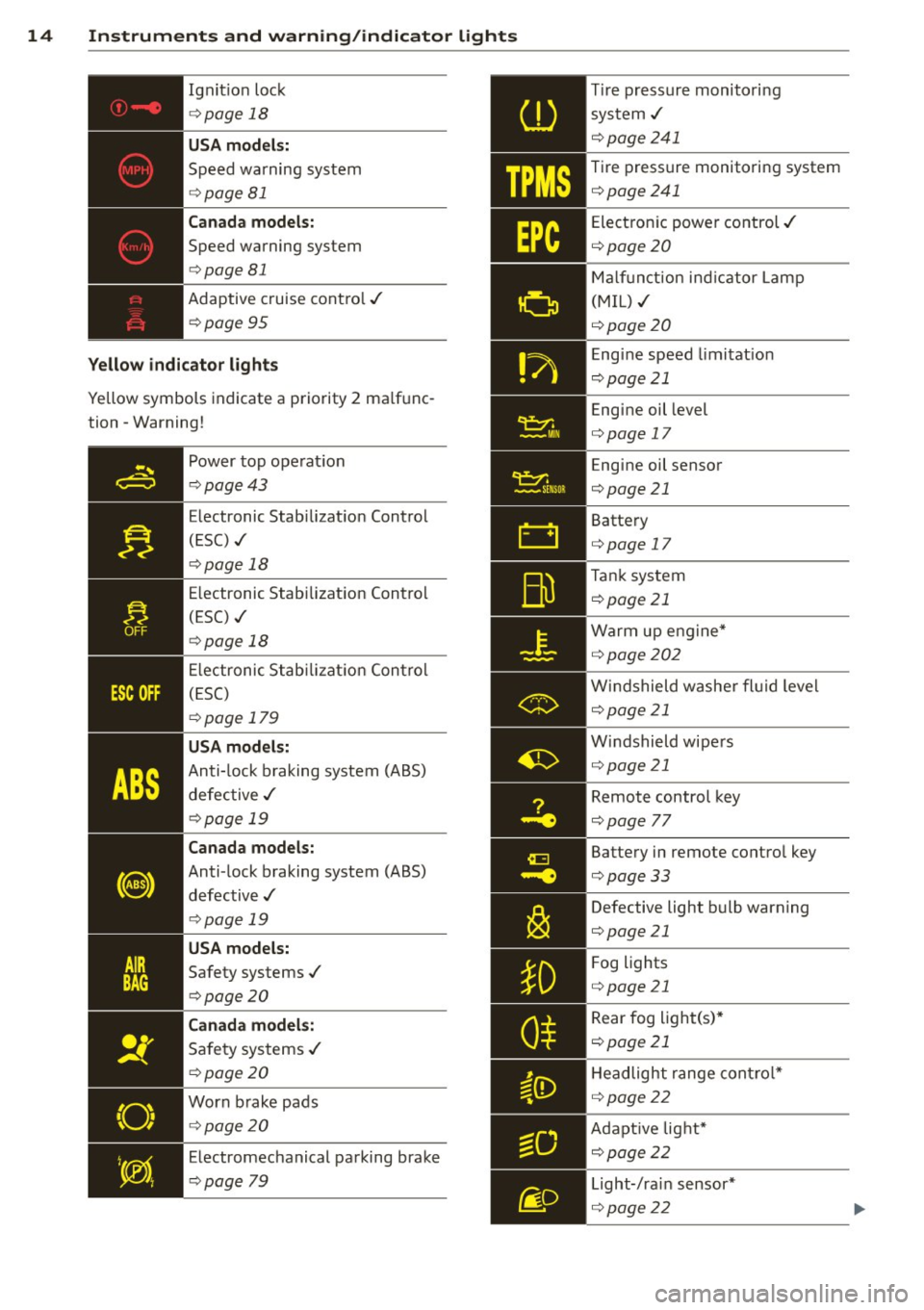
Ignit ion loc k
¢ page 18
USA models:
Speed warning sys tem
¢ page 81
Canada models:
Speed warning system
¢ page 81
Adaptive cruise contro l./
¢ page 95
Yellow indicator lights
Yellow symbols indicate a priority 2 ma lf u nc
tion -Warning!
Power top ope rat ion
¢ page43
E lectronic Stab ilizat io n Cont rol
( E SC) ./
¢ page 18
E lectronic Stab ilizat ion Contro l
(ESC) ./
¢ page 18
E lectronic S tabiliz atio n Con trol
( E SC)
¢ page 179
USA models:
Anti-lock b raking system (A BS)
d efec tive ./
¢page 19
Canada models:
Anti-lock b raking system (ABS)
d efective ./
¢ page 19
USA models:
Safety systems ./
¢ page20
Canada models:
Safe ty sys tems ./
¢ page20
Worn brake pads
¢ page 20
E lectromechanical parking brake
¢ page
79
TPMS
Tir e pressur e monitori ng
sys tem ./
¢ page241
T ire pressure monitori ng system
¢ page 241
Ele ct ron ic powe r co ntrol ./
¢page20
Ma lf u n ct ion i nd ica tor Lam p
(M IL) ./
¢ page2 0
E ng ine speed limi tat ion
¢ page2 1
Eng ine oil level
¢page 17
E ng ine oil sensor
¢page21
Batte ry
¢ page 17
Tan k system
¢ page 21
Warm u p en gin e*
~ pa ge 202
Win dshield washe r flui d leve l
¢page 21
Win dshield wipe rs
¢ page 21
Remot e control key
¢ page
77
Batte ry in remote contro l key
¢page33
Defective light b ulb warn ing
¢page21
F og lig hts
¢ page 21
R ear fog ligh t(s) *
¢ page21
H ead ligh t range con trol *
¢ page22
A da ptive lig ht*
¢ page22
L ight-/ra in sensor*
¢ page 22
Page 17 of 286
Instruments and warning/indicator lights 15
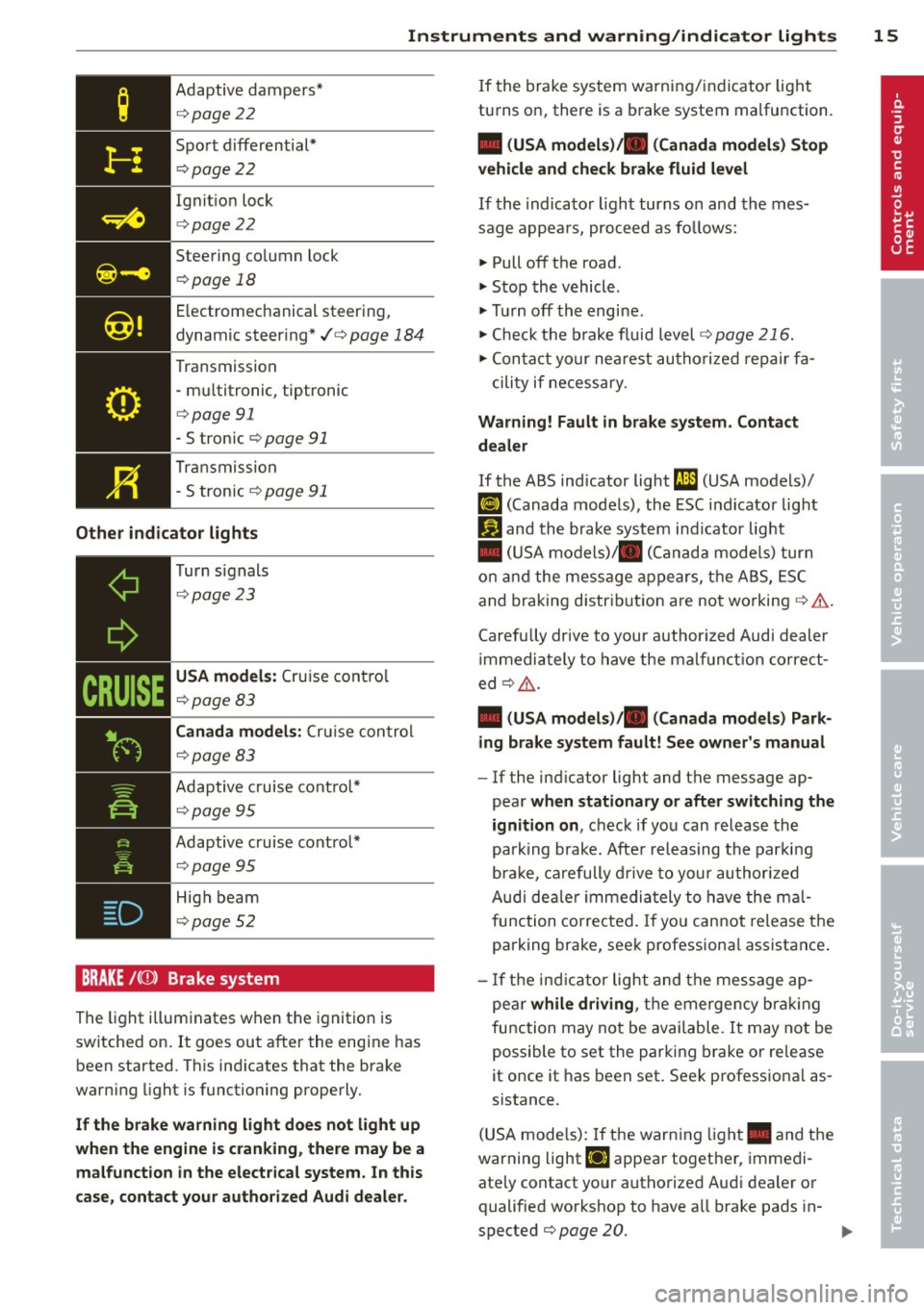
Adaptive dampers*
¢page 22
Sport d ifferential*
¢ page 22
Ignit ion lock
¢ page 22
Steering co lumn lock
¢page 18
Electromechanical steering,
dynamic steering*./¢
page 184
Transmission
- mu ltitronic, tiptronic
¢ page 91
-S tronic ¢ page 91
Transmission
- S tronic
¢p age 91
Other indicator lights
Turn signals
¢page 23
USA models: Cruise control
¢page 83
Canada models: Cruise control
¢page 83
Adaptive cruise control*
¢page 95
Adaptive cruise control*
¢pag e 95
High beam
¢page 52
BRAKE /((J)) Brake system
The light illuminates when the ignition is
switched on.
It goes out after the engine has
been started. Th is ind icates that the brake
warn ing light is functioning properly.
If the brake warning light does not light up
when the engine is cranking, there may be a
malfunction in the electrical system. In this
case, contact your authorized Audi dealer.
If the brake system warning/indicator light
turns on, there is a brake system malfunction.
• (USA models)/ . (Canada models) Stop
vehicle and check brake fluid level
If the indicator light turns on and the mes
sage appea rs, proceed as fo llows:
"' Pull off the road.
"' Stop the vehicle.
"' Turn off the engine .
"' Check the brake fluid level
¢page 216.
"' Contact your nearest authorized repair fa-
cility if necessary.
Warning! Fault in brake system. Contact
dealer
If the ABS indicator light m) (USA models)/
IIJ (Canada models), the ESC indicator light
GJ and the brake system ind icator light
• (USA models)/ . (Canada models) turn
on and the message appears, the ABS, ESC
and braking distribution are not working ¢& .
Carefu lly drive to your author ized Audi dealer
immediately to have the malfunction correct
ed
¢ ,6 .
• (USA models)/ . (Canada models) Park
ing brake system fault! See owner's manual
-If the ind icator light and the message ap-
pear
when stationary or after switching the
ignition on ,
check if you can release the
park ing brake . After releasing the parking
bra ke, carefully drive to your authorized
Audi dealer immediately to have the mal
function corrected. If yo u cannot release the
parking brake, seek professiona l assistance .
- If the indicator light and the message ap
pea r
while driving , the emergency brak ing
function may not be available. It may not be
possible to set the parking brake or release
it once it has been set. Seek professiona l as
sistance.
(USA mode ls) : If the warning light. and the
warning light
Ei] appear together, immedi
ate ly contact your authorized Audi dea ler or
qualified workshop to have a ll brake pads in-
spected
¢ page 20. .,.
Page 85 of 286

Cruise control
Switching on
The cruise control system makes it possible to
drive at a constant speed starting at 20 mph
(30 km/h).
0
f
~
0
Fig . 94 Contro l lever with push-bu tton
Fig . 95 D isplay: Selected speed
.,. Pull the lever to position (!)~ fig. 94 to
swit ch the system on .
.,. Drive at the speed to be controlled.
.,. Press button @ to set that speed .
The stored speed and the green symbol
.,
;1; 9 a: .,
"'
II (US model)/ ... (Canadian mode l) are
shown in the display~
fig. 95. The display
may vary, depending on the type of display in
your vehicle.
The speed is kept constant by modifying en gine power or through an active brake inter
vention.
A WARNING
- Always pay attention to the traffic around you when the cruise control is in
operation . You are always responsib le for
your speed and the distance between
your vehicle and other vehicles.
On the road 83
-For reasons of safety, cruise control
should not be used in the city, in stop
and-go traffic, on twisting roads and
when road conditions are poor (such as ice, fog, gravel, heavy rain and hydro
plan ing) - risk of accident .
- Turn off the cruise control temporarily when enter ing turn lanes, highway exit
lanes or in construction zones.
- Please note that inadvertently ''resting"
your foot on the accelerator pedal causes
the cruise control not to brake. This is
because the cruise control is overridden
by the driver's acceleration.
- If a brake system malfunction such as
overheating occurs when the cruise con
trol system is switched on, the braking
function in the system may be switched off . The other cruise contro l functions re
main active as long as the indicator light
Ill (US models) !l'I (Canadian models)
is on.
(D Tips
The brake lights illuminate as soon as the
brakes app ly automatically .
Changing speed
.,. To increase/decrease the speed in incre
ments, tap the lever in the
0 10 direction
~ page 83, fig. 94 .
.,. To increase/decrease the speed quickly, hold
the lever in the
010 direction until the de
sired speed is displayed .
You can also press the accelerator pedal down
to increase your speed, e.g. if you want to pass someone. The speed you saved earlier
will resume as soon as you let off of the acce l
erator pedal.
If, however , you exceed yo ur saved speed by
6 mph (10 km/h) for longer than S minutes,
the cru ise control will be turned off tempora
rily. The green symbol in the display turns
white. The saved speed remains the same.
Page 86 of 286
84 On th e road
Presetting your speed
You can preset your desired speed while the
vehicle is not moving .
.,. Switch on the ignition .
.,. Pull lever into pos ition
(D q page 83,
fig . 94 .
... Press the lever in the 0 or 0 direction to
i ncrease o r decrease yo ur speed .
.,. Re lease the lever to save that speed.
This funct ion makes it possible, for example,
to save the speed yo u want before driving on
the highway . Once on the hig hway, activate
the cruise cont ro l by pull ing the leve r towa rd
(D .
Switching off
Temp orar y de activation
.,. Press the bra ke peda l, or
... Press the lever into position @ (not clicked
into place)
q page 83, fig . 94, or
... Drive for longer than 5 minutes at more
than 6 mph (10 km/h) above the stored
speed.
Sw it c hing off comp letely
... Press lever into position @ (clicked into
place), or
.,. Switch the ign ition off.
The speed yo u saved wi ll be retained if the
cruise control has been switched off tempora
rily. To resume the saved speed, let up on the
brake and pull the lever to pos ition
(D .
Sw itching the ignition off erases the saved
speed.
A WARNING
You should only return to the saved speed
if it is not too fast for the current traffic
conditions -risk of an accident!
Page 91 of 286

Hill descent control
Applies to vehicles: with multitronic/S tronic/tiptronic
The hill descent control system assists the
driver when driving down declines.
Hill descent control is activated when these
lector lever is in D/S and you press the brake
pedal. The transmission automatically selects
a gear that is suitable for the incline . Hill de
scent control tries to maintain the speed ach
ieved at the time of braking, within physical
and techn ica l limitations. It may still be nec
essary to adjust the speed with the brakes.
H ill descent control switches
off once the de
cline levels out or you press the accelerator
pedal.
On vehicles w ith the cruise control system*
¢ page 83, hill descent control is also activat
ed when the speed is set.
.&, WARNING
Hill descent control cannot overcome
physical limitations, so it may not be able
to maintain a constant speed under all
conditions. Always be ready to app ly the
brakes.
Manual shift program
App lies to vehicles: with multitronic/S tronic/tiptronic
Using the manual shift program you can
manually select gears.
F ig. 99 Center console: shifting t he gea rs manually
Transmission 89
Fig . 100 Stee ring whee l: Shift buttons*
Gear selection with selector lever
The tiptronic mode can be selected either with
the vehicle stat ionary or on the move .
.,. Push the se lector lever to the right from D/
5. An M appears in the instrument cluster
display as soon as the transmission has
shifted .
.,. To upshift, push the selector lever forward
to the plus position
0 ¢ fig. 99 .
.,. To downshift, push the lever to the minus
position
0 .
Gear selection with paddle levers*
The shift buttons are activated when these
l ector lever is in D/S or the tiptronic manual
shift program.
.,. To upshift, touch the button on the right
0
¢ fig. 100 .
.,. To downshift, touch the button on the left
0 .
.,. If you do not press a sh ift button within a
short time while in the D/S posit ion, the
transmission will return to automatic mode.
To keep shifting using the shift buttons,
move the selector lever to the right out of
the D/S position.
The transm ission automatically shifts up or
down before critical engine speed is reached .
The transmission only allows manual sh ifting
when the engine speed is within the permit
ted range.
(D Tips
-When you shift into the next lower gear,
the transmission will downshift only
Page 95 of 286

Audi adaptive cruise control and braking guard 93
Audi adaptive cruise
control and braking
guard
Introduction
App lies to vehicles: with Audi adaptive cruise co ntrol
The adaptive cruise control system assists the
driver by regu lating vehicle speed and helping
to maintain a set distance to the vehicle
ahead, within the limits of the system . If the
system detects a moving vehicle up ahead,
adaptive cruise control can brake and then ac
celerate your vehicle . This he lps to make driv
ing more comfortable on long highway
stretches.
The braking guard system can warn you about
an impending collision and initiate braking
maneuvers ¢
page 99.
Adaptive cruise control and braking guard
have technical limitations that you must
know, so please read this section carefully, un
derstand how the system works and use them properly at all times.
General information
General information
Applies to vehicles: with Audi adaptive cruise control
Fig. 103 Front of the vehicle: Position of radar sensor
The area that contains the radar sensor
¢
fig. 103 must never be covered by stickers
or other objects or obstructed with dirt, in
sects, snow or ice that will interfere with the
adaptive cruise control system and braking
guard. For information on cleaning, refer to
¢
page 195. The same applies for any modifi
cations made in the front area . The
function of the adaptive cruise control
system and braking guard is limited under
some cond itions:
- Objects can only be detected when they are
within sensor range
.:!>page 95, fig. 106.
-The system has a limited ability to detect
objects that are a short distance ahead, off
to the side of your vehicle or moving into
your lane.
- Some kinds of vehicles are hard to detect;
for examp le motorcycles, vehicles with high
ground clearance or overhanging loads may
be detected when it is too late or they may
not be detected at all.
- When driving through curves¢
page 94.
-Stationary objects¢ page 94.
A WARNING
-Always pay attention to traffic when adap-
tive cruise control is switched on and brak ing guard is active. As the dr iver, you are
still respons ible for start ing and for main
tain ing speed and distance to other ob
jects. Braking guard is used to assist you .
The driver must always take action to avoid
a col lision. The driver is always responsible
for braking at the correct time.
- Im proper use of adaptive cruise con trol
can cause collisions, other accidents and
serious personal inj ury .
- Never let the comfort and convenience
that adaptive cruise control and braking
guard offer distract you from the need to
be alert to traffic conditio ns and the
need to remain in full control of your ve
hicle at all times,
- Always remember that the adaptive
cru ise control and brak ing guard have
limits -they will not slow the vehicle
down or maintain the set distance when
you drive towards an obstacle or some
thing on or near the road that is not
moving, such as vehicles stopped in a
traffic jam, a stalled or disabled vehicle.
If registered by the radar sensor, vehicles
or obstacles that are not moving can
trigger a collision warning and if .,.
Page 96 of 286

94 Audi adaptive cruise control and braking guard
confirmed by the video camera, an acute
collision warning.
- For safety reasons, do not use adaptive
cruise control when driving on roads with
many curves, when the road surface is in
poor condition and/or in bad weather
(such as ice, fog, gravel, heavy rain and
hydroplaning). Using the system under
these conditions could result in a colli
sion.
- Switch adaptive cruise control off tempo
rarily when driving in turning lanes, on
expressway exits or in construction
zones. This prevents the vehicle from ac
celerating to the set speed when in these
situations.
- The adaptive cruise control system will
not brake by itself if you put your foot on
the accelerator pedal. Doing so can over
ride the speed and distance regulation.
- When approaching stationary objects
such as stopped traffic, adaptive cruise
control will not respond and braking
guard will have limited function.
- The adaptive cruise control system and
braking guard do not react to people, an
imals, objects crossing the road or on
coming objects .
- The function of the radar sensor can be
affected by reflective objects such as
guard rails, the entrance to a tunnel,
heavy rain or ice.
- Never follow a vehicle so closely that you cannot stop your vehicle safely. The
adaptive cruise control cannot slow or
brake the vehicle safely when you follow
another vehicle too closely . Always re
member that the automatic braking
function cannot bring the vehicle to a sudden or emergency stop under these
conditions.
- To prevent unintended operation, always
switch ACC off when it is not being used.
{[) Note
The sensor can be displaced by impacts or
damage to the bumper, wheel housing and
underbody. That could affect the adaptive cruise control system and braking guard.
Have your authorized Audi dealer or au
thorized Audi Service Facility check their
function.
, In curves
Applies to vehicles: wit h Aud i adapt ive cr uise contro l
Fig. 104 Example: driv ing into a curve
When driving into a curve <=> fig. 104 and out
of a curve, the adaptive cruise control may re act to a vehicle in the next lane and apply the
brakes. You can override or prevent the brak
ing by pressing the accelerator pedal briefly.
Stationary objects
Applies to vehicles: with Aud i adaptive crui se contro l
Fig. 105 Example: object changing lanes a nd station
a ry object
The adaptive cruise control system only reacts
to objects that are moving or that the system
has already detected as moving. For example,
if a vehicle @, which has already been detect
ed by the adaptive cruise control, turns or
changes lanes and another stationary vehicle
@ is located in front of that vehicle, the sys
tem will not react to the stationary vehicle.
Page 97 of 286

Audi adaptive cruise control and braking guard 95
Audi adaptive cruise
control
Description
A pp lies to vehicles: with Audi adaptive cruise control
Fig. 106 Detect ion range
What can Audi adaptive cruise control do?
The adaptive cruise control works in conjunc
tion with a radar sensor installed in the front
of the vehicle ¢
page 93, fig . 103, which is
subject to designated sys tem limits
¢
page 95. Stationary objects are disregard
ed .
On open roads w ith no traffic, adaptive cruise
control wo rks like a regular cruise control sys
tem. The stored speed is maintained. When
approaching a moving vehicle detected up
ahead, the adaptive cruise control system au
tomatically slows down to match that vehi
cle's speed and then maintains the distance
that the driver previously stored. As soon as
the system does not detect a vehicle up
ahead, adaptive cruise control accelerates back up to the stored speed.
Which functions can be controlled?
When you switch adaptive cruise control on,
you can set the current speed as the "control speed" ¢
page 95, Switching on and off.
When driving, you can stop cruise control
¢
page 97 or change the speed¢ page 96
at any time .
You can a lso set the distance to the object
ahead and set the adaptive cruise control driv ing program
¢ page 97.
Switching on and off
Applies to vehicles: with Aud i adap tive crui se contro l
Fig. 107 Selecto r lever : switch ing on/off
Fig . 108 Instru men t cluster: Audi adaptive c ru ise con
trol
You can set any speed between 20 mph and
95 mph (30 and 150 km/h).
Ind icator lamps and messages in the instru
ment cluster disp lay inform you about the cur
rent system status and settings.
Switching Audi adaptive cruise control on
.. Pull the lever toward you into position (D
¢ fig. 107. ACC standby appears in the in
strument cluster display.
Setting the speed and activating regulation
.. To set the current speed, press the ISETI but-
ton ¢
page 11, fig. 4. The set speed is ll-