light AUDI A5 CABRIOLET 2015 Owners Manual
[x] Cancel search | Manufacturer: AUDI, Model Year: 2015, Model line: A5 CABRIOLET, Model: AUDI A5 CABRIOLET 2015Pages: 268, PDF Size: 66.88 MB
Page 210 of 268

Checking and Fill in g
th e e nergy management functions correctly after
replacing the battery.
If i t is not poss ible to use a battery of this type,
the new battery must have the same capacity,
voltage (12-vo lts), amperage, construct ion and
p lug sealing.
When insta lling the battery, make sure the igni
tion and all elec trical consumers are t urned off.
CD Note
Make sure the ventilation hose on the s ide of
t he batte ry is connected, otherwise fumes or
bat tery ac id can leak out.
@ For the sake of the environment
Because of the problem of proper d isposa l of
a battery, we recommend your author ized
Audi dea le r change the battery for yo u. Ba t
teries contain su lfuric acid and lead and must
always be disposed of properly in compliance
w ith all environmenta l reg ulations. D isposing
of vehicle batteries improperly is very danger
ous to the environment.
Windshield/headlight* washer container
Fig. 178 Engine co mpa rtment : Cove r on th e w in d shiel d
an d h ead ligh t• was her fl uid container
The washer fluid containe r is marked with the
symbol
O on its cap ¢ fig . 178 , ¢page 197,
fig . 172 .
.,. Before you check anyth ing in the eng ine com
partment , alw ays re ad and he ed all WARN·
I NGS
¢ ,& in Working in the engine comport
ment on page 195 .
208
.,. Lift the filler cap tongue to add washer fluid.
Yo u can fill the container to the top.
.,. Press the cap back onto the filler neck after fill-
ing the container .
You can find the reservoir ca p acit y in the table in
~ page 246.
Clean water should be used when filling up. If
possible, use soft water to prevent scaling on the
washer jets . Always add a g lass cleaner solution
(with frost protection in the winter) .
CD Note
Do not mix engine coolant antifreeze or any
other additives to fill up the windsh ield wash
er reservoir.
Page 211 of 268
Wheels
Wheels and Tires
General information
.,.Che ck your tires regularly for
damage (punctures, cuts, cracks
and bulges). Remove foreign ob
jects from the tire tread.
.,. If driving over curbs or similar
obstacles, drive slowly and ap
proach the curb at an angle.
.,.Have faulty tires or rims re
placed immediately.
"'Protec t your tires from oil,
grease and fuel.
.,.Ma rk tires before removing
them so that the same running direction can be maintained if
they are reinstalled .
.,.Lay tires flat when storing and
store them in a cool, dry location
with as little exposure to light as
possible.
(D Note
-Please note that summer and
winter tires are designed for
the conditions that are typical
in those seasons. Audi recom
mends using winter tires dur
ing the winter months. Low
temperatures significantly de crease the elasticity of summ
er tires, which affects traction
Wheels
and braking ability. If summer
tires are used in very cold tem
peratures, cracks can form on
the tread bars, resulting in
permanent tire damage that
can cause loud driving noise
and unbalanced tires.
-Burnished, polished or
chromed rims must not be
used in winter driving condi
tions. The surface of the rims
does not have sufficient corro
sion protection for this and
could be permanently dam
aged by road salt or similar
substances.
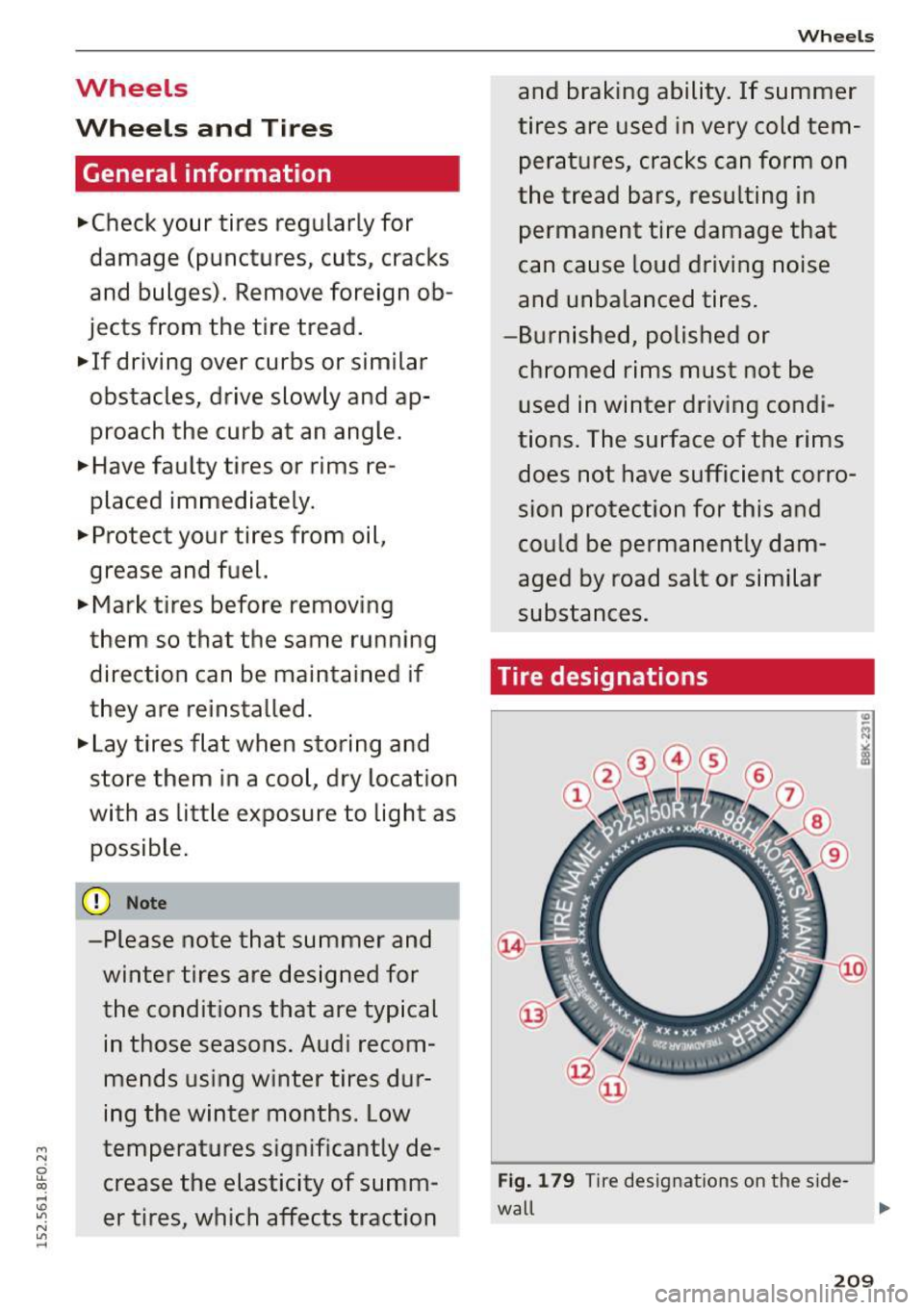
Tire designations
Fig. 179 T ir e designations on the sid e-
wall ,..
209
Page 229 of 268

M N
ci u.. co ,...., \!) ..,.,
N ..,., ,....,
also reduces fuel efficiency and tire tread life,
and may affect the vehicle's handling and stop
ping ability .
Please note that the TPMS is not a substitute for
proper tire maintenance, and it is the driver's re
sponsibility to maintain correct tire pressure,
even if under-inflation has not reached the level
to trigger illumination of the TPMS low tire pres
sure telltale.
Your vehicle has also been equipped with a TPMS malfunction indicator to indicate when the sys
tem is not operating properly. The TPMS mal
function indicator is combined with the low tire pressure telltale . When the system detects a
malfunct ion, the telltale will flash for approxi
mately one minute and then remain continuously
illuminated. This sequence will continue upon
subsequent veh icle start-ups as long as the mal
function exists.
When the malfunction indicator is illuminated,
the system may not be able to detect or signal
low tire pressure as intended. TPMS malfunctions
may occur for a variety of reasons, including the
installation of replacement or alternate tires or
wheels on the vehicle that prevent the TPMS
from functioning properly. Always check the
TPMS malfunction telltale after replacing one or more tires or wheels on your vehicle to ensure
that the replacement or alternate tires and
wheels allow the TPMS to continue to function properly.
Wheels
If the Tire Pressure Monitoring System
indicator appears
Appl ies to vehicles : wi th t ir e p ress ure mo nito rin g system
The tire pressure indicator in the instrument
cluster informs you if the tire pressure is too low
or if there is a system malfunction.
Fig. 183 Instrument cluster: i ndicator light with message
Using the ABS sensors, the tire pressure monitor
ing system compares the tire tread circumference
and vibration characteristics of the individual
tires .
If the pressure changes in one or more
tires, this is indicated in the instrument cluster
display with an indicator light
[I] and a message .
If only one tire is affected, the location of that
tire will be indicated .
The tire pressures must be stored in the Infotain
ment system again each time the pressures
change (switching between partial and full load
pressure) or after changing or replacing a tire on
your vehicle ¢
page 228. The tire pressure moni
toring system only monitors the tire pressure you have stored. Refer to the tire pressure label for
the recommended tire pressure for your vehicle
r=> page 219, fig . 182.
Tire tread circumference and vibration character
istics can change and cause a tire pressure warn
ing if:
- the tire pressure in one or more tires is too low .
- the tire has structural damage.
- the tir e was replaced or the tire pressure was
changed and it was not stored ¢
page 228.
-the spare t ire* is installed.
Indicator lights
[I] Loss of pressure in at least one tire¢.& .
Check the tires and replace or repair if necessary .
liJJ,-
227
Page 230 of 268

Wheels
Check/correct the pressures of all four tires and
store the pressure again in the Infotainment sys
tem
c!) page 228.
mm (Tire Pressure Monitoring System) Tire pres
sure: System malfunction!.
If m appears after
switching the ignition on or while driving and the
[I] i ndicator light in the instrument cluster
blinks for approximately one minute and then
stays on, there is system malfunction. Try to
store the correct tire pressures
c:> page 228 . If
the indicator light does turn off or turns on again
after a short period of time, drive to your author
ized Audi dealer or qualified repair facility imme
diately to have the malfunction corrected.
A WARNING
-If the tire pressure indicator appears in the
display, reduce your speed immediately and
avoid any hard steering or braking maneu
vers. Stop as soon as possible and check the
tires and their pressure.
- The driver is responsible for maintaining the
correct tire pressure. You must check the
tire pressure regularly.
-Under certain conditions (such as a sporty
driving style, winter conditions or unpaved
roads), the tire pressure monitoring system
indicator may be delayed.
- Do not use run-flat tires on your vehicle. Us
ing them when not permitted can lead to
vehicle damage or accidents.
(D Tips
- The tire pressure monitoring system can al
so stop working when there is an ESC mal
function.
- Using snow chains may result in a system
malfunction.
- The tires with the identification "AO" or
"RO"
c:> page 216 have been matched with
your Audi tire pressure monitoring system.
We recommend that you use these tires.
228
· Storing tire pressures
App lies to vehicles: wit h tire press ure mo nitor ing system
If the tire pressure changes or a tire is replaced,
it must be confirmed in the Infotainment sys
tem .
.,. Make sure before storing that the tire pressures
of all four tires meet the spec ified values and
are adapted to the load
c!) page 219.
.,. Switch the ignition on.
.,. Select: the
I CARI function button > Tire pres
sure monitoring
control button. Or
.,. Select: the
I CARI function button > Car Sys
tems*
control button > Servicing & checks >
Tire pressure monitoring.
(D Tips
Do not store the tire pressures if snow chains
a re i nsta lied.
Page 231 of 268
M N
ci LL co
rl I.O
"' N
"' rl
Emergency assistance
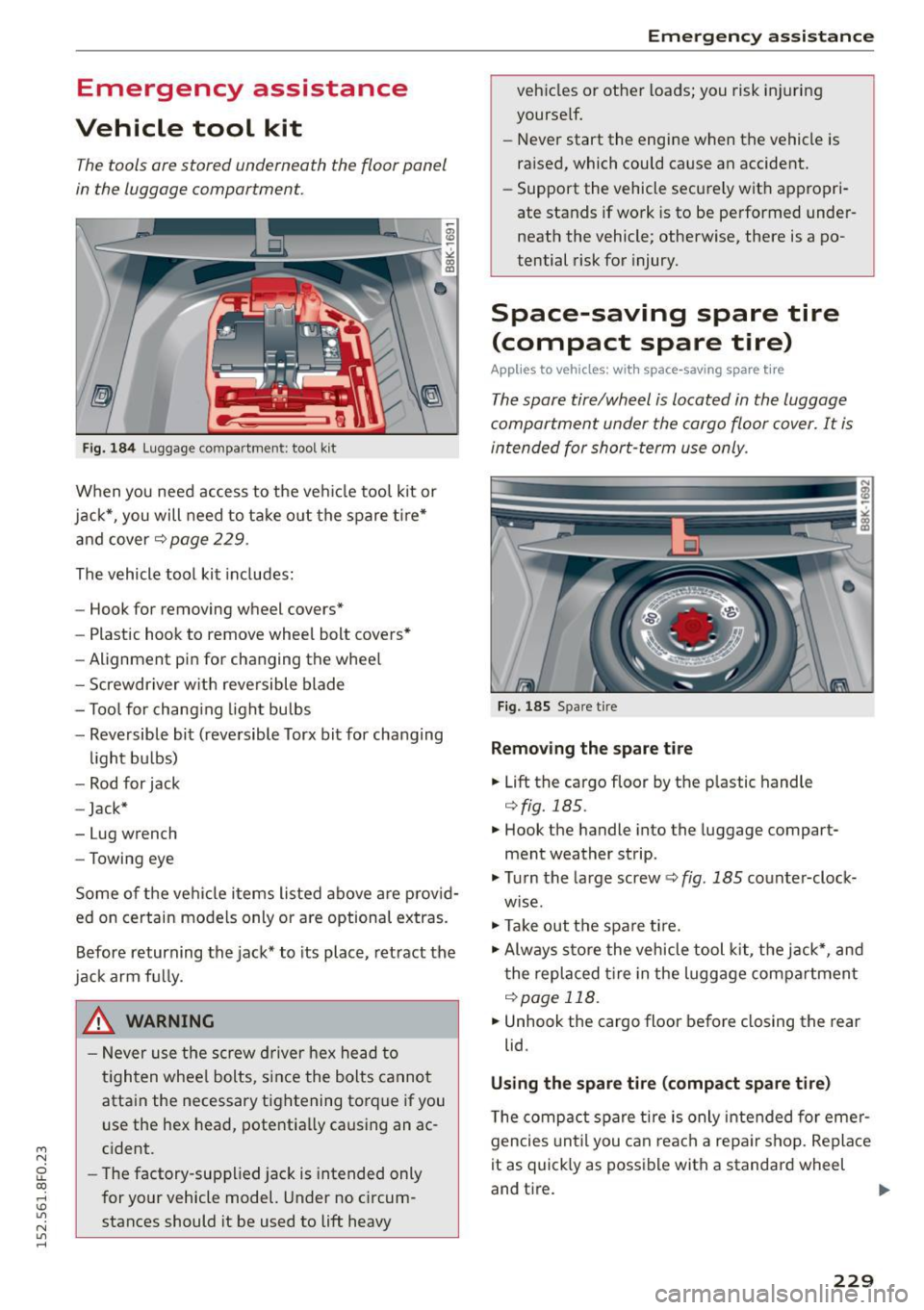
Vehicle tool kit
The tools ore stored underneath the floor panel
in the luggage comportment.
Fig. 184 Luggage compartme nt: tool kit
When you need access to the veh icle tool kit or
jack*, you will need to take out the spare t ire*
and cover¢
page 229.
The vehicle tool kit includes:
- Hook for removing wheel covers*
- Plastic hook to remove wheel bolt covers*
- Alignment pin for changing the whee l
- Screwdriver w ith reversible blade
- Tool for chang ing light bulbs
- Reversible bit (reversible Torx bit for changing
light bulbs)
- Rod for jack
- Jack*
- Lug wrench
- Towing eye
Some of the vehicle items listed above are prov id
ed on certain models only or are optional extras.
Before returning the jack* to its place, retract the
jack arm fu lly.
_& WARNING
- Never use the screw driver hex head to
t ighten whee l bolts, since the bolts cannot
attain the necessary tightening torque if you
use the hex head, potentially causing an ac
cident.
- The factory-suppl ied jack is intended only
for your vehicle model. Under no c ircum
stances should it be used to lift heavy
Emergen cy assistance
vehicles or other loads; you risk injuring
yourself.
- Never start the engine when the vehicle is
raised, which could cause an accident.
- Support the vehicle securely with appropri
ate stands if work is to be performed under
neath the vehicle; otherwise, there is a po
tential risk for injury.
Space-saving spare tire
(compact spare tire)
Applies to vehicles: with space-saving spare tire
The spore tire/wheel is located in the luggage
comportment under the cargo floor cover. It is
intended for short-term use only.
Fig. 185 Spare tire
Removing the spare tire
.,. Lift the cargo floor by the p lastic handle
¢ fig. 185.
.,. Hook the handle into the lugg age compart
ment weather strip.
.,. Turn the large screw ¢
fig. 185 counter-clock
wise.
.,. Take out the spare ti re .
.,. Always store the vehicle tool kit, the jack*, and
the replaced tire in the luggage compartment
¢page 118.
.,. Unhook the cargo floor before closing the rear
lid.
Using the spare tire (compact spare tire)
The compact spare tire is only intended for emer
gencies until you can reach a repa ir shop. Replace
it as quickly as possible with a standard wheel
and tire. ..,
229
Page 233 of 268

M N
ci LL co
rl I.O
"' N
"' rl
off the ground, placing the Automatic Trans
mission in "P" (Park) will
not prevent the ve
hicle from moving.
- Before you change a wheel, be sure the
ground is level and firm. If necessary, use a
sturdy board under the jack.
- Always store the vehicle tool kit, the jack*
and the replaced tire in the luggage com
partment ¢
page 118 .
(D Note
If you are chang ing the wheel on a steep in
cline, use a rock or sim ilar ob ject to block the
opposite whee l to prevent the vehicle from
mov ing.
(D Tips
Obey a ll laws.
Changing a wheel
When you change o whe el, follow the sequence
described below step-by-step and in exactly that
order.
1. Remove the decorative wheel cover* or the
wheel bolt caps* . For more details see a lso
¢ page 231, Decorative wheel covers or
¢ page 232, Wheels with wheel bolt caps.
2 . Loosen the wheel bolts¢ page 232 .
3. Locate the proper mount ing po int for the
jack and align the jack below that point
¢page 233.
4. Lift the car wit h the jack ¢ page 233.
5. Remove the wheel with the flat tire and then
install the
spare tire¢ page 234.
6. Tighten all wheel bolts light ly .
7.
Lower the vehicle w ith the jack.
8 . Use the wheel bolt wrenc h and
firmly tighten
all wheel bolts in a crisscross pattern
c> page232 .
9. Replace the decorative wheel cover* or the
wheel bolt cap s* .
.&, WARNING
Always read and follow all WARNINGS and in
formation
¢ .&. in Raising the vehicle on
page 233
and ¢ page 235.
Emergen cy assistance
After changing a wheel
A wheel change is not complete without the do
ing the following .
"Always store the vehicle tool kit, the jack", and
the replaced t ire in the luggage compartment
¢page 118.
"Check the tire pressure of the spare tire as soon
as poss ible.
" As soon as possible, have the
tightening tor
ques
on all wheel bolts checked with a torque
w rench. The cor rect tightening torque is 90
ft
lbs. (120 Nm).
" Have the flat tire
replaced as soon as possible.
(D Tips
-If you notice that the wheel bolts are cor
roded and difficult to turn while changing a
tire, they should be replaced before you
check the tightening torque .
- Dr ive at reduced speed until you have the
tightening torques checked.
Decorative wheel covers
Applies to vehicles : wit h decorative w hee l covers
The decorative wheel covers must be removed
first to access the wheel bolts.
Fig . 186 C ha ng in g a w heel: removing the wheel cover
Removing
" Insert the hook provided with the vehicle tool
kit in the hole in the hub .
" Pull off the
decorative wheel cover¢ fig. 186 .
231
Page 235 of 268
M N
ci LL co
rl I.O
"' N
"' rl
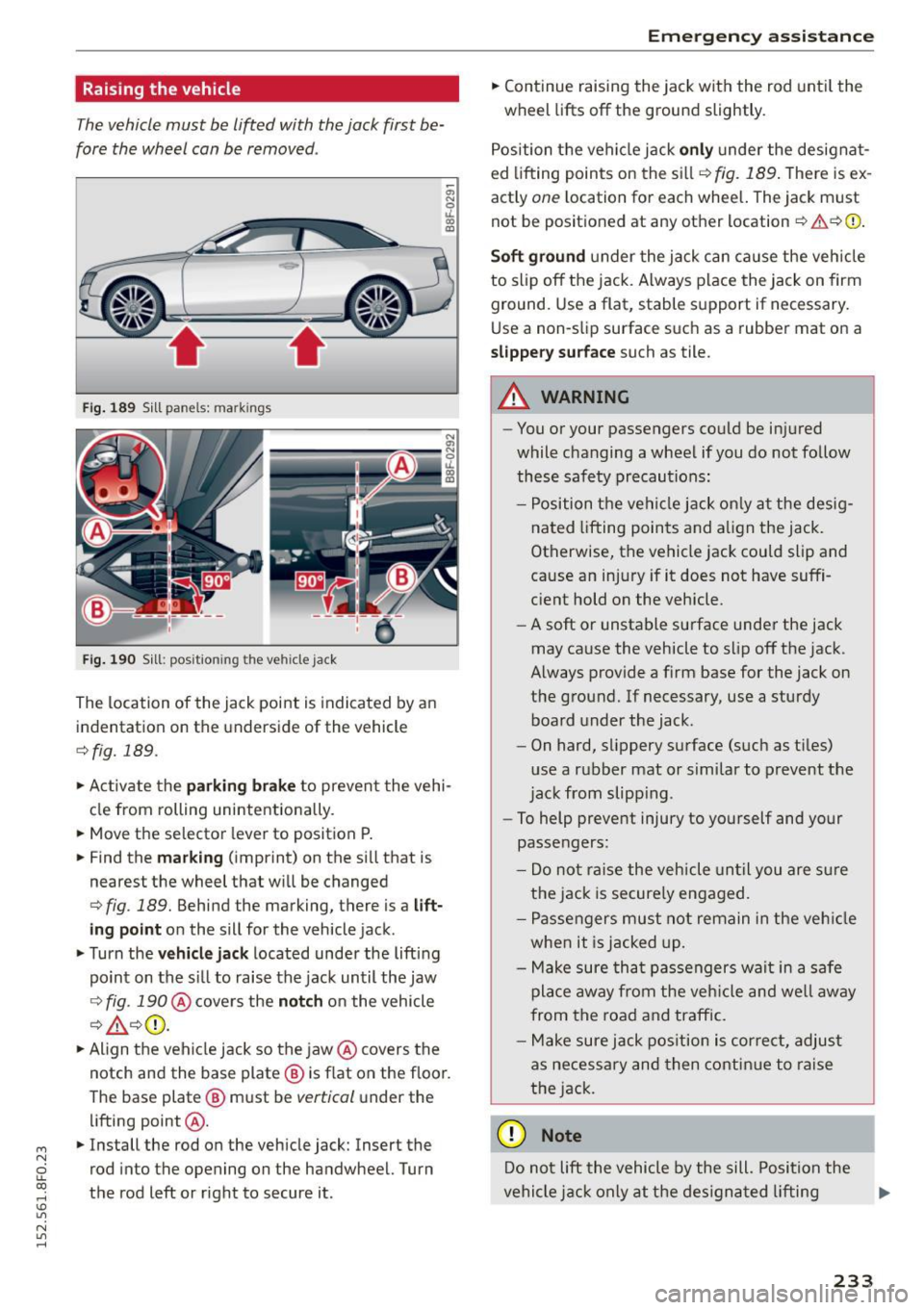
Raising the vehicle
The vehicle must be li~ed with the jack first be
fore the wheel can be removed .
Fig. 189 Sill panels: markings
Fig . 190 Sill: posit ion ing the vehicl e jack
The location of the jack point is indicated by an
indentation on the underside of the vehicle
c::> fig. 189.
;:;; N 0 u. a, ID
.,.. Activate the pa rkin g brake to prevent the vehi
cle from rolling unintentionally.
.,.. Move the se lector lever to position P .
.,.. Find the
m ar king (imprint) on the si ll that is
nearest the wheel that wi ll be changed
<=> fig . 189. Behind the marking, there is a lift
ing point on the sill for the vehicle jack .
.,.. Turn the
vehicl e jack located under the lifting
point on the si ll to raise the jack until the jaw
<=> fig. 19O @cove rs the n o tch on the vehicle
Q ,& c::>0.
.,.. Align the vehi cle jack so the jaw @covers the
notch and the base plate @ is f lat on the floor.
The base plate @ must be
vertical under the
lifting point @.
.,.. Install the rod on the veh icle jack: Insert the
rod into the opening on the handwheel. Turn
the rod left or right to secure it.
Em erg en cy ass is tan ce
.,.. Continue raising the jack wit h the rod unt il the
wheel lifts off the ground slightly.
Position t he vehicle jack
only under the designat
ed lifting points on the si ll
r:1>fig. 189. The re is ex
actly
one l ocation fo r each wheel. The jack must
not be posit ioned at any other location
c::> .& c::>0 .
Soft ground under the jack can cause the veh icle
to s lip off the jack. A lways place the jack on firm
ground. Use a flat, stable support if necessary.
Use a non-slip surface suc h as a rubber mat on a
slipper y surface such as tile.
_& WARNING
--You or your passengers could be injured
while changing a wheel if you do not follow
these safety precautions:
- Position the vehi cle jack on ly at the desig
nated lifting points and a lign the jack.
Otherwise, the vehicle jack could slip and
cause an injury if it does not have suffi
cient hold on the vehicle.
- A soft or unstable surface under the jack
may cause the vehicle to slip off the jack .
Always provide a firm base for the jack on
the g round. If necessary, use a sturdy
board under the jack.
- On hard, slippery surface (such as tiles)
use a rubber mat or similar to prevent the
jack from slipp ing .
- To help prevent injury to yourself and your
passengers:
- Do no t ra ise the vehicle until you are s ure
the jack is secure ly engaged.
- Passengers must not remain in the veh icle
when it is jacked up .
- Make sure tha t passengers wait in a safe
pla ce away from the veh icle and we ll away
from the road and traffic.
- Make sure jack pos ition is cor rect, adjus t
as necessary and then contin ue to raise
the jack .
(D Note
Do not lift the vehicle by the sill. Posi tion the
vehicle j ack only at the des igna ted lifting
233
Page 236 of 268

Emergency assistance
points on the sill. Otherwise, your vehicle will
be damaged.
Taking the wheel off/installing the spare
tire
Follow these instructions step-by-step for chang
ing the wheel .
Fig. 191 Cha ngin g a w hee l: u sing t he screwd rive r hand le
(w ith t he blade re moved) to turn the bo lts
Fig. 192 C han gin g a w heel: align men t pin inside the top
h ole
After you have loosened all wheel bolts and
ra ised the veh icle off the ground, remove and re
p la ce the whee l as follows:
Removing the wheel
"' Remove the topmost wheel bolt completely
with the
hexagonal socket in the screwdriver
handle (vehicle tool kit)
r=;, fig. 191 and set it
aside on a
clean surface.
"' Screw the threaded end of the
alignment pin
from the tool kit hand-tight into the empty bo lt
hole
r=;, fig . 192.
"' Then remove the other wheel bo lts as described
above.
"' Take off the wheel leaving the alignment pin in
the bolt hole
r=;,(I).
234
Putting on the spare tire
"'Push the spare tire over the alignment pin.
"' Screw on the wheel bolts and tighten them
slightly using the hexagona l socket .
"' Remove the alignment pin and insert and tight
en the remaining wheel bolt slightly like the
rest.
"' Turn the jack hand le counter-clockwise to lower
the vehicle until the jack is fully released .
"' Use the wheel bolt wrench to tighten all wheel
bolts firmly
r=;, page 232. Tighten them in a
crisscross pattern,
from one bolt to the (ap
proximately) opposite one, to keep the wheel
centered.
"' Perform the steps required after changing the
wheel
r=;, page 231, A~er changing a wheel .
The hexagonal socket makes it easie r to remove
the wheel bolts from the rim. Care should be tak
en when removing the reversib le blade .
(D Note
When removing or installing the wheel, the
rim could hit the brake rotor and damage the
rotor. Work carefully and have a second per
son to he lp you.
(D Tips
- When mounting tires with unidirectional
tread design
make sure the tread pattern is
pointed the right way
r=;, page 235.
- The wheel bolts should be clean and easy to
turn. Check for dirt and corrosion on the
mating surfaces of both the wheel and the
hub. Remove all dirt from these surfaces be
fore remounting the wheel.
- Do not use the hexagonal socket in the
screwdriver handle to loosen or tighten the
wheel bolts.
Page 238 of 268
Fuses and bulbs
Fuses and bulbs
Fuses
Replacing a fuse
A fuse that hast blown will have metal strips
that have burned through .
Fig. 19 3 Left cockp it: fuse panel cover
The fuses a re located at the fron t left and right of
the cockpit and behind the trim on the right side
of the luggage compartment.
• Swi tc h the ignition and all e lectr ica l equipment
off .
• Check the following table to see which fuse be
longs to the equipment.
• Remove the appropriate cover.
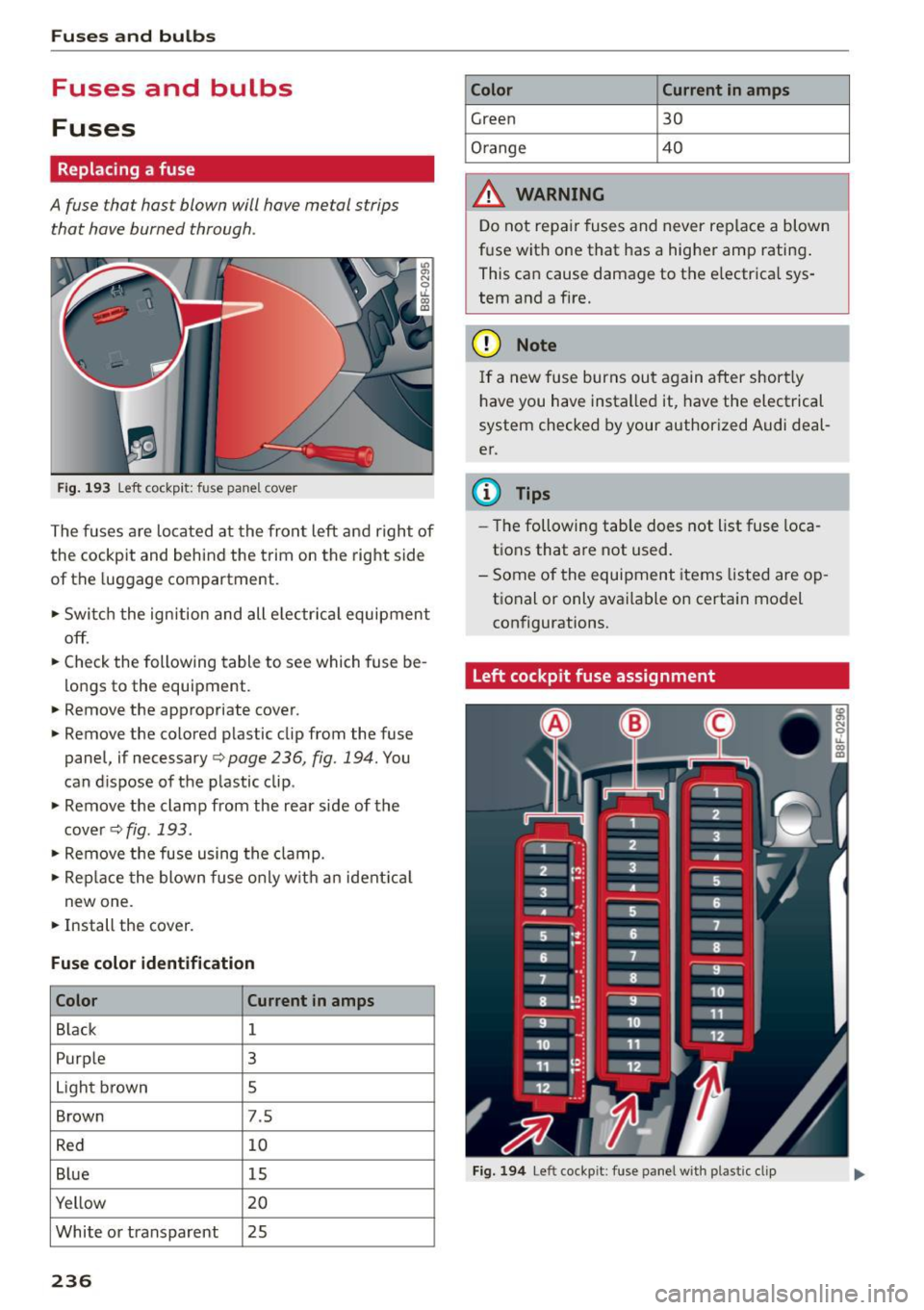
• Remove the colored p lastic clip from the fuse
panel, if necessary ¢
page 236, fig. 194. You
can d ispose of the p lastic clip .
• Remove the clamp from the rear side of the
cover ¢fig.193 .
• Remove the fuse using the clamp.
• Rep lace the blow n fuse o nly w it h an ident ica l
new one.
• Install the cover .
Fuse color identification
Color Current
in amps
Black 1
Purp le 3
Light brown s
Brown 7.5
R ed 10
B lue 15
Yellow 20
White or transparent 25
236
Color Current in amps
Green 30
Orange 40
A WARNING
D o not repa ir fuses and never rep lace a blown
f u se wit h one that has a higher amp rating .
This can cause damage to the e lectr ica l sys
tem and a fire.
(D Note
I f a new fuse burns out again after short ly
h ave you have insta lled it, have the electrical
system checked by your author ized Audi deal
er.
(D Tips
- The followi ng table does not list fuse loca
t ions that a re not used.
- Some of the equipment items listed are op
t ional or only available on certain model
con figurations.
Left cockpit fuse assignment
F ig . 1 94 Le ft cockpi t: fuse panel wi th plastic clip
Page 239 of 268

M N
ci LL co
rl I.O
"' N
"' rl
Fu se pa nel @ (black )
No. Consumer
1 Dynamic steering
2 Electron ic Stabilization Control (module)
A/C system pressure sensor, electrome-
chanical parking brake, HomeLink, auto-
3 mat
ic dimming interior rear view mirror,
air quality/outside air sensor, Electron ic
Stabilization Control (button)
s Sound actuator
6 Headlight range control/headl
ight (corner-
ing light)
7 Headlight (cornering light)
Control modu les (electromechanical park-
8 ing brake, shock absorber, q uattro sport),
DCDC converte r
9 Adaptive
cruise control
10 Shift gate/clutch sensor
11 Side assist
1 2 Headlight range cont ro l, parking system
13 Airbag
14 Rear
wiper (a llroad)
15 Auxiliary fuse (instrument panel)
16 Auxiliary
fuse termina l 15 (engine area)
Fuse p anel @ (brown )
No. C onsumer
2 Brake light sensor
3 Fuel pump
4 Clutch sensor
5
Left seat heating with/without seat venti-
lation
6 Electronic Stabilization Control (electric)
7 Ho rn
8
Front left door (window regulator, central
locking, mirror, switch, lighting)
9 Windshield wiper motor
10 Electronic Stabilization Control (valves) Fu
ses a nd bulb s
No. Consumer
Two-door mode ls: rear left window regula-
11 tor; Four-door
models: rear left door (win-
dow regulator, central locking, switch,
light ing)
12 Rain and l
ight sensor
Fuse panel © (r e d )
No . Con sumer
3 Lumbar support
4 Dynamic steering
5 Inter
ior l ight ing (Cabriolet)
6 Windshie
ld washer system, headlight
washer system
7 Vehicle electrica l system control module 1
8 Vehicle electr ica l system control module 1
9 Left rear
window regulator motor (Ca brio-
let)/su nroof
10 Vehicle electr ica l system co ntrol module 1
11 Right rear
window regulator (Cabriolet)/
sun shade motor
12 Anti-theft
alarm warning system
Right cockpit fuse assignment
Fig. 195 Right cockpit: fu se panel with plastic cl ip
237