cruise control AUDI A5 CABRIOLET 2015 User Guide
[x] Cancel search | Manufacturer: AUDI, Model Year: 2015, Model line: A5 CABRIOLET, Model: AUDI A5 CABRIOLET 2015Pages: 268, PDF Size: 66.88 MB
Page 96 of 268

Audi adaptive cruise control and braking guard
Interrupting cruise control
Applies to veh icles: w ith Audi adaptive cruise co ntrol
Fig. 110 Selector leve r
Requirement : adaptive cruise control must be
switched on
¢ fig . llO (i).
Overriding cruise control
• To accelerate manually, press the acce lerator
pedal. The message
ACC override appears .
• To resume adaptive cruise control, remove your
foot from the gas pedal. The system returns
again to the speed that was saved before.
• You can save a new speed at any time by press·
ing the
ISETI button r:::;, page 11, fig. 4.
Canceling cruise control while driving
• Move the lever into position @. The message
ACC standby appears . Or
• press the brake pedal.
• To resume the stored speed, move the lever in
to position
@ .
,& WARNING
Never resume the stored speed if the speed is
too high for prevailing road, traffic or weather
conditions.
94
Setting the distance
App lies to vehicles: wit h Audi adapt ive cru ise contro l
Fig. 111 Selector lever: setting the d istance
• Tap the switch to display the current set dis
tance
¢ fig . 111 .
• To increase or reduce the distance by incre·
ments, tap the switch again to the left or right.
The distance between the two veh icles will
change in the instrument cluster display .
When approach ing a mov ing vehicle up ahead,
the adapt ive cruise control system brakes to
match that object's speed and then mainta ins
the stored distance. If the vehicle ahead acceler
ates, adaptive cruise contro l will also accelerate
up to the stored speed.
The higher the speed, the greater the distance in
yards (meters)
r:::;, A . The Distance 3 setting is
recommended.
The distances prov ided are specified va lues . De
pending on the driving situation and the how the
vehicle ahead is driving, the actua l dis tance may
be more or less than these target distances.
The var ious symbols for the time increments ap
pear briefly in the information line@r:::;,
page 92,
fig. 108 when you change the settings .
o;:'.'.:>_o;:'.'.:> ___ Distance 1: This setting corresponds
to a distance of 92 feet/28 meters when travel·
i ng at 62 mph (100 km/h), or a time i nterva l of 1
second.
o;:'.'.:> __ o;:'.'.:> __ Distance 2: This setting corresponds
to a distance of 118 feet/36 meters when travel
i ng at 62 mph (100 km/h), or a time i nterva l of
1.3 seconds.
Page 97 of 268
M N
ci LL co
rl I.O
"' N
"' rl
Audi adapt ive crui se cont rol and bra king gu ard
~ -- -~ -Di sta nce 3: This setting corresponds
to a distance of 164 feet/SO meters when trave l
ing at 62 mph (100 km/h), or a t ime interval of
1.8 seconds.
~ -- --~ Dista nc e 4: This setting corresponds
to a distance of 210 feet/64 meters when trave l
ing at 62 mph (100 km/h), or a t ime interval of
2 .3 seconds.
A WARNING
Following other vehicles too closely increases
the risk of collisions and ser ious personal in
jury.
- Setting short distances to the traffic ahead
reduces the time and distance available to
br ing your vehicle to a safe stop and makes
it even mo re necessary to pay close atten
tion to traffic.
- Always obey applicable traffic laws, use
good judgment, and select a safe following
distance for the traffic, road and weather
condit ions.
¢j) Tips
- Di stance
3 is set automatically each time
you switch t he ignition on.
- Your standa rd settings are automatically
stored and assigned to the remote contro l
k ey being used.
Setting the driving program
Applies to vehicles: with Audi adaptive cruise control
D epending on the se lected dr iv ing program and
distance, driving behavior when accelerating will
vary from dynamic to comfortab le .
Setting th e driving program for v ehicl es
without Audi d rive s elect*
~ In the radio/MMI*, select: !CAR !function but
ton >
Adapti ve c ru is e control > D riv ing prog. >
comfo rt, stand ard or d y namic . Or
~ Select : !CAR I function button> Ca r sy ste m s*
co ntrol button > D river ass ist > Adap tive cru ise
cont ro l
> Dr iving progr am * > Comfort, Stand
ard
or D ynamic . Setting the driving mode for vehicles w
ith
Audi dri ve select*
Refer to ¢ page 104.
(D Tips
Your settings are automatical ly stored and as
signed to the remote control key being used.
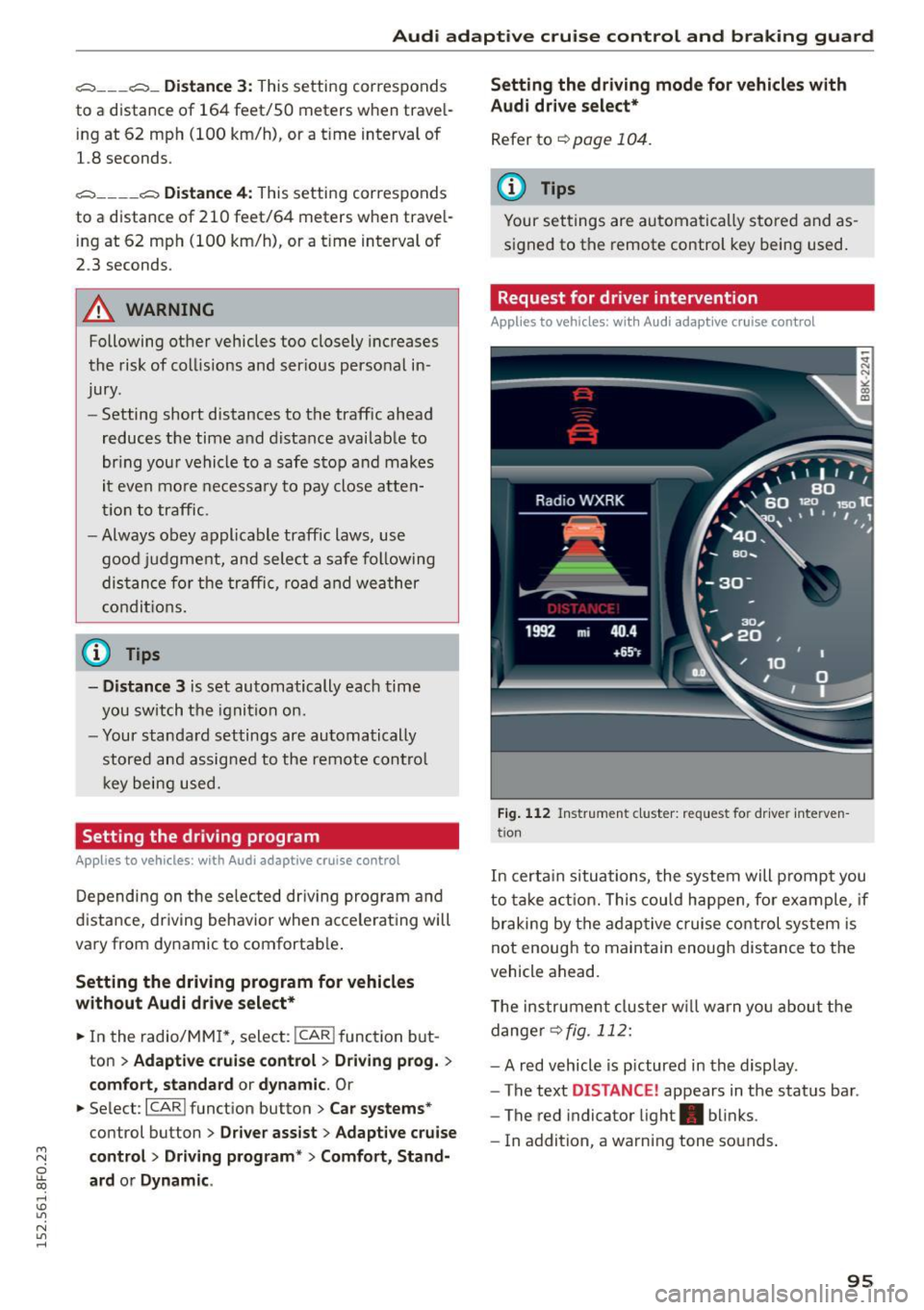
Request for driver intervention
Applies to vehicles: with Audi adaptive cruise control
Fig . 1 12 Instr ume nt cluster: reques t fo r dr ive r inte rven
t ion
In certa in situations, the system will prompt you
to ta ke act ion. This cou ld happen, fo r example , if
braking by the adaptive c ruise control system is
not enough to maintain enough distance to the
vehicle ahead.
T he instrument cluster w ill warn you abou t the
dange r
~fig. 112:
-A red vehicle is p ictured in the display .
- The text
DISTANCE! appears in the status bar .
- The red indicator light . blinks .
- In addition, a warning tone sounds .
95
Page 98 of 268

Audi adaptive cruise control and braking guard
Audi braking guard
Description
Applies to veh icles: w ith Audi adaptive cruise co ntrol
Fig. 113 Instrument cluster : approach warn ing
Braking guard uses a radar sensor. It also func
tions within the limits of the system when adap
tive cruise control is switched off.
What can Audi braking guard do?
When detected in time, the system can assess
situations when a vehicle ahead brakes suddenly
or if your own vehicle is traveling at a high speed
and approaching a vehicle up ahead that is mov
ing more slowly . Braking guard does not react if it
cannot detect the situation .
The system advises you of various situations:
- The
distance warning is given if you are too
close to the vehicle ahead for a long time. If the
vehicle ahead brakes sharply, you will not be
able to avoid a collision. The indicator light.
in the display comes on .
- The
approach warning is given when a detected
vehicle up ahead in your lane is moving much
more slowly than you are or if it brakes sharply .
When this warning is given, it may only be pos
s ib le to avoid a collision by swerving or braking
sharply. The indicator light . and indicato r in
the display will wa rn you about the danger
¢ fig. 113 . You will also hear an acoustic signa l.
If you do not react fast enough or do not react at
all to the situation, Braking guard will intervene
by braking and the message
braking guard inter
vention
will appear.
ll Thi s is not available in so me c oun tries.
96
- If a co llision is imminent, the system wi ll first
provide an
acute warning by br iefly and sharply
app ly in g the brakes.
- If you do not react to the acute warning, brak
ing guard can brake within the limits of the sys
tem. This reduces the vehicle speed in the event
of a collision.
- At speeds under 20 mph (30 km/h), the system
can initiate a complete deceleration shortly be
fore a collisionl l_
-If the braking guard senses that you are not
braking hard enough when a collision is immi
nent, it can increase the braking force.
Which functions can be controlled?
You can switch braking guard and the distance/
approach warning on or off in the radio or MMI
¢page
97, Settings in the radio/MM!.
A WARNING
Lack of attent ion can cause collisions, other
accidents and ser ious personal injuries. The
braking guard is an assist system and cannot
prevent a coll is ion by itself. The dr iver must
always intervene. The driver is always respon
sib le for braking at the correct time.
- Always pay close attent ion to traffic, even
when the braking guard is switched on. Be
ready to intervene and be ready to take com
plete control whenever necessary. Always
keep the safe and legal distance between
your vehicle and vehicles up ahead.
- Braking guard works within limits and will
not respond outside the system limits, for
examp le when approaching a stopped vehi
cle or stationary obstacle (end of a traffic
jam or vehicle that has broken down in traf
fic).
- Always remember that the radar sensor for
the braking guard works only w ith in defined
detection and range limits that may prevent
the proper detection of other vehicles.
- The radar sensor's function and range can
be reduced by rain, snow and heavy spray.
Moving vehicles up ahead may not be
-
Page 99 of 268

M N
ci u.. co ,...., \!) 1.1"1
N 1.1"1 ,....,
Audi adaptive cruise control and braking guard
promptly detected or may not be detected
at all.
- Reflective surfaces including crash barriers
or tunnel entrances may impair the function
of the radar sensor.
(D Tips
- You can cancel the braking that is initiated by the system by braking yourself, by accel
erating noticeably or by swerving.
- Braking guard error messages
Q page 97.
- Keep in mind that braking guard can brake
unexpectedly. Always secure any cargo or
objects that you are transporting to reduce
the risk of damage or injury.
Settings in the radio /MMI
App lies to vehicles: with Audi adaptive cruise co ntrol
... Select : I CARI function button > Car systems*
control button > Driver assist> Audi braking
guard .
Or
... Select :
~I C-A-R~I function button > Audi braking
guard.
System -
Switch Audi braking guard On and Off.
When you switch the ignition on, the message
Audi braking guard off appears if the system is
switched off.
Early warning -The distance and approach warn
ings in the display can be switched
On/Off.
(D Tips
-Your settings are automatically stored and
assigned to the remote control key being
used at the times the settings are made.
- If you restrict or switch off the ESC, the
braking guard also switches itself off
¢ page 171.
- Switch braking guard off when you are load
ing the vehicle onto a vehicle carrier, train,
ship or other type of transportation . This
can prevent undesired warnings from the
braking guard system.
Messages
Applies to vehicles: wi th Aud i adap tive c ruise control
Braking guard: Off
This driver message appears if the system is
turned off via the radio/MMI*. Otherwise, if the
system is turned off, the information appears ev
ery time shortly after the start of the trip.
The driver message also appears if the system is
not available due to a malfunction or if the ESC is
not switched on
¢ page 171. If this is the case,
the system will not provide warnings about a possible collision.
Braking guard: Activated
This driver message appears if sharp brake pres
sure was applied due to an acute warning .
•••
Three white dots appear if a setting cannot be se
lected with the operating lever. For example, this
happens if you want to raise/lower the speed
even though there was no previously saved
speed .
ACC: Sensor blocked
This message appears if the sensor view is ob
structed, for example by leaves, snow, heavy
spray or dirt. Clean the sensor~
page 90,
fig. 103.
ACC: not available
The driver message appears if there is a malfunc
tion. The adaptive cruise control turns off. A
chime sounds as a reminder. Have the system
checked by an authorized Audi dealer or author
ized Audi Service Facility.
ACC: unavailable
The driver message appears if, for example, the
brake temperature is too high. The adaptive
cruise control is temporarily unavailable . A chime
sounds as a reminder.
Shift lever position!
The driver message appears if the selector lever
is shifted to the N position. The adaptive cruise
control is not available while in this position. .,..
97
Page 100 of 268
Audi adaptive cruise control and braking guard
Stabilization control (ESC)
T his message appea rs if the electroni c stabili za
t ion con trol ( ESC) is taki ng act io n to s tab iliz e th e
ve hicl e. The adap tive cruise cont ro l tur ns off. A
chime soun ds as a remin der.
Speed too low
This message appea rs if the current speed is too
low
to set or to maintain th e des ired s peed .
The speed being saved must be at least 20 mph (30 km/h). The cru ise cont ro l is turned off for
speeds lowe r th an 12 mph (20 km/h). The adap
tive c ruise co ntrol rema ins tur ned o n for speeds
above 95 mph (150 km/ h) (override). It w ill sta
b iliz e aga in at 9 5 mph ( 150 k m/h) whe n the dr iv
e r tak es his foo t off of the g as peda l.
Parking brake!
The drive r message appea rs when the park ing
b rake is activated. Adaptive cru ise cont ro l is
tur ned off . A chime sounds as a reminde r.
98
Page 105 of 268
M N
ci u.. co ,...., \!) ..,.,
N ..,., ,....,
Audi drive select Driving settings
Introduction
App lies to vehicles: with Audi drive select
Drive select provides the possibi lity to experience
d ifferent types of vehicle settings in one vehicle.
F or instance, using the three
Comfort, Auto and
Dynamic modes, the driver can switch from a
sporty to a comfortable driving mode with the
press of a button.
Addit ionally, in vehicles with
MM I*, the vehicle
setup for
Individual* mode can be customized by
you. This makes it possib le to combine settings
such as a sporty engine tuning with comfortab le
steering .
A WARNING
-
Improper use of the Audi drive select can
cause collisions, other acc idents and serious
personal injury.
Description
App lies to vehicles: with Audi drive select
The vehicle setup in each mode depends on the
veh icle's featu res . However, the engine, automat
ic transmission and steering are always involved.
Engine and automatic transmission
Depending on the mode, the engine and the au
tomatic transmission respond quicker or in a
more balanced manner to accelerator pedal
movements. In the sporty dynamic mode, the au
tomatic transmission shifts at higher RPMs .
Steering
The steering adapts in terms of steering effort
and steering ratios. Ind irect steer ing that moves
eas ily, like the steering in comfort mode, is best
suited to long drives on a highway. In contrast,
dynamic mode provides sporty, direct stee ring.
The follow ing applies to vehicles with dynam ic
steer ing*: the steering ratio changes based on ve
hicle speed in order to maintain optimum steer
ing effort for the dr iver at all times. This sets the
steer ing to be less sensitive at higher speeds in
Audi drive select
order to provide improved vehicle control. At re
duced speeds, however, steering is more direct in
order to keep the steering effort as m inima l as
possib le when the driver is maneuvering the vehi
cle. At low and average speeds, dynamic steering
additionally provides more responsive steering performance.
Adaptive dampers*
The adaptive dampers* use sensors to record in
formation regarding steering movements, braking and acceleration operations by the driver,
road surface, driving speed, and load. This makes
i t possible to adapt damping to the driving situa
t ion virtually in real t ime . Drive select also makes
it possible to sat isfy the desire for sporty suspen
s ion (Dynamic) and comfortab le suspension
(Comfort) without giving up ba lanced tuning (Au
to) .
Sport differential*
As a component of the all whee l dr ive system
(quattro)
~ page 174, the sport differential* dis
tributes the driving power to the rear axle de
pending on the situation. The dist ribution of
power varies depending on the mode selected.
The goal is a high level of agility and ability to ac
ce lerate on curves. The vehicle is very responsive
to steering.
Audi adaptive cruise control*
T he behavior when accelerating can be adjusted
from comfortable to sporty, depending on the
drive select mode. Adaptive cruise control also
responds to the driving behavior of the vehicle
ahead in a more conservative or sporty manner.
Engine sound*
The sound of the engine is adapted to the select
ed mode and ranges from subtle to sporty.
(D Tips
- In some models, the maximum vehicle
speed can only be reached in the
Auto and
Dynamic modes.
- For vehicles with an automatic transmis-
sion, selecting the
Dynamic mode results in ..,.
103
Page 107 of 268
M N
ci u.. co ,...., \!) 1.1'1
N 1.1'1 ,....,
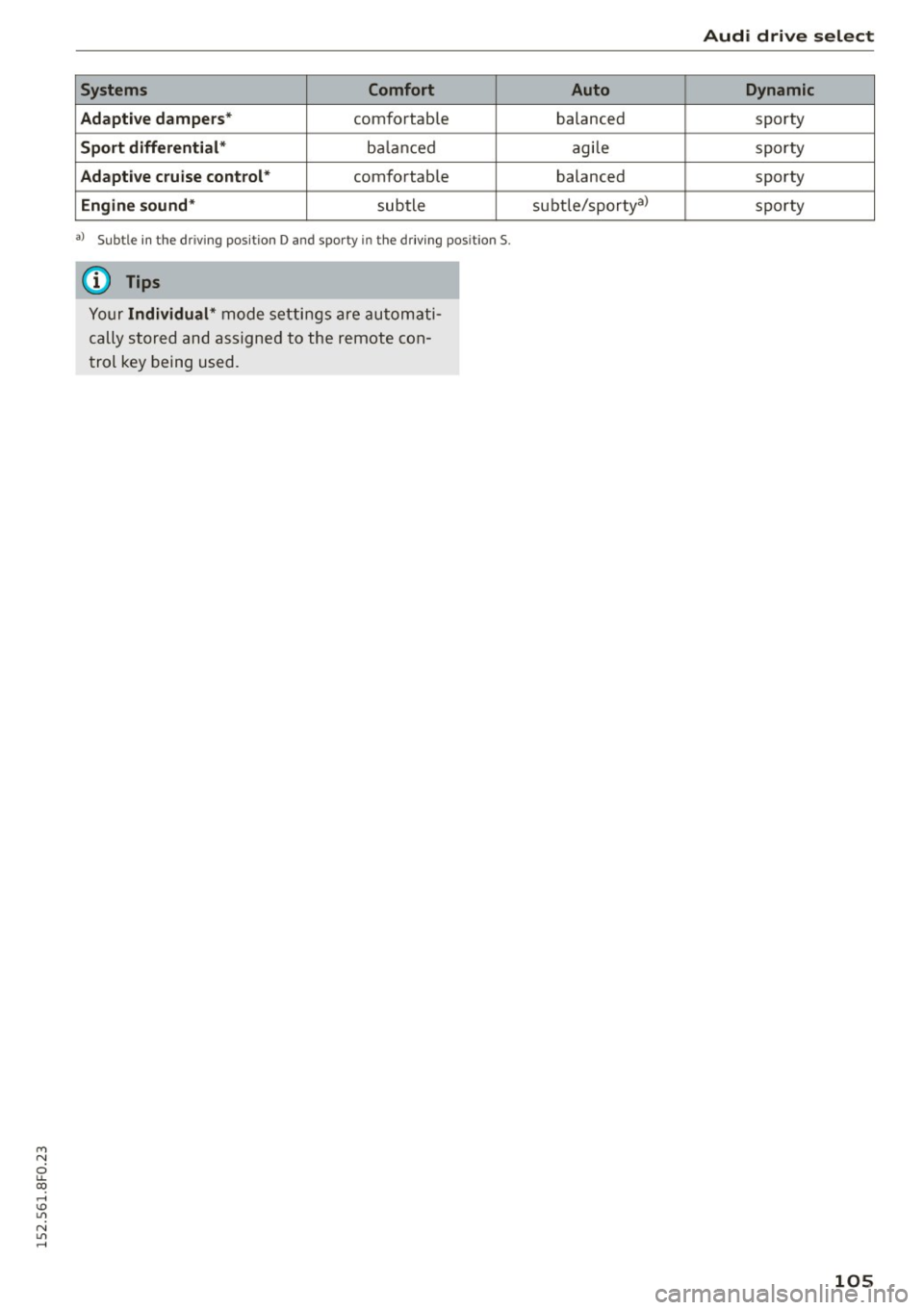
Systems Comfort
Adapti ve dampers *
comfortable
Sport differenti al* ba la nced
Adaptive cruise control * comfortable
Engin e sound * subtle
al Subt le in the dri ving pos itio n D and spo rty i n th e d rivin g pos ition S .
(D Tips
Your Individual* mode se ttings are au tom ati
cally stored and assigne d to the remote con
trol key being used.
Audi drive select
Auto Dynamic
balanced sporty
agi le sporty
balanced sporty
su bt le/ sportya)
sp orty
105
Page 174 of 268

Smart Technology
The following situations are exceptions where it
may be usefu l to switch on sport mode to allow
the wheels to spin : -
Rocking the vehicle to free it when it is stuck
- Driv ing in deep snow or on loose ground
- Dr iv ing with snow chains
Sport mode on ESC/ASR off Sport mode off or
ESC /ASRon
Behavior
The ESC and ASR stabiliza- The stabilization funct ion is The full stabilization func-
tion fu nct ions are limited not
available¢ ,&.. ESC and
tion of the ESC and ASR is
¢ ,&. .
ASR are switched
off. available again.
Operation Press the I!> OF F! button Press and hold the I!> OF FI Press the I!> OF F! button
briefly . button longer than 3 sec-again.
onds .
Indicator II turns on. JI and lf'lii•li~ turn on. II turns off or II and
lights lf'lii•l~~ turn off.
Driver mes- Stabilization control (ESC): Stabilization control (ESC): Stabilization control
sages Sport. Warning! Re stricted off. Warning! Restricted (ESC):
On
stability stability
It is only possible to turn off the ASR up to 30
mph (SO km/h) for veh icles wi th front whee l
drive . At about
45 mph (70 km/h) it automatica l
ly turns on again. It is possible to turn
off the
ASR at any speed for vehicles with all whee l
drive.
A WARNING
-
You should only sw itch sport mode on or
switch ESC/ASR
off if your driving ab ilities and
road condit io ns perm it .
- The stabilization function is limited when
sport mode is switched on. The dr iv ing
wheels could spin and the veh icle cou ld
swerve, especially on slick or slippery road
surfaces.
- There is no vehicle stabilization when ESC/
ASR are switched
off.
(D Tips
ESC/ASR cannot be switched off or sport
mode cannot be switched on when cruise con
trol or adaptive cru ise control* is sw itched on .
172
Braking
What affects broking efficiency?
New brake pads
During the first 250 miles (400 km), new brake
pads do not possess their full braking effect, they
have to be "broken in" first¢,&. . You can com
pensate for this slightly reduced braking power
by pushing harder on the brake pedal. Avoid
heavy braking loads during the break-in period.
Operating conditions and driving habits
The brakes on today's automobiles are still sub
ject to wear, depending largely on operating con
ditions and driving habits~,&. . On vehicles that
are either driven most ly in stop-and -go city traf
fic or are driven hard, the brake pads should be
checked by your authorized Audi dealer more of
ten than specified in the
Warranty & Mainte
nance booklet .
Failure to have your brake pads
i nspected can result in reduced brake perform
ance .
On steep slopes, you should use the braking ef
fect of the engine . This way, you prevent unnec
essary wear on the brake system. If you must use
your brakes, do not hold the brakes down contin
uously. Pump the brakes at intervals.
Page 239 of 268

M N
ci LL co
rl I.O
"' N
"' rl
Fu se pa nel @ (black )
No. Consumer
1 Dynamic steering
2 Electron ic Stabilization Control (module)
A/C system pressure sensor, electrome-
chanical parking brake, HomeLink, auto-
3 mat
ic dimming interior rear view mirror,
air quality/outside air sensor, Electron ic
Stabilization Control (button)
s Sound actuator
6 Headlight range control/headl
ight (corner-
ing light)
7 Headlight (cornering light)
Control modu les (electromechanical park-
8 ing brake, shock absorber, q uattro sport),
DCDC converte r
9 Adaptive
cruise control
10 Shift gate/clutch sensor
11 Side assist
1 2 Headlight range cont ro l, parking system
13 Airbag
14 Rear
wiper (a llroad)
15 Auxiliary fuse (instrument panel)
16 Auxiliary
fuse termina l 15 (engine area)
Fuse p anel @ (brown )
No. C onsumer
2 Brake light sensor
3 Fuel pump
4 Clutch sensor
5
Left seat heating with/without seat venti-
lation
6 Electronic Stabilization Control (electric)
7 Ho rn
8
Front left door (window regulator, central
locking, mirror, switch, lighting)
9 Windshield wiper motor
10 Electronic Stabilization Control (valves) Fu
ses a nd bulb s
No. Consumer
Two-door mode ls: rear left window regula-
11 tor; Four-door
models: rear left door (win-
dow regulator, central locking, switch,
light ing)
12 Rain and l
ight sensor
Fuse panel © (r e d )
No . Con sumer
3 Lumbar support
4 Dynamic steering
5 Inter
ior l ight ing (Cabriolet)
6 Windshie
ld washer system, headlight
washer system
7 Vehicle electrica l system control module 1
8 Vehicle electr ica l system control module 1
9 Left rear
window regulator motor (Ca brio-
let)/su nroof
10 Vehicle electr ica l system co ntrol module 1
11 Right rear
window regulator (Cabriolet)/
sun shade motor
12 Anti-theft
alarm warning system
Right cockpit fuse assignment
Fig. 195 Right cockpit: fu se panel with plastic cl ip
237
Page 253 of 268
means that you risk both a substantia l reduction
in the operational safety of your vehicle and an
increased wear of vehicle parts~.& .
Author ized Audi dealers w ill perform this work in
a professiona l and competent manner or , in spe
cial cases, refer you to a professional company
that spec ializes in such modifications.
A WARNING
Improper repairs and modifications can
change the way vehicle systems work and
cause serious personal injury .
(D Note
If emergency repairs must be performed e lse
where, have the veh icle examined by an au
thorized Audi dealer as soon as possib le.
Declaration of
Compliance, Telecommu
nications and Electronic
Systems
Radio Frequency Devices and Radiocommunica
tion Equipment User Manual Notice .
The manufacturer is not responsible for any radio
or TV interference caused by unauthorized modi
f ications to this equ ipment .
Device s
The fo llow ing devices each comp ly w ith FCC Part
15.19, FCC Part 15.21 and RSS-Gen Issue
1:
- Adaptive cruise control*
- Convenience key*
- Side assist*
- Cell phone package*
- Electronic immob ilizer
- Homelink universal remote control*
- Remote control key
FCC Part 15.19
This device compl ies with pa rt 15 of the FCC
~ Rules. Opera tion is subjec t to the following two
ci u.. conditions : co ,...., \!) 1.1'1
N l/'I ,....,
Co nsum er information
(1) This device may not cause harm ful interfe r
ence , and
(2) this device must accept any inte rfe rence re
ce ived, incl ud ing in terference that may cause un
desired operation.
FCC Part 15.21
CAUT ION:
Changes or mod ificat ions not expressly approved
by the party responsible for compliance could
vo id the user's authori ty to ope rate the equ ip
me nt.
RSS-Gen Is sue 1
Operation is subject to the follow ing two condi
tions:
(1) this device may not ca use interference, and
(2) this devi ce must ac cep t any inte rference , in
cl ud ing interference that may cause undesired
operation of the device .
251