transmission AUDI A5 CABRIOLET 2015 User Guide
[x] Cancel search | Manufacturer: AUDI, Model Year: 2015, Model line: A5 CABRIOLET, Model: AUDI A5 CABRIOLET 2015Pages: 268, PDF Size: 66.88 MB
Page 87 of 268

M N
ci u.. co ,...., \!) 1.1"1
N 1.1"1 ,....,
At speeds above about 1 mph (2 km/h) the Auto
matic Shift Lock is automatically deactivated in
the N position.
A time delay element prevents the selector lever
from locking when it is moved through the N po
sition (going from R to D/S). The locking element
will lock the se lector lever if the lever is left in N
(Neutral) for more than approximate ly 2 seconds,
without the brake pedal being pressed.
Release button
The release button on the selector lever prevents
the lever from being accidentally shifted into cer
tain positions. Depending on the direction of the
shift, the selector lever locks at different posi
tions. The positions are highlighted in the illus
tration
c> fig . 97.
Ignition key safety interlock
The key cannot be removed from the ignition un
l ess the se lector lever is in the P park posit ion.
When the ignit ion key is removed, the selector
lever will be locked in the P position.
Driving the automatic transmission
Applies to vehicles: with m ultit ron ic/S tronic/t iptronic
F ig . 98 S hift gate on t he center conso le: selector lever w ith
re lease button
Starting the engine
~ The selector lever must be in P or N.
Starting off
~ Press and ho ld the brake pedal.
~ Press and hold the release button in the selec
tor lever handle, select the des ired selector lev
er posit ion such as D/S and release the button.
Automatic transmission
~ Wait briefly until the transmission has shifted
(you will fee l a slight movement).
~ Remove your foot from the brake pedal and ac
celerate.
Stopping temporarily
~ Keep the vehicle stationary using the braking
pedal, for example at traffic lights.
~ Do not press the accelerator peda l when doing
this.
~ To prevent the vehicle from rolling when you
start driving, set the parking brake when stop
p in g on steep inclines
c> .&_.
~ The parking brake will release automat ically
and the vehicle will start mov ing once you press
t he acce lerator pedal.
Stopping/parking
If the selector lever is not in the P position when
you open the dr iver's door, the vehicle could roll.
The message
Transmission: Car may roll! Shift
to park!
appea rs.
~ Press and hold the brake pedal until the vehicle
has come to a complete stop .
~ Apply the parking brake c:;. page 78, Parking .
~ Select the P selector lever posit ion c> .&_ .
Stopping on an incline
~ Always press the brake pedal to hold the vehi
cle in place and prevent it from "rolling back"
c:;. .&_ . Do not try to prevent the veh icle from
"rolling back" when a gear is engaged by in
creasing the engine speed
c> 0 .
Starting on an incline
~ Activate the parking brake.
~ With the driving gear selected, press the accel
erator pedal carefully. The parking brake w ill re
lease automat ically if your seat belt is fastened .
Under certain circumstances, such as driving in
the mounta ins, it may be useful to sw itch tempo
r ar ily to the manual shift program in order to ad
just the gears to the dr iv ing conditions by hand
c>page 87.
On slopes, activate the parking brake first and
then move the selector lever to the P position .
85
Page 88 of 268
Automatic transmission
This prevents too much stress from being placed
on the locking mechanism.
Vehicles with multitronic transmission: Your vehi
cle is equipped with
hill hold assist allowing you
to start while on an incline. The system is activat
ed when the brake pedal is pressed down and
held
for a few seconds. The brake pressure will
hold for
a momen t after the brake pedal loosens
t o preven t the vehicle from rolling backwards
while starting up .
A WARNING
- The vehicle can also roll when the engine is
stopped .
- Unintended vehicle movement can cause se rious injury .
- Never leave your vehicle with the engine
running while in gear.
If you must leave your
vehicle when the engine is running, activate
the parking brake and move the selector lev
er to
P.
-Power is still transmitted to the wheels
when the engine is running at idle. To pre
vent the vehicle from "creeping", you must
keep your foot on the brake when the engine
is running and the selector lever is in 0/5 or
R or "tiptronic" mode is selected.
- Do not press the accelerator pedal when changing the selector lever position while
the vehicle is stationary and the engine is
running .
- Never shift into R or P while driving.
- Before driving down a steep slope, reduce
your speed and shift into a lower gear with
"tiptronic".
- Do not ride the brakes or press the brake
pedal too often or too long when driving
down a hill. Constant braking causes the
brakes to overheat and substantially re
duces braking performance, increases brak
ing distance or causes complete failure of
the brake system .
- To prevent the vehicle from rolling back
when stopping on inclines, always hold it in
place with the brake pedal or parking brake.
- Never hold the vehicle on an incline with a
slipping clutch. The clutch opens automati-
86
cally when it becomes too hot from the
overload. An indicator lamo
[ O ] illuminates
and a driver message appears
¢ page 88
when the clutch is overloaded.
- If the engine must remain running, never
have any driving position engaged when
checking under the hood . Make sure these
lector lever has securely engaged and is
locked in P with the parking brake set
¢ page 195. Otherwise, any increase in en
gine speed may set the vehicle in motion,
even with the parking brake applied.
(D Note
- 5 tronic- and tiptronic transmission: When
stopping on an incline, do not try to hold
the vehicle in place by pressing the accelera
tor pedal while a driving gear is selected.
This can cause the transmission to overheat
and can damage it. Activate the parking
brake or press the brake pedal to prevent
the vehicle from rolling.
- 5 tronic- and tiptronic transmission: Allow
ing the vehicle to roll when the engine is
stopped and the selector lever is in N will
damage the transmission because it is not
lubricated under those circumstances .
(D Tips
For safety reasons, the parking brake is re
leased automatically only when the driver's
safety belt is engaged in the buckle .
· Hill descent control
App lies to vehicles: wit h mult itronic/S tronic/tiptronic
The hill descent control system assists the driver
when driving down declines.
Hill descent control is activated when the selec
tor lever is in 0/5 and you press the brake pedal.
The transmission automatically selects a gear
that is suitable for the incline. Hill descent con
trol tries to maintain the speed achieved at the
time of braking, within physical and technical
limitations.
It may still be necessary to adjust the
speed with the brakes. .,.
Page 89 of 268
M N
ci LL co
rl I.O
"' N
"' rl
Hill descent control switches off once the decline
levels out or you press the accelerator pedal.
On vehicles w ith the cruise control system*
¢ page 81, hill descent control is also activated
when the speed is set.
&,_ WARNING
H ill descent control cannot overcome physical
limitations, so it may not be able to maintain
a constant speed under all conditions. Always
be ready to apply the brakes.
Manual shift program
A ppl ies to vehicles: w ith mul titr onic /S tronic/t iptronic
Using the manual shift program you can man
ually select gears.
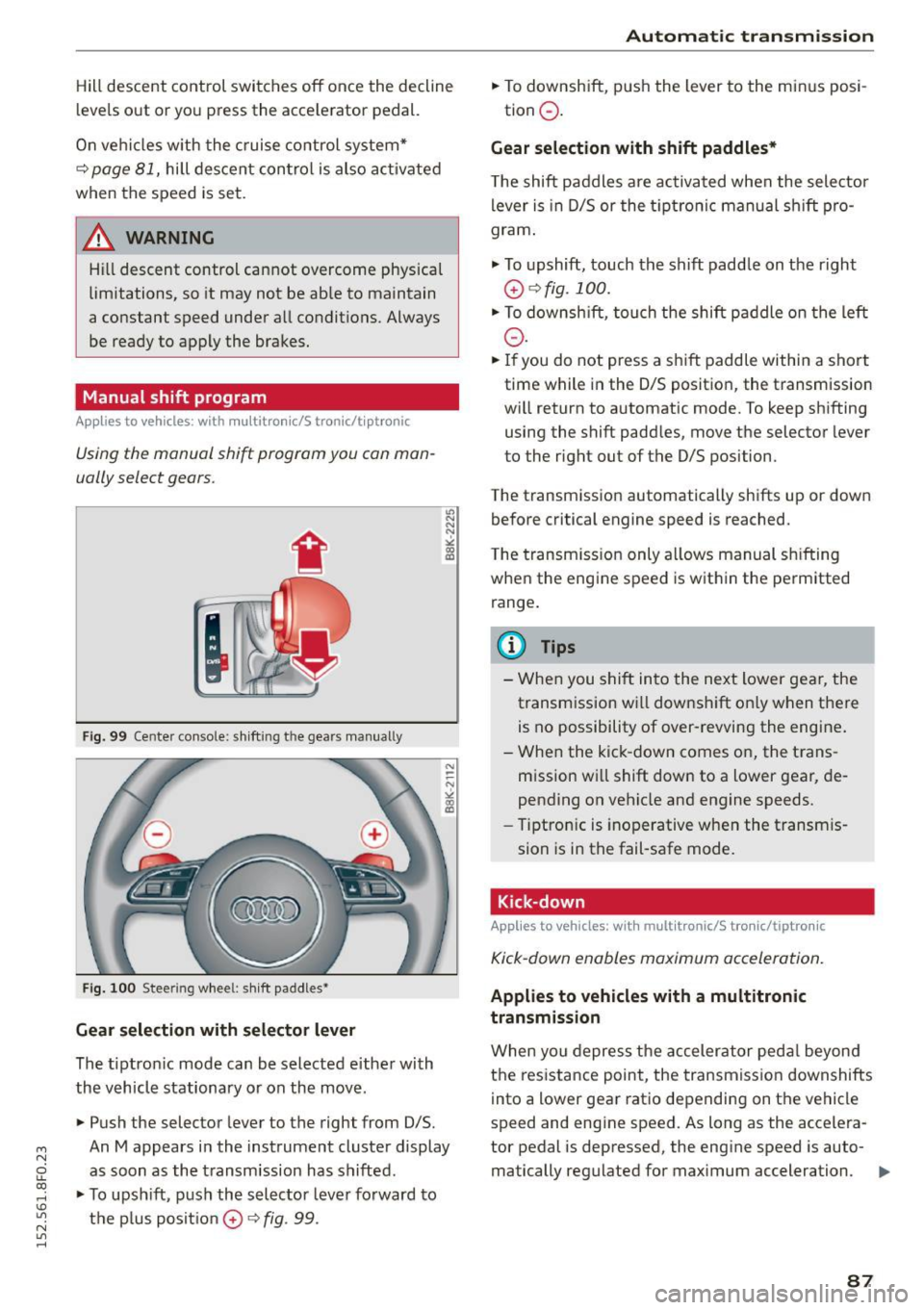
Fig. 99 Center console: shift ing t he gears manually
Fig. 100 Steer ing wheel : sh ift paddles•
Gear selection with selector lever
The tiptronic mode can be selected either with
the vehicle stationary or on the move.
• Push the selector lever to the right from 0/5.
"' N N N ,.:i
~
An M appears in the instrument cluster display
as soon as the transmission has shifted .
• To upshift, push the selector lever forward to
the plus posit ion
0 ¢ fig . 99.
Automatic transmission
• To downshift, push the lever to the minus posi-
tion
0 .
Gear selection with shift paddles*
The shift paddles are activated when the selector
lever is in D/5 or the tiptronic manual sh ift pro
gram .
.,. To upshift, touch the shift padd le on the right
0 ¢ fig. 100.
• To downshift , touch the shift paddle on the left
0-
• If you do not press a shift paddle within a short
time while in the 0/5 position, the transmission
will return to automatic mode. To keep shifting using the shift paddles, move the selector lever
to the rig ht out of the 0/5 position.
The transmission automatically shifts up or down before critical engine speed is reached.
The transmission only allows manual shifting
when the engine speed is within the permitted
range.
@ Tips
- When you shift into the next lower gear, the
transm ission wi ll downshift on ly when there
is no possibility of over-revving the engine.
- When the kick -down comes on, the trans
mission will shift down to a lower gear, de
pending on vehicle and engine speeds.
- Tiptronic is inoperative when the transm is
sion is in the fail-safe mode.
Kick-down
Applies to vehicles: wit h mult itronic/S tro nic/tiptro nic
Kick-down enables maximum acceleration.
Applies to vehicles with a multitronic
transmission
When you depress the accelerator pedal beyond
the resistance point , the transmission downshifts
into a lower gear ratio depending on the vehicle
speed and engine speed. As long as the accelera
tor pedal is depressed, the engine speed is auto-
matically regulated for maximum acceleration.
1111>-
87
Page 90 of 268

Automatic transmi ssion
Appli es to v ehicle s w ith a S tronic- / tiptronic
t ra nsm ission
When you depress the acce lerator pedal beyond
the resistance po int, the automatic transmiss ion
downshifts into a lower gear, dependi ng o n ve hi
cle speed and engi ne speed. The ups hift into the
next h igher gea r tak es place once the max imum
specified engine speed is r eached.
A WARNING
Please note that the drive whee ls can spin if
kick-down is used on a smooth slippery road -
there is a r is k of s kidding.
Launch Control Program
Applies to vehicles: with S tronic
The Launch Control Program provides the best
acceleration possible when starting from a stop.
Requirement: The engine must be at operating
temperature and the steering wheel must not be
turned.
"' Press the
!.!1 O FF I button ¢ page 171 while the
engine is runn ing . The
II indicator light illumi
nates in the instrument cluste r and
Stabil iza
tion contr ol (ESC ): Sport . Warning ! Restricte d
s tabilit y
appears in the d river informat ion sys
tem display.
"' Move the selecto r lever to the D/S position to
select sport mode (S) or select the
d ynamic
driving mode in drive select * ¢page 104.
"'Press the brake peda l strongly with your left
foot and hold it down for at least 1 second.
"' At the same time, press the accelerator pedal
down completely with your right foot until the
engine reaches and maintains a h igh RPM .
"' Remove your foot from t he brake pedal wit hin 5
seconds¢
& -
A WARNING
-Always adapt you r driving to the traffic flow.
- Only use the La unch Control P rog ram when
road and t ra ffi c condi tions a llow i t and oth
er dr ivers will not be endangered or annoyed
by your driving and the vehicle's accelera
t ion .
88
-Please note that the driving wheels can spin
and the vehicle can b reak away when sport
mode is switched on, espec ially when the
road is slippery.
- Once you have accelerated, you should
sw itch sport mode
off by pressing the
I;-; OFFI button.
(D Tips
- The transmission temperature may increase
signif icant ly after using the Launch Control
Program. If that happens, the program may
not be availab le for a few minutes . It will be
available again after a cool-down per iod .
- When accelerating using the Launch Control
program, a ll vehicle parts are subject to
heavy loads. This can result in increased
wea r.
Transmission malfunction
Applies to vehicles: wi th mul titronic/ 5 tronic/t iptronic
rm Transmi ssion : Pres s brak e pedal and sele ct
gear again.
Press the brake peda l and select the desired se
l ector lever position again. You ca n then cont inue
driv ing.
rm Transmission overh eating : Plea se dri ve con
servativel y.
The transm ission temperature has increased s ig
nificantly due to the sporty driving manner . Drive
i n a less spo rty manne r unt il the temperatu re re
turns to the norma l range and the ind icator light
switches of.
rm Tran smission ma lfun ction: You can continue
driv ing
There is a system malfunct ion in the transmis
s ion. You may conti nue driving. Drive to your au
thorized Audi dea ler or qua lified repa ir facility
soon to have the malfunction corrected.
rm Transmission malfunction: Lim ited d riving
functional ity
There is a system malfunct ion i n the t ransmis-
s ion. The transm ission is switching to emergency
mode. This mode on ly shifts into certain gears or .,.
Page 91 of 268
M N
ci LL co
rl I.O
"' N
"' rl
will no longer shift at a ll. The engine may stall.
Drive to your authorized Audi dealer or qualified
repair facility immediately to have the malfunc
tion corrected.
rm l;j Transmission malfunction: No reverse
You can continue driving
S tronic transmission: There is a system malfunc
tion in the transmission. The transmission is
switching to emergency mode. This mode only
shifts into certain gears or will no longer shift at
all. The engine may stall. You cannot engage the
reverse gear. Drive to your authorized Audi dea ler
or qualified repair facility immediately to have
the ma lfunction corrected .
rm Transmission malfunction: Stop vehicle and
shift to park.
Do not continue driving. Select the P se lector lev
er position and see your authorized Audi dealer
or qualified repair facility for assistance.
([) Note
If the transmission switches to emergency
mode, you shou ld take the vehicle to an au
thorized Audi dealersh ip as soon as possible
to have the condit ion corrected.
Selector lever emergency release
Applies to vehicles: with multitronic/5 tronic/tiptronic
If the vehicle's power supply foils, the selector
lever can be released in an emergency.
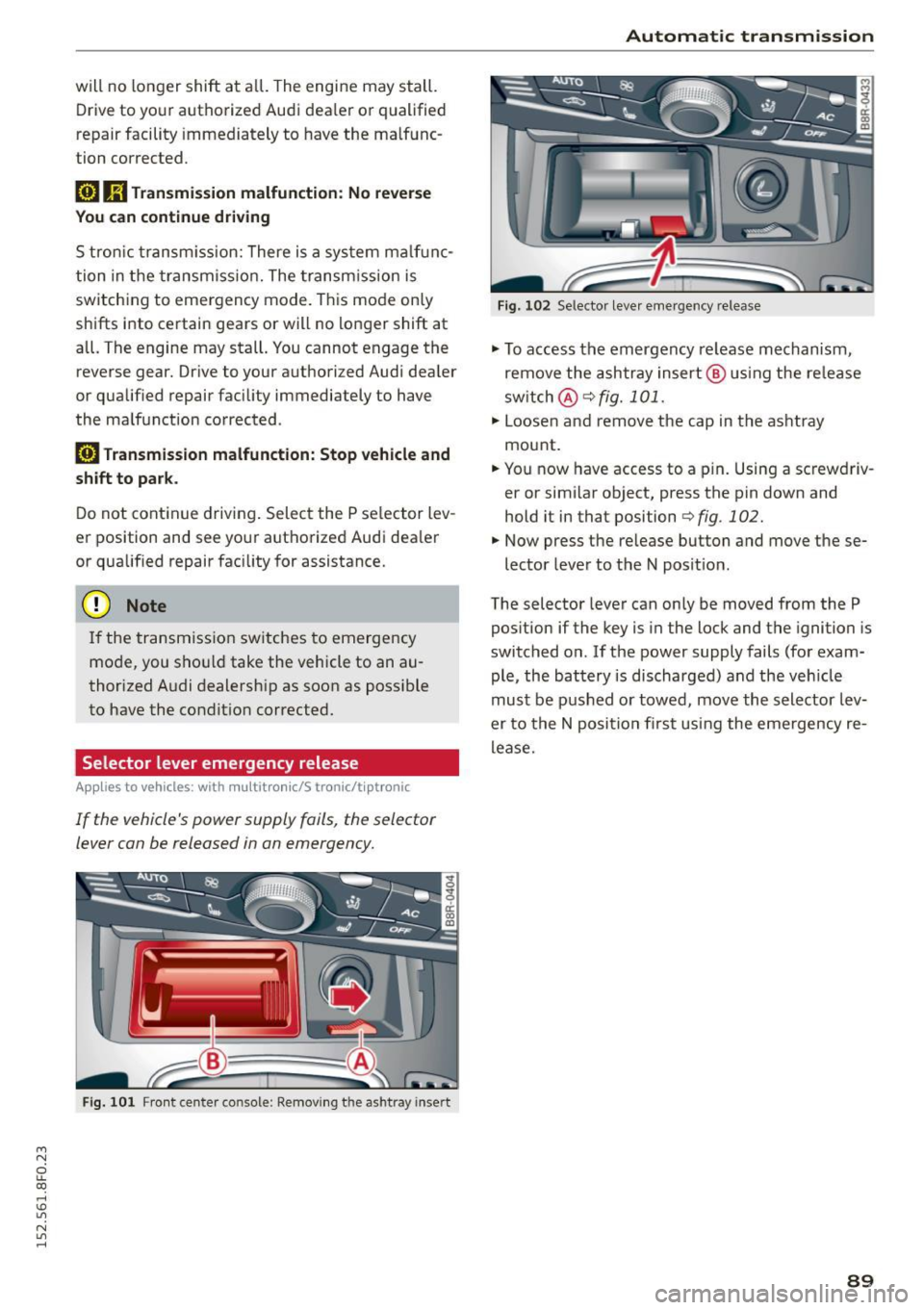
Fig . 101 Front center console: Removing the ashtray insert
Automatic transmission
Fig. 102 Selector lever emergency release
"'To access the emergency release mechanism,
remove the ashtray insert @ using the release
sw itch @ c:::>fig.
101.
"' Loosen and remove the cap in the ashtray
mount.
"' You now have access to a pin. Using a screwdriv
er or similar object, press the pin down and
hold it in that position
c:::>fig . 102.
"' Now press the re lease button and move these-
lector lever to the N position .
The selector lever can only be moved from the P
position if the key is in the lock and the ignition is
switched on . If the power supply fails (for exam
ple, the battery is discharged) and the vehicle
must be pushed or towed, move the selector lev
er to the N position first using the emergency re
lease.
89
Page 105 of 268
M N
ci u.. co ,...., \!) ..,.,
N ..,., ,....,
Audi drive select Driving settings
Introduction
App lies to vehicles: with Audi drive select
Drive select provides the possibi lity to experience
d ifferent types of vehicle settings in one vehicle.
F or instance, using the three
Comfort, Auto and
Dynamic modes, the driver can switch from a
sporty to a comfortable driving mode with the
press of a button.
Addit ionally, in vehicles with
MM I*, the vehicle
setup for
Individual* mode can be customized by
you. This makes it possib le to combine settings
such as a sporty engine tuning with comfortab le
steering .
A WARNING
-
Improper use of the Audi drive select can
cause collisions, other acc idents and serious
personal injury.
Description
App lies to vehicles: with Audi drive select
The vehicle setup in each mode depends on the
veh icle's featu res . However, the engine, automat
ic transmission and steering are always involved.
Engine and automatic transmission
Depending on the mode, the engine and the au
tomatic transmission respond quicker or in a
more balanced manner to accelerator pedal
movements. In the sporty dynamic mode, the au
tomatic transmission shifts at higher RPMs .
Steering
The steering adapts in terms of steering effort
and steering ratios. Ind irect steer ing that moves
eas ily, like the steering in comfort mode, is best
suited to long drives on a highway. In contrast,
dynamic mode provides sporty, direct stee ring.
The follow ing applies to vehicles with dynam ic
steer ing*: the steering ratio changes based on ve
hicle speed in order to maintain optimum steer
ing effort for the dr iver at all times. This sets the
steer ing to be less sensitive at higher speeds in
Audi drive select
order to provide improved vehicle control. At re
duced speeds, however, steering is more direct in
order to keep the steering effort as m inima l as
possib le when the driver is maneuvering the vehi
cle. At low and average speeds, dynamic steering
additionally provides more responsive steering performance.
Adaptive dampers*
The adaptive dampers* use sensors to record in
formation regarding steering movements, braking and acceleration operations by the driver,
road surface, driving speed, and load. This makes
i t possible to adapt damping to the driving situa
t ion virtually in real t ime . Drive select also makes
it possible to sat isfy the desire for sporty suspen
s ion (Dynamic) and comfortab le suspension
(Comfort) without giving up ba lanced tuning (Au
to) .
Sport differential*
As a component of the all whee l dr ive system
(quattro)
~ page 174, the sport differential* dis
tributes the driving power to the rear axle de
pending on the situation. The dist ribution of
power varies depending on the mode selected.
The goal is a high level of agility and ability to ac
ce lerate on curves. The vehicle is very responsive
to steering.
Audi adaptive cruise control*
T he behavior when accelerating can be adjusted
from comfortable to sporty, depending on the
drive select mode. Adaptive cruise control also
responds to the driving behavior of the vehicle
ahead in a more conservative or sporty manner.
Engine sound*
The sound of the engine is adapted to the select
ed mode and ranges from subtle to sporty.
(D Tips
- In some models, the maximum vehicle
speed can only be reached in the
Auto and
Dynamic modes.
- For vehicles with an automatic transmis-
sion, selecting the
Dynamic mode results in ..,.
103
Page 106 of 268

Audi drive select
sporty shifting characteristics . The S gear
position engages automatically.
- In vehicles that have dynamic steering*, op
erating noise is heard when starting or stop
ping the engine. This does not indicate a
problem.
Selecting the driving mode
Applies to veh icles: with Audi drive select
You con choose between Comfo rt, Auto , Dynam·
ic
and Individual * modes.
N N 0
0
'I::======:..,. gJ
drive I sel,.c,ct _ J -~-
F ig. 119 Cente r conso le: Control fo r Aud i drive se lect
Fig . 120 MMI*: A udi drive select
Adjusting the Individual mode
Applies to vehicles: w ith MMI and Audi drive select
.,. To set the mode, press the~:/:'.~ button
r::!) fig. 119 multiple times until the desired
mode is displayed in the instrument cluster . Or
.,. In the MMI*, select: ICARlfunction button>
Comfort, Auto, Dynamic or Individual*.
In vehicles without the MMI*, the r:::~ button is
found underneath the shift/selector lever.
You can change the driving mode when the vehi
cle is stationary or while driving . If traffic per
mits, after changing modes, briefly take your
foot off the accelerator pedal so that the recently
selected mode is also activated for the engine
and transmission .
Comfort -provides a comfort-oriented vehicle
setup and is suited for long drives on highways.
Auto -provides an overall comfortable yet dy
namic driving feel and is suited for every day use.
Dynamic -gives the driver a sporty driving feel
and is suited to a sporty driving style .
Individual* -c>page 104 .
&_ WARNING
Pay attention to traffic when operating drive
select to prevent potential risk o f an acciden t.
You can personally specify the vehicle setup in the MMI* .
.,. Select the ICAR I function button > Set individu·
al
control button. Once you select the menu,
you w ill automatically drive in the
individual
mode.
Systems Comfort
Eng i ne/Tra nsm ission ba
lanced
Steering comfortable
Dynamic steering* comfortable/indirect
104
The equipment in your vehicle will determine
which settings you can adjust. The following ta
ble prov ides an overview of the characteristics of
each driving mode.
Auto Dynamic
balanced sporty
balanced sporty
balanced/direct sporty/direct
Page 175 of 268
Operating noise
Noises may occur when braking depending on the
speed, braking force and outside conditions such
as temperature and humidity.
Effect of water and road salt
In certain situat ions, for example after driving
through water, in heavy ra in, after overn ight con
densat ion or after washing your car, the braking
effect can be reduced by moisture or ice on the
brake rotors and brake pads. The brakes must be
dried first with a few carefu l brake applications.
At higher speeds and with the w indshie ld w ipers
turned on, the brake pads press against the brake
rotors for a short amount of time. This occurs at
regular intervals without the driver noticing and
provides for better brake response time under
wet conditions.
The effectiveness of the brakes can be reduced
when the vehicle is driven on a salt-covered road
and the brakes are not used. Likewise, you clean
off accumulated salt coating from brake discs
and pads with a few cautious applications of the
brake ¢.& .
Corrosion
There may be a tendency for dirt to build up on
the brake pads and corros ion to form on the discs
if the car is not driven regularly or only for short
tr ips with little use of the brakes.
If the brakes are not used frequently, or if corro
sion has formed on the discs, it is advisab le to
clean off the pads and discs by braking firmly a
few t imes from a moderately high speed¢.&.
Faults in the brake system
If you should notice a sudden increase in brake
pedal trave l, then one of the two brake circuits
may have failed
c:> .& .
Low brake fluid level
Malfunctions can occur in the brake system if the
brake fluid level is too low. The brake fluid leve l is
~ monitored e lectronically.
ci u.. co ,...., \!) ..,.,
N ..,., ,....,
Smart Technology
Brake booster
T he brake booster increases the pressure that you
generate w ith the brake pedal.
It works on ly
when the engine is running
.c:> .&
Brake lining wear status
Brake lining wear may be checked by visual in
spect ion of the condition of the brake pads
through the openings in the wheel. If necessary,
the wheel may be removed for this inspection
c:> page 230, Replacing wheels.
_8 WARNING "'---
-New brake pads don't have the best stop
pin g power and must be "broken-in" during
the initial 250 miles (400 kilometers). You
can compensate for this by press ing the
brake pedal more firmly. This also applies
later when new pads are installed.
-
- You shou ld perform braking maneuvers for
the purpose of cleaning the brake system
only if road conditions permit. Other road
users must not be put at r isk -you may
cause an acciden t!
- Before descending a steep grade, reduce
speed and shift transmission into a lower
gear or lower driving range. Do not ride the
brakes or hold the pedal down too long or
too often . This could cause the brakes to get
hot and diminish braking efficiency.
- Do not "ride the brakes" by resting your foot
on the pedal when you do not intend to
brake. This may cause the brakes to over
heat, premature wear and increased stop
p in g distance.
- Under certain cl imatic and operat ing condi
tions such as passing through water, dr iv ing
in heavy rain or after washing the vehicle,
the effectiveness of the brakes can be re
duced. In winter, ice can accumulate on the
b rak e pads, linings, discs and drums. Care
fully apply brakes for a test. Brakes will dry
and ice coatings will be cleaned off after a
few careful brake applications.
- Driving for an extended period of time on
salt -covered roads wi thout using your
brakes can a lso affect braking efficiency .
173
Page 179 of 268
M N
ci u.. co ,...., \!) 1.1"1
N 1.1"1 ,....,
Driving and the
environment
Breaking in
New engine
The engine needs to be run-in during the first
1,000 miles (1,500 km).
For the first 600 miles (1,000 kilometers ):
"' Do not use full throttle .
"' Do not drive at engine speeds that are more
than
2/3 of the max imum permitted RPM .
From 600 to 1,000 miles (1,000 to 1,500
kilometers):
"' Speeds can gradually be increased to the maxi
mum perm issible road or engine speed.
During and after break-in period
"'Do not rev the engine up to high speeds when it
is cold. This applies whether the transmission is
in N (Neutral) or in gear .
After the break-in period
"'Do not exceed maximum engine speed under
any circumstances.
"'U pshift into the next higher gear
before reach
ing the red area at the end of the tachometer
scale
c=> page 10.
During the first few hours of driving, the engine's
internal friction is higher than later when all the
moving parts have been broken in. How well this
break-in process is done depends to a considera
ble extent on the way the vehicle is driven during
the first 1,000 miles (1,500 kilometers).
(D Note
Extremely high engine speeds are automati
cally reduced. However, these rpm limits are
p rog rammed for an engine wel l run- in, not a
new engine.
@) For the sake of the environment
Do not dr ive with unnecessarily high eng ine
speeds -upshifting early saves fuel, reduces
noise and protects the environment.
Driving and the environment
New tires
If your vehicle is running on new tires, drive very
carefully for the fi rst 350 m iles (500 kilometers)
after fitting .
New tires tend to be slippery and must also
be "broken-in". Be sure to remember this dur
ing the first
350 miles (500 kilometers).
Brake gently. Avoid following closely behind
other vehicles or other situations that might
require sudden, hard brak ing .
Avoid damaging the
vehicle
When you are d riving on poor roads, or over
curbs, steep ramps, etc., ma ke certain that low
lying parts such as spoilers and exhaust system
parts do not bottom out and get damaged.
T his is espec ially true for veh icles with low-s lung
chassis (sports chassis)* and fully loaded
vehicles.
Driving through water on
roads
Note the following to avoid vehicle damage when
driving through water, for example on f looded
roads:
- The water must not be any higher than the bot
tom of the vehicle body.
- Do not drive faster than walking speed.
A WARNING
= -
After driving through water, mud, slush, etc.,
the brakes may be s low to take effect because
of wet brake rotors and pads. Dry the brakes
first by braking carefully to restore the full braking effect.
(D Note
Vehicle components such as the engine,
transmission, suspension or electrical system
can be severely damaged by driving through
water . ""
177
Page 185 of 268
M N
ci u.. co ,...., \!) ..,.,
N ..,., ,....,
Trailer mode notes
Important to know
Your vehicle hand les differently when tow ing a
trailer because of the additional weight and dif
ferent weight distribution. Safety, performance
and economy will greatly depend on how careful
ly you load your trailer and operate your rig.
Before you actually tow your trailer, practice
turning, stopping and backing up in an area away
from traffic. Keep practicing until you have be
come completely familiar with the way your vehi
cle-trailer combination behaves and responds.
Backing up is difficult and requires practice. Back
ing up with a trailer generally requires steering
action opposite to that when backing up your ve
hicle without a trailer .
Maintain a greater distance between your vehicle
and the one in front of you. You wi ll need more
room to stop. To compensate for the trailer, you
will need a larger than normal turning radius.
When passing, remember that you cannot acce l
erate as fast as you normally would because of
the added load. Make sure you have enough room
to pass. After passing, allow plenty of room for
your trailer before changing lanes again.
Avoid jerky starts, sharp turns or rapid lane
changes.
(D Tips
- Do not tow a trailer during the break-in peri
od of your vehicle.
- If you tow a trailer, your A udi may require
more frequent maintenance due to the ex
tra load
¢ page 248 .
Parking on a slope
Do not park on a slope with a trailer. If it cannot
be avoided, do so only after doing the following:
When parking:
.. Apply the foot brake.
.. Have someone place chocks under both the ve
hicle and the trailer wheels.
Trailer mode
.. With chocks in place, slowly release the brakes
until the wheel chocks absorb the load.
.. Turn the whee ls towards the curb .
.. App ly the parking brake.
.. Move the selector lever to P.
When restarting after parking:
.. App ly the foot brake.
.. Start the engine.
.. Move the selector lever to D/S .
.. Release the parking brake and slowly pull out
and away from the wheel chocks.
.. Stop and have someone retrieve the wheel
chocks .
(D Tips
If you move the selector lever of the automat
ic transmission to P before applying the park
in g brake and before blocking the wheels, you
may have to use more force later to move the
l ever out of the P position.
183