heating AUDI A5 CABRIOLET 2015 Owners Manual
[x] Cancel search | Manufacturer: AUDI, Model Year: 2015, Model line: A5 CABRIOLET, Model: AUDI A5 CABRIOLET 2015Pages: 268, PDF Size: 66.88 MB
Page 24 of 268
Instruments and indicator lights
you can continue to turn the lights on and off us
ing the light switch . You can still control a ll func
tions that are independent of the rain sensor
through the windshield wiper lever .
Contact your authorized A udi dealer as soon as
possible to have the problem corrected.
; Adaptive dampers
Applies to veh icles: w ith Audi drive select and adapt ive damp ·
ers
B Suspen sion : S ystem fault!
If the B symbol in the display comes on, there is
a ma lf u nction in the adaptive dampers. P lease go
t o an author ized Audi dealer or qua lified work
shop to have the malfunction repaired .
!-: Sport differential
Applies to vehicles: w ith Audi drive select and sport differen
tial
Sport differential: Sy ste m fault!
There is a malfunct ion wit h the sport differential.
Drive to yo ur authori zed Aud i dea ler immediately
to have the malfunction corrected .
Sport differential: Overheating
The transmission tempe ratu re has increased sig
n ifican tly due to the sporty dr iv ing manner. D rive
in a less sporty manner unti l the temperature re
turns to the normal range and the indicato r light
switches of.
A WARNING
Contact yo ur authorized Aud i dealer or quali
fied workshop if the sport differential is faulty
or ma lfunctioning. The repa ir must be per
formed by trained personnel using the co rrect
oil in orde r to ensure safety .
~ Ignition lock
II Ignition lock defective
There is a malfunct ion in the electron ic ignition
lock . Please go to an authorized Audi dealer or
other qualified workshop to have the malfunction repair ed .
22 ¢
Q Turn s
ignal s
Wheneve r you use the left B o r the right Ill
turn s ignal, t he indica to r li ght blinks. When you
u se the emergency flashers, bot h indicator lights
flash.
If one of the tu rn signa l ligh t bulbs bu rn out, the
turn s ign al will b link t wice as fast as normal.
Carefully drive to your author ized Audi dealer im
mediate ly to have the malfunction corrected .
Page 70 of 268

Warm and cold
Warm and cold Climate control system
Description
The climate control system warms, cools and
adds humidity to the air in the vehicle interior. It
is the most effective when the windows and pow
er top are closed.
If there is a build-up of heat in
side the vehicle , ventilation can help to speed up
the cooling process.
In all heating mode functions except
defrost, the
blower only switches to a higher speed once the
engine coolant has reached a certain tempera
ture.
Condensation from the cooling system can drip
and form a puddle of water under the vehicle.
This is normal and does not mean there is a leak.
Pollutant filter
The pollutant filter removes pollutants such as
dust and pollen from the air.
The air pollutants filter must be changed at the
intervals specified in your Warranty & Mainte
nance booklet, so that the air conditioner can
properly work.
If you drive your vehicle in an area with high air pollution , the filter may need to be changed
more frequently than specified in your Audi War
ranty
& Maintenance booklet. If in doubt, ask
your authorized Audi Service Advisor for advice.
Key coded settings
The climate control settings are automatically
stored and assigned to the remote control key
that is in use . These settings are different when
the power top is open or closed.
_& WARNING
Reduced visibility is dangerous and can cause
accidents.
68
- For safe driving it is very important that all
windows be free of ice, snow and condensa
tion.
- Completely familiarize yourself with the
proper use and function of the heating and
ventilation system and especially how to de
fog and defrost the windows .
- Never use the windshield wiper/washer sys
tem in freezing weather until you have
warmed the windshield first, using the heat
ing and ventilation system . The washer solu
tion may freeze on the windshield and re
duce visibility .
(U;) Note
- If you suspect that the air conditioner has
been damaged, switch the system off to
avoid further damage and have it inspected
by a qualified dealership.
- Repairs to the Audi air conditioner require
special technical knowledge and special
tools. Contact an authorized Audi dealer for
assistance.
@ For the sake of the environment
By reducing the amount of fuel you use, you
also reduce the amount of pollutants emitted
into the air.
(D Tips
- Keep the air intake slots (in front of the
windshield) free from ice, snow and debris in order to maintain the proper function of
the climate control system.
- The energy management system may switch
the seat heating* or rear window defroster
off temporarily. These systems are available
again as soon as the energy balance has
been restored.
- Air escapes through vents under the rear
window. When placing items of clothing on
the luggage compartment cover, ensure
that the openings are not covered.
Page 72 of 268
Warm and cold
l= I Swit ching recir culation m ode on /off
In recirculation mode, the air ins ide the vehicle is
circu lated and filtered . This prevents the unfil
tered air outside the vehicle from entering the
ve hicle interior . We recommend switching recir
culation mode on when driving through a tunne l
or when sitting in traffic
c:> ,&. .
The IAU TOI button or lllll> F RONT I button switches
recirculation mode off .
IAUTOI Switching automatic mode on
Automatic mode ma inta ins a constant tempera
ture inside the vehicle. A ir temperature, airflow
and ai r distribution are controlled automatica lly .
Adjusting th e tempe ratur e
Temperatures between 60 °F (+16 °C) and 84 °F
( + 28 °C) can be set. Outside of this range,
LO or
HI will appear in the cl imate control system dis
p lay. At both of these settings, the climate con
trol system r uns continuously at maximum cool
i n g or heating power. There is no temperat ure
regulation.
~ Ad justing the airflow
You can adjust the a irf low manually to su it yo ur
needs . To have the airf low regulated automatica l
ly, press the
IAUTO I button .
~ Adjusting the air distribution
You can manually se lect the vents where the air
will flow. To have the air distr ibution reg ulated
automatically , press the
!AUTO ! button.
QJ Adjusting seat h eating *
Pressing the button sw itches the seat heating on
at the h ighest setting (level 3) . The LEDs indicate
the tempe ratu re leve l. To reduce the tempe ra
ture, press the button again . To switch the seat
heating off, press the button repeatedly unt il the
L ED turns off .
Afte r 10 minutes, the seat heat ing automat ica lly
sw itches from level 3 to leve l 2.
~ Adjust ing seat ventilation*
Pressing the button switches the seat ventilation
on at the highest setting (level 3) . The LEDs indi-
70
cate the ventilation level. To reduce the ventila
tion level, press the button again. To switch the
seat ventilation off , press the button repeatedly
u nt il the LED turns off .
I@ FRONT I Switch the defro ste r on /off
The w indshield and side windows are defrosted
or cleared of condensation as q uickly as possib le.
The maximum amount of air f lows mainly from
the vents below the windshield. Recirculation
mode switches off. The temperature should be
set to 72 °F (22 °C) or h igher. The temperature is
controlled automat ically.
The
! AUTO ! button switches the defroster off.
lliil REAR I Switch ing rear window he ater on /
off
The rear window heater on ly operates when the
engine is runn ing . It switches off automatically
after a few minutes, depending on the outside
temperature.
To prevent the rear window heater from switch ing off automatically, press and hold the
I Cliil REARI
button for more than 2 seconds. This remains
stored until the ignit ion is switched off.
Air vents
You can open and close the center and rear air
vents using the th umbwhee ls . The levers adjust
the d irection of the airflow from the vents.
In vehicles with a 3-zone deluxe automa tic cli
mate control system*, you can adjust the air tem
perature in the rear by turning the thumbwhee l
toward the red side to make it warmer or toward
the blue side to make it cooler.
A WARNING
- Do not use the recircu lation for extended
periods of time. The windows could fog up
since no fresh air can enter the vehicle. If
the wi ndows fog up, press the air rec ircula
tion button again immed iate ly to sw itch off
the air recirc ulation func tion or selec t de
frost.
- I ndivid ua ls w ith red uced sensitivity to pain
or tempera ture could develop burns when
using the seat heating f unction . To reduce
-
Page 73 of 268
M N
ci LL co
rl I.O
"' N
"' rl
the risk of injury, these individua ls should
not use seat heating.
(D Note
To avo id damage to the heating elements in
the seats, do not kneel on the seats or place heavy loads on a small area of the seat .
Setup
The basic climate control settings can be adjust
ed in the radio or MMI*.
.. Se lect: I CAR I fu nct ion button > A /C control but
ton . Or
.. Se lect:
ICARI function button> Car system s*
control button > AC.
Automatic recircul ation *
When switched o n, automatic recirculation con
trols the recircu lation mode au toma tically . If the
windows fog up, press the
I '"" F RONT I button.
Synchronization *
When synchronization is sw itched on, the same
settings are applied to both the driver and front
p a ssenger, except fo r the seat hea ting/vent ila
tion* . Synchronization switches off when you ad
just the settings on the front passenger 's side .
You can a lso switch synchroniza tion on by press
i ng a nd ho ld ing the knob on the driver's side.
Supplementary he ater
The supplementary heater warms the inter ior of
veh icles w ith flexible fuel engines more quickly.
The supplementa ry heater is cont rolled automat
ically in the
Auto se tting.
Warm and cold
Upper cabin heating
Applies to vehicles: with upper cabin heating
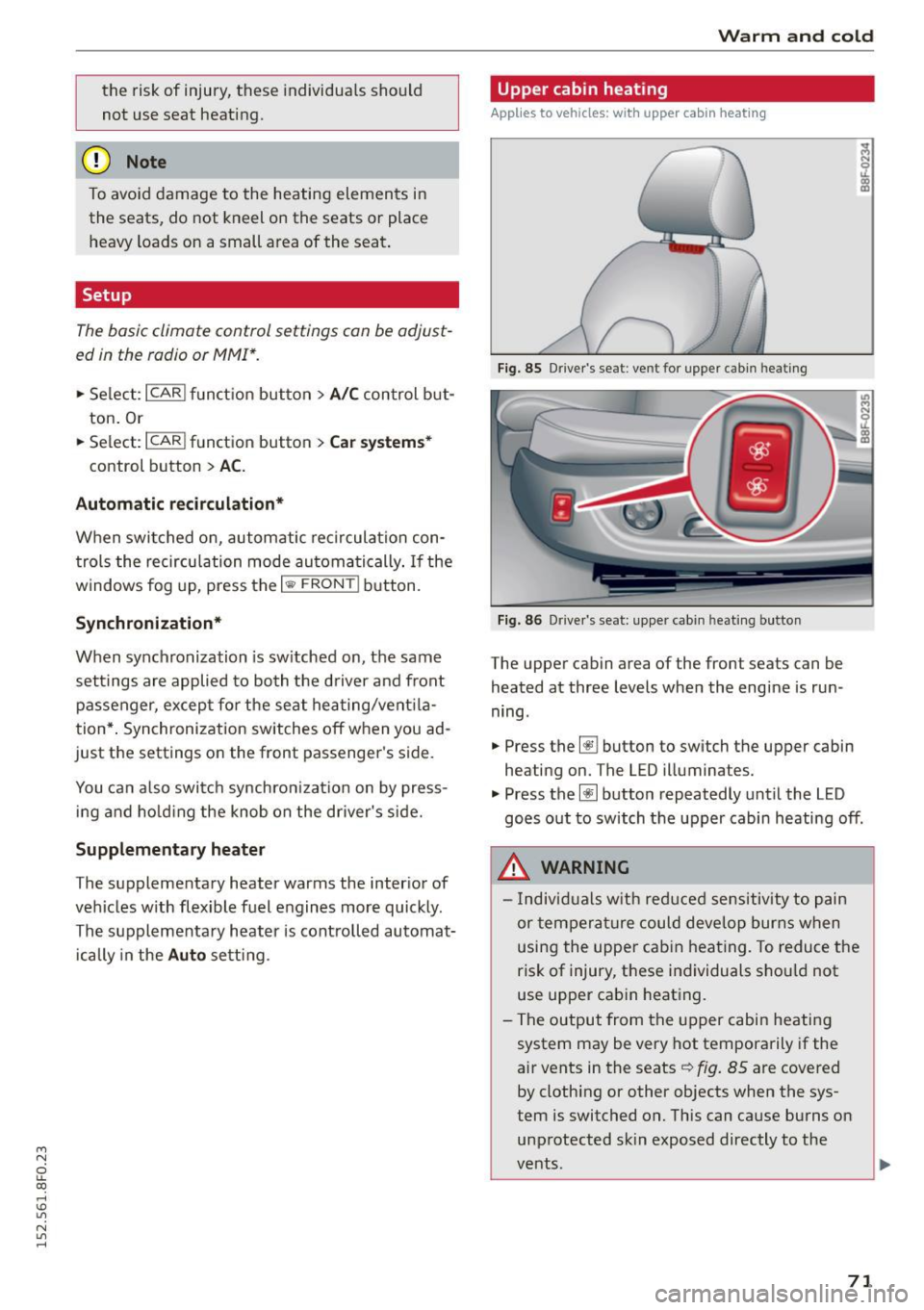
F ig. 85 Driver's seat: ven t fo r upper cabin heating
Fig . 86 Driver's sea t: uppe r cab in hea tin g button
The upper cabin area of the front seats can be
heated at three levels when the engine is run
ning.
.. Press the~ button to switch the upper cabin
heating on. The LED illuminates.
.,. Press the~ button repeatedly until the LED
goes out to switch the upper cabin heating off .
A WARNING
-Individuals w ith reduced sensitivity to pain
or tempera ture could deve lop burns when
using the upper cabin heat ing. To reduce the
risk of injury, these ind ividuals shou ld not
use upper cabin heat ing.
- The output from the upper cabin heati ng
system may be very hot temporarily if the
air vents in the seats<=>
fig. 85 are covered
by clothing or other objects when the sys
tem is switched on. This can cause burns on
unprotected sk in exposed directly to the
vents.
71
Page 74 of 268

Warm and cold
(D Tips
-Upper cabin heating always switches on at
the highest level. You can reduce the heat
output with the~ button and increase it
with the~ button as needed.
- Energy management
¢ page 175 may re
duce the heat output if the battery vo ltage
i s too low.
72
Page 83 of 268
M N
ci LL co
rl I.O
"' N
"' rl
Cruise control system
Switching on
The cruise control system makes it possible to
drive at a constant speed starting at 20 mph (30
km/h) .
0
f
®t
0
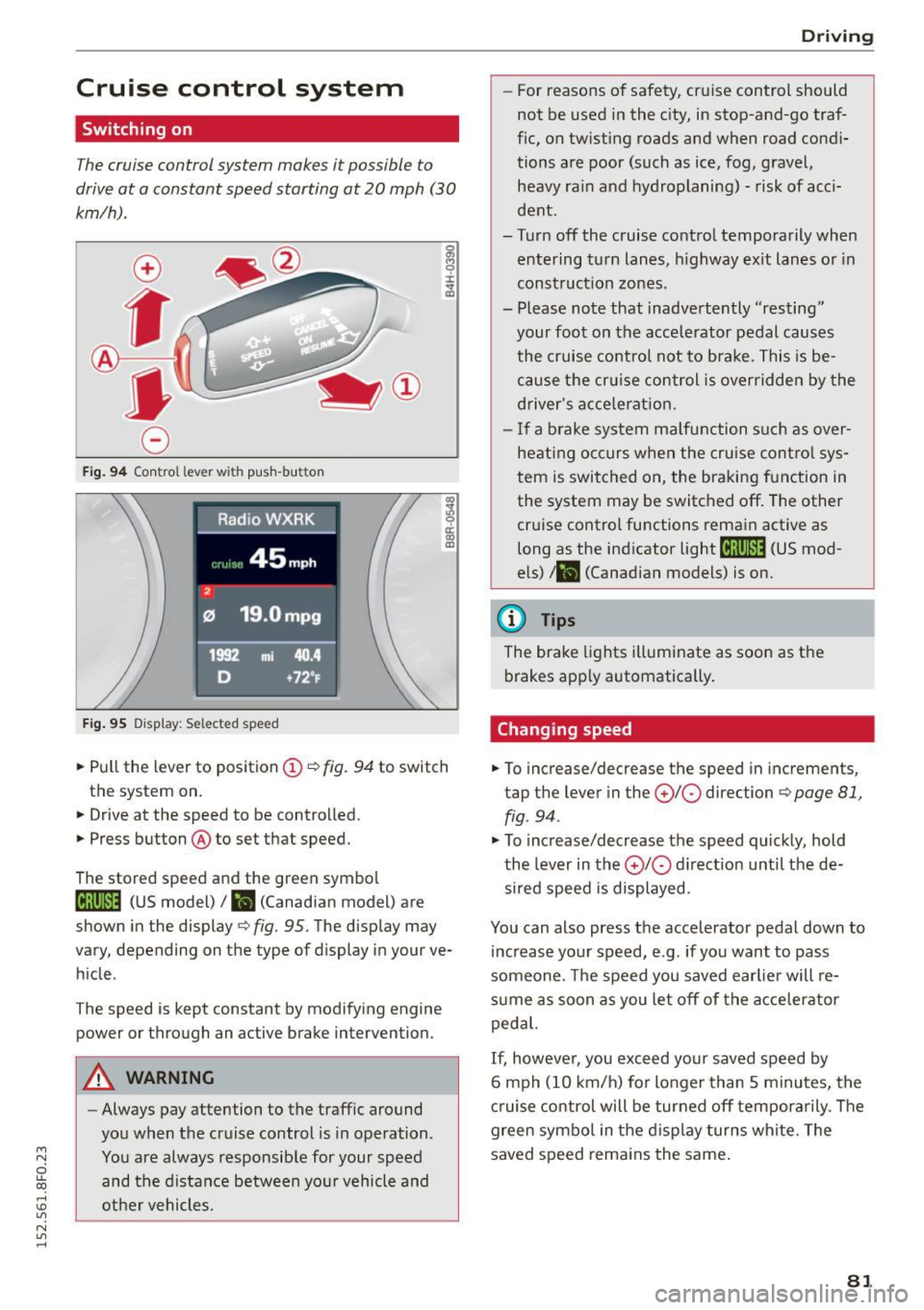
Fig. 94 Control lever with push-bu tton
Fig. 95 Display : Selected speed
al M 0 ±
ti
~ 0 er: a,
"'
• Pull the lever to position (D ¢ fig. 94 to switch
the system on.
• Drive at the speed to be controlled.
• Press button @to set that speed.
The stored speed and the green symbol
[lj;(i )~i4 (US model)/ l'I (Canadian model) are
shown in the display ¢
fig. 95. The display may
vary, depending on the type of display in your ve
hicle .
The speed is kept constant by modifying engine
power or through an active brake intervention.
A WARNING
-Always pay attention to the traffic around
you when the cruise control is in operation.
You are always responsible for your speed and the distance between your vehicle and
other vehicles.
Driving
- For reasons of safety , cruise control should
not be used in the city, in stop-and-go traf
fic, on twisting roads and when road condi
tions are poor (such as ice, fog, gravel, heavy ra in and hydroplaning) - risk of acci
dent .
- Turn off the cruise control temporarily when entering turn lanes , highway exit lanes or in
construction zones.
- Please note that inadvertently "resting" your foot on the accelerator pedal causes
the cruise control not to brake. This is be
cause the cr uise control is overridden by the
driver's accele rat ion.
- If a brake system malfunction such as over
heating occurs when the cruise control sys
tem is switched on, the braking function in
the system may be switched off . The other
cruise control functions remain active as
long as the ind icator
light til;rnM4 (US mod
els)
t l'I (Canadian models) is on.
(D Tips
The brake lights illuminate as soon as the
brakes apply automatically.
Changing speed
• To increase/decrease the speed in incremen ts,
tap the lever in the
(£)10 direction ¢ page 81,
fig . 94 .
"'To increase/decrease the speed quickly, hold
the lever in the
010 direct ion until the de
sired speed is displayed.
You can also press the accelerator pedal down to increase your speed, e.g . if you want to pass
someone . The speed you saved earlier will re
sume as soon as you let off of the accelerator
pedal.
If, however, you exceed your saved speed by
6 mph (10 km/h) for longer than 5 minutes, the
cruise control will be turned off temporarily . T he
green symbo l in the display turns white. The
saved speed remains the same .
81
Page 173 of 268
M N
ci LL co
rl I.O
"' N
"' rl
In extreme cases, EDL a utomatica lly switches off
to help keep the brake on the braked whee l from
overheating. EDL w ill switch on again automati
cally when conditions have returned to normal.
Steering re commendat ion
The ESC helps to stabilize the ve hicle by chang ing
the steering torque.
I n vehicles with dynamic steeri ng*, ESC also
h e lps to stabilize the steering in critical s itua
tions .
Electronic interaxle differential lock* /
sel ectiv e wheel torque control*
The electron ic in teraxle d iffe ren tial lock (front
wheel drive) or the selective wheel torq ue contro l
(all wheel drive) operates when driving through
curves. The front whee l on the ins ide of the cu rve
or both whee ls on the inside of the curve are
braked selectively as needed. Thi s allows more
precise driving in curves. The applicable system
may not activate when driving in wet or snowy
conditions .
_&, WARNING
- The ESC and its integrated systems cannot
overcome the laws of physics. This is espe
ci al ly impo rtant on slippe ry or wet roads. If
the sys tems begin acting to stabilize your
Switching on/off
Smart Technology
veh icle, you shou ld immediately change
your speed to matc h the road and traffic
conditions. Do not let the increased safety
provided by these systems tempt you to
take risks . Do ing so will increase the risk of a
loss of vehicle control, collision and serious
personal injuries.
- Always adapt your speed to road, traffic and
weather conditions. The risk of losing con
trol of the vehicle inc reases when dr iving
too fast, espec ially through curves and on
slippery or wet roads, and when dr iving too
close to vehicles up ahead . The ESC and its
integrated systems cannot a lways prevent
coll isions -there is sti ll a risk of accidents!
- Always accelerate with special care on even,
smooth su rfaces such as those that are wet
or covered with ice and snow. The drive
wheels can spin even with these assistance
systems that can not always help to reduce
the risk of loss of vehicle cont rol.
{!) Tips
-ABS and ASR only work correct ly when a ll
four wheels are equipped w ith ident ica l
tires. Different tire sizes can lead to a reduc
tion in engine power.
- You may hear noises when the systems de
scribed are working.
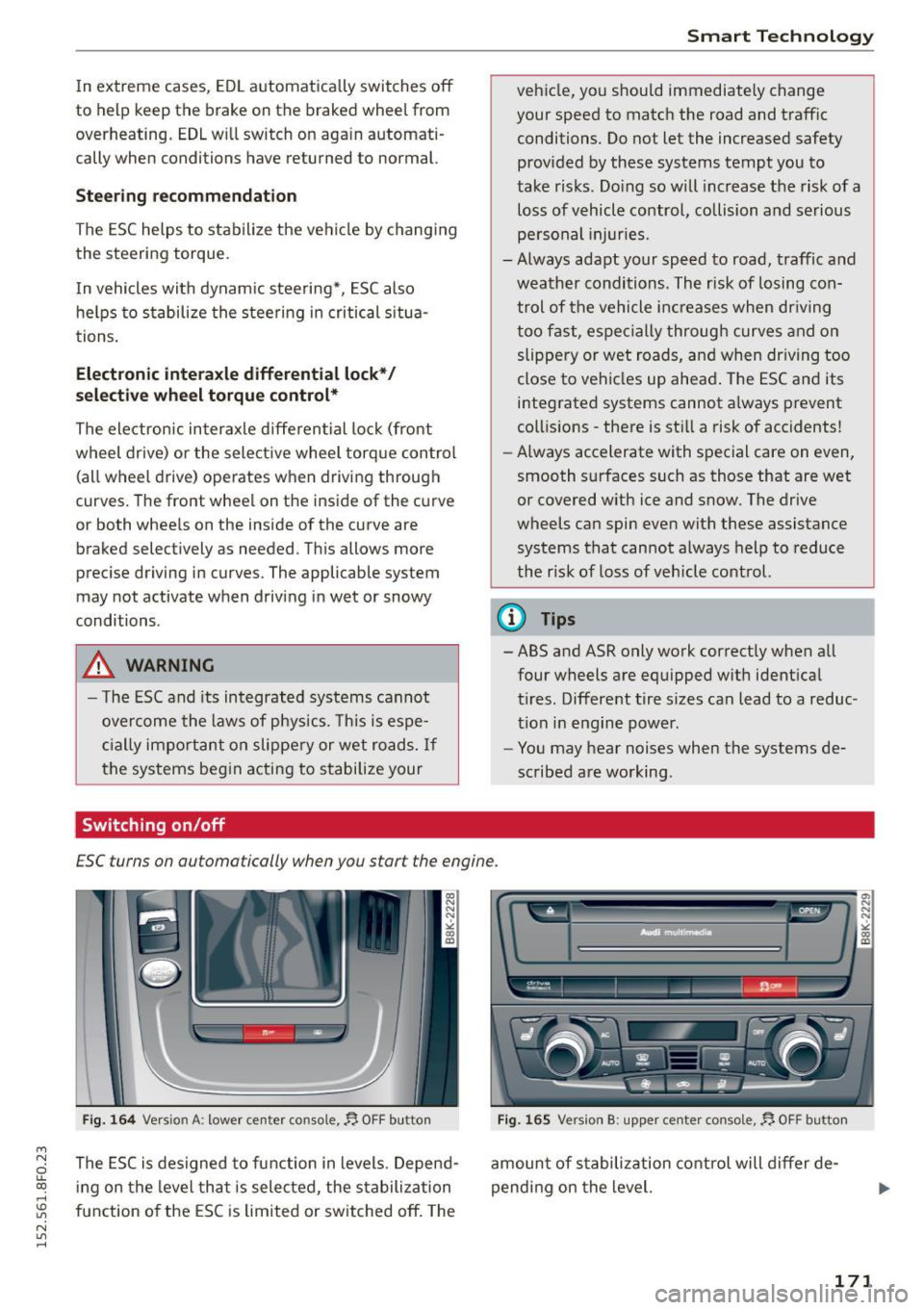
ESC turns on automatically when you start the engine.
Fig. 16 4 Version A: lowe r ce nter console,~ OFF button
The ESC is designed to function in levels. Depend
i ng on the level that is selected, the stabilization
function o f the ESC is limited or switched off . The
F ig. 165 Versio n B: uppe r ce nter console,~ OFF button
amount of s tabilization control will differ de
pend ing on the level.
a, N N N ,.: CX) m
171
Page 178 of 268

Smart Technology
according to the needs of the individual compo
nents. It regulates consumption, so that more
electrical energy is not being used than is being
generated and ensures an opt imal state of
charge for the battery.
(D Tips
- But even energy management cannot neg
ate the limits of physics. Consider that the
power and life of a battery are limited.
- If starting ability is threatened, the indica tor light (•) appears ¢
page 16.
What you should know
The highest priority is given to maintaining start
ing capability.
The battery is severely taxed in short-distance
driving, in city traffic and during the cold time of
year. Abundant electrica l energy is requ ired, but
only a little is generated. It is also critical if the
engine is not running and electrical components
are turned on. In th is instance energy is being
consumed but none is being generated.
It is in precisely these situations that you will no
tice energy management actively regulating the
d istr ibut ion of energy.
Vehicle stands for an extended period
If you do not drive your vehicle over a period of
several days or weeks, e lectrical components are
gradually cut back or switched
off. This reduces
energy consumption and maintains starting ca pability over a longer period . Some of the con
ven ience funct ions may not operate, such as the
interior lights or the powe r seat adjustment. The
conven ience functions w ill be available again
when yo u sw itch on the ignition and start the en
gine.
With the engine turned off
I f you listen to the radio, for example, with the
engine turned
off or use other MMI functions,
the battery is being discha rged .
If starting capability is jeopardized due to energy
consumption, a message appears in the MMI dis
p la y. The message indicates that the system will
176
be switched off automatically in a moment . If
you wish to continue using the functions, you have to start the eng ine.
With the engine running
Althoug h elec trical energy is generated when the
vehicle is being driven, the battery can become
discharged . This happens mostly when litt le en
ergy is being generated and a great dea l con
sumed and the battery's state of charge is not
optimal.
To bring the energy ba lance back into equilibri
u m, consumers which require especially large
amounts of energy are temporar ily cut back or
switched
off. Heating systems in part icular re
quire a great deal of energy. If you notice, for ex
ample, that the heated seats* or the heated rear
window a re not heating, they have been tempo
rarily cut back or switched
off. These systems w ill
be ava ilable again as soon as the energy ba lance
has been restored.
You will also notice that engine idle speed has
been increased slightly . Thi s is normal and not a
cause for concern. By incr easing eng ine idle
speed the additional energy required is generated
and the battery is cha rged.
Page 180 of 268

Driving and th e environment
(D Tips
- Check the depth of the water before driving
through it.
- Do not stop the veh icle, drive in reverse or
switch the engine
off when driving through
water.
- Keep in mind that oncoming vehicles may
create waves that raise the water level and
make it too deep for your vehicle to dr ive
through safely.
- Avoid driving through sa lt water because it
can cause corrosion.
Catalytic converter
It is very important that your emission control
system (catalytic converter) is functioning prop erly to ensure that your vehicle is running in an
environmentally sound manner .
~ Always use lead-free gasoline c:::;, page 190,
Fuel supply .
~ Never run the tank down a ll the way to empty .
~ Never put too much motor oil in your engine
c:::;, page 199, 9::?1 Adding engine oil .
~ Never try to push- or tow -start your veh icle.
The cata lytic conve rter is an eff icient "clean-up"
dev ice bu ilt into the exhaust system of the vehi
cle. The cataly tic converter burns many of the
pollutants in the exhaust gas before they are re
leased into the atmosphere.
The ex clusive use of u nleaded fuel is critically im
por tant for the life of the catalyt ic converte r and
p roper functioning o f the engine.
A WARNING ,..___ -
- The temperature of the exhaust system is
high, both when driving and after stopping
the engine.
- Never touch the exha ust tail pipes once they
have become hot. This could result in burns.
- Do not park o r operate the vehicle in areas
whe re the hot exhaust system may come in
contact with dry grass, brush, fue l spill or
other mater ial which can cause a fire.
- Do not apply additional undercoating or
rustproofing on or near the exha ust man i-
178
fold, exha ust pipes, catalytic converter or
heat shields. During driv ing, the substance
used for undercoat ing could overheat and
cause a f ire.
Cl) Note
- Be aware that just one tank fill ing with
le ad·
ed
fue l w ill already ser iously degrade the
performance of the catalytic converter.
- Do not exceed the correct engine oil level
c:::;,page 199.
-Do not drive until the fue l tank becomes
completely empty. The engine co uld m isfire.
Unburned fuel could also get into the ex
haust system and this could cause the cata
lyt ic converter to overheat.
- Do not turn
off the ignition while the vehicle
is moving .
- Do not continue to operate your veh icle un
der these conditions, as otherwise fuel can
reach the catalytic converter . This could re
sult in overheating of the conve rter, requ ir
ing its replacement.
- T o assure efficient operation of the Emission
Cont ro l System:
- Have your vehicle maintained properly and
in accordance with the se rvice recommen
dations in yo ur Warranty
& Maintenance
booklet.
- Lack of proper maintenance as we ll as im
proper use of the vehicle will impair the
function of the emission control system
and could lead to damage.
(® For the sake of the environment
Even when the Emiss ion C ontrol System is op
e rat ing proper ly, the exhaust gas can have a
sulfur-like exhaust gas sme ll under some op
erat ing states. This depends on the sulfur
content of the fuel being used. Us ing a d iffe r
ent brand of fue l may he lp, or fi llin g the tank
wi th lead-free s uper grade gaso line.
Shutting down vehicle
If you would like you r vehicle to remai n inope ra
tive for a longer period of time, con tact an Audi
o r other spec ia liz ed dealer. They can adv ise you .,.
Page 181 of 268
M N
ci u.. co ,...., \!) 1.1'1
N 1.1'1 ,....,
on necessary precautions e.g. corrosion preven
tion, maintenance and storage. Pay attention to
addit ional information concern ing the battery.
Refer to
c> page 204.
Economical and environ
mentally-friendly driving
General
Your personal style of driving will determine the
economy of your vehicle, as well as exhaust and
noise levels.
Fu el economy, environmental impact , and wear
on your engine, brakes and tires largely depend
on three factors:
- your persona l dr iving style
- operating conditions
- technical limitations
If you anticipate what you need to do next and
drive economically, you can easily cut your fuel
consumption by 10-15 percen t. This sec tion will
give you some tips on how you can help the envi
ronment and your pocketbook .
(!) Tips
The consumpt ion estimates as published by
ENVIRONMENTAL PROTECTION AGENCY (EPA)
and Transport Canada may not correspond to
your actual consumption on the road, which
w ill vary depending upon vehicle load and
speed, road and weather conditions, trip
length, etc.
Drive smoothly and keep a lookout ahead
Vehicles use the most fuel when they are acceler
ating.
" Avoid unnecessary accelerating and braking.
Vehicles use the most fuel when they are acceler
ating . If you anticipate what is going to happen
next, you will need to brake less and, thus, accel
e rate less. Let the vehicle coast whenever possi
ble - for example when yo u see that the next traf
fic light is red .
Driving and the environment
Avoid full throttle
Driving at moderate speeds saves fuel and im
proves your mileage .
"Try and keep well below your car's maximum
speed.
Acce lerat ing gently reduces fue l consumption,
engine wear, and does not disturb the environ
ment .
Fuel consumption, exhaust emissions and engine
noise increase disproportionately at high speeds.
If you drive at approximate ly three quarters of
top speed, fuel consump tion will be reduced by
one half. Never drive faster than the posted
speed l imit and weather cond itions permit .
Reducing unnecessary idling
Even when your car is jus t idling it burns up fuel.
" Shut the eng ine off when you are not driving
the vehicle.
" Do not warm up the vehicle by lett ing the en-
gine run at idle.
It makes sense to shut off the engine in traffic
jams, when wa iting for tra ins to pass a t railroad
crossings, or at traffic lights that have long waits
on red . Turning the engine
off for just 30-40 sec
onds saves more fue l than is burned starting the
. . engine again.
It takes a long t ime for the engine to warm up
fully when it is running at idle. However, wear
and noxious emissions are especially high when
the engine is warming up. So you should drive
away as soon as you sta rt the engine and avoid
running at high rpms wh ile the engine is st ill
warming up.
(D Note
Do not leave engine idling unatt ended afte r
starting .
If warning lights should come on to
indicate improper operation, they would go
un heeded . Extended idling also produces
heat, which could result in overheating or oth
er damage to the vehicle or other property.
179