automatic transmission AUDI A5 CABRIOLET 2017 User Guide
[x] Cancel search | Manufacturer: AUDI, Model Year: 2017, Model line: A5 CABRIOLET, Model: AUDI A5 CABRIOLET 2017Pages: 266, PDF Size: 66.64 MB
Page 89 of 266
a:,
a:,
...... N
" N ...... 0
0
LL co
will no longer shift at all. The engine may sta ll.
D rive to yo ur aut horized Audi dea le r or q ualified
repair fac ility immediately to have the malfunc
tion corrected.
rm liJ Transmission malfunction: No reverse
You can continue driving
S t roni c tra nsmissi on: The re is a s ystem m alfu nc
tion in t he tra nsmission. The transmiss io n is
switch ing to emergency mode . This mo de only
shifts into certain gears or will no longer sh ift at
all. The engine may stall. You cannot engage the
reverse gea r. D rive to your authorized A udi dealer
or qua lified repa ir facility immed iate ly to have
the ma lfunction co rrected.
rm Transmission malfunction: Stop vehicle and
sh ift to park.
Do not cont inue driving . Selec t the P se lector lev
e r p osition and see you r authorized Audi dea ler
or qua lified repa ir facility for assistance.
([) Note
If the tr ansmi ssion swi tc h es to emer gency
mo de, you s ho uld take the ve hicle to a n au
t horized A udi dealersh ip as soon as poss ible
to have the condition c orrected.
Selector lever emergency release
Applies to: vehicles with multitronic/S tron ic/tiptronic
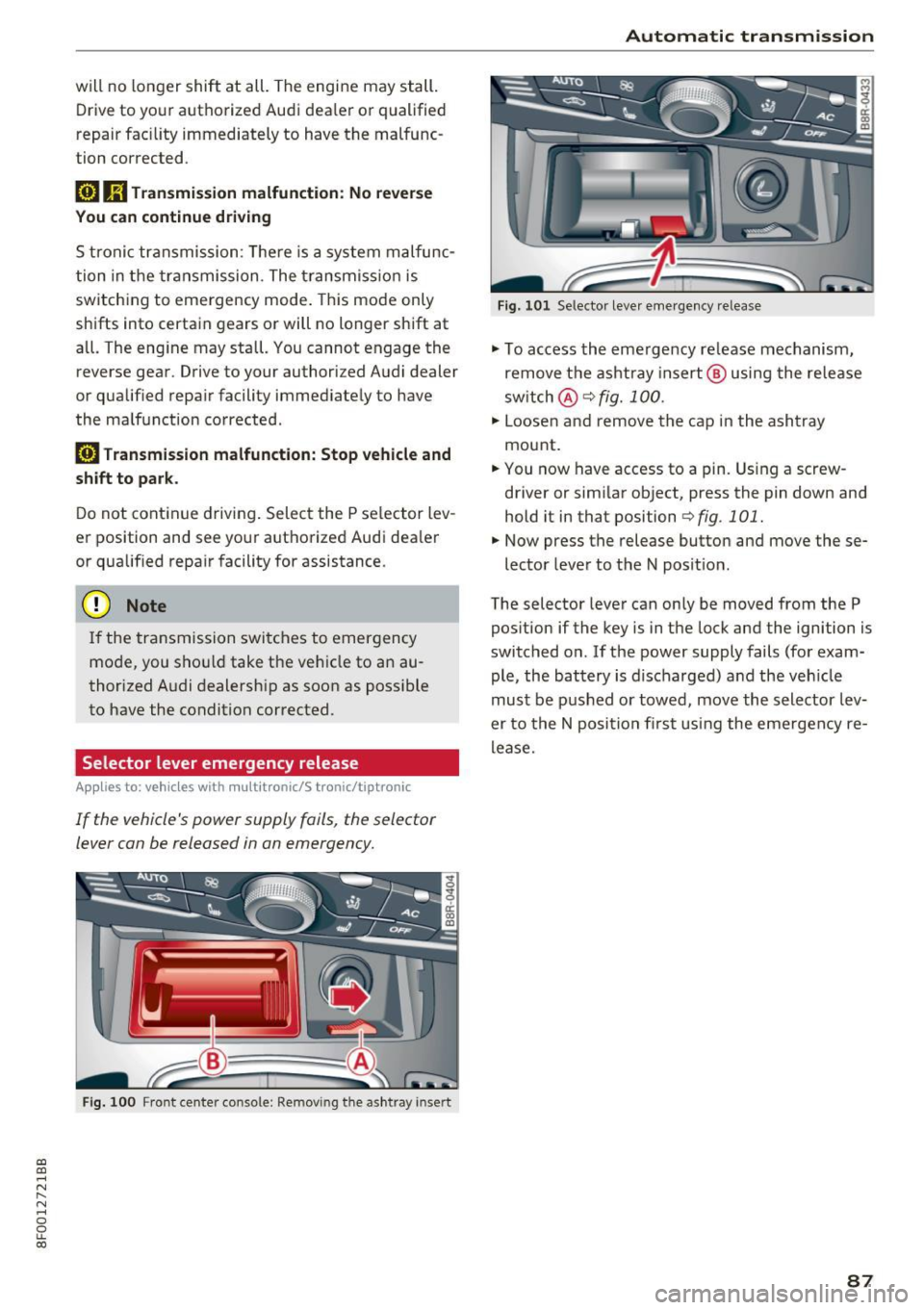
If the vehicle 's power supply foils, the selector
lever can be released in an emergency.
F ig . 100 Front center co nsole: Removing the ashtray insert
Automatic transmission
Fig. 10 1 Selec tor leve r em erge ncy re lease
"' To access the eme rg ency re lease me chanism,
remove t he ash tra y insert @ usin g the re lease
sw itch @
¢fig. 100.
"' Loose n and r emove the c ap in the ash tray
mount .
"' You now have access to a pin. Using a screw
driver or sim ila r ob ject, press the pin down and
hold it in that positi on
¢ fig. 101.
"' Now press the release button and move these-
lector leve r to the N pos it io n.
The selector leve r can on ly be moved from the P
pos ition if the key is in t he lock and the ign ition is
switched on. If the power supply fails (fo r exam
ple, the bat tery is d ischarged) a nd the veh icle
must be p ushed or towed, move th e selector lev
er to th e N posi tion first using the e merge ncy re
lease.
87
Page 103 of 266

Audi drive select Drive settings
Introduction
Applies to: vehicles with Audi drive select
Drive select provides the possibility to experience
d iff erent types of vehicle settings in one veh icle.
F or instance, using the three
Comfort, Auto and
Dynamic modes, the driver can switch from a
sporty to a comfortab le driving mode with the
press of a button.
Addit ionally, in vehicles with MM I*, the vehicle
setup for
Individual* mode can be customized by
you. This makes it possible to combine settings
such as a sporty engine tuning with comfortable
steering.
A WARNING
-
Improper use of the Audi drive select can
cause collisions, other accidents and serious
personal injury .
Description
Applie s to: vehicles with Audi drive select
The vehicle setup in each mode depends on the
veh icle's features . However, the engine, auto
matic transmission and steering are always in
volved.
Engine and automatic transmission
Depending on the mode, the engine and the au
tomatic transm ission respond quicker or in a
more balanced manner to accelerator pedal
movements . In the sporty dynam ic mode, the au
tomatic transmission shifts at higher RPMs .
Steering
The steering adapts in terms of steering effort
and steering ratios. Indirect steer ing that moves
eas ily, like the steering in comfort mode, is best
suited to long drives on a highway. In contrast,
dynamic mode provides sporty, direct steering.
gi The follow ing applies to vehicles with dynam ic
;:::: steering*: the steering rat io changes based on
r--.
~ vehicle speed in order to ma inta in optim um 0
fi:' steering effort for the driver at all times. This 00
Audi drive select
sets the steering to be less sensitive at higher
speeds in order to provide improved vehicle con
tro l. At reduced speeds, however, steering is
more direct in order to keep the steering effort as
minimal as possible when the driver is maneuver
ing the vehicle. At low and average speeds, dy
nam ic steering additionally prov ides more re
sponsive steering performance .
Adaptive dampers*
The adaptive dampers* use sensors to record in
formation regarding steering movements, brak
ing and acceleration operations by the driver,
road surface, driving speed, and load . This makes
it possible to adapt damping to the driving situa
t ion virtua lly in real time. Drive select also makes
it possible to sat isfy the desire for sporty suspen
sion (Dynamic) and comfortable suspension
(Comfort) without giving up balanced tuning (Au
to).
Sport differential*
As a component of the all whee l dr ive system
(quattro)
c::> page 172, the sport different ial* dis
tributes the driving power to the rear axle de
pending on the situation. The distribution of
power varies depending on the mode selected.
The goal is a high level of ag ility and ability to ac
celerate on curves. The vehicle is very responsive
to steering.
Audi adaptive cruise control*
The behavior when accelerating can be adjusted
from comfortable to sporty, depending on the
drive select mode. Adaptive cruise control also
responds to the driving behavior of the vehicle
ahead in a more conservative or sporty manner .
Engine sound*
The sound of the engine is adapted to the select
ed mode and ranges from subtle to sporty.
(D Tips
- In some models, the maximum vehicle
speed can only be reached in the
Auto and
Dynamic modes.
- For vehicles with an automatic transmis-
sion, se lecting the
Dynamic mode resu lts in ...,
101
Page 104 of 266
Audi drive select
sporty shifting characteristics . The S gear
position engages automatically.
- In vehicles that have dynamic steering*, op
erating noise is heard when starting or stop
ping the engine. This does not ind icate a
problem.
Selecting the driving mode
Applies to: vehicl es w ith Aud i dri ve select
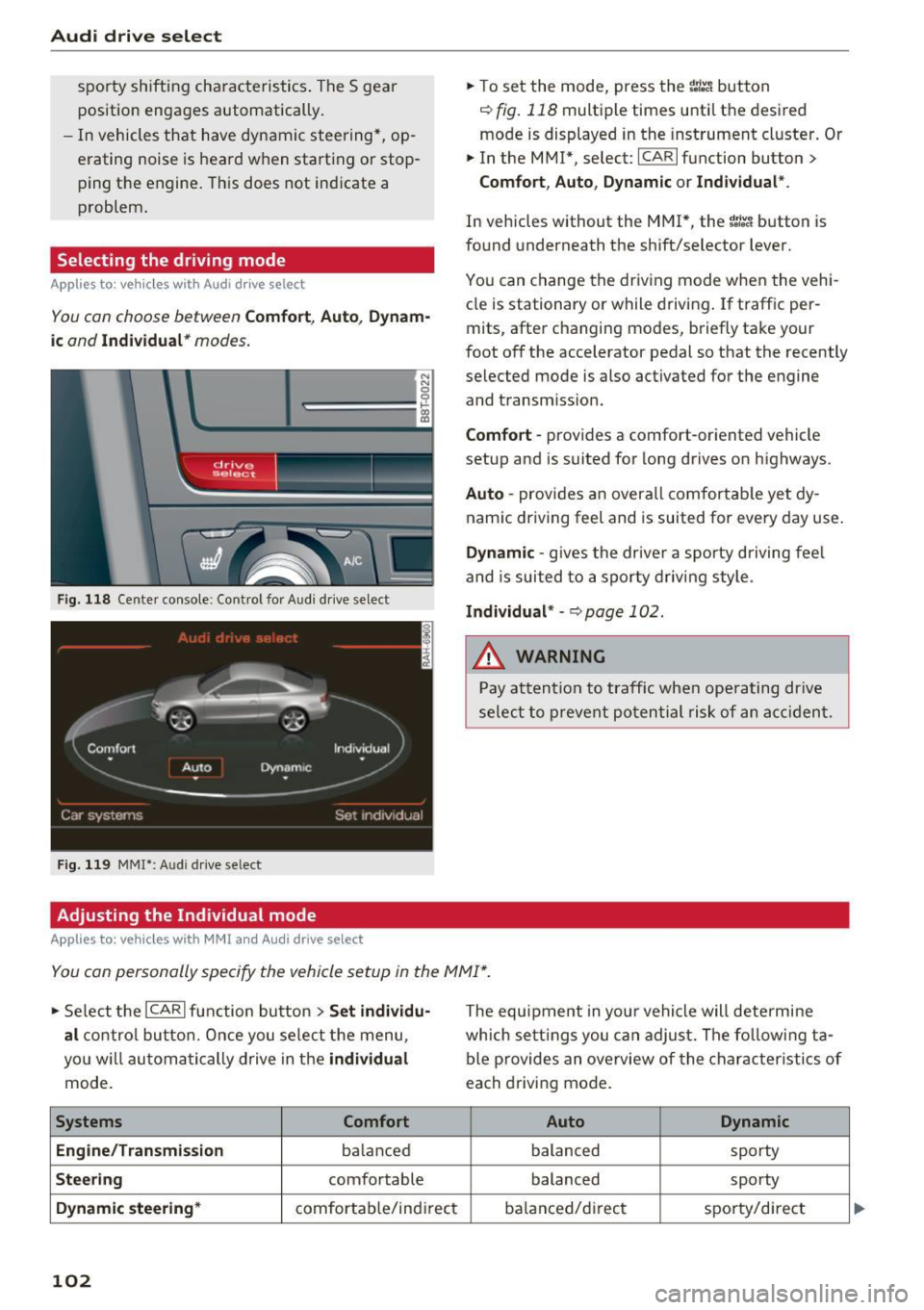
You con choose between Comfort, Auto , Dynam
ic and Individual * modes.
N N 0
0
'l::=====:::: 1-'gi
drive I sel,.c,ct _ J -~-
Fig. 118 Center console: Control fo r Aud i dr ive select
Fig . 119 MMI*: A udi drive select
Adjusting the Individual mode
Applies to : ve hicles w ith MMI and Audi drive select
.,. To set the mode, press the ~:i:a button
r::!) fig. 118 multiple times until the desired
mode is displayed in the instrument cluster. Or
.,. In the MMI* , select: ICARlfunction button>
Comfort, Auto, Dynamic or Individual".
In vehicles without the MMI*, the ~:/:a button is
found underneath the shift/selector lever.
You can change the driving mode when the vehi
cle is stationary or while driving. If traff ic per
mits, after changing modes, briefly take your
foot off the accelerator pedal so that the recently
selected mode is also activated for the engine
and transm iss ion.
Comfort -provides a comfort-oriented vehicle
setup and is suited for long drives on highways.
Auto -provides an overall comfortable yet dy
namic driving feel and is suited for every day use.
Dynamic -gives the drive r a sporty driving fee l
and is suited to a sporty driving style .
Individual* -c>page 102.
&_ WARNING
Pay attention to traffic when operating drive
select to prevent potential risk of an accident.
You can personally specify the vehicle setup in the MMI* .
.,. Select the ICAR I function button > Set individu
al
control button. Once you select the menu,
you w ill automatically drive in the
individual
mode.
Systems Comfort
Engine/Transmission
ba lanced
Steering comfortable
Dynamic steering* comfortab le/indi rect
102
The equipment in you r vehicle will determine
which settings you can adjust. The following ta
ble provides an overview of the characteristics of
each driving mode.
Auto Dynamic
balanced
sporty
balanced sporty
ba lanced/d irec t sporty/direct
Page 196 of 266
Checking and Filling
compartment. Wait until no steam or cool
ant can be seen or heard before carefully
opening the hood.
- Keep children away from the engine com
partment.
- Never spill fluids on hot engine compo
nents. They can cause a fire.
- Never touch the radiator fan. The auxiliary
electric fan is temperature controlled and
can switch on suddenly.
- Never open the coolant reservoir cap when
the engine is still warm . The coolant system
is pressurized and hot coolant could spray
out.
- Protect your face, hands and arm from
steam or hot engine coolant by placing a
thick rag over the cap when you open the coolant reservoir .
- Do not remove the engine cover under any
circumstances . This increases the risk of
burns.
- If work on the fuel system or the electrical
system is necessary:
= Always disconnect the battery.
- Never smoke or work near heaters or open
flames. Fluids in the engine compartment
could start a fire.
- Keep an approved fire extinguisher imme
diately available.
- To avoid electrical shock and personal injury
while the engine is running or being started,
never touch:
- Ignition cables
- Other components of the high voltage
electronic ignition system.
- If you must perform a check or repair with
the engine running:
- First, fully apply the parking brake, move
selector lever of automatic transmission
to "P" (Park).
- Always use extreme caution to prevent
clothing , jewelry, or long hair from get-
194
ting caught in the radiator fan, V-belts or
other moving parts, or from contacting
hot parts. Tie back hair before starting,
and do not wear clothing that will hang or
droop into the engine.
- Minimize exposure to emission and chemi
cal hazards
c::> &.
A WARNING
California Proposition 65 Warning:
- Engine exhaust, some of its constituents,
and certain vehicle components contain or
emit chemicals known to the State of Cali
fornia to cause cancer and birth defects and
reproductive harm. In addition, certain flu
ids contained in vehicles and certain prod
ucts of component wear contain or emit
chemicals known to the State of California
to cause cancer and birth defects or other
reproductive harm .
- Battery posts, terminals and related acces
sories contain lead and lead compounds,
chemicals known to the State of California
to cause cancer and reproductive harms.
Wash hands after handling.
([) Note
When adding fluids, always make sure that
they are poured into the proper container or
filler opening, otherwise serious damage to
vehicle systems will occur.
@ For the sake of the environment
To detect leaks in time, inspect the vehicle
floor pan from underneath regularly. If you
see spots from oil or other vehicle fluids, have
your vehicle inspected by an authorized Audi dealer .
Page 231 of 266

always fully set the parking brake and block
the wheel diagonally opposite the wheel be ing changed with the folding chocks or oth
er objects. When one front wheel is lifted
off the ground, placing the Automatic
Transmission in "P" (Park) will
not prevent
the vehicle from moving.
- Before you change a wheel, be sure the
ground is level and firm. If necessary, use a
sturdy board under the jack.
- Always store the vehicle tool kit, the jack*
and the replaced tire in the luggage com
partment
r::!>page 116.
(D Note
If you are changing the wheel on a steep in
cline, use a rock or similar object to block the
opposite wheel to prevent the vehicle from
moving.
(D Tips
Obey all laws.
Changing a wheel
When you change a wheel, follow the sequence
described below step-by-step and in exactly that
order.
1.
Remove the decorative wheel cover* or the
wheel bolt caps*. For more details see also
r::!> page 229, Decorative wheel covers or
r::!> page 230, Wheels with wheel bolt caps .
2. Loosen the wheel bolts~ page 230.
3. Locate the proper mounting point for the
jack and align the jack below that point
r::!> page 2 31.
4. lift the car with the jack r::!> page 231.
5. Remove the wheel with the flat tire and then
in stall the
spare tire r::::> page 232.
6. Tighten all wheel bolts lightly .
7 .
lower the vehicle with the jack.
8 . Use the wheel bolt wrench and
firmly tighten
all wheel bolts in a crisscross pattern
r::!> page 230.
~ 9. Replace the decorative wheel cover* or the ......
~ wheel bolt caps*. N ...... 0
0
LL co
Emergency assistance
A WARNING
-Always read and follow all WARNINGS and in-
formation
r::!> .&. in Raising the vehicle on
page231
and r::::> page233.
After changing a wheel
A wheel change is not complete without the do
ing the following.
.. Always store the vehicle tool kit, the jack*, and
the replaced tire in the luggage compartment
r::::>page 116.
.. Check the tire pressure of the spare tire as soon
as possible .
.. As soon as possible, have the
tightening tor
ques
on all wheel bolts checked with a torque
wrench. The correct tightening torque is 90 ft
lbs .
(120 Nm).
.. Have the flat tire
replaced as soon as possible.
@ Tips
-If you notice that the wheel bolts are cor
roded and difficult to turn while changing a
tire, they should be replaced before you
check the tightening torque.
- Drive at reduced speed until you have the tightening torques checked.
Decorative wheel covers
Applies to: vehicles wit h deco rative w heel covers
The decorative wheel covers must be removed
first to access the wheel bolts.
Fig. 18S C ha nging a wheel: removing the wheel cover
229
Page 240 of 266

Emergency situations
Emergency situations
General
This chapter is intended for trained emergency crews and working personnel who have the nec
essary tools and equipment to perform these
operations.
Starting by pushing or
towing
(D Note
Vehicles with an automatic transmission
cannot be started by pushing or towing.
Starting with jumper
cables
If necessary, the engine con be started by con
necting it to the battery of another vehicle .
If the engine should fail to start because of a dis
charged or weak battery, the battery can be con
nected to the battery of
another vehicle, using a
pair of jumper cables to start the engine.
Jumper cables
Use only jumper cables of sufficiently largecross
section
to carry the starter current safely. Refer
to the manufacturer's specifications.
Use only jumper cables with
insulated terminal
clamps which are distinctly marked :
plus(+) cable in most cases colored red
minus(-) cable
in most cases colored black .
A WARNING
Batteries contain electricity, acid, and gas.
Any of these can cause very serious or fatal in
jury. Follow the instructions below for
safe
handling of your vehicle's battery .
-Always shield your eyes and avoid leaning
over the battery whenever possible.
-A dead battery can freeze at temperatures
around 32 °F (0 °C) . If the vehicle battery is
frozen, you must thaw it before connecting
the jump start cables.
If you do not, this in-
238
creases the risk of an explosion and chemi
cal burns. After jump starting the vehicle,
drive to an authorized Audi dealer or author
ized Audi Service Facility immediately to
have the vehicle battery checked.
- Do not allow battery acid to contact eyes or
skin . Flush any contacted area with water
immediately.
- Improper use of a booster battery to start a
vehicle may cause an explosion .
- Vehicle batteries generate explosive gases.
Keep sparks, flame and lighted cigarettes
away from batteries.
- Do not try to jump start any vehicle with a
low acid level in the battery .
- The voltage of the booster battery must also
have a 12 -Volt rating . The capacity (Ah) of
the booster battery should not be lower
than that of the discharged battery. Use of
batteries of different voltage or substantial
ly different "Ah" rating may cause an explo
sion and personal injury.
- Never charge a frozen battery. Gas trapped
in the ice may cause an explosion.
- Never charge or use a battery that has been
frozen . The battery case may have be weak
ened.
- Use of batteries of different voltage or sub
stantially different capacity (Ah) rating may
cause an explosion and injury. The capacity (Ah) of the booster battery should not be
lower than that of the discharged battery.
- Before you check anything in the engine
compartment, always read and heed all
WARNINGS
r=> poge 193.
([) Note
-Applying a higher voltage booster battery
will cause expensive damage to sensitive electronic components, such as control
units, relays, radio, etc.
- There must be no electrical contact between
the vehicles as otherwise current could al
ready start to flow as soon as the positive
(+) terminals are connected .
Page 241 of 266
a:,
a:,
...... N
" N .... 0
0
LL co
@ Tips
The discharged battery must be properly con
nected to the vehicle's electrical system .
When jump starting or charg ing the battery,
never connect the negative ground cable to
the battery negative post because the battery
manager system must be able to detect the
battery's state of charge. Always connect the
negative ground cable to the negative ground
post of the battery manager control unit.
Use of jumper cables
Make sure to connect the jumper cable clamps in
exactly the order described below!
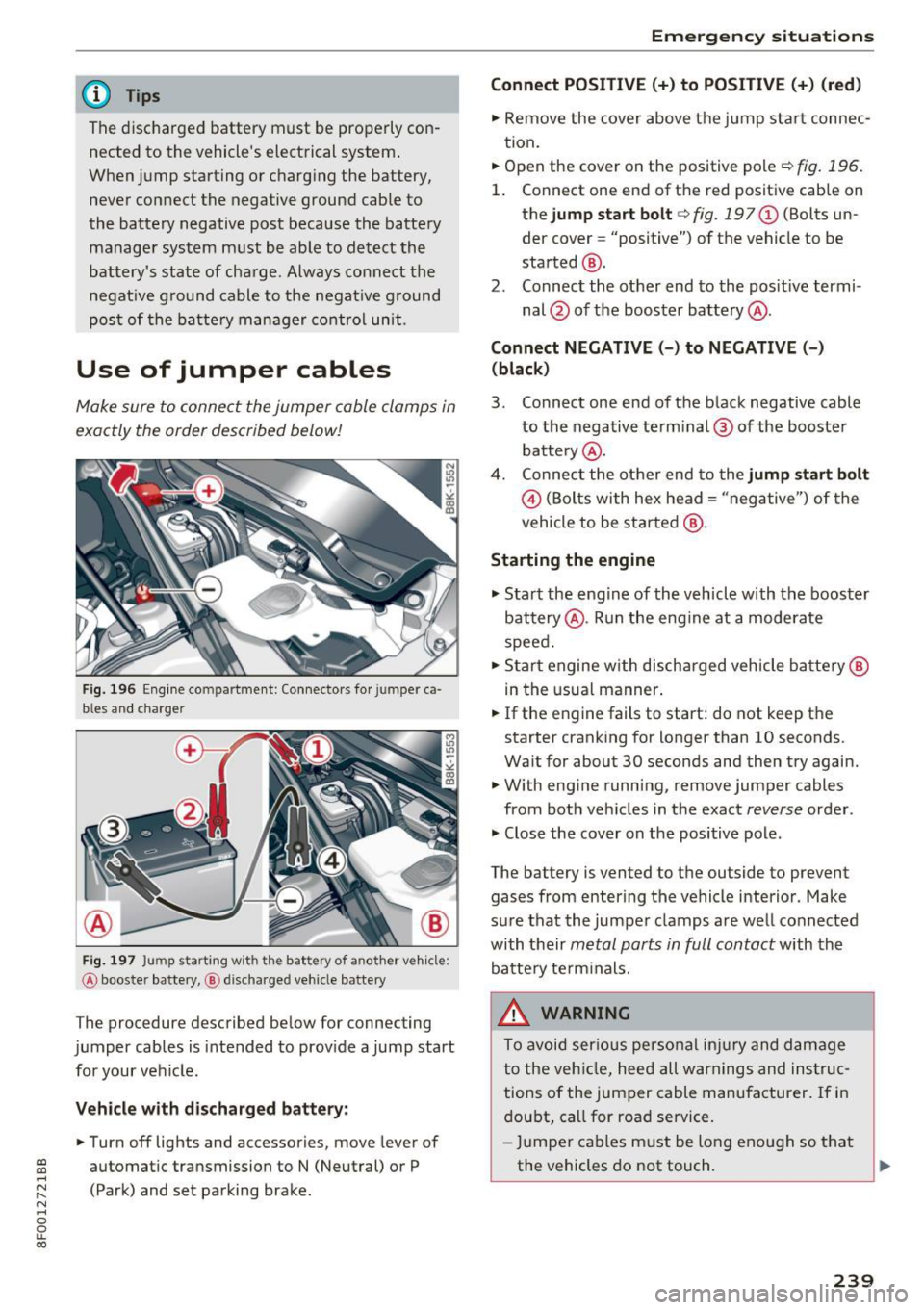
Fig. 196 Engine compartment: Connectors fo r jumper ca
bles and charger
Fig. 197 Jump starting with the battery of another vehicle:
@ booster battery, @ discharged vehicle battery
The procedure described below for connecting
jumper cables is intended to provide a jump start
for your vehicle.
Vehicle with discharged battery: .. Turn off lights and accessories, move lever of
automatic transmission to N (Neutral) or P
(Park) and set parking brake.
Emergency situations
Connect POSITIVE(+) to POSITIVE (+) (red)
.. Remove the cover above the jump start connec
tion.
.. Open the cover on the positive pole
c;, fig. 196.
1. Connect one end of the red positive cab le on
the jump start bolt
c;, fig. 197@ (Bolts un
der cover= "positive") of the vehicle to be
started @.
2. Connect the other end to the positive termi-
nal @ of the booster battery @.
Connect NEGATIVE(-) to NEGATIVE(-) (black)
3. Connect one end of the black negative cable
to the negative te rm i nal @of the booster
battery @.
4. Connect the other end to the jump start bolt
@ (Bolts with hex head= "negative") of the
vehicle to be started @.
Starting the engine
"' Start the engine of the vehicle with the booster
battery @. Run the engine at a moderate
speed.
"' Start engine w ith discharged vehicle battery@
in the usual manner.
"' If the eng ine fails to start: do not keep the
starter cranking for longer than 10 seconds.
Wait for about 30 seconds and then try again.
"' With engine running, remove jumper cables
from both vehicles in the exact
reverse order .
"' Close the cover on the positive pole.
The battery is vented to the outside to prevent gases from entering the vehicle interior. Make
sure that the jumper clamps are well connected
with their
metal parts in full contact with the
battery term inals.
_&. WARNING
To avoid serious personal injury and damage
to the veh icle, heed all warnings and instruc
tions of the jumper cable manufacturer. If in
doubt, call for road service.
- Jumper cables must be long enough so that
the vehicles do not touch. ""
239
Page 253 of 266
a:,
a:,
...... N r--. N ...... 0
0
LL 00
Automatic transmission . . . . . . . . . . . . . . . . . 81
Automatic Shift Lock (ASL) . . . . . . . . . . . . . 82
Driving . . . . . . . . . . . . . . . . . . . . . . . . . . . . . 83
Emergency mode . . . . . . . . . . . . . . . . . . . . . 86
Emergency release . . . . . . . . . . . . . . . . . . . . 87
Kick -down . . . . . . . . . . . . . . . . . . . . . . . . . . . 85
Manua l shift program . . . . . . . . . . . . . . . . . 85
Removal lock (ignition key) . . . . . . . . . . . . . 71
Selector lever . . . . . . . . . . . . . . . . . . . . . . . . 81
Automatic wipers . . . . . . . . . . . . . . . . . . . . . . 53
Auto Safety Hotline . . . . . . . . . . . . . . . . . . . 118
Average speed . . . . . . . . . . . . . . . . . . . . . . . . 22
Avoid damaging the vehicle . . . . . . . . . . . . . 175
B
Battery . . . . . . . . . . . . . . . . . . . . . . . . . . . . . . 14
Battery location inside the luggage compart-
ment ..............................
203
Charge level . . . . . . . . . . . . . . . . . . . . . . . . 173
Charging . . . . . . . . . . . . . . . . . . . . . . . . . . . 205
Energy management . . . . . . . . . . . . . . . . . 173
Important warnings when working on the
battery . . . . . . . . . . . . . . . . . . . . . . . . . . . .
203
Jump starting . . . . . . . . . . . . . . . . . . . . . . . 238
Replac ing the battery . . . . . . . . . . . . . . . . 206
Work ing on the battery . . . . . . . . . . . . . . . 203
Before driving . . . . . . . . . . . . . . . . . . . . . . . . 111
Belt positioner . . . . . . . . . . . . . . . . . . . . . . . 125
Belt tensioners . . . . . . . . . . . . . . . . . . . . . . . 128
Bio -ethanol (Fuel) . . . . . . . . . . . . . . . . . . . . . 189
Blended gasoline . . . . . . . . . . . . . . . . . . . . . 188
Blower (automatic climate control) . . . . . . . . 68
Booster seats . . . . . . . . . . . . . . . . . . . . . . . . 158
Brake fluid
Changing the brake fluid . . . . . . . . . . . . . .
202
Checking the brake fluid l evel . . . . . . . . . . 202
Brake system
Anti-lock brak ing system . . . . . . . . . . . . . . .
17
Brake fluid specifications for refill and re
placement . . . . . . . . . . . . . . . . . . . . . . . . .
202
Brake light defective . . . . . . . . . . . . . . . . . . 19
Brake power assist unit . . . . . . . . . . . . . . . 170
Brakes. .. .. .. ............... .. ..... 170
Ceramic brakes . . . . . . . . . . . . . . . . . . . . . . 170
Electromechan ical parking brake . . . . . . . . 76
Warning/indicator lights . . . . . . . . . . . . . . . 13
Worn brake pads symbol . . . . . . . . . . . . . . . 18
Index
Braking
Brake assist . . . . . . . . . . . . . . . . . . . . . . . .
167
Emergency braking function . . . . . . . . . . . . 77
braking guard . . . . . . . . . . . . . . . . . . . . . . . . . 88
Messages . . . . . . . . . . . . . . . . . . . . . . . . . . . 95
Settings . . . . . . . . . . . . . . . . . . . . . . . . . . . . 95
Break-in period
Brake pads .. .. .. .. ............. .. . .
Tires ..... .... .. .. ........ · · · · · · · · ·
Breaking in ... .. .. .. ............... . .
New tires
Bulbs
C
170
175
175
214
237
California Proposition 65 Warning . . . . . . . 194
Battery specific . . . . . . . . . . . . . . . . . . . . . 204
Capacities . . . . . . . . . . . . . . . . . . . . . . . . . . . 244
Engine oil . . . . . . . . . . . . . . . . . . . . . . . . . . 195
Care . . . . . . . . . . . . . . . . . . . . . . . . . . . . . . . . 182
Cargo area
refer to Luggage compartment ...... 63, 116
Catalytic converter . . . . . . . . . . . . . . . . . . . . 176
Center armrest . . . . . . . . . . . . . . . . . . . . . . . . 60
C en tral locking . . . . . . . . . . . . . . . . . . . . . . . .
27
Central locking switch . . . . . . . . . . . . . . . . . 31
Convenience key . . . . . . . . . . . . . . . . . . . . . . 30
Remote control key . . . . . . . . . . . . . . . . . . . 30
Ceramic brake rotors
New brake pads . . . . . . . . . . . . . . . . . . . . .
170
Certification . . . . . . . . . . . . . . . . . . . . . . . . . 249
Changing engine oil . . . . . . . . . . . . . . . . . . . 198
Checking
Engin e coolant level. . . . . . . . . . . . . . . . . .
199
Child restraints
Danger of using child restraints in the front
seat.... .. .. .. .. .. ............. ....
131
Where can I get add itiona l information
about child restra ints and their use? . . . .
166
Child restraint system anchors . . . . . . . . . . 163
Child safety . . . . . . . . . . . . . . . . . . . . . . . . . . 150
Impo rtant safety instructions for using child
safety seats . . . . . . . . . . . . . . . . . . . . . . . .
153
Installing a c hild restraint using the LATCH
system . . . . . . . . . . . . . . . . . . . . . . . . . . . .
165
251
Page 259 of 266
a:,
a:,
...... N r--. N ...... 0
0
LL 00
Oil
refer to Engine oil . . . . . . . . . . . . . . . 195, 197
O il consumption . . . . . . . . . . . . . . . . . . . . . . 197
On-Board Diagnostic System (OBD) Data L ink Connector (DLC) . . . . . . . . . . . . . . 26
Electronic speed limiter . . . . . . . . . . . . . . . . 26
Malfunction Indicator Lamp (MIL) . . . . . . . 25
Open door or front lid warning . . . . . . . . . . . 21
Opening. .. .. .. ............... .. .. .. .. 27
Opening/closing at the lock cylinder. . . . . . . . . . . . . . . . . . . . 32
by remote control . . . . . . . . . . . . . . . . . . . . 30
with the central locking sw itch . . . . . . . . . . 31
with the convenience key . . . . . . . . . . . . . . . 30
Other equipment (efficiency program) . . . . . 24
Outside temperature display . . . . . . . . . . . . . 21
p
Paint damage . . . . . . . . . . . . . . . . . . . . . . . . 184
Paint No. . . . . . . . . . . . . . . . . . . . . . . . . . . . . 243
Parking . . . . . . . . . . . . . . . . . . . . . . . . . . . . . . 76
Automatic transmission . . . . . . . . . . . . . . . 83
Vale t parking . . . . . . . . . . . . . . . . . . . . . . . . 36
Parking aid
C leaning sensors/camera lenses . . . . . . . . 183
Parking brake . . . . . . . . . . . . . . . . . . . . . . . . . 76
also refer to E lectromechanical
parking brake . . . . . . . . . . . . . . . . . . . . . . . . 76
Parking system . . . . . . . . . . . . . . . . . . . . . . . 104
Parking System . . . . . . . . . . . . . . . . . . . . . . . 104
Parking system (rear)
Adjusting the warning tones . . . . . . . . . . . 105
Parking system (rear, with rear view camera) Parking mode 1 . . . . . . . . . . . . . . . . . . . . . 108
Parking mode 2 . . . . . . . . . . . . . . . . . . . . . 109
Safety precautions . . . . . . . . . . . . . . . . . . . 106
Switching on/off . . . . . . . . . . . . . . . . . . . . 107
Sw itching rear view camera on/off . . . . . . 110
Parts replacement . . . . . . . . . . . . . . . . . . . . 248
PASSENGER AIR BAG OFF light . . . . . . . . . . 140
Pedals . . . . . . . . . . . . . . . . . . . . . . . . . . . . . . 116
Physical principles of a frontal collision . . . 123
Polishing . . . . . . . . . . . . . . . . . . . . . . . . . . . . 184
Pollutant filter (automatic A/C system) . . . . 66
Index
Power
seat adjustment . . . . . . . . . . . . . . . . . . . . . . 58
Windows . . . . . . . . . . . . . . . . . . . . . . . . . . . 35
Power locking system
Emergency locking . . . . . . . . . . . . . . . . . . . . 32
Power windows . . . . . . . . . . . . . . . . . . . . . . 35
Rear lid . . . . . . . . . . . . . . . . . . . . . . . . . . . . . 33
Se lective unlock featur e . . . . . . . . . . . . . . . 32
Settings . . . . . . . . . . . . . . . . . . . . . . . . . . . . 32
Power steering
refer to Electro-mechanical power assist . 171
Power top . . . . . . . . . . . . . . . . . . . . . . . . . . . . 40
Cleaning . . . . . . . . . . . . . . . . . . . . . . . . . . . 184
Closing . . . . . . . . . . . . . . . . . . . . . . . . . . . . . 40
Convenience closing . . . . . . . . . . . . . . . . . . . 41
Convenience opening . . . . . . . . . . . . . . . . . . 41
Emergency operation . . . . . . . . . . . . . . . . . . 44
General information . . . . . . . . . . . . . . . . . . 40
Malfunction . . . . . . . . . . . . . . . . . . . . . . . . . 42
Messages . . . . . . . . . . . . . . . . . . . . . . . . . . . 42
Opening . . . . . . . . . . . . . . . . . . . . . . . . . . . . 40
Variable power top storage bay . . . . . . . . . 42
Wind deflector . . . . . . . . . . . . . . . . . . . . . . . 43
Power window Convenience opening/closing . . . . . . . . . . . 35
Power windows
Malfunctions . . . . . . . . . . . . . . . . . . . . . . . . 36
Pregnant women Spec ial considerat ions when wearing a safe-
ty belt . . . . . . . . . . . . . . . . . . . . . . . . . . . . . 127
Pressure (tires) . . . . . . . . . . . . . . . . . . . . . . . 225
Proper occupant seat ing positions . . . . . . . 112
Proper safety be lt pos ition . . . . . . . . . . . . . . 127
Proper seating position Front passenger . . . . . . . . . . . . . . . . . . . . . 113
Occupants ....... .. ................. 112
Rear passengers . . . . . . . . . . . . . . . . . . . . . 114
Protecting . . . . . . . . . . . . . . . . . . . . . . . . . . . 184
Q
Quartz clock . . . . . . . . . . . . . . . . . . . . . . . . . . 10
quattro
refer to all-wheel drive . . . . . . . . . . . . . . . 172
Question What happens to unbelted occupants? . . 123
257
Page 261 of 266
a:,
a:,
...... N r--. N ...... 0
0
LL 00
Seat heating . . . . . . . . . . . . . . . . . . . . . . . . . . 68
Upper cabin heating . . . . . . . . . . . . . . . . . . . 69
Seating capacity . . . . . . . . . . . . . . . . . . . . . . 122
Seating position Driver . . . . . . . . . . . . . . . . . . . . . . . . . . . . . 112
Front passenger . ................ ... . 113
How to adjust the front seats . . . . . . . . . . 113
Incorrect seat position . . . . . . . . . . . . . . . 115
Occupants .. .. .. ........... .. .. ..... 112
Rear passengers . . . . . . . . . . . . . . . . . . . . . 114
Seats Adjusting . . . . . . . . . . . . . . . . . . . . . . . . . . . 58
Adjusting in the MMI . . . . . . . . . . . . . . . . . . 59
Convenience s ide view . . . . . . . . . . . . . . . . . 59
Correct seating position . . . . . . . . . . . . . . 112
Dr iver's seat . . . . . . . . . . . . . . . . . . . . . . . . . 57
F olding . . . . . . . . . . . . . . . . . . . . . . . . . . . . . 64
Front passenger's seat . . . . . . . . . . . . . . . . . 58
Number of seats . . . . . . . . . . . . . . . . . . . . 122
Power easy entry function . . . . . . . . . . . . . . 59
Safety guidelines . . . . . . . . . . . . . . . . . . . . . 57
Seat symmetry . . . . . . . . . . . . . . . . . . . . . . . 59
Seat ventilat ion . . . . . . . . . . . . . . . . . . . . . . . 68
Seat (upper cabin heating) . . . . . . . . . . . . . . . 69
Selective unlock feature . . . . . . . . . . . . . . . . . 32
Selector lever . . . . . . . . . . . . . . . . . . . . . . . . . 81
Emergency release . . . . . . . . . . . . . . . . . . . . 87
Selector lever emergency re lease . . . . . . . . . 87
Service and disposal
Safety belt pretensioner . . . . . . . . . . . . . . 129
Service interval display . . . . . . . . . . . . . . . . . . 25
Service position
refer to Replacing w iper blades . . . . . . . . . 54
SET button . . . . . . . . . . . . . . . . . . . . . . . . . . . . 9
Shutting down vehicle . . . . . . . . . . . . . . . . . 176
Side airbags Description . . . . . . . . . . . . . . . . . . . . . . . . . 146
H ow they work . . . . . . . . . . . . . . . . . . . . . . 148
side assist Adjusting the brightness . . . . . . . . . . . . . . . 99
Sensor range . . . . . . . . . . . . . . . . . . . . . . . . 98
Side assist Activating and deactivating . . . . . . . . . . . . . 99
Cleaning the sensors . . . . . . . . . . . . . . . . . 183
Description . . . . . . . . . . . . . . . . . . . . . . . . . . 97
Side marker lights . . . . . . . . . . . . . . . . . . . . . 48
Ski sack . . . . . . . . . . . . . . . . . . . . . . . . . . . . . . 65
Index
Snow chains
222
Sound system display ................... 21
Sources of information about child restraints
and their use
.... .. .. ............... .. 166
Spare tire . . . . . . . . . . . . . . . . . . . . . . . . . . . 227
Speedometer . . . . . . . . . . . . . . . . . . . . . . . . . 10
Speed warning system . . . . . . . . . . . . . . . . . . 78
Sport d ifferent ial . . . . . . . . . . . . . . . . . . . . . 101
Indicator lamp . . . . . . . . . . . . . . . . . . . . . . . 20
START ENG INE STOP button (convenience
key ) . . . . . . . . . . . . . . . . . . . . . . . . . . . . . . . . . 74
S TART ENGINE STOP button (Convenience
key) . . . . . . . . . . . . . . . . . . . . . . . . . . . . . . . . . 73
Starting from rest . . . . . . . . . . . . . . . . . . . . . . 77
Start ing off with a trailer . . . . . . . . . . . . . . . . 77
Starting the engine ................. 71, 73
Steering Locking the steering . . . . . . . . . . . . . . . . . . 71
also refer to Electro-mechan ical power as-
sist . . . . . . . . . . . . . . . . . . . . . . . . . . . . . . . 171
Steering wheel Adjusting steering column . . . . . . . . . . . . . 71
Indicator light . . . . . . . . . . . . . . . . . . . 16, 171
Steps for determining correct load limit . . . 221
Stopping the engine . . . . . . . . . . . . . . . . . 73, 74
Storage . . . . . . . . . . . . . . . . . . . . . . . . . . . . . . 62
S tronic . . . . . . . . . . . . . . . . . . . . . . . . . . . . . . 81
Selector lever . . . . . . . . . . . . . . . . . . . . . . . . 81
S tronic transmission Emergency release . . . . . . . . . . . . . . . . . . . . 87
Launch Contro l Program . . . . . . . . . . . . . . . 86
Sun visors . . . . . . . . . . . . . . . . . . . . . . . . . . . . 53
Symbols
refer to Warning/i ndicator lights . . . . . . . . 11
T
Tachomete r . . . . . . . . . . . . . . . . . . . . . . . . . . . . 9
T echn ical data . . . . . . . . . . . . . . . . . . . . . . . . 243
Technical modifications . . . . . . . . . . . . . . . . 248
Tie-downs 64,118
t iptronic . . . . . . . . . . . . . . . . . . . . . . . . . . . . . 81
Automatic Shift Lock (ASL) . . . . . . . . . . . . . 82
Driving . . . . . . . . . . . . . . . . . . . . . . . . . . . . . 83
Emergency mode . . . . . . . . . . . . . . . . . . . . . 86
Manua l shift program . . . . . . . . . . . . . . . . . 85
Selector lever . . . . . . . . . . . . . . . . . . . . . . . . 81
259