brake light AUDI A5 CABRIOLET 2017 Owner's Guide
[x] Cancel search | Manufacturer: AUDI, Model Year: 2017, Model line: A5 CABRIOLET, Model: AUDI A5 CABRIOLET 2017Pages: 266, PDF Size: 66.64 MB
Page 204 of 266
Checking and Filling
Brake fluid
Checking brake fluid level
The brake fluid level can be checked with a quick
glance.
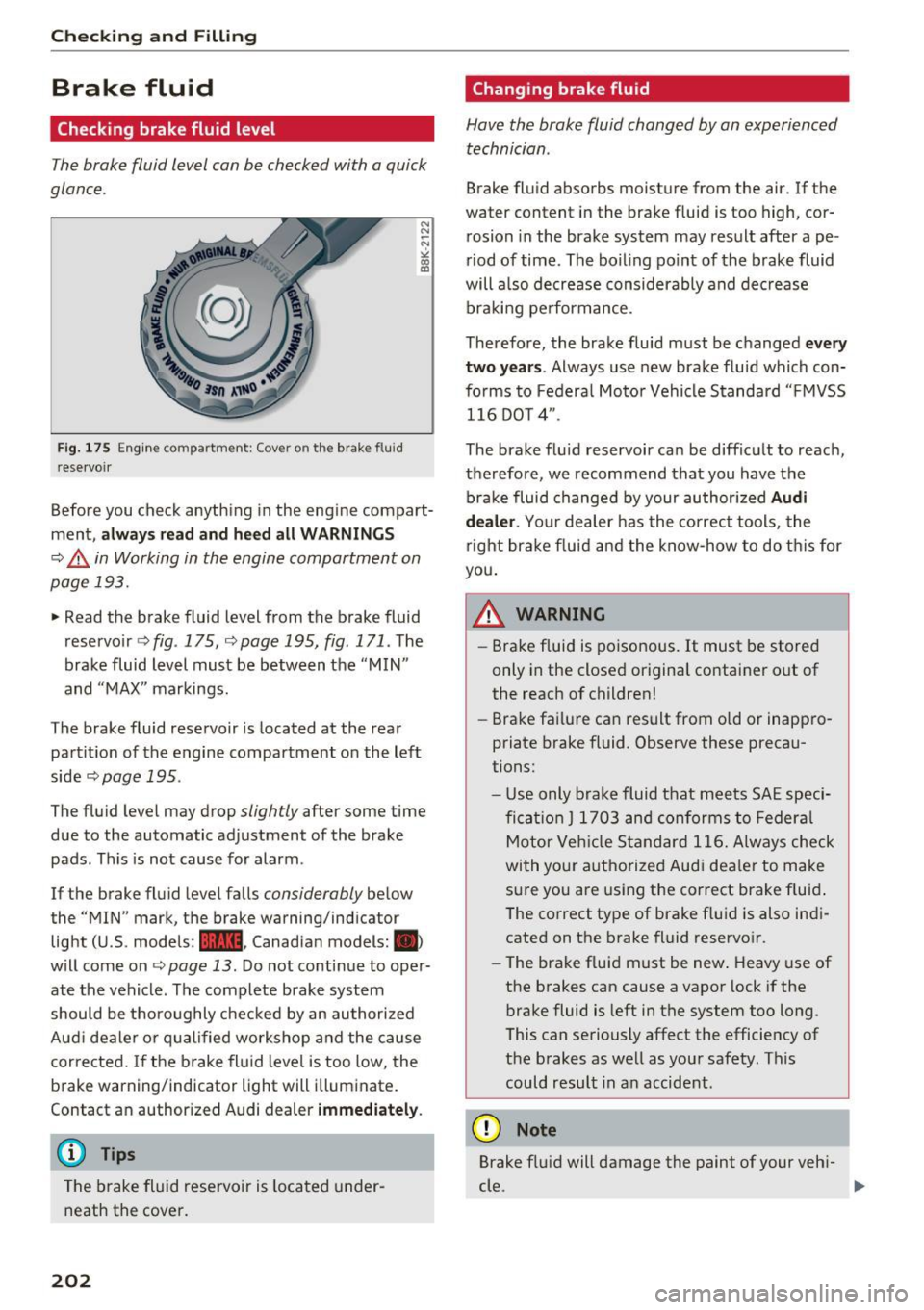
Fig. 175 Engine compartment: Cover on the brake fluid
r eservoir
Before you check anything in the engine compart
ment,
always read and heed all WARNINGS
¢ A in Working in the engine compartment on
page 193.
., Read the brake fluid level from the brake fluid
reservoir
<=> fig . 175, ¢page 195, fig . 171 . The
brake fluid level must be between the
" MIN"
and "MAX " markings.
The brake fluid reservoir is located at the rear
partition of the engine compartment on the left
side
¢ page 195.
The fluid level may drop slightly after some time
due to the automatic adjustment of the brake
pads . This is not cause for alarm .
If the brake fluid level falls
considerably below
the ' 'MIN" mark, the brake warning/indicator
light (U .S. models:
1111 , Canadian models: 1111)
will come on¢ page 13 . Do not continue to oper
ate the vehicle . The complete brake system
should be thoroughly checked by an authorized
Aud i dealer or qualified workshop and the cause
corrected . If the brake fluid level is too low, the
brake warning/indicator light w ill illuminate.
Contact an author ized Audi dealer
immediately.
(D} Tips
The brake fluid reservoir is located under
neath the cover.
202
Changing brake fluid
Have the brake fluid changed by an experienced
technician .
Brake fluid absorbs moisture from the air. If the
water content in the brake fluid is too high, cor
rosion in the brake system may result after ape
riod of time . The boiling po int of the brake fluid
will a lso decrease considerably and decrease
braking performance.
Therefore , the brake fluid must be changed
every
two years .
Always use new brake fluid which con
forms to Feder-al Motor Vehicle Standard "FMVSS
116 DOT 4 ".
The brake fluid reservoir can be difficult to reach ,
therefore, we recommend that you have the
brake fluid changed by your author ized
Audi
dealer .
Your dealer has the correct tools, the
right brake fluid and the know-how to do this for
you.
A WARNING
- Brake fluid is poisonous. It must be stored
only in the closed original container out of
the reach of children!
- Brake fai lure can result from o ld or inappro
priate brake fluid. Observe these precau
tions:
- Use only brake fluid that meets SAE speci
fi cation
J 1703 and conforms to Federal
Motor Veh icle Standard 116. Always check
with your authorized Audi dealer to make
sure you are using the correct brake f luid .
The correct type of brake f luid is also indi
cated on the brake fluid reservoir.
- The brake fluid must be new . Heavy use of
the brakes can cause a vapor lock if the
brake fluid is left in the system too long .
This can seriously affect the efficiency of
the brakes as well as your safety. This
could result in an accident.
(D Note
Brake fluid will damage the paint of your vehi-
cle .
lilJJ,
Page 205 of 266
a:,
a:,
...... N r--. N ...... 0
0
LL 00
@ For the sake of the environment
Because of the problem of proper disposal of
brake fluid as we ll as the special toots re
quired and the necessary expertise, we rec
ommend that you have the brake fluid
changed by your authorized Audi dealer .
Battery
General information
Under normal operating conditions, the battery
in your Audi does not need any maintenance.
With
high outside temperatures or long daily
drives we recommend that you have the electro
lyte level checked by an authorized Audi dealer or
qualified workshop. The electrolyte level should
also be checked each time the battery is charged
¢ page 205.
Have the battery checked when you take your ve
hicle in for serv ice. You are well advised to re
place a battery t hat is older than 5 years.
Disconnecting the battery terminals
Some vehicle functions (power window regula
tors, for example) are lost if the battery termi nals are disconnected. These functions have to be
relearned after the battery terminals are con
nected again. To prevent th is, the battery should
only be disco nnected from the vehicle e lectr ica l
system when abso lutely necessary for repairs.
Vehicles not driven for long periods
If you do not drive your vehicle over a period of
several days or weeks, electrical components are
gradually cut back or sw itched off. This reduces
energy consumption and maintains starting ca
pability over a longer period¢
page 173.
Some of the conven ience functions may not oper
ate, such as the interior lights or the power seat
adjustment. The convenience functions will be
available again when you turn on the ignition and
start the engine.
Winter operation
During the winter months, battery capacity tends
to decrease as temperatures drop . T his is be-
Checking and Filling
cause more power is also consumed while start
ing, and the headlights, rear window defogger,
etc., are used more often.
Avo id unnecessary power consumption, particu
larly in city traff ic or when traveling only short
distances . Let your authorized Audi dealer check
the capacity of the vehicle battery before winter
sets in ¢
page 205. A well charged battery will
not only prevent starting problems when the
weather is cold, but will also last longer .
(D Tips
If your vehicle is left standing for several
weeks at extremely low temperatures, the ve
hicle battery should be removed and stored
where it w ill not freeze. This will prevent it
from be ing damaged and having to be re
placed.
Working on the battery
Be especially careful when working on or near
the battery.
The battery is located in the luggage compart
ment under the floo r. Before you check anything
in the luggage compartment,
read and heed all
WARNINGS ¢
LD.·
Always heed the safety warnings, when working
on the vehicle battery or the veh icle electrical
system to prevent injury.
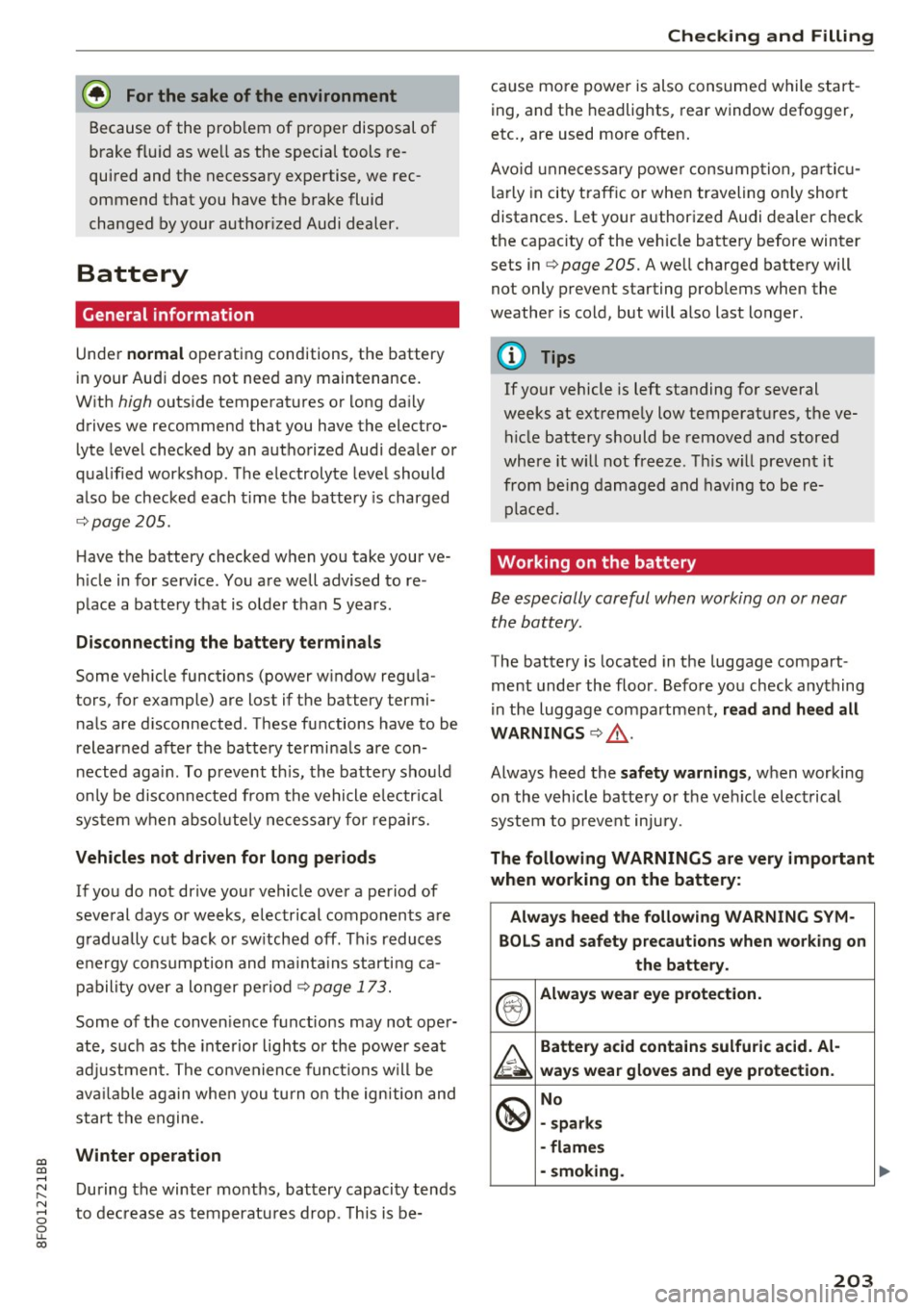
The following WARNINGS are very important
when working on the battery:
Always heed the following WARNING SYM·
BOLS and safety precautions when working on
the battery.
®
Always wear eye protection.
A
Battery acid contains sulfuric acid. Al·
ways wear gloves and eye protection .
@
No
- sparks
· flames
· smoking.
203
Page 231 of 266

always fully set the parking brake and block
the wheel diagonally opposite the wheel be ing changed with the folding chocks or oth
er objects. When one front wheel is lifted
off the ground, placing the Automatic
Transmission in "P" (Park) will
not prevent
the vehicle from moving.
- Before you change a wheel, be sure the
ground is level and firm. If necessary, use a
sturdy board under the jack.
- Always store the vehicle tool kit, the jack*
and the replaced tire in the luggage com
partment
r::!>page 116.
(D Note
If you are changing the wheel on a steep in
cline, use a rock or similar object to block the
opposite wheel to prevent the vehicle from
moving.
(D Tips
Obey all laws.
Changing a wheel
When you change a wheel, follow the sequence
described below step-by-step and in exactly that
order.
1.
Remove the decorative wheel cover* or the
wheel bolt caps*. For more details see also
r::!> page 229, Decorative wheel covers or
r::!> page 230, Wheels with wheel bolt caps .
2. Loosen the wheel bolts~ page 230.
3. Locate the proper mounting point for the
jack and align the jack below that point
r::!> page 2 31.
4. lift the car with the jack r::!> page 231.
5. Remove the wheel with the flat tire and then
in stall the
spare tire r::::> page 232.
6. Tighten all wheel bolts lightly .
7 .
lower the vehicle with the jack.
8 . Use the wheel bolt wrench and
firmly tighten
all wheel bolts in a crisscross pattern
r::!> page 230.
~ 9. Replace the decorative wheel cover* or the ......
~ wheel bolt caps*. N ...... 0
0
LL co
Emergency assistance
A WARNING
-Always read and follow all WARNINGS and in-
formation
r::!> .&. in Raising the vehicle on
page231
and r::::> page233.
After changing a wheel
A wheel change is not complete without the do
ing the following.
.. Always store the vehicle tool kit, the jack*, and
the replaced tire in the luggage compartment
r::::>page 116.
.. Check the tire pressure of the spare tire as soon
as possible .
.. As soon as possible, have the
tightening tor
ques
on all wheel bolts checked with a torque
wrench. The correct tightening torque is 90 ft
lbs .
(120 Nm).
.. Have the flat tire
replaced as soon as possible.
@ Tips
-If you notice that the wheel bolts are cor
roded and difficult to turn while changing a
tire, they should be replaced before you
check the tightening torque.
- Drive at reduced speed until you have the tightening torques checked.
Decorative wheel covers
Applies to: vehicles wit h deco rative w heel covers
The decorative wheel covers must be removed
first to access the wheel bolts.
Fig. 18S C ha nging a wheel: removing the wheel cover
229
Page 233 of 266

Raising the vehicle
The vehicle must be li~ed with the jack first be
fore the wheel can be removed .
Fig. 188 S ill panels: markings
Fig. 189 Sill: posit ion ing th e vehicle jack
The location of the jack point is indicated by an
indentat ion on the underside of the vehicle
c::> fig. 188.
;:;; N 0 u. a, ID
~ Activate the parkin g brake to p reve nt the vehi
cle from roll ing unintentionally.
~ Move the selector lever to position P.
~ Find the m ark in g (imprint) on the sill that is
nearest the wheel that will be changed
<=> fig . 188. Behind the marking, there is a lift
i ng p oint on the sill for the vehicle jack .
~ Turn the ve hicle ja ck located under the lifting
po int on the s ill to ra ise the jack until the jaw
<=> fig. 189 @cove rs the n o tch on the vehicle
Q ,& c::>0 .
~ Align the vehicle jack so the jaw @covers the
notch and the base plate @ is flat on the floor.
The base plate @ must be
vertical under the
lifting point @.
~ Install the rod on the vehicle jack: Insert the
; rod into the opening on the handwheel. Turn
~ the rod left or right to secure it. N .... 0
0
LL co
Emergen cy a ssis tanc e
~ Continue ra ising the jack with t he rod unti l the
wheel lifts off the ground slightly .
Pos ition the vehicle jack
only under the des igna t
ed lift ing points on the sill
c::> fig. 188. There is ex
actly
one l ocation for each wheel. The jack must
not be posit ioned at any ot her location
c::> &<=>CD .
Soft ground under the jack can cause the vehicle
to s lip off the jack. A lways p lace the jack on firm
ground . Use a f lat, stab le support if necessary .
Use a non-s lip surface such as a rubber mat on a
slipp ery s urface such as tile.
_& WARNING
--You or your passengers could be injured
while changing a wheel if you do not follow
these safety precautions:
- Position the vehicle jack only at t he des ig
nated lifting points and align the jack .
Otherwise, the vehicle jack could slip and
cause an injury if it does not have suffi
c ient hold on the vehicle.
- A soft or unstable surface under the jack
may cause the veh icle to slip off the jack.
Always provide a firm base for the jack on
the ground . If necessary, use a sturdy
board unde r the jack .
- On hard, slippery surface (such as t iles)
use a rubber mat or similar to prevent the
jack from slipping.
- To help prevent injury to yourse lf and your
passengers:
- Do no t raise the veh icle until you are sure
the jack is securely engaged.
- Passengers m ust not remai n in the vehicle
when it is jacked up.
- Make su re tha t passengers wait in a safe
place away from the vehicle and well away
from the road and traffic.
- Make s ure jack position is correct, adjus t
as necessary and t hen continue to raise
the jack .
(D Note
Do not lift the vehicle by the s ill. Pos ition the
vehicle j ack only at the des ignated lift ing
231
Page 234 of 266

Emergency assistance
points on the sill. Otherwise, your vehicle will
be damaged .
Taking the wheel off/installing the spare
tire
Follow these instructions step-by-step for chang
ing the wheel .
Fig. 190 Cha nging a wheel : usin g the screwdr iver handle
(with the b lade removed) to turn th e bo lts
Fig. 191 Chan gin g a wheel: align ment pin inside the top
h ole
After you have loosened all wheel bolts and
raised the vehicle off the ground, remove and re
p lac e the whee l as follows:
Removing the wheel
"' Remove the topmost wheel bolt completely
with the
hexagonal socket in the screwdriver
handle (vehicle tool kit)
¢fig. 190 and set it
aside on a
clean surface.
"' Screw the threaded end of the
alignment pin
from the tool kit hand -tight into the empty bolt
hole
r=;, fig . 191 .
"'Then remove the other wheel bo lts as described
above.
"' Take off the wheel leaving the alignment pin in
the bolt hole
r=;, (D.
232
Putting on the spare tire
"'Push the spare tire over the alignment pin.
"' Scr ew on the whee l bolts and tighten them
slightly using the hexagona l socket.
"' Remove the alignment pin and insert and tight
en the remaining wheel bolt slightly like the
rest.
"' Turn the jack handle counter-clockw ise to lower
the vehicle until the jack is fully released .
"' Use the wheel bolt wrench to tighten a ll wheel
bolts firmly ¢
page 230. Tighten them in a
crisscross pattern,
from one bolt to the (ap
proximate ly) opposite one, to keep the whee l
centered.
"' Perform the steps required after changing the
wheel
r=;, page 229, After changing a wheel .
The hexagonal socket makes it easier to remove
the wheel bolts from the rim. Care should be tak
en when removing the reversible blade.
(D Note
When removing or installing the wheel, the
rim could hit the brake rotor and damage the
rotor. Work carefully and have a second per
son to help you.
(D Tips
-When mounting tires with unidirectional
tread design
make sure the tread pattern is
pointed the right way¢
page 233.
-The wheel bolts should be clean and easy to
turn. Check for dirt and corrosion on the
mating surfaces of both the wheel and the
hub. Remove all dirt from these surfaces be
fore remounting the wheel.
- Do not use the hexagonal socket in the
screwdriver handle to loosen or tighten the
wheel bolts .
Page 237 of 266

a:,
a:,
...... N
" N ...... 0
0
LL co
Fuse panel @ (black)
No . Consumer
1 Dynamic steering
2 Electronic Stabilization Cont rol (mod ule)
A/C system press ure sensor, elect rome -
chan ica l park ing brake , Homelink, auto-
3 mat
ic dimming interior rear v iew mirror,
air q uality/outside a ir sensor, Electronic
Stabili zation Cont rol (button)
5 Sound actuator
6 Headlight range control/
headlight (cor-
ne ring light)
7 Headlight (cornering light)
Con trol modules (e lectrom echan ica l par k-
8 ing brake, s hock ab so rbe r, q uattro s port),
DCDC converter
9 Adapt ive cru ise control
1 0 Shift ga te/clu tch se nsor
1 1 Side assist
12 Headlight range control
, p arkin g sys tem
13 Airbag
14 Rear wiper (a
llroad)
1 5 Auxiliary fuse (instrument panel)
1 6 Auxiliary fuse terminal 15 (engine area
)
Fuse panel@ (brown)
No . Consumer
2 Brake light senso r
3 Fuel pump
4 Clutch sensor
5
Left seat heating w it h /w it h out seat venti-
l a tion
6 Electronic Stabili zation Cont rol (e lectr ic)
7 Ho rn
8
Front left door (window regulator, central
locki ng, mirror, switch, lig hting)
9 Windshield wiper moto r
10 Electronic Stabilization Cont rol (va lves)
Fuses and bulbs
No . Consumer
Two-door mode ls: rear left w indow reg ula-
1 1 tor; Four-door mode
ls: rear left door (w in-
dow regu lator, central locking, switch,
li ght ing)
1 2 Rain and
light sensor
Fuse panel © (red)
No . Consumer
3 Lumbar support
4 Dynam ic steering
5 Inter
io r ligh ting ( Cabr io let)
6 W
indshie ld washer system, headlight
wash er system
7 Vehicle e lectrica l system control module 1
8 Ve hicl e e lec trica l sy stem con trol module 1
9
Left rear window regu lator motor (Cabr io-
l et)/s unroof
1 0 Vehicle e lec tric al system con trol module 1
1 1 R
ight rear window regulator (Cabriolet)/
su n shade motor
1 2 A
nti- theft alarm warning system
Right cockpit fuse assignment
Fig. 194 R ig h t cockp it : f use pane l wit h plast ic cl ip
235
Page 238 of 266

Fuses and bulbs
Fuse panel @ (black)
No. Consumer
5 Steering column switch module
7 Terminal 15 diagnostic connector
8 Gateway (Databus diagnostic interface)
9 Supplementary heater
Fuse panel @ (brown)
No. Consumer
1 CD/DVD player
2 Wi-Fi
3 MMI/Radio
4 Instrument cluster
5
Gateway (instrument cluster control mod-
ule)
6 Ignition lock
7 Light switch
8 Climate control system blower
9 Steering column lock
10 Climate control system
11 Terminal 30 diagnostic connector
12 Steering column switch module
236
Right luggage compartment fuse
assignment
Fig. 195 Right lugg age compartment: fuse panel wit h
plastic cl ip
Fuse panel @ (black)
No. Consumer
2 Rear window heater (Cabriolet)
3 Power top latch (Cabriolet)
4 Power top hydraulics (Cabriolet)
Fuse panel @ (black)
No. Consumer
Luggage compartment lid control module
1 (allroad)/Power top control module (Cab- riolet)
2 Retractable rear
spoiler
(RS 5 Coupe)
5 Electromechanical
parking brake
6 Electronic damping control
7 Electromechan ical park ing brake
8 Rear exterior lighting
9 quattro sport
10 Rear exterior lighting
11 Central
locking
12 Terminal 30
...
Page 239 of 266
a:,
a:,
...... N r--. N ...... 0
0
LL 00
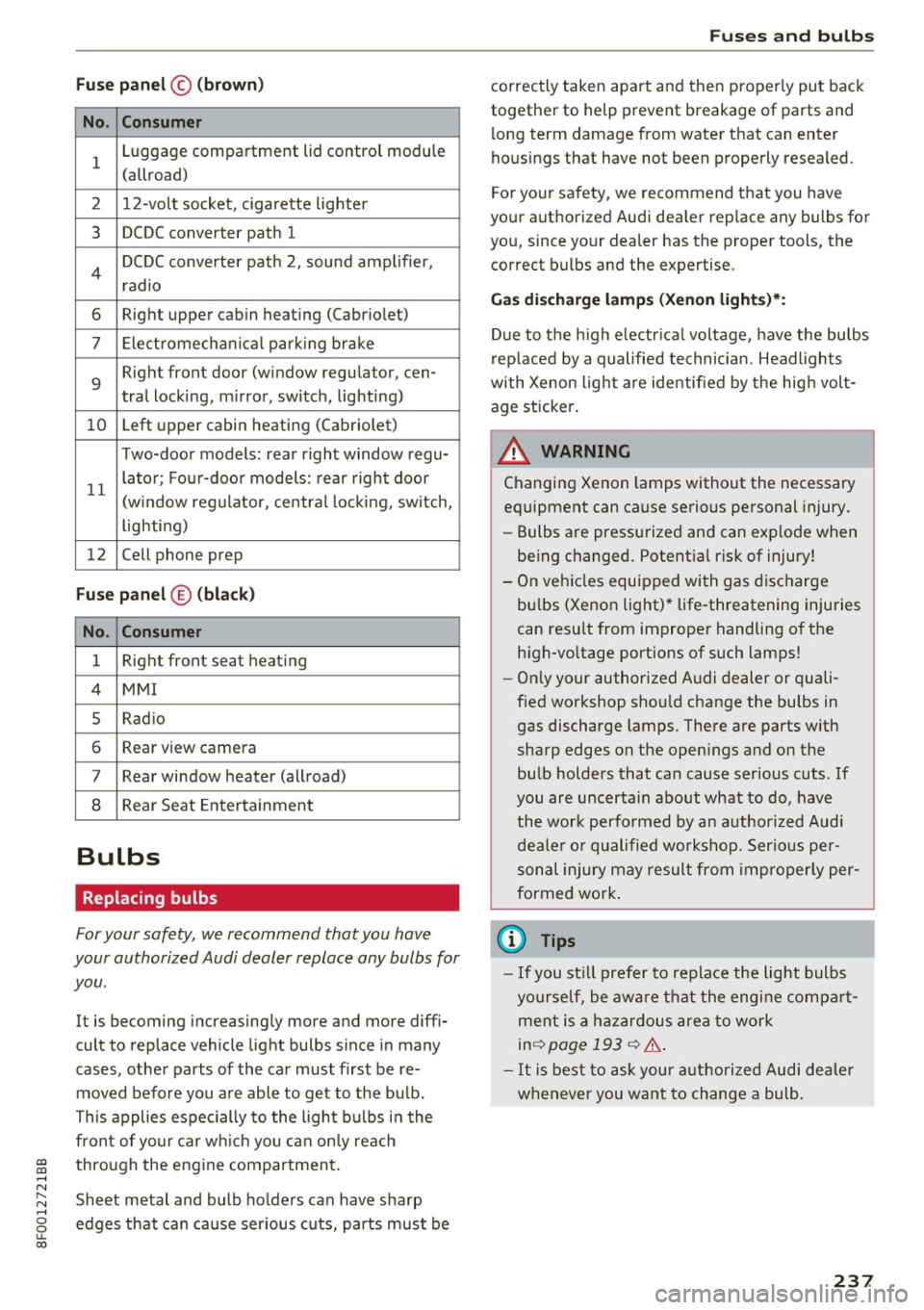
Fuse panel© (brown)
No . Consumer
1 Luggage compartment lid control module
(allroad)
2 12-volt socket, cigarette lighter
3 DCDC converter path 1
4 DCDC converter path 2, sound amplifier,
radio
6 Right upper cabin heating (Cabriolet)
7 Elect romechan ical park ing brake
9
Right front door (window regulator, cen-
tral locking, m irror, switch, lighting)
10 Left
upper cabin heating (Cabriolet)
Two-door models: rear r ight window regu-
11 lator; Four-door models:
rear right door
(w indow regulator, central locking, switch,
lighting)
12 Cell phone prep
Fuse panel ® (black )
No . Consumer
1 Right front seat
heating
4 MMI
5 Radio
6 Rear view camera
7 Rear window heater (allroad)
8 Rear Seat Entertainment
Bulbs
Replacing bulbs
For your safety, we recommend that you have
your authorized Audi dealer replace any bulbs for
you .
It is becoming increasingly more and more diffi
cult to replace vehicle light bulbs since in many
cases, other parts of the car must first be re
moved before you are able to get to the bu lb.
This applies especially to the light bulbs in the
front of your car which you can only reach
through the eng ine compartment.
Sheet metal and bulb ho lders can have sharp
edges that can cause serious cuts, parts must be
Fuses and bulbs
correctly taken apart and then properly put back
together to help prevent breakage of parts and
long term damage from water that can enter
hous ings that have not been properly resealed.
For your sa fety, we recommend that you have
your authorized Audi dea ler replace any bulbs for
you, since your dealer has the proper tools, the
correct bulbs and the expertise.
Gas discharge lamps (Xenon lights)*:
Due to the high e lectr ica l voltage, have the bulbs
replaced by a qualified technician. Headlights
with Xenon light are identified by the high volt
age sticker .
A WARNING
Changing Xenon lamps without the necessary
equipment can cause serious personal injury.
- Bulbs are pressurized and can explode when
being changed . Potential risk of injury!
- On vehicles equipped with gas discharge
bu lbs (Xenon light)* life-threatening injuries
can resu lt from improper handling of the
high -vo ltage portions of such lamps!
- Only your authorized Audi dealer or quali
fied workshop shou ld change the bulbs in
gas discharge lamps. There are parts w ith
sharp edges on the openings and on the bulb holders that can cause serious cuts . If
you are uncerta in about what to do, have
the wor k performed by an authorized Audi
dealer or qualified workshop. Serious per
sonal injury may result from improperly per
formed work.
(D Tips
- If you st ill prefer to replace the light bulbs
yourself, be awa re that the engine compa rt
ment is a hazardous area to work
inq page 193 q &,.
- It is best to ask your authorized Audi dealer
whenever you want to change a bulb.
237
Page 241 of 266
a:,
a:,
...... N
" N .... 0
0
LL co
@ Tips
The discharged battery must be properly con
nected to the vehicle's electrical system .
When jump starting or charg ing the battery,
never connect the negative ground cable to
the battery negative post because the battery
manager system must be able to detect the
battery's state of charge. Always connect the
negative ground cable to the negative ground
post of the battery manager control unit.
Use of jumper cables
Make sure to connect the jumper cable clamps in
exactly the order described below!
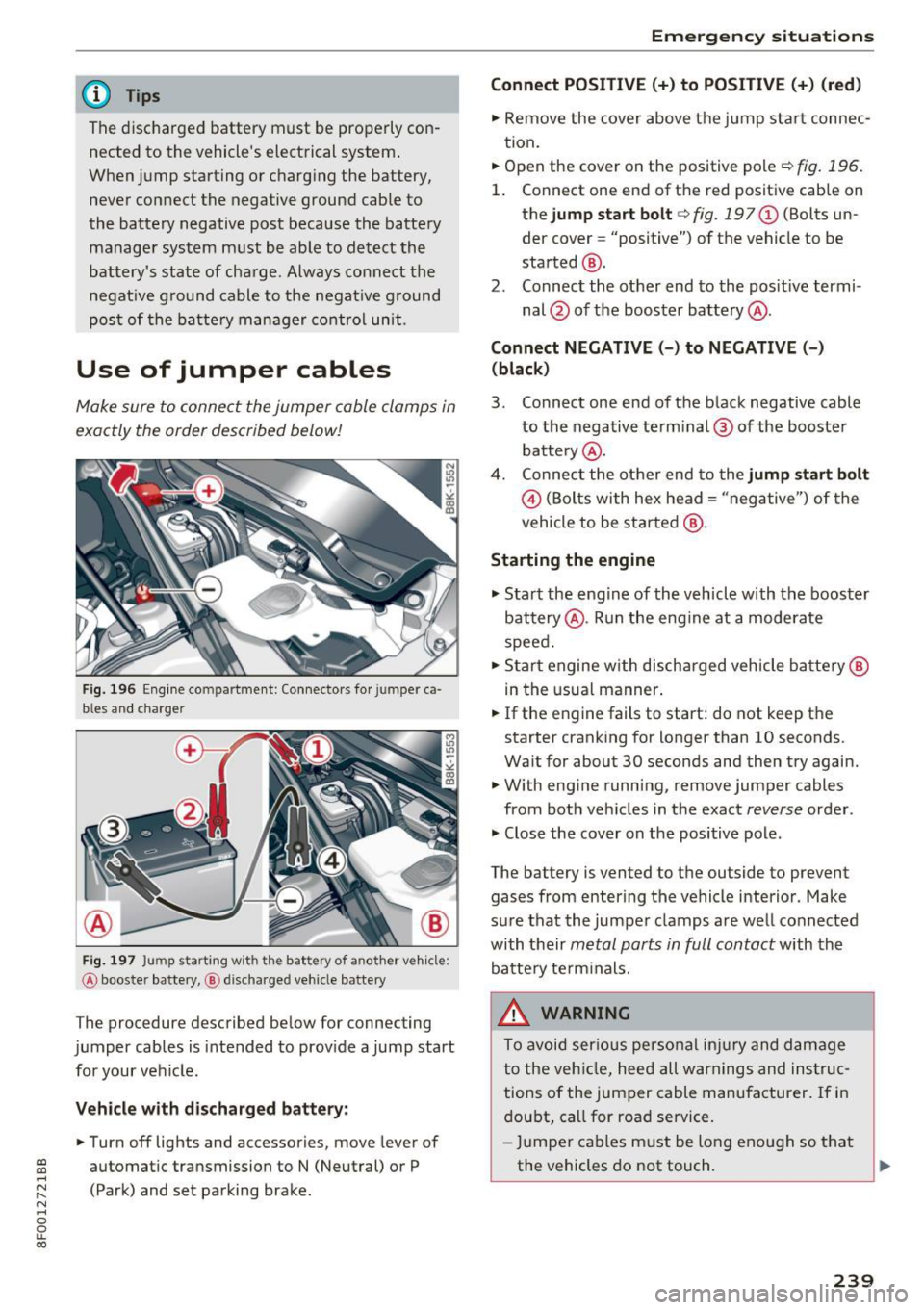
Fig. 196 Engine compartment: Connectors fo r jumper ca
bles and charger
Fig. 197 Jump starting with the battery of another vehicle:
@ booster battery, @ discharged vehicle battery
The procedure described below for connecting
jumper cables is intended to provide a jump start
for your vehicle.
Vehicle with discharged battery: .. Turn off lights and accessories, move lever of
automatic transmission to N (Neutral) or P
(Park) and set parking brake.
Emergency situations
Connect POSITIVE(+) to POSITIVE (+) (red)
.. Remove the cover above the jump start connec
tion.
.. Open the cover on the positive pole
c;, fig. 196.
1. Connect one end of the red positive cab le on
the jump start bolt
c;, fig. 197@ (Bolts un
der cover= "positive") of the vehicle to be
started @.
2. Connect the other end to the positive termi-
nal @ of the booster battery @.
Connect NEGATIVE(-) to NEGATIVE(-) (black)
3. Connect one end of the black negative cable
to the negative te rm i nal @of the booster
battery @.
4. Connect the other end to the jump start bolt
@ (Bolts with hex head= "negative") of the
vehicle to be started @.
Starting the engine
"' Start the engine of the vehicle with the booster
battery @. Run the engine at a moderate
speed.
"' Start engine w ith discharged vehicle battery@
in the usual manner.
"' If the eng ine fails to start: do not keep the
starter cranking for longer than 10 seconds.
Wait for about 30 seconds and then try again.
"' With engine running, remove jumper cables
from both vehicles in the exact
reverse order .
"' Close the cover on the positive pole.
The battery is vented to the outside to prevent gases from entering the vehicle interior. Make
sure that the jumper clamps are well connected
with their
metal parts in full contact with the
battery term inals.
_&. WARNING
To avoid serious personal injury and damage
to the veh icle, heed all warnings and instruc
tions of the jumper cable manufacturer. If in
doubt, call for road service.
- Jumper cables must be long enough so that
the vehicles do not touch. ""
239
Page 253 of 266
a:,
a:,
...... N r--. N ...... 0
0
LL 00
Automatic transmission . . . . . . . . . . . . . . . . . 81
Automatic Shift Lock (ASL) . . . . . . . . . . . . . 82
Driving . . . . . . . . . . . . . . . . . . . . . . . . . . . . . 83
Emergency mode . . . . . . . . . . . . . . . . . . . . . 86
Emergency release . . . . . . . . . . . . . . . . . . . . 87
Kick -down . . . . . . . . . . . . . . . . . . . . . . . . . . . 85
Manua l shift program . . . . . . . . . . . . . . . . . 85
Removal lock (ignition key) . . . . . . . . . . . . . 71
Selector lever . . . . . . . . . . . . . . . . . . . . . . . . 81
Automatic wipers . . . . . . . . . . . . . . . . . . . . . . 53
Auto Safety Hotline . . . . . . . . . . . . . . . . . . . 118
Average speed . . . . . . . . . . . . . . . . . . . . . . . . 22
Avoid damaging the vehicle . . . . . . . . . . . . . 175
B
Battery . . . . . . . . . . . . . . . . . . . . . . . . . . . . . . 14
Battery location inside the luggage compart-
ment ..............................
203
Charge level . . . . . . . . . . . . . . . . . . . . . . . . 173
Charging . . . . . . . . . . . . . . . . . . . . . . . . . . . 205
Energy management . . . . . . . . . . . . . . . . . 173
Important warnings when working on the
battery . . . . . . . . . . . . . . . . . . . . . . . . . . . .
203
Jump starting . . . . . . . . . . . . . . . . . . . . . . . 238
Replac ing the battery . . . . . . . . . . . . . . . . 206
Work ing on the battery . . . . . . . . . . . . . . . 203
Before driving . . . . . . . . . . . . . . . . . . . . . . . . 111
Belt positioner . . . . . . . . . . . . . . . . . . . . . . . 125
Belt tensioners . . . . . . . . . . . . . . . . . . . . . . . 128
Bio -ethanol (Fuel) . . . . . . . . . . . . . . . . . . . . . 189
Blended gasoline . . . . . . . . . . . . . . . . . . . . . 188
Blower (automatic climate control) . . . . . . . . 68
Booster seats . . . . . . . . . . . . . . . . . . . . . . . . 158
Brake fluid
Changing the brake fluid . . . . . . . . . . . . . .
202
Checking the brake fluid l evel . . . . . . . . . . 202
Brake system
Anti-lock brak ing system . . . . . . . . . . . . . . .
17
Brake fluid specifications for refill and re
placement . . . . . . . . . . . . . . . . . . . . . . . . .
202
Brake light defective . . . . . . . . . . . . . . . . . . 19
Brake power assist unit . . . . . . . . . . . . . . . 170
Brakes. .. .. .. ............... .. ..... 170
Ceramic brakes . . . . . . . . . . . . . . . . . . . . . . 170
Electromechan ical parking brake . . . . . . . . 76
Warning/indicator lights . . . . . . . . . . . . . . . 13
Worn brake pads symbol . . . . . . . . . . . . . . . 18
Index
Braking
Brake assist . . . . . . . . . . . . . . . . . . . . . . . .
167
Emergency braking function . . . . . . . . . . . . 77
braking guard . . . . . . . . . . . . . . . . . . . . . . . . . 88
Messages . . . . . . . . . . . . . . . . . . . . . . . . . . . 95
Settings . . . . . . . . . . . . . . . . . . . . . . . . . . . . 95
Break-in period
Brake pads .. .. .. .. ............. .. . .
Tires ..... .... .. .. ........ · · · · · · · · ·
Breaking in ... .. .. .. ............... . .
New tires
Bulbs
C
170
175
175
214
237
California Proposition 65 Warning . . . . . . . 194
Battery specific . . . . . . . . . . . . . . . . . . . . . 204
Capacities . . . . . . . . . . . . . . . . . . . . . . . . . . . 244
Engine oil . . . . . . . . . . . . . . . . . . . . . . . . . . 195
Care . . . . . . . . . . . . . . . . . . . . . . . . . . . . . . . . 182
Cargo area
refer to Luggage compartment ...... 63, 116
Catalytic converter . . . . . . . . . . . . . . . . . . . . 176
Center armrest . . . . . . . . . . . . . . . . . . . . . . . . 60
C en tral locking . . . . . . . . . . . . . . . . . . . . . . . .
27
Central locking switch . . . . . . . . . . . . . . . . . 31
Convenience key . . . . . . . . . . . . . . . . . . . . . . 30
Remote control key . . . . . . . . . . . . . . . . . . . 30
Ceramic brake rotors
New brake pads . . . . . . . . . . . . . . . . . . . . .
170
Certification . . . . . . . . . . . . . . . . . . . . . . . . . 249
Changing engine oil . . . . . . . . . . . . . . . . . . . 198
Checking
Engin e coolant level. . . . . . . . . . . . . . . . . .
199
Child restraints
Danger of using child restraints in the front
seat.... .. .. .. .. .. ............. ....
131
Where can I get add itiona l information
about child restra ints and their use? . . . .
166
Child restraint system anchors . . . . . . . . . . 163
Child safety . . . . . . . . . . . . . . . . . . . . . . . . . . 150
Impo rtant safety instructions for using child
safety seats . . . . . . . . . . . . . . . . . . . . . . . .
153
Installing a c hild restraint using the LATCH
system . . . . . . . . . . . . . . . . . . . . . . . . . . . .
165
251