bulb AUDI A5 COUPE 2008 User Guide
[x] Cancel search | Manufacturer: AUDI, Model Year: 2008, Model line: A5 COUPE, Model: AUDI A5 COUPE 2008Pages: 313, PDF Size: 13.86 MB
Page 276 of 313
Fuses and bulbs
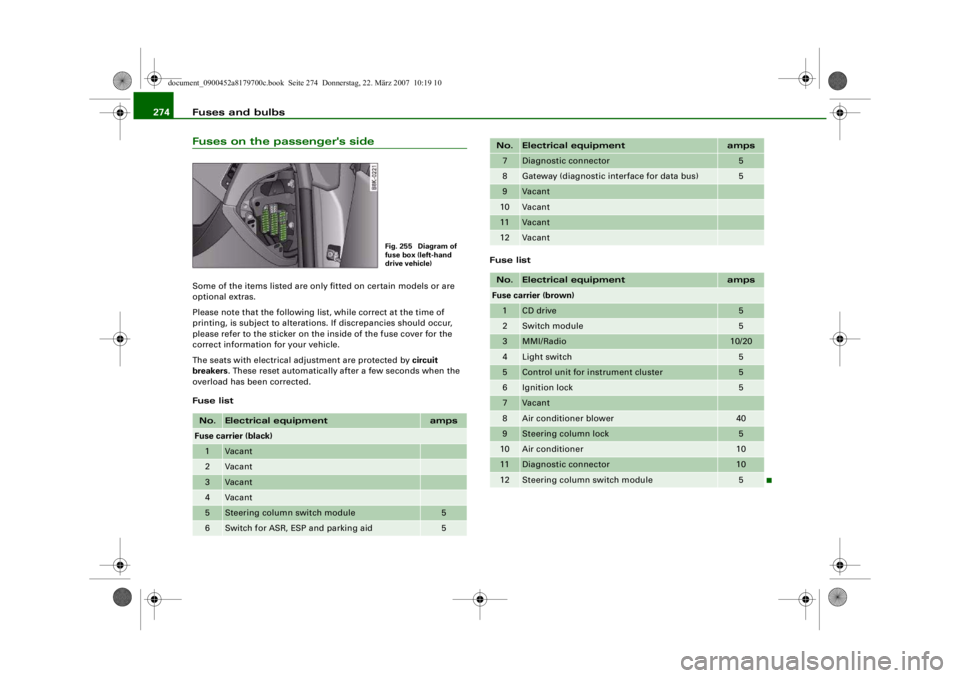
274Fuses on the passenger's sideSome of the items listed are only fitted on certain models or are
optional extras.
Please note that the following li st, while correct at the time of
printing, is subject to alterations. If discrepancies should occur,
please refer to the sticker on the inside of the fuse cover for the
correct information for your vehicle.
The seats with electrical adjustment are protected by circuit
breakers . These reset automatically after a few seconds when the
overload has been corrected.
Fuse list Fuse listNo.
Electrical equipment
amps
Fuse carrier (black)1
Vacant
2
Vacant
3
Vacant
4
Vacant
5
Steering column switch module
5
6
Switch for ASR, ESP and parking aid
5
Fig. 255 Diagram of
fuse box (left-hand
drive vehicle)
7
Diagnostic connector
5
8
Gateway (diagnostic in
terface for data bus)
5
9
Vacant
10
Vacant
11
Vacant
12
Vacant
No.
Electrical equipment
amps
Fuse carrier (brown)1
CD drive
5
2
Switch module
5
3
MMI/Radio
10/20
4
Light switch
5
5
Control unit for instrument cluster
5
6
Ignition lock
5
7
Vacant
8
Air conditioner blower
40
9
Steering column lock
5
10
Air conditioner
10
11
Diagnostic connector
10
12
Steering column switch module
5
No.
Electrical equipment
amps
document_0900452a8179700c.book Seite 274 Donnerstag, 22. März 2007 10:19 10
-+ ~
--11-
..
-
..
-
..
-
..
-
..
..
..
..
..
..
..
..
..
..
..
--4 -
-
-
T
-
-
-
-
-
+-
-
-
-
-
-
•
4-
---r
Page 277 of 313
Fuses and bulbs275
Controls
Safety
Driving tips
General maintenance
Self-help
Technical data
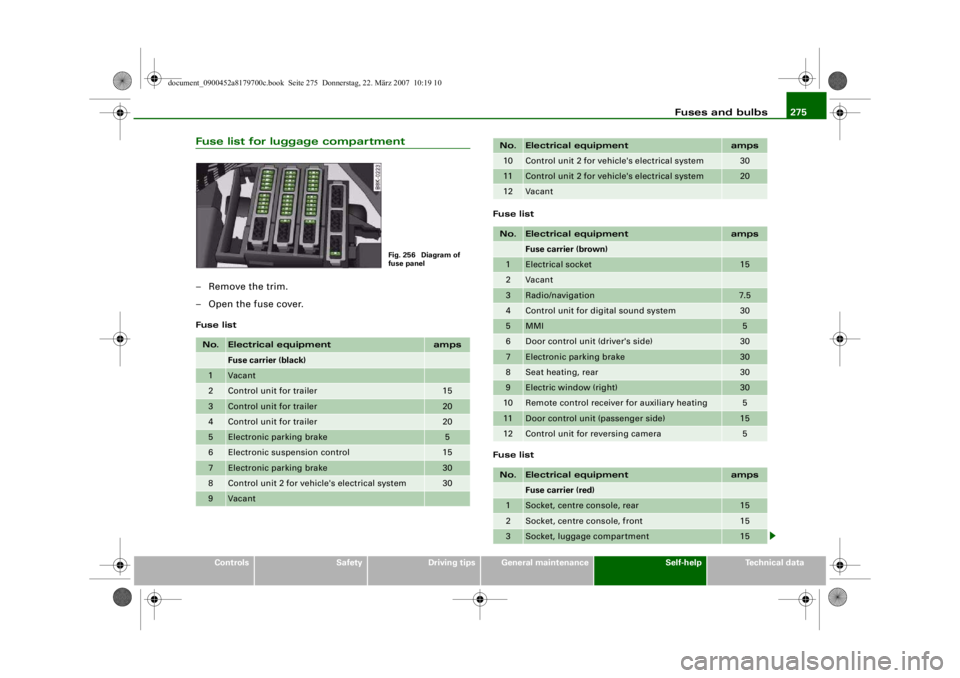
Fuse list for luggage compartment– Remove the trim.
– Open the fuse cover.Fuse list Fuse list
Fuse listNo.
Electrical equipment
amps
Fuse carrier (black)
1
Vacant
2
Control unit for trailer
15
3
Control unit for trailer
20
4
Control unit for trailer
20
5
Electronic parking brake
5
6
Electronic suspension control
15
7
Electronic parking brake
30
8
Control unit 2 for vehicle's electrical system
30
9
Vacant
Fig. 256 Diagram of
fuse panel
10
Control unit 2 for vehicle's electrical system
30
11
Control unit 2 for vehicle's electrical system
20
12
Vacant
No.
Electrical equipment
amps
Fuse carrier (brown)
1
Electrical socket
15
2
Vacant
3
Radio/navigation
7.5
4
Control unit for digital sound system
30
5
MMI
5
6
Door control unit (driver's side)
30
7
Electronic parking brake
30
8
Seat heating, rear
30
9
Electric window (right)
30
10
Remote control receiver for auxiliary heating
5
11
Door control unit (passenger side)
15
12
Control unit for reversing camera
5
No.
Electrical equipment
amps
Fuse carrier (red)
1
Socket, centre console, rear
15
2
Socket, centre console, front
15
3
Socket, luggage compartment
15
No.
Electrical equipment
amps
document_0900452a8179700c.book Seite 275
Donnerstag, 22. März 2007 10:19 10
--4 -
-
-
T
-
-
-
-
-+
-
+-
1111
-
-
1111
--
1111
-
-
1111
-
1111
--
1111
--
~
-~
Page 278 of 313
Fuses and bulbs
276BulbsChanging bulbs
Changing bulbs requires a certain degree of practical
skill.You can change the following bulbs for exterior lights yourself:•
Halogen headlights: Bulb for dipped headlights
•
Halogen headlights: Bulb for main beam headlights
•
Halogen headlights: Bulb for side lights
•
Xenon headlights*: Bulb for turn signals
•
Bulb for fog light
•
Bulbs for rear lights in boot lid
•
Bulbs for rear lights in side panel
•
Bulbs for number plate light
The following bulbs should only be changed by a qualified work-
shop :
•
Halogen headlights: Bulb for turn signals
•
Xenon headlights*: Light source for daytime running
lights/parki ng lights
•
Bulb for headlights: Bi-xenon lights ⇒
•
Light source for turn signal in exterior mirror housing
•
Light source for high-level brake light
As a rule, you require a certain degree of practical skill to change
defective bulbs. This applies in particular to those bulbs which are
only accessible from the engine compartment.
If in doubt, we recommend that you have defective bulbs changed
by a qualified workshop or qualified mechanic.
If you do decide to change bulbs in the engine compartment your-
self, be aware of the safety risks involved ⇒page 231 ⇒ .
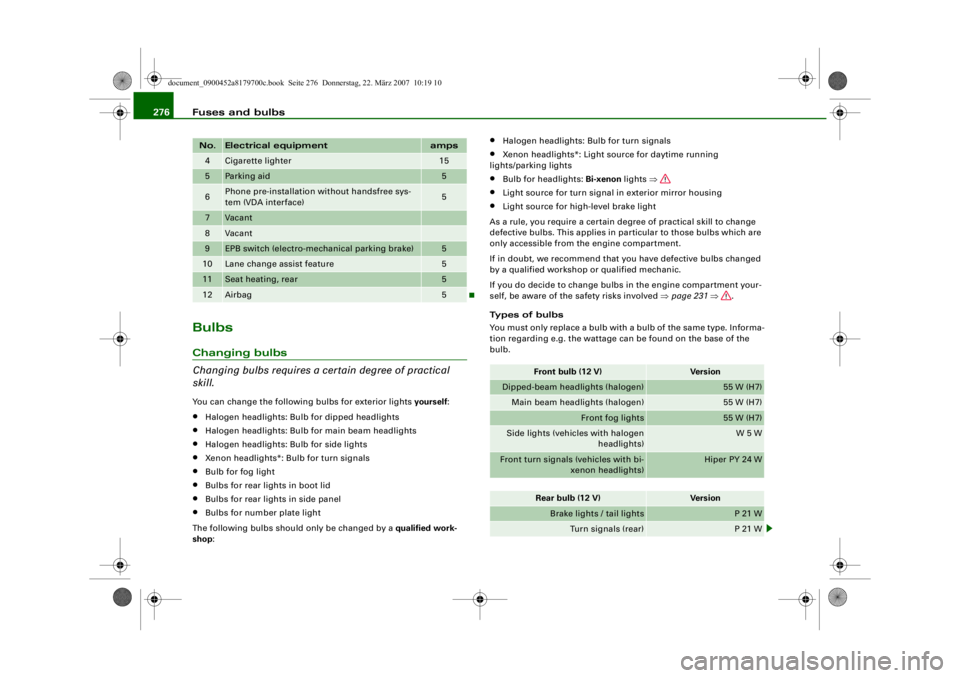
Types of bulbs
You must only replace a bulb with a bulb of the same type. Informa-
tion regarding e.g. the wattage can be found on the base of the
bulb.
4
Cigarette lighter
15
5
Parking aid
5
6
Phone pre-installation without handsfree sys-
tem (VDA interface)
5
7
Vacant
8
Vacant
9
EPB switch (electro-mechanical parking brake)
5
10
Lane change assist feature
5
11
Seat heating, rear
5
12
Airbag
5
No.
Electrical equipment
amps
Front bulb (12 V)
Vers io n
Dipped-beam headlights (halogen)
55 W (H7)
Main beam headlights (halogen)
55 W (H7)
Front fog lights
55 W (H7)
Side lights (vehicles with halogen headlights)
W 5 W
Front turn signals (vehicles with bi-
xenon headlights)
Hiper PY 24 W
Rear bulb (12 V)
Vers io n
Brake lights / tail lights
P 21 W
Turn signals (rear)
P 21 W
document_0900452a8179700c.book Seite 276 Donnerstag, 22. März 2007 10:19 10
--4 -
1111
-
T
1111
-
6
1111
-
1111
-
1111
-
•
6
-+ +-
Page 279 of 313
Fuses and bulbs277
Controls
Safety
Driving tips
General maintenance
Self-help
Technical data
WARNING
•
Take particular care when working on components in the
engine compartment if the engine is warm - risk of burns!
•
Bulbs are sensitive to pressure. The glass can break when you
touch the bulb, causing injury.
•
Incorrect handling of the high-voltage element of xenon gas-
discharge bulbs* can have potentially fatal consequences.
•
When changing bulbs, please take care not to injure yourself on
sharp edges, in particular on the headlight housing.Caution
•
Always remove the ignition key before carrying out any work on
the electrical system - danger of short circuiting!
•
Switch off the lights or parking lights before you change a bulb.
•
Take good care to avoid damaging any components.
•
Removing the lights in particular can lead to the paintwork
becoming damaged. This is another reason why we recommend
having the bulbs changed by a qualified workshop.For the sake of the environment
Please ask your specialist retailer how to dispose of used bulbs in
the proper manner.
Note
Place the parts you have removed on a soft cloth so that they do not
become scratched.
•
Please check at regular intervals that all lighting (especially the
exterior lighting) on your vehicle is functioning properly. This is not
only in the interest of your own sa fety, but also in that of all other
road users.
•
Before changing a bulb, make sure you have the correct new
bulb.
•
Do not touch the glass part of the bulb with your bare hands, use
a cloth or paper towel instead. Otherwise, the fingerprints left on
the glass will vaporise as a result of the heat generated by the bulb,
be deposited on the reflector and impair its surface.
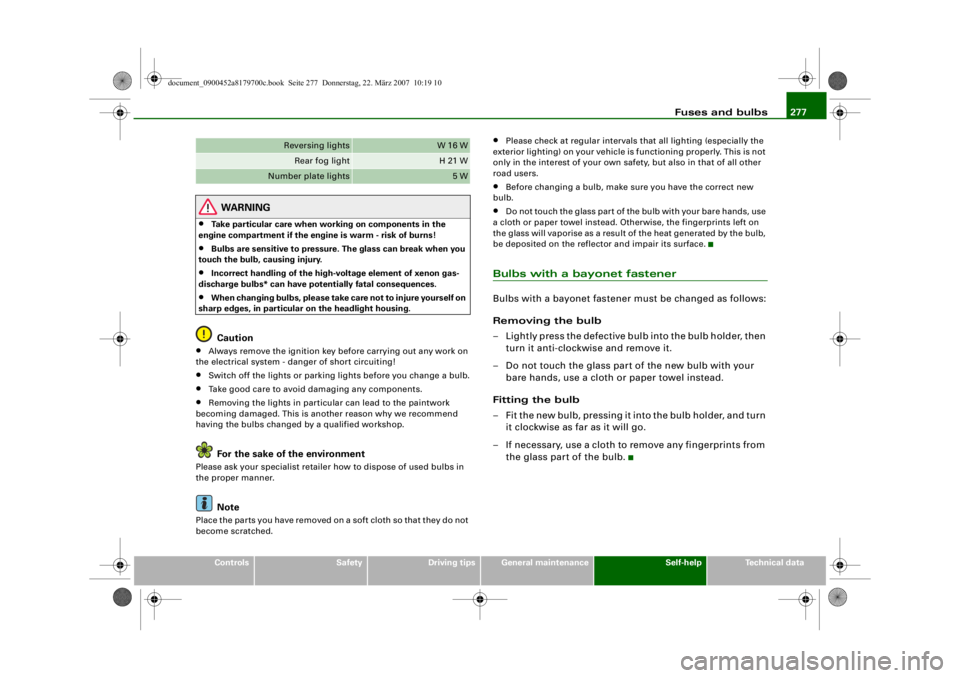
Bulbs with a bayonet fastenerBulbs with a bayonet fastener must be changed as follows:
Removing the bulb
– Lightly press the defective bulb into the bulb holder, then turn it anti-clockwise and remove it.
– Do not touch the glass part of the new bulb with your bare hands, use a cloth or paper towel instead.
Fitting the bulb
– Fit the new bulb, pressing it into the bulb holder, and turn it clockwise as far as it will go.
– If necessary, use a cloth to remove any fingerprints from the glass part of the bulb.
Reversing lights
W 16 W
Rear fog light
H 21 W
Number plate lights
5 W
document_0900452a8179700c.book Seite 277 Donnerstag, 22. März 2007 10:19 10
--4 -
-T
•
-+
0
+-
•
[I]
Page 280 of 313
Fuses and bulbs
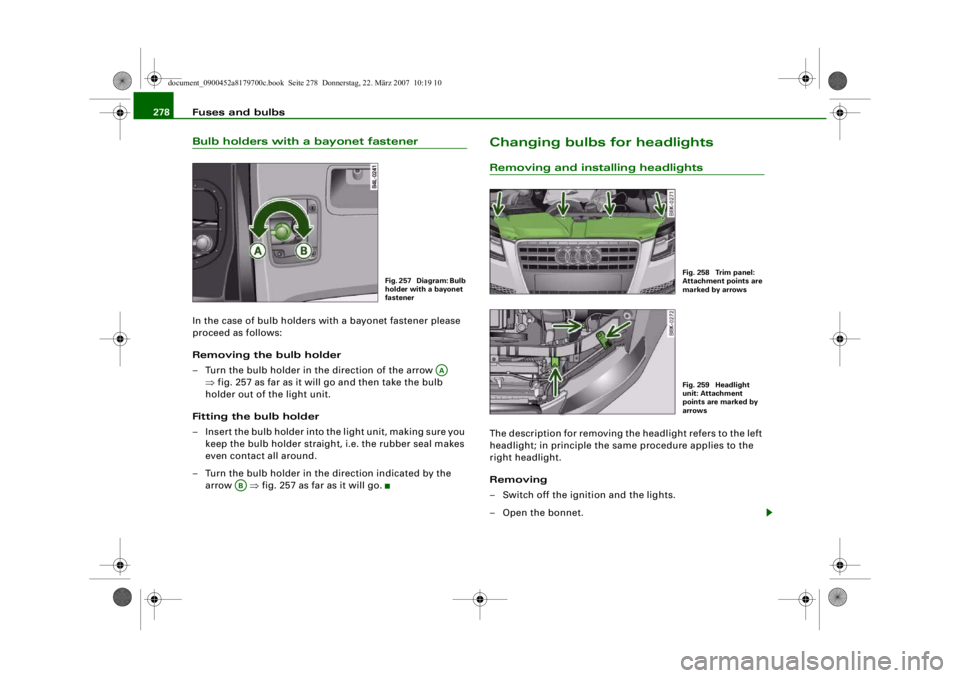
278Bulb holders with a bayonet fastenerIn the case of bulb holders with a bayonet fastener please
proceed as follows:
Removing the bulb holder
– Turn the bulb holder in the direction of the arrow
⇒fig. 257 as far as it will go and then take the bulb
holder out of the light unit.
Fitting the bulb holder
– Insert the bulb holder into the light unit, making sure you keep the bulb holder straight , i.e. the rubber seal makes
even contact all around.
– Turn the bulb holder in the direction indicated by the arrow ⇒fig. 257 as far as it will go.
Changing bulbs for headlightsRemoving and installing headlightsThe description for removing the headlight refers to the left
headlight; in principle the same procedure applies to the
right headlight.
Removing
– Switch off the ignition and the lights.
– Open the bonnet.
Fig. 257 Diagram: Bulb
holder with a bayonet
fastener
AA
AB
Fig. 258 Trim panel:
Attachment points are
marked by arrowsFig. 259 Headlight
unit: Attachment
points are marked by
arrows
document_0900452a8179700c.book Seite 278 Donnerstag, 22. März 2007 10:19 10
--4 -
-T
-+ +-
•
Page 281 of 313
Fuses and bulbs279
Controls
Safety
Driving tips
General maintenance
Self-help
Technical data
– Take the screwdriver and the interchangeable Torx socket
out of the vehicle tool kit.
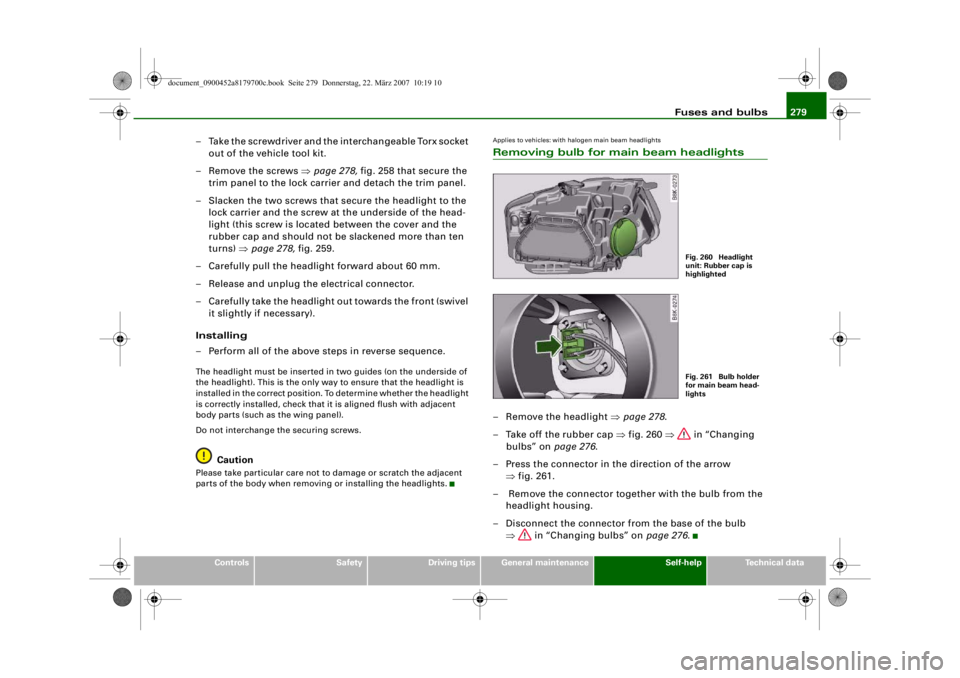
– Remove the screws ⇒page 278, fig. 258 that secure the
trim panel to the lock carrier and detach the trim panel.
– Slacken the two screws that secure the headlight to the lock carrier and the screw at the underside of the head-
light (this screw is located between the cover and the
rubber cap and should not be slackened more than ten
turns) ⇒page 278, fig. 259.
– Carefully pull the headlight forward about 60 mm.
– Release and unplug th e electrical connector.
– Carefully take the headlight out towards the front (swivel it slightly if necessary).
Installing
– Perform all of the above steps in reverse sequence.The headlight must be inserted in two guides (on the underside of
the headlight). This is the only w ay to ensure that the headlight is
installed in the correct position. To determine whether the headlight
is correctly installed, check that it is aligned flush with adjacent
body parts (such as the wing panel).
Do not interchange the securing screws.
Caution
Please take particular care not to damage or scratch the adjacent
parts of the body when removing or installing the headlights.
Applies to vehicles: with halogen main beam headlightsRemoving bulb for main beam headlights– Remove the headlight ⇒page 278 .
– Take off the rubber cap ⇒fig. 260 ⇒ in “Changing
bulbs” on page 276.
– Press the connector in the direction of the arrow ⇒fig. 261.
– Remove the connector together with the bulb from the headlight housing.
– Disconnect the connector from the base of the bulb ⇒ in “Changing bulbs” on page 276.
Fig. 260 Headlight
unit: Rubber cap is
highlightedFig. 261 Bulb holder
for main beam head-
lights
document_0900452a8179700c.book Seite 279 Donnerstag, 22. März 2007 10:19 10
--4 -
-T
-+ +-
CD
•
Page 282 of 313
Fuses and bulbs
280Applies to vehicles: with halogen main beam headlightsInstalling the bulb for the main beam headlights
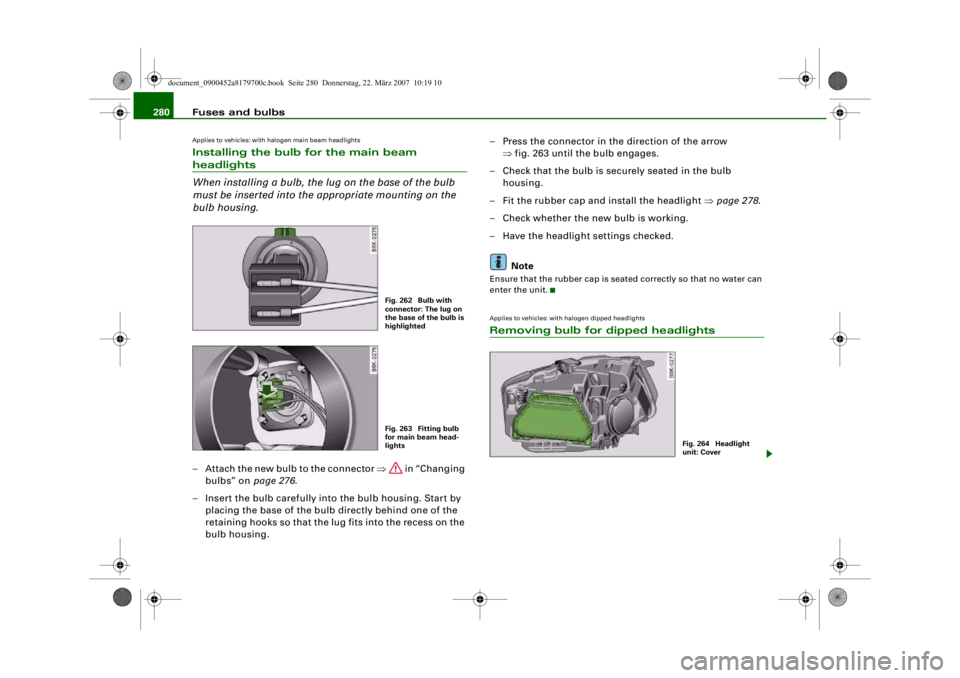
When installing a bulb, the lug on the base of the bulb
must be inserted into the appropriate mounting on the
bulb housing.– Attach the new bulb to the connector ⇒ in “Changing
bulbs” on page 276.
– Insert the bulb carefully into the bulb housing. Start by placing the base of the bulb directly behind one of the
retaining hooks so that the lug fits into the recess on the
bulb housing. – Press the connector in the direction of the arrow
⇒fig. 263 until the bulb engages.
– Check that the bulb is securely seated in the bulb housing.
– Fit the rubber cap and install the headlight ⇒page 278 .
– Check whether the new bulb is working.
– Have the headlight settings checked.
Note
Ensure that the rubber cap is seated correctly so that no water can
enter the unit.Applies to vehicles: with halogen dipped headlightsRemoving bulb for dipped headlights
Fig. 262 Bulb with
connector: The lug on
the base of the bulb is
highlightedFig. 263 Fitting bulb
for main beam head-
lights
Fig. 264 Headlight
unit: Cover
document_0900452a8179700c.book Seite 280 Donnerstag, 22. März 2007 10:19 10
--4 -
-T
[I]
•
-+ +-
Page 283 of 313
Fuses and bulbs281
Controls
Safety
Driving tips
General maintenance
Self-help
Technical data
– Remove the headlight ⇒page 278.
– Swivel the retaining clip of the cover upwards.
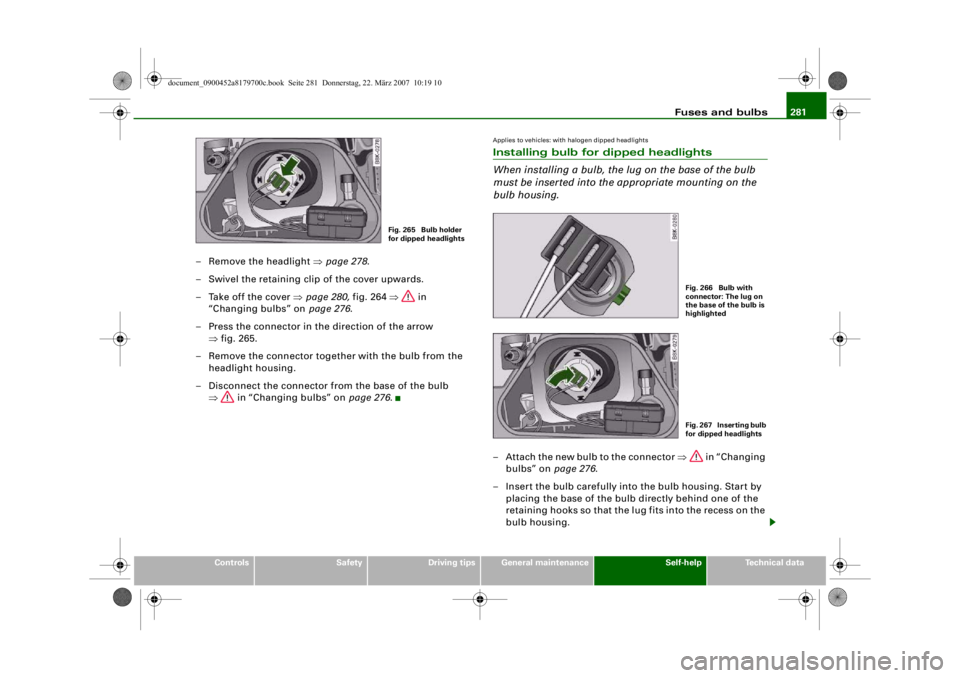
– Take off the cover ⇒page 280, fig. 264 ⇒ in
“Changing bulbs” on page 276.
– Press the connector in the direction of the arrow ⇒fig. 265.
– Remove the connector together with the bulb from the headlight housing.
– Disconnect the connector fr om the base of the bulb
⇒ in “Changing bulbs” on page 276.
Applies to vehicles: with halogen dipped headlightsInstalling bulb for dipped headlights
When installing a bulb, the lug on the base of the bulb
must be inserted into the appropriate mounting on the
bulb housing.– Attach the new bulb to the connector ⇒ in “Changing
bulbs” on page 276.
– Insert the bulb carefully into the bulb housing. Start by placing the base of the bulb directly behind one of the
retaining hooks so that the lug fits into the recess on the
bulb housing.
Fig. 265 Bulb holder
for dipped headlights
Fig. 266 Bulb with
connector: The lug on
the base of the bulb is
highlightedFig. 267 Inserting bulb
for dipped headlights
document_0900452a8179700c.book Seite 281 Donnerstag, 22. März 2007 10:19 10
--4 -
-T
-+ +-
•
Page 284 of 313
Fuses and bulbs
282
– Press the connector in the direction of the arrow ⇒page 281, fig. 267 until the bulb engages.
– Check that the bulb is securely seated in the bulb housing.
– Fit the cover and swivel the retaining clip downwards.
– Install the headlight ⇒page 278.
– Check whether the new bulb is working.
– Have the headlight settings checked.Applies to vehicles: with xenon headlight bulbsChanging bulb for turn signalsThe bulb is secured in the bulb carrier with a bayonet
fastener.
– Remove the headlight ⇒page 278 .
– Take off the rubber cap (small cover) and remove the bulb carrier.
– Lightly press the defective bulb into the bulb carrier, then turn it anti-clockwise and remove it.
– Do not touch the glass part of the new bulb with your bare hands, use a cloth or paper towel instead.
– Fit the new bulb, pressing it into the bulb carrier, and turn it clockwise as far as it will go.
– If necessary, use a cloth to re move any fingerprints from
the glass part of the bulb.
– Insert the bulb carrier into the headlight. Note
Ensure that the rubber cap is seated
correctly so that no water can
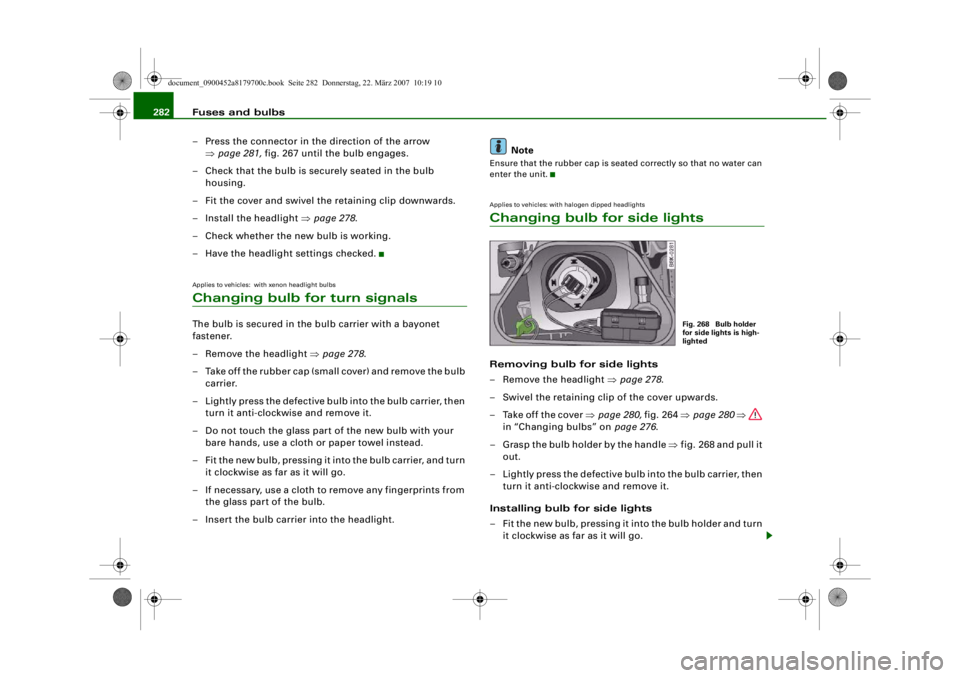
enter the unit.Applies to vehicles: with halogen dipped headlightsChanging bulb for side lightsRemoving bulb for side lights
– Remove the headlight ⇒page 278 .
– Swivel the retaining clip of the cover upwards.
– Take off the cover ⇒page 280, fig. 264 ⇒page 280 ⇒
in “Changing bulbs” on page 276.
– Grasp the bulb holder by the handle ⇒fig. 268 and pull it
out.
– Lightly press the defective bulb into the bulb carrier, then turn it anti-clockwise and remove it.
Installing bulb for side lights
– Fit the new bulb, pressing it into the bulb holder and turn it clockwise as far as it will go.
Fig. 268 Bulb holder
for side lights is high-
lighted
document_0900452a8179700c.book Seite 282 Donnerstag, 22. März 2007 10:19 10
--4 -
-
[I]
T
•
•
-+ +-
Page 285 of 313
Fuses and bulbs283
Controls
Safety
Driving tips
General maintenance
Self-help
Technical data
– Use a clean cloth to remove any fingerprints from the
glass part of the bulb.
– Insert the bulb carrier into the headlight.
– Fit the cover and swivel the retaining clip downwards.
– Install the headlight ⇒page 278 .
– Check whether the new bulb is working.Changing bulb for front fog lightsPreparations
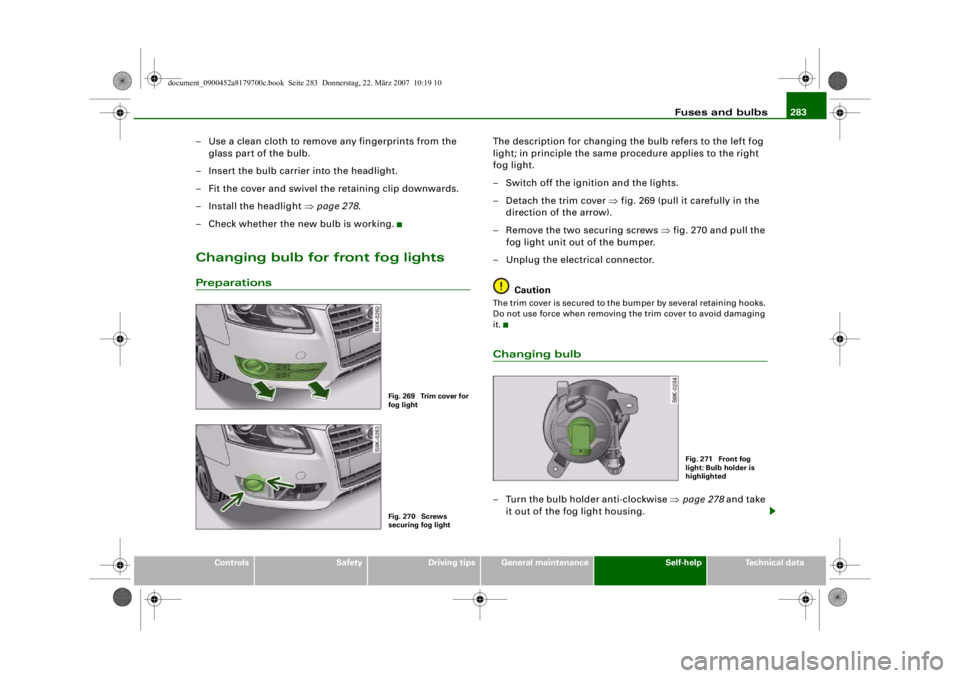
The description for changing the bulb refers to the left fog
light; in principle the same procedure applies to the right
fog light.
– Switch off the ignition and the lights.
– Detach the trim cover ⇒ fig. 269 (pull it carefully in the
direction of the arrow).
– Remove the two securing screws ⇒fig. 270 and pull the
fog light unit out of the bumper.
– Unplug the electrical connector.
CautionThe trim cover is secured to the bumper by several retaining hooks.
Do not use force when removing the trim cover to avoid damaging
it.Changing bulb– Turn the bulb holder anti-clockwise ⇒page 278 and take
it out of the fog light housing.
Fig. 269 Trim cover for
fog lightFig. 270 Screws
securing fog light
Fig. 271 Front fog
light: Bulb holder is
highlighted
document_0900452a8179700c.book Seite 283 Donnerstag, 22. März 2007 10:19 10
--4 -
-T
•
---- 0
-+
•
+-