change time AUDI A5 COUPE 2008 User Guide
[x] Cancel search | Manufacturer: AUDI, Model Year: 2008, Model line: A5 COUPE, Model: AUDI A5 COUPE 2008Pages: 313, PDF Size: 13.86 MB
Page 111 of 313

Heating and cooling109
Controls
Safety
Driving tips
General maintenance
Self-help
Technical data
Applies to vehicles: with deluxe automatic air conditioner plusEconomical operation of the air conditioner
Economical operation of the ai r conditioner will help to
save fuel.When the air conditioner is operating in the cooling mode it
reduces engine power and increases fuel consumption. To
ensure that the cooling mode is activated only when really
necessary, please note the following points:
– Switch off the cooling mode by pressing the AC button
(LED off) if you wish to save fuel.
– You should also switch off the cooling mode by pressing
the AC button (LED off) if you open the windows or the
tilting panorama roof* while driving.
– If the vehicle has heated up after standing in the sun, open the windows and doors for a short time to cool the
vehicle.
For the sake of the environmentBy saving fuel you also reduce th e amount of pollutants emitted
from your vehicle.
Deluxe automatic air conditioner plus
- basic settingsApplies to vehicles: with deluxe automatic air conditioner plusGeneral notes
You can change the basic setti ngs for the air conditioner
on the MMI* or on the so und system control console.– Press the function selector button marked .
– Press the control button for AC ⇒fig. 124
3).
3)The display for the MMI basic differs slightly.
Fig. 124 MMI display:
AC menu optionFig. 125 MMI display:
Setup AC
CAR
document_0900452a8179700c.book Seite 109 Donnerstag, 22. März 2007 10:19 10
--4 -
-T
-+ +-
•
Page 112 of 313

Heating and cooling
110
– Select the desired air conditioner settings using the rotary pushbutton ⇒page 109, fig. 125.The following functions are available:•
Automatic air recirculation ⇒page 110
•
Synchronisation ⇒page 110
•
Auxiliary heating* ⇒ page 111
•
Auxiliary ventilation* ⇒page 111
•
Running time* ⇒page 113
•
Timer status* ⇒page 112
•
Timer 1* ⇒ page 112
•
Timer 2* ⇒page 112
•
Timer 3* ⇒page 112
•
Supplementary heater* ⇒page 110
Applies to vehicles: with deluxe automatic air conditioner plusAutomatic recirculation
If the outside air is polluted, an air purity sensor in the
vehicle will automatically switch on the air recirculation.To prevent fumes, etc. in the outside air from entering the interior,
we recommend that the automatic air recirculation should be
switched on at all times.
If the air purity sensor in the air conditioner system detects a certain
concentration of fumes in the outside air, the control unit will either
pass the incoming air through the pollution filter or automatically
switch on the air recirc ulation. If there is a high concentration of
pollution in the outside air, the air conditioner automatically
switches to air recirculation and cuts off the supply of air from the
outside. As soon as the level of pollution decreases, air is fed into
the vehicle from the outside again.
If the windows mist up when the automatic air recirculation is on,
press the
button immediately. The automatic air recirculation can switch itself off in certain condi-
tions. If the outside temperature is
less than about +10 °C, the auto-
matic air recirculation will only operate for 30 seconds. If the air
conditioner is switched to the ECON mode, or if the outside temper-
ature is less than about -1 °C, the automatic air recirculation will
only operate for 15 seconds.
Applies to vehicles: with deluxe automatic air conditioner plusSynchronisation
The air conditioner settings can be synchronised for all
passengers.When the synchronisation function is on, the driver's settings are
also applied to the front passenge r or vice versa. Any subsequent
changes to the air conditioner setti ngs (except for the seat heating*)
are also applied to the other occupant.
You can still change the setting on the “synchronised” side (this will
deactivate the synchronisation function).Applies to vehicles: with diesel engineSupplementary heater– Set the Supplementary heater to auto or off .Models with a diesel engine are equipped with a supplementary
heater to help warm up the interior more quickly. At outside temper-
atures below about +5 °C the supp lementary heater is switched on
(and off) automatically when the engine is running, depending on
the coolant temperature, the temperat ure in the vehicle interior and
the temperature the heater is set to.
document_0900452a8179700c.book Seite 110 Donnerstag, 22. März 2007 10:19 10
--4 -
-T
•
-+
•
•
+-
•
Page 115 of 313

Heating and cooling113
Controls
Safety
Driving tips
General maintenance
Self-help
Technical data
Activating a timer
– Press the button.
– Press the control button for AC.
– Select the Timer status and then select the timer you
want to start first.Three timers are available. This allows you to pre-set different
starting times and running times for the auxiliary heating/ ventila-
tion.
When the time set on one of the ti mers elapses, the date automati-
cally changes to the next day and the timer status is reset to off.
Each timer first has to be activated before it will switch on the auxil-
iary heating/ventilation at the time you have set.
The timers are not activated automa tically. This prevents the auxil-
iary heating/ventilation from switching on repeatedly when the
vehicle is not being used.
Note
Before activating the ti mer, make sure that the correct time and date
settings have been ente red. If the time and/or date are not correct,
the auxiliary heating will come on late or not at all. Please refer to
the MMI Operating Instructions fo r information on how to set the
date and time.
Applies to vehicles: with auxiliary heating - under development at the time of printingSetting the running time– Press the button.
– Press the control button for AC.
– Select Running time and then choose the time.The running time for the auxiliary heating/ventilation can be set to
a time between 15 and 60 minutes. The auxiliary heating/ventilation
will switch itself off at the end of the programmed running time.
CAR
Fig. 129 MMI display:
Running time
CAR
document_0900452a8179700c.book Seite 113 Donnerstag, 22. März 2007 10:19 10
--4 -
-T
-+ [{
+-
•
•
Page 116 of 313

Heating and cooling
114Applies to vehicles: with auxiliary heating - under development at the time of printingRemote control
The auxiliary heating and auxiliary ventilation can also be
switched on or off with the remote control.Switching on
– Press the button for about 2 seconds to activate the
auxiliary heating/ventilation ⇒fig. 130.
Switching off
– Press the button for about 2 seconds to switch off the auxiliary heating/ventilation. Changing the battery
– Push back and remove the battery cover on the remote
control ⇒fig. 131.
– Change the battery. The diagram in the battery compart- ment shows how the battery should be fitted. The new
battery must be of the same type as the old battery.
– Re-fit the battery cover.
When it is switched on, the auxili ary heating or auxiliary ventilation
starts immediately and remains on for the period set in the menu.
The maximum running time is 60 minutes.
If you want to switch the system on again after the end of the
programmed running time, press the button .
Transmitter indicator lamp
The transmitter indicator lamp will flash accordingly to show
whether the command you sent via the remote control was
successful.
When you switch the system on by pressing the button the
indicator lamp will flash green for about 30 seconds to confirm that
the heating/ ventilation has been switched on. When you switch the
system off by pressing the button the indicator lamp will
flash red to confirm that the heatin g/ ventilation has been switched
off.
If the remote control is outside th e transmitting range the indicator
lamp will flash red slowly. If there is a fault in the system (e.g. fuel
level is down to reserve), the indicator lamp will flash red rapidly. In
both cases the command will not be executed.
When the remote control battery is almost completely flat, the
transmitter indicator lamp will not light up and no commands will
be executed.
Fig. 130 Remote
control for auxiliary
heatingFig. 131 Remote
control: Changing
battery
A1
OFF
A2
A1
A3
A1
OFF
A2
document_0900452a8179700c.book Seite 114 Donnerstag, 22. März 2007 10:19 10
--4 -
-T
D
-+
D
+-
D
D
Page 127 of 313
Driving125
Controls
Safety
Driving tips
General maintenance
Self-help
Technical data
lights or in stop-and-g
o traffic. When the Audi hold assist function
is on, you don't have to keep your foot on the brake to prevent the
vehicle from accidentally rolling away. Once it detects that the
vehicle is stopped, Audi hold assist keeps the vehicle stationary. The
green symbol
in the instrument cluste r indicates that the func-
tion is activated. You can now ta ke your foot off the brake pedal.
As soon as you drive off in the normal way, the parking brake will
automatically be released and the vehicle will start moving.
If the conditions for Audi hold assist change and the function is
switched off as a result, the parking brake will be applied automati-
cally to ensure that the vehicle is parked safely. The diode in the
button will go out when the Audi hold assist function is switched
off.
WARNING
The intelligent technology in Audi hold assist cannot defy the laws
of physics. Do not let the extra convenience provided by Audi hold
assist tempt you into taking a safety risk.•
Audi hold assist cannot keep the vehicle stationary in all condi-
tions on a gradient (e.g. if the road is slippery or icy).
•
Audi hold assist must be swit ched on again each time the
engine is started – Risk of accident!
•
Never get out of the vehicle wh en the engine is running and
Audi hold assist is switched on – Risk of accident!
•
Always ensure that the vehicle is stopped properly and safely
to avoid injury to yourself and others.Caution
Switch off the Audi hold assist function before driving the vehicle
into a car wash.
Note
•
Audi hold assist can be switched on only when the driver's door
is closed, the driver's seat belt is buckled and the engine is running.
•
Audi hold assist prevents auto matic vehicles from creeping
forwards when the brake pedal is released with the car in gear.
•
When the vehicle has been stationary for an extended period,
Audi hold assist will automatically apply the parking brake. In this
case, the green symbol
in the instrument cluster display will
change to red
.
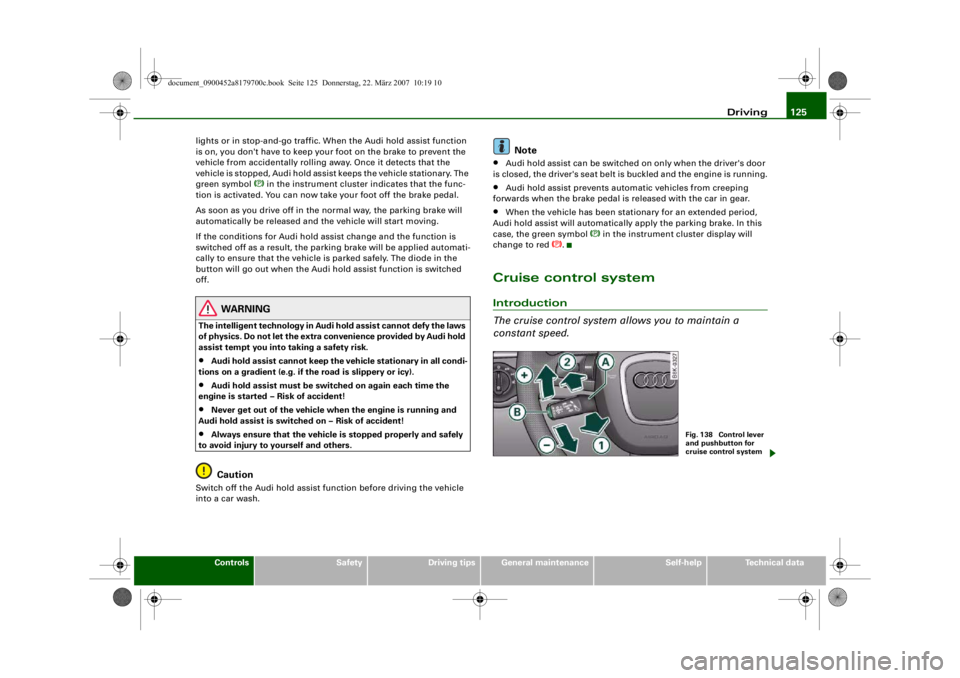
Cruise control systemIntroduction
The cruise control system allows you to maintain a
constant speed.
Fig. 138 Control lever
and pushbutton for
cruise control system
document_0900452a8179700c.book Seite 125 Donnerstag, 22. März 2007 10:19 10
--4 -
-
[I]
T
•
-+ +-
(D
Page 128 of 313
Driving
126The cruise control system allows you to drive at a constant speed of
30 km/h or higher.
A constant speed is maintained by adjusting the engine power or
braking the vehicle accordingly (while in cruise mode).
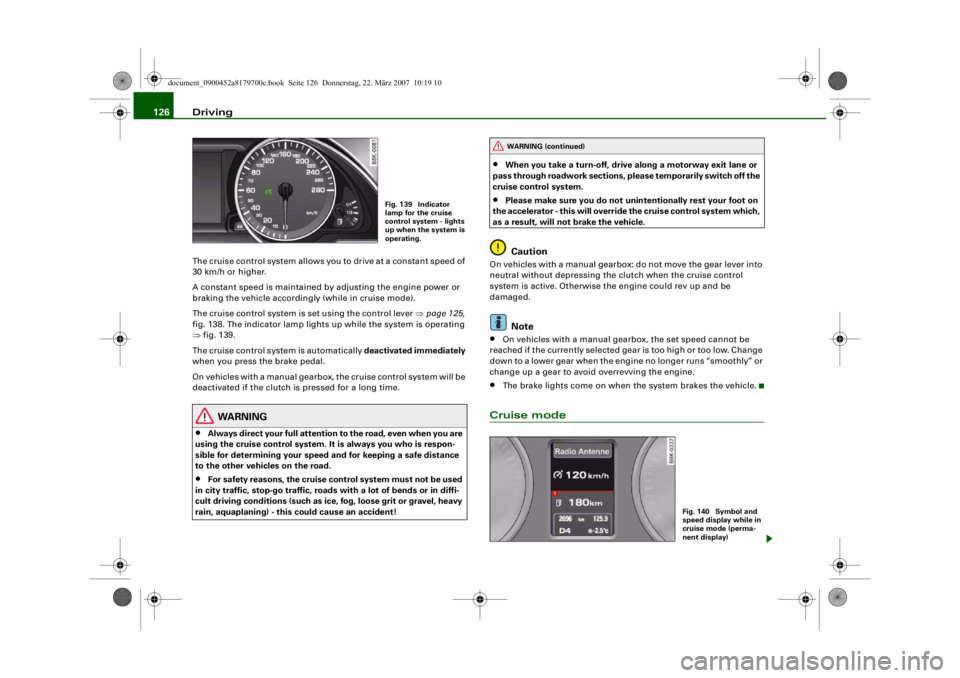
The cruise control system is set using the control lever ⇒page 125,
fig. 138. The indicator lamp lights up while the system is operating
⇒ fig. 139.
The cruise control system is automatically deactivated immediately
when you press the brake pedal.
On vehicles with a manual gearbox, the cruise control system will be
deactivated if the clutch is pressed for a long time.
WARNING
•
Always direct your full attention to the road, even when you are
using the cruise control system. It is always you who is respon-
sible for determining your speed and for keeping a safe distance
to the other vehicles on the road.
•
For safety reasons, the cruise control system must not be used
in city traffic, stop-go traffic, roads with a lot of bends or in diffi-
cult driving conditions (such as ice, fog, loose grit or gravel, heavy
rain, aquaplaning) - this could cause an accident!
•
When you take a turn-off, drive along a motorway exit lane or
pass through roadwork sections, please temporarily switch off the
cruise control system.
•
Please make sure you do not unintentionally rest your foot on
the accelerator - this will override the cruise control system which,
as a result, will not brake the vehicle.Caution
On vehicles with a manual gearbox: do not move the gear lever into
neutral without depressing the clutch when the cruise control
system is active. Otherwise the engine could rev up and be
damaged.
Note
•
On vehicles with a manual gearbox, the set speed cannot be
reached if the currently selected gear is too high or too low. Change
down to a lower gear when the engine no longer runs “smoothly” or
change up a gear to avoid overrevving the engine.
•
The brake lights come on when the system brakes the vehicle.
Cruise mode
Fig. 139 Indicator
lamp for the cruise
control system - lights
up when the system is
operating.
WARNING (continued)
Fig. 140 Symbol and
speed display while in
cruise mode (perma-
nent display)
document_0900452a8179700c.book Seite 126 Donnerstag, 22. März 2007 10:19 10
--4 -
-T
CD
-+
[I]
+-
•
Page 135 of 313
Automatic gearbox133
Controls
Safety
Driving tips
General maintenance
Self-help
Technical data
– Press the brake pedal and at the same time press in the
interlock button.Automatic selector lever lock
The selector lever is locked in the P and N positions when the igni-
tion is on. The brake pedal must be depressed before the lever can
be moved out of either of these positions. The following message
appears in the instrument display as a reminder for the driver when
the selector lever is in position P or N:
WHEN STATIONARY APPLY FOOTBRAKE WHILE SELECTING GEAR.
The selector lever lock only works if the vehicle is stationary or
driving at speeds up to 5 km/h. At higher speeds the selector lever
lock in the N position is disengaged automatically.
The selector lever lock is not engaged if the selector lever is moved
quickly through position N (e.g. when shifting from R to D). This
makes it possible, for instance, to “rock” the vehicle backwards and
forwards if it is stuck in snow or mud. The selector lever lock
engages automatically if the brake pedal is not depressed and the
lever is in position N for more than about a second.
Interlock button
The interlock button on the selector lever handle prevents the driver
from inadvertently engaging particul ar gears. Press the button in to
disengage the selector lever lock. Th e illustration shows the selector
lever positions in which the button has to be pressed, highlighted in
colour ⇒page 132, fig. 146.
Safety interlock for ignition key
The key can only be withdrawn with the ignition switched off and
the selector lever in position P. When the ignition key is removed,
the selector lever is locked in position P.
Applies to vehicles: with multitronic®Kick-down feature
The kick-down feature is designed to give maximum
acceleration.When the accelerator pedal is pressed right down past the point of
resistance at full throttle, the gearbox will select a lower gear,
depending on road speed and engine speed. While you keep the
accelerator depressed the engine speed is automatically controlled
to give your vehicle maximum acceleration.
WARNING
Please note that if the road surf ace is slippery or wet, the kick-
down feature could cause the driv ing wheels to spin, which could
result in skidding.Applies to vehicles: with multitronic®Dynamic gear control program (DCP)
The multitronic
® gearbox is controlled electronically.
The vehicle is equipped with an electronically controlled gearbox.
The gear ratios are selected automatically according to preset gear-
shift programmes.
When you drive at moderate speeds the gearbox will select the most
economical shift programme. It will then change up early and delay
the downshifts to give better fuel economy.
If you drive at higher speeds with heavy acceleration, if you open the
throttle quickly, or if you use the kick-down or the car's maximum
speed, the gearbox will automaticall y select the more “sporty” shift
programmes.
The gearbox is self-adapting, and continuously selects the most
suitable shift programme. At the same time, the driver can also
make the gearbox switch to a more "sporty" programme by pressing
document_0900452a8179700c.book Seite 133 Donnerstag, 22. März 2007 10:19 10
--4 -
-T
-+ +-
•
Page 142 of 313
Audi parking system
140reached the danger (collision) zone. The driver should then not
move backwards/forwards any further ⇒ .
The graphic display in the MMI screen ⇒page 149 can be switched
off. The acoustic proximity warning will, however, remain activated.
The graphic display will be deacti vated as soon as you press a func-
tion selector button on the MMI control console. The graphic
display will appear again the next time you park the vehicle. The
graphic display in the MMI screen can also be switched on again
manually using the switch
⇒ page 138, fig. 152. For more infor-
mation on the MMI cont rol console please refer to the MMI Oper-
ating Manual.
WARNING
•
The sensors have blind spots in which obstacles are not regis-
tered. It is particular ly important to ensure that there are no small
children or animals near the vehicle, as the sensors may not
always be able to detect them.
•
The parking aid cannot replace th e full concentration of the
driver. The driver is always resp onsible for safety during parking
and other manoeuvres. Always keep a close watch on the area
around the vehicle.
•
Please note that low obstacles detected by the system may no
longer be registered by the sensors as the car moves closer, so the
system will not give any further warning. Certain kinds of obsta-
cles (such as wire fences, chains, thin painted posts or trailer draw
bars, etc.) may not always be de tected by the system (accident
risk).Note
•
There is a slight delay in the picture display.
•
You can change the settings for the graphic display in the MMI
⇒ page 149 .
•
To ensure that the acoustic parking aid works properly, the
sensors must be kept clean and free of snow and ice. Please observe
the additional notes on ⇒page 152 .
•
Please refer to the notes on towing ⇒page 147 .
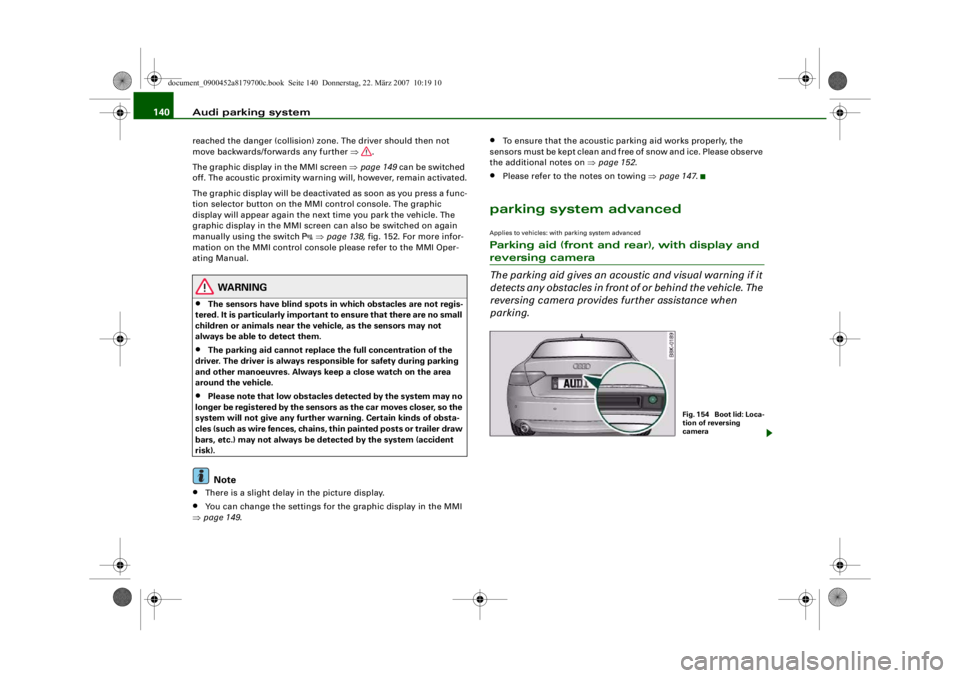
parking system advancedApplies to vehicles: with parking system advancedParking aid (front and rear), with display and reversing camera
The parking aid gives an acoustic and visual warning if it
detects any obstacles in front of or behind the vehicle. The
reversing camera provides further assistance when
parking.
Fig. 1 54 Bo o t lid : Lo c a-
tion of reversing
camera
document_0900452a8179700c.book Seite 140 Donnerstag, 22. März 2007 10:19 10
--4 -
-T
•
-+ +-
[I)
Page 144 of 313
Audi parking system
142displayed on the MMI screen. The warnings will then return to the
normal volume if the vehicle approaches the detected obstacle
again.
Graphic display
The segments in the MMI display indicate the distance between the
vehicle and an obstacle. The number of segments shown depends
on the obstacle in front of or be hind the vehicle. The closer the
vehicle gets to the obstacle the closer the segments move towards
the vehicle in the graphic ⇒page 141, fig. 155. At the latest when
the penultimate segment is highlighted the vehicle has reached the
danger (collision) zone. The driver should then not move back-
wards/forwards any further ⇒.
The graphic display in the MMI screen ⇒page 149 can be switched
off. The acoustic proximity warning will, however, remain activated.
The graphic display will be deacti vated as soon as you press a func-
tion selector button on the MMI control console. The graphic
display in the MMI screen can also be switched on again manually
using the switch
. For more information on the MMI control
console please refer to the MMI Operating Manual.
Reversing camera (Rear View)
The mirrored image of the picture supplied by the reversing camera
⇒ page 145, fig. 160 is shown in the MMI display. The picture
supplied by the reversing camera also includes orientation lines
and area markings which are projected onto the image to assist you
when parking ⇒page 143 . The red line in the picture ⇒page 143,
fig. 156/ ⇒page 143, fig. 157 shows the collision zone. From here at
the latest, the driver should not reverse any further ⇒.
If your vehicle is near an obstac le, the proximity graphic will also
appear in the reversing camera image. This superimposed graphic
helps the driver to localise the critical area of the vehicle.
If the MMI screen is showing the graphic display you can switch to
the image of the reversing camera by pressing the control button
for the function Rear View ⇒ page 141, fig. 155. If the MMI screen is showing the
image of the reversing camera you
can switch to the graphic display by pressing the control button for
the function Graphic ⇒ page 145, fig. 160.
The image of the reversing camera in the MMI screen ⇒page 149
can be switched off. The acoustic proximity warning will, however,
remain activated.
The image of the reversing camera will be deactivated as soon as
you press a function selector button on the MMI control console.
The image of the reversing camera will be shown again the next
time you park the vehicle. The im age of the reversing camera can
also be switched on again manually using the switch
. For more
information on the MMI control console please refer to the MMI
Operating Manual.
WARNING
•
The sensors have blind spots in which obstacles are not regis-
tered. It is particularly important to ensure that there are no small
children or animals near the vehicle, as the sensors may not
always be able to detect them.
•
The parking aid cannot replace the full concentration of the
driver. The driver is always resp onsible for safety during parking
and other manoeuvres . Always keep a close watch on the area
around the vehicle.
•
Please note that low obstacles detected by the system may no
longer be registered by the sensor s as the car moves closer, so the
system will not give any further warning. Certain kinds of obsta-
cles (such as wire fences, chains, thin painted posts or trailer draw
bars, etc.) may not always be detected by the system (accident
risk).Note
•
There is a slight delay in the picture display.
•
You can change the settings fo r the graphic display and the
reversing camera in the MMI ⇒ page 149.
document_0900452a8179700c.book Seite 142 Donnerstag, 22. März 2007 10:19 10
--4 -
-T
-+ +-
[I]
Page 151 of 313
Audi parking system149
Controls
Safety
Driving tips
General maintenance
Self-help
Technical data
Applies to vehicles: with parking system plusSwitching graphic display on and off
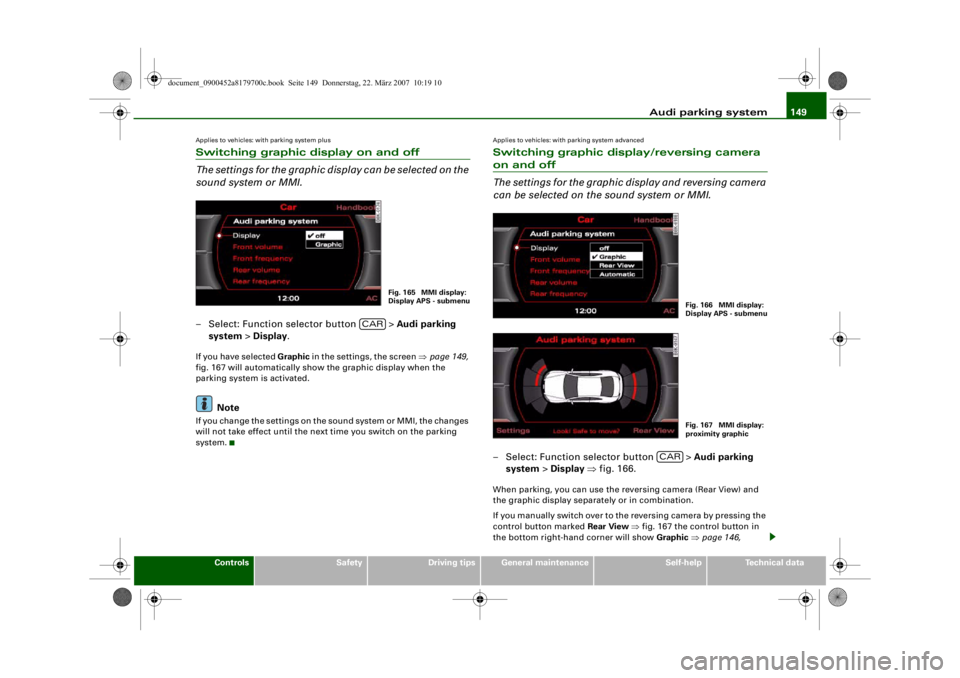
The settings for the graphic display can be selected on the
sound system or MMI.– Select: Function selector button > Audi parking
system > Display .If you have selected Graphic in the settings, the screen ⇒page 149,
fig. 167 will automatically show the graphic display when the
parking system is activated.
Note
If you change the settings on the sound system or MMI, the changes
will not take effect until the next time you switch on the parking
system.
Applies to vehicles: with parking system advancedSwitching graphic display/reversing camera on and off
The settings for the graphic display and reversing camera
can be selected on the sound system or MMI.– Select: Function selector button > Audi parking
system > Display ⇒ fig. 166.When parking, you can use the reversing camera (Rear View) and
the graphic display separately or in combination.
If you manually switch over to the reversing camera by pressing the
control button marked Rear View ⇒ fig. 167 the control button in
the bottom right-hand corner will show Graphic ⇒ page 146,
Fig. 165 MMI display:
Display APS - submenu
CAR
Fig. 166 MMI display:
Display APS - submenuFig. 167 MMI display:
proximity graphic
CAR
document_0900452a8179700c.book Seite 149 Donnerstag, 22. März 2007 10:19 10
--4 -
-T
-+ +-
[I]
•