fuel AUDI A5 COUPE 2008 User Guide
[x] Cancel search | Manufacturer: AUDI, Model Year: 2008, Model line: A5 COUPE, Model: AUDI A5 COUPE 2008Pages: 313, PDF Size: 13.86 MB
Page 37 of 313

Driver information system35
Controls
Safety
Driving tips
General maintenance
Self-help
Technical data
Note
On some models the speed limit warning 1
and speed limit
warning 2
will also be displayed as yellow symbols. These always
appear as a small symbol at the top of the display ⇒page 28 .
Applies to vehicles: with advanced keyKey not in vehicle
Key not in vehicle
This message will appear together with the symbol
if the remote
control key is removed from the vehicle while the engine is running.
This is to remind you not to continue driving without the key (for
example if you change drivers).
If the remote control key is not in the vehicle you will not be able to
switch on the ignition or restar t the engine after it has been
switched off. You will also not be able to lock the vehicle from the
outside.
Light sensor/ rain sensor defective
Automatic headlights/ automatic wipers defective
If the symbol appears, this means that the light sensor/ rain
sensor is not functioning. For safety reasons, the dipped beam
headlights will then be switched on permanently when the light
switch is set to the AUTO position. However, you can still switch the
lights on and off in the normal way with the light switch. If the rain
sensor is defective, the functions operated via the windscreen wiper
lever will still be available. You should have the light sensor/ rain
sensor checked by a qualified wo rkshop as soon as possible.
Brake pads worn
⇒page 36
Battery power*
⇒page 36
Bulb monitor*
Bulb failure*
⇒page 36
Check engine oil level
⇒page 37
Engine oil sensor defective
⇒page 37
Fuel level low
⇒page 36
Washer fluid level low*
⇒page 36
advanced key*
Key not in vehicle
⇒page 35
Light sensor/ rain sensor defec-
tive
⇒page 35
Diesel particulate filter*
obstructed
⇒page 37
Dynamic headlight range con-
trol* defective
⇒page 37
Battery in remote control key
⇒page 40
Electro-mechanical
parking brake
⇒page 123
adaptive light* defective
⇒page 37
Ignition lock defective
⇒page 37
Windscreen wiper defective
⇒page 38
document_0900452a8179700c.book Seite 35 Donnerstag, 22. März 2007 10:19 10
--4 -
-
[I]
T
•
-----
-+
•
+-
-
-
•
-
Page 38 of 313

Driver information system
36Brake pads worn
Brake pads!
If the symbol lights up, have the front brake pads (and, for
safety's sake the rear pads as well) inspected by a qualified
workshop.
Applies to vehicles: with bulb monitorBulb monitor
The bulb monitor checks whethe r the lights on the vehicle
are working.The bulb monitor checks whether the lights on the vehicle are
working. If it detects a defective bulb on the vehicle it will show a
yellow warning symbol together with a message indicating which
light is not working.
Bulb failure
If the symbol
lights up, this means that one of the turn signals
(front or rear), headlights, brake li ghts, rear lights, fog lights or the
rear fog light is not working.
WARNING
•
Bulbs are sensitive to pressure. The glass can break when you
touch the bulb, causing injury.
•
Incorrect handling of the high-voltage element of xenon gas-
discharge bulbs* can have potentially fatal consequences.Note
Have the components repaired or replaced by a qualified
workshop.
Applies to vehicles: with washer fluid warning systemWasher fluid level low
Please top up washer fluid
If the symbol lights up, top up the fluid for the windscreen
washer and headlight washer system* ⇒page 242 .
Fuel level low
Please refuel
When this symbol
comes on for the first time, there are about
8 litres of fuel left in the tank. You should fill up as soon as possible
⇒ page 228 .
If this warning symbol lights up al though the fuel tank is sufficiently
filled, there is a malfunction in the fuel tank system. The display will
also show the driver message Tank system malfunction ! Contact
workshop . Please contact a qualified workshop.
Applies to vehicles: with battery power warning systemBattery power
If battery power drops to a level at which you may encounter prob-
lems when starting the engine, th e display will show the symbol
and the driver message Low battery charge: Battery will be charged
while driving .
Please bear in mind that the starting ability of the engine may be
impaired while this message is shown.
Message comes on and goes out again
If the message appears in the display after the ignition is switched
on or while driving, and goes out again after a period of time, the
battery has been charged up again sufficiently while the vehicle was
being driven.
document_0900452a8179700c.book Seite 36 Donnerstag, 22. März 2007 10:19 10
--4 -
-T
• •
-+
•
+-
[I)
•
Page 39 of 313

Driver information system37
Controls
Safety
Driving tips
General maintenance
Self-help
Technical data
Message comes on and does not go out
If the message appears in the display after the ignition is switched
on or while driving, and does not go out again, the battery is not
being maintained at the proper power level. Starting reliability may
be impaired. You should have the battery checked by a qualified
workshop as soon as possible.
Check engine oil level
Please check oil level
If the symbol lights up, check the engine oil level as soon as
possible ⇒page 234 . Top up the oil at the next opportunity
⇒ page 234 .
Engine oil sensor defective
Oil level ! Sensor defective
If the
symbol lights up, take the ve hicle to a qualified workshop
and have the oil level sensor checked. Until then it is advisable to
check the oil level every time you fill up with fuel ⇒page 234 .
Applies to vehicles: with diesel engine and diesel particulate filterDiesel particulate filter obstructed
Particle filter. See Owner's Manual
When the symbol
lights up you can assist the self-cleaning func-
tion of the filter by driving accordingly. You should drive at a speed
of at least 60 km/h (engine sp eed about 2,000 rpm) for about
15 minutes in 4th or 5th gear, or with the selector lever in position S
on vehicles with automatic gearbox* . As a result of the increase in
temperature the soot in the filter wi ll be burned off. The symbol will
disappear once the cleaning proc ess has been completed success-
fully. If the symbol
does not go out, please contact a qualified work-
shop and have the fault rectified.
For further information on the diesel particulate filter ⇒page 205 .
WARNING
It is essential that you adjust your speed to suit the weather, road,
terrain and traffic conditions. The recommended driving speed
must never lead to the driver disregarding the traffic regulations.Applies to vehicles: with dynamic headlight range controlHeadlight range control defective
Headlight range control defective
This symbol
indicates a malfunction in the dynamic headlight
range control. Take the vehicle to a qualified workshop to have the
dynamic headlight range control function repaired.
Applies to vehicles: with adaptive lightadaptive light defective
adaptive light defective
This symbol
indicates that the adaptive light is defective. Take
the vehicle to a qualified workshop to have the headlights and/or
the control unit for the adaptive light repaired.
Ignition lock defective
Ignition lock defective
If the symbol
lights up in the display, there is a malfunction in
the electronic ignition lock. Take the vehicle to a qualified workshop
to have the problem remedied.
document_0900452a8179700c.book Seite 37 Donnerstag, 22. März 2007 10:19 10
--4 -
-T
•
-+
•
+-
•
•
•
Page 66 of 313
Lights and vision
64
Note•
Check that the washer fluid reservoir is full before starting a long
journey. Filling the reservoir ⇒page 242 .
•
Worn or dirty wiper blades can cause smearing on the glass
which can also impair the effectiveness of the rain sensor. Please
check the wiper blades regularly.
Applies to vehicles: with headlight washersHeadlight washer systemThe headlight washer system only operates when the lights
are switched on.
– Move the automatic wash and wipe lever to position ⇒page 62, fig. 64.The headlight washer system is al ways activated the first time you
operate the automatic wash and wipe. Subsequently, it is only acti-
vated about every five wash and wipe cycles. The headlights are
always washed if you hold the lever for longer than about
2 seconds.
The headlight washer jets come out of the bumper automatically
(under water pressure).
Clean off stubborn dirt (insects, etc.) from the lenses at regular
intervals, for instance when stopping for fuel.
To ensure that the system works properly in winter, keep the nozzle
holders free of snow and remove any ice with a de-icer spray.
Service position
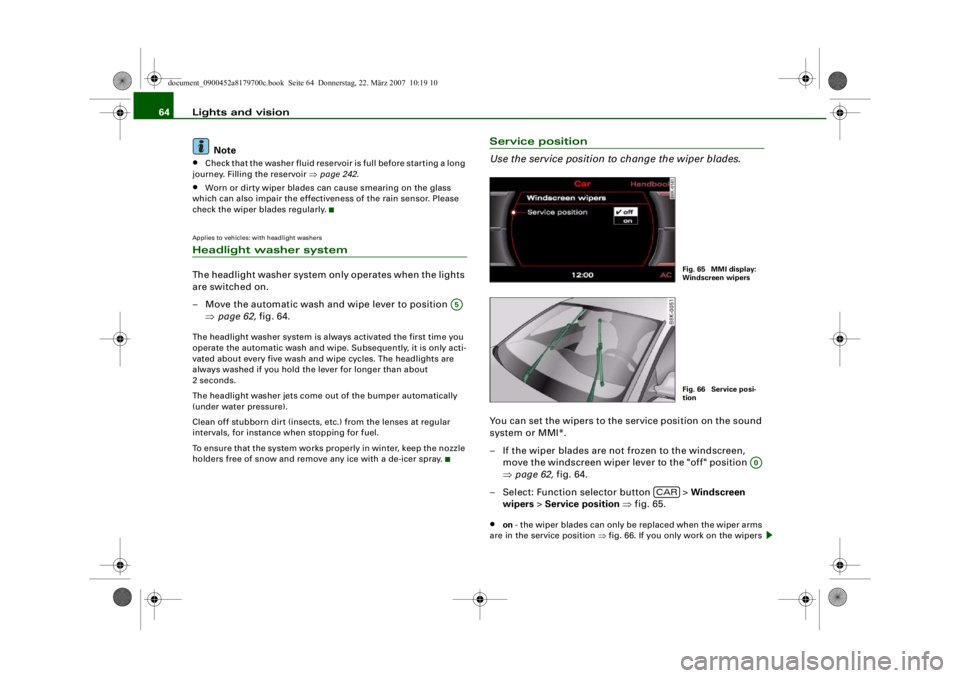
Use the service position to change the wiper blades.You can set the wipers to the service position on the sound
system or MMI*.
– If the wiper blades are not frozen to the windscreen, move the windscreen wiper lever to the "off" position
⇒page 62, fig. 64.
– Select: Function selector button > Windscreen
wipers > Service position ⇒fig. 65.•
on - the wiper blades can only be replaced when the wiper arms
are in the service position ⇒fig. 66. If you only work on the wipers
A5
Fig. 65 MMI display:
Windscreen wipersFig. 66 Service posi-
tion
A0
CAR
document_0900452a8179700c.book Seite 64 Donnerstag, 22. März 2007 10:19 10
--4 -
-T
•
-+ +-
•
Page 87 of 313
Seats and storage85
Controls
Safety
Driving tips
General maintenance
Self-help
Technical data
Roof load
Loads carried on the roof must be securely attached. The
car's handling is affected when transporting loads.The maximum permissible roof load for your vehicle is 75 kg. The
load limit applies to the combined weight of the carrier system and
the load itself.
It will not be possible to carry the full maximum load if the roof
carrier you are using is rated for a load which is less than this figure.
Do not exceed the maximum weight limit for the roof carrier, which
is listed in the fitting instructions.
WARNING
•
To prevent accidents, loads ca rried on the roof must be
securely attached.
•
Do not exceed the maximum roof load for the vehicle, the
maximum axle loads or the maximu m gross vehicle weight, as this
could cause an accident.
•
When transporting heavy or bulky loads on the roof, bear in
mind that the car's handling is af fected by the extra weight on the
roof and a possible susceptibility to cross winds. Adjust your
speed and driving style accord ingly to avoid accidents.For the sake of the environment
The increased air resistance when the roof carrier is fitted means
that the vehicle uses more fuel. For this reason you should always
take off the roof carrier when it is not in use.
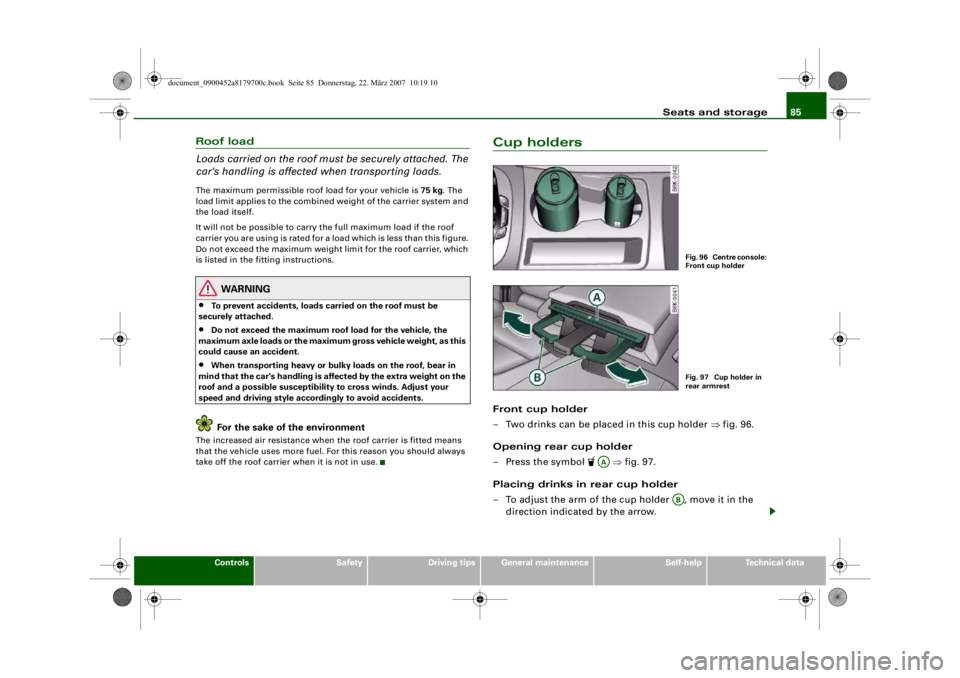
Cup holdersFront cup holder
– Two drinks can be placed in this cup holder ⇒fig. 96.
Opening rear cup holder
– Press the symbol
⇒fig. 97.
Placing drinks in rear cup holder
– To adjust the arm of the cup holder , move it in the direction indicated by the arrow.
Fig. 96 Centre console:
Front cup holderFig. 97 Cup holder in
rear armrest
AA
AB
document_0900452a8179700c.book Seite 85 Donnerstag, 22. März 2007 10:19 10
--4 -
-T
-+ +-
•
Page 100 of 313

Heating and cooling
98
– Turn the rotary control to the desired setting.You can use the air distribution setting to select the air outlets you
wish to activate. In setting
all the air is directed to the windows,
in setting
the air is directed to the driver (or passenger), and in
setting
to the footwells. In addition to this there are several other
possible combinations, allowing you to adjust the air distribution to
suit individual requirements.
Switch to for automatic control of the air distribution.
The air distribution setting will be shown on the MMI display
⇒ page 97, fig. 112 for a few seconds if the MMI is switched on.
Applies to vehicles: with deluxe automatic air conditionerDefrosting
The windscreen and side windows are defrosted or
demisted as quickly as possible.– To switch on, press the button.
– To switch off, press the button again, or press the
button.The temperature is regulated automatically. The air output is
increased to maximum and most of the air comes out of the outlets
below the windscreen.
The air recirculation mode is switched off when the button is
pressed.Applies to vehicles: with deluxe automatic air conditionerHeated rear window
The rear window heating helps to demist the rear window.– Press the
b u t t o n t o s w i t c h t h e r e a r w i n d o w h e a t i n g o n
and off.
The rear window heating only works when the engine is running. An
indicator lamp in the button lights up when the rear window heater
is switched on.
Depending on the outside temperat ure, the rear window heating
switches off automatically after about 10 to 20 minutes.
The rear window heating can be switched on permanently by
pressing the
button for longer than two seconds. It will then
remain on until the ignition is switched off. When the rear window
heating is switched on, this setting will remain activated for 15
minutes after switching off the ignition.
If the engine is started again during this period of 15 minutes, the
rear window heating will be switched on for about 10 to 20 minutes,
depending on the exterior temperature. This means you do not have
to manually switch on the rear window heating again if the vehicle
has only been parked for a short time.
For the sake of the environment
Switch off the heated rear window manually as soon as the rear
window is clear. By saving electrical power you can also save fuel.Applies to vehicles: with deluxe automatic air conditionerAC mode Deactivating the AC mode
– Press the button.
Activating the AC mode
– Press the button again.In the AC mode, the air cooling system is switched on and the
heating and ventilation are regulated automatically.
AUTO
AUTO
ACACAC
document_0900452a8179700c.book Seite 98 Donnerstag, 22. März 2007 10:19 10
--4 -
-T
•
D
-+
D
+-
D
•
D
D
D
•
D
D
~
~
4-
--11-
---r
Page 102 of 313
Heating and cooling
100adequate cooling effect, you sh ould not close these outlets
completely.Applies to vehicles: with deluxe automatic air conditionerEconomical operation of the air conditioner
Economical operation of the air conditioner will help to
save fuel.When the air conditioner is operating in the cooling mode it
reduces engine power and increases fuel consumption. To
ensure that the cooling mode is activated only when really
necessary, please note the following points:
– Switch off the cooling mode by pressing the AC button (LED off) if you wish to save fuel.
– You should also switch off the cooling mode by pressing the AC button (LED off) if you open the windows or the
tilting panorama roof* while driving.
– If the vehicle has heated up after standing in the sun, open the windows and doors for a short time to cool the
vehicle.
For the sake of the environmentBy saving fuel you also reduce the amount of pollutants emitted
from your vehicle.
Deluxe automatic air conditioner -
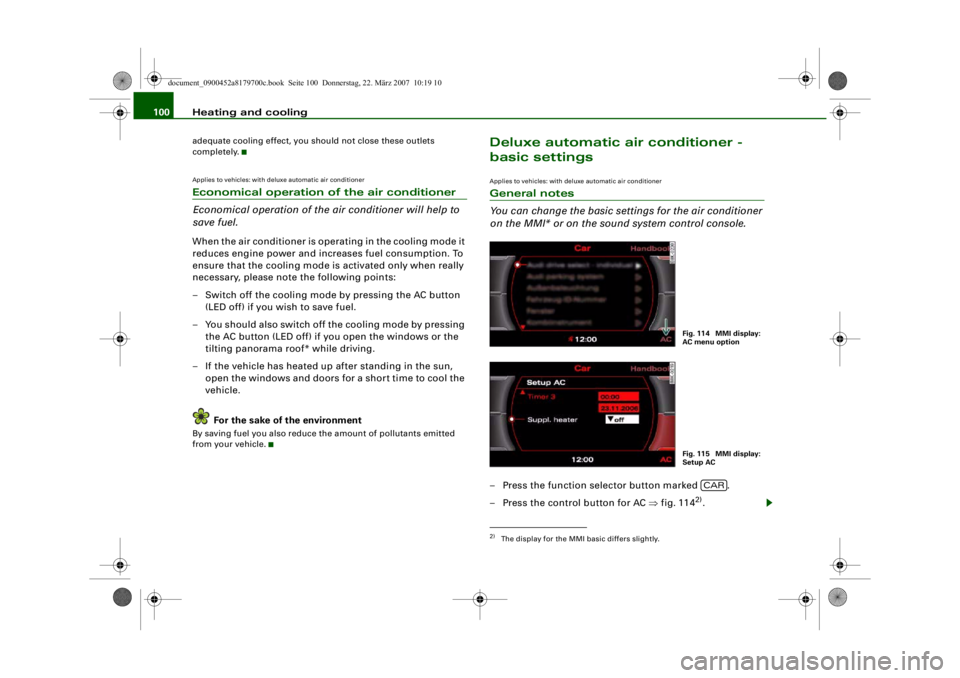
basic settingsApplies to vehicles: with deluxe automatic air conditionerGeneral notes
You can change the basic settings for the air conditioner
on the MMI* or on the so und system control console.– Press the function selector button marked .
– Press the control button for AC ⇒fig. 114
2).
2)The display for the MMI basic differs slightly.
Fig. 114 MMI display:
AC menu optionFig. 115 MMI display:
Setup AC
CAR
document_0900452a8179700c.book Seite 100 Donnerstag, 22. März 2007 10:19 10
--4 -
-T
•
-+ +-
•
Page 109 of 313
Heating and cooling107
Controls
Safety
Driving tips
General maintenance
Self-help
Technical data
Switch to for automatic control of the air distribution.
The air distribution
setting will be show n on the MMI display
⇒ page 106, fig. 122 for a few seconds if the MMI is switched on.
Applies to vehicles: with deluxe automatic air conditioner plusDefrosting
The windscreen and side windows are defrosted or
demisted as quickly as possible.– To switch on, press the button.
– To switch off, press the button again, or press the
button.The temperature is regulated automatically. The air output is
increased to maximum and most of the air comes out of the outlets
below the windscreen.
The air recirculation mode is switched off when the button is
pressed.Applies to vehicles: with deluxe automatic air conditioner plusHeated rear window
The rear window heating helps to demist the rear window.– Press the
button to switch the rear window heating on
and off.
The rear window heating only works when the engine is running. An
indicator lamp in the button lights up when the rear window heater
is switched on.
Depending on the outside temperature, the rear window heating
switches off automatically after about 10 to 20 minutes.
The rear window heating can be switched on permanently by
pressing the
button for longer than tw o seconds. It will then remain on until the ignition is switched off. When the rear window
heating is switched on, this setting will remain activated for 15
minutes after switching off the ignition.
If the engine is started again during this period of 15 minutes, the
rear window heating will
be switched on for about 10 to 20 minutes,
depending on the exterior temperature. This means you do not have
to manually switch on the rear wi ndow heating again if the vehicle
has only been parked for a short time.
For the sake of the environment
Switch off the heated rear window manually as soon as the rear
window is clear. By saving electrical power you can also save fuel.Applies to vehicles: with deluxe automatic air conditioner plusAC mode Deactivating the AC mode
– Press the button.
Activating the AC mode
– Press the button again.In the AC mode, the air cooling system is switched on and the
heating and ventilation are regulated automatically.
Note
If the LED in the AC button should continue to light up when the AC
mode has been switched off (i.e. the air conditioner has been
switched off) this is due to a defect in one of the air conditioner
components. If a malfunction should occur, please contact a quali-
fied workshop.
AUTO
AUTO
ACACAC
document_0900452a8179700c.book Seite 107 Donnerstag, 22. März 2007 10:19 10
D
-+
•
D
D
D
•
D D
D
D
[I]
•
--4 -
-T
•
+-
Page 111 of 313

Heating and cooling109
Controls
Safety
Driving tips
General maintenance
Self-help
Technical data
Applies to vehicles: with deluxe automatic air conditioner plusEconomical operation of the air conditioner
Economical operation of the ai r conditioner will help to
save fuel.When the air conditioner is operating in the cooling mode it
reduces engine power and increases fuel consumption. To
ensure that the cooling mode is activated only when really
necessary, please note the following points:
– Switch off the cooling mode by pressing the AC button
(LED off) if you wish to save fuel.
– You should also switch off the cooling mode by pressing
the AC button (LED off) if you open the windows or the
tilting panorama roof* while driving.
– If the vehicle has heated up after standing in the sun, open the windows and doors for a short time to cool the
vehicle.
For the sake of the environmentBy saving fuel you also reduce th e amount of pollutants emitted
from your vehicle.
Deluxe automatic air conditioner plus
- basic settingsApplies to vehicles: with deluxe automatic air conditioner plusGeneral notes
You can change the basic setti ngs for the air conditioner
on the MMI* or on the so und system control console.– Press the function selector button marked .
– Press the control button for AC ⇒fig. 124
3).
3)The display for the MMI basic differs slightly.
Fig. 124 MMI display:
AC menu optionFig. 125 MMI display:
Setup AC
CAR
document_0900452a8179700c.book Seite 109 Donnerstag, 22. März 2007 10:19 10
--4 -
-T
-+ +-
•
Page 113 of 313

Heating and cooling111
Controls
Safety
Driving tips
General maintenance
Self-help
Technical data
Auxiliary heating and auxiliary
ventilationApplies to vehicles: with auxiliary heating - under development at the time of printingDescription
The auxiliary heating and ventilation systems heat and
cool the interior independently of the engine.The auxiliary heating
works in conjunction with the air condi-
tioner system, but does not rely on heat from the engine. Instead of
this, the system burns fuel. The system's main function is to warm
up the interior of the vehicle and to defrost the windows in cold
weather.
The auxiliary heating system can be used both when the vehicle is
stationary and when driving (to provide extra heat while the engine
is warming up).
The auxiliary ventilation also operates independently of the
engine. This feature can be used to cool the interior with the blower
when the vehicle is left parked in the sun.
The system will automatically activate either the auxiliary heating or
the auxiliary ventilation mode, de pending on the actual tempera-
ture measured inside the car and the temperature you have set with
the air conditioner controls. It is possible to alter the temperature
setting while the auxiliary he ating/ventilation is running.
Switching on and off
There are two different ways of switching on the auxiliary
heating/ventilation system.
•
Immediate start: You can switch the auxiliary heating/ventilation
on and off at any time in the MMI Car menu ⇒page 112 . You can
also switch the system on and off using the remote control
⇒ page 114 .
•
Switching on via timer: You can programme various start times
using the timers ⇒ page 112. However you must first activate the timer before the auxiliary heating/ve
ntilation system will switch on
automatically.
The auxiliary heating/ventilation will switch itself off at the end of
the programmed running time. The running time can be set to 15,
30, 45 or 60 minutes ⇒page 113 .
WARNING
•
The auxiliary heating must no t be allowed to run when the
vehicle is in a confined space because it can give off toxic fumes.
•
To avoid any possible fire risk, never have the auxiliary heating
switched on when refuelling the vehicle.
•
Because of the high temperatur es which occur when the auxil-
iary heating is running, make sure when parking the car that the
exhaust outlet under the car is no t obstructed in any way and that
the exhaust gases do not come in to contact with flammable mate-
rials (fire risk).Note
•
It is advisable to open the air outlets when using the auxiliary
heating/ventilation.
•
The auxiliary heating/ventilation will not switch on if the fuel in
the tank has reached the reserve zone.
•
The auxiliary heating/ventilation wi ll not switch on if the battery
charge level is low.
•
The symbols
(auxiliary ventilation) or
(auxiliary heating)
flash in the instrument cluster ne xt to the clock display when the
auxiliary heating/ventilation is switched on. Both symbols light
continuously when the timer is activated.
•
At low outside temperatures some visible water vapour may
form in the engine compartment. This is a normal phenomenon,
and no reason for concern.
document_0900452a8179700c.book Seite 111 Donnerstag, 22. März 2007 10:19 10
--4 -
-T
-+
[I]
+-
•