lights AUDI A5 COUPE 2008 User Guide
[x] Cancel search | Manufacturer: AUDI, Model Year: 2008, Model line: A5 COUPE, Model: AUDI A5 COUPE 2008Pages: 313, PDF Size: 13.86 MB
Page 25 of 313
Driver information system23
Controls
Safety
Driving tips
General maintenance
Self-help
Technical data
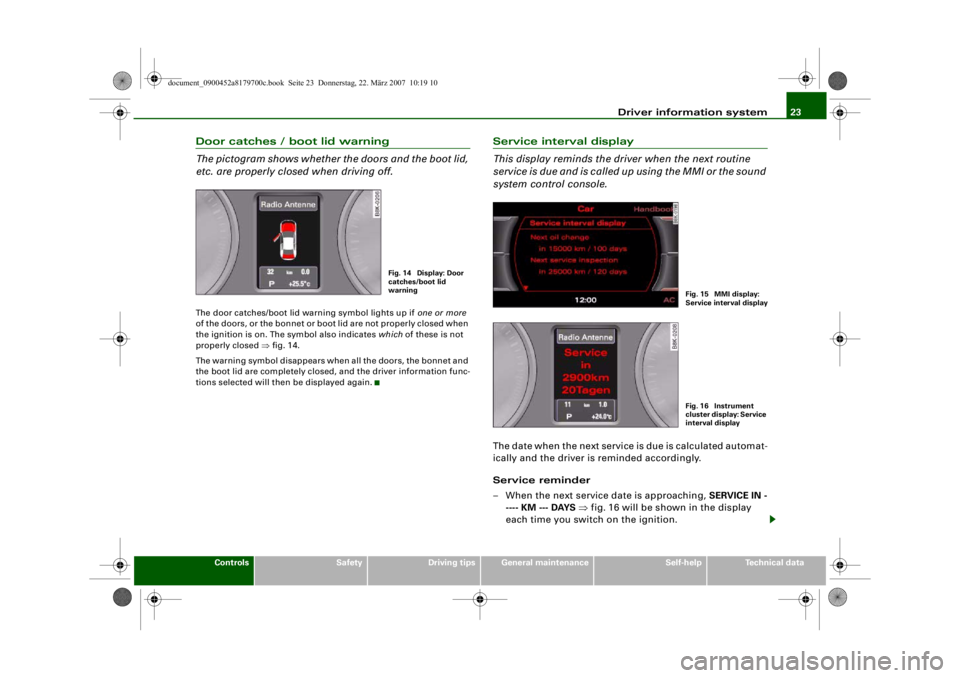
Door catches / boot lid warning
The pictogram shows whether the doors and the boot lid,
etc. are properly closed when driving off.The door catches/boot lid warning symbol lights up if one or more
of the doors, or the bonnet or boot lid are not properly closed when
the ignition is on. The symbol also indicates which of these is not
properly closed ⇒fig. 14.
The warning symbol disappears when all the doors, the bonnet and
the boot lid are completely closed, and the driver information func-
tions selected will then be displayed again.
Service interval display
This display reminds the dri ver when the next routine
service is due and is called up using the MMI or the sound
system control console.The date when the next service is due is calculated automat-
ically and the driver is reminded accordingly.
Service reminder
– When the next service date is approaching, SERVICE IN -
---- KM --- DAYS ⇒ fig. 16 will be shown in the display
each time you switch on the ignition.
Fig. 14 Display: Door
catches/boot lid
warning
Fig. 15 MMI display:
Service interval displa
y
Fig. 16 Instrument
cluster display: Service
interval display
document_0900452a8179700c.book Seite 23 Donnerstag, 22. März 2007 10:19 10
--4 -
-T
-+ +-
•
Page 31 of 313

Driver information system29
Controls
Safety
Driving tips
General maintenance
Self-help
Technical data
Clearing speed limit
– Drive the vehicle at a minimum of 5 km/h.
– Press the button for at least 2 seconds.The speed warning symbol
lights up briefly in the display to
confirm that the selected speed has been stored. The speed limit
that has been set remains stored until another speed is set with a
brief push of the button, or until the memory is cleared with a long
push of the button.
When the speed limit has been cleared, the display will show a
crossed-out warning symbol .
Applies to vehicles: with speed warning functionSetting speed limit warning 2
You can use the MMI* or sound system control console to
set, alter or cancel speed limit warning 2.– Select: Function selector button > Instrument cluster > Speed warning.•
Speed warning on/off - to activate or deactivate the speed
warning function ⇒ fig. 23.
•
Speed warning - to set the speed above which a warning signal
will sound.
Speed limit warning 2 can be adjusted in increments of 10 km/h
between 30 and 240 km/h.
Auto-check controlIntroductionThe auto-check control checks important components and vehicle
systems. These background checks are run constantly, as long as
the ignition is switched on.
A message is displayed in the inst rument cluster if a fault should
occur or if any maintenance or repairs are urgently required. This is
accompanied by an audible warning signal. Depending on the
priority of the fault, a red or yello w warning symbol lights up in the
display.
The red symbols indicate a serious malfunction, whereas the yellow
ones represent other malfunctions or items requiring attention.
Additional messages to assist the driver may be shown with the red
or yellow symbols.
Automatic gearbox* function test
The auto-check control automatically checks the vehicle systems
when the ignition is switched on. If the selector lever is in position
P or N, the following instruction will appear:
When stationary apply footbrake while selecting gear
When a gear (R, D etc.) is selected, this message disappears and the
auto-check control function is displayed.
The driver message will disappear 30 seconds after switching on
the ignition or earlier, if there are other driver messages or malfunc-
tions.
SET
Fig. 23 MMI display:
Setting speed limit
warning 2
CAR
document_0900452a8179700c.book Seite 29 Donnerstag, 22. März 2007 10:19 10
--4 -
-T
•
•
-+ +-
Page 33 of 313
Driver information system31
Controls
Safety
Driving tips
General maintenance
Self-help
Technical data
– Switch off the engine.
– Check the function displayed. Obtain professional assist-
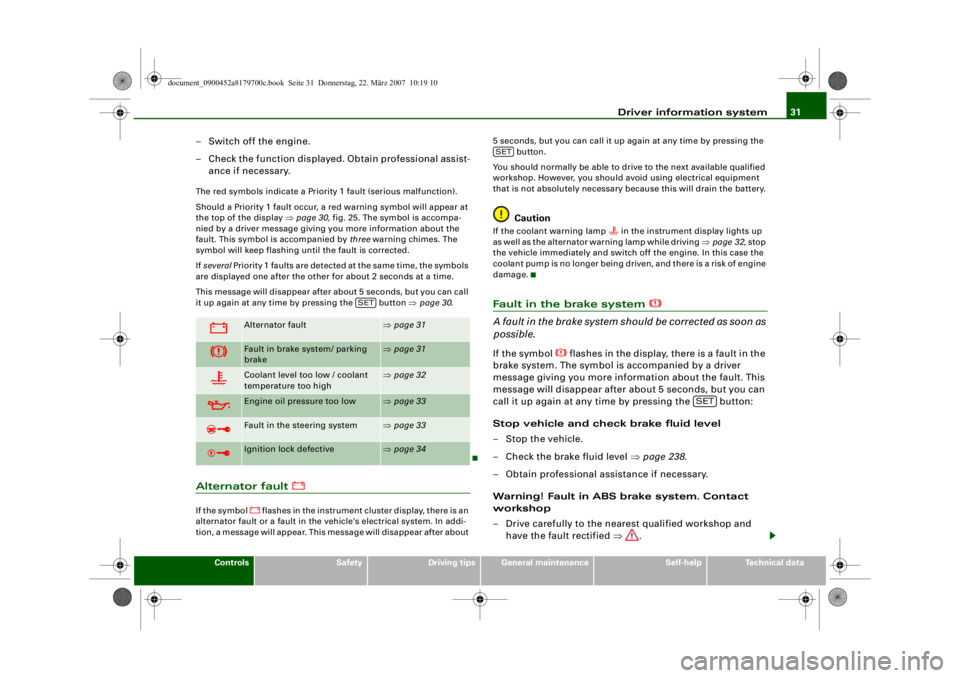
ance if necessary.The red symbols indicate a Priority 1 fault (serious malfunction).
Should a Priority 1 fault occur, a red warning symbol will appear at
the top of the display ⇒page 30, fig. 25. The symbol is accompa-
nied by a driver message giving you more information about the
fault. This symbol is accompanied by three warning chimes. The
symbol will keep flashing until the fault is corrected.
If several Priority 1 faults are detected at the same time, the symbols
are displayed one after the other for about 2 seconds at a time.
This message will disappear after about 5 seconds, but you can call
it up again at any time by pressing the button ⇒page 30 .Alternator fault
If the symbol
flashes in the instrument cluster display, there is an
alternator fault or a fa ult in the vehicle's electrical system. In addi-
tion, a message will appear. This message will disappear after about 5 seconds, but you can call it up again at any time by pressing the
button.
You should normally be able to dr ive to the next available qualified
workshop. However, you should avoid using electrical equipment
that is not absolutely necessary because this will drain the battery.
Caution
If the coolant warning lamp
in the instrument display lights up
as well as the alternator warning lamp while driving ⇒page 32 , stop
the vehicle immediately and switch off the engine. In this case the
coolant pump is no longer being driven, and there is a risk of engine
damage.
Fault in the brake system
A fault in the brake system shou ld be corrected as soon as
possible.If the symbol
flashes in the display, there is a fault in the
brake system. The symbol is accompanied by a driver
message giving you more information about the fault. This
message will disappear after about 5 seconds, but you can
call it up again at any time by pressing the button:
Stop vehicle and check brake fluid level
– Stop the vehicle.
– Check the brake fluid level ⇒page 238 .
– Obtain professional assistance if necessary.
Warning! Fault in ABS brake system. Contact
workshop
– Drive carefully to the nearest qualified workshop and have the fault rectified ⇒.
Alternator fault
⇒page 31
Fault in brake system/ parking
brake
⇒page 31
Coolant level too low / coolant
temperature too high
⇒page 32
Engine oil pressure too low
⇒page 33
Fault in the steering system
⇒page 33
Ignition lock defective
⇒page 34
SET
SET
SET
document_0900452a8179700c.book Seite 31 Donnerstag, 22. März 2007 10:19 10
--4 -
-T
CD
•
D
-+ +-
D
-
•
Page 34 of 313

Driver information system
32
Parking brake ! Please contact workshop
– If the symbol appears after you switch on the ignition when the vehicle is stationary, please check whether you
can release the parking brake. If this is possible, you
should drive without delay to the nearest qualified work-
shop and have the fault rectified. If the parking brake
cannot be released you should obtain professional
assistance.
– If this symbol should appear while driving, there may be a malfunction in the drive-away assist or the emergency
brake functions. You may not be able to apply the parking
brake. It is also possible that you cannot release the
parking brake after it has been applied. Drive the vehicle
to a qualified workshop and have the fault repaired.If the ABS fails, the ABS warning lamp
will light up together with
the brake warning symbol
⇒ .
WARNING
•
Before opening the bonnet and ch ecking the brake fluid level,
observe the warning information on ⇒page 231, “Working on
components in the engine compartment”.
•
If the brake fluid level in the reservoir is too low, this could
result in an accident. Do not drive on. You should obtain profes-
sional assistance.
•
If the brake warning lamp lights up together with the ABS
warning lamp, this can mean that the control function of the ABS
is out of action. As a result the rear wheels can lock relatively
easily when braking. This could caus e the tail of the vehicle to skid
sideways. Drive carefully to the nearest qualified workshop and
have the fault rectified.
Note
The warning lamp
in the instrument cluster will start flashing as
well if there is a fault in the brake system.
Fault in the cooling system
Faults in the cooling system must be rectified immedi-
ately.If the
symbol flashes in the display, this means that
either the coolant temperature is too high or the coolant
level is too low. The symbol is accompanied by a driver
message giving you more information about the fault. This
message will disappear after about 5 seconds, but you can
call it up again at any time by pressing the button:
Switch off engine, check coolant level
–Stop the vehicle.
– Switch off the engine.
– Check the coolant level ⇒page 236.
– Add more coolant if necessary ⇒page 236 .
– Wait for the symbol to go out before driving on.
– Obtain professional assistance if necessary.
If the coolant level is correct, the overheating may be caused by a
malfunction of the radiator fan.
If the alternator warning lamp lights up as well ⇒page 31 , it is
possible that the drive belt has broken.
SET
document_0900452a8179700c.book Seite 32 Donnerstag, 22. März 2007 10:19 10
--4 -
-
[I]
T
•
-+
D
+-
Page 35 of 313

Driver information system33
Controls
Safety
Driving tips
General maintenance
Self-help
Technical data
WARNING
•
If your vehicle should break down for technical reasons, stop it
at a safe distance away from moving traffic, switch off the engine
and turn on the hazard warning lights ⇒page 58, “Hazard
warning lights ”.
•
Never open the bonnet if you can see or hear steam or coolant
escaping from the engine compartment; there is a risk of being
scalded. Wait until you can no longer see or hear escaping steam
or coolant.
•
The engine compartment of any motor vehicle is a dangerous
place. Before carrying out any work in the engine compartment,
switch off the engine and allow it to cool down. Please observe the
important safe ty warnings ⇒page 231, “Working on components
in the engine compartment”.Caution
Do not drive on if the symbol
has come on to indicate a fault in
the cooling system, otherwise there is a risk of damaging the
engine.
Engine oil pressure too low
If the engine oil pressure is too low the fault must be recti-
fied immediately.If the
symbol flashes in the display, the oil pressure is
too low. The symbol is accompanied by a driver message
giving you more information ab out the fault. This message
will disappear after about 5 seconds, but you can call it up
again at any time by pressing the button:
Switch off engine and check oil level
–Stop the vehicle. – Switch off the engine.
– Check the engine oil level
⇒page 234 .
– Obtain professional assistance if necessary.
If the engine oil level is too low
If the engine oil level is too low, add more oil ⇒page 234 .
If the engine oil level is correct
If the
symbol flashes and the engine oil level is correct, obtain
professional assistance. Do not drive on. Do not continue to run the
engine, not even at idle speed .
Note
The oil pressure warning lamp
is not an indicator for the oil
level. The oil level should therefore be checked regularly.
Fault in the steering system
The steering wheel cannot be unlocked if there is a fault
in the electronic steering lock.If the symbol
flashes in the display, there is a malfunc-
tion in the electronic steerin g lock. The symbol is accompa-
nied by a driver message giving you more information
about the fault. This message will disappear after about
5 seconds, but you can call it up again at any time by
pressing the button:
Do not drive vehicle. Steering defective
– You should obtain professional assistance.
– Do not have the vehicle towed away.
SET
SET
document_0900452a8179700c.book Seite 33 Donnerstag, 22. März 2007 10:19 10
--4 -
-T
[I]
-+
CD
•
•
+-
D
Page 37 of 313

Driver information system35
Controls
Safety
Driving tips
General maintenance
Self-help
Technical data
Note
On some models the speed limit warning 1
and speed limit
warning 2
will also be displayed as yellow symbols. These always
appear as a small symbol at the top of the display ⇒page 28 .
Applies to vehicles: with advanced keyKey not in vehicle
Key not in vehicle
This message will appear together with the symbol
if the remote
control key is removed from the vehicle while the engine is running.
This is to remind you not to continue driving without the key (for
example if you change drivers).
If the remote control key is not in the vehicle you will not be able to
switch on the ignition or restar t the engine after it has been
switched off. You will also not be able to lock the vehicle from the
outside.
Light sensor/ rain sensor defective
Automatic headlights/ automatic wipers defective
If the symbol appears, this means that the light sensor/ rain
sensor is not functioning. For safety reasons, the dipped beam
headlights will then be switched on permanently when the light
switch is set to the AUTO position. However, you can still switch the
lights on and off in the normal way with the light switch. If the rain
sensor is defective, the functions operated via the windscreen wiper
lever will still be available. You should have the light sensor/ rain
sensor checked by a qualified wo rkshop as soon as possible.
Brake pads worn
⇒page 36
Battery power*
⇒page 36
Bulb monitor*
Bulb failure*
⇒page 36
Check engine oil level
⇒page 37
Engine oil sensor defective
⇒page 37
Fuel level low
⇒page 36
Washer fluid level low*
⇒page 36
advanced key*
Key not in vehicle
⇒page 35
Light sensor/ rain sensor defec-
tive
⇒page 35
Diesel particulate filter*
obstructed
⇒page 37
Dynamic headlight range con-
trol* defective
⇒page 37
Battery in remote control key
⇒page 40
Electro-mechanical
parking brake
⇒page 123
adaptive light* defective
⇒page 37
Ignition lock defective
⇒page 37
Windscreen wiper defective
⇒page 38
document_0900452a8179700c.book Seite 35 Donnerstag, 22. März 2007 10:19 10
--4 -
-
[I]
T
•
-----
-+
•
+-
-
-
•
-
Page 38 of 313

Driver information system
36Brake pads worn
Brake pads!
If the symbol lights up, have the front brake pads (and, for
safety's sake the rear pads as well) inspected by a qualified
workshop.
Applies to vehicles: with bulb monitorBulb monitor
The bulb monitor checks whethe r the lights on the vehicle
are working.The bulb monitor checks whether the lights on the vehicle are
working. If it detects a defective bulb on the vehicle it will show a
yellow warning symbol together with a message indicating which
light is not working.
Bulb failure
If the symbol
lights up, this means that one of the turn signals
(front or rear), headlights, brake li ghts, rear lights, fog lights or the
rear fog light is not working.
WARNING
•
Bulbs are sensitive to pressure. The glass can break when you
touch the bulb, causing injury.
•
Incorrect handling of the high-voltage element of xenon gas-
discharge bulbs* can have potentially fatal consequences.Note
Have the components repaired or replaced by a qualified
workshop.
Applies to vehicles: with washer fluid warning systemWasher fluid level low
Please top up washer fluid
If the symbol lights up, top up the fluid for the windscreen
washer and headlight washer system* ⇒page 242 .
Fuel level low
Please refuel
When this symbol
comes on for the first time, there are about
8 litres of fuel left in the tank. You should fill up as soon as possible
⇒ page 228 .
If this warning symbol lights up al though the fuel tank is sufficiently
filled, there is a malfunction in the fuel tank system. The display will
also show the driver message Tank system malfunction ! Contact
workshop . Please contact a qualified workshop.
Applies to vehicles: with battery power warning systemBattery power
If battery power drops to a level at which you may encounter prob-
lems when starting the engine, th e display will show the symbol
and the driver message Low battery charge: Battery will be charged
while driving .
Please bear in mind that the starting ability of the engine may be
impaired while this message is shown.
Message comes on and goes out again
If the message appears in the display after the ignition is switched
on or while driving, and goes out again after a period of time, the
battery has been charged up again sufficiently while the vehicle was
being driven.
document_0900452a8179700c.book Seite 36 Donnerstag, 22. März 2007 10:19 10
--4 -
-T
• •
-+
•
+-
[I)
•
Page 39 of 313

Driver information system37
Controls
Safety
Driving tips
General maintenance
Self-help
Technical data
Message comes on and does not go out
If the message appears in the display after the ignition is switched
on or while driving, and does not go out again, the battery is not
being maintained at the proper power level. Starting reliability may
be impaired. You should have the battery checked by a qualified
workshop as soon as possible.
Check engine oil level
Please check oil level
If the symbol lights up, check the engine oil level as soon as
possible ⇒page 234 . Top up the oil at the next opportunity
⇒ page 234 .
Engine oil sensor defective
Oil level ! Sensor defective
If the
symbol lights up, take the ve hicle to a qualified workshop
and have the oil level sensor checked. Until then it is advisable to
check the oil level every time you fill up with fuel ⇒page 234 .
Applies to vehicles: with diesel engine and diesel particulate filterDiesel particulate filter obstructed
Particle filter. See Owner's Manual
When the symbol
lights up you can assist the self-cleaning func-
tion of the filter by driving accordingly. You should drive at a speed
of at least 60 km/h (engine sp eed about 2,000 rpm) for about
15 minutes in 4th or 5th gear, or with the selector lever in position S
on vehicles with automatic gearbox* . As a result of the increase in
temperature the soot in the filter wi ll be burned off. The symbol will
disappear once the cleaning proc ess has been completed success-
fully. If the symbol
does not go out, please contact a qualified work-
shop and have the fault rectified.
For further information on the diesel particulate filter ⇒page 205 .
WARNING
It is essential that you adjust your speed to suit the weather, road,
terrain and traffic conditions. The recommended driving speed
must never lead to the driver disregarding the traffic regulations.Applies to vehicles: with dynamic headlight range controlHeadlight range control defective
Headlight range control defective
This symbol
indicates a malfunction in the dynamic headlight
range control. Take the vehicle to a qualified workshop to have the
dynamic headlight range control function repaired.
Applies to vehicles: with adaptive lightadaptive light defective
adaptive light defective
This symbol
indicates that the adaptive light is defective. Take
the vehicle to a qualified workshop to have the headlights and/or
the control unit for the adaptive light repaired.
Ignition lock defective
Ignition lock defective
If the symbol
lights up in the display, there is a malfunction in
the electronic ignition lock. Take the vehicle to a qualified workshop
to have the problem remedied.
document_0900452a8179700c.book Seite 37 Donnerstag, 22. März 2007 10:19 10
--4 -
-T
•
-+
•
+-
•
•
•
Page 42 of 313

Doors and windows
40
WARNING
•
Always switch off the ignition and take the key with you when
leaving the vehicle - even if you on ly intend to be gone for a short
time. This is especially im portant if children are left in the car. They
might otherwise be able to start the engine or use power-operated
equipment such as the electric windows - this could lead to inju-
ries.
•
Wait for the vehicle to come to a standstill before removing the
ignition key from the lock. Otherwise the steering lock could
engage suddenly, causing an accident.Note
The function of the remote control key may be impaired by interfer-
ence from other nearby radio signals (for example from a mobile
telephone or TV transmitter) if these are in the same frequency
range.Indicator lamp on remote control key
The indicator lamp on the remote control key lights up
when you press the buttons.
The indicator lamp should light up once briefly when you press one
of the buttons briefly. The indicator lamp should flash when you
press and hold one of the buttons (convenience open/close).
If the indicator lamp does not li ght up, this means the battery is
exhausted and must be replaced ⇒page 40 . The instrument cluster
display also sh ows the symbol
and the following message if the
battery is exhausted:
Please change key battery
Replacing the battery for the remote control key– Press the release button ⇒fig. 29.
Fig. 28 Indicator lamp
on remote control key
Fig. 29 Remote control
key: Removing the
emergency keyFig. 30 Remote control
key: Removing the
battery carrier
AA
document_0900452a8179700c.book Seite 40 Donnerstag, 22. März 2007 10:19 10
•
-+
•
.. "' : Ol
..
--4 -
-T +-
Page 45 of 313
Doors and windows43
Controls
Safety
Driving tips
General maintenance
Self-help
Technical data
Lock function can be switched on and off on the sound system or
MMI*
⇒page 44 .
In the event of an accident in which the airbags inflate, the doors
will be automatically unlocked to facilitate access and assistance.
Deadlock mechanism
The central locking system is combined with a deadlock mecha-
nism. Once the vehicle has been locked from the outside, the door
handles on the inside are deactivated. This makes it more difficult
to break into the vehicle.
Anti-theft alarm system*
If the anti-theft alarm system senses interference with the vehicle it
triggers an audible and visible alarm.
The anti-theft alarm system switches on automatically when the
vehicle is locked. It switches off automatically if you unlock the
vehicle using the remote control.
If you unlock the vehicle by inserting the key in the drivers door, the
ignition must be switched on within 15 seconds, otherwise the
alarm will be triggered. On some export versions, the alarm is trig-
gered immediately when you open a door.
To deactivate the alar m, press the unlock button on the remote
control key or switch on the ignition . The alarm will also switch itself
off when it comes to the end of its cycle.
Switch off the interior monitor an d tow-away protection if you wish
to prevent the alarm from be ing triggered accidentally.
Turn signals
The turn signals will flash twice when the vehicle is unlocked and
once when the vehicle is locked. If the turn signals do not flash, one
of the doors, the bonnet or the boot lid is still open.
Accidental lock-out
The central locking system prevents you from being locked out of
the vehicle in the following situations:
•
When the driver's door is open, it cannot be locked together with
the other door by pressing the central locking switch and then
closing the door ⇒page 47 .
•
On vehicles with advanced key*, the boot lid will be released
again automatically if the remote control key that was last in use is
left inside the boot when the boot lid is closed ⇒page 48 .
To prevent yourself from being locked out, do not lock the vehicle
with the remote control key before closing the doors or boot lid.
WARNING
Do not leave anyone (especially child ren) in the car if it is locked
from the outside and the deadlock mechanism is activated: the
doors and windows cannot then be opened from the inside.
Locked doors could delay assistance in an emergency, potentially
putting lives at risk.
Note
•
Never leave any valuable items in the vehicle unattended. Even a
locked vehicle is not a safe.
•
If the diode on the driver's window sill lights up for about 30
seconds when the vehicle is locked, the central locking system or
anti-theft alarm* is not working properly. Please have the malfunc-
tion repaired by an Audi dealer or qualified workshop.
•
The interior monitor of the anti-t heft alarm* system will only
function as intended if the windows and the tilting panorama roof*
are closed.
document_0900452a8179700c.book Seite 43 Donnerstag, 22. März 2007 10:19 10
--4 -
-T
-+
[I]
+-
•