park assist AUDI A5 COUPE 2008 User Guide
[x] Cancel search | Manufacturer: AUDI, Model Year: 2008, Model line: A5 COUPE, Model: AUDI A5 COUPE 2008Pages: 313, PDF Size: 13.86 MB
Page 139 of 313
Audi parking system137
Controls
Safety
Driving tips
General maintenance
Self-help
Technical data
Audi parking systemParking aid systemsApplies to vehicles: with parking systemGeneral notes
Depending on the optional equipment fitted, there are
various parking aid systems to assist you when parking or
manoeuvring in tight spaces.parking system*:
The parking system comprises the rear acoustic parking aid
⇒ page 137 .
The rear acoustic parking system uses ultrasonic sensors to
measure the distance between the vehicle and an obstacle which
has been detected. There are four sensors which are located in the
rear bumper (two in the centre, two at the sides).
parking system plus*:
The parking system plus* comprises the rear and front acoustic
parking aid ⇒page 138 in conjunction with a graphic display.
The parking system plus* uses ultrasonic sensors to measure the
distance between the vehicle and an obstacle which has been
detected. There are a total of 8 sensors located in the front and rear
bumpers (2 in the centre and 2 on the side of each bumper).
parking system advanced*:
The parking system advanced* comprises the rear and front
acoustic parking aid in conjunction with the graphic display as well
as a reversing camera (Rear View) ⇒page 140 .
The reversing camera is located in the boot lid ⇒page 140, fig. 154
and assists the driver when parking or manoeuvring in tight spaces.
The reversing camera provides an image which is shown in the MMI display. It represents the mirror image of a section of the area
behind the vehicle ⇒
page 144, fig. 159.
Note
There is a slight delay in the picture display.parking systemApplies to vehicles: with parking systemRear parking aid
The parking aid gives an acoustic warning if it detects any
obstacles behind the vehicle.– Engage reverse gear. You will hear a short beep to
confirm that the rear parking aid has been activated. The
rear parking aid remains active for as long as the reverse
gear is engaged.The measuring range of the sensors in the rear bumper starts at
approximately :
Reversing
When the vehicle is reversing, the system starts to beep when it
registers an obstacle within its detection range (see above). The
warnings will beep increasingly rapidly as the vehicle approaches
the obstacle.Rear
Side
0.60 m
Centre
1.60 m
document_0900452a8179700c.book Seite 137 Donnerstag, 22. März 2007 10:19 10
--4 -
-T
----
[I)
•
-+ +-
Page 142 of 313
Audi parking system
140reached the danger (collision) zone. The driver should then not
move backwards/forwards any further ⇒ .
The graphic display in the MMI screen ⇒page 149 can be switched
off. The acoustic proximity warning will, however, remain activated.
The graphic display will be deacti vated as soon as you press a func-
tion selector button on the MMI control console. The graphic
display will appear again the next time you park the vehicle. The
graphic display in the MMI screen can also be switched on again
manually using the switch
⇒ page 138, fig. 152. For more infor-
mation on the MMI cont rol console please refer to the MMI Oper-
ating Manual.
WARNING
•
The sensors have blind spots in which obstacles are not regis-
tered. It is particular ly important to ensure that there are no small
children or animals near the vehicle, as the sensors may not
always be able to detect them.
•
The parking aid cannot replace th e full concentration of the
driver. The driver is always resp onsible for safety during parking
and other manoeuvres. Always keep a close watch on the area
around the vehicle.
•
Please note that low obstacles detected by the system may no
longer be registered by the sensors as the car moves closer, so the
system will not give any further warning. Certain kinds of obsta-
cles (such as wire fences, chains, thin painted posts or trailer draw
bars, etc.) may not always be de tected by the system (accident
risk).Note
•
There is a slight delay in the picture display.
•
You can change the settings for the graphic display in the MMI
⇒ page 149 .
•
To ensure that the acoustic parking aid works properly, the
sensors must be kept clean and free of snow and ice. Please observe
the additional notes on ⇒page 152 .
•
Please refer to the notes on towing ⇒page 147 .
parking system advancedApplies to vehicles: with parking system advancedParking aid (front and rear), with display and reversing camera
The parking aid gives an acoustic and visual warning if it
detects any obstacles in front of or behind the vehicle. The
reversing camera provides further assistance when
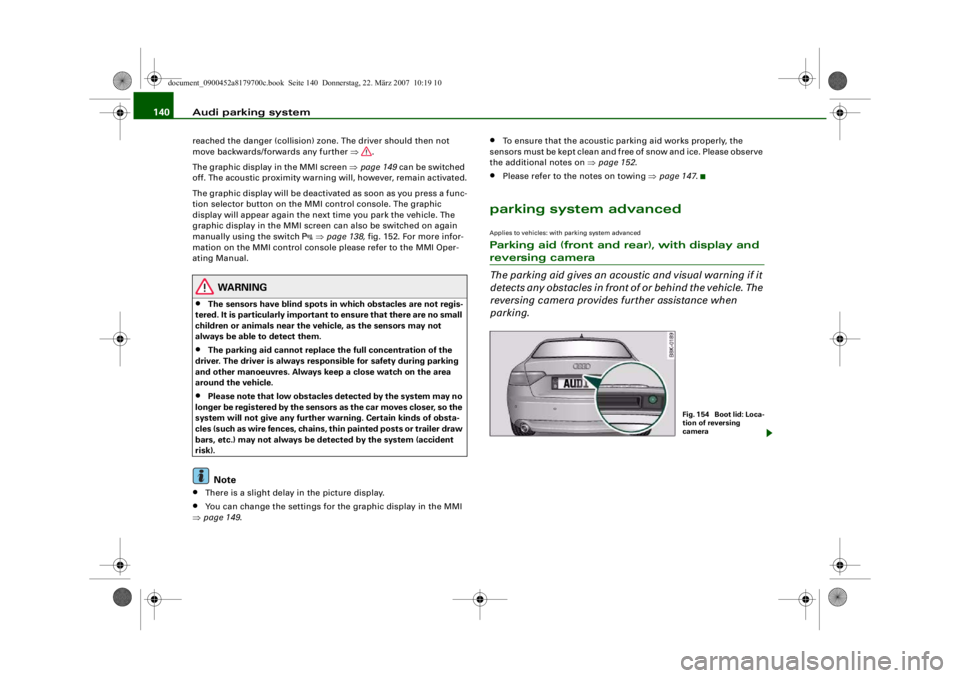
parking.
Fig. 1 54 Bo o t lid : Lo c a-
tion of reversing
camera
document_0900452a8179700c.book Seite 140 Donnerstag, 22. März 2007 10:19 10
--4 -
-T
•
-+ +-
[I)
Page 144 of 313
Audi parking system
142displayed on the MMI screen. The warnings will then return to the
normal volume if the vehicle approaches the detected obstacle
again.
Graphic display
The segments in the MMI display indicate the distance between the
vehicle and an obstacle. The number of segments shown depends
on the obstacle in front of or be hind the vehicle. The closer the
vehicle gets to the obstacle the closer the segments move towards
the vehicle in the graphic ⇒page 141, fig. 155. At the latest when
the penultimate segment is highlighted the vehicle has reached the
danger (collision) zone. The driver should then not move back-
wards/forwards any further ⇒.
The graphic display in the MMI screen ⇒page 149 can be switched
off. The acoustic proximity warning will, however, remain activated.
The graphic display will be deacti vated as soon as you press a func-
tion selector button on the MMI control console. The graphic
display in the MMI screen can also be switched on again manually
using the switch
. For more information on the MMI control
console please refer to the MMI Operating Manual.
Reversing camera (Rear View)
The mirrored image of the picture supplied by the reversing camera
⇒ page 145, fig. 160 is shown in the MMI display. The picture
supplied by the reversing camera also includes orientation lines
and area markings which are projected onto the image to assist you
when parking ⇒page 143 . The red line in the picture ⇒page 143,
fig. 156/ ⇒page 143, fig. 157 shows the collision zone. From here at
the latest, the driver should not reverse any further ⇒.
If your vehicle is near an obstac le, the proximity graphic will also
appear in the reversing camera image. This superimposed graphic
helps the driver to localise the critical area of the vehicle.
If the MMI screen is showing the graphic display you can switch to
the image of the reversing camera by pressing the control button
for the function Rear View ⇒ page 141, fig. 155. If the MMI screen is showing the
image of the reversing camera you
can switch to the graphic display by pressing the control button for
the function Graphic ⇒ page 145, fig. 160.
The image of the reversing camera in the MMI screen ⇒page 149
can be switched off. The acoustic proximity warning will, however,
remain activated.
The image of the reversing camera will be deactivated as soon as
you press a function selector button on the MMI control console.
The image of the reversing camera will be shown again the next
time you park the vehicle. The im age of the reversing camera can
also be switched on again manually using the switch
. For more
information on the MMI control console please refer to the MMI
Operating Manual.
WARNING
•
The sensors have blind spots in which obstacles are not regis-
tered. It is particularly important to ensure that there are no small
children or animals near the vehicle, as the sensors may not
always be able to detect them.
•
The parking aid cannot replace the full concentration of the
driver. The driver is always resp onsible for safety during parking
and other manoeuvres . Always keep a close watch on the area
around the vehicle.
•
Please note that low obstacles detected by the system may no
longer be registered by the sensor s as the car moves closer, so the
system will not give any further warning. Certain kinds of obsta-
cles (such as wire fences, chains, thin painted posts or trailer draw
bars, etc.) may not always be detected by the system (accident
risk).Note
•
There is a slight delay in the picture display.
•
You can change the settings fo r the graphic display and the
reversing camera in the MMI ⇒ page 149.
document_0900452a8179700c.book Seite 142 Donnerstag, 22. März 2007 10:19 10
--4 -
-T
-+ +-
[I]
Page 145 of 313
Audi parking system143
Controls
Safety
Driving tips
General maintenance
Self-help
Technical data
•
To ensure that the acoustic parking aid works properly, the
sensors and the lens of the reversing camera must be kept clean
and free of snow and ice. Please observe the additional notes from
⇒ page 152 onwards.
•
Please refer to the notes on towing ⇒page 147 .
Applies to vehicles: with parking system advancedReversing camera (Rear View)
The reversing camera image in the MMI display shows the
area behind the vehicle.
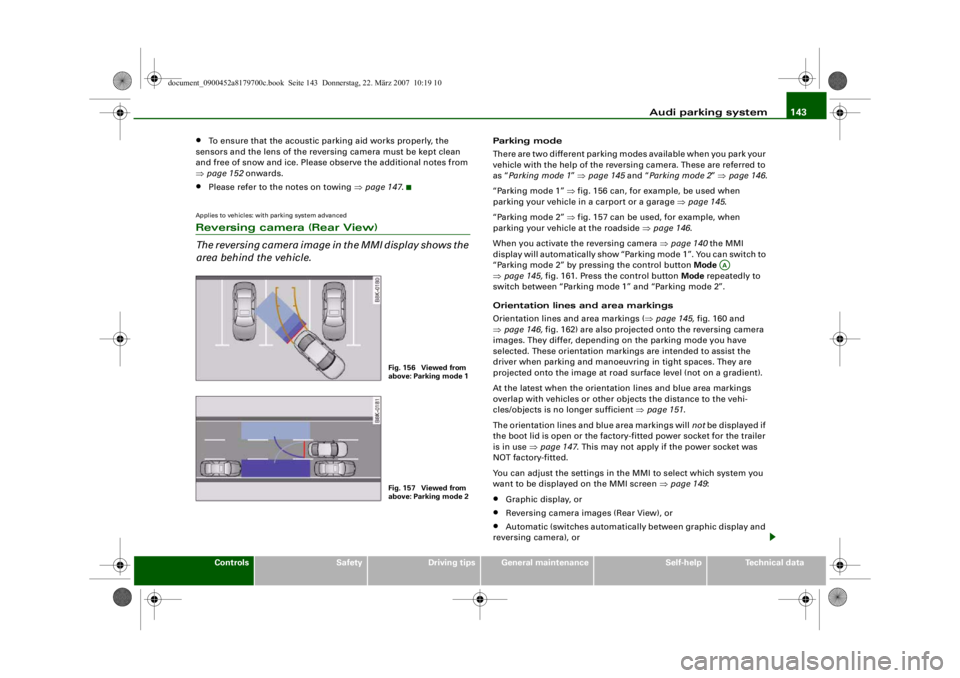
Parking mode
There are two different parking modes available when you park your
vehicle with the help of the reversing camera. These are referred to
as “Parking mode 1 ” ⇒ page 145 and “Parking mode 2 ” ⇒ page 146 .
“Parking mode 1” ⇒ fig. 156 can, for example, be used when
parking your vehicle in a carport or a garage ⇒page 145 .
“Parking mode 2” ⇒ fig. 157 can be used, for example, when
parking your vehicle at the roadside ⇒page 146 .
When you activate the reversing camera ⇒ page 140 the MMI
display will automatically show “Parking mode 1”. You can switch to
“Parking mode 2” by pressing the control button Mode
⇒ page 145, fig. 161. Press the control button Mode repeatedly to
switch between “Parking mode 1” and “Parking mode 2”.
Orientation lines and area markings
Orientation lines and area markings ( ⇒page 145, fig. 160 and
⇒ page 146, fig. 162) are also projected onto the reversing camera
images. They differ, depending on the parking mode you have
selected. These orientation markin gs are intended to assist the
driver when parking and manoeuvring in tight spaces. They are
projected onto the image at road surface level (not on a gradient).
At the latest when the orientation lines and blue area markings
overlap with vehicles or other objects the distance to the vehi-
cles/objects is no longer sufficient ⇒page 151 .
The orientation lines and blue area markings will not be displayed if
the boot lid is open or the factory-fitted power socket for the trailer
is in use ⇒page 147 . This may not apply if the power socket was
NOT factory-fitted.
You can adjust the settings in th e MMI to select which system you
want to be displaye d on the MMI screen ⇒page 149 :•
Graphic display, or
•
Reversing camera images (Rear View), or
•
Automatic (switches automatically between graphic display and
reversing camera), or
Fig. 156 Viewed from
above: Parking mode 1Fig. 157 Viewed from
above: Parking mode 2
AA
document_0900452a8179700c.book Seite 143 Donnerstag, 22. März 2007 10:19 10
--4 -
-T
•
-+ +-
Page 147 of 313
Audi parking system145
Controls
Safety
Driving tips
General maintenance
Self-help
Technical data
WARNING
Please note that objects which ar e not touching the ground may
appear to be further away than they actually are (e.g. the bumper
of a parked vehicle, a towing bracke t or the rear end of a truck). In
this case you should not use the orientation lines for judging the
distance (acc ident risk).Applies to vehicles: with parking system advancedParking mode 1
“Parking mode 1” can, for exam ple, be used to assist you
when parking in a garage or carport.
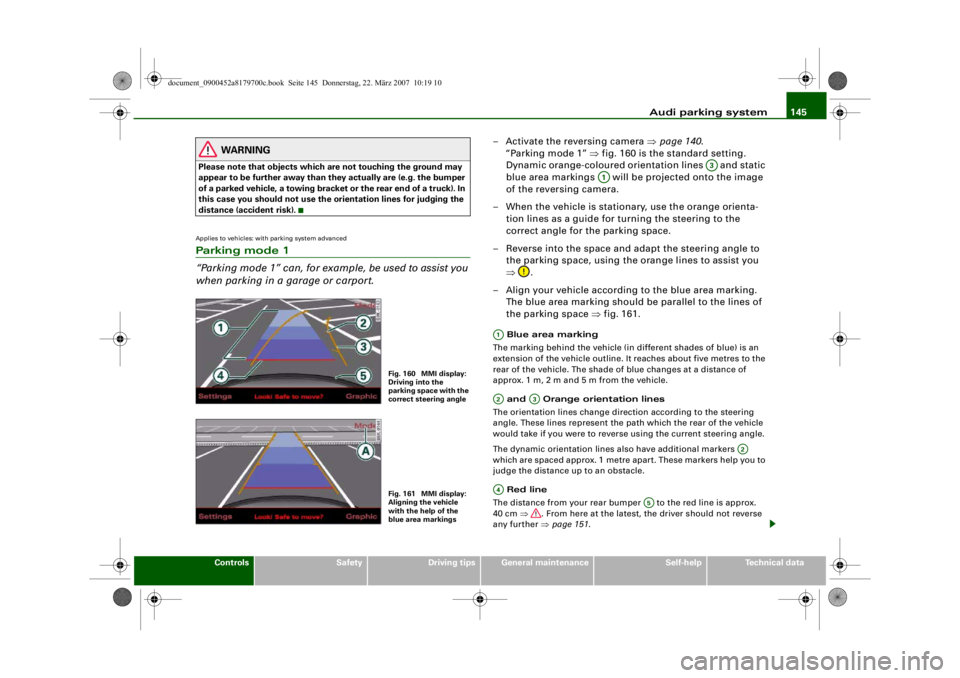
– Activate the reversing camera ⇒page 140 .
“Parking mode 1” ⇒fig. 160 is the standard setting.
Dynamic orange-coloured orientation lines and static
blue area markings will be projected onto the image
of the reversing camera.
– When the vehicle is stationary, use the orange orienta- tion lines as a guide for turning the steering to the
correct angle for the parking space.
– Reverse into the space and adapt the steering angle to the parking space, using the orange lines to assist you
⇒ .
– Align your vehicle according to the blue area marking.
The blue area marking should be parallel to the lines of
the parking space ⇒fig. 161. Blue area marking
The marking behind the vehicle (in different shades of blue) is an
extension of the vehicle outline. It reaches about five metres to the
rear of the vehicle. The shade of blue changes at a distance of
approx. 1m, 2m and 5m from the vehicle.
and Orange orientation lines
The orientation lines change direction according to the steering
angle. These lines represent the path which the rear of the vehicle
would take if you were to revers e using the current steering angle.
The dynamic orientation lines also have additional markers
which are spaced approx. 1 metre apart. These markers help you to
judge the distance up to an obstacle.
Red line
The distance from your rear bumper to the red line is approx.
40 cm ⇒. From here at the latest, the driver should not reverse
any further ⇒page 151 .
Fig. 160 MMI display:
Driving into the
parking space with the
correct steering angleFig. 161 MMI display:
Aligning the vehicle
with the help of the
blue area markings
A3
A1
A1A2
A3
A2
A4
A5
document_0900452a8179700c.book Seite 145 Donnerstag, 22. März 2007 10:19 10
--4 -
-T
•
0
-+ +-
Page 155 of 313
Audi parking system153
Controls
Safety
Driving tips
General maintenance
Self-help
Technical data
•
Do not allow the camera images in the MMI display to distract
you from watching the traffic.
•
When parking or manoeuvring do not rely solely on the MMI
display. Some objects (e.g. narrow posts or bars) may - due to the
resolution of the display screen - not be displayed in a satisfactory
manner or may not be displayed at all.
•
Only use the reversing camera to assist you if it is supplying
you with a good and clear picture. The quality of the picture could
be impaired by adverse light, dirt on the lens or a defect (accident
risk).
•
If the MMI display is switched on and the picture is obscured or
the area behind the vehicle is no t visible (e.g. due to a dirty or
defective lens) you must not use the reversing camera to assist
you when manoeuvrin g (accident risk).
•
The reversing camera produc es two-dimensional images.
Please remember that ridges in the ground, parts protruding on
other vehicles or fixed objects jutting out are all more difficult to
detect on the MMI display screen du e to a lack of spatial depth. In
some cases it may not be possi ble to detect them at all.
•
For safety reasons, you should not use the system if the posi-
tion and installati on angle of the camera have been changed, e.g.
in a rear-end collision. Have it checked by a qualified workshop.
•
Only use the reversing camera wh en the boot lid is completely
closed. Please make sure that th ere are no objects mounted to the
rear end of the vehicle which could block the view of the reversing
camera.Caution
•
Never remove snow and ice from the lens of the reversing
camera using warm or hot water - da nger of cracks appearing on the
lens.
•
Never use abrasive cleaning agents on the lens.WARNING (continued)
document_0900452a8179700c.book Seite 153 Donnerstag, 22. März 2007 10:19 10
--4 -
-T
-+ +-
CD
•
Page 203 of 313
Intelligent technology201
Controls
Safety
Driving tips
General maintenance
Self-help
Technical data
Power steering (servotronic)The power steering assists the driver when turning the
steering wheel (with the engine running).The power steering assists the driver by reducing the force needed
to turn the steering wheel. The degree of power assistance is
adapted electronically , depending on the speed.
If a fault should occur in the servotronic system the power steering
will still operate. The degree of power assistance will, however, no
longer adapt to different speeds. If the electronic regulating system
is not working properly, this is most noticeable when turning the
steering wheel at low speeds (for instance when parking) – more
effort will be required than usual. The fault should be corrected by
a qualified workshop as soon as possible.
The power steering does not function when the engine is switched
off. In this case the steering wheel is very hard to turn.
If the steering is held at its turning limit when the car is stationary,
this will place an excessive load on the power steering system. In
this case, the power steering system will make noises. It will also
reduce the idling speed of the engine.
Caution
Do not keep the steering in the ful l-lock position for longer than
15 seconds when the engine is running – this could cause damage
to the power steering system.
Note
•
If the power steering should fail at any time or the engine is
switched off (for instance when being towed), the car can still be
steered. However, more effort will be required to turn the steering
wheel.
•
If the system is leaking or malfunctioning, please take the car to
a qualified workshop as soon as possible.
•
The power steering requires a special hydraulic fluid. The fluid
reservoir is located at the front of the engine compartment on the
left ⇒page 232 . The correct fluid level in the reservoir is important
for the power steering to function properly. The hydraulic fluid level
is checked at the Inspection Service.
Applies to vehicles: with four-wheel driveFour-wheel drive (quattro
®)
On quattro models the engine power is distributed to all
four wheelsGeneral notes
On four-wheel drive vehicles, the engine power is distributed to all
four wheels. The distribution of power is controlled automatically
according to your driving style and the road conditions. Also refer
to ⇒ page 199, “Electronic differential lock (EDL)”.
The four-wheel drive is specially designed to complement the supe-
rior engine power of your Audi. This combination gives the car
exceptional handling and performance capabilities – both on
normal roads and in more difficult conditions, such as snow and ice.
Even so (or perhaps especially for this reason), it is important to
observe certain safety points ⇒.
Winter tyres
Thanks to its four-wheel drive, your car will have plenty of traction
in winter conditions, even with the standard tyres. Nevertheless, we
still recommend that winter tyres or all-season tyres should be fitted
on all four wheels when winter road conditions are expected, mainly
because this will give a better braking response.
Snow chains
On roads where snow chains are mandatory, this also applies to cars
with four-wheel drive ⇒page 248, “Snow chains”.
document_0900452a8179700c.book Seite 201 Donnerstag, 22. März 2007 10:19 10
--4 -
-T
•
-+ +-
CD [I]
Page 260 of 313
Self-help
258The TMS can be used at outside temperatures down to – 20 °C.
WARNING
After repairing a tyre please note the following points:•
Do not drive faster than 80 km/h.
•
Avoid heavy acceleration, hard braking and fast cornering.
•
Vehicle handling could be impaired.
•
Tyres which have been sealed using the TMS are only suitable
for temporary use. Damaged tyres must be renewed.
•
The TMS must NOT be used,
− on cuts and punctures larger than 4 mm
− if the wheel rim has been damaged
− if you have been driving with very low pressure or a
completely flat tyre
•
Seek professional assistance if th e repair of a tyre puncture is
not possible with the sealing compound.
•
Do not allow the sealant to come into contact with your eyes,
skin or clothing.
•
If you do come into contact wi th the sealant immediately rinse
the eyes or skin affected with clean water.
•
Change clothing immediately if it becomes soiled with the tyre
sealant.
•
Make sure you do not breathe in the fumes!
•
If any of the tyre sealant is a ccidentally ingested, immediately
rinse the mouth thoroughly and drink lots of water.
•
Do not induce vomiting. Immediately contact a doctor!
•
If any allergic reactions should occur get medical help immedi-
ately.
•
Keep the sealant away from children.
For the sake of the environment
Used bottles of sealing compound can be returned to an Audi dealer
for disposal.
Note
•
If sealant should leak out, leave it to dry. When it has dried, you
can pull it off like a piece of foil.
•
Observe the expiry date stated on the sealing compound can.
Have the sealing compound exchanged by a qualified workshop.
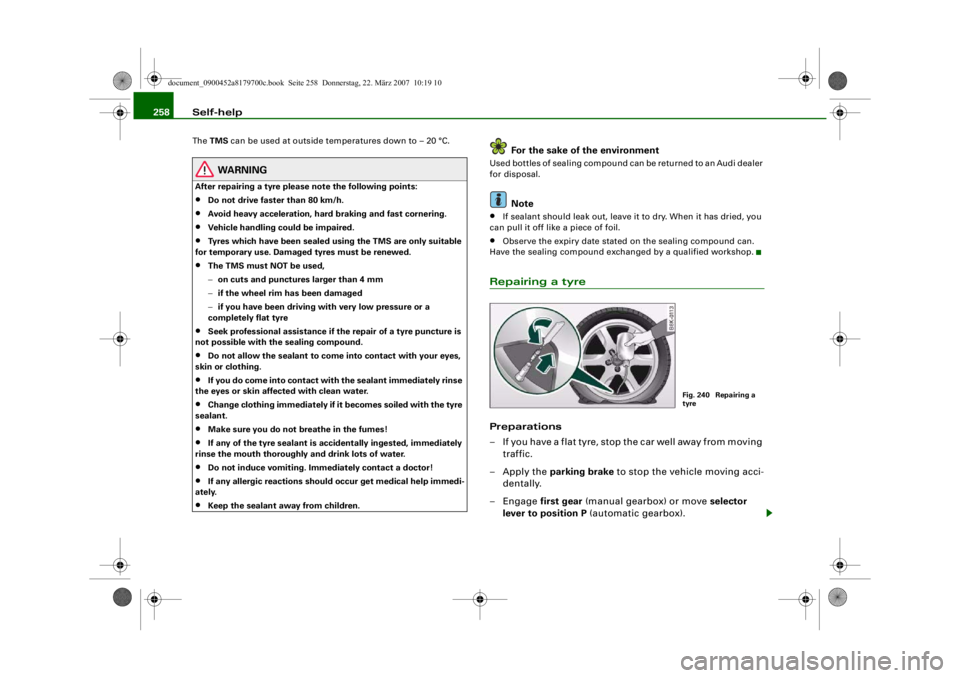
Repairing a tyrePreparations
– If you have a flat tyre, stop the car well away from moving traffic.
– Apply the parking brake to stop the vehicle moving acci-
dentally.
–Engage first gear (manual gearbox) or move selector
lever to position P (automatic gearbox).
Fig. 240 Repairing a
tyre
document_0900452a8179700c.book Seite 258 Donnerstag, 22. März 2007 10:19 10
--4 -
-T
[I]
•
-+ +-
Page 262 of 313
Self-help
260•
Seek professional assistance if th e repair of a tyre puncture is
not possible with the sealing compound.
•
If tyre pressure is less than 1.3 bar after driving about 10
minutes, the tyre is too badly damaged. Do not drive on. You
should obtain professional assistance.Caution
Take special care if you have to repair a tyre on a gradient.
Note
•
Do not use the compressor for longer than 6 minutes at a time,
as it could overheat. When the compressor has cooled down, you
can use it again.
•
If tyre sealant should leak out, leave it to dry and then pull it off
like foil.
•
After carrying out a tyre repair remember to buy a new tyre
sealant can at a qualified workshop. This will ensure that the Tyre
Mobility System is operative again.
•
Please observe the relevant regulations.
Changing a wheelPreparations
Some preparations are necessary before changing a
wheel.– If you have a flat tyre, stop the car well away from moving traffic. Choose a location that is as level as possible.– All passengers should
leave the car. They should wait in
a safe place (for instance behind the roadside crash
barrier).
– Apply the parking brake to stop the vehicle moving acci-
dentally.
–Engage first gear (manual gearbox) or move selector
lever to position P (automatic gearbox).
– When towing a trailer: unhitch the trailer from your vehicle.
– Take the tools ⇒ page 255 and the spare wheel*
⇒ page 256 out of the luggage compartment.
WARNING
If you have a puncture in moving traffic, switch on the hazard
warning lights and place the warning triangle in a visible location.
This is for your own safety and also warns other road users.
Caution
If you have to change the tyre on a gradient, block the wheel oppo-
site the wheel being changed by placing a stone or similar object
under it to prevent the vehicle from rolling away.
Note
Please observe the relevant regulations.How to change a wheel
Change the wheel as described below.–Pull off the hub cap . Also refer to ⇒page 261, “Hub
caps”.
WARNING (continued)
document_0900452a8179700c.book Seite 260 Donnerstag, 22. März 2007 10:19 10
--4 -
-T
0 [I)
-+
I&
+-
0
•
•
Page 278 of 313
Fuses and bulbs
276BulbsChanging bulbs
Changing bulbs requires a certain degree of practical
skill.You can change the following bulbs for exterior lights yourself:•
Halogen headlights: Bulb for dipped headlights
•
Halogen headlights: Bulb for main beam headlights
•
Halogen headlights: Bulb for side lights
•
Xenon headlights*: Bulb for turn signals
•
Bulb for fog light
•
Bulbs for rear lights in boot lid
•
Bulbs for rear lights in side panel
•
Bulbs for number plate light
The following bulbs should only be changed by a qualified work-
shop :
•
Halogen headlights: Bulb for turn signals
•
Xenon headlights*: Light source for daytime running
lights/parki ng lights
•
Bulb for headlights: Bi-xenon lights ⇒
•
Light source for turn signal in exterior mirror housing
•
Light source for high-level brake light
As a rule, you require a certain degree of practical skill to change
defective bulbs. This applies in particular to those bulbs which are
only accessible from the engine compartment.
If in doubt, we recommend that you have defective bulbs changed
by a qualified workshop or qualified mechanic.
If you do decide to change bulbs in the engine compartment your-
self, be aware of the safety risks involved ⇒page 231 ⇒ .
Types of bulbs
You must only replace a bulb with a bulb of the same type. Informa-
tion regarding e.g. the wattage can be found on the base of the
bulb.
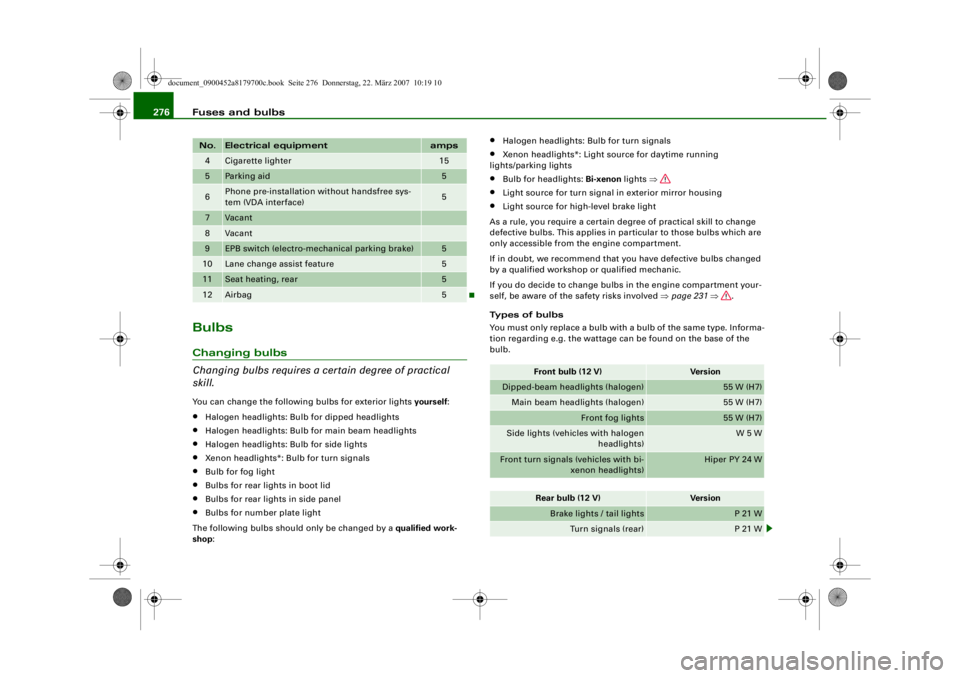
4
Cigarette lighter
15
5
Parking aid
5
6
Phone pre-installation without handsfree sys-
tem (VDA interface)
5
7
Vacant
8
Vacant
9
EPB switch (electro-mechanical parking brake)
5
10
Lane change assist feature
5
11
Seat heating, rear
5
12
Airbag
5
No.
Electrical equipment
amps
Front bulb (12 V)
Vers io n
Dipped-beam headlights (halogen)
55 W (H7)
Main beam headlights (halogen)
55 W (H7)
Front fog lights
55 W (H7)
Side lights (vehicles with halogen headlights)
W 5 W
Front turn signals (vehicles with bi-
xenon headlights)
Hiper PY 24 W
Rear bulb (12 V)
Vers io n
Brake lights / tail lights
P 21 W
Turn signals (rear)
P 21 W
document_0900452a8179700c.book Seite 276 Donnerstag, 22. März 2007 10:19 10
--4 -
1111
-
T
1111
-
6
1111
-
1111
-
1111
-
•
6
-+ +-